

10 beste gratis lønningsapper i 2026

Kortliste over de beste gratis lønnsappene


En gratis lønnsapp er lønnsprogramvare som tilbyr en kostnadsfri plan eller prøveperiode, slik at bedrifter kan administrere lønn uten en innledende investering. Disse verktøyene er utviklet for å effektivisere lønnsoppgaver, noe som gjør det enklere å beregne lønn, håndtere trekk og overholde regelverket. Mange alternativer fokuserer på et brukervennlig grensesnitt og et problemfritt oppsett, slik at små bedrifter kan betale ansatte korrekt samtidig som de reduserer det administrative arbeidet. Denne veiledningen hjelper deg med å finne frem i utvalget, slik at du kan sammenligne de beste gratis lønnsappene og finne en løsning som passer virksomheten din og holder lønnsarbeidet enkelt.
Hvorfor du kan stole på våre programvareanbefalinger
Teamet vårt har testet og anmeldt programvare siden 2012. Vi er selv HR-eksperter, så vi vet hvor vanskelig og hvor viktig det er å velge riktig programvare.
I denne guiden har vi vurdert verktøyene gjennom praktisk testing og uavhengig research og gitt dem poeng ut fra våre utvelgelseskriterier. Vi bygger også på innsikt fra ledende eksperter i bransjen og erfarne HR-eksperter.
Anmeldelsene våre bygger på vår egen redaksjonelle vurdering. De er ikke et salgsargument.
Ekspertanmeldere:
Sammenligningstabell for gratis lønnsapper
Sammenlign prisopplysningene for mine beste utvalgte gratis lønnsapper i tabellen nedenfor.
| Tool | Best For | Trial Info | Price | ||
|---|---|---|---|---|---|
| 1 | Best for flexible payroll services | Free demo available | Pricing upon request | Website | |
| 2 | Best for scalable payroll compliance | Free demo available | Pricing upon request | Website | |
| 3 | Best for unified payroll and HR | Free demo available | Pricing upon request | Website | |
| 4 | Best for easy payroll and tax filing | Free demo + free plan available | From $49/month + $6/user/month | Website | |
| 5 | Best for global team payroll | Free demo available | From $29/user/month | Website | |
| 6 | Best for payroll with employee engagement | Free demo available | Pricing upon request | Website | |
| 7 | Best for open-source payroll solutions | 30-day free trial | From $50/month | Website | |
| 8 | Best for payroll with accounting integration | 30-day free trial | From $88/month | Website | |
| 9 | Best for small team payroll | Free plan + 14-day free trial available | From $24/location/month (billed annually) | Website | |
| 10 | Best for payroll and workforce management | Free trial available | From $99/month | Website |

Anmeldelser av de beste gratis lønnsappene
Nedenfor finner du mine detaljerte sammendrag av de gratis lønnsappene som kom med på kortlisten. Anmeldelsene mine gir en grundig gjennomgang av funksjonene, prisene og de beste bruksområdene for hver programvare, slik at du kan finne den som passer best for deg.
Paychex
Best for flexible payroll services
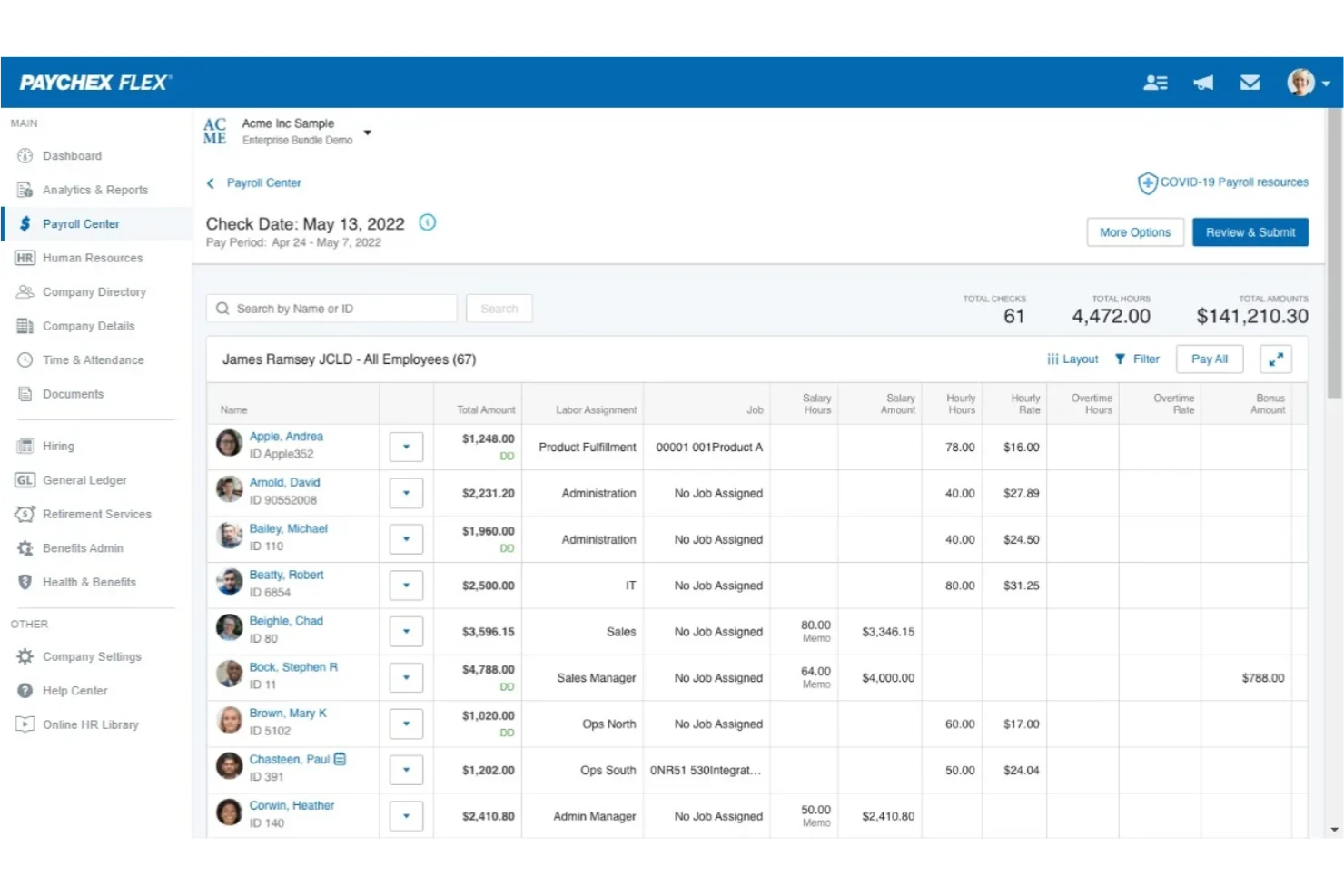
Paychex is a payroll and HR software platform that lets you process payroll, manage employee data, handle tax administration, and access HR tools from a single system.
Who Is Paychex Best For?
Paychex is a good fit for small to midsize businesses that want flexible payroll and HR management in one platform.
Why I Picked Paychex
I picked Paychex as one of the best because I can manage payroll and HR tasks together, which is rare among free payroll apps. I like that Paychex lets me customize pay schedules and automate tax calculations for different employee types. My team uses the platform’s employee self-service features to let staff access pay stubs and update personal information without extra admin work.
Paychex Key Features
- Mobile payroll processing: Run payroll and manage employee data from the Paychex mobile app.
- Direct deposit management: Set up and manage direct deposit for employees within the platform.
- Garnishment payment services: Handle court-ordered wage garnishments automatically through the system.
- Payroll tax compliance alerts: Receive notifications about upcoming payroll tax deadlines and requirements.
Paychex Integrations
Paychex offers native integrations with QuickBooks, Sage Intacct, Xero, Oracle NetSuite, Jirav, Connecteam, SwyftOps, and more. An API is available for custom integrations.
What's Free?
Paychex does not offer a free-forever plan or a limited-time free trial. Users can request a free demo to see the platform in action, but all payroll features require a paid subscription.
Pros and Cons
Pros:
- Includes employee self-service for pay access
- Offers tax calculation and W-2 form generation
- Supports automatic direct deposit to employees
Cons:
- Year-end tax filing requires a paid upgrade
- Add-on fees for some payroll features
ADP
Best for scalable payroll compliance
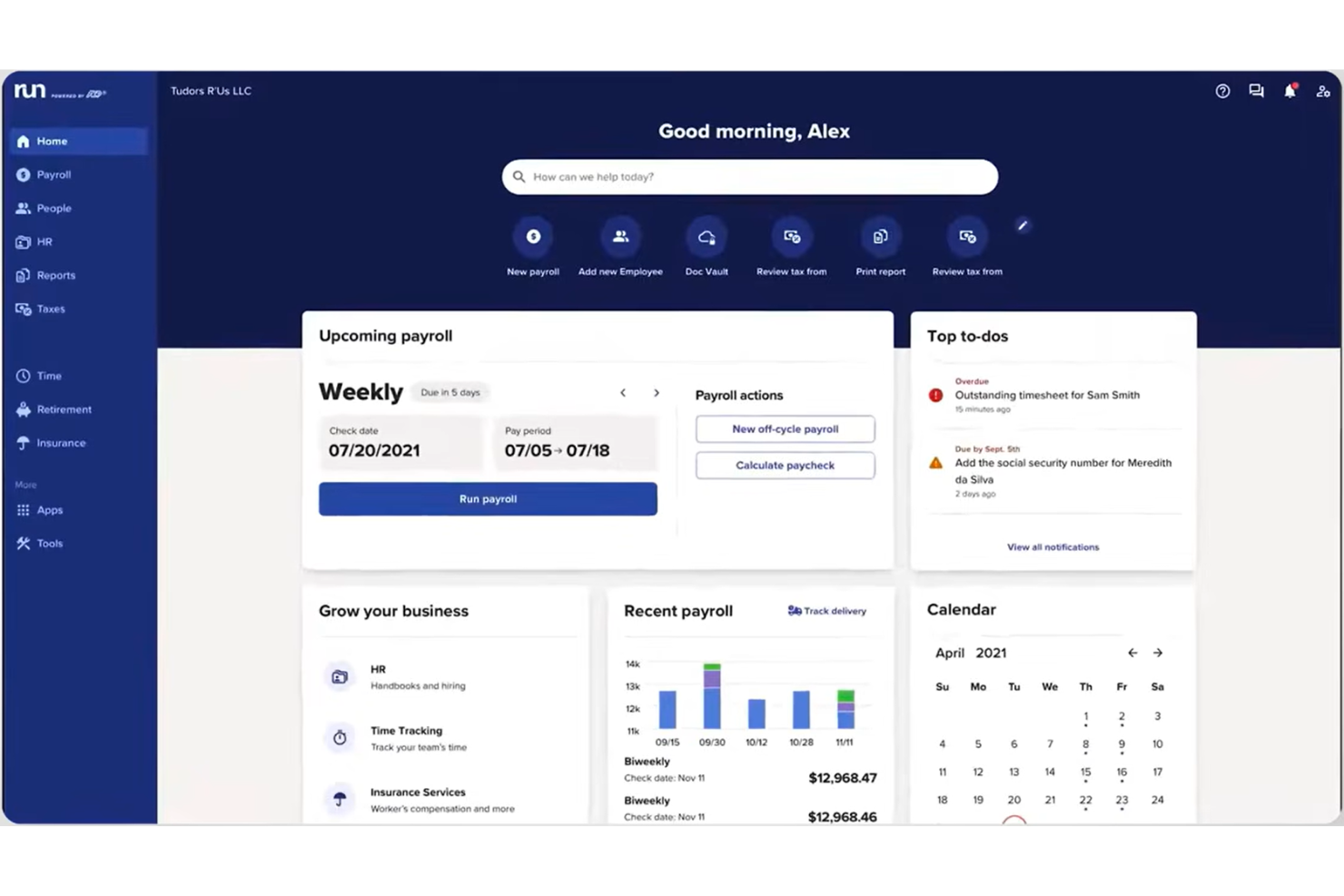
ADP is a payroll and HR management platform that provides automated payroll processing, tax filing, employee self-service, and compliance tools for businesses of all sizes.
Who Is ADP Best For?
ADP is a good fit for midsize to large businesses in the US that need scalable payroll and HR solutions.
Why I Picked ADP
I picked ADP as one of the best because it’s the most widely used payroll provider in the US, which means I can rely on its compliance expertise and up-to-date tax filing tools. I like that ADP handles multi-state payroll and automates complex deductions, which is essential for larger teams. My team is able to access employee self-service features and detailed reporting, making payroll management more efficient.
ADP Key Features
- Mobile payroll app: Run payroll and manage employee data from your phone.
- Garnishment payment services: Automate wage garnishments and agency payments.
- Customizable pay schedules: Set up multiple pay frequencies for different employee groups.
- ACA compliance management: Track and report Affordable Care Act requirements within the platform.
ADP Integrations
ADP offers native integrations with QuickBooks, Xero, Wave, Sage, Oracle, SAP SuccessFactors, Workday, and more. An API is available for custom integrations.
What's Free?
ADP does not offer a free-forever plan. You can request a free demo, but there is no limited-time free trial or free payroll processing available.
Pros and Cons
Pros:
- Provides detailed payroll and compliance reports
- Integrates with major accounting platforms
- Handles multi-state and complex payroll needs
Cons:
- Customer support response times vary
- Setup process can be time-consuming
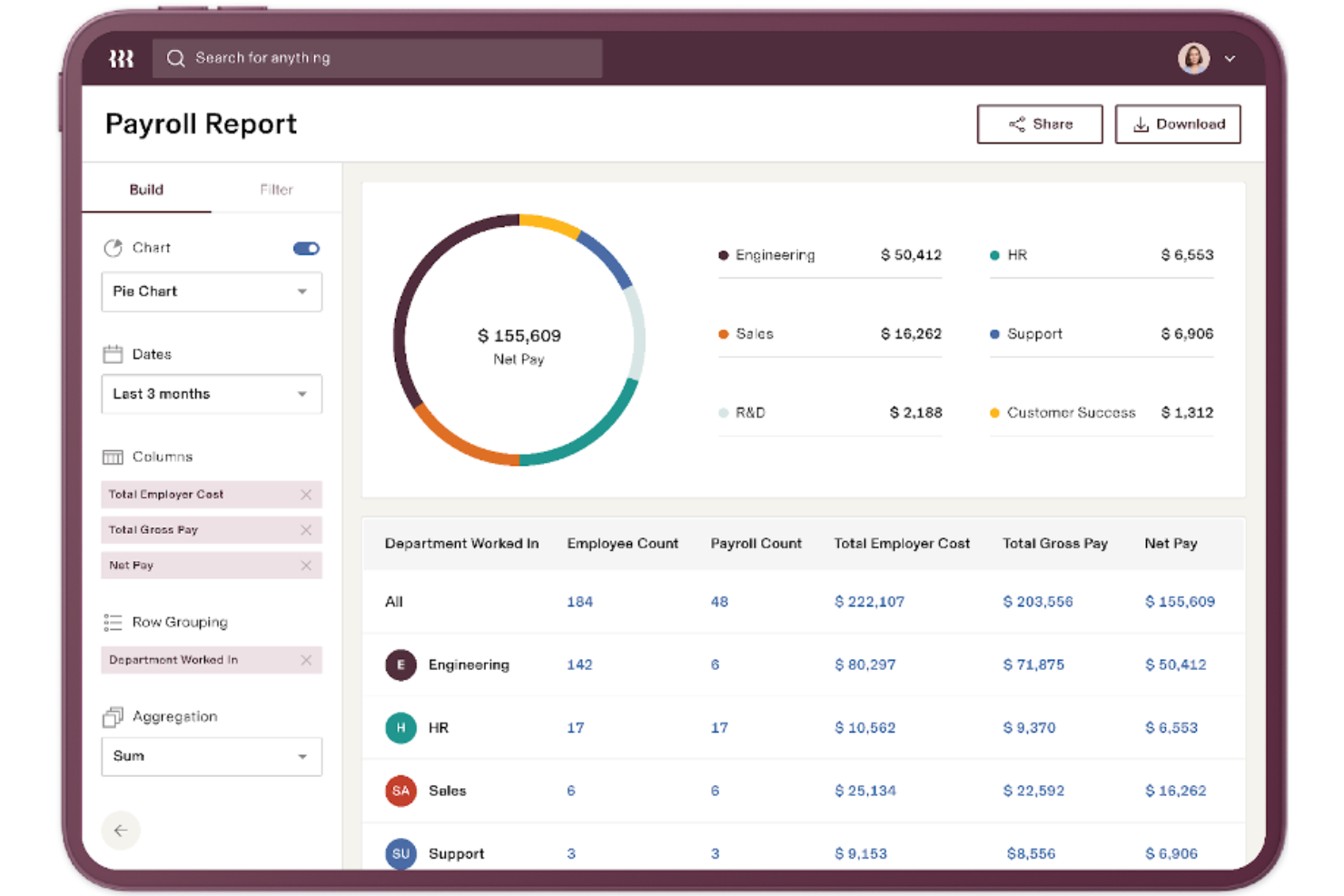
Rippling is a cloud-based payroll and HR platform that lets you manage payroll, automate tax filings, and handle compliance for employees and contractors in multiple countries.
Who Is Rippling Best For?
Global companies and HR teams that need to manage payroll and compliance for a distributed workforce across multiple countries.
Why I Picked Rippling
I picked Rippling as one of the best because I can manage payroll and HR for global teams in one place. I like that I can automate tax filings and compliance for employees and contractors in multiple countries. My team uses Rippling to sync payroll with HR data, so we avoid manual entry and reduce errors.
Rippling Key Features
- Custom pay types: Set up unique pay types for bonuses, commissions, or reimbursements.
- Automated pay stubs: Generate and distribute digital pay stubs to employees automatically.
- Time tracking integration: Sync employee hours directly from time tracking tools.
- Role-based permissions: Control payroll access by assigning specific roles and permissions.
Rippling Integrations
Rippling offers native integrations with QuickBooks Online, Xero, NetSuite, Slack, Google Workspace, Okta, and more. An API is available for custom integrations.
What's Free?
Rippling does not offer a free-forever plan or a limited-time free trial. Access to payroll features requires a paid subscription, and all pricing details are available upon request.
Pros and Cons
Pros:
- Integrates natively with major HR tools
- Offers custom pay types and deductions
- Syncs payroll with HR and benefits data
Cons:
- Add-on modules increase overall cost quickly
- Limited payroll features for hourly workers

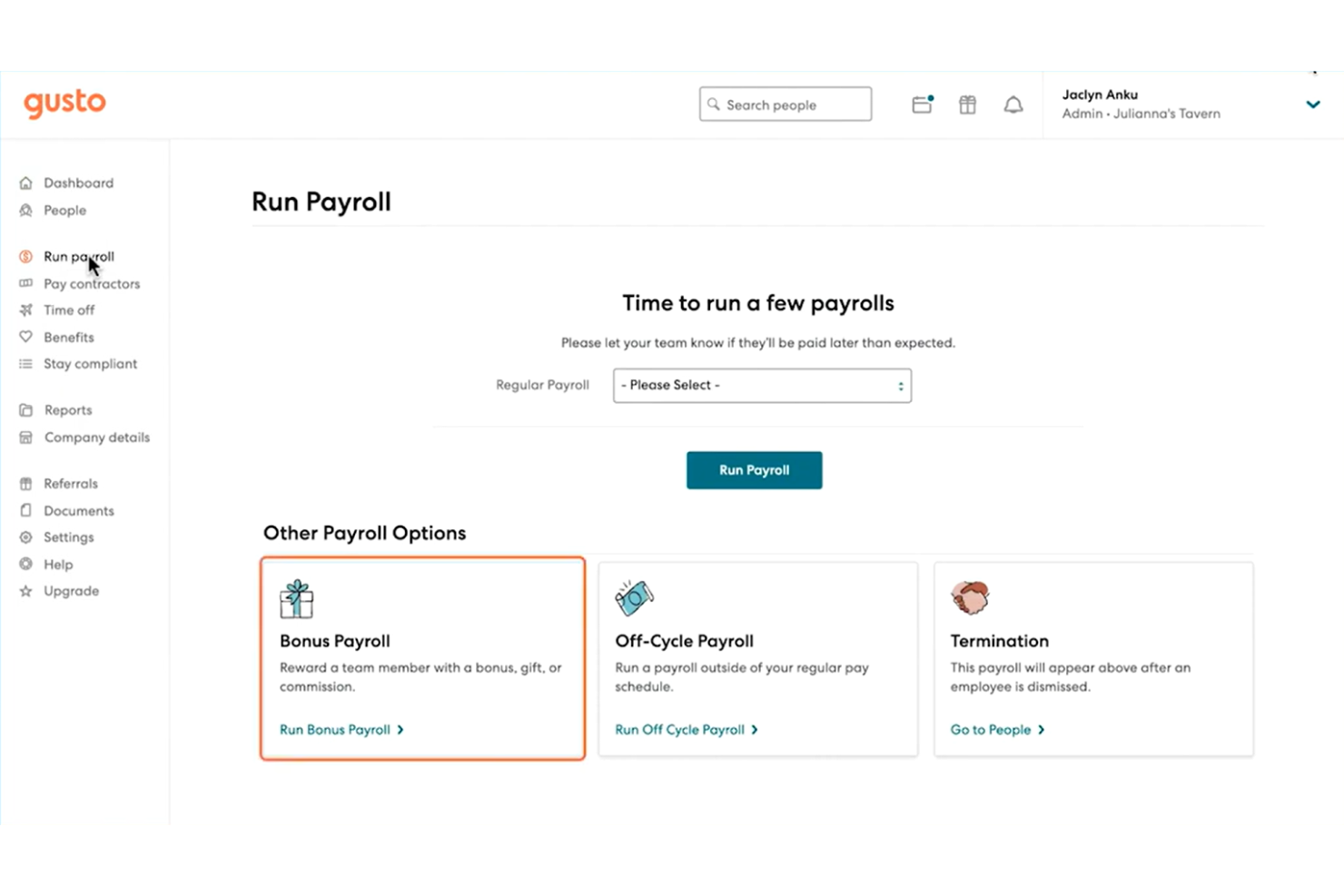
Gusto is a payroll software platform designed for small businesses that need automated payroll runs, tax filing, and integrated benefits management.
Who Is Gusto Best For?
Small business owners and HR teams in the United States who want automated payroll and tax filing.
Why I Picked Gusto
I picked Gusto as one of the best because I can automate payroll runs and tax filings without extra manual steps. I like that Gusto handles federal, state, and local payroll taxes automatically. My team is able to generate and send digital pay stubs and manage benefits enrollment all in one place.
Gusto Key Features
- Employee self-service portal: Employees can access pay stubs, tax forms, and update personal details online.
- Direct deposit setup: Pay employees directly to their bank accounts with customizable deposit schedules.
- Contractor payments: Pay contractors alongside employees and generate 1099 forms automatically.
- Time-off tracking: Track and manage employee PTO, sick leave, and holiday accruals within the platform.
Gusto Integrations
Gusto offers native integrations with 7Shifts, 15Five, Accelo, Asana, Box, Carta, ClickUp, Clover, and more. An API is available for custom integrations.
What's Free?
Gusto does not offer a free-forever plan. You can request a free demo, but all payroll features require a paid subscription, with no limited-time free trial available.
Pros and Cons
Pros:
- Employee self-onboarding and document storage
- Built-in benefits administration options
- Automated tax filing for all states
Cons:
- Time tracking requires higher-tier plans
- Limited support for international payroll

Best for global team payroll
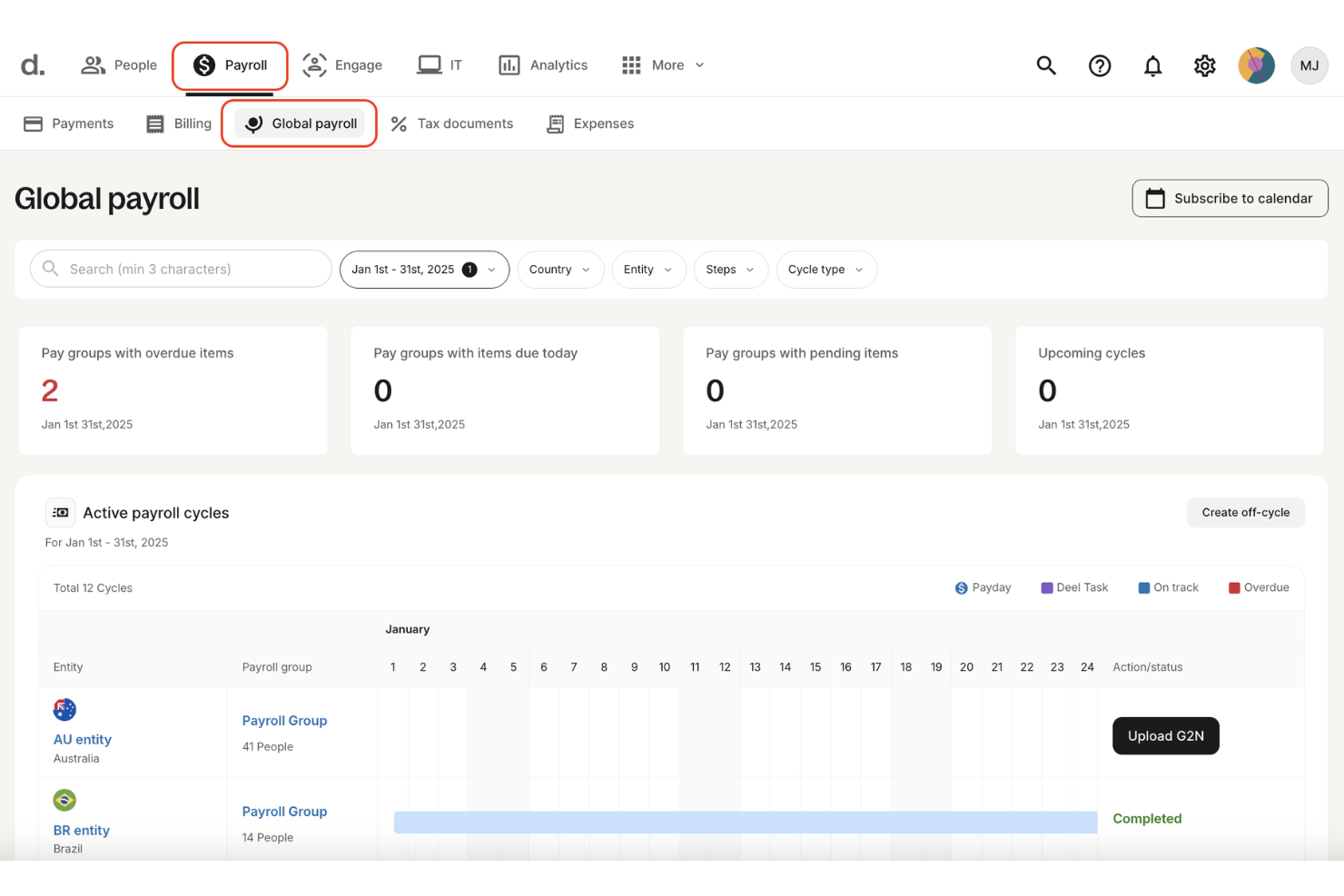
Deel Payroll is a global payroll software platform that lets you manage payroll, contractor payments, and employer of record services for distributed teams in over 100 countries.
Who Is Deel Payroll Best For?
Global HR and finance teams managing payroll and compliance for remote employees and contractors across multiple countries.
Why I Picked Deel Payroll
I picked Deel Payroll as one of the best because I can run payroll for employees and contractors in over 100 countries from a single dashboard. I like that Deel handles built-in contractor and employer of record (EOR) support, so my team can onboard and pay global talent without separate systems. Deel also automates local tax compliance and generates country-specific payslips, which saves me time managing international payroll requirements.
Deel Payroll Key Features
- Bulk payments: Send payments to multiple employees or contractors at once.
- Expense management: Track, approve, and reimburse employee expenses within the platform.
- Custom payroll reports: Generate downloadable payroll and tax reports for any pay cycle.
- Localized document templates: Access country-specific employment and compliance document templates.
Deel Payroll Integrations
Deel Payroll offers native integrations with SAP SuccessFactors, NetSuite, Google Workspace, Slack, and more. An API is available for custom integrations.
What's Free?
Deel Payroll does not offer a free-forever plan or a limited-time free trial. All payroll features require a paid subscription with no free tier available.
Pros and Cons
Pros:
- Automated local tax compliance features
- Built-in contractor and EOR management
- Supports payroll in over 100 countries
Cons:
- Some integrations require manual setup
- Occasional delays in international payments

Best for payroll with employee engagement
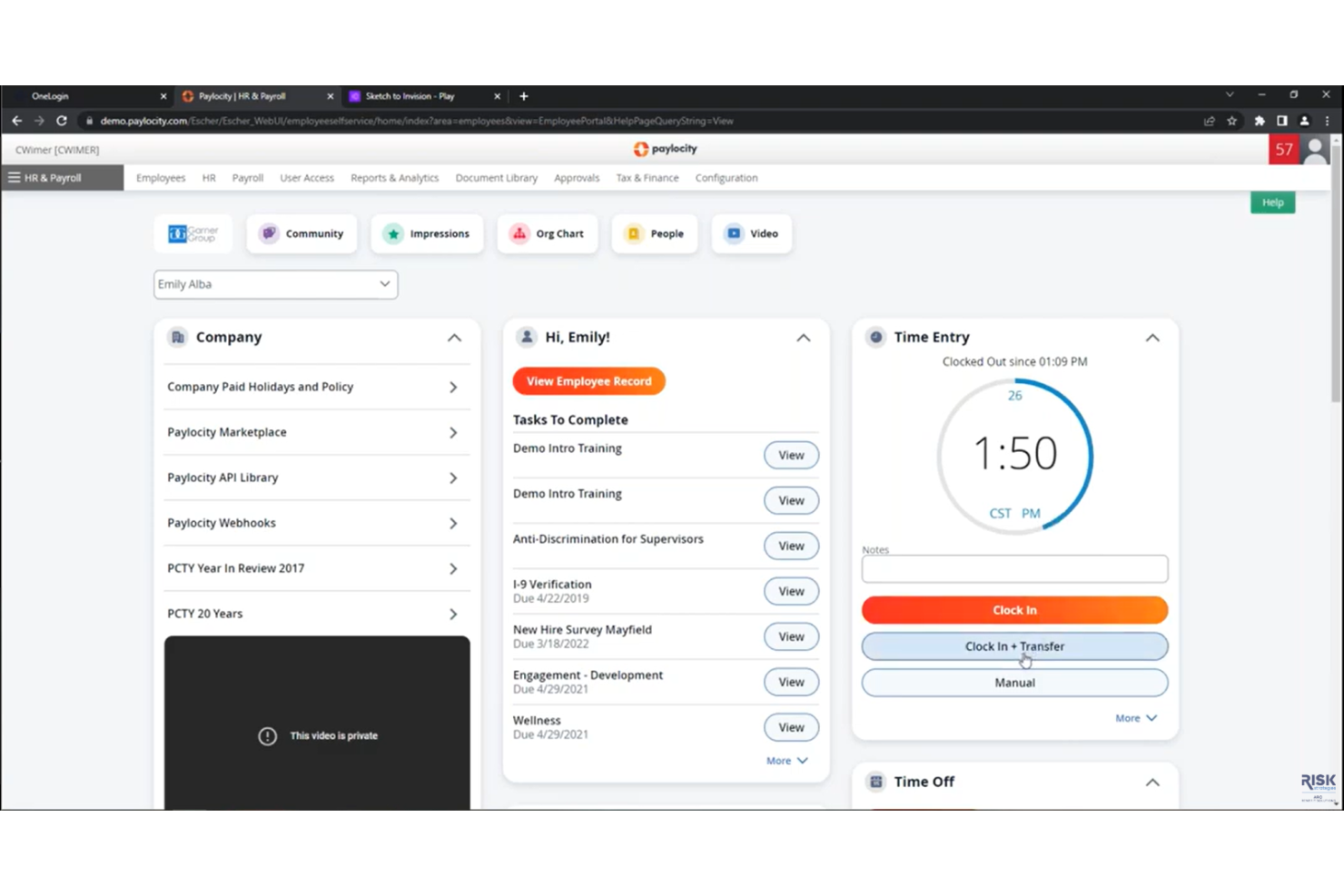
Paylocity is a cloud-based payroll and HR platform that combines automated payroll processing, tax filing, employee self-service, and compliance management for businesses seeking a unified payroll app solution.
Who Is Paylocity Best For?
Paylocity is a good fit for mid-sized and large businesses that want to manage payroll and HR processes in one platform.
Why I Picked Paylocity
I picked Paylocity as one of the best because I can manage payroll and HR tasks together in a single platform. I like that it handles automated payroll runs, tax filing, and employee self-service from one dashboard. My team is able to track compliance and manage onboarding without switching tools, which fits the unified payroll and HR platform for modern workforces' USP.
Paylocity Key Features
- Direct deposit management: Set up and manage employee direct deposit accounts within the platform.
- Garnishment processing: Automatically calculate and process wage garnishments for employees.
- Year-end tax form generation: Generate and distribute W-2 and 1099 forms for employees and contractors.
- Mobile payroll access: Run payroll and access payroll data from the Paylocity mobile app.
Paylocity Integrations
Paylocity offers native integrations with QuickBooks, NetSuite, ADP, SAP SuccessFactors, and has native integrations across the Microsoft ecosystem. An API is available for custom integrations.
What's Free?
Paylocity does not offer a free-forever plan or a limited-time free trial. Access to the platform requires contacting sales for a demo and custom pricing.
Pros and Cons
Pros:
- Garnishment processing supported in all plans
- Mobile payroll approvals for managers
- Customizable payroll reporting and analytics
Cons:
- Implementation fee required for new clients
- Add-on fees for document management
New Product Updates from Paylocity

Paylocity Adds Candidate Engagement and Talent Rediscovery Agents
Paylocity adds Candidate Engagement and Talent Rediscovery Agents to automate candidate outreach, scheduling, and re-engagement. This helps recruiting teams move candidates through hiring faster. For more information, visit Paylocity’s official site.
 .
.
TimeTrex
Best for open-source payroll solutions
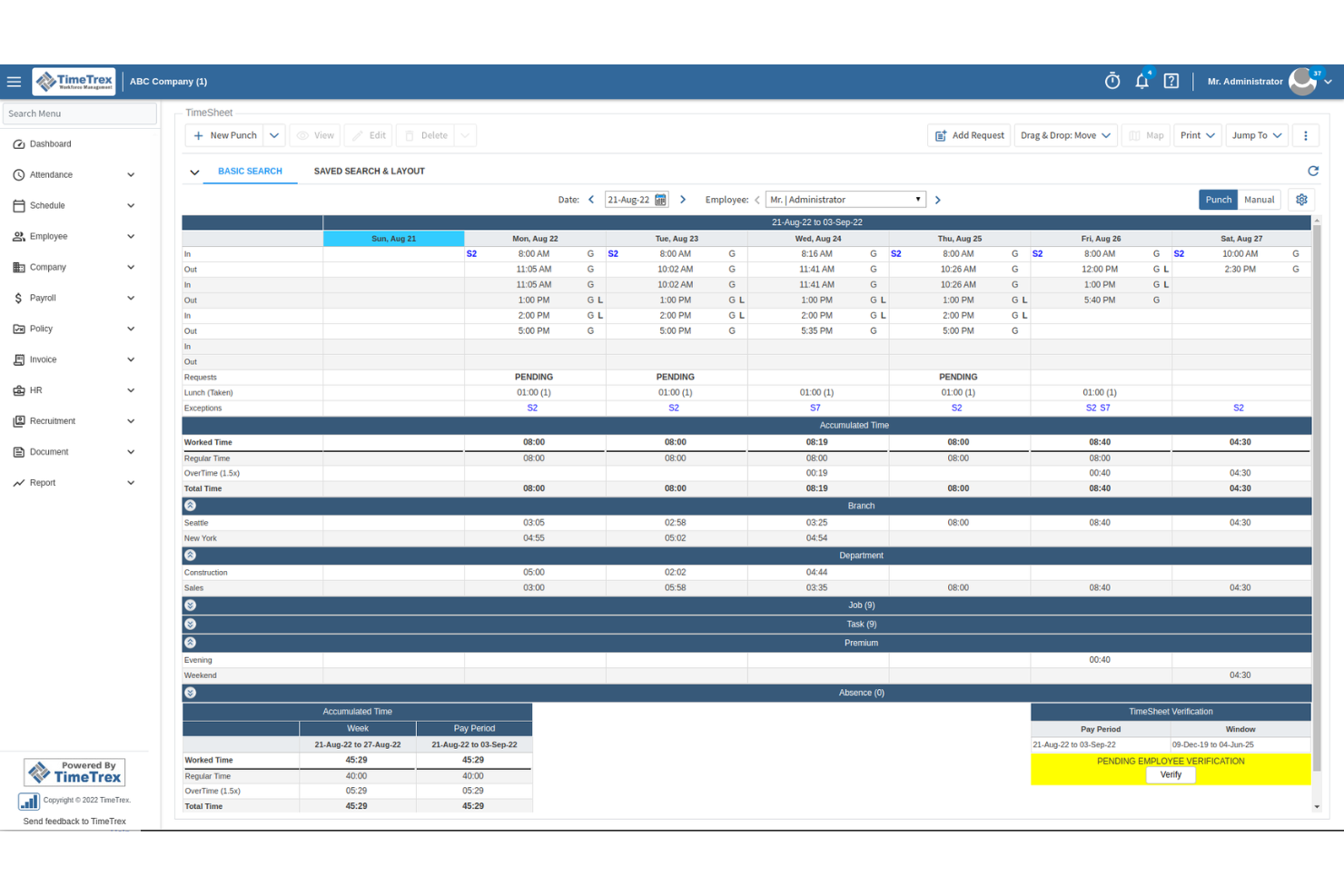
TimeTrex is an open-source payroll and time tracking platform that combines employee scheduling, attendance management, payroll processing, and tax calculations in a single system.
Who Is TimeTrex Best For?
TimeTrex is a good fit for small to midsize businesses and nonprofits that need open-source payroll and time tracking with customizable workflows.
Why I Picked TimeTrex
I picked TimeTrex as one of the best because it’s the only free, open-source payroll and time tracking platform I’ve found that covers everything from scheduling to payroll tax calculations. I like that I can automate pay runs, manage employee attendance, and handle compliance tasks without paying for a license. My team is able to customize workflows and reporting, which is rare among free payroll apps.
TimeTrex Key Features
- Mobile app: Track time and manage payroll from iOS or Android devices.
- Geofencing: Restrict clock-ins and clock-outs to specific locations.
- Custom pay policies: Set up unique overtime, holiday, and break rules.
- Document management: Store and organize employee documents securely within the platform.
TimeTrex Integrations
TimeTrex offers native integrations with ADP, Sage, QuickBooks, Paychex, Meditech, Insync, and more. TimeTrex offers an API for custom integrations.
What's Free?
TimeTrex offers a free-forever Community Edition with no user limits. Some advanced features, integrations, and support options are only available in paid plans.
Pros and Cons
Pros:
- Supports biometric time clock hardware
- Includes payroll tax calculation tools
- Open-source with no user limits
Cons:
- Lacks built-in direct deposit support
- Interface feels outdated and cluttered
New Product Updates from TimeTrex
TimeTrex Redesigns Workforce Management With New Payroll, Scheduling, and AI Tools
TimeTrex redesigns its workforce management experience with new dashboards, scheduling and timesheet tools, a rebuilt payroll workflow, and expanded AI assistance. These updates give teams more flexible ways to manage schedules, payroll, reporting, and employee data. For more information, visit TimeTrex’s official site.
 .
.
Best for payroll with accounting integration
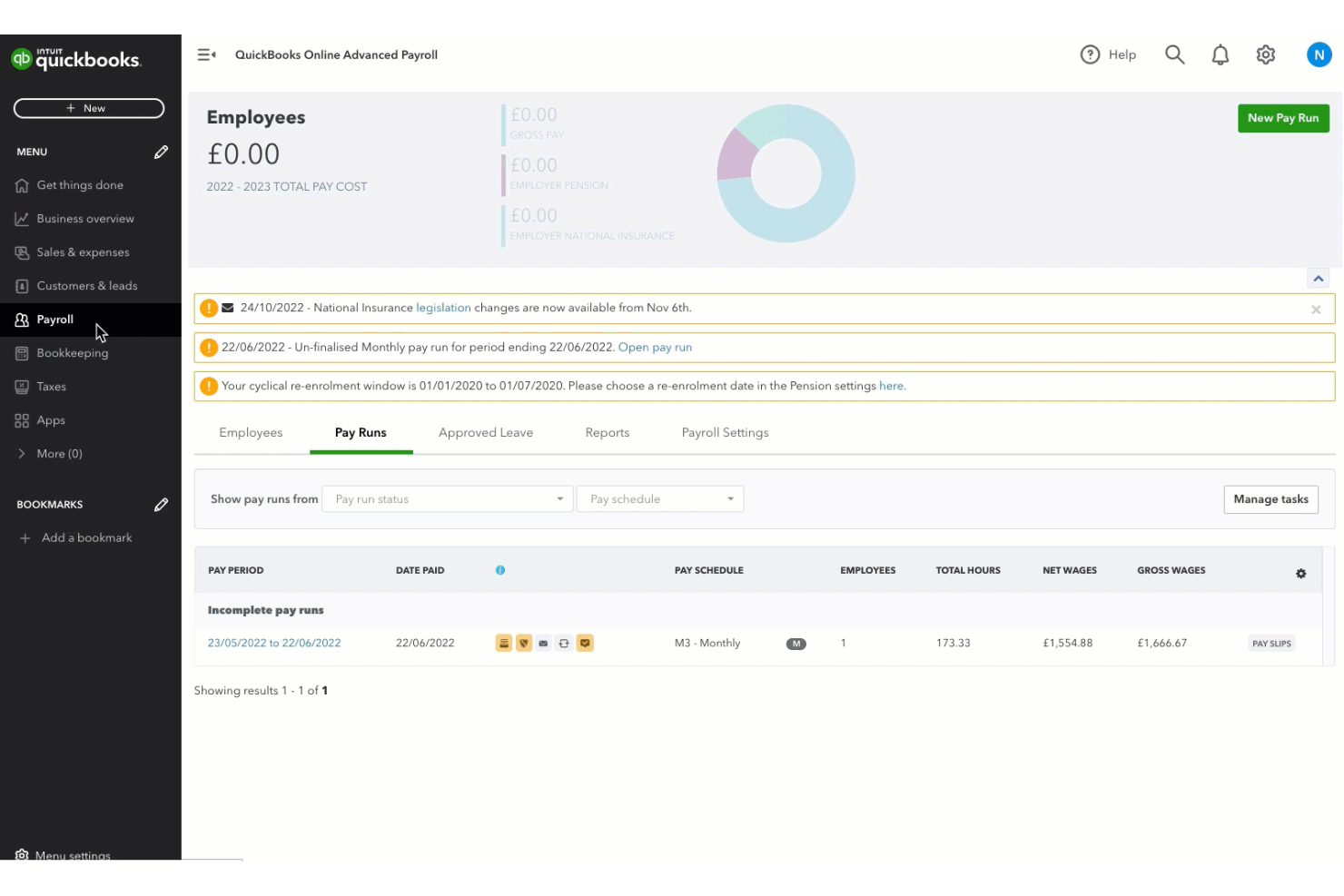
QuickBooks Workforce (formerly known as QuickBooks Payroll) is a cloud-based payroll software that lets you run payroll, manage tax filings, and handle direct deposit while syncing payroll data with QuickBooks accounting.
Who Is QuickBooks Workforce Best For?
QuickBooks Workforce is a good fit for small businesses and accountants who want integrated payroll and accounting in one platform.
Why I Picked QuickBooks Workforce
I picked QuickBooks Workforce as one of the best because I can run payroll and sync all payroll data directly with QuickBooks accounting, which keeps everything in one place. I like that I can automate tax filings and payments, and handle direct deposit without switching platforms. My team is able to manage payroll, tax compliance, and accounting from a single dashboard, which saves us from juggling multiple systems.
QuickBooks Workforce Key Features
- Automatic payroll runs: Schedule payroll to run each pay period automatically.
- Employee self-service portal: Let employees access pay stubs and tax forms online.
- Garnishment and deduction management: Set up and manage wage garnishments and deductions.
- Year-end tax form generation: Generate and distribute W-2s and 1099s for employees and contractors.
QuickBooks Workforce Integrations
QuickBooks Workforce offers native integrations with QuickBooks Online, PayPal, Etsy, Square, eBay, and more. An API is available for custom integrations.
What's Free?
QuickBooks Workforce does not offer a free-forever plan but does offer a limited-time free trial. However, most of the features require a paid subscription.
Pros and Cons
Pros:
- Offers same-day and next-day direct deposit
- Automates federal and state tax filings
- Syncs payroll data with QuickBooks accounting
Cons:
- Mobile app lacks full payroll functionality
- Charges extra for multi-state payroll processing

Homebase
Best for small team payroll
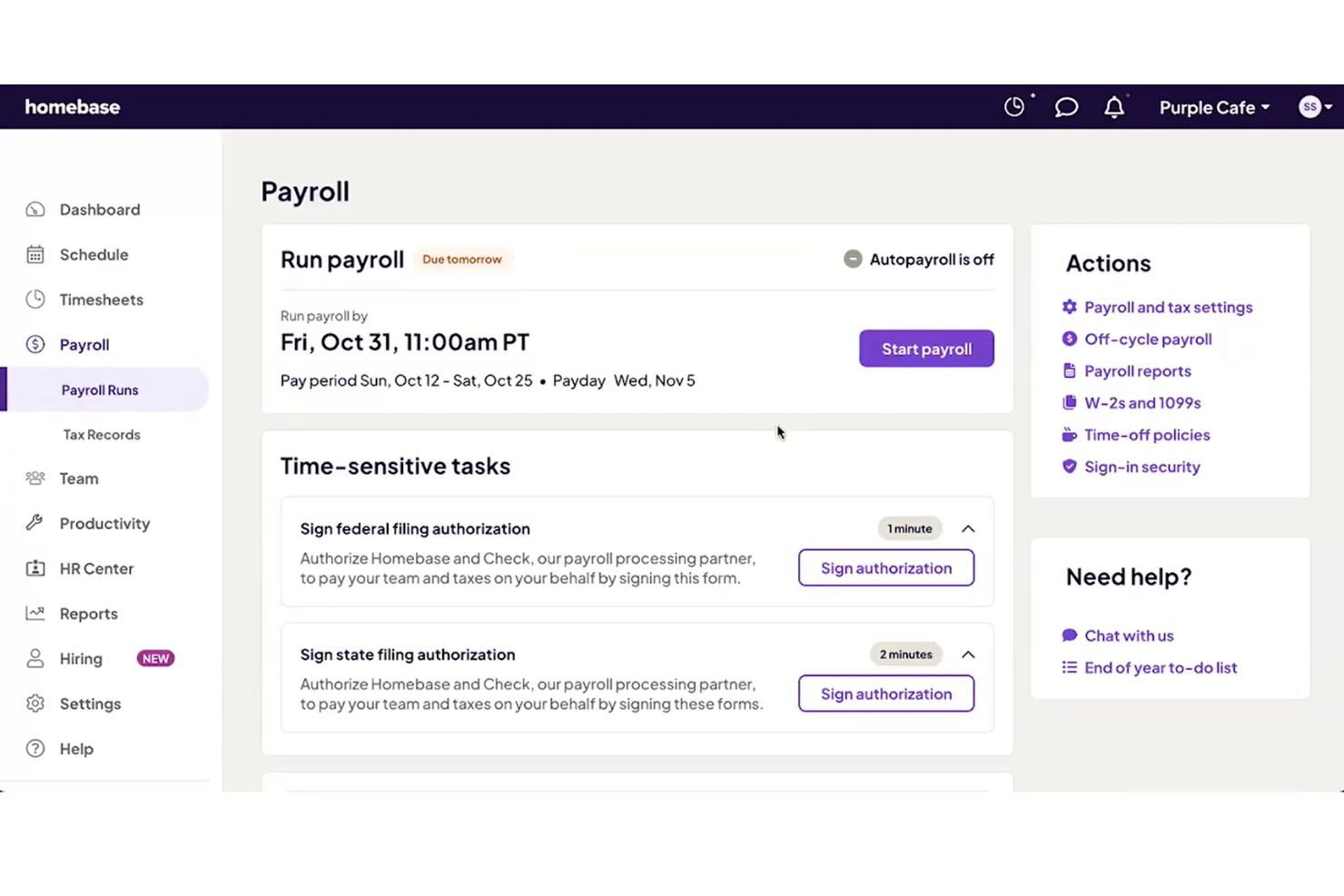
Homebase is a payroll and team management platform for small businesses that combines automated payroll processing, time tracking, scheduling, and compliance tools in one system.
Who Is Homebase Best For?
Homebase is a good fit for small businesses in retail, hospitality, or food service that need simple payroll and hourly team management.
Why I Picked Homebase
I picked Homebase as one of the best because it lets me run payroll for hourly teams and track time in one place. I like that I can sync timesheets directly into payroll, which helps avoid manual entry. My team uses Homebase to handle wage calculations and tax filings automatically, which is especially useful for small businesses with hourly staff.
Homebase Key Features
- Direct deposit payments: Pay employees quickly with direct deposit to their bank accounts.
- W-2 and 1099 preparation: Generate and file W-2 and 1099 forms for employees and contractors.
- Garnishment management: Handle wage garnishments and deductions directly within payroll.
- Multi-location support: Manage payroll for multiple business locations from a single dashboard.
Homebase Integrations
Homebase offers native integrations with QuickBooks, Square, Toast, Shopify, Clover, ADP, Gusto, Paychex, and more. An API is available for custom integrations.
What's Free?
Homebase offers a free-forever plan that includes time tracking, scheduling, and basic team management for unlimited employees at a single location. Payroll features are not included in the free plan and require a paid upgrade.
Pros and Cons
Pros:
- Supports multi-location businesses
- Integrates with major POS systems
- Free payroll for up to 20 employees
Cons:
- Lacks advanced HR management features
- No support for salaried employee payroll
Paycor
Best for payroll and workforce management
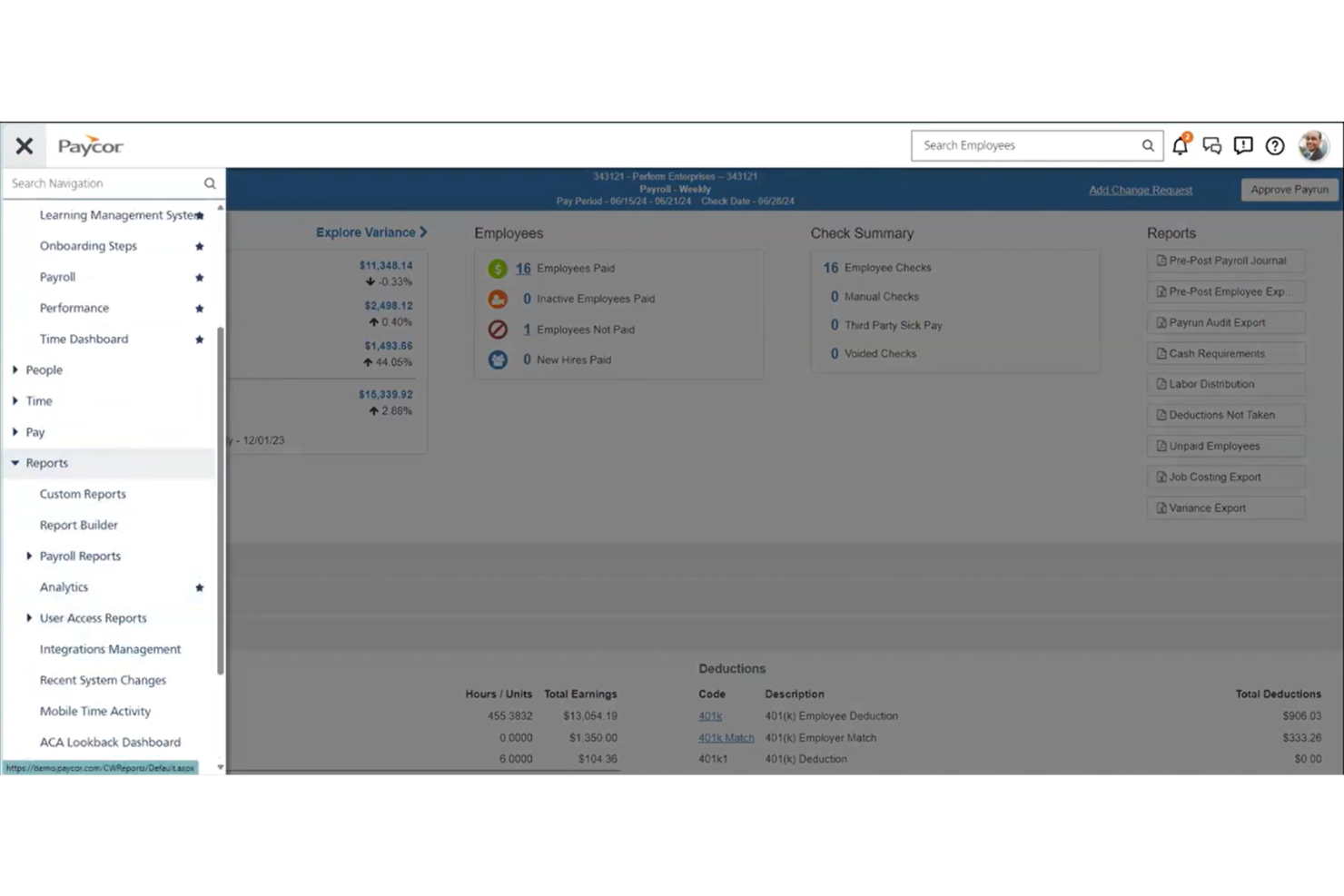
Paycor is a cloud-based payroll and HR platform that combines payroll processing, tax management, employee self-service, and workforce analytics for businesses seeking a free payroll app solution.
Who Is Paycor Best For?
Paycor is a good fit for midsize and growing businesses that need scalable payroll and HR management across multiple locations.
Why I Picked Paycor
I picked Paycor as one of the best because its flexible payroll and HR platform lets me manage payroll, tax compliance, and employee records in one place. I like that I can automate payroll runs and access workforce analytics for better decision-making. My team uses Paycor to handle multi-location payroll and track employee data as we grow.
Paycor Key Features
- Employee self-service portal: Employees can view pay stubs, tax forms, and update personal information online.
- On-demand pay: Employees can access earned wages before payday through the platform.
- Garnishment management: The system handles wage garnishments and deductions automatically.
- ACA compliance tools: Paycor tracks and manages Affordable Care Act reporting requirements.
Paycor Integrations
Paycor offers hundreds of native integrations through its marketplace, including AssureHire, Sterling, Clearstar, and more. An API is available for custom integrations.
What's Free?
Paycor does not offer a free-forever plan or a limited-time free trial. Users can request a free demo, but access to payroll features requires a paid subscription.
Pros and Cons
Pros:
- Marketplace offers many HR integrations
- Built-in ACA and benefits management tools
- Handles multi-state payroll compliance well
Cons:
- Integration setup may require IT support
- Year-end filings can carry additional fees
Andre gratis lønnsapper
Her er noen flere alternativer for gratis lønnsapper som ikke kom med på kortlisten min, men som likevel er verdt å sjekke ut:
- OnPay
For simple payroll with HR tools
- Patriot Payroll
For affordable payroll setup
- TMetric
For time tracking with payroll
- Remote
For global payroll compliance
- Square Payroll
For payroll for hourly teams
- Wave Payroll
For payroll with free accounting
- SurePayroll
For payroll for hourly teams
- SumoPayroll
For payroll with employee self-service
- HR.my
For cloud HR and payroll
- Payroll4Free
For free payroll for small teams
- ExcelPayroll
For Excel-based payroll tracking
- Zoho Payroll
For automated payroll compliance
- Microkeeper
For payroll with time tracking
- Wise BatchTransfer
For bulk payroll payments
- TaxBandits
For payroll tax filing
- PaycheckManager
For paycheck calculations
- Payment Evolution
For Canadian payroll services


How I Evaluate Free Payroll Apps
I split my evaluation into two layers: core requirements—like a genuinely free plan and automated tax calculations—and differentiators that set the best options apart.
Core Functionality (Table Stakes For This List)
When I'm selecting tools for my list, I rank each one on a scale from 0 (does not offer the functionality) to 5 (excels in this area) for each core functionality listed below. Then, I calculate the tool's total score into a percentage. Each tool needs to achieve a minimum total score of 65% to be considered for inclusion.
- Payroll Calculation Engine: I check whether the tool automatically handles gross-to-net calculations across different pay types like hourly, salaried, overtime, and bonuses.
- Tax Withholding & Filing: Each tool should calculate payroll taxes and generate end-of-year forms—some tools like Gusto and Wave auto-file, while others provide forms for manual filing.
- Free Tier Availability: I look for a genuinely free plan that lets you run real payroll on an ongoing basis, not a 14- or 30-day trial disguised as a free product.
- Direct Deposit & Pay Distribution: The app should offer at least one method to pay employees, whether that's direct deposit, printed checks, or pay cards.
- Pay Stub & Records Generation: I evaluate whether the platform produces itemized digital pay stubs and maintains a searchable payroll history you can reference at tax time or during audits.
- Employee Self-Service Access: Your team members should be able to log in and pull their own pay stubs, tax documents, and personal info without pinging HR every pay cycle.
Once I have a list of tools that meet this criteria, I consider what sets each platform apart.
Differentiating Factors (What Sets Vendors Apart)
Here's how I compare and contrast different vendors:
Standout Features
Multi-state payroll matters if your team is distributed—I look for tools that handle jurisdiction-specific tax rules without forcing manual research. Contractor payments are another big one, especially for small businesses that rely on a mix of W-2 and 1099 workers and need year-end forms generated for both. I also evaluate whether time tracking is built in or connected, since auto-flowing hours into payroll cuts down on manual data entry errors every pay cycle.
Beyond Features
True cost transparency is the first thing I check—some "free" tools bury fees in direct deposit processing or year-end tax form generation. I also evaluate how well each app connects to popular accounting platforms like QuickBooks or Xero, since clean payroll-to-ledger sync prevents reconciliation headaches. Data security deserves close attention too. Payroll apps store sensitive information like bank details and government IDs, so I look for SOC 2 compliance, encryption standards, and role-based access controls.
Slik velger du en gratis lønnsapp
Det er lett å gå seg vill i lange funksjonslister og kompliserte prismodeller. For å hjelpe deg med å holde fokus mens du arbeider deg gjennom den unike prosessen med å velge programvare, har vi laget en sjekkliste over faktorer du bør ha i bakhodet:
| Faktor | Hva du bør vurdere |
| Skalerbarhet | Vil appen støtte teamet ditt etter hvert som det vokser? Sjekk grenser for brukere eller ansatte og muligheter for oppgradering. |
| Integrasjoner | Kan den kobles til regnskaps-, HR- eller tidsregistreringsverktøyene dine? Bekreft innebygde integrasjoner, ikke bare CSV-eksport. |
| Tilpasningsmuligheter | Kan du justere lønningsplaner, typer trekk eller rapportformater slik at de passer til arbeidsprosessene dine? |
| Brukervennlighet | Er grensesnittet tydelig og enkelt for både administratorer og ansatte? Test med reelle lønnsscenarier. |
| Implementering og innføring | Hvor raskt kan du komme i gang? Se etter veiledet oppsett, alternativer for dataimport og støtte ved innføring. |
| Kostnad | Finnes det skjulte gebyrer for skatteinnlevering, direkte innskudd eller kundestøtte? Gå gjennom hele prisoversikten. |
| Sikkerhetstiltak | Tilbyr appen kryptering, brukertillatelser og revisjonsspor for å beskytte sensitive lønnsdata? |
| Overholdelse av regelverk | Holder appen deg oppdatert på lokale og nasjonale regler for lønn og skatt? |
Hva er en gratis lønnsapp?
En gratis lønnsapp er programvare som lar deg beregne ansattes lønn, administrere skattetrekk og generere lønnsrapporter uten abonnementsavgift. Disse verktøyene hjelper små bedrifter eller team med å automatisere lønnsoppgaver, overholde skattereglene og tilby lønnsslipper eller direkte innskudd, helt kostnadsfritt.
Funksjoner i gratis lønnsapper
La oss gå gjennom funksjonene som vanligvis finnes i lønnsapper, og hvilke som vanligvis er inkludert i gratis kontra betalte planer.
Vanlige funksjoner i gratis lønnsapper
- Lønnsberegninger: Beregner automatisk bruttolønn, fradrag og nettolønn for hver ansatt basert på arbeidede timer eller lønn.
- Lønnsslippgenerering: Oppretter digitale eller utskrivbare lønnsslipper som ansatte kan bruke til å kontrollere inntekt og fradrag.
- Grunnleggende skatteberegninger: Beregner standard føderale, statlige og lokale lønnsskatter for hver lønningsperiode.
- Støtte for direkte innbetaling: Gjør det mulig å betale ansatte direkte til bankkontoene deres uten å skrive ut sjekker.
- Selvbetjening for ansatte: Lar ansatte se lønnsslipper, skatteskjemaer og personopplysninger gjennom en sikker portal.
- Grunnleggende rapportering: Tilbyr standard lønnsrapporter, for eksempel lønnssammendrag og rapporter om skatteforpliktelser, for dokumentasjon og overholdelse av regelverk.
- Utskrift av manuelle sjekker: Gjør det mulig å skrive ut fysiske lønnssjekker til ansatte som ikke bruker direkte innbetaling.
- Ansatthåndtering: Lagrer grunnleggende informasjon om ansatte, for eksempel kontaktopplysninger, stillingstitler og lønnssatser.
Vanlige funksjoner i betalte lønnsapper
- Automatisk skatterapportering: Håndterer rapportering av føderale, statlige og lokale lønnsskatter på dine vegne, slik at manuelt arbeid og risikoen for feil reduseres.
- Skatteskjemaer ved årets slutt: Genererer og sender inn W-2, 1099 og andre påkrevde skatteskjemaer ved årets slutt for ansatte og oppdragstakere.
- Støtte for lønn i flere delstater: Håndterer lønn og overholdelse av skatteregler for ansatte som arbeider i flere delstater eller jurisdiksjoner.
- Tilpassbare lønnsplaner: Lar deg sette opp flere lønnsfrekvenser og tilpassede lønnsperioder som passer virksomhetens behov.
- Avanserte integrasjoner: Kobler lønnsdata sammen med systemer for regnskap, HR og tidsregistrering for mer effektive arbeidsflyter.
- Behandling av lønnstrekk: Beregner og behandler lønnstrekk, for eksempel barnebidrag eller skattekrav, automatisk.
- Avansert rapportering og analyse: Tilbyr tilpassbare rapporter og analyser for å følge med på lønnstrender, kostnader og nøkkeltall for regelverksetterlevelse.
- Egen kundestøtte: Gir tilgang til prioriterte kundestøttekanaler eller direkte kundestøtte, inkludert telefon, chat eller egne kundeansvarlige.
- Mobil lønnsbehandling: Gjør det mulig å kjøre lønn og administrere ansattdata fra en mobilapp eller mobilenhet.
- Oppdateringer for regelverksetterlevelse: Oppdaterer automatisk skatteskalaer og regler for regelverksetterlevelse i tråd med de nyeste føderale, statlige og lokale bestemmelsene.
Fordeler med gratis lønnsapp
Å ta i bruk en gratis lønnsapp gir flere fordeler for teamet og virksomheten din. Her er noen av fordelene du kan se frem til:
- Kostnadsbesparelser: Fjerner abonnementsavgifter, slik at du kan håndtere lønn uten å øke de faste kostnadene.
- Automatiske beregninger: Reduserer manuelle feil ved å beregne lønn, fradrag og skatt automatisk for hver lønningsperiode.
- Raskere lønnsbehandling: Fremskynder lønnskjøring med funksjoner som direkte innbetaling og massebehandling.
- Større selvstendighet for ansatte: Gir ansatte tilgang til lønnsslipper og skatteskjemaer gjennom selvbetjeningsportaler.
- Overholdelse av regelverk: Hjelper deg med å overholde grunnleggende krav til skatteberegning og rapportering.
- Enkel oppstart: Tilbyr veiledet konfigurering og maler, slik at du raskt kan komme i gang, selv med begrenset erfaring med lønn.
- Skalerbarhet for små team: Støtter små virksomheter eller team i vekst uten at det kreves umiddelbare oppgraderinger eller betalte abonnementer.
Kostnader og priser for lønnsapp
Jeg forstår at du kom til denne artikkelen på jakt etter de beste lønnsappene som er tilgjengelige gratis. Siden gratisabonnementer imidlertid bare tilbyr begrenset funksjonalitet, er det en god sjanse for at du må oppgradere abonnementet ditt i fremtiden.
Tabellen nedenfor oppsummerer vanlige abonnementer, gjennomsnittsprisene deres og typiske funksjoner som er inkludert i lønnsapper:
Sammenligningstabell for abonnementer på lønnsapper
| Plantype | Gjennomsnittspris | Vanlige funksjoner |
| Gratisabonnement | $0 | Grunnleggende lønnsberegninger, generering av lønnsslipper, støtte for direkte innskudd, grunnleggende skatteberegninger og selvbetjening for ansatte. |
| Personlig abonnement | $5-$15/bruker/måned | Alle gratisfunksjoner, pluss automatisk skatterapportering, skatteblanketter ved årets slutt og begrensede integrasjoner. |
| Bedriftsabonnement | $20-$40/bruker/måned | Alle funksjoner i det personlige abonnementet, pluss lønnskjøring i flere delstater, avansert rapportering, tilpassede lønnsplaner og prioritert brukerstøtte. |
| Abonnement for store virksomheter | $40-$70/bruker/måned | Alle bedriftsfunksjoner, pluss dedikert kontoadministrasjon, avanserte samsvarsverktøy, tilpassede integrasjoner og forbedret sikkerhet. |
Vanlige spørsmål om gratis lønnsapp
Her er noen svar på vanlige spørsmål om gratis lønnsapper:
Er gratis lønnsapper trygge å bruke?
Ja, de fleste gratis lønnsapper bruker kryptering og sikkerhetsprotokoller for å beskytte lønnsdataene dine. Gå alltid gjennom leverandørens personvernerklæring og sikkerhetssertifiseringer før du legger inn sensitiv informasjon.
Kan jeg kjøre lønn for flere ansatte med en gratis lønnsapp?
Ja, mange gratis lønnsapper lar deg behandle lønn for flere ansatte, men noen kan begrense antallet brukere eller ansatte du kan legge til. Sjekk vilkårene for hver app for å bekrefte eventuelle begrensninger.
Håndterer gratis lønnsapper skatterapportering automatisk?
Nei, de fleste gratis lønnsapper beregner bare skatter, men rapporterer dem ikke automatisk. Vanligvis må du håndtere skatterapporteringen selv eller oppgradere til et betalt abonnement for automatisk rapportering.
Hva skjer hvis jeg vokser ut av en gratis lønnsapp?
Hvis teamet ditt vokser eller behovene dine blir mer komplekse, kan du vanligvis oppgradere til et betalt abonnement for avanserte funksjoner som lønnskjøring i flere delstater, automatisk skatterapportering eller integrasjoner.
Kan jeg integrere en gratis lønnsapp med regnskapsprogramvaren min?
Noen gratis lønnsapper tilbyr grunnleggende integrasjoner eller CSV-eksport, men fullstendige regnskapsintegrasjoner er ofte forbeholdt betalte abonnementer. Se gjennom integrasjonsalternativene før du velger en løsning.