

10 beste gratis tidsregistreringsapper i 2026

Kortliste over de beste gratis tidsregistreringsappene


En gratis tidsregistreringsapp lar team registrere arbeidstimer uten å betale for et abonnement, enten gjennom et gratis abonnement eller en gratis prøveperiode. Hvis du ønsker å registrere tid, administrere oppmøte eller holde oversikt over skift – uten å belaste budsjettet – er disse alternativene noe for deg.
Etter hvert som HR-kravene øker og presset for å overholde regelverket blir større, er det viktig å finne et gratis tidsregistreringsverktøy som faktisk fungerer. I denne listen finner du de beste gratis tidsregistreringsappene for 2026, slik at du kan sammenligne funksjonene deres og velge en løsning som dekker teamets faktiske behov.
Why Trust Our Software Recommendations
Our team has been testing and reviewing software since 2012. As HR experts ourselves, we know how difficult—and important—it is to choose the right software.
For this guide, we evaluated tools using hands-on testing and independent research, scoring tools using our selection criteria. We also draw on insights from industry thought leaders and practicing HR experts.
Our reviews reflect our human editorial judgment, not a sales pitch.
Expert reviewers:
Sammenligningstabell for gratis tidsregistreringsapper
Denne sammenligningstabellen oppsummerer prisdetaljene for gratis tidsregistreringsapper:
| Tool | Best For | Trial Info | Price | ||
|---|---|---|---|---|---|
| 1 | Best for client billing accuracy | Free plan + 14-day free trial + free demo available | From $4/user/month (billed annually) | Website | |
| 2 | Best for managing unlimited users | Free plan + free download available | From $39/user/month | Website | |
| 3 | Best for location-verified remote teams | Free plan + free trial + free demo available | From $9/user/month (billed annually) | Website | |
| 4 | Best for automated shift rostering | Free plan + 30-day free trial + free demo available | From $9.60/user/month (billed annually) | Website | |
| 5 | Best for mobile workforce tracking | 14-day free trial | From $29/month (billed annually) | Website | |
| 6 | Best for GPS-based activity mapping | Free plan + 7-day free trial available | From $4.99/user/month | Website | |
| 7 | Best for facial recognition check-ins | Free plan + free demo available | Pricing upon request | Website | |
| 8 | Best for detailed reporting and analytics | 14-day free trial + free plan + free demo available | From $3.99/user/month (billed annually) | Website | |
| 9 | Best for restaurants and hospitality | 14-day free trial + free plan available | From $39.99/month | Website | |
| 10 | Best for construction and field crews | 14-day free trial + free demo + free plan available | From $9.99/user/month (billed annually) | Website |
Anmeldelser av gratis tidsregistreringsapper
Nedenfor finner du mine detaljerte oppsummeringer av de gratis tidsregistreringsappene som kom med på kortlisten. Anmeldelsene mine gir en grundig gjennomgang av funksjonene, prisene og de beste bruksområdene for hvert verktøy, slik at du kan finne det som passer best for deg.

My Hours
Best for client billing accuracy
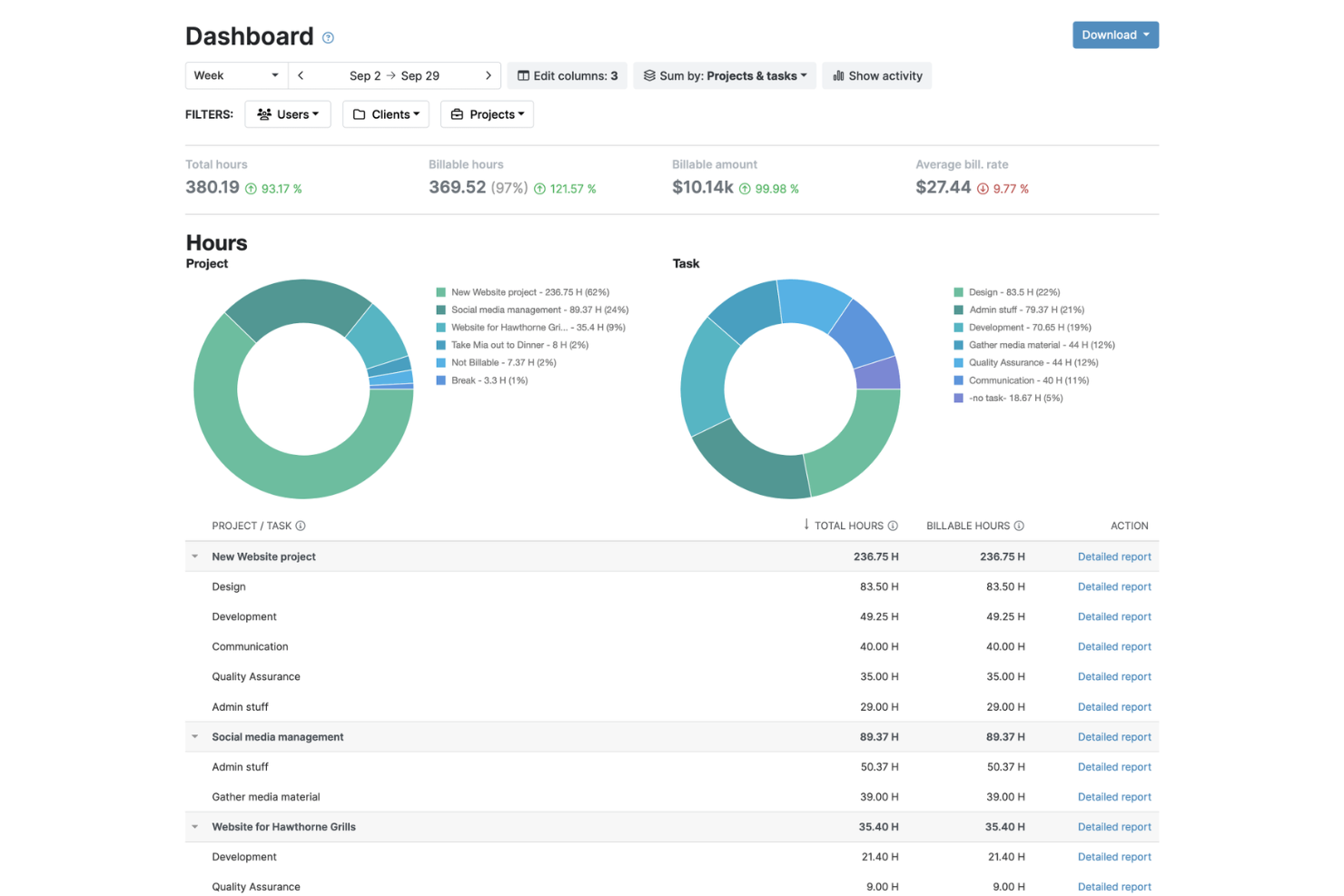
My Hours is a time tracking and client billing platform that lets teams log hours against projects, set billing rates, track expenses, and generate invoices from time data.
Who Is My Hours Best For?
My Hours works well for professional services firms at the small to mid-size stage that need project-level time visibility without the overhead of a full project management suite.
Why I Picked My Hours
I picked My Hours as one of the best because it treats billing accuracy as a core function, not an afterthought. What I find most useful is the timesheet approval workflow, where managers can review and sign off on hours before anything gets sent to a client.
I also like that you can attach billable expenses directly to a project, so your invoice reflects the full scope of work, not just logged hours.
My Hours Key Features
- Billing rate configuration: Set different hourly rates per user, project, or task to match your actual client contracts.
- Billable vs. non-billable hour tagging: Mark individual time entries as billable or non-billable directly on the log.
- Detailed time reports: Filter logged hours by client, project, team member, or date range for granular reporting.
- Manual time entry: Log hours retroactively without requiring a running timer.
My Hours Integrations
My Hours offers native integrations with Jira, Microsoft Teams, Asana, Basecamp, monday.com, ClickUp, QuickBooks, Xero, and Microsoft Power BI. It connects with Zapier and has an API for custom integrations.
What's Free?
My Hours offers a free-forever plan for up to five active users with unlimited projects and clients, basic time tracking, a single billable rate per project, and detailed reports. The Pro plan includes a 14-day free trial with no credit card required.
Pros and Cons
Pros:
- Generates invoices directly from time logs
- Built-in billable and non-billable hour tracking
- Free plan includes unlimited projects and clients
Cons:
- Approval workflows are locked behind paid plans
- No GPS or location-based clock-in tracking

Best for managing unlimited users
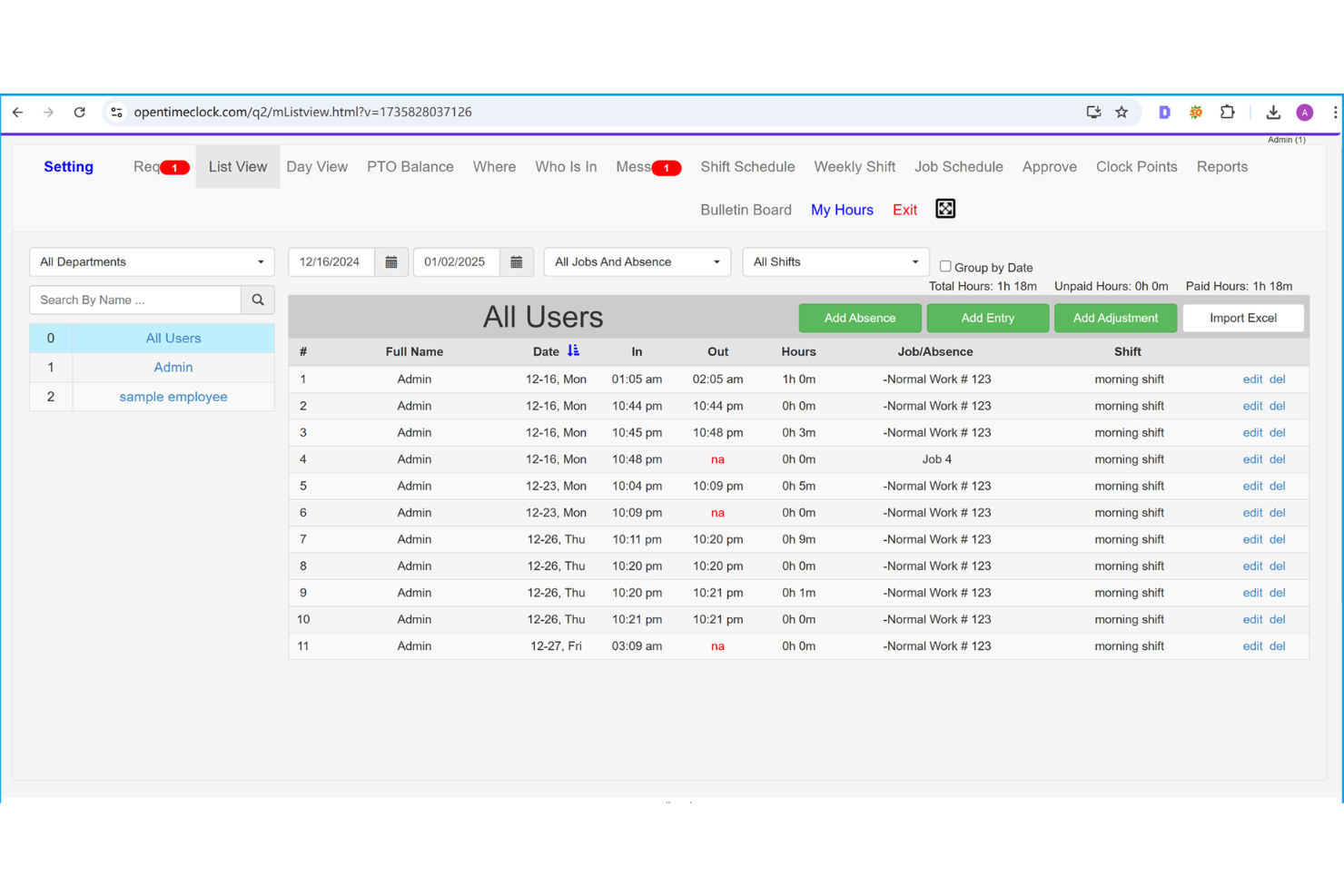
Built for teams of any size, Open Time Clock is a free time clock solution with clock-in and clock-out tracking, GPS verification, PTO management, shift scheduling, and payroll export tools.
Who Is Open Time Clock Best For?
Open Time Clock suits operations and HR managers in industries like retail, construction, and hospitality, where tracking large numbers of hourly and field-based workers is a daily requirement.
Why I Picked Open Time Clock
I've included Open Time Clock in my top picks because it's one of the only free time clock apps that doesn't cap your headcount. What I find genuinely useful is the department and group management feature, which lets you organize hundreds of employees into separate units so managers only see their own teams' hours.
I also like the automatic overtime calculation, which flags hours beyond daily or weekly thresholds without any manual review.
Open Time Clock Key Features
- GPS location tracking: Records the employee's GPS coordinates at the time of each clock-in and clock-out for location verification.
- Facial recognition clock-in: Employees can verify their identity using facial recognition to prevent buddy punching.
- Shift scheduling: Managers can create and assign shifts to employees directly within the platform.
- PTO request management: Employees submit leave requests through the app, and managers approve or deny them from the admin panel.
Open Time Clock Integrations
Open Time Clock offers a smaller set of native integrations compared to other time clock apps, connecting with payroll and accounting tools like QuickBooks, ADP, Gusto, Paychex, and Xero. It also has a developer API for custom integrations with HR and project management tools like Asana and Trello.
What's Free?
Open Time Clock offers a free-forever plan that includes unlimited users, free support, and access to all core features. The main limitation is that PDF and Excel report downloads aren't included, though you do get 30 days of free access to those reporting features when you first sign up.
Pros and Cons
Pros:
- GPS and Wi-Fi-based location restrictions
- Supports facial recognition and RFID clock-in
- Free tier allows unlimited employee profiles
Cons:
- Standard templates limit data visibility
- System lacks native invoice creator menus

Best for location-verified remote teams
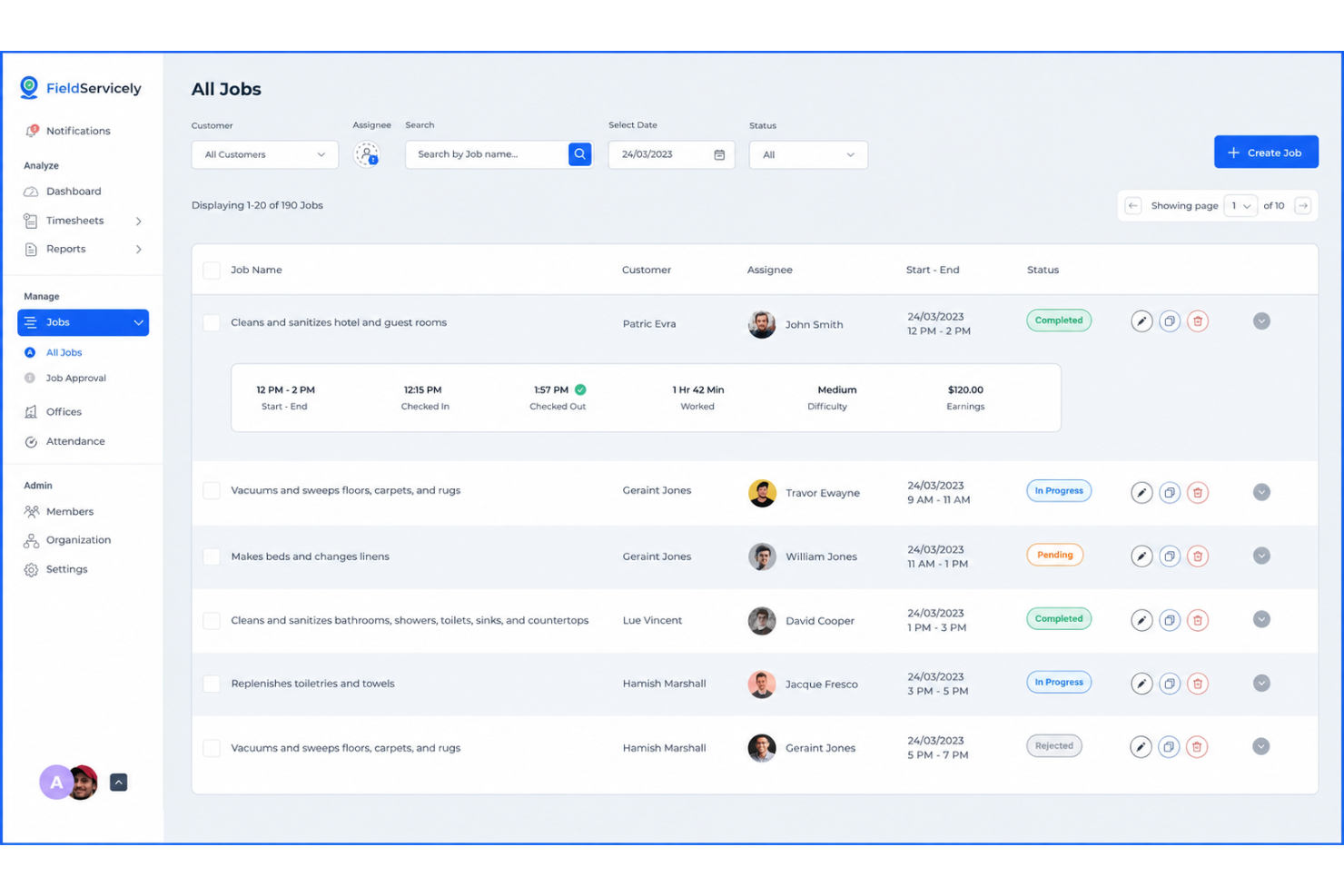
FieldServicely is a GPS-based time clock app built for field service and remote teams, with geofencing, photo-verified clock-ins, live location tracking, offline time recording, and job management tools.
Who Is FieldServicely Best For?
FieldServicely works well for operations managers and HR teams who need to verify attendance for employees who work across multiple job sites each day.
Why I Picked FieldServicely
FieldServicely earns its spot on my shortlist because I love how it creates a full location history for every shift, not just a single clock-in point. GPS breadcrumb tracking records movement throughout the workday, so I can confirm an employee was on-site at 2 pm just as easily as at 8 am.
The real-time location dashboard also lets my team monitor exactly where everyone is across multiple active job sites at once.
FieldServicely Key Features
- Geofence clock-in restrictions: Set a defined radius around a job site so employees can only clock in when they're physically within the approved boundary.
- Photo clock-in verification: Require employees to take a selfie at clock-in to confirm identity at the time of the punch.
- Offline time recording: Employees can clock in and out without a signal, with punches syncing automatically once connectivity is restored.
- Overtime tracking: Automatically flag hours that exceed daily or weekly thresholds based on configured overtime rules.
FieldServicely Integrations
FieldServicely offers an API for custom integrations to connect with payroll and accounting software.
What's Free?
FieldServicely offers a free-forever plan that includes basic features like geofencing, route map tracking, time tracking, timesheets, and job management. New users also get a 10-day free trial with full access to all premium features on their selected plan, with no credit card required.
Pros and Cons
Pros:
- GPS breadcrumb tracking across multiple sites
- Drag and drop timelines speed up team scheduling
- Includes geofencing and selfie verification
Cons:
- No live native integrations available
- Limited reporting and analytics customization
Shifton
Best for automated shift rostering

Shifton is a workforce management platform that pairs GPS-verified mobile time clocking with automated shift scheduling, timesheet generation, and payroll export.
Who Is Shifton Best For?
Shifton is a good fit for operations managers in shift-based industries like retail, logistics, and field services who need to automate roster building alongside time tracking.
Why I Picked Shifton
I've included Shifton in my top picks because it's one of the few free time clock tools that ties automated scheduling directly to time tracking in a single platform. When you build a shift roster in Shifton, the schedule data feeds the clock-in workflow, so managers can spot planned-vs-actual variance without reconciling two separate systems.
I also like the overtime threshold alerts, which flag employees at 75%, 90%, or 100% of their weekly limit before payroll closes, giving you time to actually act on it.
Shifton Key Features
- Mobile time clock app: Employees clock in and out directly from their smartphones, with timestamps recorded in real time.
- Automatic timesheet generation: Shifton compiles clock-in and clock-out data into timesheets without manual entry from managers.
- Payroll export: Approved timesheets can be exported in formats compatible with external payroll processing.
- Employee availability management: Staff can submit their availability windows, which Shifton factors into the shift-building process.
Shifton Integrations
Shifton offers native integrations with QuickBooks, Xero, Google Calendar, Outlook, Apple Calendar, Slack, Microsoft Teams, BambooHR, Workday, Intercom, and Usedesk. It also connects with Zapier and provides a RESTful API with webhook support for custom integrations.
What's Free?
Shifton offers a free-forever plan for up to 10 team members with no credit card required. It includes shift scheduling, time clock and attendance, a mobile app for iOS and Android, unlimited schedules and locations, and reports and analytics.
Pros and Cons
Pros:
- Supports 41 languages for global teams
- Free plan includes GPS verification
- Schedule and time clock share one platform
Cons:
- Analytics lack granular custom data tracking
- Feature limits impact scaling for unique needs
Best for mobile workforce tracking
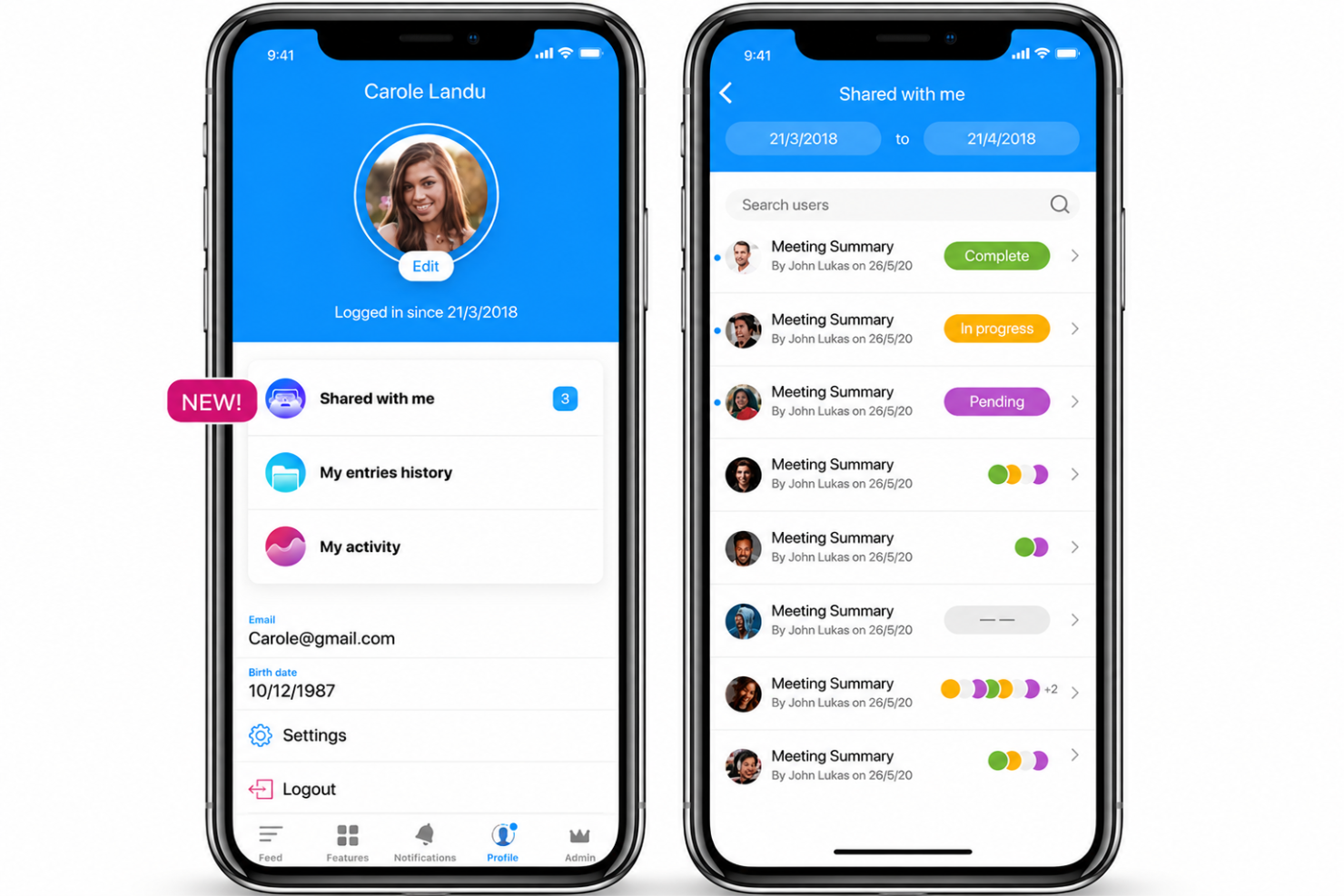
Connecteam is a time clock and workforce management app built for deskless and field-based teams, with GPS tracking, NFC clock-in, geofencing, and live location breadcrumbs at its core.
Who Is Connecteam Best For?
Connecteam is a strong fit for small to mid-sized businesses in industries like construction, home services, and logistics that manage distributed teams working across multiple job sites.
Why I Picked Connecteam
I've included Connecteam in my top picks because it handles mobile workforce tracking better than most free time clock apps I've tested. The GPS breadcrumb feature is what stands out to me: it logs an employee's location trail throughout their shift, not just at clock-in.
I also like how geofenced job sites auto-remind workers to clock in when they arrive, which cuts down on missed punches without any manual follow-up from managers.
Connecteam Key Features
- Kiosk mode: Turn any shared tablet into a clock-in station with a PIN code or selfie verification to prevent buddy punching
- Smart timesheets: Automatically populate hours from clock-in and clock-out data, with no manual entry required
- In-app chat and updates: Send direct messages, announcements, and job-specific updates directly within the app
- NFC clock-in: Let employees clock in by tapping their phone to an NFC tag placed at a specific job site location
Connecteam Integrations
Connecteam offers native integrations with Gusto, QuickBooks, Xero, Paychex, ADP, Square, Lightspeed, Clover, Shopify, and BambooHR, among others. It also connects with Zapier and integrates with physical time clock hardware from vendors like Accu-Time Systems and Synel.
What's Free?
Connecteam offers a free-forever Small Business Plan for teams with up to 10 users, which includes all hubs and nearly all features. Teams with 11–30 users can use the free Limited plan indefinitely, though it comes with reduced feature access across all hubs.
Pros and Cons
Pros:
- Combines scheduling, chat, and time tracking
- GPS breadcrumbs track location during shifts
- Simplifies manual shift swaps for employee teams
Cons:
- No built-in mileage tracking feature
- Data synchronization requires connectivity
New Product Updates from Connecteam

Connecteam Expands Break and Timesheet Controls
Connecteam adds flexible break thresholds, personalized policies, auto-end options, a centralized exceptions report, and improved timesheet issue visibility to help teams manage breaks and timesheets more effectively. For more information, visit Connecteam’s official site.
 .
.
Clockify
Best for GPS-based activity mapping

Clockify is a time clock app that covers employee time tracking, GPS clock-ins, project and task logging, and visual timeline reporting across unlimited users.
Who Is Clockify Best For?
Clockify is a strong fit for small to mid-sized businesses with field teams or remote workers spread across multiple job sites or locations.
Why I Picked Clockify
I picked Clockify as one of the best because of how it handles GPS-based activity mapping in a way that goes beyond a simple clock-in location stamp. I like that it records GPS coordinates throughout a shift, lets you replay a worker's route on a map, and shows all visited job sites in a single view.
For any team managing field workers across multiple locations in a day, that route replay feature gives you real visibility into how time and movement are distributed across sites.
Clockify Key Features
- Kiosk mode: Set up a shared tablet or device as a fixed clock-in terminal for an entire team.
- Break tracking: Log paid and unpaid breaks directly within a time entry to keep shift records accurate.
- Timesheet approval: Managers can review, approve, or reject submitted timesheets before payroll is processed.
- Overtime tracking: Automatically flag daily or weekly overtime based on configurable work hour thresholds.
Clockify Integrations
Clockify offers 100+ integrations through its browser extension, including QuickBooks, Xero, Jira, Asana, Trello, Salesforce, Google Calendar, Outlook, and Slack. It also has native integrations with Pumble and Plaky and connects with Zapier. An API is available for custom integrations.
What's Free?
Clockify offers a free-forever plan for up to five users that includes unlimited time tracking, timesheets, a time tracker, calendar view, mobile and desktop apps, and basic reporting. GPS tracking, kiosk mode, and break tracking are not available on the free plan and require a paid upgrade starting at the Basic tier.
Pros and Cons
Pros:
- Kiosk mode for shared device clock-ins
- GPS route tracking across multiple job sites
- Scales without headcount restrictions
Cons:
- Requires stable data transfer rates
- GPS tracking requires a paid plan upgrade
Jibble
Best for facial recognition check-ins

Jibble is a free time clock app with GPS-verified clock-ins, facial recognition, geofencing, live location tracking, and automated timesheets for field and distributed teams.
Who Is Jibble Best For?
Jibble is a strong fit for businesses with deskless or frontline workers in industries like construction, retail, and hospitality where preventing time fraud is a priority.
Why I Picked Jibble
I picked Jibble as one of the best because its facial recognition clock-in is one of the most fraud-resistant I've seen in a free time clock app. When an employee clocks in, Jibble captures and matches their face against a registered photo, rejecting unrecognized attempts automatically. Paired with GPS verification, each clock-in logs both identity and location at the same time.
Jibble Key Features
- Geofencing: Set virtual boundaries around job sites so employees can only clock in when physically within a designated area.
- Kiosk mode: Turn a shared tablet or device into a central clock-in station for teams working from a single location.
- Automated timesheets: Jibble generates timesheets from clock-in and clock-out data, including break deductions and overtime calculations.
- Activity and project tracking: Employees can log time against specific projects or tasks during a shift, not just start and end times.
Jibble Integrations
Jibble offers 50+ integrations, including Slack, Microsoft Teams, QuickBooks Online, Xero, ADP, Gusto, BambooHR, Deel, Salesforce, and Jira Software Cloud. It also connects with Zapier and provides an API for custom integrations.
What's Free?
Jibble offers a free-forever plan for unlimited users that includes core time tracking, GPS clock-ins, automated timesheets, and basic reporting. No credit card is required to sign up.
Pros and Cons
Pros:
- GPS and geofencing verify clock-in locations
- Supports swift identity validation
- Unlimited users on the free plan
Cons:
- Requires reliable wireless connection
- Geofencing drains a phone's battery quickly

TimeCamp
Best for detailed reporting and analytics

TimeCamp is a time tracking platform that combines automatic time capture, attendance monitoring, timesheet management, and project-level reporting in a single tool.
Who Is TimeCamp Best For?
TimeCamp is a good fit for professional services teams—like consultants, agencies, and attorneys—who need to track billable hours across multiple clients and projects.
Why I Picked TimeCamp
I picked TimeCamp as one of the best because its reporting depth is genuinely hard to match at this price point. You get over a dozen pre-built report types, including margin reports, revenue breakdowns, and cost-per-user views, all filterable by task, employee, or project.
I also like the custom pivot-table report builder, which lets you drag and drop variables to create reports that fit your exact billing or audit needs.
TimeCamp Key Features
- Automatic time tracking: Tracks time based on computer activity, including visited websites and used apps, without manual input.
- Attendance management: Logs clock-in and clock-out times, absences, and time-off requests in a single attendance view.
- Timesheet approval workflow: Managers can review, approve, or reject submitted timesheets directly within the platform.
- Idle time detection: Automatically identifies and flags periods of inactivity so employees can decide whether to log or discard that time.
TimeCamp Integrations
TimeCamp offers 70+ integrations across project management, helpdesk, CRM, accounting, and development categories, including Asana, Trello, Jira, monday.com, Slack, QuickBooks, Xero, Salesforce, Microsoft Teams, and GitHub. It also connects with Zapier and provides an API for custom integrations.
What's Free?
TimeCamp offers a free-forever plan for unlimited users that includes timesheets, web, desktop, and mobile apps, unlimited projects, and two-factor authentication. The free plan doesn't include features like attendance tracking, invoicing, integrations, or reporting exports.
Pros and Cons
Pros:
- Invoices are generated directly from tracked time
- Automatic tracking captures more logged hours
- Accommodates large team deployments
Cons:
- No direct HR or payroll integrations
- The mobile app lacks offline functionality
7shifts
Best for restaurants and hospitality
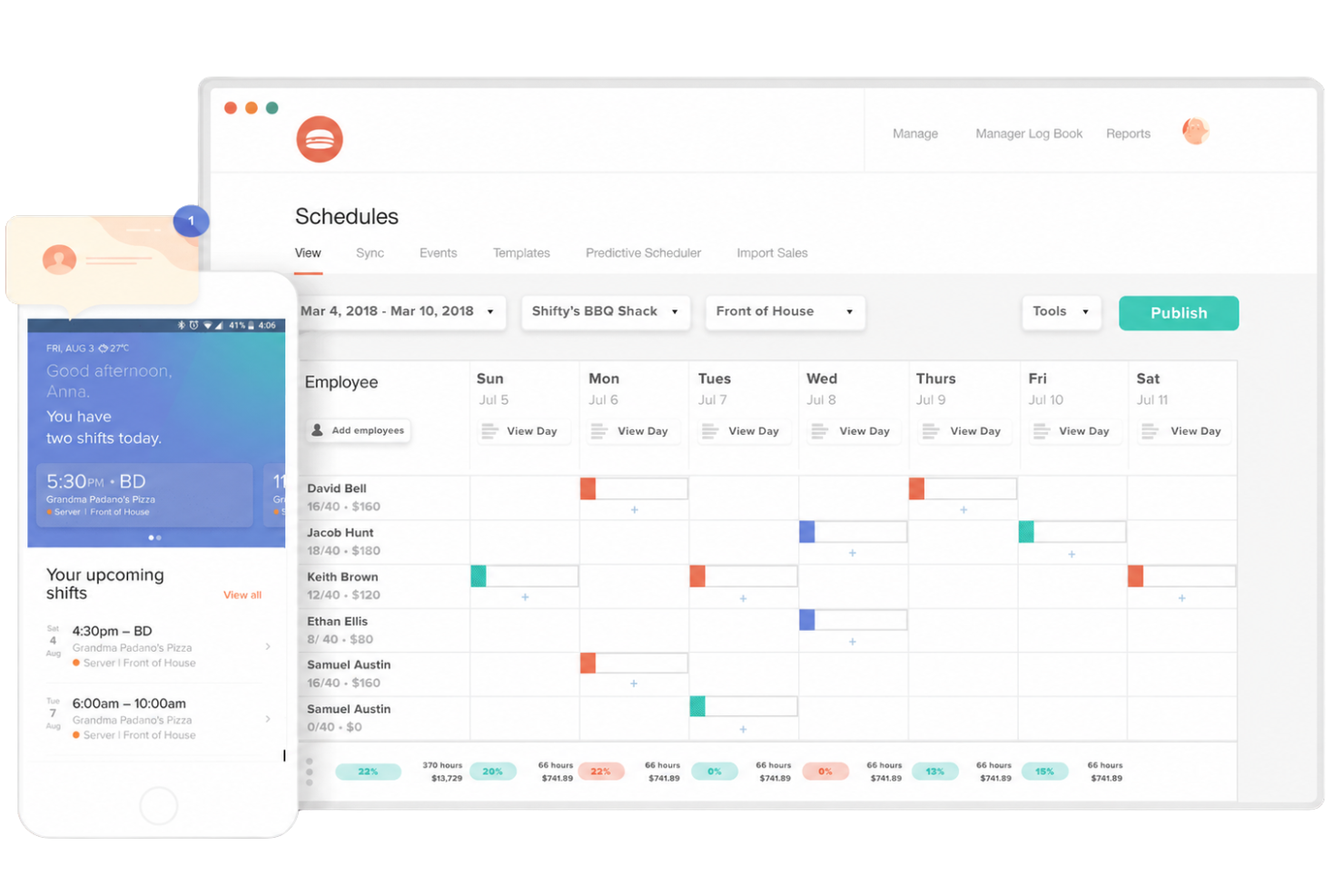
7shifts is a restaurant-focused workforce management platform with a dedicated time clocking app (7punches) that handles employee clock-ins, break tracking, overtime monitoring, and timesheet syncing with scheduling and payroll.
Who Is 7shifts Best For?
7shifts is a strong fit for restaurant owners and hospitality operators managing hourly, shift-based teams across single- or multi-location businesses.
Why I Picked 7shifts
I picked 7shifts as one of the best because it's purpose-built for restaurant operations in ways generic time clock tools aren't. I love that 7punches flags late or no-show clock-ins against the published schedule in real time, which is critical when you're running a dinner service short-staffed.
It also handles tip pooling calculations and break compliance tracking, two pain points that come up constantly in hospitality but rarely appear in standard time clock apps.
7shifts Key Features
- GPS clock-in verification: Employees clock in via mobile with GPS confirmation, so you can see exactly where each punch originated.
- Photo capture on clock-in: 7punches takes a photo at each clock-in to prevent buddy punching at shared devices.
- Overtime threshold alerts: Managers receive automatic notifications when an employee is approaching their overtime limit during a shift.
- Timesheet approval workflow: Managers can review, edit, and approve employee timesheets before they're sent to payroll.
7shifts Integrations
7shifts offers 50+ native integrations focused on the restaurant ecosystem, including POS systems like Toast, Square, Clover, Lightspeed, TouchBistro, and Revel, along with payroll providers like ADP, Gusto, Paychex, and QuickBooks Online. An API is also available for custom integrations.
What's Free?
7shifts offers a free-forever plan called Comp, designed for a single location with up to 30 employees. It includes basic scheduling, time clocking, and team communication, but doesn't include features like labour compliance tools, tip management, or advanced reporting.
Pros and Cons
Pros:
- Auto-applies state-specific overtime rules
- Schedule-synced clock-ins prevent time theft
- Free plan includes time clock and scheduling
Cons:
- Free plan limited to one location
- Time clocking requires a separate app

BusyBusy
Best for construction and field crews

BusyBusy is a GPS time clock app built specifically for construction and field-based industries, with tools for crew clock-ins, equipment tracking, job costing, daily project reports, and timecard management.
Who Is BusyBusy Best For?
BusyBusy is a strong fit for contractors and subcontractors managing hourly field crews across multiple job sites.
Why I Picked BusyBusy
I picked BusyBusy as one of the best because it's purpose-built for the realities of field work in a way that general time clock apps simply aren't. I really like the "Required Onsite" GPS feature, which blocks employees from clocking in unless they're physically within the project's geofence.
The supervisor clock-in tool also lets a crew lead clock in an entire team at once, which is a practical fix for job sites where workers don't have phones on them.
BusyBusy Key Features
- Equipment time tracking: Log hours on specific pieces of equipment alongside crew time entries to track usage by job.
- Job cost budgeting: Set labour cost budgets per project and monitor real-time spending as employees clock in and out.
- Daily project reports: Generate end-of-day field reports that capture crew hours, notes, and conditions directly from the job site.
- PTO and time-off tracking: Submit, approve, and record paid time off alongside regular timecards in one place.
BusyBusy Integrations
BusyBusy offers native integrations with QuickBooks Online, QuickBooks Desktop, Procore, Sage Intacct, Sage 100, Sage 300, Viewpoint Spectrum, ADP, Paychex, and Microsoft Dynamics, among others. It also connects with Zapier and supports file-based exports to additional accounting systems.
What's Free?
BusyBusy offers a free-forever plan that includes GPS time tracking, job costing, equipment tracking, and unlimited users. If you want to try advanced features like GPS breadcrumbing, supervisor tools, or scheduling, there's also a 14-day free trial of the Pro plan with no credit card required.
Pros and Cons
Pros:
- Supervisors can bulk clock in crews
- GPS geofence reminders at job sites
- Offline time tracking syncs when reconnected
Cons:
- No auto clock-out when leaving geofence
- GPS accuracy issues near water or obstructions
Andre gratis tidsregistreringsapper
Her er noen flere gratis tidsregistreringsapper som ikke kom med på kortlisten, men som likevel er verdt å sjekke ut:
- Homebase
For scheduling hourly staff
- Bitrix24
For team collaboration integration
- actiPLANS
For leave and absence management
- Time Clock Wizard
For custom payroll reporting


How I Evaluate Free Time Clock Apps
Core Functionality (Table Stakes For This List)
In addition to my free offer requirements, I also use a scoring system to select tools for my list. Here's how it works:
I rank each one on a scale from 0 (does not offer the functionality) to 5 (excels in this area) for each core functionality listed below. Then, I calculate the tool's total score as a percentage. Each tool needs to achieve a minimum total score of 65% to be considered for inclusion.
- Employee clock-in/out: I look for one-tap punch options that cover shift starts, stops, and breaks. A crew lead at a landscaping company should be able to clock out for lunch and back in without switching screens.
- Timesheet generation: The app should compile punch data into weekly or biweekly timesheets with total hours. I check whether managers can review and approve timesheets before exporting them for payroll.
- Mobile access: Most hourly workers clock in from a phone, so I evaluate whether the app offers a dedicated iOS and Android app or just a mobile browser experience. Tools like Connecteam and Homebase both provide native apps, for example.
- Multi-employee support: Free plans that cap at one or two users aren't practical for most teams. I look at how many employees the free tier supports, since even a small retail shop typically needs to track five or more staff members.
- GPS or location verification: I check whether the app stamps GPS coordinates on each punch or goes further with geofencing. A cleaning company sending crews to client sites, for instance, needs proof that employees clocked in at the right address.
- Payroll export/reporting: At minimum, I look for a CSV export so admins can pull hour totals into their payroll system. Some tools go further with PDF or Excel formats, which matters when you're handing reports to an accountant or bookkeeper.
Once I have a list of tools that meet these criteria, I consider what sets each platform apart.
Differentiating Factors (What Sets Vendors Apart)
Here's how I compare and contrast different vendors:
Standout Features
Photo verification at clock-in is a practical way to prevent buddy punching, and tools like Connecteam and FieldServicely include it on their free plans. Offline mode matters just as much—crews at construction sites or rural properties need to log hours even without cell service. I also evaluate whether employees can tag punches to specific job or project codes, since service businesses often need to tie labour costs back to individual client accounts.
Beyond Features
Payroll integrations on free plans range from basic CSV exports to direct connections with providers like QuickBooks or Xero. That gap matters when you're running biweekly payroll for a dozen hourly workers and want to avoid manual data entry. Onboarding speed is another factor I evaluate—a restaurant manager shouldn't need IT support to get their team clocking in. Self-serve resources like setup guides and knowledge base articles tell you a lot about how smooth the first week will be.
Slik velger du en gratis tidsregistreringsapp
Det er lett å gå seg vill i lange funksjonslister og kompliserte prismodeller. For å hjelpe deg med å holde fokus når du går gjennom den unike prosessen med å velge programvare, får du her en sjekkliste over faktorer du bør ha i bakhodet:
| Faktor | Hva du bør vurdere |
|---|---|
| Skalerbarhet | Passer verktøyet til teamets nåværende størrelse og planlagte vekst? Se etter begrensninger på antall brukere, spesielt hvis du driver sesongbaserte eller voksende team. |
| Integrasjoner | Kobles appen problemfritt til lønns- og HR-systemene dine? Sørg for at foretrukne integrasjoner ikke krever betaling eller er begrenset i gratisabonnementene. |
| Tilpasningsmuligheter | Kan du tilpasse tidsregler, roller eller varsler til arbeidsflytene i virksomheten din? Unngå verktøy med rigide innstillinger som begrenser fleksibiliteten. |
| Brukervennlighet | Kan ansatte uten teknisk bakgrunn lære å bruke det raskt? Prøv demonstrasjoner eller oppsettveiledninger for å vurdere den faktiske læringskurven for både ledere og ansatte. |
| Implementering og oppstart | Finnes det støtteressurser, veiledninger og selvbetjent hjelp til oppsettet? En enklere oppstart reduserer frustrasjon og unngår forsinkelser. |
| Kostnad | Er gratisfunksjonene virkelig tilstrekkelige, eller er en oppgradering uunngåelig? Kartlegg kostnadene ut fra det du realistisk sett vil trenge det neste året. |
| Sikkerhetstiltak | Hvordan beskytter plattformen data fra timelister og ansattes identitet? Se etter kryptering, tilgangskontroller og sikker drift. |
| Tilgjengelig kundestøtte | Er det mulig å få hjelp i sanntid eller feilsøking hvis du står fast? Hvis du bare kan bruke e-post eller forum, kan det forsinke løsningen av problemer. |
Hva er gratis tidsregistreringsapper?
En gratis tidsregistreringsapp er et digitalt verktøy som lar ansatte stemple inn og ut ved hjelp av datamaskiner eller mobile enheter, uten kostnad. Disse appene registrerer arbeidstimer, holder oversikt over oppmøte og bidrar til å håndtere grunnleggende timelister for lønn.
Gratisabonnementer støtter vanligvis små team og inkluderer enkle rapporter, posisjonssporing og funksjoner for registrering av pauser.
Funksjoner i gratis tidsregistreringsapper
La oss se nærmere på funksjonene som vanligvis finnes i løsninger for tidsregistreringsapper, og hvilke av dem som vanligvis er inkludert i gratis- og betalingsabonnementer.
Vanlige funksjoner i gratis tidsregistreringsapper
- Grunnleggende tidsregistrering: Ansatte stempler inn og ut ved hjelp av en mobil enhet eller datamaskin, slik at arbeidstimer registreres nøyaktig med digitale oppføringer.
- Mobil tilgang: Team kan få tilgang til appen fra iOS- eller Android-enheter, noe som gjør det enkelt for feltarbeidere eller distribuerte team å registrere timer.
- GPS-posisjonstagger: Hver stemplingshendelse kan merkes med en GPS-posisjon, slik at det bekreftes hvor stemplingen ble gjort ved arbeidsoppgaver på bestemte steder.
- Enkel timelistrapportering: Last ned eller vis grunnleggende rapporter for å se hver ansatts totale timer for en valgt periode, slik at lønnsforberedelsene holdes enkle.
- Registrering av pauser: Ansatte kan registrere ubetalte måltids- og hvilepauser, noe som støtter overholdelse av arbeidsbestemmelser og nøyaktige lønnsberegninger.
- Eksport til CSV: Last ned registrerte tidsdata i et standardformat for rask import til lønnssystemet eller sikkerhetskopiering.
- Lederdashbord: Ledere kan følge med på hvem som har stemplet inn, se stemplingshistorikk og gjøre grunnleggende justeringer i registreringene fra én enkelt skjerm.
- Manuelle tidskorrigeringer: Administratorer kan rette feil eller manglende stemplinger, slik at nøyaktigheten opprettholdes selv om noen glemmer å stemple inn eller ut.
Vanlige funksjoner i betalte tidsregistreringsapper
- Geogjerder: Automatiser inn- og utstempling basert på når ansatte går inn i eller forlater angitte arbeidsområder, slik at manuelle feil og kameratstempling reduseres.
- Foto- eller selfiebekreftelse: Ta et bilde ved inn- eller utstempling for å bekrefte den ansattes identitet, noe som forbedrer ansvarligheten uten behov for dyr maskinvare.
- Avansert skiftplanlegging: Opprett og administrer ansatteskift i appen, tildel arbeidere til bestemte arbeidsoppgaver og automatiser varsler om endringer i arbeidsplanen.
- Integrasjoner med lønn og HR: Overfør tidsdata direkte til lønns- eller HR-systemer, slik at dobbel dataregistrering unngås og lønnskjøringene forbedres.
- Prosjekt- og jobbkostnadsberegning: La ansatte knytte tid til bestemte oppgaver, jobber eller kunder, slik at du kan følge lønnsomheten i jobber og støtte kundefakturering.
- Tilpasset rapportering: Generer skreddersydde rapporter etter avdeling, prosjekt eller lønnsperiode, slik at du får bedre innsikt i arbeidstidsutvikling og kostnader.
- Automatisk beregning av overtid: Appen bruker automatisk overtidsregler basert på angitte parametere, noe som hjelper deg med å overholde regelverket og forenkle lønnsarbeidet.
- Godkjenningsflyter: Ledere eller arbeidsledere kan gjennomgå og godkjenne timelister før eksport, noe som gir et ekstra kontrollnivå for revisjon og nøyaktighet i lønnsarbeidet.
- API-tilgang: Koble tidsregistreringssystemet til andre forretningsverktøy eller utvikle tilpassede integrasjoner for unike prosessbehov.
- Prioritert kundestøtte: Få raskere hjelp via direktechat, direkte telefonlinjer eller dedikerte kundestøtteteam, slik at nedetiden blir kortere når problemer oppstår.
Fordeler med gratis tidsregistreringsapp
Implementering av en gratis tidsregistreringsapp gir flere fordeler for teamet og virksomheten din. Her er noen av fordelene du kan se frem til:
- Nøyaktig registrering: Digitale inn- og utstemplinger bidrar til å redusere manuelle feil og sikrer pålitelige fremmøteregistreringer for lønnsarbeidet.
- Oversikt i sanntid: Lederdashbord og funksjoner for direkte status lar deg se hvem som arbeider og hvor, når som helst.
- Enkel mobiltilgang: Teammedlemmer kan stemple inn eller ut fra mobile enheter, noe som er ideelt for eksternt eller distribuert arbeid.
- Kostnadsbesparelser: Gratisabonnementer hjelper virksomheten med å administrere tid og fremmøte uten ekstra programvarekostnader.
- Bedre overholdelse av regelverket: Innebygd pauseregistrering, overtidsberegninger og grunnleggende rapportering støtter kravene i arbeidslovgivningen.
- Rask konfigurering og opplæring: Gratisapper har vanligvis enkle brukergrensesnitt, slik at du kan komme i gang med teamene med minimal opplæring.
- Posisjonsbekreftelse: GPS- og geogjerdeverktøy bekrefter hvor ansatte stempler inn, noe som motvirker kameratstempling og uautoriserte skift.
Kostnader og priser for gratis tidsregistreringsapp
Jeg forstår at du kom til denne artikkelen på jakt etter de beste tidsregistreringsappene som er tilgjengelige gratis. Siden gratisabonnementer imidlertid bare tilbyr begrensede funksjoner, er det en god sjanse for at du vil trenge å oppgradere abonnementet ditt i fremtiden.
Tabellen nedenfor oppsummerer vanlige abonnementer, gjennomsnittsprisene deres og typiske funksjoner som er inkludert i tidsregistreringsapper:
Sammenligningstabell for stemplingsapper
| Plantype | Gjennomsnittspris | Vanlige funksjoner |
|---|---|---|
| Gratisabonnement | $0 | Grunnleggende tidsregistrering, mobiltilgang, GPS-posisjonssporing, enkel timelistrapportering og manuelle tidskorrigeringer. |
| Personlig abonnement | $5–$10/bruker/måned | Alle gratisfunksjoner, bildeverifisering, enkel skiftplanlegging, grunnleggende brukerstøtte og begrensede lønnsintegrasjoner. |
| Bedriftsabonnement | $10–$25/bruker/måned | Avansert skiftplanlegging, geogjerder, prosjekt- og jobbkostnadsberegning, støtte for flere lokasjoner og tilpasset rapportering. |
| Virksomhetsabonnement | $25+/bruker/måned | API-tilgang, avansert samsvarssporing, dedikert kundeansvarlig, SSO og skreddersydd innføring. |
Vanlige spørsmål om gratis stemplingsapper
Her er noen svar på vanlige spørsmål om gratis stemplingsapper:
Kan en gratis stemplingsapp håndtere flere lokasjoner eller eksterne team?
Ja, de fleste gratis apper for tidsregistrering støtter fjernstempling, og noen gjør det mulig å registrere tid på tvers av ulike arbeidssteder. Avanserte verktøy for administrasjon av flere lokasjoner kan imidlertid kreve en oppgradering, så bekreft alternativene for lokasjonsstyring før du tar i bruk et verktøy for geografisk spredte team.
Er tidsregistreringer fra en gratis app sikre og beskyttet mot manipulering?
Nei, gratisapper bruker ofte grunnleggende sikkerhet som passordbeskyttelse og revisjonsspor, men kan mangle avanserte sikkerhetstiltak som flerfaktorautentisering. Hvis virksomhetseiere trenger streng datakontroll for å registrere ansattes arbeidstid nøyaktig og holde arbeidskostnadene under kontroll, bør du undersøke hvilke beskyttelser som er inkludert før du stoler på en gratisversjon.
Hvilke begrensninger følger med de fleste gratisabonnementer?
De fleste gratis programvarealternativer for tidsregistrering har begrensninger på antall brukere, rapporteringsalternativer eller integrasjoner. Noen tillater bare grunnleggende eksporter eller begrenser antallet administratorer og bestemte brukertillatelser. Sjekk alltid leverandørens detaljer om gratisabonnementet, slik at du ikke møter en begrensning når teamet vokser.
Kan jeg integrere en gratis stemplingsapp med lønnssystemer?
Du kan noen ganger eksportere data om de ansattes arbeidstid, men fullstendige integrasjoner med lønns- eller HR-systemer er vanligvis forbeholdt betalte abonnementer. Gratisversjoner kan tilby manuelle CSV-eksporter i stedet for automatisert tidsregistrering, så ta dette med i vurderingen hvis nøyaktig lønnsbehandling er viktig for arbeidsflyten din.
Hvordan får jeg brukerstøtte hvis jeg får problemer med et gratisabonnement?
Gratisabonnementer leveres vanligvis med selvbetjente ressurser som kunnskapsbaser eller brukerfora, og direkte støtte via e-post eller chat for nettappen eller iPhone-versjonen er ofte begrenset eller treg. Tenk over hvor mye støtte teamet ditt kan trenge, særlig hvis det er forretningskritisk å erstatte manuelle regneark med en nettbasert timeregistrering.