

10 beste HR-programvarer med åpen kildekode – vurdert for 2026

Kortliste over den beste HR-programvaren med åpen kildekode


Den beste HR-programvaren med åpen kildekode gir deg fleksibilitet, kontroll og kostnadsbesparelser – uten å binde deg til rigide leverandøravtaler.
Hvis det nåværende HR-systemet ditt føles for dyrt, begrensende eller lite fleksibelt, tilbyr løsninger med åpen kildekode et kraftig alternativ. Med disse verktøyene kan du tilpasse og skalere sentrale HR-prosesser som administrasjon av medarbeiderdata, registrering av fravær, introduksjon av nyansatte og rapportering – samtidig som du beholder full kontroll over dataene og infrastrukturen din.
Etter å ha undersøkt dusinvis av HR-plattformer med åpen kildekode har jeg satt sammen en liste over de beste alternativene som er tilgjengelige i dag. I denne veiledningen finner du verktøy som balanserer tilpasningsmuligheter, brukervennlighet og skalerbarhet – slik at du kan bygge et HR-system som virkelig passer organisasjonens behov og budsjett.
Why Trust Our Software Recommendations
Our team has been testing and reviewing software since 2012. As HR experts ourselves, we know how difficult—and important—it is to choose the right software.
For this guide, we evaluated tools using hands-on testing and independent research, scoring tools using our selection criteria. We also draw on insights from industry thought leaders and practicing HR experts.
Our reviews reflect our human editorial judgment, not a sales pitch.
Expert reviewers:
Sammenligningstabell for HR-programvare med åpen kildekode
Denne sammenligningstabellen oppsummerer prisopplysningene for mine beste utvalgte HR-programmer med åpen kildekode:
| Tool | Best For | Trial Info | Price | ||
|---|---|---|---|---|---|
| 1 | Best for data visualization | Free plan available | From $9/user/month (billed annually) | Website | |
| 2 | Best for ease of use | Free to use one app only | From $31/user/month | Website | |
| 3 | Best personnel information management | Free plan available OR 30-day free trial | Pricing upon request | Website | |
| 4 | Best for small businesses | 15-day free trial + free demo available | From $49/month (billed annually) | Website | |
| 5 | Best Wordpress-based HR software | Free to use | Free software | Website | |
| 6 | Best for integrated ERP and CRM capabilities | 30-day free trial + free demo available | Free | Website | |
| 7 | Best for customizable HR workflows | Free trial + free download available | From $50/month (unlimited users) | Website | |
| 8 | Best for insightful HR reporting and analytics | Free demo available | Free to use | Website | |
| 9 | Best internal job portal | 45 days free trial | From $0.90/user/month | Website | |
| 10 | Best for accurate time tracking | 30-day free trial | From $50/month (billed annually) | Website |

Anmeldelser av HR-programvare med åpen kildekode
Her er en kort beskrivelse av hver av de 15 beste HR-programmene med åpen kildekode. Målet er å vise det beste bruksområdet for hvert verktøy, noen bemerkelsesverdige funksjoner og skjermbilder som gir et innblikk i grensesnittet. Les videre for å finne flere bonusvalg nederst på listen.

Best for data visualization
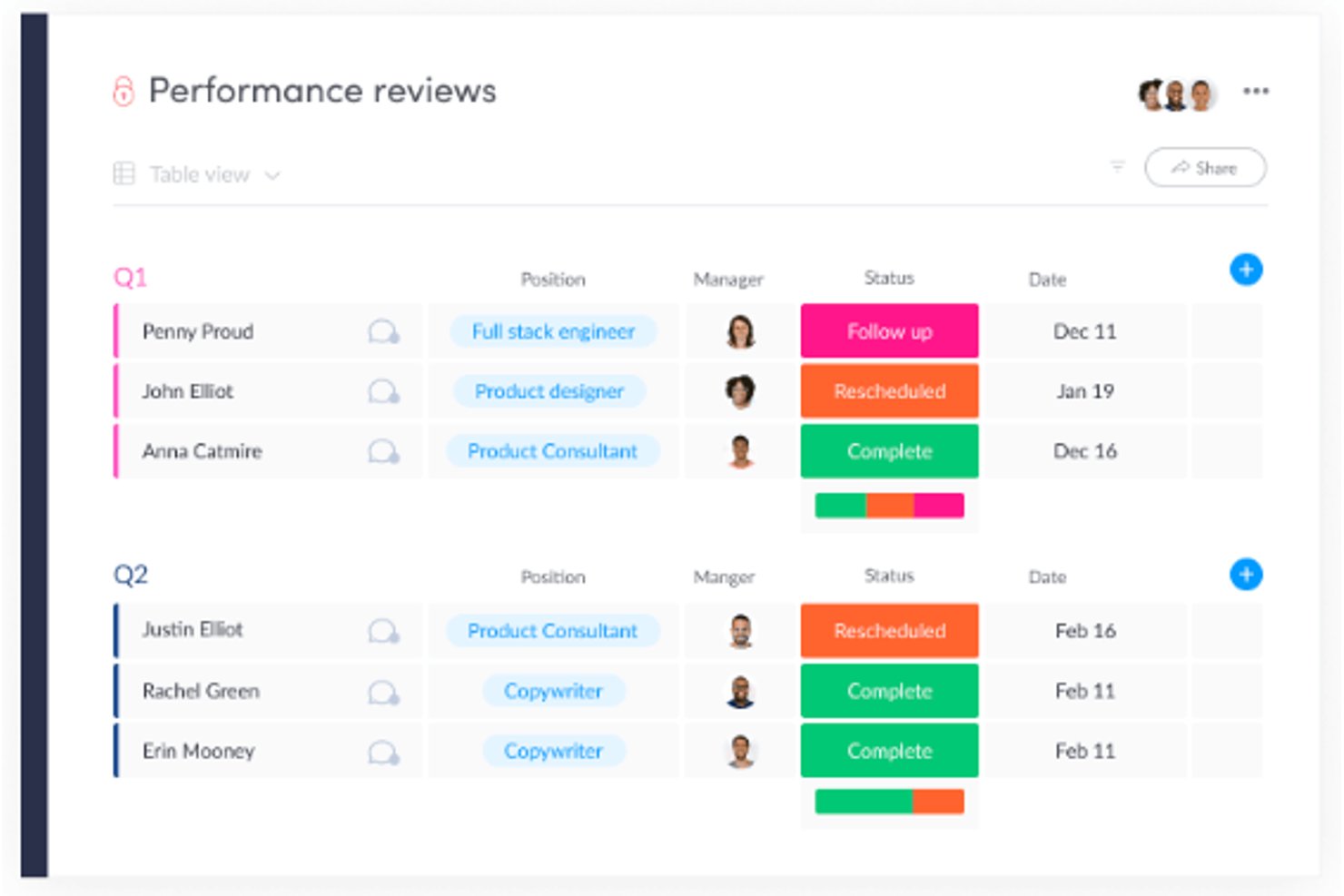
monday AI Workspace is a customizable work management platform that combines AI-powered project planning, visual dashboards, workflow automation, and collaboration tools that can be adapted to HR processes like recruiting, onboarding, and employee management.
Who Is monday AI Workspace Best For?
It's a strong fit for mid-sized HR and people ops teams that want flexible, visual workflows without investing in a dedicated HRIS.
Why I Picked monday AI Workspace
monday AI Workspace earns its spot on my shortlist because of how it handles data visualization for HR workflows. I particularly like the live dashboards that pull data across multiple boards, letting my team track headcount, onboarding progress, and open roles in one consolidated view. The color-coded status columns and timeline views make bottlenecks visible at a glance, without anyone needing to dig through spreadsheets or generate manual reports.
monday AI Workspace Key Features
- Customizable workflow builder: Drag-and-drop interface to design and automate HR processes like onboarding or performance reviews.
- Document management: Upload, store, and organize employee documents and HR files securely within boards.
- Role-based permissions: Control access to sensitive HR data with custom user roles and permissions.
- Integrated forms: Create internal forms for requests such as leave, equipment, and feedback, linking submissions directly to workflows.
monday AI Workspace Integrations
monday AI Workspace offers hundreds of native integrations through its built-in integrations and marketplace, including Slack, Salesforce, HubSpot, Google Workspace, Microsoft 365, Zoom, DocuSign, GitHub, Jira, and Dropbox. It also supports Zapier and provides an API for custom integrations.
Pros and Cons
Pros:
- AI features automate repetitive HR tasks
- Flexible boards adapt to any HR workflow
- Highly visual dashboards for HR data
Cons:
- No native payroll or leave modules
- Not open source or self-hostable
New Product Updates from monday AI Workspace
monday AI Workspace Adds Human Approval Routing
monday AI Workspace adds a human-in-the-loop approval block to AI Workflows, sending approval requests and routing workflow paths based on responses. For more information, visit monday AI Workspace's official site.

Best for ease of use

Odoo Employees makes the cut for how it brings core HR functions together with clear dashboards and customizable views. I've found the contracts management and time off tracking modules fast to set up, which really makes onboarding and tracking leave requests simple. When teams need basic HR operations and want to bring all employee info into one place, I recommend Odoo for how quickly you can get started.
What I like is that hard-to-find HR details, like contract statuses or absences, are right there when you need them. I usually see teams appreciate not spending hours chasing paperwork, especially if they're used to email or spreadsheets.
Odoo Employees' Best For
- Small to midsize orgs needing unified HR basics
- Teams managing contracts, leave, and attendance centrally
Odoo Employees' Not Great For
- Companies needing advanced talent or payroll features
- Organizations with highly specialized HR compliance needs
What sets Odoo Employees apart
Odoo Employees is built around the idea that HR data and people management should live with the rest of your core business processes. Instead of creating a separate workflow like you find in BambooHR or Gusto, Odoo expects you to manage contracts, leave, and employee records within a unified system. This tends to work best when you want a basic HR toolkit inside an all-in-one platform, with quick access to information and simple oversight.
Tradeoffs with Odoo Employees
Odoo Employees optimizes for centralizing essential HR functions, but the tradeoff is a lack of depth in areas like analytics and advanced talent management. In practice, this means you miss out on specialized HR features that standalone suites offer.
Pros and Cons
Pros:
- Straightforward setup for core HR tasks
- Employee self-service reduces everyday HR admin requests
- Clean, consistent interface across all HR workflows
Cons:
- Payroll localization depends on country-specific configurations
- Reporting depth is limited without additional setup
Best personnel information management

OrangeHRM sits on my shortlist because it’s built around personnel information management that you rarely get with other open source HR platforms. I like how it manages detailed employee profiles, including job, salary, license, and contract history, all in a single location.
When I’m working with organizations that care about strong record-keeping, OrangeHRM’s granular data fields and access controls make it easy. Teams usually lean on its reporting and audit trail features for compliance and workforce planning, which is where I think it delivers the most value.
OrangeHRM’s Best For
- Organizations needing detailed personnel record management
- HR teams focused on compliance and audit trails
OrangeHRM’s Not Great For
- Companies wanting built-in payroll or benefits modules
- Teams looking for modern, highly visual user interfaces
What sets OrangeHRM apart
OrangeHRM stands out by building HR processes around granular personnel records rather than focusing on payroll, recruiting, or benefits out of the box. Compared to tools like Bitrix24 or ERPNext, OrangeHRM expects you to treat core employee data as the foundation and layer other HR workflows on top.
In practice, this works well when organizations depend on highly structured records for compliance and decision-making.
Tradeoffs with OrangeHRM
OrangeHRM optimizes for structured HR data, but that means you give up broader, all-in-one functionality like integrated payroll and benefits management. As a result, you need other tools if you want those features in your stack.
Pros and Cons
Pros:
- Open-source core keeps long-term HR system costs low
- Strong role-based permissions protect sensitive personnel information
- Centralized employee records reduce duplication
Cons:
- Advanced reporting needs paid plans or customization
- Payroll requires third-party integration rather than native tools

Bitrix24
Best for small businesses

Bitrix24 stands out to me when small businesses need more than just basic HR tools. I see a lot of value in how it combines time management, employee directory, and document workflows under one open source system, so teams don’t have to juggle multiple apps.
One thing I like is that it gives you self-service tools for leave requests and time tracking, while also letting you automate approval workflows as you scale. I tend to point small teams here when they need access controls and employee records in a single interface, without outgrowing their stack right away.
Bitrix24’s Best For
- Small businesses needing a central HR and collaboration tool
- Companies wanting built-in document management and time tracking
Bitrix24’s Not Great For
- Large enterprises with complex, multi-country HR requirements
- Teams wanting highly customizable open source code
What sets Bitrix24 apart
Bitrix24 stands out by approaching HR as part of a broader workplace platform, rather than a standalone HR tool like OrangeHRM or Sentrifugo. You work in the same place you collaborate, manage documents, and track time—so HR processes blend in with daily workflow. In practice, this setup works best for small businesses looking to avoid tool sprawl and keep everything under one roof.
Tradeoffs with Bitrix24
Bitrix24 optimizes for a unified workspace, but that means HR features have less depth and configurability than tools built just for HR management. You’ll find limitations as HR needs grow more nuanced or specialized.
Pros and Cons
Pros:
- Scales gradually as headcount and needs increase
- Built-in chat and video reduce reliance on extra tools
- Designed for small teams
Cons:
- Fewer native integrations outside major ecosystems
- Initial setup takes time due to feature breadth

WP ERP
Best Wordpress-based HR software

WP ERP makes my shortlist because it’s one of the few HR tools built directly for WordPress sites. I like that you can manage company-wide employee records, attendance, and leave policies right from your WP dashboard, with data fully stored inside your existing website. What stands out to me is how easy it is to handle day-to-day HR tasks without leaving WordPress, which is key for site-centric organizations.
WP ERP’s Best For
- WordPress site owners managing HR directly from their site
- Small businesses wanting open-source, on-site HR control
WP ERP’s Not Great For
- Organizations not running WordPress sites
- Enterprises needing complex HR analytics or compliance tools
What sets WP ERP apart
WP ERP treats your WordPress site as the center of your HR work, so you manage HR tasks directly alongside your website admin tools. Unlike something like OrangeHRM, which runs as a standalone platform, WP ERP expects you to handle HR, employee records, and leave management from within your WP dashboard. This works best if you live mostly inside WordPress and don’t want to jump between systems.
Tradeoffs with WP ERP
WP ERP optimizes for WP-based workflow, but you sacrifice advanced HR analytics and broader compliance features that exist in dedicated platforms. If you outgrow the WordPress environment, the limits become clear.

Dolibarr
Best for integrated ERP and CRM capabilities

Dolibarr shows up on my list because it combines HR management with ERP and CRM tools in a single open source stack. I find it fits well when you want to support HR processes like recruiting and employee records alongside finance, project management, and sales workflows from the same interface.
What I appreciate is how you can connect HR events, absences, and contracts directly to business operations without leaving the platform. This keeps everything aligned across teams that need integration, not just basic HR functions.
Dolibarr’s Best For
- Organizations needing both HR and business process integration
- Teams that want open source ERP with HR modules
Dolibarr’s Not Great For
- Companies needing specialized HR features, like advanced payroll
- Teams focused solely on stand-alone HR solutions
What sets Dolibarr apart
Dolibarr takes a broad, modular approach, bringing HR, ERP, and CRM together in one open source system. It’s designed so you can run HR tasks alongside things like accounting or inventory from the same workspace. Compared to something focused like OrangeHRM, Dolibarr expects you to weave HR into bigger organizational workflows.
This works well when you want everything tracked in one place instead of managing separate apps.
Tradeoffs with Dolibarr
By optimizing for breadth and integration, Dolibarr sacrifices the depth you get from HR-only tools. If you need advanced HR features or detailed reporting, you’ll probably find things missing.


ERPNext landed on my list because it’s open source and gives you full flexibility over how HR workflows are structured. When I’ve worked with organizations that need to build custom HR processes—think unique approvals, onboarding paths, or department-specific policies—ERPNext is one of the few that actually lets you model this with its workflow engine.
What I appreciate most is how approachable it is for teams who want to automate repetitive HR steps without heavy coding or external add-ons. You can build forms, set up rules, or trigger notifications, so HR doesn’t end up stuck in email chains chasing paperwork.
ERPNext’s Best For
- Organizations with unique or customizable HR workflow needs
- Companies wanting open source HRM with built-in automation
ERPNext’s Not Great For
- Teams wanting modern UI and out-of-the-box HR templates
- Companies seeking prebuilt payroll or localized compliance tools
What sets ERPNext apart
ERPNext is built with customization in mind, letting you shape HR processes with its workflow tools so you aren’t boxed in by preset fields or rigid templates. Where something like OrangeHRM relies on ready-to-use modules, I see ERPNext working better when you want to create your own forms, approval paths, or onboarding routes using a visual editor. In practice, that means you have more leeway to match HR systems exactly to local policies and business preferences.
Tradeoffs with ERPNext
ERPNext optimizes for flexibility and customization, but as a result, setup can take more time and requires people who know what they want to build. If you want an HR system that works out of the box with minimal input, this isn’t the fastest option.


ADempiere is on my shortlist because it’s one of the more flexible open source ERP tools with a strong track record in HR analytics and reporting. I recommend it when you need HR reporting tied directly to live workforce activity, payroll, and performance data inside the same platform. You get customizable dashboards and detailed reports, and I appreciate how much you can tailor the data views to your own HR process.
ADempiere’s Best For
- Organizations needing tailored HR reporting with real-time data
- Companies integrating HR with ERP, payroll, and accounting
ADempiere’s Not Great For
- Teams wanting plug-and-play HR features
- Companies looking for modern UI or mobile HR tools
What sets ADempiere apart
ADempiere is shaped by its foundation as an open source ERP, so HR features are tied closely to finance and operations. Instead of focusing on an HR-first design like OrangeHRM or Sentrifugo, it expects you to connect reporting and analytics directly to payroll, time tracking, and business processes. In practice, this works well when you want HR data always linked to what’s happening in the rest of your business.
Tradeoffs with ADempiere
ADempiere optimizes for integration with broader ERP workflows, but that means HR features feel less modern and need more setup. Teams focused just on HR will find it slower to get value.

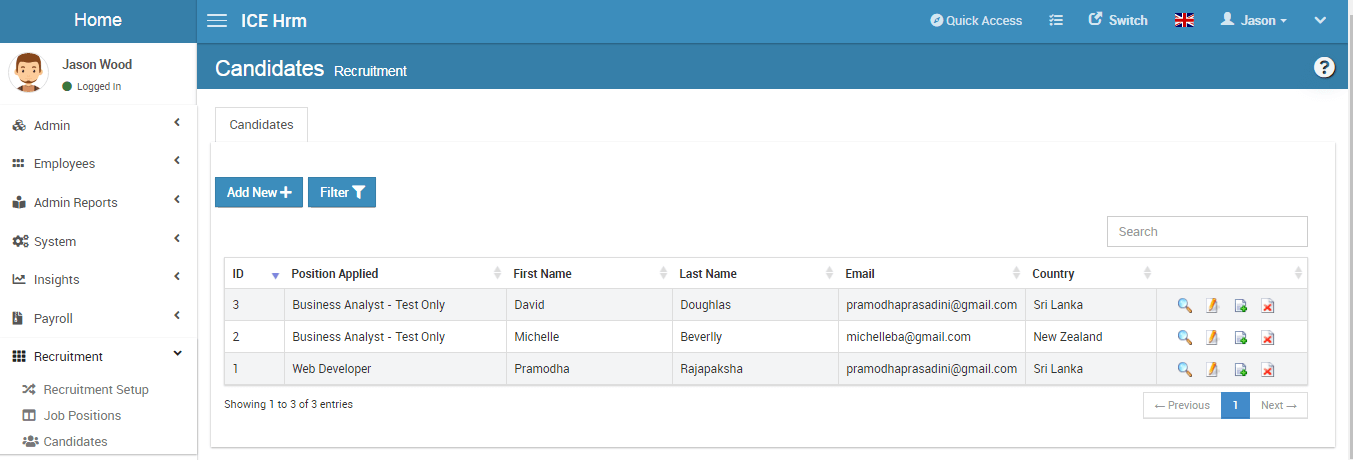
IceHrm Open Source Edition makes my shortlist because it’s one of the few HR suites that actually gives you robust internal job posting tools out of the box. I’ve seen teams use its internal job portal to handle cross-department transfers and promote advancement, all while tracking candidates in the same system. What I like is how straightforward it makes promoting roles to current employees without bolt-on modules or workarounds.
IceHrm’s Best For
- Organizations building internal mobility and promotion programs
- HR teams seeking open source control and customization
IceHrm’s Not Great For
- Companies needing sophisticated payroll or benefits management
- Teams reliant on large-scale external candidate sourcing
What sets IceHrm apart
IceHrm takes an open approach to traditional HR tasks by putting internal mobility front and center. Unlike OrangeHRM or Sentrifugo, which often focus on basic leave tracking or attendance, IceHrm leans into using an internal job portal to support employee growth. In practice, this works well when you want to encourage transfers and promotions within the organization rather than defaulting to external hiring.
Tradeoffs with IceHrm
IceHrm optimizes for transparency and internal talent movement, but you lose advanced features like automated payroll or modern engagement tools, which means you’ll need other solutions as your needs evolve.

TimeTrex
Best for accurate time tracking

TimeTrex stands out for open source HR software when you need accurate time tracking built into a broader workforce platform. I’ve watched teams rely on its punch-in/out options, geolocation-stamped time cards, and automated scheduling, especially for businesses with strict attendance policies. What I like most is how I can run detailed payroll straight from the same system, with compliance tools and audit logs making the whole process feel safer.
This works best when accurate records drive not just payroll but also compliance and visibility for hourly workforces.
TimeTrex’s Best For
- Businesses that need accurate time and attendance tracking
- HR teams managing payroll and compliance in one system
TimeTrex’s Not Great For
- Teams looking for advanced talent management features
- Organizations needing modern, user-friendly dashboards
What sets TimeTrex apart
TimeTrex takes a strict approach to workforce oversight, making time tracking and attendance compliance its top priority. In practice, you build work schedules, manage timecards, and run payroll in one place, so administrative staff control all the moving parts from a single hub. Unlike something like OrangeHRM, which focuses more on talent and performance, TimeTrex stays tightly centered on accurate records and payroll-ready data.
Tradeoffs with TimeTrex
TimeTrex optimizes for timekeeping and compliance, but that focus means you miss out on modern talent management modules, so teams needing growth and engagement tools look elsewhere.
New Product Updates from TimeTrex
TimeTrex Adds Quick Punch App With Offline and QR Support
TimeTrex adds a new Quick Punch app, offline punching, QR code scanning, punch images, configurable messages, and punch warnings or lockouts to improve employee clock-ins across browsers and local computers. For more information, visit TimeTrex’s official site.
 .
.Annen HR-programvare med åpen kildekode
Her er noen flere HR-systemer med åpen kildekode som er verdt å vurdere, men som ikke kom med på min topp 10-liste. Jeg hadde ikke plass til en full gjennomgang av hver av disse, men de fortjener likevel å vurderes:
- Open HRMS
For tracking KPIs
- MintHCM
For a holistic approach to HCM
- Sentrifugo
For an employee self-service portal
- Bazara
For HR with talent acquisition.
- Jorani
Leave management software
- SimpleHRM
Free open source HR software
- WaypointHR
For compensation management


Relaterte anmeldelser av HR-programvare
Hvis du fortsatt ikke har funnet det du leter etter her, kan du se nærmere på disse andre relaterte verktøyene som vi har testet og evaluert:
- HR-programvare
- Lønnsprogramvare
- Rekrutteringsprogramvare
- Tjenester for registrert arbeidsgiver
- Systemer for sporing av jobbsøkere
- Programvare for arbeidsstyring
How I Evaluate Open Source HR Software
I evaluate open source HR tools in two layers: core requirements like self-hosting, OSS licensing, and employee records, then differentiators like community health and payroll depth.
Core Functionality (Table Stakes For This List)
When I'm selecting tools for my list, I rank each one on a scale from 0 (does not offer the functionality) to 5 (excels in this area) for each core functionality listed below. Then, I calculate the tool's total score into a percentage. Each tool needs to achieve a minimum total score of 65% to be considered for inclusion.
- Open Source Licensing: I check for a recognized OSI-approved license (GPL, MIT, AGPL, Apache) and confirm the source code is publicly available in a live repository.
- Self-Hosting Capability: Each tool should support on-premise or self-hosted deployment so your team controls where HR data lives and how infrastructure is managed.
- Employee Records Management: I look for a centralized employee database that handles profiles, org hierarchy, contracts, and document storage across the full employee lifecycle.
- Leave & Attendance Tracking: Tools should handle leave requests, approval workflows, and attendance logging—like configuring regional holiday calendars or multi-level manager approvals.
- Payroll & Compensation Module: I evaluate whether the platform includes payroll runs, payslip generation, and salary structures, or offers a direct integration path with payroll systems.
- Extensibility & API Access: A documented REST API, webhook support, or plugin architecture matters here—especially for teams connecting HR data to ERPs or identity providers.
Once I have a list of tools that meet this criteria, I consider what sets each platform apart.
Differentiating Factors (What Sets Vendors Apart)
Here's how I compare and contrast different vendors:
Standout Features
An employee self-service portal is a big differentiator—it lets staff submit leave requests, download payslips, and update personal details without filing tickets with HR. I also evaluate multi-language and localization support, which matters for teams spread across regions who need locale-specific date formats, currencies, and labor law templates. Performance management is another feature I look for, especially tools that tie goal tracking and appraisal cycles directly to employee records.
Beyond Features
Community health is one of the first things I check. A project with regular commits, active forum discussions, and recent releases signals long-term viability—abandoned repos are a real risk in this space. I also evaluate the licensing model closely, since an AGPL license carries different obligations than MIT when you're modifying source code for internal use. Compliance and data security round out my assessment, particularly role-based access controls and audit logging for handling sensitive employee data on self-hosted infrastructure.
Hva er HR-programvare med åpen kildekode?
HR-programvare med åpen kildekode er en type verktøy for personaladministrasjon der kildekoden er tilgjengelig for alle som ønsker å bruke, endre og distribuere den. Den gjør det mulig for virksomheter å tilpasse HR-prosessene sine, inkludert administrasjon av medarbeiderdata, lønn, rekruttering og evaluering av prestasjoner, etter egne behov. Denne programvaren gir vanligvis kostnadsfordeler og fleksibilitet, støttet av et fellesskap av utviklere og brukere.
Funksjoner
Her er kjernefunksjonene all god HR-programvare med åpen kildekode bør ha:
- Tilpassbar kode: Endre programvaren for å tilpasse arbeidsflyter, skjemaer og funksjoner til organisasjonens unike behov. Dette er perfekt hvis du ønsker friheten til å bygge inn akkurat det som betyr mest for deg.
- Administrasjon av medarbeiderdatabase: Lagre, organiser og oppdater medarbeiderinformasjon enkelt, slik at du raskt kan finne detaljer og unngå å drukne i regneark.
- Rollebasert tilgangskontroll: Angi tillatelser for ulike brukere for å sikre at sensitive HR-data forblir private, samtidig som medarbeiderne får tilgangen de trenger til de daglige oppgavene sine.
- Registrering av arbeidstid og oppmøte: Registrer medarbeidernes oppmøte, permisjonssøknader og arbeidstid, slik at du kan effektivisere lønnskjøringen og unngå hodebry med tidsregistrering.
- Verktøy for resultatstyring: Administrer mål, tilbakemeldinger og vurderinger på ett sted, slik at du kan gi løpende støtte og holde teamene på rett spor.
- Lønnsintegrasjon: Koble til lønnsløsninger for å automatisere beregninger og utbetalinger, og redusere den administrative belastningen.
- Rekruttering og introduksjon: Publiser ledige stillinger, administrer søknader og følg fremdriften fra første intervju til første arbeidsdag – alt på en måte du kan tilpasse etter hvert som prosessene dine endres.
- Dokumentadministrasjon: Lagre kontrakter, retningslinjer og andre viktige filer på en sikker måte, slik at det blir enkelt å finne det du trenger uten å lete gjennom skrivebordsskuffer.
- Rapportering og analyse: Generer detaljerte rapporter for å få innsikt i medarbeidertrender, antall medarbeidere, personalutskifting og mer – ingen krystallkule er nødvendig!
Vanlige AI-funksjoner i HR-programvare med åpen kildekode
I tillegg til standardfunksjonene i HR-programvare med åpen kildekode som er nevnt ovenfor, tar mange av disse løsningene i bruk kunstig intelligens med funksjoner som:
- Automatisert CV-gjennomgang: Kunstig intelligens analyserer søknader og fremhever de beste kandidatene, slik at du kan slippe den tidkrevende manuelle gjennomgangen og fokusere på intervjuene.
- Prediktiv arbeidsstyrkeanalyse: Bruk kunstig intelligens til å forutsi risiko for personalutskifting og behov i arbeidsstyrken, slik at du kan oppdage mønstre og planlegge smartere.
- Chatboter for HR-støtte: Interaktive chatboter basert på kunstig intelligens svarer umiddelbart på medarbeidernes spørsmål om retningslinjer eller fordeler, slik at innboksen ikke renner over.
- Resultatvurderinger drevet av kunstig intelligens: Samle inn og vurder tilbakemeldinger automatisk for å identifisere utviklingsmuligheter, slik at oppfølgingen blir mindre basert på gjetting.
- Intelligent bemanningsplanlegging: Kunstig intelligens bidrar til å optimalisere skiftfordeling og kalendere, slik at du har de riktige personene på rett sted til rett tid.
Når du bruker HR-programvare med åpen kildekode, har du friheten til å tilpasse koden. Hvis tilpasning imidlertid ikke er en prioritet, kan du utforske disse HR-programvareplattformene som tilbyr funksjonalitet som fungerer rett ut av boksen.
Fordeler
Det finnes omfattende lister over HR-programvare å velge mellom. Hvorfor bør du da velge åpen kildekode? HR-programvare med åpen kildekode gir brukere og organisasjoner en rekke fordeler. Her er flere grunner til at du kanskje ønsker å ta i bruk HR-programvare med åpen kildekode i organisasjonen din:
- Kostnadseffektivitet: Den vanligste fordelen ved å bruke programvare med åpen kildekode er at den er gratis. Ved å eliminere de høye lisensavgiftene som følger med proprietære systemer, reduserer et system med åpen kildekode de samlede driftskostnadene for virksomheten din.
- Tilpasning: Organisasjoner kan endre HR-programvare med åpen kildekode for å møte sine spesifikke behov, noe som sikrer en skreddersydd løsning som er tilpasset deres unike prosesser og krav.
- Støtte fra fellesskapet: Systemer med åpen kildekode har vanligvis et aktivt fellesskap av utviklere og brukere som tilbyr omfattende støtte og ressurser, med hjelp til feilsøking og regelmessige oppdateringer.
- Åpenhet: Programvarens åpne natur gjør det mulig for brukerne å se og forstå kildekoden, slik at de kan være sikre på at det ikke finnes skjulte funksjoner eller sikkerhetsproblemer.
- Innovasjon: Tilgang til kildekoden oppmuntrer til innovasjon og gjør det mulig for organisasjoner å ta i bruk de nyeste funksjonene og forbedringene raskt.
Ved å velge HR-programvare med åpen kildekode kan virksomheter spare kostnader og få den fleksibiliteten og kontrollen som trengs for å skape et system som passer perfekt til behovene deres. Disse fordelene bidrar samlet til en mer effektiv, sikker og tilpasningsdyktig HR-administrasjonsprosess, og gir organisasjoner et godt grunnlag for varig suksess.
Kostnader og priser
Noen ganger handler alt om pris, og programvare med åpen kildekode er vanligvis svært rimelig. Faktisk er programvaren i de fleste tilfeller tilgjengelig for gratis bruk.
Mange leverandører av programvare med åpen kildekode tilbyr også brukerne muligheten til å oppgradere til en betalt versjon av den samme programvaren hvis de ønsker tilgang til mer avanserte funksjoner. Som bruker er det flott å ha denne typen fleksibilitet. Det betyr at du kan laste ned programvaren og bruke litt tid på å bli kjent med den før du tar en beslutning.
Og hvis du virkelig liker den og ønsker tilgang til flere funksjoner, kan du enten oppgradere eller be IT-avdelingen om å prøve å tilpasse den til virksomhetens spesifikke behov.
Vanlige spørsmål
Her er noen svar på vanlige spørsmål jeg ofte får om HR-programvare med åpen kildekode:
Hva betyr "åpen kildekode" når det gjelder programvare?
Begrepet åpen kildekode viser til en type modell for utvikling og distribusjon av programvare der kildekoden til et dataprogram gjøres tilgjengelig for offentligheten. Når denne informasjonen er offentlig tilgjengelig, kan andre programvareutviklere endre den underliggende kildekoden for å tilpasse programmet til sine egne spesifikke behov. Programvare med åpen kildekode utvikles vanligvis i samarbeid innenfor tekniske utviklermiljøer, der utviklere arbeider med prosjektet pro bono (det vil si gratis) for å videreutvikle prosjektet til beste for bransjen og sluttbrukerne.
Hva er forskjellen mellom HRIS og HRMS?
HRIS-systemer (informasjonssystemer for menneskelige ressurser) er programvare som tilbyr mer grunnleggende funksjoner som registrering av oppmøte, tidsregistrering og lønnsbehandling. HRMS-systemer (systemer for personaladministrasjon) er verktøy for medarbeideradministrasjon som tar funksjonaliteten et skritt videre ved å inkludere funksjoner som rapportering, medarbeiderengasjement og medarbeidervurdering.
Hvilke programvareintegrasjoner er viktige for HR-programvare med åpen kildekode?
Programvareintegrasjoner kan spare deg for mye manuelt arbeid, for eksempel behovet for å overføre data manuelt eller via import og eksport fra ett system til et annet. Ved å bruke innebygde programvareintegrasjoner kan du i stedet forbedre teamets produktivitet og hjelpe HR-medarbeiderne med å arbeide mer effektivt.
Hvilke integrasjoner du bør se etter, avhenger av hvilken type HR-programvare du er ute etter. Integrasjoner med e-postleverandører, digitale kalendere, lønnsprogramvare og arbeidsplattformer som Google Workspace og Microsoft SharePoint er imidlertid alltid nyttige.