

10 beste programvareløsninger for arbeidsstyring i detaljhandelen i 2026

Beste programvare for bemanningsstyring i varehandelen – kortliste


Programvare for bemanningsstyring i varehandelen hjelper deg med å håndtere turnusplanlegging, oppmøte og bemanningsbehov for butikkene dine, alt på ett sted. Hvis du ser etter en smartere måte å administrere skift på, øke medarbeiderengasjementet, holde tritt med kravene som gjelder for timelønnede og støtte de ansatte som møter kundene, har du kommet til rett sted. Med så stort press for å håndtere skiftende kundetrafikk, heve den generelle kundeopplevelsen og holde medarbeiderne engasjert kan det riktige verktøyet utgjøre hele forskjellen. I denne veiledningen ser du hvilken programvare som utmerker seg for 2026, slik at du kan velge den løsningen som passer best for driften og behovene til teamet ditt i varehandelen.
Hvorfor du kan stole på våre programvareanbefalinger
Teamet vårt har testet og anmeldt programvare siden 2012. Vi er selv HR-eksperter, så vi vet hvor vanskelig og hvor viktig det er å velge riktig programvare.
I denne guiden har vi vurdert verktøyene gjennom praktisk testing og uavhengig research og gitt dem poeng ut fra våre utvelgelseskriterier. Vi bygger også på innsikt fra ledende eksperter i bransjen og erfarne HR-eksperter.
Anmeldelsene våre bygger på vår egen redaksjonelle vurdering. De er ikke et salgsargument.
Ekspertanmeldere:
Sammenligningstabell for programvare for bemanningsstyring i varehandelen
Tabellen nedenfor sammenligner prisopplysninger for mine beste utvalgte løsninger for bemanningsstyring i varehandelen.
| Tool | Best For | Trial Info | Price | ||
|---|---|---|---|---|---|
| 1 | Best for AI scheduling with earned wage access | Free demo available | From $500/month | Website | |
| 2 | Best for SMB retail scheduling and shift ops | Free plan + 14-day free trial available | From $24/location/month (billed annually) | Website | |
| 3 | Best for quick frontline shift swapping | 14-day free trial + free demo available | From $5/user/month | Website | |
| 4 | Best for integrating workforce insights with payroll | Free demo available | Pricing upon request | Website | |
| 5 | Best for real-time workforce data unification | Free demo available | Pricing upon request | Website | |
| 6 | Best for highly configurable labor rules | Free demo available | Pricing upon request | Website | |
| 7 | Best for adaptive demand forecasting in stores | Free demo available | Pricing upon request | Website | |
| 8 | Best for combining frontline communication with tasks | Free demo available | Pricing upon request | Website | |
| 9 | Best for global hourly compliance | Free trial + free demo available | Pricing upon request | Website | |
| 10 | Best mobile scheduling for floor teams | Free demo available | Pricing upon request | Website |
Anmeldelser av den beste programvaren for bemanningsstyring i varehandelen
Nedenfor finner du mine detaljerte sammendrag av den beste programvaren for bemanningsstyring i varehandelen som kom med på kortlisten min. Anmeldelsene mine gir en detaljert gjennomgang av funksjonene, de beste bruksområdene og integrasjonene til hver plattform, slik at du kan finne den som passer best for deg.

Rotageek
Best for AI scheduling with earned wage access
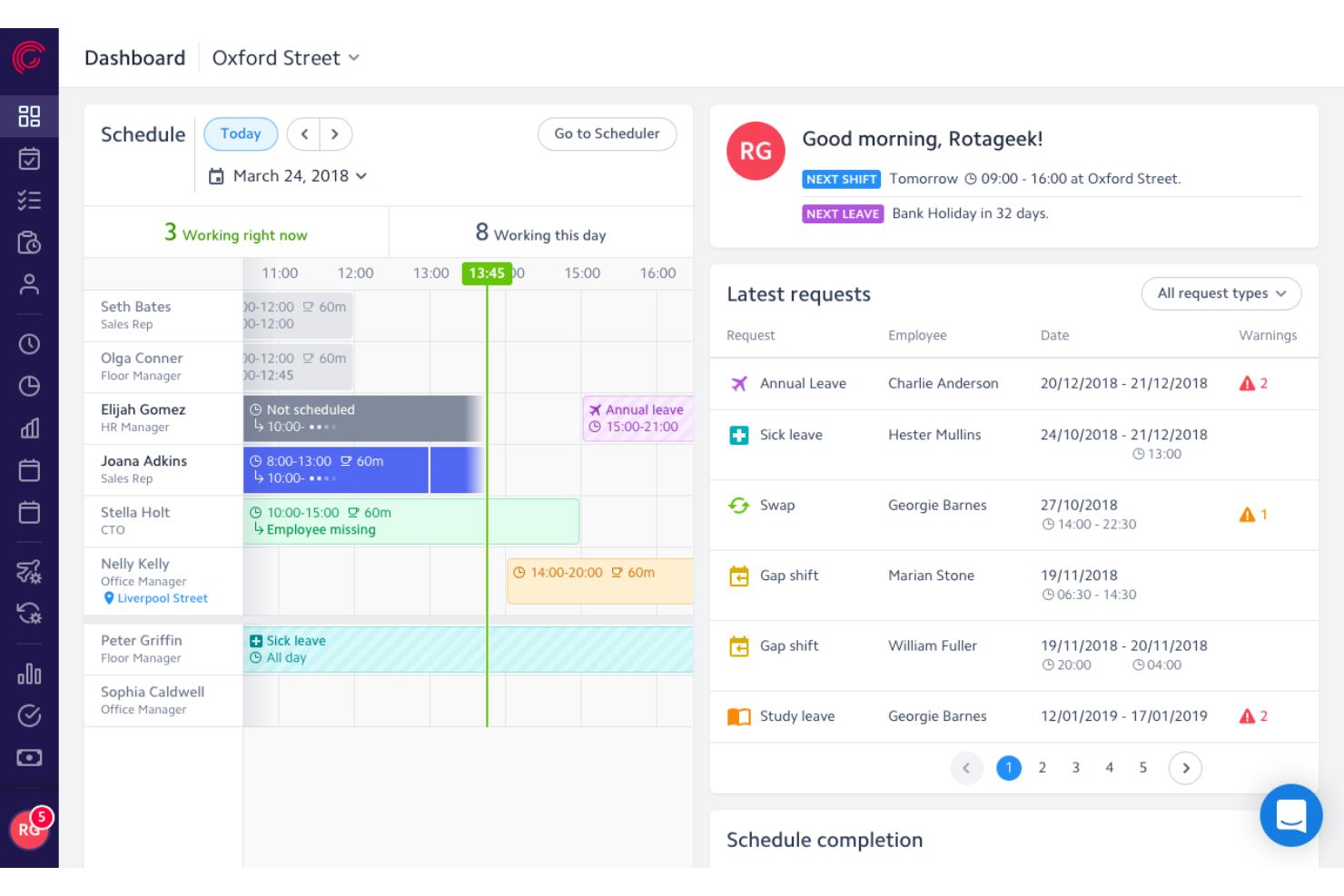
Rotageek is a retail workforce management platform with AI-driven shift scheduling, ML-based demand forecasting in 15-minute increments, time and attendance tracking, and earned wage access integrations.
Who Is Rotageek Best For?
Rotageek is a strong fit for mid-market to enterprise retailers in the UK and Europe managing hourly workforces across multiple locations.
Why I Picked Rotageek
Rotageek earns its spot on my shortlist because of how tightly its AI scheduling engine connects to earned wage access partners like Wagestream and Hastee. I love that Auto Scheduling generates compliant rotas in roughly 30 seconds while factoring in demand forecasts built on 15-minute ML increments, pulling in real footfall data from RetailNext. That combination means hourly associates get schedules that reflect actual store traffic, and they can access earned pay between paydays without HR lifting a finger.
Rotageek Key Features
- Labour modelling: Run "what-if" scenarios to test how volume changes, new store hours, or cost pressures affect headcount before committing to a plan.
- Multi-location schedule view: See and manage rotas across individual stores or as a merged view, making it easy to spot gaps and overstaffing across your entire estate.
- Geo-fenced time clock: Employees clock in and out via the mobile app with location verification and photo capture, creating a clear audit trail for wage and hour compliance.
- Natural language workforce insights: Query your labor data in plain language and get instant AI-backed answers without waiting on a BI team to pull reports.
Rotageek Integrations
Rotageek supports integrations with RetailNext, Wagestream, Hastee, Level, Zellis, ADP, SAP, Oracle, Sage, and Yoobic. It also supports custom connectivity through APIs, webhooks, and SFTP transfers.
Pros and Cons
Pros:
- Demand forecasting uses real footfall data
- Earned wage access built for hourly staff
- AI auto-scheduling generates rotas in seconds
Cons:
- Occasional mobile app stability issues
- No explicit US labor law compliance

Homebase
Best for SMB retail scheduling and shift ops
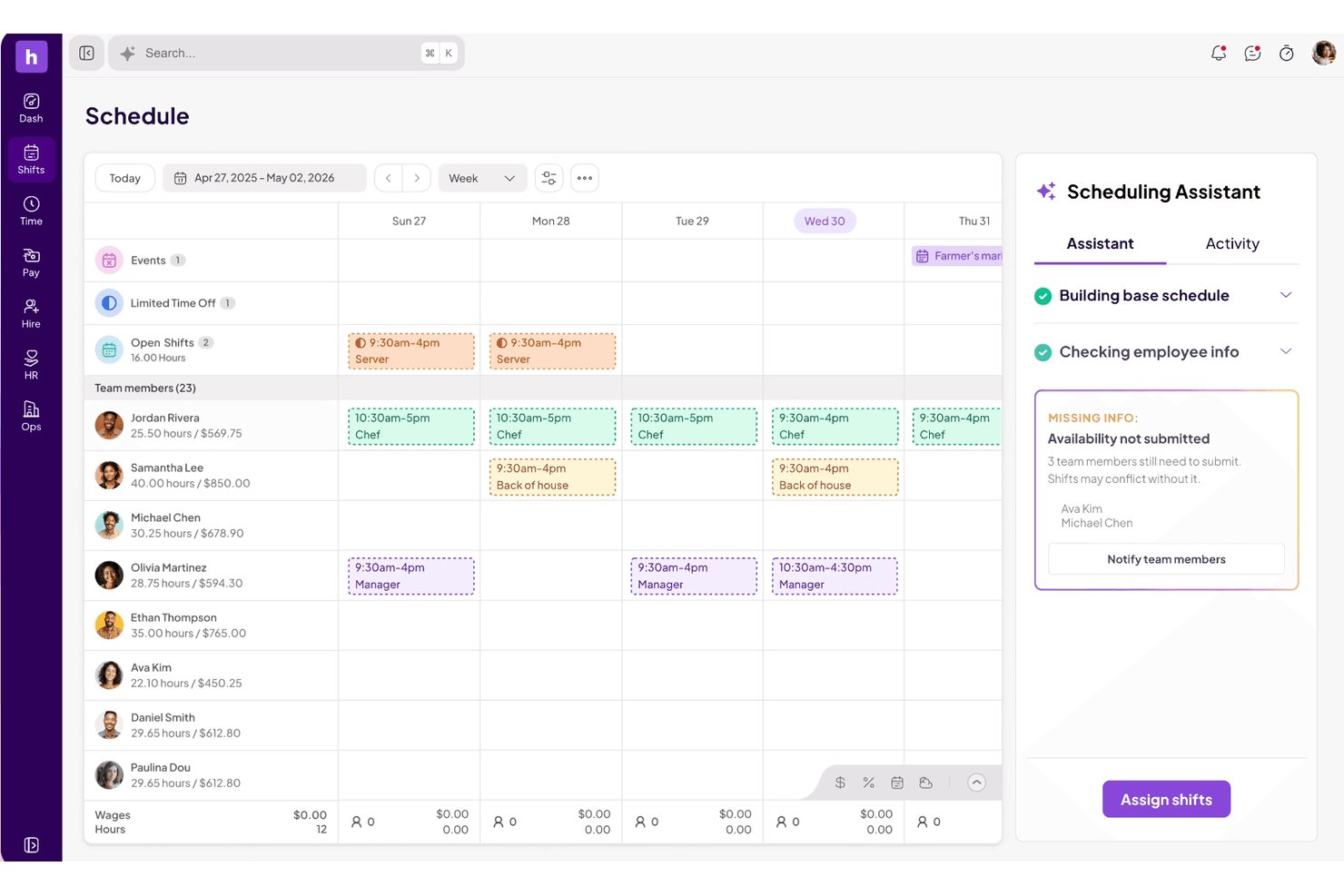
Homebase is a workforce management platform built for hourly teams that combines shift scheduling, time and attendance tracking, team communication, and labor cost monitoring in one mobile-first system.
Who Is Homebase Best For?
Homebase fits store operations managers and people ops leads at small-to-mid-sized retail businesses who need scheduling, time tracking, and team communication in one mobile-first tool.
Why I Picked Homebase
Homebase earns its spot on my shortlist because it's purpose-built for the kind of hourly shift environment small retail teams actually run on. I love that the AI Scheduling Assistant can generate a full week's schedule in seconds and even digitize an existing paper schedule from a photo upload. Pair that with real-time labor cost versus sales tracking pulled directly from your POS, and store managers can make smarter coverage calls mid-shift without leaving the floor.
Homebase Key Features
- Geofenced time clock: Employees clock in only when physically on-site, with photo capture and unique PINs to prevent buddy punching.
- Shift trade and cover requests: Team members can request or claim open shifts directly in the mobile app, with manager approval required before changes go live.
- In-app team messaging: Managers can message individuals, role-based groups, or the full team without sharing personal phone numbers, with read receipts on announcements.
- Performance and attendance tracking: Late alerts, no-show tracking, and per-employee performance notes give managers a running record of attendance patterns over time.
Homebase Integrations
Homebase offers native integrations with Square, Toast, Clover, Shopify, Lightspeed, PAR POS, GoDaddy, Gusto, ADP RUN, and QuickBooks Online Plus. POS connections sync sales and labor data for scheduling and cost tracking.
Pros and Cons
Pros:
- Real-time labor cost tracking from POS data
- Mobile app supports shift trades and covers
- AI auto-scheduling digitizes paper schedules
Cons:
- Labor demand forecasting lacks foot-traffic inputs
- No predictive scheduling compliance features

Deputy
Best for quick frontline shift swapping
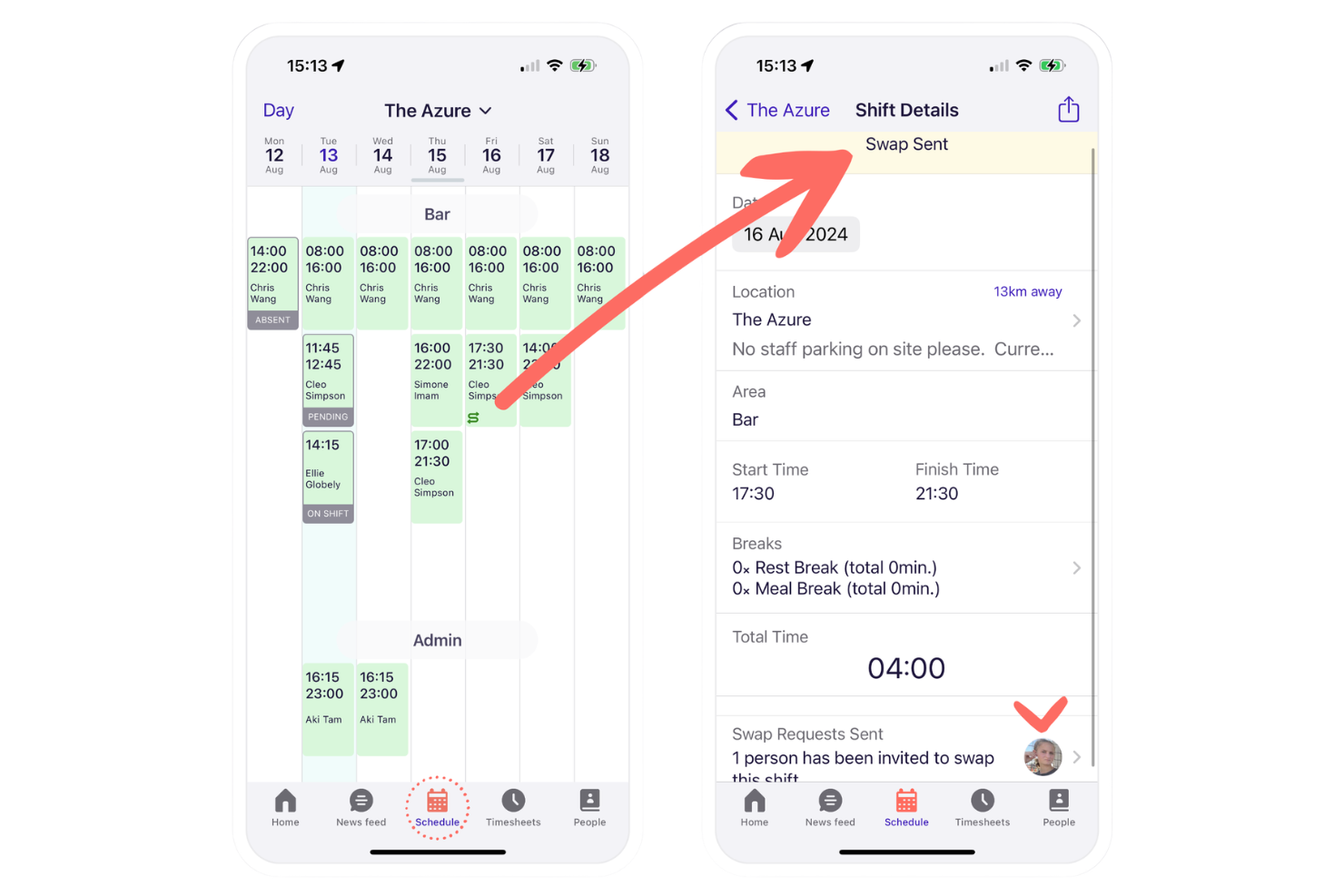
Deputy is a retail workforce management platform that offers employee scheduling, time tracking, attendance, shift swapping, and tasking tools designed for fast-moving retail environments.
Who Is Deputy Best For?
Retailers and restaurant chains with hourly staff who need quick shift adjustments and a mobile-friendly scheduling solution.
Why I Picked Deputy
I picked Deputy as one of the best because I see frontline teams use its mobile shift swapping daily, where managers approve swaps in seconds, and staff can pick up extra shifts instantly, keeping retail coverage flexible and responsive.
Deputy Key Features
- Timesheet approvals: Managers review and approve digital timesheets for payroll processing.
- Break planning: Schedule legally compliant meal and rest breaks for staff.
- Labor cost reporting: View real-time wage costs compared to sales data.
Deputy Integrations
Deputy offers native integrations with ADP, Gusto, QuickBooks Online, Xero, Square, BambooHR, Paychex, Netsuite, CloudPayroll, MYOB, and Zapier. An API is available for custom integrations.
Pros and Cons
Pros:
- Real-time attendance and location tracking
- Smart scheduling based on sales data
- Fast mobile shift swapping for retail teams
Cons:
- Strict break-enforcement blocks early clock-ins
- Manual data-mapping errors or API disconnects can stall exports

Workday
Best for integrating workforce insights with payroll
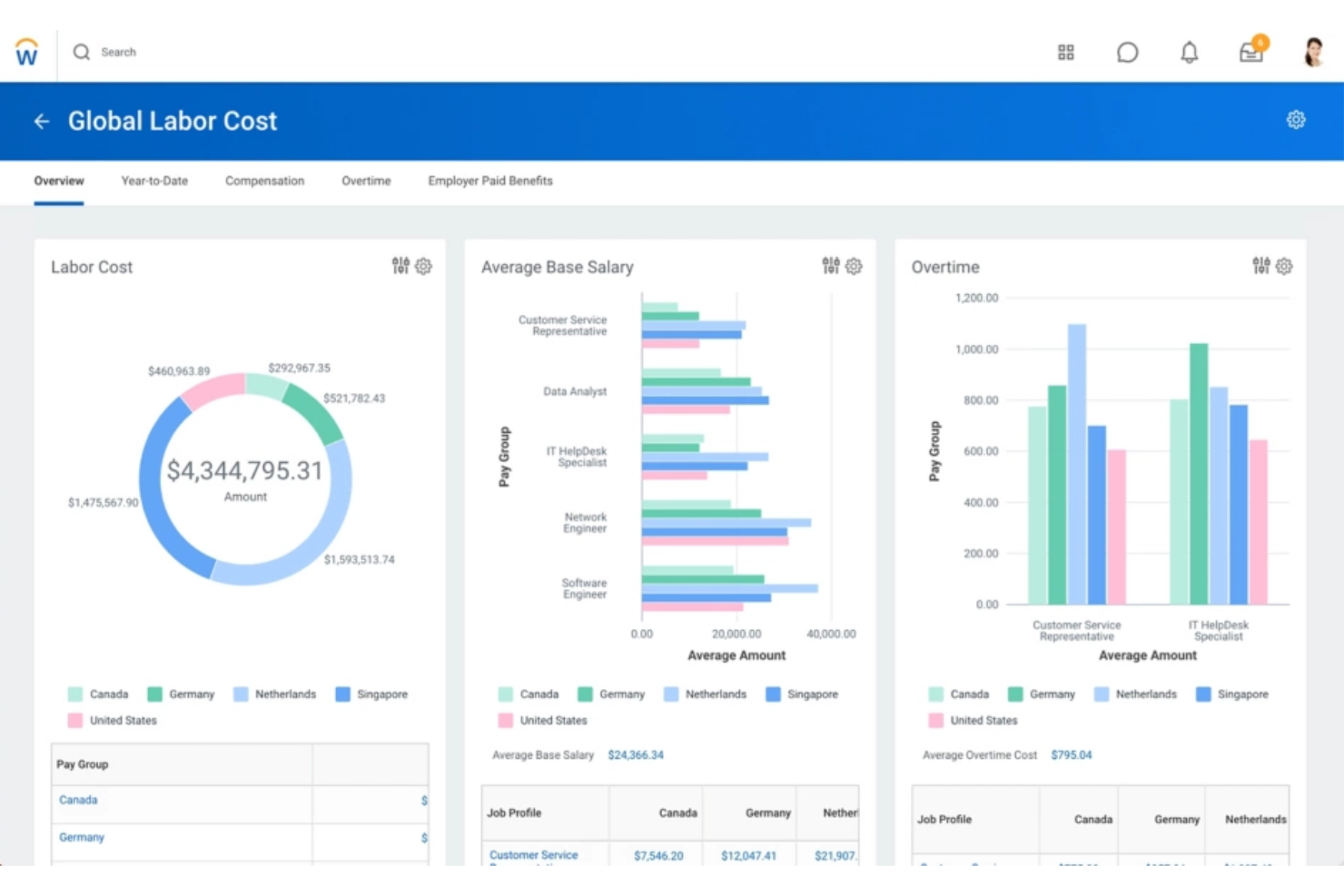
Workday is a retail workforce management platform designed for staff scheduling, attendance tracking, workforce analytics, and integration with finance, HR, and broader WFM functions.
Who Is Workday Best For?
Workday suits large retail organizations and HR teams that need unified workforce, HR, and payroll management across multiple locations.
Why I Picked Workday
I picked Workday as one of the best because I can pull workforce and payroll data together at the right time in real time. I use its unified reporting to align staffing metrics with payroll processes, which makes labor and compensation analysis much more actionable.
Workday Key Features
- Mobile time tracking: Allows employees to clock in and out through a mobile app.
- Absence management: Tracks all types of employee leave and automates approvals.
- Labor compliance monitoring: Monitors labor law compliance for multiple regions and business units.
Workday Integrations
Workday offers native integrations with platforms like Salesforce, Microsoft 365, Oracle, ADP, and Okta, and provides an API for custom integrations.
Pros and Cons
Pros:
- Advanced compliance monitoring for retail operations
- Automates scheduling based on real-time demand
- Consolidates HR, payroll, and staffing data
Cons:
- User friction with mobile UX and session timeouts
- System configuration can be time-consuming
Dayforce
Best for real-time workforce data unification
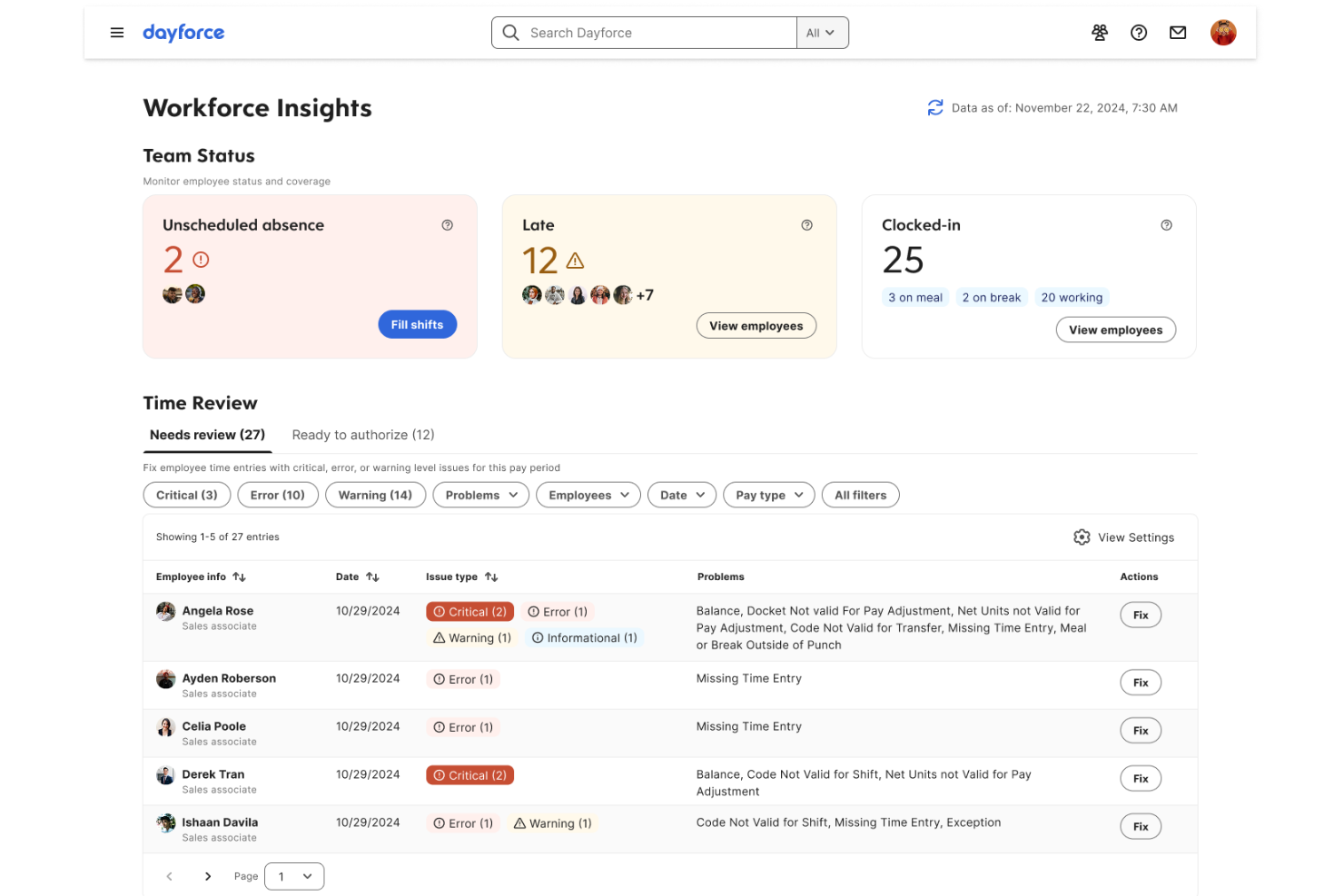
Dayforce is a cloud-based retail workforce management software that combines scheduling, time and attendance, payroll, and HR functionality with centralized data management.
Who Is Dayforce Best For?
Dayforce is well-suited for large retailers and HR teams managing distributed hourly workforces needing unified workforce data across locations.
Why I Picked Dayforce
I picked Dayforce because I need real-time workforce data across all my retail locations, not after the fact. My team uses the single HR/payroll database to track attendance, scheduling, and pay updates as they happen.
Dayforce Key Features
- Self-scheduling tools: Employees can select and swap available shifts directly in the app.
- Mobile clock-in: Staff can clock in or out using their mobile devices with geo-fencing.
- Compliance rule engine: Built-in rules enforce labor laws and company policies for every location.
Dayforce Integrations
Dayforce offers native integrations with Workday, Oracle, and SAP SuccessFactors. An API is available for custom integrations.
Pros and Cons
Pros:
- Mobile app enables shift changes and approvals
- Payroll and HR data unified in one system
- Real-time scheduling and time tracking tools
Cons:
- Initial setup can be time-intensive
- Customization often requires vendor involvement

Infor
Best for highly configurable labor rules

Infor is a workforce management software for retailers that combines labor forecasting, scheduling, time tracking, real-time analytics, and attendance management in a modular suite.
Who Is Infor Best For?
Infor suits large retail organizations and operations leaders managing complex labor scheduling and compliance requirements across multiple locations.
Why I Picked Infor
I picked Infor because I can fine-tune labor rules at the region, role, or union level and match the realities of retail compliance. My team uses workload modeling and rule-based scheduling, so we don’t get limited by one-size-fits-all templates.
Infor Key Features
- Time and attendance tracking: Captures punches and exceptions in real time.
- Mobile self-service portal: Lets employees view schedules, swap shifts, and request time off.
- Compliance monitoring dashboard: Flags potential violations of work hours, breaks, or overtime rules.
Infor Integrations
Native integrations are not publicly listed. Infor provides an API for custom integrations.
Pros and Cons
Pros:
- Mobile app supports employee shift swaps
- Flexible scheduling for complex workforces
- Extensive labor and compliance rule engine
Cons:
- Custom configurations requires heavy IT administrative overhead
- Reporting setup can be time-consuming

Legion
Best for adaptive demand forecasting in stores
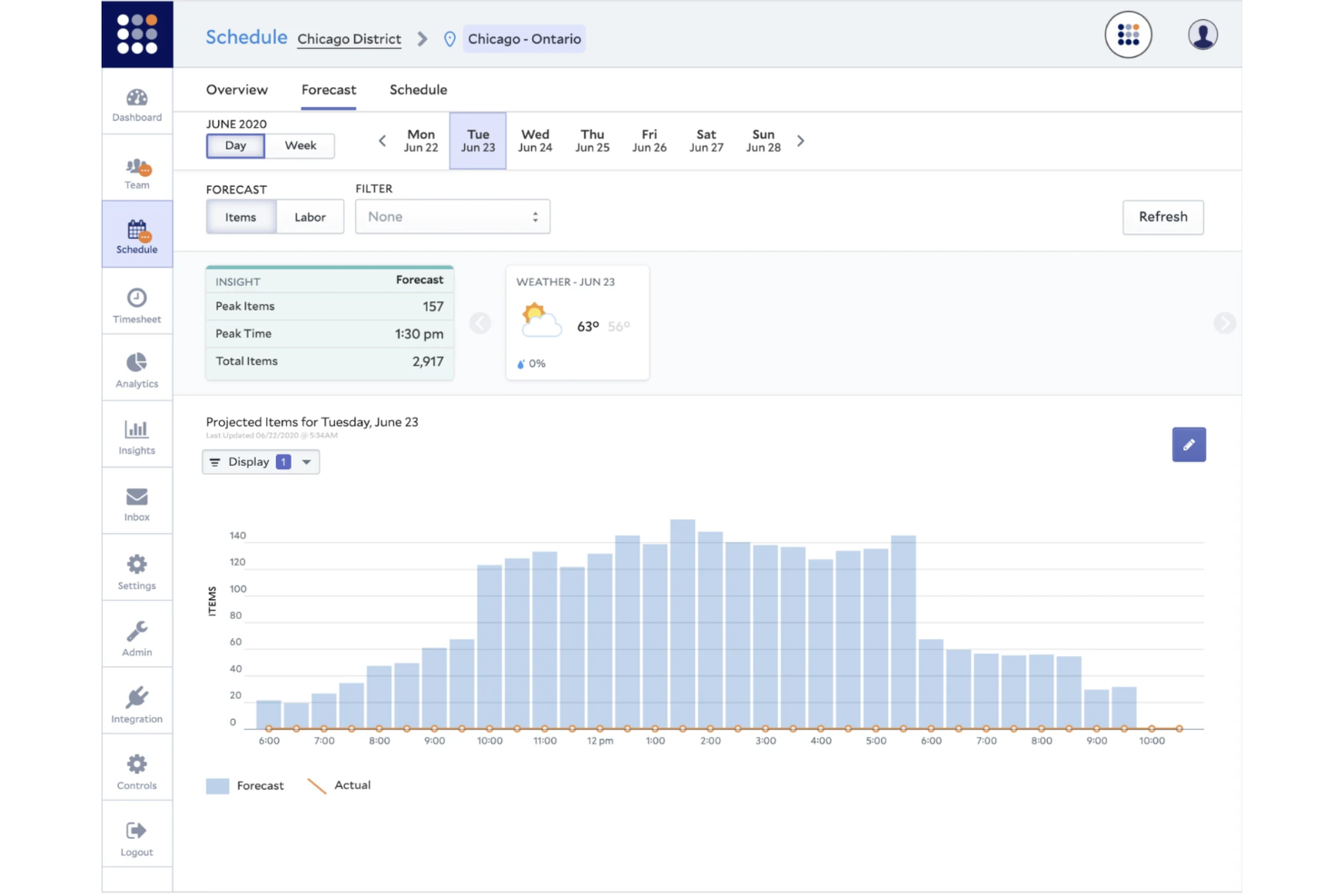
Legion is a cloud-based retail workforce management platform with features for staff scheduling, demand forecasting, labor optimization, time tracking, and real-time communications.
Who Is Legion Best For?
Legion suits large retailers and multi-location businesses that need AI-powered demand forecasting and optimized scheduling for hourly store staff.
Why I Picked Legion
I picked Legion because I see its adaptive demand forecasting handles fluctuating store traffic with high precision. I use its machine learning models to align staffing to predicted peaks, and the automated schedule builder supports quick realignment on short notice.
Legion Key Features
- Time and attendance management: Track employee hours and attendance using web or mobile access.
- Mobile app for staff: Employees can view schedules, request shifts, and receive notifications.
- Compliance monitoring tools: Built-in controls flag potential labor law or policy violations.
Legion Integrations
Legion offers native integrations with ADP, SAP SuccessFactors, and Workday, and provides an API for custom integrations.
Pros and Cons
Pros:
- Mobile shift swapping for hourly staff
- Automated compliance with labor regulations
- Adaptive scheduling powered by AI
Cons:
- Occasional location-tracking (geofencing) errors
- Enterprise-level rollouts can face delays during complex data integrations
WorkJam
Best for combining frontline communication with tasks
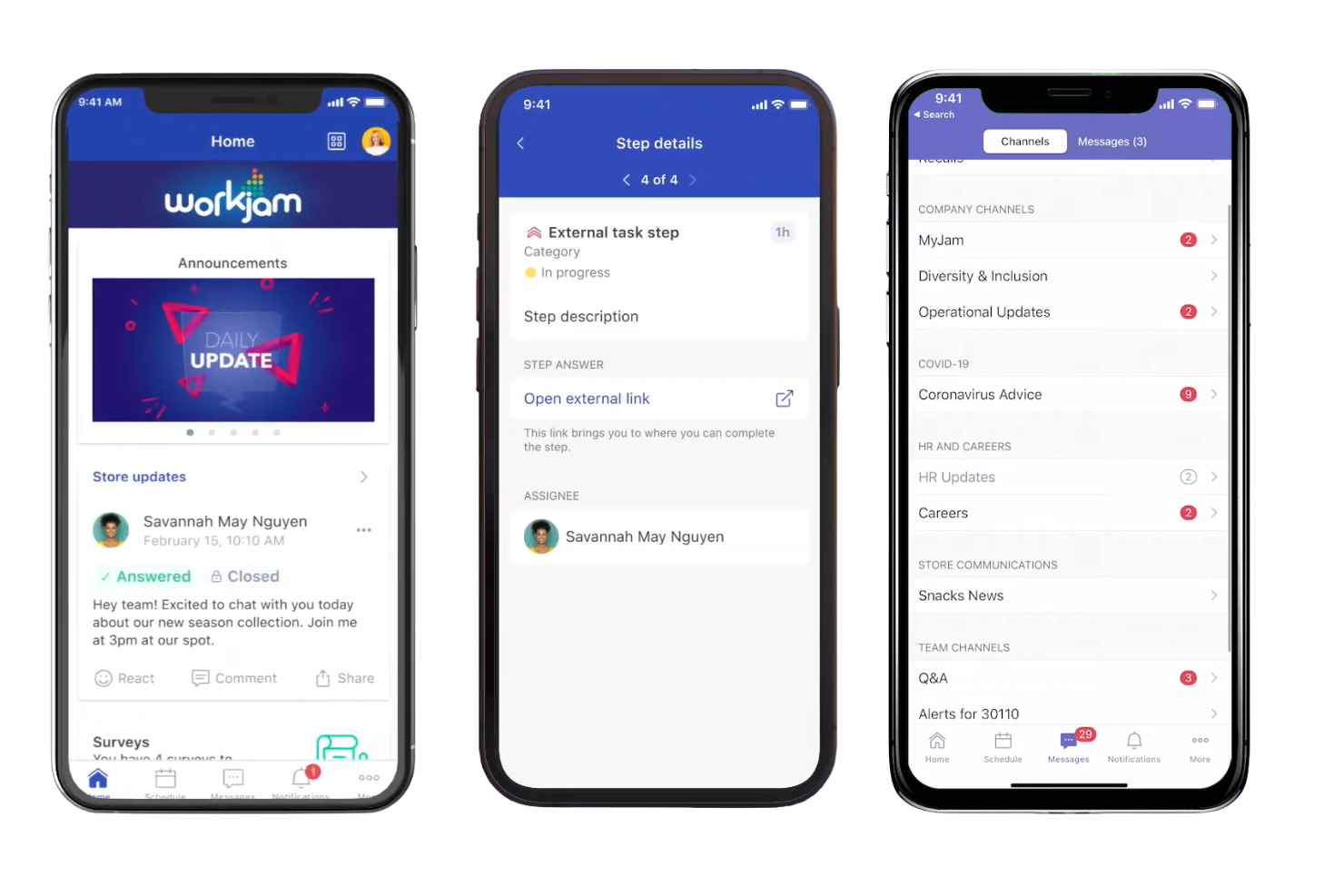
WorkJam is a retail workforce management platform that brings together frontline employee communication, task management, shift scheduling, and training in one mobile-first solution.
Who Is WorkJam Best For?
Frontline retailers and multi-site operation managers who need to unify communications, task execution, and shift management in a mobile platform.
Why I Picked WorkJam
I picked WorkJam as one of the best because I can connect frontline teams through chat, announcements, and task checklists tied directly to daily workflows. My team uses its mobile task management so employees get clear instructions alongside schedule updates.
WorkJam Key Features
- Surveys and polls: Managers can gather feedback directly from frontline staff.
- Microlearning modules: Deliver short, targeted training sessions within the app.
- Recognition and rewards: Enable managers to acknowledge employee achievements digitally.
WorkJam Integrations
WorkJam offers native integrations with Google Cloud, UKG, Microsoft Teams, Azure Services, ADP, Blue Yonder, Honeywell, Xoxoday, and more. An API is available for custom integrations.
Pros and Cons
Pros:
- Real-time communication with task assignments
- Mobile-first microlearning for frontline staff
- Shift swapping and open shift claiming in-app
Cons:
- App lag during heavy media loads
- Configuring workflows can require vendor support

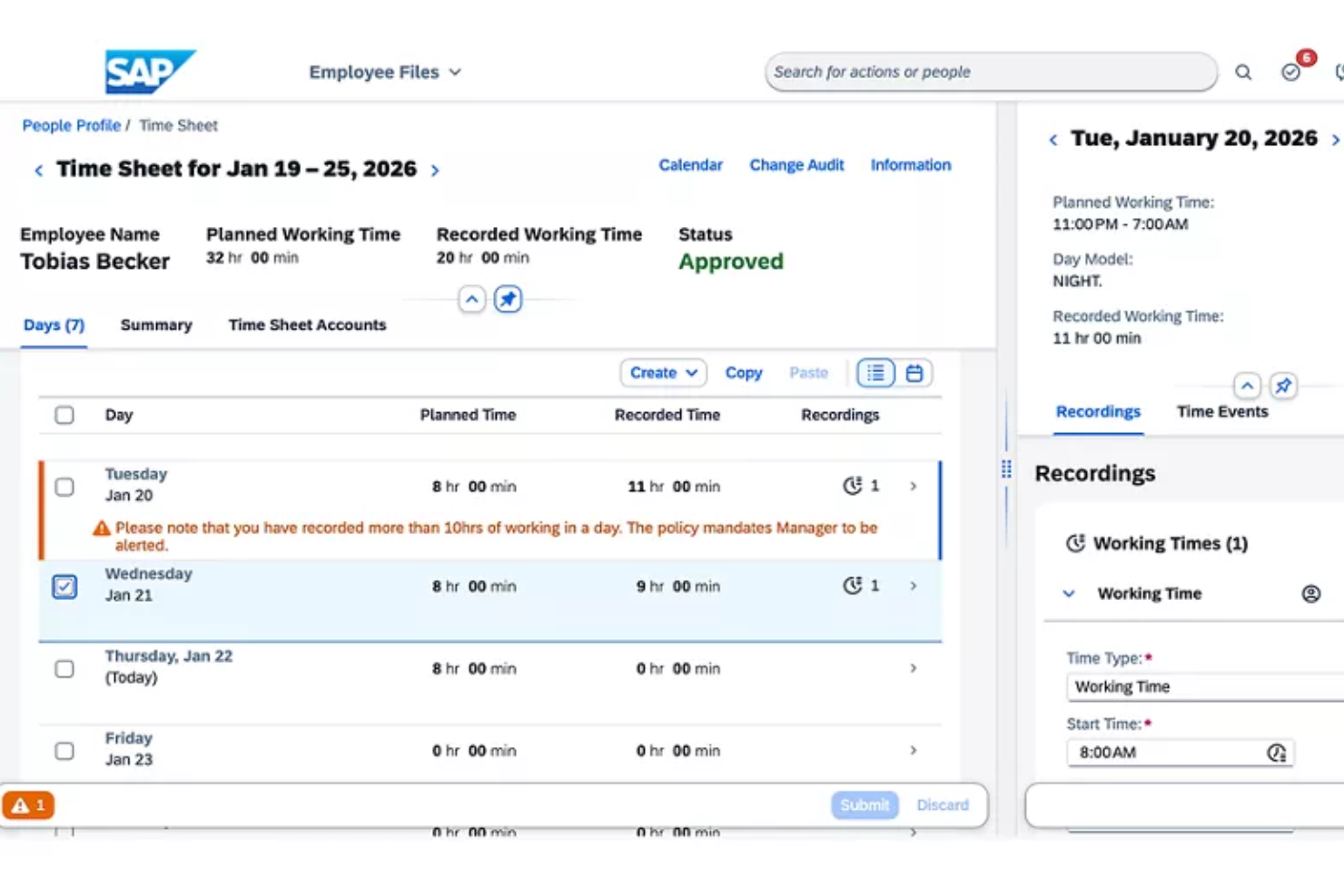
SAP Workforce Management is an enterprise workforce management platform that offers advanced scheduling, time and attendance tracking, labor compliance, and global workforce analytics for retail organizations.
Who Is SAP Best For?
Large global retailers and HR teams managing complex hourly workforces across multiple countries and compliance requirements.
Why I Picked SAP
I picked SAP because I need built-in compliance with global labor regulations for my international retail teams. I regularly configure complex pay rules and automate wage calculations across multiple regions. I rely on SAP’s audit and reporting tools to meet changing requirements.
SAP Key Features
- Shift planning tools: Build, adjust, and visualize workforce schedules for retail teams.
- Mobile manager dashboards: Enable on-the-go management and real-time decision-making from mobile devices.
- Employee self-service portal: Let staff request time off, view schedules, and swap shifts.
SAP Integrations
SAP Workforce Management offers native integrations with SAP SuccessFactors and SAP S/4HANA and has native integrations across the Microsoft ecosystem, including Microsoft 365 and Azure. An API is available for custom integrations.
Pros and Cons
Pros:
- Scalable for multi-country enterprise deployments
- Detailed scheduling and shift planning options
- Advanced global compliance management tools
Cons:
- User friction stemming from slow loading times
- Configuration requires SAP technical expertise

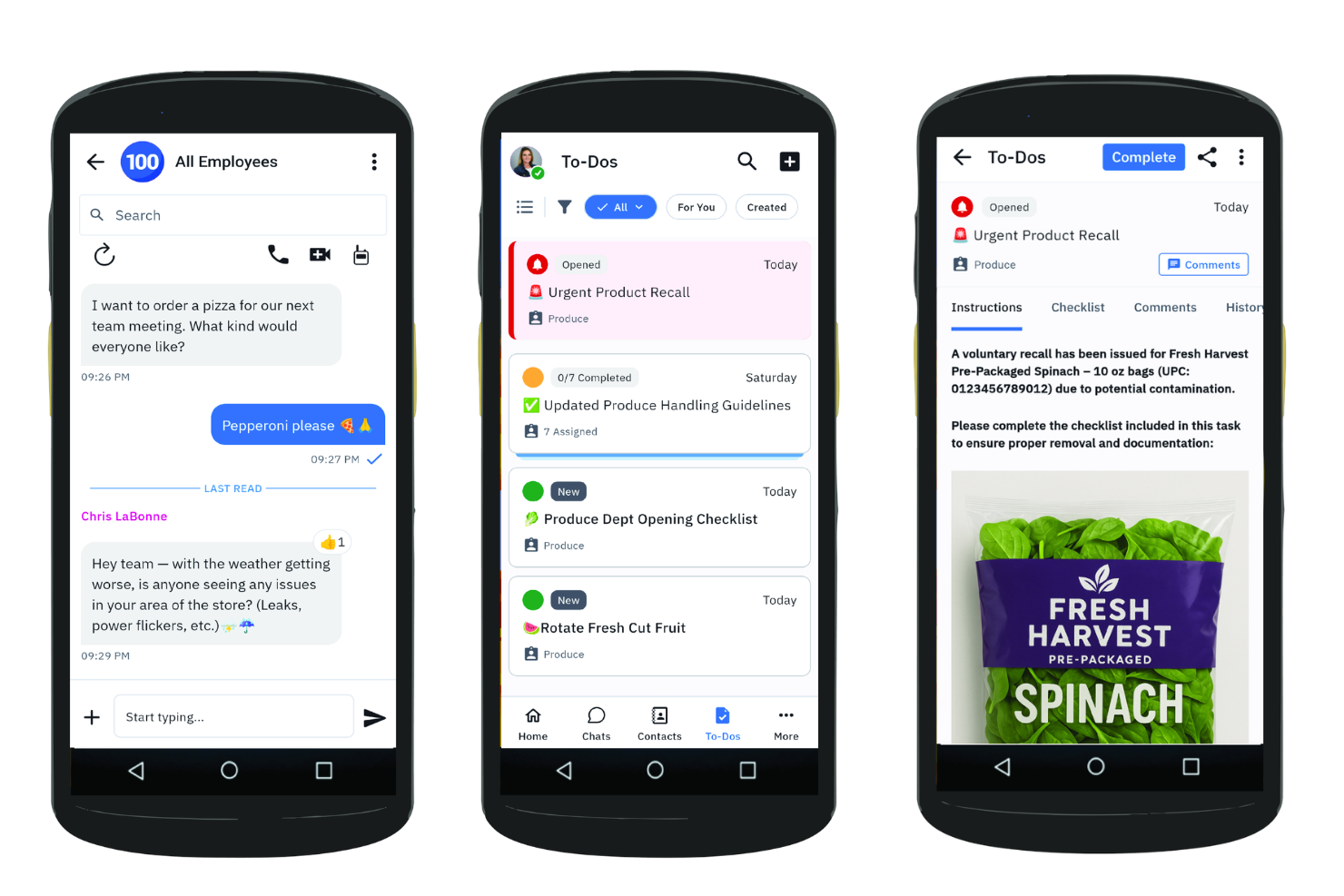
Zebra Technologies Workcloud Workforce Optimization Suite is a retail workforce management software that offers mobile scheduling, time and attendance, labor forecasting, and analytics for retail floor teams.
Who Is Zebra Technologies Best For?
Store operations leaders and regional managers in large retail chains needing advanced mobile shift scheduling and labor oversight for floor-based teams.
Why I Picked Zebra Technologies
I picked Zebra Technologies because my team can manage floor staff schedules from our phones and track attendance in real time. I like how the tool lets us send shift updates instantly and match labor to forecasted demand with built-in analytics.
Zebra Technologies Key Features
- Compliance tracking: Enforce labor policies and manage certifications for staff.
- Employee self-service portal: Let employees request time off and manage availability.
- Multi-location support: Manage scheduling and reporting across several retail locations.
Zebra Technologies Integrations
Zebra Technologies Workcloud Workforce Optimization Suite offers native integrations with Oracle, SAP SuccessFactors, Tulip, Scalefusion, SOTI Connect, TinyMDM, Clyd EMM, and more. An API is available for custom integrations.
Pros and Cons
Pros:
- Mobile app designed for shift workers
- Smart labor forecasting for in-store operations
- Shift swapping is supported within the platform
Cons:
- Security protocols trigger frequent user logouts
- Workflow setup can require technical assistance
Annen programvare for bemanningsstyring i varehandelen
Her er noen flere alternativer for programvare for bemanningsstyring i varehandelen som ikke kom med på kortlisten min, men som likevel er verdt å se nærmere på:
- Quinyx
AI-driven platform for shift scheduling
- Blue Yonder
For omnichannel labor forecasting
- ADP Workforce Now
For all-in-one payroll integration
- Oracle HCM Cloud
For global labor compliance tracking
- Connecteam
Mobile scheduling for frontline operations
- UKG
Analytics for large enterprise teams
- When I Work
For hourly shift swaps and drops


How I Evaluate Retail Workforce Management Software
I split my evaluation into baseline criteria—like multi-location scheduling and labor cost tracking—and differentiators that separate tools built for retail from generic workforce platforms.
Core Functionality (Table Stakes For This List)
When I'm selecting tools for my list, I rank each one on a scale from 0 (does not offer the functionality) to 5 (excels in this area) for each core functionality listed below. Then, I calculate the tool's total score into a percentage. Each tool needs to achieve a minimum total score of 65% to be considered for inclusion.
- Retail Shift Scheduling: I check whether the tool handles multi-location, role-based scheduling—like splitting coverage between cashiers, floor staff, and back-of-house across a dozen stores.
- Labor Demand Forecasting: Forecasting should pull from retail-specific signals like sales volume and seasonal trends, not just repeat last week's schedule with minor edits.
- Time & Attendance Tracking: I evaluate how clock-in/out, break tracking, and pay rule enforcement work for hourly associates—especially across shift types and store locations.
- Mobile Employee Self-Service: Frontline retail workers need to swap shifts, set availability, and request time off from their phones, so I look for a purpose-built mobile experience.
- Labor Cost Management: I look for real-time visibility into labor spend vs. sales and budget targets, so store managers can course-correct staffing mid-week instead of after the fact.
- Compliance & Labor Law Support: The tool should enforce rules like predictive scheduling, minor labor restrictions, and mandated break periods based on configurable location-level policies.
Once I have a list of tools that meet the criteria, I consider what sets each platform apart.
Differentiating Factors (What Sets Vendors Apart)
Here's how I compare and contrast different vendors:
Standout Features
AI-powered auto-scheduling is a major differentiator. I look for tools that balance labor budgets, employee preferences, and demand forecasts to generate schedules managers can publish with minimal edits. Earned wage access is another feature I evaluate, since giving hourly associates early access to earned pay can meaningfully reduce turnover. I also consider built-in team communication, which lets store managers push announcements or task updates directly to associates' phones instead of relying on group texts.
Beyond Features
Retail-specific integrations matter a lot here. I check whether the platform connects natively to POS systems and payroll providers, since that's what drives sales-based scheduling and clean pay runs. Scalability is another factor I evaluate closely—a tool that works for five stores should also handle a franchise network with location-specific rules and seasonal hiring spikes. Pricing structure counts too. Per-employee-per-month models with modular packaging give retailers more flexibility, especially when headcount swings dramatically between peak and off-peak seasons.
Slik velger du programvare for bemanningsstyring i varehandelen
Det er lett å gå seg vill i lange funksjonslister og kompliserte prismodeller. For å hjelpe deg med å holde fokus mens du går gjennom den unike prosessen med å velge programvare, har vi her en sjekkliste over faktorer du bør ha i tankene:
| Faktor | Hva bør du vurdere? |
|---|---|
| Skalerbarhet | Vil programvaren fortsatt passe hvis du vokser til dusinvis eller hundrevis av butikker? Se etter fleksible grenser for antall brukere og administrasjon av flere lokasjoner. |
| Integrasjoner | Kan den kobles direkte til HR-, lønns- og kassasystemene dine? Bekreft leverandørens dokumentasjon for å unngå tilpassede løsninger. |
| Tilpasningsmuligheter | Kan du konfigurere regler, roller og varsler om overholdelse av regelverk for arbeidslovgivningen eller avtalene som gjelder spesielt for butikkene dine? |
| Brukervennlighet | Vil timelønnede ansatte og butikksjefer lære å bruke systemet raskt? Be om demonstrasjoner i sanntid eller prøveperioder slik at ikke-tekniske brukere kan teste de viktigste arbeidsflytene. |
| Implementering og oppstart | Hvor lang tid tar det å komme i gang? Spør om støtte ved migrering, opplæring av administratorer og standard tidsplaner for utrulling. |
| Kostnad | Er prisen basert på aktive brukere, lokasjoner eller moduler? Finn ut hva som er inkludert, hva som koster ekstra, og beregn de totale årlige utgiftene. |
| Sikkerhetstiltak | Hvordan beskyttes medarbeiderdata og timelister? Spør om rollebasert tilgang, kryptering, revisjoner og leverandørens samsvarssertifiseringer. |
| Krav til regelverksetterlevelse | Overvåker systemet arbeidslivsregler som gjelder spesifikt for byen, delstaten eller landet ditt? Se etter automatiske oppdateringer ved endringer i lovverket. |
Hva er programvare for bemanningsstyring i varehandelen?
Programvare for bemanningsstyring i varehandelen er et verktøy som er utviklet for å automatisere turnusplanlegging, tidsregistrering, overholdelse av arbeidslivsregler og oppgavefordeling for varehandelsbedrifter. Disse plattformene hjelper deg med å administrere timelønnede ansatte, støtte drift på flere lokasjoner og sikre at arbeidslovgivningen overholdes. Ved å bruke denne programvaren får du bedre oversikt over medarbeidernes tilgjengelighet, reduserer konflikter i turnusplanleggingen og effektiviserer den daglige bemanningsadministrasjonen for team i varehandelen.
Funksjoner i programvare for arbeidsstyring i detaljhandelen
Når du velger programvare for arbeidsstyring i detaljhandelen, bør du se etter følgende nøkkelfunksjoner:
- Automatisert skiftplanlegging: Genererer arbeidsplaner basert på salgsprognoser, medarbeidernes tilgjengelighet og forretningsregler for å bidra til å sikre skiftdekning og redusere manuell planlegging.
- Registrering av arbeidstid og oppmøte: Registrerer når medarbeiderne stempler inn, pauser og arbeidstimer, slik at ledere kan opprettholde nøyaktige lønnsdata og følge med på overtid.
- Mobil tilgang: Lar ledere og medarbeidere se arbeidsplaner, bytte skift og be om fri fra mobile enheter, og støtter fleksibel arbeidsstyring på farten.
- Overvåking av arbeidsrettslig etterlevelse: Varsler om mulige brudd på arbeidslover eller butikkens retningslinjer og følger med på lovpålagte pauser, overtid og grenser for arbeidstid, slik at du er klar for revisjoner.
- Lønnsintegrasjon: Kobler data om arbeidstid og oppmøte direkte til lønnssystemet, reduserer feil ved dataregistrering og sparer tid ved lønnsbehandlingen.
- Skiftbytte og skiftbud: Gjør det mulig for medarbeidere å bytte, gi fra seg eller by på tilgjengelige skift innenfor fastsatte regler, slik at bemanningskriser reduseres og endringer i siste liten dekkes.
- Prognoser og etterspørselsplanlegging: Bruker historiske data og forventet salg til å hjelpe deg med å forutse bemanningsbehov under høysesonger, kampanjer eller høytider.
- Verktøy for oppgaver og kommunikasjon: Samler daglige sjekklister, tildeler oppgaver og muliggjør meldinger mellom ledere og medarbeidere for koordinering utover selve skiftplanleggingen.
- Rapportering og analyse: Gir innsikt i arbeidskraftkostnader, etterlevelse av arbeidsplaner, medarbeidernes oppmøte og andre måltall, slik at ledere kan ta informerte beslutninger om bemanning.
- Rollebaserte tillatelser: Lar deg styre tilgangen slik at ledere, arbeidsledere og medarbeidere bare ser og utfører handlinger på relevante data og arbeidsflyter i henhold til rollen sin.
Fordeler med programvare for arbeidsstyring i detaljhandelen
Implementering av programvare for arbeidsstyring i detaljhandelen gir flere fordeler for teamet ditt, virksomheten din og den generelle driftseffektiviteten. Her er noen av fordelene du kan se frem til:
- Enklere skiftplanlegging: Automatiserte systemer genererer feilfrie arbeidsplaner som er tilpasset virksomhetens behov og medarbeidernes tilgjengelighet.
- Trygghet rundt arbeidsrettslig etterlevelse: Innebygd overvåking av etterlevelse bidrar til å sikre at butikken overholder relevante regler for arbeidstid, pauser og overtid.
- Koordinering av teamet i sanntid: Mobilverktøy og meldingsfunksjoner holder ledere og medarbeidere tilkoblet og klare til å reagere på tvers av flere lokasjoner.
- Færre lønnsfeil: Integrert registrering av arbeidstid og oppmøte sender nøyaktige data direkte til lønnssystemet og eliminerer kostbare feil ved manuell registrering.
- Raskere skiftdekning: Funksjoner for skiftbytte og skiftbud gir medarbeiderne mulighet til å dekke eller bytte skift uten at en leder må involveres.
- Handlingsrettet innsikt i arbeidsstyrken: Funksjoner for rapportering og analyse gir deg dataene du trenger for å optimalisere arbeidskraftkostnadene og identifisere trender innen oppmøte eller produktivitet.
- Bedre medarbeideropplevelse: Verktøy for selvbetjent skiftplanlegging og kommunikasjon gir medarbeiderne mer kontroll og fleksibilitet, noe som støtter både medarbeiderbevaring og engasjement.
Kostnader og priser for programvare for arbeidsstyring i detaljhandelen
Valg av programvare for arbeidsstyring i detaljhandelen krever en forståelse av de ulike prismodellene og abonnementene som er tilgjengelige. Kostnadene varierer basert på funksjoner, teamstørrelse, tillegg og mer. Tabellen nedenfor oppsummerer vanlige abonnementer, gjennomsnittsprisene deres og typiske funksjoner som er inkludert i programvareløsninger for arbeidsstyring i detaljhandelen:
Sammenligningstabell for abonnementer for programvare for arbeidsstyring i detaljhandelen
| Abonnementstype | Gjennomsnittspris | Vanlige funksjoner |
|---|---|---|
| Gratisabonnement | $0 | Grunnleggende skiftplanlegging, begrenset antall brukere, grunnleggende tidsregistrering og kundestøtte via e-post. |
| Personlig abonnement | $5-$10/bruker/måned | Verktøy for skiftplanlegging, mobil tilgang, registrering av arbeidstid og oppmøte, begrenset rapportering og funksjonalitet for skiftbytte. |
| Bedriftsabonnement | $15-$25/bruker/måned | Avansert skiftplanlegging, lønnsintegrasjon, overvåking av arbeidsrettslig etterlevelse, analyse og støtte for flere lokasjoner. |
| Abonnement for storbedrifter | $30-$50/bruker/måned | Tilpassede regler, dedikert kundeansvar, avanserte integrasjoner, verktøy for oppstart, prioritert kundestøtte og tilpassede rapporter. |
Vanlige spørsmål om programvare for arbeidsstyring i detaljhandelen
Her er noen svar på vanlige spørsmål om programvare for arbeidsstyring i detaljhandelen:
Hvordan bidrar programvare for arbeidsstyring i detaljhandelen til å redusere arbeidskostnadene?
Den bidrar til å redusere arbeidskostnadene ved å forutsi etterspørselen, automatisere vaktplaner og registrere arbeidstid for å forhindre unødvendig overtid eller for få ansatte på jobb. Disse kontrollene gjør det mulig å optimalisere vaktene og unngå bøter for manglende overholdelse av regelverket.
Kan programvare for arbeidsstyring i detaljhandelen håndtere virksomheter med flere lokasjoner?
Ja, de fleste løsninger for arbeidsstyring i detaljhandelen tilbyr verktøy for å administrere vaktplaner, rapportering og regelverksetterlevelse på tvers av flere butikksteder fra et sentralisert system. Dette gjør det enklere for regionale ledere å følge opp ansatte og fordele ressurser.
Hva er den vanlige tidsrammen for implementering for nye brukere?
En vanlig implementering av ny programvare for vaktplanlegging i detaljhandelen tar fra noen dager til noen uker. Tidsrammen avhenger av datamigrering, teamets størrelse, kompleksiteten i eksisterende arbeidsflyter og tilgjengeligheten av opplæringsressurser eller støtte fra leverandøren.
Er programvare for arbeidsstyring i detaljhandelen brukervennlig for timelønnede ansatte?
Ja, mange plattformer er utviklet med brukervennlige mobilapper som gjør det mulig for timelønnede ansatte å sjekke vaktplaner, bytte vakter og kommunisere med ledere. Denne selvbetjeningsløsningen gjør det enklere for de ansatte å bruke verktøyet hver dag.
Hvilke integrasjonsmuligheter er viktige for team i detaljhandelen?
Viktige integrasjonsmuligheter omfatter lønnssystemer, HR-plattformer og kassasystemer. Synkronisering av disse systemene reduserer behovet for manuell dataregistrering, sikrer nøyaktige vaktplaner og bidrar til å holde ansattopplysningene oppdaterte.