

10 beste programvareløsninger for optimalisering av arbeidsstyrken i 2026

Kortliste over programvare for optimalisering av arbeidsstyrken


Programvare for optimalisering av arbeidsstyrken hjelper deg med å administrere planlegging, produktivitet og resultater på tvers av teamene dine ved å kombinere verktøy for prognoser, sporing og analyse. Hvis du leter etter den beste programvaren for optimalisering av arbeidsstyrken, ønsker du sannsynligvis å løse utfordringer knyttet til arbeidskraftkostnader, overholdelse av regelverk og medarbeiderengasjement – samtidig som du støtter virksomhetens mål og tilpasser deg endrede behov på arbeidsplassen. Denne listen hjelper deg med å sammenligne ledende alternativer for 2026, slik at du kan velge riktig plattform for å forbedre arbeidsstyrkeplanleggingen, forenkle driften og støtte medarbeiderne dine.
Why Trust Our Software Recommendations
Our team has been testing and reviewing software since 2012. As HR experts ourselves, we know how difficult—and important—it is to choose the right software.
For this guide, we evaluated tools using hands-on testing and independent research, scoring tools using our selection criteria. We also draw on insights from industry thought leaders and practicing HR experts.
Our reviews reflect our human editorial judgment, not a sales pitch.
Expert reviewers:
Sammenligningstabell for programvare for optimalisering av arbeidsstyrken
Denne sammenligningstabellen oppsummerer prisopplysningene for mine beste utvalg av programvare for optimalisering av arbeidsstyrken.
| Tool | Best For | Trial Info | Price | ||
|---|---|---|---|---|---|
| 1 | Best for unified HR and payroll workflows | Free demo available | Pricing upon request | Website | |
| 2 | Best for continuous pay calculation | Free demo available | Pricing upon request | Website | |
| 3 | Best for automated shift optimization | Free demo available | Pricing upon request | Website | |
| 4 | Best for omnichannel contact center analytics | Free demo available | Pricing upon request | Website | |
| 5 | Best for large enterprise workforce planning | Free demo available | Pricing upon request | Website | |
| 6 | Best with ticketing and support integration | Free trial + free demo available | From $19/agent/month (billed annually) | Website | |
| 7 | Best for retail labor forecasting accuracy | Free demo available | Pricing upon request | Website | |
| 8 | Best for real-time agent coaching features | Free demo available | From $75/user/month (billed annually) | Website | |
| 9 | Best for AI-driven performance insights | Free demo available | From $110/agent/month | Website | |
| 10 | Best for global compliance management | Free demo available | Pricing upon request | Website |
Anmeldelser av programvare for optimalisering av arbeidsstyrken
Nedenfor finner du mine detaljerte sammendrag av programvaren for optimalisering av arbeidsstyrken som kom med på kortlisten min. Anmeldelsene mine gir et detaljert innblikk i funksjonene, de beste bruksområdene og integrasjonene til hver plattform, slik at du kan finne den beste løsningen for deg.

Workday
Best for unified HR and payroll workflows
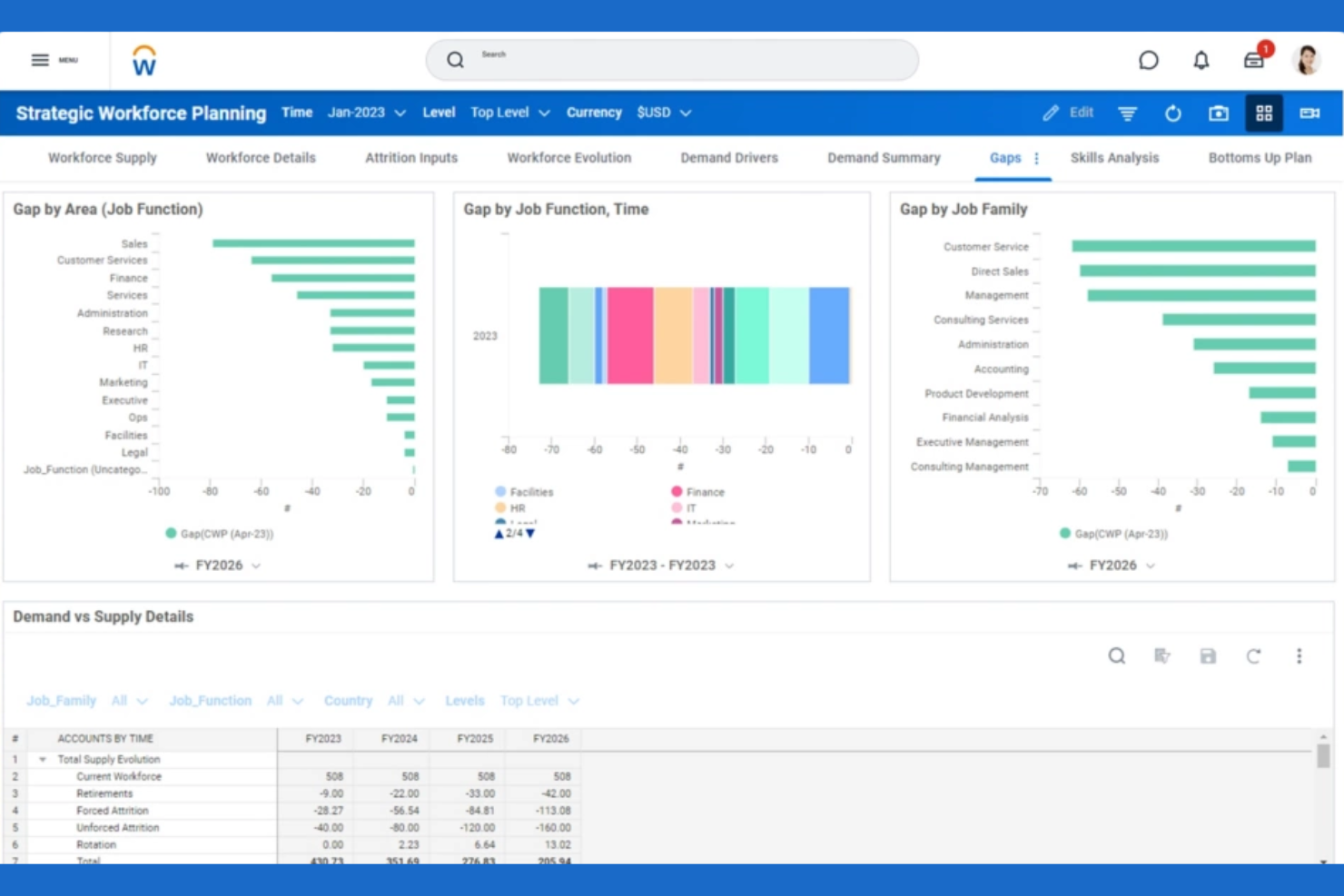
Workday brings HR, payroll, and workforce management tools together in a single platform, making it a strong choice for organizations seeking unified workflows. It’s especially useful for HR teams and finance leaders who need real-time visibility into labor costs and employee data. Workday helps businesses coordinate staffing, automate payroll, and manage compliance without switching between multiple systems.
Why I Picked Workday
What sets Workday apart is its ability to unify HR and payroll workflows within a single system. This approach lets HR and finance teams manage employee records, time tracking, and payroll processing without juggling multiple platforms. I picked Workday because it connects workforce scheduling and compensation data, so you can make real-time decisions based on accurate, up-to-date information. This unified workflow helps organizations reduce manual errors and maintain compliance across HR and payroll functions.
Workday Key Features
Some other features that make Workday appealing for workforce management system include:
- Mobile workforce management app: Employees and managers can access schedules, approve time, and manage requests from their phones.
- Automated absence management: Track, approve, and report on employee absences with built-in policy enforcement.
- Labor cost forecasting: Analyze and predict labor expenses using real-time data and configurable models.
- Role-based dashboards: Give users tailored views of workforce metrics and tasks based on their job function.
Workday Integrations
Integrations include Salesforce, Microsoft Azure, Slack, Adobe Sign, Okta, ServiceNow, LinkedIn, SAP, Oracle, and Google Workspace.
Pros and Cons
Pros:
- Role-based dashboards for workforce analytics
- Mobile app supports on-the-go approvals
- Real-time payroll and HR data sync
Cons:
- Limited connectivity with non-Workday apps
- High dependency on certified consultants
Dayforce
Best for continuous pay calculation
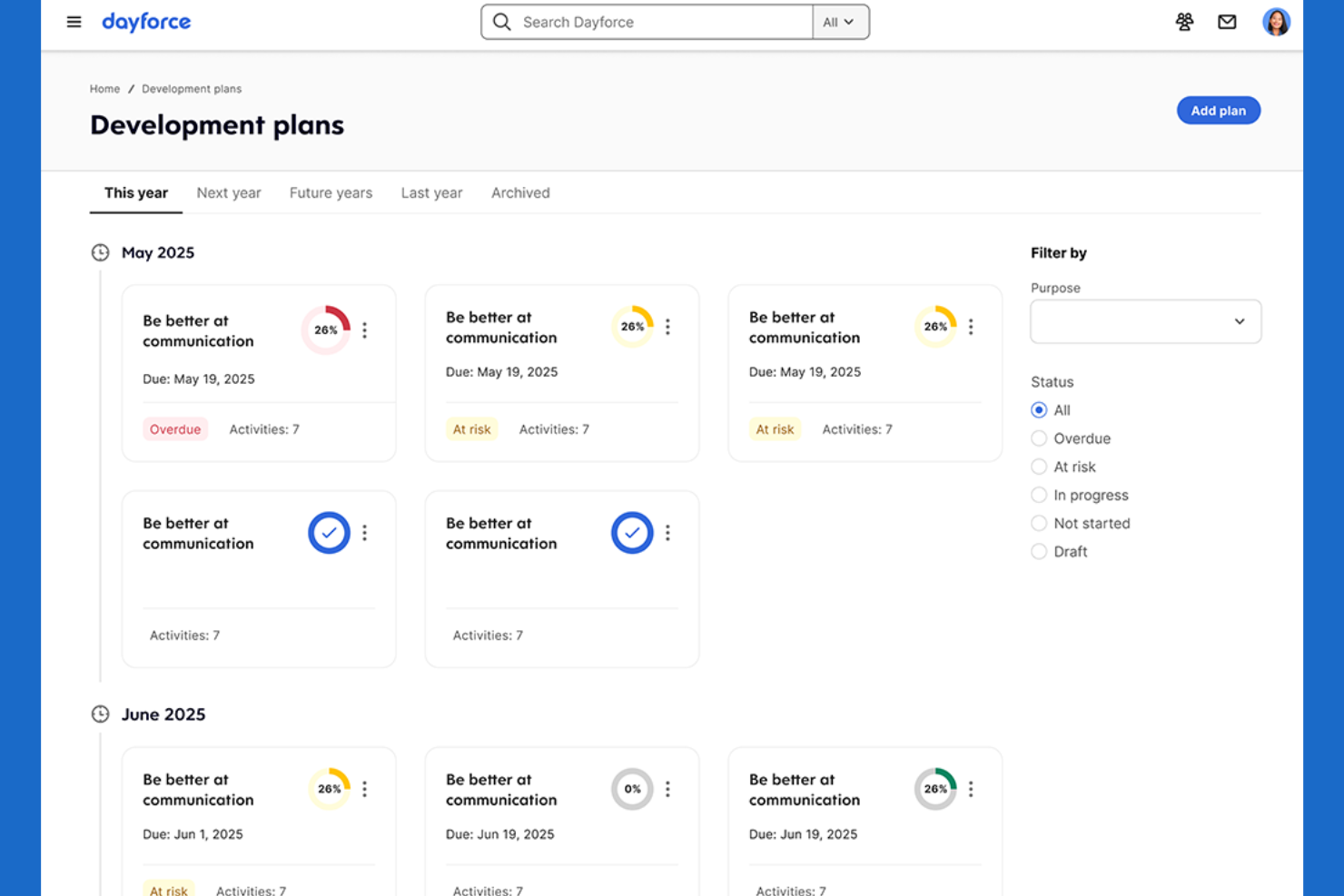
Dayforce offers a single platform for payroll, HR, and workforce management, with a focus on continuous pay calculation. It’s a strong fit for organizations that need up-to-the-minute payroll accuracy, such as those with hourly or shift-based workforces. Dayforce helps HR and payroll teams reduce pay errors and compliance risks by updating pay data in real time.
Why I Picked Dayforce
Unlike many workforce optimization tools, Dayforce calculates pay continuously rather than in batches, which is especially valuable for businesses with complex or variable schedules. This real-time pay calculation means payroll data is always current, helping HR and payroll teams catch errors and address compliance issues before they become problems. I picked Dayforce because it connects time tracking, scheduling, and payroll in a single workflow, so you can see the impact of schedule changes on pay immediately. This approach is ideal for organizations that need accurate, up-to-date payroll information at any moment.
Dayforce Key Features
Some other features that make Dayforce useful for workforce optimization include:
- Automated compliance monitoring: The system checks schedules and pay rules against labor regulations as you build them.
- Employee self-service portal: Staff can view schedules, request time off, and update personal information directly.
- Advanced analytics dashboards: Visualize workforce trends and key metrics with configurable reports.
- Mobile app for managers: Approve timesheets, manage shift swaps, and communicate with employees from anywhere.
Dayforce Integrations
Integrations include Salesforce, Microsoft Dynamics, Workday, SAP, Oracle, ADP, Kronos, QuickBooks, Ceridian, and Infor.
Pros and Cons
Pros:
- Built-in employee self-service
- Automated compliance checks for scheduling and pay
- Updates payroll in real time
Cons:
- Limited transparency on pricing without a quote
- System performance lags during peak periods

Legion
Best for automated shift optimization
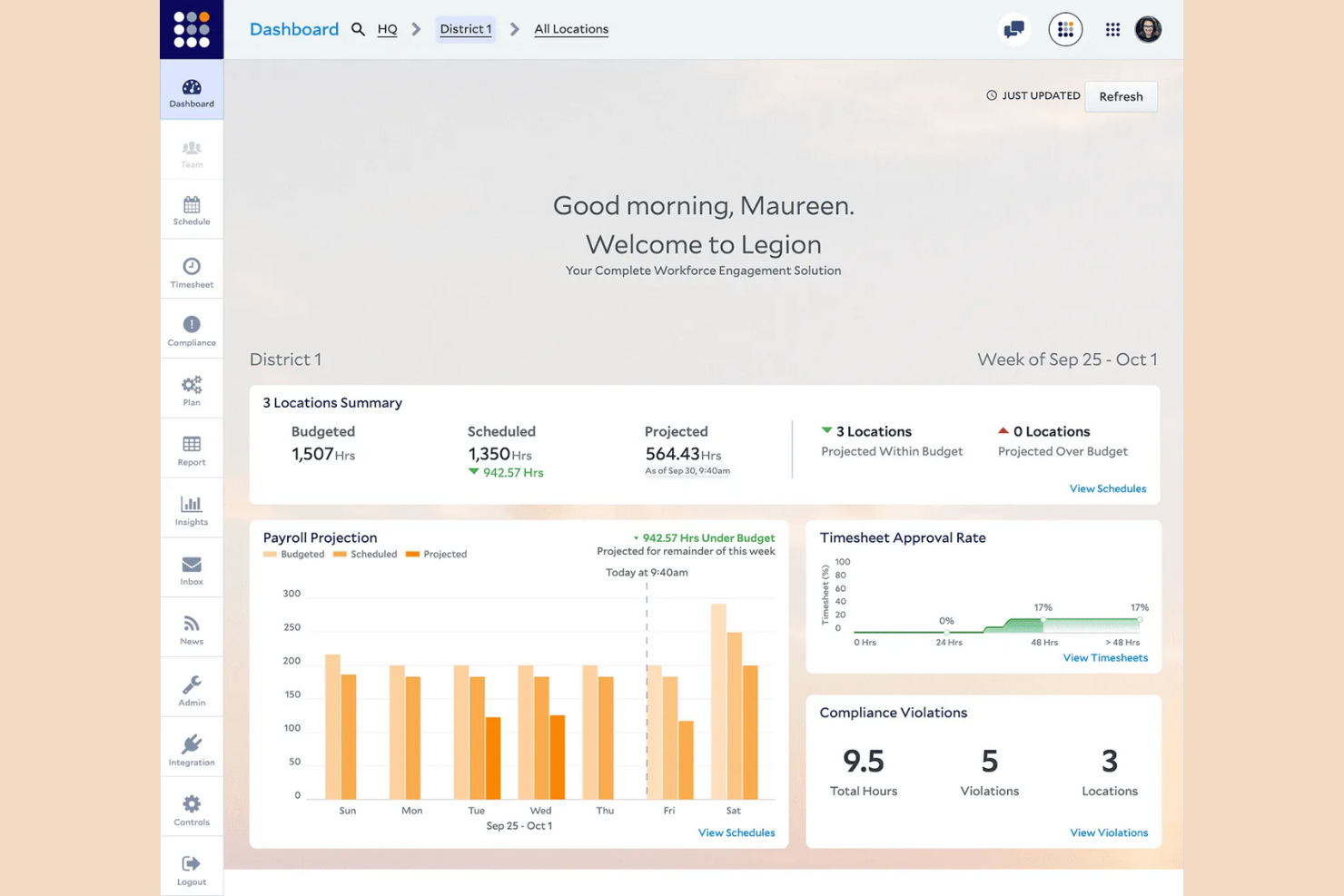
Legion uses AI-driven automation to build optimized shift schedules that match business demand and employee preferences. It’s especially useful for retailers, restaurants, and other businesses with hourly workforces that need to balance labor costs with coverage. Legion helps managers reduce manual scheduling work and minimize compliance risks by automatically generating fair, demand-based schedules.
Why I Picked Legion
What sets Legion apart is its focus on automated shift optimization powered by AI. The platform analyzes business demand, employee availability, and labor rules to automatically generate schedules that meet both operational needs and worker preferences. I picked Legion because it reduces the manual effort managers spend on scheduling while helping ensure compliance with labor laws. This makes it a strong choice for organizations that need to quickly adapt staffing to fluctuating demand without sacrificing fairness or accuracy.
Legion Key Features
Some other features that make Legion valuable for workforce optimization include:
- Demand forecasting engine: Predicts labor needs based on historical sales and traffic data.
- Employee mobile app: Improve employee experience with a mobile app so staff view schedules, swap shifts, and request time off.
- Automated compliance monitoring: Flags potential violations of labor laws and company policies.
- Real-time schedule updates: Instantly notifies employees of any changes to their shifts.
Legion Integrations
Integrations include Accu-Time Systems, GT Clocks, HR Path, Phenom, Rebus by Longbow Advantage, RELEX Solutions, RetailNext, SAP SuccessFactors, Synel, and YOOBIC.
Pros and Cons
Pros:
- Integrated gig-worker pool for understaffed shifts
- Budget-aware labor demand scheduling constraints
- Automated shift swapping via employee app
Cons:
- No native offline mobile accessibility mode
- Limit on custom field data exports
Verint
Best for omnichannel contact center analytics
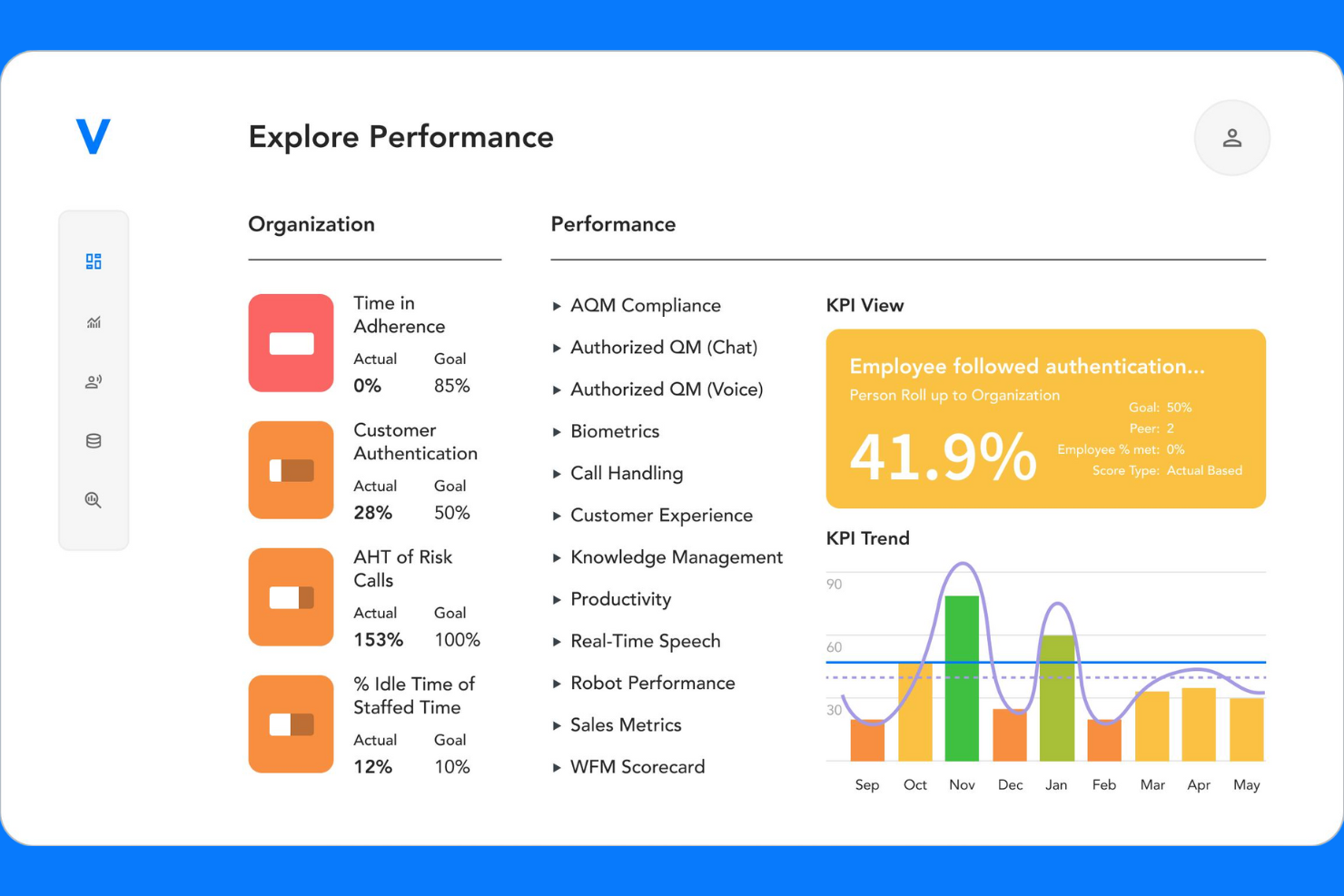
Verint is built for contact center leaders who need deep analytics across voice, chat, email, and social channels. This all-in-one platform helps you unify workforce management and performance tracking in complex, omnichannel environments. If your team struggles to connect agent activity with customer experience insights, Verint offers specialized tools to bridge that gap.
Why I Picked Verint
What sets Verint apart for workforce optimization is its focus on omnichannel contact center analytics. I picked Verint because it brings together data from voice, chat, email, and social channels, giving managers a unified view of agent performance and customer interactions. The platform’s analytics engine helps you identify trends and gaps in service quality across every channel. For teams managing complex, multi-channel operations, Verint’s ability to connect workforce metrics with customer experience insights is especially valuable.
Verint Key Features
Some other features in Verint that are worth noting include:
- Automated quality monitoring: The system automatically reviews and scores customer interactions for quality assurance.
- Forecasting and scheduling engine: Generate staffing forecasts and build optimized schedules based on historical and real-time data.
- Performance scorecards: Track agent KPIs and progress with customizable dashboards and scorecards.
- E-learning and coaching modules: Deliver targeted training and coaching directly within the platform to support agent development.
Verint Integrations
Integrations include Salesforce, Microsoft Dynamics, and HubSpot. An API is available for custom integrations.
Pros and Cons
Pros:
- Customizable performance scorecards
- Built-in e-learning and coaching modules
- Real-time schedule adherence tracking
Cons:
- Advanced features require additional licensing
- Complex setup process for new users

UKG
Best for large enterprise workforce planning
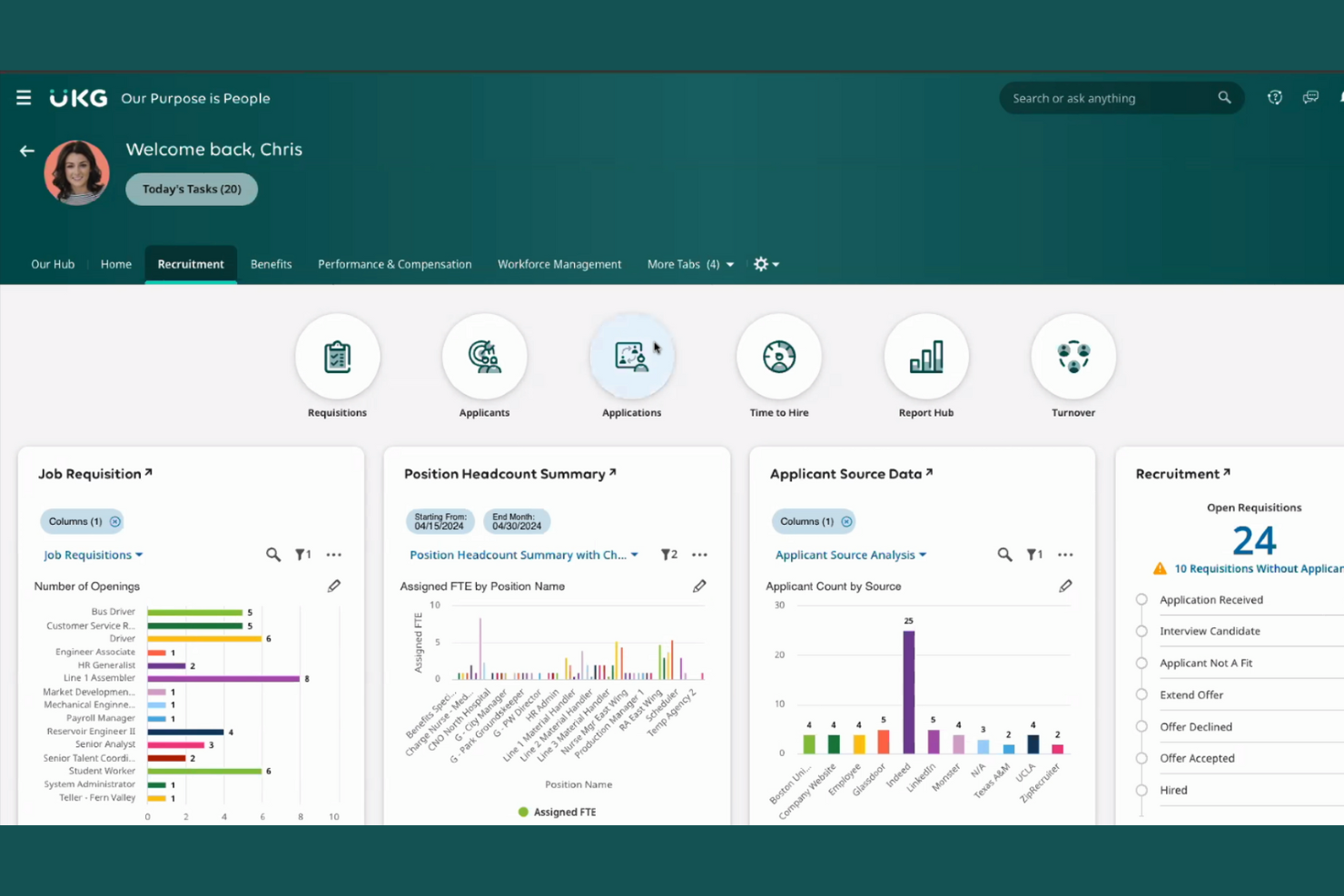
UKG is designed for large enterprises that need advanced workforce planning and management capabilities. It’s a strong fit for HR leaders and operations teams handling complex scheduling, compliance, and labor forecasting across multiple locations. UKG helps organizations coordinate large-scale staffing, manage labor costs, and maintain regulatory compliance in dynamic environments.
Why I Picked UKG
For organizations managing large, distributed workforces, UKG offers specialized tools for enterprise-scale workforce planning. The platform supports advanced scheduling, labor forecasting, and compliance management, which are essential for businesses with complex staffing needs. I picked UKG because it allows HR teams to automate shift assignments and track labor costs across multiple locations. These capabilities make it a strong choice for enterprises that need to optimize staffing ROTAs and maintain regulatory compliance at scale.
UKG Key Features
In addition to its workforce planning strengths, UKG offers several other features that support large organizations:
- Mobile self-service portal: Employees can view schedules, request time off, and swap shifts from their mobile devices.
- Automated time & attendance tracking: Capture employee hours and attendance data with built-in compliance checks.
- Analytics and reporting suite: Generate detailed workforce reports and dashboards for data-driven decision-making.
- Talent management tools: Conduct performance management reviews, goal setting, and employee development within the same platform.
UKG Integrations
Integrations include SAP, Oracle, Workday, ADP, Microsoft Dynamics, Salesforce, Ceridian, Infor, Kronos, and QuickBooks.
Pros and Cons
Pros:
- Supports large-scale payroll and HR operations
- Built-in compliance tools for labor regulations
- Handles complex multi-location scheduling scenarios
Cons:
- High technical expertise for custom reporting
- Implementation process can be lengthy
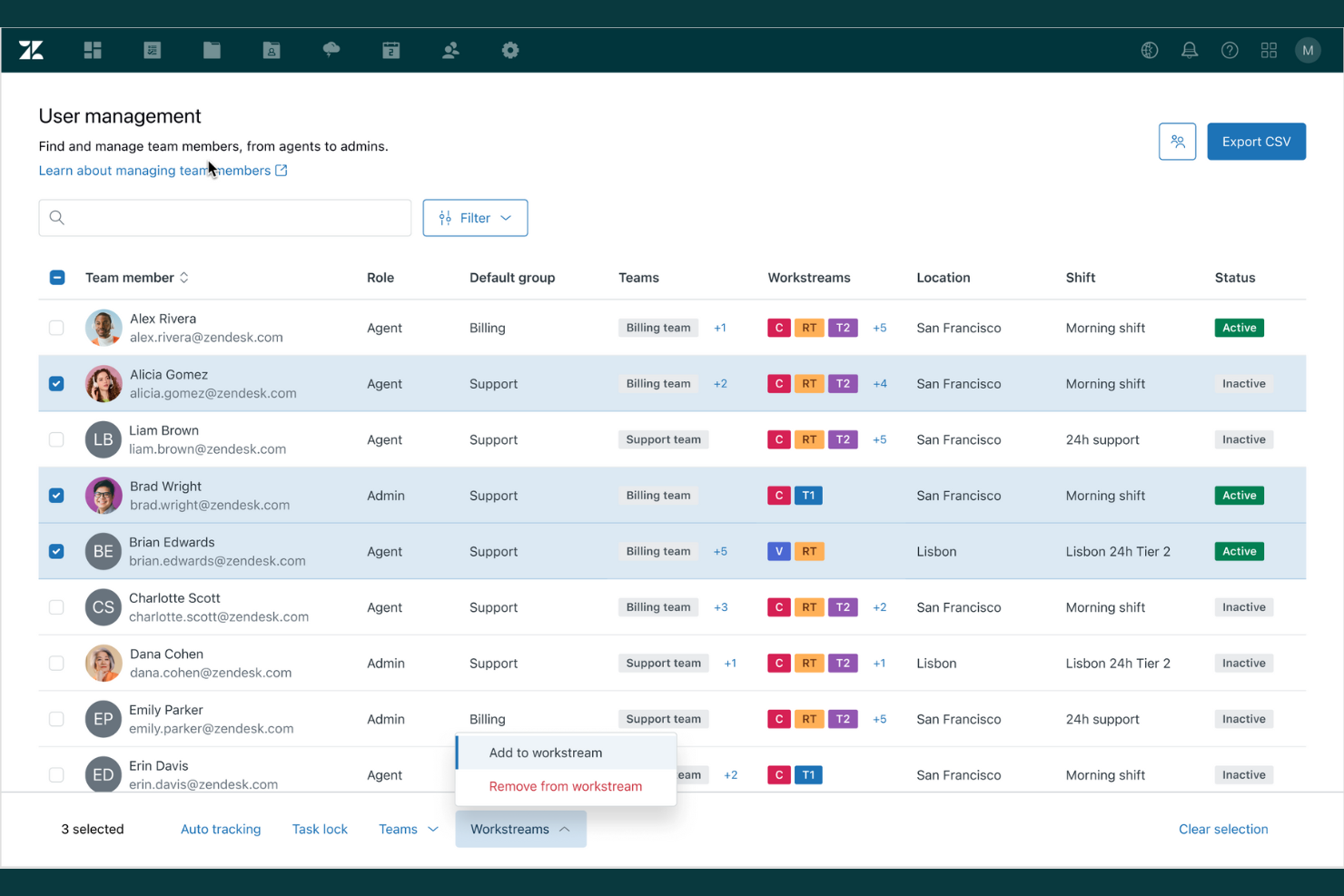
If your team relies on ticketing and integrated support workflows, Zendesk offers a workforce optimization solution built around these needs. It’s especially useful for customer service teams that want to unify ticket management, agent performance tracking, and support analytics in one place. Zendesk helps you coordinate agent workloads and monitor service quality across multiple channels.
Why I Picked Zendesk
Zendesk stands out for its deep ticketing and support integration, which is essential for workforce optimization in customer service environments. The platform connects ticket management with agent performance metrics, so you can track how efficiently issues are resolved and where bottlenecks occur. I like that Zendesk also offers automated ticket routing and escalation, helping teams prioritize urgent requests and balance workloads. These features make it a strong fit for organizations that need to optimize support operations and maintain high service standards.
Zendesk Key Features
Some other features that make Zendesk a strong choice for workforce optimization include:
- Customizable agent dashboards: Give agents and managers real-time visibility into workload and performance metrics.
- Integrated knowledge base: Allow agents to access and share up-to-date support articles during customer interactions.
- SLA management tools: Set, monitor, and enforce service level agreements for different ticket types.
- Multichannel support capabilities: Manage customer conversations across email, chat, phone, and social media from a single platform.
Zendesk Integrations
Integrations include Salesforce, Slack, Shopify, HubSpot, Mailchimp, Trello, Asana, Google Analytics, and Microsoft Teams.
Pros and Cons
Pros:
- Automatic mapping of full-day leave
- SLA tracking supports service quality goals
- Real-time tracking of non-Zendesk activities
Cons:
- No automated ingestion from HR systems
- Manual cache clearing for interface sync
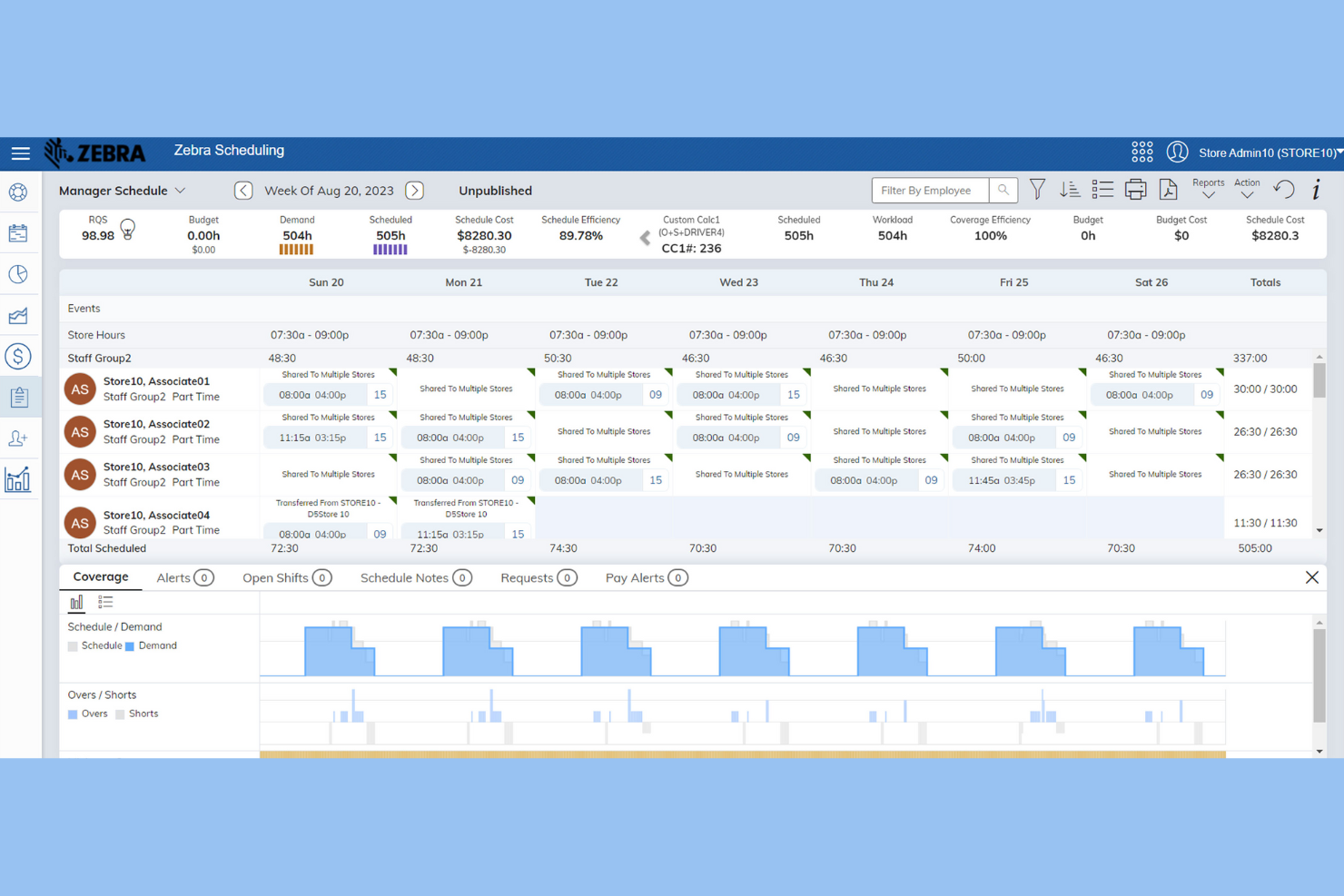
Zebra’s Workcloud Workforce Optimization Suite is designed for retailers who need precise labor forecasting and scheduling. This platform helps store managers and operations leaders align staffing with real-time demand and sales trends. If you’re looking to reduce labor costs and improve shift coverage accuracy in a retail environment, Zebra offers specialized tools to address those needs.
Why I Picked Zebra
For workforce optimization in retail, I picked Zebra because its suite focuses on labor forecasting accuracy—a top concern for store managers and retail operations teams. Zebra uses demand-driven scheduling tools that analyze sales data and foot traffic to predict staffing needs down to the hour. I also like that it offers automated shift assignments, which help reduce overstaffing and understaffing during peak and slow periods. These features make Zebra a strong choice for retailers who want to match labor resources with real-time demand.
Zebra Key Features
Some other features in Zebra’s Workcloud Workforce Optimization Suite that stand out include:
- Mobile scheduling app: Employees and managers can view schedules, swap shifts, and request time off directly from their mobile devices.
- Task management tools: Assign, track, and monitor completion of in-store tasks to keep teams aligned with daily priorities.
- Compliance monitoring: Built-in compliance checks help ensure schedules meet labor laws and company policies.
- Analytics dashboard: Access real-time insights into labor costs, attendance, and productivity trends across locations.
Zebra Integrations
Integrations include SAP, Oracle, Microsoft Dynamics, Kronos, ADP, Salesforce, Workday, Ceridian, and Infor.
Pros and Cons
Pros:
- Integrated task management
- Mobile app for shift management and swaps
- Built-in compliance checks for labor laws
Cons:
- Limited focus beyond the retail industry
- Requires Zebra hardware for full functionality
Genesys
Best for real-time agent coaching features
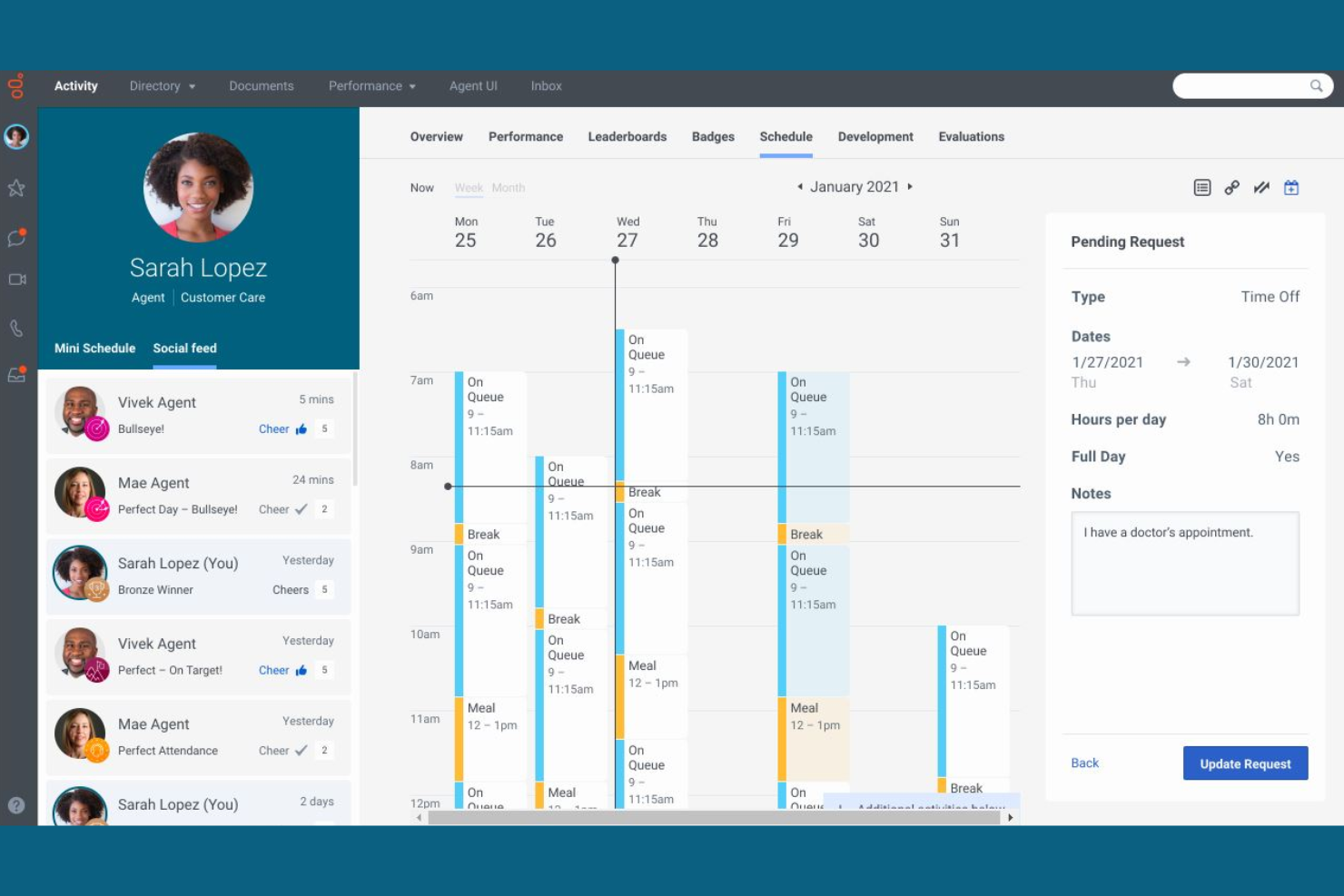
Genesys stands out for its real-time agent coaching features, making it a strong choice for contact centers and customer service teams focused on live performance improvement. If you need to support agents with instant feedback and guidance during customer interactions, this platform offers tools designed for in-the-moment coaching and skill development. Its focus on live support helps managers ensure the right people address issues at the right time.
Why I Picked Genesys
What drew me to Genesys is its strong focus on real-time agent coaching, which is a key differentiator in workforce optimization software. The platform offers live monitoring and whisper coaching, allowing supervisors to provide instant feedback and guidance to agents during customer interactions. I appreciate that Genesys also includes performance dashboards that update in real time, so managers can spot coaching opportunities as they arise. These features make it a practical choice for teams that want to improve agent performance in the moment, not just after the fact.
Genesys Key Features
Some other features that make Genesys a strong option for workforce optimization include:
- Omnichannel routing: Direct customer inquiries to the right agent across voice, chat, email, and social channels.
- Automated workforce forecasting: Predict staffing needs using historical data and AI-driven models.
- Quality management tools: Score and review agent interactions for compliance and service standards.
- Employee gamification modules: Motivate agents with built-in recognition and achievement tracking.
Genesys Integrations
Integrations include Salesforce, Microsoft Dynamics, Zendesk, ServiceNow, Oracle, SAP, AWS, Google Cloud, Twilio, and Cisco.
Pros and Cons
Pros:
- Built-in gamification for agent motivation
- Omnichannel routing for customer interactions
- Real-time agent coaching with live monitoring
Cons:
- Separate management for standalone WFM
- Limit of 100 simultaneous activities
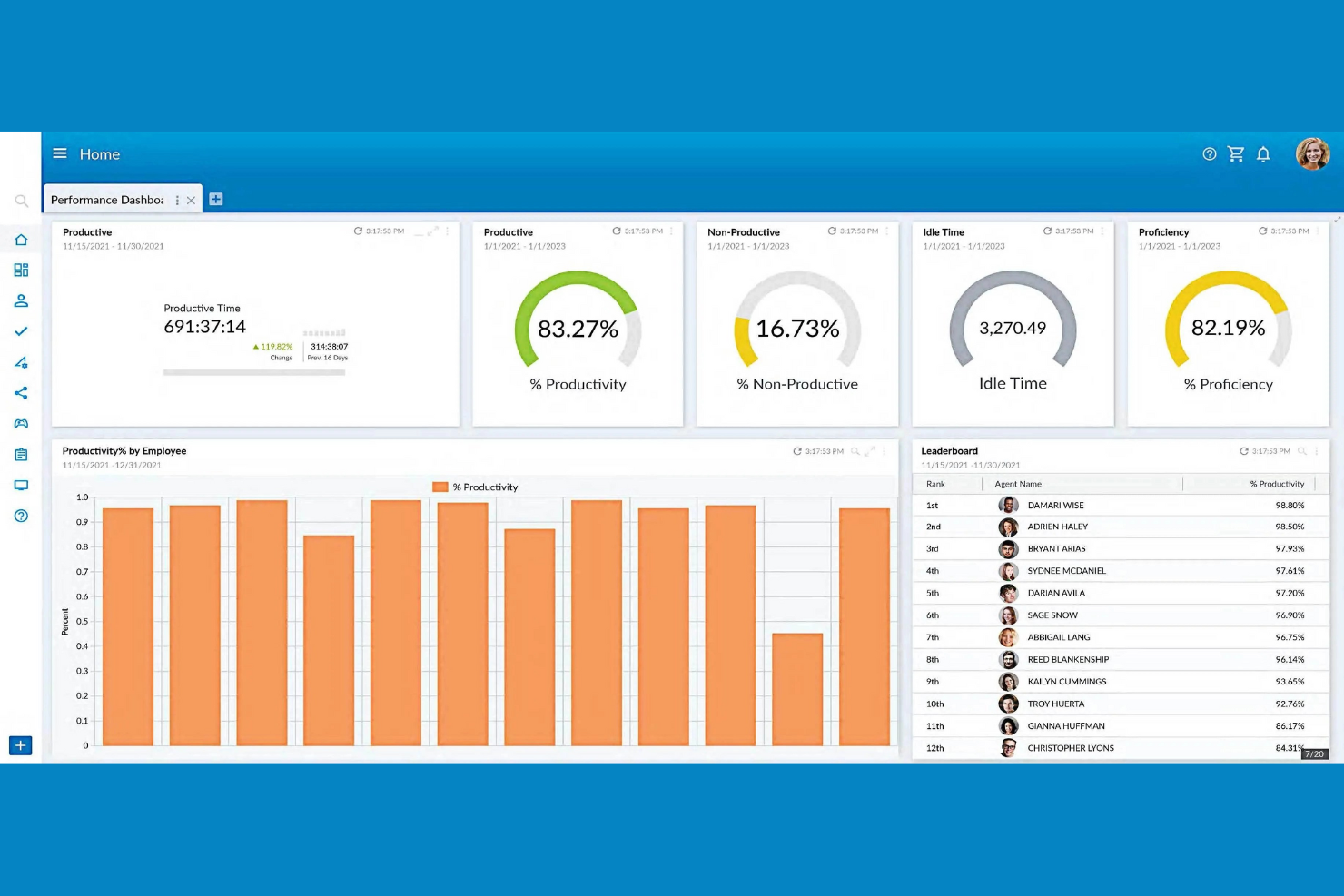
NiCE brings AI-powered analytics to workforce optimization, making it a strong fit for teams focused on performance improvement. If you manage a contact center or a large service operation, this platform helps you uncover actionable insights from employee and customer interactions. Its advanced automation and real-time feedback tools are designed to support data-driven coaching, retention, and continuous process improvement.
Why I Picked NiCE
What sets NiCE apart as a workforce management solution is its focus on AI-driven performance insights. The platform uses AI to analyze large volumes of customer and employee interactions, surfacing trends and coaching opportunities that might otherwise go unnoticed. I picked NiCE because its real-time analytics and automated quality management help managers quickly identify performance gaps and deliver targeted feedback. These capabilities make it especially valuable for organizations that want to use data to drive continuous improvement in service and productivity.
NiCE Key Features
Some other features that make NiCE a strong choice for workforce optimization include:
- Omnichannel interaction recording: Capture and review customer interactions across voice, chat, email, and social channels.
- Automated scheduling engine: Generate optimized employee schedules based on forecasted demand and business rules.
- Employee engagement surveys: Collect real-time feedback from staff to monitor sentiment and engagement.
- Compliance management tools: Track and document adherence to regulatory requirements within your workforce operations.
NiCE Integrations
Integrations include Salesforce, Microsoft Dynamics, SAP, Oracle, Zendesk, Genesys, Avaya, Cisco, Amazon Connect, and Twilio.
Pros and Cons
Pros:
- Built-in employee engagement surveys
- AI-driven long-term staffing demand forecasting
- Automated multi-week shift bidding cycles
Cons:
- Concurrent limit on background processing jobs
- Browser-specific requirements for legacy modules
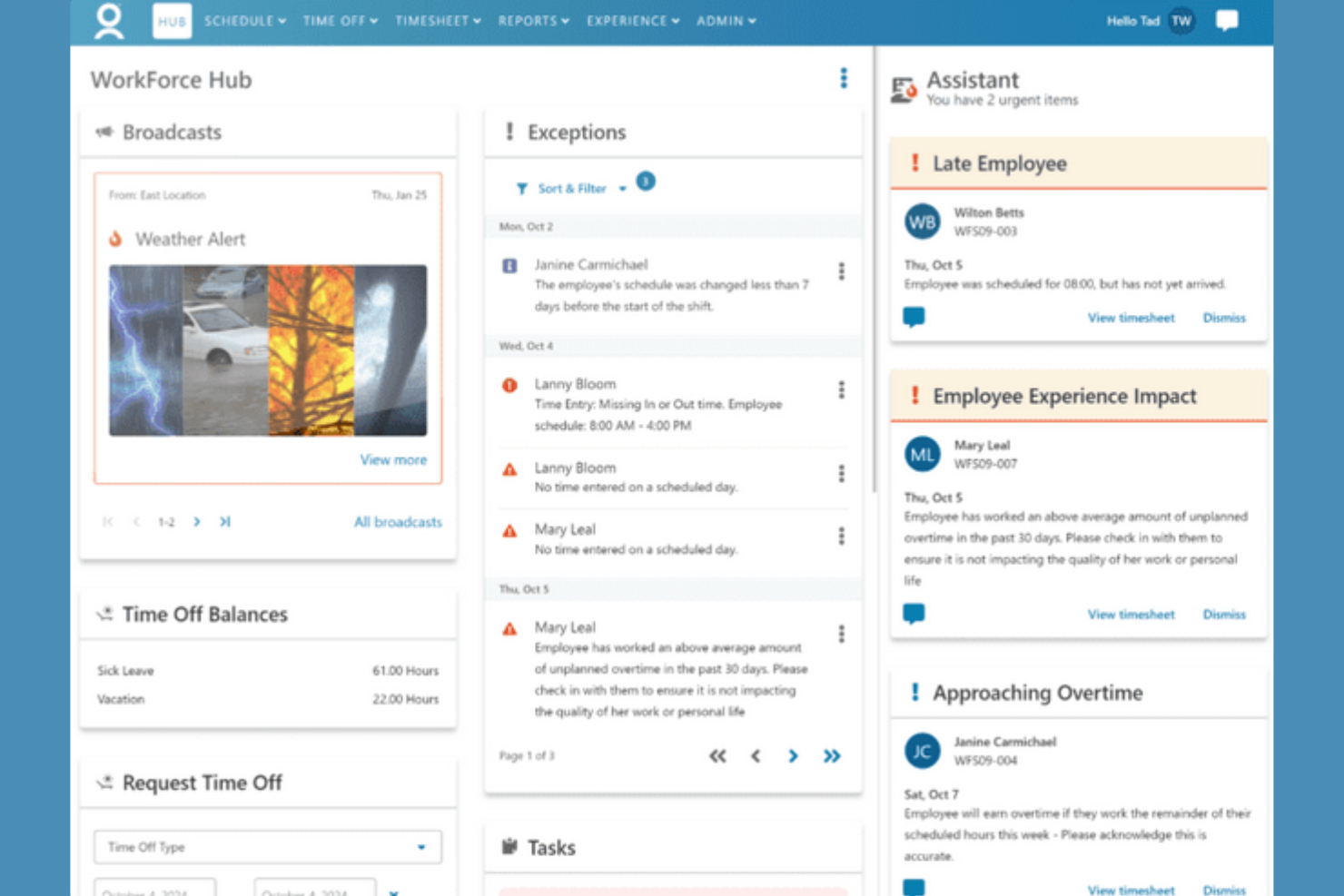
ADP WorkForce Suite stands out for organizations managing a global workforce with complex compliance needs. If your business operates across multiple countries or regions, this platform helps you navigate local labor laws and regulatory requirements. Its compliance-driven scheduling and time tracking features are designed to reduce risk and support HR teams handling international operations.
Why I Picked ADP WorkForce Suite
For organizations that need to manage compliance across multiple countries, ADP WorkForce Suite offers tools built specifically for global requirements. The platform supports region-specific scheduling rules and POS data syncing to automate compliance with local labor laws, which is essential for multinational teams. I picked ADP WorkForce Suite because it helps HR teams reduce risk by flagging potential violations before they happen. Its audit-ready reporting and automated policy enforcement make it a strong choice for businesses focused on global compliance management.
ADP WorkForce Suite Key Features
In addition to its compliance management strengths, ADP WorkForce Suite offers several other features worth noting:
- Automated time and attendance tracking: Capture employee work hours and absences with digital timesheets and real-time updates.
- Employee self-service portal: Allow staff to view schedules, request time off, and swap shifts directly from the platform.
- Mobile workforce management software: Enable on-the-go access for managers and employees to manage schedules and approvals.
- Advanced analytics and reporting: Generate detailed workforce insights and export custom reports to make informed decisions.
ADP WorkForce Suite Integrations
Integrations include SAP, Oracle, Workday, ADP, Kronos, Microsoft Dynamics, Salesforce, Ceridian, Infor, and UKG.
Pros and Cons
Pros:
- Native geofenced mobile time capture
- Pre-built global union compliance templates
- Automated fatigue and rule-based monitoring
Cons:
- High configuration for job costing tasks
- Complex multi-layer database table structure
Annen programvare for optimalisering av arbeidsstyrken
Her er noen flere alternativer for programvare for optimalisering av arbeidsstyrken som ikke kom med på kortlisten min, men som likevel er verdt å sjekke ut:
- Eleveo
For mid-sized contact center scheduling
- Deel HR
For centralized global HR records
- ActivTrak
For productivity trend analysis
- Workforce.com
For hourly staff scheduling
- Oracle Cloud HCM
With advanced analytics integration


How I Evaluate Workforce Optimization Software
I split my evaluation into two layers: core capabilities like demand forecasting and shift scheduling that a tool must have, and differentiators that make one platform a better fit than another.
Core Functionality (Table Stakes For This List)
When I'm selecting tools for my list, I rank each one on a scale from 0 (does not offer the functionality) to 5 (excels in this area) for each core functionality listed below. Then, I calculate the tool's total score into a percentage. Each tool needs to achieve a minimum total score of 75% to be considered for inclusion.
- Workforce Forecasting & Planning: I evaluate whether the tool can predict staffing demand using historical data and business drivers, like modeling seasonal spikes in retail or patient volume surges in healthcare.
- Scheduling & Shift Management: Automated schedule generation matters here, especially how well the tool accounts for employee skills, availability, and labor rules when building shift rosters.
- Time & Attendance Tracking: I look at how the platform captures hours worked, from mobile clock-ins for field teams to geofenced check-ins at multi-site operations, and how that data flows into payroll.
- Performance & Productivity Analytics: Dashboards that track KPIs like adherence, utilization, and output per team give managers real visibility, so I check for configurable reporting and benchmarking.
- Skills & Competency Management: The ability to map employee certifications and skill sets to open roles or project needs is what I evaluate, including whether the tool flags expiring credentials.
- Labor Compliance & Cost Management: I check how the platform enforces overtime caps, mandated break rules, and scheduling regulations while giving finance teams real-time labor cost tracking against budget.
Once I have a list of tools that meet the criteria, I consider what sets each platform apart.
Differentiating Factors (What Sets Vendors Apart)
Here's how I compare and contrast different vendors:
Standout Features
Scenario modeling is a big one for me. I want to see tools that let workforce planners test "what if we cut weekend shifts by 20%" before making real changes. AI-driven recommendations add another layer, surfacing patterns like burnout risk or turnover likelihood that manual analysis would miss. I also look at employee self-service portals, since platforms that let frontline workers swap shifts, claim open slots, and manage availability from their phones take significant pressure off scheduling managers.
Beyond Features
Integrations matter a lot in this space. I check whether a platform connects natively with the HRIS and payroll systems a team already runs, since a scheduling tool that can't sync with your existing payroll creates double entry. Industry fit is equally important—a contact center with 500 agents has very different needs than a hospital managing rotating nursing shifts. I also evaluate implementation timelines and onboarding support, because workforce optimization rollouts that drag on for months risk losing buy-in from the managers who need the tool most.
Slik velger du programvare for optimalisering av arbeidsstyrken
Det er lett å gå seg vill i lange funksjonslister og kompliserte prismodeller. For å hjelpe deg med å holde fokus mens du går gjennom den unike prosessen din for valg av programvare, får du her en sjekkliste over faktorer du bør ha i tankene:
| Faktor | Hva du bør vurdere |
|---|---|
| Skalerbarhet | Vil programvaren håndtere dagens og fremtidens antall medarbeidere, lokasjoner og planleggingskompleksitet? Se etter begrensninger på antall brukere eller lokasjoner. |
| Integrasjoner | Kan den kobles direkte til lønns-, HRIS- og tidsregistreringssystemene dine? Bekreft kompatibiliteten for å unngå manuell dataregistrering. |
| Tilpasningsmuligheter | Kan du tilpasse planleggingsregler, innstillinger for regelverksetterlevelse og rapportering til organisasjonens retningslinjer og arbeidsflyter? |
| Brukervennlighet | Vil ledere og medarbeidere ta løsningen raskt i bruk? Se etter tydelig navigasjon, mobiltilgang og minimale opplæringsbehov. |
| Implementering og onboarding | Hvor lang tid tar oppsettet, og hvilke ressurser kreves? Spør om støtte ved migrering, opplæring og typiske tidsrammer for produksjonssetting. |
| Kostnad | Er prisnivåene transparente og forutsigbare? Ta hensyn til de totale eierkostnadene, inkludert tillegg, brukerstøtte og fremtidige oppgraderinger. |
| Sikkerhetstiltak | Tilbyr leverandøren datakryptering, rollebasert tilgang og samsvar med relevante standarder (som GDPR eller SOC 2)? |
| Krav til regelverksetterlevelse | Kan verktøyet tilpasses endringer i arbeidsmiljølovgivning og regionale forskrifter? Se etter automatiske varsler og regelmessige oppdateringer om regelverksetterlevelse. |
Hva er programvare for optimalisering av arbeidsstyrken?
Programvare for optimalisering av arbeidsstyrken er en kategori digitale verktøy som hjelper organisasjoner med å planlegge, administrere og analysere medarbeiderplanlegging, tilstedeværelse og produktivitet. Disse systemene automatiserer tildeling av skift, sporer arbeidskraftkostnader og støtter overholdelse av arbeidsrettslige regler. Ved å sentralisere arbeidsstyrkedata og HR-prosesser gjør programvare for optimalisering av arbeidsstyrken det mulig for HR-team og ledere å tilpasse bemanningen til virksomhetens behov og forbedre driftseffektiviteten.
Funksjoner i programvare for optimalisering av arbeidsstyrken
Se etter følgende viktige funksjoner når du velger programvare for optimalisering av arbeidsstyrken:
- Skiftplanlegging: Gjør det mulig for ledere å opprette, tildele og justere ansattskift basert på virksomhetens behov og de ansattes tilgjengelighet.
- Registrering av arbeidstid og oppmøte: Registrerer når ansatte stempler inn og ut, overvåker fravær og bidrar til å sikre nøyaktig lønnsbehandling.
- Bemanningsprognoser: Bruker historiske data og trender til å forutsi fremtidige bemanningsbehov, noe som bidrar til å forhindre overbemanning eller underbemanning.
- Etterlevelsesstyring: Overvåker planer og tidsregistreringer for å flagge mulige brudd på arbeidsmiljøloven, fagforeningsregler eller virksomhetens retningslinjer.
- Selvbetjeningsportal for ansatte: Lar ansatte se arbeidsplaner, be om fri og bytte skift, noe som reduserer den administrative arbeidsmengden for ledere.
- Fraværsadministrasjon: Holder oversikt over ferie, sykefravær og annet fravær, og sikrer nøyaktig opptjening samt oversikt for både ansatte og HR.
- Rapportering og analyse: Tilbyr oversikter og tilpassbare rapporter om arbeidskraftkostnader, oppmøtemønstre og effektiviteten i arbeidsplanleggingen.
- Integrasjon med lønnssystemer: Kobler seg direkte til lønnssystemer for å overføre data om arbeidstid og oppmøte, noe som reduserer manuell registrering og feil.
- Mobil tilgang: Tilbyr mobilapper eller responsive nettgrensesnitt slik at ledere og ansatte kan administrere arbeidsplaner og forespørsler på farten.
Fordeler med programvare for optimalisering av arbeidsstyrken
Implementering av programvare for optimalisering av arbeidsstyrken gir flere fordeler for teamet og virksomheten. Her er noen av fordelene du kan se frem til:
- Mer nøyaktig arbeidsplanlegging: Automatisert tildeling av skift og bemanningsprognoser bidrar til å sikre riktig bemanning på hvert skift.
- Redusert risiko for manglende etterlevelse: Innebygd etterlevelsesstyring flagger mulige brudd på arbeidsmiljøloven og virksomhetens retningslinjer før de blir problemer.
- Mindre administrativ arbeidsmengde: Selvbetjeningsportaler for ansatte og automatisert tidsregistrering reduserer manuelle oppgaver knyttet til arbeidsplanlegging og dataregistrering.
- Bedre kontroll over arbeidskraftkostnader: Rapportering og analyse i sanntid gir ledere oversikt over arbeidskraftkostnader og trender for overtidsarbeid.
- Større medarbeiderengasjement: Mobil tilgang og åpen arbeidsplanlegging gjør ansatte i stand til å administrere egen tilgjengelighet og egne forespørsler.
- Raskere opplæring og innføring: Intuitive grensesnitt og veiledede verktøy for innføring hjelper team med å komme i gang med minimale forstyrrelser.
- Nøyaktig lønnsbehandling: Direkte integrasjon med lønnssystemer sikrer at data om arbeidstid og oppmøte overføres uten feil eller forsinkelser.
Kostnader og priser for programvare for optimalisering av arbeidsstyrken
Valg av programvare for optimalisering av arbeidsstyrken krever en forståelse av de ulike prismodellene og abonnementene som er tilgjengelige. Kostnadene varierer ut fra funksjoner, teamstørrelse, tillegg og mer. Tabellen nedenfor oppsummerer vanlige abonnementer, gjennomsnittsprisene deres og typiske funksjoner som er inkludert i WFM-programvareløsninger:
Sammenligningstabell for programvare for optimalisering av arbeidsstyrken
| Abonnementstype | Gjennomsnittspris | Vanlige funksjoner |
|---|---|---|
| Gratisabonnement | $0 | Grunnleggende skiftplanlegging, begrenset tidsregistrering og tilgang for et lite antall brukere. |
| Personlig abonnement | $5-$15/bruker/måned | Individuell arbeidsplanlegging, registrering av arbeidstid og oppmøte, mobil tilgang og grunnleggende rapportering. |
| Bedriftsabonnement | $15-$30/bruker/måned | Teamplanlegging, fraværsadministrasjon, overvåking av etterlevelse, integrasjoner og avansert analyse. |
| Foretaksabonnement | $30-$60/bruker/måned | Tilpassede arbeidsflyter, API-tilgang, avansert sikkerhet, dedikert brukerstøtte og administrasjon av flere lokasjoner. |
Vanlige spørsmål om programvare for optimalisering av arbeidsstyrken
Her er noen svar på vanlige spørsmål om programvare for optimalisering av arbeidsstyrken:
Hvordan bidrar programvare for optimalisering av arbeidsstyrken til å sikre etterlevelse?
Programvare for optimalisering av arbeidsstyrken bidrar til å sikre etterlevelse ved å overvåke arbeidsplaner og tidsregistreringer for mulige brudd på arbeidsmiljølovgivning, tariffavtaler og virksomhetens retningslinjer. Mange verktøy tilbyr automatiske varsler og rapporter som hjelper HR-team med å ligge i forkant av endringer i regelverket og unngå kostbare bøter.
Kan programvare for optimalisering av arbeidsstyrken integreres med lønns- og HR-systemer?
Ja, det meste av programvaren for optimalisering av arbeidsstyrken kan integreres med lønns- og HR-systemer. Disse integrasjonene gjør det mulig å overføre data om arbeidstid, oppmøte og arbeidsplaner automatisk, noe som reduserer behovet for manuell registrering og minimerer feil under lønnskjøringen.
Hva bør jeg vurdere når jeg velger programvare for optimalisering av arbeidsstyrken for et eksternt eller hybrid team?
Når du velger programvare for eksterne eller hybride team, bør du se etter mobiltilgang, skybasert distribusjon og selvbetjeningsfunksjoner. Disse funksjonene sørger for at ansatte kan se arbeidsplaner, be om endringer og registrere arbeidstid fra hvor som helst, og støtter fleksible arbeidsordninger.
Hvor lang tid tar det å implementere programvare for optimalisering av arbeidsstyrken?
Tidsrammen for implementering varierer, men de fleste organisasjoner kan forvente at oppsettet tar alt fra noen dager til flere uker. Faktorer som spiller inn, er behovet for datamigrering, kompleksiteten i integrasjonene og tilgjengeligheten av opplæringsressurser som opplæringsvideoer og produktomvisninger.
Passer programvare for optimalisering av arbeidsstyrken for små bedrifter?
Ja, mange løsninger for optimalisering av arbeidsstyrken tilbyr abonnementer og funksjoner som er tilpasset små bedrifter. Se etter alternativer med enkelt oppsett, oversiktlige priser og grunnleggende funksjoner for arbeidsplanlegging og tidsregistrering uten unødvendig kompleksitet.