

10 beste programvarer for administrasjon av kontorlokaler med KI i 2026

Beste programvare for AI-basert administrasjon av kontorlokaler


Programvare for AI-basert administrasjon av kontorlokaler bruker kunstig intelligens til å hjelpe deg med å planlegge, reservere og optimalisere hvordan arbeidsplasser brukes og administreres. Hvis du ser etter verktøy som forenkler bestilling, forbedrer data om beleggsgrad og tilpasser seg hybridarbeid eller fleksibelt arbeid, har du kommet til rett sted. Den rette løsningen kan hjelpe virksomheten din med å møte endrede behov hos de ansatte, utnytte kontorlokalene bedre og ta bedre datadrevne beslutninger. Nedenfor finner du ekspertutvalgte alternativer og viktig informasjon, slik at du trygt kan velge det beste AI-verktøyet for målene dine for en hybrid arbeidsplass.
Why Trust Our Software Recommendations
Our team has been testing and reviewing software since 2012. As HR experts ourselves, we know how difficult—and important—it is to choose the right software.
For this guide, we evaluated tools using hands-on testing and independent research, scoring tools using our selection criteria. We also draw on insights from industry thought leaders and practicing HR experts.
Our reviews reflect our human editorial judgment, not a sales pitch.
Expert reviewers:
Sammenligningstabell for AI-basert programvare for administrasjon av kontorlokaler
Denne sammenligningstabellen oppsummerer prisopplysningene for mine beste utvalgte programmer for AI-basert administrasjon av kontorlokaler:
| Tool | Best For | Trial Info | Price | ||
|---|---|---|---|---|---|
| 1 | Best for predictive space scenario modeling | Free demo available | Pricing upon request | Website | |
| 2 | Best for touchless desk check-in | Free demo available | Pricing upon request | Website | |
| 3 | Best for real-time occupancy insights | Free demo available | From $5/bookable resource/month (billed annually) | Website | |
| 4 | Best for space efficiency recommendations | Free trial + free demo available | From $5/user/month (billed annually) | Website | |
| 5 | Best for flexible desk and room reservations | Free demo available | Pricing upon request | Website | |
| 6 | Best for sensor-driven workspace analytics | Free demo available | Pricing upon request | Website | |
| 7 | Best for AI-powered workplace assistance | Free demo available | From $99/month | Website | |
| 8 | Best for Microsoft ecosystem integration | Free demo available | From $8.55/license/month (billed annually) | Website | |
| 9 | Best for hybrid work scheduling integration | Free demo available | Pricing upon request | Website | |
| 10 | Best for dynamic office mapping | Free demo available | Pricing upon request | Website |

Anmeldelser av den beste AI-baserte programvaren for administrasjon av kontorlokaler
Nedenfor finner du mine detaljerte sammendrag av den beste AI-baserte programvaren for administrasjon av kontorlokaler som kom med på kortlisten min. Anmeldelsene mine bygger på virkelige casestudier og gir en detaljert oversikt over funksjonene, mulighetene og integrasjonene til hver plattform, slik at du kan finne den beste løsningen for deg.
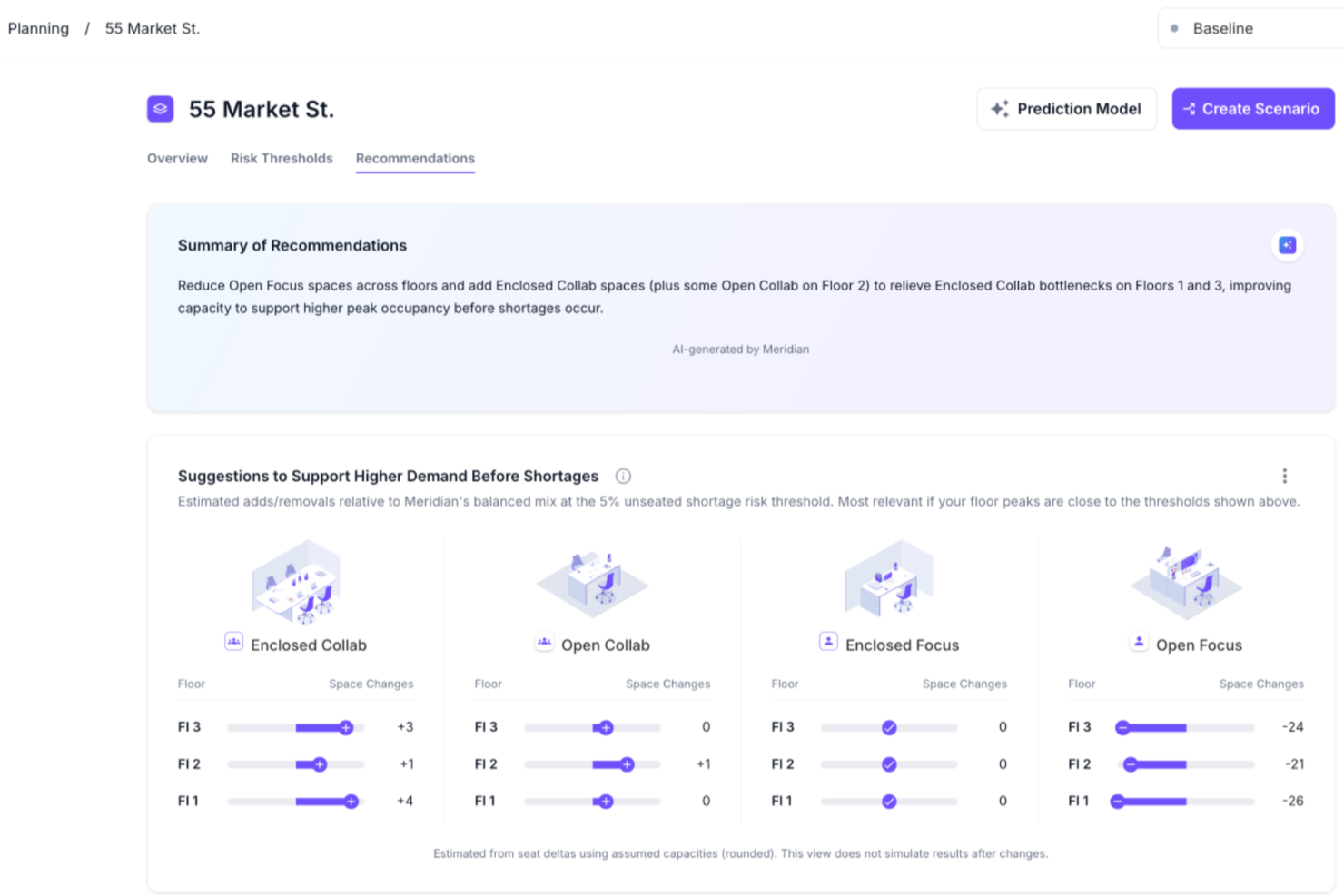
VergeSense is an AI-powered office space management platform that uses occupancy intelligence and predictive planning tools for scenario modeling, capacity forecasting, and portfolio-level space optimization.
Who Is VergeSense Best For?
VergeSense suits corporate real estate and workplace teams at large enterprises managing complex, multi-site office portfolios.
Why I Picked VergeSense
VergeSense is one of my top picks because I love how its Predictive Planning tool handles the "what if" questions that come up constantly in space planning. I can upload a floor plan and run scenario models against real occupancy data, testing headcount growth, hybrid attendance shifts, or consolidation plans before committing to anything. Unlike others, the Large Spatial Model draws from more than 200M sq ft of real workplace behavior across 200+ enterprises, so scenario outputs aren't based on industry averages. I've also found the CFO-ready reporting genuinely useful when I need to defend a footprint decision to leadership.
VergeSense Key Features
- Infinity Area Sensor: A proprietary sensor that captures zone-level occupancy data across open areas, meeting rooms, and neighborhoods, eliminating the need for individual desk sensors.
- Signs of Life detection: A passive occupancy detection method that identifies space use independently of booking data or badge swipes, reducing data gaps.
- Multi-source data integration: Combines occupancy signals from Wi-Fi, badge systems, and desk booking platforms into a single analytics layer for a unified view.
- Capacity threshold alerts: Notifies teams when space utilization crosses set thresholds so they can address over- or under-used areas in real time.
VergeSense Integrations
VergeSense offers dozens of native integrations including Accruent EMS, Archibus by Eptura, Aruba, Cisco Meraki, CBRE Host, Cloudbooking, Condeco by Eptura, Crestron, Microsoft Places, ServiceNow, and Appspace. An open API is also available for custom integrations.
Pros and Cons
Pros:
- Ingests data from Wi-Fi, badges, and sensors
- Delivers consistent measurement across multiple sites
- Sensor accuracy exceeds 95% for occupancy detection
Cons:
- Hardware installation increases upfront cost and extends lead time
- Camera-based sensors require extensive privacy reviews

Best for touchless desk check-in
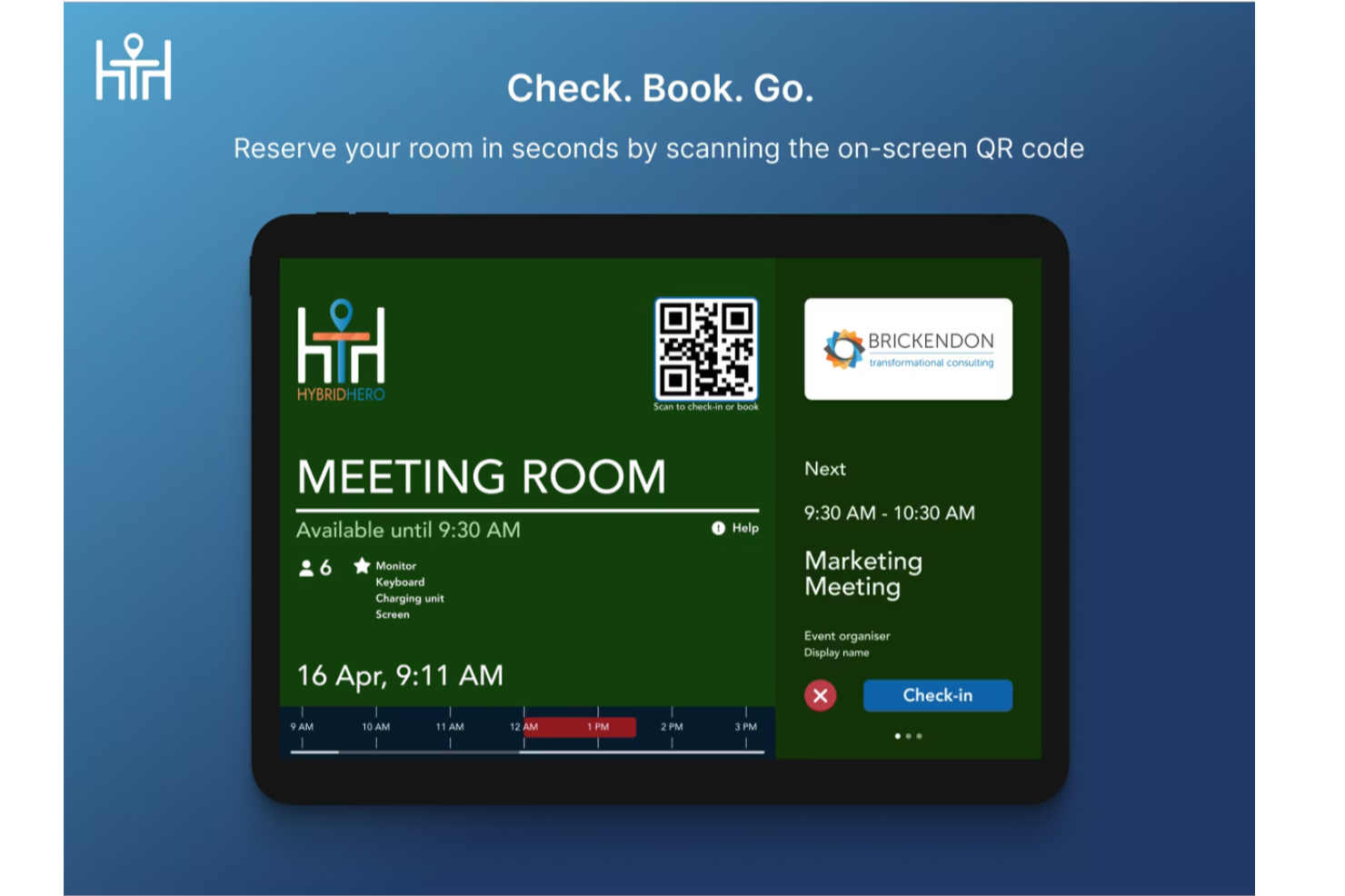
HybridHero is an AI-powered workplace management platform that covers desk booking, meeting room scheduling, visitor management, parking, and space utilization analytics across hybrid office environments.
Who Is Hybrid Hero Best For?
HybridHero is a strong fit for mid-to-large organizations managing hybrid work schedules across multiple office locations or floors.
Why I Picked Hybrid Hero
I picked HybridHero as one of the best for touchless desk check-in because of how well it closes the gap between a booking and actual attendance. Employees scan a QR code at the desk to confirm they're there, and if no check-in happens within a set window (say, 15 minutes), the desk auto-releases back into the available pool. I also like that every missed check-in is tracked as a no-show in the utilisation reporting, so you're building a real picture of desk demand, not just booking data.
Hybrid Hero Key Features
- AI booking assistant: Book a desk using natural-language prompts through the HybridHero AI chat interface, without navigating menus.
- Interactive floor plans: View real-time desk availability across floors and select a specific seat directly from a visual map.
- Heat map analytics: See which zones and desks are used most frequently through color-coded occupancy heat maps.
- Office neighborhood management: Assign desks or zones to specific teams so groups consistently sit in the same area.
Hybrid Hero Integrations
HybridHero offers native integrations with Microsoft Outlook, Microsoft Teams, Google Workspace, Slack, Okta, and Azure Active Directory. It also supports SSO through SAML and OpenID Connect. A REST API and webhooks are available for custom integrations with HRIS, access control, and internal systems.
Pros and Cons
Pros:
- Week cloning speeds up repeat bookings
- Includes parking and visitor management
- Built-in no-show auto-release for desks
Cons:
- Page load times can be slow
- Mobile app lacks full web features

Envoy
Best for real-time occupancy insights
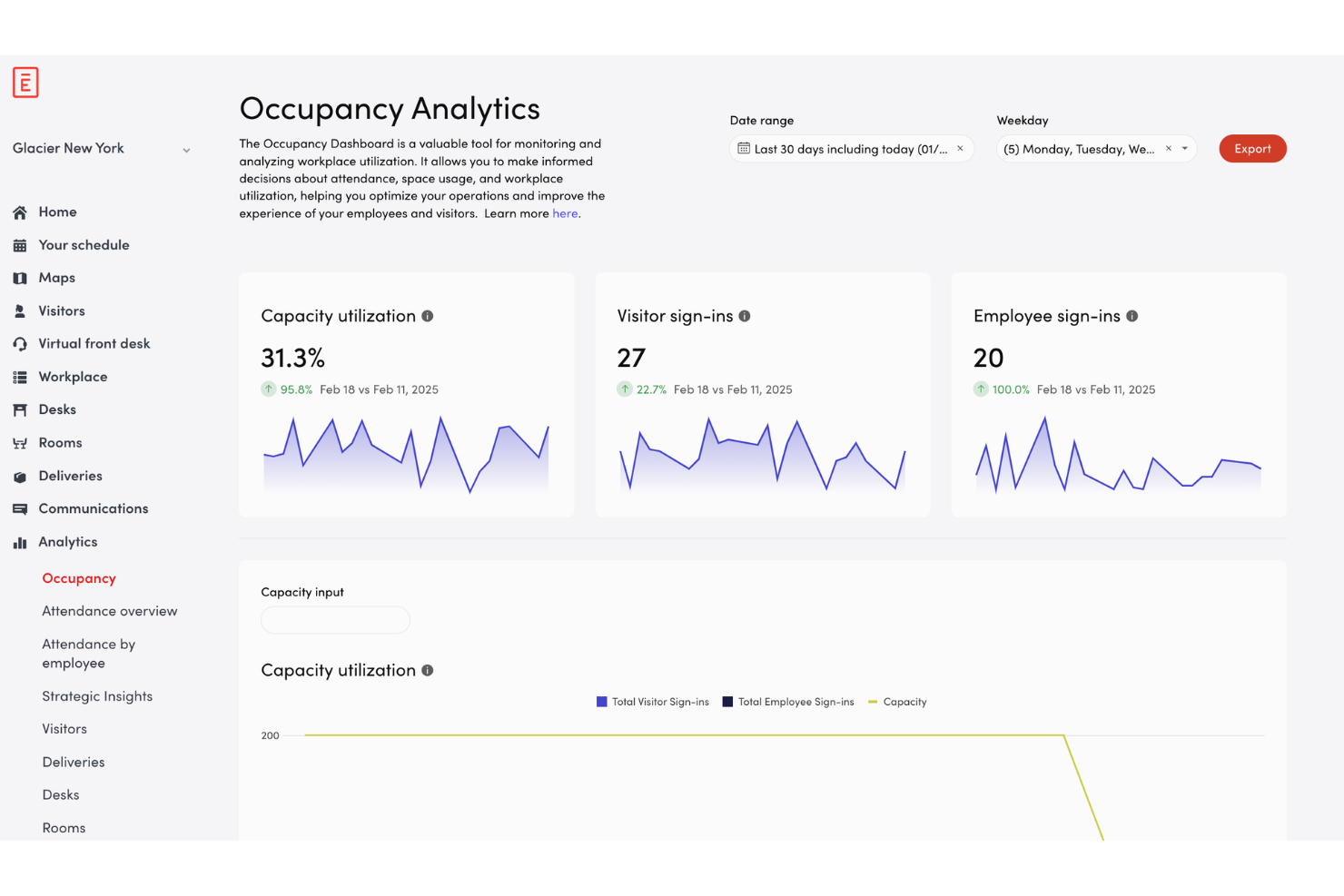
Envoy is an office space management platform for workplace teams, offering automated desk reservations, visitor management, workplace capacity tools, and real-time occupancy tracking for modern workplaces.
Who Is Envoy Best For?
Facility managers and workplace teams at mid-sized or larger offices who need real-time insights into space usage and on-site occupancy.
Why I Picked Envoy
I picked Envoy as one of the best because I can see real-time occupancy insights on every floor, track desk and meeting room usage by the hour, and set thresholds for workplace capacity. I like being able to monitor traffic spikes and adjust space policies quickly.
Envoy Key Features
- Visitor management dashboard: Register and track guests from a single interface.
- Desk booking system: Reserve, release, or assign desks across multiple locations.
- Employee mobile app: Manage bookings, check-ins, and notifications on iOS and Android.
- Touchless sign-in process: Enable QR code or mobile-based entry to shared workspaces.
Envoy Integrations
Envoy offers 100+ integrations through its app directory, including Slack, Microsoft Teams, Google Calendar, Microsoft Outlook, Okta, Salesforce, Brivo, Kisi, Avigilon Alta, and DocuSign. It also connects with Zapier and provides an API for custom integrations.
Pros and Cons
Pros:
- Mobile app enables booking and check-in
- Customizable floor maps reflect workspace bookings
- Real-time occupancy data by desk and room
Cons:
- Requires investing in workplace hardware
- Set up time for complex workplace layouts

deskbird
Best for space efficiency recommendations
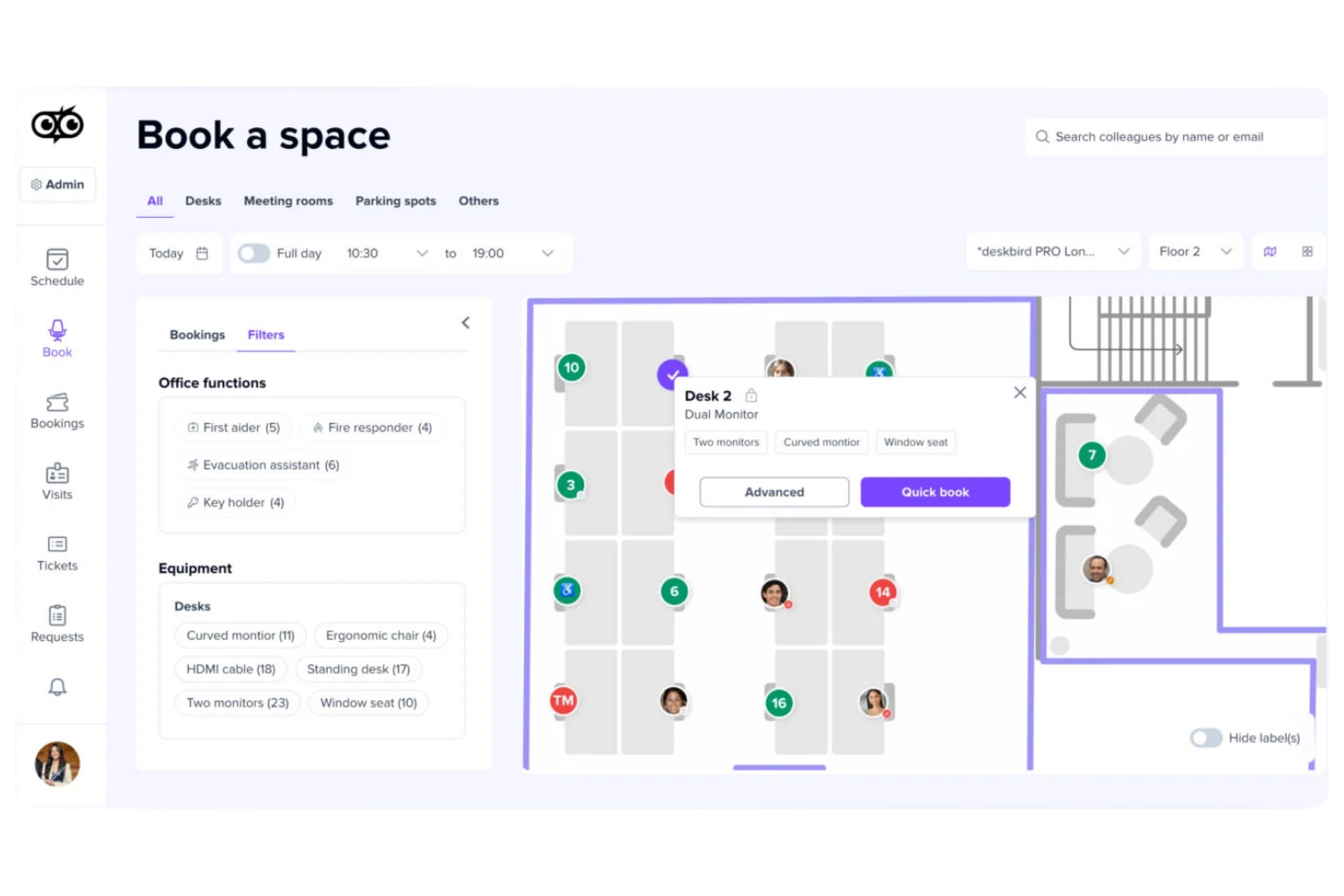
deskbird is an AI-powered office space management platform that offers workspace booking, usage analytics, office occupancy tracking, and smart recommendations for optimizing physical workspace allocation.
Who Is deskbird Best For?
deskbird fits offices with hybrid work models needing a system for workspace scheduling and actionable insights to maximize use of physical space.
Why I Picked deskbird
I picked deskbird as one of the best because I use its AI-based analytics to audit seat occupancy and receive automatic space efficiency recommendations. I get daily and long-term insights, and the platform flags underused areas to help me make informed changes.
deskbird Key Features
- Interactive floor plan: Users can view and select available spaces directly on a digital office map.
- Mobile app booking: Book desks and rooms using the deskbird mobile app for iOS and Android.
- Hybrid work planning: Schedule in-office and remote workdays within the platform.
- Visitor management: Register and track office visitors using integrated workflows.
deskbird Integrations
deskbird offers 50+ native integrations including Microsoft 365, Outlook, Google Workspace, Microsoft Teams, Sage, Rippling, UKG Pro, HiBob, Gusto, Dayforce, ADP, Workday, and Slack. An API is available for custom integrations.
Pros and Cons
Pros:
- Mobile booking for desks and meeting rooms
- Interactive office floorplans for easy navigation
- AI generates actionable workspace efficiency insights
Cons:
- Some analytics features are locked to higher plans
- No native IoT sensor hardware

Robin
Best for flexible desk and room reservations
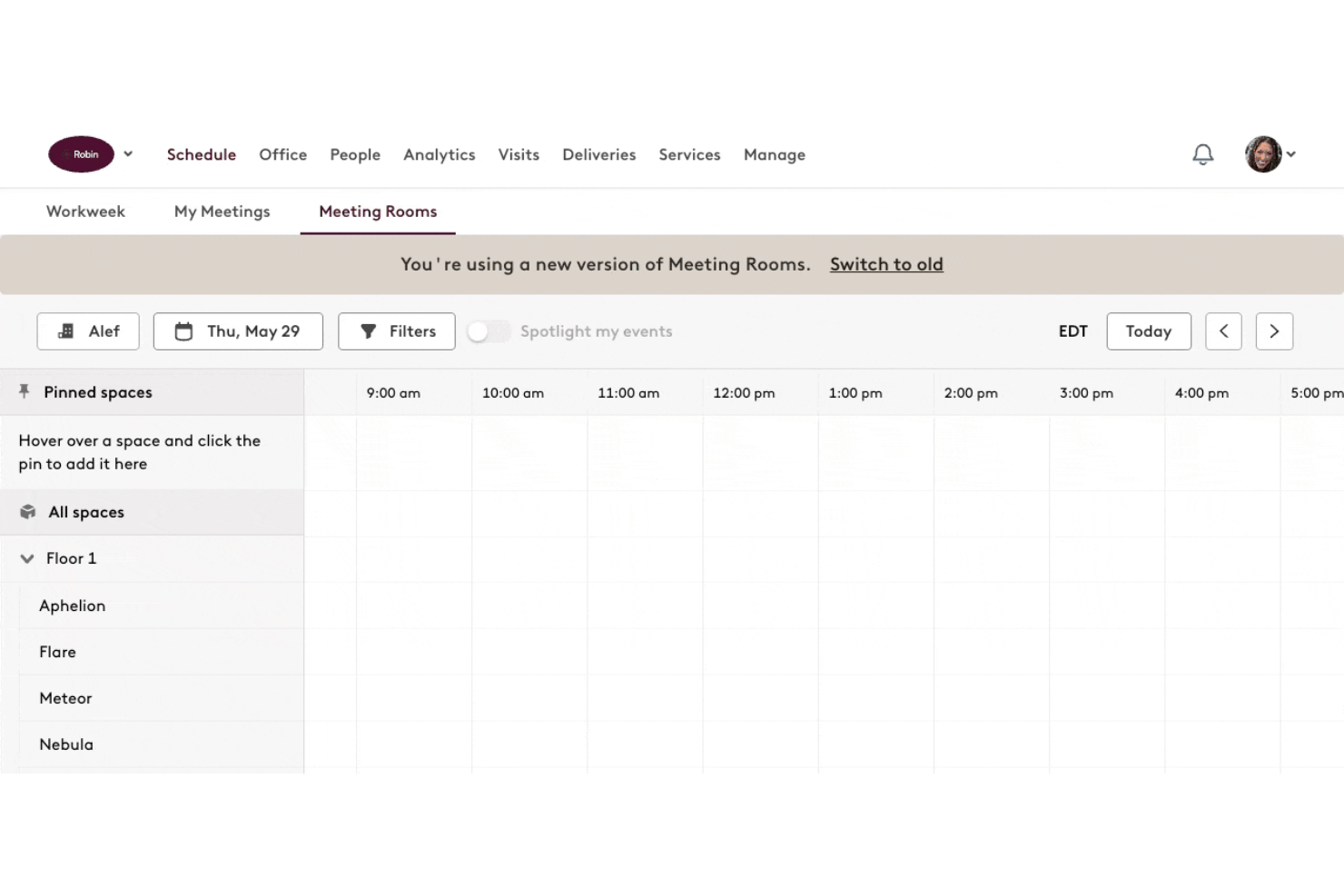
Robin is a space management platform offering AI-powered hot-desking options, room bookings, office maps, analytics, and shared workspace coordination.
Who Is Robin Best For?
Facilities and workplace teams at hybrid offices that need on-demand desk and meeting room scheduling.
Why I Picked Robin
I picked Robin as one of the best because I can set up flexible desk and conference room reservations, manage daily shifts, and configure office maps that update as bookings change. I use Robin’s scheduling rules to automate space assignments for hybrid and remote teams.
Robin Key Features
- Interactive office floor plans: Visualize workspace availability and seating layouts in real time.
- Visitor management: Register, track, and manage guest access directly from the platform.
- Workplace analytics dashboard: Display usage patterns and space utilization metrics for all locations.
- Mobile app booking: Reserve desks or rooms from iOS and Android devices.
Robin Integrations
Robin offers native integrations across the Microsoft ecosystem, including Microsoft Teams, Outlook, Exchange, Entra ID, Intune, and Microsoft 365, as well as Google Calendar and Google Workspace. It also integrates with Slack, Zoom, Okta, OneLogin, Rippling, and access control systems like Avigilon, Brivo, and Kisi. An API is available for custom integrations.
Pros and Cons
Pros:
- Mobile app supports on-the-go reservations
- Real-time occupancy and workplace analytics
- Customizable office maps update with bookings
Cons:
- Some features only available on higher tiers
- Setup for large offices takes time
Best for sensor-driven workspace analytics
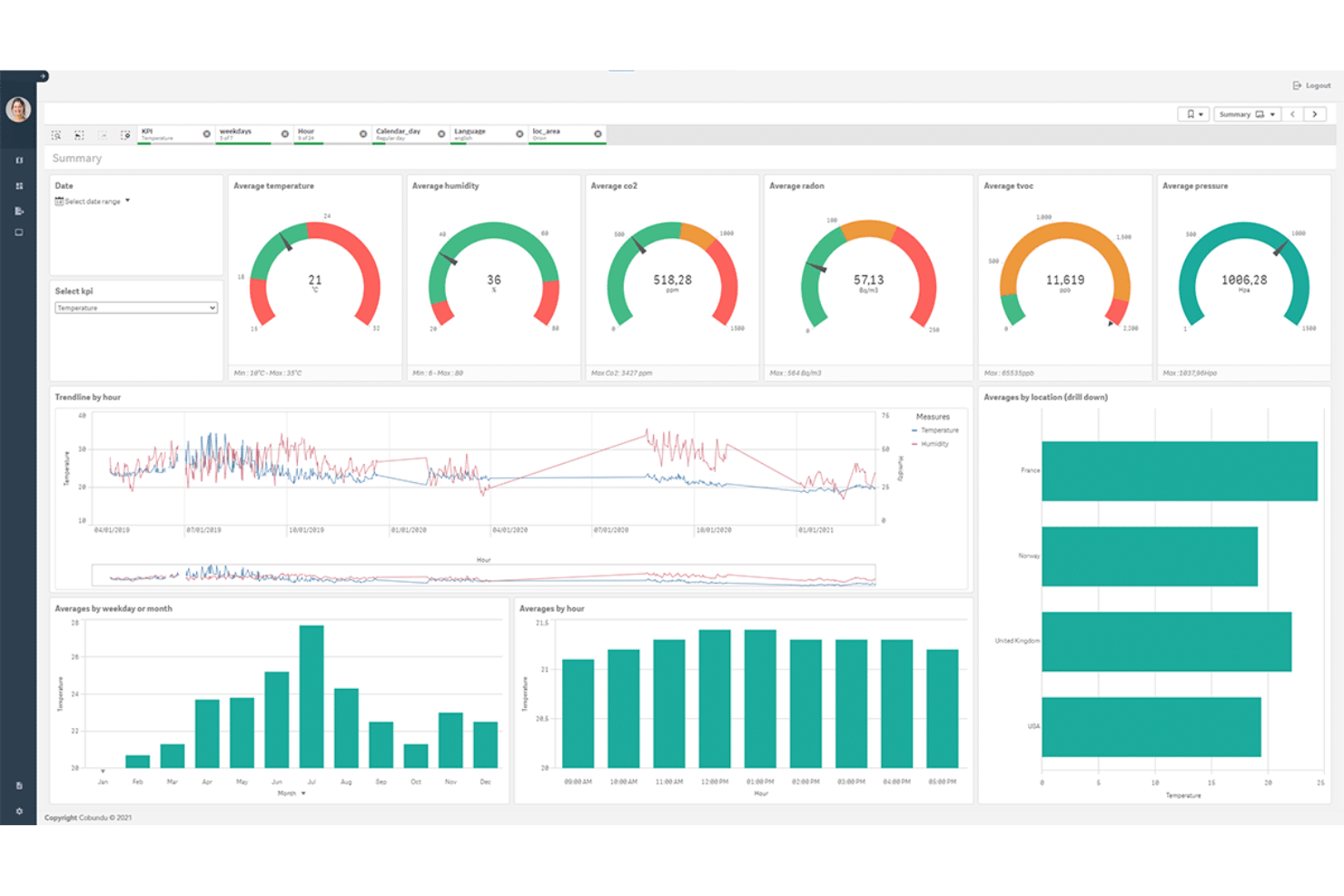
Spacewell is an AI-driven office space management platform that delivers workspace utilization monitoring, desk and room booking, occupancy insights, and automated facility operations management.
Who Is Spacewell Best For?
Facility managers in large corporate offices or multi-site enterprises who need robust workspace monitoring and analytics.
Why I Picked Spacewell
I picked Spacewell as one of the best because I use its IoT sensor integrations to gather real-time workspace occupancy and environmental metrics. I rely on its granular analytics dashboards for seat-level and meeting room utilization tracking.
Spacewell Key Features
- Desk and room booking system: Lets employees reserve workspaces and meeting rooms through a self-service portal.
- Cleaning and maintenance scheduling: Automates assignment and tracking of cleaning and service tasks.
- Live floor plan visualization: Shows current occupancy and activity across office zones in an interactive map.
- Occupant feedback modules: Collects real-time feedback from employees about workspace conditions.
Spacewell Integrations
Spacewell offers native integrations with Oracle, SAP, ServiceNow, Freshservice, Workday, Jira, and Microsoft 365. Google Workspace, AutoCAD, and more. An API is available for custom integrations.
Pros and Cons
Pros:
- Detailed workplace environmental monitoring
- Sensor-based alerts for inefficient space usage
- Real-time heatmapping of workspace occupancy
Cons:
- Workflow customization options are limited
- Initial setup may require technical assistance
YAROOMS
Best for AI-powered workplace assistance
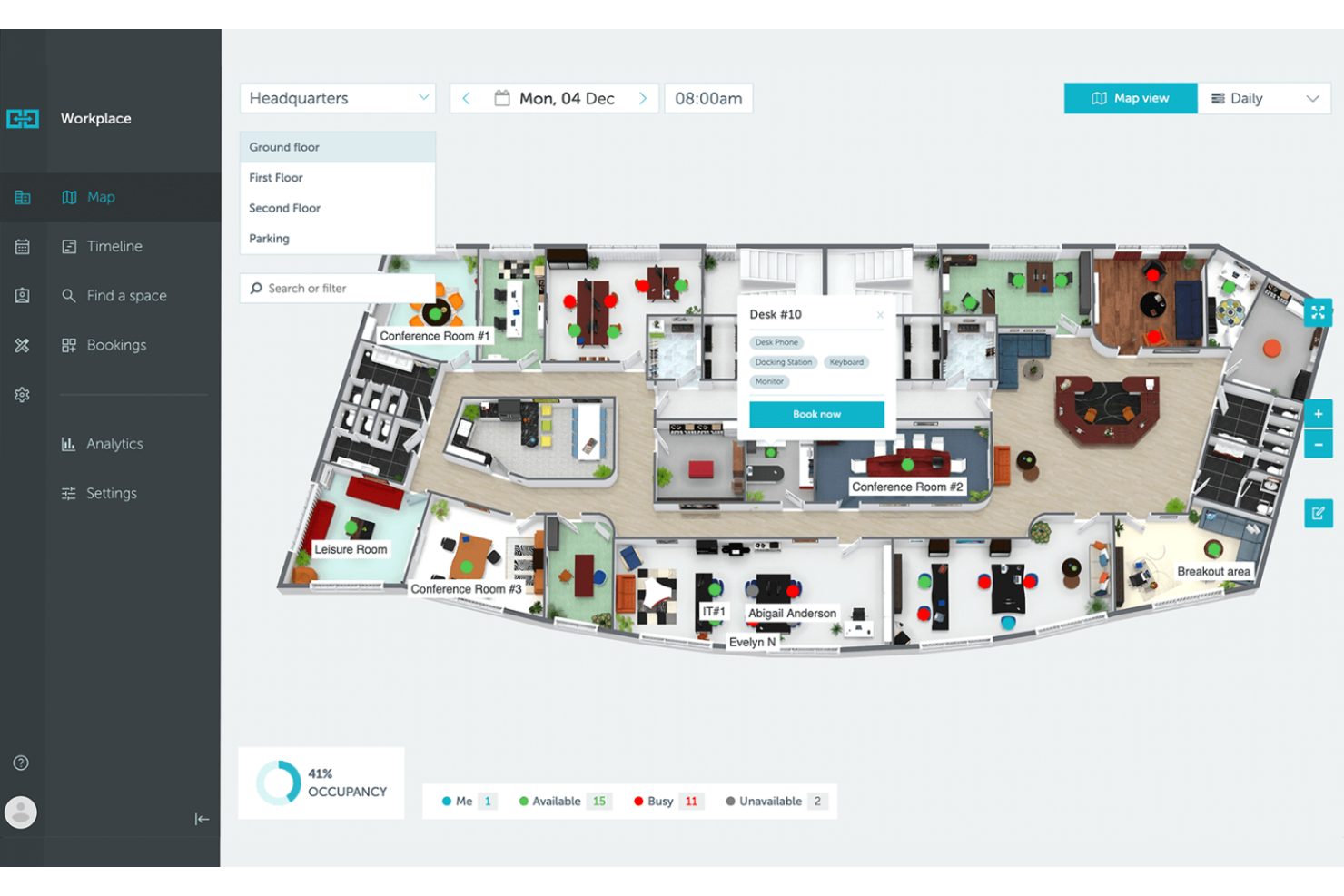
YAROOMS is an AI-driven office space management platform that combines resource booking, workspace analytics, hybrid work planning, and environmental monitoring into an all in one system.
Who Is YAROOMS Best For?
YAROOMS is a strong fit for facilities and workplace managers at mid-sized to large organizations seeking advanced AI support for space management and resource coordination.
Why I Picked YAROOMS
I picked YAROOMS as one of the best because I use its AI-powered assistant, YARVIS, to automate booking requests and respond to employee questions in real time. I rely on its natural language interface and policy-driven recommendations to manage workspace access and optimize resource usage.
YAROOMS Key Features
- Workplace analytics dashboard: Tracks workspace utilization and user activity in real time.
- Hybrid work scheduling: Lets users coordinate in-office and remote workdays.
- Interactive floor plans: Lets users visualize workspace layouts and check availability before booking.
- Room and desk booking: Allows employees to reserve meeting rooms and desks directly from the platform.
YAROOMS Integrations
YAROOMS offers native integrations across the Microsoft ecosystem, including Microsoft Teams, Microsoft 365, Outlook, and Azure AD, along with Google Calendar, Google Meet, Slack, Zoom, MappedIn, and SAML 2.0 for SSO. A REST API is also available for custom integrations.
Pros and Cons
Pros:
- Tracks environmental metrics like CO2 and air quality
- Desk and room mapping is interactive and clear
- AI assistant processes requests in natural language
Cons:
- Mobile app lacks offline booking
- Lacks passive occupancy sensor hardware

Best for Microsoft ecosystem integration
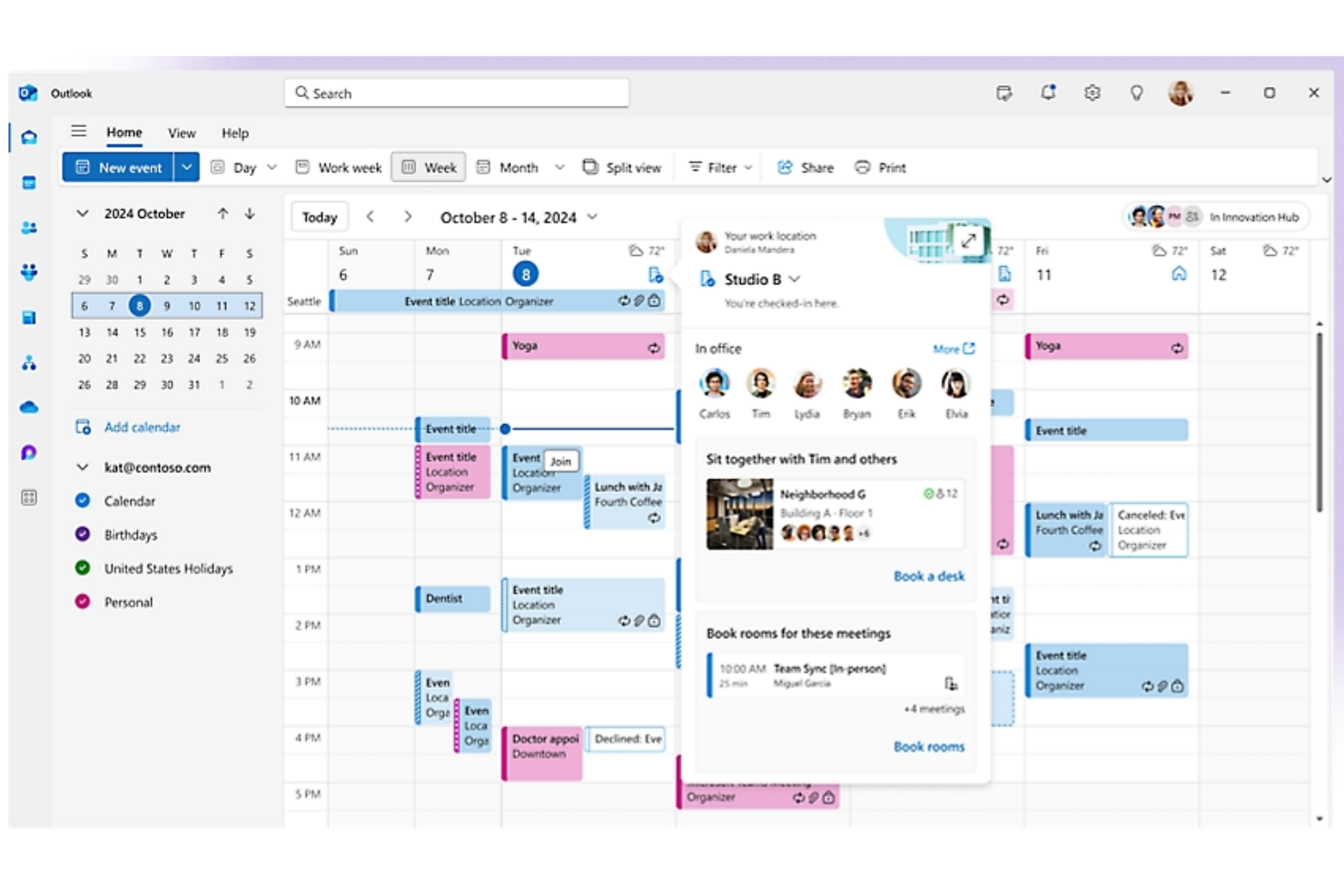
Microsoft Places is a smart workplace management platform that helps organizations manage hybrid workspaces, enable desk and room booking, coordinate in-office schedules, and visualize workplace occupancy through integration with Microsoft 365.
Who Is Microsoft Places Best For?
Microsoft Places is well-suited for medium-to-large organizations using Microsoft 365 who want to manage hybrid office occupancy and space coordination across locations.
Why I Picked Microsoft Places
I picked Microsoft Places as one of the best because I can manage workspace reservation, team schedules, and space utilization directly within the Microsoft 365 ecosystem. I rely on it to sync bookings with Outlook and Teams, keeping all workplace data centralized.
Microsoft Places Key Features
- AI-powered occupancy forecasting: Provides workspace usage predictions using real-time and historical data
- Interactive workplace maps: Lets users visualize office layouts to locate rooms and desks
- Hybrid work scheduling: Lets employees coordinate in-office and remote days with integrated workspace reservations.
- Presence detection integration: Updates workspace availability automatically based on user presence data
Microsoft Places Integrations
Microsoft Places has native integrations across the Microsoft ecosystem, including Microsoft 365, Outlook, Teams, and Azure. An API is available for custom integrations.
Pros and Cons
Pros:
- Direct calendar sync with Outlook and Teams
- AI-powered occupancy forecasts assist planning
- Floor plan mapping is customizable and detailed
Cons:
- Features closely tied to Microsoft 365 subscriptions
- Limited analytics unless using advanced Microsoft licenses

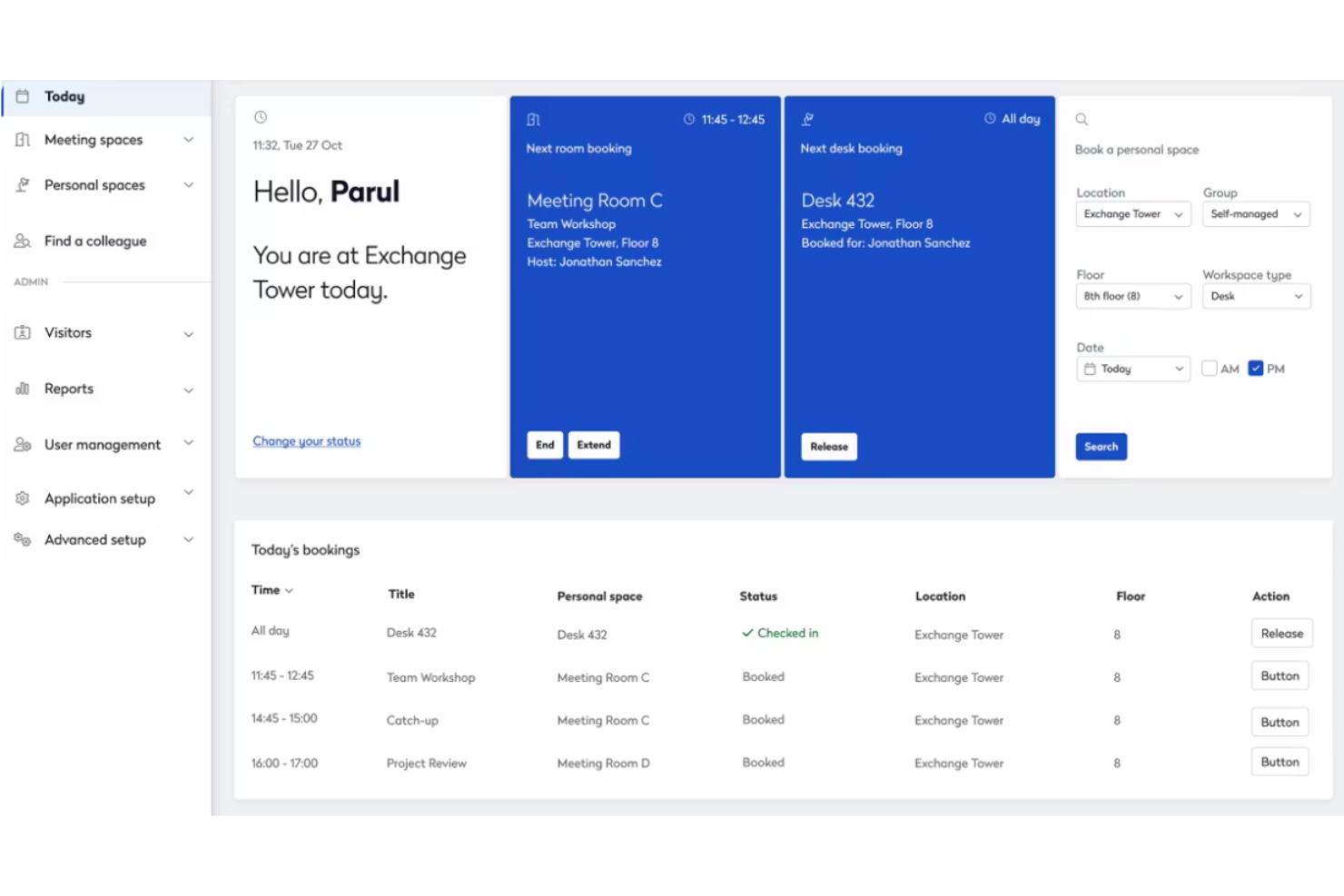
Eptura is a workplace management platform designed for hybrid offices, offering features such as desk and room booking, visitor management, workplace analytics, asset tracking, and space planning.
Who Is Eptura Best For?
HR and facilities teams at enterprise or multi-location companies who want unified management of hybrid workspaces and scheduling.
Why I Picked Eptura
I picked Eptura as one of the best because I can coordinate hybrid work schedules with desk and room booking that syncs across employee calendars and floor plans. I also like how the scheduling automation reduces manual work for my team.
Eptura Key Features
- Interactive floor plan mapping: Visualize workspace layouts and desk assignments in real time.
- Visitor management system: Register guests, track entry, and automate sign-ins.
- Asset tracking dashboard: Monitor and manage office equipment locations and usage.
- Workplace analytics reporting: Analyze occupancy, space usage, and trends with built-in reports.
Eptura Integrations
Eptura offers more than 30 native integrations, including the Microsoft ecosystem, Zoom, Salesforce, Dropbox, Azure, AWS, Power BI, and Slack. It integrates with Zapier, and an API is also available for custom integrations.
Pros and Cons
Pros:
- Mobile booking and check-in functionality
- Custom floor plans reflect actual workspace layouts
- Real-time view of desk and room occupancy
Cons:
- Reporting modules can be difficult to use
- Setup can be complex for large offices


Maptician is an office space management software that provides dynamic office mapping, real-time desk booking, meeting room scheduling, visitor tracking, and workspace occupancy analytics for modern workplaces.
Who Is Maptician Best For?
Office administrators and facility managers in mid-sized and large companies who need real-time control and visualization of dynamic workspaces.
Why I Picked Maptician
I picked Maptician as one of the best because I rely on its interactive dynamic office maps that update in real time, making it easy to visualize and adjust space allocation. The ability to manage both desk and meeting room assignments from a detailed floor plan is a major plus.
Maptician Key Features
- Workplace occupancy analytics: Lets you track and analyze space usage trends over time.
- Visitor management system: Enables front-desk check-ins and guest tracking.
- Health and safety compliance tools: Supports contact tracing and social distancing protocols.
- Self-service desk booking: Allows employees to reserve their own workspaces online.
Maptician Integrations
Native integrations with Microsoft 365, Webex, Microsoft Azure, Brivo, Ping, Google Workspace, Okta, Slack, and more are supported. Maptician also provides an API for custom integrations.
Pros and Cons
Pros:
- Desk booking available through the mobile app
- Includes space utilization and occupancy analytics
- Floorplan updates reflect real-time changes
Cons:
- Annual subscription contract is required
- Lacks passive automatic check-in sensors
Annen AI-basert programvare for administrasjon av kontorlokaler
Her er noen flere alternativer for AI-basert programvare for administrasjon av kontorlokaler som ikke kom med på kortlisten min, men som likevel er verdt å se nærmere på:
- elia
For automated occupancy tracking
- OfficeSpace
For customizing workplace layouts
- anny
For granular permission controls
- Skedda
For interactive floorplan scheduling
- WorkInSync
For centralized resource booking
- Kadence
For real-time occupancy scheduling
- Tactic
For hybrid team coordination
- Joan
For meeting room display integration
- Archie
For workplace visitor management
- Officely
For Slack-based office planning


How I Evaluate AI Office Space Management Software
I look for platforms where AI does more than label a dashboard—it should actively predict occupancy, suggest smarter desk assignments, and surface real estate savings your team can act on. My evaluation splits into two layers: core functionality every tool needs to make the list, and differentiating factors that separate good options from great ones.
Core Functionality (Table Stakes For This List)
When I'm selecting tools for my list, I rank each one on a scale from 0 (does not offer the functionality) to 5 (excels in this area) for each core functionality listed below. Then, I calculate the tool's total score into a percentage. Each tool needs to achieve a minimum total score of 65% to be considered for inclusion.
- AI-Driven Space Optimization: I look for platforms where ML models analyze patterns across seating zones, floors, and shifts to recommend consolidation or layout changes.
- Intelligent Desk & Room Booking: The booking engine should surface smart suggestions—like assigning desks near teammates already scheduled to be in the office that day.
- Occupancy Analytics & Forecasting: I evaluate whether the tool goes beyond historical dashboards to predict future demand, such as forecasting peak days by department.
- Employee-Facing Experience Interface: A mobile or web app that lets employees search for open desks, locate colleagues, and book rooms on the go is what I check for here.
- HR & Workplace System Integrations: Connectors to HRIS platforms, calendar tools like Outlook and Google Calendar, and collaboration apps like Slack or Teams keep data in sync.
- Interactive Floor Plans & Wayfinding: I look for dynamic, visual maps that show real-time availability and let employees tap a desk or room to book it directly from the layout.
Once I have a list of tools that meet this criteria, I consider what sets each platform apart.
Differentiating Factors (What Sets Vendors Apart)
Here's how I compare and contrast different vendors:
Standout Features
Team coordination AI is a big one for me—I check whether a platform can suggest optimal in-office days based on who's collaborating on shared projects. Scenario planning tools also carry weight, especially for HR leaders modeling what happens to space needs after a hiring surge or a return-to-office policy shift. I also look for conversational AI assistants that let employees book a desk or find a colleague through Slack or Teams without leaving their workflow.
Beyond Features
Data privacy matters here because these platforms collect sensitive employee presence and location data. I evaluate whether vendors offer GDPR and SOC 2 compliance alongside configurable anonymization settings. Scalability is another factor I weigh—an HR team managing five offices across different regions needs multi-site dashboards, localized time zones, and flexible licensing that grows with headcount. I also consider onboarding support, since floor plan digitization and sensor setup can stall rollout without a dedicated implementation team.
Slik velger du AI-basert programvare for administrasjon av kontorlokaler
Det er lett å gå seg vill i lange funksjonslister og kompliserte prismodeller. For å hjelpe deg med å holde fokus mens du går gjennom den unike prosessen med å velge programvare, har vi laget en sjekkliste over faktorer du bør ha i bakhodet:
| Faktor | Hva bør du vurdere? |
|---|---|
| Skalerbarhet | Vil systemet støtte dagens og fremtidige kontorlokasjoner, teamstørrelser eller endringer i arbeidsplassutformingen uten omfattende oppgraderinger eller økt kompleksitet? |
| Integrasjoner | Kan plattformen kobles til tilgangskontroll-, HR- eller IT-systemene du allerede bruker? Se etter bekreftede integrasjoner, ikke bare påstander om API-støtte. |
| Tilpasningsmuligheter | Kan du tilpasse regler for beleggsgrad, arbeidsplassoner og rapporteringsdashbord slik at de gjenspeiler organisasjonens unike arbeidsflyter og retningslinjer? |
| Brukervennlighet | Vil ansatte og administratorer kunne ta i bruk verktøyet med minimal opplæring? Be om demonstrasjoner for å se om vanlige oppgaver kan utføres raskt og enkelt. |
| Implementering og innføring | Hvor lang tid tar oppsettet, og hvilke ressurser tilbyr leverandøren for innføringen? Undersøk om det finnes støtte for datamigrering, maler og praktisk veiledning. |
| Kostnad | Er prisnivåene tilpasset forventet bruk, og ikke bare antall brukere? Vær oppmerksom på ekstra gebyrer knyttet til sensorutstyr, gulvareal eller ytterligere analyser. |
| Sikkerhetstiltak | Anonymiserer eller sikrer verktøyet data om beleggsgrad, og overholder det personvernregler? Kontroller at standarder og sertifiseringer er tilpasset regionen eller bransjen din. |
| Tilgjengelig kundestøtte | Hvilke støttekanaler og åpningstider tilbyr leverandøren? Vurder om du trenger feilsøking ved behov eller hjelp på tvers av flere tidssoner. |
Hva er AI-basert programvare for administrasjon av kontorlokaler?
Programvare for AI-basert styring av kontorlokaler er en digital plattform som bruker kunstig intelligens til å overvåke, analysere og administrere belegget i arbeidsområder i sanntid. Disse verktøyene gir automatisert innsikt i kontorbruken, støtter bestilling og ressursallokering og hjelper team med å optimalisere utformingen for effektivitet. Vanligvis omfatter de funksjoner som beleggsanalyse, kapasitetsvarsler og verktøy for reservasjon av arbeidsområder.
Funksjoner i programvare for AI-basert styring av kontorlokaler
Når du velger programvare for AI-basert styring av kontorlokaler, bør du se etter følgende nøkkelfunksjoner:
- Overvåking av belegg i sanntid: Bruker sensorer eller AI-algoritmer til å spore og vise aktuell bruk av rom og arbeidsområder mens det skjer, slik at driftsteam raskt kan ta informerte beslutninger.
- Automatisert bestilling av arbeidsområder: Lar ansatte reservere skrivebord eller møterom gjennom et sentralisert system, noe som hindrer kostbare dobbeltbestillinger og optimaliserer ressursallokeringen.
- Dashbord for beleggsanalyse: Gir detaljerte visualiseringer og rapporter om trender i arealbruk, utnyttelsesgrad og tidspunkter med høyest belegg, slik at kontorplanleggingen blir bedre.
- Kapasitetsvarsler: Sender varsler når rom eller områder nærmer seg eller overskrider sikre eller tildelte kapasitetsgrenser, og støtter overholdelse av retningslinjer for sikkerhet på arbeidsplassen.
- Tilpassbare soner for arbeidsområder: Lar administratorer definere, justere og overvåke separate områder i større kontorer eller på campusområder, slik at de gjenspeiler organisatoriske behov eller avdelingsinndelinger.
- Personvernkontroller: Tilbyr funksjoner for å anonymisere eller begrense personopplysninger som samles inn gjennom sensorer, slik at personvernregelverket overholdes.
- Integrasjon med bygningssystemer: Kobler seg til systemer for HVAC, belysning eller adgangskontroll for å synkronisere beleggsdata med ressurser i lokalene og oppnå større effektivitet.
- Intelligent etterspørselsprognostisering: Bruker historiske data til å forutsi arealbehov for kommende uker, slik at planleggingen ved varierende bemanning blir mindre basert på gjetting.
- Tilgang via mobilapp: Gjør det mulig å bestille arbeidsområder, registrere ankomst og se analyser på farten, noe som gir større fleksibilitet for fjernarbeidere og mobile arbeidstakere.
- Automatiserte rapporteringsverktøy: Genererer og distribuerer rapporter om bruk, samsvar eller revisjon etter en fast tidsplan, med liten manuell inngripen.
Fordeler med programvare for AI-basert styring av kontorlokaler
Implementering av programvare for AI-basert styring av kontorlokaler gir flere fordeler for teamet og virksomheten din. Her er noen av fordelene du kan se frem til:
- Optimalisert utnyttelse av arbeidsområder: Overvåking av belegg i sanntid og analyser avdekker bruksmønstre, slik at du kan ta bedre beslutninger om hvordan kontorarealet skal fordeles.
- Tidsbesparende automatisering: Automatiserte bestillinger og kapasitetsvarsler reduserer den manuelle arbeidsmengden for driftsteam ved å håndtere reservasjoner og oppgaver knyttet til samsvar.
- Bedre medarbeideropplevelse: Sentralisert bestilling og tydelig status for tilgjengelighet gjør det enklere for ansatte å finne og reservere arbeidsområder eller møterom.
- Bedre sikkerhet og samsvar: Kapasitetskontroller og rapporteringsverktøy hjelper deg med å holde belegget innenfor sikre grenser og opprettholde oppdaterte samsvarsregistre.
- Smartere ressursplanlegging: AI-basert prognostisering bruker historiske data til å forutsi fremtidige arealbehov på tvers av hele eiendomsporteføljen.
- Økt kostnadseffektivitet: Ved å identifisere områder som brukes lite, og eliminere bortkastet plass, kan du redusere faste kostnader og driftskostnader.
- Datadrevet beslutningstaking: Omfattende rapportering og tilpassbare dashbord gjør det mulig for interessenter å basere kontorstrategier på fakta i stedet for gjetting.
Kostnader og priser for programvare for AI-basert styring av kontorlokaler
Valg av programvare for AI-basert styring av kontorlokaler krever en forståelse av de ulike prismodellene og abonnementene som er tilgjengelige. Kostnadene varierer basert på funksjoner, teamstørrelse, tillegg og mer. Tabellen nedenfor oppsummerer vanlige abonnementer, gjennomsnittsprisene deres og typiske funksjoner som er inkludert i løsninger for programvare for AI-basert styring av kontorlokaler:
Sammenligningstabell for abonnementer for programvare for AI-basert styring av kontorlokaler
| Plantype | Gjennomsnittspris | Vanlige funksjoner |
|---|---|---|
| Gratisplan | $0 | Grunnleggende oversikt over beleggsgrad, manuelt bookingsystem, begrenset analyse og e-poststøtte. |
| Personlig plan | $5-$15/bruker/måned | Reservasjon av skrivebord eller rom, bruksanalyse, grunnleggende rapportering, tilgang til mobilapp og chatstøtte. |
| Bedriftsplan | $20-$40/bruker/måned | Automatisert booking, beleggsdata i sanntid, integrasjoner, administratorkontroller og varsler om kapasitetsgrenser. |
| Foretaksplan | $50-$100/bruker/måned | Tilpassede arbeidsflyter, avansert analyse, API-tilgang, sikkerhet på virksomhetsnivå og dedikert støtte. |
Vanlige spørsmål om programvare for AI-styring av kontorlokaler
Her er noen svar på vanlige spørsmål om programvare for AI-styring av kontorlokaler:
Hvordan bruker programvare for AI-styring av kontorlokaler data om beleggsgrad?
Programvare for AI-styring av kontorlokaler samler inn data om beleggsgrad fra sensorer eller systempålogginger for å analysere bruken i sanntid og historiske bruksmønstre. Dette hjelper teamet ditt med å identifisere hvor ofte områder brukes, oppdage underutnyttede områder og ta informerte beslutninger om kontorlayout og ressursfordeling.
Kan disse verktøyene bidra til å støtte hybride eller fleksible arbeidsordninger?
Ja, de fleste løsninger for AI-styring av kontorlokaler støtter hybridarbeid ved å gjøre det mulig for ansatte å reservere skrivebord på forhånd, se hvem som jobber på kontoret og følge med på tilgjengelig plass. Denne fleksibiliteten gjør det enklere å koordinere arbeidsplaner på stedet og sikrer at kapasitetsreglene overholdes.
Er det vanskelig å få ansatte og administratorer i gang med disse plattformene?
Nei, opplæringen er vanligvis enkel. De fleste plattformer tilbyr interaktive produktvisninger, opplæringsvideoer og maler som hjelper brukerne raskt i gang. Administratorer kan ofte importere ansattlister, konfigurere plantegninger og angi retningslinjer med minimalt behov for IT-støtte.
Hvilke integrasjoner bør jeg se etter i disse verktøyene?
Se etter integrasjoner med kalendere, adgangskontrollsystemer, HR-plattformer og bygningsstyringssystemer. Disse forbindelsene bidrar til å automatisere bookinger, synkronisere brukerdata og knytte bruken av arbeidsplassen til andre forretningsprosesser.
Hvordan håndterer disse systemene personvernbekymringer knyttet til overvåking av beleggsgrad?
De fleste ledende løsningene tilbyr personvernkontroller som anonymisering av data og begrenset tilgang til sensitiv informasjon. Gå alltid gjennom personvernfunksjonene for å sikre samsvar med interne retningslinjer og lovpålagte krav, særlig hvis du driver virksomhet i områder med strenge regler for databeskyttelse.