

10 beste programvarer for AI-basert medarbeiderplanlegging vurdert i 2026

Beste programvare for AI-basert vaktplanlegging – kortliste


Å administrere medarbeidernes vaktplaner kan være en skikkelig hodepine. Som HR-medarbeider må du håndtere utallige variabler som tilgjengelighet, ferdigheter og etterlevelse av regler. Det er her programvare for AI-basert vaktplanlegging kommer inn i bildet. Disse verktøyene bruker AI til å forutsi bemanningsbehov, optimalisere vaktplanleggingen og redusere konflikter.
Etter å ha testet disse løsningene har jeg erfart at AI-funksjonalitet utgjør en stor forskjell. De hjelper deg med å spare tid, øke teamets produktivitet og sørge for at alle er på rett sted til rett tid.
I denne artikkelen deler jeg mine beste anbefalinger for verktøy til AI-basert vaktplanlegging. Du får et objektivt innblikk i funksjonene deres og hvordan de kan være til nytte for teamet ditt. La oss gjøre vaktplanlegging enkelt.
Why Trust Our Software Recommendations
Our team has been testing and reviewing software since 2012. As HR experts ourselves, we know how difficult—and important—it is to choose the right software.
For this guide, we evaluated tools using hands-on testing and independent research, scoring tools using our selection criteria. We also draw on insights from industry thought leaders and practicing HR experts.
Our reviews reflect our human editorial judgment, not a sales pitch.
Expert reviewers:
Sammenligningstabell for programvare til AI-basert vaktplanlegging
Denne sammenligningstabellen oppsummerer prisopplysningene for mine beste utvalgte programmer for AI-basert vaktplanlegging:
| Tool | Best For | Trial Info | Price | ||
|---|---|---|---|---|---|
| 1 | Best as AI for business | Free demo available | From $8/user/month | Website | |
| 2 | Best for mobile workforce scheduling | 14-day free trial | From $29/month (billed annually) | Website | |
| 3 | Best for building custom automated schedules | Free plan available; 14-day free trial | From $9/user/month (billed annually) | Website | |
| 4 | Best for integrated desk and room booking | Free demo available | Pricing upon request | Website | |
| 5 | Best for dynamic shift swapping | 14-day free trial + free demo available | From $5/user/month | Website | |
| 6 | Best for compliance-focused scheduling | Free demo available | Pricing upon request | Website | |
| 7 | Best for task-based scheduling | 7-day free trial | From $4.60/user/month (billed annually) | Website | |
| 8 | Best for enterprise-level HR integration | Free demo available | Pricing upon request | Website | |
| 9 | Best for AI task prioritization | Free trial available | From $19/user/month (billed annually) | Website | |
| 10 | Best for automated calendar syncing | Free plan available | From $10/seat/month | Website |

Anmeldelser av den beste programvaren for AI-basert vaktplanlegging
Nedenfor finner du mine detaljerte oppsummeringer av den beste programvaren for AI-basert vaktplanlegging som kom med på kortlisten. Anmeldelsene mine gir en grundig gjennomgang av de viktigste funksjonene, fordelene og ulempene, integrasjonene og ideelle bruksområdene for hvert verktøy, slik at du kan finne det som passer best for deg.

Best as AI for business
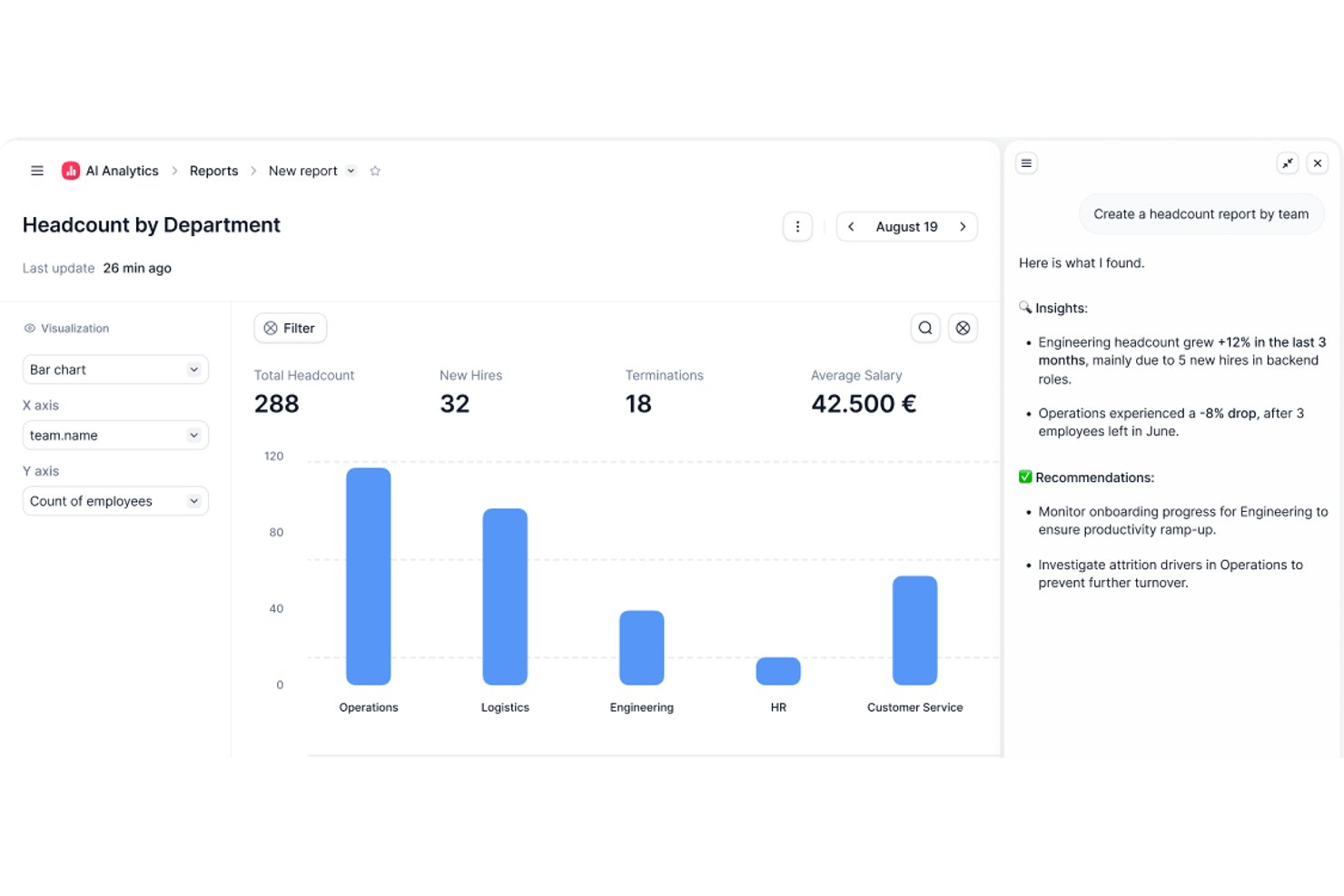
Factorial is an AI for business that brings time tracking, shift scheduling, and workforce management into a single HR platform—with AI assistance for tasks like planning timetables, generating reports, and answering employee policy questions.
Who Is Factorial Best For?
Factorial suits HR and shift managers who want scheduling, time tracking, and broader HR workflows managed in one AI-assisted platform.
Why I Picked Factorial
I picked Factorial as one of the best because it approaches scheduling as part of a broader AI for business platform, which means shift planning doesn't exist in a silo. I like that its AI assistance handles timetable planning, generates reports, and answers employee policy questions, so HR and shift managers aren't constantly context-switching between tools. The automated shift planner builds optimized weekly schedules quickly, and employees can request swaps and track status directly from the mobile app.
Factorial Key Features
- Bulk and rotating shift creation: Build recurring or large-scale shift patterns in one action instead of entering each shift individually.
- Bank of Hours tracking: Automatically calculates the difference between employees' expected and actual worked hours from attendance records.
- Mobile shift swap requests: Employees can request a shift swap directly from the app, and the selected colleague receives an instant notification.
- QR code clock-in: Employees clock in and out by scanning a QR code, including at fixed physical locations.
Factorial Integrations
Factorial offers marketplace integrations with ZKTeco, Suprema, Microsoft Power BI, and Slack, plus Zapier. Its public API, webhooks, SDKs, API keys, and OAuth 2.0 support custom integrations.
Pros and Cons
Pros:
- Scheduling connects with attendance and leave workflows
- Reviewers praise clock-ins and timesheet tracking
- Mobile shift swaps include status tracking
Cons:
- Enterprise-only auto-planning has undisclosed inputs
- No documented demand forecasting
Best for mobile workforce scheduling
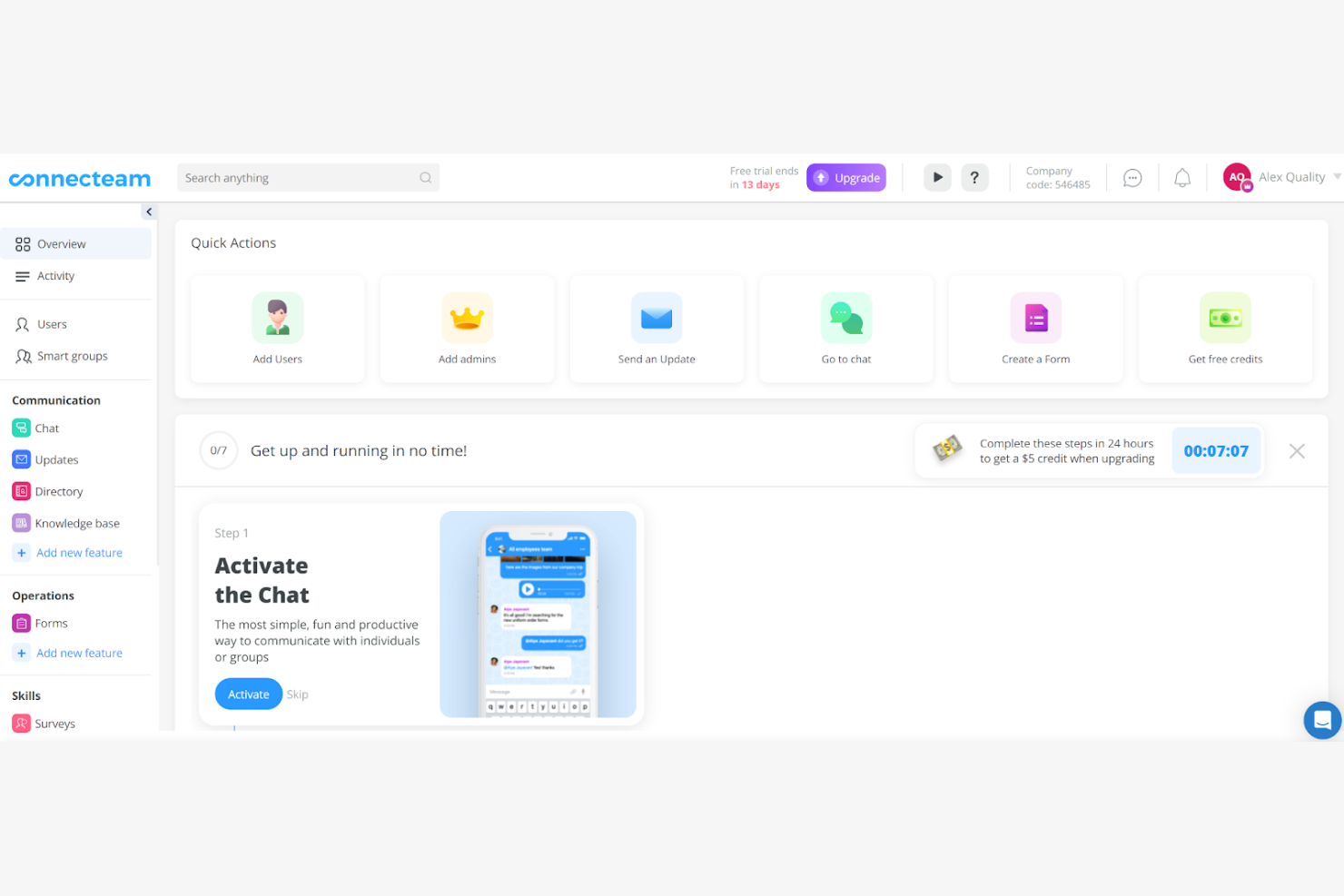
Connecteam is on my list because it does mobile workforce scheduling much better than most scheduling platforms I’ve seen. I typically recommend it when managers need to coordinate shifts, monitor attendance, and communicate instantly with distributed teams, especially people working offsite or in the field.
What I like about Connecteam is how it handles GPS tracking with shift assignments. Teams get clear mobile reminders and managers get real-time visibility so last-minute changes or coverage gaps are handled reliably.
Connecteam’s Best For
- Mobile-first businesses with distributed or deskless employees
- Managers needing real-time location and shift coverage visibility
Connecteam’s Not Great For
- Office-only teams working standard business hours
- Businesses wanting advanced forecasting or demand planning
What sets Connecteam apart
Connecteam is built around the idea that your scheduling, attendance, and task management need to travel with your field teams, not stay tied to a central office. Instead of modeling employee schedules after desktop-centric tools like Deputy or When I Work, Connecteam expects that managers and staff rely on mobile devices to check shifts, get updates, and respond to changes. This works best when much of your workforce is offsite and only reachable by phone.
Tradeoffs with Connecteam
Connecteam optimizes for field and mobile scheduling, so its feature set isn’t as focused on highly advanced forecasting or labor analytics. If you rely on predictive scheduling or want deeper analysis, you’ll probably need other tools for those needs.
Pros and Cons
Pros:
- Good shift handoff support
- Strong GPS-based tracking
- Great for field teams
Cons:
- Difficult for big enterprises
- Advanced rules feel limited
New Product Updates from Connecteam

Connecteam Expands Break and Timesheet Controls
Connecteam adds flexible break thresholds, personalized policies, auto-end options, a centralized exceptions report, and improved timesheet issue visibility to help teams manage breaks and timesheets more effectively. For more information, visit Connecteam’s official site.
 .
.
Best for building custom automated schedules
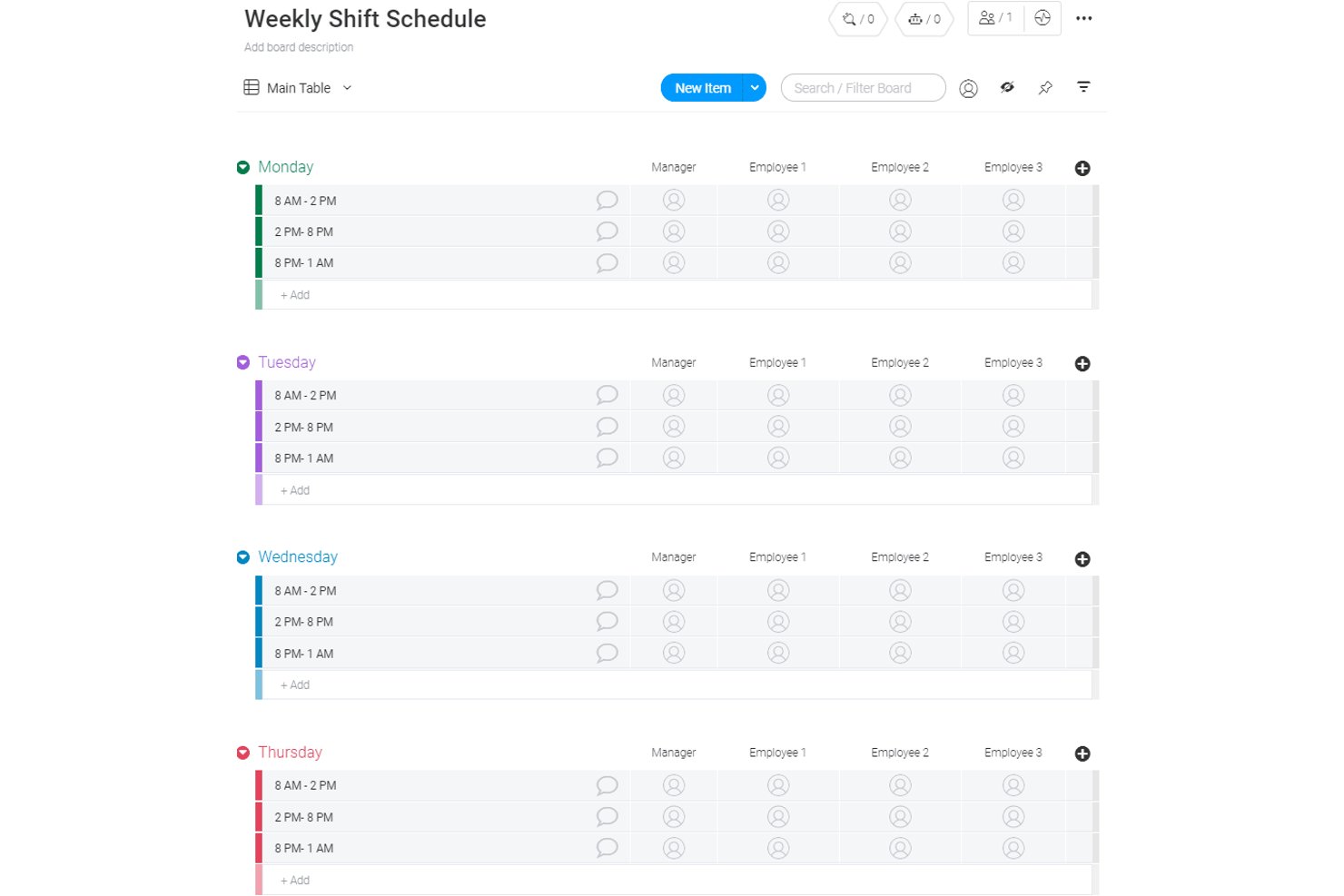
monday AI Workspace is a flexible work management platform that combines AI-powered automation, customizable scheduling boards, and timeline views to coordinate team workflows and operational planning.
Who Is monday AI Workspace Best For?
It's a strong fit for cross-functional teams and operations managers who need flexible, customizable workflows rather than rigid, shift-based scheduling structures.
Why I Picked monday AI Workspace
I picked monday AI Workspace because its AI workflow builder lets you orchestrate multi-step scheduling automations connecting boards, triggers, and AI agents without a single line of code. The AI columns feature handles repetitive scheduling tasks directly within boards, like automatically assigning owners when a shift status changes. What I find genuinely useful is the recurring task logic, which generates schedule entries at set intervals without requiring manual input each cycle.
monday AI Workspace Key Features
- Multiple board views: Switch between calendar, Kanban, Gantt, and timeline views to visualize team schedules in different formats.
- Custom automations: Set up if/then automation recipes to reduce manual work for task assignment or scheduling changes.
- API and integration options: Connect workflows to tools like Slack, Gmail, and Outlook, or use monday’s API for custom integrations.
- Mobile app access: Enable team members to stay updated and view scheduling boards on iOS and Android devices.
monday AI Workspace Integrations
monday AI Workspace offers native integrations with Slack, Google Drive, Gmail, Outlook, and GitHub. An API is available for custom integrations.
Pros and Cons
Pros:
- AI columns streamline task assignments
- Multiple board views for visualizing schedules
- Custom workflow automation for schedule coordination
Cons:
- Lacks shift swap and open shift features
- No auto-scheduling by demand or availability
New Product Updates from monday AI Workspace
monday AI Workspace Adds Human Approval Routing
monday AI Workspace adds a human-in-the-loop approval block to AI Workflows, sending approval requests and routing workflow paths based on responses. For more information, visit monday AI Workspace's official site.
Best for integrated desk and room booking
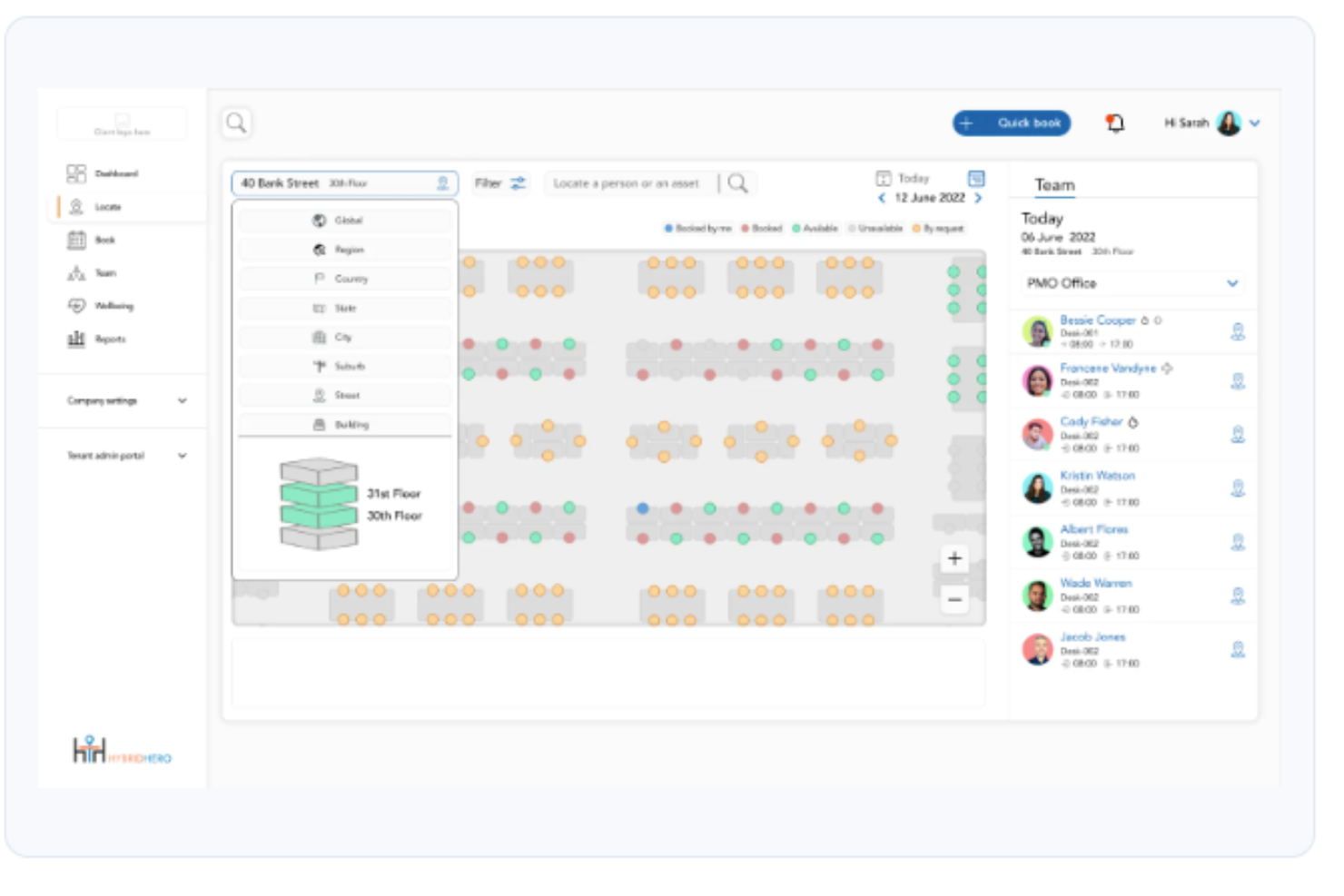
Hybrid Hero is a workplace management platform for hybrid offices that covers desk booking, meeting room reservations, visitor management, parking, interactive floor plans, and space utilization analytics.
Who Is Hybrid Hero Best For?
Hybrid Hero is a good fit for HR and workplace operations teams managing hybrid work policies across mid-size to enterprise organizations with shared office spaces.
Why I Picked Hybrid Hero
I've included Hybrid Hero in my top picks because it handles desk and room booking from a single platform, which removes the friction of managing two separate tools. I particularly like how meeting room booking includes auto-release of no-shows and real-time availability, so rooms don't sit idle when someone forgets to cancel. On the desk side, I can book hot desks, permanent desks, or team neighbourhoods in two clicks from web, iOS, or Android, with live floor plan visibility showing exactly who's sitting where across every floor.
Hybrid Hero Key Features
- Hybrid attendance tracking: View a daily schedule showing which team members are working from the office, remotely, or are out, across the entire organization.
- Visitor management: Register guests in advance, notify hosts on arrival, and maintain a digital visitor log.
- Parking space booking: Let employees reserve a parking bay alongside their desk booking for the same workday.
- Multi-location support: Manage bookings and space availability across multiple office sites from one admin dashboard.
Hybrid Hero Integrations
Hybrid Hero integrates with Microsoft 365, Teams, Google Workspace, Slack, and SSO providers, including Azure Active Directory and Okta. An API is available for custom integrations.
Pros and Cons
Pros:
- Built-in GDPR and ISO 27001 compliance
- Per-desk pricing suits hybrid headcounts
- Unified desk, room, visitor, parking booking
Cons:
- No free trial or self-serve onboarding
- Mobile app can be buggy at times

Deputy
Best for dynamic shift swapping

Deputy stands out to me for how it handles shift swapping in organizations where last-minute changes are common. I see teams with dynamic, unpredictable schedules using Deputy’s AI-driven matching to let staff quickly pick up or swap open shifts, right from their phones.
What I like is how fair and fast the process feels, thanks to rules that balance coverage, overtime, and employee preferences. Shift swaps rarely cause coverage issues in practice, which isn’t something I see with most scheduling platforms.
Deputy’s Best For
- Retail, hospitality, and healthcare teams with fast-changing shifts
- Organizations needing quick, mobile-friendly team shift swaps
Deputy’s Not Great For
- Teams with fixed, unchanging schedules
- Companies wanting granular, long-term resource planning
What sets Deputy apart
Deputy puts shift flexibility at the core of scheduling. Instead of expecting fixed plans, it’s designed for places where people need to swap, claim, or adjust shifts at the last minute. Unlike platforms like When I Work, Deputy assumes staffing changes happen all week and gives everyone tools to respond quickly.
This works great for on-site teams where reliability comes from agility, not strict schedules.
Tradeoffs with Deputy
Deputy optimizes for fluid, shift-based work, but that fluidity comes at the expense of advanced forecasting or complex resource planning. If you need long-range strategy or detailed analytics, you’ll find Deputy lacks depth in those areas.
Pros and Cons
Pros:
- Strong labor rule controls
- Helpful demand-based shifts
- Fast shift swap handling
Cons:
- Needs precise data to work
- Some features require initial learning

Oracle
Best for compliance-focused scheduling

Oracle earns a place on my list because its advanced scheduling features meet strict compliance and audit requirements out of the box. When I'm helping organizations in regulated industries, I see Oracle shine with granular controls over data access, scheduled task logging, and clear reporting for audits.
What I like here is how well Oracle surfaces scheduling records for inspection. I recommend it if you need policies and tracking that meet high-stakes regulatory standards.
Oracle’s Best For
- Enterprises in regulated industries with complex compliance needs
- Teams that require detailed audit trails on scheduling activities
Oracle’s Not Great For
- Small businesses with straightforward scheduling requirements
- Organizations looking for easy-to-configure, lightweight scheduling tools
What sets Oracle apart
Oracle sets itself apart by making strict auditing, compliance, and record-keeping a core part of scheduling—not an add-on. In practice, I see organizations with strong regulatory needs use it to schedule tasks, document steps, and monitor activity in detail. Compared to something like monday.com, Oracle assumes you work in environments where oversight and policy come first.
Tradeoffs with Oracle
Oracle optimizes for compliance and audit records, but that comes at the cost of setup time and ease of configuration. For teams that just want quick, simple scheduling, the workflow can feel slow and heavy.
Pros and Cons
Pros:
- Good risk spotting tools
- Helpful complex schedule modeling
- Strong compliance rule checks
Cons:
- Needs strong IT support
- Hard for smaller teams

TimeHero
Best for task-based scheduling

TimeHero lands on my list because it doesn’t just assign shifts, it schedules tasks for each employee based on priorities and workload. I've seen teams save hours once they start plugging their daily requirements in and let TimeHero auto-allocate work on the calendar.
What I appreciate most is how automation actually handles the back-and-forth of changing deadlines and tasks. For teams with lots of moving pieces day to day, its hands-off scheduling is a real time-saver.
TimeHero’s Best For
- Teams needing auto-scheduled, task-based employee shifts
- Managers handling frequent changes in team priorities
TimeHero’s Not Great For
- Businesses focused on pure shift scheduling without tasks
- Organizations with static, unchanging daily routines
What sets TimeHero apart
TimeHero is built around auto-scheduling tasks onto calendars so that planning shifts means defining what needs to get done, not just blocking out hours. In practice, this is nothing like standard shift-scheduling in When I Work or Homebase, where you’re focused on start and end times. Here, the schedule flexes as you add or change tasks, so the plan actually reflects real project needs.
Tradeoffs with TimeHero
TimeHero optimizes for managing shifting task demands, but that flexibility comes at the cost of limited support for strict, recurring shift structures. You miss out on traditional punch clock controls or patterns some industries rely on.
Pros and Cons
Pros:
- Strong project task flow
- Good deadline-driven planning
- Helpful auto task scheduling
Cons:
- Steep setup for managers
- Limited shift coverage logic

Workday
Best for enterprise-level HR integration

Workday hits my shortlist because it brings AI-driven scheduling right into a single HR system that most enterprise teams are already running. What I find unique is how it connects scheduling, time tracking, and workforce forecasting with talent management and payroll, so scheduling isn’t isolated from bigger workforce decisions.
When I see organizations navigating hourly staffing at scale, especially across regions or subsidiaries, Workday’s real-time labor insights make shift planning much more responsive. I’ve tested its Labor Optimization tools and appreciate how quickly you can spot gaps, deploy people, and factor compliance right into scheduling.
Workday’s Best For
- Large organizations with complex, global workforce scheduling needs
- Enterprises that want AI-driven scheduling integrated with HR systems
Workday’s Not Great For
- Small businesses or teams without formal HR systems
- Companies needing basic, standalone shift scheduling tools
What sets Workday apart
Workday treats scheduling as one piece of the larger workforce puzzle. Instead of handling shifts in isolation the way something like Deputy or When I Work does, it expects you to anchor scheduling decisions to everything happening in your HR system. In practice, this syncs scheduling with payroll, compliance, and workforce planning, giving you strong context across teams and regions.
Tradeoffs with Workday
Workday optimizes for organizations that want scheduling built into HR, so you give up a fast, standalone setup. This means if you want something rapid and lightweight, onboarding can feel heavy.
Pros and Cons
Pros:
- Helpful org-wide planning
- Strong enterprise rule support
- Scales with huge workforces
Cons:
- Needs ongoing admin effort
- Long implementation timeline

Motion
Best for AI task prioritization

Motion lands on my list for how it uses AI to automatically prioritize tasks and build out custom schedules. What sets it apart is how it constantly adapts team calendars as priorities shift, from last-minute reschedules to new urgent shifts.
I really appreciate that I can trust Motion to re-assign work in real time so teams don’t waste hours manually adjusting shifts and coverage. This makes it a smart pick when keeping employee schedules current is a moving target.
Motion’s Best For
- Teams needing AI-based task and shift prioritization
- Managers handling frequent schedule changes or urgent reassignments
Motion’s Not Great For
- Simple, static staff rosters with fixed shifts
- Organizations needing deep labor compliance or payroll features
What sets Motion apart
Motion is built to automate task and shift scheduling by continuously adjusting priorities based on real-time changes. Instead of a manual calendar or whiteboard approach, Motion pushes you to hand over scheduling decisions to its AI. I find that, compared to tools like Google Calendar or When I Work, Motion takes a more hands-off role where you set the rules and let the system shift things as needed.
In practice, this works best when rescheduling and shifting priorities are the norm.
Tradeoffs with Motion
Motion optimizes for automated adjustments, but you lose out on granular control over every schedule detail. If you want to manually fine-tune shifts or set complex compliance rules, it can feel limiting.
Pros and Cons
Pros:
- Good auto schedule updates
- Helpful deadline awareness
- Smart daily task plans
Cons:
- Needs clear task inputs
- Limited shift use cases

Reclaim
Best for automated calendar syncing

Reclaim earns its spot here for how it takes away the pain of juggling multiple work and personal calendars, making conflicts way less likely. I’ve found the automated calendar syncing especially helpful for fast-paced HR teams that manage flexible shifts, off-site work, or fluctuating schedules.
What stands out is how it can dynamically update meetings, focus time, and events across all your linked calendars. I appreciate that you can set smart rules to protect personal time or prioritize key meetings, without worrying about accidental double-booking.
Reclaim’s Best For
- HR teams juggling multiple calendars and shifting schedules
- Managers who need automated syncing for meetings and focus time
Reclaim’s Not Great For
- Teams seeking built-in time tracking or shift bidding
- Organizations needing advanced compliance or labor law controls
What sets Reclaim apart
Reclaim is designed for people who manage complex schedules and need their work and personal calendars to speak to each other automatically. Unlike Google Calendar or Outlook, it doesn’t just display overlapping events. It actively prevents double-bookings by reshuffling meetings and flexible tasks when conflicts pop up.
This works best if you want your calendar to act more like a living schedule and less like a static planner.
Tradeoffs with Reclaim
Reclaim optimizes for calendar syncing and automation, so you give up advanced shift management and labor compliance features found in full-scale scheduling platforms. If you rely on specific scheduling rules or shift coverage tracking, it probably won’t be enough on its own.
Pros and Cons
Pros:
- Great for busy calendars
- Helpful priority reshuffling
- Strong auto time blocking
Cons:
- Not ideal for large crews
- Hard for shift-heavy teams
Annen programvare for AI-basert vaktplanlegging
Her er noen flere alternativer for programvare til AI-basert vaktplanlegging som ikke kom med på kortlisten min, men som likevel er verdt å sjekke ut:
- Sling
For team communication integration
- Timefold
For predictive scheduling analytics
- MakeShift
For real-time availability updates
- Workeen
For AI-driven shift recommendations
- SubItUp
For higher education scheduling
- Homebase
With integrated payroll add-on
- When I Work
For shift notification alerts
- Parim
For flexible shift planning
- WebWork Time Tracker
For visual time tracking
- Rotageek
For data-driven scheduling
- Shiftboard
For demand-driven scheduling
- Celayix
For AI-based overtime management
- SkedPal
For personal productivity scheduling
- Toki
For task and time management
- ShiftMate AI
For AI-driven shift matching
- Structured
For simple task organization


How I Evaluate AI Employee Scheduling Software
Every tool on this list needs to go beyond basic automation—I look for AI that actually reduces scheduling effort, like predicting demand spikes or resolving conflicts without manager intervention. I split my evaluation into core functionality every tool must deliver to qualify and differentiating factors that separate good options from great ones.
Core Functionality (Table Stakes For This List)
When I'm selecting tools for my list, I rank each one on a scale from 0 (does not offer the functionality) to 5 (excels in this area) for each core functionality listed below. Then, I calculate the tool's total score into a percentage. Each tool needs to achieve a minimum total score of 65% to be considered for inclusion.
- AI-Powered Auto-Scheduling: I check whether the tool generates full schedules from constraints like availability, roles, and labor budgets—not just auto-fills empty slots with templates.
- Demand Forecasting: The tool should predict staffing needs using historical trends and seasonality, so managers aren't guessing headcount for a holiday rush or slow period.
- Skills & Preference Matching: I look for AI that assigns shifts based on certifications, skill sets, and employee preferences rather than relying on managers to remember who's qualified.
- Labor Compliance Automation: Each tool should enforce overtime limits, mandatory rest periods, and break rules during schedule creation—not just flag violations after the fact.
- Employee Self-Service & Shift Swaps: Staff should be able to submit availability, request time off, and swap shifts from a mobile app with AI validating that swaps stay compliant.
- HR/Payroll System Integration: I evaluate whether the tool connects to major HRIS and payroll platforms so scheduled hours flow into pay runs without manual re-entry.
Once I have a list of tools that meet this criteria, I consider what sets each platform apart.
Differentiating Factors (What Sets Vendors Apart)
Here's how I compare and contrast different vendors:
Standout Features
Scenario simulation is a big differentiator—I look for tools that let a manager model a change like cutting weekend headcount and preview the downstream impact before publishing. Fatigue and burnout detection matters too, especially for 24/7 operations where back-to-back closing and opening shifts slip through the cracks. I also value predictive attrition insights that flag turnover risk tied to scheduling patterns, giving HR a window to step in before losing strong employees.
Beyond Features
AI transparency matters a lot here—I look for tools that show managers why a specific schedule was generated, not just the output. When employees question shift fairness, HR needs an audit trail. Implementation speed is another factor I weigh, since scheduling tools that take months to ingest historical data and configure rules delay ROI for teams that need relief now. I also evaluate industry fit, checking whether the platform supports the labor patterns of healthcare, retail, or hospitality rather than offering a one-size-fits-all approach.
Slik velger du programvare for AI-basert vaktplanlegging
Det er lett å gå seg vill i lange funksjonslister og kompliserte prisstrukturer. For å hjelpe deg med å holde fokus mens du går gjennom den unike prosessen din for valg av programvare, får du her en sjekkliste over faktorer du bør ha i tankene:
| Faktor | Hva bør vurderes |
|---|---|
| Skalerbarhet | Vil programvaren vokse sammen med virksomheten din? Vurder hvor mange ansatte den støtter, og om den kan håndtere planene dine for utvidelse. Se etter prismodeller med ulike nivåer som samsvarer med vekstbanen din. |
| Integrasjoner | Kobler den seg til de eksisterende systemene dine? Sørg for kompatibilitet med HR-, lønns- og kommunikasjonsverktøyene dine. Se etter API-er eller ferdigbygde integrasjoner for å minimere manuell dataregistrering. |
| Tilpasningsmuligheter | Kan du tilpasse programvaren slik at den passer til prosessene dine? Se etter alternativer for å justere regler for skiftplanlegging, varsler og dashbord slik at de samsvarer med arbeidsflyten din. Unngå systemer som tilbyr en løsning som passer likt for alle. |
| Brukervennlighet | Er grensesnittet intuitivt for teamet ditt? Test hvordan programvaren navigeres, og hvordan den er utformet. En bratt læringskurve kan føre til frustrasjon og redusert produktivitet. Velg brukervennlige utforminger som teamet raskt kan ta i bruk. |
| Implementering og opplæring | Hvor raskt kan du komme i gang? Evaluer ressursene som trengs til oppsett og opplæring. Se etter leverandører som tilbyr støtte ved oppstart, for eksempel veiledninger og direktesendinger, for å sikre en smidig overgang. |
| Kostnad | Samsvarer prisen med budsjettet ditt? Sammenlign de totale eierkostnadene, inkludert abonnementsavgifter, oppsettskostnader og eventuelle skjulte gebyrer. Vurder verdien du får opp mot prisen for å sikre at løsningen passer de økonomiske rammene dine. |
| Sikkerhetstiltak | Hvor sikre er dataene dine? Kontroller at løsningen er i samsvar med personvernforordninger som GDPR. Se etter funksjoner som kryptering, tilgangskontroller for brukere og regelmessige sikkerhetsrevisjoner for å holde informasjonen din trygg. |
| Etterlevelseskrav | Oppfyller programvaren bransjespesifikke regler? Sørg for at den støtter etterlevelse av arbeidsrettslige lover og standarder som er relevante for sektoren din. Kontroller om den tilbyr verktøy for effektiv overvåking og rapportering av etterlevelsesmålinger. |
Hva er programvare for AI-basert skiftplanlegging?
Programvare for AI-basert skiftplanlegging er et verktøy som automatiserer prosessen med å opprette og administrere arbeidsplaner ved hjelp av kunstig intelligens. HR-medarbeidere, ledere og teamledere bruker ofte disse verktøyene til å optimalisere arbeidsstyringen og redusere planleggingskonflikter. Funksjoner som prediktiv analyse, automatisert skifttildeling og justeringer i sanntid bidrar til effektiv planlegging og ressursfordeling. Disse verktøyene sparer til syvende og sist tid og øker produktiviteten ved å sørge for at de rette medarbeiderne er på rett sted til rett tid.
Funksjoner
Når du velger programvare for AI-basert skiftplanlegging, bør du se etter følgende viktige funksjoner:
- Prediktiv analyse: Analyserer historiske data og sanntidsdata for å forutsi bemanningsbehov, slik at du kan ta informerte beslutninger om planlegging.
- Automatisert skifttildeling: Tildeler skift basert på medarbeidernes tilgjengelighet og preferanser, noe som reduserer tiden som brukes på manuell planlegging.
- Justeringer i sanntid: Gjør det mulig å endre arbeidsplaner dynamisk som følge av uventede hendelser eller bemanningsbehov.
- Prognoser for etterspørsel: Bruker AI til å forutsi perioder med høy aktivitet og justere bemanningsnivåene deretter, slik at dekningen blir optimal.
- AI-drevne kontroller av etterlevelse: Sørger for at arbeidsplanene følger arbeidsrettslige lover og regler, og minimerer risikoen for manglende etterlevelse.
- Registrering av arbeidstid og oppmøte: Overvåker medarbeidernes arbeidstimer og oppmønster, og gir nøyaktige data til lønnsbehandling og medarbeidersamtaler.
- Bytte av skift: Gjør det mulig for medarbeidere å bytte skift med minimal involvering fra ledere, noe som øker fleksibiliteten og tilfredsheten.
- Tilgang via mobilapp: Gjør det mulig for medarbeidere å se og administrere arbeidsplanene sine på farten, noe som styrker kommunikasjonen og engasjementet.
- Integrasjonsmuligheter: Kobler seg til eksisterende HR-, lønns- og kommunikasjonssystemer for jevn dataflyt og effektivitet.
- Tilpassbar rapportering: Gir innsikt i planleggingseffektivitet, rapporter over innstempling og arbeidskraftkostnader, slik at du kan identifisere områder som kan forbedres.
Fordeler
Implementering av programvare for AI-basert skiftplanlegging gir flere fordeler for teamet og virksomheten din. Her er noen av fordelene du kan se frem til:
- Forbedret effektivitet: Automatiserte skiftplaner og prediktiv analyse reduserer tiden som brukes på manuell planlegging, slik at ledere kan fokusere på andre oppgaver.
- Økt nøyaktighet: Justeringer i sanntid og samsvarskontroller drevet av kunstig intelligens sikrer at planene overholder arbeidslovgivningen og minimerer feil.
- Bedre ressursfordeling: Etterspørselsprognoser bidrar til å optimalisere bemanningsnivåene og sikrer at du har riktig antall ansatte i perioder med høyest etterspørsel.
- Økt fleksibilitet: Bytting av skift og tilgang via mobilapp gir de ansatte mulighet til å administrere arbeidsplanene sine, noe som øker tilfredsheten og engasjementet.
- Kostnadsbesparelser: Registrering av arbeidstid og oppmøte gir nøyaktige lønnsdata, noe som bidrar til å kontrollere arbeidskostnadene og redusere kostnadene for overtid.
- Datadrevet innsikt: Tilpassbare rapporter gir verdifull innsikt i planleggingseffektivitet og arbeidskostnader, noe som støtter strategiske beslutninger.
Kostnader og priser
Ved valg av programvare for planlegging av ansatte med kunstig intelligens er det nødvendig å forstå de tilgjengelige prismodellene og abonnementene. Kostnadene varierer basert på funksjoner, teamstørrelse, tillegg og mer. Tabellen nedenfor oppsummerer standardabonnementer, gjennomsnittsprisene deres og typiske funksjoner som er inkludert i programvareløsninger for planlegging av ansatte med kunstig intelligens:
Sammenligningstabell for programvare for planlegging av ansatte med kunstig intelligens
| Abonnementstype | Gjennomsnittspris | Vanlige funksjoner |
|---|---|---|
| Gratisabonnement | $0 | Grunnleggende planlegging, bytting av skift og begrenset rapportering. |
| Personlig abonnement | $2-$15/bruker/måned | Automatisert planlegging, mobiltilgang og tidsregistrering. |
| Forretningsabonnement | $15-$40/bruker/måned | Avansert analyse, funksjoner for overholdelse av regelverk og integrasjonsmuligheter. |
| Abonnement for store virksomheter | Fra $40/bruker/måned eller tilpasset | Tilpassbar rapportering, etterspørselsprognoser drevet av kunstig intelligens og dedikert brukerstøtte. |
Vanlige spørsmål om AI-basert programvare for bemanningsplanlegging
Her er noen svar på vanlige spørsmål om AI-basert programvare for bemanningsplanlegging:
Hvordan håndterer AI-verktøy for bemanningsplanlegging uventet personalmangel?
AI-verktøy for vaktplanlegging bruker AI-drevne algoritmer til å skanne tilgjengelighet, ferdigheter og til og med de ansattes preferanser for å anbefale de riktige personene til å fylle en ledig vakt. Mange plattformer fungerer som en AI-assistent som sender umiddelbare varsler og oppdaterer planleggingsprosessen i sanntid. Dette opprettholder bemanningen uten å forstyrre de ansattes tilfredshet, samtidig som regler og arbeidskrav respekteres når systemet genererer optimaliserte arbeidsplaner.
Hvilke data bør jeg gjennomgå for å vurdere verdien av å kjøpe AI-basert programvare for bemanningsplanlegging?
Gå gjennom måltall som gjentakende vaktkonflikter, mønstre for overtidsarbeid, forespørsler om fri og hvor mye tid ledere bruker i den nåværende planleggingsappen eller den manuelle prosessen for bemanningsplanlegging. Se også på forbedringer i medarbeidertilfredshet, færre feil og færre oppdateringer frem og tilbake. Hvis AI-verktøyene faktisk forenkler planleggingsprosessen, optimaliserer arbeidsbelastningen og sparer lederne for tid, gir programvaren stor verdi.
Hvordan vurderer jeg om AI-basert programvare for bemanningsplanlegging passer til bransjespesifikke regler?
Kontroller om plattformen støtter tilpassede regler, roterende arbeidsplaner, sertifiseringskrav, vaktordninger og begrensninger knyttet til fagforeninger. Test noen virkelige scenarier for å se om systemets algoritmer oppdager problemer tidlig, og om den AI-drevne planleggingsmotoren plasserer de riktige personene på vakter som er i samsvar med reglene. De beste verktøyene tilpasser seg arbeidsflyten din i stedet for å tvinge deg til å bruke rigide regneark eller maler, noe som gjør dem bedre egnet på lang sikt for team med spesialiserte behov.
Hva skjer med eksisterende planleggingsdata når jeg bytter til AI-basert programvare for bemanningsplanlegging?
De fleste plattformer lar deg importere tidligere ukeplaner, historiske tilgjengelighetsdata, rolledata og ansattes preferanser, slik at AI-en kan generere optimaliserte arbeidsplaner fra første dag. Det kan være nødvendig med noe enkel opprydding under innføringen, særlig hvis du migrerer fra et eldre system for bemanningsplanlegging. Spør hvor langt tilbake du kan importere data, og om plattformen integreres sømløst med de nåværende samlede HR- eller driftsverktøyene dine.
Hvordan måler jeg kontinuerlig suksess etter å ha tatt i bruk AI-basert programvare for bemanningsplanlegging?
Følg med på KPI-er som færre konflikter, færre endringer i siste liten, bedre bemanning og lavere overtidsbruk. Overvåk hvor raskt ledere kan sette opp arbeidsplaner, og om de ansatte enklere godtar eller bytter vakter – begge deler er tegn på høyere medarbeidertilfredshet. Du kan også vurdere om AI-assistenten eller de AI-drevne planleggingsfunksjonene fortsetter å forbedre planleggingsprosessen over tid ved automatisk å velge de riktige personene og opprettholde mer forutsigbare arbeidsbelastninger.
Hvordan hindrer AI-verktøy for bemanningsplanlegging utilsiktede brudd på regler?
Moderne AI-verktøy markerer problemer som manglende hvileperioder, manglende samsvar mellom sertifiseringer eller rollebaserte begrensninger før arbeidsplanen ferdigstilles. Systemets algoritmer gjennomfører samsvarskontroller i bakgrunnen og sørger for at planleggingsappen ikke godkjenner vakter som bryter reglene dine. Dette reduserer den administrative risikoen, samtidig som bemanningsplanleggingen forblir nøyaktig og teamets opplevelse konsekvent.