

10 beste programvarer for tidsregistrering i 2026

Kortliste over beste programvare for tidsregistrering


Programvare for tidsregistrering lar teamet ditt loggføre timer nøyaktig, overvåke arbeidsmengder og følge opp tidsfrister på tvers av prosjektporteføljer. Hvis du driver med digital prosjektstyring, betyr det å finne de riktige verktøyene for tidsregistrering færre overskredne tidsfrister, tydeligere fakturering og bedre ressursplanlegging.
Med så mange alternativer der ute er det lett å gå seg vill i valgene. Derfor har jeg satt sammen denne listen for å hjelpe deg med å sammenligne de beste alternativene, se hvilke funksjoner som betyr mest for arbeidet ditt, og få kontroll over teamets tid, budsjett og prosjektmål.
Why Trust Our Software Recommendations
Our team has been testing and reviewing software since 2012. As HR experts ourselves, we know how difficult—and important—it is to choose the right software.
For this guide, we evaluated tools using hands-on testing and independent research, scoring tools using our selection criteria. We also draw on insights from industry thought leaders and practicing HR experts.
Our reviews reflect our human editorial judgment, not a sales pitch.
Expert reviewers:
Sammenligningstabell for programvare for tidsregistrering
Denne sammenligningstabellen oppsummerer prisopplysningene for mine beste utvalg av programvare for tidsregistrering:
| Tool | Best For | Trial Info | Price | ||
|---|---|---|---|---|---|
| 1 | Best for billable hour tracking across client projects | 14-day free trial + free demo available | From $3.99/user/month (billed annually) | Website | |
| 2 | Best for real-time attendance tracking | 14-day free trial + free demo available | From $5/user/month | Website | |
| 3 | Best for intuitive digital time entry | Free trial + free demo available | Pricing upon request | Website | |
| 4 | Best for unified HR and IT compliance | Free demo available | Pricing upon request | Website | |
| 5 | Best for unified payroll sync | Free demo available | From $49/month + $6/user/month | Website | |
| 6 | Best for configurable workflow automation | Free demo available | Pricing upon request | Website | |
| 7 | Best for self-service employee time management | Not available | Pricing upon request | Website | |
| 8 | Best for flexible device time collection | Free demo available | Pricing upon request | Website | |
| 9 | Best for advanced workforce analytics | Free demo available | Pricing upon request | Website | |
| 10 | Best for enterprise payroll integration | Free demo available | Pricing upon request | Website |

Anmeldelser av den beste programvaren for tidsregistrering
Nedenfor finner du mine detaljerte sammendrag av den beste programvaren for tidsregistrering som kom med på kortlisten min. Anmeldelsene mine gir en grundig gjennomgang av funksjonene, integrasjonene og de beste bruksområdene for hver plattform, slik at du kan finne den som passer best for deg.
Best for billable hour tracking across client projects
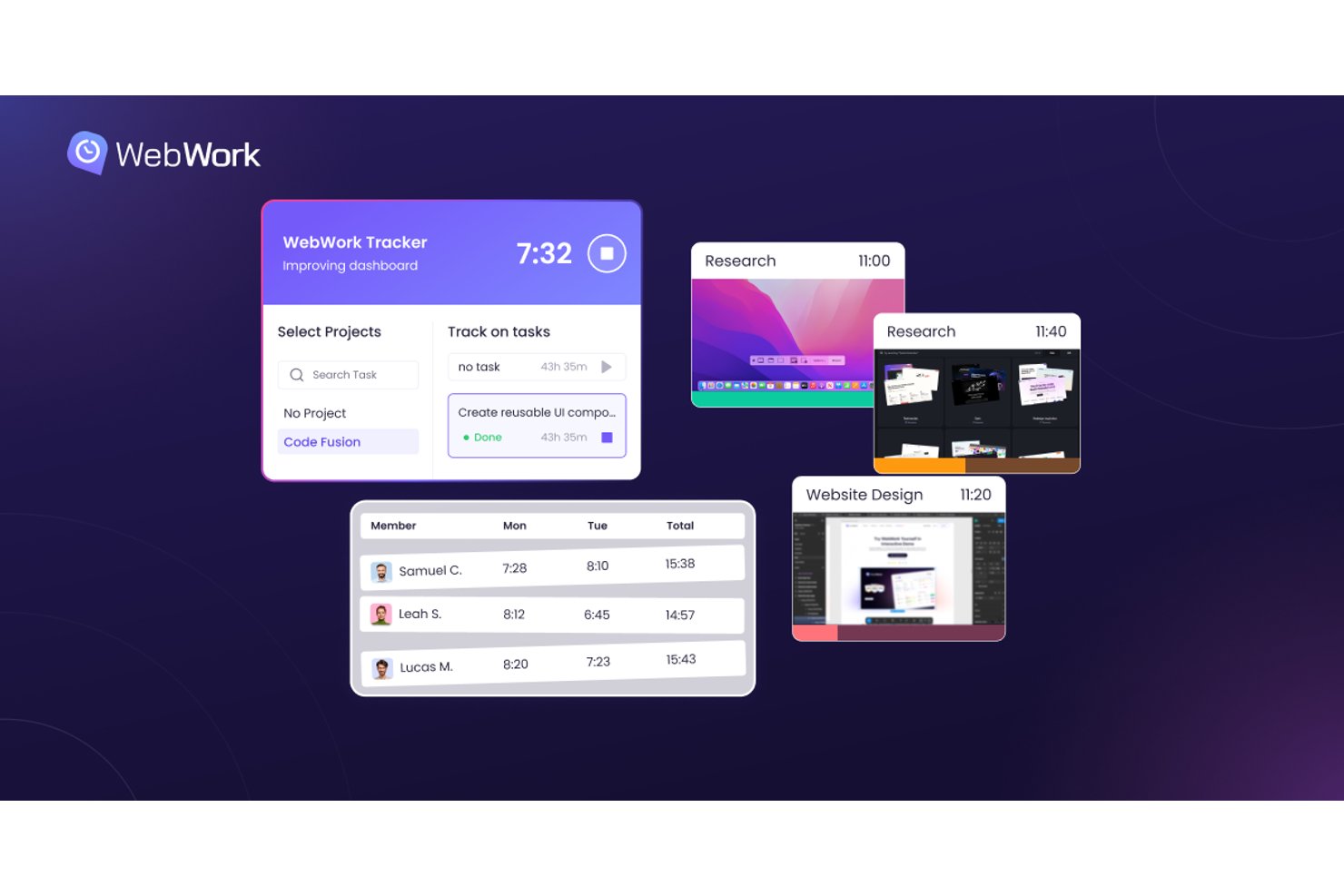
WebWork Time Tracker is a time tracking platform that combines automatic time capture, billable hour tracking, attendance and leave management, payroll exports, and client invoicing across projects and teams.
Who Is WebWork Time Tracker Best For?
WebWork Time Tracker is a strong fit for HR business partners and operations teams that need to manage billable hours, attendance, and leave in one place without paying for a heavyweight platform.
Why I Picked WebWork Time Tracker
I picked WebWork Time Tracker as one of the best because it handles billable hour tracking across client projects better than most tools at this price point. I love how it lets you set billable and cost rates per project or per member, then generates client-ready invoices directly from tracked time with multi-currency support. Branded, shareable reports mean I can send polished summaries to clients without any extra formatting work.
WebWork Time Tracker Key Features
- Attendance dashboard: A real-time view of who's active, absent, late, or on leave at any given moment across your team.
- Leave accrual and carry-over: Automatically accrues leave balances with configurable carry-over rules, entitlements per country, and multi-level approval chains.
- Geofencing: Automatically clocks team members in and out when they enter or leave a defined job-site radius.
- AI timesheet review: Flags gaps, missing hours, and misassigned project entries, then sends email summaries to keep records accurate.
WebWork Time Tracker Integrations
WebWork Time Tracker offers native integrations with Asana, Jira, ClickUp, QuickBooks, Zoho Books, Deel, Google Calendar, and Outlook. It also supports custom integrations through its public API and Zapier.
Pros and Cons
Pros:
- Branded reports clarify client hours
- Budget tracking covers fixed-fee projects
- Billable rates support client project invoicing
Cons:
- Activity scores misread research and planning
- No resource forecasting or capacity planning

Deputy
Best for real-time attendance tracking
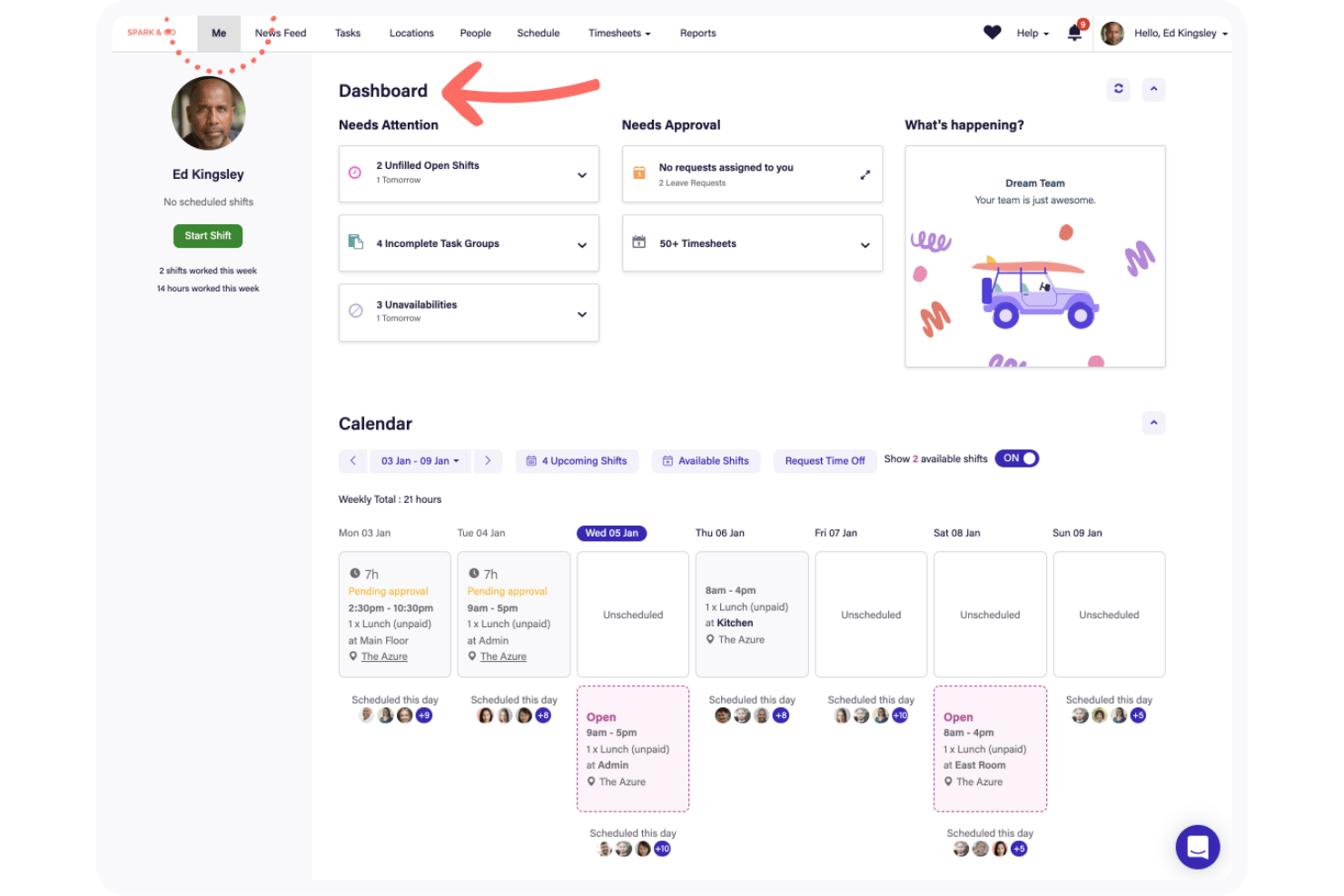
Deputy is a workforce management and time tracking platform built for shift-based teams, combining clock-in/out tools, employee scheduling, timesheet management, attendance monitoring, and labor compliance controls.
Who Is Deputy Best For?
Deputy is a strong fit for operations managers and HR teams in industries like retail, hospitality, and healthcare that run shift-based workforces across multiple locations.
Why I Picked Deputy
I picked Deputy as one of the best because its real-time attendance dashboard gives me instant visibility into who's clocked in, who's running late, and who's on break across every location. I particularly like the employee attestation feature, which automatically flags missed breaks or unscheduled clock-ins and requires workers to verify them before the timesheet is approved. Paired with biometric facial recognition on the Deputy Kiosk, time fraud becomes a non-issue.
Deputy Key Features
- Drag-and-drop shift scheduling: Build and edit shift rosters with a visual, intuitive interface.
- Multi-language kiosk support: Allow employees to clock in and out using their preferred language on shared devices.
- Labor law compliance engine: Automatically apply region-specific overtime and break rules to employee schedules.
- Payroll integrations: Sync timesheets with popular payroll providers like ADP, Gusto, and Xero.
Deputy Integrations
Deputy offers 60+ native integrations, including ADP, Gusto, QuickBooks, Xero, Paychex, Square, BambooHR, Lightspeed, Box, and Zapier. An API is also available for custom integrations.
Pros and Cons
Pros:
- Automated labor law and overtime compliance
- Built-in biometric facial recognition for clock-ins
- Real-time shift status and attendance dashboard
Cons:
- Advanced analytics require a paid upgrade
- Lacks built-in client invoicing and billing

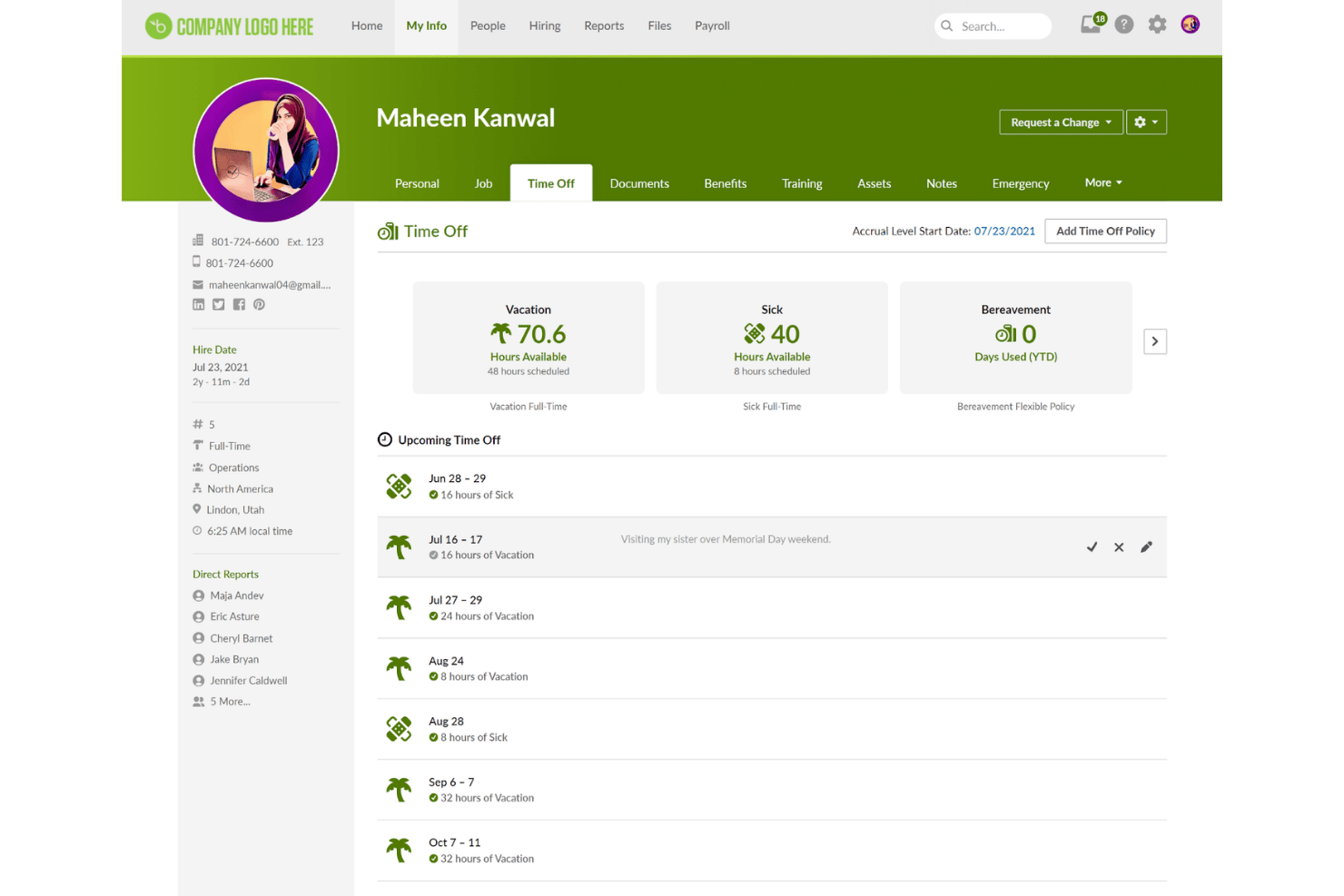
BambooHR is an HR platform that combines employee time tracking, attendance monitoring, shift scheduling, leave management, and payroll sync in a single system built for small and mid-sized businesses.
Who Is BambooHR Best For?
BambooHR is a strong fit for HR operations teams that need time tracking, leave management, and payroll in one place rather than a standalone time tool.
Why I Picked BambooHR
I picked BambooHR because of the sheer range of digital time entry options it supports in a single HR system. Employees can clock in via web app, mobile with geolocation, or an iPad Time Kiosk that captures a photo on entry. I also like that early clock-in prevention is built directly into the scheduling layer, keeping shift adherence accurate without requiring manager intervention on every missed start time.
BambooHR Key Features
- Automated approval workflows: Submit, review, and approve employee timesheets with automated routing to the correct manager.
- Comprehensive PTO tracking: Track, approve, and manage employee leave with policy customization and real-time balance updates.
- Payroll integration: Sync approved time data directly with payroll for faster, accurate compensation calculations.
- Compliance intelligence: Automatically apply overtime, break, and labor law rules across multiple US jurisdictions.
BambooHR Integrations
BambooHR offers over 150 native integrations, including Deputy, Deel, Chekr, Merge, Lattice, 15Five, Bonusly, Papaya Global, AccuSourceHR, and Payscale. An API is available for custom integrations.
Pros and Cons
Pros:
- Built-in PTO and leave management
- Accurate US overtime rule automation
- Multiple time entry options including kiosk mode
Cons:
- Approval workflows can be buggy for some teams
- Time tracking is a paid add-on
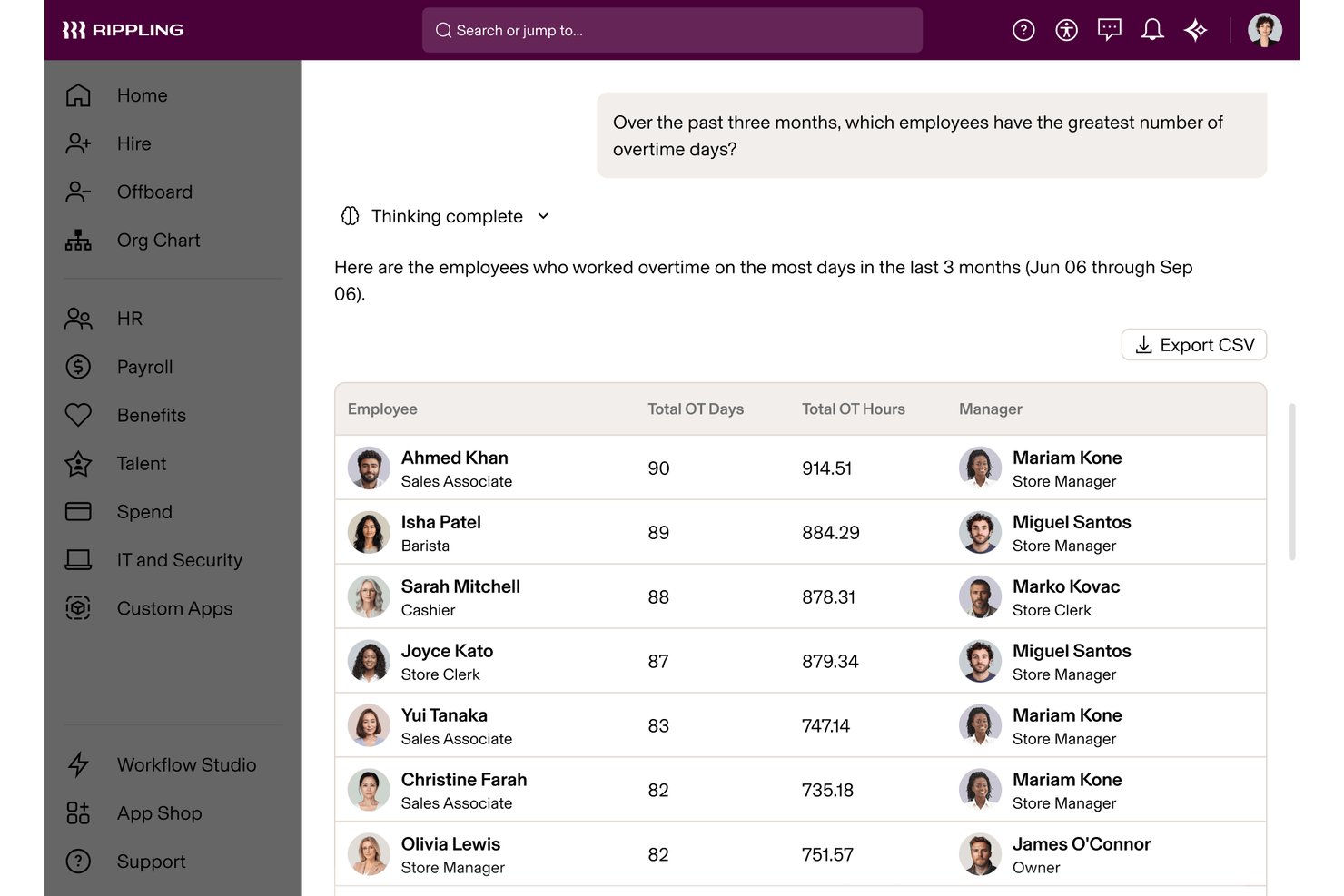
Rippling is a workforce management platform that combines time and attendance tracking, automated payroll sync, labor compliance enforcement, and leave management in a single connected system.
Who Is Rippling Best For?
It's a strong fit for mid-sized companies with HR operations teams managing multi-location workforces where payroll accuracy and labor compliance are top priorities.
Why I Picked Rippling
Rippling earns its spot on my shortlist because of how tightly it connects time tracking to both HR compliance and IT workflows. I particularly like that it automatically applies the correct overtime and break rules based on each employee's work location, flagging issues like duplicate punches or missed clock-outs before payroll runs. Employee access, device provisioning, and time data all live in one platform, so my team isn't reconciling data across separate tools.
Rippling Key Features
- Job costing and project tracking: Employees can track hours against specific jobs, projects, or tasks for cost allocation.
- Mobile app time entry: Staff can clock in and out, view schedules, and submit PTO from iOS or Android devices.
- AI-driven reporting: Customizable dashboards highlight trends like overtime spikes or labor cost changes in real time.
- Integrated leave management: PTO requests, approvals, and balances are managed and synced with each employee’s records.
Rippling Integrations
Rippling offers over 600 native integrations, including Slack, Zendesk, Notion, Chekr, Campfire, Tilt, Gong, Google Workspace, Microsoft 365, and Slack, and an API for custom integrations.
Pros and Cons
Pros:
- Flags approval bottlenecks and time anomalies
- Syncs time tracking instantly to payroll
- Tracks hours, breaks, and overtime by location
Cons:
- Lacks granular task-level time breakdowns
- Limited productivity or app usage monitoring

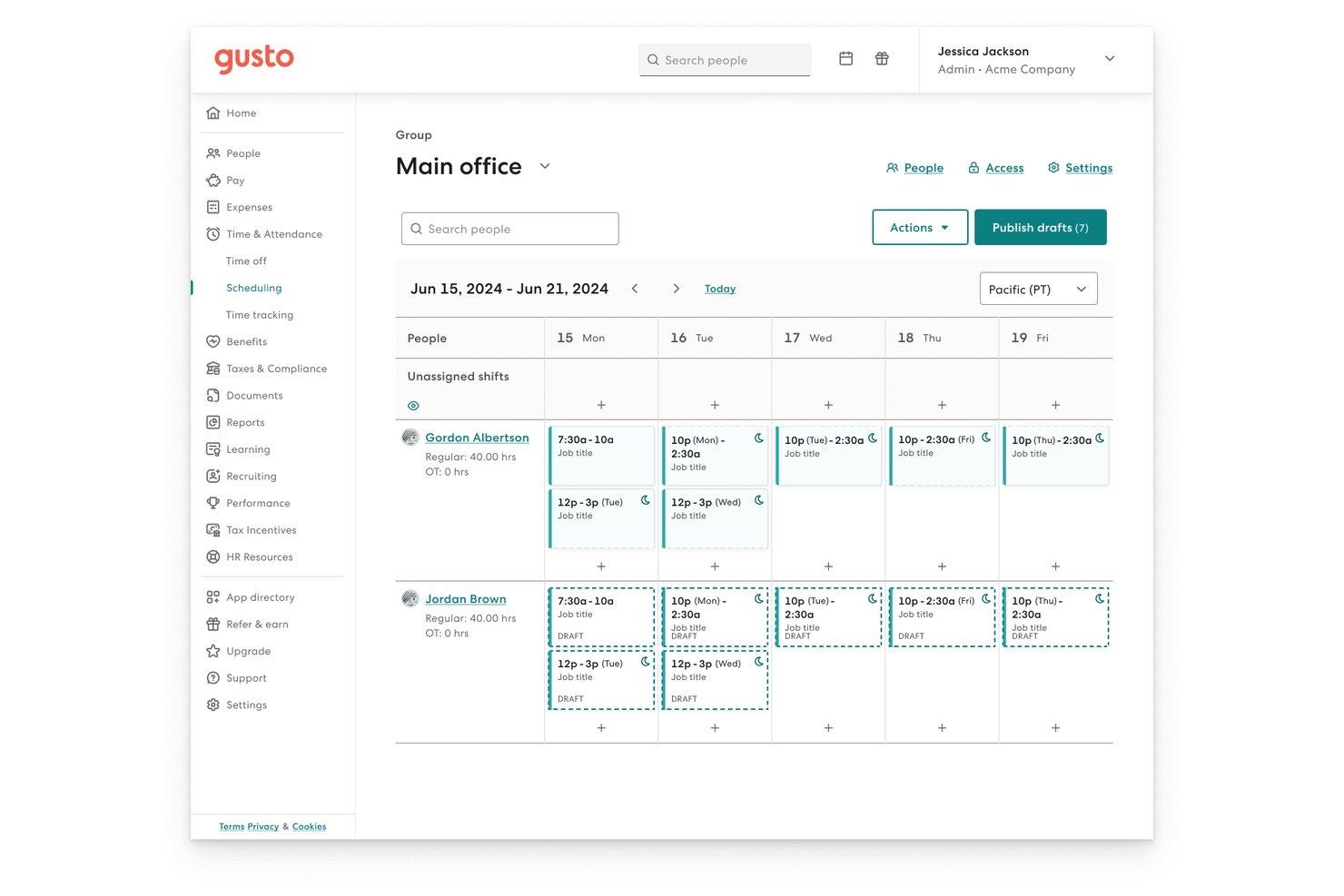
Gusto is an HR and payroll platform with built-in time tracking tools, including clock-in/out, scheduling, PTO management, geofencing, and timesheet approvals that sync directly with payroll.
Who Is Gusto Best For?
It's a natural fit for small to mid-sized businesses that already run payroll in Gusto and want time tracking without adding a separate tool.
Why I Picked Gusto
I picked Gusto as one of the best because approved timesheets flow directly into payroll calculations, eliminating the manual export step that causes errors between separate systems. I particularly like the state-specific break policies, which enforce jurisdiction-level compliance automatically at the point of time capture. Project and job tracking let me see workforce costs broken down per project, and that data syncs directly to QuickBooks Online or Xero.
Gusto Key Features
- Time Kiosk: Turn any tablet or computer into a clock-in station for team members.
- Mobile geofencing: Limit clock-ins and clock-outs to specific work locations using geolocation on the mobile app.
- AI time suggestions: Flag and suggest corrections for timesheet anomalies before hours are approved.
- Attendance reporting: Export detailed reports of scheduled versus worked hours by employee, department, or project.
Gusto Integrations
Gusto offers native integrations with 15Five, Arvo, Box, Deputy, Clover, Connecteam, DocuSign, HubSpot, Novo, Okta, Salesforce, and more.
Pros and Cons
Pros:
- Mobile clock-in with location restrictions
- State-specific break and overtime compliance
- Direct payroll sync with approved timesheets
Cons:
- Multi-level approval workflows not configurable
- No advanced productivity or utilization analytics

Best for configurable workflow automation
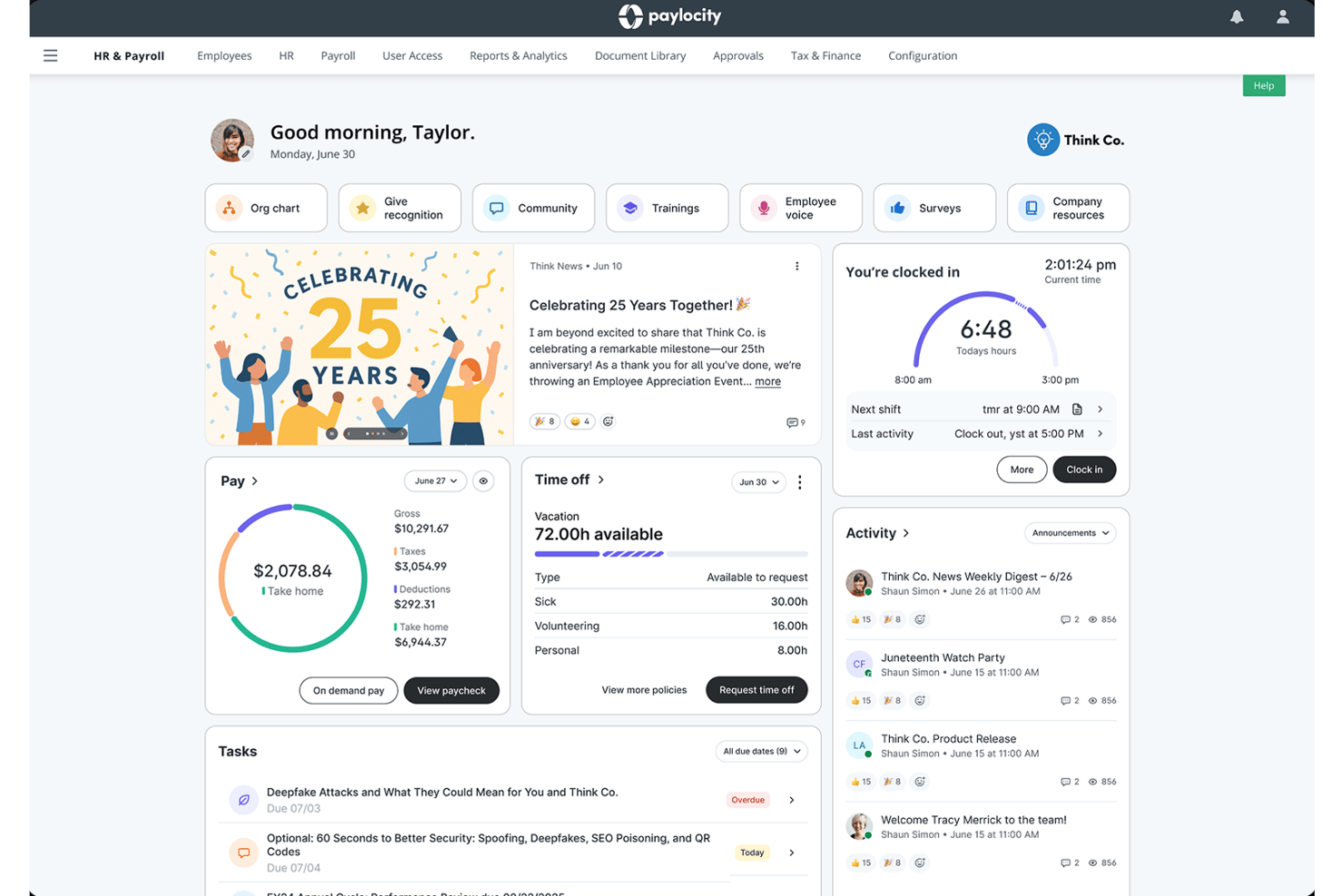
Paylocity is a cloud-based HR and workforce management platform with a time and labor module covering employee time capture, attendance tracking, PTO management, scheduling, and payroll integration.
Who Is Paylocity Best For?
Paylocity is a natural fit for mid-market HR teams in the US that manage hourly or mixed workforces and need time tracking connected to payroll in one system.
Why I Picked Paylocity
Paylocity earns its spot on my shortlist because its timesheet approval workflows are genuinely configurable, not just a basic single-level sign-off. I can set up multi-step approvals with automated notifications that trigger at each stage, which keeps time card reviews moving without manual follow-up. The automated policy enforcement layer is what really sets it apart: overtime thresholds and shift rules apply automatically, so compliance isn't something I have to manually police.
Paylocity Key Features
- Mobile time tracking: Employees can clock in and out using a mobile app with location verification.
- Employee scheduling: Build and manage shift schedules with AI-powered shift recommendations.
- Integrated payroll sync: Time entries flow directly into payroll calculations without manual data transfers.
- PTO and leave management: Track vacation, sick days, and leave requests in one centralized interface.
Paylocity Integrations
Paylocity offers hundreds of marketplace integrations, including AccuSourceHR, Chekr, Asana, Atlassian, Box, Deputy, Expensify, FlexSpring, Okta, Oracle NetSuite, and more. An API is available for custom integrations.
Pros and Cons
Pros:
- Built-in AI for shift scheduling recommendations
- Multi-channel clock-in options including kiosk and mobile
- Fully automated shift and overtime enforcement
Cons:
- Primarily designed for US payroll compliance
- Reporting setup is cumbersome for complex needs
New Product Updates from Paylocity

Paylocity Expands Expense and Purchase Request Tools
Paylocity adds connected personal cards, smarter expense categorization, and a streamlined purchase request experience. This reduces manual entry and helps finance teams manage expenses and approvals more efficiently. For more information, visit Paylocity’s official site.
 .
.
Paycom
Best for self-service employee time management
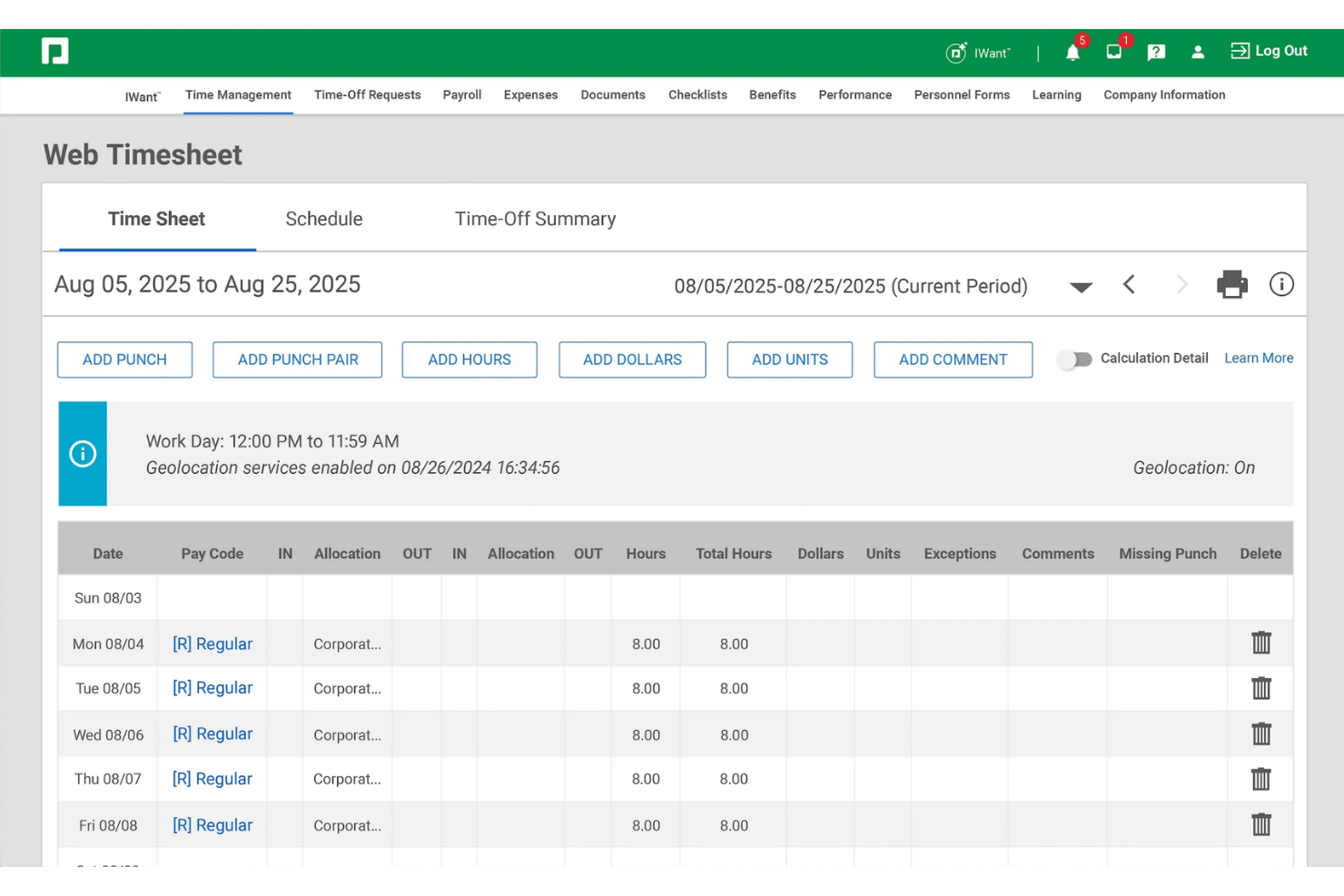
Paycom is a single-database HCM platform with a built-in time and labor management suite that covers employee clock-in/out, scheduling, PTO tracking, labor allocation, and native payroll sync.
Who Is Paycom Best For?
Paycom is a strong fit for mid-market HR and payroll teams at US-based organizations that want time tracking managed within a unified HCM system rather than a standalone tool.
Why I Picked Paycom
I picked Paycom because its self-service model genuinely shifts time management work from HR to employees. Workers clock in via mobile, submit punch change requests, and trigger PTO approvals directly from their phones. I especially like GONE®, which auto-approves or denies time-off requests based on rules your team configures, cutting approval lag entirely. Geofencing and IP filtering on clock-in also give managers real control over where and when punches happen.
Paycom Key Features
- Labor allocation: Assign employee hours across locations, roles, or cost centers in real time.
- Mobile time clocks: Use the Paycom mobile app for clocking in, viewing schedules, and tracking hours remotely.
- Overtime and compliance settings: Configure automated overtime and break tracking with jurisdiction-specific rules.
- Custom reporting tools: Build workforce analytics and export real-time data on hours, attendance, and trends.
Paycom Integrations
Native integrations are not publicly listed.
Pros and Cons
Pros:
- Mobile app supports punch-in with geofencing
- Overtime and compliance rules are configurable
- Employees can edit their own punches
Cons:
- Global compliance limited outside the US
- No free trial or transparent pricing
Best for flexible device time collection
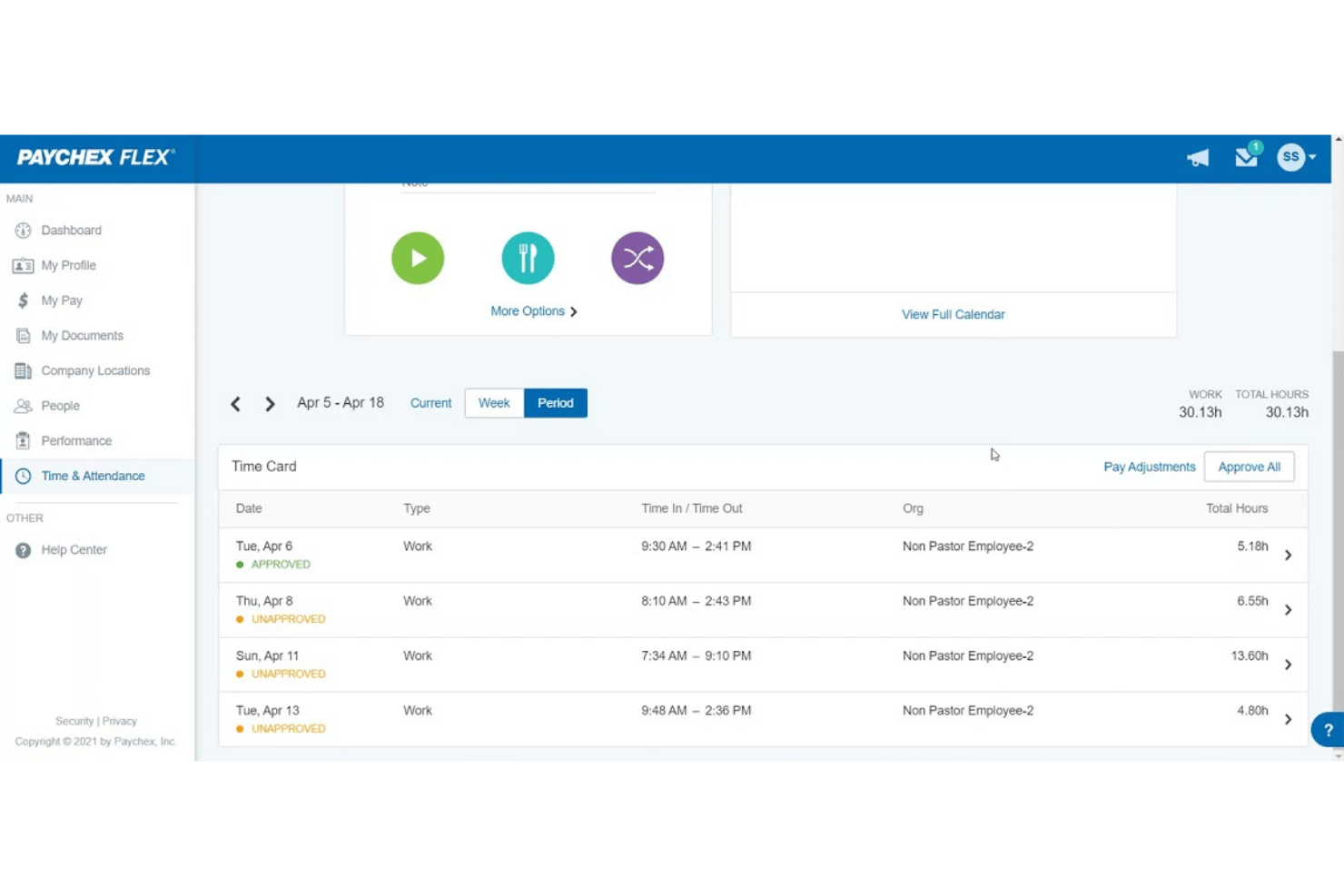
Paychex Flex is a workforce time tracking platform that combines biometric clock-in, mobile punching, web-based timesheets, attendance tracking, leave management, and payroll integration within a single HR system.
Who Is Paychex Flex Best For?
It's a strong fit for HR teams at mid-size to large companies managing onsite, hybrid, or distributed workforces that need payroll-connected time tracking.
Why I Picked Paychex Flex
Paychex Flex earns its spot on my shortlist because no other time tracking tool I've tested matches its range of clock-in hardware options. I can deploy iris biometric clocks for touchless punching, proximity badge readers for fast onsite teams, or a tablet kiosk with facial verification where hardware costs need to stay low. The approaching overtime alerts and geofencing in the full Flex Time tier add a compliance layer I rely on alongside the device flexibility.
Paychex Flex Key Features
- Online timesheet management: Employees submit and managers review work hours through web-based timesheets.
- Automated PTO accrual tracking: Track and manage employee time-off balances with built-in accrual calculations.
- Native payroll integration: Time and attendance data flows directly into Paychex payroll for smooth processing.
- Attendance violation point system: Configure infraction rules to automatically track attendance issues and assign points.
Paychex Flex Integrations
Paychex Flex offers a range of native integrations including Xero, Sage Intacct, QuickBooks, Oracle NetSuite, Connecteam, BambooHR, Clover, and 7Shifts. An API is available for custom integrations.
Pros and Cons
Pros:
- Automated overtime and compliance alerts
- Strong built-in PTO accrual tracking
- Wide range of physical time clock options
Cons:
- Higher tier required for advanced features
- Lacks in-depth project-level time allocation
UKG Pro
Best for advanced workforce analytics
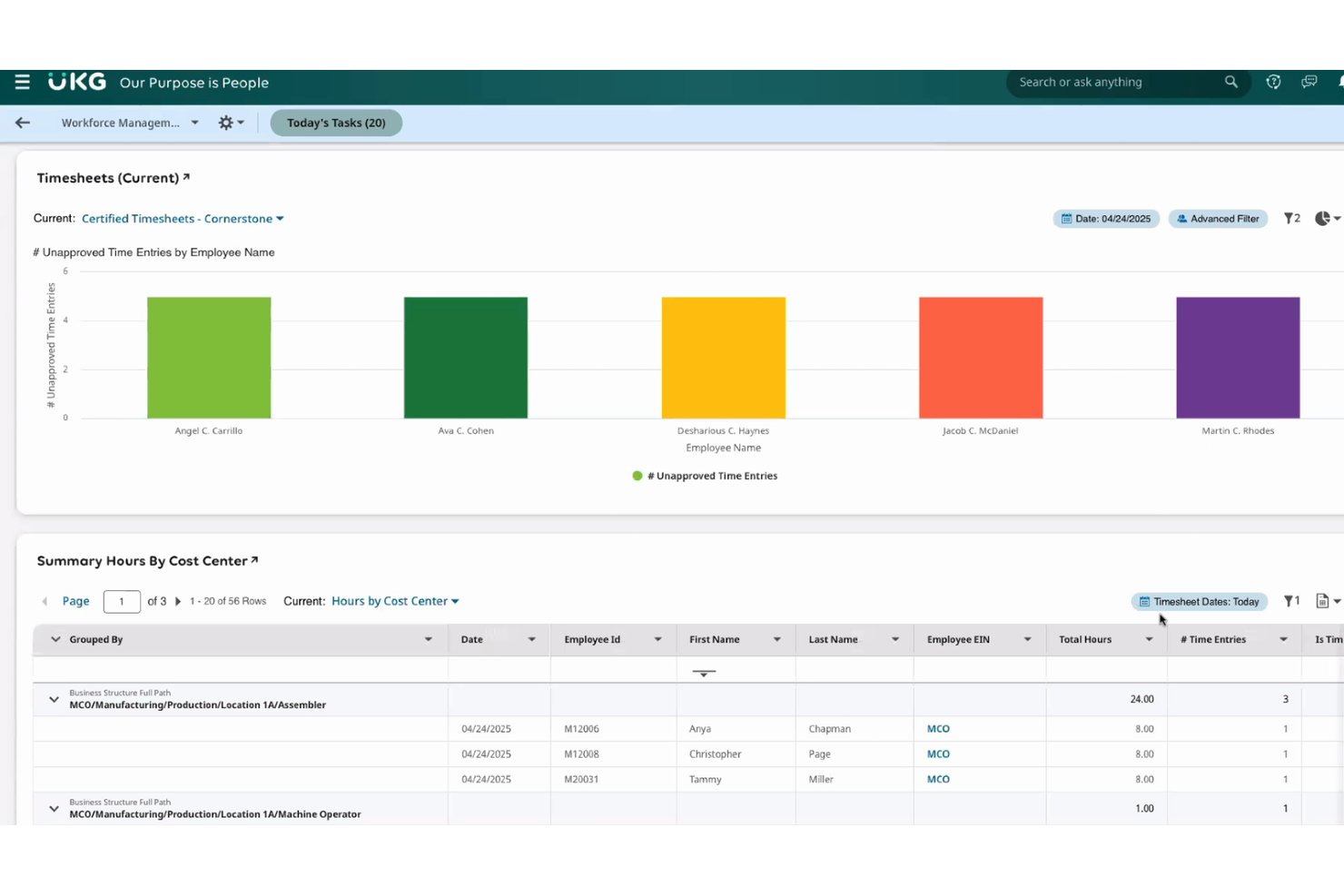
UKG Pro is an enterprise HCM suite with a dedicated workforce management module covering multi-modal time capture, timesheet management, attendance and leave tracking, labor compliance automation, and AI-driven workforce analytics.
Who Is UKG Pro Best For?
UKG Pro is a strong fit for mid-market and enterprise organizations with complex, multi-location workforces and dedicated HR operations or people analytics teams.
Why I Picked UKG Pro
UKG Pro earns its spot on my shortlist because of how far its workforce analytics go beyond standard hour totals. I particularly like the AI-driven workforce intelligence layer, which surfaces bottlenecks, lost time patterns, and shift coverage gaps directly from your attendance data. Real-time labor dashboards also give my team visibility into exceptions and cost variances before payroll closes, not after.
UKG Pro Key Features
- Multi-modal time capture: Capture hours using biometric time clocks, mobile app, web browser, or telephony.
- Configurable policy enforcement: Enforce pay, break, and scheduling rules automatically across locations.
- Mobile self-service tools: Allow employees to request time off, punch in, or view schedules from any device.
- Compliance tracking and auditing: Maintain automated audit logs and ensure adherence to labor laws.
UKG Pro Integrations
UKG Pro offers native integrations with ADP, DocuSign, Microsoft Teams, Oracle, Salesforce, SAP, Workday, Okta, ServiceNow, and more. An API is available for custom integrations, and additional connectors are offered through the UKG Marketplace.
Pros and Cons
Pros:
- Comprehensive labor compliance automation features
- Multi-modal time capture options available
- Advanced AI-powered workforce analytics engine
Cons:
- Setup and configuration can be time-intensive
- Too complex for smaller or simple teams
ADP
Best for enterprise payroll integration
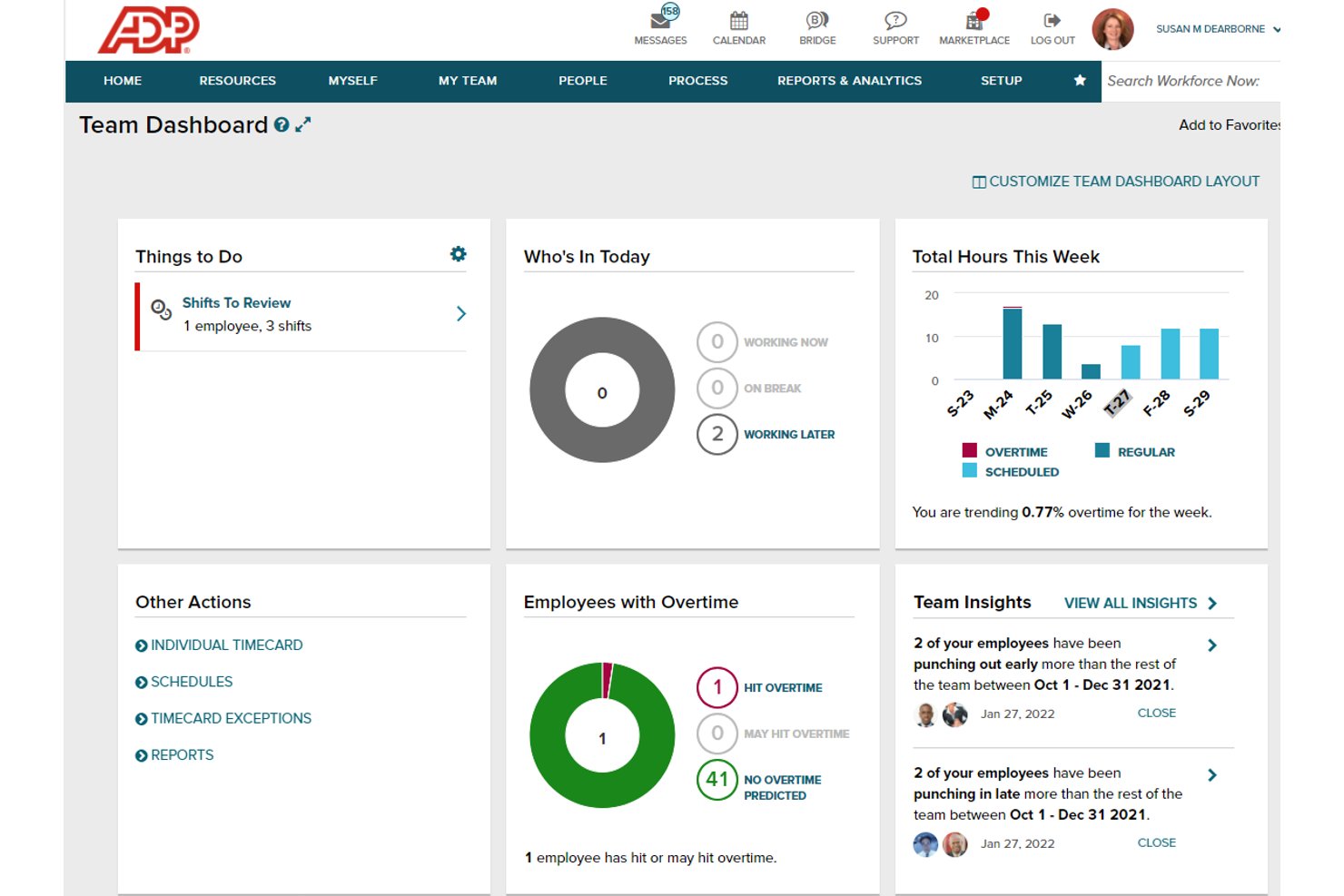
ADP is an HCM platform that combines employee time capture, automated timesheet calculations, attendance tracking, labor compliance enforcement, and native payroll sync across mid-sized and enterprise organizations.
Who Is ADP Best For?
ADP is a natural fit for mid-sized to enterprise organizations that already run payroll through ADP and want time tracking built into the same system.
Why I Picked ADP
I picked ADP as one of the best because it's the only tool on this list that is the payroll system, not just something that connects to one. Tracked hours flow directly into payroll calculations, with overtime rules and statutory holiday policies applied automatically against each employee's pay policy. There's no reconciliation step between time data and compensation, because both live on the same database.
ADP Key Features
- Mobile app time capture: Employees clock in and out using the ADP Mobile app with GPS and geofencing.
- Physical and kiosk time clocks: Supports badge, fingerprint, and facial recognition for on-site attendance.
- Attendance and leave tracking: Managers see real-time attendance data and handle PTO, sick leave, and holiday tracking in one system.
- Automated compliance policies: Built-in enforcement for overtime, break rules, and Canadian statutory holiday requirements.
ADP Integrations
ADP offers native integrations with Sage, Xero, Workday, QuickBooks, Ashby, Flexspring, Chekr, Stream, and more. An API is available for custom integrations.
Pros and Cons
Pros:
- Multiple time capture methods: app, kiosks, clocks
- Advanced overtime and statutory holiday policies
- Direct sync to ADP payroll calculations
Cons:
- Reporting customization is limited and clunky
- No project or task-level time tracking
Annen programvare for tidsregistrering
Her er noen flere alternativer for tidsregistrering som ikke kom med på kortlisten min, men som likevel er verdt å undersøke:
- Paycor
For dynamic scheduling tools
- Deel HRIS
For global workforce oversight
- Homebase
For small business shift management
- TriNet
For integrated payroll connectivity
- Justworks Hours
For unified hourly tracking
- Factorial
For PTO and absence automation
- TimeClock Plus
For customizable clock-in options
- Workday HCM
For mobile-first workforce management
- Replicon
For project-based hour tracking
- SAP SuccessFactors Time Tracking
For global compliance capabilities


How I Evaluate Time Tracking Software
I split my evaluation into core foundations—timesheet approvals, payroll sync—and differentiators like billable segmentation and budget burn-down that separate the best tools from the rest.
Core Functionality (Table Stakes For This List)
When I'm selecting tools for my list, I rank each one on a scale from 0 (does not offer the functionality) to 5 (excels in this area) for each core functionality listed below. Then, I calculate the tool's total score into a percentage. Each tool needs to achieve a minimum total score of 65% to be considered for inclusion.
- Employee Time Capture: I look for multiple clock-in methods—mobile, desktop timers, kiosk mode—so field and office teams can log hours the way that fits their workflow.
- Timesheet Management: Manager approval workflows matter here, especially multi-level approvals where a team lead and a director both need to sign off before payroll runs.
- Payroll Integration: I check whether tracked hours sync natively with payroll platforms like ADP or Gusto, rather than requiring manual CSV exports each pay period.
- Attendance & Leave Tracking: Tools should unify PTO balances, absence records, and worked hours in one view so HR doesn't juggle separate systems for each.
- Labor Compliance Controls: I evaluate how well the platform handles overtime rules and break requirements across different jurisdictions without constant manual configuration.
- Reporting & Analytics: Custom dashboards and exportable reports on labor costs, attendance trends, and hours by project give HR and finance teams the data they actually need.
Once I have a list of tools that meet the criteria, I consider what sets each platform apart.
Differentiating Factors (What Sets Vendors Apart)
Here's how I compare and contrast different vendors:
Standout Features
Billable vs. non-billable segmentation is a big differentiator. I look for tools that automatically tag hours by client, task type, and project phase so invoicing stays accurate without manual cleanup. Retainer and budget tracking goes hand-in-hand here, giving PMs real-time burn-down visibility before a project goes over scope. I also evaluate timesheet automation, like auto-populating entries from calendar events or Jira activity, which cuts down on the time PMs spend chasing submissions.
Beyond Features
Integration with the tech stack matters a lot. I check whether a tool connects natively to project management platforms like Asana or Jira and syncs two-way with accounting tools like QuickBooks or Xero. Agency fit is another key factor—tools built for multi-client, multi-project structures with distinct billing rates handle real agency workflows far better than generic trackers. I also evaluate reporting depth, specifically whether you can pull project-level and client-level profitability views without exporting raw data into a separate BI tool.
Slik velger du programvare for tidsregistrering
Det er lett å bli overveldet av lange funksjonslister og komplekse prismodeller. For å hjelpe deg med å holde fokus mens du går gjennom den unike prosessen med å velge programvare, får du her en sjekkliste over faktorer du bør ha i bakhodet:
| Faktor | Hva bør du vurdere? |
|---|---|
| Skalerbarhet | Vil verktøyet håndtere økt bemanning, nye avdelinger og endrede prosjektstrukturer etter hvert som virksomheten vokser? |
| Integrasjoner | Kan det kobles til de eksisterende systemene dine for prosjektstyring, lønn og fakturering uten omveier? |
| Tilpasningsmuligheter | Lar det deg tilpasse godkjenningsflyter, rapportering eller prosjektetiketter slik at de samsvarer med måten teamet ditt arbeider på? |
| Brukervennlighet | Hvor enkelt kan prosjektledere og ansatte registrere og godkjenne timer på alle enheter, og hvor bratt er læringskurven? |
| Implementering og opplæring | Hvilken støtte – opplæring, veiledninger og direkte hjelp – tilbyr leverandøren for å få alle til å bruke systemet riktig? |
| Kostnad | Hvor forutsigbare blir kostnadene etter hvert som bruken øker? Vær oppmerksom på kostnader per bruker, tillegg for moduler eller gebyrer for integrasjoner. |
| Sikkerhetstiltak | Er databeskyttelse som SOC 2 eller GDPR-samsvar på plass, og kan du angi brukerkontroller for sensitiv informasjon? |
| Etterlevelseskrav | Vil plattformen håndheve regler for overtid, pauser og lokale arbeidslover for alle regioner og roller du administrerer? |
Hva er programvare for tidsregistrering?
Programvare for tidsregistrering er en kategori verktøy som er utviklet for å hjelpe team innen digital prosjektstyring med å loggføre arbeidstimer, administrere timelister og overvåke oppmøte for lønn, etterlevelse og produktivitetsanalyse. Disse plattformene forenkler godkjenningsflyter, kobler seg til lønnssystemer og støtter arbeidsflyter for byråer med strukturer basert på flere kunder og prosjekter.
Funksjoner i programvare for tidsregistrering
Når du velger programvare for tidsregistrering, bør du se etter følgende viktige funksjoner:
- Registrering av ansattes arbeidstid: Lar ansatte registrere timer ved hjelp av tidtakere, manuell registrering eller verktøy for inn- og utstempling på tvers av enheter, slik at datainnsamlingen passer til enhver arbeidsstil.
- Timelisteadministrasjon: Tilbyr strukturerte timelister med arbeidsflyter for gjennomgang, redigering og godkjenning, noe som sikrer nøyaktige oppføringer for lønn og overholdelse av regelverk.
- Lønnsintegrasjon: Kobler registrerte timer direkte til lønns- eller HRIS-plattformer, automatiserer beregninger av lønn og reduserer manuelt arbeid ved hver lønnskjøring.
- Registrering av oppmøte og permisjon: Registrerer oppmøte, betalt fritid og permisjonssøknader sammen med arbeidede timer, slik at HR-team får en samlet oversikt over alle tidsdata.
- Kontroller for overholdelse av arbeidslivsregler: Håndhever regler for pauser, overtid og jurisdiksjonsspesifikke arbeidsbestemmelser gjennom retningslinjer som automatisk markerer brudd på regelverket for gjennomgang.
- Rapportering og analyse: Leverer tilpassbare rapporter og dashbord om arbeidede timer, oppmøte, arbeidskraftskostnader og produktivitet, noe som støtter bedre beslutninger om arbeidsstyrken.
- Segmentering av fakturerbar og ikke-fakturerbar tid: Kategoriserer tidsregistreringer etter kunde, oppgave eller faktureringsstatus for å forbedre prosjektkostnadsberegning og kundefakturering.
- Ressursprognoser: Bruker registrert tid til å hjelpe prosjektledere med å forutsi ressursbehov, unngå overbooking og planlegge kommende arbeidsmengder basert på reelle data.
- Støtte for flere kunder og prosjekter: Strukturerer tidsregistreringer for ulike kunder og prosjekter, slik at byråer og PMO-er får tydelig oversikt over tidsfordeling og lønnsomhet.
- Automatisering av timelister og påminnelser: Fyller automatisk ut timelister basert på kalenderhendelser eller aktivitet i oppgaver og minner brukere på å sende inn ferdig utfylte registreringer, noe som reduserer administrativ oppfølging.
Vanlige AI-funksjoner i programvare for tidsregistrering
I tillegg til standardfunksjonene i programvare for tidsregistrering som er listet ovenfor, tar mange av disse løsningene i bruk AI med funksjoner som:
- Automatiserte forslag til timelister: AI analyserer kalenderhendelser, e-poster og prosjektaktivitet for å foreslå tidsregistreringer, noe som reduserer manuell inntasting og manglende timer.
- Avviksdeteksjon: AI markerer uvanlige mønstre i registrerte timer eller oppmøte, slik at ledere raskt kan oppdage feil, svindel eller risiko for brudd på regelverket.
- Prediktiv ressursfordeling: AI forutsier fremtidige bemanningsbehov og mulige flaskehalser ved å analysere historiske prosjektdata og nåværende arbeidsmengder.
- Smarte overtidsvarsler: AI overvåker arbeidsmønstre og varsler proaktivt ledere og ansatte om mulig overtid eller brudd på arbeidslivslovgivningen før det oppstår.
- Tidsregistrering med naturlig språk: AI gjør det mulig for brukere å registrere tid ved hjelp av samtalebasert språk, slik at det blir raskere og mer intuitivt å registrere arbeidsaktiviteter.
Fordeler med programvare for tidsregistrering
Implementering av programvare for tidsregistrering gir flere fordeler for teamet og virksomheten din. Her er noen av fordelene du kan se frem til:
- Nøyaktig lønnsbehandling: Automatisert tidsregistrering og lønnsintegrasjoner reduserer manuelle feil og sikrer utbetaling til rett tid.
- Overholdelse av arbeidslivsregler: Innebygde kontroller for arbeidslivslovgivning bidrar til å håndheve krav til overtid, pauser og regionale bestemmelser for å minimere juridisk risiko.
- Innsikt i prosjektlønnsomhet: Segmentering av fakturerbar tid, budsjettoppfølging og rollebasert rapportering viser hvilke kunder, team eller prosjekter som gir best avkastning.
- Optimalisering av ressurser: Ressursprognoser og analyser bidrar til bedre fordeling av teammedlemmer og forebygger overbooking eller utbrenthet.
- Redusert administrativ belastning: Automatiserte påminnelser om timelister, optimaliserte godkjenninger og forhåndsutfylte data sparer tid for prosjektledere og ansatte.
- Bedre datasynlighet: Samlede dashbord bringer sammen oppmøte, timer, betalt fritid og prosjektmåltall for raskere beslutningstaking.
- Bedre åpenhet overfor kunder: Kundeklare rapporter gjør det enkelt å dele merkevaretilpassede og detaljerte oversikter over tid og kostnader med interessenter.
Kostnader og priser for programvare for tidsregistrering
Valg av programvare for tidsregistrering krever en forståelse av de ulike prismodellene og abonnementene som er tilgjengelige. Kostnadene varierer basert på funksjoner, teamstørrelse, tillegg og mer. Tabellen nedenfor oppsummerer vanlige abonnementer, gjennomsnittsprisene deres og typiske funksjoner som er inkludert i løsninger for tidsregistrering:
Sammenligningstabell for abonnementer for programvare for tidsregistrering
| Plantype | Gjennomsnittspris | Vanlige funksjoner |
|---|---|---|
| Gratisplan | $0 | Grunnleggende verktøy for tidsregistrering, begrenset rapportering og begrensninger på antall prosjekter eller brukere. |
| Personlig plan | $5-$10/user/month | Individuelle timelister, mobiltilgang, grunnleggende eksportalternativer og selvbetjente brukerstøtteressurser. |
| Bedriftsplan | $10-$25/user/month | Godkjenning av timelister for team, integrasjoner med lønnssystemer, registrering av permisjoner, rapportering av prosjektkostnader og synkronisering med prosjektstyringsverktøy. |
| Foretaksplan | $25-$45/user/month | Avansert analyse, tilpassede arbeidsflyter, dedikert introduksjon, sikkerhetsalternativer og støtte for krav til samsvar. |
Vanlige spørsmål om programvare for tidsregistrering
Her er noen svar på vanlige spørsmål om programvare for tidsregistrering:
Hvordan vet jeg om programvare for tidsregistrering kan integreres med verktøyene jeg bruker nå?
Se leverandørens integrasjonsliste for direkte tilkoblinger til plattformene dine for prosjektstyring, lønn eller fakturering. Se etter innebygde integrasjoner, API-integrasjoner eller Zapier-integrasjoner for å sikre at systemene fungerer sammen uten manuelle opplastinger.
Kan programvare for tidsregistrering håndtere kompleks fakturering på tvers av flere kunder?
Ja, mange løsninger støtter strukturer med flere kunder og prosjekter, med tilpassbare satser og faktureringskoder. Dette hjelper byråer med å fakturere ulike kunder nøyaktig og spore lønnsomhet per prosjekt eller kunde.
Hva bør jeg vurdere når det gjelder datasikkerhet ved valg av programvare for tidsregistrering?
Se etter plattformer med SOC 2-, GDPR- eller lignende sertifiseringer. Kontroller at de har rollebaserte tilgangskontroller, datakryptering og revisjonslogger for å håndtere sensitive tids-, lønns- og kundedata på en sikker måte.
Vil programvare for tidsregistrering hjelpe med samsvar med regelverk i ulike land eller delstater?
Mange verktøy tilbyr konfigurerbar håndheving av arbeidsregler for overtid, pauser og lokale bestemmelser. Se gjennom policyalternativene og lokaliseringene som er tilgjengelige, slik at de samsvarer med organisasjonens geografiske krav.
Hvor vanskelig er det å få ansatte til å bruke programvare for tidsregistrering?
Bruken avhenger av hvor enkelt systemet er å bruke – velg et system med registrering via mobil, nett eller nettleser, automatiske påminnelser og få trinn, slik at de ansatte ikke oppfatter det som en byrde. Se etter leverandører med ressurser for introduksjon og rask brukerstøtte.