

Et HR-samsvarssystem for små bedrifter er HR-programvare som hjelper deg med å håndtere arbeidsrett, forskrifter og virksomhetens retningslinjer, slik at teamet ditt overholder kravene og unngår kostbare feil.
Hvis du leter etter den rette løsningen, vet du hvor raskt regelverket kan endres – og hvor lett det er for små team å gå glipp av viktige oppdateringer eller dokumentasjon.
Denne listen hjelper deg med å sammenligne de beste HR-samsvarssystemene for små bedrifter i 2026, slik at du kan finne en plattform som passer behovene dine, støtter medarbeiderne dine og beskytter virksomheten din.
Hvorfor du kan stole på våre programvareanbefalinger
6,700+
Reviews
20
Industry experts
16+
Evaluation factors
14
Years
Teamet vårt har testet og anmeldt programvare siden 2012. Vi er selv HR-eksperter, så vi vet hvor vanskelig og hvor viktig det er å velge riktig programvare.
I denne guiden har vi vurdert verktøyene gjennom praktisk testing og uavhengig research og gitt dem poeng ut fra våre utvelgelseskriterier. Vi bygger også på innsikt fra ledende eksperter i bransjen og erfarne HR-eksperter.
Anmeldelsene våre bygger på vår egen redaksjonelle vurdering. De er ikke et salgsargument.
Ekspertanmeldere:
- Phil GrayCOO
 Kim BehnkeHR Tech Editor & Analyst
 Josh BarkerPeople Ops Manager

Sammenligningstabell for HR-samsvarssystemer for små bedrifter
Denne sammenligningstabellen oppsummerer prisopplysningene for mine beste HR-samsvarssystemer for små bedrifter
Sorted by: Default
| Tool | Starting Price | Website | |
|---|---|---|---|
Best for small business HR compliance support | Not rated | Pricing upon request Free demo available | Website |
Best for centralized global workforce records | 4.8 out of 5 | $5/user/month Free demo available | Website |
Best for hourly team compliance | 4.2 out of 5 | $99/month Free plan + 30-day free trial + free demo available | Website |
Best for intuitive policy management | 4.8 out of 5 | $2/user/month Free plan + free demo available | Website |
Best for global workforce compliance | 4.9 out of 5 | $29/user/month Free demo available | Website |
Best for international employment compliance | 2.9 out of 5 | $599/user/month Free demo available | Book Demo |
Best for scalable compliance solutions | 4.2 out of 5 | Pricing upon request Free demo available | Website |
Best for automated compliance alerts | 4.1 out of 5 | Pricing upon request Free demo available | Website |
Best for unified compliance across systems | Not rated | $8/user/month Free demo available | Website |
Best for industry-specific compliance guidance | Not rated | Pricing upon request Free demo available | Website |


Anmeldelser av HR-samsvarssystemer for små bedrifter
Nedenfor finner du mine detaljerte sammendrag av HR-samsvarssystemene for små bedrifter som kom med på kortlisten min. Anmeldelsene mine gir en detaljert gjennomgang av funksjonene, de beste bruksområdene og prisene for hvert system, slik at du kan finne det som passer best for deg.
 Best for small business HR compliance support
- Free demo available
- Pricing upon request

Mitratech Mineral manages HR compliance with policy tools and legal guidance. Mitratech Mineral is an HR compliance platform that helps small and mid-sized businesses manage employment law requirements through compliance monitoring, employee handbook tools, HR guidance, policy resources, and employee training.
Who Is Mitratech Mineral Best For?
Mitratech Mineral is a strong fit for small business owners and HR generalists who need practical compliance support without maintaining an in-house legal or compliance team.
Why I Picked Mitratech Mineral
I picked Mitratech Mineral because it gives small businesses access to both compliance tools and experienced HR professionals in one platform. Instead of researching employment laws independently or hiring outside consultants, users receive personalized compliance alerts, attorney-reviewed resources, and expert guidance when complex workplace situations arise. I also like that the platform combines handbook management, employee training, and compliance planning, making it easier for lean HR teams to stay organized as regulations evolve.
Mitratech Mineral Key Features
- Mineral Intelligence™: Monitor changing employment laws and receive personalized compliance recommendations based on your business.
- Smart Employee Handbook Plus: Create and maintain compliant employee handbooks with automatic policy updates and multi-state support.
- Employee training library: Deliver workplace compliance and employee development training through built-in online courses.
- Compliance calendar: Track important federal and state compliance deadlines from one centralized dashboard.
Mitratech Mineral Integrations
Mitratech Mineral primarily operates through partnerships with payroll providers, insurance brokers, PEOs, and HCM platforms. It is also available through the PrismHR Marketplace. Public documentation of native integrations remains limited, and Zapier support is not currently documented.
Pros and Cons
Pros:
- Expert HR support
- Built-in HR training
- Personalized compliance guidance
Cons:
- Limited native integrations
- Handbook tools may cost extra
Learn more about Mitratech Mineral: Best for centralized global workforce records
- Free demo available
- From $5/user/month
Visit WebsiteCustomer Rating:4.8/5
Deel HR dashboard showing payroll, compliance tasks, employment verification, and contractor management tools in one centralized platform for small businesses. Deel HR is an HR compliance platform for small businesses that brings together global employee records, automated compliance tools, onboarding workflows, and document management in one system.
Who Is Deel HR Best For?
Deel HR suits small businesses and HR teams managing global employees, contractors, and compliance across multiple countries.
Why I Picked Deel HR
I picked Deel HR as one of the best because I can keep all global workforce records in one place, no matter where my team members are based. I use Deel HR to store contracts, compliance documents, and personal data for employees and contractors across multiple countries. The platform lets me quickly access and update records, which helps my team stay organized and audit-ready.
Deel HR Key Features
- Automated worker classification: Instantly determines contractor or employee status based on local laws.
- Global onboarding workflows: Guides new hires through country-specific onboarding steps and document collection.
- E-signature support: Lets you send, sign, and store contracts and compliance documents digitally.
- Custom document templates: Allows you to create and manage templates for contracts, NDAs, and HR policies.
Deel HR Integrations
Deel HR offers native integrations with BambooHR, Workday, Greenhouse, HiBob, QuickBooks, Xero, NetSuite, Expensify, Okta, and Slack. An API is available for custom integrations.
Pros and Cons
Pros:
- Native integrations with major HR and payroll tools
- Country-specific onboarding workflows for new hires
- Built-in contract and document management tools
Cons:
- Some integrations require higher-tier plans
- Limited customization of onboarding workflows
 Best for hourly team compliance
- Free plan + 30-day free trial + free demo available
- From $99/month (billed annually)
Visit WebsiteCustomer Rating:4.2/5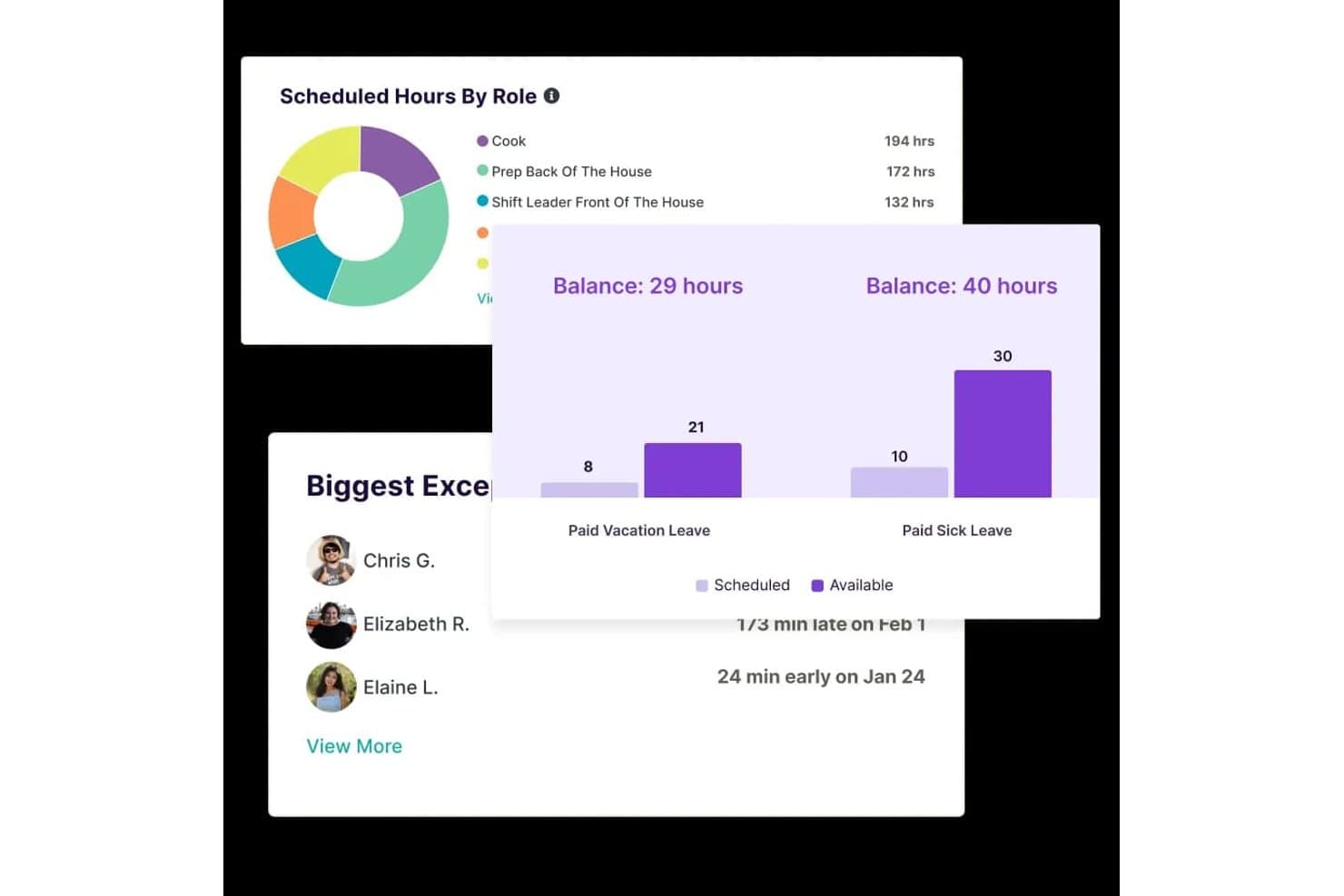
Homebase tracks scheduled hours, leave balances, and attendance exceptions. Homebase is a workforce management platform for small businesses with hourly teams that combines scheduling, time tracking, payroll, and HR compliance tools including labor-law alerts, new-hire onboarding, and certified HR advisor access.
Who Is Homebase Best For?
Homebase fits small business owners managing hourly teams who want scheduling, time tracking, and basic wage-and-hour compliance in one place without hiring dedicated HR staff.
Why I Picked Homebase
I've included Homebase in my top picks because it's built around the compliance pressures that come with running a team of hourly workers, not office employees. I love that it checks schedules against federal, state, and provincial child-labor rules before you publish them, flagging conflicts automatically. Its HR Pro tier also pushes email alerts when local labor laws change, like a minimum-wage increase taking effect in your area, and pairs that with certified HR advisors who can review your policies and build a custom handbook.
Homebase Key Features
- New-hire self-onboarding: Invite new employees to complete required federal and state forms, e-sign documents, and upload paperwork before their first day.
- Certification expiration alerts: Track required employee certifications and receive automatic alerts 10 days before any certification expires.
- FLSA-compliant timesheet storage: Store time cards, including edits, for 4+ years on paid plans to support recordkeeping requirements.
- Break and overtime tracking: Monitor employee breaks and overtime across locations and send alerts when employees approach overtime thresholds.
Homebase Integrations
Homebase lists various integrations, including ADP, Gusto, Paychex, QuickBooks, and Square Payroll. It also offers a JSON API for custom integrations, though data-sync behavior isn’t specified.
Pros and Cons
Pros:
- Certification alerts flag upcoming expirations
- Edited time cards support FLSA recordkeeping
- Overtime and missed-break alerts support wage compliance
Cons:
- No exempt-status guidance or misclassification flags
- HR compliance tools require the top-tier plan
 Best for intuitive policy management
- Free plan + free demo available
- From $2/user/month (billed annually)
Visit WebsiteCustomer Rating:4.8/5
TalentHR offers a dashboard interface displaying quick access to HR documents and links. TalentHR offers small businesses a straightforward way to create, update, and share HR policies without the usual complexity. If you need a system that makes policy management accessible for non-specialists and keeps your team aligned, this platform is designed for you. Its focus on intuitive workflows helps you maintain compliance and clarity as your business grows.
Why I Picked TalentHR
What sets TalentHR apart is its focus on making policy management simple and accessible for small businesses. I picked TalentHR because it lets you build, edit, and distribute HR policies directly within the platform, so you can keep everyone on the same page without extra steps.
The policy library feature helps you organize documents and updates, while built-in acknowledgment tracking ensures employees review and accept new policies. These tools make it easier for small teams to stay compliant and maintain clear communication around workplace rules.
TalentHR Key Features
In addition to its policy management tools, TalentHR offers several other features for small business HR compliance:
- Employee Records Management: Store and update employee information, documents, and contracts in a centralized location.
- Time Off Tracking: Monitor leave balances, approve requests, and generate reports on absences.
- Customizable Workflows: Set up approval processes and notifications tailored to your organization’s needs.
- Role-Based Access Controls: Assign permissions to users based on their role to protect sensitive HR data.
TalentHR Integrations
Integrations include Slack, Google Calendar, Zapier, TalentLMS, WordPress, Google Workspace, and more. An API is also available for custom integrations.
Pros and Cons
Pros:
- Role-based permissions for sensitive HR data
- Built-in document templates for HR policies
- Policy acknowledgment tracking for compliance audits
Cons:
- Limited analytics for compliance reporting
- No built-in payroll processing features
Learn more about TalentHR: Best for global workforce compliance
- Free demo available
- From $29/user/month
Visit WebsiteCustomer Rating:4.9/5
Deel offers a dashboard displaying compliance tracking with onboarding status to simplify HR management. Deel is designed for small businesses that need to manage HR compliance across multiple countries. If you’re hiring international employees or contractors, Deel helps you navigate local labor laws, contracts, and payroll requirements in over 150 countries. This platform is especially useful for teams expanding globally who want to reduce compliance risks and administrative overhead.
Why I Picked Deel
For small businesses hiring internationally, Deel stands out for its focus on global workforce compliance. Deel offers localized contract templates and automated compliance checks, helping you stay aligned with labor laws in each country where you operate.
I picked Deel because it also manages international payroll and tax filings, reducing the risk of costly compliance errors. These features make Deel a strong choice for small businesses that want to confidently expand their teams across borders without getting bogged down in legal complexity.
Deel Key Features
Some other features that make Deel useful for small business HR compliance include:
- Document Management Portal: Store, organize, and access compliance documents for all employees and contractors.
- Automated Onboarding Workflows: Guide new hires through country-specific onboarding steps and required documentation.
- Expense Management Tools: Submit, approve, and track expenses for global team members within the platform.
- Customizable Permissions: Set user roles and access levels to control who can view or edit sensitive HR and compliance information.
Deel Integrations
Integrations include SAP SuccessFactors, NetSuite, Slack, Google Workspace, Rydoo, Humaans, OpenSesame, Ramp, Thatch, and more.
Pros and Cons
Pros:
- Contractor misclassification risk assessment tools
- Real-time support for international HR questions
- Built-in compliance document storage
Cons:
- Some integrations require enterprise plan
- No built-in time tracking feature
Learn more about Deel Payroll: Best for international employment compliance
- Free demo available
- From $599/user/month (billed annually)
Visit WebsiteCustomer Rating:2.9/5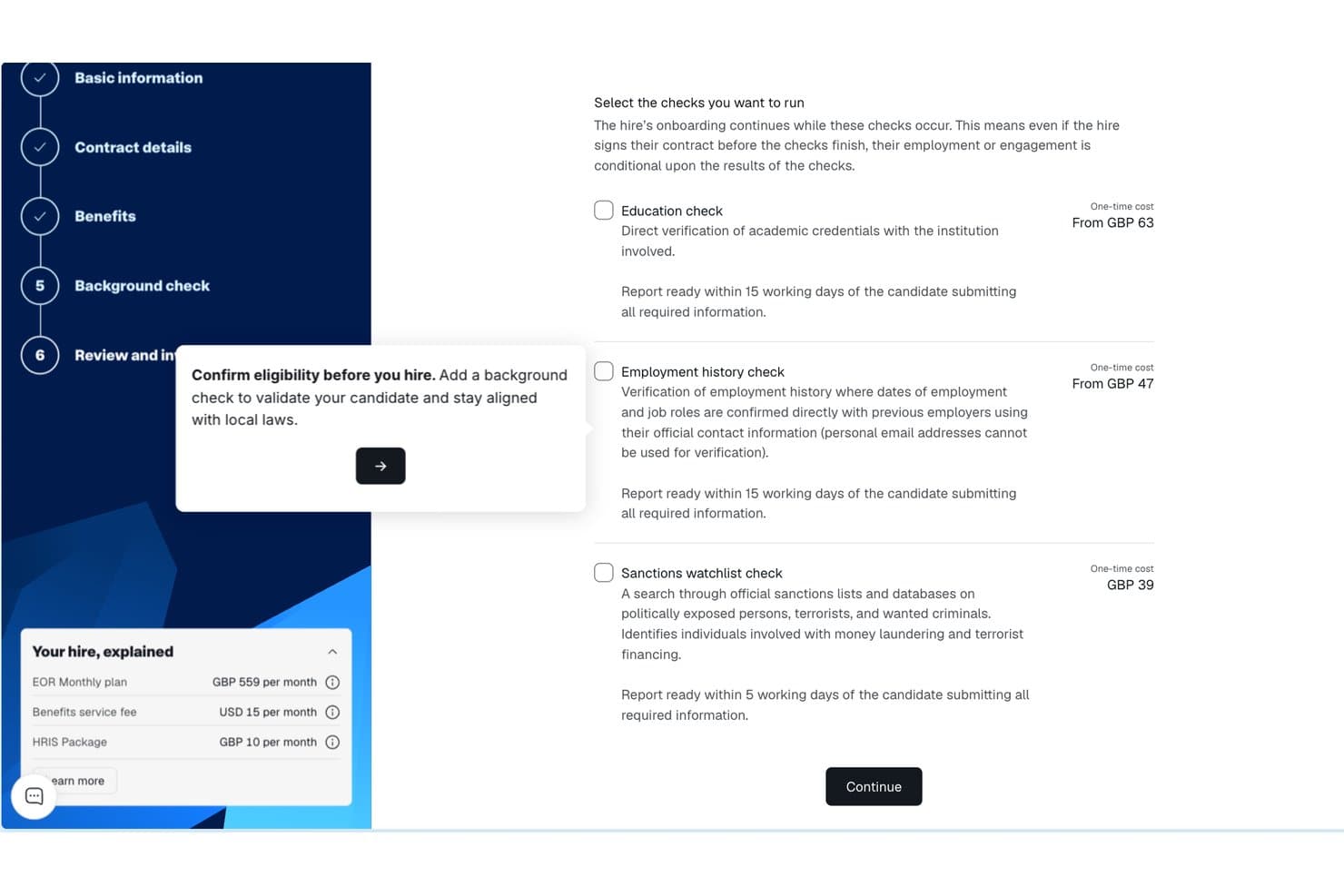
Remote background check selection screen with education, employment, and sanctions options. Remote gives small businesses a way to compliantly hire and manage employees in other countries without setting up local entities. If you’re expanding your team internationally, Remote handles employment contracts, payroll, and benefits in line with local laws. This platform is especially useful for HR teams that want to reduce legal risk and simplify cross-border employment.
Why I Picked Remote
Unlike many HR platforms, Remote is purpose-built to help small businesses manage international employment compliance without needing to set up their own legal entities abroad. I picked Remote because it acts as the legal employer of record, handling employment contracts, payroll, and statutory benefits in each country where you hire.
The platform also manages local tax withholdings and ensures your employment practices align with local labor laws. For small businesses looking to expand globally while minimizing compliance risks, Remote offers a focused solution that addresses the complexities of cross-border employment.
Remote Key Features
Some other features that make Remote valuable for small business HR compliance include:
- Self-Service Employee Portal: Employees can access payslips, contracts, and personal information directly.
- Automated Time Off Tracking: Track and manage leave requests and approvals in one place.
- IP Protection Agreements: Generate and manage intellectual property agreements for international hires.
- Localized Benefits Administration: Offer and administer country-specific benefits packages through the platform.
Remote Integrations
Integrations include QuickBooks, Zapier, HiBob, BambooHR, NetSuite, Xero, Zelt, Carta, Workday, Google Workspace, and more.
Pros and Cons
Pros:
- Localized benefits management for each country
- Automated onboarding for international employees
- Built-in IP and invention rights protection
Cons:
- Payroll processing limited to employees, not contractors
- No built-in performance management tools
 Best for scalable compliance solutions
- Free demo available
- Pricing upon request
Visit WebsiteCustomer Rating:4.2/5
Paychex dashboard displays workflow management tools in a centralized user interface. Paychex gives small businesses access to compliance tools that can scale as their needs change. If you’re looking for a solution that combines payroll, HR, and risk management with built-in compliance support, this platform is designed to adapt as your business grows. Paychex stands out for its ability to handle complex regulatory requirements across multiple states and industries.
Why I Picked Paychex
What drew me to Paychex is its ability to scale compliance support as your business grows or regulations change. Paychex offers automated tax filing and reporting, which helps small businesses stay current with federal, state, and local requirements.
I also appreciate its built-in HR compliance library, which provides up-to-date resources and templates for policies and documentation. These features make Paychex a strong fit for small businesses that need a compliance system capable of adapting to new locations, headcounts, or industry rules.
Paychex Key Features
Some other features that make Paychex useful for small business HR compliance include:
- Employee Handbook Builder: Create and update custom employee handbooks with compliance guidelines.
- Onboarding Tools: Digitally collect new hire forms and manage onboarding checklists.
- Time and Attendance Tracking: Monitor employee hours and attendance with automated tools.
- ACA Compliance Management: Track and report Affordable Care Act requirements directly within the platform.
Paychex Integrations
Integrations include QuickBooks, Sage Intacct, Xero, Jirav, 7shifts, Clover, BambooHR, goHappy, and more.
Pros and Cons
Pros:
- Employee handbook builder with legal updates
- Dedicated compliance support specialists available
- Automated state and federal tax filing
Cons:
- No built-in learning management system
- Limited customization for compliance reports
 8Best for automated compliance alerts
ADP
- Free demo available
- Pricing upon request
Visit WebsiteCustomer Rating:4.1/5
ADP offers an HR compliance system for small businesses, making it easy to manage employee changes from one centralized dashboard. If you need a system that keeps your business updated on changing employment laws, ADP offers automated compliance alerts designed for small teams. This platform suits businesses that want proactive notifications and built-in guidance to help avoid compliance mistakes. ADP can help you manage complex regulations without needing a dedicated compliance expert on staff.
Why I Picked ADP
I chose ADP because its automated compliance alerts help small businesses stay ahead of regulatory changes without extra manual effort. The system monitors federal, state, and local employment laws, then sends real-time notifications when something changes that could affect your business.
I also like that ADP includes built-in compliance checklists and document management, so you can track what needs attention and keep records organized. These features make it easier for small teams to avoid compliance gaps and reduce risk.
ADP Key Features
Some other features in ADP that small businesses may find useful include:
- Employee Handbook Wizard: Create and update a compliant employee handbook tailored to your business and location.
- HR Policy Library: Access a library of pre-built HR policies that you can customize for your organization.
- Onboarding Tools: Digitally onboard new hires with compliance-focused forms and checklists.
- Workforce Analytics: Generate reports on workforce trends, turnover, and compliance-related metrics.
ADP Integrations
Integrations include QuickBooks, Xero, Sage, Workday, HealthEquity, ZipRecruiter, ClockShark, JazzHR, OrgChart, and more.
Pros and Cons
Pros:
- Employee handbook creation and updates included
- Built-in compliance checklists for HR tasks
- Automated alerts for federal and state changes
Cons:
- Integration setup can be time-consuming
- Limited customization for compliance workflows
Learn more about ADP: Best for unified compliance across systems
- Free demo available
- From $8/user/month (billed annually)

Rippling's Compliance 360 dashboard displays a searchable list of open compliance issues with employee details and deadlines. Rippling brings HR, payroll, and IT compliance together in one platform, making it easier for small businesses to manage requirements across multiple systems. If you’re juggling employee data, device security, and payroll compliance, Rippling’s unified approach helps you keep everything in sync. It’s a strong fit for teams that want to automate compliance tasks, support accurate recordkeeping, and even outsource certain administrative functions while reducing the risk of gaps between disconnected tools within the HR department.
Why I Picked Rippling
Unlike many HR tools that focus on a single area, Rippling connects HR, payroll, and IT compliance in one place, which is especially useful for small businesses managing multiple systems. I picked Rippling because it automatically syncs employee data across HR and IT, so compliance updates happen everywhere at once.
The platform also lets you set up automated workflows for onboarding, offboarding, and policy management, reducing the risk of compliance gaps. For teams that want to avoid juggling separate tools and manual updates, Rippling’s unified compliance approach stands out.
Rippling Key Features
Some other features that make Rippling useful for small business HR compliance include:
- Custom Policy Builder: Create and manage company policies tailored to your organization’s needs.
- Automated Document Collection: Request, collect, and store compliance documents from employees in one place.
- Time Off Tracking: Monitor and manage employee leave balances and requests with built-in compliance checks.
- E-signature Collection: Gather legally binding signatures on compliance documents directly within the platform.
Rippling Integrations
Integrations include Slack, Google Workspace, Microsoft 365, Salesforce, Asana, Zoom, Jira, QuickBooks Online, Xero, and more.
Pros and Cons
Pros:
- Centralized dashboard for tracking compliance tasks
- Automated compliance alerts for multiple jurisdictions
- Syncs HR, payroll, and IT compliance data
Cons:
- Reporting exports can be slow during peak times
- Limited in-app guidance for complex compliance issues
Learn more about Rippling:

TriNet offers a Workforce Analytics dashboard displaying recently viewed reports in an organized interface. TriNet specializes in HR compliance solutions tailored to the unique needs of different industries, making it a strong choice for small businesses with specific regulatory requirements. If your team operates in healthcare, technology, retail, or another highly regulated field, TriNet offers guidance and tools designed for your environment. This platform helps you manage risk and stay compliant with industry-specific laws and standards that generic HR systems may overlook.
Why I Picked TriNet
Unlike many HR platforms that take a one-size-fits-all approach, TriNet stands out for its focus on industry-specific compliance guidance. This is especially important for small businesses in fields like healthcare, finance, or manufacturing, where regulations can be complex and constantly changing.
I picked TriNet because it offers tailored compliance resources, including industry-focused policy templates and access to HR experts who understand your sector’s requirements. With these features, your business can address compliance risks that generic HR systems might miss.
TriNet Key Features
Some other features that TriNet offers for small business HR compliance include:
- Payroll Processing: Manage payroll, tax filings, and wage calculations directly within the platform.
- Employee Benefits Administration: Offer and administer health, dental, vision, and retirement plans for your team.
- Time and Attendance Tracking: Track employee hours, manage PTO, and monitor attendance trends.
- HR Analytics Dashboard: Access real-time reports on workforce metrics, compliance status, and HR activities.
TriNet Integrations
Native integrations are not currently listed.
Pros and Cons
Pros:
- Employee handbook templates tailored by industry
- Automated tax filing and reporting features
- Industry-specific compliance resources for multiple sectors
Cons:
- Some features require contacting support to enable
- Platform updates may disrupt ongoing workflows
Learn more about TriNet:
Andre HR-samsvarssystemer for små bedrifter
Her er noen flere HR-samsvarssystemer for små bedrifter som ikke kom med på kortlisten min, men som likevel er verdt å undersøke:
- 11GustoBest for integrated payroll and benefits
- 12Keka HRBest for implementation and onboarding support
- 13PaycomBest for customizable compliance checklists
- 14HiBobBest for real-time compliance tracking
- 15BambeeBest for dedicated HR manager support
- 16PaycorBest for compliance training resources
- 17LatticeBest for compliance-focused performance reviews
- 18NamelyBest for mid-sized business compliance needs
- 19BLR HR HeroBest for expert-authored compliance templates
- 20SixFiftyBest for automated legal document generation
How I Evaluate HR Compliance Systems for Small Business
I split my evaluation into baseline requirements—like multi-jurisdiction law tracking and I-9 management—and differentiators that separate the best tools for lean HR teams.
Core Functionality (Table Stakes For This List)
When I'm selecting tools for my list, I rank each one on a scale from 0 (does not offer the functionality) to 5 (excels in this area) for each core functionality listed below. Then, I calculate the tool's total score into a percentage. Each tool needs to achieve a minimum total score of 65% to be considered for inclusion.
- Labor Law Compliance Tracking: I check whether the platform monitors federal, state, and local law changes and sends alerts—for example, when a new paid leave mandate takes effect in a jurisdiction where you have employees.
- Employee Records Management: Secure, organized personnel files matter, so I evaluate how each tool handles document storage, retention schedules, and access permissions for sensitive items like offer letters and disciplinary records.
- Policy & Handbook Management: I look for tools that let you build and distribute employee handbooks with e-signature acknowledgment tracking, especially those offering state-specific policy templates you can customize.
- Mandatory Reporting & Filings: Each tool should support key government forms and filings like I-9s, W-4s, EEO-1 reports, and ACA submissions, with built-in error checks to reduce rejected or late filings.
- Compliance Training Tracking: I evaluate whether the platform assigns, delivers, or tracks required training—like anti-harassment or workplace safety courses—and sends reminders before certifications expire.
- Audit Trails & Reporting: Clear, timestamped logs of every administrative and employee action are what I look for here, along with the ability to generate export-ready compliance reports ahead of an audit.
Once I have a list of tools that meet the criteria, I consider what sets each platform apart.
Differentiating Factors (What Sets Vendors Apart)
Here's how I compare and contrast different vendors:
Standout Features
Access to certified HR advisors is a major differentiator, especially when a small team needs guidance on a tricky termination or leave request. I also look for multi-state compliance automation, which matters as soon as you hire your first remote employee in a new jurisdiction. Built-in compliance risk assessments round things out—tools that score your current posture and flag gaps give you a clear action plan before issues escalate.
Beyond Features
Pricing and plan structure matter here—I evaluate whether a vendor's per-employee pricing stays realistic as a small team grows from 10 to 50 people. Integrations are equally important; a compliance system that connects with your existing payroll provider and benefits carriers keeps data consistent without manual re-entry. I also consider onboarding support, since an office manager juggling HR duties needs guided setup and ready-made compliance checklists, not a self-serve knowledge base alone.
Slik velger du et HR-samsvarssystem for små bedrifter
Det er lett å gå seg vill i lange funksjonslister og komplekse prismodeller. For å hjelpe deg med å holde fokus mens du går gjennom den unike programvarevalgsprosessen din, har vi laget en sjekkliste over faktorer du bør ha i tankene:
| Faktor | Hva du bør vurdere |
|---|---|
| FaktorSkalerbarhet | Hva du bør vurdereVil systemet støtte virksomheten din når den vokser, får flere lokasjoner eller øker antallet ansatte? Se etter brukerbegrensninger og muligheter for oppgradering. |
| FaktorIntegrasjoner | Hva du bør vurdereKan verktøyet kobles til lønns-, HRIS- eller dokumenthåndteringssystemene dine? Bekreft at integrasjonene er innebygd, slik at du unngår manuelt arbeid. |
| FaktorTilpasningsmuligheter | Hva du bør vurdereKan du tilpasse arbeidsflyter, opplæringstildelinger og rapportering til retningslinjene og myndighetskravene dine? Unngå rigide oppsett som passer likt for alle. |
| FaktorBrukervennlighet | Hva du bør vurdereVil HR-teamet og de ansatte oppleve grensesnittet som intuitivt? Test om navigasjonen er tydelig og behovet for opplæring er minimalt. |
| FaktorImplementering og oppstart | Hva du bør vurdereHvor lang tid vil det ta å komme i gang? Spør om støtte ved migrering, ressurser for oppstart og vanlig tid før du får verdi av løsningen. |
| FaktorKostnad | Hva du bør vurdereEr prisnivåene transparente og forutsigbare? Vær oppmerksom på skjulte gebyrer, kostnader per bruker eller ekstra kostnader for samsvarsmoduler. |
| FaktorSikkerhetstiltak | Hva du bør vurdereTilbyr systemet kryptering, tilgangskontroller og revisjonslogger? Sørg for at det oppfyller standardene dine for personvern og samsvar. |
| FaktorTilgjengelig kundestøtte | Hva du bør vurdereHvilke supportkanaler tilbys, og i hvilket tidsrom? Vurder om du trenger hjelp døgnet rundt eller tilgang til samsvarsspesialister. |
Hva er et HR-samsvarssystem for små bedrifter?
Et HR-samsvarssystem for små bedrifter er HR-programvare som hjelper organisasjoner med å administrere, spore og dokumentere samsvar på tvers av HR-funksjoner. Disse plattformene støtter HR-drift, kjerne-HR og bredere HCM-prosesser gjennom hele den ansattes livssyklus.
De brukes av HR-fagfolk og eiere av små bedrifter til å håndtere oppgaver som søkersporing, talentstyring og samsvar med krav som COBRA og regelverk for helseforsikring.
Mange verktøy integreres også med lønnsprogramvare for å effektivisere arbeidsflyter og forbedre medarbeiderengasjement og -bevaring. Med en brukervennlig tilnærming sentraliserer disse systemene samsvarsaktiviteter, reduserer risiko og hjelper team med å holde seg organiserte og klare for revisjon.
Funksjoner
Når du velger et HR-samsvarssystem for en liten bedrift, bør du se etter følgende viktige funksjoner:
- Administrasjon av samsvarsopplæring: Tildel, planlegg og følg opp gjennomføringen av obligatoriske opplæringskurs for ansatte, slik at de oppfyller regulatoriske krav og virksomhetens standarder.
- Lagring og administrasjon av dokumenter: Lagre, organiser og hent samsvarsrelaterte dokumenter, for eksempel retningslinjer, sertifiseringer og revisjonsdokumentasjon, på en sikker måte.
- Sporing av bekreftelse av retningslinjer: Distribuer retningslinjer til ansatte og overvåk digitale bekreftelser for å sikre at alle har gjennomgått og godkjent viktige dokumenter.
- Automatiserte påminnelser og varsler: Konfigurer varsler om kommende frister for opplæring, oppdateringer av retningslinjer eller sertifiseringer som utløper, slik at samsvarsoppgavene holdes på sporet.
- Sporing av hendelser og undersøkelser: Loggfør hendelser på arbeidsplassen, dokumenter oppfølgingstiltak og oppbevar dokumentasjon for revisjoner eller juridiske gjennomganger.
- Tilpassbar samsvarsrapportering: Generer og eksporter rapporter om gjennomføring av opplæring, bekreftelser av retningslinjer og andre samsvarsmålinger for revisjoner eller interne gjennomganger.
- Rollebaserte tilgangskontroller: Begrens tilgangen til sensitive samsvarsdata basert på brukerroller, slik at bare autorisert personell kan se eller redigere bestemt informasjon.
- Varsler om regulatoriske oppdateringer: Motta varsler om endringer i relevante arbeidslivslover eller forskrifter som kan påvirke samsvarskravene dine.
- Automatisering av arbeidsflyter: Automatiser gjentakende samsvarsprosesser, for eksempel sjekklister for onboarding eller tilbakevendende opplæringstildelinger, for å redusere manuelt arbeid.
- Logging av revisjonsspor: Oppretthold en detaljert oversikt over alle samsvarsrelaterte handlinger og endringer i systemet for å støtte åpenhet og ansvarlighet.
Fordeler
Implementering av et HR-samsvarssystem for en liten bedrift gir flere fordeler for teamet og virksomheten. Her er noen av fordelene du kan se frem til:
- Redusert samsvarsrisiko: Sentralisert sporing og automatiserte påminnelser bidrar til å sikre at virksomheten oppfyller regulatoriske krav og unngår kostbare bøter.
- Raskere forberedelse til revisjoner: Organisert dokumentlagring og logging av revisjonsspor gjør det enkelt å samle inn og presentere samsvarsdokumentasjon under revisjoner.
- Bedre ansvarlighet blant ansatte: Sporing av bekreftelser av retningslinjer og administrasjon av opplæring sikrer at ansatte forstår og fullfører nødvendige samsvarsoppgaver.
- Tidsbesparelser for HR: Automatisering av arbeidsflyter og tilpassbar rapportering reduserer manuelt arbeid og frigjør HR-ansatte til aktiviteter med høyere verdi.
- Bedre oversikt over samsvarsstatus: Sanntidsdashbord og rapportering gir en tydelig oversikt over gjennomføring av opplæring, bekreftelser av retningslinjer og utestående oppgaver.
- Forbedret datasikkerhet: Rollebaserte tilgangskontroller og sikker dokumentadministrasjon beskytter sensitiv samsvarsinformasjon mot uautorisert tilgang.
- Tilpasning til regulatoriske endringer: Varsler om regulatoriske oppdateringer og tilpassbare arbeidsflyter hjelper virksomheten med å holde seg oppdatert etter hvert som lover og krav utvikler seg.
Kostnader og priser
Valg av et HR-samsvarssystem for en liten bedrift krever en forståelse av de ulike prismodellene og abonnementene som er tilgjengelige. Kostnadene varierer basert på funksjoner, teamstørrelse, tillegg og mer. Tabellen nedenfor oppsummerer vanlige abonnementer, gjennomsnittsprisene deres og typiske funksjoner som er inkludert i HR-samsvarssystemer for små bedrifter:
Sammenligningstabell for abonnementer for HR-samsvarssystemer for små bedrifter
| Plantype | Gjennomsnittspris | Vanlige funksjoner |
|---|---|---|
| PlantypeGratisplan | Gjennomsnittspris$0 | Vanlige funksjonerGrunnleggende lagring av dokumentasjon for regelverksetterlevelse, begrensede opplæringsoppgaver og enkel rapportering. |
| PlantypePersonlig plan | Gjennomsnittspris$5-$15/bruker/måned | Vanlige funksjonerAdministrasjon av opplæring i regelverksetterlevelse, dokumentlagring, automatiske påminnelser og grunnleggende oppfølging av retningslinjer. |
| PlantypeBedriftsplan | Gjennomsnittspris$15-$30/bruker/måned | Vanlige funksjonerTilpassbare arbeidsflyter for regelverksetterlevelse, avansert rapportering, hendelsessporing og tilgangskontroller basert på roller. |
| PlantypeStorbedriftsplan | Gjennomsnittspris$30-$50/bruker/måned | Vanlige funksjonerVarsler om oppdateringer i regelverket, logging av revisjonsspor, dedikert kundestøtte og avanserte sikkerhetstiltak. |
Vanlige spørsmål om systemer for HR-etterlevelse for små bedrifter
Her er noen svar på vanlige spørsmål om systemer for HR-etterlevelse for små bedrifter:
Hvordan vet jeg om småbedriften min trenger et system for HR-etterlevelse?
Hvis du administrerer opplæring av ansatte, bekreftelser på retningslinjer eller dokumentasjon på regelverk manuelt, trenger du sannsynligvis et system for HR-etterlevelse. Disse verktøyene bidrar til å redusere feil, spare tid og sikre at du oppfyller lovkravene etter hvert som bedriften vokser.
Kan systemer for HR-etterlevelse hjelpe med team i flere delstater eller eksterne team?
Ja, de fleste systemer for HR-etterlevelse støtter team i flere delstater og eksterne team ved å spore stedsspesifikke krav og muliggjøre digital distribusjon av retningslinjer og opplæring. Dette hjelper deg med å overholde regelverket på tvers av ulike jurisdiksjoner og arbeidsordninger.
Hva bør jeg se etter i et system for regelverksetterlevelse hvis bedriften min vokser?
Se etter skalerbarhet, fleksibel brukeradministrasjon og tilpassbare arbeidsflyter. Etter hvert som bedriften vokser, trenger du et system som kan håndtere flere brukere, tilpasses nye regler og integreres med andre HR-verktøy.
Hvor lang tid tar det å implementere et system for HR-etterlevelse?
Implementeringstiden varierer, men de fleste små bedrifter kan komme i gang i løpet av noen dager til noen uker. Faktorer inkluderer datamigrering, brukeropplæring og hvor komplekse behovene dine for regelverksetterlevelse er.
Er systemer for HR-etterlevelse sikre nok for sensitive ansattdata?
Ja, anerkjente systemer for HR-etterlevelse bruker kryptering, tilgangskontroller og revisjonslogger for å beskytte sensitive data. Kontroller alltid at systemet oppfyller bransjens standarder for personvern og datasikkerhet før du kjøper det.