

10 beste verktøy for arbeidsstyring med kunstig intelligens – anmeldt i 2026

Kortliste over de beste verktøyene for AI-basert arbeidsstyring


Det kan være krevende å administrere en arbeidsstyrke effektivt. Du må håndtere tidsplaner, følge med på prestasjoner og sikre etterlevelse. Verktøy for AI-basert arbeidsstyring kan lette byrden ved å automatisere oppgaver og gi datadrevet innsikt.
Disse verktøyene hjelper deg med å ta velinformerte beslutninger, optimalisere tidsplaner og øke produktiviteten. AI-funksjonene analyserer data for å forutsi trender og tilby løsninger som er tilpasset behovene dine.
Som en uavhengig anmelder har jeg vurdert de beste tilgjengelige alternativene. Målet mitt er å gi deg en objektiv vurdering av de beste valgene, med vekt på AI-funksjonene deres og hvordan de kan være nyttige for teamet ditt.
I denne artikkelen finner du innsikt i styrkene til hvert verktøy, slik at du kan velge det som passer best for organisasjonen din.
Why Trust Our Software Recommendations
Our team has been testing and reviewing software since 2012. As HR experts ourselves, we know how difficult—and important—it is to choose the right software.
For this guide, we evaluated tools using hands-on testing and independent research, scoring tools using our selection criteria. We also draw on insights from industry thought leaders and practicing HR experts.
Our reviews reflect our human editorial judgment, not a sales pitch.
Expert reviewers:
Sammenligningstabell for verktøy for AI-basert arbeidsstyring
Denne sammenligningstabellen oppsummerer prisdetaljene for mine beste utvalgte verktøy for AI-basert arbeidsstyring:
| Tool | Best For | Trial Info | Price | ||
|---|---|---|---|---|---|
| 1 | Best as AI for business | Free demo available | From $8/user/month | Website | |
| 2 | Best for global workforce insights | Free demo available | From $5/user/month | Website | |
| 3 | Best for visualizing work patterns | Free demo + 14-day free trial available | From $10/user/month (billed annually) | Website | |
| 4 | Best for payroll and HR Automation | Free demo available | From $49/month + $6/month/user | Website | |
| 5 | Best for team scheduling and collaboration | 30-day free trial | From €8/user/month (billed annually) | Website | |
| 6 | Best for small businesses | Free trial + free demo available | Pricing upon request | Website | |
| 7 | Best for large enterprises | Free demo available | Pricing upon request | Website | |
| 8 | Best for customer experience | Free demo available | From $75/user/month (billed annually) | Website | |
| 9 | Best for call center analytics | Free demo available | Pricing upon request | Website | |
| 10 | Best for workforce planning | Free demo available | Pricing upon request | Website |


Anmeldelser av de beste verktøyene for AI-basert arbeidsstyring
Nedenfor finner du mine detaljerte sammendrag av de beste verktøyene for AI-basert arbeidsstyring som kom med på kortlisten min. Anmeldelsene mine gir en detaljert gjennomgang av de viktigste funksjonene, fordelene & ulempene, integrasjonene og ideelle bruksområdene for hvert verktøy, slik at du kan finne det som passer best for deg.

Best as AI for business
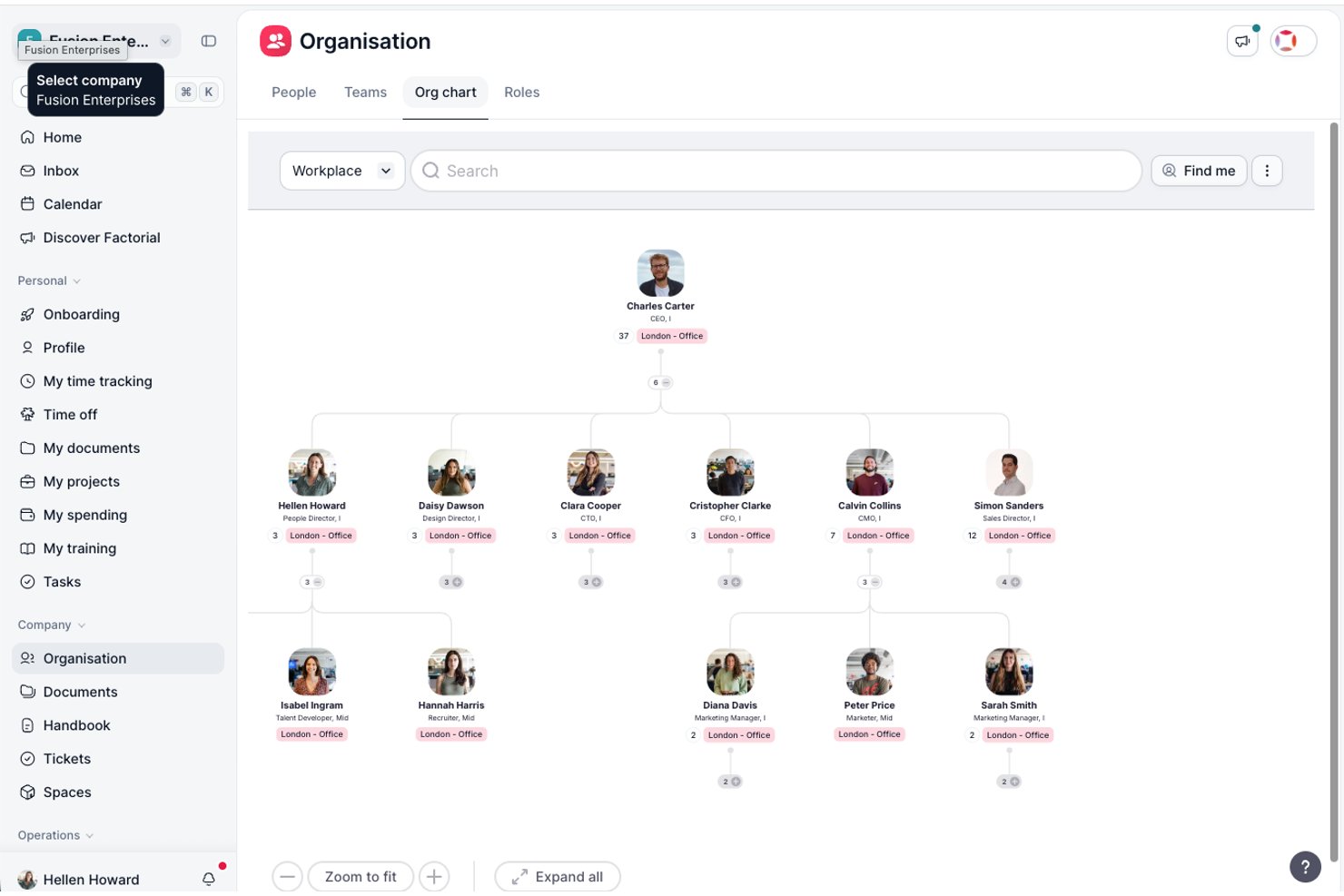
Factorial is an AI for business platform that covers day-to-day HR and operations tasks, including shift scheduling, time tracking, report generation, and employee policy Q&A through its AI agent, One.
Who Is Factorial Best For?
Factorial suits HR operations teams at small to mid-sized businesses that want a single platform to handle everyday people, finance, and IT tasks with AI assistance built in.
Why I Picked Factorial
I've included Factorial in my top picks because it approaches workforce management as part of a broader AI for business platform, which sets it apart from point solutions. Its AI agent, One, handles the kinds of tasks that quietly eat up HR time: answering employee policy questions, generating reports from live data, and flagging payroll anomalies before they become problems. I also like that shift scheduling, time tracking, and absence management all live in the same place, so your team isn't jumping between tools to get a complete picture of how people are spending their time.
Factorial Key Features
- Automatic shift scheduling: Lets managers define rules to generate employee shifts in bulk, including rotating schedules, before manually adjusting and publishing.
- Mobile QR-code clock-in: Employees clock in and out by scanning a QR code in the mobile app, with geolocation tracking their work location.
- Employee self-service portal: Gives employees direct access to their documents, timesheets, absence balances, and performance information without HR involvement.
- eNPS and engagement surveys: Collects employee feedback through Net Promoter Score surveys, Team Pulse check-ins, and climate surveys to surface sentiment trends.
Factorial Integrations
Factorial’s marketplace displays 72 integrations, including Microsoft Power BI, Okta, Slack, Microsoft Outlook Calendar, and Recruitee. It also offers a public API, webhooks, SDKs, and Zapier.
Pros and Cons
Pros:
- One answers policy questions and generates reports
- Mobile QR clock-ins support distributed teams
- Reviewers praise dependable time and leave tracking
Cons:
- Scheduling lacks optimization and can leave shifts unassigned
- No AI-driven staffing demand forecasts

Deel HR
Best for global workforce insights
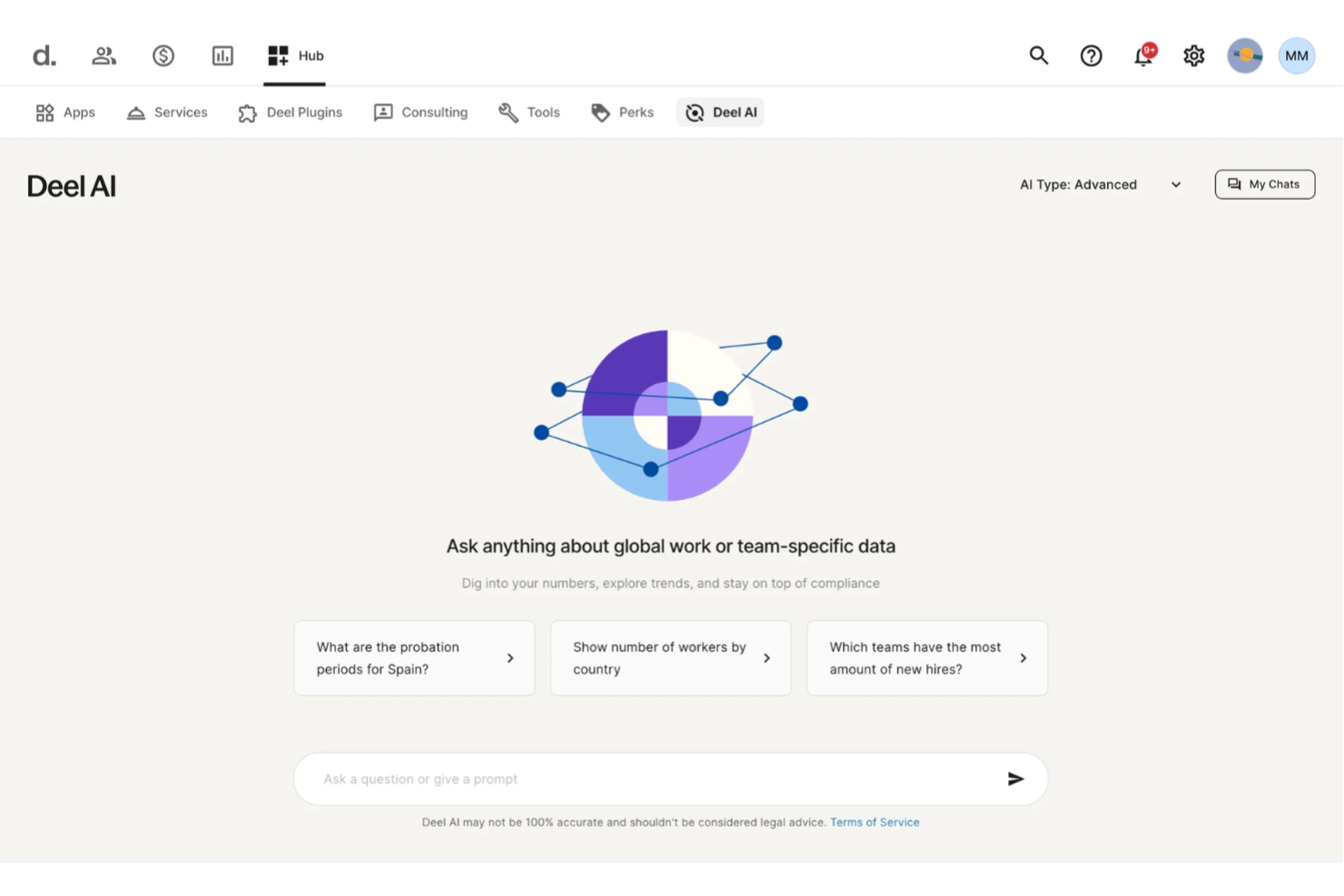
Deel HR lands on my list for the way it surfaces real, actionable insights into a global workforce. What I like is that you get at-a-glance dashboards that break down headcount, employee movement, and demographic data across locations so you see what's actually happening, not just raw numbers.
Teams managing employees in multiple countries get the most out of Deel HR when they need to keep up with evolving compliance and optimize talent strategy with granular analytics.
Deel HR’s Best For
- HR teams overseeing multinational, distributed employee bases
- Organizations needing compliance insights across global regions
Deel HR’s Not Great For
- Companies with a single-country or static workforce
- Teams looking for advanced scheduling or time tracking features
What sets Deel HR apart
Deel HR is built for companies managing global teams that need more than what something like BambooHR offers for a single region. I see it prioritizes analytics and compliance by surfacing hiring, retention, and demographic trends for each country you operate in. Instead of expecting you to blend and standardize global data yourself, Deel HR serves insights that help HR leads spot changes or risks before they hit payroll or compliance.
Tradeoffs with Deel HR
Deel HR optimizes for high-level workforce intelligence by country, but you lose out on granular, day-to-day scheduling and operational HR controls that you might get from tools built for in-country HR management.
Pros and Cons
Pros:
- Delivers guidance across 150+ country employment contexts
- Surfaces org insights and summaries directly from your team data
- AI answers talent and workforce questions using expert-sourced data
Cons:
- AI guidance may require human review for complex legal scenarios
- Heavy dependence on proprietary Knowledge Hub for accuracy
New Product Updates from Deel HR

Deel Expands Stablecoin Wallet to 80+ Countries
Deel expands its Stablecoin Wallet to 80+ countries with dollar-backed balances and optional rewards. This gives eligible contractors more ways to hold and manage earnings inside Deel. For more information, visit Deel’s official site.
 .
.
Best for visualizing work patterns
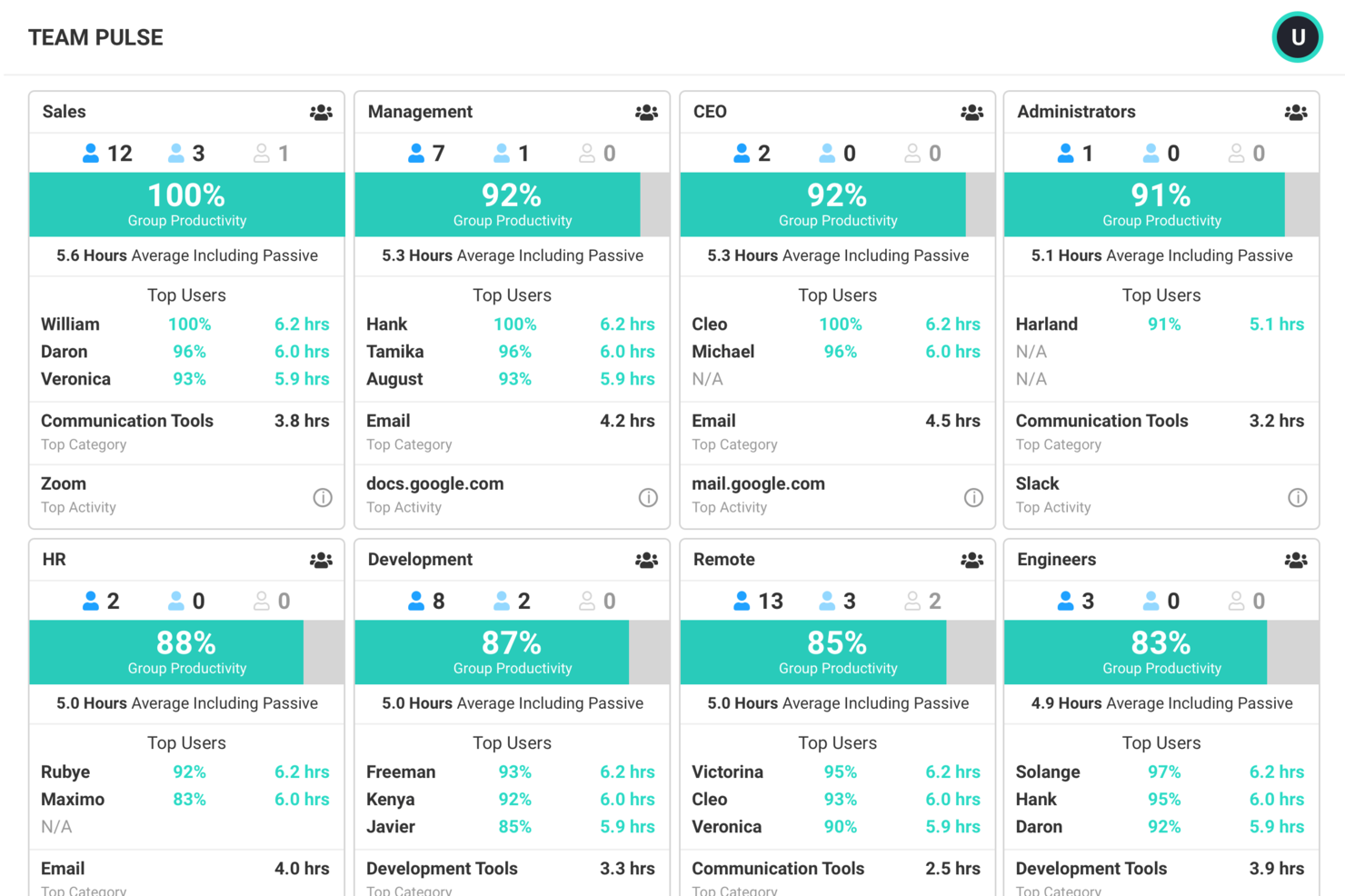
ActivTrak is a work intelligence platform that tracks application and website usage, schedule adherence, workload distribution, and AI tool adoption to give HR and operations teams a data-driven view of how work happens across people and technology.
Who Is ActivTrak Best For?
ActivTrak is a strong fit for mid-sized companies with distributed or hybrid teams where HR and operations leaders need visibility into how employees spend their time across tools and tasks.
Why I Picked ActivTrak
ActivTrak is one of my top picks because I love how it turns raw activity data into a clear visual picture of how teams actually work. The Productivity Trends feature breaks down time spent on productive and unproductive activities by day, week, and month, making it easy to spot slowdowns or shift patterns that aren't obvious in any spreadsheet. I also rely on the Team Productivity view, which shows real-time activity alongside historical trends so I can compare how a team's working today against how they typically work over time. For distributed and hybrid teams, the location adherence reporting adds another layer by letting you see how work patterns shift across remote and in-office days.
ActivTrak Key Features
- Workload balance analysis: Flags overutilized and underutilized employees by comparing individual activity levels against team benchmarks.
- Schedule adherence tracking: Monitors whether employees are active during their scheduled hours and surfaces deviations in a centralized view.
- AI Insights: Tracks which AI tools employees are using, how often, and whether adoption correlates with measurable productivity changes.
- Goal setting and benchmarks: Lets you set productivity targets by team or role and track progress against those baselines over time.
ActivTrak Integrations
ActivTrak offers native integrations with Microsoft Outlook, Google Calendar, and Microsoft Entra ID for calendar syncing and automated user management. Through the ActivConnect API, you can connect ActivTrak data with BI tools like Power BI, Looker Studio, and Tableau, as well as business systems like Salesforce, ServiceNow, Zendesk, Jira Software, Slack, and Workday. HRIS integrations include ADP, BambooHR, Dayforce, HiBob, Paycor, Personio, SAP SuccessFactors, UKG Pro, and Workday. SCIM-based provisioning is also supported through Okta. An API and SQL access are available for custom integrations.
Pros and Cons
Pros:
- Identifies unused software licenses across teams
- Tracks work patterns without keystroke logging
- AI-powered burnout risk and coaching detection
Cons:
- App categorization requires heavy manual tuning
- Misses offline work like calls and meetings

Gusto
Best for payroll and HR Automation

Gusto is here because it’s one of the few payroll tools that automates complex HR processes from hiring to benefits with a focus on usability. I like how the AI-driven automation simplifies payroll runs, onboarding, and compliance tasks for teams that are scaling.
What stands out for me is the way you can automate time-consuming admin like new hire onboarding and benefits management, all from one dashboard. This usually makes Gusto a match for businesses growing quickly or struggling to keep up with changing payroll requirements and manual HR work.
Gusto’s Best For
- Businesses automating payroll, onboarding, and benefits administration
- Teams needing built-in compliance support for HR processes
Gusto’s Not Great For
- Organizations requiring industry-specific workforce features
- Companies managing large, global operations across many countries
What sets Gusto apart
Gusto feels different from tools like ADP because it puts automation front and center in both payroll and core HR processes. Instead of expecting you to manage compliance and onboarding manually, Gusto handles things like tax filings and new hire documentation with minimal intervention. This tends to work best when you want clear separation between admin tasks and people management, letting smaller teams automate recurring work quickly.
Tradeoffs with Gusto
Gusto optimizes for fast, automated payroll and basic HR tasks, but you lose depth in workforce planning or advanced analytics, which limits long-term strategic flexibility.
Pros and Cons
Pros:
- Simplifies employee benefits administration
- Extensive compliance support
- Easy payroll management
Cons:
- May require additional customization for unique needs
- Limited advanced HR features
New Product Updates from Gusto
Gusto Adds Solo Advisory Tools and Mobile Money Features
Gusto adds Solo S-Corp Advisory Tools and Gusto Money on Mobile for tax guidance, invoicing, and bill payments. These updates help accountants advise solopreneurs and let users manage business finances from their phones. For more information, visit Gusto’s official site.

Soon
Best for team scheduling and collaboration

Soon earns its place on my list for how it balances shift planning and team communication in workforce-heavy environments. When I’ve set this up with hourly teams, its drag-and-drop shift scheduler and built-in shift swapping give managers and teams shared clarity over coverage.
I appreciate how shift reminders and role-based access help avoid the usual miscommunications. It’s good when you want everyone aligned and self-sufficient around their schedules.
Soon’s Best For
- Hourly, shift-based teams needing shared visibility
- Managers coordinating dynamic schedules and coverage
Soon’s Not Great For
- Organizations with complex, multi-location compliance needs
- Teams looking for labor forecasting or demand modeling
What sets Soon apart
Soon takes a scheduling-first approach, making it easy for teams that run on shifts to build and adjust coverage quickly. Instead of trying to be a full HR suite like BambooHR or a time-tracking tool like Toggl, Soon zeroes in on schedule sharing, communication, and shift management. This works best where managers need input from staff and self-service shift swaps without jumping through admin hoops.
Tradeoffs with Soon
Soon optimizes for fast, collaborative scheduling, but you lose the depth of forecasting, compliance tracking, or analytics you’d get in larger workforce management platforms. This means teams that need to plan staffing against long-term demand or strict labor rules can run into limits.
Pros and Cons
Pros:
- Dashboard with easy signup and cancellation options
- Available globally
- Auto-scheduling and staff forecasting
Cons:
- May require training for new users
- Limited advanced analytics


BambooHR earns a spot on my list for how it tailors workforce AI features to the needs of small businesses. This is the first platform I recommend when HR teams want things like automated time-off tracking, employee satisfaction tools, and centralized personnel data without dealing with enterprise-scale complexity.
I appreciate how the self-service portal lets employees handle their own info and updates, which is rare at this price point.
BambooHR’s Best For
- Small businesses needing HR automation and centralized data
- Teams that want employee self-service and easy onboarding
BambooHR’s Not Great For
- Enterprise companies with complex, global HR needs
- Organizations requiring advanced scheduling or shift management
What sets BambooHR apart
BambooHR makes workforce management approachable for small businesses by removing the complexity I see in larger HR platforms like ADP or Workday. It’s organized around simplicity, so you track time-off, onboard new hires, and view employee data without sorting through complicated menus. Unlike tools built for enterprise, BambooHR expects you to want a lightweight system that gets the essentials right.
In practice, I see HR leads use it when they want everyone updating their details in one spot, instead of bouncing between email and spreadsheets.
Tradeoffs with BambooHR
BambooHR is built for simplicity and core HR basics, but you lose advanced workforce and shift planning options that growing teams or specialized industries might need.
Pros and Cons
Pros:
- Transparent pricing
- Employees self-service app
- User-friendly interface
Cons:
- Limited advanced analytics
- Lower tiers have limited features


Workday Illuminate is built for organizations managing workforces at scale, with AI-driven insights for global HR, labor optimization, and compliance. I like how its analytics surface workforce trends that large enterprises consistently struggle to spot, like attrition risk or skills gaps across regions.
You get tailored dashboards and predictive modeling to manage thousands of employees confidently. It comes into its own when you need broad, unified workforce visibility across complex business units.
Workday Illuminate’s Best For
- Large enterprises with complex, distributed workforces
- Organizations needing AI-driven workforce analytics and compliance
Workday Illuminate’s Not Great For
- Small businesses with basic workforce management needs
- Teams looking for simple scheduling or time-tracking tools
What sets Workday Illuminate apart
Workday Illuminate builds HR and workforce planning into a single system, designed for scale. This is different from something like ADP Workforce Now, which handles payroll and scheduling but separates analytics into another layer. In practice, large organizations get direct access to trends and predictive insights alongside everyday HR management. I often see this work best when you want all workforce data tied together and visible from one dashboard.
Tradeoffs with Workday Illuminate
Illuminate optimizes for broad workforce visibility and predictive capabilities, but the onboarding and data migration process is heavy. For smaller teams or groups without full HR departments, the upfront setup and complexity can be more than they need.
Pros and Cons
Pros:
- Supports diverse industries
- Provides access to a large database
- Advanced analytics capabilities
Cons:
- High cost compared to competitors
- Slight learning curve
Genesys
Best for customer experience

Genesys makes my list because it brings real, AI-driven automation to forecasting, scheduling, and intraday management, but also tightly integrates this with customer experience metrics. I see contact centers relying on Genesys to match agent skills and schedules directly to changing service needs, not just predicted call volumes.
What I appreciate most is how the platform surfaces actionable, experience-specific insights while automating workforce adjustments—especially for teams balancing high customer support expectations with operational constraints.
Genesys’s Best For
- High-volume contact centers focused on customer experience metrics
- Enterprises needing advanced AI-driven workforce forecasting and scheduling
Genesys’s Not Great For
- Small teams without dedicated customer support operations
- Organizations wanting lightweight or basic workforce management tools
What sets Genesys apart
Genesys expects you to connect workforce management directly to customer experience priorities, not treat them as separate processes. Unlike cloud WFM tools like NICE that focus heavily on scheduling and forecasts, Genesys builds in skills-based routing and customer context as core components. You plan around what matters to customers, not just staffing numbers.
This feels most different when you need to balance needed coverage with the kind of service experience contact centers aim for.
Tradeoffs with Genesys
Genesys optimizes for sophisticated customer-centric planning, but you give up speed and simplicity for basic scheduling needs. This can overload small teams that don't need advanced modeling or CX alignment.
Pros and Cons
Pros:
- Flexible communication options
- Detailed customer analytics
- Strong omnichannel support
Cons:
- Can be complex to configure
- May have a steep learning curve

Calabrio makes my shortlist because it goes beyond standard WFM tools with its advanced call center analytics features. I’ve seen teams use interaction analytics to spot customer trends and dig into agent performance at scale.
I appreciate its automated speech and text analysis, which makes it easier to act on concrete conversation data when managing large support operations.
Calabrio’s Best For
- High-volume call centers focused on interaction analytics
- Teams managing large agent workforces with complex call data
Calabrio’s Not Great For
- Small support teams with minimal call analytics needs
- Organizations wanting lightweight, non-voice scheduling only
What sets Calabrio apart
Calabrio builds its workflow around analyzing call and interaction data, not just scheduling or shift coverage. Unlike tools like NICE or monday.com, it assumes you want to dig into what’s happening on customer calls and build decisions from real conversational trends rather than surface-level metrics. I find this is good for teams prioritizing deep insights from every contact, instead of just optimizing schedules.
Tradeoffs with Calabrio
Calabrio optimizes for call center analytics, which means you trade off simplicity in favor of features focused on capturing and analyzing detailed voice data. Teams needing basic, fast shift management often find that the sophistication gets in the way.
Pros and Cons
Pros:
- Supports compliance management
- Real-time performance monitoring
- Detailed call analytics
Cons:
- Limited customization options
- May require extensive setup


Quinyx made my list because it takes workforce planning to a strategic level by combining predictive AI with scenario modeling. I see HR teams choosing Quinyx when they need to balance cost, demand, and compliance across complex labor environments.
What stands out for me is how Quinyx lets you test different staffing scenarios in advance and visualize the outcomes. I like the way its forecasting engine gives you concrete, data-backed plans that are easy to adjust as business needs change.
Quinyx’s Best For
- HR teams needing AI-based workforce planning and forecasting
- Large organizations balancing cost, demand, and labor rules
Quinyx’s Not Great For
- Small businesses with simple workforce scheduling needs
- Teams wanting extensive non-HR process automation
What sets Quinyx apart
Quinyx is designed around the idea of workforce optimization for large, distributed organizations rather than basic shift scheduling. Where tools like Deputy or When I Work center on managing hours, Quinyx expects you to plan staffing against forecasts, compliance, and costs. In practice, this works best for teams balancing dozens of variables who want to preview scenarios instead of assigning shifts one week at a time.
Tradeoffs with Quinyx
Quinyx optimizes everything for long-range, data-driven planning, but that means even routine scheduling feels heavyweight if you just need fast, daily or ad hoc changes.
Pros and Cons
Pros:
- Effective labor cost management
- User-friendly scheduling tools
- Accurate labor forecasting
Cons:
- Limited customization options
- May require training for advanced features
Andre verktøy for AI-basert arbeidsstyring
Her er noen flere alternativer for verktøy for AI-basert arbeidsstyring som ikke kom med på kortlisten min, men som likevel er verdt å ta en titt på:
- ATOSS
For shift scheduling in Europe
- Rippling
For employee onboarding
- ADP Workforce Now
For compliance oversight
- Fuel50
For career pathing
- Deel Payroll
For global payroll


How I Evaluate AI Workforce Management Tools
I look for tools where AI delivers real, measurable impact—like cutting scheduling time from hours to minutes or catching compliance violations before they become costly. I split my evaluation into core functionality every tool needs to qualify and the differentiating factors that separate a good option from the best fit for your team.
Core Functionality (Table Stakes For This List)
When I'm selecting tools for my list, I rank each one on a scale from 0 (does not offer the functionality) to 5 (excels in this area) for each core functionality listed below. Then, I calculate the tool's total score into a percentage. Each tool needs to achieve a minimum total score of 65% to be considered for inclusion.
- AI-Driven Scheduling: I check whether the tool can auto-generate optimized schedules that factor in demand patterns, employee availability, and skill requirements—not just drag-and-drop builders.
- Predictive Workforce Forecasting: The tool should use historical and real-time data to forecast staffing needs, like anticipating seasonal demand spikes across multiple locations.
- Time & Attendance Intelligence: I look for AI layers on top of time tracking, such as flagging unusual clock-in patterns or auto-approving routine timesheets to reduce manager workload.
- Labor Compliance Automation: Scheduling engines should enforce overtime limits, mandatory rest periods, and jurisdiction-specific labor rules automatically as shifts are built.
- Workforce Analytics & Insights: I evaluate whether the platform surfaces actionable AI-generated insights—like identifying which teams have the highest attrition risk—beyond standard dashboards.
- Skills & Capacity Intelligence: The tool should map employee skills and availability to support smarter task assignments, such as matching certified staff to regulated roles automatically.
Once I have a list of tools that meet this criteria, I consider what sets each platform apart.
Differentiating Factors (What Sets Vendors Apart)
Here's how I compare and contrast different vendors:
Standout Features
Scenario simulation is a major differentiator—I look for tools that let workforce planners model the cost and coverage impact of decisions like hiring freezes or new shift patterns before committing. Employee sentiment analysis also adds real value when AI can flag burnout or flight risk signals from engagement data. I pay close attention to bias and fairness controls too, since equitable shift and overtime distribution are growing priorities for HR teams.
Beyond Features
HR tech stack integration is one of the first things I check. A workforce management tool that syncs cleanly with your existing HRIS and payroll system—like Workday, ADP, or UKG—saves hours of duplicate data entry every pay cycle. AI transparency matters too; I look for platforms that explain why a schedule or forecast was generated, so managers actually trust the output. I also evaluate industry fit, since tools built for healthcare shift patterns work very differently from those designed for retail demand planning.
Slik velger du et verktøy for AI-basert arbeidsstyring
Det er lett å gå seg vill i lange funksjonslister og kompliserte prismodeller. For å hjelpe deg med å holde fokus når du går gjennom den unike prosessen med å velge programvare, har vi laget en sjekkliste over faktorer du bør ha i mente:
| Faktor | Hva du bør vurdere |
|---|---|
| Skalerbarhet | Kan verktøyet vokse sammen med virksomheten din? Undersøk om det kan håndtere flere brukere og større datamengder etter hvert som teamet ditt vokser. |
| Integrasjoner | Fungerer det sammen med de eksisterende systemene dine? Se etter kompatibilitet med verktøy som lønnssystemer og kommunikasjonsplattformer. |
| Tilpasningsmuligheter | Kan du tilpasse verktøyet til arbeidsflytene dine? Sørg for at det tillater justeringer som samsvarer med de spesifikke prosessene og preferansene dine. |
| Brukervennlighet | Er grensesnittet intuitivt? Unngå verktøy med bratte læringskurver som kan redusere produktiviteten til teamet ditt. |
| Implementering og introduksjon | Hvor lang tid tar det å komme i gang? Ta hensyn til tiden og ressursene som kreves for å integrere verktøyet fullt ut i driften din. |
| Kostnad | Passer prisen inn i budsjettet ditt? Vurder totalkostnaden, inkludert oppsettsgebyrer og løpende utgifter, for å sikre at den samsvarer med den økonomiske planen din. |
| Sikkerhetstiltak | Er dataene og informasjonen din beskyttet? Se etter kryptering, tilgangskontroller og overholdelse av regler for databeskyttelse. |
| Tilgjengelig brukerstøtte | Får du hjelp når du trenger det? Undersøk om det finnes brukerstøtte døgnet rundt, og vurder kvaliteten på kundeservicen som tilbys. |
Hva er verktøy for AI-basert arbeidsstyring?
Verktøy for AI-basert arbeidsstyring er programvareløsninger som bruker kunstig intelligens til å optimalisere driften av arbeidsstyrken. HR-medarbeidere, ledere og teamledere bruker vanligvis disse verktøyene til å forbedre planleggingen, øke produktiviteten og håndtere etterlevelse.
Prediktiv analyse, automatisert planlegging og sanntidsinnsikt i data bidrar til beslutningstaking og ressursallokering. Alt i alt gir disse verktøyene verdifull støtte i arbeidet med å håndtere en dynamisk arbeidsstyrke på en effektiv måte.
Funksjoner
Når du velger verktøy for AI-basert arbeidsstyring, bør du se etter følgende viktige funksjoner:
- Prediktiv analyse: Gir prognoser for bemanningsbehov og hjelper deg med å ta informerte beslutninger om arbeidsplaner.
- Automatisert planlegging: Oppretter og justerer arbeidsplaner automatisk basert på virksomhetens behov og de ansattes preferanser.
- Sanntidsinnsikt i data: Gir umiddelbar tilgang til data om arbeidsstyrken, slik at du raskt kan reagere på endrede forhold.
- AI-drevet etterlevelsesstyring: Sikrer overholdelse av arbeidsmiljølover og forskrifter gjennom intelligent overvåking og varsler.
- Selvbetjeningsportaler for ansatte: Gjør det mulig for ansatte å administrere arbeidsplaner, forespørsler om fri og personopplysninger.
- Ytelsesanalyse: Analyserer de ansattes produktivitet og engasjement for å bidra til bedre effektivitet og tilfredshet.
- Etterspørselsprognoser: Bruker AI til å forutsi arbeidsmengde og ressursbehov, slik at fordelingen av arbeidsstyrken optimaliseres.
- Skiftplanlegging: Gjør det enkelt å opprette og endre skiftplaner for å møte virksomhetens behov.
- Sentimentanalyse: Tolker tilbakemeldinger og holdninger blant de ansatte for å styrke arbeidsplasskulturen og arbeidsmoralen.
Fordeler
Implementering av verktøy for AI-basert arbeidsstyring gir flere fordeler for teamet og virksomheten din. Her er noen av fordelene du kan se frem til:
- Bedre effektivitet: Automatisert planlegging og prediktiv analyse reduserer manuelt arbeid og optimaliserer ressursallokeringen.
- Bedre beslutningstaking: Sanntidsinnsikt i data hjelper deg med å ta informerte beslutninger raskt og tilpasse deg endrede behov.
- Bedre etterlevelse: AI-drevet etterlevelsesstyring sikrer at virksomheten overholder arbeidsmiljølover og forskrifter.
- Økt medarbeidertilfredshet: Selvbetjeningsportaler og fleksible planleggingsalternativer gir de ansatte større innflytelse og styrker arbeidsmoralen.
- Kostnadsbesparelser: Etterspørselsprognoser og effektiv planlegging minimerer arbeidskostnadene ved å tilpasse bemanningen til de faktiske behovene.
- Høyere produktivitet: Ytelsesanalyse identifiserer forbedringsområder og øker den samlede produktiviteten i teamet.
- Bedre arbeidsstyrkeplanlegging: AI-funksjoner støtter nøyaktige prognoser og strategiske beslutninger om styring av arbeidsstyrken.
Kostnader og priser
Ved valg av verktøy for AI-basert arbeidsstyring er det nødvendig å forstå de ulike prismodellene og abonnementene som er tilgjengelige. Kostnadene varierer basert på funksjoner, teamstørrelse, tillegg og mer. Tabellen nedenfor oppsummerer vanlige abonnementer, gjennomsnittsprisene deres og typiske funksjoner som er inkludert i løsninger for verktøy for AI-basert arbeidsstyring:
Sammenligningstabell for abonnementer for verktøy for AI-basert arbeidsstyring
| Abonnementstype | Gjennomsnittspris | Vanlige funksjoner |
|---|---|---|
| Gratis abonnement | $0 | Grunnleggende planlegging, begrenset rapportering og selvbetjening for ansatte. |
| Personlig abonnement | $5-$25/bruker/måned | Avansert planlegging, ytelsessporing og grunnleggende integrasjoner. |
| Bedriftsabonnement | $30-$60/bruker/måned | AI-drevet analyse, etterlevelsesstyring og forbedrede rapporteringsverktøy. |
| Virksomhetsabonnement | $70-$150/bruker/måned | Tilpassbare arbeidsflyter, dedikert kundestøtte og omfattende datainnsikt. |
Vanlige spørsmål om verktøy for AI-basert arbeidsstyring
Her er noen svar på vanlige spørsmål om verktøy for AI-basert arbeidsstyring:
Kan verktøy for AI-basert arbeidsstyring integreres med eksisterende systemer?
Ja, mange verktøy for AI-basert arbeidsstyring tilbyr integrasjonsmuligheter med eksisterende systemer. Du bør sjekke verktøyets kompatibilitet med den eksisterende programvaren din, for eksempel lønns-, HR- og kommunikasjonsplattformer. Eksempler inkluderer integrasjoner med QuickBooks for lønn, Slack for teamkommunikasjon og Google Calendar for planlegging. Sørg for at verktøyet kan kobles sømløst til de eksisterende arbeidsflytene dine for å maksimere effektiviteten og redusere manuell dataregistrering.
Hvordan håndterer verktøy for AI-basert arbeidsstyring datasikkerhet?
Verktøy for AI-basert arbeidsstyring inneholder ofte sikkerhetstiltak for å beskytte dataene dine. Se etter funksjoner som kryptering, tilgangskontroller og samsvar med personvernregler som GDPR. Det er viktig å gjennomgå leverandørens sikkerhetspolicyer og sørge for at de er i tråd med organisasjonens standarder. Du kan også spørre om tredjepartsrevisjoner eller sertifiseringer leverandøren har gjennomført for å bekrefte sikkerhetsrutinene deres.
Er verktøy for AI-basert arbeidsstyring skalerbare for virksomheter i vekst?
Ja, de fleste verktøy for AI-basert arbeidsstyring er utviklet for å skalere i takt med virksomheten din. Etter hvert som teamet ditt vokser, kan disse verktøyene håndtere flere brukere og mer data uten betydelige endringer. Se etter løsninger som tilbyr fleksible prisplaner og enkle oppgraderinger for å støtte de økende behovene dine. Det er avgjørende å velge et verktøy som kan tilpasses organisasjonens vekst uten at det kreves en fullstendig omlegging av de eksisterende systemene dine.