

De 10 beste AI-programvarene for HR-ledelse, gjennomgått i 2026

10 Kortliste over den beste AI-programvaren for HR-administrasjon


Arbeid innen HR innebærer ofte å håndtere rekruttering, medarbeiderengasjement og etterlevelse samtidig, og det kan raskt bli overveldende. AI-programvare for administrasjon bidrar til å lette arbeidsbelastningen ved å automatisere repetitive oppgaver, analysere data og støtte informerte beslutninger.
Etter mange år med testing og gjennomgang av HR-programvare har jeg lært hva som virkelig hjelper team med å spare tid og arbeide mer effektivt. I denne artikkelen går jeg gjennom de beste AI-verktøyene for administrasjon som kan forenkle HR-prosessene dine og gjøre den daglige arbeidsbelastningen enklere å håndtere.
Why Trust Our Software Recommendations
Our team has been testing and reviewing software since 2012. As HR experts ourselves, we know how difficult—and important—it is to choose the right software.
For this guide, we evaluated tools using hands-on testing and independent research, scoring tools using our selection criteria. We also draw on insights from industry thought leaders and practicing HR experts.
Our reviews reflect our human editorial judgment, not a sales pitch.
Expert reviewers:
Sammenligningstabell for AI-administrasjonsprogramvare
Denne sammenligningstabellen oppsummerer prisopplysningene for mine beste utvalg av AI-administrasjonsprogramvare:
| Tool | Best For | Trial Info | Price | ||
|---|---|---|---|---|---|
| 1 | Best as AI for business | Free demo available | From $8/user/month | Website | |
| 2 | Best for AI-powered multi-country HR management | Free demo available | From $5/user/month | Website | |
| 3 | Best for creating custom employee portals | Free plan available; 14-day free trial | From $9/user/month (billed annually) | Website | |
| 4 | Best for AI-powered pulse checks on employee sentiment | Free demo available | Pricing upon request | Website | |
| 5 | Best for AI-powered people management | Free demo available | From $4,999/year | Website | |
| 6 | Best for AI-powered workforce planning insights | Free demo available | Pricing upon request | Website | |
| 7 | Best for teams needing AI workforce insights | Free demo available | Pricing upon request | Website | |
| 8 | Best for AI-assisted global compliance | 30-day free trial + free demo | Pricing upon request | Website | |
| 9 | Best for AI-automated HR queries | Free demo available | Pricing upon request | Website | |
| 10 | Best for AI onboarding tools | Free demo available | Pricing upon request | Website |

Gjennomgang av den beste AI-administrasjonsprogramvaren
Nedenfor finner du mine detaljerte sammendrag av den beste AI-administrasjonsprogramvaren som kom med på kortlisten min. Gjennomgangene mine gir et detaljert innblikk i de viktigste funksjonene, fordelene & ulempene, integrasjonene og ideelle bruksområdene for hvert verktøy, slik at du kan finne det som passer best for deg.

Best as AI for business
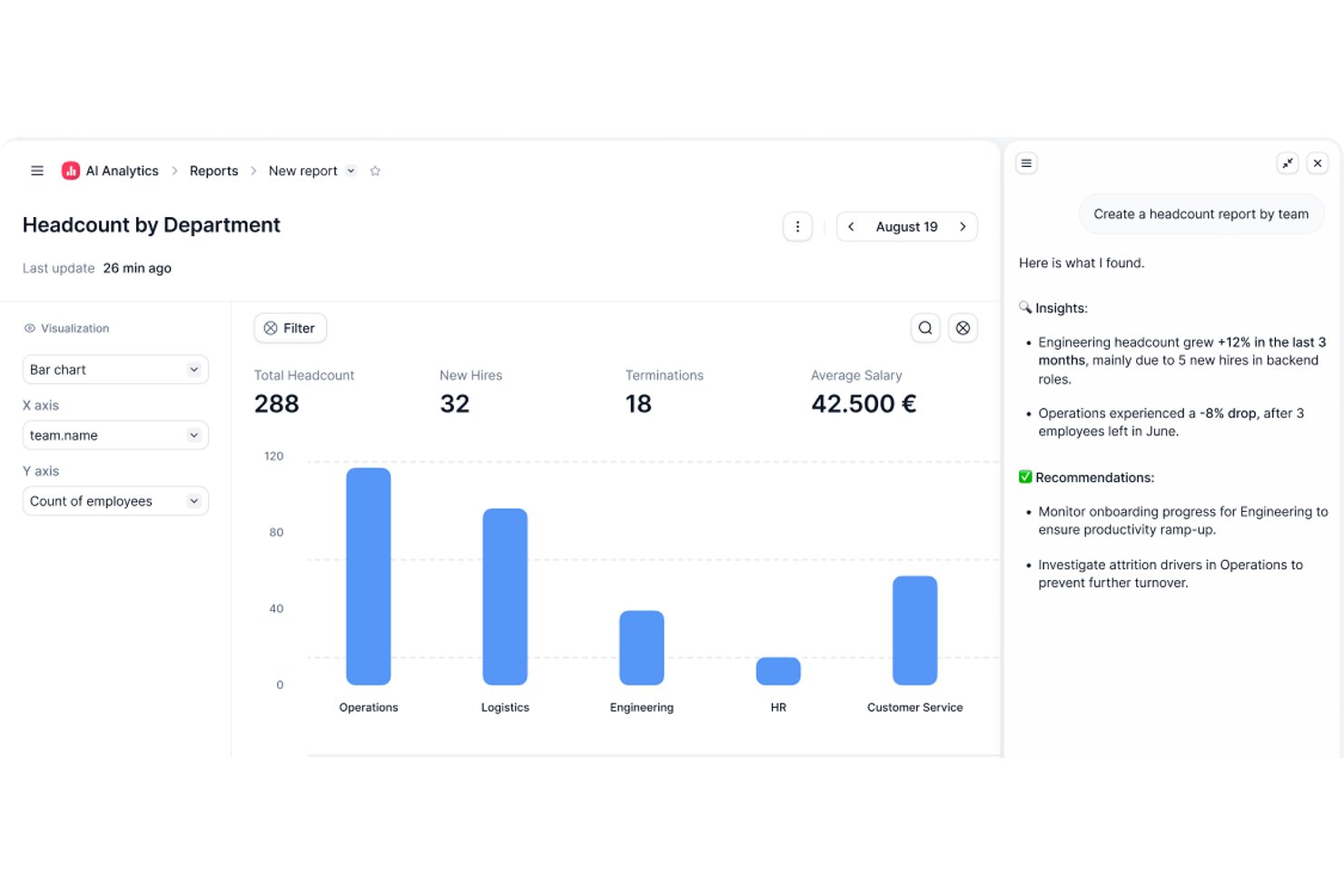
Factorial is an AI-powered HR and business management platform that covers HR, finance, and IT operations—handling tasks like scheduling, reporting, document management, and employee policy queries through its built-in AI agent, One.
Who Is Factorial Best For?
Factorial is a strong fit for HR teams at growing small and mid-sized businesses that want a single platform to handle HR, finance, and IT operations alongside an AI assistant.
Why I Picked Factorial
I picked Factorial as one of the best because it's built around the idea of AI handling the operational busywork that slows HR teams down every day. Its built-in AI agent, One, can plan timetables, generate reports from live data, and answer employee questions about company policies directly from the handbook. I especially like how One connects across HR, finance, and IT in a single platform, so there's no switching between tools to get a full picture.
Factorial Key Features
- AI-assisted candidate screening: One can screen candidates, call applicants, and draft job descriptions directly within the recruitment workflow.
- Expense capture with OCR: AI-powered OCR extracts receipt details automatically and fills expense fields when employees submit expenses.
- Performance reviews and 9-box grid: Teams can run 180- and 360-degree reviews and use a 9-box grid to assess talent and identify development opportunities.
- Shift scheduling automation: Managers can build automated, bulk, and rotating shift schedules and notify employees of last-minute changes.
Factorial Integrations
Factorial offers marketplace integrations with Microsoft Business Central, Google Workspace, Slack, Microsoft Azure, Microsoft Power BI, LinkedIn, Recruitee, and Okta. It also provides a public API, webhooks, SDKs, and access to hundreds of tools through Zapier.
Pros and Cons
Pros:
- Leave approvals and onboarding cut admin work
- AI helps plan timetables and generate reports
- One answers policy questions from company handbooks
Cons:
- Limited AI governance and model oversight
- Complex workflows can require workarounds

Deel HR
Best for AI-powered multi-country HR management

Deel is a global payroll and compliance platform designed for businesses managing remote teams across various countries. It simplifies international hiring by managing payroll, taxes, and compliance, with AI-driven features to improve accuracy and efficiency.
Why I picked Deel: It automates global payroll compliance using AI capabilities for automated tax calculations, compliance alerts, and continuous regulatory monitoring. Its AI capabilities focus on ensuring compliance with international payroll regulations. Deel's AI-driven analytics help you understand payroll trends and optimize payment processes. These features ensure your team can manage international payroll with confidence and ease.
Standout Features & Integrations:
Features include AI-supported compliance alerts, automated invoice generation, and global payroll processing across 150+ countries. It also has customizable contract templates, automated invoicing, and a user-friendly dashboard.
Integrations include QuickBooks, Xero, Netsuite, BambooHR, Gusto, Rippling, Greenhouse, Lever, Slack, and Workday.
Pros and Cons
Pros:
- Customizable contract templates
- Automated tax calculations
- AI-driven compliance checks
Cons:
- Fewer integration options than competitors
- Limited offline functionality
New Product Updates from Deel HR

Deel Expands Stablecoin Wallet to 80+ Countries
Deel expands its Stablecoin Wallet to 80+ countries with dollar-backed balances and optional rewards. This gives eligible contractors more ways to hold and manage earnings inside Deel. For more information, visit Deel’s official site.
 .
.
Best for creating custom employee portals
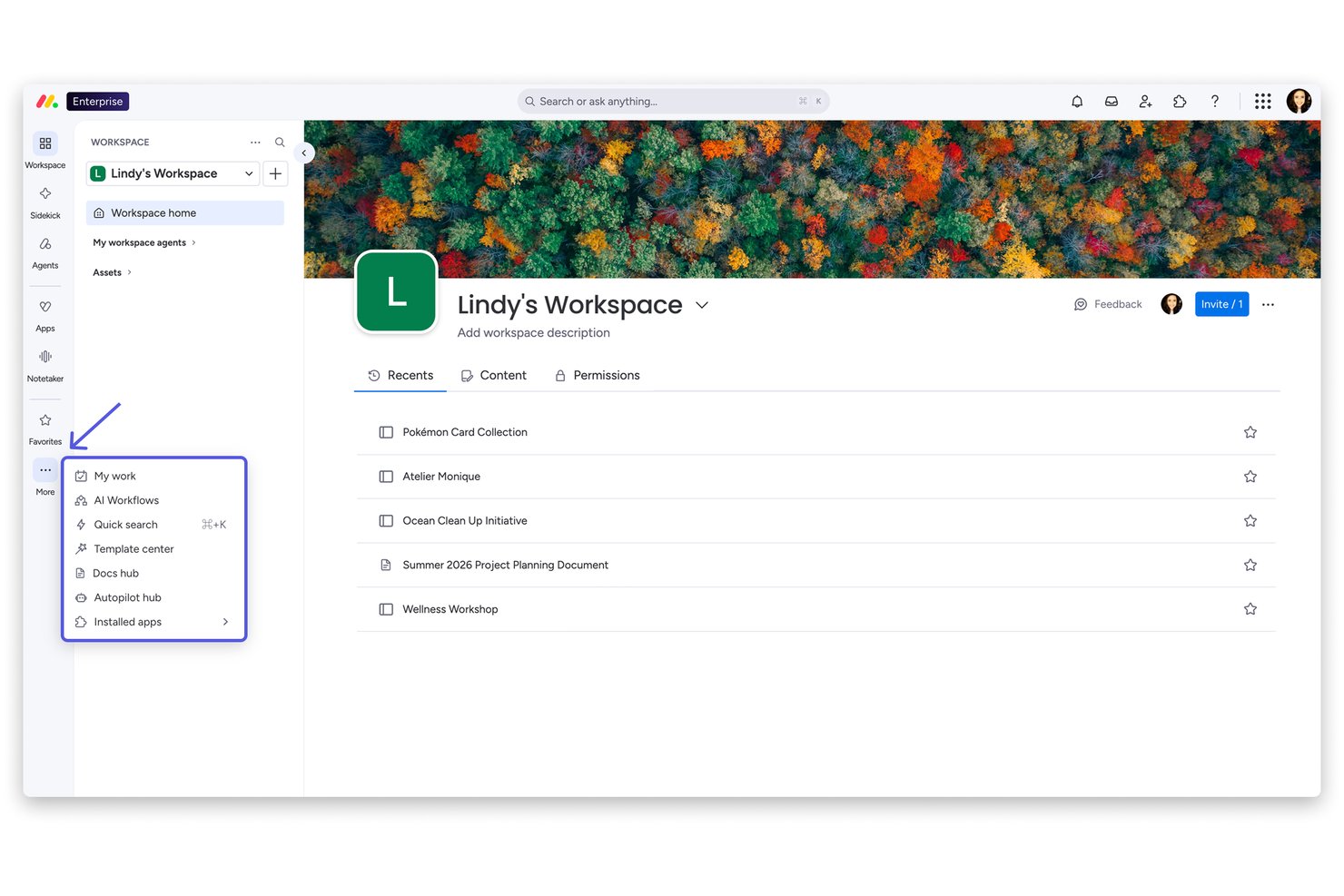
monday AI Workspace is a flexible work management platform that uses AI agents, workflow automation, and customizable boards to support HR processes like recruitment, onboarding, and employee management.
Who Is monday AI Workspace Best For?
It's a strong fit for HR operations teams at mid-sized companies that need to build and manage custom workflows without a dedicated HR software suite.
Why I Picked monday AI Workspace
monday AI Workspace earns its spot on my shortlist because of how far you can push its customization for HR use cases. I particularly like the Vibe app builder, which lets me turn a specific HR need (like a new hire portal or a policy request hub) into a working custom app without writing a single line of code. Paired with AI columns that automate repetitive data entry directly within boards, I can build portals that actively process work, not just display it.
monday AI Workspace Key Features
- AI-powered meeting notetaker: Automatically creates actionable summaries from HR meetings and syncs notes into workflows.
- Time tracking and attendance tools: Enables HR teams to monitor employee hours and attendance directly from custom boards.
- Sidekick AI assistant: Offers context-aware suggestions and can run automated HR tasks through conversational prompts.
- Custom automation builder: Lets users create multi-step automated actions for HR processes, including candidate screening and onboarding.
Monday AI Workspace Integrations
Monday AI Workspace offers native integrations with Slack, Google Workspace, Microsoft Teams, Zoom, Outlook, Asana, GitHub, and Salesforce. It also supports Zapier and provides an API for custom integrations.
Pros and Cons
Pros:
- Workflow templates for HR ticketing and requests
- AI automations handle high-volume onboarding tasks
- Custom portal builder supports complex HR processes
Cons:
- Lacks native payroll and benefits management
- No predictive analytics for attrition or engagement
New Product Updates from monday AI Workspace
monday AI Workspace Adds Human Approval Routing
monday AI Workspace adds a human-in-the-loop approval block to AI Workflows, sending approval requests and routing workflow paths based on responses. For more information, visit monday AI Workspace's official site.

Best for AI-powered pulse checks on employee sentiment

Paylocity is a cloud-based HR and payroll software tailored for small to medium-sized businesses. It provides tools for payroll processing, talent management, and benefits administration, with AI capabilities to improve user experience and decision-making.
Why I picked Paylocity: It offers a user-friendly interface that simplifies HR tasks. The AI-driven analytics provide insights into workforce trends and help you make informed HR decisions. Paylocity's automation features reduce manual workload, allowing your team to focus on strategic activities. Additionally, its AI tools facilitate employee engagement and feedback collection.
Standout Features & Integrations:
Features include automated payroll processing, customizable reports, and employee self-service portals. These features help your team manage HR functions efficiently and keep employees informed.
Integrations include QuickBooks, Xero, Salesforce, ADP, BambooHR, Slack, Gusto, Wrike, Microsoft Teams, and Google Workspace.
Pros and Cons
Pros:
- Easy-to-use interface
- Automation reduces manual tasks
- AI-driven workforce analytics
Cons:
- Lack of pricing transparency
- Limited options for non-standard employees
New Product Updates from Paylocity

Paylocity Expands Expense and Purchase Request Tools
Paylocity adds connected personal cards, smarter expense categorization, and a streamlined purchase request experience. This reduces manual entry and helps finance teams manage expenses and approvals more efficiently. For more information, visit Paylocity’s official site.
 .
.
Workleap
Best for AI-powered people management

Workleap is an AI-driven talent management platform designed for small to medium-sized businesses. It focuses on employee engagement, performance management, and AI-driven people insights across HR workflows.
Why I picked Workleap: It excels in providing small businesses with tailored AI solutions for talent management. The platform offers AI-generated insights to improve employee engagement and performance tracking. Its customizable performance reviews and compensation management tools are ideal for businesses looking to maintain equitable pay structures.
Standout Features & Integrations:
Features include AI summaries of engagement data, customizable performance review cycles, and compensation analytics supported by market benchmarks. real-time engagement insights, customizable performance management reviews, and pulse surveys to detect early signs of disengagement.
Integrations include QuickBooks, Slack, Microsoft Teams, BambooHR, Gusto, Greenhouse, Lever, Xero, Google Workspace, and ADP.
Pros and Cons
Pros:
- User-friendly interface
- Customizable performance reviews
- AI-driven engagement insights
Cons:
- Advanced customization may require additional setup
- Full functionality requires technical knowledge

Workday
Best for AI-powered workforce planning insights

Workday is a cloud-based financial and human capital management software designed for medium to large enterprises. It helps organizations with workforce planning, talent management, and financial analysis, offering AI-driven insights to improve operational efficiency.
Why I picked Workday: It excels in providing real-time analytics, offering users immediate insights into workforce trends. Workday's AI features include predictive analytics that help forecast HR needs and optimize talent management strategies. The platform's machine learning capabilities improve data-driven decision-making by identifying patterns and anomalies. Its real-time data processing ensures your team can make timely and informed decisions.
Standout Features & Integrations:
Features include AI-supported talent management, real-time workforce analytics, and performance insights embedded across HR and finance workflows, intuitive workforce planning tools, all in one talent management solutions, and detailed financial reporting capabilities.
Integrations include Salesforce, Microsoft Azure, Slack, ServiceNow, Okta, ADP, SAP, Oracle, IBM, and Google Workspace.
Pros and Cons
Pros:
- Complete financial reporting
- Predictive analytics for HR needs
- Real-time data processing
Cons:
- Customization requires technical support
- Feature overload causes navigation issues

UKG
Best for teams needing AI workforce insights

UKG is a complete human capital management solution tailored for businesses of all sizes. It focuses on workforce management, payroll, and HR service delivery, offering AI-driven tools to optimize employee experiences and operational efficiency.
Why I picked UKG: It provides AI capabilities that improve workforce management. The AI-driven scheduling tools help your team to optimize shift planning and reduce labor costs. Its predictive analytics offer insights into workforce trends and employee productivity. Additionally, UKG's AI-powered chatbots assist in automating routine HR queries, freeing up your team's time for more strategic tasks.
Standout Features & Integrations:
Features include advanced workforce analytics, time and attendance tracking, and employee self-service portals. The mobile app gives employees access to time tracking and timely notifications for action items related to HR.
Integrations include ADP, SAP, Oracle, Microsoft Azure, Salesforce, Workday, Kronos, SuccessFactors, Clickup, Google Workspace, and Slack.
Pros and Cons
Pros:
- Employee self-service portals
- Predictive workforce analytics
- AI-driven scheduling tools
Cons:
- Require ongoing training
- Limited reporting and HR process tools


SAP SuccessFactors HCM is a cloud-based human capital management solution tailored for businesses seeking to improve HR processes. It primarily serves enterprises aiming to manage global compliance and simplify HR activities with AI-driven insights.
Why I picked SAP SuccessFactors HCM: The tool excels in offering AI capabilities that assist in global compliance management. It features AI-assisted writing and translation tools that simplify communication across multilingual teams. The platform's AI-driven analytics provide insights into compliance risks and employee engagement trends, providing the data necessary for multiple stakeholders to anticipate workforce needs and optimize HR strategies.
Standout Features & Integrations:
Features include complete employee self-service options, AI-driven performance management, and advanced talent acquisition tools. These features are designed to empower your team to manage tasks efficiently and make informed decisions.
Integrations include SAP ERP, Microsoft Teams, LinkedIn, Slack, Concur, Docusign, SuccessFactors Learning, Kronos, Google Workspace, and Salesforce.
Pros and Cons
Pros:
- Predictive workforce analytics
- Multilingual support with AI translation
- AI-driven compliance insights
Cons:
- Upper tiers lack pricing transparency
- Maintenance requires additional resources


Leena AI is an AI-powered HR assistant designed to simplify HR processes for mid-sized to large enterprises. It focuses on automating employee queries, onboarding, and policy management, offering value through its AI-driven support and insights.
Why I picked Leena AI: It specializes in automating HR queries, making it efficient for large teams. The platform's AI chatbots handle routine employee questions, reducing your HR team's workload. Its AI-driven onboarding tools ensure a smooth experience for new hires. Additionally, Leena AI offers analytics that help you improve employee engagement and satisfaction.
Standout Features & Integrations:
Features include automated policy management, real-time query resolution, and onboarding assistance. It also connects with leading project management tools to keep work aligned across operations and HR.
Integrations include SAP SuccessFactors, Trello, Workday, BambooHR, ADP, Microsoft Teams, Slack, Google Workspace, Salesforce, and Kronos.
Pros and Cons
Pros:
- Automated policy management
- Efficient onboarding tools
- AI-driven query resolution
Cons:
- Requires initial setup and training
- May not cover all complex queries


Humaans is a modern HR software solution aimed at startups and small businesses. It focuses on simplifying team management, onboarding, and employee data management, with AI features that improve operational efficiency.
Why I picked Humans: It offers intuitive team management capabilities, making it ideal for small businesses. The platform's AI-driven onboarding tools help your team simplify new hire processes. Its automated reminders ensure compliance and keep employee records up-to-date. Additionally, AI analytics provide insights into team dynamics and performance.
Standout Features & Integrations:
Features include automated document management, customizable onboarding workflows, centralized employee data storage, and delegating tasks that would otherwise require manual follow-ups by AI agents.
Integrations include Slack, Google Workspace, Microsoft Teams, BambooHR, QuickBooks, Xero, Lever, Greenhouse, Zoom, and Okta.
Pros and Cons
Pros:
- Centralized data management
- Automated compliance reminders
- Intuitive onboarding process
Cons:
- Limited customization
- Lacks advanced reporting options
Annen AI-administrasjonsprogramvare
Her er noen flere alternativer for AI-administrasjonsprogramvare som ikke kom med på kortlisten min, men som likevel er verdt å se nærmere på:
- Praisidio
For AI-driven employee retention analytics
- Rippling
For unified automation across HR and IT
- HR Acuity
For analyzing employee relations with AI
- Paycom
For integrated payroll and HR data
- ClearCo
For talent acquisition
- Leapsome
For continuous feedback
- Lattice
For performance reviews
- Sloneek
For small team management


How I Evaluate AI Management Software
Every tool on this list has to deliver real AI value for HR teams—not just bolt a chatbot onto a legacy HRIS. I split my evaluation into two layers: the core functionality a tool needs to make the list, and the differentiators that set one apart.
Core Functionality (Table Stakes For This List)
When I'm selecting tools for my list, I rank each one on a scale from 0 (does not offer the functionality) to 5 (excels in this area) for each core functionality listed below. Then, I calculate the tool's total score into a percentage. Each tool needs to achieve a minimum total score of 65% to be considered for inclusion.
- AI-Powered Workflow Automation: I look for AI that actually handles multi-step HR tasks—like auto-routing onboarding checklists or triaging employee requests—rather than simple rule-based triggers.
- Predictive People Analytics: The platform should surface forward-looking insights, such as flagging flight-risk employees or forecasting hiring needs, with clear reasoning behind each prediction.
- Natural Language Interface: Whether it's a chatbot answering benefits questions or a copilot drafting offer letters, I evaluate how well the conversational AI handles real HR queries beyond scripted FAQs.
- Intelligent Talent Matching: I check whether the AI can meaningfully match candidates to roles or recommend internal moves based on skills, not just keyword overlap on a resume.
- HR Data Integration: A tool needs to connect with the systems HR teams already use—HRIS, ATS, payroll—so its AI models work from real, up-to-date people data rather than siloed inputs.
- Responsible AI Governance: Bias audits, explainability features, and compliance controls matter here. I look for tools that document how their models make decisions and support regulatory requirements.
Once I have a list of tools that meet this criteria, I consider what sets each platform apart.
Differentiating Factors (What Sets Vendors Apart)
Here's how I compare and contrast different vendors:
Standout Features
A skills intelligence graph is a big differentiator—I look for platforms that map employee competencies and skill adjacencies to drive internal mobility and succession planning. Sentiment and engagement AI also matter, especially tools that analyze pulse surveys or collaboration signals to flag burnout before it turns into attrition. I check whether a platform offers a generative AI copilot that can draft job descriptions, review summaries, or policy documents directly within HR workflows.
Beyond Features
AI governance and compliance posture is one of the first things I evaluate—I want to see published bias audit reports and clear documentation on how models make decisions, especially for hiring. Data privacy matters just as much; I check whether a vendor offers data residency options and transparent policies on whether customer data trains shared models. I also consider implementation support, since rolling out AI in HR requires change management resources like training programs and prompt libraries to drive adoption.
Slik velger du AI-administrasjonsprogramvare
Det er lett å gå seg vill i lange funksjonslister og komplekse prismodeller. For å hjelpe deg med å holde fokus mens du går gjennom den unike prosessen din for valg av programvare, får du her en sjekkliste over faktorer du bør ha i tankene:
| Faktor | Hva du bør vurdere |
| Skalerbarhet | Kan programvaren vokse sammen med virksomheten din? Vurder om verktøyet kan håndtere et økende antall brukere eller datamengder uten ytelsesproblemer. |
| Integrasjoner | Kan den integreres med eksisterende systemer som lønnssystem eller CRM? Kontroller at den er kompatibel med verktøyene teamet ditt allerede bruker, slik at du unngår avbrudd. |
| Tilpasningsmuligheter | Kan du tilpasse programvaren til arbeidsflytene dine? Se etter alternativer for å endre kontrollpaneler, rapporter og innstillinger slik at de samsvarer med virksomhetens prosesser. |
| Brukervennlighet | Er grensesnittet intuitivt for teamet ditt? Vurder om brukerne kan navigere effektivt uten omfattende opplæring eller hyppig brukerstøtte. |
| Implementering og innføring | Hvor lang tid vil det ta å sette opp løsningen og lære opp teamet ditt? Vurder hvilke ressurser som trengs for en smidig overgang, og om leverandøren tilbyr støtte i denne fasen. |
| Kostnad | Finnes det skjulte gebyrer eller variable kostnader? Sørg for at du forstår totalkostnaden, inkludert etableringsgebyrer, månedlige kostnader og eventuelle kostnader for tilleggsfunksjoner. |
| Sikkerhetstiltak | Beskytter programvaren sensitive data? Kontroller at den oppfyller bransjestandarder for datakryptering og tilgangskontroller for brukere, slik at informasjonen holdes sikker. |
| Tilgjengelig brukerstøtte | Er hjelp tilgjengelig når du trenger det? Kontroller om leverandøren tilbyr brukerstøtte døgnet rundt, og gjennom hvilke kanaler, for eksempel chat, e-post eller telefon, slik at hjelpen alltid er innen rekkevidde. |
Hva er AI-administrasjonsprogramvare?
Programvare for AI-styring er en kategori verktøy som bruker kunstig intelligens til å automatisere og forbedre HR-funksjoner. Disse verktøyene brukes vanligvis av HR-fagfolk, ledere og teamledere for å forbedre beslutningstaking og operasjonell effektivitet.
Prediktiv analyse, AI-drevne chatboter og automatisert databehandling bidrar til å optimalisere rekruttering, håndtere ansattforespørsler og analysere trender i arbeidsstyrken. Alt i alt gir disse verktøyene verdifull innsikt og automatisering som sparer tid og forbedrer HR-resultatene.
Funksjoner i programvare for AI-styring
Når du velger programvare for AI-styring, bør du se etter følgende nøkkelfunksjoner:
- Prediktiv analyse: Bruker AI til å forutsi trender i arbeidsstyrken og bidra til å planlegge fremtidige HR-behov.
- AI-drevne chatboter: Automatiserer rutinemessige HR-forespørsler, noe som sparer tid og reduserer arbeidsbelastningen for HR-team.
- Automatisert introduksjon: Forenkler introduksjonsprosessen med AI-verktøy som veileder nyansatte gjennom de nødvendige trinnene.
- Databehandling i sanntid: Gir umiddelbar innsikt og analyse for raske beslutninger.
- Tilpassbare oversikter: Gjør det mulig for brukere å tilpasse visningen av data etter spesifikke forretningsbehov og preferanser.
- Analyse av medarbeiderengasjement: Analyserer engasjementsdata for å identifisere forbedringsområder og styrke moralen.
- Håndtering av regelverksetterlevelse: Bruker AI til å overvåke og sikre at bransjeregler og -standarder følges.
- Automatisert resultatoppfølging: Følger opp medarbeidernes resultatmålinger og gir innsikt til vurderinger og utvikling.
- Funksjoner for datasikkerhet: Beskytter sensitive HR-data med kryptering og tilgangskontroller.
- Integrasjonsmuligheter: Kobles enkelt til eksisterende HR- og forretningssystemer for å forbedre funksjonaliteten.
Fordeler med programvare for AI-styring
Implementering av programvare for AI-styring gir flere fordeler for teamet og virksomheten din. Her er noen av fordelene du kan se frem til:
- Bedre beslutningstaking: AI-drevet analyse gir innsikt som hjelper deg med å ta velinformerte HR-beslutninger raskt.
- Tidsbesparelser: Automatiserte prosesser reduserer manuelle oppgaver og frigjør tid til strategiske aktiviteter.
- Bedre regelverksetterlevelse: AI-verktøy overvåker og sikrer at regelverk følges, noe som reduserer risikoen for manglende etterlevelse.
- Bedre medarbeiderengasjement: Analyse identifiserer utfordringer knyttet til engasjement, slik at du kan håndtere dem proaktivt.
- Økt effektivitet: AI-funksjoner som chatboter og automatisert introduksjon forenkler HR-funksjonene.
- Kostnadsreduksjon: Automatisering av rutineoppgaver reduserer driftskostnadene knyttet til manuelle HR-prosesser.
- Skalerbarhet: AI-verktøy kan vokse sammen med virksomheten din og håndtere økte datamengder og brukerbehov uten problemer.
Kostnader og priser for programvare for AI-styring
Valg av programvare for AI-styring krever en forståelse av de ulike prismodellene og abonnementene som er tilgjengelige. Kostnadene varierer basert på funksjoner, teamstørrelse, tillegg og mer. Tabellen nedenfor oppsummerer vanlige abonnementer, gjennomsnittsprisene deres og typiske funksjoner som er inkludert i løsninger for programvare for AI-styring:
Sammenligningstabell for abonnementer for programvare for AI-styring
| Abonnementstype | Gjennomsnittlig pris | Vanlige funksjoner |
| Gratisabonnement | $0 | Grunnleggende analyse, begrenset brukerstøtte og viktige HR-funksjoner. |
| Personlig abonnement | $5-$1,000/bruker/måned | Avansert analyse, AI-drevne chatboter og verktøy for automatisert introduksjon. |
| Bedriftsabonnement | $70-$2,000/bruker/måned | Tilpassbare oversikter, integrasjonsmuligheter og forbedrede sikkerhetstiltak. |
| Virksomhetsabonnement | $100-$10,000/bruker/måned | Fullstendige AI-funksjoner, dedikert brukerstøtte og komplett håndtering av regelverksetterlevelse. |
Vanlige spørsmål om programvare for AI-administrasjon
Her er noen svar på vanlige spørsmål om programvare for AI-administrasjon:
Hvordan vurderer jeg skalerbarheten til programvare for AI-administrasjon?
For å vurdere skalerbarheten bør du undersøke om programvaren kan håndtere økte datamengder og flere brukere etter hvert som virksomheten vokser. Se etter funksjoner som skybasert infrastruktur og fleksible prisplaner som tilpasses bruken. Be leverandørene om casestudier eller referanser fra bedrifter av tilsvarende størrelse som har skalert driften sin med programvaren.
Kan programvare for AI-administrasjon integreres med eksisterende HR-systemer?
Ja, de fleste verktøy for AI-administrasjon tilbyr integrasjonsmuligheter. Kontroller kompatibiliteten med systemene du bruker i dag, for eksempel lønnssystemer, CRM-systemer og kommunikasjonsverktøy. Leverandørene tilbyr vanligvis API-er eller ferdigbygde koblinger. Be om en demonstrasjon for å se hvordan integrasjonene fungerer, og for å sikre en problemfri overgang.
Hva bør jeg ta hensyn til når det gjelder datasikkerhet i programvare for AI-administrasjon?
Prioriter programvare med sterk datakryptering, tilgangskontroller for brukere og samsvar med regelverk som GDPR. Spør leverandørene om sikkerhetssertifiseringene deres og tiltakene de har iverksatt for å beskytte data. Vurder å gjennomføre en sikkerhetsrevisjon eller rådføre deg med en ekspert for å sikre at programvaren oppfyller virksomhetens sikkerhetskrav.
Hvordan kan programvare for AI-administrasjon bidra til medarbeiderengasjement?
AI-verktøy kan analysere data om engasjement for å identifisere trender og områder som kan forbedres. Funksjoner som sentimentanalyse og verktøy for tilbakemeldinger gir innsikt i medarbeidernes tilfredshet. Bruk denne innsikten til å iverksette endringer som forbedrer motivasjon og produktivitet, for eksempel ved å justere arbeidsbelastningen eller forbedre kommunikasjonskanalene.
Er det mulig å tilpasse programvare for AI-administrasjon til våre spesifikke behov?
Ja, mange løsninger for AI-administrasjon tilbyr tilpasningsmuligheter. Se etter programvare som lar deg endre dashbord, rapporter og arbeidsflyter slik at de samsvarer med prosessene dine. Tilpasning kan kreve teknisk kompetanse, så undersøk hvilket støttenivå leverandøren tilbyr for disse oppgavene.