

De 10 beste KI-verktøyene for bedrifter vurdert i 2026

10 Beste AI-verktøy for bedrifter


Dagens forretningsmiljøer utvikler seg raskt, og team forventes å ta tydelige beslutninger samtidig som de håndterer stadig større arbeidsmengder. AI-verktøy kan bidra til dette ved å automatisere rutineoppgaver, forbedre datanøyaktigheten og levere innsikt som hjelper organisasjonen med å arbeide mer effektivt.
Jeg har brukt flere år på å teste og vurdere programvare innen ulike forretningsområder, med fokus på å identifisere verktøy som faktisk forbedrer arbeidsflyter i stedet for å gjøre dem mer komplekse.
I denne artikkelen finner du de beste AI-verktøyene for bedrifter, sammen med en gjennomgang av de viktigste funksjonene deres. Dette hjelper deg med å identifisere alternativene som samsvarer med målene dine og kan støtte teamets arbeid på en effektiv måte.
Hvorfor du kan stole på våre programvareanbefalinger
Teamet vårt har testet og anmeldt programvare siden 2012. Vi er selv HR-eksperter, så vi vet hvor vanskelig og hvor viktig det er å velge riktig programvare.
I denne guiden har vi vurdert verktøyene gjennom praktisk testing og uavhengig research og gitt dem poeng ut fra våre utvelgelseskriterier. Vi bygger også på innsikt fra ledende eksperter i bransjen og erfarne HR-eksperter.
Anmeldelsene våre bygger på vår egen redaksjonelle vurdering. De er ikke et salgsargument.
Ekspertanmeldere:
Sammenligningstabell: AI-verktøy for bedrifter
Denne sammenligningstabellen oppsummerer prisopplysningene for mine beste utvalgte AI-verktøy for bedrifter:
| Tool | Best For | Trial Info | Price | ||
|---|---|---|---|---|---|
| 1 | Best for expert-trained AI HR insights | Free demo available | From $5/employee/month | Website | |
| 2 | Best for customizable workflows | Free plan + 14-day trial available | From $9/user/month (billed annually) | Website | |
| 3 | Best for AI across daily business operations | Free demo available | From $8/user/month | Website | |
| 4 | Best for automated AI policy monitoring | Free demo available | Pricing upon request | Website | |
| 5 | Best with multilingual support for global teams | 7-day free trial + free plan + free demo available | From $32/month (billed annually) | Website | |
| 6 | Best for behavior-led commerce discovery | Free trial available | Pricing upon request | Website | |
| 7 | Best for advanced AI reasoning and business analysis | Free plan available | From $20/month | Website | |
| 8 | Best for agents acting within Salesforce CRM | Free trial available | From $5/user/month | Website | |
| 9 | Best for cross-system operational AI agents | Free demo available | Pricing upon request | Website | |
| 10 | Best for customizable task management | Free plan available | From $7/user/month (billed annually) | Website |


Anmeldelser av de beste AI-verktøyene for bedrifter
Nedenfor finner du mine detaljerte sammendrag av de beste AI-verktøyene for bedrifter som kom med på listen min. Anmeldelsene mine gir en detaljert gjennomgang av de viktigste funksjonene, fordelene og ulempene, integrasjonene og de ideelle bruksområdene for hvert verktøy, slik at du kan finne det som passer best for deg.

Deel HR
Best for expert-trained AI HR insights
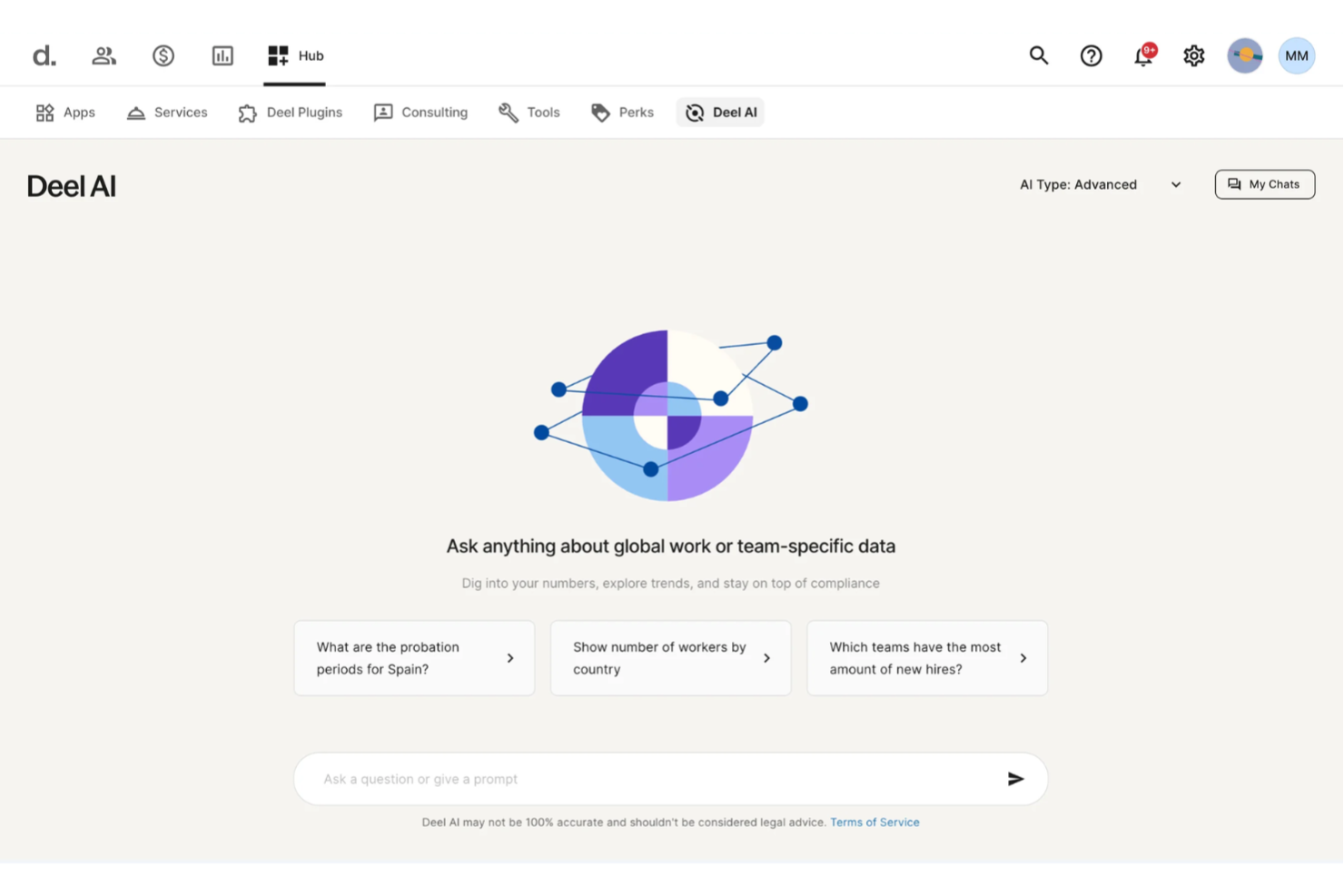
Businesses managing teams across different regions often need instant clarity on HR, payroll, and compliance questions, and Deel AI steps in as a built-in expert that helps you keep work moving without long searches or delays. You get an always-available assistant trained by legal and HR specialists in 150+ countries, giving you actionable insights drawn directly from your organization’s own data. If your team handles global operations, distributed workers, or recurring HR inquiries, Deel AI helps you find answers quickly so you can focus on higher-value work.
Why I Picked Deel
I picked Deel because it brings practical, expert-trained intelligence into everyday business workflows, making it more than a typical help bot. Its contextual AI shows insights based on the exact page you’re viewing — whether that’s payroll, people data, or compliance details — so you don’t have to switch tools or dig for information. I also appreciate how it responds to HR, legal, and policy questions using a Knowledge Hub built by experts across 150+ countries, giving teams guidance they would usually wait hours or days to access. For businesses scaling globally or managing distributed teams, this creates a dependable AI layer that supports fast, informed decisions.
Deel Key Features
In addition to the AI-powered global guidance I mentioned above, I also found several other noteworthy aspects of Deel:
- Deel Global Payroll: This feature enables businesses to manage payroll across multiple countries, supporting over 120 currencies and ensuring timely payments.
- Contractor Management: Allows seamless hiring and management of international contractors, complete with automated invoicing and payment processing.
- Employer of Record (EOR) Services: Deel acts as the legal employer for international employees, handling all local employment responsibilities.
- Immigration Support: Provides guidance and assistance for obtaining visas and work permits, streamlining the process for international hires.
Deel Integrations
Integrations include popular platforms such as QuickBooks, Xero, BambooHR, Greenhouse, Hibob, Workday, Lever, NetSuite, Salesforce, and SAP SuccessFactors. Additionally, Deel supports custom integrations through an available API.
Pros and Cons
Pros:
- AI answers talent and workforce questions using expert-sourced data
- Surfaces org insights and summaries directly from your team data
- Delivers guidance across 150+ country employment contexts
Cons:
- Heavy dependence on proprietary Knowledge Hub for accuracy
- AI guidance may require human review for complex legal scenarios
New Product Updates from Deel HR

Deel Expands Stablecoin Wallet to 80+ Countries
Deel expands its Stablecoin Wallet to 80+ countries with dollar-backed balances and optional rewards. This gives eligible contractors more ways to hold and manage earnings inside Deel. For more information, visit Deel’s official site.
 .
.
Best for customizable workflows
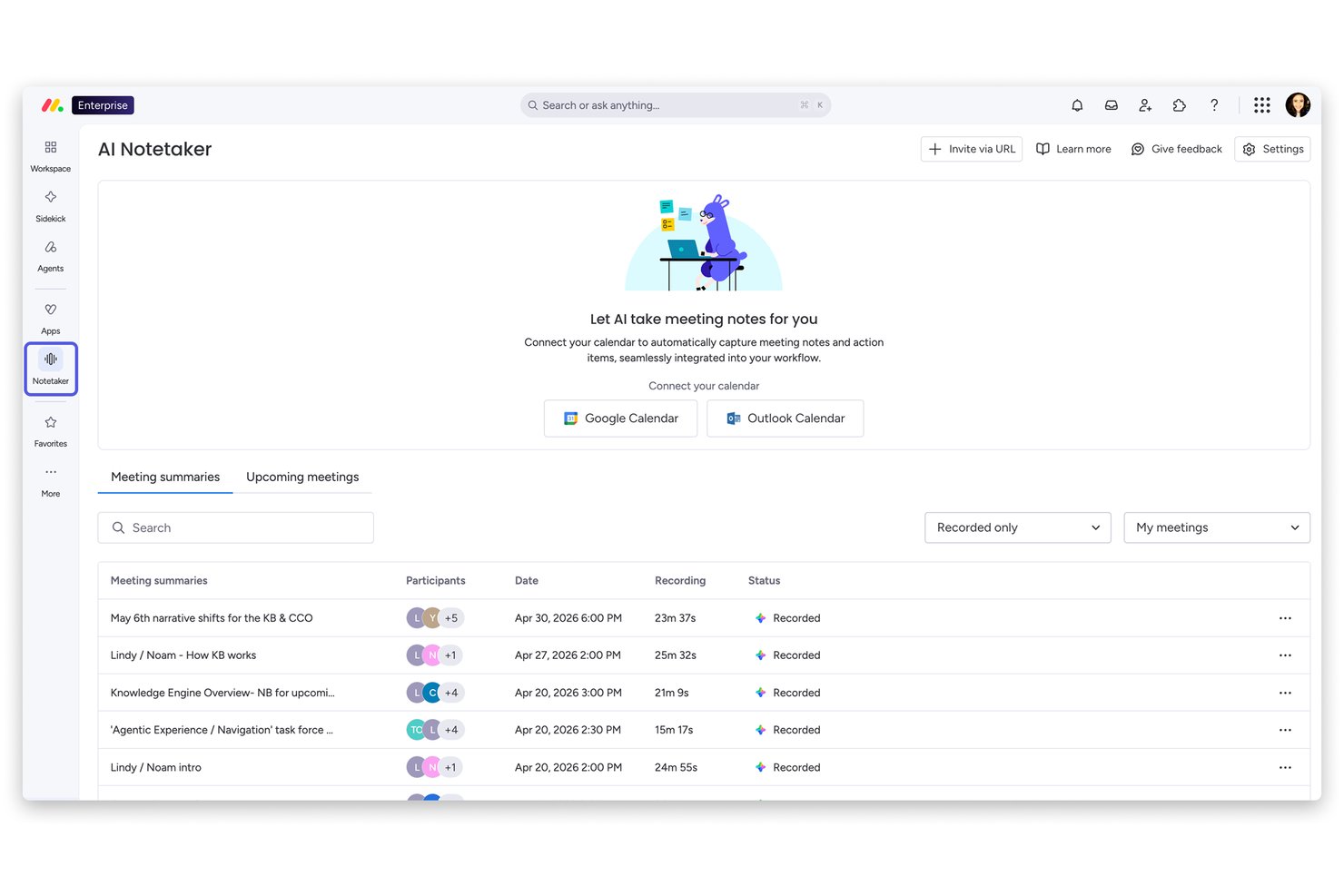
monday AI Workspace is an AI work management platform that combines project planning, workflow automation, AI agents, and cross-functional collaboration tools across work management, CRM, service, and development use cases.
Who Is monday AI Workspace Best For?
It's a strong fit for mid-sized and enterprise teams managing work across multiple departments who need one platform to replace several disconnected tools.
Why I Picked monday AI Workspace
monday AI Workspace earns its spot on my shortlist because of how far you can push its workflow customization without writing a single line of code. I use the AI Workflow Builder to create multi-step automations with logic-based triggers, and monday agents can execute tasks autonomously within those workflows. What sets it apart is the ability to connect external AI models like Claude or ChatGPT directly to boards, so the automation isn't just rule-based, it's genuinely intelligent.
monday AI Workspace Key Features
- Custom board views: Switch between timeline, Kanban, Gantt, and calendar views to visualize project data the way you prefer.
- AI-powered project insights: Get automated summaries and recommendations for project risk, dependencies, and milestones based on workspace data.
- Role-based permissions: Assign granular access to boards, workflows, and automations for specific team members or departments.
- Native integrations library: Connect with 200+ external apps including Slack, Salesforce, Google Drive, and Jira for seamless workflow connectivity.
monday AI Workspace Integrations
monday AI Workspace offers hundreds of native integrations, including Slack, Google Workspace, Microsoft 365, Salesforce, Jira, GitHub, Zoom, Dropbox, HubSpot, and Zendesk. It also supports Zapier and provides an API for custom integrations.
Pros and Cons
Pros:
- Supports multiple project views and boards
- AI agents handle multi-step tasks autonomously
- Highly customizable no-code workflow automation
Cons:
- Can feel overwhelming for smaller teams
- AI features locked to higher-tier plans
New Product Updates from monday AI Workspace
monday AI Workspace Adds Human Approval Routing
monday AI Workspace adds a human-in-the-loop approval block to AI Workflows, sending approval requests and routing workflow paths based on responses. For more information, visit monday AI Workspace's official site.

Best for AI across daily business operations
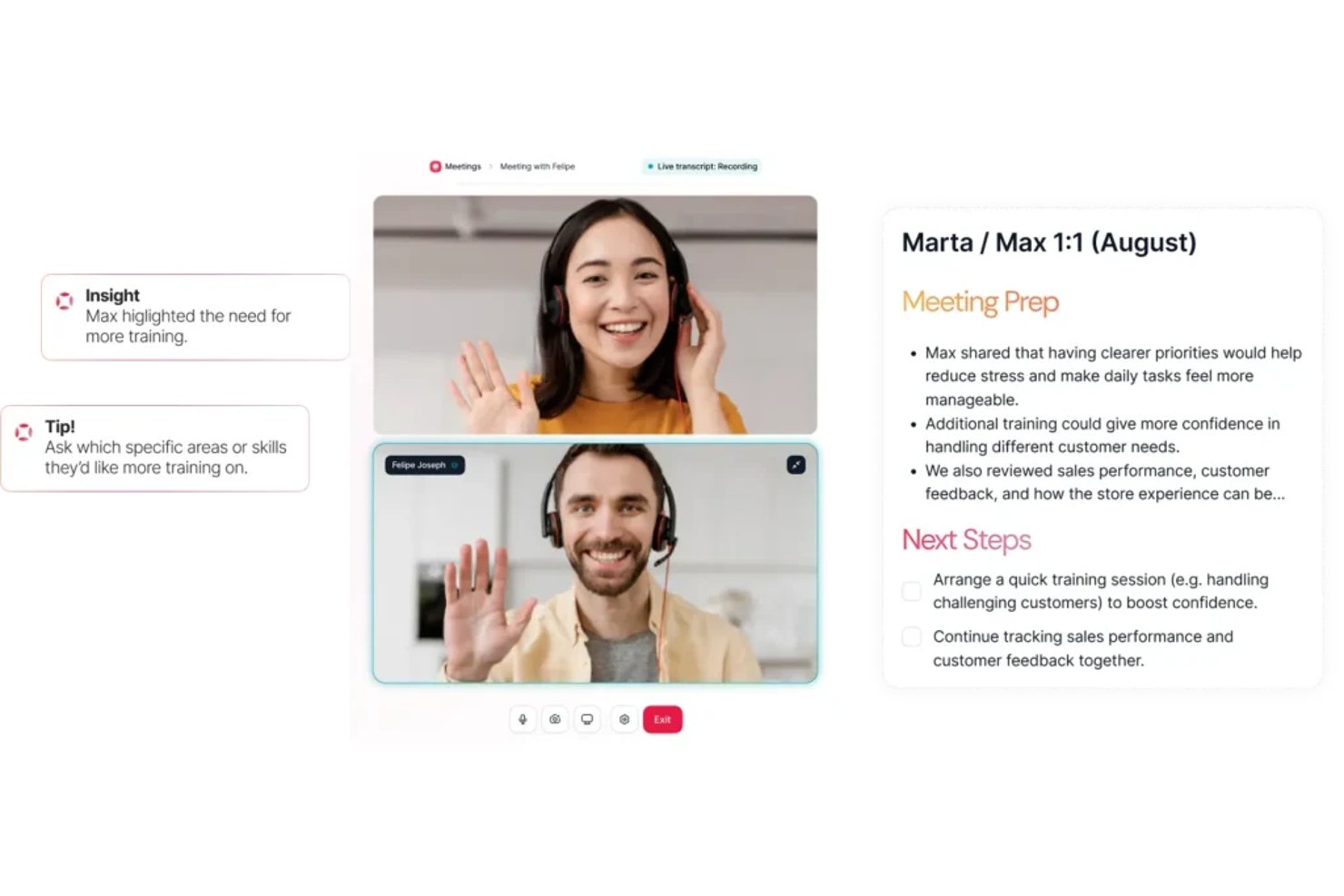
Factorial is an AI-powered business platform that unifies HR, finance, and IT operations—handling everything from timetable planning and report creation to answering employee policy questions through its built-in AI agent, One.
Who Is Factorial Best For?
Factorial is a strong fit for SMBs that want one platform to handle HR, finance, and IT—without stitching together multiple tools.
Why I Picked Factorial
Factorial earns its spot on my shortlist because its AI agent, One, genuinely spans the full scope of daily operations: it screens CVs, flags payroll anomalies before a run completes, and pulls answers directly from your company handbook. I especially like that One connects HR, finance, and IT in a single context, so my team isn't switching between platforms to get things done. It's one of the few tools where AI works across recruiting, expenses, and IT tickets all at once.
Factorial Key Features
- Expense OCR: Reads receipt details and supports multi-step expense approvals.
- Time tracking: Records hours with geolocation or QR tracking and supports overtime compensation.
- Performance reviews: Runs 360 reviews and tracks employee competencies.
- Device management: Uses multi-OS MDM to enforce security policies and remotely lock or wipe devices.
Factorial Integrations
Factorial offers 80+ third-party integrations, including Slack, Power BI, Okta, Jira, Outlook, Dynamics 365, HubSpot, and Zapier. It also provides an open API for custom integrations.
Pros and Cons
Pros:
- Screens CVs and calls candidates automatically
- Flags payroll anomalies before a run completes
- One AI agent spans HR, finance, and IT
Cons:
- Reporting is weaker than dedicated analytics tools
- Support hours limited to European and Latin American time zones
Best for automated AI policy monitoring

Trustible is an AI governance and compliance platform that lets organizations document, assess, and monitor AI use cases against a library of regulatory frameworks and internal policies.
Who Is Trustible Best For?
Trustible is a good fit for enterprise AI governance teams, risk officers, and compliance professionals managing multiple AI use cases across regulated industries.
Why I Picked Trustible
I picked Trustible as one of the best because its automated policy monitoring goes well beyond a static checklist. I like that it continuously tracks external regulatory signals and maps them against your existing controls, so when something like an EU AI Act guidance update drops, my team isn't scrambling to reconcile it manually. The platform's threshold-based alerts also automatically flag when approved AI systems breach review windows, which means overdue governance actions surface before an auditor does.
Trustible Key Features
- AI use case intake workflows: Submit, review, and approve new AI use cases through configurable intake forms with built-in routing and approval steps.
- Attributes-based risk scoring: Automatically score AI systems using a configurable risk engine that recommends governance next steps based on use case attributes.
- Vendor documentation analysis: Use AI-assisted analysis to review third-party vendor and model documentation against your governance requirements.
- Centralized AI inventory: Maintain a single, auditable registry of all AI systems in use across your organization, including ownership and review status.
Trustible Integrations
Trustible integrates directly with MLOps tools to connect developer workflows with risk management teams. The platform also offers an AI literacy and compliance training module that integrates with learning management systems (LMS). Specific native integration partners are not clearly documented, and the Enterprise tier adds integrations into existing systems beyond what's available in the Standard plan.
Pros and Cons
Pros:
- Automated risk scoring drives governance workflows
- Expert-curated AI risk and mitigation taxonomies
- Maps controls across 10+ regulatory frameworks
Cons:
- Limited third-party integration options documented
- Built for governance teams, not developers

Chatbase
Best with multilingual support for global teams
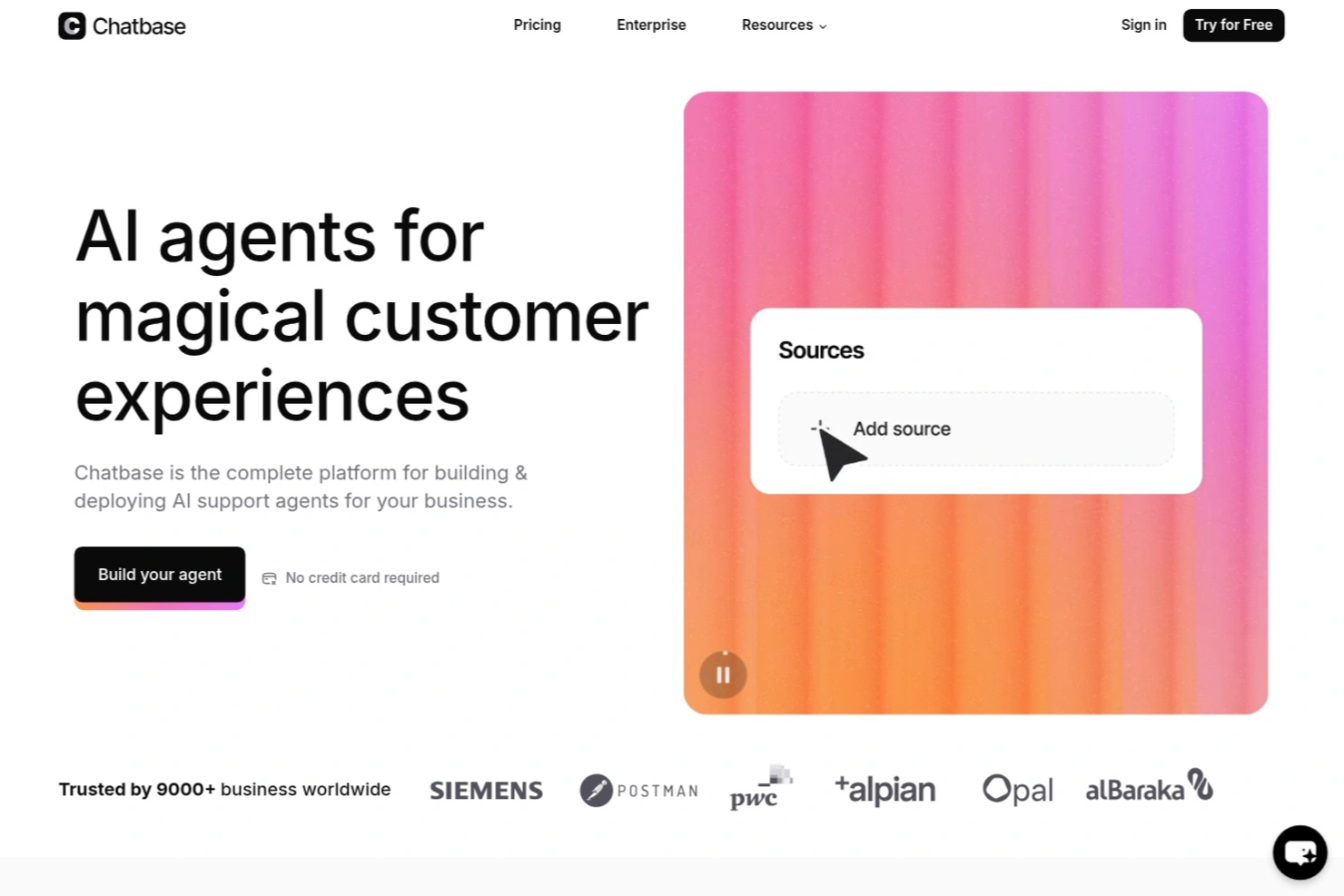
Chatbase is an AI chatbot platform designed for businesses that want to automate customer interactions, support, and lead generation with customizable, no-code chatbots that integrate into existing workflows.
Who Is Chatbase Best For?
Chatbase suits business teams and customer support functions looking to automate conversations and integrate AI chatbots into their digital channels.
Why I Picked Chatbase
I picked Chatbase as one of the best because I’ve seen how its multilingual support lets my team deploy chatbots that handle conversations in dozens of languages without extra setup. I like that I can upload documents in multiple languages and the chatbot responds accurately in the user’s preferred language. My team uses this to support global customers and internal teams across regions, making it easy to maintain consistent communication standards.
Chatbase Key Features
- No-code chatbot builder: Build and customize chatbots for your website without writing any code.
- Custom data source uploads: Import PDFs, text files, or website links to train your chatbot on business-specific content.
- Widget and API deployment: Add chatbots to your site with a widget or integrate via API for more advanced use cases.
- Conversation analytics: Track user interactions and chatbot performance with built-in analytics dashboards.
Chatbase Integrations
Chatbase offers native integrations with Slack, WhatsApp, Facebook Messenger, Telegram, and Zapier. An API is available for custom integrations with your business systems.
Pros and Cons
Pros:
- Includes analytics dashboard for conversation insights
- Enables chatbot training with custom data sources
- Provides API access for custom business workflows
Cons:
- Limited prebuilt templates for industry-specific bots
- Lacks advanced natural language understanding features
Coveo
Best for behavior-led commerce discovery
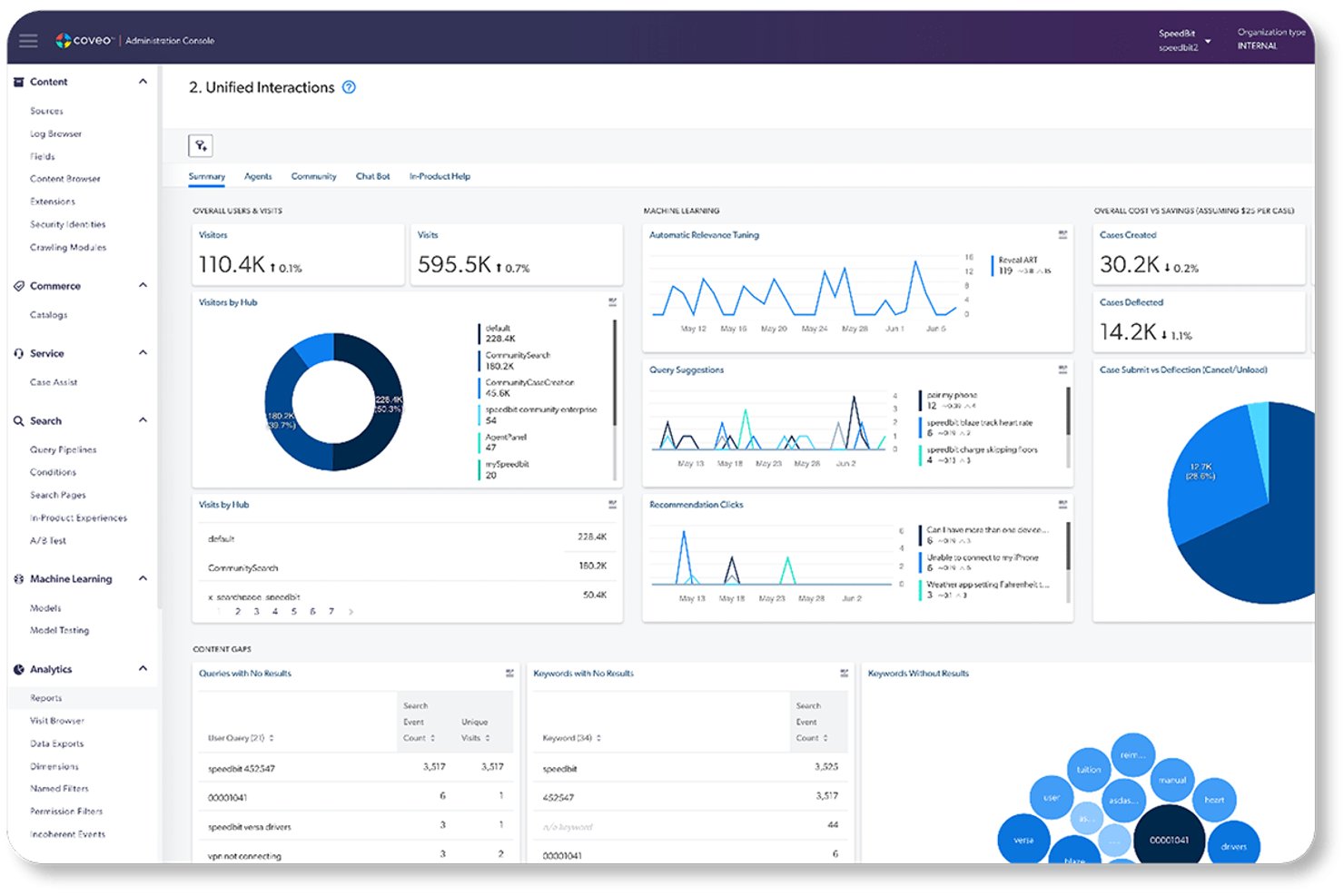
Coveo is an enterprise AI search and discovery platform that combines hybrid search, behavioral AI, and generative answering across commerce, customer service, and workplace use cases.
Who Is Coveo Best For?
Coveo is built for mid-to-large enterprises in B2B and B2C commerce, customer service, or IT that need AI-powered search across complex, multi-source content environments.
Why I Picked Coveo
Coveo earns its spot on my shortlist because of how it handles behavior-led commerce discovery at scale. Its intent-aware product ranking learns from real session data to surface the right products at the right moment, without manual merchandising rules doing all the heavy lifting. I'm also impressed by the Conversational Product Discovery feature, which lets shoppers describe what they need in natural language and get contextually matched results straight from the search box.
Coveo Key Features
- Permission-aware unified index: Applies document-level access controls across connected enterprise content.
- Relevance Generative Answering: Generates answers grounded in indexed content for service and workplace use.
- Search analytics: Tracks queries, clicks, content gaps, and conversions in dashboards.
- Enterprise connectors: Connects to business systems through native connectors, APIs, and custom integrations.
Coveo Integrations
Coveo documents native commerce integrations with SAP, Salesforce, and Shopify. Its 45+ connectors support more than 100 systems, and APIs and custom connectors are available.
Pros and Cons
Pros:
- Handles multi-source enterprise search out of the box
- Generative answers pull from your actual indexed content
- Behavior-driven ranking adapts without manual rules
Cons:
- Time to value stretches to nearly two years
- Setup and administration demand significant technical expertise

Claude
Best for advanced AI reasoning and business analysis
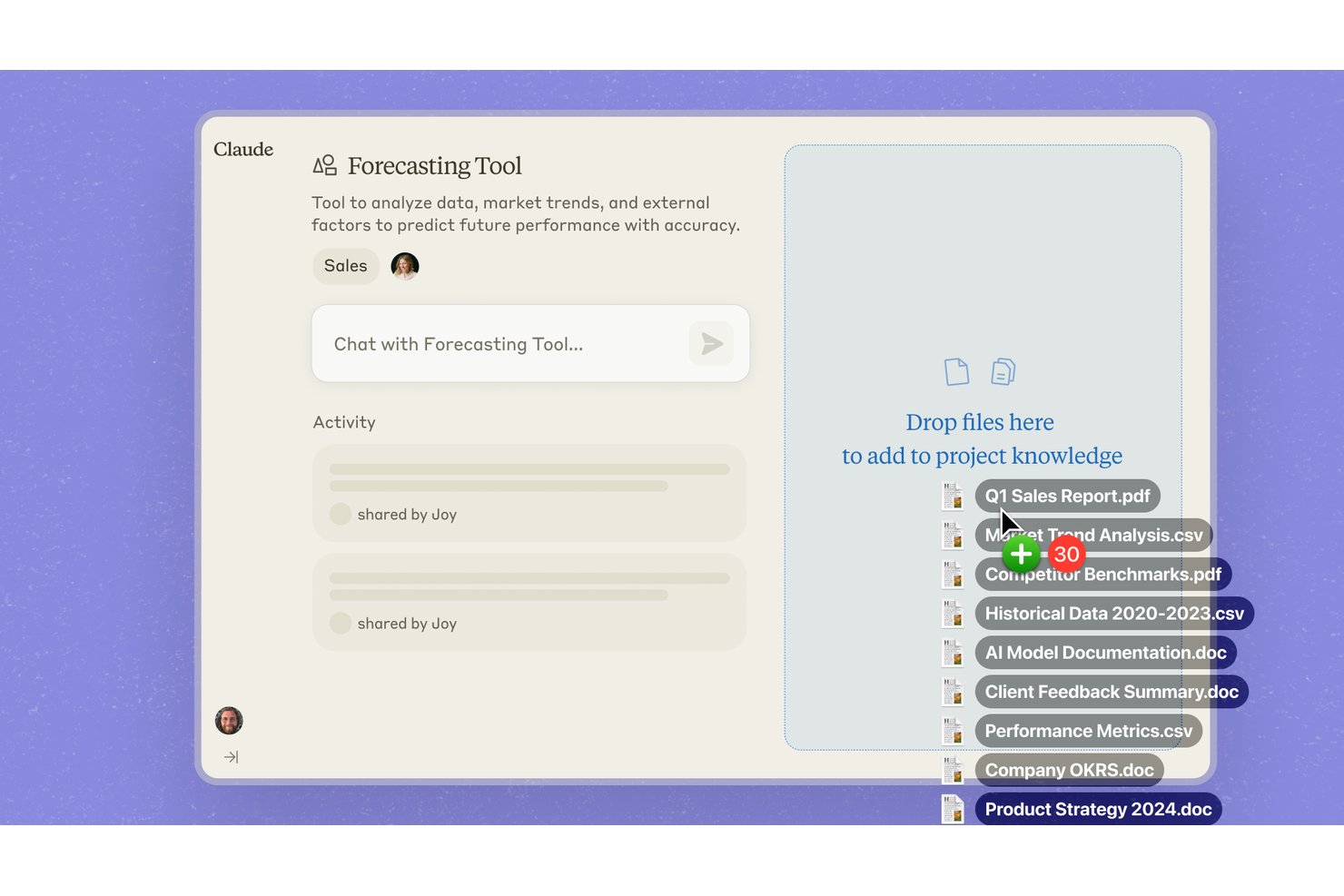
Claude is an AI assistant developed by Anthropic that handles complex reasoning, writing, research, coding, and data analysis tasks through a conversational interface.
Who Is Claude Best For?
Claude is a strong fit for business analysts, researchers, and knowledge workers who need to work through complex, multi-step problems with nuance and depth.
Why I Picked Claude
Claude earns its spot on my shortlist because its reasoning capabilities go deeper than most AI tools I've tested for business analysis. I particularly like how it handles multi-step analytical tasks, like synthesizing research across long documents or stress-testing a business argument before it reaches a stakeholder. Its extended context window means I can feed it dense reports, contracts, or datasets without losing coherence mid-analysis.
Claude Key Features
- Artifact creation: Claude generates self-contained outputs like documents, code files, and structured reports you can export and use directly.
- Claude.ai Projects: Organize conversations, uploaded files, and context into persistent project workspaces that retain memory across sessions.
- Vision and file analysis: Upload images, PDFs, and documents for Claude to read, extract data from, and summarize.
- API access: Connect Claude to your existing tools and workflows via Anthropic's API for custom business integrations.
Claude Integrations
Native integrations are not clearly documented. Claude offers an API for custom integrations.
Pros and Cons
Pros:
- Polished drafts need less editing
- Nuanced analysis surfaces business risks
- Long-document synthesis preserves context
Cons:
- Confident errors still need verification
- Usage caps interrupt extended analysis
Best for agents acting within Salesforce CRM
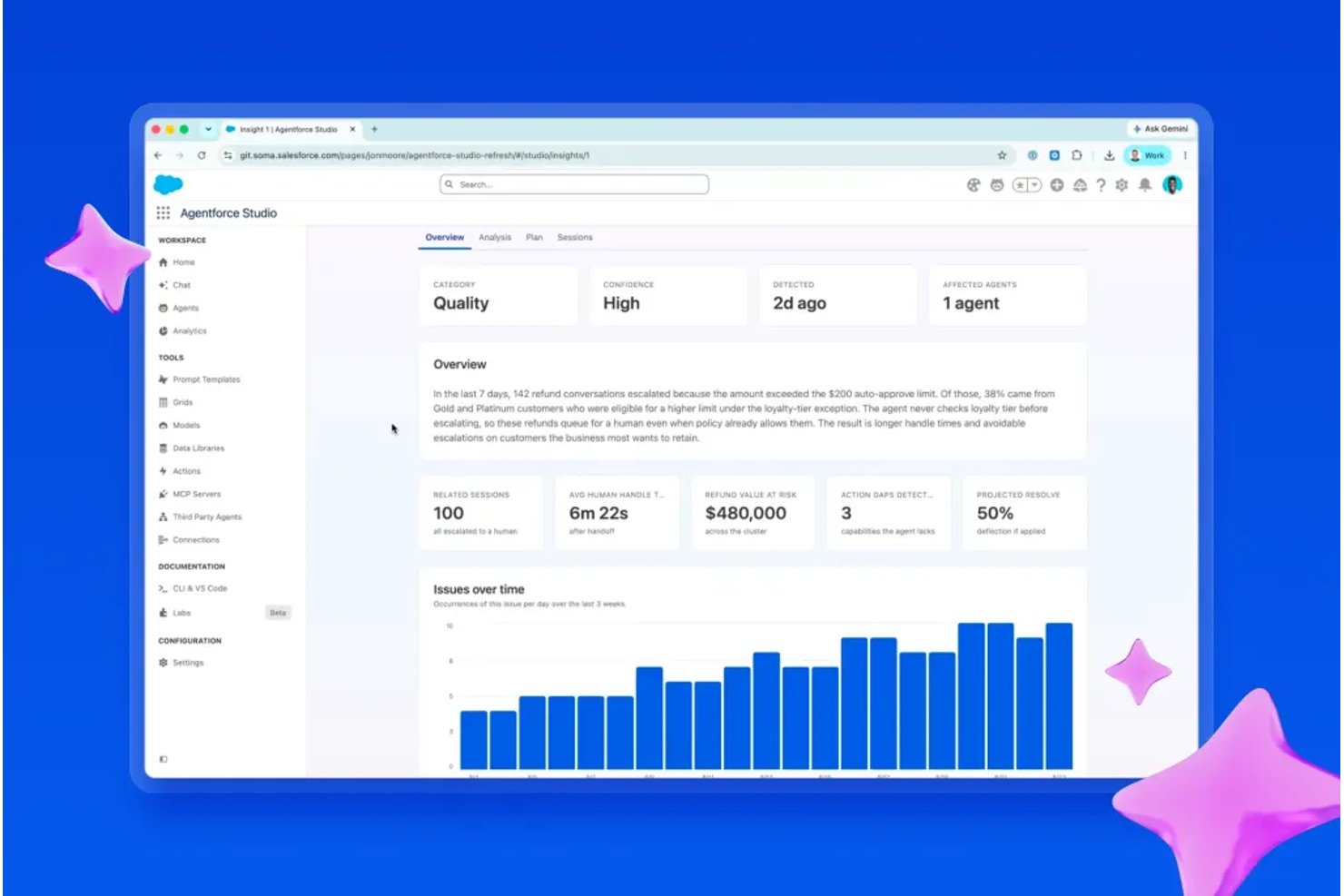
Salesforce Agentforce is an AI agent platform built into Salesforce CRM that lets you deploy autonomous agents across sales, service, marketing, and commerce workflows.
Who Is Salesforce Agentforce Best For?
Agentforce is a strong fit for enterprise teams already running their sales, service, or HR workflows inside Salesforce CRM.
Why I Picked Salesforce Agentforce
Agentforce earns its spot on my shortlist because it's built directly into Salesforce CRM, meaning your agents aren't just reading customer data—they're acting on it. I love how you can deploy autonomous agents that close service cases, qualify leads, or update opportunity stages without leaving the CRM environment. The Atlas Reasoning Engine lets agents make multi-step decisions using your actual Salesforce records, flows, and prompts as context.
Salesforce Agentforce Key Features
- Agent Builder: A low-code interface that lets you create, configure, and customize AI agents using natural language instructions and point-and-click tools.
- Einstein Trust Layer: A built-in security framework that masks sensitive data, enforces access controls, and logs all AI interactions for auditability.
- Prompt Builder: A template editor for creating and managing reusable prompt instructions that agents follow when generating responses or taking action.
- Pre-built agent templates: Ready-made agent configurations for common business roles—like HR assistant or onboarding coordinator—that you can deploy and tailor without starting from scratch.
Salesforce Agentforce Integrations
Agentforce offers native integrations across Salesforce products, including Sales Cloud, Service Cloud, and Data Cloud, plus Slack. Salesforce APIs and MuleSoft support custom integrations.
Pros and Cons
Pros:
- Trust Layer masks and audits interactions
- Atlas grounds decisions in CRM context
- Agents can update Salesforce records directly
Cons:
- Poor CRM data can impair accuracy
- Setup requires admin work and testing

Glean
Best for cross-system operational AI agents
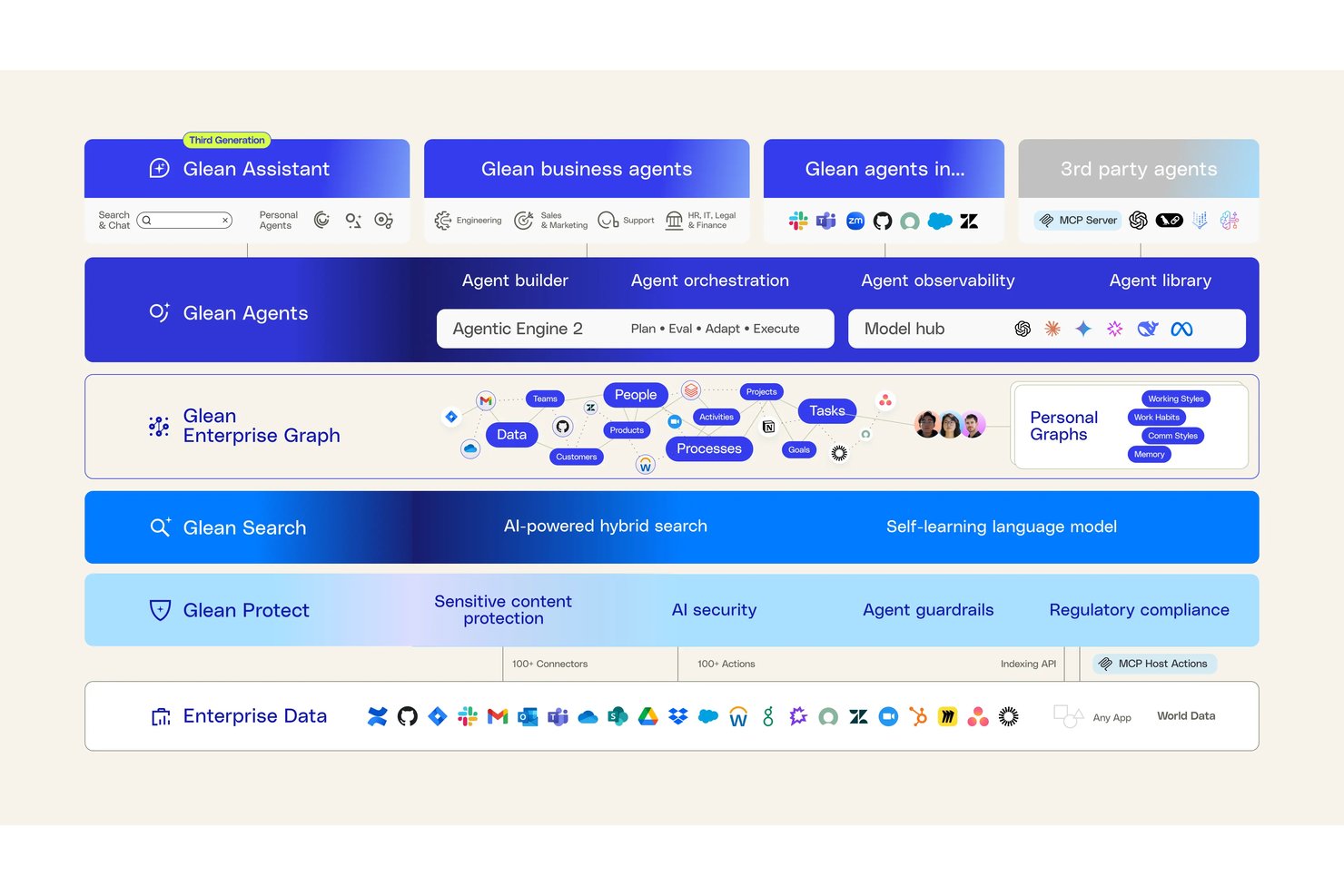
Glean is an enterprise AI platform that connects to your existing business tools to deliver a unified search experience, AI-powered answers, and deployable AI agents across your tech stack.
Who Is Glean Best For?
Glean is a strong fit for large enterprises that need AI agents to work across multiple business systems without rebuilding their existing tech stack.
Why I Picked Glean
Glean earns its spot on my shortlist because it's built specifically to let AI agents operate across your entire business tech stack, not just within a single app. I'm particularly impressed by Glean's Knowledge Graph, which maps relationships between people, content, and tools so agents can retrieve and act on the right information in context. Its agent actions layer lets you deploy AI that can execute tasks across systems like Salesforce, ServiceNow, and Slack without rebuilding existing workflows.
Glean Key Features
- Permissions-aware search: Glean respects each user's existing access controls, so search results and AI answers only surface content the individual is authorized to see.
- AI assistant chat interface: Users can ask questions in natural language and get direct answers synthesized from content across all connected business tools.
- Pre-built connector library: Glean offers 100+ native integrations with workplace apps like Google Drive, Confluence, Jira, and Workday to index content without custom development.
- AI app builder: Teams can create and deploy custom AI assistants tailored to specific business functions, workflows, or departments using a no-code builder.
Glean Integrations
Glean offers 100+ native integrations, including Google Drive, Confluence, Jira, and Workday. It connects business content across your existing tools while respecting each user’s access permissions.
Pros and Cons
Pros:
- Agents automate multistep internal support tasks
- Search cuts time spent locating workplace knowledge
- Permission-aware answers respect existing access controls
Cons:
- Custom action failures can lack clear diagnostics
- Search sometimes misses relevant results
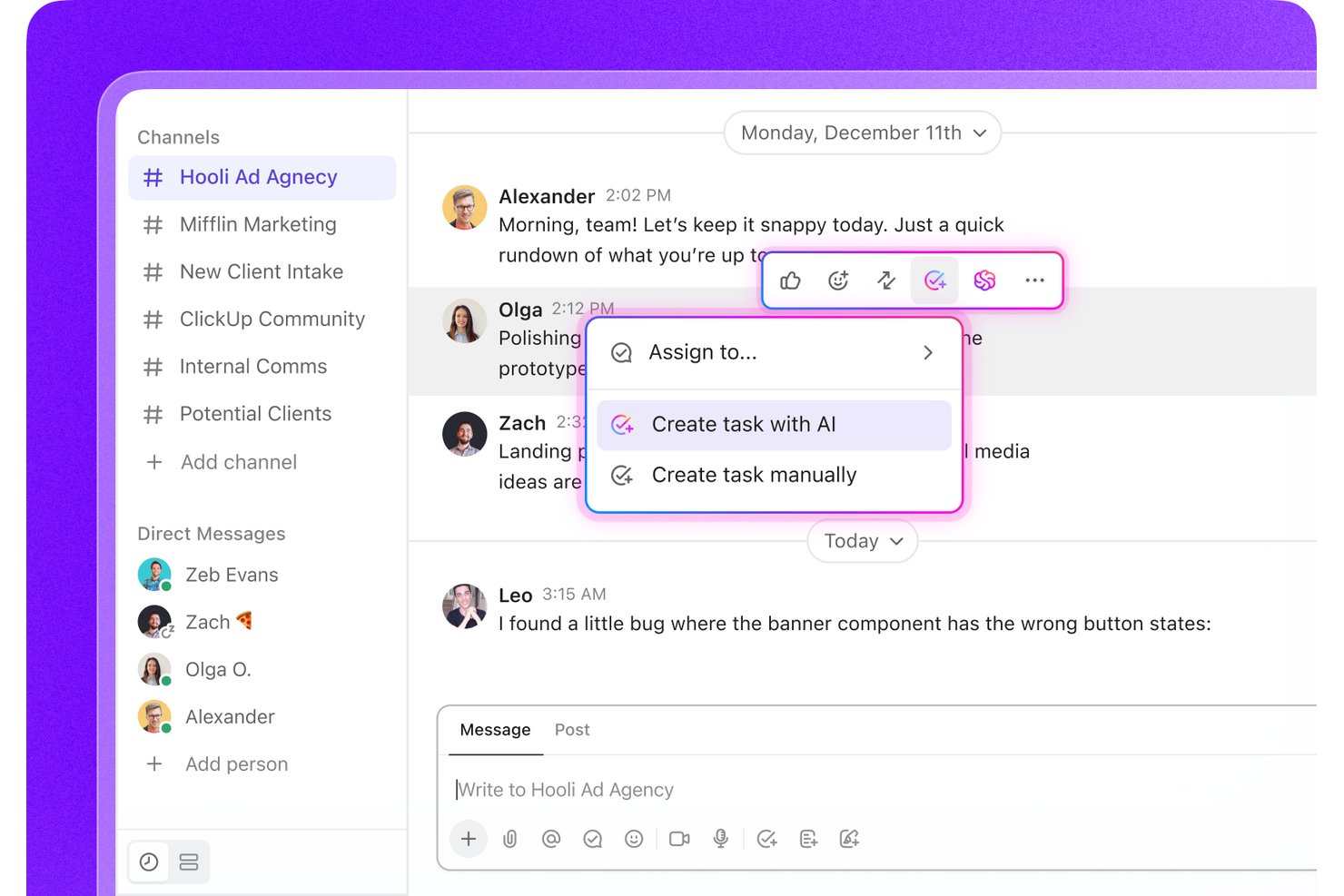
ClickUp is a project and work management platform that combines AI-assisted task creation, customizable workflows, goal tracking, docs, and team collaboration tools in one workspace.
Who Is ClickUp Best For?
ClickUp suits teams that need to tailor their workflows from the ground up, especially those juggling multiple projects across different functions.
Why I Picked ClickUp
I picked ClickUp as one of the best because its AI-assisted task creation lets you generate tasks, subtasks, and action items directly from a prompt, cutting the setup work that usually slows teams down. I also love how custom fields and views let you shape workflows around the way your team actually operates, whether that's a sprint board, a Gantt chart, or a flat list. ClickUp Brain, its built-in AI layer, can summarize threads, draft updates, and surface task context without leaving the workspace.
ClickUp Key Features
- AI-powered writing assistant: ClickUp Brain can draft emails, project briefs, and status updates directly within your workspace.
- Automations builder: Create rule-based automations to trigger actions like status changes, assignments, or notifications without writing code.
- Time tracking: Log time directly on tasks and generate reports to monitor how hours are spent across projects and teams.
- Dashboards: Build custom dashboards that pull real-time data from tasks, workloads, and goals into a single view.
ClickUp Integrations
ClickUp connects to 1,000+ tools, with native integrations including HubSpot, Google Drive, Microsoft Teams, Outlook, and Google Calendar. Its public API and webhooks support custom integrations and data synchronization.
Pros and Cons
Pros:
- Custom fields adapt workflows to team needs
- Summarizes threads alongside task context
- Generates tasks and subtasks from prompts
Cons:
- Prompt-generated tasks need manual scope checks
- AI targets project workflows over general analysis
Andre AI-verktøy for bedrifter
Her er noen flere AI-verktøy for bedrifter som ikke kom med på listen min, men som likevel er verdt å undersøke:
- Gemini Enterprise
For AI across mixed business apps
- ChatGPT Business
For delegating shared team work to AI
- Wrike
For AI task prioritization
- Notion
For AI-enhanced note-taking
- Microsoft 365 Copilot
For adding AI with Microsoft 365 controls
- Apollo.io
For taking B2B leads through outreach
- Clari
For AI sales forecasting
- Dialpad AI
For AI call analysis
- HubSpot Breeze
For shared CRM context across teams
- Perplexity Enterprise Pro
For pairing company files with market data


How I Evaluate AI Tools for Business
To make this list, I look for tools that handle real business operations, like drafting emails and summarizing reports. From there, I evaluate three things. Core functionality carries the most weight, like connecting business systems and tailoring AI outputs. Then I look at cross-system data unification and the vendor’s onboarding support.
Core Functionality (Table Stakes For This List)
When I'm selecting tools for my list, I score each one on a scale from 0 (does not offer the functionality) to 5 (excels in this area) for each core functionality listed below. I then convert the total into a percentage to help assess each tool's overall fit, with extra weight on any functionalities I’ve deemed essential.
- AI-Powered Automation (Essential): I look for AI that adapts to incoming information, such as sorting support requests, routing approvals, or drafting follow-up tasks.
- Natural Language Processing (Essential): I assess how well a tool drafts emails, summarizes reports, and responds to questions with the right context and tone.
- Data-Driven Insights: I check whether it surfaces useful patterns, forecasts, or recommendations from business data, such as changes in sales or workload.
- Workflow Integration: I look for connectors or APIs that put AI into existing systems, such as a CRM, project tool, or shared document platform.
- Customizable AI Outputs: I evaluate whether teams can tailor tone, format, prompts, or reference materials to match company needs and internal guidance.
- Multi-Function AI: I consider whether AI supports distinct tasks, such as content creation, analytics, communication, and workflow automation.
Once I have a list of tools that meet the criteria, I consider what sets each platform apart.
Differentiating Factors (What Sets Vendors Apart)
Here's how I compare and contrast different vendors:
Standout Features
I look for scenario modeling simulations that let HR leaders preview the impact of workforce changes—like a hiring freeze or restructuring—before making a final call. Cross-system data unification also matters; I check whether the tool pulls from your HRIS, ATS, and payroll into one AI-ready layer. Tools with role-based AI permissions stand out because they let you control who sees sensitive predictions, like attrition risk scores. I also evaluate embedded change management support, such as in-app guides that help teams actually adopt new AI workflows.
Beyond Features
I also evaluate how transparent a vendor is about its AI decision-making, especially for hiring or attrition predictions where bias can carry legal and ethical weight. Audit trails and the ability to override recommendations matter here. Data privacy is just as important—I check for compliance with regulations like GDPR and the EU AI Act, along with clear documentation on how employee data is stored and used. Finally, I look at integration depth across the full employee lifecycle, not just one module, since tools that only connect to your ATS but ignore payroll or performance data create blind spots.
Slik velger du AI-verktøy for bedrifter
Det er lett å gå seg vill i lange lister over funksjoner og komplekse prismodeller. For å hjelpe deg med å holde fokus mens du går gjennom den unike prosessen med å velge programvare, får du her en sjekkliste over faktorer du bør ha i bakhodet:
| Faktor | Hva du bør vurdere |
| Skalerbarhet | Kan verktøyet vokse med bedriften din? Tenk på fremtidige behov, som flere brukere eller større datamengder, og om verktøyet kan håndtere dette uten ytelsesproblemer. |
| Integrasjoner | Fungerer det med de nåværende systemene dine? Se etter kompatibilitet med eksisterende programvare for å unngå datasiloer og sikre smidig drift. |
| Tilpasningsmuligheter | Kan du tilpasse verktøyet til arbeidsflytene dine? Kontroller om det er mulig å gjøre justeringer som passer prosessene dine uten omfattende teknisk kompetanse. |
| Brukervennlighet | Er det brukervennlig for teamet ditt? Vurder læringskurven og om teamet kan bruke det effektivt med minimal opplæring. |
| Implementering og oppstart | Hvor raskt kan du komme i gang? Vurder tiden det tar å sette opp løsningen, ressursene som kreves, og støtten som tilbys under oppstartsfasen. |
| Kostnad | Passer det inn i budsjettet ditt? Sammenlign prismodellen, inkludert skjulte gebyrer, og sørg for at den samsvarer med verdien verktøyet tilfører bedriften din. |
| Sikkerhetstiltak | Er dataene dine beskyttet? Sørg for at verktøyet følger bransjestandarder for databeskyttelse, som kryptering og tilgangskontroller, for å holde sensitiv informasjon trygg. |
| Tilgjengelig kundestøtte | Hvor lett tilgjengelig er hjelpen når du trenger den? Vurder hvilke supportkanaler som tilbys, responstiden og om det finnes døgnåpen hjelp for presserende problemer. |
Hva er AI-verktøy for bedrifter?
AI-verktøy for virksomheter er programvareløsninger som bruker kunstig intelligens til å automatisere prosesser, analysere data og forbedre beslutningstaking. Disse verktøyene brukes vanligvis av fagpersoner innen områder som markedsføring, salg og kundeservice, og skaper verdi ved å øke effektiviteten og gi bedre innsikt.
I stedet for å vise til én enkelt kategori omfatter «AI-verktøy» mange typer, som hver er utviklet for spesifikke oppgaver, team eller forretningsmål.
Disse verktøyene kan være i form av motorer for prediktiv analyse, samtaleagenter, automatiseringsplattformer, beslutningsstøttesystemer, modeller for kreativ innholdsgenerering, anbefalingssystemer og mer. De varierer betydelig i kompleksitet, fra enkle AI-assistenter som er innebygd i vanlige apper, til plattformer på virksomhetsnivå som organiserer komplette arbeidsflyter.
AI er nå integrert i nesten alle deler av den moderne arbeidsstyrken, fra markedsføring, salg, HR, økonomi, produktutvikling, kundestøtte, drift, cybersikkerhet og strategisk ledelse. Ulike funksjoner er avhengige av ulike typer AI:
- Markedsføringsteam bruker AI til innholdsgenerering, kundesegmentering og kampanjeoptimalisering.
- Salgsteam bruker AI til poengsetting av potensielle kunder, prognoser og personalisering.
- Kundeserviceteam tar i bruk chatboter, automatisert fordeling av supportsaker og sentimentanalyse.
- HR bruker AI til å finne talenter, kartlegge ferdigheter og analysere arbeidsstyrken.
- Økonomiavdelinger er avhengige av avviksdeteksjon, prognoser og automatisert rapportering.
- Driftsavdelinger integrerer AI i modellering av forsyningskjeder, etterspørselsplanlegging og kvalitetskontroll.
Viktige funksjoner kan omfatte naturlig språkbehandling (NLP), maskinlæring, datamaskinsyn, prediktiv modellering og arbeidsflytautomatisering. Alt i alt forbedrer AI-verktøy produktiviteten, støtter datadrevne strategier og gjør det mulig for team å konsentrere seg om arbeid med høyere verdi. Men fordi landskapet av AI-løsninger er omfattende og stadig utvikler seg, er det viktig å forstå de ulike typene og hvordan de knytter seg til spesifikke forretningsbehov. Dette er en sentral del av læring om og innføring av AI.
Funksjoner
Her er de viktigste funksjonene all god programvare med AI-verktøy for virksomheter bør ha:
- Prediktiv analyse: Gir innsikt i fremtidige trender ved å analysere nåværende og historiske data, slik at du kan ta informerte beslutninger.
- Naturlig språkbehandling: Gjør programvaren i stand til å forstå og svare på menneskelig språk, noe som forbedrer kundeinteraksjoner og kundestøtte.
- Automatiserte arbeidsflyter: Automatiserer repetitive oppgaver, sparer tid og lar teamet ditt konsentrere seg om strategiske aktiviteter.
- Databehandling i sanntid: Gir umiddelbar innsikt og oppdateringer, slik at du alltid har den nyeste informasjonen tilgjengelig.
- Maskinlæringsfunksjoner: Gjør verktøyet i stand til å lære av data og forbedre ytelsen over tid, noe som øker nøyaktigheten og effektiviteten.
- Tilpassbare AI-modeller: Lar deg tilpasse AI-en etter virksomhetens spesifikke behov og mål, og gir fleksibilitet.
- Integrasjonsfunksjoner: Sikrer at verktøyet kan kobles til eksisterende systemer, noe som legger til rette for smidig dataflyt og samarbeid.
- AI-drevet innsikt: Leverer handlingsrettede anbefalinger basert på dataanalyse og støtter bedre beslutningstaking.
- Sikkerhetstiltak: Beskytter sensitive data med kryptering og tilgangskontroller og sikrer samsvar med bransjestandarder.
Fordeler
Implementering av AI-verktøy for virksomheter gir flere fordeler for teamet og virksomheten din. Her er noen av fordelene du kan se frem til:
- Bedre beslutningstaking: AI-drevet innsikt og prediktiv analyse hjelper deg med å ta mer informerte beslutninger ved å analysere trender og data.
- Økt effektivitet: Automatiserte arbeidsflyter og oppgavehåndtering reduserer manuelt arbeid, slik at teamet ditt kan konsentrere seg om aktiviteter med høy verdi.
- Forbedrede kundeinteraksjoner: Naturlig språkbehandling muliggjør bedre kommunikasjon med kunder og forbedrer opplevelsen og tilfredsheten deres.
- Kostnadsbesparelser: Automatisering av repetitive oppgaver og optimalisering av ressurser fører over tid til reduserte driftskostnader.
- Skalerbarhet: Tilpassbare AI-modeller og integrasjonsfunksjoner sikrer at verktøyene utvikler seg i takt med virksomhetens behov og støtter ekspansjon.
- Datadrevne strategier: Databehandling i sanntid og maskinlæringsfunksjoner gir oppdatert informasjon som bidrar til å forme strategiske initiativer.
- Samsvar med sikkerhetskrav: Avanserte sikkerhetstiltak beskytter sensitiv informasjon og sikrer samsvar med bransjeregler og -standarder.
Kostnader og priser
AI-verktøy for bedrifter varierer mye både i kostnad og funksjonalitet. Derfor kan det være nødvendig med en mer nyansert forståelse av hvilke typer AI-verktøy som er tilgjengelige for bedrifter, samt de ulike prismodellene og abonnementene deres. Generelt varierer kostnadene basert på funksjoner, teamstørrelse, tillegg og mer. Tabellen nedenfor oppsummerer vanlige abonnementer, gjennomsnittsprisene deres og typiske funksjoner som er inkludert i AI-verktøy for bedriftsløsninger:
Sammenligningstabell for abonnementer for AI-verktøy for bedrifter
| Abonnementstype | Gjennomsnittspris | Vanlige funksjoner |
| Gratisabonnement | $0 | Grunnleggende funksjonalitet med begrenset automatisering, enkle bruksgrenser og minimale tilpasningsmuligheter. Ideelt for enkeltpersoner som tester funksjoner, eller små team som utforsker AI-funksjoner uten forpliktelser. |
| Personlig abonnement | $5-$100/user/month | Flere alternativer for automatisering, høyere bruksgrenser, mer omfattende analyser og tilgang til et bredere utvalg av AI-modeller. Inkluderer standardintegrasjoner, moderate tilpasningsmuligheter og raskere responstid fra kundestøtten. |
| Bedriftsabonnement | $30-$500/user/month | Avanserte AI-funksjoner som prediktiv analyse, orkestrering av arbeidsflyter, integrasjon med flere verktøy og rollebaserte tilgangskontroller. Tilbyr modeller med høyere ytelse, samarbeidsfunksjoner, mer detaljerte rapporter og sterkere sikkerhetsalternativer. |
| Abonnement for store virksomheter | $100-$2000+/user/month | Omfattende tilpasningsmuligheter, tilgang til premiummodeller, alternativer for dedikert infrastruktur, forbedret styring og samsvar på bedriftsnivå. Inkluderer SLA-er, dedikerte kundestøtteteam, avanserte datakontroller og integrasjon med komplekse teknologistakker for store eller strengt regulerte organisasjoner. |
Vanlige spørsmål
Her er noen svar på vanlige spørsmål om AI-verktøy for bedrifter:
Hvordan påvirker AI-verktøy personvernet?
Ja, AI-verktøy kan påvirke personvernet, så det er avgjørende å vurdere sikkerhetstiltakene deres. Se etter verktøy som tilbyr kryptering, tilgangskontroller og samsvar med personvernforordninger som GDPR. Sørg for at teamet ditt forstår hvordan verktøyet håndterer data, og hvilke sikkerhetstiltak som er på plass. Velg leverandører som er åpne om datahåndteringspraksisen sin, og som tilbyr tydelige personvernerklæringer.
Kan AI-verktøy integreres med eksisterende programvare?
Ja, de fleste AI-verktøy er utviklet for å integreres med eksisterende programvaresystemer. Kontroller at verktøyet er kompatibelt med plattformene du bruker i dag, for eksempel CRM- eller ERP-systemer. Integrasjon forbedrer dataflyten og sikrer konsekvent informasjon på tvers av applikasjoner. Kontroller om verktøyet tilbyr API-er eller forhåndsbygde koblinger for sømløs tilkobling.
Hva bør jeg vurdere når det gjelder skalerbarheten til AI-verktøy?
Vurder om AI-verktøyet kan vokse i takt med bedriftens behov. Se etter funksjoner som støtter økt datamengde, flere brukere og komplekse prosesser. Vurder om leverandøren tilbyr skalerbare abonnementer, og hvor enkelt det er å utvide verktøyets funksjoner. Skalerbarhet sikrer langsiktig bruk og verdi.
Hvordan måler jeg avkastningen på AI-verktøy?
Mål avkastningen ved å vurdere kostnadsbesparelser, økt effektivitet og bedre beslutningstaking. Følg med på måltall som spart tid på oppgaver, inntektsvekst og forbedringer i kundetilfredshet. Sammenlign disse fordelene med kostnadene for verktøyet for å fastslå verdien for bedriften. Gå regelmessig gjennom ytelsesdataene for å sikre fortsatt avkastning.
Er AI-verktøy vanskelige å implementere?
Nei, mange AI-verktøy er utviklet for enkel implementering. Vurder leverandørens støtte ved oppstart, for eksempel opplæringsmateriell og kundeservice. Noen verktøy tilbyr trinnvise veiledninger og interaktive omvisninger for å hjelpe teamet ditt i gang. Ta hensyn til den tekniske kompetansen som kreves for oppsettet, og velg et verktøy som passer teamets ferdighetsnivå.