

10 beste software voor bezettingsregistratie in 2026

Beste software voor bezettingsregistratie


Software voor bezettingsregistratie houdt bij hoe mensen je ruimtes gebruiken en zich erdoorheen bewegen. Zo krijg je realtimegegevens waarmee je slimmere beslissingen over de werkplek kunt nemen. Als je op zoek bent naar de beste software voor bezettingsregistratie, sta je waarschijnlijk voor de uitdaging om veiligheid, efficiëntie en kosten in balans te houden en tegelijkertijd een flexibele, productieve omgeving te ondersteunen. De juiste tool helpt je om veranderende bezettingsbehoeften bij te houden, aan compliancevereisten te voldoen en verspilde ruimte of overbezetting te voorkomen. In deze lijst vind je bewezen opties die deze prioriteiten aanpakken, zodat je vol vertrouwen een oplossing kunt kiezen die echt aansluit bij de behoeften van je team.
Waarom u onze softwarebeoordelingen kunt vertrouwen
Ons team test en beoordeelt software sinds 2012. Als HR-experts weten we zelf hoe moeilijk — en belangrijk — het is om de juiste software te kiezen.
Voor deze gids hebben we tools geëvalueerd met behulp van praktijktests en onafhankelijk onderzoek, waarbij we tools beoordeelden aan de hand van onze selectiecriteria. We putten ook uit inzichten van vooraanstaande experts uit de branche en van praktiserende HR-professionals.
Onze reviews weerspiegelen ons menselijke redactionele oordeel, geen verkooppraatje.
Deskundige beoordelaars:
Vergelijkingstabel: software voor bezettingsregistratie
Deze vergelijkingstabel geeft een overzicht van de prijsgegevens van mijn beste keuzes voor software voor bezettingsregistratie.
| Tool | Best For | Trial Info | Price | ||
|---|---|---|---|---|---|
| 1 | Best for flexible workspace booking | Free trial + free demo available | From $5/user/month (billed annually) | Website | |
| 2 | Best for actionable workplace utilization data | Free demo available | Pricing upon request | Website | |
| 3 | Best for hybrid office coordination | Free demo available | Pricing upon request | Website | |
| 4 | Best for custom space access rules | 30-day free trial + free demo available | From $249/month (billed annually) | Website | |
| 5 | Best for team attendance planning | Free demo available | Pricing upon request | Website | |
| 6 | Best for real-time desk availability insights | Free demo available | Pricing upon request | Website | |
| 7 | Best for visitor and employee flow management | Free plan + free demo available | From $362/location/month (billed annually) | Website | |
| 8 | Best for enterprise-grade facility integration | 14-day free trial + free demo available | From $3,315.15 | Website | |
| 9 | Best for privacy-first people counting | Free demo available | From $229/unit | Website | |
| 10 | Best wireless sensor accuracy for workplaces | Free demo available | Pricing upon request | Website |

Beoordelingen van de beste software voor bezettingsregistratie
Hieronder staan mijn gedetailleerde samenvattingen van de beste software voor bezettingsregistratie die op mijn shortlist terecht is gekomen. In mijn beoordelingen bespreek ik de functies, integraties en beste gebruiksscenario’s van elk platform uitgebreid, zodat je de beste optie voor jou kunt vinden.

deskbird
Best for flexible workspace booking
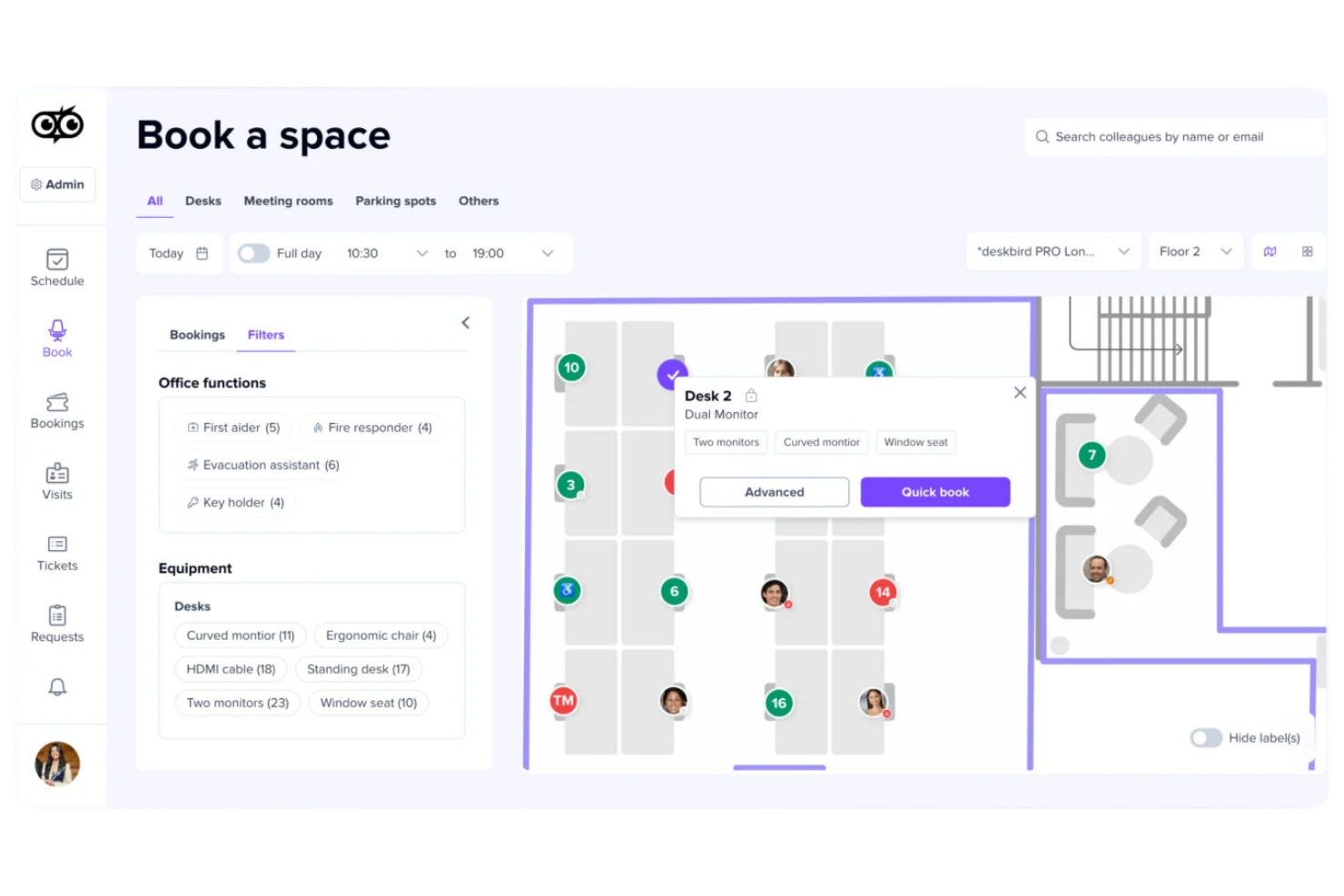
deskbird is a hybrid workplace management platform that covers desk booking, meeting room booking, parking space reservations, visitor management, and real-time occupancy analytics across multiple office locations.
Who is deskbird Best for?
deskbird is a strong fit for mid-sized companies managing hybrid work schedules who need employees to self-manage desk and resource bookings.
Why I Picked deskbird
I've included deskbird on this list because its flexible booking system genuinely covers the full range of hybrid workspace scenarios. I particularly like that you can mix hot desking and assigned seating on the same interactive floor plan, so teams that use a neighbourhood model don't have to manage two separate systems. The auto-booking and smart desk recommendations, which suggest spots based on team schedules and past habits, make the booking experience low-effort for employees. And when occupancy data feeds directly into the analytics dashboard, I find it much easier to act on real utilization patterns rather than estimating from headcounts.
deskbird Key Features
- Meeting room booking: Reserve meeting rooms directly from the floor plan or calendar view, with real-time availability and capacity details visible before booking.
- Week planning: Employees can map out their in-office and remote schedule for the week ahead, giving managers visibility into team attendance patterns.
- Visitor management: Register and track guests with digital check-in, host notifications, and visitor logs tied to specific office locations.
- Parking space booking: Employees can reserve parking spots alongside their desk, with the same booking and release logic applied to parking occupancy.
deskbird Integrations
deskbird offers a large catalogue of integrations spanning Microsoft Teams, Slack, Microsoft Outlook, Google Calendar, MS Entra ID, Google Workspace, Okta, BambooHR, Personio, and HiBob, plus dozens of additional HRIS, SSO, access control, and hardware integrations. An API is available for custom integrations.
Pros and Cons
Pros:
- Auto-release frees no-show desk bookings
- Employees can coordinate in-office days
- Interactive floor plans with amenity filters
Cons:
- Per-user pricing scales up quickly
- Analytics lack depth for larger teams
Best for actionable workplace utilization data
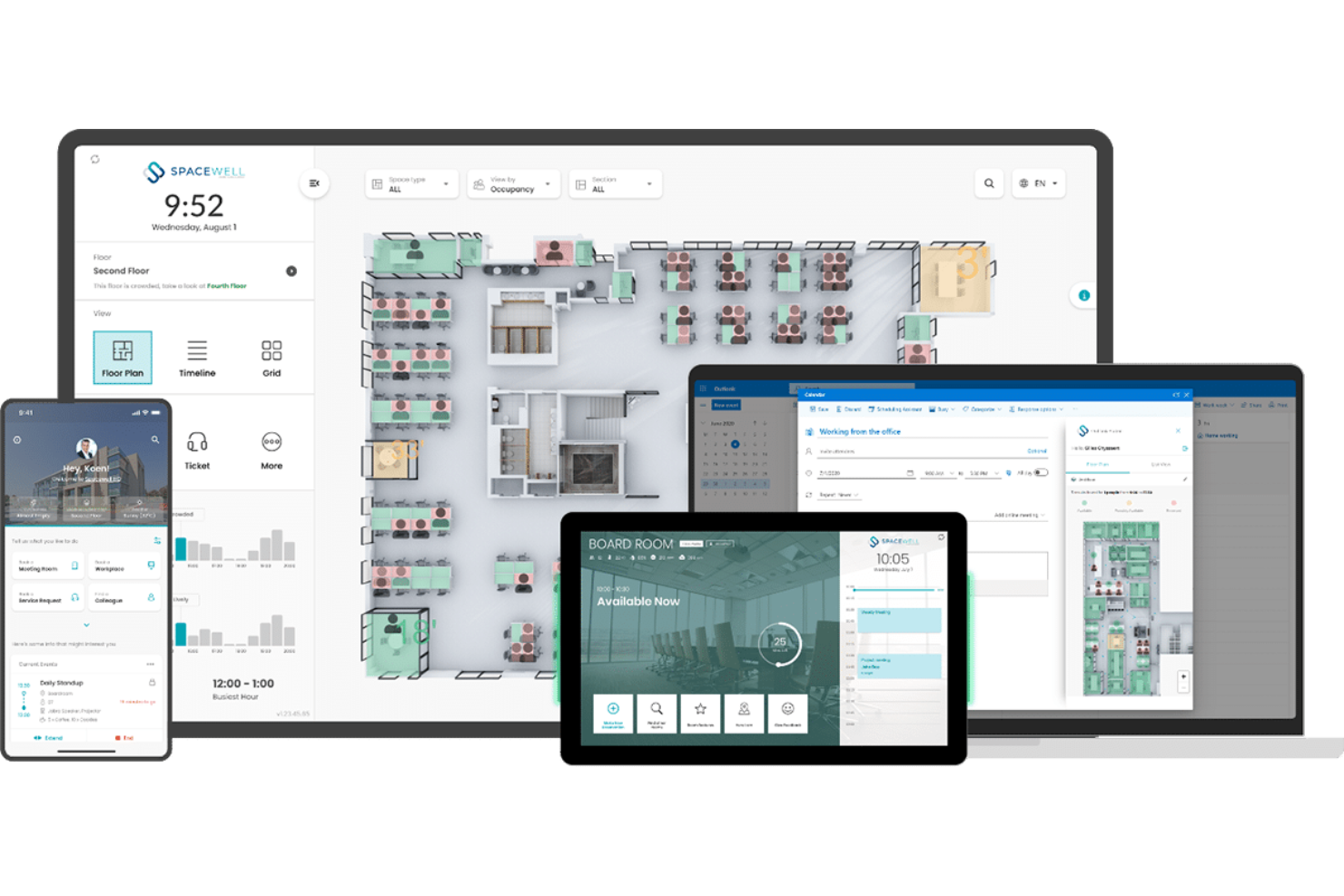
Spacewell is a smart building platform that combines workplace space management, IoT-based occupancy monitoring, indoor air quality tracking, desk and room reservations, and space utilization analytics across building portfolios.
Who Is Spacewell Best For?
Spacewell is a strong fit for facilities managers and corporate real estate teams in mid-to-large enterprises that rely on IoT sensor data to make space decisions.
Why I Picked Spacewell
I picked Spacewell as one of the best because it's one of the few occupancy tracking tools that turns raw IoT sensor data into genuinely actionable insights. I like that the Opportunity Simulator lets you benchmark space performance across your entire portfolio and run consolidation scenarios before committing to any changes. The timelapse feature also stands out to me: you can replay past occupancy trends to understand how space is actually used over time, not just in the moment. That combination of historical playback and multi-building benchmarking makes it unusually strong for data-driven real estate decisions.
Spacewell Key Features
- Sensor management console: Configure, monitor, and troubleshoot connected occupancy sensors across your building from a single interface.
- Indoor environmental quality monitoring: Track CO2 levels, temperature, humidity, and noise in real time alongside occupancy data.
- Desk and room reservations: Let employees book workspaces through a self-service portal, with occupancy data feeding directly into availability displays.
- Workplace app: Employees can check space availability, navigate the office, and submit service requests from a mobile device.
Spacewell Integrations
Spacewell offers pre-built connectors for Microsoft 365, Google Workspace, SAP, Oracle, Microsoft Dynamics, ServiceNow, Jira, Freshservice, Workday, and SuccessFactors, and also supports connections to AutoCAD, Revit, and BMS platforms. REST APIs, SDKs, and webhook support are available for custom integrations.
Pros and Cons
Pros:
- Modular design scales across multiple buildings
- Real-time air quality and occupancy combined
- IoT sensor-agnostic platform supports any hardware
Cons:
- Mobile app lacks some advanced desktop features
- Complex initial setup needs technical expertise

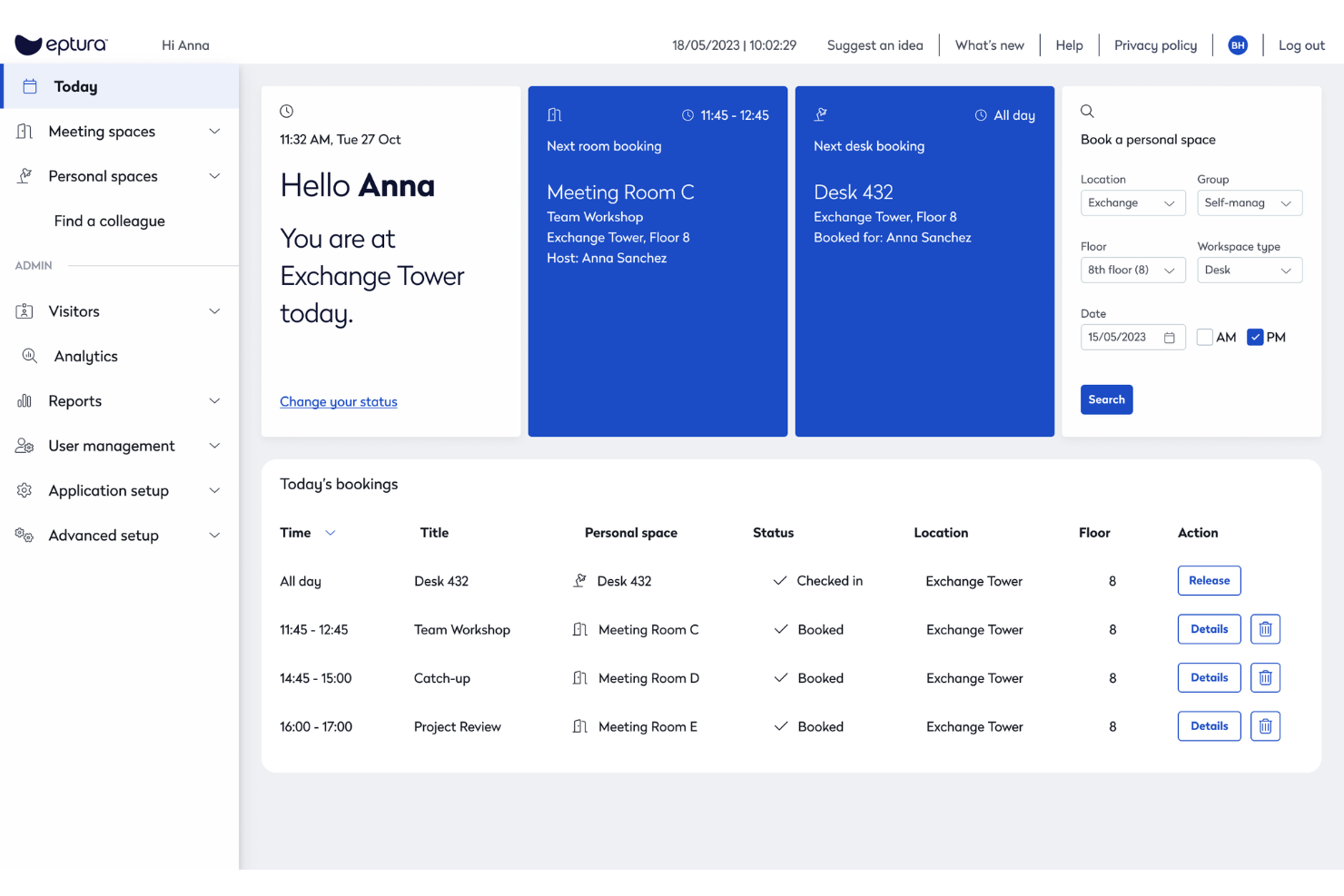
Eptura Workplace is a workplace operations and space management platform that combines desk booking, room scheduling, occupancy analytics, space planning, and move management across single and multi-site office environments.
Who Is Eptura Workplace Best For?
Eptura Workplace is a strong fit for large enterprises managing complex, multi-site office portfolios where real estate decisions need to be backed by live occupancy and utilization data.
Why I Picked Eptura Workplace
I've included Eptura Workplace in my top picks because it handles hybrid office coordination better than most tools I've tested. The AI-powered Copilot lets employees book desks and rooms using natural language, and the team days feature lets coworkers see who's coming in and plan in-office time together. I also like that workplace analytics surface peak days, no-show rates, and utilization trends in one place, so space decisions are based on actual behaviour rather than assumptions.
Eptura Workplace Key Features
- Move management: Plan and execute employee moves end-to-end, from seat assignments to department relocations, with built-in tracking across each step.
- Wayfinding: Let employees navigate the office and locate desks, rooms, and colleagues through interactive floor maps.
- Service request tickets: Submit and track workplace maintenance or facilities requests directly within the platform.
- Space planning: Redesign floor plans and model seating scenarios using live occupancy data and interactive layout tools.
Eptura Workplace Integrations
Eptura Workplace offers a broad tech partner ecosystem with integrations across categories like access control, sensors, calendars, collaboration, HR, and SSO. Native integrations include Microsoft Teams, Microsoft Outlook, Google Calendar, Slack, Okta, Power BI, and VergeSense, and the platform connects with access control providers like Brivo, Genetec, and Gallagher. An API is available for custom integrations.
Pros and Cons
Pros:
- Per-office policy settings across multiple locations
- Custom dashboards for occupancy reporting
- Interactive floor plans show live desk availability
Cons:
- Outlook room bookings don't always sync back
- Requires manual CAD imports

Skedda
Best for custom space access rules

Skedda is a space booking and scheduling platform that covers desk reservations, meeting room bookings, visitor management, and space utilization tracking with a customizable rules and permissions engine.
Who Is Skedda Best For?
Skedda suits facilities and workplace teams at mid-size to enterprise organizations that need granular control over who can access and book shared spaces.
Why I Picked Skedda
I picked Skedda as one of the best because its rules and roles engine is the most granular I've seen in this space. I can set booking conditions by team (for example, only the marketing team can book desks between 9 AM and 5 PM), cap individual usage with quotas, and require admin approval for specific rooms. For organizations where not every space should be open to every employee, that level of access control is exactly what the tool is built around.
Skedda Key Features
- Interactive floor map: Browse a visual map of your space to see real-time desk and room availability before booking.
- Visitor management: Register and track guests, send invitations, and log visitor activity alongside internal space bookings.
- Recurring bookings: Set up repeat reservations on a daily or weekly schedule without recreating the booking each time.
- Calendar sync: Connect bookings to Google Calendar or Microsoft 365 so reservations appear alongside existing schedules.
Skedda Integrations
Skedda offers native (direct) integrations with Microsoft 365, Microsoft Teams, Microsoft Entra ID, Google Workspace, Slack, Zoom, Stripe, Okta, OneLogin, and JumpCloud, along with third-party connections to ServiceNow, Kisi, QuickBooks, Xero, and Trello. It also connects with Zapier and supports webhooks for custom integrations.
Pros and Cons
Pros:
- No-show auto-release frees unused spaces
- Granular booking rules per team and role
- Wi-Fi-based occupancy tracking needs no hardware
Cons:
- No native HRIS integration via aggregator
- Visitor management costs extra as add-on
New Product Updates from Skedda

Skedda Expands Visit Exports With Custom Field Data
Skedda adds Summary and Breakdown visit exports with custom field data, filter support, and XLSX or CSV formats. These updates give teams more flexibility when exporting visit- and visitor-level information for reporting and analysis. For more information, visit Skedda’s official site.
 .
.
Kadence
Best for team attendance planning

Kadence is a workplace management platform that combines desk and space booking, team scheduling, occupancy analytics, visitor management, and AI-driven space planning into a single system.
Who Is Kadence Best For?
Kadence is a strong fit for mid-sized and enterprise companies managing hybrid teams across multiple office locations.
Why I Picked Kadence
I picked Kadence as one of the best because of how well it handles team attendance planning alongside occupancy tracking. The Team Kadences feature lets managers suggest and coordinate in-office days across their teams, so you can see real attendance intent before the day even starts. I also like the office activity view, which shows team bookings across the week and gives you a live read on how occupied your space will actually be.
Kadence Key Features
- Desk booking: Reserve individual desks by date, location, or floor directly within the platform, with auto-release for no-show bookings.
- Capacity limits: Set occupancy thresholds per floor or area on any given day to prevent overcrowding across your office.
- Kadence Sense: Tracks real workplace occupancy data without physical sensors, giving you accurate usage insights from booking behaviour alone.
- Scenario planning: Models "what-if" situations like headcount growth or policy changes to evaluate the impact on space and costs before making decisions.
Kadence Integrations
Kadence offers native integrations with Microsoft Teams, Slack, Google Calendar, Microsoft Outlook, Google Workspace, Microsoft Azure, BambooHR, Rippling, Workday, and Okta, among others, including SSO providers like OneLogin, JumpCloud, and Ping Identity, plus ticketing tools like Zendesk, Jira, ServiceNow, and Freshdesk. A public API is also available for custom integrations.
Pros and Cons
Pros:
- Multi-location management from one dashboard
- AI suggests the best days to commute
- Sensorless occupancy tracking via booking data
Cons:
- Advanced support limited to enterprise plans
- Floor plan setup requires manual effort
New Product Updates from Kadence
Kadence MCP Comes to Popular AI Assistants
Kadence launches MCP support for Claude, ChatGPT, and Microsoft Copilot to manage workplace tasks and access space insights. This brings booking, scheduling, and reporting into the AI assistants teams already use. For more information, visit Kadence’s official site.
 .
.
Robin
Best for real-time desk availability insights

Robin is a hybrid workplace platform that covers desk booking, meeting room scheduling, visitor management, and space utilization analytics across office environments.
Who Is Robin Best For?
Robin is a strong fit for mid-size to enterprise companies managing hybrid work schedules across multi-floor office environments.
Why I Picked Robin
Robin earns its spot on my shortlist because of how it handles real-time desk availability. Its interactive floor maps update live, showing which desks are booked, checked in, or open across every floor. I also like the AI-powered auto-booking, which reads past behaviour and preferences to reserve the right desk automatically. On top of that, the real-time "who's in the office" view lets employees see where teammates are sitting before they even arrive.
Robin Key Features
- In-office policies: Set and communicate hybrid work policies, and let employees track their own in-office attendance progress
- Visitor management: Handle pre-registration, check-in, and visit logs for office guests in one place
- Access control data: Connect your access control system to trigger automatic check-ins and pull badge data into occupancy reports
- Wayfinding: Let employees and visitors navigate office floors and locate available resources on a live map display
Robin Integrations
Integrations include Microsoft, Outlook, Teams, Exchange, Google, Slack, Zoom, Okta, OneLogin, and Rippling.
Pros and Cons
Pros:
- Predictive analytics forecast future space usage
- Auto-cancels ghost meetings to free rooms
- Visualizes live seat vacancy
Cons:
- Per-headcount pricing penalizes low attendance
- Floor plan edits require vendor assistance

Envoy
Best for visitor and employee flow management
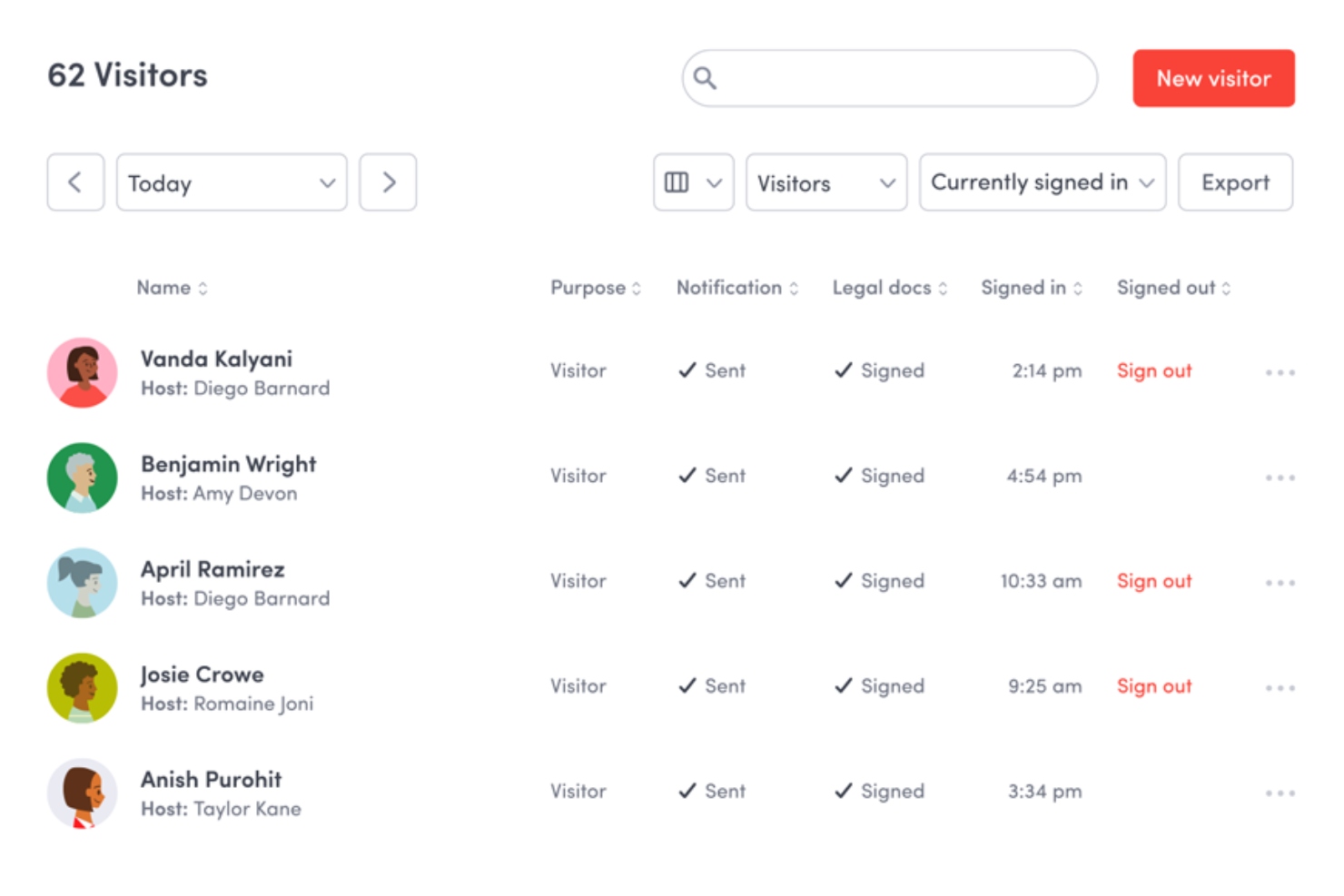
Envoy is a workplace management platform that combines visitor management, desk and room booking, occupancy analytics, emergency notifications, and digital signage into a single connected system.
Who Is Envoy Best For?
Envoy is a strong fit for mid-size to large companies managing hybrid workplaces where tracking both visitor check-ins and employee desk usage matters daily.
Why I Picked Envoy
Envoy earns its spot on my shortlist because no other tool I've tested handles the intersection of visitor check-in and employee desk booking with this level of live visibility. I particularly like the interactive live map, which lets my team see in real time which desks are occupied and where specific coworkers are sitting. Envoy's presence signals also feed directly into occupancy analytics, so I can see actual attendance patterns rather than just booking data.
Envoy Key Features
- Room booking: Reserve conference rooms directly through Envoy, with real-time availability visible across the workplace.
- Neighbourhood management: Group desks into zones assigned to specific teams, making it easier to manage seating arrangements at scale.
- Capacity limits: Set maximum occupancy thresholds per space and prevent bookings from exceeding defined limits.
- Emergency headcount: Trigger alerts during safety events and track who has confirmed their status in real time.
Envoy Integrations
Envoy offers over 100 integrations through its app directory, including Slack, Microsoft Teams, Google Calendar, Microsoft Outlook, Okta, Salesforce, Brivo Access, Verkada, Kisi, and Butlr. It also connects with Zapier and provides an API for custom integrations.
Pros and Cons
Pros:
- Multi-channel emergency alerts tied to headcounts
- Visitor and employee tracking in one view
- Live map shows real-time desk occupancy
Cons:
- Add-on modules increase total cost quickly
- Require iPad hardware setups in the kiosk operations

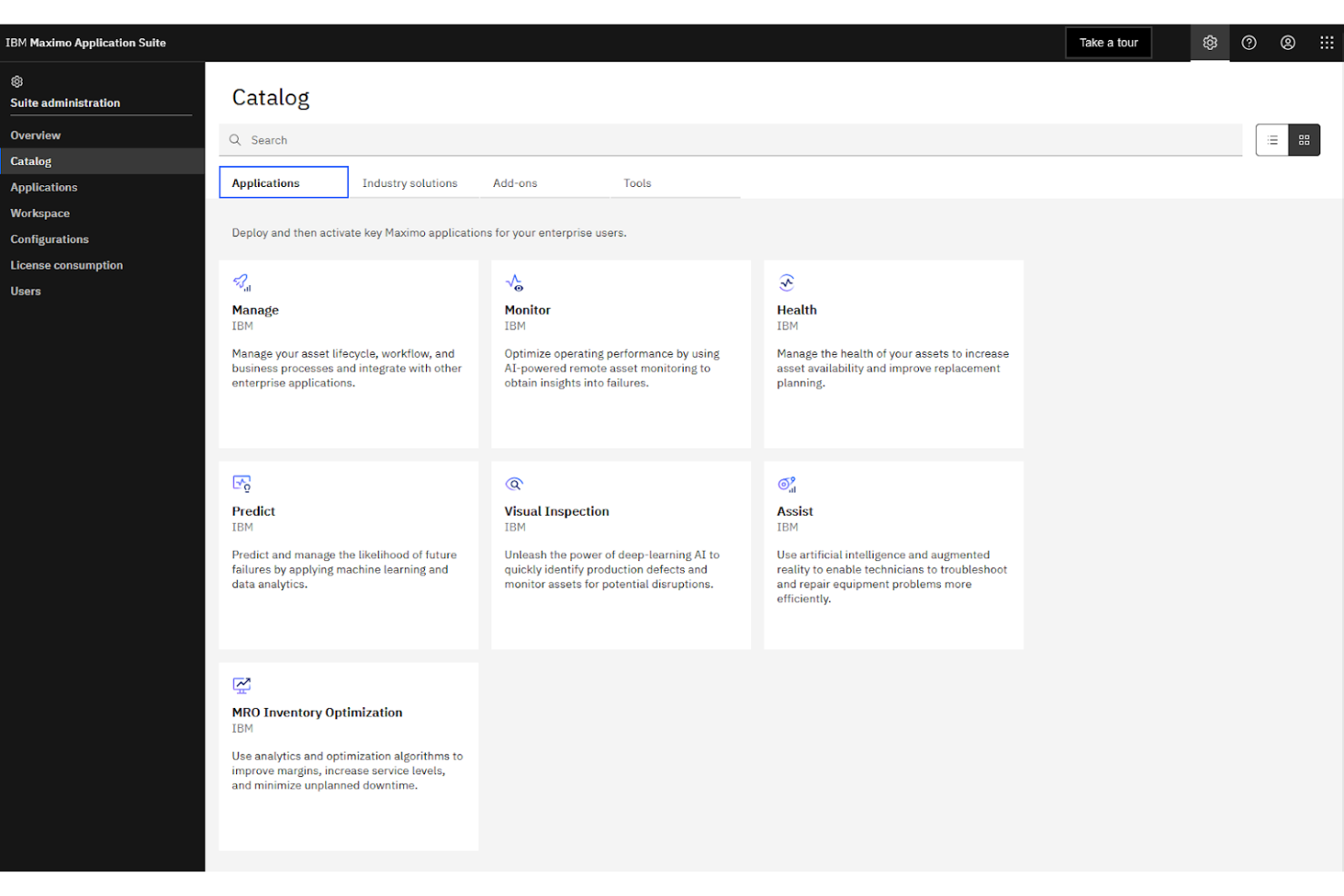
IBM Maximo is an enterprise asset management platform that tracks space utilization, manages work orders, monitors facility assets, and connects with IoT-enabled building systems across large-scale operations.
Who Is IBM Maximo Best For?
IBM Maximo is purpose-built for large enterprises and public sector organizations managing complex, multi-site facility and infrastructure portfolios.
Why I Picked IBM Maximo
I picked IBM Maximo because no other tool on this list connects occupancy data to the physical infrastructure of a building the way it does. Maximo's asset topology maps link space utilization data directly to the equipment, systems, and maintenance records within that space. I also like that it pulls live sensor data from BMS and IoT-connected devices into a single asset record, so facility teams aren't toggling between platforms to understand what's happening across a campus or multi-site portfolio.
IBM Maximo Key Features
- Space management: Track room assignments, area classifications, and occupancy allocations across an entire location hierarchy
- Work order automation: Automatically generate maintenance work orders when occupancy thresholds or asset conditions trigger predefined rules
- AI-powered health scoring: Use built-in AI to assess asset and facility conditions based on real-time utilization and sensor data
- Inspection management: Schedule and log facility inspections tied directly to specific locations and assets within the system
IBM Maximo Integrations
IBM Maximo integrates with enterprise systems like SAP, Oracle, Microsoft Dynamics, ServiceNow, Workday, and Esri GIS platforms through its built-in Maximo Integration Framework (MIF) and dedicated connectors. IBM App Connect extends connectivity further to tools like Jira, Salesforce, and Slack, and a REST API is available for custom integrations.
Pros and Cons
Pros:
- AI flags asset issues before failures occur
- Covers multi-site portfolios in one platform
- IoT sensor data tied to individual assets
Cons:
- Adding assets to the hierarchy is slow
- Initial setup demands significant IT resources

Density Waffle is a plug-and-play radar sensor paired with occupancy software that delivers real-time and historical people count data for meeting rooms, phone booths, open spaces, and desks.
Who Is Density Waffle Best For?
Density Waffle is a particularly good fit for workplace teams at mid-sized companies that need accurate room and desk occupancy data without the cost or complexity of enterprise-grade sensor systems.
Why I Picked Density Waffle
I picked Density Waffle as one of the best because its radar-based sensor counts people without capturing any images or biometric data, which removes the privacy review process that camera-based sensors typically trigger. In practice, that means my team can deploy it across sensitive spaces like private offices and phone booths without compliance pushback. I also like that Waffle counts in three discrete tiers (0, 1, 2, or 3+ people) with under one second of data latency, giving genuinely actionable real-time occupancy data.
Density Waffle Key Features
- Flexible mounting options: Waffle supports three mounting configurations, so you can install it on ceilings, walls, or furniture without structural changes.
- Historical occupancy data: Alongside real-time counts, Waffle stores historical usage data can be queried to analyze space trends over time.
- Mobile access: View live and historical occupancy data directly from a mobile device, without needing to log into a desktop dashboard.
- Real-time and historical API: Access raw occupancy data through a dual-mode API, enabling custom reporting, wayfinding displays, or third-party system connections.
Density Waffle Integrations
Density Waffle relies on a real-time and historical API with WebSocket support, which you can use to pipe occupancy data into your existing tools, dashboards, or building management systems.
Pros and Cons
Pros:
- Sub-one-second real-time data latency
- Self-installable with no professional help needed
- Radar sensors ensure complete occupant anonymity
Cons:
- iOS is required for initial sensor setup
- Counts max three people per sensor

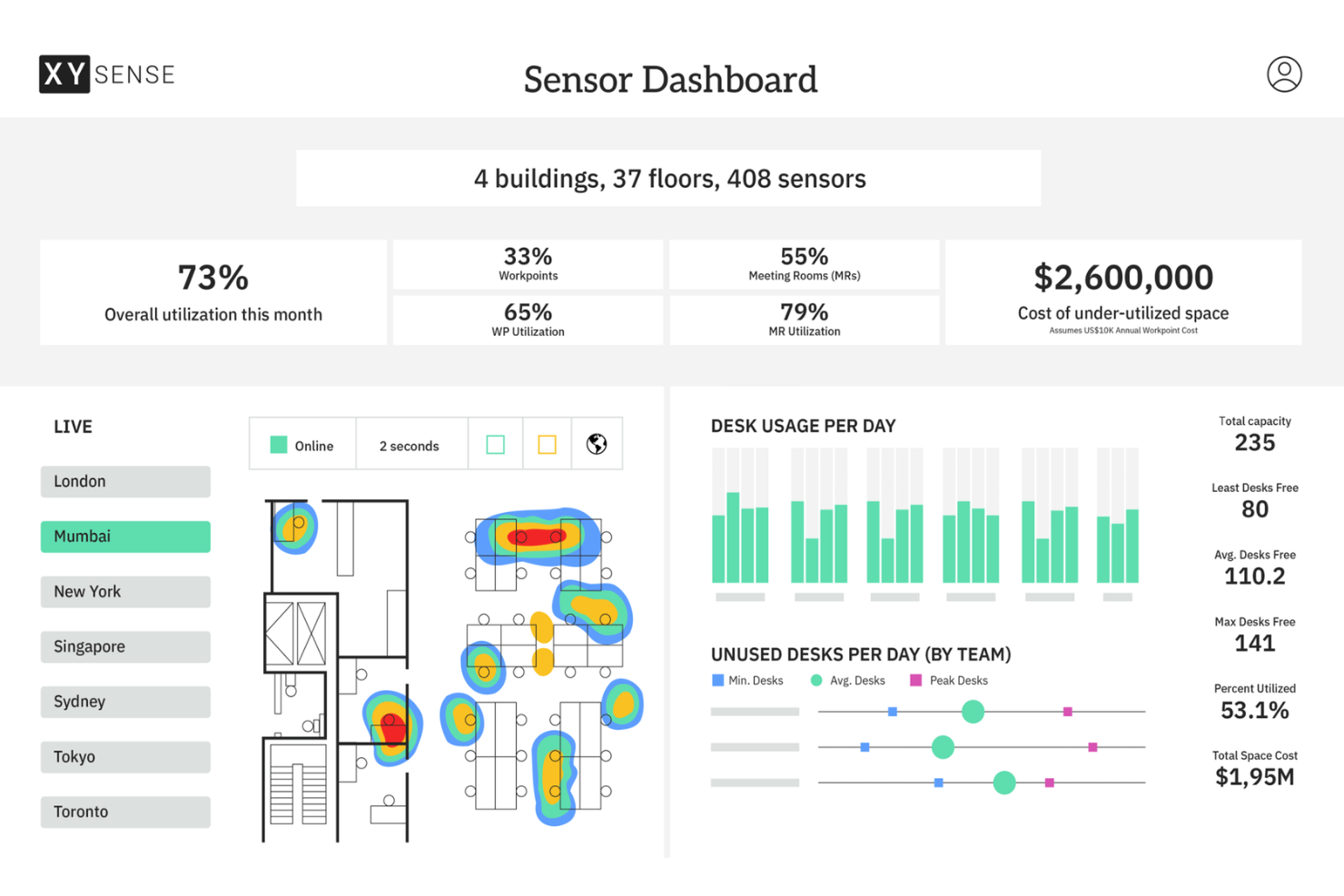
XY Sense is an occupancy intelligence platform that combines wireless sensors, a real-time insights dashboard, and an API to track how meeting rooms, open areas, small spaces, and building entries are used throughout the workday.
Who Is XY Sense Best For?
XY Sense is a strong fit for enterprise workplace teams and corporate real estate managers who need precise, floor-level occupancy data across large, multi-zone office environments.
Why I Picked XY Sense
I picked XY Sense as one of the best because its Area Pro Sensor covers up to 3,000 sq ft per unit and tracks people to within one foot, updating every two seconds. That level of precision means I can map real movement patterns across large open floors, not just detect whether a zone is occupied. I also like that the sensors run on wired PoE, so there's no battery maintenance, degrading data quality over time across a large deployment.
XY Sense Key Features
- Occupancy replays: Review a visual, time-stamped playback of how desks, rooms, and floors were used throughout the day
- Predictive forecasting: View projected demand and capacity trends before they become visible in real-time data
- Neighbourhood and department balancing: See how specific teams use zones across a floor to inform space allocation decisions
- Customizable alerts: Set occupancy thresholds for specific spaces and get notified the moment those thresholds are crossed
XY Sense Integrations
Integrations include Microsoft, Google, Appspace, Calven, Entrak, GoSpace, Habitap, HubStar, NHance, and Nura.
Pros and Cons
Pros:
- Real-time desk-level occupancy detection available
- Thermal sensing avoids collecting identifiable data
- Battery-powered sensors need no wired infrastructure
Cons:
- Dashboard reporting could offer deeper granularity
- Limited booking features compared to competitors
Andere software voor bezettingsregistratie
Hier zijn enkele aanvullende opties voor software voor bezettingsregistratie die mijn shortlist niet hebben gehaald, maar die toch de moeite waard zijn om te bekijken:
- VergeSense
For AI-powered spatial analytics
- SpaceIQ
For scenario-based office space planning
- YAROOMS
For AI assistant integration in Teams
- Tactic
For unified workplace request management
- Archie
For coworking space automation
- Officely
For chat-based check-ins via Teams
- OfficeSpace
For visual seat allocation layouts
- Eden Workplace
For connected desk and visitor reservations
- HybridHero
With integrated employee leave workflows
- Maptician
For multi-floor real-time presence mapping


How I Evaluate Occupancy Tracking Software
I evaluate occupancy tracking tools across two layers: the baseline capabilities every platform must have—like real-time monitoring and HRIS sync—and what separates the best fits for hybrid HR teams.
Core Functionality (Table Stakes For This List)
When I'm selecting tools for my list, I rank each one on a scale from 0 (does not offer the functionality) to 5 (excels in this area) for each core functionality listed below. Then, I calculate the tool's total score into a percentage. Each tool needs to achieve a minimum total score of 65% to be considered for inclusion.
- Real-Time Occupancy Monitoring: I look for live headcount visibility across buildings, floors, and zones so workplace leaders can spot underused wings or overcrowded areas as the workday unfolds.
- Attendance & Check-In Tracking: Whether it's badge swipes, mobile check-ins, or Wi-Fi detection, I evaluate how many automated methods a platform supports and how reliably it logs individual employee presence.
- Space Utilization Analytics: Strong reporting goes beyond raw counts. I check for historical trend dashboards, peak-time analysis, and the ability to filter by department or location to support workforce planning conversations.
- Capacity Threshold Management: I look at whether admins can set per-space occupancy caps and receive automated alerts when a floor or meeting area approaches its limit, which matters for safety compliance and event planning.
- Desk & Room Booking Integration: Booking data only tells half the story. I evaluate whether a tool reconciles reservations against actual usage, surfacing ghost bookings and no-shows that distort utilization reports.
- HRIS & Calendar Integration: Syncing with platforms like Workday, BambooHR, Google Calendar, or Outlook keeps employee rosters and schedules current, so I check for native connectors and the depth of data flowing between systems.
Once I have a list of tools that meet this criteria, I consider what sets each platform apart.
Differentiating Factors (What Sets Vendors Apart)
Here's how I compare and contrast different vendors:
Standout Features
Real-time heatmaps make a difference when workplace leaders need to assess density at a glance. I look for live floor plan overlays that color-code zones by occupancy level, so you can spot a packed floor without pulling a report. Predictive analytics add another layer—platforms that forecast next week's occupancy from historical patterns help HR teams plan desk availability proactively. Sensor-agnostic hardware support also matters, since teams that inherit existing sensors shouldn't need to rip and replace to adopt a new platform.
Beyond Features
Privacy and compliance posture is one of the first things I check. HR teams tracking employee presence need anonymized counting methods and clear GDPR or CCPA documentation, especially when legal reviews how occupancy data is collected. Deployment flexibility matters too. I evaluate whether a platform supports wireless sensors that retrofit into existing office infrastructure without major construction. Pricing structure also shapes long-term viability—I look at whether vendors charge per sensor, per location, or per square foot, and whether hardware is bundled as a service or requires upfront capital investment.
Zo kies je software voor bezettingsregistratie
Het is gemakkelijk om te verzanden in lange lijsten met functies en complexe prijsstructuren. Om je te helpen gefocust te blijven tijdens je unieke selectieproces voor software, vind je hier een checklist met factoren om rekening mee te houden:
| Factor | Waar je rekening mee moet houden |
|---|---|
| Schaalbaarheid | Kan deze tool de omvang van je team en toekomstige groei op meerdere locaties of afdelingen aan, zonder grote systeemwijzigingen of extra kosten? |
| Integraties | Werkt de software samen met je HRIS, agenda of toegangscontrolesystemen, zodat je handmatige gegevensinvoer voorkomt en nauwkeurige aanwezigheidsregistraties bijhoudt? |
| Aanpasbaarheid | Kun je beleidsregels, plattegronden, gebruikersrechten en werkplekcategorieën eenvoudig aanpassen aan je specifieke hybride werk- of kantoorvereisten? |
| Gebruiksgemak | Zullen werknemers en beheerders de interface snel begrijpen, of komt de ingebruikname tot stilstand door onduidelijke navigatie, langzaam laden of onnodige stappen? |
| Implementatie en introductie | Zijn er sjablonen, installatiehandleidingen of ondersteuningsbronnen om je te helpen de tool te configureren en directorygegevens of plattegronden te importeren met minimale IT-ondersteuning? |
| Kosten | Sluiten de prijsniveaus aan bij je budget, of zijn er dure aanvullingen en gebruikslimieten die van een lage beginprijs kunnen leiden tot hoge totale kosten? |
| Beveiligingsmaatregelen | Biedt de oplossing sterke gebruikersauthenticatie, rolgebaseerde toegang, gegevensversleuteling en opties om te voldoen aan privacynormen zoals de AVG? |
| Beschikbaarheid van ondersteuning | Krijg je snel hulp als er problemen ontstaan, en biedt de leverancier livechat, telefonische ondersteuning of introductiediensten die aansluiten bij je zakelijke behoeften? |
Wat is software voor bezettingsregistratie?
Software voor het bijhouden van bezetting is een digitale tool die controleert, registreert en beheert hoe mensen gedeelde ruimtes binnen een werkplek of faciliteit gebruiken. Deze systemen bieden realtime en historische gegevens over bezettingspatronen, ondersteunen reserveringen van bureaus of ruimtes en helpen teams capaciteits- en veiligheidsbeleid te handhaven. Met behulp van deze informatie kunnen organisaties het ruimtegebruik optimaliseren, de werkplekervaring verbeteren en weloverwogen beslissingen nemen over kantoorindelingen en resourceplanning.
Functies van software voor het bijhouden van bezetting
Let bij het selecteren van software voor het bijhouden van bezetting op de volgende belangrijke functies:
- Realtime bezettingsmonitoring: Houdt het aantal mensen in een ruimte op elk moment bij met behulp van sensoren, gebruikersaanmeldingen of systeemintegraties, zodat je veilig en efficiënt ruimtegebruik kunt handhaven.
- Reservering van bureaus en ruimtes: Laat werknemers specifieke bureaus of vergaderruimtes vooraf reserveren, waardoor conflicten worden verminderd, hybride werken wordt ondersteund en er duidelijk inzicht ontstaat in toekomstige bezetting.
- Interactieve plattegronden: Biedt digitale kaarten die realtime beschikbare en bezette ruimtes tonen, zodat werknemers eenvoudig werkplekken of vergaderruimtes kunnen vinden en reserveren die aan hun behoeften voldoen.
- Handhaving van capaciteitslimieten: Beperkt reserveringen automatisch of verstuurt waarschuwingen wanneer ruimtes de maximale bezetting dreigen te overschrijden, ter ondersteuning van de naleving van veiligheids- of afstandsbeleid.
- Gebruiksanalyses en rapportage: Biedt gegevens en visuele dashboards over hoe ruimtes in de loop van de tijd worden gebruikt, zodat HR- en faciliteitenteams trends, onderbenutting of knelpunten kunnen identificeren.
- Bezoekersbeheer: Houdt externe gasten bij die de werkplek betreden, waardoor nauwkeurige bezettingsregistraties, soepelere aanmeldingen en betere beveiliging voor werknemers en bezoekers worden gegarandeerd.
- Mobiele toegang: Stelt gebruikers in staat om onderweg de beschikbaarheid te controleren, reserveringen te maken en meldingen te ontvangen, wat essentieel is voor hybride of flexibele werkomgevingen.
- Integratie met agenda's: Synchroniseert reserveringen en bezettingsgegevens met je bestaande agendasystemen, zodat reserveringsinformatie naast vergaderingen en werknemersagenda's wordt weergegeven.
Veelvoorkomende AI-functies van software voor het bijhouden van bezetting
Naast de hierboven genoemde standaardfuncties van software voor het bijhouden van bezetting integreren veel van deze oplossingen AI met functies zoals:
- Voorspellende analyses van ruimtegebruik: Gebruikt AI om historische bezettingstrends te analyseren en de toekomstige vraag naar ruimte te voorspellen, zodat je drukke periodes kunt plannen en kantoorindelingen kunt optimaliseren.
- Intelligente reserveringsaanbevelingen: Stelt de beste beschikbare bureaus of vergaderruimtes voor op basis van voorkeuren van werknemers, werkpatronen en teamschema's, waardoor tijd wordt bespaard en de tevredenheid op de werkplek wordt verbeterd.
- Geautomatiseerde anomaliedetectie: Controleert bezettingsgegevens op ongebruikelijke patronen, zoals aanhoudende overbezetting of onderbenutte ruimtes, en markeert vervolgens problemen voor beoordeling en actie.
- Beleidshandhaving op basis van AI: Past machinelearningmodellen toe om toegangsrechten en reserveringsregels automatisch aan te passen in reactie op veranderend werkplekbeleid of daadwerkelijk gebruik.
- Op bezetting gebaseerde schoonmaakplanning: Plant schoonmaak of onderhoud op basis van realtime en voorspeld ruimtegebruik, zodat drukbezochte ruimtes prioriteit krijgen met het oog op gezondheid en veiligheid.
Voordelen van software voor het bijhouden van bezetting
Het implementeren van software voor het bijhouden van bezetting biedt verschillende voordelen voor je team en je bedrijf. Hier zijn enkele voordelen waar je naar kunt uitkijken:
- Efficiënter ruimtegebruik: Krijg realtime en historische gegevens om kantoorindelingen te optimaliseren, verspilde ruimte te elimineren en ervoor te zorgen dat middelen aansluiten bij de behoeften van het team.
- Verbeterde veiligheid en naleving: Handhaaf capaciteitslimieten automatisch en houd de bezetting bij ter ondersteuning van gezondheidsrichtlijnen, noodplanning en organisatiebeleid.
- Verbeterde werknemerservaring: Maak het voor werknemers eenvoudiger om geschikte werkplekken te vinden en te reserveren, en ondersteun zo flexibele werkregelingen en samenwerking.
- Weloverwogen besluitvorming: Gebruik analyses en prognoses om kantooruitbreidingen, consolidaties of herinrichtingen te plannen op basis van reële bezettingstrends en behoeften.
- Minder administratieve werkbelasting: Automatiseer routinetaken zoals bureaureserveringen, bezoekersregistratie en rapportage, zodat HR- en faciliteitenteams zich kunnen richten op werk met een hogere toegevoegde waarde.
- Besparingen op faciliteiten: Identificeer onderbenutte ruimtes en mogelijkheden om ruimte af te bouwen of een andere bestemming te geven, zodat huur- en operationele kosten in de loop van de tijd worden verlaagd.
- Betere beveiliging van de werkplek: Houd bij wie er op locatie is, beheer de toegang van bezoekers en bewaar nauwkeurige logboeken ter ondersteuning van noodrespons of audits.
Kosten en prijzen van software voor het bijhouden van bezetting
Voor het selecteren van software voor bezettingsregistratie is inzicht nodig in de verschillende beschikbare prijsmodellen en abonnementen. De kosten variëren op basis van functies, teamgrootte, uitbreidingen en meer. De onderstaande tabel geeft een overzicht van veelvoorkomende abonnementen, hun gemiddelde prijzen en de gebruikelijke functies die in oplossingen voor bezettingsregistratie zijn inbegrepen:
Vergelijkingstabel van abonnementen voor software voor bezettingsregistratie
| Plantype | Gemiddelde prijs | Veelvoorkomende functies |
|---|---|---|
| Gratis abonnement | $0 | Basisregistratie van bezetting, beperkte reservering van bureaus, ondersteuning voor één locatie en basisrapportage. |
| Persoonlijk abonnement | $5-$15/gebruiker/maand | Reservering van bureaus en ruimtes, standaardplattegronden, mobiele toegang, e-mailondersteuning en eenvoudige analyses. |
| Zakelijk abonnement | $15-$35/gebruiker/maand | Ondersteuning voor meerdere locaties, geavanceerde analyses, bezoekersbeheer, integraties en geautomatiseerde handhaving van capaciteitslimieten. |
| Enterprise-abonnement | $35-$70/gebruiker/maand | Aangepaste workflows, prioriteitsondersteuning, eenmalige aanmelding, nalevingstools, API-toegang en toegewijde klantondersteuning. |
Veelgestelde vragen over software voor bezettingsregistratie
Hier vindt u antwoorden op veelgestelde vragen over software voor bezettingsregistratie:
Hoe werkt software voor bezettingsregistratie?
Software voor bezettingsregistratie gebruikt sensoren, check-ins van medewerkers of systeemintegraties om realtimegegevens te verzamelen over het aantal mensen in elk gedeelte van een werkplek. Deze gegevens worden verwerkt en weergegeven via cloudgebaseerde dashboards, interactieve heatmaps of rapporten, zodat teams ruimte, reserveringen en capaciteitslimieten zonder giswerk kunnen beheren.
Kan software voor bezettingsregistratie helpen bij hybride werkregelingen?
Ja, software voor bezettingsregistratie wordt vaak gebruikt ter ondersteuning van hybride werken, doordat medewerkers bureaus of ruimtes kunnen reserveren op de dagen dat ze op kantoor komen. Dit verbetert de gebruikerservaring voor teams op afstand en geeft managers inzicht in het kantoorgebruik, zodat zij indelingen, personeelsbezetting of beleidsregels kunnen aanpassen wanneer de behoeften veranderen.
Naar welke integraties moet ik zoeken in software voor bezettingsregistratie?
U moet zoeken naar integraties met HR-systemen, agenda’s (zoals Google of Outlook), toegangscontrole, HVAC-units en communicatieplatforms. Met de juiste integraties kunt u reserveringen automatiseren, check-ins ondersteunen en gegevens actueel houden zonder handmatige invoer.
Is software voor bezettingsregistratie geschikt voor organisaties met meerdere locaties?
Ja, de meeste moderne oplossingen kunnen de bezetting op meerdere locaties of in meerdere kantoren vanuit één dashboard beheren. Zo kunt u gebruikspatronen volgen, beleidsregels handhaven en rapporten maken, ongeacht of uw personeelsbestand gecentraliseerd is of over een regio verspreid is.
Hoe beschermen deze systemen de privacy van medewerkers?
Goede software voor bezettingsregistratie beschermt de privacy door geanonimiseerde of geaggregeerde gegevens te gebruiken, individuele tracking tot een minimum te beperken en te voldoen aan regelgeving zoals de AVG. Beheerdersinstellingen bepalen ook welke informatie verschillende gebruikers kunnen bekijken. Controleer altijd de privacyverklaring van een leverancier voordat u de software implementeert.