

Um sistema de conformidade de RH para pequenas empresas é um software de RH que ajuda a gerir a legislação laboral, os regulamentos e as políticas da empresa, para que a sua equipa se mantenha em conformidade e evite erros dispendiosos.
Se está à procura da solução certa, sabe como os regulamentos podem mudar rapidamente — e como é fácil para as equipas pequenas não acompanharem atualizações ou documentação essenciais.
Esta lista ajudá-lo-á a comparar os principais sistemas de conformidade de RH para pequenas empresas em 2026, para que possa encontrar uma plataforma adequada às suas necessidades, que apoie as suas pessoas e mantenha a sua empresa protegida.
Why Trust Our Software Recommendations
6,700+
Reviews
20
Industry experts
16+
Evaluation factors
14
Years
Our team has been testing and reviewing software since 2012. As HR experts ourselves, we know how difficult—and important—it is to choose the right software.
For this guide, we evaluated tools using hands-on testing and independent research, scoring tools using our selection criteria. We also draw on insights from industry thought leaders and practicing HR experts.
Our reviews reflect our human editorial judgment, not a sales pitch.
Expert reviewers:
- Phil GrayCOO
 Kim BehnkeHR Tech Editor & Analyst
 Josh BarkerPeople Ops Manager

Tabela comparativa de sistemas de conformidade de RH para pequenas empresas
Esta tabela comparativa resume os detalhes dos preços dos meus principais sistemas de conformidade de RH para pequenas empresas
| Tool | Best For | Trial Info | Price | ||
|---|---|---|---|---|---|
| 1 | Best for small business HR compliance support | Free demo available | Pricing upon request | Website | |
| 2 | Best for centralized global workforce records | Free demo available | From $5/user/month | Website | |
| 3 | Best for hourly team compliance | Free plan + 30-day free trial + free demo available | From $99/month (billed annually) | Website | |
| 4 | Best for intuitive policy management | Free plan + free demo available | From $2/user/month (billed annually) | Website | |
| 5 | Best for global workforce compliance | Free demo available | From $29/user/month | Website | |
| 6 | Best for international employment compliance | Free demo available | From $599/user/month (billed annually) | Website | |
| 7 | Best for scalable compliance solutions | Free demo available | Pricing upon request | Website | |
| 8 | Best for automated compliance alerts | Free demo available | Pricing upon request | Website | |
| 9 | Best for unified compliance across systems | Free demo available | Pricing upon request | Website | |
| 10 | Best for industry-specific compliance guidance | Free demo available | Pricing upon request | Website |


Avaliações de sistemas de conformidade de RH para pequenas empresas
Seguem-se os meus resumos detalhados dos sistemas de conformidade de RH para pequenas empresas que entraram na minha lista restrita. As minhas avaliações oferecem uma análise detalhada das funcionalidades, dos casos de utilização mais adequados e dos preços de cada sistema, para o ajudar a encontrar a melhor opção para si.
 Best for small business HR compliance support
- Free demo available
- Pricing upon request

Mitratech Mineral manages HR compliance with policy tools and legal guidance. Mitratech Mineral is an HR compliance platform that helps small and mid-sized businesses manage employment law requirements through compliance monitoring, employee handbook tools, HR guidance, policy resources, and employee training.
Who Is Mitratech Mineral Best For?
Mitratech Mineral is a strong fit for small business owners and HR generalists who need practical compliance support without maintaining an in-house legal or compliance team.
Why I Picked Mitratech Mineral
I picked Mitratech Mineral because it gives small businesses access to both compliance tools and experienced HR professionals in one platform. Instead of researching employment laws independently or hiring outside consultants, users receive personalized compliance alerts, attorney-reviewed resources, and expert guidance when complex workplace situations arise. I also like that the platform combines handbook management, employee training, and compliance planning, making it easier for lean HR teams to stay organized as regulations evolve.
Mitratech Mineral Key Features
- Mineral Intelligence™: Monitor changing employment laws and receive personalized compliance recommendations based on your business.
- Smart Employee Handbook Plus: Create and maintain compliant employee handbooks with automatic policy updates and multi-state support.
- Employee training library: Deliver workplace compliance and employee development training through built-in online courses.
- Compliance calendar: Track important federal and state compliance deadlines from one centralized dashboard.
Mitratech Mineral Integrations
Mitratech Mineral primarily operates through partnerships with payroll providers, insurance brokers, PEOs, and HCM platforms. It is also available through the PrismHR Marketplace. Public documentation of native integrations remains limited, and Zapier support is not currently documented.
Pros and Cons
Pros:
- Expert HR support
- Built-in HR training
- Personalized compliance guidance
Cons:
- Limited native integrations
- Handbook tools may cost extra
Learn more about Mitratech Mineral: Best for centralized global workforce records
- Free demo available
- From $5/user/month
Visit WebsiteCustomer Rating:4.8/5
Deel HR dashboard showing payroll, compliance tasks, employment verification, and contractor management tools in one centralized platform for small businesses. Deel HR is an HR compliance platform for small businesses that brings together global employee records, automated compliance tools, onboarding workflows, and document management in one system.
Who Is Deel HR Best For?
Deel HR suits small businesses and HR teams managing global employees, contractors, and compliance across multiple countries.
Why I Picked Deel HR
I picked Deel HR as one of the best because I can keep all global workforce records in one place, no matter where my team members are based. I use Deel HR to store contracts, compliance documents, and personal data for employees and contractors across multiple countries. The platform lets me quickly access and update records, which helps my team stay organized and audit-ready.
Deel HR Key Features
- Automated worker classification: Instantly determines contractor or employee status based on local laws.
- Global onboarding workflows: Guides new hires through country-specific onboarding steps and document collection.
- E-signature support: Lets you send, sign, and store contracts and compliance documents digitally.
- Custom document templates: Allows you to create and manage templates for contracts, NDAs, and HR policies.
Deel HR Integrations
Deel HR offers native integrations with BambooHR, Workday, Greenhouse, HiBob, QuickBooks, Xero, NetSuite, Expensify, Okta, and Slack. An API is available for custom integrations.
Pros and Cons
Pros:
- Native integrations with major HR and payroll tools
- Country-specific onboarding workflows for new hires
- Built-in contract and document management tools
Cons:
- Some integrations require higher-tier plans
- Limited customization of onboarding workflows
 Best for hourly team compliance
- Free plan + 30-day free trial + free demo available
- From $99/month (billed annually)
Visit WebsiteCustomer Rating:4.2/5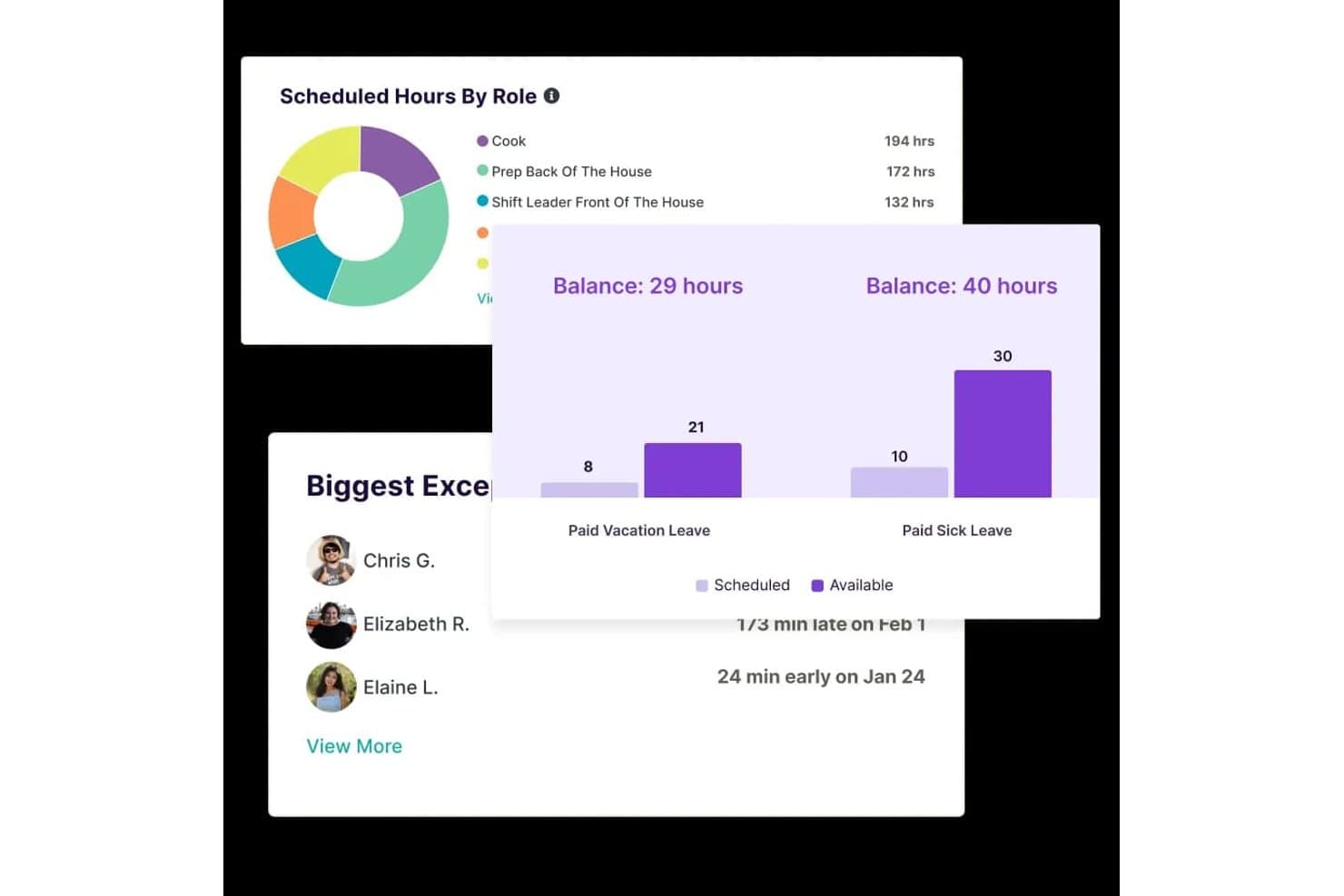
Homebase tracks scheduled hours, leave balances, and attendance exceptions. Homebase is a workforce management platform for small businesses with hourly teams that combines scheduling, time tracking, payroll, and HR compliance tools including labor-law alerts, new-hire onboarding, and certified HR advisor access.
Who Is Homebase Best For?
Homebase fits small business owners managing hourly teams who want scheduling, time tracking, and basic wage-and-hour compliance in one place without hiring dedicated HR staff.
Why I Picked Homebase
I've included Homebase in my top picks because it's built around the compliance pressures that come with running a team of hourly workers, not office employees. I love that it checks schedules against federal, state, and provincial child-labor rules before you publish them, flagging conflicts automatically. Its HR Pro tier also pushes email alerts when local labor laws change, like a minimum-wage increase taking effect in your area, and pairs that with certified HR advisors who can review your policies and build a custom handbook.
Homebase Key Features
- New-hire self-onboarding: Invite new employees to complete required federal and state forms, e-sign documents, and upload paperwork before their first day.
- Certification expiration alerts: Track required employee certifications and receive automatic alerts 10 days before any certification expires.
- FLSA-compliant timesheet storage: Store time cards, including edits, for 4+ years on paid plans to support recordkeeping requirements.
- Break and overtime tracking: Monitor employee breaks and overtime across locations and send alerts when employees approach overtime thresholds.
Homebase Integrations
Homebase lists various integrations, including ADP, Gusto, Paychex, QuickBooks, and Square Payroll. It also offers a JSON API for custom integrations, though data-sync behavior isn’t specified.
Pros and Cons
Pros:
- Certification alerts flag upcoming expirations
- Edited time cards support FLSA recordkeeping
- Overtime and missed-break alerts support wage compliance
Cons:
- No exempt-status guidance or misclassification flags
- HR compliance tools require the top-tier plan
 Best for intuitive policy management
- Free plan + free demo available
- From $2/user/month (billed annually)
Visit WebsiteCustomer Rating:4.8/5
TalentHR offers a dashboard interface displaying quick access to HR documents and links. TalentHR offers small businesses a straightforward way to create, update, and share HR policies without the usual complexity. If you need a system that makes policy management accessible for non-specialists and keeps your team aligned, this platform is designed for you. Its focus on intuitive workflows helps you maintain compliance and clarity as your business grows.
Why I Picked TalentHR
What sets TalentHR apart is its focus on making policy management simple and accessible for small businesses. I picked TalentHR because it lets you build, edit, and distribute HR policies directly within the platform, so you can keep everyone on the same page without extra steps.
The policy library feature helps you organize documents and updates, while built-in acknowledgment tracking ensures employees review and accept new policies. These tools make it easier for small teams to stay compliant and maintain clear communication around workplace rules.
TalentHR Key Features
In addition to its policy management tools, TalentHR offers several other features for small business HR compliance:
- Employee Records Management: Store and update employee information, documents, and contracts in a centralized location.
- Time Off Tracking: Monitor leave balances, approve requests, and generate reports on absences.
- Customizable Workflows: Set up approval processes and notifications tailored to your organization’s needs.
- Role-Based Access Controls: Assign permissions to users based on their role to protect sensitive HR data.
TalentHR Integrations
Integrations include Slack, Google Calendar, Zapier, TalentLMS, WordPress, Google Workspace, and more. An API is also available for custom integrations.
Pros and Cons
Pros:
- Role-based permissions for sensitive HR data
- Built-in document templates for HR policies
- Policy acknowledgment tracking for compliance audits
Cons:
- Limited analytics for compliance reporting
- No built-in payroll processing features
Learn more about TalentHR: Best for global workforce compliance
- Free demo available
- From $29/user/month
Visit WebsiteCustomer Rating:4.9/5
Deel offers a dashboard displaying compliance tracking with onboarding status to simplify HR management. Deel is designed for small businesses that need to manage HR compliance across multiple countries. If you’re hiring international employees or contractors, Deel helps you navigate local labor laws, contracts, and payroll requirements in over 150 countries. This platform is especially useful for teams expanding globally who want to reduce compliance risks and administrative overhead.
Why I Picked Deel
For small businesses hiring internationally, Deel stands out for its focus on global workforce compliance. Deel offers localized contract templates and automated compliance checks, helping you stay aligned with labor laws in each country where you operate.
I picked Deel because it also manages international payroll and tax filings, reducing the risk of costly compliance errors. These features make Deel a strong choice for small businesses that want to confidently expand their teams across borders without getting bogged down in legal complexity.
Deel Key Features
Some other features that make Deel useful for small business HR compliance include:
- Document Management Portal: Store, organize, and access compliance documents for all employees and contractors.
- Automated Onboarding Workflows: Guide new hires through country-specific onboarding steps and required documentation.
- Expense Management Tools: Submit, approve, and track expenses for global team members within the platform.
- Customizable Permissions: Set user roles and access levels to control who can view or edit sensitive HR and compliance information.
Deel Integrations
Integrations include SAP SuccessFactors, NetSuite, Slack, Google Workspace, Rydoo, Humaans, OpenSesame, Ramp, Thatch, and more.
Pros and Cons
Pros:
- Contractor misclassification risk assessment tools
- Real-time support for international HR questions
- Built-in compliance document storage
Cons:
- Some integrations require enterprise plan
- No built-in time tracking feature
Learn more about Deel Payroll: Best for international employment compliance
- Free demo available
- From $599/user/month (billed annually)
Visit WebsiteCustomer Rating:2.9/5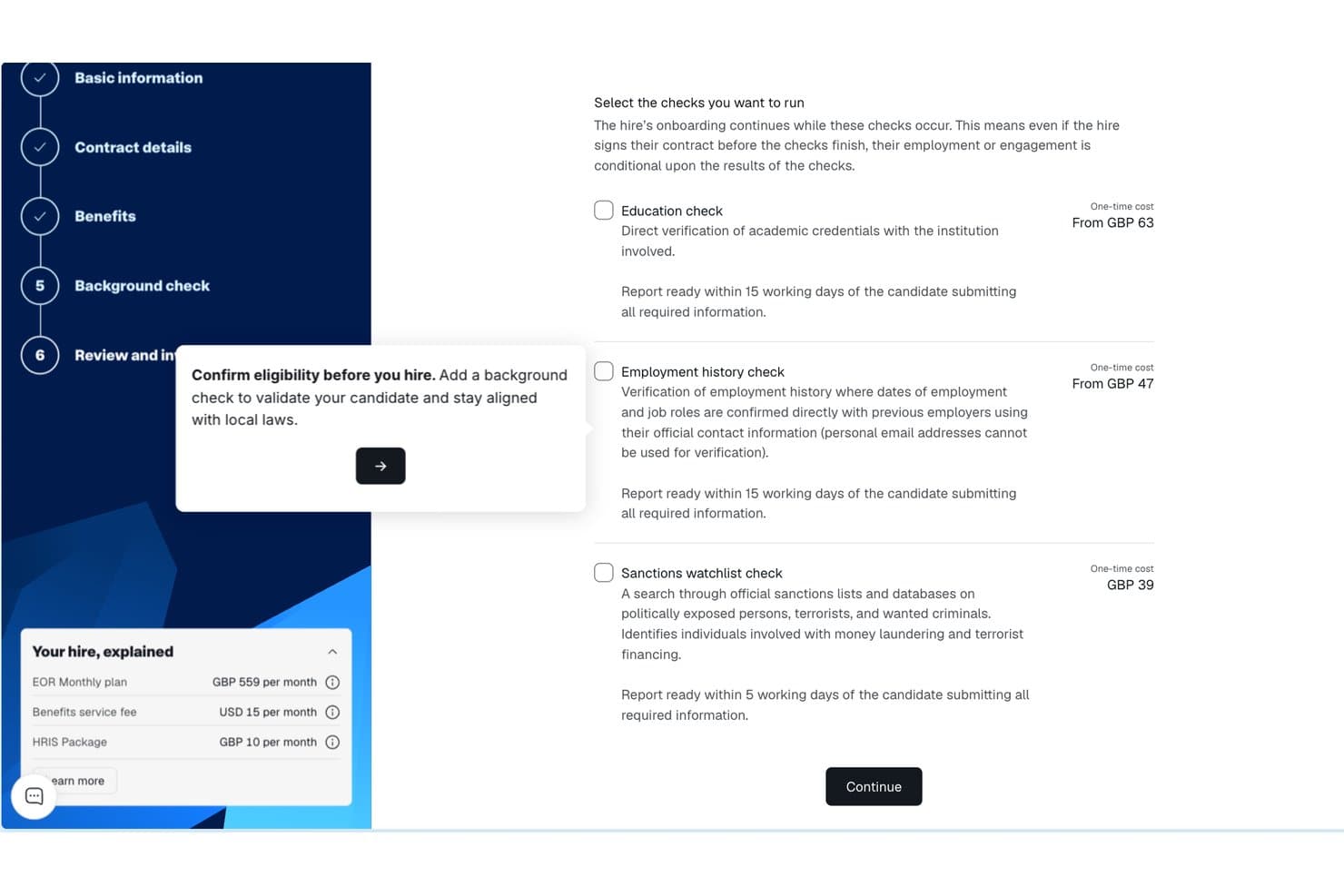
Remote background check selection screen with education, employment, and sanctions options. Remote gives small businesses a way to compliantly hire and manage employees in other countries without setting up local entities. If you’re expanding your team internationally, Remote handles employment contracts, payroll, and benefits in line with local laws. This platform is especially useful for HR teams that want to reduce legal risk and simplify cross-border employment.
Why I Picked Remote
Unlike many HR platforms, Remote is purpose-built to help small businesses manage international employment compliance without needing to set up their own legal entities abroad. I picked Remote because it acts as the legal employer of record, handling employment contracts, payroll, and statutory benefits in each country where you hire.
The platform also manages local tax withholdings and ensures your employment practices align with local labor laws. For small businesses looking to expand globally while minimizing compliance risks, Remote offers a focused solution that addresses the complexities of cross-border employment.
Remote Key Features
Some other features that make Remote valuable for small business HR compliance include:
- Self-Service Employee Portal: Employees can access payslips, contracts, and personal information directly.
- Automated Time Off Tracking: Track and manage leave requests and approvals in one place.
- IP Protection Agreements: Generate and manage intellectual property agreements for international hires.
- Localized Benefits Administration: Offer and administer country-specific benefits packages through the platform.
Remote Integrations
Integrations include QuickBooks, Zapier, HiBob, BambooHR, NetSuite, Xero, Zelt, Carta, Workday, Google Workspace, and more.
Pros and Cons
Pros:
- Localized benefits management for each country
- Automated onboarding for international employees
- Built-in IP and invention rights protection
Cons:
- Payroll processing limited to employees, not contractors
- No built-in performance management tools
 Best for scalable compliance solutions
- Free demo available
- Pricing upon request
Visit WebsiteCustomer Rating:4.2/5
Paychex dashboard displays workflow management tools in a centralized user interface. Paychex gives small businesses access to compliance tools that can scale as their needs change. If you’re looking for a solution that combines payroll, HR, and risk management with built-in compliance support, this platform is designed to adapt as your business grows. Paychex stands out for its ability to handle complex regulatory requirements across multiple states and industries.
Why I Picked Paychex
What drew me to Paychex is its ability to scale compliance support as your business grows or regulations change. Paychex offers automated tax filing and reporting, which helps small businesses stay current with federal, state, and local requirements.
I also appreciate its built-in HR compliance library, which provides up-to-date resources and templates for policies and documentation. These features make Paychex a strong fit for small businesses that need a compliance system capable of adapting to new locations, headcounts, or industry rules.
Paychex Key Features
Some other features that make Paychex useful for small business HR compliance include:
- Employee Handbook Builder: Create and update custom employee handbooks with compliance guidelines.
- Onboarding Tools: Digitally collect new hire forms and manage onboarding checklists.
- Time and Attendance Tracking: Monitor employee hours and attendance with automated tools.
- ACA Compliance Management: Track and report Affordable Care Act requirements directly within the platform.
Paychex Integrations
Integrations include QuickBooks, Sage Intacct, Xero, Jirav, 7shifts, Clover, BambooHR, goHappy, and more.
Pros and Cons
Pros:
- Employee handbook builder with legal updates
- Dedicated compliance support specialists available
- Automated state and federal tax filing
Cons:
- No built-in learning management system
- Limited customization for compliance reports
 8Best for automated compliance alerts
ADP
- Free demo available
- Pricing upon request
Visit WebsiteCustomer Rating:4.1/5
ADP offers an HR compliance system for small businesses, making it easy to manage employee changes from one centralized dashboard. If you need a system that keeps your business updated on changing employment laws, ADP offers automated compliance alerts designed for small teams. This platform suits businesses that want proactive notifications and built-in guidance to help avoid compliance mistakes. ADP can help you manage complex regulations without needing a dedicated compliance expert on staff.
Why I Picked ADP
I chose ADP because its automated compliance alerts help small businesses stay ahead of regulatory changes without extra manual effort. The system monitors federal, state, and local employment laws, then sends real-time notifications when something changes that could affect your business.
I also like that ADP includes built-in compliance checklists and document management, so you can track what needs attention and keep records organized. These features make it easier for small teams to avoid compliance gaps and reduce risk.
ADP Key Features
Some other features in ADP that small businesses may find useful include:
- Employee Handbook Wizard: Create and update a compliant employee handbook tailored to your business and location.
- HR Policy Library: Access a library of pre-built HR policies that you can customize for your organization.
- Onboarding Tools: Digitally onboard new hires with compliance-focused forms and checklists.
- Workforce Analytics: Generate reports on workforce trends, turnover, and compliance-related metrics.
ADP Integrations
Integrations include QuickBooks, Xero, Sage, Workday, HealthEquity, ZipRecruiter, ClockShark, JazzHR, OrgChart, and more.
Pros and Cons
Pros:
- Employee handbook creation and updates included
- Built-in compliance checklists for HR tasks
- Automated alerts for federal and state changes
Cons:
- Integration setup can be time-consuming
- Limited customization for compliance workflows
Learn more about ADP: Best for unified compliance across systems
- Free demo available
- Pricing upon request

Rippling's Compliance 360 dashboard displays a searchable list of open compliance issues with employee details and deadlines. Rippling brings HR, payroll, and IT compliance together in one platform, making it easier for small businesses to manage requirements across multiple systems. If you’re juggling employee data, device security, and payroll compliance, Rippling’s unified approach helps you keep everything in sync. It’s a strong fit for teams that want to automate compliance tasks, support accurate recordkeeping, and even outsource certain administrative functions while reducing the risk of gaps between disconnected tools within the HR department.
Why I Picked Rippling
Unlike many HR tools that focus on a single area, Rippling connects HR, payroll, and IT compliance in one place, which is especially useful for small businesses managing multiple systems. I picked Rippling because it automatically syncs employee data across HR and IT, so compliance updates happen everywhere at once.
The platform also lets you set up automated workflows for onboarding, offboarding, and policy management, reducing the risk of compliance gaps. For teams that want to avoid juggling separate tools and manual updates, Rippling’s unified compliance approach stands out.
Rippling Key Features
Some other features that make Rippling useful for small business HR compliance include:
- Custom Policy Builder: Create and manage company policies tailored to your organization’s needs.
- Automated Document Collection: Request, collect, and store compliance documents from employees in one place.
- Time Off Tracking: Monitor and manage employee leave balances and requests with built-in compliance checks.
- E-signature Collection: Gather legally binding signatures on compliance documents directly within the platform.
Rippling Integrations
Integrations include Slack, Google Workspace, Microsoft 365, Salesforce, Asana, Zoom, Jira, QuickBooks Online, Xero, and more.
Pros and Cons
Pros:
- Centralized dashboard for tracking compliance tasks
- Automated compliance alerts for multiple jurisdictions
- Syncs HR, payroll, and IT compliance data
Cons:
- Reporting exports can be slow during peak times
- Limited in-app guidance for complex compliance issues
Learn more about Rippling:

TriNet offers a Workforce Analytics dashboard displaying recently viewed reports in an organized interface. TriNet specializes in HR compliance solutions tailored to the unique needs of different industries, making it a strong choice for small businesses with specific regulatory requirements. If your team operates in healthcare, technology, retail, or another highly regulated field, TriNet offers guidance and tools designed for your environment. This platform helps you manage risk and stay compliant with industry-specific laws and standards that generic HR systems may overlook.
Why I Picked TriNet
Unlike many HR platforms that take a one-size-fits-all approach, TriNet stands out for its focus on industry-specific compliance guidance. This is especially important for small businesses in fields like healthcare, finance, or manufacturing, where regulations can be complex and constantly changing.
I picked TriNet because it offers tailored compliance resources, including industry-focused policy templates and access to HR experts who understand your sector’s requirements. With these features, your business can address compliance risks that generic HR systems might miss.
TriNet Key Features
Some other features that TriNet offers for small business HR compliance include:
- Payroll Processing: Manage payroll, tax filings, and wage calculations directly within the platform.
- Employee Benefits Administration: Offer and administer health, dental, vision, and retirement plans for your team.
- Time and Attendance Tracking: Track employee hours, manage PTO, and monitor attendance trends.
- HR Analytics Dashboard: Access real-time reports on workforce metrics, compliance status, and HR activities.
TriNet Integrations
Native integrations are not currently listed.
Pros and Cons
Pros:
- Employee handbook templates tailored by industry
- Automated tax filing and reporting features
- Industry-specific compliance resources for multiple sectors
Cons:
- Some features require contacting support to enable
- Platform updates may disrupt ongoing workflows
Learn more about TriNet:
Outros sistemas de conformidade de RH para pequenas empresas
Eis algumas opções adicionais de sistemas de conformidade de RH para pequenas empresas que não entraram na minha lista restrita, mas que vale a pena conhecer:
- 11GustoBest for integrated payroll and benefits
- 12Keka HRBest for implementation and onboarding support
- 13PaycomBest for customizable compliance checklists
- 14HiBobBest for real-time compliance tracking
- 15BambeeBest for dedicated HR manager support
- 16PaycorBest for compliance training resources
- 17LatticeBest for compliance-focused performance reviews
- 18NamelyBest for mid-sized business compliance needs
- 19BLR HR HeroBest for expert-authored compliance templates
- 20SixFiftyBest for automated legal document generation
How I Evaluate HR Compliance Systems for Small Business
I split my evaluation into baseline requirements—like multi-jurisdiction law tracking and I-9 management—and differentiators that separate the best tools for lean HR teams.
Core Functionality (Table Stakes For This List)
When I'm selecting tools for my list, I rank each one on a scale from 0 (does not offer the functionality) to 5 (excels in this area) for each core functionality listed below. Then, I calculate the tool's total score into a percentage. Each tool needs to achieve a minimum total score of 65% to be considered for inclusion.
- Labor Law Compliance Tracking: I check whether the platform monitors federal, state, and local law changes and sends alerts—for example, when a new paid leave mandate takes effect in a jurisdiction where you have employees.
- Employee Records Management: Secure, organized personnel files matter, so I evaluate how each tool handles document storage, retention schedules, and access permissions for sensitive items like offer letters and disciplinary records.
- Policy & Handbook Management: I look for tools that let you build and distribute employee handbooks with e-signature acknowledgment tracking, especially those offering state-specific policy templates you can customize.
- Mandatory Reporting & Filings: Each tool should support key government forms and filings like I-9s, W-4s, EEO-1 reports, and ACA submissions, with built-in error checks to reduce rejected or late filings.
- Compliance Training Tracking: I evaluate whether the platform assigns, delivers, or tracks required training—like anti-harassment or workplace safety courses—and sends reminders before certifications expire.
- Audit Trails & Reporting: Clear, timestamped logs of every administrative and employee action are what I look for here, along with the ability to generate export-ready compliance reports ahead of an audit.
Once I have a list of tools that meet the criteria, I consider what sets each platform apart.
Differentiating Factors (What Sets Vendors Apart)
Here's how I compare and contrast different vendors:
Standout Features
Access to certified HR advisors is a major differentiator, especially when a small team needs guidance on a tricky termination or leave request. I also look for multi-state compliance automation, which matters as soon as you hire your first remote employee in a new jurisdiction. Built-in compliance risk assessments round things out—tools that score your current posture and flag gaps give you a clear action plan before issues escalate.
Beyond Features
Pricing and plan structure matter here—I evaluate whether a vendor's per-employee pricing stays realistic as a small team grows from 10 to 50 people. Integrations are equally important; a compliance system that connects with your existing payroll provider and benefits carriers keeps data consistent without manual re-entry. I also consider onboarding support, since an office manager juggling HR duties needs guided setup and ready-made compliance checklists, not a self-serve knowledge base alone.
Como escolher um sistema de conformidade de RH para pequenas empresas
É fácil ficar atolado em listas extensas de funcionalidades e estruturas de preços complexas. Para o ajudar a manter o foco enquanto analisa o seu processo específico de seleção de software, eis uma lista de verificação dos fatores a ter em conta:
| Fator | O que considerar |
|---|---|
| FatorEscalabilidade | O que considerarO sistema apoiará a sua empresa à medida que esta cresce, adiciona localizações ou aumenta o número de colaboradores? Verifique os limites de utilizadores e as opções de atualização. |
| FatorIntegrações | O que considerarA ferramenta liga-se aos seus sistemas de processamento salarial, HRIS ou gestão documental? Confirme as integrações nativas para evitar trabalho manual. |
| FatorPersonalização | O que considerarPode adaptar os fluxos de trabalho, as atribuições de formação e os relatórios às suas políticas e necessidades regulamentares? Evite configurações rígidas e uniformes. |
| FatorFacilidade de utilização | O que considerarA sua equipa de RH e os colaboradores considerarão a interface intuitiva? Teste se a navegação é clara e se os requisitos de formação são reduzidos. |
| FatorImplementação e integração inicial | O que considerarQuanto tempo demorará a pôr o sistema a funcionar? Informe-se sobre o apoio à migração, os recursos de integração inicial e o tempo habitual até obter resultados. |
| FatorCusto | O que considerarOs escalões de preços são transparentes e previsíveis? Esteja atento a taxas ocultas, cobranças por utilizador ou custos adicionais relativos aos módulos de conformidade. |
| FatorMedidas de segurança | O que considerarO sistema disponibiliza encriptação, controlos de acesso e registos de auditoria? Certifique-se de que cumpre as suas normas de privacidade de dados e conformidade. |
| FatorDisponibilidade do apoio | O que considerarQue canais de apoio são disponibilizados e durante que horário? Considere se precisa de ajuda 24 horas por dia, 7 dias por semana, ou de acesso a especialistas em conformidade. |
O que é um sistema de conformidade de RH para pequenas empresas?
Um sistema de conformidade de RH para pequenas empresas é um software de RH que ajuda as organizações a gerir, monitorizar e documentar a conformidade em todas as funções de recursos humanos. Estas plataformas apoiam as operações de RH, o RH central e processos mais amplos de gestão do capital humano (HCM) ao longo do ciclo de vida dos colaboradores.
São utilizadas por profissionais de RH e proprietários de pequenas empresas para realizar tarefas como o acompanhamento de candidatos, a gestão de talentos e o cumprimento de requisitos como o COBRA e os regulamentos relativos ao seguro de saúde.
Muitas ferramentas também se integram com software de processamento salarial para simplificar os fluxos de trabalho e melhorar o envolvimento e a retenção dos colaboradores. Com uma abordagem fácil de utilizar, estes sistemas centralizam as atividades de conformidade, reduzem os riscos e ajudam as equipas a manterem-se organizadas e preparadas para auditorias.
Funcionalidades
Ao selecionar um sistema de conformidade de RH para uma pequena empresa, esteja atento às seguintes funcionalidades essenciais:
- Gestão da formação em conformidade: Atribua, agende e acompanhe a conclusão dos cursos de formação obrigatórios pelos colaboradores, de modo a cumprir os requisitos regulamentares e os padrões da empresa.
- Armazenamento e gestão de documentos: Armazene, organize e recupere de forma segura documentos relacionados com a conformidade, como políticas, certificações e registos de auditoria.
- Acompanhamento do reconhecimento das políticas: Distribua políticas aos colaboradores e monitorize os reconhecimentos digitais para garantir que todos analisaram e aceitaram os documentos essenciais.
- Lembretes e alertas automatizados: Configure notificações para prazos de formação próximos, atualizações de políticas ou certificações prestes a expirar, de modo a manter as tarefas de conformidade em curso.
- Acompanhamento de incidentes e investigações: Registe incidentes no local de trabalho, documente as ações de acompanhamento e mantenha registos para auditorias ou análises jurídicas.
- Relatórios de conformidade personalizáveis: Crie e exporte relatórios sobre a conclusão da formação, o reconhecimento das políticas e outras métricas de conformidade para auditorias ou análises internas.
- Controlos de acesso baseados em funções: Limite o acesso a dados de conformidade sensíveis com base nas funções dos utilizadores, garantindo que apenas o pessoal autorizado pode consultar ou editar determinadas informações.
- Notificações de atualizações regulamentares: Receba alertas sobre alterações às leis ou aos regulamentos laborais relevantes que possam afetar os seus requisitos de conformidade.
- Automatização de fluxos de trabalho: Automatize processos de conformidade repetitivos, como listas de verificação de integração ou atribuições de formação recorrentes, para reduzir o trabalho manual.
- Registo do histórico de auditoria: Mantenha um registo detalhado de todas as ações e alterações relacionadas com a conformidade no sistema, para apoiar a transparência e a responsabilização.
Benefícios
A implementação de um sistema de conformidade de RH para uma pequena empresa proporciona vários benefícios à sua equipa e à sua empresa. Eis alguns dos benefícios que pode esperar:
- Redução do risco de incumprimento: O acompanhamento centralizado e os lembretes automatizados ajudam a garantir que a sua empresa cumpre os requisitos regulamentares e evita penalizações dispendiosas.
- Preparação mais rápida para auditorias: O armazenamento organizado de documentos e o registo do histórico de auditoria facilitam a recolha e a apresentação dos registos de conformidade durante as auditorias.
- Maior responsabilização dos colaboradores: O acompanhamento do reconhecimento das políticas e a gestão da formação garantem que os colaboradores compreendem e concluem as tarefas de conformidade obrigatórias.
- Poupança de tempo para os RH: A automatização dos fluxos de trabalho e os relatórios personalizáveis reduzem o trabalho manual e libertam a equipa de RH para atividades de maior valor.
- Melhor visibilidade do estado de conformidade: Os painéis de controlo e os relatórios em tempo real proporcionam uma visão clara da conclusão da formação, do reconhecimento das políticas e das tarefas pendentes.
- Maior segurança dos dados: Os controlos de acesso baseados em funções e a gestão segura de documentos protegem as informações de conformidade sensíveis contra acessos não autorizados.
- Adaptação às alterações regulamentares: As notificações de atualizações regulamentares e os fluxos de trabalho personalizáveis ajudam a sua empresa a manter-se atualizada à medida que as leis e os requisitos evoluem.
Custos e Preço
A seleção de um sistema de conformidade de RH para uma pequena empresa exige uma compreensão dos vários modelos de preços e planos disponíveis. Os custos variam consoante as funcionalidades, a dimensão da equipa, os complementos, entre outros fatores. A tabela abaixo resume os planos comuns, os respetivos preços médios e as funcionalidades normalmente incluídas nas soluções de sistemas de conformidade de RH para pequenas empresas:
Tabela de comparação de planos para sistemas de conformidade de RH para pequenas empresas
| Tipo de plano | Preço médio | Funcionalidades comuns |
|---|---|---|
| Tipo de planoPlano gratuito | Preço médio$0 | Funcionalidades comunsArmazenamento básico de documentos de conformidade, atribuição limitada de ações de formação e relatórios simples. |
| Tipo de planoPlano pessoal | Preço médio$5-$15/utilizador/mês | Funcionalidades comunsGestão da formação em conformidade, armazenamento de documentos, lembretes automatizados e acompanhamento básico de políticas. |
| Tipo de planoPlano empresarial | Preço médio$15-$30/utilizador/mês | Funcionalidades comunsFluxos de trabalho de conformidade personalizáveis, relatórios avançados, acompanhamento de incidentes e controlos de acesso baseados em funções. |
| Tipo de planoPlano empresarial de grande dimensão | Preço médio$30-$50/utilizador/mês | Funcionalidades comunsNotificações de atualizações regulamentares, registo do histórico de auditorias, suporte dedicado e medidas de segurança avançadas. |
Perguntas frequentes sobre sistemas de conformidade de RH para pequenas empresas
Eis algumas respostas a perguntas frequentes sobre sistemas de conformidade de RH para pequenas empresas:
Como posso saber se a minha pequena empresa precisa de um sistema de conformidade de RH?
Se gere manualmente a formação dos colaboradores, a confirmação de leitura de políticas ou a documentação regulamentar, é provável que precise de um sistema de conformidade de RH. Estas ferramentas ajudam a reduzir erros, poupar tempo e garantir o cumprimento dos requisitos legais à medida que a sua empresa cresce.
Os sistemas de conformidade de RH podem ajudar com equipas distribuídas por vários estados ou equipas remotas?
Sim, a maioria dos sistemas de conformidade de RH suporta equipas distribuídas por vários estados e equipas remotas, acompanhando os requisitos específicos de cada localização e permitindo a distribuição digital de políticas e formação. Isto ajuda a manter a conformidade em diferentes jurisdições e modelos de trabalho.
O que devo procurar num sistema de conformidade se a minha empresa estiver a crescer?
Procure escalabilidade, gestão flexível de utilizadores e fluxos de trabalho personalizáveis. À medida que a sua empresa cresce, precisará de um sistema capaz de gerir mais utilizadores, adaptar-se a novos regulamentos e integrar-se com outras ferramentas de RH.
Quanto tempo demora a implementar um sistema de conformidade de RH?
O tempo de implementação varia, mas a maioria das pequenas empresas pode começar a utilizar o sistema no prazo de alguns dias a algumas semanas. Entre os fatores relevantes encontram-se a migração de dados, a formação dos utilizadores e a complexidade das suas necessidades de conformidade.
Os sistemas de conformidade de RH são suficientemente seguros para dados sensíveis dos colaboradores?
Sim, os sistemas de conformidade de RH conceituados utilizam encriptação, controlos de acesso e registos de auditoria para proteger dados sensíveis. Verifique sempre se o sistema cumpre as normas de privacidade e segurança de dados aplicáveis ao seu setor antes de o adquirir.