

O melhor software de triagem de currículos ajuda a identificar rapidamente os melhores candidatos, a reduzir o tempo de análise manual e a manter o seu processo de recrutamento a decorrer de forma eficiente.
Quando tem de lidar com um grande volume de candidaturas, a triagem manual pode tornar todo o processo mais lento e aumentar o risco de não identificar candidatos qualificados. A ferramenta certa elimina o ruído ao classificar automaticamente os currículos, destacar competências relevantes e apresentar os candidatos mais adequados às suas funções.
Com base na minha experiência como recrutador interno e avaliador experiente de software de RH, selecionei as principais soluções de triagem de currículos concebidas para oferecer rapidez, precisão e escalabilidade.
O que é um software de triagem de currículos?
O software de triagem de currículos é uma ferramenta que os recrutadores utilizam para analisar, avaliar e filtrar candidaturas a emprego, identificando os candidatos com mais competências correspondentes a cada vaga. Pode utilizá-lo para procurar palavras-chave e competências específicas, filtrar currículos com base em critérios específicos e classificar objetivamente os candidatos de acordo com os requisitos da vaga. Muitos utilizam também tecnologias de inteligência artificial (IA) que analisam informações de processos de recrutamento anteriores para melhorar os seus fluxos de trabalho de recrutamento.
Ao automatizar a fase inicial de triagem e filtragem de currículos, o software de triagem de currículos pode poupar imenso tempo aos recrutadores. Pode também melhorar os resultados do recrutamento ao utilizar IA para fazer a correspondência de competências com critérios específicos, ajudando-o a encontrar facilmente os melhores talentos. Entre outros benefícios, estão a capacidade de detetar imprecisões nos perfis profissionais, eliminar preconceitos no recrutamento, promover práticas de recrutamento diversificadas e disponibilizar ferramentas para criar uma força de trabalho eficiente e produtiva.
Porque pode confiar nas nossas recomendações de software
6,700+
Reviews
20
Industry experts
16+
Evaluation factors
14
Years reviewing software
A nossa equipa testa e analisa software desde 2012. Como especialistas em RH, sabemos o quão difícil — e importante — é escolher o software certo.
Para este guia, avaliámos as ferramentas através de testes práticos e pesquisa independente, pontuando-as de acordo com os nossos critérios de seleção. Recorremos também a contributos de líderes de opinião do setor e de especialistas em RH no ativo.
As nossas análises refletem o juízo da nossa equipa editorial, e não um discurso de vendas.
Revisores especialistas:
- Phil GrayCOO
 Kim BehnkeHR Tech Editor & Analyst
 Josh BarkerPeople Ops Manager

Tabela comparativa de preços de software de triagem de currículos
A tabela abaixo compara os detalhes de preços das minhas principais escolhas de software de triagem de currículos.
Sorted by: Default
| Tool | Starting Price | Website | |
|---|---|---|---|
Best as AI for business | 4.4 out of 5 | $8/user/month Up to 15-day free trial + demo available | Website |
Best for cross-department recruitment workflows | 4.6 out of 5 | $9/user/month Free plan + 14-day trial available | Book Demo |
Best for multilingual resume parsing | 4.4 out of 5 | Pricing upon request Free demo available | Website |
Best with AI-powered video interview analysis | Not rated | $99/month Free trial available | Website |
Best for real-time team collaboration in hiring | 4.8 out of 5 | $119/month 7-day free trial + free demo available | Website |
Best for pre-screening tests and deep resume parsing capabilities | 4.6 out of 5 | Pricing upon request Not available | Website |
Best for shortlisting candidates with automated screening and video interviewing | 4.7 out of 5 | Pricing upon request Free demo available | Website |
Best for AI-powered background checks | 4.5 out of 5 | $29.99/report Free demo available | Website |
Best for contextual candidate tracking and selection | 4.5 out of 5 | $69/month 14-day free trial | Website |
Best for customizable recruiting solutions | 4.4 out of 5 | $1,000/year Not available | Website |


Avaliações dos melhores softwares de triagem de currículos
Apresentamos uma visão abrangente dos 10 melhores softwares de triagem de currículos, com destaque para as suas características principais, preços, vantagens e desvantagens.
 Best as AI for business
- Up to 15-day free trial + demo available
- From $8/user/month
Visit WebsiteCustomer Rating:4.4/5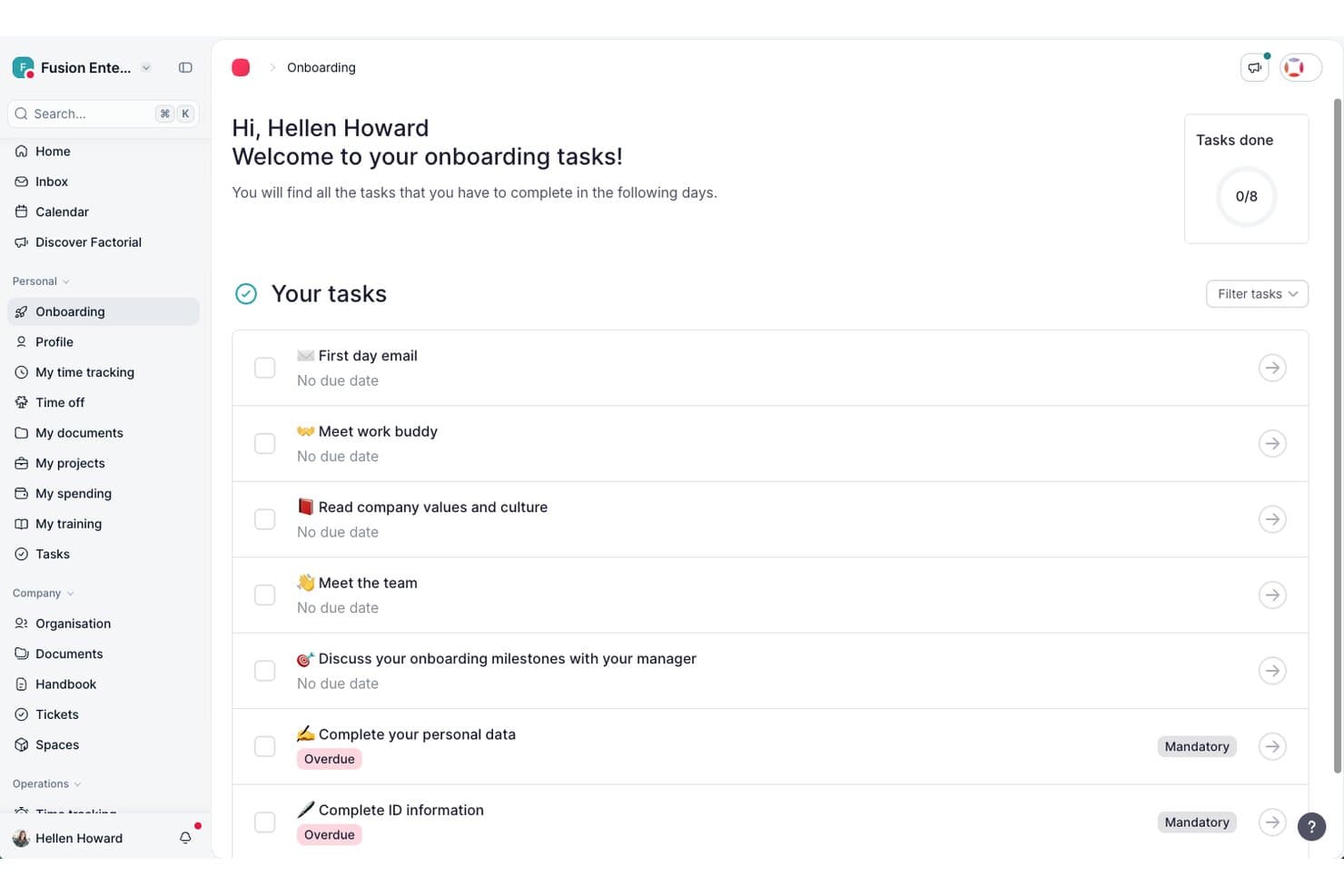
Factorial guides new hires through onboarding tasks in one place. Factorial is an AI-driven HR platform that handles resume screening, candidate tracking, CV parsing, and hiring-pipeline management alongside broader workforce operations.
Who Is Factorial Best For?
Factorial is a strong fit for HR teams that want a single AI-driven platform to manage both day-to-day operations and hiring workflows without juggling multiple tools.
Why I Picked Factorial
I've included Factorial in my top picks because it approaches resume screening as part of a broader AI for business platform, which means your hiring workflow sits alongside the same AI agent handling timetables, reports, and policy questions. I particularly like how its AI generates resume summaries and applies role context to evaluate candidates, so recruiters get a match label tied to the specific role rather than a generic read. Its AI calling feature can also reach out to candidates directly within a configured window, reducing the back-and-forth that slows early screening down.
Factorial Key Features
- Candidate pipeline customization: Teams can build and adjust hiring stages to match their specific recruitment workflow for each role.
- Screening question templates: Recruiters can create and reuse customized screening questions or draw from built-in templates when setting up job postings.
- Candidate tagging: Tags let you filter and group applicant profiles by criteria like skills, seniority level, or hiring status.
- Interview scheduling: The platform connects with team calendars so recruiters and hiring managers can coordinate and book interviews directly within Factorial.
Factorial Integrations
Factorial has documented integrations with InfoJobs, Recruitee, LinkedIn, Google Workspace, Slack, and Microsoft Power BI. It supports API keys, OAuth 2.0, webhooks, SDKs, and Zapier for custom connectivity.
Pros and Cons
Pros:
- Recruiters and managers share candidate evaluation notes
- Screening questions and pipelines fit hiring workflows
- AI summaries support role-context candidate reviews
Cons:
- Bulk uploads stop at 20 resumes
- Match labels lack disclosed scoring rationale
 Best for cross-department recruitment workflows
- Free plan + 14-day trial available
- From $9/user/month
Customer Rating:4.6/5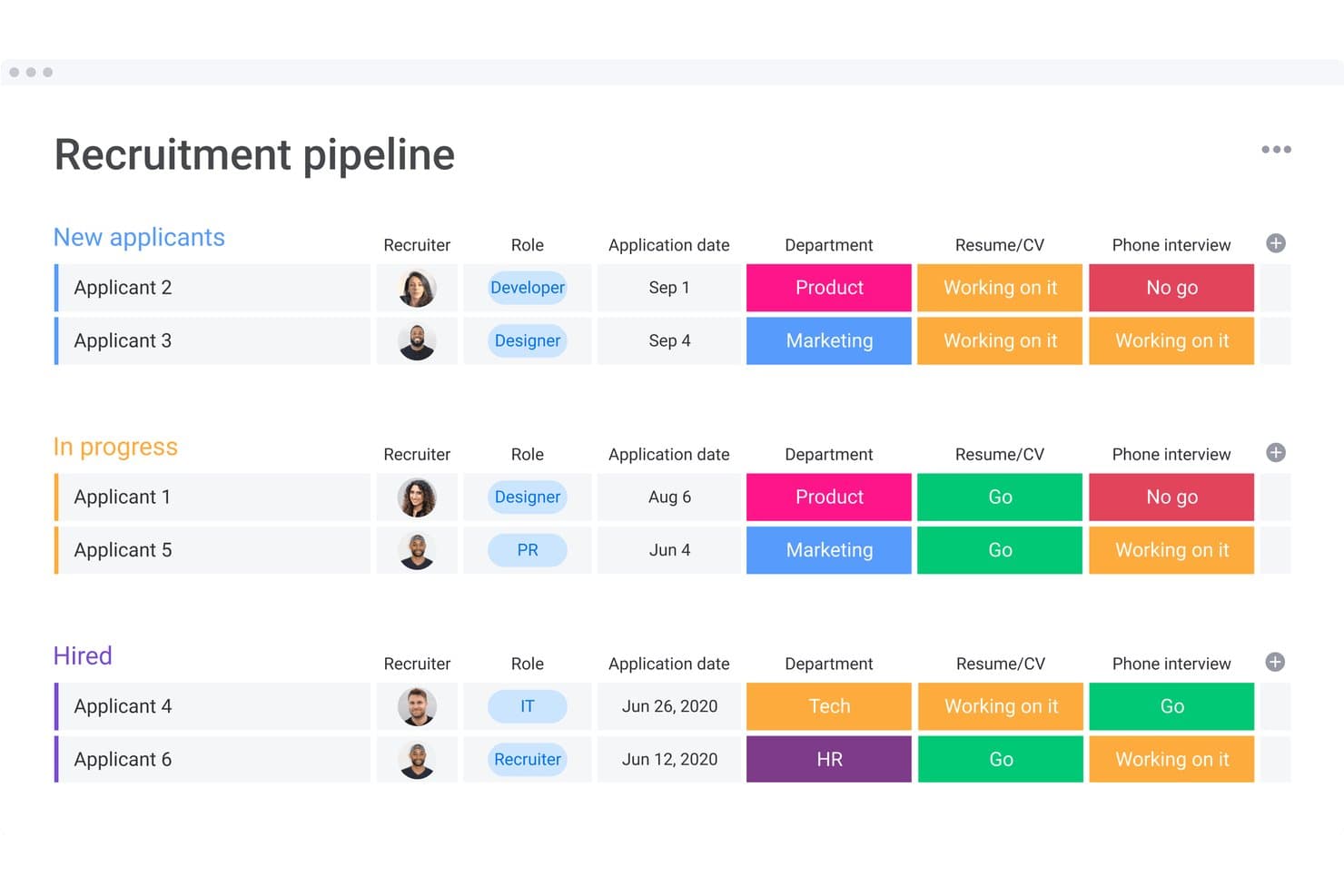
monday AI Workspace offers a recruitment pipeline board template to track applicants. monday AI Workspace is a configurable work management platform that lets recruiting teams build AI-powered candidate screening pipelines with automated resume data extraction, status routing, and cross-department hiring workflows.
Who Is monday AI Workspace Best For?
It's a strong fit for mid-size to enterprise organizations where hiring spans multiple departments and recruiters need to coordinate with managers across teams.
Why I Picked monday AI Workspace
monday AI Workspace earns its spot on my shortlist because of how well it connects screening to collaboration across departments. When a new application lands, an AI agent can extract resume data, summarize the candidate, and notify a hiring manager in a completely separate team, all automatically. I also like that the AI Sidekick lets me share that candidate summary across stakeholders without anyone needing to open a separate tool.
monday AI Workspace Key Features
- AI-powered data extraction: Extracts structured candidate details from resume files into configurable board columns.
- Custom automation builder: Lets you create rules to route, tag, or update candidate records based on triggers you set.
- Document management: Stores resumes, interview notes, and offer letters directly within recruiting boards.
- Team permissions controls: Allows granular access settings for sensitive hiring data and recruiter collaboration.
monday AI Workspace Integrations
monday AI Workspace offers hundreds of built-in integrations, including Slack, Salesforce, HubSpot, Google Workspace, Microsoft 365, Outlook, Gmail, Zoom, GitHub, and connects with Zapier. An API is available for custom integrations.
Pros and Cons
Pros:
- Configurable candidate pipelines for multi-team hiring
- Automates candidate status and routing steps
- AI summary and extraction from resumes
Cons:
- No native bulk resume processing tool
- Lacks built-in bias mitigation features
Learn more about monday AI Workspace: Best for multilingual resume parsing
- Free demo available
- Pricing upon request
Visit WebsiteCustomer Rating:4.4/5
Greenhouse allows you to bulk download and print multiple candidate resumes into a single PDF. Greenhouse is an applicant tracking system designed for HR teams and recruiters to screen, organize, and advance candidates through every stage of the hiring process.
Who Is Greenhouse Best For?
Greenhouse is a strong fit for mid-size to enterprise companies with structured, high-volume hiring needs across multiple departments or locations.
Why I Picked Greenhouse
I picked Greenhouse as one of the best because of how well it handles multilingual resume parsing for teams hiring across borders. Greenhouse job boards support 19 languages, and the interview experience is available in six—meaning candidates can apply and move through the process in their native language, and the parsed data still flows into your pipeline. I also like the Greenhouse Real Talent™ feature, which filters out fraud and spam at the top of the funnel so my team isn't wasting time reviewing illegitimate applications. Additionally, AI-generated candidate summaries give recruiters a quick read on each applicant without digging through every resume manually.
Greenhouse Key Features
- Interview scorecard templates: Build role-specific scorecards that give every interviewer a consistent framework for evaluating candidates against defined criteria.
- Talent Match: Uses AI to surface the best-fit applicants to the top of your queue based on job criteria, so your team reviews the strongest candidates first.
- Custom report builder: Filter and build reports by candidates, sources, departments, jobs, offers, and more using boolean searches and multilayer filtering.
- Candidate self-scheduling: Let candidates book their own interview times on branded self-scheduling pages, with automatic conflict checks and calendar syncing.
Greenhouse Integrations
Integrations include Checkr, Criteria Corp, Findem, HireRight, BrightHire, Pave, Grayscale, AmazingHiring, Alva Labs, and Apideck.
Pros and Cons
Pros:
- Supports fair screening through resume anonymization
- Structured scorecards keep evaluations consistent
- Accurately parses resumes submitted in multiple languages
Cons:
- Limited resume keyword tuning compared to niche parsers
- Could offer more social media integrations
 Best with AI-powered video interview analysis
- Free trial available
- From $99/month

Truffle enables smarter hiring decisions with automated candidate evaluation and matching. Truffle is an AI-driven resume screening platform designed for recruiters and HR teams who want to automate candidate evaluation and reduce manual screening time.
Who Is Truffle Best For?
Truffle is a strong fit for small to mid-sized businesses that need to screen high volumes of applicants without a large recruiting team.
Why I Picked Truffle
Truffle earns its spot on my shortlist because of how it handles AI-powered video interview analysis. I like that the AI doesn't just transcribe candidate responses—it evaluates each answer against a custom rubric and generates a match score with transparent reasoning, so I can see exactly why a candidate ranked where they did. The "Candidate Shorts" feature gives me a 30-second AI-generated recap of each interview, which means I can move through a large applicant pool without watching every full recording. I also find the AI Check flag genuinely useful—it surfaces patterns that suggest AI-assisted responses, so I can flag those candidates for a closer look before moving them forward.
Truffle Key Features
- Talent assessments: Three structured pre-employment assessments—Personality (Big Five), Situational Judgment, and Environment Fit—score candidates based on role alignment rather than rehearsed responses.
- Smart candidate ranking: Truffle ranks applicants against your defined requirements and generates a match percentage, so you can prioritize your shortlist without manually comparing profiles.
- Team reviews and scorecards: Hiring team members submit independent reviews, and Truffle surfaces consensus scores instantly using a three-option decision framework (Move Forward, Unsure, Pass).
- Candidate branding customization: Interview landing pages, instructions, and confirmation emails can carry your logo, brand colors, and custom messaging throughout the screening process.
Truffle Integrations
Integrations include Ashby, Breezy HR, and Indeed.
Pros and Cons
Pros:
- Customizable screening questions for tailored filtering
- Automated resume parsing organizes candidate data
- Plug-and-play setup takes under 15 minutes
Cons:
- Lacks advanced analytics or reporting dashboards
- No direct job board posting from the platform
Learn more about Truffle: Best for real-time team collaboration in hiring
- 7-day free trial + free demo available
- From $119/month
Visit WebsiteCustomer Rating:4.8/5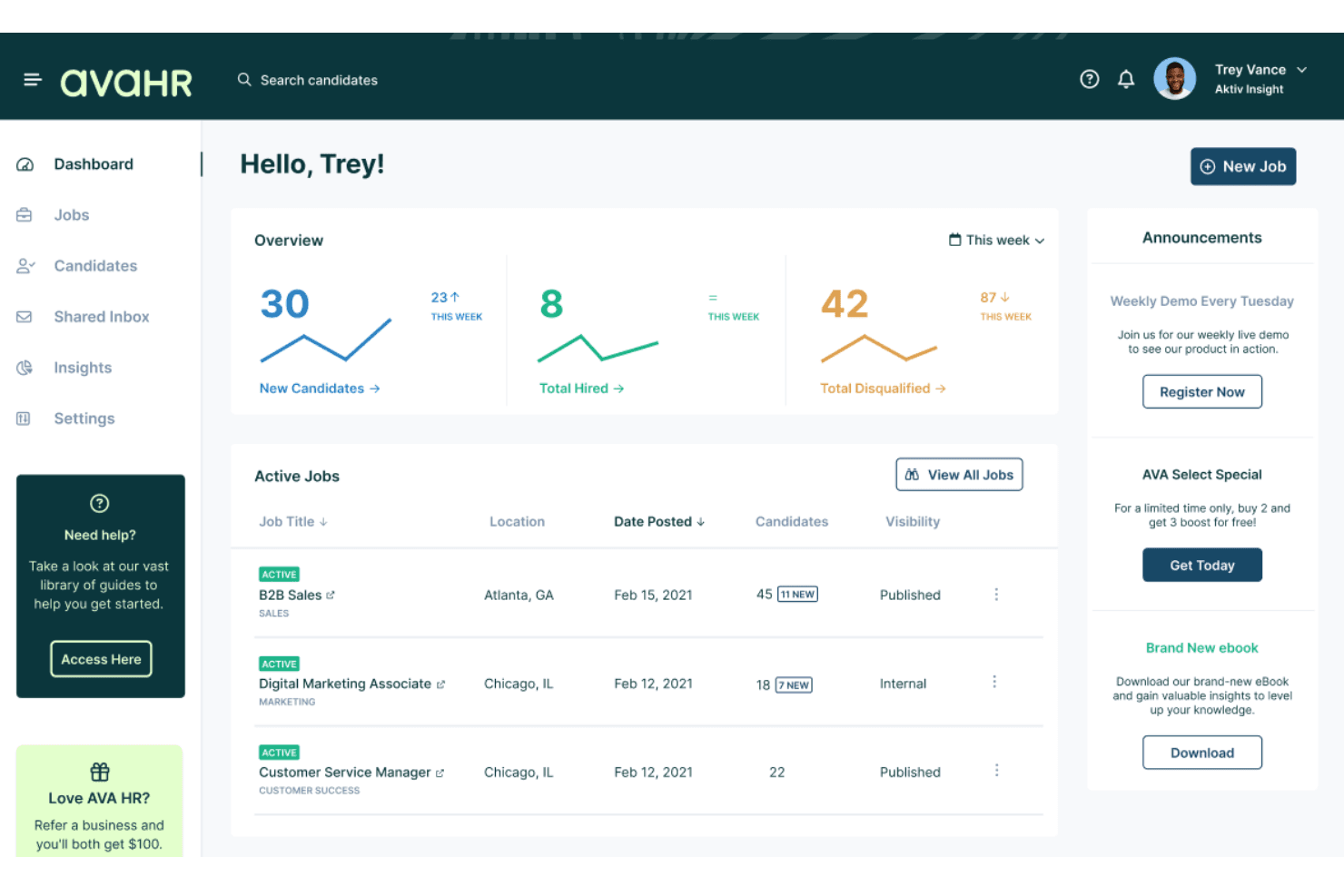
AvaHR displays a recruiter dashboard with job listings, candidate metrics, and hiring activity overview. AvaHR is an applicant tracking system that combines AI-powered resume parsing, candidate scoring, and custom hiring pipelines with built-in team collaboration tools and one-click job distribution to 100+ job boards.
Who Is AvaHR Best For?
AvaHR is a strong fit for small businesses in industries like construction, healthcare, retail, and hospitality that need to fill roles quickly without a dedicated recruiting team.
Why I Picked AvaHR
AvaHR earns its spot on my shortlist because it treats resume screening as a team activity rather than a solo task. I love that hiring managers can leave shared notes, compare candidate scorecards, and move applicants through a custom pipeline all in real time. The AI Candidate Scoring layer adds real weight to that process, ranking applicants automatically before the team sits down to compare.
AvaHR Key Features
- AI job description generator: Automatically creates job descriptions to help kickstart postings.
- Knockout questions: Let you add pre-screen questions that filter out unqualified candidates early.
- Resume uploader and parser: Converts applicant resumes into structured digital profiles for faster sorting.
- Branded careers page: Allows you to build a customized job portal reflecting your company’s culture.
AvaHR Integrations
AvaHR offers over 70 native integrations, including BambooHR, Checkr, DocuSign, Google Calendar, Slack, Microsoft Teams, HubSpot, Salesforce, Gusto, and Calendly. An API is available for custom integrations.
Pros and Cons
Pros:
- Customizable knockout screening questions
- Real-time team collaboration features
- Fast AI resume parsing and scoring
Cons:
- Limited analytics and reporting tools
- Lacks bulk emailing to candidates
Learn more about AvaHR: Best for pre-screening tests and deep resume parsing capabilities
- Not available
- Pricing upon request
Visit WebsiteCustomer Rating:4.6/5
Freshteam allows recruiters to save top candidates in a database and recommend them for relevant job roles. Freshteam is an applicant tracking system designed for HR teams and recruiters who need to screen, parse, and manage large volumes of resumes to find the right candidates faster.
Who Is Freshteam Best For?
Freshteam is a strong fit for growing mid-sized companies that need a structured, scalable hiring process without a dedicated recruiting operations team.
Why I Picked Freshteam
I picked Freshteam as one of the best because I love how it handles both sides of early-stage screening: parsing resumes and testing candidates before they ever reach a recruiter's calendar. When a resume is uploaded, Freshteam automatically scans and parses it into a structured Candidate 360 profile, pulling out experience, skills, education, and previous employers. That means my team isn't manually entering data for every applicant. On top of that, Freshteam's Autopilot workflow builder lets you trigger pre-screening tests automatically when a candidate hits a specific hiring stage—so if someone applies for a technical role, an assessment goes out the moment they're moved to the online test stage, without anyone lifting a finger.
Freshteam Key Features
- Interview scorecards: Create structured evaluation forms for each job so hiring panel members can rate and compare candidates against consistent criteria.
- Talent pool management: Save promising candidates who weren't hired into a searchable pool, so you can revisit them for future openings without starting from scratch.
- Custom application forms: Build job-specific application forms with drag-and-drop fields to capture the exact information you need from applicants upfront.
- Candidate self-scheduling: Let candidates book their own interview slots based on interviewer availability, cutting back-and-forth scheduling emails.
Freshteam Integrations
Integrations include Microsoft Teams, Slack, Google Calendar, Outlook, LinkedIn, Zoom, HackerRank, DocuSign, and Google Meet.
Pros and Cons
Pros:
- Provides an birds-eye-view into applicants by screening stage
- Easy integration with other Freshworks apps
- Enables detailed daily, weekly, and monthly customized report creation
Cons:
- Mobile application could be improved
- Cannot generate custom salary breakups
Learn more about Freshteam: Best for shortlisting candidates with automated screening and video interviewing
- Free demo available
- Pricing upon request
Visit WebsiteCustomer Rating:4.7/5
MyInterview facilitates resume screening, candidate shortlisting, and video interviewing. myInterview (now known as Radancy) gives recruiters and HR teams a way to automate resume screening and add video interviews to their hiring process, helping them identify top candidates earlier in the process and streamline early-stage selection.
Who Is myInterview Best For?
myInterview is a strong fit for talent acquisition teams and recruiters at small to mid-sized businesses that need to screen high volumes of applicants without adding headcount.
Why I Picked myInterview
myInterview earns its spot on my shortlist because of how it combines automated screening with one-way video in a single workflow. I like that the AI conducts and scores candidate interactions using transparent, data-driven evaluations, so my team isn't manually sifting through dozens of applications to find the strongest fits. The one-way video feature is particularly useful—candidates record answers on their own schedule, and the AI transcribes those responses and factors them directly into each candidate's screening score. That combination of automated scoring and video context gives my team a much clearer picture of a candidate than a resume alone ever could.
myInterview Key Features
- Customizable screening templates: Build role-specific screening workflows using AI-recommended qualifications and skills pulled directly from job descriptions.
- Candidate self-scheduling: Candidates receive personalized interview invitations and select their own time slots, syncing directly with recruiter and hiring manager calendars.
- Microsoft Teams integration: Schedule and manage interviews without leaving Teams, with real-time calendar syncing across Outlook, Google Calendar, and Teams.
- Personality insights: AI analyzes candidate responses to surface personality traits and culture fit signals beyond what a resume can show.
myInterview Integrations
Integrations include SAP SuccessFactors, Oracle, Workday, LinkedIn, Glassdoor, and LinkedIn.
Pros and Cons
Pros:
- Allows for more applicants to be screened
- Enhanced resume screening with AI technology
- Automates video interviews
Cons:
- No mobile application
- Limitations on group interviews
Learn more about myInterview: Best for AI-powered background checks
- Free demo available
- From $29.99/report
Visit WebsiteCustomer Rating:4.5/5
Checkr’s custom API integrates with popular ATS and recruiting platforms like iCIMS to support background checks as part of the resume screening process. Checkr helps HR teams and recruiters in fast-paced industries verify candidate backgrounds and credentials, offering automated checks that support confident, compliant hiring decisions alongside your resume screening process.
Who Is Checkr Best For?
Checkr is a strong fit for high-volume hiring teams in industries like gig economy, healthcare, and retail that need fast, automated candidate verification at scale.
Why I Picked Checkr
Checkr earns its spot on my shortlist because its AI-powered background checks run faster than traditional manual processes, which matters when you're moving candidates through a hiring pipeline. I like that Checkr's continuous checks flag new criminal records or license changes on existing employees, not just new hires. The AI also reduces bias by standardizing how adjudication decisions are applied across candidates, which I find valuable for teams maintaining fair hiring practices at scale.
Checkr Key Features
- Candidate portal: Candidates submit their own information and consent directly through a self-service portal, reducing back-and-forth for your HR team.
- Drug screening: Order and manage drug tests alongside background checks from within the same platform.
- Compliance tools: Built-in federal, state, and local compliance guidance helps your team apply hiring rules correctly across different jurisdictions.
- Checkr Assess: Customizable adjudication rules let you automatically pre-adverse or clear candidates based on your own criteria.
Checkr Integrations
Integrations include Greenhouse, Lever, iCIMS, Workday, BambooHR, JazzHR, SmartRecruiters, Jobvite, SAP SuccessFactors, and Oracle Taleo.
Pros and Cons
Pros:
- Fast turnaround for background checks helping speed up hiring decisions
- User-friendly dashboard and candidate portal for easy background screening management
- Integrates with popular ATS tools, increasing workflow efficiency
Cons:
- May lack some resume screening software functionalities compared to dedicated tools
- Limited support for heavily regulated industries
Learn more about Checkr: Best for contextual candidate tracking and selection
- 14-day free trial
- From $69/month (billed annually)
Visit WebsiteCustomer Rating:4.5/5
The CVViZ dashboard offers a quick overview of accepted candidates, popular candidate sourcing channels, and resume pass-through rates. CVViZ uses AI-driven resume screening to help recruiters and HR teams in fast-paced industries identify, rank, and shortlist top candidates based on contextual relevance and job fit.
Who Is CVViZ Best For?
CVViZ is a strong fit for in-house recruiting teams and growing businesses that need to screen high volumes of resumes without sacrificing candidate quality.
Why I Picked CVViZ
CVViZ earns its spot on my shortlist because of how it handles contextual resume screening—rather than flagging resumes based on keyword matches, its NLP and machine learning algorithm reads resumes the way a domain expert would. I like that it can tell the difference between a company secretary and a personal secretary, or an Oracle developer and a Java developer, which cuts down on the false positives that waste a recruiter's time. The relative ranking feature: CVViZ scores candidates against each other based on your organization's specific hiring history and the types of candidates you've previously engaged, not just a generic match score. I find the automated candidate tracking across pipeline stages useful—you can set triggers to move candidates, send notifications, and log stage changes without manual input.
CVViZ Key Features
- Candidate pre-screening questions: Set knockout or multiple-choice questions that candidates answer on application, then filter the applicant pool based on their responses.
- Resume database management: Upload resumes in bulk, parse them automatically, flag duplicates, tag candidates, and track the source of each application.
- Recruitment workflow automation: Define triggers to send emails or notifications automatically when a candidate moves stages, a new resume arrives, or a job is added.
- Recruitment analytics: Track sourcing performance, team activity, and time-to-fill metrics, with reports exportable in CSV, PDF, or JPG formats.
CVViZ Integrations
Native integrations are not currently listed.
Pros and Cons
Pros:
- Integrates with many job boards
- Intuitive and user-friendly UX
- Easy to integrate with any company website
Cons:
- Interview scheduling and talent scoring features can be improved
- Limited customizable email template options
Learn more about CVViZ: 10Best for customizable recruiting solutions
JazzHR
- Not available
- From $1,000/year (billed annually)
Visit WebsiteCustomer Rating:4.4/5
JazzHR helps teams parse resumes and automate the recruiting process with customizable workflows. JazzHR gives HR teams and recruiters in small to midsize businesses a way to automate resume screening, manage candidate pipelines, and collaborate on hiring decisions, helping you identify top talent faster and reduce manual review.
Who Is JazzHR Best For?
JazzHR is a strong fit for small to midsize businesses that need a structured, scalable hiring process without the complexity of enterprise-level recruiting platforms.
Why I Picked JazzHR
I picked JazzHR as one of the best because I love how much flexibility it gives you to shape the recruiting process around your team's actual workflow. The customizable workflow automation lets you build hiring stages that match your specific screening criteria—so when a high-volume role opens up, my team isn't manually triaging every application from scratch. I also find the customizable interview guides genuinely useful: you can build role-specific question sets that keep evaluations consistent across hiring managers, which makes comparing candidates a lot cleaner. The automated resume parsing then layers on top of that, pulling key candidate details into structured profiles so you're not hunting through attachments to make a call.
JazzHR Key Features
- Candidate sourcing: Post open roles to multiple job boards simultaneously directly from the JazzHR platform.
- Collaborative hiring tools: Leave comments, ratings, and feedback on candidate profiles so hiring teams can evaluate applicants together.
- Offer letter management: Create, send, and track offer letters from within the platform without switching to a separate tool.
- Reporting and analytics: Access pre-built reports on pipeline activity, time-to-hire, and source performance to track recruiting progress.
JazzHR Integrations
Integrations include BambooHR, UKG, LinkedIn Recruiter, and more.
Pros and Cons
Pros:
- Interview guide templates
- Bulk email communication
- Custom branding options
Cons:
- No internal video interviewing options
- Limited advanced analytics
How I Evaluate Resume Screening Software
I split my evaluation into two layers: baseline criteria every tool must meet—like accurate parsing and ATS integration—and differentiators that separate tools for high-volume hiring from lean recruiting teams.
Core Functionality (Table Stakes For This List)
When I'm selecting tools for my list, I rank each one on a scale from 0 (does not offer the functionality) to 5 (excels in this area) for each core functionality listed below. Then, I calculate the tool's total score as a percentage. Each tool needs to achieve a minimum total score of 65% to be considered for inclusion.
- Resume Parsing: I check whether the tool accurately extracts work history, skills, education, and contact details from PDFs, DOCX files, and other common formats without manual cleanup.
- Keyword & Skills Matching: Each tool should go beyond exact keyword hits—I look for synonym recognition and contextual matching that connects "project management" to "Scrum" or "Agile."
- Candidate Ranking & Scoring: I evaluate how the tool scores applicants against job criteria and whether recruiters can adjust weighting to prioritize certifications, years of experience, or specific skills.
- Bulk Resume Processing: High-volume teams need to ingest hundreds of resumes at once, so I look at batch upload limits and automated intake from job boards and email inboxes.
- AI/ML-Based Screening: I consider whether the AI layer adds genuine value beyond rules-based filters, such as learning from past hiring patterns or flagging transferable skills across industries.
- ATS Integration: The tool should sync candidate data with platforms like Greenhouse, Lever, or iCIMS so recruiters aren't copying records between systems manually.
Once I have a list of tools that meet the criteria, I consider what sets each platform apart.
Differentiating Factors (What Sets Vendors Apart)
Here's how I compare and contrast different vendors:
Standout Features
Bias mitigation tools matter a lot here—I look for features like automated name and demographic anonymization that let recruiters run blind screenings. Candidate rediscovery is another feature I value, especially for teams sitting on large talent databases. A tool that resurfaces past applicants who match a new req saves sourcing time and ad spend. I also evaluate whether platforms support custom scoring models that recruiters can train on their own historical hiring data to reflect role-specific priorities.
Beyond Features
Compliance is a big one—I check whether a vendor provides audit trails for AI-driven decisions and supports data privacy standards like GDPR and SOC 2. Hiring volume fit also matters. A staffing agency processing thousands of resumes weekly has very different scalability needs than a mid-size company hiring a few roles per quarter. I also look at implementation speed, specifically whether the platform offers pre-built skills libraries and templates so recruiting teams can start screening without weeks of configuration.
Funcionalidades do software de triagem de currículos
Quando se trata de software de triagem de currículos, as funcionalidades certas podem fazer toda a diferença para o ajudar a identificar rapidamente os melhores talentos. As seguintes funcionalidades essenciais trabalham em conjunto para eliminar tarefas manuais tediosas e melhorar a precisão e a rapidez das avaliações de currículos.
- Correspondência automática de palavras-chave: O software analisa os currículos em busca de palavras-chave associadas à descrição da função, ajudando-o a encontrar candidatos cujas competências e experiência correspondem às suas necessidades — sem mais triagens manuais intermináveis.
- Análise de currículos: Esta funcionalidade extrai dos currículos dados estruturados, como informações de contacto, formação académica e histórico profissional, para que possa consultar os elementos essenciais de imediato, sem ter de alternar entre documentos.
- Carregamento em massa de currículos: Pode carregar centenas (ou milhares) de currículos de uma só vez, permitindo que o software processe grandes grupos de candidatos mais rapidamente do que alguma vez conseguiria por si próprio.
- Filtros personalizáveis: Ajuste o processo de triagem definindo filtros com base em critérios como anos de experiência, nível de formação, certificações ou localização. Isto ajuda-o a concentrar-se apenas nos candidatos que realmente correspondem aos seus requisitos.
- Deteção de duplicados: O software assinala automaticamente as candidaturas duplicadas, para que a sua análise não seja dificultada por ver o mesmo candidato cinco vezes.
- Classificação de candidatos: Com base nos critérios escolhidos, o software classifica os candidatos para que veja as pessoas mais promissoras no topo da lista, poupando tempo nas análises iniciais.
- Capacidades de integração: Ligue a ferramenta de triagem de currículos ao seu sistema existente de acompanhamento de candidatos ou software de recursos humanos para simplificar o seu fluxo de trabalho e evitar transferências manuais de dados.
- Verificações de conformidade: O software ajuda-o a evitar problemas ao destacar riscos de conformidade, como a ausência de consentimento para o tratamento de dados pessoais ou problemas assinalados relacionados com a autorização de trabalho.
- Ferramentas de colaboração: Partilhe notas, classificações e comentários sobre os candidatos com a sua equipa de recrutamento diretamente na plataforma, facilitando a coordenação de todos.
Funcionalidades comuns de inteligência artificial do software de triagem de currículos
Para além das funcionalidades padrão do software de triagem de currículos acima mencionadas, muitas destas soluções estão a incorporar inteligência artificial com funcionalidades como:
- Correspondência baseada em inteligência artificial: A inteligência artificial analisa não só as palavras-chave, mas também o contexto, o histórico profissional e as competências, para sugerir candidatos que poderão adequar-se bem à função — mesmo que os seus currículos não correspondam perfeitamente às palavras-chave.
- Redução automatizada de preconceitos: Os algoritmos de inteligência artificial identificam e minimizam preconceitos inconscientes ao ocultar dados dos candidatos, como o nome, a idade ou o género, durante o processo de triagem, ajudando a promover um recrutamento justo.
- Classificação preditiva de candidatos: O software utiliza inteligência artificial para prever quais os candidatos com maior probabilidade de sucesso na função, com base em dados de recrutamentos anteriores e nos requisitos atuais da função.
- Processamento de linguagem natural (NLP): A inteligência artificial utiliza o NLP para interpretar o significado do conteúdo dos currículos, identificando realizações e responsabilidades relevantes mesmo quando são formuladas de formas únicas.
- Pré-seleção automatizada: A inteligência artificial cria autonomamente listas de pré-seleção dos melhores candidatos com base nos critérios específicos da sua função, para que possa concentrar a sua atenção onde é mais necessária.
Perguntas frequentes
Eis algumas perguntas frequentes e respostas sobre software de triagem de currículos:
Como funciona o software automatizado de triagem de currículos?
O software automatizado de triagem de currículos acelera a fase inicial do recrutamento: encontrar os candidatos ideais para o emprego. Estas ferramentas extraem e comparam dados dos currículos com palavras-chave predefinidas e outros critérios.
Em seguida, são atribuídas pontuações ou classificações aos currículos com base na sua correspondência com os requisitos da oferta de emprego. Os currículos que atingem um limiar mínimo (pontuação) são encaminhados para análise humana, enquanto os que obtêm pontuações mais baixas são rejeitados. A triagem de currículos é um aspeto fundamental dos sistemas de acompanhamento de candidatos.
Com o objetivo de melhorar a precisão e reduzir os preconceitos no recrutamento, os sistemas avançados de triagem de currículos utilizam algoritmos de IA e aprendizagem automática que realizam análises contextuais. Além disso, a integração destas ferramentas com o seu ATS pode simplificar o fluxo de trabalho de contratação.
Quais são algumas técnicas para acelerar o seu processo de recrutamento?
Para acelerar o seu processo de recrutamento, pode começar por criar descrições de funções claras e precisas e utilizar software de triagem de currículos para filtrar candidatos de forma eficiente e automatizar outros processos de recrutamento.
Atualmente, os responsáveis pela contratação podem utilizar software baseado em IA para encontrar candidatos em várias plataformas de emprego e até nas redes sociais. Alguns softwares também ajudam a realizar avaliações pré-emprego ou entrevistas iniciais por vídeo para avaliar a adequação dos candidatos.
Por último, deve analisar e aperfeiçoar continuamente as suas estratégias de recrutamento para identificar possíveis obstáculos.
Quais são algumas sugestões para encontrar os melhores candidatos?
Em primeiro lugar, comece por definir claramente os requisitos da função.
De seguida, utilize software de triagem de currículos que disponibilize análise de descrições de funções e publicação em várias plataformas para publicar as suas ofertas no LinkedIn e noutros websites específicos do setor. Pode também criar uma campanha interna de recomendações, incentivando os colaboradores atuais a recomendar candidatos, uma vez que esta prática ajuda frequentemente a aumentar a qualidade das contratações.
Além disso, estabelecer uma forte presença nas redes sociais para interagir com candidatos passivos e colaborar com agências de recrutamento de confiança para aceder às respetivas redes também pode ser muito benéfico.
Como pode fazer a triagem de candidatos se não tiver um departamento de RH?
É necessário adotar uma abordagem simplificada para selecionar e contratar candidatos sem o apoio de um departamento de RH. Pode recorrer a recrutadores externos para este efeito ou investir em software automatizado de triagem e análise de currículos para facilitar o processo.
Comece por definir claramente os requisitos da função e estabelecer um processo de candidatura estruturado. Assim que as candidaturas começarem a chegar, as ferramentas automatizadas de triagem de currículos podem filtrar as candidaturas de forma eficiente com base em critérios predefinidos.
É fundamental manter registos organizados dos candidatos e uma documentação pormenorizada do feedback ao longo de todo o processo. Embora os conhecimentos especializados de RH sejam inestimáveis, as pequenas empresas também podem fazer uma triagem eficaz dos candidatos seguindo estes passos.
Outra abordagem consiste em recorrer a empresas de externalização de processos de recrutamento (RPO) para satisfazer as suas necessidades de contratação. Se estiver interessado, eis a minha lista das 10 principais RPO para o ajudar a seguir na direção certa.
Ao escolher software de triagem de currículos, esteja atento às seguintes funcionalidades essenciais:
- Comparação automatizada de palavras-chave: O software analisa os currículos em busca de palavras-chave associadas à descrição da função, ajudando-o a encontrar candidatos cujas competências e experiência correspondem às suas necessidades — sem mais filtragens manuais intermináveis.
- Análise de currículos: Esta funcionalidade extrai dos currículos dados estruturados, como informações de contacto, formação académica e histórico profissional, para que possa consultar os elementos essenciais de imediato, sem alternar entre documentos.
- Carregamento de currículos em massa: Pode carregar centenas (ou milhares) de currículos de uma só vez, permitindo que o software processe grandes grupos de candidatos mais rapidamente do que alguma vez conseguiria sozinho.
- Filtros personalizáveis: Ajuste o processo de triagem definindo filtros com base em critérios como anos de experiência, nível de formação, certificações ou localização. Isto ajuda-o a concentrar-se apenas nos candidatos que correspondem efetivamente aos seus requisitos.
- Deteção de duplicados: O software assinala automaticamente candidaturas duplicadas, para que a sua análise não seja dificultada por ver o mesmo candidato cinco vezes.
- Classificação de candidatos: Com base nos critérios escolhidos, o software classifica os candidatos para que veja as pessoas mais promissoras no topo da lista, poupando tempo nas análises iniciais.
- Capacidades de integração: Ligue a ferramenta de triagem de currículos ao seu sistema de acompanhamento de candidatos ou software de RH existente para simplificar o fluxo de trabalho e evitar transferências manuais de dados.
- Verificações de conformidade: O software ajuda-o a evitar problemas ao destacar riscos de conformidade, como a ausência de consentimento para o tratamento de dados pessoais ou problemas assinalados relacionados com a autorização de trabalho.
- Ferramentas de colaboração: Partilhe notas, classificações e comentários sobre os candidatos com a sua equipa de contratação diretamente na plataforma, facilitando a coordenação de todos.
Funcionalidades comuns de IA do software de triagem de currículos
Para além das funcionalidades padrão do software de triagem de currículos acima indicadas, muitas destas soluções estão a incorporar IA com funcionalidades como:
- Correspondência baseada em IA: A IA analisa não só as palavras-chave, mas também o contexto, o histórico profissional e as competências, para sugerir candidatos que podem ser uma boa escolha — mesmo que os respetivos currículos não correspondam perfeitamente às palavras-chave.
- Redução automatizada de preconceitos: Os algoritmos de IA identificam e minimizam preconceitos inconscientes ao ocultar dados dos candidatos, como o nome, a idade ou o género, durante o processo de triagem, ajudando a promover contratações justas.
- Pontuação preditiva de candidatos: O software utiliza IA para prever quais os candidatos com maior probabilidade de sucesso na função, com base em dados de contratações anteriores e nos requisitos atuais da função.
- Processamento de linguagem natural (NLP): A IA utiliza NLP para interpretar o significado do conteúdo dos currículos, identificando realizações e responsabilidades relevantes, mesmo quando são expressas de formas específicas.
- Pré-seleção automatizada: A IA cria autonomamente listas restritas dos melhores candidatos com base nos seus critérios específicos para a função, permitindo-lhe concentrar a atenção onde é mais necessária.
Outro software para melhorar as suas práticas de contratação
A triagem e a análise de currículos são apenas a ponta do icebergue. A contratação do candidato certo para um emprego envolve muitos outros aspetos, e tem ao seu alcance muitos tipos diferentes de software: