

Com tantas opções diferentes de software de fluxos de trabalho de RH disponíveis, escolher o mais adequado é difícil. Quer simplificar os seus processos de RH, mas precisa de determinar qual é a ferramenta mais indicada. Veio ao sítio certo. Com base nos meus conhecimentos sobre processos de RH e na minha experiência a utilizar e testar diferentes sistemas de software de RH, criei esta lista para o ajudar a encontrar o melhor software de fluxos de trabalho de RH para as suas necessidades.
Pode utilizar software de fluxos de trabalho de RH para automatizar tarefas repetitivas, melhorar a precisão dos dados e otimizar a gestão dos colaboradores. Estes sistemas também resolvem problemas como a introdução manual de dados, as questões de conformidade e a comunicação ineficiente.
Porque pode confiar nas nossas recomendações de software
6,700+
Reviews
20
Industry experts
16+
Evaluation factors
14
Years reviewing software
A nossa equipa testa e analisa software desde 2012. Como especialistas em RH, sabemos o quão difícil — e importante — é escolher o software certo.
Para este guia, avaliámos as ferramentas através de testes práticos e pesquisa independente, pontuando-as de acordo com os nossos critérios de seleção. Recorremos também a contributos de líderes de opinião do setor e de especialistas em RH no ativo.
As nossas análises refletem o juízo da nossa equipa editorial, e não um discurso de vendas.
Revisores especialistas:
- Phil GrayCOO
 Kim BehnkeHR Tech Editor & Analyst
 Josh BarkerPeople Ops Manager

Tabela comparativa de softwares de fluxos de trabalho de RH
Esta tabela comparativa resume os detalhes de preços das minhas principais escolhas de software de fluxos de trabalho de RH:
Sorted by: Default
| Tool | Starting Price | Website | |
|---|---|---|---|
Best with dedicated support & implementation teams | 4.5 out of 5 | Pricing upon request Free demo available | Book Demo |
Best for centralized HR, IT, and finance workflows | 4.9 out of 5 | $8/user/month Free demo available | Website |
Best for built-in analytics and reporting | 4.3 out of 5 | $99/month Free demo available | Website |
Best for HR processes among global teams | 4.8 out of 5 | $5/user/month Free demo available | Website |
Best for integrated time tracking | 4.6 out of 5 | $79/user/month Free demo available | Website |
Best for reusable automation workflows | 4.5 out of 5 | Pricing upon request Free demo available | Website |
Best for centralized HR document workflows | 4.3 out of 5 | Pricing upon request Free demo available | Website |
Best as AI for business | 4.4 out of 5 | $8/user/month Up to 15-day free trial + demo available | Website |
Best for document-driven workflows | 4.7 out of 5 | Pricing upon request 14-day free trial; free demo available | Website |
Best for customizable HR automation | 4.8 out of 5 | $11/user/month 14-day free trial + free demo available | Website |


Análises dos melhores softwares de fluxos de trabalho de RH
Apresentamos os meus resumos detalhados dos melhores softwares de automatização de fluxos de trabalho de RH que entraram na minha seleção dos 10 melhores, incluindo notas sobre os motivos pelos quais os escolhi. Cada análise inclui também os prós e contras de cada sistema, as suas principais funcionalidades e os cenários de utilização ideais.
 Best with dedicated support & implementation teams
- Free demo available
- Pricing upon request
Customer Rating:4.5/5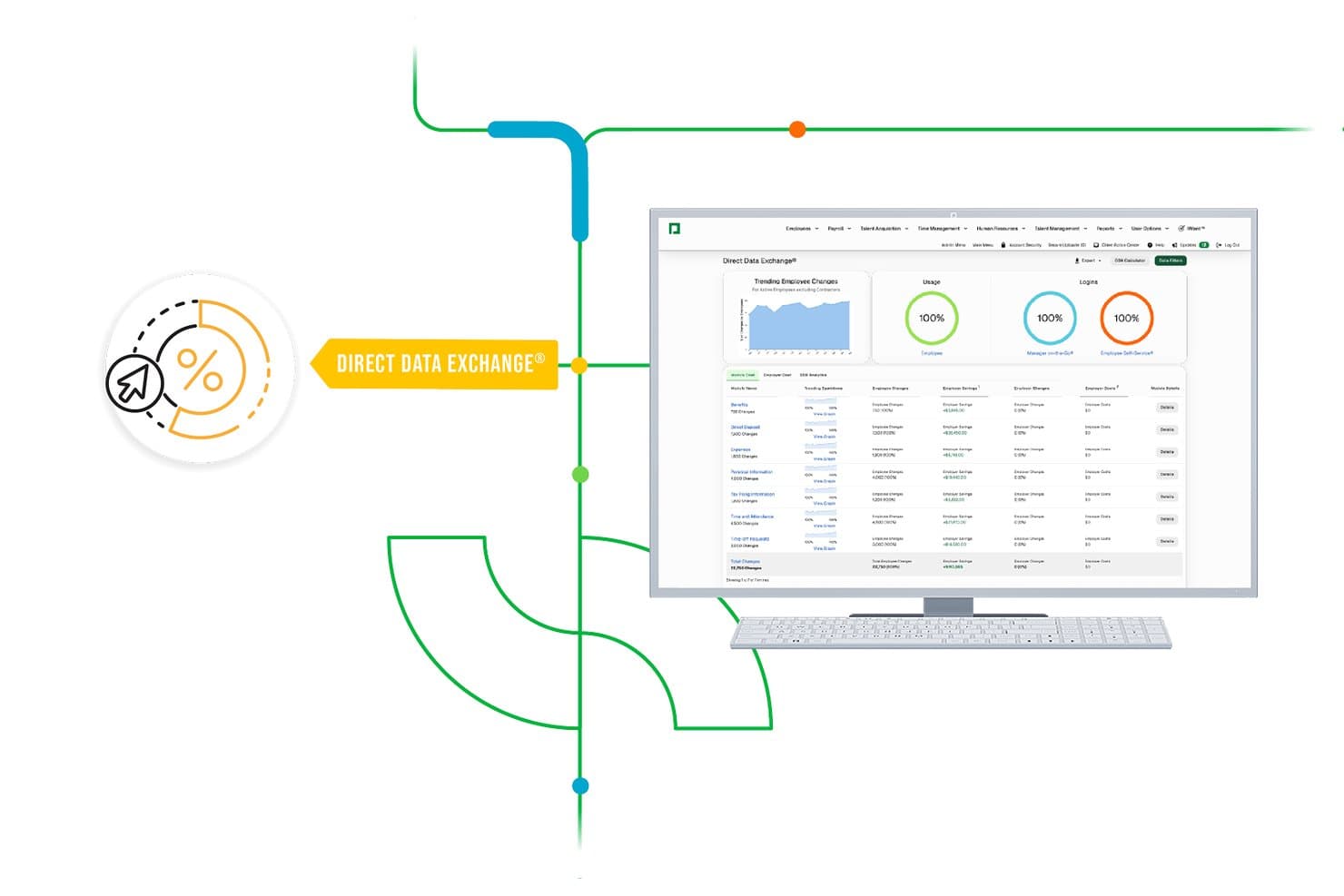
Paycom offers Direct Data Exchange®, an HR dashboard that tracks trending employee changes, usage rates, and login activity across modules. Paycom is a single-database HCM platform that automates HR workflows across the full employee lifecycle, covering payroll, onboarding, time and labor management, talent management, and HR forms within one unified system.
Who Is Paycom Best For?
Paycom is a strong fit for mid-size to enterprise U.S. businesses that want to consolidate HR and payroll into a single platform managed by one dedicated support team.
Why I Picked Paycom
Paycom earns its spot on my shortlist because of how seriously it takes implementation. Every client gets a dedicated specialist at no extra cost, which means when I'm configuring GONE's automated PTO decisioning rules or setting up personnel action form routing, I'm not figuring it out alone. In practice, my team can rely on that specialist to get complex workflow configurations right from day one, not months after go-live.
Paycom Key Features
- Beti payroll automation: Employees preview, verify, and correct their own payroll before submission within a guided workflow.
- Document creator and management: HR can create digital forms, collect e-signatures, and store documents in centralized employee files.
- GONE automated time-off decisioning: Time-off requests are automatically decided based on configurable rules and tracked in real time.
- Direct Data Exchange analytics: Provides a dashboard to monitor HR workflow usage and process efficiency across your organization.
Paycom Integrations
Native integrations are not clearly documented. Paycom supports integrations via third-party middleware such as Celigo, Lingk, and RoboMQ, and offers an API for custom integrations.
Pros and Cons
Pros:
- Automated decisioning for PTO and payroll
- Comprehensive employee lifecycle workflow coverage
- Dedicated implementation and support specialist
Cons:
- Custom workflow logic is not fully visual
- Integration options are limited and complex
 Best for centralized HR, IT, and finance workflows
- Free demo available
- From $8/user/month
Customer Rating:4.9/5
Rippling offers hundreds of pre-built workflow templates for a wide range of functions in different departments. Rippling is a comprehensive HR, finance, and IT management platform designed to streamline various administrative tasks for businesses. It integrates several functions into one system, including HR, payroll, benefits, and device management.
Why I picked Rippling: I picked Rippling because it offers a seamless integration of HR, IT, and finance workflows into a single, cohesive platform. Unlike traditional HR software that focuses solely on human resources tasks, Rippling goes beyond by incorporating IT management features, such as automated device provisioning and de-provisioning, and finance workflows, like expense management and payroll processing. Furthermore, its powerful workflow automation capabilities allow businesses to create custom workflows across these different departments.
Standout features & integrations:
Features include global payroll management, benefits administration, time and attendance tracking, custom reporting, an applicant tracking system, employee self-service portal, performance management, customizable workflows, and automated compliance management.
Integrations include Slack, Google Workspace, Microsoft 365, Zoom, QuickBooks, Xero, Dropbox, Salesforce, HubSpot, Zendesk, Jira, Trello, Asana, Okta, Duo Security, GitHub, GitLab, BambooHR, Greenhouse, Lever, ADP, PayPal, Stripe, Expensify, and Gusto.
Pros and Cons
Pros:
- Automated employee onboarding
- Global payroll support
- Customizable workflow automation across different departments
Cons:
- Initial learning curve and time investment for setting up automations
- Limited language support on the platform
 Best for built-in analytics and reporting
- Free demo available
- From $99/month
Visit WebsiteCustomer Rating:4.3/5
Paycor performance management dashboard displaying employee objectives, reviews, recognition tools, and mobile team member feedback features. Paycor is an HCM platform that brings together HR workflow automation, payroll, recruiting, onboarding, and talent management in a single system.
Who Is Paycor Best For?
Paycor is a strong fit for small to mid-sized businesses that need a unified HR and payroll platform to manage the full employee lifecycle.
Why I Picked Paycor
I've included Paycor in my top picks because its built-in analytics go well beyond basic headcount reports. I find the predictive resignation feature particularly useful—it uses AI to surface at-risk employees, flag the factors driving turnover risk, and project expected resignations across departments over the next 12 months. I also like that the unified data model pulls from payroll, time, and talent into a single analytics view, so you're not manually reconciling data from separate systems. Automated report delivery lets you schedule recurring reports and push them directly to stakeholders on any cadence.
Paycor Key Features
- Onboarding workflow automation: Assign onboarding tasks, collect e-signatures, and track new hire completion status from a single dashboard.
- Applicant tracking system (ATS): Post jobs, manage candidate pipelines, and move applicants through configurable hiring stages.
- Performance review management: Build and launch review cycles, set employee goals, and track progress against them over time.
- Compensation planning tools: Model pay changes, manage merit cycles, and submit compensation recommendations through a structured approval workflow.
Paycor Integrations
Paycor offers 320+ marketplace connectors through its Integration Platform, which includes the Paycor Marketplace, Developer Services, and Developer Tools. Marketplace integrations include Indeed, QuickBooks, Sterling, Cornerstone, and Equifax, among others spanning background screening, scheduling, benefits admin, and point of sale categories. Paycor's Developer Tools include 140+ APIs for building custom integrations. Zapier support is not clearly available.
Pros and Cons
Pros:
- Top-rated mobile app with GPS clock-in
- Onboarding collects records and e-signatures automatically
- Built-in ATS and performance management modules
Cons:
- Acquired modules can feel disjointed from core
- Time tracking and scheduling are paid add-ons
 Best for HR processes among global teams
- Free demo available
- From $5/user/month
Visit WebsiteCustomer Rating:4.8/5
Deel's HR features include compliance tracking and documentation to align with various jurisdictions. Deel is a comprehensive HR platform designed to streamline and manage human resources for global teams. It caters to businesses looking to hire, onboard, and manage employees across various countries without the hassle of setting up local entities or worrying about compliance issues.
Why I picked Deel: I chose Deel for its workflow features tailored to international operations. It offers seamless onboarding processes that comply with local laws and provides flexible payment options in multiple currencies. The platform’s ability to handle complex HR tasks such as payroll, benefits, and compliance across over 150 countries makes it indispensable for companies looking to expand their global talent efficiently.
Standout features & integrations:
Features include automated onboarding, localized compliance tools, detailed analytics and reporting, customizable access levels, a comprehensive employee directory, and specialized modules for global recruiting, benefits administration, and payroll.
Integrations include QuickBooks, Xero, Gusto, Slack, Microsoft Teams, Google Workspace, Dropbox, Zapier, and Trello.
Pros and Cons
Pros:
- Support from local compliance experts
- Automated invoicing
- Simplifies international payroll and compliance for businesses
Cons:
- Limited platform customization options
- No mobile app available
 Best for integrated time tracking
- Free demo available
- From $79/user/month
Customer Rating:4.6/5
Combined payroll, benefits, PTO requests, company directory, and employee self-service features displayed across desktop and mobile app interfaces. Justworks is an HR workflow software platform that brings together payroll, benefits administration, compliance management, and HR support in one system for small and midsize businesses.
Who Is Justworks Best For?
Justworks is a good fit for small to midsize businesses that want a unified HR, payroll, and compliance solution.
Why I Picked Justworks
I picked Justworks as one of the best because I can manage payroll and HR tasks while tracking employee hours in the same platform. The integrated time tracking lets my team capture work hours, sync them directly to payroll, and reduce manual entry. I like that I can review timesheets and approve hours without switching between systems.
Justworks Key Services
- Automated payroll processing: Run payroll for salaried and hourly employees with automated tax filings.
- Benefits administration: Manage health insurance, 401(k), and other employee benefits from one dashboard.
- HR document storage: Store and organize employee handbooks, policies, and onboarding documents securely.
- Compliance support: Access tools and resources to help maintain compliance with labor laws and regulations.
Justworks Integrations
Native integrations are not clearly documented. Justworks offers an API for custom integrations.
Pros and Cons
Pros:
- Access to large-group health insurance plans
- Automated payroll tax filings and payments
- Integrated time tracking for hourly teams
Cons:
- Custom reporting options are somewhat basic
- No built-in performance management features
Learn more about Justworks: Best for reusable automation workflows
- Free demo available
- Pricing upon request
Visit WebsiteCustomer Rating:4.5/5
HiBob's DE&I dashboard offers insights into diversity, equity, and inclusion metrics. HiBob is a modern HR platform that helps fast-growing organizations streamline core HR processes, automate workflows, and gain real-time visibility into workforce metrics. It centralizes people data, performance tracking, and compensation management, enabling HR teams to manage the entire employee lifecycle efficiently. With customizable workflows, built-in analytics, and a focus on employee engagement, HiBob empowers companies to align HR strategies with business goals.
Why I picked HiBob: I picked HiBob because it offers a broad suite of HR management tools—covering everything from onboarding and time tracking to performance reviews and payroll—while keeping the experience intuitive for both HR teams and employees. Its reusable automation workflows save time on recurring tasks like onboarding and offboarding, and its analytics capabilities help HR leaders make data-driven decisions about hiring, retention, and workforce planning. I also appreciate its strong integration ecosystem, connecting HR processes with communication, productivity, and payroll systems to create a seamless workflow environment.
Standout features & integrations:
Features include core HR management, onboarding and offboarding workflows, time and attendance tracking, compensation management, payroll automation (including UK payroll), hiring and applicant tracking, learning management, performance evaluations, employee surveys, whistleblower compliance tools, people analytics, and workforce planning dashboards. HiBob also offers customizable access rights for data security and tailored employee experiences that align individual goals with organizational objectives.
Integrations include ADP, Breezy, Globalization Partners, Paylocity, Trinet, Xero, Sequoia Tech, Greenhouse, Slack, Deel, and NetSuite.
Pros and Cons
Pros:
- Comprehensive HR tools
- Employee self-service capabilities
- Provides detailed and insightful reports
Cons:
- End-to-end payroll only offered for UK businesses
- Could offer more configuration options
 Best for centralized HR document workflows
- Free demo available
- Pricing upon request
Visit WebsiteCustomer Rating:4.3/5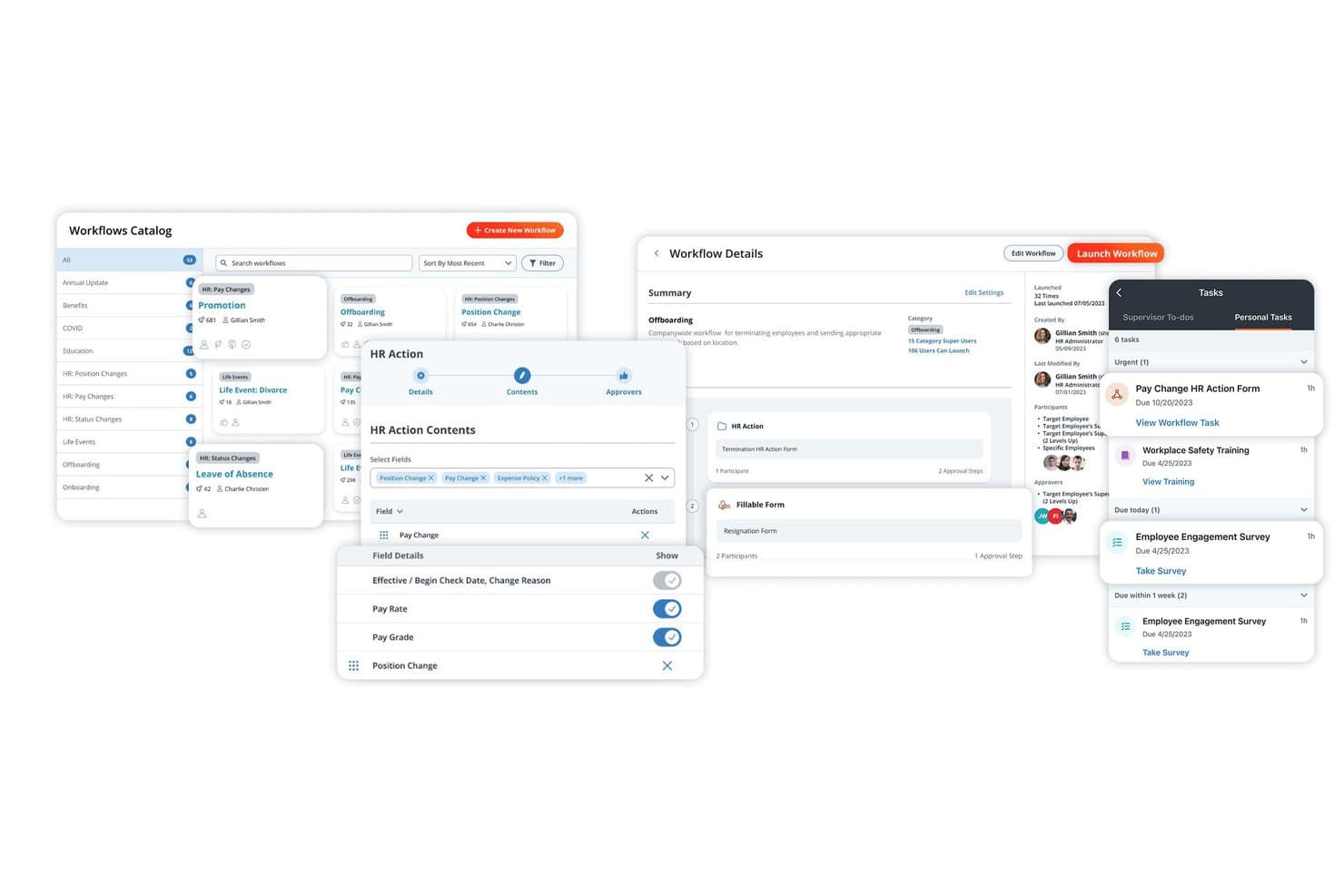
Paylocity lets users build, manage, and assign HR workflows in one place. Paylocity is an HCM platform that combines HR workflows, document management, approval routing, onboarding and offboarding automation, compliance templates, and employee self-service.
Who Is Paylocity Best For?
Paylocity suits HR teams that want to manage workflows, approvals, and employee documents from a single platform without juggling multiple tools.
Why I Picked Paylocity
Paylocity earns its spot on my shortlist because it keeps HR documents, workflows, and approvals inside a single system rather than scattered across tools. I particularly like how you can build conditional document-collection workflows, like automatically prompting an employee to upload a life-event form and routing it to HR for approval, all without leaving the platform. The searchable, taggable document database with role-based permissions and digital signatures makes it genuinely easy to stay on top of records across the employee lifecycle.
Paylocity Key Features
- Employee self-service portal: Employees get 24/7 access to view pay stubs, manage personal information, request time off, and complete HR tasks without admin involvement.
- Mobile app with push notifications: Available on iOS and Android, the app lets employees and managers complete approvals, upload documents, and track task progress from their phones.
- Compliance training automation: The platform sends phone or email notifications, triggers periodic reminders, and tracks completion status through a dashboard for required training programs.
- 350+ marketplace integrations: Prebuilt connections to tools like Greenhouse, Slack, and Okta automate data flow between Paylocity and third-party HR, payroll, and productivity systems.
Paylocity Integrations
Paylocity offers 350+ marketplace integrations, including Greenhouse, iCIMS, Workable, Okta, Slack, Google Workspace, and Microsoft 365 (Entra ID). It also supports APIs and webhooks for custom integrations.
Pros and Cons
Pros:
- Reviewers value pre-start onboarding workflows
- Searchable employee records support document collection
- Conditional workflows route approvals by thresholds
Cons:
- Support follow-up can be slow or inconsistent
- Onboarding may fail to create employee records
 Best as AI for business
- Up to 15-day free trial + demo available
- From $8/user/month
Visit WebsiteCustomer Rating:4.4/5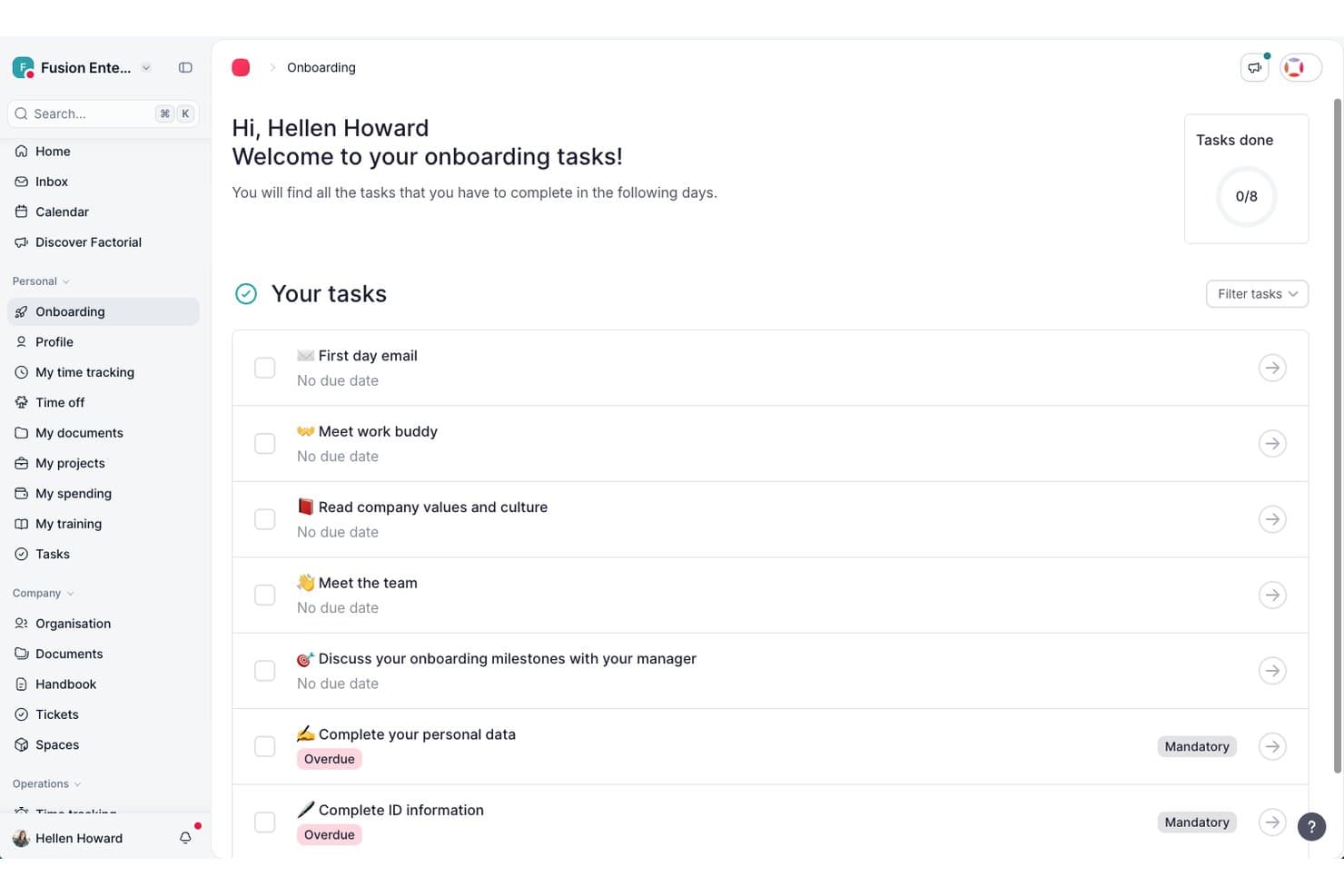
Factorial guides new hires through onboarding tasks in one place. Factorial is an HR workflow software platform that combines workflow automation, onboarding and offboarding, approval routing, time tracking, document management, and AI-assisted reporting into a single system.
Who Is Factorial Best For?
Factorial fits HR teams at small to mid-sized businesses that want a single platform to handle everyday people operations—onboarding, approvals, time tracking, and reporting—with AI assistance built in.
Why I Picked Factorial
I picked Factorial as one of the best because its AI sits at the center of daily HR operations, not as a bolt-on feature. Factorial One acts like an extra team member: it can answer employee questions about policies, generate reports from your company data, and help plan timetables, so your HR team spends less time fielding routine requests. I also like how its workflow automation engine ties these AI capabilities into structured processes, triggering onboarding steps, routing leave approvals, and keeping everything moving without manual chasing.
Factorial Key Features
- Factorial One AI agent: An AI agent that uses your company's data to search, analyze, and act—handling tasks like answering employee policy questions and generating custom reports.
- Time-off approval flows: Configurable, multi-step approval routing for employee leave requests, with leave balances and team absences visible to both employees and managers.
- Legal entity management: Supports multiple companies or branches in a single account, with separate fields for employee country of residence and work location to handle cross-border employment.
- Employee self-service portal: Employees can access their own records, payslips, and documents, and submit requests directly through their profile without going through HR.
Factorial Integrations
Factorial offers marketplace integrations with Silae, DATEV LODAS, a3innuva Nómina, Recruitee, Slack, Google Workspace, Microsoft Power BI, and Okta. It also provides an API with OAuth 2.0, webhooks, SDKs, and OpenAPI support, plus Zapier.
Pros and Cons
Pros:
- Leave approvals surface balances and team absences
- Employee-triggered workflows keep onboarding steps moving
- AI answers policy questions and creates reports
Cons:
- Country-specific processes can be hard to standardize
- Complex workflows can be difficult to adapt
 Best for document-driven workflows
- 14-day free trial; free demo available
- Pricing upon request
Visit WebsiteCustomer Rating:4.7/5
Process Street is an HR workflow software that streamlines and automates HR tasks, including onboarding, training, and employee management, with checklists. Process Street offers comprehensive HR workflow software to help human resources professionals digitize their operations. It is best for document-driven workflows because it’s easy for users to embed procedural documents or checklists without any coding knowledge.
Why I picked Process Street: I chose Process Street for the list because of its unique approach to document-driven workflows. The platform breaks workflow management down into three chunks: handling documentation (creating, exporting, and embedding procedure documents and templates), running trigger-based workflows (for random events initiated by a trigger, such as employee onboarding), and programming scheduled tasks that run on an automated schedule (such as monthly productivity reports).
Standout features & integrations:
Features include workflow management, task scheduling & tracking, a drag-and-drop task manager, attendance tracking, data visualization, an employee database, a vacation & absence calendar, process reporting, status notifications, employee incentive management, and process modeling.
Integrations are available by connecting Process Street to third-party app connectors such as Zapier, Make, or Microsoft Power Automate, or through Process Street’s webhooks and API.
Pros and Cons
Pros:
- Unlimited workflow checklists and templates
- Easy task assignment
- No coding required
Cons:
- Basic reporting only
- No drag-and-drop reordering feature for checklists
Learn more about Process Street: 10Best for customizable HR automation
Cflow
- 14-day free trial + free demo available
- From $11/user/month (billed annually)
Visit WebsiteCustomer Rating:4.8/5
Cflow is an HR workflow software that automates and optimizes HR processes, enhancing efficiency in recruitment, onboarding, and employee management. Cflow is a comprehensive workflow automation tool for streamlining HR and admin processes. It excels at customizable HR automation, allowing businesses to tailor workflows to their needs.
Why I picked Cflow: I chose Cflow for its exceptional ability to customize HR workflows, which sets it apart from other HR automation tools. The platform's flexibility in designing and modifying workflows ensures it can adapt to any organization's unique requirements, making it the best for customizable HR automation.
Standout features & integrations:
Features include visual workflow creation, form design, multiple process stages, rule-based email notifications, and customizable emails.
Integrations are available by connecting Cflow to a paid Zapier account. Cflow also offers webhooks and an API.
Pros and Cons
Pros:
- User-friendly interface
- Role-based access control for enhanced security
- Customizable workflows to suit various HR processes
Cons:
- Limited to 20 processes on the basic plan
- Minimum of 10 users required
Learn more about Cflow:
Outros softwares de fluxos de trabalho de RH
Segue-se uma lista de outros softwares de fluxos de trabalho de RH que não entraram na minha lista dos 10 melhores, mas que vale a pena conhecer:
- 11PipefyBest for simplifying HR processes with automation
- 12GoCoBest for automating the employee onboarding process
- 13ContractbookBest for integrated contract management
- 14ChartHopBest for customizable, data-driven HR workflows
- 15FormstackBest for integrating HR forms and documents
- 16HappyFox WorkflowsBest for automating HR request management
- 17CeligoBest for syncing multi-app HR tech stacks
- 18KenjoBest for customizable HR workflows
- 19RedwoodBest for automating exception handling
- 20Jotform WorkflowsBest for drag-and-drop builder
How I Evaluate HR Workflow Software
I split my evaluation into two layers: baseline capabilities a tool must have—like onboarding automation, approval routing, and digital forms—and the differentiators that set the genuinely useful options apart.
Core Functionality (Table Stakes For This List)
When I'm selecting tools for my list, I rank each one on a scale from 0 (does not offer the functionality) to 5 (excels in this area) for each core functionality listed below. Then, I calculate the tool's total score into a percentage. Each tool needs to achieve a minimum total score of 65% to be considered for inclusion.
- Workflow Automation Builder: I evaluate whether the platform lets you design multi-step HR processes with triggers and conditions—like auto-launching a probation review workflow 90 days after a start date.
- Employee Lifecycle Workflows: Prebuilt templates for onboarding, offboarding, role changes, and leave matter here. I check how many lifecycle stages are covered and how editable each template is.
- Approval Routing & Task Assignment: I look for conditional routing that assigns approvals based on attributes like department or location—not just a single static chain of command.
- HR Forms & Document Management: Digital forms, e-signatures, and centralized document storage all come into play. A tool should let you generate an offer letter, collect a signature, and file it automatically.
- HRIS & HR Stack Integrations: The platform should connect with your existing HRIS, payroll, and ATS. I check for native integrations, open API access, and middleware compatibility with tools like Zapier or Workato.
- Compliance & Audit Trails: Every approval, document change, and workflow action should be logged. I look for role-based permissions, retention controls, and relevant certifications like SOC 2 or GDPR readiness.
Once I have a list of tools that meet this criteria, I consider what sets each platform apart.
Differentiating Factors (What Sets Vendors Apart)
Here's how I compare and contrast different vendors:
Standout Features
Cross-departmental orchestration is a big differentiator. When a new hire starts, the best workflows don't just notify HR—they trigger IT provisioning, finance payroll setup, and facilities desk assignment in one sequence. I also look for workflow analytics dashboards that surface bottlenecks, like flagging that manager approvals in a specific department consistently stall. Native Slack or Teams integration matters too, because approvals that happen inside chat see much faster turnaround than ones buried in email.
Beyond Features
Implementation speed matters a lot. A platform with prebuilt onboarding and offboarding templates can go live in days, while one that requires building every workflow from scratch may take weeks. I also evaluate how well the tool scales—whether it supports multi-entity structures and multiple languages for organizations with distributed teams. Security and compliance posture rounds out my evaluation. I check for SOC 2 certification, role-based access controls, and data residency options, especially for teams handling sensitive employee records across regions.
Como escolher um software de fluxos de trabalho de RH
É fácil perder-se em listas longas de funcionalidades e estruturas de preços complexas. Para o ajudar a manter o foco enquanto analisa o seu processo específico de seleção de software, apresentamos uma lista de verificação dos fatores a ter em conta:
| Fator | O que deve considerar |
|---|---|
| FatorEscalabilidade | O que deve considerarO software acompanhará o crescimento da sua equipa? Verifique se permite adicionar utilizadores e expandir funcionalidades sem um aumento significativo dos custos. |
| FatorIntegrações | O que deve considerarVerifique a compatibilidade com as ferramentas que já utiliza, como sistemas de processamento salarial ou plataformas de comunicação. Procure opções de integração simples. |
| FatorPersonalização | O que deve considerarPode adaptar os fluxos de trabalho aos seus processos específicos de RH? Evite soluções que imponham modelos rígidos se a flexibilidade for importante para si. |
| FatorFacilidade de utilização | O que deve considerarA interface é intuitiva para a sua equipa? Um sistema complexo pode exigir formação extensa e tornar a adoção mais lenta. |
| FatorImplementação e integração inicial | O que deve considerarQuanto tempo demorará a configurar o sistema e a formar a sua equipa? Procure fornecedores que ofereçam guias de início rápido e apoio abrangente durante a integração inicial. |
| FatorCusto | O que deve considerarAvalie o custo total, incluindo taxas ocultas. Considere se o preço está de acordo com o seu orçamento e oferece uma boa relação qualidade-preço para as funcionalidades disponibilizadas. |
| FatorMedidas de segurança | O que deve considerarO software está em conformidade com normas de proteção de dados, como o RGPD? Certifique-se de que dispõe de medidas de segurança robustas para proteger os dados dos colaboradores. |
| FatorDisponibilidade do apoio | O que deve considerarO apoio ao cliente está acessível quando precisa dele? Verifique a existência de opções de apoio 24 horas por dia, 7 dias por semana, e a disponibilidade de vários métodos de contacto. |
Tendências dos softwares de fluxos de trabalho de RH
O software de fluxos de trabalho de RH continua a evoluir para incorporar os avanços tecnológicos e acompanhar as necessidades empresariais em mudança. Eis algumas tendências que estão atualmente a influenciar o desenvolvimento do software de gestão de fluxos de trabalho:
- Recrutamento com recurso a IA: As ferramentas de fluxos de trabalho começaram a incorporar a IA nos fluxos de trabalho centrados no recrutamento, para ajudar a analisar currículos e a comparar candidatos com descrições de funções. Isto reduz o tempo dedicado a tarefas manuais e ajuda a encontrar a pessoa mais adequada para cada função.
- Integração com outras ferramentas empresariais: O software de RH está cada vez mais integrado com outras ferramentas empresariais, como plataformas de gestão de projetos e de comunicação. Isto cria um ambiente de trabalho mais coeso e garante a consistência dos dados entre sistemas.
- Análise avançada e relatórios: As ferramentas de fluxos de trabalho de RH disponibilizam agora análises mais avançadas, que fornecem informações mais aprofundadas sobre as tendências da força de trabalho. Isto ajuda as equipas a tomar melhores decisões baseadas em dados e a identificar áreas a melhorar.
Como pode ver, estas tendências centram-se na incorporação de novas tecnologias no software de fluxos de trabalho de RH, para ajudar as equipas a tirar o máximo partido do software e a reduzir o trabalho manual.
O que é o software de fluxos de trabalho de RH?
O software de fluxos de trabalho de RH é uma ferramenta concebida para automatizar e gerir os processos de recursos humanos. Normalmente utilizado por profissionais e gestores de RH, ajuda a simplificar tarefas como a integração de novos colaboradores, o acompanhamento do desempenho e a conformidade. As funcionalidades de automatização, gestão de tarefas e elaboração de relatórios ajudam a melhorar a eficiência, reduzir o trabalho manual e garantir a consistência. De um modo geral, estas ferramentas permitem poupar tempo de forma significativa e melhorar a precisão das operações de RH.
Funcionalidades
Ao selecionar software de fluxos de trabalho de RH, esteja atento às seguintes funcionalidades essenciais:
- Ferramentas de automatização: Automatize tarefas repetitivas para poupar tempo e reduzir erros manuais.
- Fluxos de trabalho personalizáveis: Adapte os processos às suas necessidades específicas de RH e melhore a eficiência.
- Capacidades de integração: Ligue-se a ferramentas existentes, como sistemas de processamento salarial e plataformas de comunicação, para permitir um fluxo de dados contínuo.
- Autosserviço dos colaboradores: Permita que os colaboradores façam a gestão das suas próprias informações, reduzindo a carga administrativa do departamento de RH.
- Acompanhamento do desempenho: Monitorize o progresso e o desempenho dos colaboradores para apoiar o desenvolvimento e o crescimento.
- Relatórios e análises: Obtenha informações a partir dos dados para tomar decisões de RH fundamentadas.
- Acompanhamento da conformidade: Garanta o cumprimento das normas legais e mantenha registos rigorosos.
- Gestão de documentos: Organize e armazene documentos de RH de forma segura para facilitar o acesso e a consulta.
- Ferramentas de feedback: Facilite a melhoria contínua através do feedback regular dos colaboradores.
- Apoio à integração: Simplifique o processo de integração de novos colaboradores com recursos orientados de integração e formação.
Vantagens
A implementação de software de fluxos de trabalho de RH proporciona várias vantagens para a sua equipa e para a sua empresa. Eis algumas das que pode esperar:
- Poupança de tempo: As ferramentas de automatização reduzem as tarefas manuais, libertando tempo para trabalho mais estratégico.
- Maior precisão: Os processos automatizados minimizam os erros humanos, garantindo resultados consistentes e fiáveis.
- Conformidade reforçada: O acompanhamento da conformidade ajuda a manter a sua empresa alinhada com as normas legais, evitando possíveis penalizações.
- Melhor tomada de decisões: Os relatórios e as análises fornecem informações que orientam as estratégias e as decisões de RH.
- Maior satisfação dos colaboradores: As funcionalidades de autosserviço permitem que os colaboradores façam a gestão das suas próprias informações, aumentando o envolvimento.
- Integração simplificada: O apoio à integração simplifica o processo de integração de novos colaboradores, ajudando-os a adaptar-se de forma harmoniosa.
- Gestão eficiente de documentos: O armazenamento centralizado de documentos facilita o acesso e a gestão de ficheiros importantes de RH.
Custos & preços
A seleção de software de fluxos de trabalho de RH exige uma compreensão dos vários modelos e planos de preços disponíveis. Os custos variam consoante as funcionalidades, a dimensão da equipa, os complementos, entre outros fatores. A tabela abaixo resume os planos mais comuns, os respetivos preços médios e as funcionalidades normalmente incluídas nas soluções de software de fluxos de trabalho de RH:
Tabela de comparação de planos de software de fluxos de trabalho de RH
| Tipo de plano | Preço médio | Funcionalidades comuns |
|---|---|---|
| Tipo de planoPlano gratuito | Preço médio$0 | Funcionalidades comunsGestão básica de tarefas, acesso limitado dos utilizadores e relatórios essenciais. |
| Tipo de planoPlano pessoal | Preço médio$5-$25/utilizador/mês | Funcionalidades comunsFluxos de trabalho personalizáveis, integrações básicas e autosserviço dos funcionários. |
| Tipo de planoPlano empresarial | Preço médio$30-$60/utilizador/mês | Funcionalidades comunsAutomatização avançada, análises detalhadas e monitorização da conformidade. |
| Tipo de planoPlano para empresas | Preço médio$70-$120/utilizador/mês | Funcionalidades comunsCapacidades de integração completas, suporte dedicado e funcionalidades de segurança avançadas. |
Perguntas frequentes sobre software de fluxos de trabalho de RH
Eis algumas respostas a perguntas frequentes sobre software de fluxos de trabalho de RH e o seu funcionamento:
Qual é a melhor forma de avaliar software de fluxos de trabalho de RH?
Comece por avaliar as necessidades e os processos específicos da sua equipa. Faça uma lista das funcionalidades de que necessita e defina prioridades. Considere fatores como a escalabilidade, as capacidades de integração e a facilidade de utilização. Faça demonstrações de algumas opções para perceber quais se adequam ao seu fluxo de trabalho. Fale com outros profissionais de RH para conhecer as suas recomendações e experiências.
Qual é o nível de segurança do software de fluxos de trabalho de RH?
A segurança varia consoante o fornecedor, mas a maioria dos softwares de fluxos de trabalho de RH de renome inclui medidas de segurança robustas. Estas podem incluir encriptação de dados, auditorias de segurança regulares e conformidade com regulamentos de proteção de dados, como o GDPR. Verifique sempre as credenciais de segurança de um fornecedor de software antes de tomar uma decisão.
Como pode o software de fluxos de trabalho de RH melhorar a colaboração da equipa?
O software de fluxos de trabalho de RH melhora a colaboração ao centralizar informações e tarefas. Permite que os membros da equipa acedam a documentos partilhados, acompanhem o progresso das tarefas e comuniquem dentro da plataforma. Funcionalidades como notificações e atribuição de tarefas garantem que todos se mantêm alinhados, reduzindo falhas de comunicação e aumentando a eficiência.