

11 Best AI HRMS Reviewed in 2026

10 Best AI HRMS Shortlist


Managing HR tasks can feel overwhelming, especially when juggling recruitment, payroll, and compliance. You need a solution that lightens your load and boosts efficiency. That's where AI HRMS comes in, offering tools to simplify your HR processes and save you time.
In my experience testing and reviewing software, I've found that Artificial Intelligence Human Resource Management Systems (AI HRMS) can make a real difference. They help you manage tasks more effectively, leaving you free to focus on your team's needs.
In this article, I'll share my top picks for AI HRMS, based on unbiased, thorough research. You'll find insights into the features, benefits, and potential pitfalls of each option. Let's explore the best solutions to enhance your HR management.
Why Trust Our Software Reviews
Our team has been testing and reviewing software since 2012. As HR experts ourselves, we know how difficult—and important—it is to choose the right software.
For this guide, we evaluated tools using hands-on testing and independent research, scoring tools using our selection criteria. We also draw on insights from industry thought leaders and practicing HR experts.
Our reviews reflect our human editorial judgment, not a sales pitch.
Expert reviewers:
AI HRMS Comparison Table
This comparison table summarizes pricing details for my top AI HRMS selections:
| Tool | Best For | Trial Info | Price | ||
|---|---|---|---|---|---|
| 1 | Best for payroll integration | Not available | Pricing upon request | Website | |
| 2 | Best for contextual global HR insights | Free demo available | From $5/employee/month | Website | |
| 3 | Best for performance management | Free demo available | From $4/user/month (billed annually) | Website | |
| 4 | Best for small businesses in U.S. and Europe | Free demo available | Pricing upon request | Website | |
| 5 | Best for user-friendly design | Free demo available + 14-day free trial | From $4/user/month (billed annually) | Website | |
| 6 | Best for open source AI-customization | Free plan available OR 30-day free trial | Pricing upon request | Website | |
| 7 | Best for payroll expertise | Free demo available | Pricing upon request | Website | |
| 8 | Best for global compliance | 30-day free trial | Pricing upon request | Website | |
| 9 | Best for recruitment features | Free demo available | From $299/month | Website | |
| 10 | Best for enterprise scalability | Free demo available | Pricing upon request | Website |

Best AI HRMS Review
Below are my detailed summaries of the best AI HRMS that made it onto my shortlist. My reviews offer a detailed look at the key features, pros & cons, integrations, and ideal use cases of each tool to help you find the best one for you and your team.

Paycom
Best for payroll integration

Paycom’s AI-powered command engine iWant is built into its single-database HR and payroll platform. It lets users retrieve workforce data instantly through text or voice commands without navigating menus.
Why I picked Paycom: its AI-based platform iWant directly addresses a common issue in HR software—time wasted searching for information. It enables employees, managers, and executives to query data such as pay history, time-off balances, and training status simply by asking a question. This makes Paycom especially useful for organizations wanting quick, reliable access to workforce data without manual navigation.
Standout Features & Integrations:
Features include mobile and desktop access via Employee Self-Service and Manager on-the-Go, which come with reporting tools to gain insights into HR metrics, time and attendance tracking to manage employee hours, and a learning management system to support staff development. The software also offers performance management to set and track employee goals. Its document management feature helps store and manage HR documents securely.
Integrations are primarily delivered through Paycom's native HR and payroll suite, which includes built-in tools for talent management, time tracking, benefits administration, and employee self-service within a single database.
Pros and Cons
Pros:
- Reduces HR data requests from staff
- Easy access through voice or text commands
- Accurate results from their unified database
Cons:
- Limited customization options
- Complex user interface

Deel HR
Best for contextual global HR insights
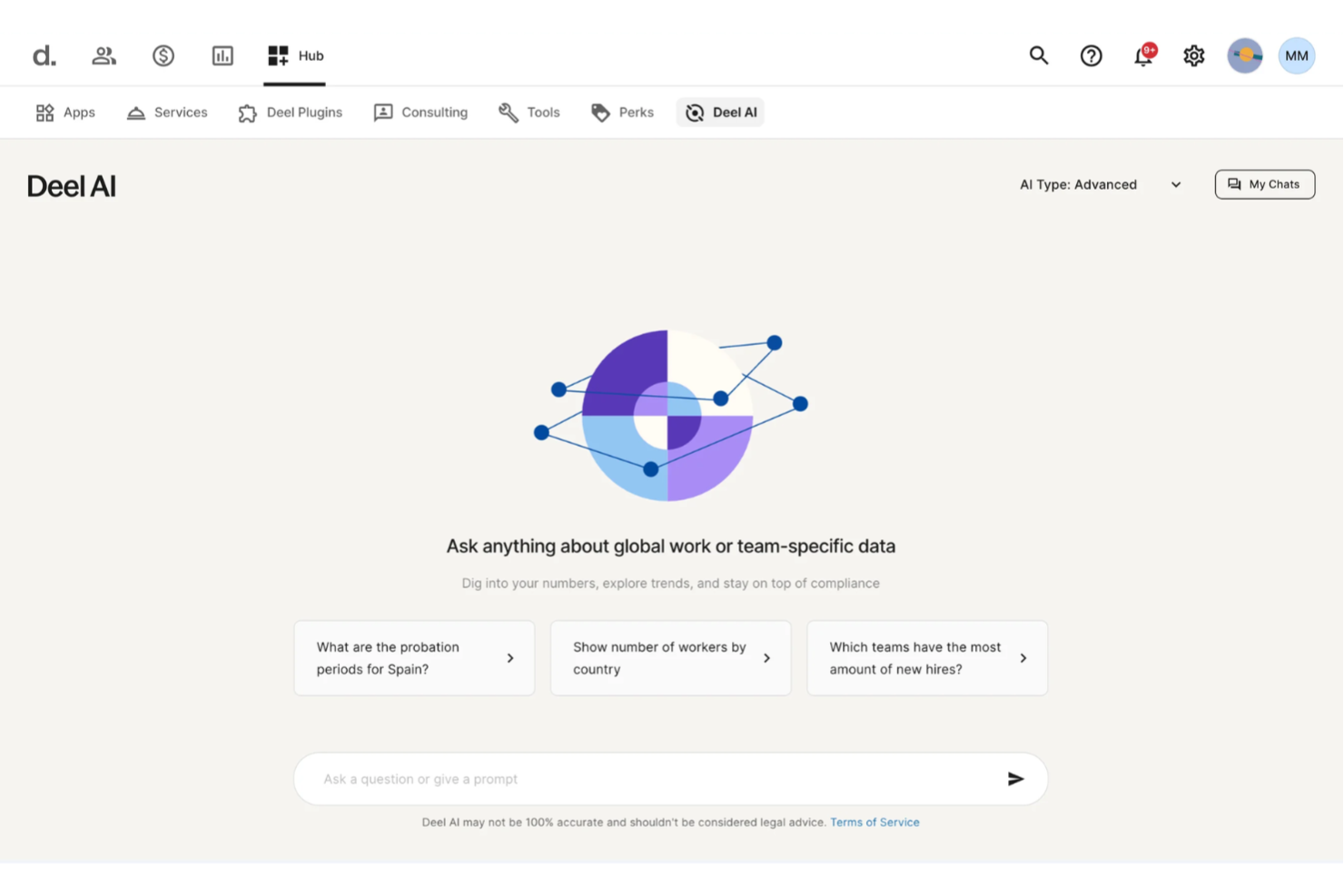
Expanding teams across regions becomes far easier when your HR system can instantly interpret regulations, surface insights from your people data, and answer complex questions without slowing you down. Deel AI gives you an HRMS enhanced with AI that supports your team around the clock, guiding you through payroll, policies, compliance, and everyday workforce needs.
Why I Picked Deel
I picked Deel because its AI is woven directly into the HRMS experience, acting as a legal and HR expert trained across 150+ countries. It offers contextual, page-aware guidance that summarizes what you’re viewing, highlights key data, and flags compliance considerations right inside the platform. I also appreciate that Deel AI lets you ask anything—from local employment rules to workforce insights—and pulls from an expert-built Knowledge Hub combined with your internal data. For teams looking for an AI HRMS that reduces manual searching and clarifies global HR decisions, this is a strong fit.
Deel Key Features
In addition to the AI-driven HR and compliance intelligence above, Deel offers several other features that enhance its appeal as an AI HRMS:
- Global Payroll Management: Processes payroll for employees and contractors in over 150 countries, allowing payments in multiple currencies.
- Employer of Record (EOR): Enables hiring in countries without local entities, handling all legal and compliance responsibilities.
- Contractor Management: Streamlines the hiring and payment processes for international contractors, including automated invoicing.
- Employee Self-Service Access: Provides employees with access to their payroll and HR information, enhancing transparency and engagement.
Deel Integrations
Deel integrates with popular platforms including QuickBooks, Xero, Greenhouse, BambooHR, NetSuite, Workday, Gusto, Lever, Slack, and SAP SuccessFactors.
Pros and Cons
Pros:
- AI answers talent and workforce questions using expert-sourced data
- Surfaces org insights and summaries directly from your team data
- Delivers guidance across 150+ country employment contexts
Cons:
- Heavy dependence on proprietary Knowledge Hub for accuracy
- AI guidance may require human review for complex legal scenarios
New Product Updates from Deel HR

Deel Expands Stablecoin Wallet to 80+ Countries
Deel expands its Stablecoin Wallet to 80+ countries with dollar-backed balances and optional rewards. This gives eligible contractors more ways to hold and manage earnings inside Deel. For more information, visit Deel’s official site.
 .
.
Lattice
Best for performance management

Lattice is a performance management platform designed for companies focused on employee growth and development. It offers performance reviews, goal setting, and feedback mechanisms to help teams improve productivity and engagement.
Why I picked Lattice: combines proven performance management workflows with AI features that simplify reviews and strengthen feedback quality. The Lattice AI Agent automatically summarizes one-on-one notes, goals, and feedback to help managers write accurate reviews faster, while the AI Writing Assist tool refines tone and phrasing for clarity and fairness. Lattice’s focus on AI-assisted performance reviews and analytics makes it ideal for teams looking to reduce admin work while improving feedback quality and consistency.
Standout Features & Integrations:
Features include AI-powered review writing assistance, goal and OKR tracking, continuous feedback tools, people analytics dashboards, and DEIB insights. The platform supports customizable review cycles, real-time feedback, and development plans through its Grow module.
Integrations include Slack, Microsoft Teams, Google Workspace, BambooHR, Workday, ADP, Okta, Greenhouse, Zapier, and Lever.
Pros and Cons
Pros:
- Integrations with popular HR and communication tools
- People analytics and DEIB insights
- Continuous feedback and goal tracking
Cons:
- Some AI tools still rely on manual data entry
- Requires user training for advanced analytics
New Product Updates from Lattice

Lattice Introduces MCP Connector for AI Chat Tools
Lattice introduced Lattice MCP, a new connector that brings talent data into Claude, ChatGPT, and other LLM tools. The connector helps teams access performance context from reviews, 1:1 notes, feedback, goals, and updates within AI chat workflows. For more information, visit Lattice’s official site.
 .
.
Personio
Best for small businesses in U.S. and Europe

Personio is an HR management system best suited to small and medium-sized businesses that use smart workflows and data-driven features to automate everyday HR tasks. Personio is great for those small businesses looking to benefit from AI-assisted HR functions without requiring in-house technical setup or dedicated IT support.
Why I picked Personio: Personio focuses on making HR automation accessible to smaller organizations. Its workflows help reduce repetitive administrative work, while its centralized dashboard gives visibility into employee data, time-off, and payroll. Unlike enterprise AI platforms, Personio’s tools are designed to be simple to set up and maintain, allowing small HR teams (or even a single admin) to run processes efficiently.
Standout Features & Integrations:
Features include a self-service portal for employees to manage their data, a recruitment module to streamline hiring, and automated payroll calculations. You can also track employee performance and manage time off requests efficiently. The intuitive interface makes onboarding new team members straightforward.
Integrations include Slack, Microsoft Teams, Google Calendar, DATEV, Prescreen, Indeed, LinkedIn, Greenhouse, and Workable.
Pros and Cons
Pros:
- Clear, user-friendly interface
- Easy to set up and manage
- Centralized HR and payroll tools
Cons:
- Occasional performance issues
- Basic reporting and analytics

Best for user-friendly design

Access PeopleHR is an HR management platform aimed at small and medium-sized businesses. It focuses on core HR functions such as recruitment, employee records, and performance management, offering easy-to-use tools for efficient HR operations.
Why I picked Access PeopleHR: Access PeopleHR is a cloud-based HR and payroll platform built for small and medium-sized businesses. The system focuses on simplifying core HR processes like recruitment, employee records, and performance management. With its intuitive interface and new AI features, it helps teams manage HR workflows efficiently while reducing administrative time.
Standout Features & Integrations:
Features include an applicant tracking system to simplify recruitment, customizable reports to gain insights, and performance management tools to track employee progress. You can also access a time and attendance tracking feature to monitor staff hours. The software provides a self-service portal for employees to manage their own data.
Integrations include Microsoft Outlook, Google Calendar, Slack, Zapier, BambooHR, Indeed, LinkedIn, Xero, QuickBooks, and Sage.
Pros and Cons
Pros:
- Visual dashboards for insights
- Quick setup process
- Simple and intuitive interface
Cons:
- Limited advanced features
- Availability limited to the U.S., U.K., and Asia
Best for open source AI-customization

OrangeHRM is an HR management platform for small and medium-sized businesses that combines open-source flexibility with new AI-powered tools. With more than 5 million users worldwide, OrangeHRM continues to evolve its platform with intelligent automation and integrated HR modules.
Why I picked OrangeHRM: OrangeHRM is a good option for its balance of open-source adaptability and AI innovation. The platform allows businesses to tailor modules, workflows, and data fields while now integrating AI tools like the Citra chat assistant and AI-enabled helpdesk to automate employee support and HR queries. These additions make OrangeHRM particularly suitable for teams wanting customizable HR software that scales with their needs.
Standout Features & Integrations:
Features include an employee information database, time and attendance tracking, leave management, recruitment, and performance management. New modules such as Surveys, Roster, and Grievances enhance engagement, scheduling, and workplace fairness.
Integrations include ADP, QuickBooks, BambooHR, SAP, Microsoft Outlook, Google Calendar, Slack, LinkedIn, Indeed, and Zapier.
Pros and Cons
Pros:
- Extensive analytics and reporting tools
- Modular architecture for scalability
- Supports multiple HR functions in one platform
Cons:
- Limited built-in automation without add-ons
- Requires setup and technical configuration

ADP
Best for payroll expertise

ADP is a global HCM platform that combines payroll accuracy with advanced AI-powered workforce management. With more than 75 years of expertise, ADP’s payroll products are built for organizations of all sizes, offering payroll, benefits, compliance, and analytics in a single system.
Why I picked ADP: I chose ADP for its proven payroll reliability paired with new AI-enabled features that enhance efficiency and insight. Its ADP Assist platform uses artificial intelligence to detect payroll anomalies, answer HR questions in real time, and provide predictive workforce analytics. These tools allow HR leaders to spot trends, correct potential payroll errors before they occur, and access visualized insights instantly.
Standout Features & Integrations:
Features AI-assisted payroll error detection, conversational analytics, predictive workforce trend reporting, and global compliance monitoring. ADP Assist integrates across payroll, time, talent, benefits, and reporting modules, providing a unified experience.
Integrations include QuickBooks, Xero, BambooHR, Workday, Microsoft Dynamics, Salesforce, Oracle, Google Workspace, Slack, and SAP.
Pros and Cons
Pros:
- Integrated HR and payroll dashboards
- Predictive workforce analytics
- AI-powered payroll anomaly detection
Cons:
- Limited customization in the standard report option
- Requires training for new users
Best for global compliance

SAP SuccessFactors delivers enterprise-grade HR management with built-in AI for governance, compliance, and workforce automation. It supports global operations across talent, payroll, and analytics, ensuring consistent regulatory alignment across countries and industries.
Why I picked SAP SuccessFactors: This tool is ideal for organizations needing global compliance, addressing diverse regulatory requirements. Joule, SAP’s built-in AI assistant, automates workflows and provides insights that help maintain fairness, accuracy, and transparency in hiring and pay. Its localized payroll and governance controls support international labor standards, while workforce analytics enable compliance tracking and strategic planning.
Standout Features & Integrations:
Features AI-powered Joule agents for HR automation, localized payroll compliance tools, performance and goal management, compensation planning, and predictive analytics for workforce trends.
Integrations include Microsoft Azure, Google Workspace, LinkedIn, ADP, Kronos, IBM, SuccessFactors API, Salesforce, Concur, and Workday.
Pros and Cons
Pros:
- Updates on new labor and tax laws
- Regulatory workflows with regional data rules
- Global compliance for 100+ countries
Cons:
- Advanced features require licensing
- Complex user interface

Workable is a recruitment software solution designed for businesses of all sizes. It focuses on streamlining the hiring process, offering tools for job posting, candidate tracking, and interview scheduling.
Why I picked Workable: Its AI-driven recruitment tools go beyond traditional applicant tracking. The AI-powered sourcing engine identifies qualified candidates from a 400M+ profile database, while the Screening Assistant summarizes resumes and highlights best-fit applicants using semantic matching. Its AI job description generator, salary estimator, and Workable Assistant simplify setup and daily HR tasks, making it ideal for organizations focused on smart, data-led hiring.
Standout Features & Integrations:
Features include AI-assisted resume parsing and screening, automated interview scheduling, personalized candidate emails, and job description generation. The platform also supports onboarding workflows, performance reviews, and HR data management.
Integrations include LinkedIn, Indeed, Glassdoor, Monster, Slack, Google Workspace, Microsoft Outlook, Zapier, BambooHR, and Salesforce.
Pros and Cons
Pros:
- Centralized HR and recruitment data
- Intuitive and customizable hiring pipelines
- AI-driven candidate sourcing and screening
Cons:
- Occasional delays in system updates
- Limited customization in templates


Workday is an enterprise-level HR management platform serving large organizations. It handles various HR functions, including workforce planning, talent management, and payroll.
Why I picked Workday: Workday suits large enterprises that need scalable, data-driven HR operations. Its Workday Illuminate™ AI framework embeds AI “agents” into core processes like performance reviews, workforce planning, and payroll. These agents automate repetitive work, analyze performance data, and provide insights so HR teams can focus on strategy. Workday’s platform unifies HR and finance data, helping enterprises align talent and business goals efficiently.
Standout Features & Integrations:
Features AI-driven Illuminate agents for workforce planning, performance analysis, and compliance automation; a Business Process Copilot for setup automation; and Employee Sentiment and Job Architecture agents for talent management. The Workday Flex Credits model lets customers scale AI adoption at their own pace.
Integrations include Salesforce, Microsoft Azure, Google Cloud, Slack, ServiceNow, Workday Adaptive Planning, ADP, Okta, SAP, and IBM.
Pros and Cons
Pros:
- Advanced analytics and compliance tools
- Unified HR and finance data platform
- Continuous AI updates via Flex Credits
Cons:
- Complex implementation process
- Steep learning curve


How I Evaluate AI HRMS
I look for platforms where AI does more than dress up static dashboards—it should automate real workflows, surface actionable workforce insights, and give employees genuine self-service tools. My evaluation splits into two layers: the core functionality a tool needs to make the list and the differentiating factors that separate good options from great ones.
Core Functionality (Table Stakes For This List)
When I'm selecting tools for my list, I rank each one on a scale from 0 (does not offer the functionality) to 5 (excels in this area) for each core functionality listed below. Then, I calculate the tool's total score into a percentage. Each tool needs to achieve a minimum total score of 65% to be considered for inclusion.
- Unified Employee Database: I check whether the platform serves as a true system of record—storing job history, compensation, documents, and org structure in one place rather than scattered modules.
- AI-Powered Automation: Each tool should use AI to handle repetitive work like onboarding task assignment, document generation, or approval routing instead of relying solely on static rule-based triggers.
- Core HR Modules: I look for payroll, benefits administration, time and attendance, and leave management bundled within the platform so HR teams aren't stitching together separate point solutions.
- Predictive People Analytics: Dashboards and reports should go beyond historical snapshots—I evaluate whether the tool forecasts attrition risk, flags engagement trends, or identifies skill gaps.
- AI Talent Management: From candidate matching in recruiting to AI-suggested development plans, I look at how deeply AI is embedded across hiring, performance reviews, and learning paths.
- Conversational AI Assistant: I evaluate whether employees and managers can ask questions, submit requests, or look up policies through a natural-language chatbot instead of navigating menus and forms.
Once I have a list of tools that meet this criteria, I consider what sets each platform apart.
Differentiating Factors (What Sets Vendors Apart)
Here's how I compare and contrast different vendors:
Standout Features
A skills intelligence engine is a major differentiator—I look for platforms that infer and map employee skills from job history and project data, then recommend internal mobility or upskilling paths. Sentiment and engagement AI also matter here. Tools that analyze pulse surveys and feedback signals to flag burnout risk give HR teams a real head start on retention. I also evaluate whether a platform offers agentic workflows that autonomously handle multi-step tasks like scheduling interviews or flagging compliance gaps without manual prompts.
Beyond Features
AI governance is top of mind when I evaluate these platforms. I check for bias auditing, model explainability, and clear opt-out controls—especially for sensitive decisions like performance scoring. Integration depth also matters: an AI HRMS needs to connect with your existing payroll, ATS, identity providers, and collaboration tools like Slack or Microsoft Teams. For growing or distributed teams, I look at multi-country compliance support, localized payroll, and multi-language capabilities to confirm the platform scales alongside your workforce.
How to Choose AI HRMS
It’s easy to get bogged down in long feature lists and complex pricing structures. To help you stay focused as you work through your unique software selection process, here’s a checklist of factors to keep in mind:
| Factor | What to Consider |
| Scalability | Can the software grow with your business? Consider whether it can handle an increase in users or data volume without degrading performance. Look for scalable architecture. |
| Integrations | Does it integrate with your existing systems? Check for compatibility with tools like payroll software, CRM, or communication platforms you already use. |
| Customizability | Can you tailor the software to fit your workflows? Ensure it offers options to adjust settings, dashboards, and processes to match your specific needs. |
| Ease of Use | Is the software user-friendly? Evaluate the interface for simplicity and intuitiveness. Ensure your team can navigate it without extensive training. |
| Implementation and Onboarding | How long will setup take? Assess the time and resources required to get up and running. Look for providers offering support, training, and onboarding guides. |
| Cost | Is the pricing transparent and within your budget? Look for hidden fees, and evaluate the cost against the features offered to determine value for money. |
| Security Safeguards | Does it protect your data? Ensure the software has strong security measures like encryption, regular backups, and compliance with data protection regulations. |
| Support Availability | Can you access help when you need it? Check if the vendor offers 24/7 support, and assess the quality and channels of customer service available. |
What Is AI HRMS?
AI HRMS is software that integrates artificial intelligence into human resource management systems to automate and optimize HR functions. HR professionals, managers, and recruiters generally use these tools to enhance decision-making and efficiency.
Automated data processing, predictive analytics, and employee engagement capabilities support effective workforce management and strategic planning. These tools provide overall value by improving productivity and reducing administrative burdens.
Features of AI HRMS
When selecting AI HRMS, keep an eye out for the following key features:
- Automated data processing: Streamlines the handling of employee data, reducing manual entry and errors.
- Predictive analytics: Uses data to forecast trends and help HR make informed decisions.
- Employee engagement tools: Enhance communication and engagement within teams, fostering a positive work environment.
- Customizable dashboards: Allow users to tailor their interface to display relevant HR metrics and insights.
- Integration capabilities: Ensures compatibility with existing systems like payroll and CRM for smooth operations.
- Compliance management: Helps maintain adherence to labor laws and regulations, minimizing legal risks.
- Performance management: Tracks employee progress and facilitates performance reviews to boost productivity.
- Mobile accessibility: Provides access to HR functions on the go, supporting remote work and flexibility.
- Time and attendance tracking: Monitors employee hours and attendance, simplifying payroll and scheduling.
- AI-driven insights: Offers valuable workforce insights, aiding strategic planning and resource allocation.
Benefits of AI HRMS
Implementing AI HRMS provides several benefits for your team and your business. Here are a few you can look forward to:
- Improved decision-making: Leverages data analytics to provide insights that support strategic HR decisions.
- Enhanced productivity: Automates repetitive tasks, allowing your team to focus on higher-value activities.
- Better compliance: Manages regulatory requirements efficiently, reducing the risk of legal issues.
- Increased engagement: Uses tools to boost communication and morale among team members.
- Scalability: Adapts to your business growth, handling increased data and user needs effortlessly.
- Cost savings: Reduces administrative expenses by optimizing HR processes and minimizing errors.
- Remote work support: Offers mobile access and flexibility, accommodating remote and hybrid work models.
Costs and Pricing of AI HRMS
Selecting AI HRMS requires an understanding of the various pricing models and plans available. Costs vary based on features, team size, add-ons, and more. The table below summarizes common plans, their average prices, and typical features included in AI HRMS solutions:
Plan Comparison Table for AI HRMS
| Plan Type | Average Price | Common Features |
| Free Plan | $0 | Basic employee data management, limited reporting, and basic support. |
| Personal Plan | $10-$299/user/month | Employee data management, basic payroll processing, and limited integrations. |
| Business Plan | $30-$599/user/month | Advanced analytics, performance tracking, and mobile access |
| Enterprise Plan | $75-$600+/user/month | Full customization, dedicated support, and comprehensive compliance management. |
AI HRMS FAQs
Here are some answers to common questions about AI HRMS:
What are the potential drawbacks of using AI in HR?
AI in HRMS software can introduce risks like biased decision-making, limited understanding of human nuance, and over-reliance on automated recommendations. Because these tools process sensitive employee and candidate data, privacy and security are also major concerns, especially if a vendor’s terms are unclear about how data is stored, used, or protected. Some systems can feel like black boxes, which makes it harder to explain or defend decisions for compliance purposes. This is why it’s important to choose vendors that prioritize transparency, do not sell or reuse your data, and position AI as a support rather than a replacement for human judgment.
How can AI be used in HRM?
AI HR technology can be used to automate repetitive work and give HR teams more time for high-value tasks like exit interviews, coaching, and deeper conversations. It can assist with recruiting new hires, onboarding, payroll management, and employee support, while also surfacing patterns in feedback, spotting skill gaps, detecting sentiment, and turning large amounts of HR data into actionable insights. These capabilities help HR teams identify problems earlier, improve processes and retention, and build a more people-centered employee experience at scale.
What should HR pros know about AI in the workplace
HR professionals should understand both the power and limitations of AI in the workplace. This includes ensuring data accuracy, protecting sensitive employee information, and knowing how to fact-check AI-generated insights before acting on them. It’s also important to stay transparent about when and how AI is being used, since trust depends on clear communication and human oversight. HR pros should recognize that AI can surface trends, support people analytics, and even perform sentiment analysis, but it still lacks human nuance, context, and ethical judgment. Treating AI as a decision support tool, not an authority, helps teams use it responsibly and effectively
Is AI-powered HR software secure?
AI-powered HR software can be secure if it incorporates strong encryption, regular security updates, and compliance with data protection regulations. It’s essential to evaluate the vendor’s security measures and ensure they align with your organization’s standards to protect sensitive employee information.
Can small businesses use AI in HR?
Yes, small businesses can benefit from AI in HR by automating repetitive tasks and improving recruitment processes. AI tools can help small teams manage HR functions like employee onboarding or payroll more efficiently, saving time and resources. Choosing scalable solutions will ensure the software grows with your business.
How does AI help with recruitment?
AI might be a key tool for the future of HR departments by automating time-consuming tasks like resume screening, keyword matching, and candidate shortlisting. It can free up your HR department by handling interview scheduling, sending updates to candidates, and flagging applicants who meet specific skills or experience requirements. Some generative AI tools also use natural language processing to analyze writing tone, video responses, or work samples to highlight potential strengths or risks, and others surface hiring trends such as common bottlenecks or where top applicants are coming from. These capabilities help recruiters move faster, reduce manual admin work in the hiring and onboarding process, and focus more on relationship-building and evaluating the human elements that AI can’t capture on its own.