

10 Best AI Offboarding Tools Reviewed in 2026

Best AI Offboarding Tools Shortlist


Why Trust Our Software Recommendations
Our team has been testing and reviewing software since 2012. As HR experts ourselves, we know how difficult—and important—it is to choose the right software.
For this guide, we evaluated tools using hands-on testing and independent research, scoring tools using our selection criteria. We also draw on insights from industry thought leaders and practicing HR experts.
Our reviews reflect our human editorial judgment, not a sales pitch.
Expert reviewers:
Even when handled with care, employee departures can expose weak spots in consistency, communication, and documentation. It’s a process where one missed detail can ripple across teams, systems, and even company culture.
That’s where AI offboarding tools can make a meaningful difference. These solutions take the weight of manual, error-prone tasks off your plate, such as automating checklists, revoking access, ensuring compliance, and even flagging potential risks. They bring structure, speed, and consistency to an often stressful process, freeing HR teams to focus on the human side of transition: dignity, transparency, and support.
In this article, I’ll share my top picks for AI offboarding tools as well as an unbiased look at their features, functions, and how they can help your team simplify the process while protecting both people and business. Let’s explore how technology can turn one of HR’s toughest moments into a smoother experience for both departing employees and management.
AI Offboarding Tools Comparison Table
This comparison table summarizes pricing details for my top AI offboarding tools selections:
| Tool | Best For | Trial Info | Price | ||
|---|---|---|---|---|---|
| 1 | Best for compliant global offboarding | Free demo available | From $599/user/month | Website | |
| 2 | Best for customizable offboarding templates | Free demo available | Pricing upon request | Website | |
| 3 | Best for deep integration capabilities | Free plan available | From $100/month | Website | |
| 4 | Best for data protection | Free demo available | Pricing upon request | Website | |
| 5 | Best for SaaS management | Free demo available | Pricing upon request | Website | |
| 6 | Best for automated employee queries | Free demo available | Pricing upon request | Website | |
| 7 | Best for security automation | Free demo available | Pricing upon request | Website | |
| 8 | Best for app visibility | Free 7-day trial available | Pricing upon request | Website | |
| 9 | Best for centralized app management | 15-day free trial + free demo | From $2,500/month | Website | |
| 10 | Best for small to mid-sized teams | Free trial + demo available | From $90/user/year | Website |
Best AI Offboarding Tool Reviews
Below are my detailed summaries of the best AI offboarding tools that made it onto my shortlist. My reviews offer a detailed look at the key features, pros & cons, integrations, and ideal use cases of each tool to help you create a smooth employee offboarding experience.

Deel HR
Best for compliant global offboarding
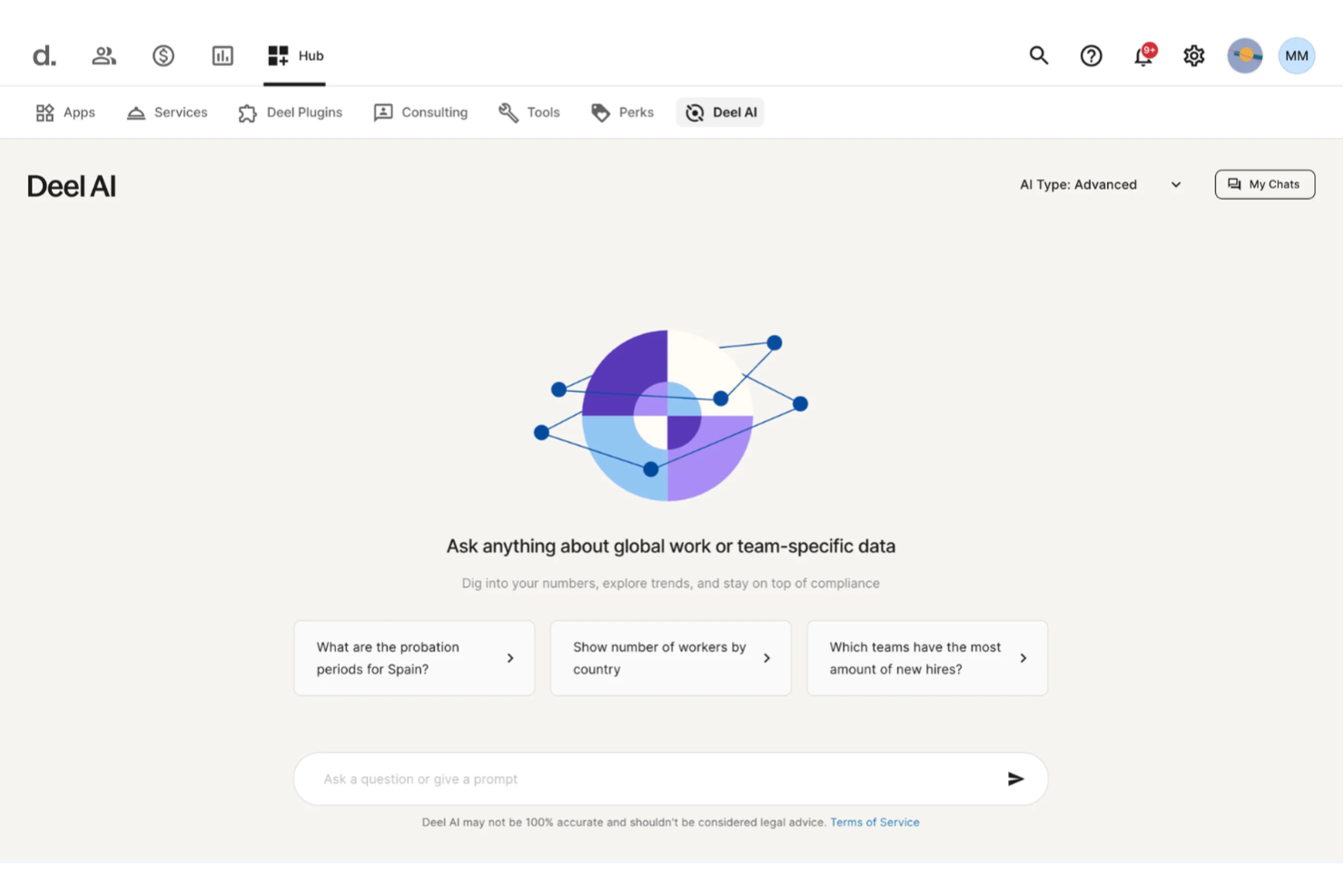
When it’s time to offboard someone from your team, you want clarity—not scattered documents, legal uncertainty, or delays. Deel AI gives you an always-available assistant that understands your workforce data, local employment laws, and HR workflows so you can handle sensitive offboarding decisions with confidence.
Why I Picked Deel
I picked Deel because its AI delivers context-aware guidance during critical HR moments, including offboarding, where regulatory nuance matters most. You get built-in compliance intelligence trained by experts across 150+ countries, so the system can surface local legal considerations, contract obligations, and policy insights as you work. I also appreciate that Deel AI interprets page context—such as employee profiles or payroll views—and summarizes key data you need before making offboarding decisions. This makes it a strong fit if you want an AI tool that reduces uncertainty and speeds up your offboarding process without relying solely on manual research.
Deel Key Features
In addition to the compliance-driven AI decision support, Deel offers several other notable capabilities:
- Automated Account Deprovisioning: This feature ensures that departing employees' access to company systems is promptly revoked, reducing security risks.
- Global Device Recovery: Facilitates the retrieval of company-issued devices from remote employees, ensuring assets are returned efficiently.
- Compliance Reporting: Provides detailed reports to ensure adherence to local regulations, minimizing legal risks.
- Global Payroll Management: Automate payroll tasks across multiple countries, ensuring compliance with local regulations.
Deel Integrations
Integrations include Slack, QuickBooks, Xero, BambooHR, Greenhouse, Lever, Rippling, Personio, Gusto, and Workday.
Pros and Cons
Pros:
- Delivers guidance across 150+ country employment contexts
- Surfaces org insights and summaries directly from your team data
- AI answers talent and workforce questions using expert-sourced data
Cons:
- AI guidance may require human review for complex legal scenarios
- Heavy dependence on proprietary Knowledge Hub for accuracy
New Product Updates from Deel HR

Deel Expands Stablecoin Wallet to 80+ Countries
Deel expands its Stablecoin Wallet to 80+ countries with dollar-backed balances and optional rewards. This gives eligible contractors more ways to hold and manage earnings inside Deel. For more information, visit Deel’s official site.
 .
.
HR Cloud
Best for customizable offboarding templates

HR Cloud is an AI-driven HR software solution designed to enhance HR management and employee engagement. It caters to industries like healthcare, technology, and retail, offering features such as automated onboarding, time-off management, and performance reviews. AI capabilities include valuable analytics, helping your team make informed decisions.
Why I picked HR Cloud: Customizable offboarding templates set HR Cloud apart, allowing you to tailor the offboarding process to fit your organization's needs. AI-powered analytics help predict potential offboarding challenges and offer solutions. The platform automates routine tasks, letting your team focus on talent development. HR Cloud's integration options ensure it fits into your existing HR ecosystem.
Standout features & integrations:
Features include digital signage for communication, automated compliance management, and customizable workflows for different HR tasks. These features ensure your team can efficiently manage HR processes and maintain compliance with ease.
Integrations include 35+ software solutions such as ADP, Glassdoor, Greenhouse, Indeed, JazzHR, Lever, Microsoft Office 365, SAP SuccessFactors, Slack, Staffbase, Twilio, QuickBooks, Yammer, Zapier, ZipRecruiter, and others.
Pros and Cons
Pros:
- Seamless integration with popular tools
- AI-driven analytics for decision-making
- Customizable onboarding and offboarding templates
Cons:
- Some features may require a learning curve
- Limited advanced customization options

Workato
Best for deep integration capabilities

Workato is an enterprise automation platform that unifies apps, data, and workflows across business systems. It enables IT and HR teams to automate complex offboarding processes, from revoking access to updating payroll, using intuitive, no-code integrations. Its AI-assisted design tools make it easy to build dynamic automations that ensure every step of the offboarding process is handled consistently and securely.
Why I picked Workato: Workato's integration capabilities offer an extensive library of connectors, including finance and payroll tools, that make it easy for your team to automate offboarding workflows. Its AI-driven features help you create intelligent automation, reducing the need for manual intervention. AI-driven recommendations simplify workflow creation, and conditional logic ensures sensitive tasks (like device deprovisioning or data transfer) happen in the right order. Workato’s platform adapts as your tech stack evolves, making it a useful tool for dynamic industries.
Standout features & integrations:
Features include a user-friendly interface that simplifies workflow creation, a library of pre-built connectors that speed up integration, an AI-assisted workflow builder, integrated HR, IT, and finance workflows, and AI-enhanced automation that reduces manual tasks.
Integrations include Salesforce, Slack, QuickBooks, Google Workspace, Microsoft 365, Jira, Zendesk, NetSuite, HubSpot, and ServiceNow.
Pros and Cons
Pros:
- AI recommendations simplify setup and reduce human error
- Cross-departmental automation
- Extensive integration options with popular tools
Cons:
- AI is assistive, not autonomous
- May require technical expertise for setup


BetterCloud is a SaaS management and security platform that excels in automated offboarding. Its no-code workflow builder enables IT teams to securely revoke user access, remove permissions, and reclaim data across all connected SaaS applications — without manual intervention. Designed for enterprise-scale environments, it oversees deprovisioning while reducing risk and ensuring compliance.
Why I picked BetterCloud: BetterCloud stands out for its ability to make offboarding secure, consistent, and fast. With automated workflows triggered by HR or identity events, IT can revoke user access, bulk-remove file permissions, and log every action for auditing. The result is faster access and permission removal, reduced insider risk, and complete visibility into access and data changes during offboarding.
Standout features & integrations:
Features include automated access removal workflows with conditional logic and scheduling, bulk access and file revocation, real-time alerts for potential security threats, and detailed analytics that offer insights into SaaS usage and security.
Integrations include Google Workspace, Microsoft 365, Slack, Salesforce, Box, Dropbox, Zendesk, Okta, Zoom, and Jira.
Pros and Cons
Pros:
- Reduces data exposure and human error
- Automates compliance and security tasks
- Granular access & sharing governance
Cons:
- AI features are more rule-based than predictive
- Best suited for mid-to-large organizations


Zluri is a SaaS management platform designed for IT, finance, and procurement teams in large organizations. Its AI-powered insights help manage software licenses, optimize usage, and control costs. While not purpose-built for employee offboarding, Zluri’s automation workflows can be adapted to manage deprovisioning, ensuring licenses are reclaimed and compliance is maintained.
Why I picked Zluri: Zluri stands out for its AI-driven analytics and automation. It centralizes visibility into SaaS usage across the enterprise and uses machine learning to identify underutilized apps, redundant subscriptions, and opportunities to consolidate vendors. Its workflow automation can assist with offboarding by revoking access and reallocating licenses, but its true strength lies in continuous SaaS optimization and spend intelligence.
Standout features & integrations:
Features include automated workflows that enhance efficiency, real-time monitoring that provides up-to-date usage data, and license optimization tools that identify cost-saving opportunities.
Integrations include Okta, Microsoft 365, Slack, Google Workspace, Salesforce, Zoom, ServiceNow, Jira, Dropbox, and Asana.
Pros and Cons
Pros:
- Automates offboarding processes
- Integrates with major HR and IT systems
- Reduces license waste
Cons:
- Offboarding use case is secondary, not core
- AI is primarily analytical, not deeply autonomous


Leena AI is an AI-powered HR solution designed to manage and automate the employee offboarding process. It provides an intuitive and consistent offboarding experience by managing exit workflows, collecting feedback, revoking employee access to logins and laptops, and ensuring compliance, all through intelligent automation. The platform integrates with your existing HR systems to handle every step efficiently and transparently.
Why I picked Leena AI: This tool stands out for its ability to simplify and personalize employee offboarding at scale. Its AI-driven workflows help HR teams automate exit checklists, trigger asset recovery, and collect exit interviews without manual follow-up. Leena AI also uses predictive insights to identify potential retention risks and surface trends from exit feedback, helping organizations learn from exit experiences, improve employee experience, and reduce attrition in the future. The smooth integration with existing HRIS and IT systems ensures a compliant, data-secure, and efficient offboarding process.
Standout features & integrations:
Features include personalized training modules that adapt to your team's needs, rapid response capabilities to handle inquiries quickly, and predictive analytics to forecast recruitment trends and needs.
Integrations include Workday, SAP SuccessFactors, ADP, Microsoft Teams, Slack, Oracle, Zoho CRM, ServiceNow, Zendesk, and Salesforce.
Pros and Cons
Pros:
- AI follows rules, policies, and permissions
- Reduces administrative workload significantly
- Automates responses to common HR queries
Cons:
- May need customization for specific industries
- Initial setup may require IT involvement


Swimlane is a security orchestration, automation, and response (SOAR) platform built for security operations and IT teams. It uses AI to automate workflows, detect threats, and manage processes like employee offboarding with greater control and consistency. Acting as a secure system of record, Swimlane helps organizations protect access points, maintain compliance, and ensure no accounts or permissions slip through during transitions.
Why I picked Swimlane: It’s a standout choice for secure automation, especially when offboarding and access control are critical. Swimlane’s AI and automation features help your team offboard employees safely by instantly revoking credentials, disabling accounts, and documenting every action. This reduces human error, speeds up response time, and strengthens security posture. The platform’s intelligent workflows also support continuous improvement by learning from past incidents and offboarding data.
Standout features & integrations:
Features include automated playbooks for secure employee offboarding, AI-driven analytics that detect and respond to threats in real time, and centralized dashboards for full visibility into user access and security operations. Swimlane integrates with major identity providers, ticketing systems, and security tools to ensure every step of the offboarding process is fully automated and auditable.
Integrations include a full-stack modular marketplace of integrations and automation components, enabling connection to tools like CrowdStrike Falcon, Microsoft Teams, Google Workspace, Atlassian Jira, Okta, and ServiceNow.
Pros and Cons
Pros:
- Customizable dashboards for insights
- Reduces incident response times
- Automates security operations
Cons:
- Initial setup can be complex
- May require technical expertise


Lumos is an application visibility and access management platform built for IT and security teams. While not a dedicated offboarding tool, it offers automation and AI-powered access governance. Lumos centralizes visibility across identity providers, SaaS, cloud, and on-premises systems, enabling teams to manage provisioning and secure offboarding workflows while maintaining compliance and control.
Why I picked Lumos: Lumos excels in unifying access management with intelligent oversight. Its AI engine, Albus, recommends context-aware RBAC and ABAC policies to enforce the right level of access and revoke it promptly during offboarding. Real-time HRIS synchronization ensures employee status changes trigger updates across connected systems, removing the manual burden from IT teams. Combined with Lumos’s anomaly detection and reporting capabilities, these features enable faster, safer offboarding with continuous oversight of app usage and permissions.
Standout features & integrations:
Features include real-time alerts that detect and flag unusual access activity, automated deprovisioning triggered by HRIS updates, and AI-driven policy recommendations from Albus to ensure secure access removal. Customizable dashboards and detailed reports provide visibility into app usage and offboarding compliance across your SaaS ecosystem.
Integrations include Slack, Microsoft 365, Google Workspace, Salesforce, Zoom, Asana, Dropbox, Zendesk, Okta, and ServiceNow.
Pros and Cons
Pros:
- Real-time HRIS sync reduces manual IT intervention
- AI-recommended access policies improve security posture
- Centralized visibility across SaaS and identity layers
Cons:
- AI serves as guidance rather than autonomous enforcement
- Primary focus is more so on identity governance than offboarding


CloudEagle is a SaaS management platform that helps organizations optimize their software usage and spend. It primarily serves mid-sized to large enterprises, offering AI-driven insights to enhance decision-making and streamline software management.
Why I picked CloudEagle: This tool is ideal for teams looking to centralize app visibility and automate lifecycle management. Through its integrations with HR and identity systems, CloudEagle supports zero-touch offboarding, automatically revoking access, reclaiming unused licenses, and ensuring compliance when employees leave. Its AI capabilities surface redundant subscriptions and forecast future software needs, improving both security and efficiency.
Standout features & integrations:
Features include automated user provisioning and deprovisioning, detailed usage reporting for visibility, license optimization tools to cut waste, and predictive analytics for planning software budgets.
Integrations include Okta, Microsoft 365, Google Workspace, Slack, Salesforce, Zoom, ServiceNow, Asana, and Jira.
Pros and Cons
Pros:
- Centralized dashboard reduces manual IT handover
- Instantly reassigns software licenses
- Zero-touch offboarding
Cons:
- Smaller teams may find it overly technical
- Focuses on app access, not full HR offboarding


Atomicwork is an AI-powered service management and offboarding software that helps organizations automate and secure every step of the employee exit process. It manages offboarding tasks such as revoking system access, recovering company assets, and managing final documentation.
Why I picked Atomicwork: Atomicwork stands out for its ability to unify and automate offboarding workflows across multiple teams. Its AI-first approach ensures every step, from triggering offboarding requests to tracking task completion, is handled consistently without manual oversight.
Standout features & integrations:
Features include the platform’s knowledge management and workflow automation tools, which help ensure compliance, minimize human error, and reduce time spent on repetitive tasks. It also offers de-provisioning of system access and assets, a low-code/drag-and-drop workflow builder, and auto-assignment of offboarding tasks to relevant teams.
Integrations include Microsoft Teams, Slack, Okta, Microsoft 365, and Lansweeper.
Pros and Cons
Pros:
- Supports employee self-service
- Unified workflows
- Scalable for small to mid-sized teams
Cons:
- May not scale well for large organizations
- Initial setup may be complex
Other AI Offboarding Tools
Here are some additional AI offboarding tools options that didn’t make it onto my shortlist, but are still worth checking out:


How I Evaluate AI Offboarding Tools
I look for tools where AI does more than label automation—it should actually reduce the manual load of revoking access, extracting exit insights, and keeping departures compliant. I split my evaluation into core functionality every tool needs to qualify and differentiating factors that separate good options from great ones.
Core Functionality (Table Stakes For This List)
When I'm selecting tools for my list, I rank each one on a scale from 0 (does not offer the functionality) to 5 (excels in this area) for each core functionality listed below. Then, I calculate the tool's total score into a percentage. Each tool needs to achieve a minimum total score of 55% to be considered for inclusion.
- Automated Offboarding Workflows: I check whether the tool uses AI to trigger and route tasks across HR, IT, and managers rather than relying on static checklists.
- AI Exit Interview Analysis: Each tool should go beyond simple survey collection—I look for NLP-driven theme extraction and sentiment scoring from exit data.
- Access & Asset Deprovisioning: Integration with identity providers like Okta or Azure AD matters here, along with automated license revocation across SaaS apps.
- Predictive Attrition Insights: I evaluate whether the platform applies machine learning to offboarding patterns to surface turnover drivers and flight-risk signals.
- Compliance & Documentation Automation: The tool should auto-generate and route region-appropriate documents like NDAs and benefits notices with audit trails.
- HRIS & Knowledge Transfer Integration: Bi-directional sync with platforms like Workday or BambooHR is a baseline, plus I look for AI-assisted knowledge capture from exiting employees.
Once I have a list of tools that meet this criteria, I consider what sets each platform apart.
Differentiating Factors (What Sets Vendors Apart)
Here's how I compare and contrast different vendors:
Standout Features
Generative knowledge capture is a big differentiator—I look for tools that auto-summarize a departing employee's project docs and communications into handoff briefs a successor can actually use. Sentiment-driven retention alerts also stand out, especially when the AI flags flight risks across teams before resignations land on your desk. I also weigh alumni and boomerang engagement features, since tools that transition offboarded employees into a talent network with rehire scoring give you long-term recruiting value from every exit.
Beyond Features
AI transparency matters a lot in this space. I check whether attrition scores and sentiment outputs come with explainability—HR teams need to trust and defend the recommendations they act on, especially during sensitive RIF events. Integration depth is another factor I weigh carefully, since an offboarding tool that doesn't connect to your IdP, HRIS, and SaaS stack creates more manual work than it removes. I also evaluate global readiness, looking at whether the platform handles multi-country compliance logic and multilingual documentation for distributed teams.
How to Choose AI Offboarding Tools
It’s easy to get bogged down in long feature lists and complex pricing structures. To help you stay focused as you work through your unique software selection process, here’s a checklist of factors to keep in mind:
| Factor | What to Consider |
|---|---|
| Scalability | Can the tool grow with your team? Consider future needs and whether the tool supports various team sizes without losing efficiency. |
| Integrations | Does it connect with your existing software? Ensure it supports key integrations to avoid manual data entry and maintain workflow consistency. |
| Customizability | Can you tailor the tool to your processes? Look for flexibility in workflows and settings that match your unique business needs. |
| Ease of use | Is the tool intuitive? A user-friendly interface reduces training time and helps employees adapt quickly. |
| Implementation and onboarding | How long does setup take? Evaluate the resources needed for a smooth transition and whether the vendor offers support during onboarding. |
| Cost | Does the pricing fit your budget? Compare the cost against features offered, and watch for hidden fees or tier limitations. |
| Security safeguards | How does the tool protect data? Look for encryption, access controls, and compliance with data protection regulations to ensure sensitive information remains secure. |
| Compliance requirements | Does it meet industry standards? Verify the tool's ability to comply with relevant regulations and legal requirements specific to your sector. |
What Are AI Offboarding Tools?
AI offboarding tools are software solutions designed to automate and enhance the employee exit process using artificial intelligence. HR professionals and IT teams typically use these tools to ensure smooth transitions, maintain compliance, and protect company data during offboarding. Automated workflows, data security, and compliance management help with reducing manual tasks, safeguarding sensitive information, and adherence to legal requirements. Overall, these tools offer efficiency and peace of mind during the offboarding process.
Features
When selecting AI offboarding tools, keep an eye out for the following key features:
- Automated workflows: Streamline the offboarding process by automating repetitive tasks, saving time, and reducing errors.
- Data security: Protect sensitive information with encryption and access controls during the employee exit process.
- Compliance management: Ensure adherence to legal and company policies, reducing the risk of non-compliance.
- Real-time alerts: Get notifications for potential security risks or anomalies during offboarding to take immediate action.
- Integration support: Connect with existing HR and IT systems to maintain workflow consistency.
- AI-driven insights: Analyze exit data to identify trends and improve future offboarding processes.
- Customizable templates: Tailor offboarding processes to fit your organization's specific needs and requirements.
- Sentiment analysis: Gauge employee sentiment during exit interviews to gain valuable feedback and insights.
- License revocation: Automatically revoke access to company systems and software to secure company data.
- Predictive analytics: Forecast potential issues in the offboarding process to proactively address them.
Benefits
Implementing AI offboarding tools provides several benefits for your team and your business. Here are a few you can look forward to:
- Time savings: Automated workflows reduce the need for manual tasks, freeing up valuable time for your team.
- Improved compliance: Compliance management ensures that all offboarding processes adhere to legal and company standards.
- Enhanced data security: Features like data encryption and access controls protect sensitive information during offboarding.
- Better decision-making: AI-driven insights and predictive analytics provide valuable data to refine and improve offboarding processes.
- Cost efficiency: Identifying and revoking unused licenses helps cut costs and optimize resource allocation.
- Increased accuracy: Automation reduces the chance of human error, ensuring consistent and accurate offboarding procedures.
- Valuable feedback: Sentiment analysis during exit interviews offers insights into employee experiences, aiding in future improvements.
Costs & Pricing
Selecting AI offboarding tools requires an understanding of the various pricing models and plans available. Costs vary based on features, team size, add-ons, and more. The table below summarizes common plans, their average prices, and typical features included in AI offboarding tools solutions:
Plan Comparison Table for AI Offboarding Tools
| Plan Type | Average Price | Common Features |
|---|---|---|
| Free Plan | $0 | Basic automation, limited analytics, and email support. |
| Personal Plan | $5-$25/user/month | Enhanced workflows, data security, and basic integrations. |
| Business Plan | $15-45/user/month | Advanced analytics, compliance management, and custom templates. |
| Enterprise Plan | $50+/user/month | Full integration support, predictive analytics, and dedicated customer support. |
AI Offboarding Tools FAQs
Here are some answers to common questions about AI offboarding tools:
How do AI offboarding tools help reduce risks during employee exits?
AI offboarding tools help reduce risks by automating access revocation, monitoring data transfers, and ensuring all exit tasks are completed on time. This lowers the chances of data leaks, compliance breaches, and missed steps that could expose your organization. Using these tools also documents every offboarding action, so you can easily audit processes if needed.
What steps can I take to ensure a smooth transition with AI-powered offboarding?
First, map your offboarding workflows and identify repetitive or sensitive tasks. Next, set up your AI tool’s integrations with HR and IT systems. Make sure key tasks—like Start by mapping your offboarding workflow — identify every step where access, data, or assets change hands. Platforms like BetterCloud and Zluri work best when you’ve clearly defined triggers (for example, an HRIS update or exit date in your identity provider).
Then, build automated workflows to handle repetitive and sensitive tasks — disabling accounts, reassigning ownership, collecting devices, and revoking file permissions — while using tools like Workato for cross-departmental handoffs (e.g., IT to Finance).
Finally, train managers and audit regularly. Review logs and AI-generated reports to identify missed steps, security gaps, or redundant access. Continuous review keeps your offboarding process secure, compliant, and adaptive as your systems evolve.
How do I measure the ROI of an AI offboarding tool?
Start by benchmarking your current manual effort — time spent revoking access, collecting equipment, transferring data, and managing licenses. Then, after implementing the tool, track automation efficiency: measure hours saved per offboarding, percentage of workflows fully automated, and the reduction in manual IT tickets.
Monitor security and compliance metrics, such as fewer delayed deprovisionings, lower risk of orphaned accounts, and improved audit readiness.
Evaluate cost optimization through reclaimed licenses and reduced shadow IT, while also surveying IT and HR stakeholders for satisfaction and confidence in the process. Over time, you should see measurable cost reductions, faster offboarding cycles, and higher compliance scores; a clear indicator that your AI-driven system is delivering a positive return.
How often should I update my AI offboarding workflows?
Review and update your AI offboarding workflows at least once a year, or whenever major organizational or system changes occur. If your HRIS, identity provider, or SaaS integrations change, update the corresponding workflow steps right away to prevent errors or security gaps. Regular updates ensure that your automation rules, access triggers, and approval chains remain accurate as your tools, roles, or compliance standards evolve.