

10 Best AI Onboarding Tools Reviewed in 2026

Best AI Onboarding Tools Shortlist


Finding the right onboarding tool can be a challenge for HR professionals like you. You're juggling multiple tasks and need a solution that simplifies the onboarding process. AI onboarding tools can help by automating repetitive tasks and improving new hire engagement.
In my experience testing and reviewing software, I've seen how AI tools can transform the onboarding experience. They save time, reduce errors, and provide a consistent experience for new employees.
In this article, I'll share my top picks for AI onboarding tools. You'll get an unbiased, well-researched review that highlights each tool's unique features. Let's make your onboarding process smoother and more efficient.
Why Trust Our Software Recommendations
Our team has been testing and reviewing software since 2012. As HR experts ourselves, we know how difficult—and important—it is to choose the right software.
For this guide, we evaluated tools using hands-on testing and independent research, scoring tools using our selection criteria. We also draw on insights from industry thought leaders and practicing HR experts.
Our reviews reflect our human editorial judgment, not a sales pitch.
Expert reviewers:
AI Onboarding Tools Comparison Table
This comparison table summarizes pricing details for my top AI onboarding tool selections:
| Tool | Best For | Trial Info | Price | ||
|---|---|---|---|---|---|
| 1 | Best for global benefits in 100+ countries | Free demo available | From $599/user/month | Website | |
| 2 | Best for onboarding document management | Free demo available | From $8/user/month | Website | |
| 3 | Best with 24/7 in-house customer support | Free demo available | Pricing upon request | Website | |
| 4 | Best for individualized onboarding plans | Free trial available | From $6.91/user/month (billed annually) | Website | |
| 5 | Best for AI course creation | 14-day free trial | Pricing upon request | Website | |
| 6 | Best for engagement-focused onboarding | Free demo available | Pricing upon request | Website | |
| 7 | Best for interactive guides | Free 7-day trial + free plan + free demo available | From $18/creator/month (billed annually) | Website | |
| 8 | Best for user onboarding analytics | Free trial available | Pricing upon request | Website | |
| 9 | Best for process automation | Free demo available | Pricing upon request | Website | |
| 10 | Best for HR and IT integration | Free demo available | Pricing upon request | Website |

Best AI Onboarding Tool Reviews
Below are my detailed summaries of the best AI onboarding tools that made it onto my shortlist. My reviews offer a detailed look at the key features, pros & cons, integrations, and ideal use cases of each tool to help you find the best one for you.

Deel HR
Best for global benefits in 100+ countries
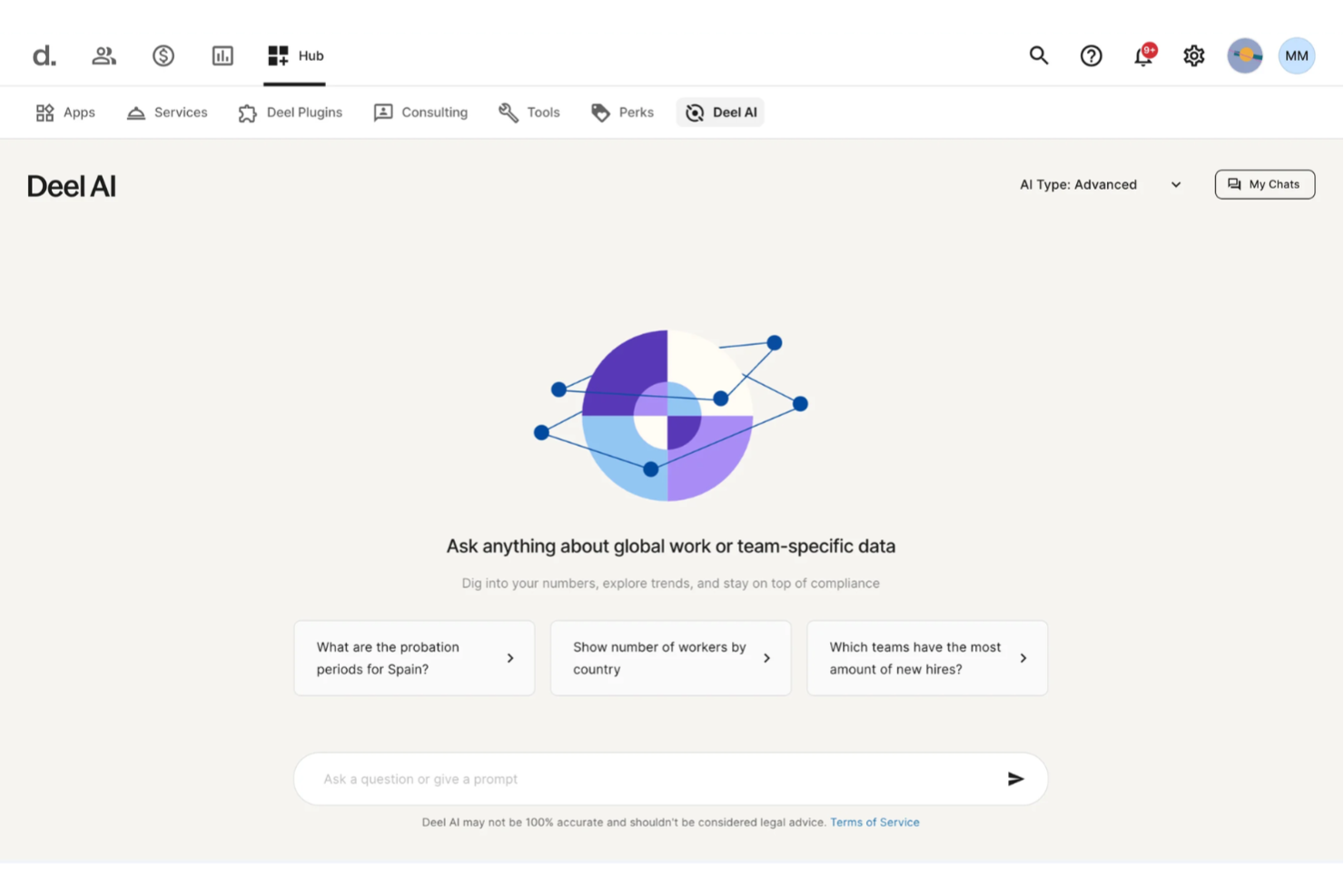
Deel helps you guide new hires through paperwork and compliance with AI-driven onboarding assistance built into its global HR platform, giving HR teams and people ops leaders a way to reduce repetitive tasks and answer questions about policies, payslips, and local labor rules without digging through manuals.
Why I Picked Deel
I picked Deel because its built-in AI assistant helps your team handle onboarding queries and compliance checks right where you work, without bouncing between tools or documents. The way Deel AI uses your actual workforce data and its knowledge of local labor laws means you and your team can get clear answers about contracts, payslips, and onboarding steps whenever you need them. I also appreciate that it’s accessible to workers themselves so common questions during onboarding—like about time off or policies—get answered without pulling HR staff off strategic work.
Deel Key Features
Aside from its AI assistant for onboarding and compliance, Deel offers a suite of capabilities that support your onboarding workflows and HR management:
- Automated offer and contract creation: Deel can generate compliant contracts and onboarding documents based on local rules in the countries where you hire.
- Workflows and lifecycle automation: You can trigger onboarding steps like sending paperwork, provisioning accounts, and setting up equipment based on hire date or event triggers.
- Expense Management: Simplifies the process of tracking and reimbursing employee expenses globally.
- Talent Management Tools: Includes features such as meetings, training, and surveys to enhance employee engagement and productivity.
Deel Integrations
Integrations include QuickBooks, Xero, BambooHR, NetSuite, Greenhouse, Workday, Lever, Gusto, ADP, and SAP SuccessFactors.
Pros and Cons
Pros:
- Accessible to workers for standard onboarding info
- Supports local compliance guidance across many countries
- AI answers HR questions 24/7 based on your data
Cons:
- Heavy dependence on proprietary Knowledge Hub for accuracy
- AI may not replace specialist legal advice everywhere
New Product Updates from Deel HR

Deel Expands Stablecoin Wallet to 80+ Countries
Deel expands its Stablecoin Wallet to 80+ countries with dollar-backed balances and optional rewards. This gives eligible contractors more ways to hold and manage earnings inside Deel. For more information, visit Deel’s official site.
 .
.
Best for onboarding document management
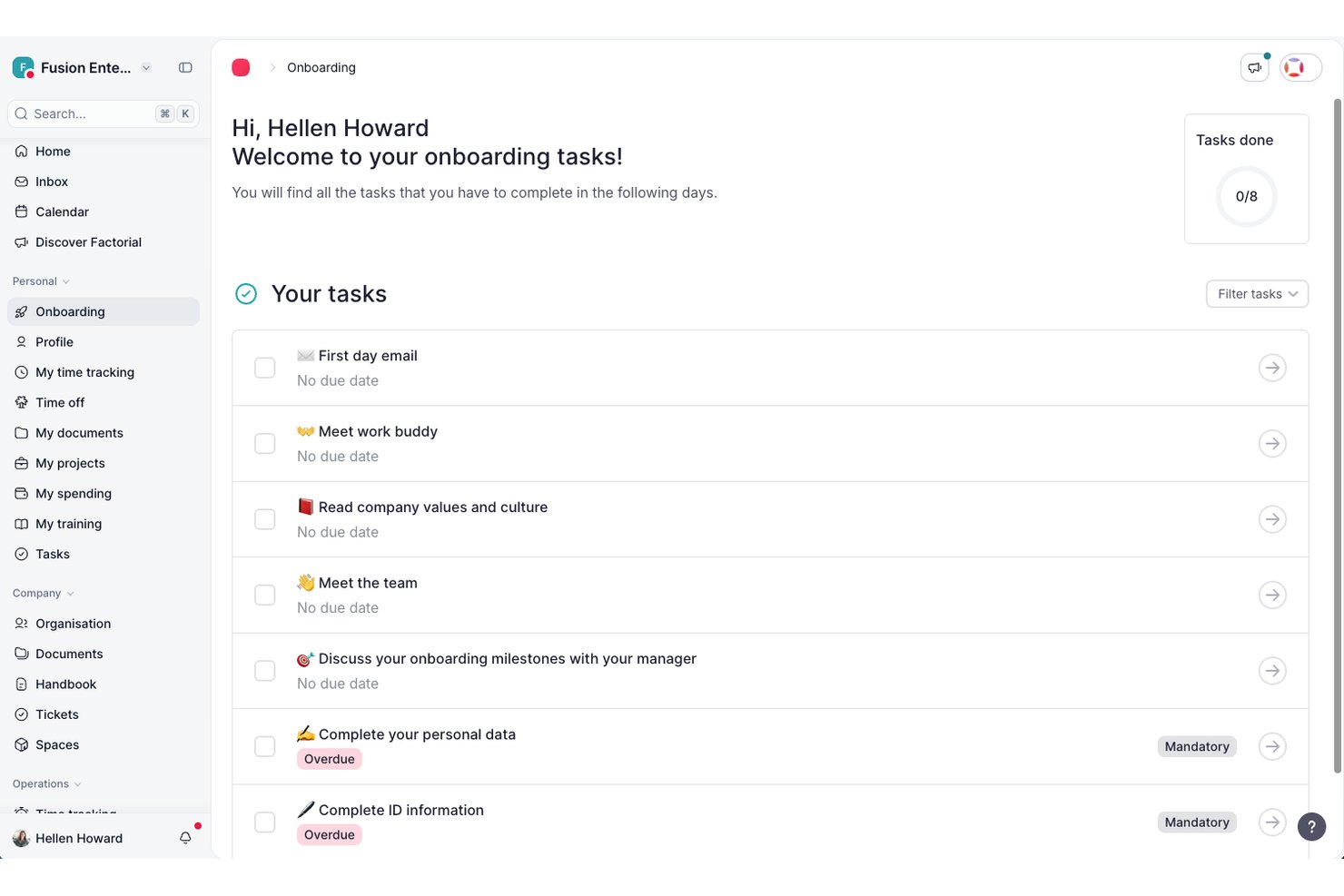
Factorial is an HR platform that helps you automate onboarding tasks, manage documentation, assign workflows, and track new hire progress using built-in ai tools.
Who Is Factorial Best For?
Factorial is a strong fit for mid-sized companies that want a single HR platform to manage onboarding alongside payroll, time tracking, and people ops.
Why I Picked Factorial
Factorial is one of my top picks because I love how it centralizes every onboarding document in one place, cutting out the back-and-forth of chasing signatures and scattered files. New hires can receive, review, and e-sign contracts and policy documents before their first day. I also like that Factorial lets you build document templates you can reuse across roles, so my team isn't recreating the same paperwork every time we bring someone new on board.
Factorial Key Features
- Onboarding checklists: Create role-specific checklists that assign tasks to new hires automatically on their start date.
- Employee self-service portal: New hires can complete their own profile, upload required documents, and access company information independently.
- Custom onboarding workflows: Build multi-step onboarding flows that trigger actions across HR, IT, and management teams.
- AI-assisted job posting: Generate and publish job descriptions using built-in AI tools directly from the platform.
Factorial Integrations
Factorial offers native integrations with Slack, Google Workspace, Microsoft 365, BambooHR, Personio, and LinkedIn, and provides an API for custom integrations.
Pros and Cons
Pros:
- Custom onboarding task templates for different roles
- Integrates with Slack, Google Workspace, and BambooHR
- Supports onboarding workflows by department or role
Cons:
- Occasional delays in workflow automation updates
- Limited advanced reporting customization options

Absorb
Best with 24/7 in-house customer support
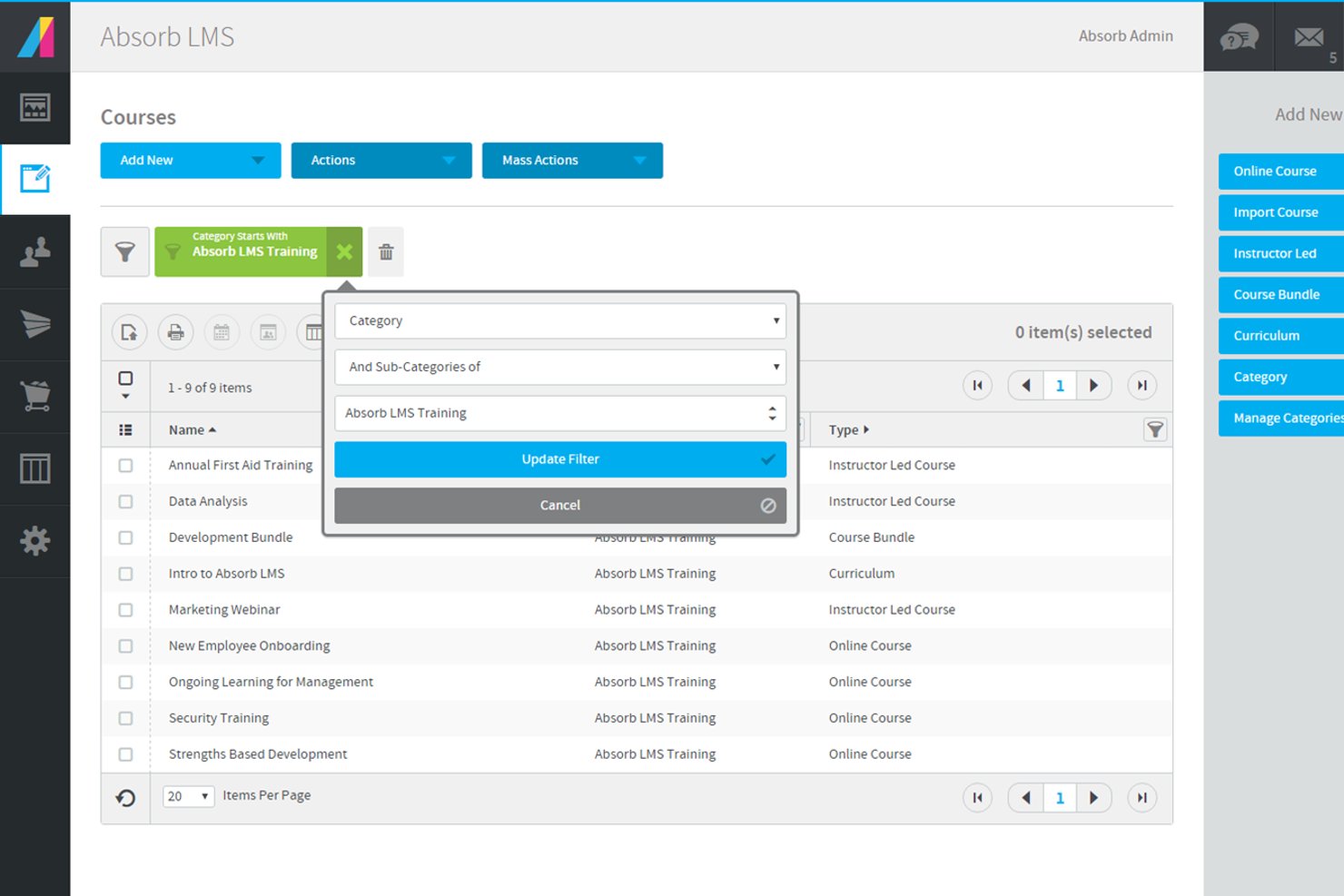
Absorb is an AI-powered learning management system designed to support employee onboarding and training. It includes AI-assisted course creation, structured learning paths, and integrations with HR and business systems to streamline onboarding delivery.
Who Is Absorb Best For?
Absorb is a good fit for HR teams and learning leaders at mid-sized to large organizations who need scalable, AI-driven onboarding and training.
Why I Picked Absorb
I picked Absorb because 24/7 in-house customer support can make a significant difference when onboarding employees across time zones. My team can get help with course setup or troubleshooting at any time, including off-hours. I also value that support is handled by Absorb’s internal team rather than outsourced agents. This means my team receives guidance from specialists who are directly familiar with the platform’s configuration and onboarding workflows.
Absorb Key Features
- AI course builder: Generate onboarding content using AI-assisted prompts and templates.
- Automated learning paths: Assign training based on role, department, or location.
- Custom learner portal: Configure branding and dashboards for different user groups.
- HRIS integrations: Sync employee data to automate user provisioning.
Absorb Integrations
Absorb offers native integrations with ADP, Workday, Salesforce, and other business systems. An API is available for custom integrations.
Pros and Cons
Pros:
- Automated learning paths for new hires
- Native integrations with ADP, Workday, Salesforce
- 24/7 in-house customer support available
Cons:
- Custom branding options require higher-tier plans
- Limited advanced analytics for onboarding progress
New Product Updates from Absorb
Absorb Aura Adds Claude and ChatGPT Connections
Absorb Aura now connects to Claude or ChatGPT via MCP, enabling users to ask questions about their learning and the LMS directly inside the AI tool after a simple setup. For more information, visit Absorb's official site.
 .
.
Best for individualized onboarding plans
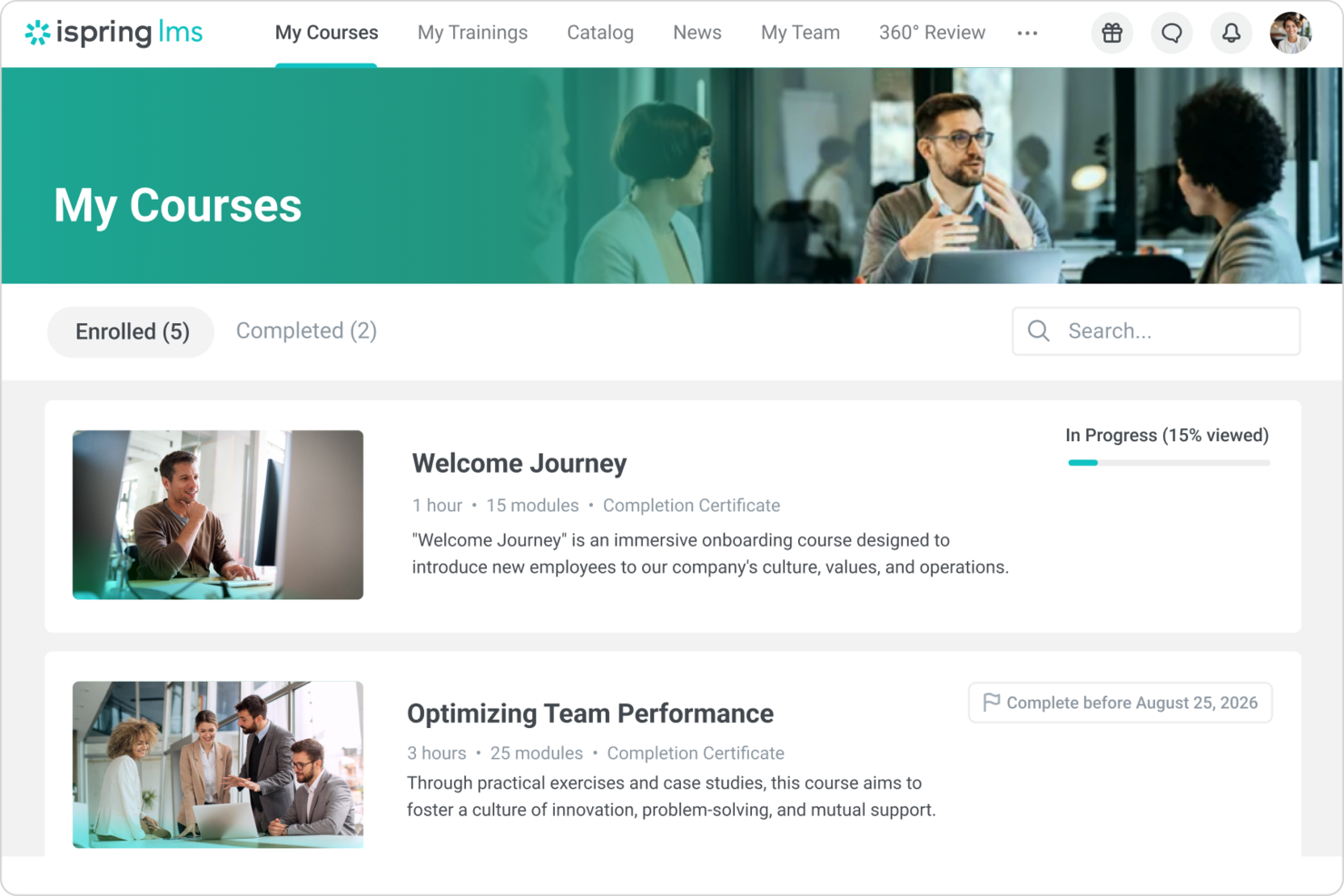
iSpring LMS offers a dynamic platform for businesses seeking to enhance their onboarding processes with AI capabilities. It appeals to organizations aiming to streamline employee integration and training through personalized onboarding plans and automated workflows. By addressing challenges such as consistent training quality and knowledge retention, iSpring LMS helps you efficiently manage new hire productivity and organizational growth.
Why I Picked iSpring LMS
I picked iSpring LMS for its ability to transform the onboarding experience with features like individualized onboarding plans and automated training management. The tool's intelligent reenrollment system ensures compliance and training schedules are maintained without manual intervention, saving your team valuable time. Additionally, its integration with CRM systems like Salesforce allows seamless alignment of learner data, enhancing the onboarding process.
iSpring LMS Key Features
Aside from its standout onboarding functionalities, iSpring LMS offers other valuable features for your team:
- Web Conferencing: Integrate with platforms like Zoom and Microsoft Teams for live training sessions and attendance tracking.
- HRIS Integration: Sync employee data and training assignments with HR systems, ensuring seamless management of user profiles and course completions.
- eCommerce: Automate course enrollment through platforms like Shopify, allowing for online course sales.
- Content Libraries: Access ready-made eLearning content from platforms like Udemy and Go1 to quickly enhance training offerings.
iSpring LMS Integrations
Integrations include Salesforce, Zoom, Microsoft Teams, Google Meet, Microsoft Outlook, Shopify, Tilda, Udemy, Go1, and LinkedIn Learning.
Pros and Cons
Pros:
- Built in knowledge base
- Automated compliance reenrollment
- Role based onboarding paths
Cons:
- Reporting depth may vary
- Limited advanced customization
New Product Updates from iSpring LMS

iSpring LMS Adds Multiple Observations to OJT Sessions
iSpring LMS now lets managers log multiple observations within one OJT session, grouping visits and auto-generating summary stats like averages, criterion results, and comparisons. For more information, visit iSpring LMS's official site.

SkyPrep
Best for AI course creation
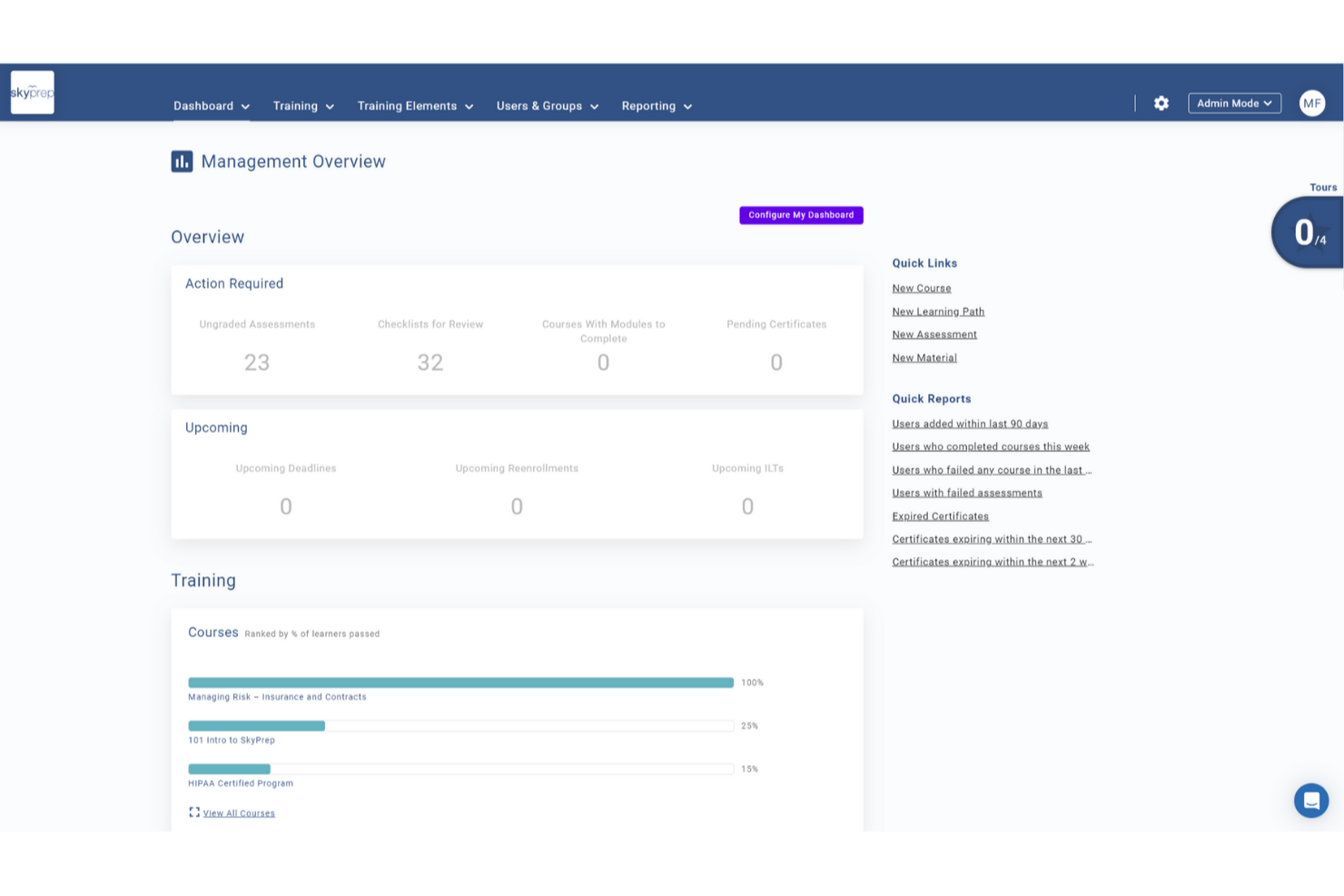
SkyPrep helps businesses improve onboarding with AI-driven training tools that reduce ramp-up time for new hires across industries like tech and healthcare. Its Generative AI feature turns existing materials such as manuals, policies, or internal docs into structured, interactive courses in minutes by drafting layouts, generating visuals, and creating modular learning blocks. You stay in control to customize and deploy training, making SkyPrep a practical choice for teams looking to modernize and scale onboarding.
Why I Picked SkyPrep
I picked SkyPrep because its AI-driven features directly support onboarding at scale while still giving you control over the learning experience. The AI assessment builder lets you create role-specific evaluations so new hires are measured against relevant learning goals. I also like how automated enrollments assign onboarding courses by department or role, which can reduce manual setup and help you focus on a higher-level onboarding strategy instead of administration.
SkyPrep Key Features
In addition to the AI-driven functionalities, SkyPrep offers several other features that enhance its onboarding capabilities:
- Content Flexibility: You can create courses using various formats, including documents and videos, providing a dynamic learning experience.
- Digital Sign-Offs: This feature ensures compliance by capturing secure e-signatures for policy acknowledgments.
- Learning Paths: Structured training journeys guide new hires through their onboarding process, ensuring no step is missed.
- Manager Dashboards: These provide visibility into employee progress, helping managers identify areas where support is needed.
SkyPrep Integrations
Integrations include ADP, BambooHR, Paycor, Workday, G Suite, Okta, Salesforce, Microsoft Teams, Slack, and Zoom. An API is available for custom integrations.
Pros and Cons
Pros:
- Gamification increases learner participation
- AI content generation boosts engagement
- AI assessment builder saves time
Cons:
- Some integrations require manual setup
- Reporting depth limited for analytics

Best for engagement-focused onboarding

Enboarder is an AI-powered onboarding platform designed for HR teams to enhance employee engagement and simplify onboarding processes. It offers personalized onboarding journeys and compliance management, focusing on boosting employee connections and experience.
Why I picked Enboarder: Enboarder's strength lies in its ability to create personalized onboarding journeys, fostering engagement right from day one. It utilizes AI to deliver real-time insights through dashboards, enabling you to track and enhance onboarding success.
The platform efficiently manages compliance, reducing administrative burdens on HR teams. Enboarder also integrates well with existing HR systems, making it a suitable choice for engagement-focused onboarding.
Standout features & integrations:
Features include personalized onboarding journeys, compliance management, and real-time insights with dashboards. The platform enhances employee connections by facilitating meaningful interactions. It also supports offboarding processes to capture critical knowledge and return equipment.
Integrations include Microsoft Teams, Workday, BambooHR, ADP, SuccessFactors, and more.
Pros and Cons
Pros:
- Real-time insights with dashboards
- Supports offboarding processes
- AI-driven onboarding journeys
Cons:
- Limited customization options
- Requires integration with HR systems

Guidde
Best for interactive guides

Guidde is an interactive onboarding platform designed to create engaging learning experiences for new employees. It serves HR teams and managers by providing tools to develop interactive guides and tutorials that improve the onboarding process.
Why I picked Guidde: Guidde focuses on creating interactive guides that make onboarding engaging and informative. It offers features like step-by-step tutorials and interactive walkthroughs to help new hires learn efficiently.
The tool enables you to easily customize content, ensuring it aligns with your company's specific needs. In my experience, Guidde's interactive approach helps your team deliver a more dynamic onboarding experience that boosts employee retention.
Standout features & integrations:
Features include step-by-step tutorials, interactive walkthroughs, and customizable content creation. The platform supports multimedia integration, allowing you to improve guides with videos and images. It also offers analytics to track user engagement and guide effectiveness.
Integrations include Slack, Microsoft Teams, Zoom, Google Workspace, and more.
Pros and Cons
Pros:
- Tracks user engagement
- Supports multimedia integration
- Interactive guide creation
Cons:
- Limited customization in some areas
- Initial setup complexity
Whatfix
Best for user onboarding analytics

Whatfix is a digital adoption platform designed to improve user onboarding and training through interactive guides and analytics. It primarily serves businesses aiming to improve software adoption and employee productivity by providing in-app guidance and support.
Why I picked Whatfix: Whatfix offers detailed analytics that help you understand how users interact with your software, making it a valuable tool for optimizing onboarding processes. It provides in-app walkthroughs and tooltips to guide users, reducing the learning curve.
The software also provides guided, in-app training that supports the new hire experience on key tools while improving software adoption and employee experience.
Standout features & integrations:
Features include walkthroughs, data dashboards, predictive analytics, and personalization to support successful onboarding. The platform supports content creation for training materials and allows you to customize the user interface. It also offers real-time feedback to help you adjust guidance as needed.
Integrations include Salesforce, Workday, ServiceNow, Microsoft Dynamics 365, and SAP SuccessFactors.
Pros and Cons
Pros:
- Real-time feedback
- In-app guidance features
- Detailed user analytics
Cons:
- Pricing lacks transparency
- Standard tier lacks integrations

Best for process automation

Process Street is a workflow management tool designed to help teams automate repetitive tasks and manage recurring processes. It serves businesses looking to improve efficiency by creating and managing detailed workflows and checklists.
Why I picked Process Street: Process Street simplifies process automation, making it ideal for teams aiming to reduce manual work. It provides a user-friendly interface to create checklists and workflows, ensuring consistency across tasks. The platform helps HR teams optimize recurring processes while reducing time-consuming manual oversight and offers conditional logic to customize workflows based on specific criteria. In my experience, Process Street's ability to automate and standardize processes helps your team focus on more strategic activities.
Standout features & integrations:
Features include checklist creation, workflow automation, and conditional logic for customizing processes. The platform supports self-service task completion to ensure accountability and timely completion. It also offers audit trails to track changes and maintain compliance.
Integrations include Slack, Zapier, Salesforce, Google Workspace, Microsoft Teams, and more.
Pros and Cons
Pros:
- Offers audit trails
- Supports task assignments
- User-friendly interface
Cons:
- No offline access
- Limited advanced features

Rippling is an all-in-one HR and IT platform designed for companies seeking to manage employee data and devices in one centralized location. It serves HR professionals and IT teams by automating onboarding, payroll, benefits, and device management.
Why I picked Rippling: Rippling combines HR and IT functions, allowing you to manage employee data and devices smoothly. Its automated workflows handle everything from onboarding to offboarding, ensuring compliance and reducing manual tasks.
With its device management feature, you can easily assign, track, and manage employee devices. Rippling's unified platform bridges the gap between HR and IT, making it ideal for companies wanting integrated solutions.
Standout features & integrations:
Features include automated workflows for onboarding and offboarding, device management, and payroll processing. The platform supports benefits administration, helping you manage employee perks efficiently. It also offers compliance management tools to ensure your company meets regulatory requirements.
Integrations include Slack, Microsoft 365, Google Workspace, QuickBooks, Xero, Okta, Zoom, and more.
Pros and Cons
Pros:
- Compliance management tools
- Device management feature
- Combines HR and IT functions
Cons:
- Integration requires technical knowledge
- Complexity in setup
Other AI Onboarding Tools
Here are some additional AI onboarding tools options that didn’t make it onto my shortlist, but are still worth checking out:
- Moveworks
For real-time support automation
- Leena AI
For AI-driven HR automation
- Click Boarding
For compliance management
- Guider
For mentorship integration
- DeepHow
For video-based learning
- Onboarded
For remote onboarding solutions
- Boilerplate
For customizable workflows
- Exec
For personalized roleplay training
- TaskRay
For Salesforce onboarding workflows
- EducateMe LMS
For AI-driven roleplay coaching
- Trupeer
For automating onboarding flows
- Workday
For large enterprises
- Apty
For software adoption support
- Connecteam
For frontline workers
- Borderless AI
For global workforce management
- BambooHR
For small to mid-sized businesses
- ArcLab
For mobile training solutions


How I Evaluate AI Onboarding Tools
Every tool here has to deliver real AI value—like auto-building role-specific plans or surfacing disengaged hires—not just wrap a chatbot around a checklist. I evaluate each option across the core functionality it must offer and differentiating factors that separate good fits from great ones.
Core Functionality (Table Stakes For This List)
When I'm selecting tools for my list, I rank each one on a scale from 0 (does not offer the functionality) to 5 (excels in this area) for each core functionality listed below. Then, I calculate the tool's total score into a percentage. Each tool needs to achieve a minimum total score of 65% to be considered for inclusion.
- AI Workflow Automation: I look at whether the tool uses AI to handle tasks like routing offer letters, triggering IT provisioning, or assigning training—not just rule-based triggers.
- AI Virtual Assistant: A good onboarding assistant answers questions about PTO policies or benefits enrollment in real time, so I check for NLP depth and channel support.
- Personalized Onboarding Journeys: I evaluate how the platform tailors plans by role, department, or location—for example, building a different 90-day path for engineers vs. sales hires.
- AI Content Generation: I look for generative AI that drafts welcome emails, onboarding checklists, or role-specific training guides rather than relying only on static templates.
- Predictive Analytics & Insights: The best tools surface signals like low engagement scores or incomplete task trends, so I check whether the AI flags at-risk hires early.
- HRIS & Tool Integrations: I evaluate native connections with platforms like Workday, BambooHR, ADP, and e-signature tools to confirm data flows both ways without manual work.
Once I have a list of tools that meet this criteria, I consider what sets each platform apart.
Differentiating Factors (What Sets Vendors Apart)
Here's how I compare and contrast different vendors:
Standout Features
Preboarding automation is a big differentiator—I look for tools that trigger welcome emails, equipment requests, and document collection before day one so new hires arrive ready. Sentiment analysis matters just as much, especially for distributed teams where it's easy to miss disengagement. Tools that scan survey responses and check-in data to flag at-risk hires give HR leads a real head start. For global organizations, I also evaluate multilingual AI that adapts chatbot responses and training content to a hire's preferred language automatically.
Beyond Features
Compliance and data security weigh heavily in my evaluation because onboarding tools handle sensitive PII like tax IDs and banking details. I check for SOC 2 compliance, GDPR readiness, and transparent AI data usage policies. Implementation speed also matters—I look at whether a platform offers pre-built templates and self-service admin so HR teams can launch without waiting on engineering. Finally, I consider measurable outcomes: vendors that share benchmarking data or customer case studies showing improved time-to-productivity and retention give buyers much more confidence.
How to Choose AI Onboarding Tools
It’s easy to get bogged down in long feature lists and complex pricing structures. To help you stay focused as you work through your unique software selection process, here’s a checklist of factors to keep in mind:
| Factor | What to Consider |
|---|---|
| Scalability | How will the tool grow with your company? Ensure it can handle increasing employee numbers without performance issues. Look for user limits or tiered plans. |
| Integrations | Does it work with your current systems? Check if it connects with your HR, payroll, and communication tools to avoid data silos. |
| Customizability | Can you tailor it to fit your processes? Evaluate the flexibility in workflows and templates to match your specific onboarding needs. |
| Ease of use | Is it user-friendly for both HR and new hires? Consider the interface simplicity and availability of support resources for a smooth experience. |
| Implementation and onboarding | How long does setup take? Assess the time and resources required to get the tool up and running. Look for onboarding support or training. |
| Cost | Does it fit your budget? Compare pricing models and total costs, including any hidden fees. Consider the value it brings against its price. |
| Security safeguards | How does it protect your data? Verify encryption standards, access controls, and compliance with data protection regulations. |
| Support availability | What support options are available? Ensure access to timely help, whether through live chat, phone, or a dedicated account manager. |
What Are AI Onboarding Tools?
AI onboarding tools are software solutions designed to automate and improve the employee onboarding process. HR professionals and managers typically use these tools to improve new hire integration and engagement. Automated workflows, training modules, and data analytics help with task management, learning, and performance tracking. These tools save time, reduce errors, and boost overall efficiency in onboarding.
Features
When selecting AI onboarding tools, keep an eye out for the following key features:
- Automated workflows: Simplifies the onboarding process by automatically assigning tasks and sending reminders, saving time and reducing manual errors.
- Training modules: Provide structured learning paths for new hires to quickly gain necessary skills and knowledge.
- Data analytics: Offers insights into onboarding progress and effectiveness, helping HR teams make data-driven decisions.
- Customizable templates: Allow companies to tailor onboarding materials and processes to fit their specific needs and culture.
- Integration capabilities: Connects with existing HR, payroll, and communication systems to ensure smooth data flow and reduce redundancies.
- Real-time feedback: Enables instant communication between new hires and HR, ensuring quick resolution of issues and continuous improvement.
- Security safeguards: Protects sensitive employee data with encryption and compliance with data protection regulations.
- Multilingual support: Accommodates diverse workforces by providing onboarding materials in multiple languages.
- Task tracking: Keeps track of completed and pending tasks to ensure nothing is overlooked during the onboarding process.
- Interactive guides: Engage new hires with step-by-step instructions and interactive elements to improve learning and retention.
Benefits
Implementing AI onboarding tools provides several benefits for your team and your business. Here are a few you can look forward to:
- Time savings: Automates repetitive tasks, freeing up HR to focus on strategic activities.
- Improved engagement: Interactive guides and real-time feedback keep new hires connected and motivated.
- Data-driven insights: Analytics provide valuable information on onboarding effectiveness and areas for improvement.
- Consistency: Standardized templates and workflows ensure a uniform onboarding experience for all new employees.
- Better learning: Training modules and multilingual support cater to diverse learning needs and preferences.
- Reduced errors: Automated workflows minimize manual mistakes and ensure compliance with company policies.
- Faster onboarding: Simplified processes and task tracking help new hires become productive more quickly.
Costs & Pricing
Selecting AI onboarding tools requires an understanding of the various pricing models and plans available. Costs vary based on features, team size, add-ons, and more. The table below summarizes common plans, their average prices, and typical features included in AI onboarding tools solutions:
Plan Comparison Table for AI Onboarding Tools
| Plan Type | Average Price | Common Features |
|---|---|---|
| Free Plan | $0 | Basic onboarding templates, limited user access, and email support. |
| Personal Plan | $5- $19,000/ user/month | Customizable templates, task automation, and basic analytics. |
| Business Plan | $30-$32,000/ user/month | Advanced analytics, integrations with HR systems, and multilingual support. |
| Enterprise Plan | $100+-$58,000/ user/month | Full customization, dedicated account manager, and premium support options. |
AI Onboarding Tools FAQs
Here are some answers to common questions about AI onboarding tools:
How do AI onboarding tools reduce time-to-productivity?
AI onboarding tools automate repetitive tasks and personalize training, which helps new hires get up to speed faster. They use data analytics to identify learning gaps and provide targeted resources. This approach reduces the time it takes for employees to reach full productivity by up to 40%.
What is the typical implementation timeline for AI onboarding tools?
Implementing AI onboarding tools usually takes between 4 and 8 weeks. This timeline encompasses setting up the system, integrating it with existing tools, and customizing the onboarding process to meet your company’s specific needs. It’s important to allocate time for testing and training your team.
How do AI onboarding tools ensure data security?
AI onboarding tools use encryption and access controls to protect employee data. They comply with data protection regulations such as GDPR and HIPAA. It’s important to verify that your chosen tool has strong security measures and regularly updates its protocols to protect against breaches.
Can AI onboarding tools help with compliance?
Yes, AI onboarding tools can automate compliance tracking and documentation. They ensure that new hires complete necessary training and paperwork, reducing the risk of non-compliance. These tools can also provide automated reminders and updates to keep your team informed of any changes in regulations.
How do AI onboarding tools personalize the onboarding experience?
AI onboarding tools use data and analytics to tailor the onboarding process to each employee’s needs. They offer personalized learning paths and content, ensuring that new hires receive relevant information. This customization enhances engagement and helps employees feel more connected to the company.
What are some common challenges with AI onboarding tools?
Common challenges include the initial setup complexity and the learning curve for users. It’s crucial to have a clear implementation plan and provide adequate training for your team. Additionally, ensuring the tool integrates smoothly with existing systems can be a hurdle that requires careful planning.