

10 Best AI Strategic Planning Software Reviewed in 2026

10 Best AI Strategic Planning Software Shortlist


Navigating the complexities of strategic planning can be a daunting task. As an HR expert, you know how important it is to align your team’s goals with the overall business strategy. This is where AI strategic planning software steps in, making your job easier by offering features like predictive analytics and task automation.
In my experience, these tools can significantly enhance your decision-making process. They help you identify trends and anticipate future challenges. As someone who independently tests and reviews software, I've gathered insights on the best AI solutions for strategic planning.
In this article, I'll share my top picks, focusing on their AI capabilities. You'll find unbiased, well-researched reviews to help you make the best choice for your team.
Why Trust Our Software Reviews
Our team has been testing and reviewing software since 2012. As HR experts ourselves, we know how difficult—and important—it is to choose the right software.
For this guide, we evaluated tools using hands-on testing and independent research, scoring tools using our selection criteria. We also draw on insights from industry thought leaders and and practicing HR experts.
Our reviews reflect our human editorial judgment, not a sales pitch.
Expert reviewers:
AI Strategic Planning Software Comparison Table
This comparison table summarizes pricing details for my top AI strategic planning software selections:
| Tool | Best For | Trial Info | Price | ||
|---|---|---|---|---|---|
| 1 | Best for global workforce strategies | Free demo available | From $5/employee/month | Website | |
| 2 | Best for customizable AI workflows | Free plan available | From $9/user/month (billed annually) | Website | |
| 3 | Best for board-level strategy execution | Free demo available | Pricing upon request | Website | |
| 4 | Best for complex modeling | Free demo available | Pricing upon request | Website | |
| 5 | Best for budget forecasts | Free demo available | Pricing upon request | Website | |
| 6 | Best for large enterprises | Free demo available | Pricing upon request | Website | |
| 7 | Best for financial planning | Free demo available | Pricing upon request | Website | |
| 8 | Best for product managers | 30-day free trial + free demo available | From $59/user/month (billed annually) | Website | |
| 9 | Best for predictive analytics | Free demo available | Pricing upon request | Website | |
| 10 | Best for visual dashboards | 30-day free trial + free demo available | Pricing upon request | Website |

Best AI Strategic Planning Software Review
Below are my detailed summaries of the best AI strategic planning software that made it onto my shortlist. My reviews offer a detailed look at the key features, pros & cons, integrations, and ideal use cases of each tool to help you find the best one for you.

Deel HR
Best for global workforce strategies
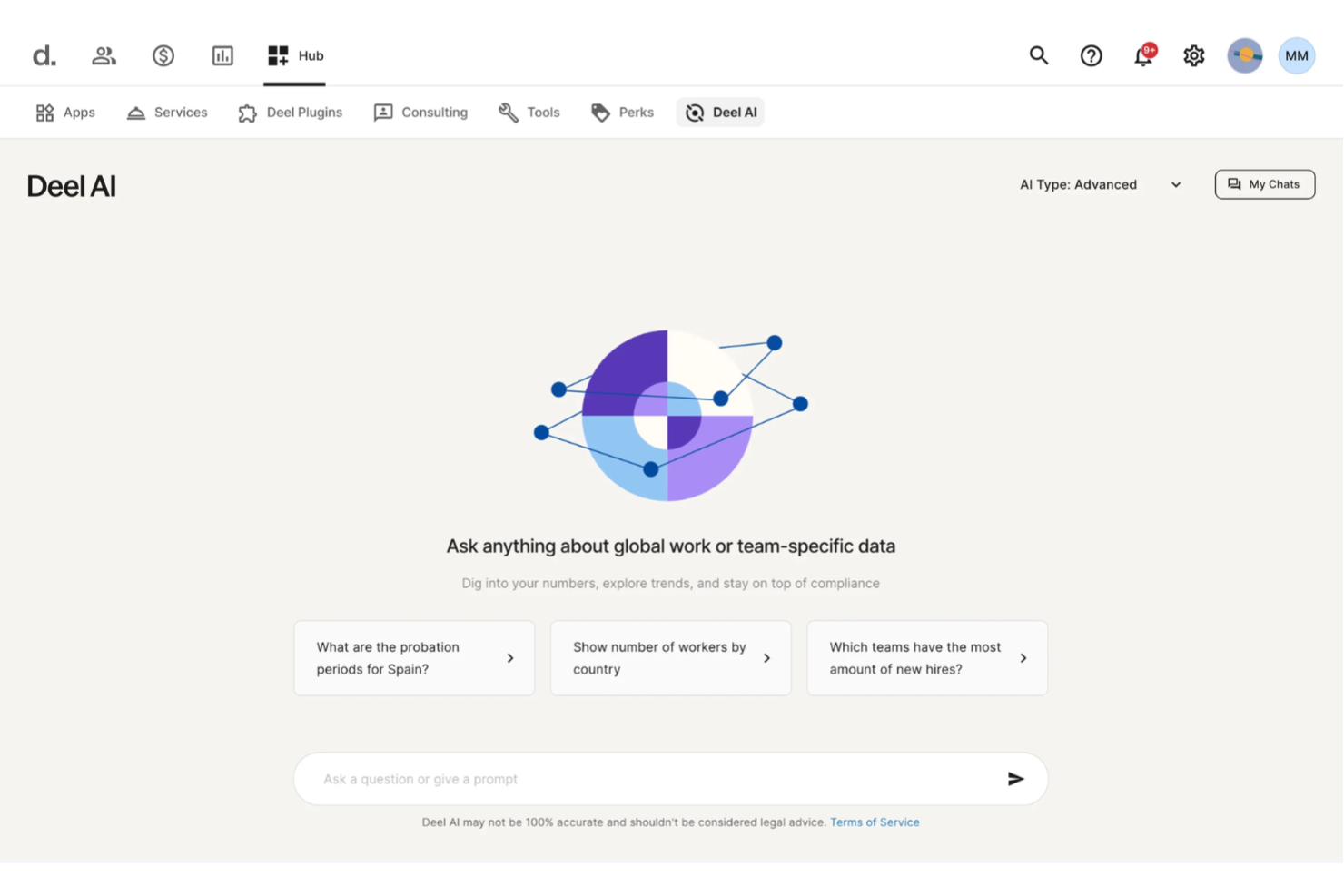
Deel AI helps you bring clarity to complex workforce decisions by combining your team’s data with expert-driven insights across 150+ countries. If you’re responsible for planning headcount, navigating global compliance, or shaping your organization’s long-term people strategy, you get an always-available assistant that interprets your context and surfaces information you’d otherwise spend hours searching for.
Why I Picked Deel
I picked Deel because its AI delivers context-aware workforce intelligence that supports strategic planning at both the operational and organizational levels. Deel AI understands where you are in the platform and brings forward summaries, key metrics, and compliance insights that help you evaluate risks and make decisions with more confidence. I also appreciate how it can analyze your internal data to create reports, highlight potential updates, and answer nuanced questions about your workforce in seconds. This makes it a strong fit for global teams looking for strategic workforce planning tools rooted directly in real HR and compliance realities.
Deel Key Features
In addition to the strategic insight capabilities I highlighted above, you’ll find these features useful:
- Global Payroll Management: Deel centralizes payroll processing across multiple countries, ensuring compliance with local tax laws.
- Localized Contract Generation: Automatically generate compliant contracts tailored to each country's legal requirements.
- Automated Compliance Monitoring: Continuously track and update compliance with local labor laws and regulations.
- HR Tools: Access a suite of HR functionalities that simplify onboarding, employee management, and performance tracking.
Deel Integrations
Integrations include SAP SuccessFactors, NetSuite, Google Workspace, QuickBooks, Slack, BambooHR, Xero, Greenhouse, Rippling, and Lever.
Pros and Cons
Pros:
- Salary and compliance intelligence improves long-term hiring strategies
- Context-aware guidance supports planning decisions directly in-platform
- AI generates strategic workforce insights from company data
Cons:
- Complex legal scenarios may still require external expert review
- Lacks scenario modeling tools found in dedicated planning platforms
New Product Updates from Deel HR

Deel Expands Stablecoin Wallet to 80+ Countries
Deel expands its Stablecoin Wallet to 80+ countries with dollar-backed balances and optional rewards. This gives eligible contractors more ways to hold and manage earnings inside Deel. For more information, visit Deel’s official site.
 .
.
Best for customizable AI workflows
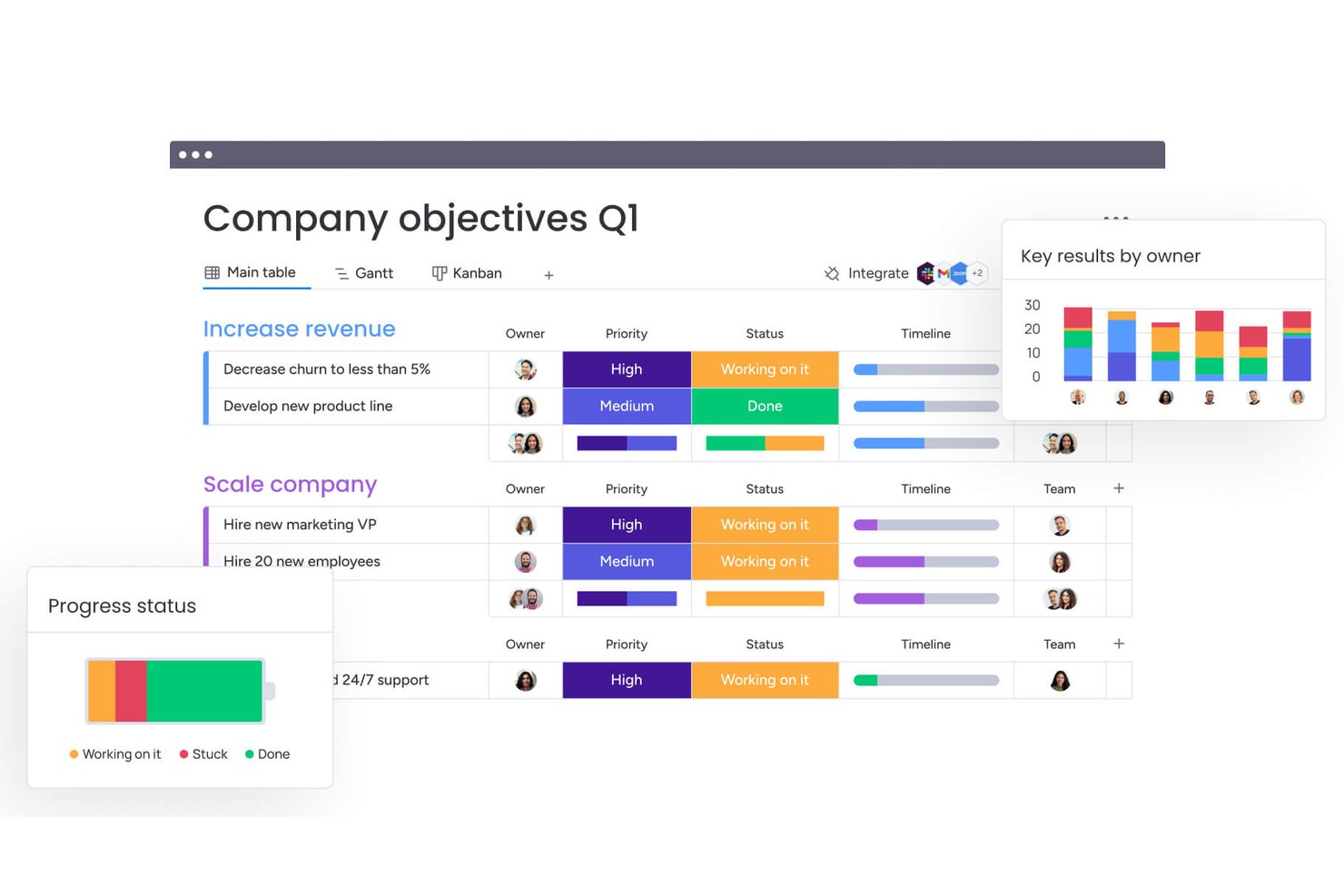
monday AI Workspace is a configurable work management platform that combines AI-powered project planning, workflow automation, portfolio tracking, and cross-team collaboration tools.
Who Is monday AI Workspace Best For?
It's a strong fit for mid-sized to enterprise teams that manage work across multiple departments and need flexible, AI-assisted planning without being locked into a rigid tool structure.
Why I Picked monday AI Workspace
monday AI Workspace earns its spot on my shortlist because no other planning tool gives me this level of control over how AI actually runs. The AI workflow builder lets me orchestrate agents around how my team tracks strategic initiatives, not the other way around. I also use AI columns to embed repeatable AI logic directly into boards, so updates, summaries, and risk flags surface automatically as work moves forward.
monday AI Workspace Key Features
- Portfolio management dashboards: Track project health, risks, and progress across multiple initiatives in one visual interface.
- Role-based permissions: Control who can view, edit, or manage sensitive workspaces and project boards.
- Resource allocation tools: Assign, monitor, and adjust team workloads across complex projects using built-in resource management.
- Template library: Access dozens of customizable templates for project planning, tracking, and reporting use cases.
monday AI Workspace Integrations
monday AI Workspace offers native integrations with Slack, Zoom, Google Workspace, Microsoft Teams, Outlook, Gmail, and GitHub. It also supports Zapier and provides an API for custom integrations.
Pros and Cons
Pros:
- Visual project and portfolio dashboards
- Embedded AI columns for task automation
- Customizable AI workflow builder for planning
Cons:
- Missing predictive analytics for HR data
- No native workforce scenario modeling
New Product Updates from monday AI Workspace
monday AI Workspace Adds Human Approval Routing
monday AI Workspace adds a human-in-the-loop approval block to AI Workflows, sending approval requests and routing workflow paths based on responses. For more information, visit monday AI Workspace's official site.

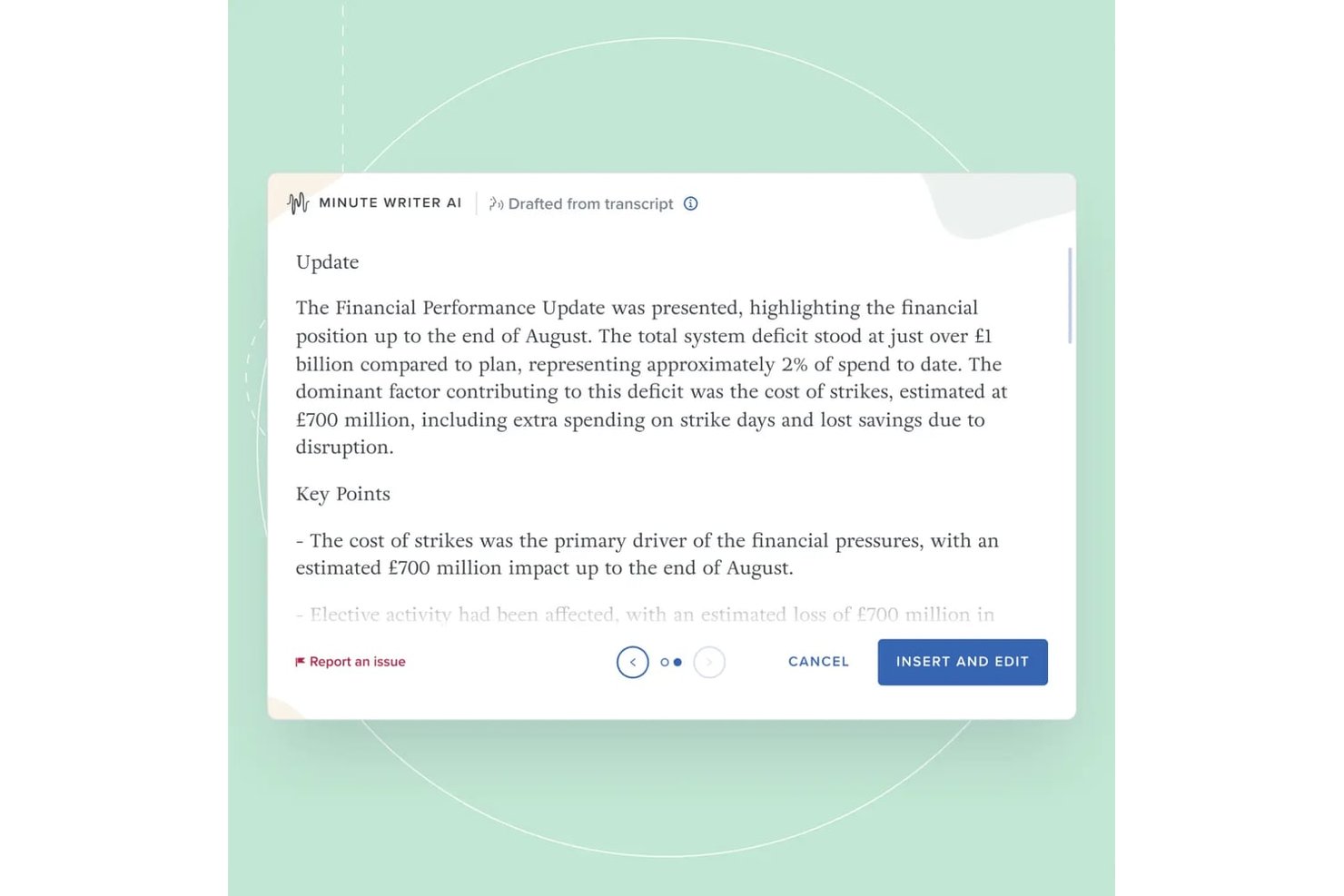
Board Intelligence is a board governance platform that uses AI to help executives and directors plan agendas, draft board papers, manage meetings, and track strategic decisions across the full board cycle.
Who Is Board Intelligence Best For?
It's a strong fit for large, regulated enterprises where executives and board directors need to align governance processes with strategic priorities.
Why I Picked Board Intelligence
Board Intelligence earns its spot on my shortlist because of how its AI is built around a real governance methodology. The IQ Experts feature draws on intelligence across 130+ board domains, anchored to your organization's strategy and pack history, so board conversations are grounded in context rather than generic analysis. I also like the Agenda Planner, which directly maps board meetings to strategic priorities rather than leaving that alignment to chance.
Board Intelligence Key Features
- Report Writer AI: Create board-ready documents within Microsoft Word using AI-powered drafting tools.
- Minute Writer AI: Draft meeting minutes quickly from recordings, transcripts, or your own notes.
- Action Tracker: Capture and monitor progress on board and committee action items from a single dashboard.
- Board Surveys: Use expert-designed board evaluation surveys to collect and analyze board performance data.
Board Intelligence Integrations
Board Intelligence offers native integration with Microsoft 365, including Microsoft Word. Native integrations beyond the Microsoft ecosystem are not clearly documented.
Pros and Cons
Pros:
- Strong document drafting within Microsoft Word
- AI offers governance best practice insights
- Sets agendas directly to strategic priorities
Cons:
- Advanced features require extensive setup
- Limited beyond board and executive use

Anaplan
Best for complex modeling

Anaplan is a cloud-based planning and performance management platform designed for large enterprises. It offers advanced modeling capabilities to help you make data-driven decisions and optimize business performance.
Why I picked Anaplan: Anaplan is ideal for organizations that require complex modeling capabilities. Its AI features include predictive analytics and scenario planning, which allow your team to anticipate and adapt to changes.
The software’s flexibility enables you to customize models to meet your specific business needs. Its real-time data integration facilitates up-to-date insights for strategy planning.
Standout features & integrations:
Features include scenario planning, which helps you explore different business outcomes. The platform's real-time data integration keeps your models current and accurate. It also offers collaborative planning tools, enabling your team to work together with fewer workflow bottlenecks.
Integrations include Salesforce, Microsoft Excel, Workday HCM, Google Sheets, Tableau, Slack, Snowflake, and Docusign.
Pros and Cons
Pros:
- Built-in collaboration tools
- Advanced scenario planning with prescriptive and predictive AI
- Supports complex and customizable models
Cons:
- Requires internal model-building expertise
- Resource-intensive implementation

Prophix
Best for budget forecasts

Prophix is a corporate performance management software tailored for finance professionals seeking to enhance budgeting and forecasting processes. It leverages AI to provide insights into financial data, helping you optimize budget forecasts and make informed decisions.
Why I picked Prophix: Prophix's focus on budget forecasts is supported by AI-driven insights that enhance financial accuracy. It offers predictive analytics to anticipate financial trends and improve planning.
With features like automated reporting, your team can reduce manual tasks and focus on strategic analysis. This makes Prophix a wise choice for finance teams looking to refine their budgeting processes.
Standout features & integrations:
Features include automated financial reporting, which reduces manual work and errors. The platform offers dashboard visualization to give you a clear view of financial data. It also supports what-if analysis, allowing you to explore different financial scenarios.
Integrations include QuickBooks, Microsoft Dynamics 365, Sage, Oracle, NetSuite, SAP, Workday HCM, Salesforce, HubSpot, UKG Pro, ADP, and Xero.
Pros and Cons
Pros:
- Flexible budgeting methodologies
- Automated reporting reduces manual tasks and errors
- AI-accelerated budget cycle
Cons:
- Intricate reporting capabilities likely require training
- Technical setup expertise

Best for large enterprises

Workday Adaptive Planning is a sophisticated platform designed for financial and workforce planning, primarily serving large enterprises. It utilizes AI capabilities, such as predictive analytics, to forecast trends and support agile planning.
Why I picked Workday Adaptive Planning: Workday Adaptive Planning stands out for its suitability for large enterprises due to its predictive analytics, which aid in anticipating future trends and making informed decisions. It offers a user-friendly interface for creating dynamic models and scenarios, enhancing agility in planning.
The platform also emphasizes ethical AI practices, ensuring responsible use of technology. These features make it a valuable tool for large-scale strategic planning.
Standout features & integrations:
Features include an intuitive interface that simplifies the creation of dynamic models and scenarios. Its responsive planning allows you to adjust plans as circumstances evolve. The platform also promotes ethical technology use by incorporating responsible AI practices.
Integrations include Salesforce, NetSuite, Workday HCM, Microsoft Excel, Oracle, SAP, Slack, and Adaptive Insights.
Pros and Cons
Pros:
- Supports ethical AI practices
- User-friendly interface for agile planning
- Predictive analytics improve forecasting
Cons:
- Performance issues with large data volumes
- Time-consuming implementation

Planful
Best for financial planning

Planful is a financial planning and analysis software designed for finance teams and business planners. It provides AI-driven financial modeling and forecasting to help you make informed budgeting decisions.
Why I picked Planful: Planful excels in financial planning with its AI-powered modeling and forecasting capabilities. It offers scenario analysis to explore different financial outcomes and make informed decisions.
The platform’s AI tools provide insights into budgeting trends, helping your team optimize financial plans. This makes Planful a valuable tool for finance teams focused on strategic financial management.
Standout features & integrations:
Features include budgeting and forecasting tools that help you create accurate financial plans. The platform offers scenario analysis, allowing you to explore various financial outcomes. It also provides real-time financial reporting to keep your team updated on key metrics.
Integrations include NetSuite, QuickBooks, Salesforce, Microsoft Dynamics, Google Workspace, Oracle, SAP, Workday, Paylocity, and Sage Intacct.
Pros and Cons
Pros:
- Bias-reducing what-if projection forecasts
- Collaborative variance investigation
- Centralized source for all financial data
Cons:
- Requires frequent updates to align with regulatory landscape
- Dated user interface


Aha Roadmaps is a strategic product management tool designed for product managers and teams to plan and execute product strategies effectively. It offers AI-driven features that help you prioritize tasks and align product goals with business objectives.
Why I picked Aha Roadmaps: Aha Roadmaps is tailored for product managers who need to define and manage product strategies. Its AI features help prioritize tasks based on strategic goals for effective product management.
The tool's roadmap visualization helps your team see the big picture and make better decisions. It also provides insights into market trends, aiding in strategic planning and execution.
Standout features & integrations:
Features include roadmap visualization, which gives you a clear view of your product's development path. The tool offers goal tracking to ensure your team's efforts align with strategic objectives. It also provides market insights, helping you stay informed about industry trends.
Integrations include Jira, Salesforce, Slack, Azure DevOps, Confluence, Trello, GitHub, Google Workspace, Microsoft Teams, and Zendesk.
Pros and Cons
Pros:
- 100+ built-in AI documentation templates
- Visual and interactive roadmapping
- Tailored for product management
Cons:
- Requires clear internal processes
- Interface can be overwhelming


Quantive StrategyAI is an AI-driven strategy management platform designed for executives and strategy leaders. It connects strategic plans to daily execution, utilizing predictive analytics and real-time insights to keep your team aligned with broader business goals.
Why I picked Quantive StrategyAI: Quantive StrategyAI excels in predictive analytics, setting it apart from other tools. It offers data-driven insights that allow you to anticipate future challenges and make informed decisions.
The platform's AI capabilities include real-time visibility and strategic agility, which are essential for effective decision-making. With these features, your team can manage Objectives and Key Results (OKRs) and Key Performance Indicators (KPIs) more efficiently.
Standout features & integrations:
Features include strategic planning tools that help you set clear objectives and track progress in a single platform. The tool provides real-time reporting, offering insights into your strategic initiatives. Its adaptability features allow you to adjust plans as market conditions change.
Integrations include Microsoft Teams, Slack, Jira, Trello, Asana, Salesforce, Google Workspace, Microsoft 365, HubSpot, and Zendesk.
Pros and Cons
Pros:
- OKRs and KPIs to business metrics
- Advanced scenario modeling Ability to link
- AI-powered strategy execution
Cons:
- Manual data entry for some functions
- Lack of multilingual support


Spider Strategies is a performance management software aimed at organizations seeking to enhance strategic execution through visual dashboards. It serves managers and executives by providing tools for tracking performance metrics and aligning them with strategic goals.
Why I picked Spider Strategies: Spider Strategies’ visual dashboards are a key feature, offering intuitive data representation to help you track performance metrics. Its AI capabilities provide insights into trends and patterns that aid strategic decision-making.
The software's focus on visual data enables your team to grasp complex information. This makes it ideal for organizations that prioritize clear, visual performance tracking.
Standout features & integrations:
Features include customizable dashboards that tailor data views to your needs. The platform supports real-time performance tracking, keeping you updated on key metrics. It also offers goal alignment tools to ensure your team stays focused on strategic objectives.
Integrations include Microsoft Excel, Power BI, Tableau, Google Sheets, and Salesforce.
Pros and Cons
Pros:
- Trend and pattern recognition and insights
- High level of customization for data visualization
- Intuitive visual dashboard design
Cons:
- Manual steps for complex calculations
- Lacks granular performance measures
Other AI Strategic Planning Software
Here are some additional AI strategic planning software options that didn’t make it onto my shortlist, but are still worth checking out:
- Envisio
For public sector planning
- Elate
For strategic alignment
- Wrike
For task automation
- Adobe Workfront
For creative project management
- AchieveIt
For cross-team alignment
- Miro
For interactive brainstorming
- monday CRM
For small team collaboration
- Lightcast
For labor market analytics
- Phocas
For data visualization
- Knovos Cascade
For government institutions
- Board
For integrated business planning


How I Evaluate AI Strategic Planning Software
I look for tools where AI does more than label dashboards—it should model workforce scenarios, forecast talent risks, and surface recommendations an HR leader can act on. From there, I split my evaluation into core functionality every tool needs to qualify and differentiating factors that separate the best fit for specific teams.
Core Functionality (Table Stakes For This List)
When I'm selecting tools for my list, I rank each one on a scale from 0 (does not offer the functionality) to 5 (excels in this area) for each core functionality listed below. Then, I calculate the tool's total score into a percentage. Each tool needs to achieve a minimum total score of 65% to be considered for inclusion.
- AI-Powered Scenario Modeling: I evaluate whether the tool can build and compare multiple workforce scenarios—like modeling the impact of a hiring freeze versus accelerated recruiting—using AI rather than manual inputs alone.
- Predictive Workforce Analytics: Strong tools use ML to forecast metrics like attrition risk or future skills demand, so I check for predictions that go beyond basic trendlines and include confidence indicators.
- Strategic Goal Alignment: I look for the ability to define HR objectives and have the platform map them to broader business goals, tracking whether initiatives like a new retention program are moving the right KPIs.
- AI-Generated Insights & Recommendations: Rather than static charts, the tool should surface actionable findings on its own—flagging an emerging flight risk in a key department, for example, and suggesting a response.
- HR Data Integration: Connecting to HRIS, ATS, HCM, and financial systems is essential, so I check for native connectors to platforms like Workday, SAP SuccessFactors, and Oracle HCM alongside open API access.
- Strategic Planning Workflows: The platform should offer purpose-built planning features such as initiative prioritization, roadmap building, and executive reporting—not just repurposed project management templates.
Once I have a list of tools that meet the criteria, I consider what sets each platform apart.
Differentiating Factors (What Sets Vendors Apart)
Here's how I compare and contrast different vendors:
Standout Features
A skills intelligence engine adds real value by mapping current workforce capabilities and recommending reskilling paths before gaps slow a strategic initiative. Financial impact modeling matters just as much—connecting a headcount scenario directly to P&L and budget projections gives HR leaders the language finance teams need to approve plans. I also evaluate whether a tool pulls in external labor market data, so internal forecasts reflect real talent supply and compensation benchmarks.
Beyond Features
AI transparency matters when your tool is predicting attrition or flagging flight risks—I check whether the vendor explains how its models reach conclusions and offers audit trails HR can share with leadership. Data security is closely tied; handling sensitive people data means I look for SOC 2 Type II compliance, role-based access controls, and regional data residency options. I also consider time-to-value, specifically whether a platform provides pre-built HR planning templates and dedicated onboarding support so teams aren't spending months before seeing results.
How to Choose AI Strategic Planning Software
It’s easy to get bogged down in long feature lists and complex pricing structures. To help you stay focused as you work through your unique software selection process, here’s a checklist of factors to keep in mind:
| Factor | What to Consider |
|---|---|
| Scalability | Can the software grow with your organization? Consider if it handles increased data and users without compromising performance. Look for scalable infrastructure. |
| Integrations | Does it work with your existing tools? Check for compatibility with essential systems like CRM, ERP, and data analytics platforms. Avoid integration bottlenecks. |
| Customizability | Can you tailor it to your workflows? Ensure it allows modifications to fit your unique processes. Beware of rigid systems that limit flexibility. |
| Ease of use | Is the interface intuitive? Consider user feedback and demo experiences. Avoid tools with steep learning curves that may hinder adoption. |
| Implementation and onboarding | How quick is the setup? Evaluate the support for initial deployment and user training. Look for broad onboarding resources to minimize disruption. |
| Cost | Does it fit your budget? Compare pricing models and hidden fees. Look for value in features versus cost. Be cautious of low-cost options with limited capabilities. |
| Security safeguards | Are your data protected? Check for encryption standards, data breach protocols, and compliance with regulations like GDPR. Prioritize vendors with strong security measures. |
What Is AI Strategic Planning Software?
AI strategic planning software is a tool that uses artificial intelligence to aid in the development and execution of strategic business plans. These tools are typically used by executives, managers, and strategy professionals to enhance decision-making and align team objectives with overall business goals. Predictive analytics, scenario planning, and real-time data analysis help with anticipating trends, evaluating different strategies, and ensuring informed decision-making. Overall, these tools provide significant value by improving the efficiency and effectiveness of strategic planning processes.
Features
When selecting AI strategic planning software, keep an eye out for the following key features:
- Predictive analytics: Analyzes historical data to forecast future trends, enabling proactive decision-making.
- Scenario planning: Allows users to evaluate different strategic options and their potential outcomes.
- Real-time data analysis: Provides up-to-date insights to help users make timely and informed decisions.
- Automated reporting: Generates reports automatically to reduce manual work and improve accuracy.
- Goal alignment tools: Ensures that team objectives are in sync with overall business strategies.
- Customizable dashboards: Offers tailored views of key metrics and data for different user needs.
- Performance tracking: Monitors progress against strategic goals and provides feedback on areas for improvement.
- Data visualization: Transforms complex data sets into easy-to-understand visual formats.
- Integration capabilities: Connects seamlessly with existing business tools like CRM and ERP systems.
- AI-driven insights: Provides intelligent recommendations for strategic adjustments and enhancements.
Benefits
Implementing AI strategic planning software provides several benefits for your team and your business. Here are a few you can look forward to:
- Improved decision-making: Predictive analytics help you anticipate trends and make informed choices.
- Enhanced efficiency: Automated reporting reduces manual tasks, freeing up time for strategic activities.
- Better goal alignment: Goal alignment tools ensure that team efforts are in sync with business objectives.
- Increased adaptability: Scenario planning allows you to quickly evaluate and adjust strategies as needed.
- Real-time insights: Real-time data analysis provides up-to-date information for timely decisions.
- Clear communication: Data visualization makes complex information easy to understand and share.
- Strategic recommendations: AI-driven insights offer intelligent suggestions for optimizing strategies.
Costs & Pricing
Selecting AI strategy planning software requires an understanding of the various pricing models and plans available. Costs vary based on features, team size, add-ons, and more. The table below summarizes common plans, their average prices, and typical features included in AI strategic planning software solutions:
Plan Comparison Table for AI Strategic Planning Software
| Plan Type | Average Price | Common Features |
|---|---|---|
| Free Plan | $0 | Basic performance tracking, limited data analysis, and community support. |
| Personal Plan | $5-$25/user/month | Customizable dashboards, predictive analytics, and email support. |
| Business Plan | $30-$60/user/month | Scenario planning, real-time data integration, goal alignment tools, and phone support. |
| Enterprise Plan | $70-$150/user/month | Advanced AI-driven insights, extensive data visualization, dedicated account manager, and 24/7 support. |
AI Strategic Planning Software FAQs
Here are some answers to common questions about AI strategic planning software:
What HR data sources can AI strategic planning software analyze?
AI strategic planning software can analyze a wide range of HR data, including employee records, payroll, benefits, performance reviews, and workforce demographics. You can usually connect the strategy software to your HRIS, ATS, and other HR platforms. This helps you gain deeper insights into trends, gaps, and opportunities for workforce development.
Can AI strategic planning software help with long-term forecasting?
Yes, AI strategic planning software can help with long-term forecasting. It uses predictive analytics to analyze historical data and project future trends. This helps your team make informed decisions about resource allocation and strategic initiatives. Use scenario planning features to explore different outcomes and adjust your plans accordingly. Regularly update your data inputs to ensure forecasts remain accurate and relevant.
Does AI strategic planning software support compliance with labor laws and regulations?
Yes, many AI strategic planning tools include features that help monitor labor law compliance, track policy changes, and flag potential risks. This can support your efforts to meet documentation and reporting requirements. Still, use it alongside guidance from your legal or compliance team.
How much technical skill do I need to use AI strategic planning software?
Most AI strategic planning software is designed to be user-friendly for HR teams, with intuitive interfaces and onboarding support. You may need some basic familiarity with data analysis or integrations, but extensive technical skills are usually unnecessary. Many platforms provide training resources to help you get started.
What’s Next:
If you're in the process of researching AI strategic planning software, connect with a SoftwareSelect advisor for free recommendations.
You fill out a form and have a quick chat where they get into the specifics of your needs. Then you'll get a shortlist of software to review. They'll even support you through the entire buying process, including price negotiations.