

10 Best Employee Email Monitoring Software Reviewed in 2026

Best Employee Email Monitoring Software Shortlist


In today's fast-paced work environment, keeping up with email communication is important. As an HR professional, you know how challenging it can be to ensure compliance and productivity. Employee email monitoring software can help you tackle these issues, offering insights into communication patterns and potential risks.
I've tested and reviewed a range of these tools to provide you with an unbiased look at the best employee monitoring software options available. In my experience, choosing the right one can make a real difference in your team's efficiency and security.
In this article, I'll guide you through my top picks, highlighting their unique features and benefits. Let's find the perfect solution for your team’s needs.
Why Trust Our Software Reviews
Our team has been testing and reviewing software since 2012. As HR experts ourselves, we know how difficult—and important—it is to choose the right software.
For this guide, we evaluated tools using hands-on testing and independent research, scoring tools using our selection criteria. We also draw on insights from industry thought leaders and and practicing HR experts.
Our reviews reflect our human editorial judgment, not a sales pitch.
Best Employee Email Monitoring Software Summary
This comparison chart summarizes pricing details for my top employee email monitoring software selections to help you find the best one for your budget and business needs.
| Tool | Best For | Trial Info | Price | ||
|---|---|---|---|---|---|
| 1 | Best for scalable tracking | 14-day free trial | From $6.67/user/month (billed annually) | Website | |
| 2 | Best for email security | 30-day free trial + free demo available | From $3/user/month (min 50 seats) | Website | |
| 3 | Best for insider threat detection | Free demo available | From $25/user/month (5 user minimum) | Website | |
| 4 | Best for simple deployment | 14-day free trial + free demo available | From $1.25/user/month | Website | |
| 5 | Best for enterprises | 30-day free trial + free demo available | Pricing upon request | Website | |
| 6 | Best for compliance archiving | Free demo available | Pricing upon request | Website | |
| 7 | Best for stealth-mode monitoring | 15-day free trial | From $9/user/month (billed annually) | Website | |
| 8 | Best for small businesses | 10-day free trial available | From $6.49/user/month (billed annually) | Website | |
| 9 | Best for productivity analysis | Free demo + 14-day free trial available | From $10/user/month (billed annually) | Website | |
| 10 | Best for detailed user activity | Free demo available | Pricing upon request | Website |

Best Employee Email Monitoring Software Reviews
Below are my detailed summaries of the best employee email monitoring software that made it onto my shortlist. My reviews offer a detailed look at the key features, pros and cons, integrations, and ideal use cases of each tool to help you find the best one for you.

Best for scalable tracking

Controlio is a scalable employee monitoring software designed for businesses that need real-time tracking of user activities. It offers companies across various industries insights into productivity and security for both in-office and remote workers.
Why I picked Controlio: Controlio offers real-time tracking features that help you monitor employee activities as they happen. It provides detailed reports and alerts that keep you informed of any unusual behavior. The software's ability to track employee web and application usage can be used to ensure your team stays productive and secure.
Standout features and integrations:
Features include time distribution insights into employee working patterns to help prevent burnout, keystroke logging to keep tabs on online behavior, and activity heatmaps to measure overall employee productivity.
Integrations are not publicly listed.
Pros and Cons
Pros:
- Web and app usage monitoring
- Detailed reporting capabilities
- Real-time activity tracking
Cons:
- Requires ongoing monitoring and adjustments
- Limited integration ecosystem

Mimecast
Best for email security

Mimecast is a cloud-based email security platform designed for businesses looking to protect against email threats and ensure data integrity. It serves organizations of all sizes by offering extensive threat protection and data archiving solutions.
Why I picked Mimecast: Mimecast focuses on email security, providing advanced threat protection features to safeguard your business communications. It offers real-time scanning and filtering to block malicious content before it reaches your inbox. The platform includes data-loss prevention tools to keep sensitive information secure. With its focus on security, Mimecast can help you maintain the integrity of your email communications.
Standout features and integrations:
Features include AI-powered protection to detect and block threats, outbound-email traffic monitoring to protect sensitive information, and archiving solutions for long-term data storage.
Integrations include Microsoft Office 365, Google Drive, Salesforce, Slack, Box, and more.
Pros and Cons
Pros:
- Broad data-loss prevention
- Real-time email scanning
- Advanced threat protection
Cons:
- Resource-intensive for small teams
- Limited customization options

Best for insider threat detection

InterGuard is an all-in-one employee monitoring software designed for businesses aiming to protect against insider threats and ensure data security. It caters to organizations of various sizes, providing tools for monitoring, recording, and analyzing employee activities.
Why I picked InterGuard: InterGuard focuses on insider threat detection, making it suitable for businesses concerned about internal security risks. It offers features such as real-time alerts and activity recording to help you catch suspicious actions early. The software's detailed reporting capabilities allow you to analyze user behavior patterns.
Standout features and integrations:
Features include keyword-based alerting to notify you of potential threats and session recording and screenshot capabilities that can be used to analyze employee behavior.
Integrations are not publicly listed.
Pros and Cons
Pros:
- Flexible monitoring options
- Real-time alerting system
- Effective insider threat detection
Cons:
- Can be resource-intensive
- Requires technical expertise

Best for simple deployment

Mera Monitor is an employee monitoring software designed for businesses seeking straightforward deployment and effective productivity tracking. It serves industries such as IT, finance, and health care by providing real-time insights into employee activities and performance.
Why I picked Mera Monitor: Mera Monitor simplifies deployment with its user-friendly interface and easy setup process. It offers features such as real-time monitoring and productivity analytics to help you keep track of your team's performance without micromanagement. The software provides configurable tracking options, which allow you to respect employee privacy while ensuring productivity. Its focus on simple deployment makes it accessible for teams that need quick implementation.
Standout features and integrations:
Features include an employee recognition system that acknowledges high performance, intuitive visualizations that can help you identify performance trends, and a private mode option that allows you to disable tracking for confidential or personal activities.
Integrations are not publicly listed.
Pros and Cons
Pros:
- Configurable tracking options
- Real-time monitoring features
- Simple setup and deployment
Cons:
- Requires ongoing monitoring and adjustments
- May require initial customization


Cisco Secure Email Threat Defense is a full email protection solution designed for large organizations looking to safeguard against advanced threats. It is designed to help businesses ensure secure email communications by providing powerful threat detection and data-loss prevention features.
Why I picked Cisco Secure Email Threat Defense: Cisco Secure Email Threat Defense is tailored for enterprise-level email protection, making it a strong fit for large organizations with complex security needs. It offers advanced threat detection that can help you stay ahead of potential risks. The software includes data-loss prevention tools to protect sensitive information from unauthorized access. Its customizable security policies allow your team to tailor protection according to specific business requirements.
Standout features and integrations:
Features include sender domain reputation and URL filtering to identify and mitigate risks, graymail detection and an antivirus engine for email scanning, and a centralized reporting and message tracking system.
Integrations are not publicly listed.
Pros and Cons
Pros:
- Extensive data-loss prevention
- Customizable security policies
- Advanced threat detection capabilities
Cons:
- Not suitable for smaller-scale operations
- Requires technical expertise


Jatheon provides AI-enabled data archiving solutions tailored for compliance, supervision, and eDiscovery, serving sectors such as education, government, and health care. It offers both cloud-based and on-premise options to ensure data availability and regulatory compliance.
Why I picked Jatheon: Jatheon focuses on compliance archiving, making it suitable for industries with strict regulatory requirements. The platform features automated retention policies and advanced search capabilities to help you manage large volumes of data efficiently. It supports a wide range of content types, including emails and social media. Jatheon also provides 24/7 technical support to assist your team in maintaining compliance.
Standout features and integrations:
Features include automated data deletion after retention policies expire that can help streamline data management, customizable user roles, file tracking with full version history, and advanced social media search and capture capabilities for quick data retrieval.
Integrations include Microsoft Exchange, Gmail, Slack, Zoom, Microsoft Teams, LinkedIn, and more.
Pros and Cons
Pros:
- Customizable on-premise solutions
- Supports diverse data sources
- Strong focus on compliance
Cons:
- May require technical expertise
- Pricing information is not transparent


EmpMonitor is a detailed employee monitoring software available across Windows, Mac, and Linux platforms, designed for businesses seeking full insights into workforce activities. It caters primarily to IT, finance, and corporate sectors by providing tools for tracking productivity and protecting sensitive data.
Why I picked EmpMonitor: EmpMonitor is known for its stealth-mode monitoring, which enables you to observe employee work without causing disruptions. It provides detailed activity logs and screenshot capturing to give you a clear view of your team’s work habits. The software’s productivity reports help you spot areas in employee work patterns that need improvement.
Standout features and integrations:
Features include project tracking for monitoring employee engagement throughout the day, live screencasting for visual evidence of work, and data visualizations that show employee efficiency levels.
Integrations are not publicly listed.
Pros and Cons
Pros:
- Project management and collaboration tools
- Context-rich reporting
- Stealth-mode monitoring
Cons:
- Limited API and integration support
- Limited AI-driven capabilities
Monitask
Best for small businesses

Monitask is a time-tracking and productivity monitoring software designed for small businesses and remote employees. It helps companies boost productivity by tracking work hours and monitoring employee activity.
Why I picked Monitask: Monitask is suitable for small businesses due to its straightforward time-tracking and activity monitoring features. It provides screenshot capturing to give you a visual overview of work progress. The software also generates custom reports and summaries that can help you understand team efficiency.
Standout features and integrations:
Features include a custom landing page that can be tailored to employee needs, advanced filters to create specific views of productivity insights, and status widgets to help simplify employee attendance tracking.
Integrations are not publicly listed.
Pros and Cons
Pros:
- Privacy-friendly monitoring
- Strong screenshotting tools
- Effective for small businesses
Cons:
- Basic reporting depth
- Limited remote access
Best for productivity analysis

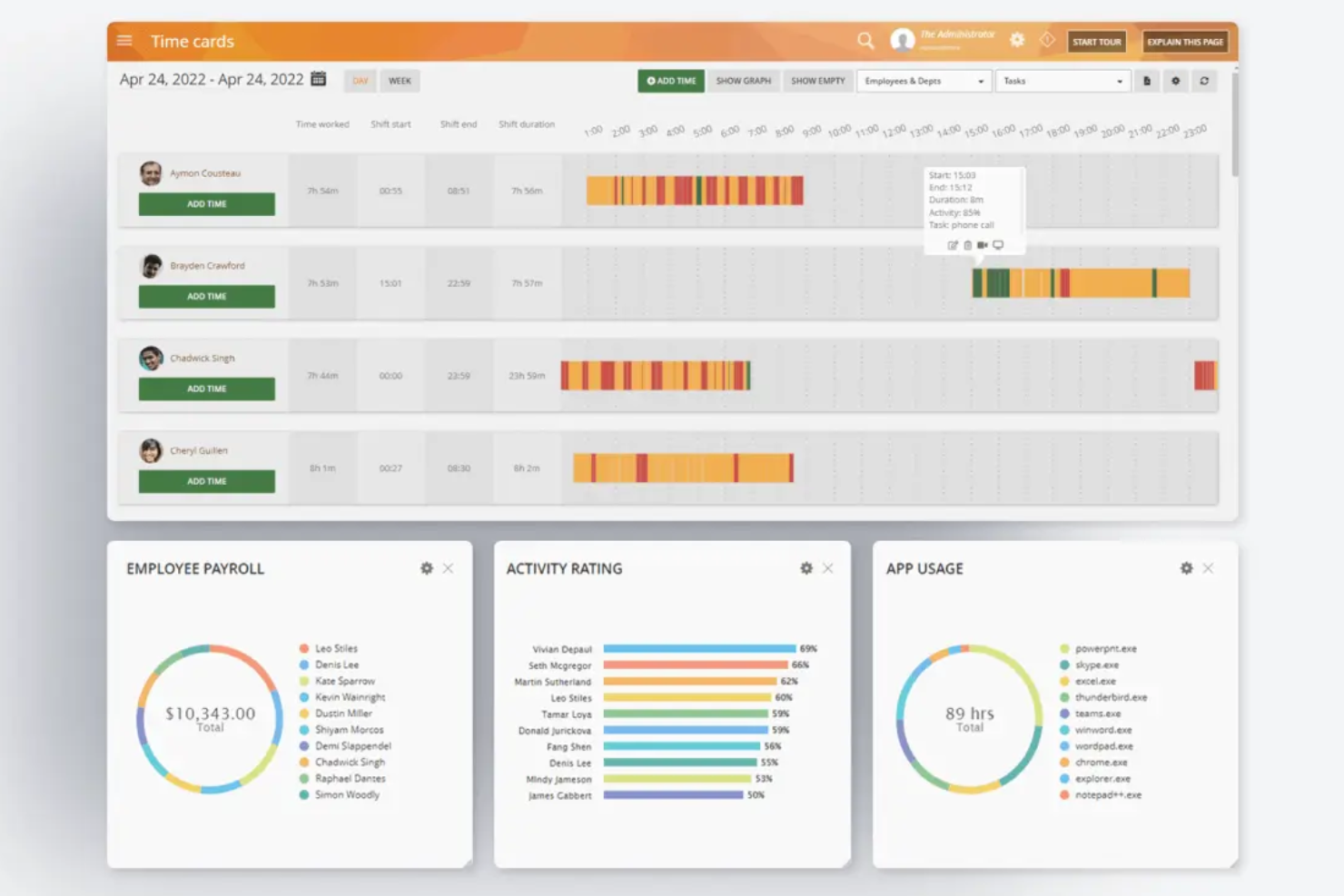
ActivTrak is a productivity monitoring software that caters to businesses aiming to enhance employee performance and efficiency. It provides insights into work habits, helping managers identify areas for improvement and optimize team productivity.
Why I picked ActivTrak: ActivTrak focuses on productivity analysis, offering tools to help you understand how your team members spend their work hours. It includes features such as activity tracking and productivity reports that can help you identify trends and inefficiencies. The software also provides real-time user monitoring to keep you informed about ongoing tasks.
Standout features and integrations:
Features include pre-defined BI templates to tailor activity tracking to your business needs, benchmarking tools that highlight efficiency levels and compare team performance to established standards, and live insights into app usage for immediate visibility into ongoing tasks.
Integrations include Slack, Microsoft Teams, Google Calendar, Workday, Zoom, and more.
Pros and Cons
Pros:
- Supports diverse work environments
- Suitable for performance optimization
- Easy deployment process
Cons:
- Analytics requires ongoing training
- Lacks deep surveillance features

Teramind
Best for detailed user activity
Teramind is an employee monitoring solution and analytics platform designed for businesses looking to enhance cybersecurity and optimize productivity. It serves a wide range of industries by providing detailed insights into employee activities and potential insider threats.
Why I picked Teramind: Teramind focuses on detailed user activity monitoring. It provides insider risk management features and data-loss prevention tools, making it a good choice for businesses focused on security. Its advanced behavior analytics allow you to understand employee actions. The platform's ability to track productivity and compliance helps ensure that you can maintain a secure and efficient workplace.
Standout features and integrations:
Features include automated evidence collection for compliance audits, data telemetry for process mapping, and website and application tracking for in-depth understanding of employee computer activity.
Integrations include Microsoft Purview, Splunk, ServiceNow, IBM QRadar, Jira, and more.
Pros and Cons
Pros:
- Advanced behavior analytics
- Strong data protection features
- Detailed activity tracking
Cons:
- Limited AI integrations
- Potential privacy concerns
Other Employee Email Monitoring Software
Here are some additional employee email monitoring software options that didn’t make it onto my shortlist but are still worth checking out:
- Hubstaff
For time-tracking integration
- Insightful
For a remote workforce
- Barracuda
For network protection
- Microsoft Viva
For employee engagement
- ProofPoint Essentials
For ransomware and phishing protection
- Inky
For managed service providers


How I Evaluate Employee Email Monitoring Software
I evaluate in two layers: the baseline a tool must meet—like email content scanning and configurable policy alerts—and the differentiators that separate vendors for specific HR use cases.
Core Functionality (Table Stakes For This List)
When I'm selecting tools for my list, I rank each one on a scale from 0 (does not offer the functionality) to 5 (excels in this area) for each core functionality listed below. Then, I calculate the tool's total score into a percentage. Each tool needs to achieve a minimum total score of 65% to be considered for inclusion.
- Email Content Monitoring: I check whether a tool can scan inbound, outbound, and internal emails across platforms like Microsoft 365 and Google Workspace, including attachments.
- Keyword & Policy Alerts: Configurable keyword rules and policy triggers matter here—I look for tools that let HR teams flag terms tied to harassment, data leaks, or policy violations.
- Audit Logs & Reporting: I evaluate whether the tool produces tamper-resistant logs and exportable reports that HR and legal teams can use to document investigations or compliance reviews.
- User Activity Tracking: Per-user visibility into email volume, recipient patterns, and attachment behavior helps me gauge how well a tool supports productivity and risk analysis.
- Data Loss Prevention: I look for the ability to detect and act on sensitive outbound data like PII or financial records, whether that's through alerts, quarantine, or blocking.
- Role-Based Access & Privacy Controls: Given the sensitivity of monitored content, I evaluate how granularly a tool restricts access—redaction, privacy masking, and multi-tier permissions all factor in.
Once I have a list of tools that meet this criteria, I consider what sets each platform apart.
Differentiating Factors (What Sets Vendors Apart)
Here's how I compare and contrast different vendors:
Standout Features
AI sentiment analysis is a major differentiator. I look for tools that detect hostility, harassment, or burnout signals in email tone rather than relying solely on keyword matches. That contextual detection helps HR teams catch issues before they become formal complaints. eDiscovery and legal hold capabilities also matter when an investigation moves toward disciplinary or legal action. Automated redaction rounds things out by masking irrelevant PII during reviews, keeping investigations defensible and privacy-compliant.
Beyond Features
Employee privacy and legal defensibility top my list. I evaluate whether a tool offers consent workflows and jurisdictional configurability, since monitoring policies that work in one region can violate laws in another. Integration depth also matters—tools that connect to your HRIS (Workday, BambooHR) and case management platforms let HR teams correlate flagged emails with employee records without manual cross-referencing. I also consider deployment flexibility. Organizations with strict data residency requirements need options for regional hosting or on-premise installation, not just a single-cloud setup.
How To Choose Employee Email Monitoring Software
It’s easy to get bogged down in long feature lists and complex pricing structures. To help you stay focused as you work through your unique software selection process, here’s a checklist of factors to keep in mind:
| Factor | What to Consider |
| Scalability | Can the software grow with your team? Consider if it supports your current and future employee count without requiring major upgrades. |
| Integrations | Does it work with your existing tools? Check for compatibility with email systems and other software your team uses daily. |
| Customizability | Can you tailor the software to suit your needs? Look for options that let you customize reports and alerts to match your workflow. |
| Ease of use | Is the interface intuitive? A user-friendly design reduces training time and helps your team adopt the tool quickly. |
| Implementation and onboarding | How smooth is the setup process? Evaluate if the vendor provides resources such as training videos, guides, and support during the initial phase. |
| Cost | Is the pricing within your budget? Compare plans and consider any hidden fees. Look for options with flexible pricing models. |
| Security safeguards | How does the software protect data? Ensure it has strong security measures, such as encryption and regular updates to safeguard sensitive information. |
| Compliance requirements | Does it meet industry regulations? Verify if the tool complies with standards relevant to your sector, such as GDPR or HIPAA, to avoid legal issues. |
What Is Employee Email Monitoring Software?
Employee email monitoring software is a tool used to track and analyze employee email communications within a company. These tools are generally used by HR professionals, IT departments, and compliance officers to ensure security and compliance. Monitoring, reporting, and alert features help with identifying potential threats, ensuring policy compliance, and maintaining productivity. Overall, these tools provide organizations with the ability to safeguard sensitive information and improve operational efficiency.
Features
When selecting employee email monitoring software, keep an eye out for the following key features:
- Monitoring: Tracks email activities to ensure compliance with company policies and detect potential threats.
- Reporting: Generates detailed activity reports to provide insights into email usage and identify patterns.
- Alerts: Sends real-time notifications of suspicious behavior to prevent data breaches.
- Archiving: Stores email communications securely for future reference and compliance purposes.
- Data encryption: Protects sensitive information by encrypting email data, ensuring confidentiality.
- Customizable dashboards: Allow users to tailor the interface to display relevant metrics and information.
- Integration compatibility: Works well with existing tools and systems to enhance workflow efficiency.
- User access controls: Manages who can view or modify data, safeguarding sensitive information.
- Productivity analytics: Analyzes email usage to help improve team efficiency and productivity.
- Compliance tracking: Ensures adherence to industry regulations, such as GDPR and HIPAA, reducing legal risks.
Benefits
Implementing employee email monitoring software provides several benefits for your team and your business. Here are a few you can look forward to:
- Improved security: Protects sensitive information by detecting and preventing potential threats through real-time alerts and monitoring.
- Enhanced compliance: Ensures adherence to industry regulations by tracking email activities and maintaining secure archives.
- Increased productivity: Analyzes email usage patterns to identify inefficiencies and help improve team performance.
- Efficient reporting: Provides detailed reports that give insights into email communication trends and user behavior.
- Better risk management: Identifies suspicious activities early, reducing the risk of data breaches and unauthorized access.
- Customizable insights: Offers tailored dashboards to display relevant information, aiding in quick decision-making.
- Integration with existing tools: Enhances workflow efficiency by working with current systems and software.
Costs and Pricing
Selecting employee email monitoring software requires an understanding of the various pricing models and plans available. Costs vary based on features, team size, add-ons, and more. The table below summarizes common plans, their average prices, and typical features included in employee email monitoring software solutions:
Plan Comparison Table for Employee Email Monitoring Software
| Plan Type | Average Price | Common Features |
|---|---|---|
| Free Plan | $0 | Basic monitoring, limited reporting, and email alerts. |
| Personal Plan | $5-$15/user/month | Full monitoring, customizable alerts, and basic reporting features. |
| Business Plan | $20-$40/user/month | Advanced reporting, integration capabilities, and data encryption. |
| Enterprise Plan | $50-$75/user/month | Extensive security, compliance tracking, dedicated support, and custom integrations. |
Employee Email Monitoring Software FAQs
Here are some answers to common questions about employee email monitoring software:
How does employee email monitoring software work?
Employee email monitoring software tracks and analyzes email communications within an organization. It captures data on email usage, flags suspicious activities, and generates reports. This helps you ensure compliance and identify security threats. Most tools operate in the background and offer customizable settings to match your company’s privacy policies.
Is employee email monitoring legal?
Yes, employee email monitoring is legal in many regions, but it must comply with local laws and regulations. It’s important to inform your employees about monitoring practices and obtain their consent if required. Check your local labor laws and consider consulting with a legal expert to ensure compliance.
Can employee email monitoring software protect against phishing attacks?
Yes, many email monitoring tools include features to detect phishing attempts. They analyze email content for suspicious links or attachments and alert you to potential threats. Educate your team on recognizing phishing emails, and use the software to add an extra layer of security against such attacks.
How do I choose the right email monitoring software for my business?
To choose the right software, consider your team’s size, industry regulations, and specific needs. Evaluate the tool’s scalability, integration capabilities, and ease of use. Test a few options with free trials or demos to see which one aligns best with your workflow and budget.
What’s Next:
If you're in the process of researching employee email monitoring software, connect with a SoftwareSelect advisor for free recommendations.
You fill out a form and have a quick chat where they get into the specifics of your needs. Then you'll get a shortlist of software to review. They'll even support you through the entire buying process, including price negotiations.