

10 Best Free Hot Desk Booking Software in 2026

Best Free Hot Desk Booking Software Shortlist


Free hot desk booking software lets your team reserve shared workspaces without paying for a subscription, using tools that offer a free plan or trial. If you’re searching for ways to manage flexible seating, support hybrid schedules, or just avoid desk chaos—without adding to your budget—you’re in the right place. This guide will help you compare the top free hot desk booking options, understand what makes each one unique, and pick the right fit for your team’s needs.
Why Trust Our Software Recommendations
Our team has been testing and reviewing software since 2012. As HR experts ourselves, we know how difficult—and important—it is to choose the right software.
For this guide, we evaluated tools using hands-on testing and independent research, scoring tools using our selection criteria. We also draw on insights from industry thought leaders and practicing HR experts.
Our reviews reflect our human editorial judgment, not a sales pitch.
Expert reviewers:
Free Hot Desk Booking Software Comparison Table
This comparison table summarizes pricing details for my top free hot desk booking software selections:
| Tool | Best For | Trial Info | Price | ||
|---|---|---|---|---|---|
| 1 | Best for per-floor-plan pricing with unlimited users | Free trial available | From $28/unlimited users/month | Website | |
| 2 | Best for quick QR code desk reservations | 14-day free trial | From $19/spot/month | Website | |
| 3 | Best for hardware display compatibility | 30-day free trial available | From $51/month | Website | |
| 4 | Best for customizable booking rules | Free plan available | From €5.50/month (billed annually) | Website | |
| 5 | Best for occupancy analytics dashboards | Free plan + free demo available | From $4.60/user/month | Website | |
| 6 | Best for Slack-based desk booking | Free trial + free demo available | From $2.50/user/month (billed annually) | Website | |
| 7 | Best for multi-location management | Free plan available | From $4/resource/month (billed annually) | Website | |
| 8 | Best for real-time desk availability maps | Free plan + free demo available | From €1.99/user/month (billed annually) | Website | |
| 9 | Best for visual floor plan selection | 30-day free trial available | Pricing upon request | Website | |
| 10 | Best for hybrid work scheduling features | Free plan + free demo available | From €1.65/user/month | Website |
Free Hot Desk Booking Software Reviews
Below are my detailed summaries of the free hot desk booking software that made it onto my shortlist. My reviews offer a detailed look at the features, best use cases, and pricing of each platform to help you find the best one for you.

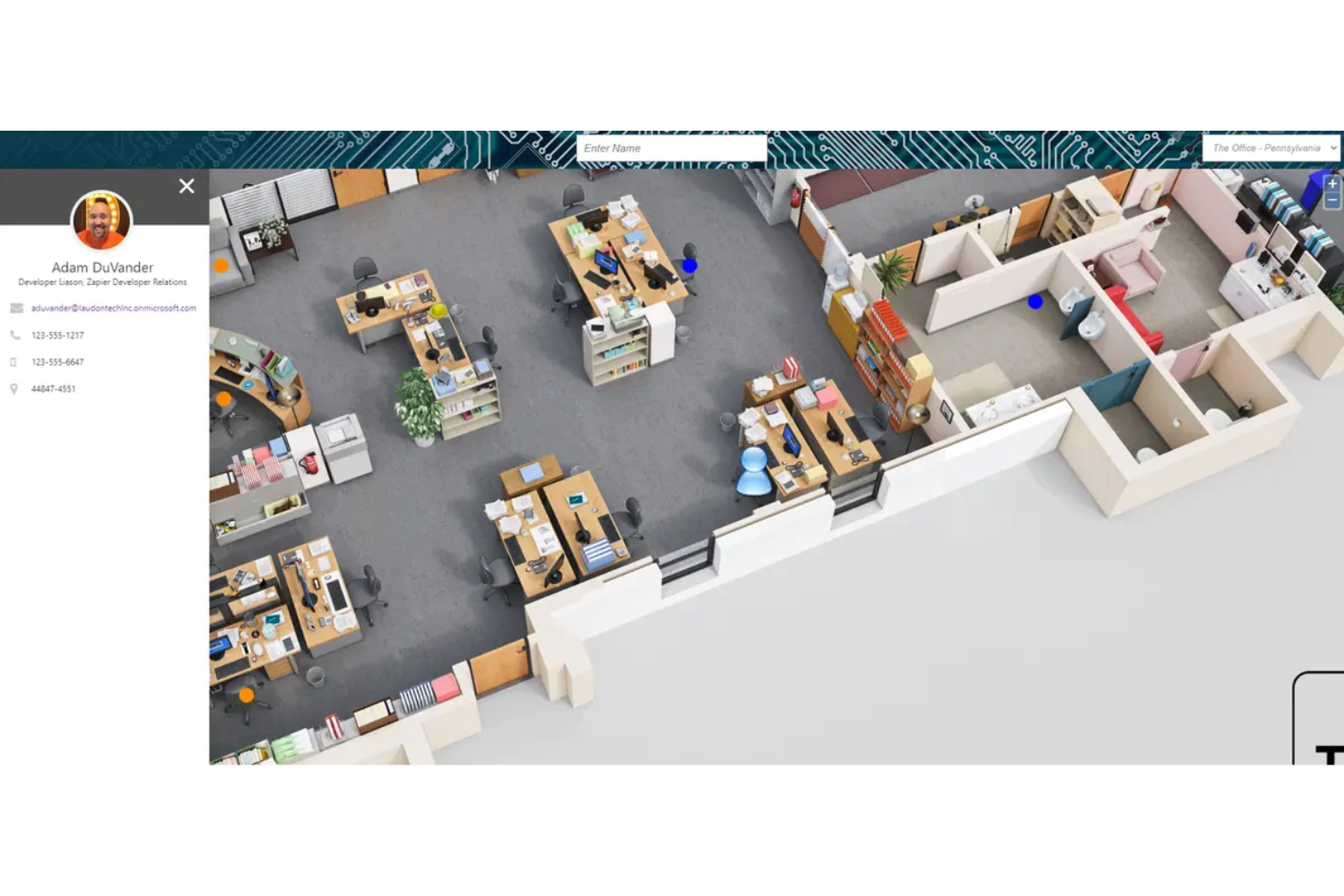
Floor Plan Mapper is hot desk booking software that converts CAD, PDF, and JPG floor plans into interactive maps for desk reservations, recurring bookings, booking rules, occupancy reports, and role-based administration across multiple buildings and floors.
Who Is Floor Plan Mapper Best For?
Office administrators managing multiple buildings should consider Floor Plan Mapper, best for per-floor-plan pricing with unlimited users.
Why I Picked Floor Plan Mapper
I picked Floor Plan Mapper as Best for per-floor-plan pricing with unlimited users because its model suits offices with changing headcounts and stable layouts. Its interactive CAD, PDF, and JPG maps support desk selection across buildings and floors, while booking rules, auto-release, and occupancy reports help with return-to-office planning. It offers a 7-day trial, not a free-forever plan.
Floor Plan Mapper Key Features
- Recurring bookings: Schedule reservations on repeating days.
- Calendar integrations: Add bookings to Outlook or Google Calendar.
- Identity provisioning: Connect Microsoft Entra ID, Okta, SAML, or SCIM.
- Audit logs: Track bookings, cancellations, changes, and permission updates.
Floor Plan Mapper Integrations
Integrations include Outlook, Google Calendar, Microsoft Teams, Microsoft 365, SharePoint, Okta, and SAML. Floor Plan Mapper also supports SCIM provisioning, Excel imports, and an API for custom integrations.
What’s Free?
Floor Plan Mapper offers a 7-day free trial, not a free-forever plan. Paid plans start at $28 per month and use per-floor-plan pricing with unlimited users.
Pros and Cons
Pros:
- Quick floor-plan setup earns praise
- Interactive maps fit multi-floor offices
- Unlimited users suit changing headcounts
Cons:
- Browser-first mobile access remains ambiguous
- No free-forever plan for pilots

Whatspot
Best for quick QR code desk reservations
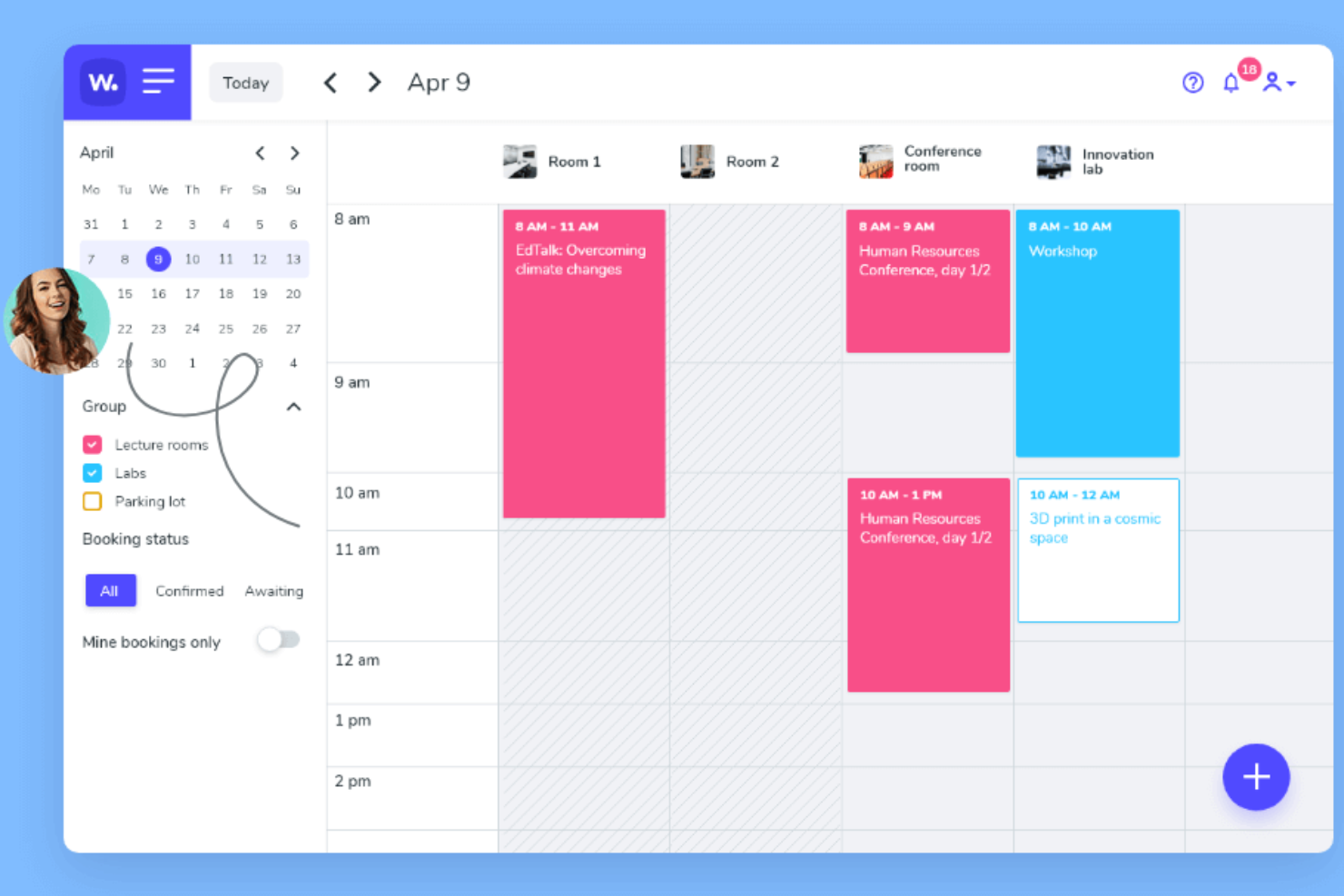
Whatspot is a desk and meeting room booking platform that lets you manage workspace reservations, generate QR codes for quick bookings, and set up approval workflows for resource requests.
Who Is Whatspot Best For?
Small businesses and coworking spaces that want a simple way to manage desk and meeting room reservations.
Why I Picked Whatspot
I picked Whatspot as one of the best because I can generate unique QR codes for each desk or meeting room, letting my team book spaces instantly with their phones. I like that I can set up approval workflows for resource requests, which helps manage shared spaces. The ability to display real-time availability on a tablet or screen outside each room is especially useful for busy offices.
Whatspot Key Features
- Booking calendar: View and manage all desk and room reservations in a single calendar interface.
- User roles and permissions: Assign different access levels for admins, managers, and regular users.
- Recurring bookings: Set up repeating reservations for desks or meeting rooms.
- Email notifications: Receive automated booking confirmations and reminders via email.
Whatspot Integrations
Integrations include Microsoft Teams, Microsoft Calendar, Microsoft Entra ID, and Google Workspace, and an API is available.
What's Free?
Whatspot offers a free-forever plan for up to 10 users, 3 spots, and 40 bookings per month. The free plan includes mobile and web access, QR code booking, and basic booking features.
Pros and Cons
Pros:
- Approval workflows for resource requests
- iOS and Android apps available
- QR code booking for instant desk access
Cons:
- Custom branding options are restricted
- No built-in visitor management feature
New Product Updates from Whatspot

Whatspot Adds Booking Modes for Different Space Types
Whatspot introduces Booking Modes to support different reservation rules for different space types. Admins can choose flexible bookings, fixed durations, or fixed intervals based on how each space is used. For more information, visit Whatspot's official site.
 .
.
Joan
Best for hardware display compatibility
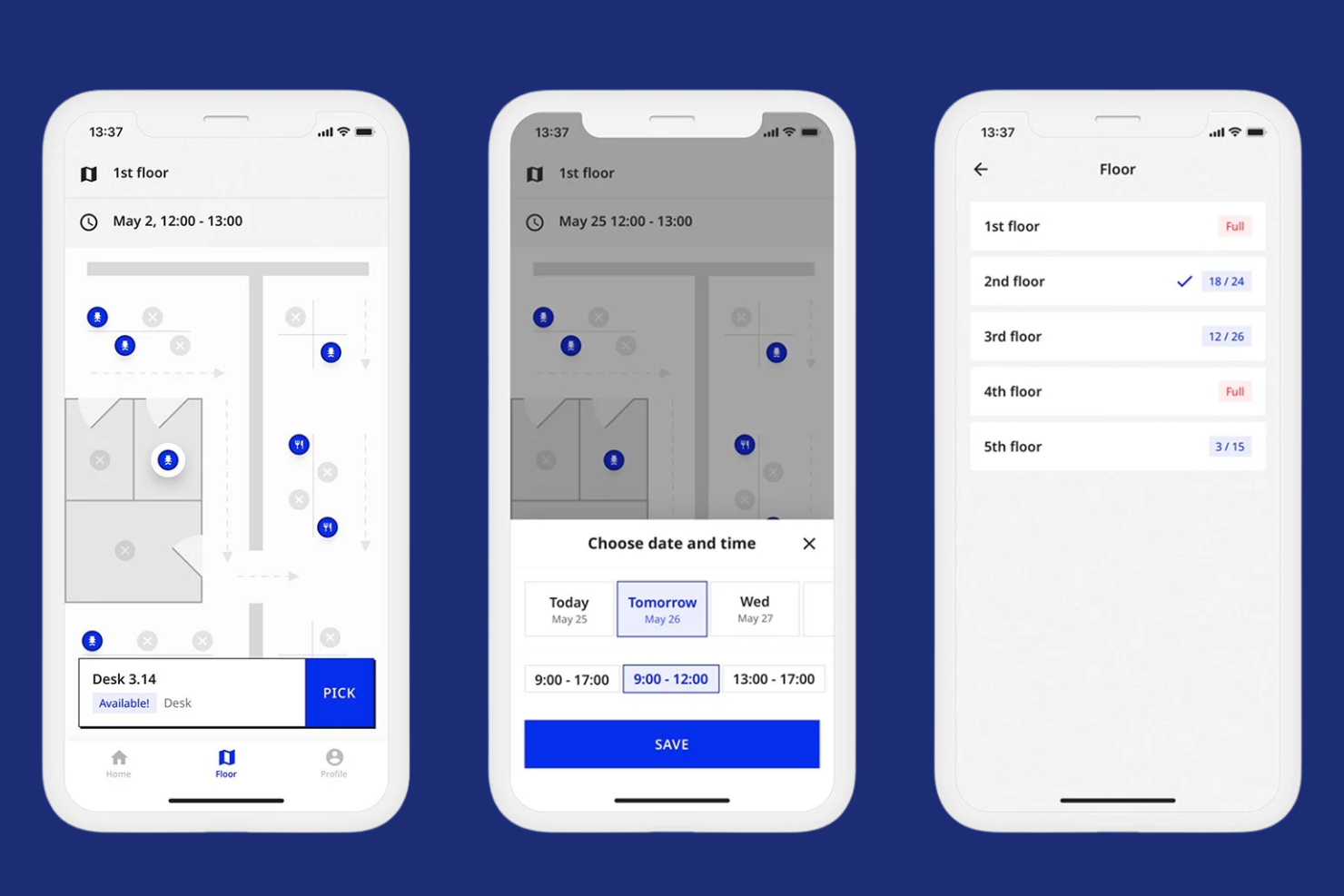
Joan is a desk booking software platform that lets you manage hot desk reservations, room scheduling, and workspace availability with support for dedicated hardware displays and mobile access.
Who Is Joan Best For?
Facilities managers and IT teams in offices that want to pair desk booking software with physical display hardware.
Why I Picked Joan
I picked Joan as one of the best because I can pair its desk booking software with Joan’s e-paper hardware displays for real-time desk status right at each workspace. I like that my team can manage bookings from the web or mobile app and see instant updates reflected on physical devices. I also appreciate how Joan’s hardware integrates with the software to reduce double-bookings and confusion in shared office environments.
Joan Key Features
- Mobile booking app: Reserve desks and rooms from your phone.
- Calendar sync: Connect bookings with Google and Outlook calendars.
- QR code check-in: Scan to confirm desk usage on arrival.
- Visitor management: Register and track office guests digitally.
Joan Integrations
Joan offers native integrations with Microsoft Active Directory, Google Calendar, Microsoft Teams, and Slack. An API is available for custom integrations.
What's Free?
Joan offers a 30-day free trial with access to all features. After the trial, continued use requires a paid subscription, and there is no free-forever plan.
Pros and Cons
Pros:
- Custom booking rules for workspace management
- Calendar sync with Google and Microsoft 365
- Hardware displays show real-time desk status
Cons:
- Limited customization for booking rules
- Hardware devices require separate purchase

Dibsido
Best for customizable booking rules

Dibsido is a free desk booking solution designed for hybrid teams that simplifies how workplaces manage shared desks, meeting rooms, and parking through an intuitive booking system. It allows users to reserve spaces in one click, book directly from interactive floor maps, and automatically release unused desks to keep office capacity optimized.
Who Is Dibsido Best For?
Office managers and administrators who want to set detailed booking rules for shared desks and meeting spaces.
Why I Picked Dibsido
I picked Dibsido as one of the best because I can set up detailed booking rules for desks and meeting rooms, including restrictions by user group or time slot. I like that I can configure booking rules by user group, workspace, and booking window to match how different teams use the office. That gives me more control over who can reserve specific spaces and when, without creating unnecessary administrative work. In practice, that means I can tailor workspace access to fit our unique office policies.
Dibsido Key Features
- Interactive floor plans: Users can select desks directly from a visual map of the workspace.
- Recurring reservations: Schedule repeating bookings for desks or rooms on a daily, weekly, or monthly basis.
- Mobile booking app: Reserve and manage desk bookings from any mobile device.
- Check-in and check-out tracking: Monitor workspace usage with built-in check-in and check-out functionality.
Dibsido Integrations
Integrations include Slack, Microsoft Teams, Google Calendar, Outlook, and Microsoft Entra ID. An API is available for custom integrations.
What's Free?
Dibsido offers a free-forever plan for 20 users. Some advanced features and integrations are only available on paid plans.
Pros and Cons
Pros:
- Granular booking rules by user group
- Unlimited desk bookings on the free plan
- Custom booking rules for each workspace
Cons:
- No two-way Outlook or Google Calendar sync on the free plan
- Free plan limited to one meeting room

PULT
Best for occupancy analytics dashboards
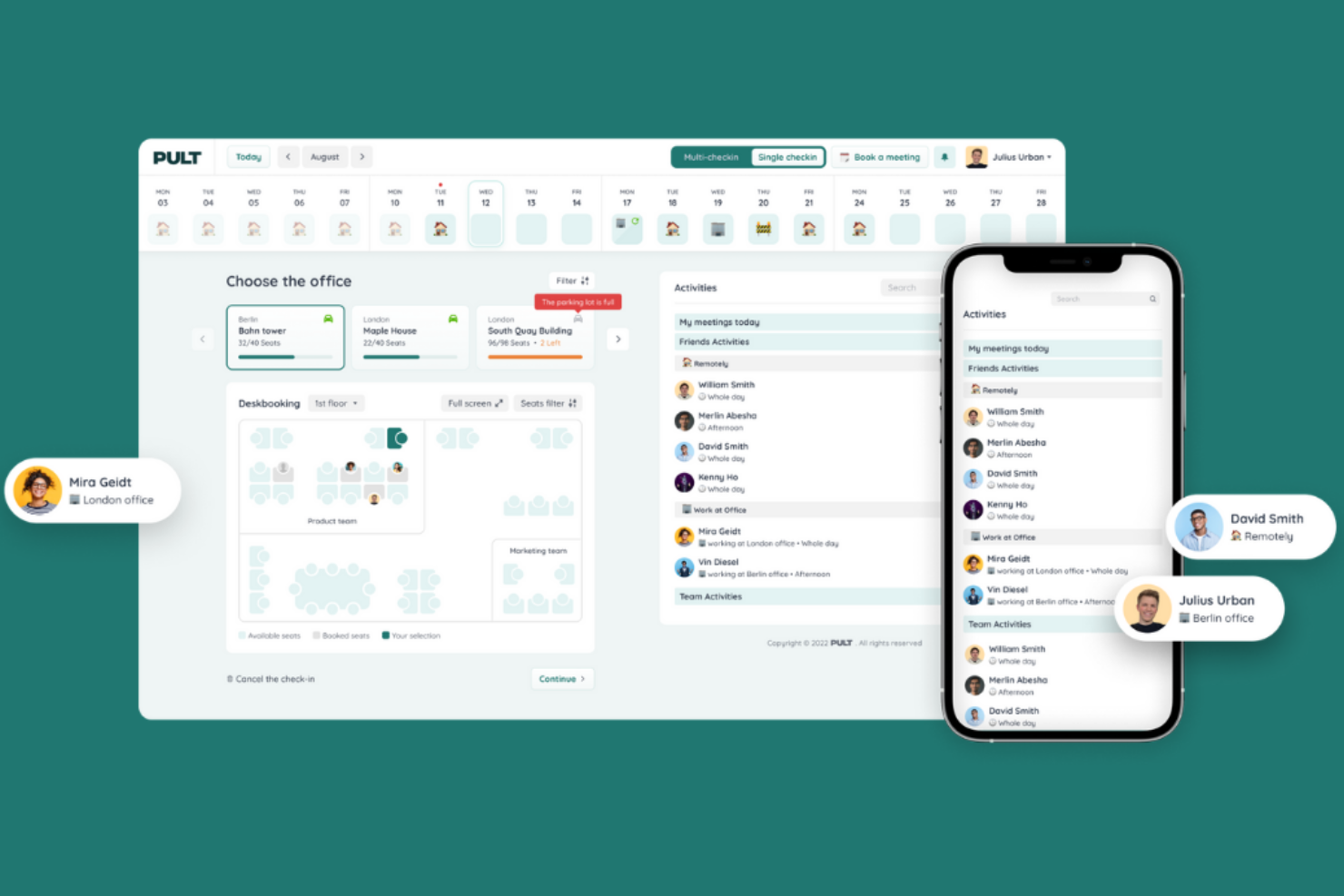
PULT is a desk booking software platform for hybrid workplaces that combines workspace reservations, meeting room management, occupancy analytics, and visitor management in one system.
Who Is PULT Best For?
PULT is a good fit for workplace managers and operations teams at mid-sized and large organizations seeking detailed occupancy and space usage insights.
Why I Picked PULT
I picked PULT as one of the best because I can access detailed occupancy analytics dashboards that show real-time and historical workspace usage. I like that my team can visualize desk and room utilization trends, spot underused spaces, and export granular usage reports. The platform’s analytics tools help me make data-driven decisions about space allocation and hybrid work planning.
PULT Key Features
- Desk check-in via QR code: Users confirm their desk reservation by scanning a QR code at the workspace.
- Recurring desk bookings: Employees can set up repeating reservations for their preferred desks.
- Mobile booking app: Book, modify, or cancel desk reservations directly from a mobile device.
- Team neighborhood assignment: Admins can assign specific desk areas to teams or departments.
PULT Integrations
PULT offers native integrations with Slack, Microsoft Teams, Google Calendar, Microsoft Outlook, Personio, HRworks, Workday, BambooHR, Okta, and Cisco Meraki. An API is available for custom integrations.
What's Free?
PULT offers free access to core desk booking features for up to 20 users. The free features include 1-click desk booking, desk tags and equipment filters, a floor plan editor, recurring bookings, booking rules and policies, QR-code check-in, hybrid work planning, and Help Centre access.
Pros and Cons
Pros:
- Real-time desk availability updates
- Native integrations with HR and IT systems
- Occupancy analytics dashboards with export options
Cons:
- No built-in support for parking space booking
- Limited customization for desk booking rules

Officely
Best for Slack-based desk booking

Officely is a desk booking software built for hybrid teams that operates directly within Slack and Microsoft Teams, allowing employees to reserve desks, meeting rooms, and other resources without switching tools. It provides real-time visibility into who is in the office, supports check-ins, and offers interactive maps so teams can plan where to sit and collaborate more effectively.
Who Is Officely Best For?
Officely is a good fit for small to midsize teams that already use Slack as their primary communication tool.
Why I Picked Officely
I picked Officely as one of the best because it lets my team book desks, manage office attendance, and coordinate hybrid schedules directly inside Slack. I like that I can set up recurring office days and see who else is coming in, all without leaving Slack. The integration with Slack channels means my team gets real-time updates and reminders about their bookings.
Officely Key Features
- Desk check-in: Users confirm their desk bookings upon arrival to the office.
- Capacity management: Set and enforce limits on the number of people in the office each day.
- Neighborhoods: Group desks into zones or neighborhoods for easier booking.
- Health screening: Collect health declarations from users before they come into the office.
Officely Integrations
Officely offers native integrations with Google Calendar, Microsoft Outlook, and Slack, and provides an API for custom integrations.
What's Free?
Officely offers free access for up to 5 users. It includes all features for small teams, including desk booking, office attendance visibility, office check-ins, private neighbourhoods, capacity management, automated booking, Slack access, and office analytics.
Pros and Cons
Pros:
- Real-time office attendance visibility
- Quick setup for hybrid office environments
- Fully integrated with Slack workspace
Cons:
- Cannot manage multiple office locations easily
- Requires Slack for core functionality

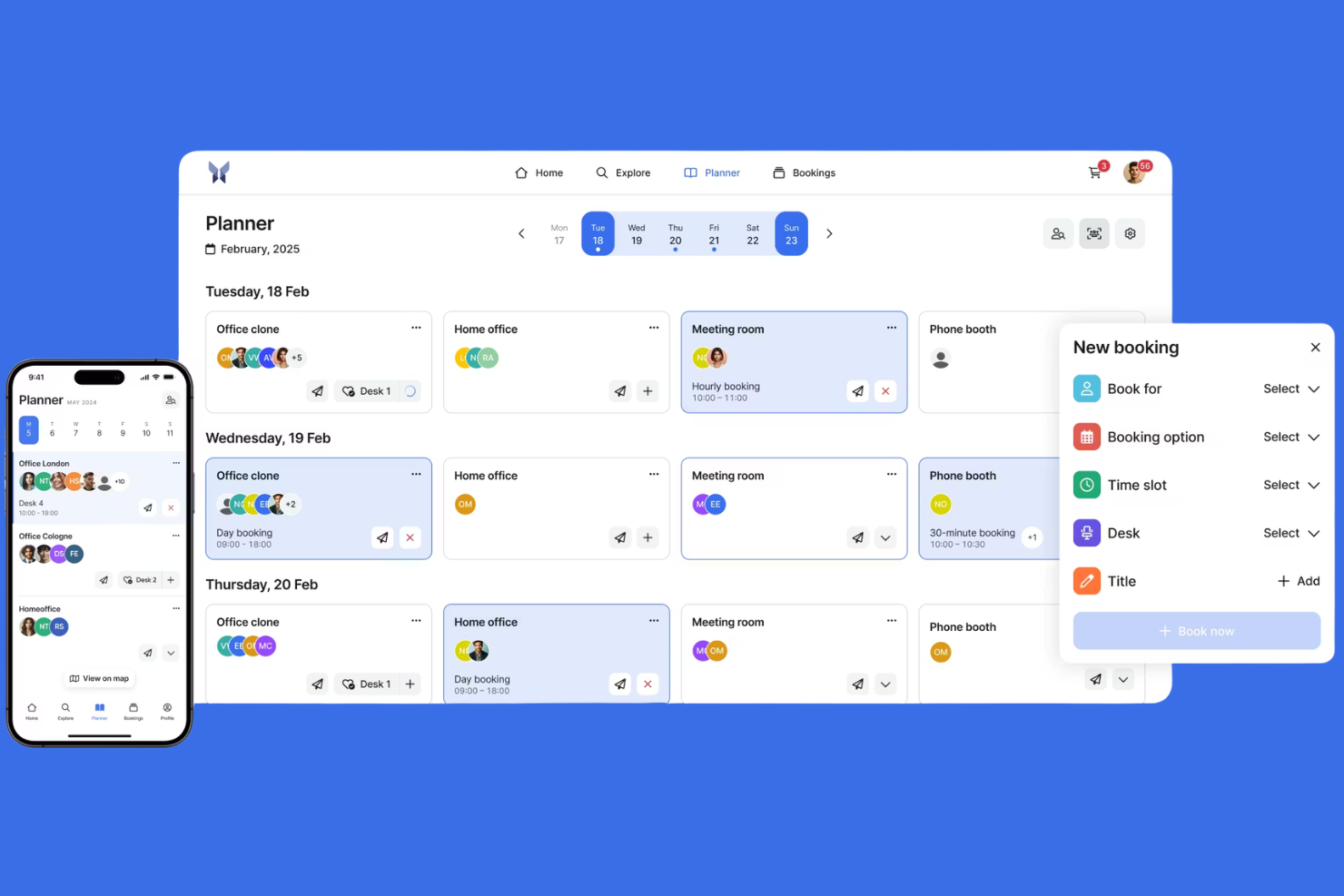
anny is a desk booking app that lets you manage workspace reservations, meeting rooms, parking spaces, and resources across multiple locations from a single dashboard.
Who Is anny Best For?
anny is a good fit for organizations managing workspaces and resources across multiple office locations or campuses.
Why I Picked anny
I picked anny as one of the best because I can manage bookings for multiple locations from a single dashboard. I like that I can set up location-specific rules and permissions for each office or campus. My team uses anny to coordinate workspace, parking, and meeting room reservations across several sites.
anny Key Features
- Interactive floor plans: Users can select and book desks directly from a visual map.
- Check-in and check-out system: Tracks actual desk usage with QR code or web check-in.
- Resource booking: Lets you reserve equipment or parking along with desks.
- Role-based access control: Admins can assign permissions for different user groups.
anny Integrations
anny offers native integrations with Personio, Google Workspace, Microsoft 365, Outlook, Zoom, Microsoft Teams, and Nuki, with additional support for smart locks, HRIS, payments, SSO, and calendar tools. An API is available for custom integrations.
What's Free?
anny offers a free-forever plan with limited features. The free plan restricts the number of locations, resources, and some advanced functionalities.
Pros and Cons
Pros:
- Role-based access for different user groups
- Multi-location management from a single dashboard
- Supports booking for desks, rooms, and parking
Cons:
- No built-in visitor management feature
- Free plan limits locations and resources

Best for real-time desk availability maps
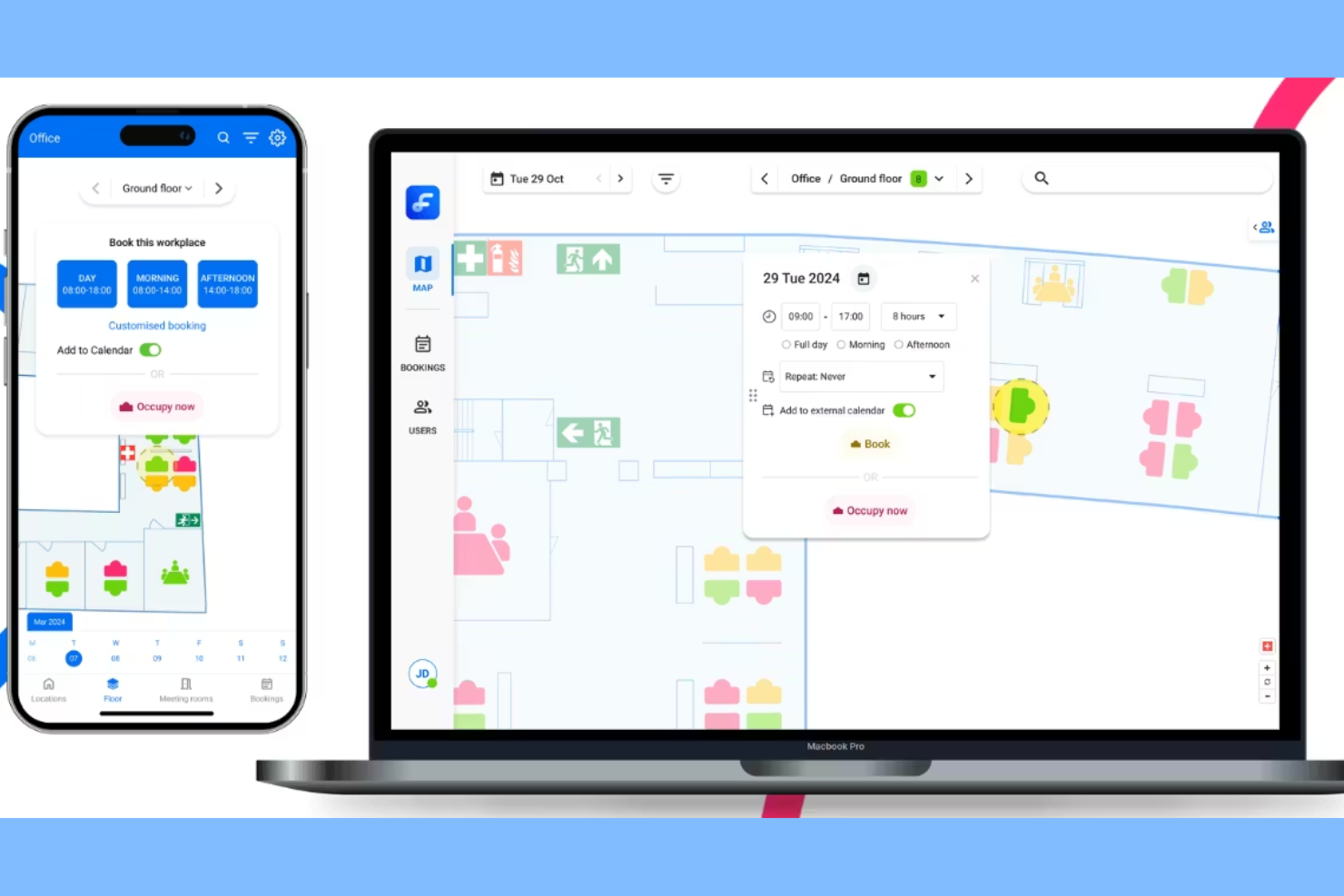
Flexwhere is a desk booking software platform that lets you view real-time desk availability, manage workspace reservations, and monitor office space occupancy using interactive maps and web or mobile access.
Who Is Flexwhere Best For?
Facilities managers and office administrators in mid-sized and large organizations who need to monitor and manage flexible workspace usage.
Why I Picked Flexwhere
I picked Flexwhere as one of the best because I can see real-time desk availability on interactive office maps, which makes it easy to spot open workspaces at a glance. My team members uses the platform’s live occupancy data to manage flexible seating and avoid double bookings. I also like that we can access desk booking from both web and mobile devices, so everyone can reserve a spot no matter where they are.
Flexwhere Key Features
- Single sign-on integration: Users can log in with Microsoft or Google accounts.
- Meeting room booking: Reserve meeting spaces alongside desks in one platform.
- Visitor registration: Register and track office visitors directly in the system.
- Occupancy analytics dashboard: View detailed reports on workspace usage and trends.
Flexwhere Integrations
Integrations include Outlook, Microsoft Teams, Google Calendar, and TopDesk.
What's Free?
Flexwhere offers free access for up to 25 users. It includes one floor plan at a single location, desk and ad hoc meeting room booking, bookings up to 1 week in advance, web and mobile app access, online support, quick bookings, custom bookings, booking edits, push notifications and reminders, SSO, and 5 custom resource labels.
Pros and Cons
Pros:
- Real-time colleague location tracking
- Support for 25 free users
- Interactive visual floor plan maps
Cons:
- One floor plan limit
- Eight-day booking limit

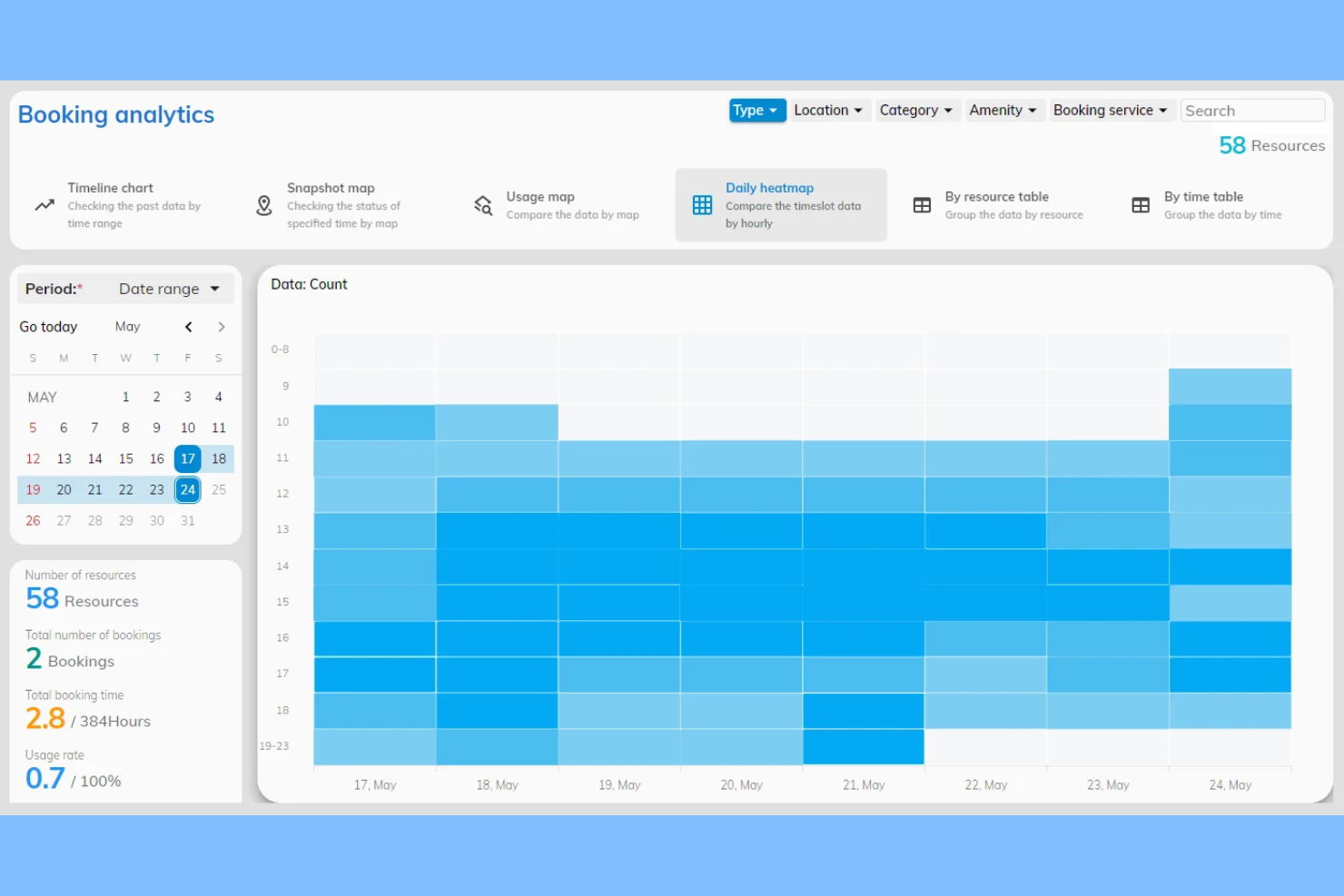
Offision is a desk booking system that lets you manage workspace reservations, visualize office layouts, and coordinate shared resources through an interactive floor plan interface.
Who Is Offision Best For?
Offision is a good fit for office managers and facilities teams who need to coordinate desk bookings using a visual floor plan.
Why I Picked Offision
I picked Offision as one of the best because I can select desks directly from a visual floor plan, which makes booking feel intuitive and location-specific. My team uses the drag-and-drop interface to quickly reserve workspaces and see real-time desk availability. I also like that Offision lets us customize floor plans to match our actual office layout, so everyone knows exactly where they're booking.
Offision Key Features
- Booking approval workflows: Set up manager approvals for desk reservations.
- Recurring bookings: Schedule desks for repeating days or weeks.
- User access controls: Assign booking permissions by user or group.
- Calendar sync: Integrate bookings with Google Calendar and Outlook.
Offision Integrations
Offision offers native integrations with Zoom, Microsoft Teams, Outlook, Microsoft 365, Google Workspace, and Webex.
What's Free?
Offision offers a 30-day free trial with access to all features. After the trial, continued use requires a paid subscription, and there is no free-forever plan.
Pros and Cons
Pros:
- Manages multiple office locations centrally
- Customizable user access permissions
- Supports booking desks, rooms, and parking
Cons:
- No free plan, only a free trial
- Limited analytics and reporting features


desk.ly is a desk booking and workspace management platform that lets you organize hot desking, manage meeting rooms, coordinate team schedules, and set up office zones for hybrid work environments.
Who Is desk.ly Best For?
desk.ly is a good fit for HR teams and office managers at mid-sized companies coordinating hybrid work schedules.
Why I Picked desk.ly
I picked desk.ly as one of the best because I can set up recurring desk bookings and coordinate hybrid work schedules for my team in one place. I like that I can assign office zones, manage meeting room reservations, and use the interactive floor plan to visualize workspace availability. The scheduling features help my team plan in-office days and keep track of who is working where.
desk.ly Key Features
- Single sign-on integration: Connects with Microsoft 365 and Google Workspace for easy access.
- QR code desk check-in: Lets users check in to desks using QR codes.
- Visitor management: Tracks and manages external visitors entering the workspace.
- Analytics dashboard: Provides workspace usage data and booking statistics.
desk.ly Integrations
Desk.ly offers native integrations with Microsoft Outlook, Google Calendar, Microsoft Teams, Personio, and Slack, and provides an API for custom integrations.
What's Free?
desk.ly offers a free-forever plan for up to 15 users. The free plan includes basic desk booking features but limits access to advanced analytics and some integrations.
Pros and Cons
Pros:
- Visitor management with digital guestbook
- Native HRIS integrations for user sync
- QR code check-in for desks and rooms
Cons:
- No mobile app for Android devices
- Limited reporting customization options
Other Free Hot Desk Booking Software
Here are some additional free hot desk booking software options that didn’t make it onto my shortlist, but are still worth checking out:
- Deskfound
For Google Workspace integration
- Skedda
For advanced booking policy controls
- deskbird
For employee privacy controls
- Clearooms
For Microsoft Teams compatibility
- Archie
For automated check-in via mobile app
- Envoy
For visitor management integration
- FLYDESK
For coworking space management
- Flexopus
For multilingual user interface
- Waldo
For workspace occupancy trends
- Sharvy
For automated desk assignment


How I Evaluate Free Hot Desk Booking Software
First, I define what counts as free. For hot desk booking software—where HR teams are managing daily seat assignments for hybrid employees—only free-forever plans qualify. I then evaluate tools across two layers: the core functionality required to make this list, and the differentiators that distinguish one vendor from another.
Core Functionality (Table Stakes For This List)
In addition to my free offer requirements, I also use a scoring system to select tools for my list. Here's how it works:
I rank each one on a scale from 0 (does not offer the functionality) to 5 (excels in this area) for each core functionality listed below. Then, I calculate the tool's total score into a percentage. Each tool needs to achieve a minimum total score of 65% to be considered for inclusion.
- Desk Reservation System: Every tool I evaluate needs to let employees browse open desks and reserve them for specific dates or time slots—like booking a desk near the sales team for a Thursday collaboration day.
- Interactive Floor Plans: I look for visual, clickable maps of the office layout so employees can pick a desk by location rather than choosing blindly from a list of desk IDs.
- Booking Self-Service: Employees should be able to view, modify, and cancel their own reservations. I check whether the tool also supports check-in so admins can reclaim no-show desks automatically.
- Multi-Device Access: A hybrid worker heading to the office on short notice needs to grab a desk from their phone. I evaluate whether each tool offers both web and mobile access on its free plan.
- Admin Controls & Permissions: Workplace managers need to configure desks, define booking rules, and assign user roles. I look at how much control admins get—for example, whether they can group desks into neighborhoods or set per-team policies.
- Occupancy Reporting: Basic utilization data helps HR and workplace teams understand which desks and floors see traffic. I check whether the free plan includes enough reporting to inform decisions like downsizing a floor or reallocating space.
Once I have a list of tools that meet the criteria, I consider what sets each platform apart.
Differentiating Factors (What Sets Vendors Apart)
Here's how I compare and contrast different vendors:
Standout Features
Team coordination features matter a lot here—I look for tools that show employees where their colleagues are sitting so they can book nearby desks on shared office days. Calendar sync with Google Calendar or Outlook is another big one, since it lets bookings flow into existing workflows without double entry. I also evaluate whether a tool supports QR code check-in, which helps admins auto-release no-show desks and keep occupancy data accurate.
Beyond Features
Free plan limits vary widely—I check how many users and desks each vendor supports before an upgrade is required, since a tool that caps at 10 desks won't work for a 50-person hybrid team. Data privacy also deserves attention because these tools collect employee location and presence data, so I evaluate GDPR compliance and transparency around how that data is stored. I also consider setup effort, particularly whether admins can import users via CSV or directory sync without a paid tier.
How to Choose Free Hot Desk Booking Software
It’s easy to get bogged down in long feature lists and complex pricing structures. To help you stay focused as you work through your unique software selection process, here’s a checklist of factors to keep in mind:
| Factor | What to Consider |
|---|---|
| Scalability | Will the software support your current and future desk volume, locations, and user growth? |
| Integrations | Does it connect with your existing calendar, HR, or access control systems without extra workarounds? |
| Customizability | Can you tailor booking rules, user permissions, and workspace layouts to match your policies? |
| Ease of use | Will employees and admins be able to book and manage desks with minimal training or confusion? |
| Implementation and onboarding | How long will it take to set up, migrate data, and get your team using the tool confidently? |
| Cost | Are there hidden costs, upgrade requirements, or usage limits that could impact your budget later? |
| Security safeguards | Does the tool offer data privacy, user authentication, and compliance with your organization’s standards? |
| Support availability | Can you access timely help if you run into issues, and is support included in the free plan? |
What Is Free Hot Desk Booking Software?
Free hot desk booking software is a digital tool that lets employees reserve shared desks or workspaces at no cost. These platforms help organizations manage desk availability, track workspace usage, and support flexible seating arrangements. Most free solutions offer basic booking, cancellation, and availability features, making them suitable for small teams or organizations piloting hybrid work models.
Features
Let’s go over the features commonly found in hot desk booking software, and which ones are usually included in free vs. paid plans.
Typically Free Hot Desk Booking Software Features
- Desk booking calendar: Lets users view available desks and reserve a workspace for specific dates and times.
- Booking cancellation: Allows users to cancel or modify their desk reservations directly within the platform.
- Real-time availability: Shows up-to-date information on which desks are open or booked at any given moment.
- User management: Enables admins to add, remove, or assign users and manage basic access permissions.
- Basic reporting: Provides simple usage statistics, such as the number of bookings or occupancy rates.
- Mobile access: Offers a mobile-friendly interface or app so users can book desks from their phones.
- Email confirmations: Sends automated booking confirmations and reminders to users via email.
- Simple floor plan view: Displays a basic map or layout of the workspace to help users select their preferred desk.
Typically Paid Hot Desk Booking Software Features
- Advanced analytics: Delivers detailed insights into workspace utilization, trends, and employee booking patterns.
- Integration with calendars: Syncs bookings with tools like Google Calendar or Microsoft Outlook for easy scheduling.
- Custom booking rules: Lets admins set advanced permissions, booking windows, or restrictions for different user groups.
- Visitor management: Tracks external guests, issues visitor passes, and logs entry and exit times.
- Interactive floor plans: Provides clickable, detailed maps with real-time desk status and advanced navigation.
- QR code check-in: Requires users to scan a QR code at their desk to confirm their reservation and occupancy.
- Single sign-on (SSO): Supports secure authentication through your organization’s identity provider.
- API access: Allows for custom integrations with other workplace tools or internal systems.
- Priority support: Offers faster response times and dedicated support channels for paid users.
- Custom branding: Lets organizations add their logo, colors, and branding to the booking platform.
Benefits
Implementing free hot desk booking software provides several benefits for your team and your business. Here are a few you can look forward to:
- Cost savings: Free plans let you manage workspace reservations without adding to your software budget.
- Improved space utilization: Real-time availability and booking data help you make the most of your office layout.
- Flexible work arrangements: Desk booking tools support hybrid and flexible schedules by letting employees reserve desks as needed.
- Simplified desk management: Admin features and user management make it easy to assign, monitor, and adjust desk usage.
- Faster onboarding: Intuitive interfaces and basic setup guides help teams get started with minimal training or IT support.
- Data-driven decisions: Basic reporting features provide insights into occupancy trends and workspace demand.
- Enhanced employee experience: Mobile access and easy booking processes make it convenient for employees to find and reserve desks.
Costs & Pricing
I realize you came to this article looking for the best hot desk booking software options that are available for free. However, since free plans only offer limited features, there's a good chance you'll need to scale your plan up in the future.
The table below summarizes common plans, their average prices, and typical features included in hot desk booking software:
Plan Comparison Table for Hot Desk Booking Software
| Plan Type | Average Price | Common Features |
|---|---|---|
| Free Plan | $0 | Basic desk booking, real-time availability, simple floor plan view, basic reporting, and email confirmations. |
| Personal Plan | $5-$15/user/month | All free features, mobile app access, limited integrations, user management, and priority email support. |
| Business Plan | $15-$30/user/month | All personal features, advanced analytics, calendar integrations, custom booking rules, and visitor management. |
| Enterprise Plan | $30-$50/user/month | All business features, SSO, API access, custom branding, dedicated support, and advanced security controls. |
Free Hot Desk Booking Software FAQs
Here are some answers to common questions about free hot desk booking software:
What limitations should I expect with free hot desk booking software?
Free plans usually limit the number of users, desks, or bookings you can manage. You may also miss out on advanced features like integrations, analytics, or custom branding, which are often reserved for paid tiers.
Can free hot desk booking software support hybrid or remote teams?
Yes, most free hot desk booking tools support hybrid work by letting employees reserve desks on the days they plan to be in the office. However, features for managing multiple locations or complex schedules may be limited.
Is my data secure with free hot desk booking software?
Most reputable providers offer basic security measures, but advanced controls like SSO, audit logs, or compliance certifications are typically only available in paid plans. Always review the vendor’s privacy policy and security documentation before use.
Can I upgrade from a free plan as my needs grow?
Yes, most vendors let you upgrade to a paid plan if you need more users, desks, or advanced features. Check if your chosen tool allows for easy migration and whether your data will transfer smoothly.
Do free hot desk booking tools offer customer support?
Support for free plans is usually limited to help center articles or email. Live chat, phone support, or dedicated onboarding are more common in paid plans. If support is important, check what’s included before committing.