

10 Best Meeting Summary AI Tools for 2026

Best Meeting Summary AI Tools Shortlist


A meeting summary AI tool uses artificial intelligence to capture, transcribe, and organize key points from your meetings automatically. If you’re searching for ways to reduce manual note-taking, ensure nothing gets missed, and keep your team aligned, these tools can help you transform how you document and follow up on meetings.
In this list, you’ll find the top meeting summary AI options for 2026, each selected for features that address real challenges HR professionals and business teams face every day. Use this guide to compare solutions and find the right fit for your workflow.
Why Trust Our Software Reviews
Our team has been testing and reviewing software since 2012. As HR experts ourselves, we know how difficult—and important—it is to choose the right software.
For this guide, we evaluated tools using hands-on testing and independent research, scoring tools using our selection criteria. We also draw on insights from industry thought leaders and practicing HR experts.
Our reviews reflect our human editorial judgment, not a sales pitch.
Expert reviewers:
Best Meeting Summary AI Tools Summary
This comparison chart summarizes pricing details for my top meeting summary AI tool selections to help you find the best one for your budget and business needs.
| Tool | Best For | Trial Info | Price | ||
|---|---|---|---|---|---|
| 1 | Best with built-in support for Zoom meetings | Free plan available | From $14.16/user/month (billed annually) | Website | |
| 2 | Best for capturing highlights in Google Meet | Free plan available | From $8/user/month (billed annually) | Website | |
| 3 | Best for live transcription with speaker labels | Free plan available | From $8.33/user/month (billed annually) | Website | |
| 4 | Best for noise-free audio note capture | Free plan + trial available | From $8/user/month (billed annually) | Website | |
| 5 | Best for exporting notes in multiple formats | Free plan available | From $8.17/month (billed annually) | Website | |
| 6 | Best for automated action item extraction | Free plan available | From $15/month (billed annually) | Website | |
| 7 | Best for multilingual summary support | Free plan + free demo available | From €39/user/month (billed annually) | Website | |
| 8 | Best for AI-powered follow-up suggestions | Free plan available | From $9/month (billed annually) | Website | |
| 9 | Best for AI data privacy and ISO 27001 compliance | Free demo available | Pricing upon request | Website | |
| 10 | Best for instant summaries after calls | Free trial available | Pricing upon request | Website |
Best Meeting Summary AI Tools Reviews
Below are my detailed summaries of the meeting summary AI tools that made it onto my shortlist. My reviews offer a detailed look at the features, integrations, and best use cases of each tool to help you find the best one for you.
Zoom
Best with built-in support for Zoom meetings
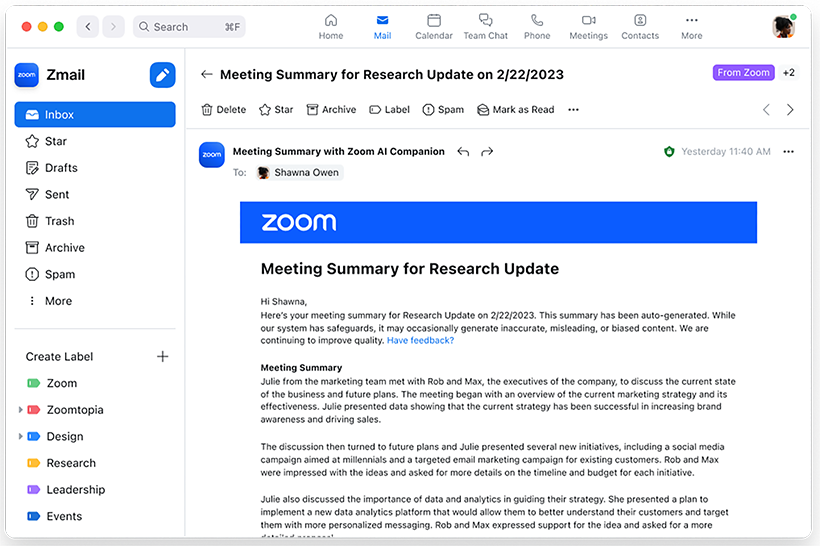
If your team already relies on Zoom for meetings, Zoom’s AI note-taking feature brings meeting summary AI directly into your existing workflow. This feature is designed for organizations that want automated summaries, action items, and insights without leaving the Zoom environment. It’s especially useful for HR, project managers, and business leaders who need instant, in-context meeting recaps right where conversations happen.
Why I Picked Zoom
Because Zoom’s AI note-taker is built directly into the Zoom platform, it’s a natural fit for teams that already use Zoom for their meetings. I picked this tool for its ability to generate real-time meeting summaries and action items without requiring any extra setup or switching between apps. The AI feature can automatically capture key discussion points and decisions as the meeting happens, making it easy to keep everyone aligned. This built-in approach means you get meeting insights right where your conversations take place, which is especially valuable for busy HR teams and business leaders.
Zoom Key Features
Some other features that make Zoom useful for meeting summary AI include:
- Automated smart chapters: The tool divides meeting recordings into labeled sections for quick navigation.
- In-meeting live transcription: Users can view real-time captions and transcripts during calls.
- Post-meeting searchable transcripts: All meeting transcripts are stored and searchable within the Zoom platform.
- AI chat responses: The AI Companion can generate suggested responses in Zoom Team Chat conversations.
Zoom Integrations
Integrations include Google Drive, Microsoft 365, Figma, Confluence, Notion, Coda, Microsoft Teams, Slack, Calendly, and Salesforce.
Pros and Cons
Pros:
- Transcripts are searchable within the Zoom platform
- Smart chapters organize recordings for review
- Action items are auto-generated and highlighted
Cons:
- Occasional transcription errors with accents
- Summaries only available for Zoom meetings

Tactiq
Best for capturing highlights in Google Meet
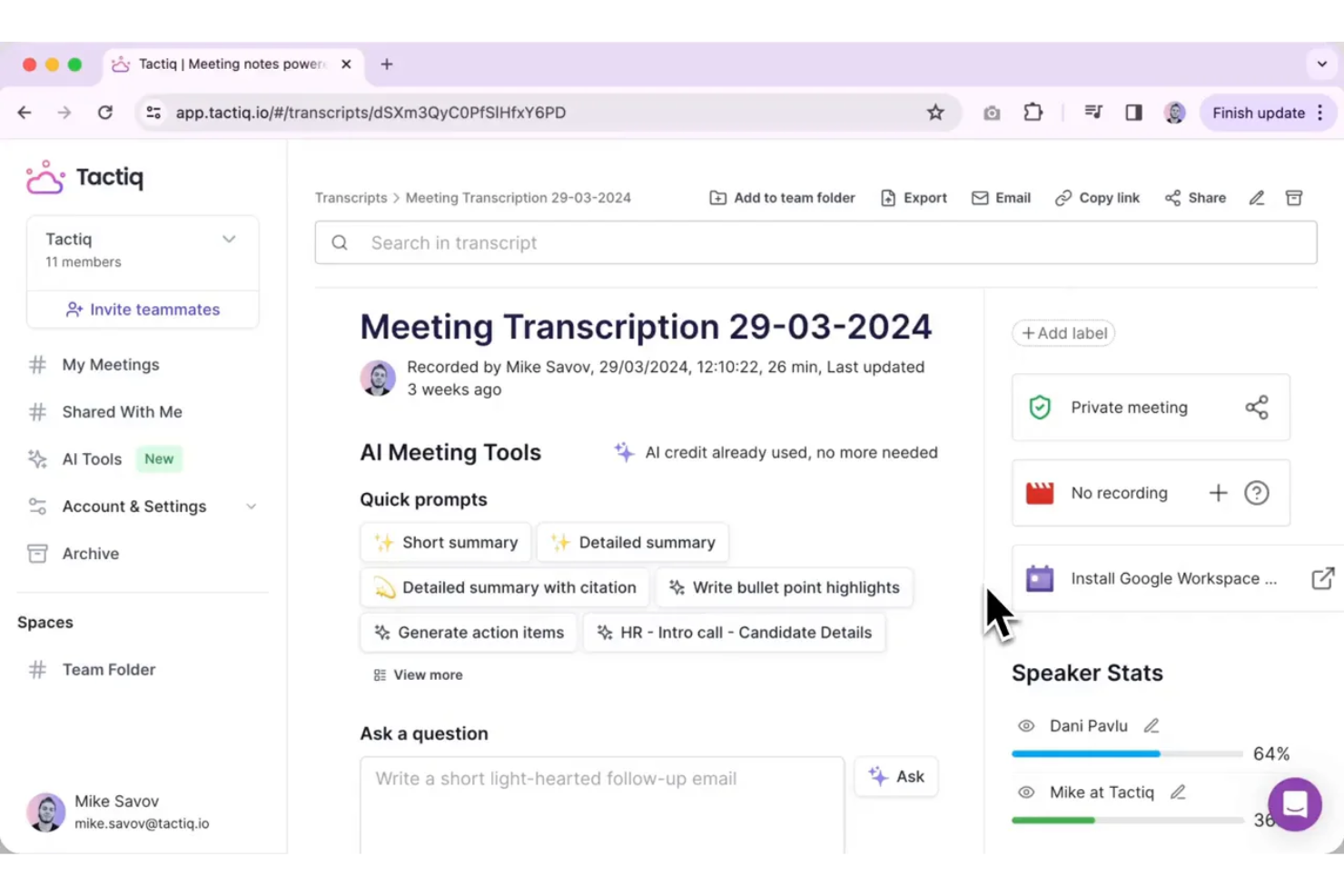
Tactiq is designed for teams and professionals who rely on Google Meet and want to capture key moments during live calls. It lets you highlight important discussion points in real time, making it easy to create actionable AI meeting summaries. This tool is especially useful for HR, project managers, and educators who need to quickly reference or share meeting highlights without sifting through full transcripts.
Why I Picked Tactiq
What sets Tactiq apart is its focus on capturing highlights directly within Google Meet, which is ideal for teams that use Google Workspace as their primary collaboration hub. I picked Tactiq because it allows users to mark important moments during live meetings, so you can quickly generate summaries that focus on what matters most. The tool automatically transcribes conversations and lets you add highlights and comments in real time. This approach helps HR professionals, project leads, and educators save time by surfacing key points without having to review entire transcripts.
Tactiq Key Features
In addition to real-time highlighting, Tactiq offers several other features that support meeting summary AI needs:
- Automatic meeting transcription: Tactiq generates live transcripts for Google Meet sessions.
- Speaker identification: The tool tags each line of the transcript with the speaker’s name.
- Export to Google Docs and Notion: Users can send meeting summaries and transcripts directly to these platforms.
- AI-generated meeting summaries: Tactiq uses AI to create concise summaries from the full transcript.
Tactiq Integrations
Integrations include Google Meet, Zoom, Microsoft Teams, Slack, Notion, Linear, and HubSpot.
Pros and Cons
Pros:
- Speaker labels included in all transcripts
- Exports summaries directly to Google Docs
- Highlights can be added during live meetings
Cons:
- Limited editing options for generated summaries
- Occasional missed highlights in busy meetings

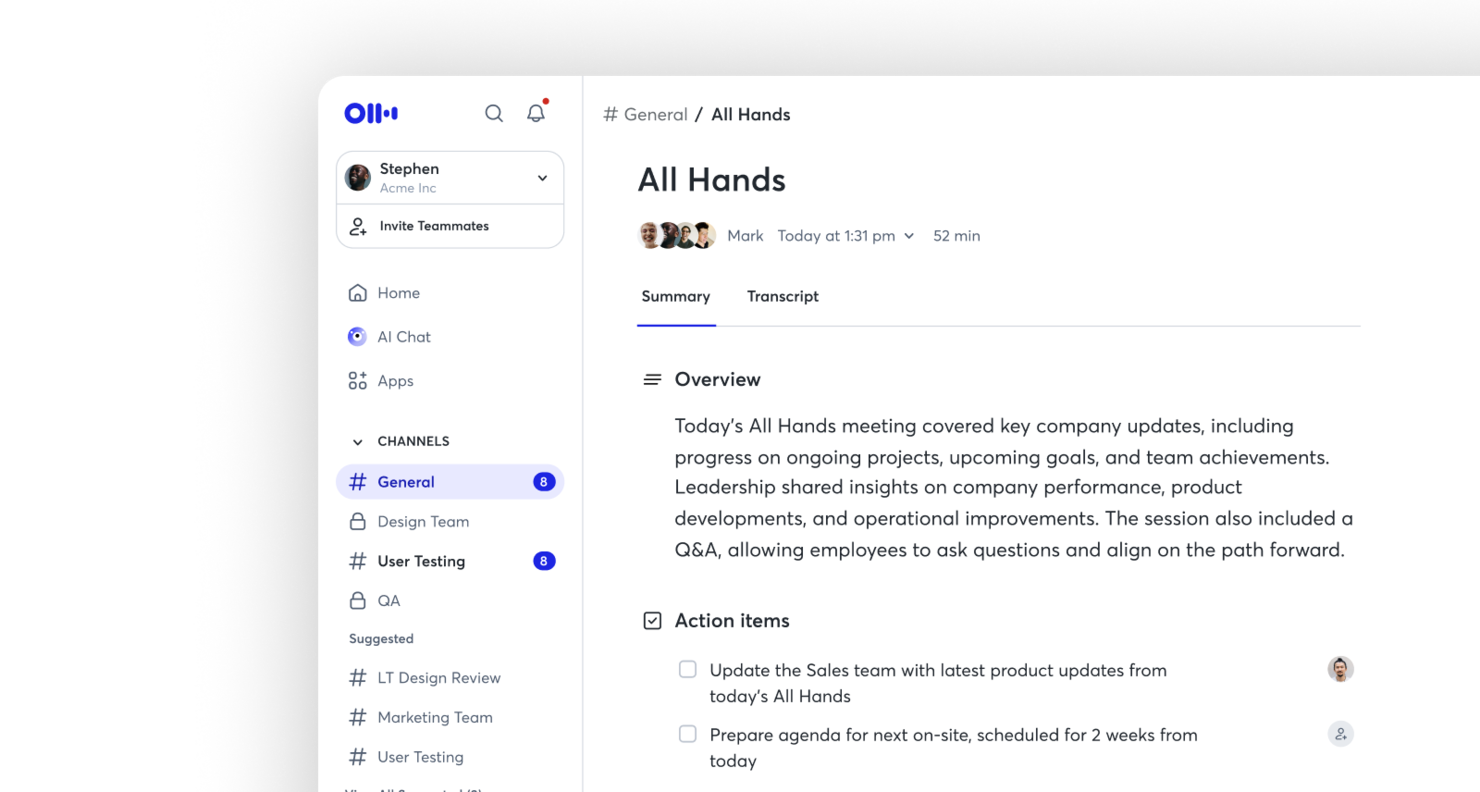
Otter is a meeting summary AI built for teams that need live transcription with clear speaker labels. It’s especially useful for professionals who want to capture conversations in real time and quickly identify who said what. If you’re looking to improve meeting documentation and accountability, Otter.ai’s speaker identification and searchable transcripts can help.
Why I Picked Otter
For teams that need accurate, real-time meeting records, Otter stands out for its live transcription with speaker labels. I picked this tool because it automatically distinguishes and tags each speaker, making it easy to follow conversations and attribute comments. The live transcription feature means you can capture discussions as they happen, without waiting for post-meeting processing. This combination is especially valuable for teams that need clear, actionable records of who said what during meetings.
Otter Key Features
In addition to live transcription and speaker labeling, I also found these features useful for meeting summary AI:
- Automated summary generation: Otter.ai creates concise meeting summaries that highlight key points and decisions.
- Searchable transcript archive: Store and search past meeting transcripts to quickly locate specific topics or statements.
- Shared live notes: Collaborate on meeting notes in real time with other participants.
- Calendar integration: Connect Otter.ai with Google or Microsoft calendars to automatically join and record scheduled meetings.
Otter Integrations
Integrations include Zoom, Google Meet, Microsoft Teams, Slack, Salesforce, HubSpot, Asana, Jira, Notion, and Dropbox.
Pros and Cons
Pros:
- Searchable transcripts for quick reference
- Live transcription updates in real time
- Speaker labels accurately identify participants
Cons:
- Limited formatting options for exported notes
- Occasional transcription errors with accents

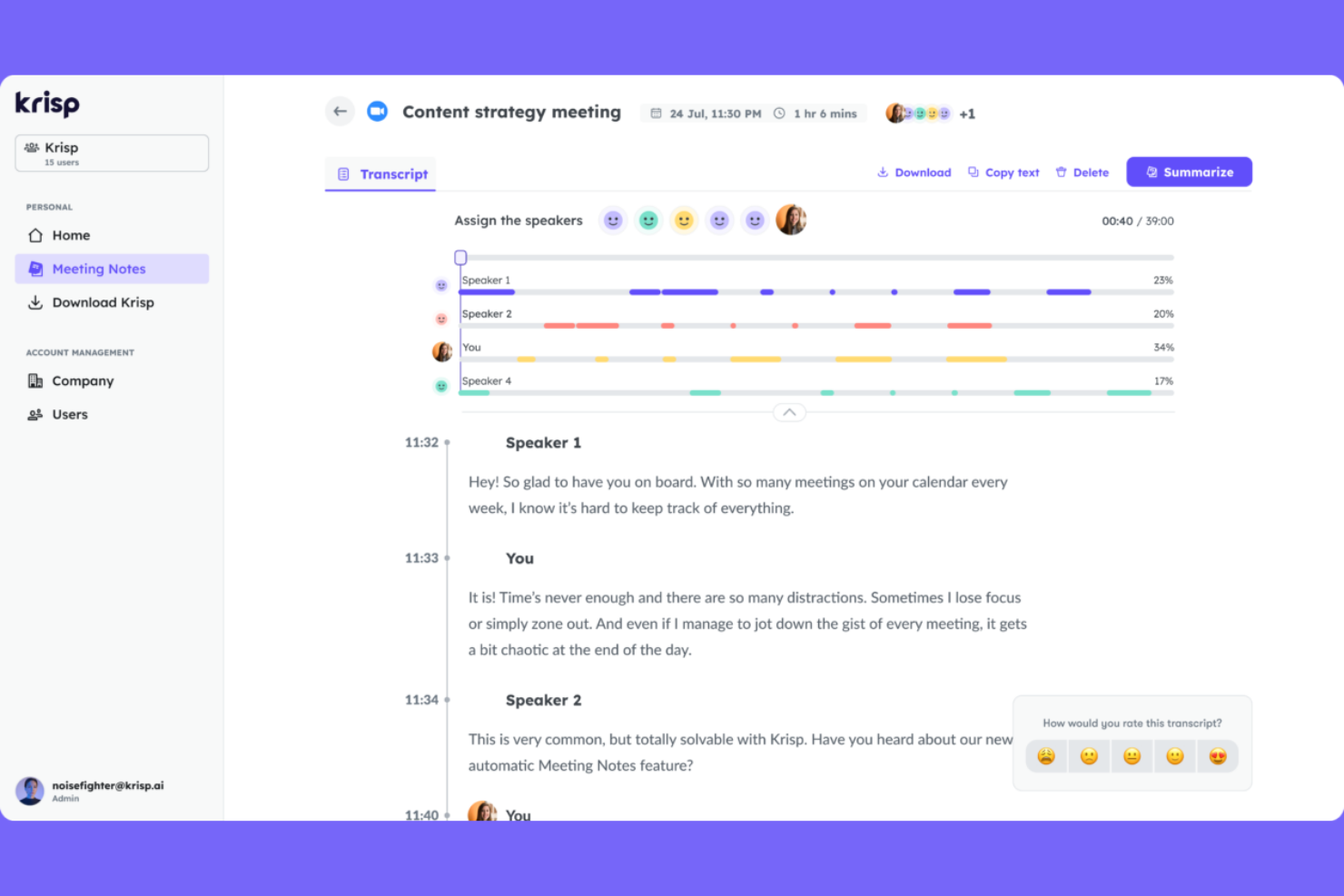
For teams that struggle with background noise during virtual meetings, Krisp offers AI-powered noise cancellation and audio note capture. It’s especially useful for remote professionals, recruiters, and HR teams who need clear, distraction-free recordings for accurate meeting summaries. Krisp helps ensure your meeting notes reflect what was actually said, not what got lost in the noise.
Why I Picked Krisp
When capturing meeting notes, audio quality can make or break the usefulness of your summaries. I picked Krisp because its AI-driven noise cancellation removes background sounds in real time, so you get clean, clear audio for every meeting. The tool also offers voice isolation, which helps ensure that only the speaker’s voice is captured, reducing confusion in transcripts and summaries. For anyone who needs reliable meeting summary AI, Krisp’s focus on noise-free audio gives you a strong foundation for accurate note-taking.
Krisp Key Features
Some other features that make Krisp useful for meeting summary AI include:
- AI Meeting Assistant: Automatically generates meeting notes and summaries from your calls.
- Call Transcription: Provides real-time transcription for meetings across supported platforms.
- Meeting Analytics Dashboard: Offers insights into talk time, meeting participation, and engagement.
- Multi-Platform Compatibility: Works with Zoom, Microsoft Teams, Google Meet, and other major conferencing tools.
Krisp Integrations
Integrations include Zoom, Google Meet, Microsoft Teams, Slack, HubSpot, Salesforce, Google Calendar, Webex, Outlook, and Discord.
Pros and Cons
Pros:
- Supports multiple conferencing platforms
- Tracks talk time and meeting participation
- Removes background noise from recordings
Cons:
- Requires desktop app installation for full features
- Transcription accuracy drops with strong accents
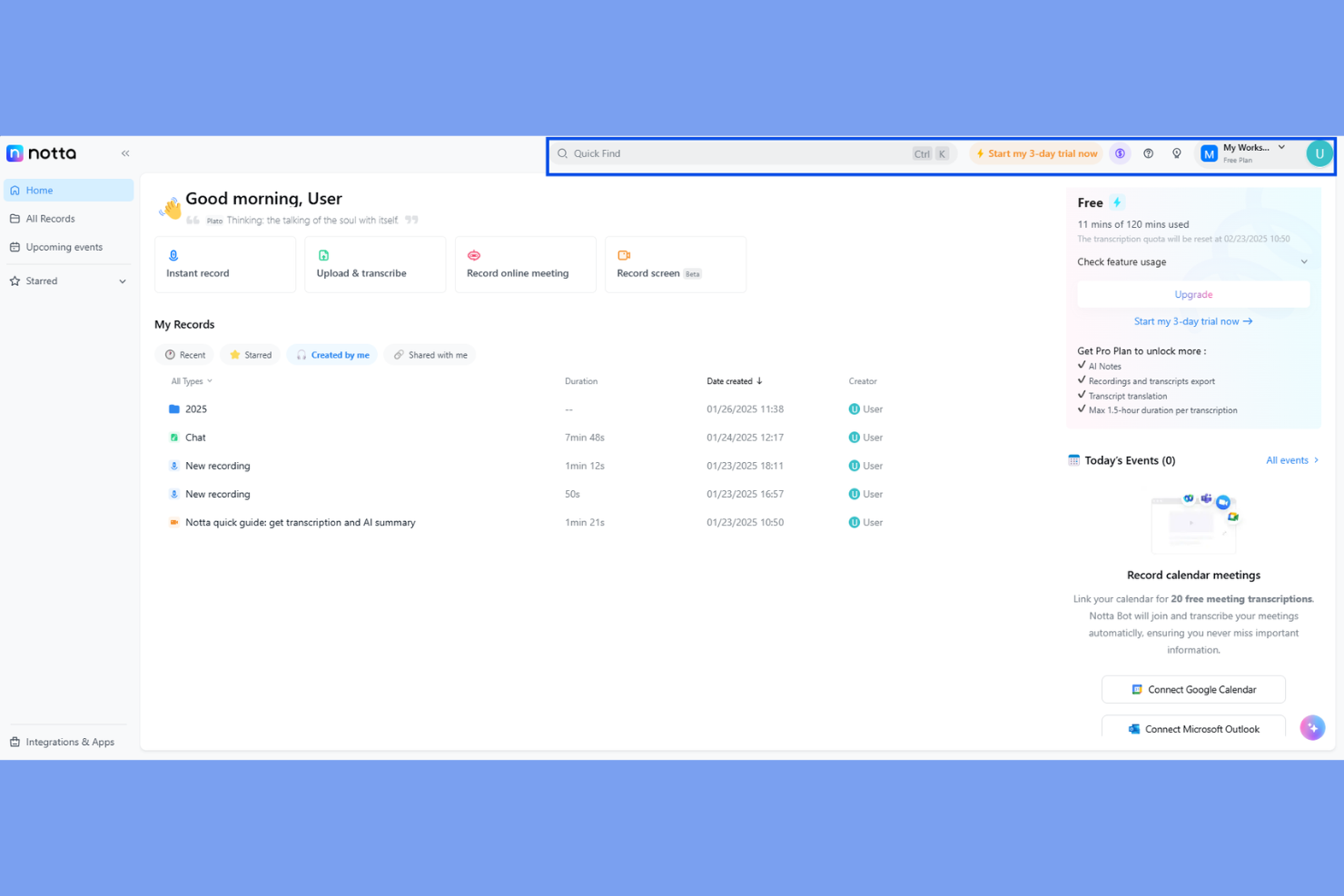
Notta is a meeting summary AI designed for teams and professionals who need flexible options for sharing and storing meeting notes. If you often work with clients, cross-functional teams, or external partners, Notta makes it easy to export transcripts and summaries in a wide range of formats. This helps you keep everyone aligned, no matter what tools or workflows your collaborators use.
Why I Picked Notta
What sets Notta apart for meeting summary AI is its ability to export notes and transcripts in a variety of formats, which is especially useful for teams that need to share information across different platforms. I picked Notta because it lets you download meeting summaries as PDF, TXT, DOCX, SRT, and even shareable links, making it easy to fit into any workflow. This flexibility is valuable for HR professionals, consultants, and project managers who often need to distribute meeting outcomes to different audiences. If you’re looking for a tool that adapts to your documentation and sharing needs, Notta’s export options make it a strong choice.
Notta Key Features
In addition to its flexible export options, Notta offers several other features that support meeting summary needs:
- Real-Time Transcription: Converts spoken words to text as the meeting happens.
- Speaker Identification: Labels who is speaking during multi-person conversations.
- Audio and Video Import: Lets you upload recordings for transcription and summary.
- Mobile App: Allows you to record and access meeting notes on the go.
Notta Integrations
Integrations include Zoom, Google Meet, Microsoft Teams, Slack, Notion, Google Docs, Salesforce, HubSpot, ClickUp, and Dropbox.
Pros and Cons
Pros:
- Speaker labels help clarify meeting transcripts
- Mobile app supports on-the-go recording
- Transcribes uploaded audio and video files
Cons:
- No live human transcription option available
- No built-in calendar scheduling for meetings

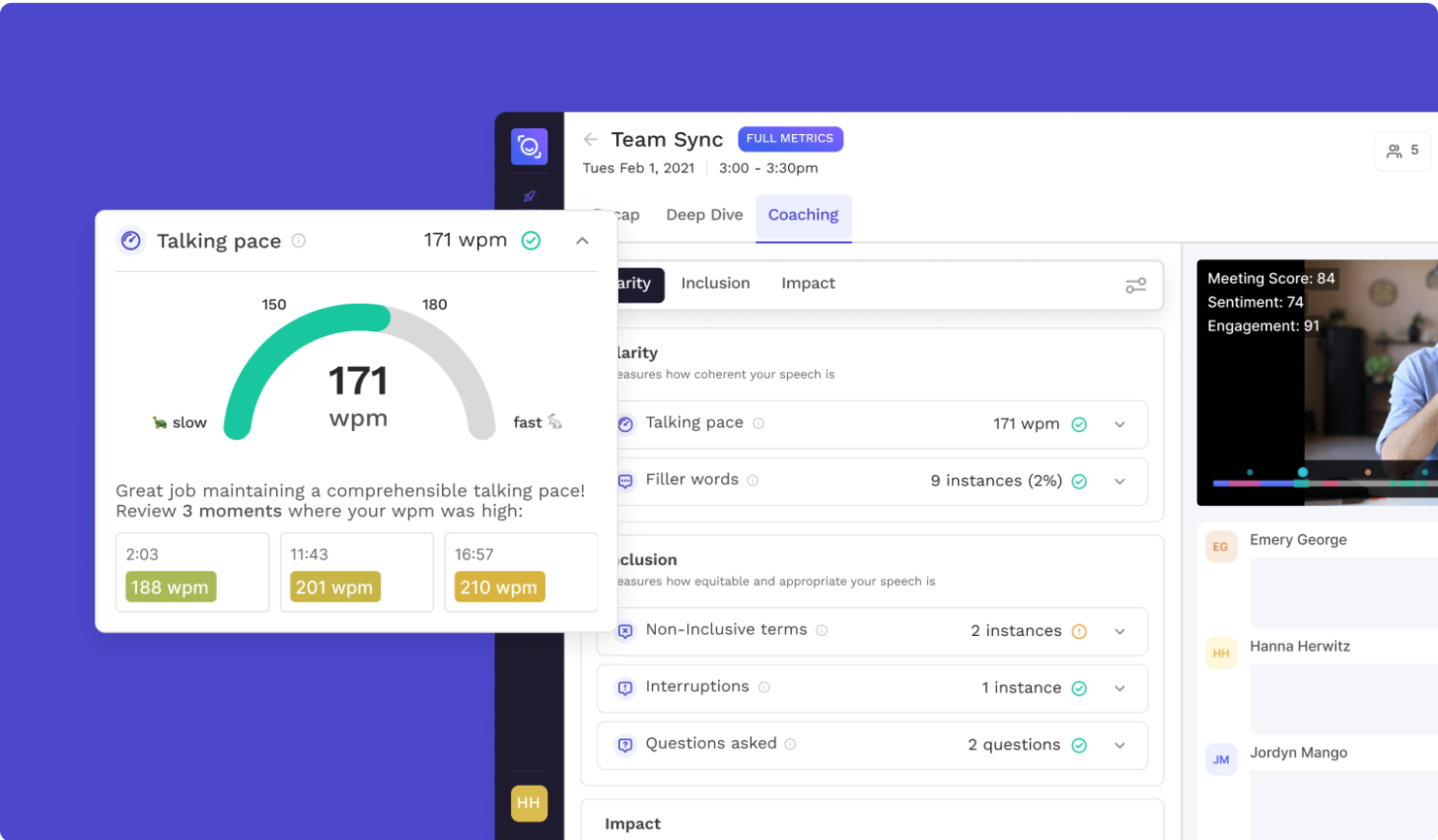
If you need a meeting summary AI that pinpoints and extracts action items automatically, Read AI is worth a look. This tool is designed for teams and professionals who want to capture next steps without sifting through long transcripts. Its focus on actionable outcomes helps you keep meetings productive and follow-ups clear.
Why I Picked Read AI
What sets Read AI apart for meeting summary AI is its focus on automated action item extraction. I picked this tool because it identifies and highlights next steps directly from your meeting conversations, so you don’t have to dig through transcripts. The platform uses AI to tag and organize action items, making it easy to assign tasks and track follow-ups. This targeted approach helps teams stay accountable and ensures that important tasks don’t get lost after meetings.
Read AI Key Features
Some other features of Read AI that stand out for meeting summary AI users include:
- Real-time transcription: Capture spoken content as it happens, making it easy to review or reference discussions immediately after meetings.
- Meeting analytics dashboard: Access visual summaries and engagement metrics to understand participation and meeting effectiveness.
- Customizable summary templates: Choose or design summary formats that fit your team’s workflow and documentation needs.
- Multi-platform support: Use Read AI with popular video conferencing tools like Zoom, Microsoft Teams, and Google Meet.
Read AI Integrations
Integrations include Zoom, Google Meet, Microsoft Teams, Slack, HubSpot, Salesforce, Atlassian, Notion, Asana, and Gmail.
Pros and Cons
Pros:
- Multi-language support for over 20 languages
- Real-time transcription across multiple platforms
- Accurate action item extraction for meetings
Cons:
- Limited analytical depth during live meetings
- Occasional privacy concerns reported

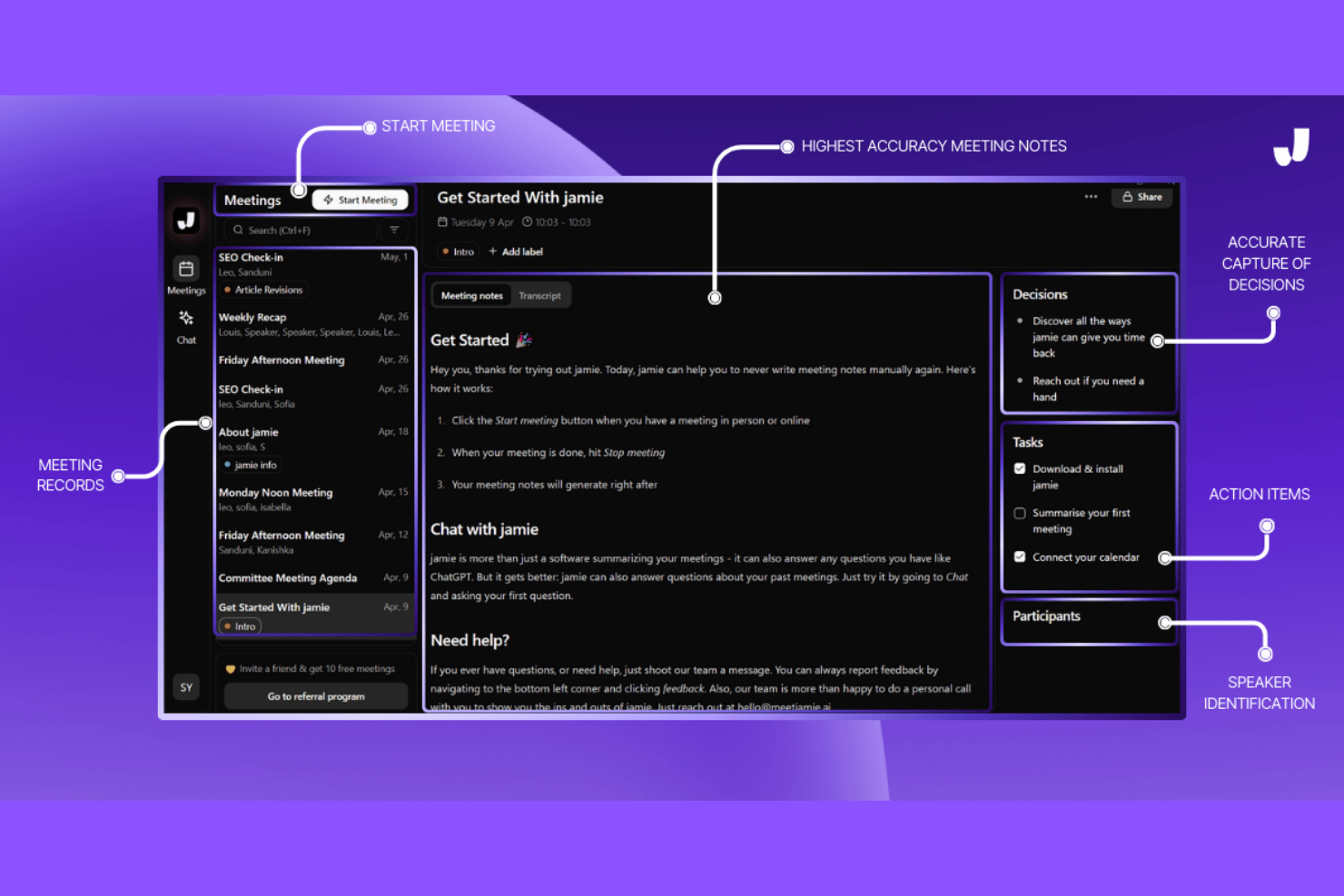
If you need meeting summaries in multiple languages, Jamie is built to support global teams and multilingual workplaces. It automatically transcribes and summarizes meetings in over 15 languages, making it a strong fit for international HR, project managers, and consultants. Jamie helps you bridge language gaps and keep everyone aligned, no matter where your team is based.
Why I Picked Jamie
Jamie stands out for its ability to generate meeting summaries in multiple languages, which is essential for teams working across borders. I picked Jamie because it supports over 15 languages, allowing users to receive accurate transcripts and summaries regardless of the language spoken in the meeting. The tool also detects the spoken language automatically, so you don’t have to set preferences before each call. This makes Jamie a strong choice for HR professionals, consultants, and global teams who need to keep everyone on the same page, no matter where they’re located.
Jamie Key Features
Some other features that make Jamie useful for meeting summary AI include:
- Automated action item extraction: Jamie identifies and lists action items from meeting conversations.
- Custom summary templates: Users can choose or design templates for how meeting summaries are formatted.
- Direct calendar integration: The tool connects with your calendar to automatically join and record scheduled meetings.
- GDPR-compliant data handling: Jamie processes and stores meeting data in accordance with GDPR requirements.
Jamie Integrations
Integrations include Notion, Google Docs, OneNote, and HubSpot.
Pros and Cons
Pros:
- Offers GDPR-compliant data processing
- Automatically detects spoken language in meetings
- Summarizes in over 15 languages
Cons:
- No mobile app for on-the-go access
- Occasional inaccuracies in action item extraction


If you’re looking for meeting summary AI that goes beyond basic note-taking, NoteGPT stands out with its AI-powered follow-up suggestions. This tool is a good fit for sales teams, project managers, and HR professionals who want to turn meeting insights into actionable next steps. NoteGPT helps you capture key points and automatically recommends follow-up actions, so nothing important slips through the cracks.
Why I Picked NoteGPT
Unlike many meeting summary tools that simply transcribe and summarize, NoteGPT actively analyzes conversations to suggest relevant follow-up actions. I picked NoteGPT because its AI doesn’t just capture what was said—it helps you decide what to do next. The tool highlights action items and automatically generates suggested follow-ups based on meeting content, which is especially useful for teams that need to keep projects moving forward. For anyone who wants more than just a record of their meetings, NoteGPT’s focus on actionable insights sets it apart.
NoteGPT Key Features
Some other features that make NoteGPT useful for meeting summary AI include:
- Multi-Language Transcription: Supports transcription in several major languages for global teams.
- Speaker Identification: Distinguishes between different speakers in meeting recordings.
- Meeting Search Function: Lets you search across past meeting notes and transcripts.
- Chrome Extension: Captures and summarizes meetings directly from your browser.
NoteGPT Integrations
Integrations are not publicly listed.
Pros and Cons
Pros:
- Search function finds details in past meetings
- Chrome extension captures browser-based meetings
- AI suggests follow-up actions after meetings
Cons:
- Free plan restricts meeting length and uploads
- No direct integration with Zoom or Teams

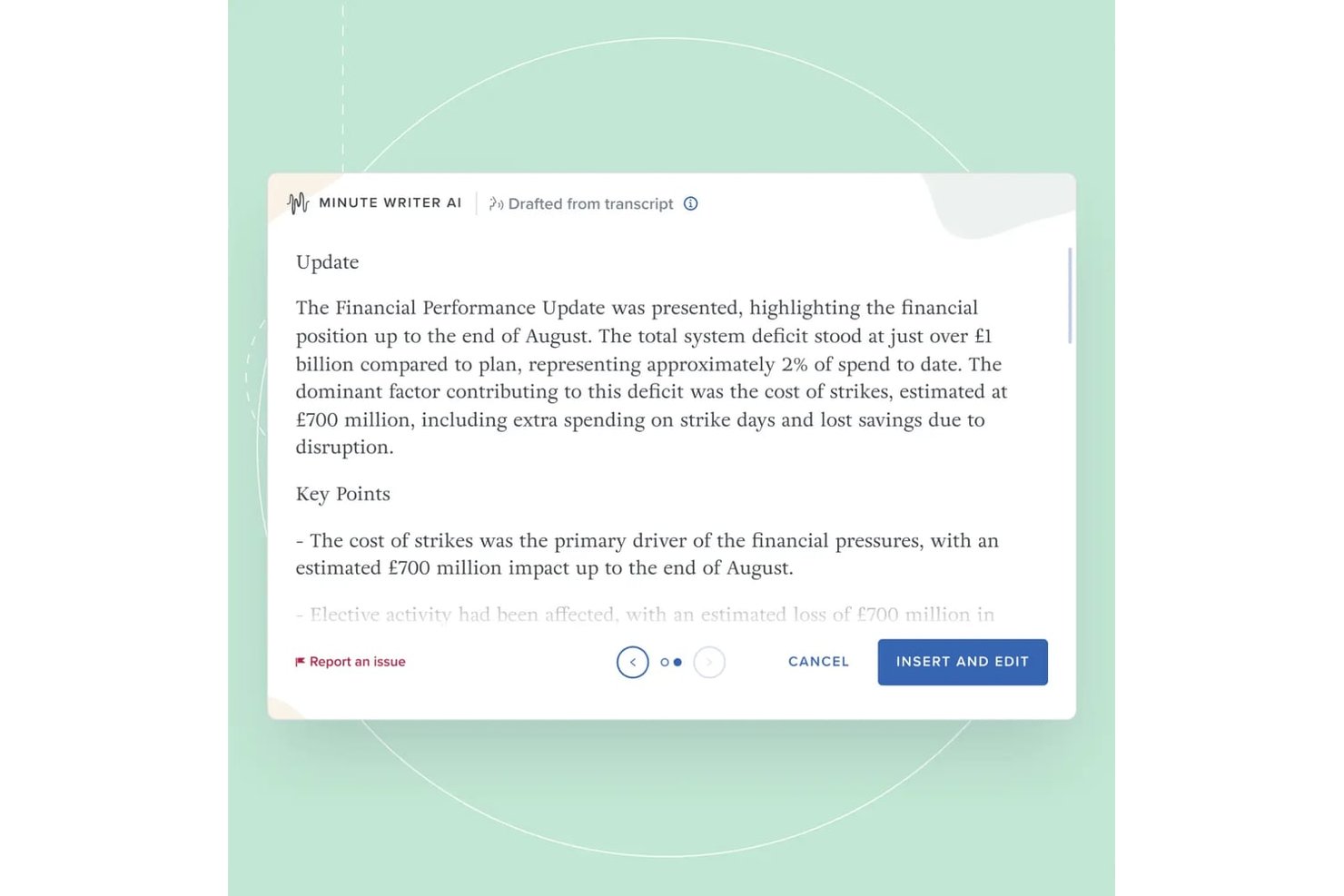
Board Intelligence is a board management platform with purpose-built AI tools for drafting meeting minutes, summarizing board packs, and writing board papers within a secure governance workflow.
Who Is Board Intelligence Best For?
Company secretaries and governance teams at large enterprises will get the most from Board Intelligence's board-specific meeting and minute workflows.
Why I Picked Board Intelligence
Board Intelligence earns its spot on my shortlist because its AI processes board meeting audio and transcripts in temporary memory only, leaving zero retained data once the session ends. I particularly like that this is backed by ISO 27001 certification, not just a policy statement. Its Minute Writer AI also pauses recording on demand, so sensitive discussions stay out of the transcript entirely.
Board Intelligence Key Features
- Agenda builder: Lets you create and manage structured agenda templates tailored for each meeting.
- AI-powered IQ Insights: Surfaces decision points and risks by analyzing board pack content and summarizing what matters.
- Report Writer add-in: Allows users to draft board-ready reports directly within Microsoft Word.
- Action tracker: Helps teams log, assign, and follow up on actions agreed during meetings.
Board Intelligence Integrations
Board Intelligence offers native integrations with Microsoft 365 and Microsoft Word, supports calendar integrations for meeting scheduling, and accepts meeting transcripts from third-party transcription tools.
Pros and Cons
Pros:
- Pause AI capture for sensitive topics
- ISO 27001 compliance for strict security
- AI-generated minutes with no retained data
Cons:
- Limited to Microsoft-based workflow
- No API for custom integrations

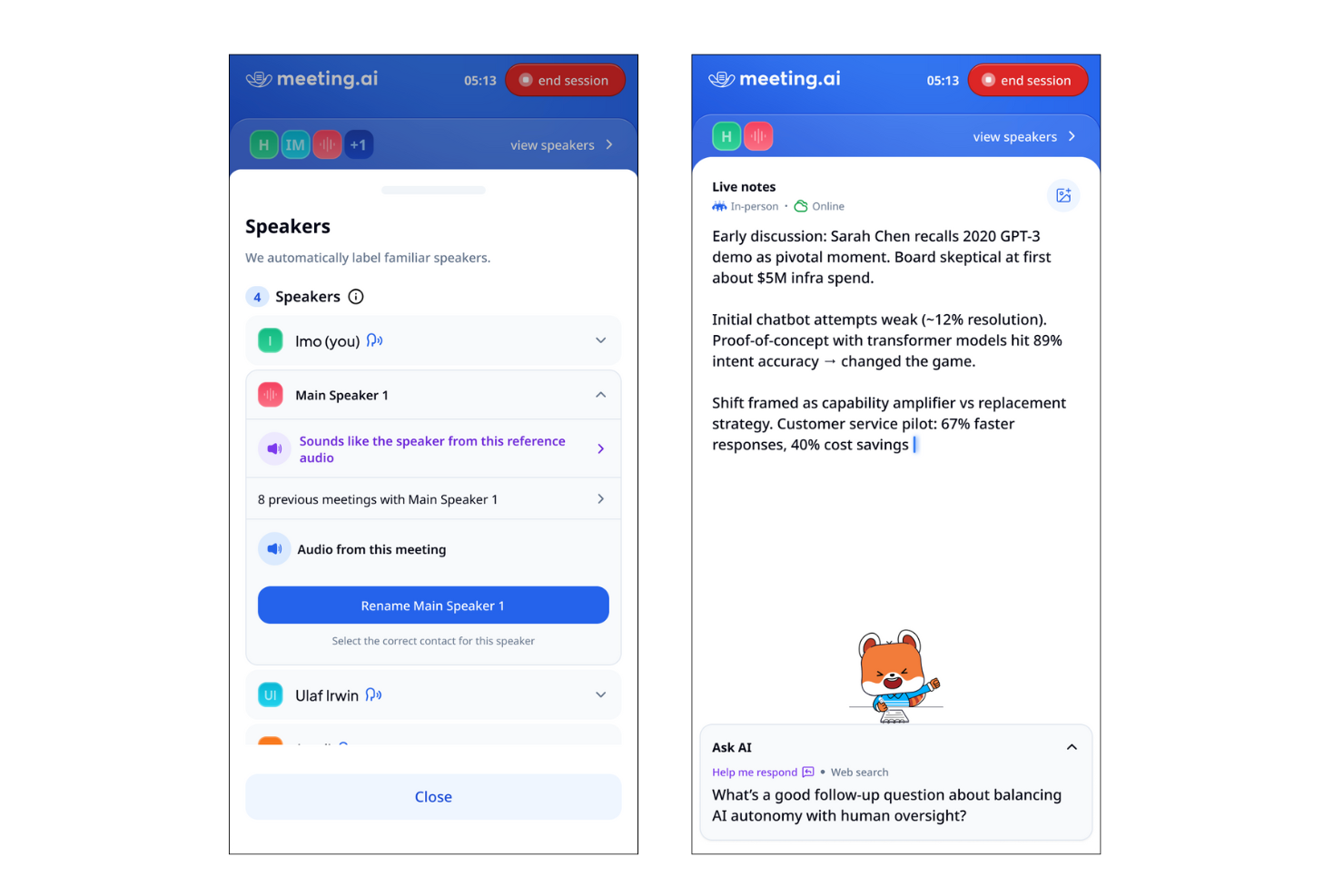
Meeting.ai is designed for teams and professionals who need instant, actionable summaries right after their calls. It’s a strong fit for fast-paced environments where quick follow-up and clear documentation are essential. If you want to capture meeting outcomes without delay, Meeting.ai’s rapid summary delivery sets it apart from other meeting summary AI tools.
Why I Picked Meeting.ai
What drew me to Meeting.ai is its focus on delivering instant summaries right after calls end. For anyone who needs to quickly review meeting outcomes or share action items, this tool’s rapid summary generation is a major advantage. Meeting.ai automatically processes call recordings and produces concise, structured summaries within minutes. I appreciate how this approach helps teams stay aligned and move forward without waiting for manual note-taking or delayed recaps.
Meeting.ai Key Features
Some other features that make Meeting.ai useful for meeting summary AI include:
- Automated action item extraction: The tool identifies and lists action items discussed during meetings.
- Speaker identification: Meeting.ai tags statements with the correct speaker for clarity.
- Searchable meeting archive: Users can search past meeting summaries and transcripts by keyword.
- Customizable summary templates: Teams can adjust the format and structure of summaries to fit their workflow.
Meeting.ai Integrations
Integrations include Zoom, Google Meet, Microsoft Teams, and Google Drive.
Pros and Cons
Pros:
- Speaker identification included in transcripts
- Action items automatically highlighted in summaries
- Summaries delivered within minutes
Cons:
- Occasional missed context in summary sections
- Limited integrations with project management tools
Other Meeting Summary AI Tools
Here are some additional meeting summary AI tool options that didn’t make it onto my shortlist, but are still worth checking out:


How I Evaluate Meeting Summary AI
I split my evaluation into two layers: baseline capabilities a tool must have—like transcription and AI summaries—and differentiators like ATS sync and data privacy that matter to HR teams.
Core Functionality (Table Stakes For This List)
When I'm selecting tools for my list, I rank each one on a scale from 0 (does not offer the functionality) to 5 (excels in this area) for each core functionality listed below. Then, I calculate the tool's total score as a percentage. Each tool needs to achieve a minimum total score of 65% to be considered for inclusion.
- Automated Meeting Transcription: I evaluate transcription accuracy across multiple speakers and accents, plus whether the tool reliably labels who said what during panel interviews or group calibration sessions.
- AI-Generated Summaries: Each tool should produce structured, readable summaries that capture decisions and key themes rather than just condensing the transcript into shorter paragraphs.
- Action Item Extraction: I check whether the tool can automatically pull follow-ups with assigned owners and deadlines, like flagging a hiring manager's commitment to submit scorecard feedback by Friday.
- Video Conferencing Integrations: Native connections to Zoom, Microsoft Teams, and Google Meet matter here, along with auto-join from calendar events so recruiters aren't manually starting recordings between back-to-back screens.
- Searchable Meeting Repository: I look for the ability to search across past meetings by keyword, speaker, or topic, which is especially useful when HR teams need to locate a specific candidate debrief or policy discussion months later.
- Sharing & Collaboration Controls: Permission settings should let you share interview summaries with a hiring panel while restricting access to sensitive employee relations conversations from the same account.
Once I have a list of tools that meet the criteria, I consider what sets each platform apart.
Differentiating Factors (What Sets Vendors Apart)
Here's how I compare and contrast different vendors:
Standout Features
I look for tools that sync summaries and scorecards directly into ATS or HRIS platforms, so recruiters aren't copy-pasting notes between systems after every interview loop. Bias and compliance flagging is another differentiator I evaluate—some tools can surface potentially non-compliant interview questions in real time. Sentiment analysis also adds depth, helping ER specialists review tone shifts during difficult employee conversations beyond what a written summary captures.
Beyond Features
HR conversations often involve sensitive personal data, so I evaluate each vendor's approach to consent management, data retention policies, and encryption standards. Scalability matters too—recruiting teams running dozens of screens per week need a tool that handles concurrent meetings without transcript quality dropping off. I also consider onboarding support, since rolling out a recording tool to hiring managers and interviewers across departments takes clear training resources and change management guidance.
How to Choose Meeting Summary AI Software
It’s easy to get bogged down in long feature lists and complex pricing structures. To help you stay focused as you work through your unique software selection process, here’s a checklist of factors to keep in mind:
| Factor | What to Consider |
|---|---|
| Scalability | Will the tool handle your meeting volume as your team or organization grows? Check user limits, storage caps, and pricing for larger teams. |
| Integrations | Does the tool connect natively with your calendar, video conferencing, or collaboration platforms? Missing integrations can create manual work. |
| Customizability | Can you tailor summaries, templates, or workflows to match your organization’s documentation standards or compliance needs? |
| Ease of use | Is the interface intuitive for all users, including those less tech-savvy? Consider how quickly team members can adopt the tool. |
| Implementation and onboarding | How long will it take to get up and running? Look for clear onboarding resources, migration support, and minimal disruption to existing workflows. |
| Cost | Are the pricing tiers transparent and predictable? Watch for hidden fees, per-user charges, or required add-ons that could impact your budget. |
| Security safeguards | Does the tool offer on-device processing, encryption, or strict data handling policies? Assess how it protects sensitive meeting content. |
| Compliance requirements | Does the tool support your industry’s compliance standards (like GDPR or HIPAA)? Confirm certifications and audit trails if you handle regulated data. |
What Is Meeting Summary AI Platform?
Meeting summary AI platform is software that automatically records, transcribes, and summarizes the key points from meetings using artificial intelligence. These tools capture spoken content, identify speakers, and generate concise written summaries for easy reference and documentation. Meeting summary AI tool helps teams save time, improve accuracy, and maintain consistent records of discussions without manual note-taking.
Features of Meeting Summary AI Tool
When selecting a meeting summary AI tool, keep an eye out for the following key features:
- Automated recording: Captures audio from meetings without manual intervention, ensuring all discussions are documented from start to finish.
- Transcription: Converts spoken words into written text, making it easy to review, search, and reference meeting content.
- Speaker identification: Labels and distinguishes between different speakers, helping clarify who said what during the meeting.
- Timestamping: Marks specific points in the transcript with time codes, allowing users to jump to important moments quickly.
- Export options: Lets users download transcripts and summaries in various formats, such as PDF, DOCX, or TXT, for sharing or archiving.
- Search functionality: Enables users to find specific topics, decisions, or action items within transcripts or summaries.
- Customizable templates: Offers pre-set or adjustable formats for meeting summaries to match organizational standards or preferences.
- Access controls: Allows administrators to set permissions for who can view, edit, or share meeting documentation.
- Multi-language support: Provides transcription and summary capabilities in multiple languages to accommodate diverse teams.
- Cloud storage integration: Connects with cloud platforms to store and organize meeting files securely and access them from anywhere.
Common Meeting Summary AI Features
Beyond the standard meeting summary ai features listed above, many of these solutions are incorporating AI with features like:
- Automated action item extraction: Uses AI to identify and list follow-up tasks or decisions from meeting conversations, helping teams track responsibilities without manual review.
- Context-aware summarization: Applies AI to generate concise, relevant summaries that capture the main points and outcomes, adapting to the meeting’s specific context and topics.
- Sentiment analysis: Analyzes the tone and mood of discussions using AI, providing insights into team dynamics or potential concerns raised during meetings.
- Topic detection: Leverages AI to automatically categorize and tag sections of the meeting by subject, making it easier to organize and retrieve information later.
- Intelligent highlights: Uses AI to flag key moments, such as important announcements or decisions, so users can quickly review the most critical parts of a meeting.
Benefits of Meeting Summary AI Tools
Implementing a meeting summary AI tool provides several benefits for your team and your business. Here are a few you can look forward to:
- Accurate documentation: Automated recording and transcription ensure every discussion is captured without missing details or relying on memory.
- Time savings: AI-powered summarization and action item extraction reduce the need for manual note-taking and post-meeting follow-up.
- Improved accountability: Speaker identification and action item tracking make it clear who is responsible for each task or decision.
- Enhanced privacy: On-device processing and access controls help protect sensitive meeting content and limit data exposure.
- Consistent records: Customizable templates and export options standardize meeting documentation across teams and projects.
- Better accessibility: Multi-language support and searchable transcripts make meeting content available to diverse and distributed teams.
- Actionable insights: AI features like sentiment analysis and topic detection provide deeper understanding of team dynamics and meeting outcomes.
Costs and Pricing of Meeting Summary AI Tools
Selecting meeting summary AI tools requires an understanding of the various pricing models and plans available. Costs vary based on features, team size, add-ons, and more. The table below summarizes common plans, their average prices, and typical features included in meeting summary AI solutions:
Plan Comparison Table for Meeting Summary AI Tools
| Plan Type | Average Price | Common Features |
|---|---|---|
| Free Plan | $0 | Basic recording, limited transcription minutes, simple summaries, and basic export options. |
| Personal Plan | $5-$15/user/month | Unlimited recordings, searchable transcripts, speaker identification, and basic integrations. |
| Business Plan | $15-$30/user/month | Team management, advanced export formats, customizable templates, collaboration tools, and priority support. |
| Enterprise Plan | $30-$60/user/month | Enhanced security, compliance features, dedicated onboarding, advanced analytics, and custom integrations. |
Meeting Summary AI Tools FAQs
Here are some answers to common questions about meeting summary AI tools:
Can a meeting summary AI tool handle multiple languages?
Yes, many solutions can now transcribe meetings in over 100 languages and accents. This is especially useful for global teams using platforms like Microsoft Teams meeting, where the software can provide real-time translation and AI-powered summaries in the participant’s preferred language. Always check for specific language new features before choosing a solution, as some tools even offer live translation for a podcast or recorded video.
How secure is a meeting summary AI tool for confidential meetings?
Most professional meeting AI solutions offer enterprise-grade security, including SOC 2 Type II certification, encryption, and access controls. For highly confidential in-person meetings, some tools offer on-device processing to ensure data never leaves your hardware. Confirming these data handling policies ensures that sensitive takeaways and meeting records remain protected according to your organization’s compliance standards.
Do I need to install special software to use a meeting summary AI tool?
No, many meeting summary AI tools are cloud-based and work directly in your browser or integrate with video conferencing platforms. However, some providers offer desktop apps that allow you to capture audio without a “bot” joining the call, which is a common way to transcribe meetings. These apps can also sync findings directly to your CRM, ensuring that client notes are updated automatically without manual entry.
Can a meeting summary AI tool identify and label different speakers?
Yes, speaker identification (or diarization) is a standard feature. The AI transcription engine distinguishes between participants by analyzing vocal patterns, labeling their contributions in the final transcript. This makes it easy to search by participant and see a specific timestamp for when a decision was made, ensuring accountability across the team.
What happens if a meeting has poor audio quality?
Poor audio quality can affect transcription accuracy. Some meeting summary AI tools use AI to filter background noise and clarify speech, but it’s best to use a good microphone and a quiet environment for optimal results.