

10 Best Occupancy Sensor Software in 2026

Best Occupancy Sensor Software Shortlist


Occupancy sensor software automatically tracks how people use spaces, giving you live insights to manage buildings smarter and keep up with changing workplace needs. If you’re searching for the best occupancy sensor software, you likely want to optimize building layouts, stay on top of health guidelines, or get the data you need to achieve significant cost savings.
Picking the right solution can make or break your ability to deliver safe, flexible, and efficient environments. This guide compares the most trusted platforms, so you can confidently choose tools that fit your goals and support your teams.
Why Trust Our Software Recommendations
Our team has been testing and reviewing software since 2012. As HR experts ourselves, we know how difficult—and important—it is to choose the right software.
For this guide, we evaluated tools using hands-on testing and independent research, scoring tools using our selection criteria. We also draw on insights from industry thought leaders and practicing HR experts.
Our reviews reflect our human editorial judgment, not a sales pitch.
Expert reviewers:
Occupancy Sensor Software Comparison Table
This comparison table summarizes pricing details for my top occupancy sensor software selections:
| Tool | Best For | Trial Info | Price | ||
|---|---|---|---|---|---|
| 1 | Best for detailed occupancy heatmaps | Free plan + free demo available | From $500/month | Website | |
| 2 | Best for real-time visualization | Free demo available | Pricing upon request | Website | |
| 3 | Best for video analytics with access control | Free demo available | Pricing upon request | Website | |
| 4 | Best for AI-powered crowd tracking | Not available | Pricing upon request | Website | |
| 5 | Best for rapid plug-and-play installation | Free demo available | From $229/unit | Website | |
| 6 | Best for privacy-first thermal detection | Not available | Pricing upon request | Website | |
| 7 | Best for multi-function sensors in one device | Free demo available | Pricing upon request | Website | |
| 8 | Best for using existing WiFi for coverage | Free demo available | Pricing upon request | Website | |
| 9 | Best for large real-time floor coverage | Free demo available | Pricing upon request | Website | |
| 10 | Best for seamless sensor integrations | Not available | Pricing upon request | Website |

Best Occupancy Sensor Software Reviews
Below are my detailed summaries of the best occupancy sensor software that made it onto my shortlist. My reviews offer a detailed look at the features, best use cases, and integrations of each platform to help you find the best one for you.

elia
Best for detailed occupancy heatmaps
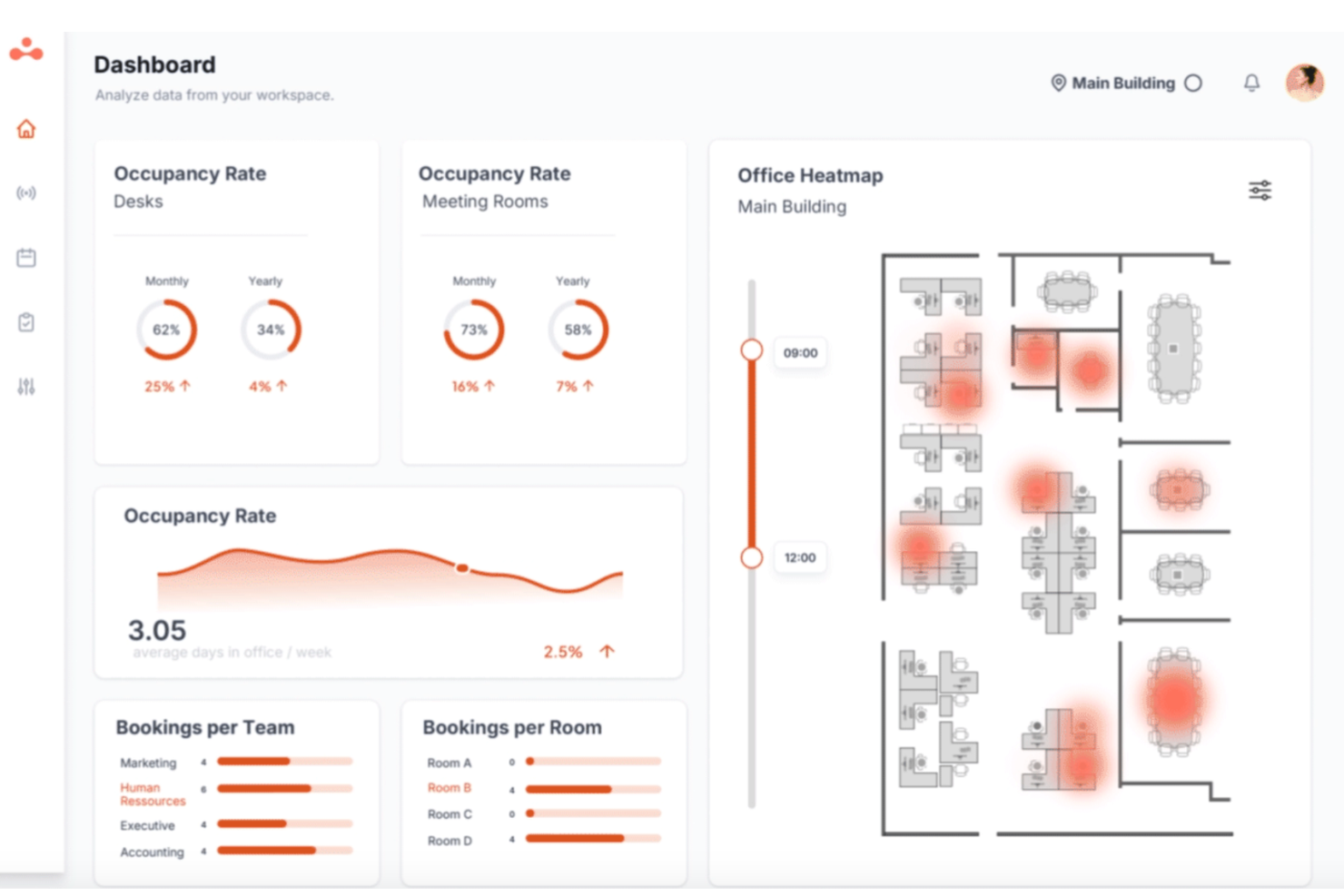
elia is a workplace operations platform with a dedicated occupancy management module that uses proprietary desk and room sensors to track space usage, collect anonymous occupancy data, and generate insights on employee usage patterns across your office.
Who Is elia Best For?
elia is a good fit for facilities managers and workplace teams in mid-to-large organizations that need to monitor and optimize physical office space across multiple locations.
Why I Picked elia
elia earns its spot on my shortlist because its heatmap visualizations go beyond simple color overlays. My team can view floor plan heatmaps filtered by time of day, day of week, or custom date ranges, which makes it easy to spot patterns like underused zones on Friday afternoons. I also like that heatmaps update from live sensor data, so the view reflects actual occupancy rather than booking data alone.
elia Key Features
- Room occupancy sensors: elia installs sensors on door frames to count entries and exits, giving you real-time occupancy data for meeting rooms and shared spaces.
- Multi-space sensor deployment: elia supports both desk and room sensors across floors and locations, so you can track occupancy at the individual workstation and full-room level simultaneously.
- Automated workplace reports: elia generates scheduled reports on space utilization trends, so your team gets consistent data without pulling it manually.
- Desk booking module: Employees can reserve desks directly in elia, with sensor data cross-referenced against bookings to track no-shows and actual usage.
elia Integrations
elia offers native integrations with Microsoft 365, Google Workspace, Slack, and specific tools within those ecosystems, including Google Calendar, Microsoft Teams, and Microsoft Outlook.
Pros and Cons
Pros:
- Covers both desk and room occupancy
- Battery-powered sensors need no wiring
- Anonymous sensor data protects employee privacy
Cons:
- Limited filtering options on floor maps
- Occupancy statistics could be more granular

Best for real-time visualization
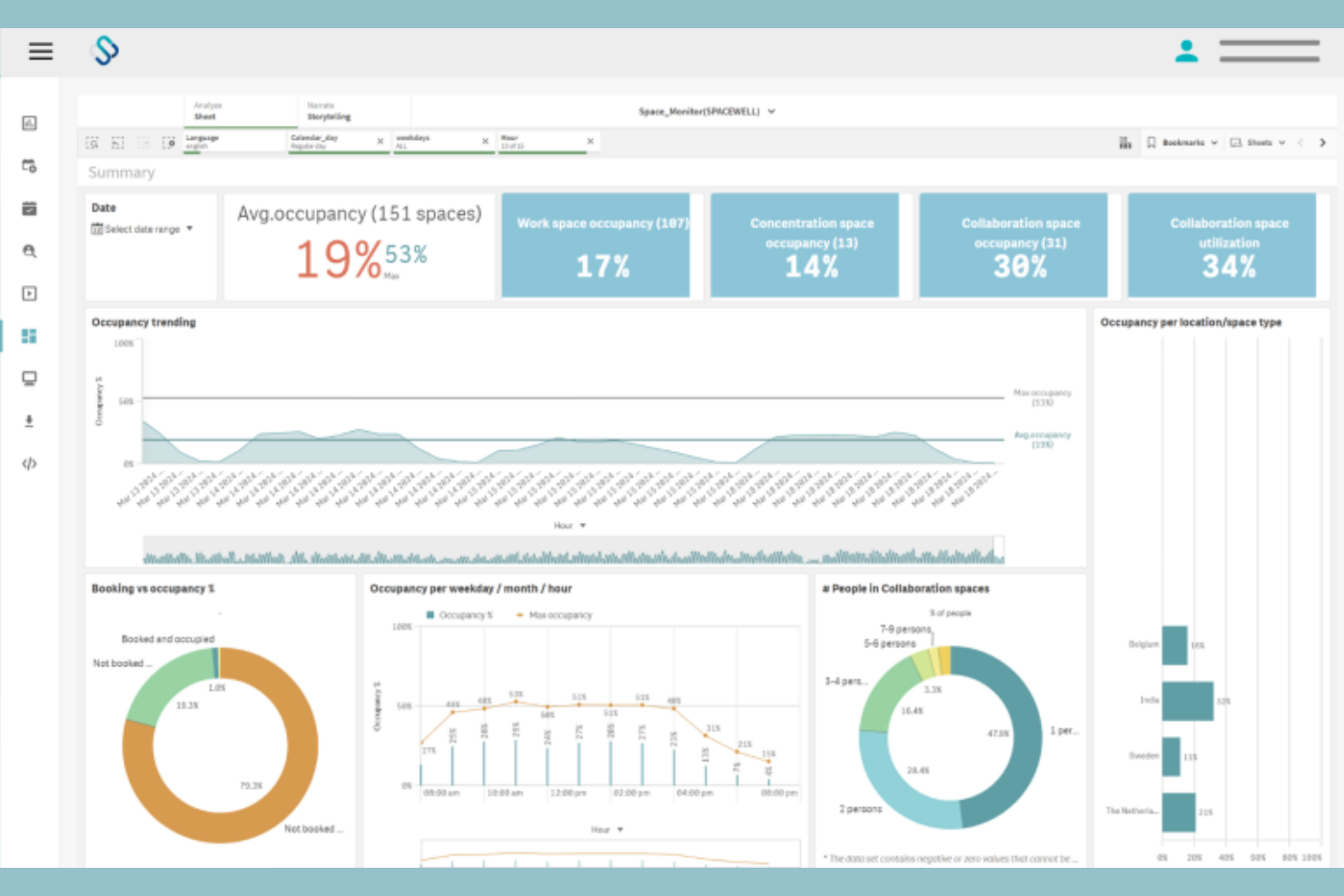
Spacewell is an occupancy monitoring platform that combines IoT-based motion and air quality sensors with interactive floor plan dashboards, space reservation, and building system integrations to track real-time occupancy across offices, campuses, and multi-site portfolios.
Who Is Spacewell Best For?
Spacewell suits facility managers and corporate real estate teams in mid-to-large organizations who need Live floor plan visibility to make day-to-day decisions about space allocation and workplace operations.
Why I Picked Spacewell
Spacewell earns its spot on my shortlist because of how it handles real-time visualization. I can overlay live sensor data directly onto CAD-compatible floor plans, so I'm not reading a table of numbers but actually seeing which zones are occupied right now. I also like the timelapse feature, which lets me replay past occupancy patterns across a floor to pinpoint exactly when and where crowding builds up during the day.
Spacewell Key Features
- Indoor air quality (IAQ) monitoring: Track CO2, VOCs, humidity, and temperature across your building using dedicated air quality sensors.
- AI-powered space release: Automatically release unoccupied booked spaces based on real-time sensor data using built-in AI automation.
- Dynamic zone grouping: Organize spaces into neighborhoods or zones to manage and analyze occupancy at a team or department level.
- Space simulation modeling: Model different space usage scenarios to evaluate layout changes or floor plan reconfigurations before making them.
Spacewell Integrations
Spacewell offers native integrations with Oracle, SAP, ServiceNow, Freshservice, Workday, Jira, and Microsoft 365. Google Workspace, AutoCAD, and more. An API is available for custom integrations.
Pros and Cons
Pros:
- Scales across global multi-site portfolios
- Interactive 2D and 3D floor plans
- Combined air quality and occupancy monitoring
Cons:
- Initial setup can be time-consuming
- Hardware sync issues cause delays

Avigilon
Best for video analytics with access control
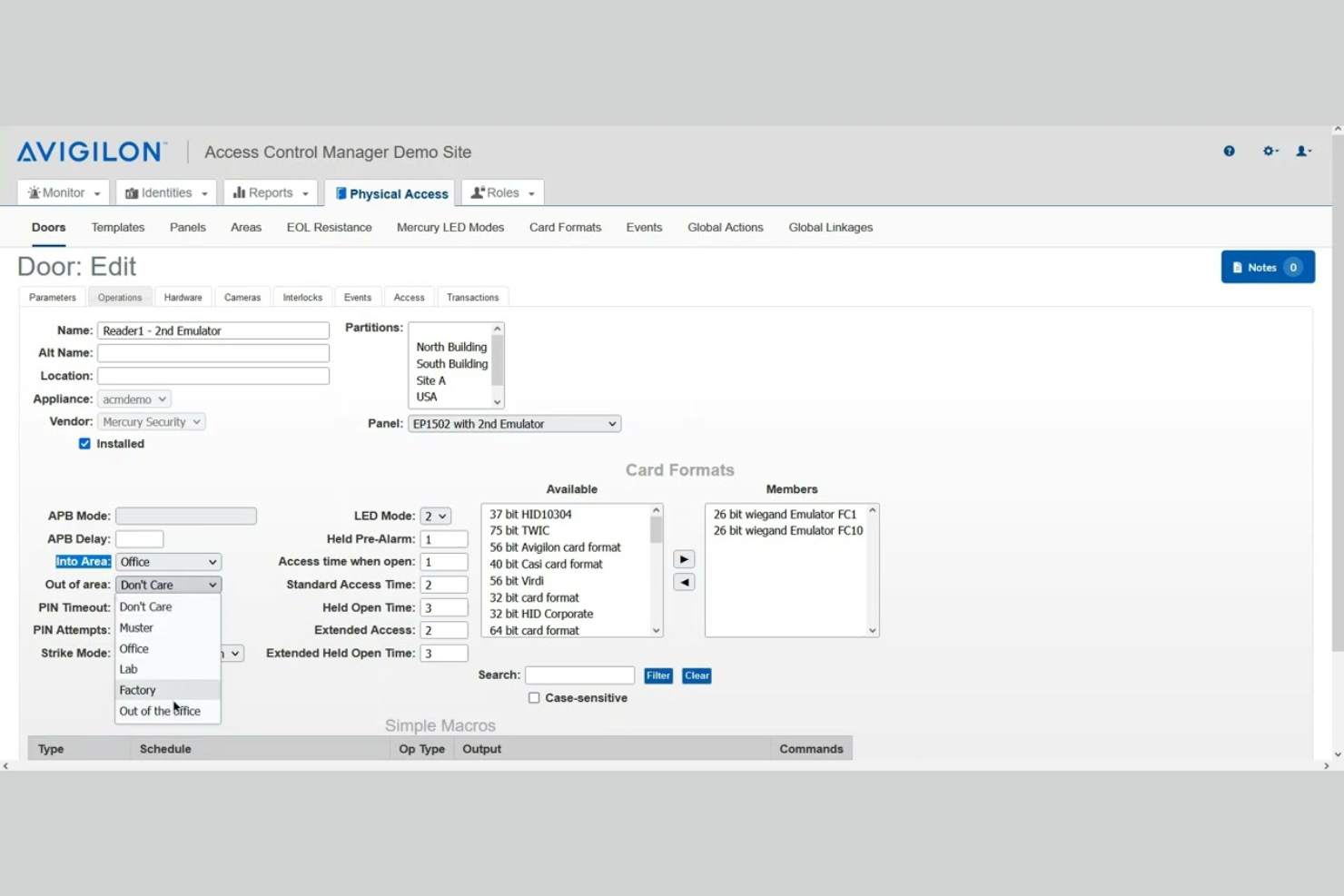
Avigilon is a video security and occupancy management platform that combines AI-powered video analytics, real-time people counting, heatmapping, and access control-based occupancy tracking across commercial facilities.
Who Is Avigilon Best For?
Avigilon suits organizations in security-sensitive industries—like retail, healthcare, and corporate campuses—that already use video surveillance and want to layer in occupancy intelligence.
Why I Picked Avigilon
I picked Avigilon as one of the best because it's one of the few platforms that genuinely unifies video analytics and access control into a single occupancy picture. I especially like the Smart Presence feature, which tracks people and vehicles moving through a space in real time, not just counting entries and exits. The Alta Access Muster Report is another feature I find genuinely useful, pulling live occupancy data during an evacuation to generate accurate personnel rosters on the spot.
Avigilon Key Features
- Occupancy dashboard: Displays real-time and historical occupancy counts across multiple zones and sites in a single view.
- Capacity threshold alerts: Send automated notifications when a monitored space reaches a predefined occupancy limit.
- Heatmapping: Visualizes foot traffic patterns across a floor plan to show which areas see the highest and lowest use over time.
- Video-based people counting: Uses overhead camera analytics to count entries and exits without requiring additional sensor hardware.
Avigilon Integrations
The Avigilon Alta App Marketplace features 40+ integrations with verified industry leaders in the technology space. These include Google Workspace, Microsoft Azure AD, Okta, Workday, Cisco Meraki, Milestone, Camio, Rhombus, and Slack. Alta Access also features an open API ecosystem for custom integrations and supports webhooks for real-time event data.
Pros and Cons
Pros:
- Combines video and access control data
- Built-in emergency muster reporting tool
- Counts both people and vehicles simultaneously
Cons:
- Heavy crowded lines drop accuracy
- Occupancy features locked to premium tiers

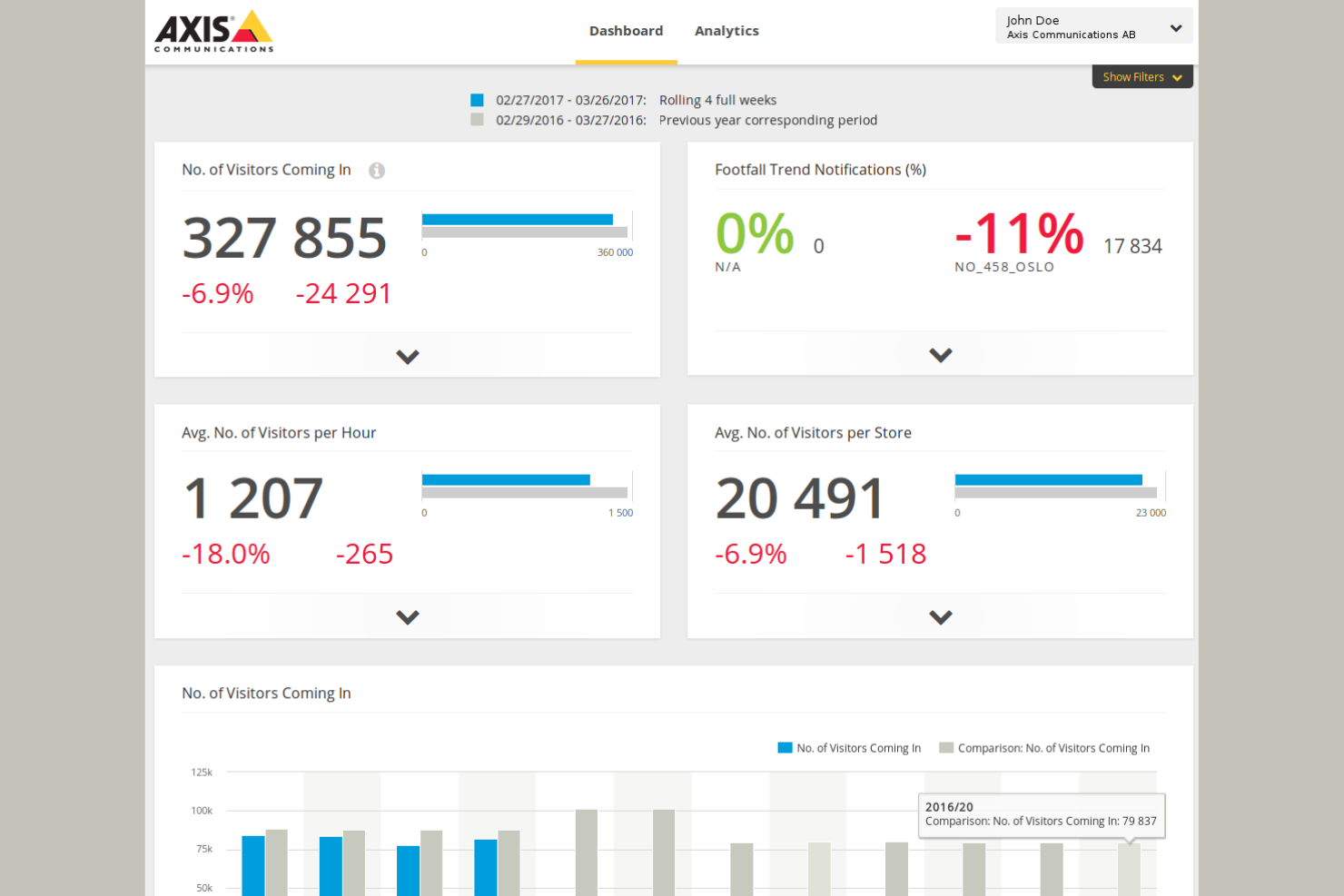
Built around network cameras and edge AI, Axis is an occupancy monitoring platform that covers people counting, crowd density analysis, and zone-based capacity tracking across retail, transit, and venue environments.
Who Is Axis Best For?
Axis is a natural fit for operations and security managers in high-footfall industries like retail, airports, and stadiums that already run camera infrastructure.
Why I Picked Axis
Axis earns its spot on my shortlist because it runs AI analytics directly on the camera hardware, which means occupancy data is processed at the edge without depending on a central server. I like that this approach keeps latency low even across multi-camera deployments covering large areas like airports or shopping centers. The AXIS Occupancy Estimator app also lets my team set live capacity thresholds per zone, with automated alerts when limits are crossed.
Axis Key Features
- People counting: Measures entries and exits using overhead cameras to maintain an accurate real-time occupancy count.
- Heat mapping: Visualizes foot traffic density across a floor plan to identify high-traffic zones over time.
- Queue detection: Monitors line formation and length at entry points or checkpoints in real time.
- Historical reporting: Logs occupancy data over time so you can analyze trends and plan staffing or space use.
Axis Integrations
Native integrations are not publicly listed.
Pros and Cons
Pros:
- Anonymized streams protect patron privacy
- Tracks both people and vehicles simultaneously
- Edge-based AI runs analytics on-camera
Cons:
- Premium hardware pricing limits smaller deployments
- Requires Axis-branded cameras to operate

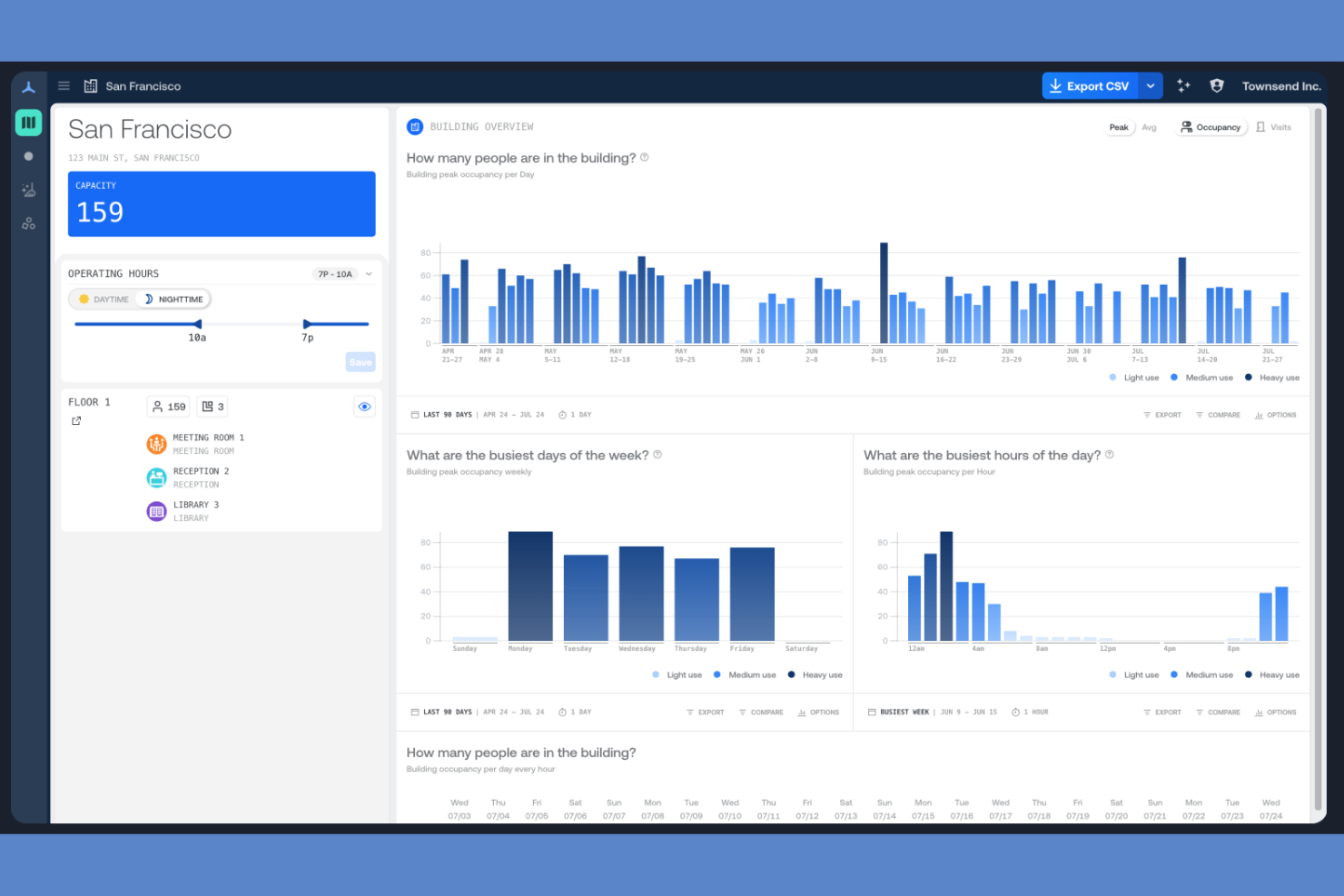
Density Waffle is a people-counting occupancy sensor platform built around its Waffle radar sensor, offering real-time and historical occupancy data for rooms, desks, phone booths, and open spaces via a self-installable, WiFi-connected device.
Who Is Density Waffle Best For?
Density Waffle is a people-counting occupancy sensor platform built around its Waffle radar sensor, offering real-time and historical occupancy data for tracking office space usage across rooms, desks, phone booths, and open spaces via a self-installable, WiFi-connected device.
Why I Picked Density Waffle
Density Waffle earns its spot on my shortlist because of how it approaches sensor installation. The Waffle sensor connects over dual-band WiFi with WPA2 and mounts in three different configurations: no ladder, no wiring, and no IT ticket required. I also like that it delivers occupancy data with under one second of latency, which means you're seeing counts update in real time across rooms, desks, and phone booths. The 140° field of view with an adjustable 18-foot range gives you real flexibility in how you cover a space.
Density Waffle Key Features
- Atlas Analytics dashboard: View occupancy and visit data broken down into 15-minute intervals, with building and floor-level views you can zoom in and out of.
- Utilization heatmaps: Visualize how employees use spaces across your floor plan to identify underused rooms and high-traffic areas.
- Live wayfinding: Display real-time space availability to help employees find open rooms, desks, or phone booths without guessing.
- Data export and API access: Export building and floor-level reports or pull real-time and historical count data directly into your existing tools via the Density API.
Density Waffle Integrations
Integrations are not publicly listed.
Pros and Cons
Pros:
- Sub-second latency for real-time counts
- Self-install setup takes about three minutes
- Radar-based counting captures no images
Cons:
- Limited to smaller enclosed space types
- Capped headcount at three or more

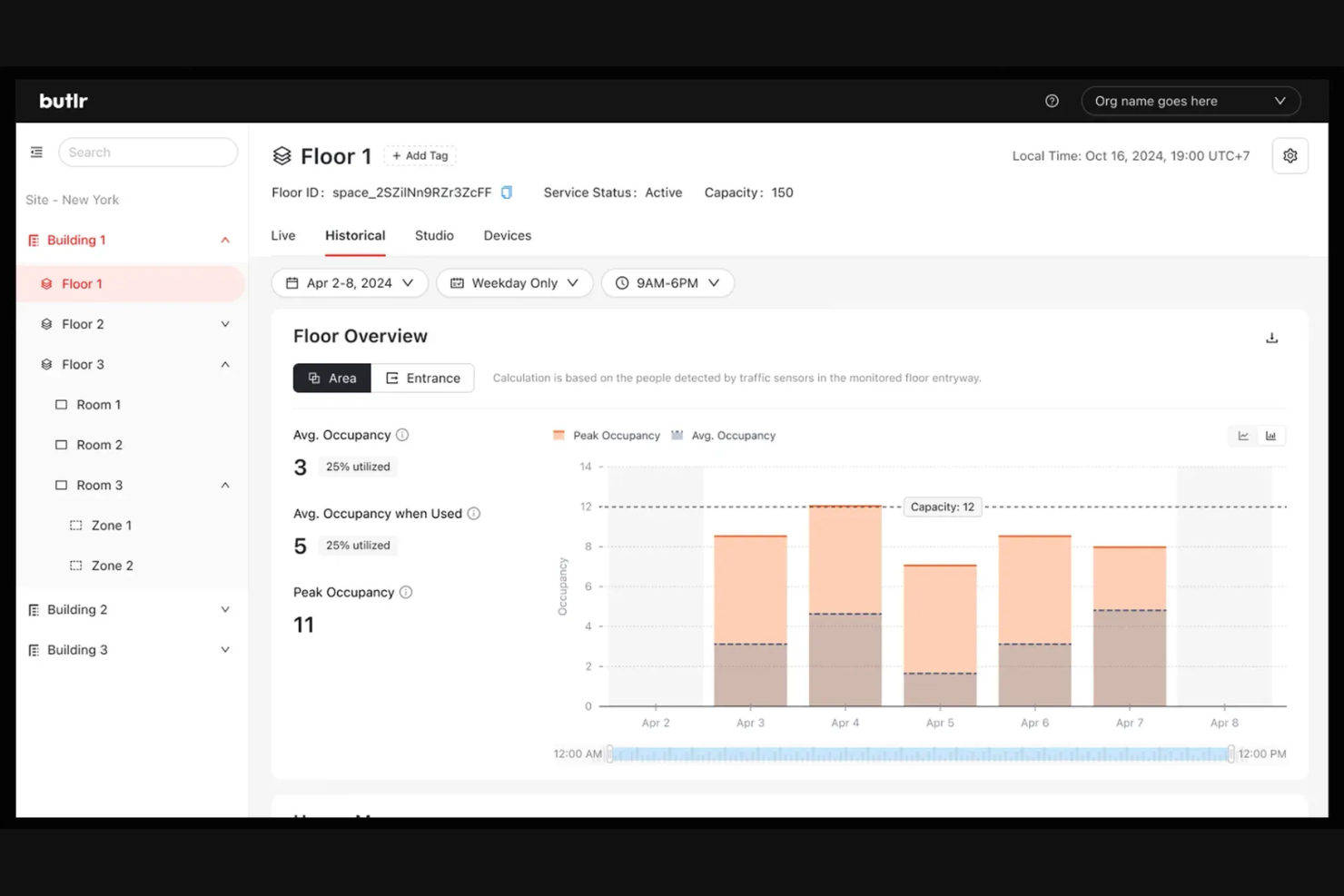
Butlr is a thermal occupancy sensor platform built around its Heatic 2+ wireless sensor, using body heat detection and AI to deliver anonymous presence, movement, and occupancy data across rooms, entryways, and open spaces.
Who Is Butlr Best For?
Butlr is a strong fit for enterprise facility teams in regulated or privacy-sensitive industries, such as healthcare, higher education, and senior living, where anonymous sensing is a hard requirement.
Why I Picked Butlr
I picked Butlr as one of the best because privacy protection is built into the hardware itself, not just the software layer. The Heatic 2+ sensor processes low-resolution, non-RGB thermal data, so there's no way it captures identifiable images regardless of how it's configured. I also like the two sensing modes: traffic mode counts entries and exits at doorways, while presence mode tracks occupancy, dwell time, and movement paths within a space, giving you granular data without any identity risk.
Butlr Key Features
- SOC 2 Type II certification: Butlr holds SOC 2 Type II certification, giving security-conscious enterprise buyers a verified standard to point to during procurement.
- Continual AI learning: The sensor adapts to its environment over time, improving detection accuracy without requiring manual recalibration.
- Multi-network connectivity: The Heatic 2+ connects via Wi-Fi, Ethernet, or cellular, giving you flexible deployment across building types without being locked into one network setup.
- Magnetic mounting: An integrated magnetic back lets you attach the sensor to steel surfaces without drilling, making repositioning fast when your floor plan changes.
Butlr Integrations
Butlr offers integrations with Slack, Hubstar, Akila, Envoy, Robin, Hologram, Willow, Cohesion, CBRE, InnerSpace, and more. An API is available for custom integrations.
Pros and Cons
Pros:
- Delivers 95% accuracy on real-time headcounts
- Multi-year battery runs without any cabling
- Thermal data captures zero identifiable images
Cons:
- Indoor-only use across rooms and open areas
- Pricing requires direct vendor contact to obtain

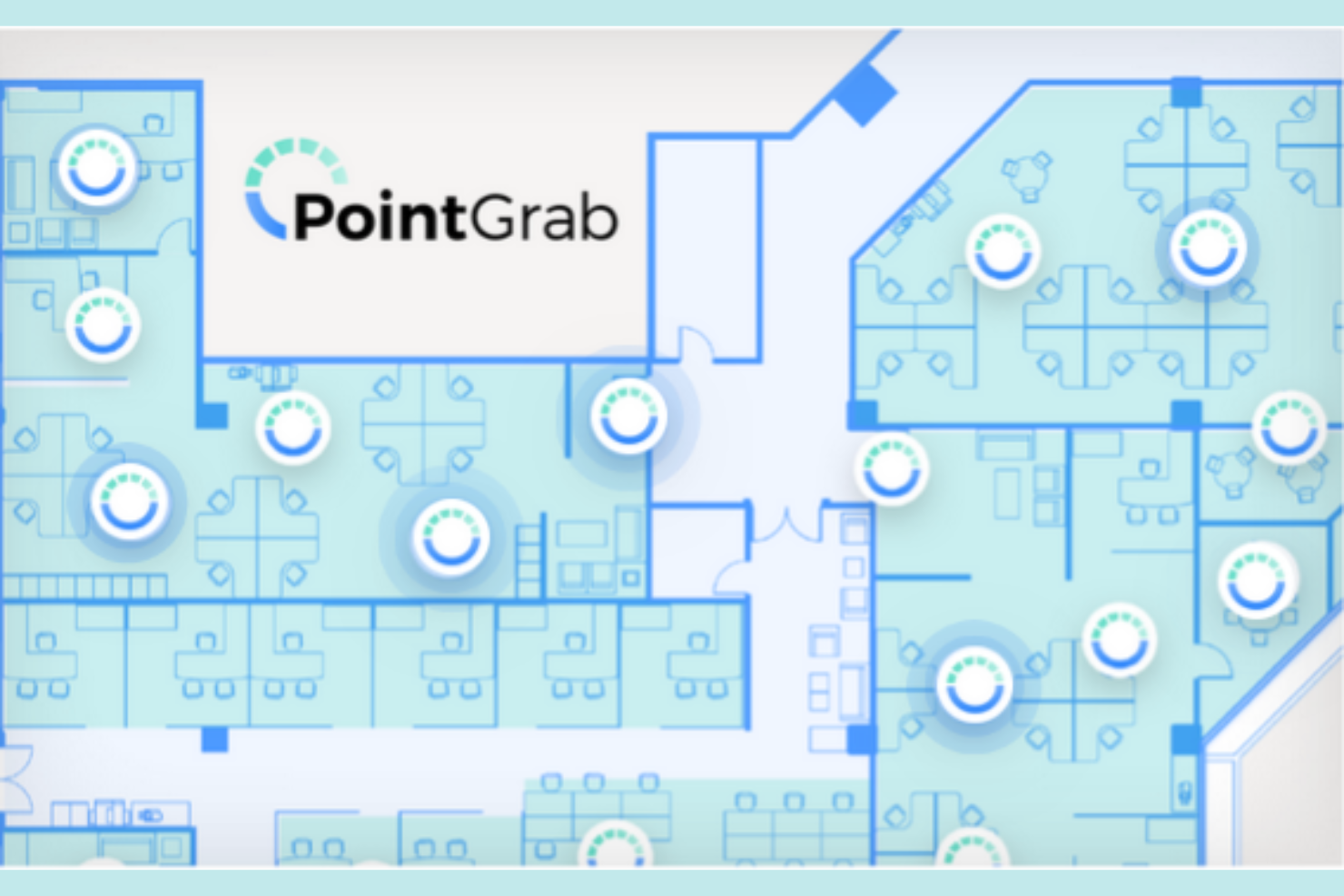
PointGrab is an AIoT occupancy sensor platform built around its CogniPoint sensors, which combine optical and PIR technology to capture occupancy counts, movement patterns, object detection, and virtual traffic line data from a single device.
Who Is PointGrab Best For?
PointGrab is a strong fit for corporate real estate and facility teams managing large office portfolios who want to minimize sensor hardware without sacrificing data depth.
Why I Picked PointGrab
I picked PointGrab as one of the best because the CogniPoint sensor consolidates four distinct data streams into a single ceiling-mounted device: occupancy counts, people in motion, object detection, and virtual traffic line counting. Most deployments require separate sensors for each of these functions, which drives up hardware costs and installation complexity. I also like the superset and subset data model in the Cloud Management Platform, where you can stitch feeds from multiple sensors into full-floor coverage or isolate a single zone for granular reporting.
PointGrab Key Features
- One-minute data intervals: The CogniPoint sensor delivers occupancy data refreshes every minute, giving you near-real-time visibility into space usage.
- Object detection: The sensor identifies physical objects like desks, chairs, and dividers to verify whether the built environment matches your floor plan.
- Wired and wireless sensor options: CogniPoint is available in both wired and wireless configurations, letting you choose the installation method that fits each space.
- Data export and REST API: Aggregated occupancy data is clean and ready to export, with a REST API available for pushing data into third-party applications.
PointGrab Integrations
PointGrab integrates with over 35 platforms and applications, including Eptura Engage, Condeco, Appspace, Mapiq, Johnson Controls, Flowscape, GoBright, HubStar, Planon, and Poppulo, with a REST API available for custom integrations.
Pros and Cons
Pros:
- Configurable areas of interest per sensor
- No identifiable images stored or transmitted
- Single sensor covers up to 3,000 sq ft
Cons:
- No outdoor or non-office deployment options
- Physical lenses trigger privacy concerns

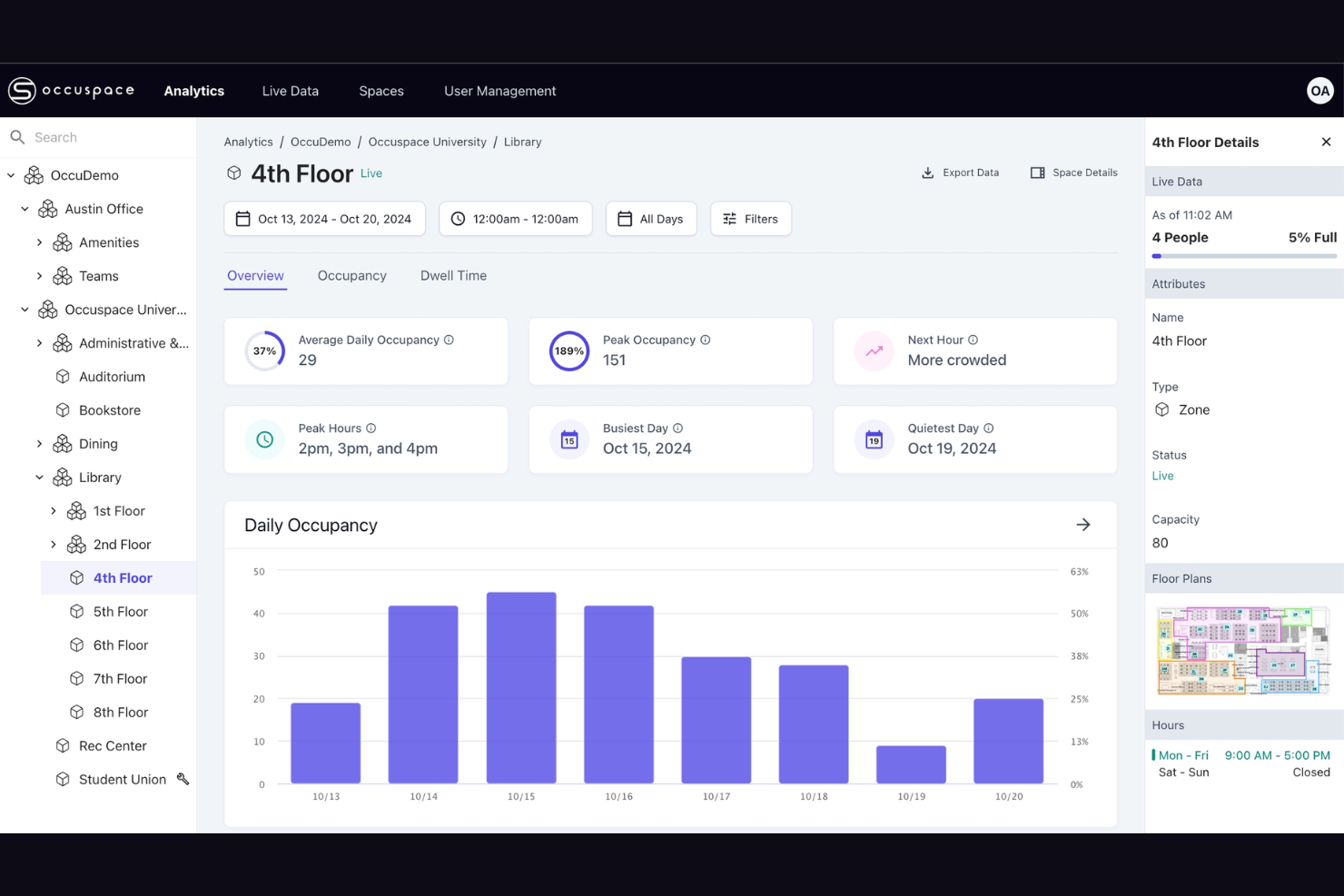
Occuspace is an AI-powered occupancy sensor platform that tracks real-time occupancy counts, foot traffic, dwell time, and space availability using wireless signal scanning from plug-in sensors or existing WiFi access points.
Who Is Occuspace Best For?
Occuspace is a natural fit for higher education and corporate campuses that already have WiFi infrastructure and want building-wide occupancy coverage without installing new sensor hardware in every room.
Why I Picked Occuspace
Occuspace earns its spot on my shortlist because its WAP Integration option turns your existing WiFi access points into occupancy sensors with zero installation required. I like that this makes building-wide coverage genuinely fast to deploy: one campus reportedly rolled out across 1 million square feet in a single day. For large, multi-building campuses where running new hardware to every room isn't practical, that's a real advantage over sensor-only platforms.
Occuspace Key Features
- Micro sensors: Purpose-built for smaller spaces like conference rooms and phone booths, using mmWave technology for precise detection.
- Digital signage display: Push live occupancy busyness data to on-site screens and kiosks so building guests can find available spaces in real time.
- Real-time notifications: Set capacity threshold alerts that trigger automated workflows for custodial, food service, or HVAC scheduling.
- Analytics dashboard: A web portal with portfolio-wide and individual space analysis, interactive charts, filterable data tables, and one-click CSV exports.
Occuspace Integrations
Native integrations are not publicly listed. A REST API is available for custom integrations with internal systems and third-party platforms.
Pros and Cons
Pros:
- Fully anonymous with no personal data collected
- Plug-in sensors need no wiring or batteries
- Leverages existing WiFi access points as sensors
Cons:
- Limited to indoor commercial and campus environments
- Micro sensors capped at small counts

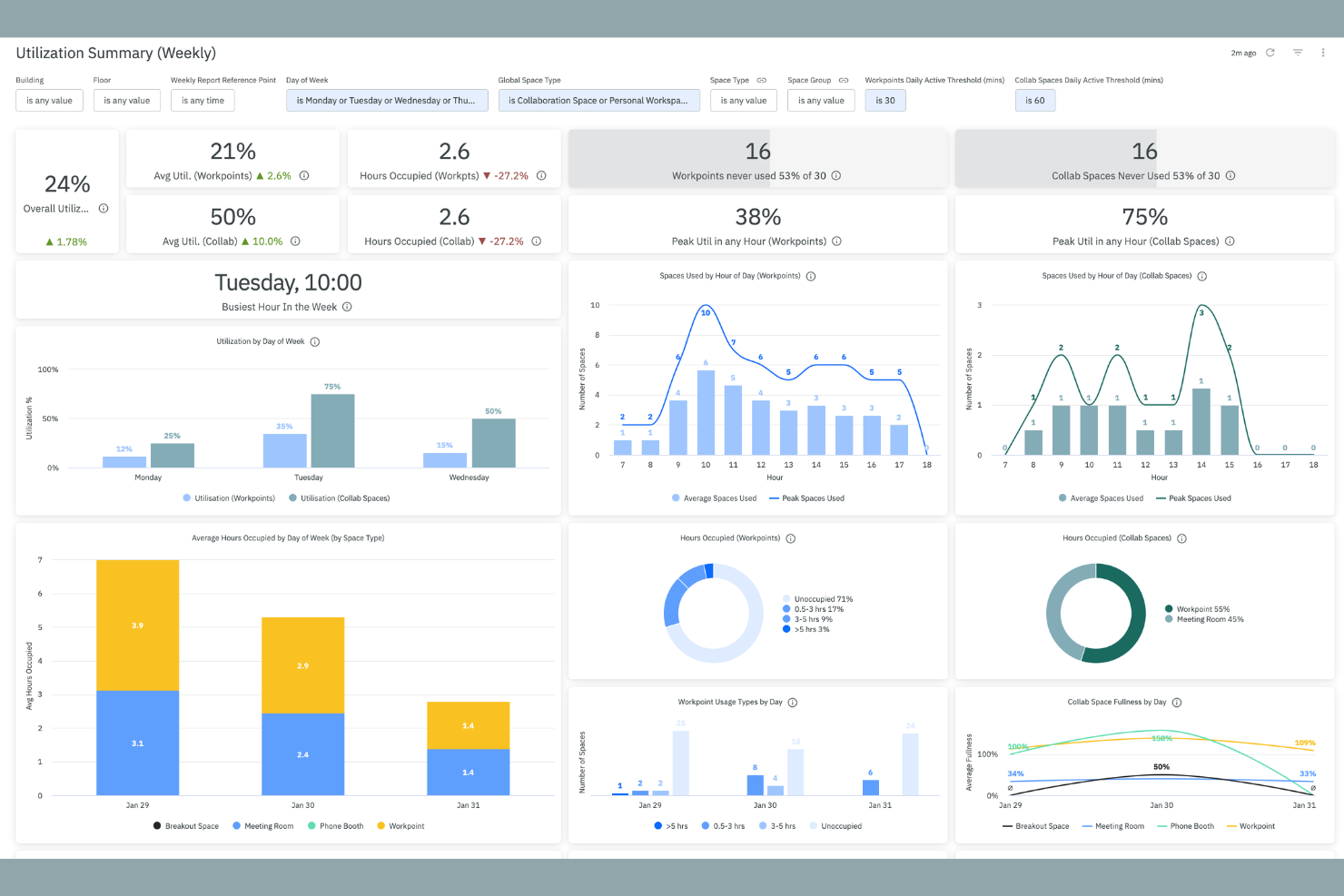
XY Sense is a hardware and software occupancy sensor platform that uses AI-powered area sensors to track real-time positional data, space utilization, and occupancy across large open floors.
Who Is XY Sense Best For?
XY Sense is a strong fit for global enterprise organizations, particularly those in banking, financial services, and pharmaceuticals, that need high-accuracy, real-time occupancy data across large open-plan floors.
Why I Picked XY Sense
I've included XY Sense in my top picks because each Area Pro sensor covers up to 3,000 sq ft at 99% accuracy, detecting people to within one foot with updates every two seconds. That combination of wide coverage and positional precision is what sets it apart for large open-plan floors, where most sensors either miss activity or require dense deployments. I also like that its Senselink daisy-chain wiring cuts cabling by 80%, making permanent, floor-wide installations far less disruptive to set up.
XY Sense Key Features
- AI-assisted insights platform: Access heatmaps, predictive analytics, live views, and daily detection replays from a single dashboard.
- Building automation triggers: Push sub-two-second occupancy data to HVAC, lighting, and room booking release systems.
- On-device processing: All sensor data is computed locally, capturing only anonymous X and Y coordinates with no images stored.
- PoE wired connectivity: Sensors run on Power over Ethernet with zero battery maintenance and enterprise-grade uptime guarantees.
XY Sense Integrations
XY Sense integrates with Serraview, Google Calendar, Microsoft 365, Smartspaces, HubStar, Habitap, KodeLabs, and more. Webhooks and an API are available for custom integrations.
Pros and Cons
Pros:
- Requires up to 50% fewer sensors than competitors
- Captures only anonymous XY coordinates, never images
- Sub-foot positional accuracy at 99% detection
Cons:
- Different sensor types complicate procurement
- Ceiling height requirements limit placement

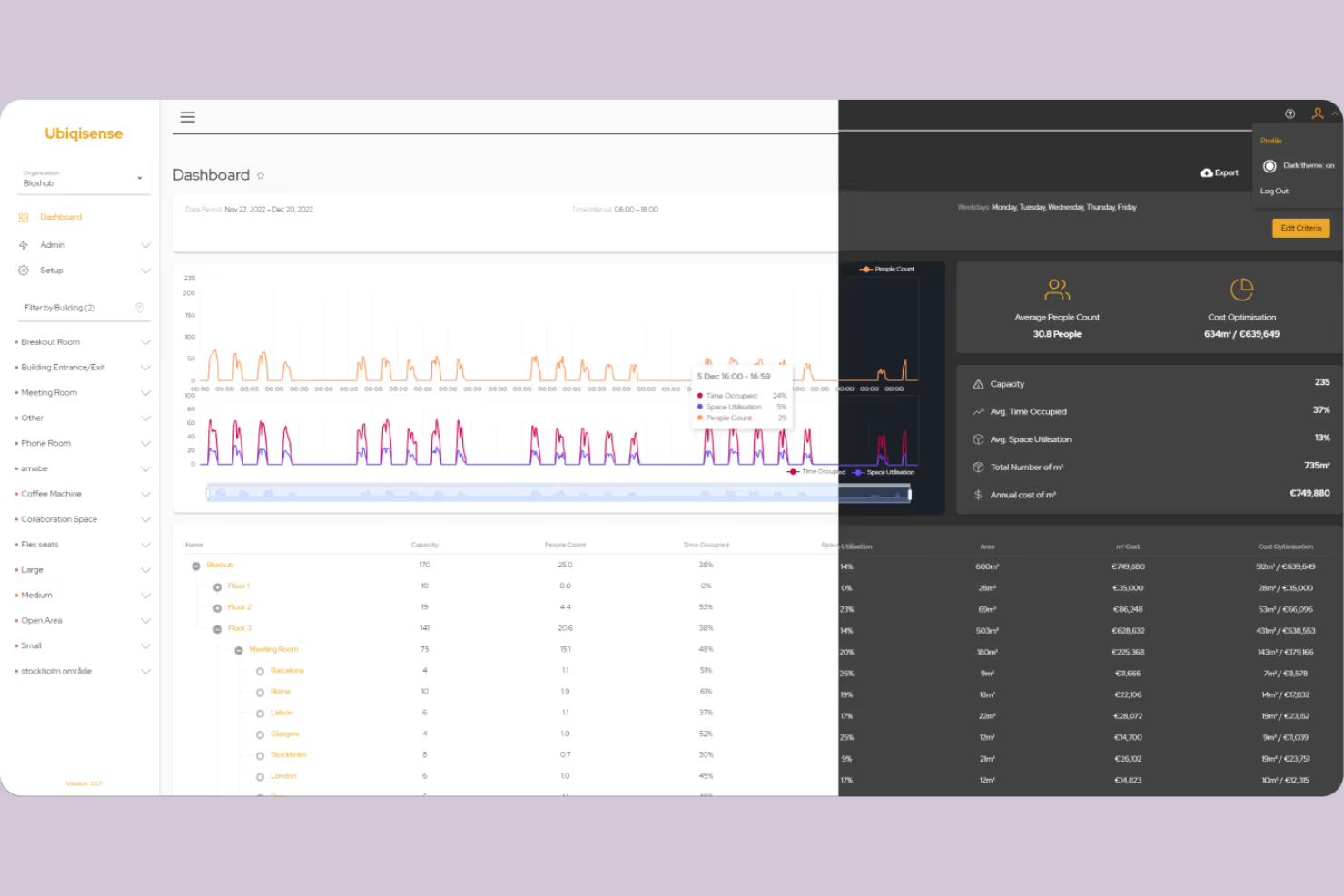
Ubiqisense is a sensor-agnostic occupancy intelligence platform that collects and processes real-time space utilization data across multiple sensor types, including people counters, IP cameras, and environmental sensors.
Who Is Ubiqisense Best For?
Ubiqisense is a strong fit for facility managers and workplace teams in mid-to-large enterprises that already have mixed sensor hardware deployed across their buildings.
Why I Picked Ubiqisense
I've included Ubiqisense in my top picks because it handles mixed sensor environments better than most tools in this space. I like that it pulls data from people counters, IP cameras, and environmental sensors into one unified platform without requiring you to rip out existing hardware. Its sensor-agnostic architecture means my team can onboard new sensor types through standard protocols like BACnet and MQTT without custom development work each time.
Ubiqisense Key Features
- Live occupancy monitoring: View real-time occupancy counts across floors, meeting rooms, open areas, and shared desks from a single dashboard.
- Historical data analysis: Access past occupancy and space utilization records to identify usage trends and patterns over time.
- Indoor air quality monitoring: Track CO2 levels, temperature, humidity, and atmospheric pressure through the UC-IAQ sensor module.
- Heatmap visualization: See which zones are overused or underused across your floor plan to inform workspace redesign decisions.
Ubiqisense Integrations
Ubiqisense integrates with Lotti, Areo, Mymesh, IoT Spot, Edge Next, Neowit, Proptech OS, Foot Analytics, and Flowscape Solutions. An API is available for custom integrations.
Pros and Cons
Pros:
- Sensors require only existing Wi-Fi infrastructure
- On-device processing preserves full privacy
- Over 95% occupancy counting accuracy
Cons:
- Limited third-party review site presence
- Physical walls block vision pathways
Other Occupancy Sensor Software
Here are some additional occupancy sensor software options that didn’t make it onto my shortlist, but are still worth checking out:
- Cisco Spaces
For leveraging network infrastructure
- Kadence
For hybrid work coordination needs
- HubStar
For multinational workplace insights
- VergeSense
For AI-driven space forecasting and planning
- Matrix Booking
For integrating with space booking systems
- OpenSensors
For custom sensor hardware compatibility
- Terabee
For privacy-first sensor solutions
- Milesight
For wireless sensor deployments


How I Evaluate Occupancy Sensor Software
I split my evaluation into two layers: the core table stakes—like real-time sensor feeds and floor plan overlays—and the differentiators that matter for hybrid headcount tracking and RTO reporting.
Core Functionality (Table Stakes For This List)
When I'm selecting tools for my list, I rank each one on a scale from 0 (does not offer the functionality) to 5 (excels in this area) for each core functionality listed below. Then, I calculate the tool's total score into a percentage. Each tool needs to achieve a minimum total score of 65% to be considered for inclusion.
- Real-Time Occupancy Tracking: I check whether the platform delivers live presence data across desks, rooms, and floors—fast enough to trigger alerts when a zone hits capacity during peak hours.
- Sensor Hardware Integration: Support for multiple sensor types matters here, so I look for platforms that aggregate feeds from PIR, thermal, computer vision, or BLE devices.
- Space Utilization Analytics: Beyond raw headcounts, I evaluate whether dashboards surface trends like average peak-day occupancy by floor or week-over-week usage shifts across buildings.
- Floor Plan Visualization: Interactive floor plans with live occupancy overlays help facilities teams spot underused wings at a glance, so I look for heatmap and multi-building support.
- Desk & Room Booking Sync: I consider how each tool compares booked vs. actual usage—specifically whether it flags ghost bookings and auto-releases no-show reservations back into inventory.
- Workforce & HR System Integration: Connecting occupancy data to HRIS or badge systems lets HR teams correlate in-office attendance with hybrid work policies, so I evaluate connector depth.
Once I have a list of tools that meet the criteria, I consider what sets each platform apart.
Differentiating Factors (What Sets Vendors Apart)
Here's how I compare and contrast different vendors:
Standout Features
Predictive space analytics is a major differentiator. I look for AI-driven forecasting that projects occupancy trends weeks or months ahead—useful when facilities directors need to justify consolidating floors or renegotiating leases. Multi-sensor compatibility also matters. Platforms that support PIR, thermal, LiDAR, and camera-based hardware give you flexibility to mix devices across buildings without vendor lock-in. I also evaluate automated cleaning workflows that trigger maintenance based on actual room usage rather than fixed schedules.
Beyond Features
Hardware strategy is a big one. I evaluate whether a vendor sells proprietary sensors, partners with third parties, or is fully hardware-agnostic—because that directly affects installation complexity and long-term costs when you need to scale across buildings. Privacy and compliance also weigh heavily, especially for organizations using camera or Wi-Fi-based sensing where anonymized data collection and clear retention policies matter. I also consider implementation support, including pilot timelines and whether the vendor provides dedicated success resources to help workplace teams drive adoption.
How to Choose Occupancy Sensor Software
It’s easy to get bogged down in long feature lists and complex pricing structures. To help you stay focused as you work through your unique software selection process, here’s a checklist of factors to keep in mind:
| Factor | What to Consider |
|---|---|
| Scalability | Will the software handle your current and future building size, number of rooms, and multiple sites? Check capacity limits and pricing models for large deployments. |
| Integrations | Does the solution connect easily with your existing building management, security, and workplace systems? Confirm native integrations and consider API options. |
| Customizability | Can dashboards, metrics, and alerts be tailored for your organization’s needs or compliance standards? Check for customizable thresholds and reporting options. |
| Ease of use | Will facility managers and HR staff learn it quickly? Look for simple navigation, quick data access, and minimal training time. |
| Implementation and onboarding | How long is the setup, and what resources are required? Ask about onboarding support, sensor installation needs, and typical time-to-value for similar organizations. |
| Security safeguards | Does the vendor support data encryption, access controls, and regular security audits? Pay special attention to privacy when tracking occupant movement. |
| Cost | Are pricing specifics transparent, given your team’s scale and feature needs? Factor in hardware, licenses, and support—ask about extra fees for analytics or sensors. |
| Support availability | Is ongoing assistance available in your time zone and preferred languages? Review response times, live support options, and after-hours escalation processes. |
What Is Occupancy Sensor Software?
Occupancy sensor software is a system that collects, analyzes, and visualizes real-time data from building sensors to show how many people are present in specific spaces. This software helps organizations understand space usage patterns, optimize facilities, and support safety and compliance by providing accurate, actionable occupancy insights for offices, classrooms, meeting rooms, and other shared environments.
Features
Here are the core features any great occupancy sensor software should have:
- Real-time occupancy monitoring: Continuously tracks the number of people in specific rooms or zones, enabling swift responses to overcrowding or safety incidents.
- Historical data analytics: Compiles and analyzes past occupancy data to identify trends, peak usage periods, and underutilized spaces for better long-term planning.
- Automated alerting: Sends notifications when occupancy exceeds set thresholds, supporting compliance with safety regulations or internal policies.
- Customizable dashboards: Lets users tailor data visualizations and reporting layouts to match organizational needs, making information easy to interpret at a glance.
- Multi-sensor compatibility: Integrates with a range of sensor types, such as infrared, ultrasonic, video, and badge readers, for better coverage and redundancy.
- Zone-based reporting: Breaks down occupancy information by rooms, floors, or designated areas so teams can make targeted decisions about layout and resource use.
- Integration with facility systems: Connects with HVAC, lighting, or security systems to adjust conditions automatically based on how spaces are being used.
- Role-based user access: Allows different user groups to access only the data and controls permitted for their roles, improving security and operational oversight.
- Footfall and dwell time measurement: Tracks how many people pass through or remain in a space over time, offering deeper insight into usage patterns and traffic flow.
- Export and API capabilities: Enables users to pull raw data or analytics into other dashboards, reports, or business systems, supporting broader workplace analysis and reporting.
Common Occupancy Sensor Software AI Features
Beyond the standard occupancy sensor software features listed above, many of these solutions are incorporating AI with features like:
- Predictive occupancy forecasting: Uses machine learning algorithms to analyze historical usage data and predict future occupancy patterns, helping organizations proactively allocate resources and optimize space.
- Anomaly detection: AI identifies irregular occupancy trends or unexpected spikes, alerting teams to potential security incidents, system failures, or changes in normal building use.
- Automated cleaning scheduling: AI determines optimal cleaning times by evaluating occupancy patterns, ensuring cleaning crews are only dispatched when and where needed for maximum efficiency.
- Crowd flow optimization: Analyzes real-time movement data to recommend navigation signage or access changes, reducing congestion and improving the flow of people through shared spaces.
- Space utilization recommendations: Suggest workspace reconfigurations or identify underused areas by continuously evaluating occupancy data, supporting data-driven facility management decisions.
Benefits
Implementing occupancy sensor software provides several benefits for your overall workplace experience and your business. Here are a few you can look forward to:
- Data-driven space planning: Gain real-time and historical insights that guide decisions on room allocation, layout changes, or expansion needs.
- Improved workplace safety: Monitor headcounts and receive alerts to maintain compliance with building occupancy limits and health guidelines.
- Resource optimization: Automate HVAC, lighting, and cleaning schedules based on actual space usage, helping reduce operational costs.
- Enhanced employee experience: Ensure employees have access to the right spaces at the right times, reducing overcrowding and boosting satisfaction.
- Increased transparency: Provide leadership with clear dashboards and reports on how facilities are being used for better strategic planning.
- Seamless system integration: Link occupancy data with broader workplace management tools for unified building operations and smarter workflows.
- Support for compliance: Track and archive occupancy data to demonstrate adherence to regulations or organizational policies when needed.
Costs and Pricing
Selecting occupancy sensor software requires an understanding of the various pricing models and plans available. Costs vary based on features, team size, add-ons, and more. The table below summarizes common plans, their average prices, and typical features included in occupancy sensor software solutions:
Plan Comparison Table for Occupancy Sensor Software
| Plan Type | Average Price | Common Features |
|---|---|---|
| Free Plan | $0 | Basic occupancy monitoring, limited reporting, and support for a small number of sensors. |
| Personal Plan | $20-$80/month | Room-level occupancy tracking, standard dashboards, exportable reports, and email notifications. |
| Business Plan | $150-$600/month | Advanced analytics, automated alerts, zone-based reporting, integration options, and role-based access. |
| Enterprise Plan | $1,000-$3,000/month | Multi-site management, custom dashboards, API access, premium support, and dedicated onboarding services. |
FAQs
Here are some answers to common questions about occupancy sensor software:
How accurate is occupancy sensor software?
Accuracy depends on the sensor types used and how well they’re installed and maintained. Most modern systems provide accuracy rates above 90% when combining multiple sensor inputs and regularly calibrating devices.
Can occupancy sensor software integrate with my building management system?
Yes, most solutions offer integrations or APIs to sync with popular building management, HVAC, and security platforms. Always check if your chosen software supports required integrations before purchase.
What data privacy considerations should I keep in mind?
Occupancy sensor software typically tracks anonymous movement and presence data, but you should review vendor privacy policies, data storage practices, and compliance with local regulations to ensure alignment with company standards.
How long does it take to implement occupancy sensor software?
Implementation varies by building size and sensor type, but small deployments can be ready in days, while large, multi-site rollouts may take weeks. Ask vendors about required setup and onboarding support.
Does occupancy sensor software require ongoing maintenance?
Yes, regular maintenance—like sensor calibration, firmware updates, and checking for connectivity issues—is needed to ensure accurate occupancy data and reliable performance.