

10 Best Performance Management Software for Small Business in 2026

Best Performance Management Software for Small Business Shortlist


Performance management software for small business helps you set goals, track progress, give feedback, and support employee growth in a way that fits your team's size and needs. If you’re looking to ditch outdated review cycles or messy spreadsheets, finding software that’s easy to use—and right-sized for your business—is essential.
In this guide, you’ll get a clear comparison of the best tools available, what makes each unique, and how they tackle the challenges small businesses face with performance management. Get ready to find a solution that empowers your team and makes growth feel achievable.
Why Trust Our Software Recommendations
Our team has been testing and reviewing software since 2012. As HR experts ourselves, we know how difficult—and important—it is to choose the right software.
For this guide, we evaluated tools using hands-on testing and independent research, scoring tools using our selection criteria. We also draw on insights from industry thought leaders and practicing HR experts.
Our reviews reflect our human editorial judgment, not a sales pitch.
Expert reviewers:
Performance Management Software for Small Business Comparison Table
This comparison table summarizes pricing details for my top performance management software for small business selections:
| Tool | Best For | Trial Info | Price | ||
|---|---|---|---|---|---|
| 1 | Best for real-time peer and manager feedback | 14-day free trial + free demo available | From $2/user/month | Website | |
| 2 | Best for customizable evaluation cycles | 30-day free trial + free demo available | From $2.50/user/month (billed annually) | Website | |
| 3 | Best for all-in flat-rate reviews and OKRs | 14-day free trial | From $4/user/month (billed annually) | Website | |
| 4 | Best for remote team engagement tracking | Free demo available | From $20/worker/month | Website | |
| 5 | Best for flexible review cycles and automation | Free demo available | From $5/user/month (billed annually) | Website | |
| 6 | Best for dynamic OKR and goals alignment features | Free demo available | Pricing upon request | Website | |
| 7 | Best for combining reviews, goals, and feedback | Free demo available | From $4/user/month (billed annually) | Website | |
| 8 | Best for customizable 1:1 and employee coaching | Free demo available | From $4/user/month (billed annually) | Website | |
| 9 | Best for instant setup with Microsoft Teams | Free plan + 30-day free trial + free demo available | From $7/user/month | Website | |
| 10 | Best for lightweight review tools for small teams | 30-day free trial + free demo available | From $3/user/month (billed annually) | Website |

Best Performance Management Software for Small Business Reviews
Below are my detailed summaries of the best performance management software for small business that made it onto my shortlist. My reviews offer a detailed look at the features, best use cases, and integrations of each platform to help you find the best one for you.
Best for real-time peer and manager feedback
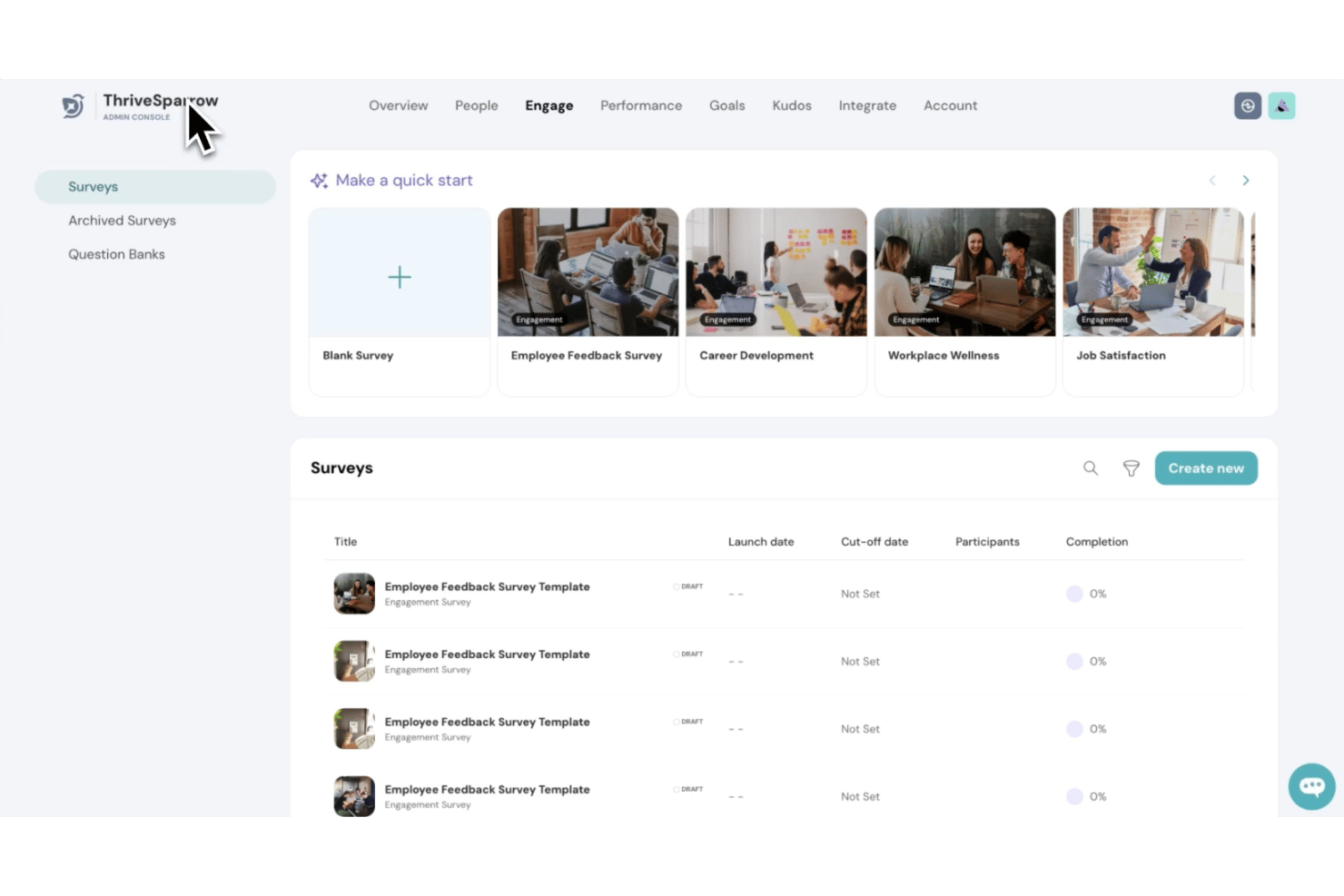
ThriveSparrow is a modular performance management platform that combines 360° reviews, OKR tracking, continuous feedback, and employee engagement surveys in a single system built for small and mid-size teams.
Who Is ThriveSparrow Best For?
ThriveSparrow suits HR generalists and people ops leads at small businesses who need to run structured review cycles without a dedicated HR admin or implementation team.
Why I Picked ThriveSparrow
ThriveSparrow earns its spot on my shortlist because the feedback loop is genuinely built into every layer of the platform. The free continuous Feedback module lets peers and managers exchange real-time comments outside of formal review cycles, so nothing waits until the annual review. I also like the competency gap analysis in the 360° review module, which cross-references rater group scores to surface specific behavioral gaps, not just aggregate ratings.
ThriveSparrow Key Features
- OKR and goal management: Set, align, and track company, team, and individual goals with cascade and progress visibility.
- Employee engagement surveys: Launch customizable pulse, wellness, and eNPS surveys to monitor team culture.
- Calibration and box grid: Run manager calibration sessions using box grid visualizations to ensure fair assessment decisions.
- Action plans management: Assign, track, and manage follow-up tasks from reviews and engagement surveys in one dashboard.
ThriveSparrow Integrations
ThriveSparrow offers native integrations with Microsoft Teams, HiBob, and more. An API is available for custom integrations.
Pros and Cons
Pros:
- Built-in calibration and competency gap analysis
- Fast review cycle setup for small HR teams
- Real-time peer and manager feedback features
Cons:
- Limited report customization options
- Fewer advanced 1:1 meeting tools

Express Evaluations is a performance management platform built for SMBs that covers customizable review cycles, 360-degree feedback, goal tracking, pulse surveys, manager check-ins, and peer recognition.
Who Is Express Evaluations Best For?
It's a strong fit for HR generalists and people ops leads at small-to-midsize organizations who need to run structured review cycles without a large HR team behind them.
Why I Picked Express Evaluations
Express Evaluations earns its spot on my shortlist because of how much control it gives over review cycle structure without requiring HR expertise to configure. I love that evaluations can be triggered based on hire dates, calendar dates, or anniversaries, so cycle timing actually matches how my organization operates. The Advanced Approval Flows and Multi-Manager Reviews mean I can replicate the real chain of feedback without building workarounds.
Express Evaluations Key Features
- Peer-to-peer recognition: Employees can easily recognize each other's contributions with built-in recognition tools.
- Pulse surveys: Quickly capture real-time feedback and measure engagement with customizable, anonymous surveys.
- AI sentiment analysis: AI automatically analyzes written feedback to surface themes and sentiment trends across teams.
- Single sign-on integration: Supports secure access and easy onboarding with SSO capabilities for modern HR environments.
Express Evaluations Integrations
Express Evaluations offers native integrations with BambooHR, Paylocity, ADP Workforce Now, Paycom, and Gusto, and has an API for custom integrations.
Pros and Cons
Pros:
- Pulse surveys built natively into the platform
- 360-degree feedback included at entry-level tiers
- Anniversary-based cycle triggers automate review scheduling
Cons:
- Reporting lacks depth for data-driven HR teams
- Goal tracking less developed than review features

Best for all-in flat-rate reviews and OKRs

PeopleGoal is a performance management platform for small businesses that combines configurable review cycles, OKR and goal tracking, 360-degree feedback, continuous feedback tools, 1:1 check-ins, engagement surveys, and core HR functionality in a single flat-rate plan.
Who Is PeopleGoal Best For?
PeopleGoal is a strong fit for small businesses that want performance reviews, OKR tracking, and employee development tools bundled into one flat-rate plan.
Why I Picked PeopleGoal
PeopleGoal earns its spot on my shortlist because it packs every performance management essential into one flat-rate plan, without forcing you to buy modules separately. I especially like that OKR cascading and 360-degree reviews are both included at the base tier, so you can align individual goals to company objectives and collect structured peer feedback in the same platform. The AI-assisted feedback summarization is a genuine time-saver, surfacing themes and sentiment from open-ended responses so managers aren't manually sifting through every comment.
PeopleGoal Key Features
- No-code workflow builder: Drag-and-drop tools let you build and adjust custom HR workflows without technical support.
- Multilingual review forms: Performance review templates are available in 70+ languages for globally distributed teams.
- Individual development plans (IDPs): Managers can assign career milestones, skills gap analysis, and learning plans directly within the platform.
- Engagement surveys: Built-in pulse surveys, eNPS tracking, and well-being surveys run alongside your performance cycles.
PeopleGoal Integrations
PeopleGoal offers native integrations with BambooHR, Workday, Namely, ADP Workforce, Slack, Microsoft Teams, Okta, Jira, Asana, and Workable, and connects with Zapier. An open API is available for custom integrations, with the vendor claiming a 1-week turnaround on custom integration requests.
Pros and Cons
Pros:
- 1:1 check-ins and IDPs are included
- AI summarizes feedback themes and sentiment
- Combines reviews, goals, and HR in one
Cons:
- G2 users mention navigation challenges
- Few third-party user reviews available

Deel Engage is a talent management platform that bundles performance reviews, OKR-based goal tracking, continuous feedback, 1:1 check-ins, engagement surveys, and peer recognition into a single suite built for distributed teams.
Who Is Deel Engage Best For?
Deel Engage is the right fit for people operations leads at remote or globally distributed small businesses that are already using—or open to adopting—Deel as their core HR platform.
Why I Picked Deel Engage
Deel Engage earns its spot on my shortlist because it's the only tool here built from the ground up for distributed, remote-first teams. I love how the Instant Feedback module creates a continuous paper trail that feeds directly into formal review cycles, which means when review season hits, managers aren't scrambling to remember what happened six months ago. The Checkins module is also genuinely impressive: it auto-creates 1:1 sessions for every manager-direct report pair and uses Google Meet transcripts to generate AI meeting notes automatically.
Deel Engage Key Features
- Simultaneous review cycles: Run multiple review types at the same time, such as a probation review and a 360° cycle, without conflicts.
- OKR goal cascading: Set company, team, and individual goals in a single framework, with real-time progress dashboards visible to managers and HR.
- Kudos recognition module: Employees send value-tagged peer recognition through Deel or Slack, posting to a shared company feed for visibility.
- Engagement surveys: Configure pulse surveys, eNPS, or custom anonymous surveys, with results feeding into centralized sentiment analytics dashboards.
Deel Engage Integrations
Deel Engage offers a smaller set of native integrations focused on communication and meeting tools, including Slack, Microsoft Teams, and Google Meet (for AI-generated 1:1 notes from call transcripts), and it requires Deel HRIS as its foundational system of record rather than connecting to third-party HRIS platforms like BambooHR, Rippling, or Gusto.
Pros and Cons
Pros:
- Consolidates reviews, goals, and feedback histories
- AI auto-generates 1:1 meeting notes
- Built specifically for remote team engagement
Cons:
- Implementation can take up to four weeks
- Requires migration to Deel’s own HRIS
Best for flexible review cycles and automation
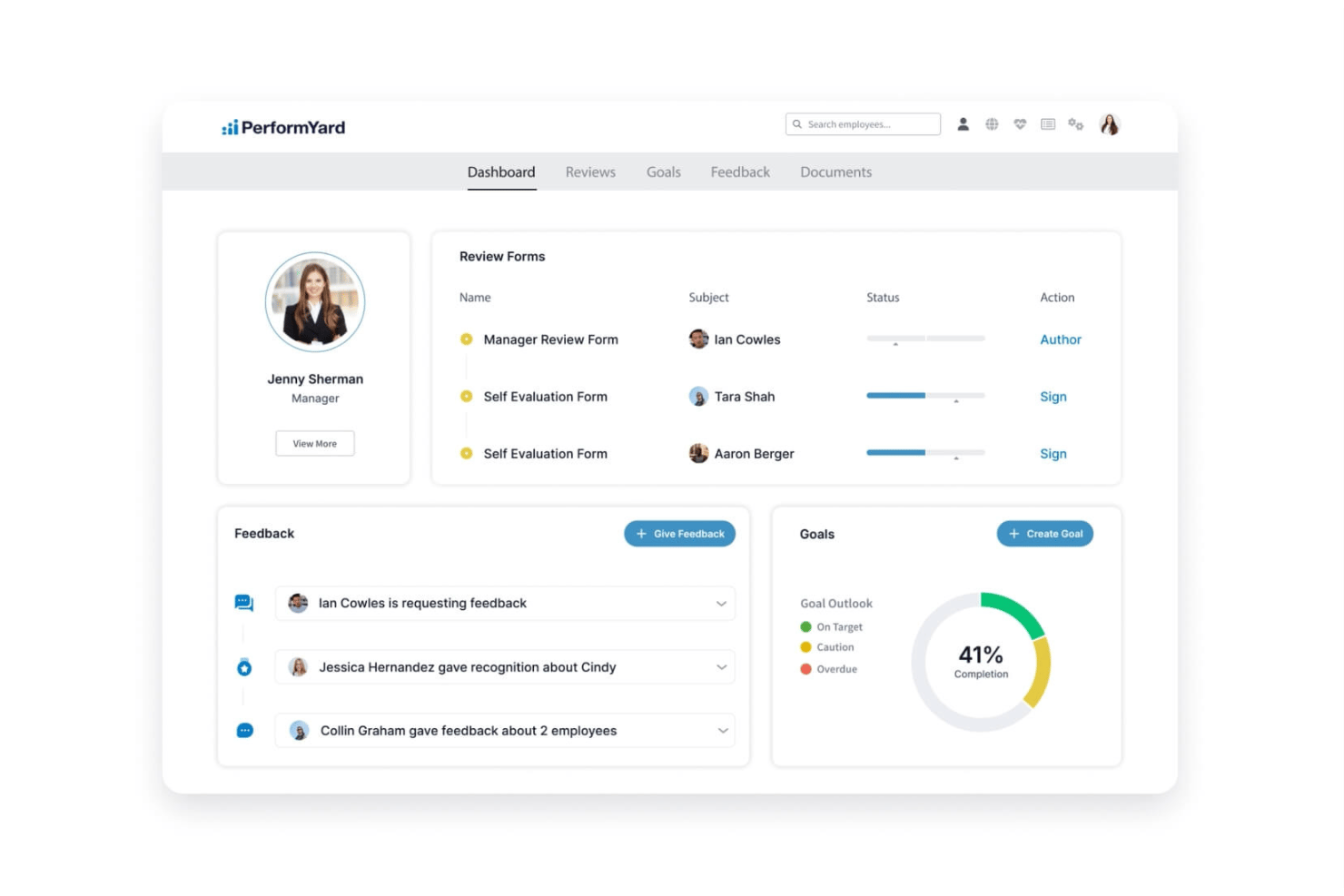
PerformYard is a performance management platform that lets small businesses run customizable review cycles, manage goals, track continuous feedback, and facilitate structured 1:1 meetings from a single system.
Who Is PerformYard Best For?
PerformYard is a strong fit for HR generalists and people ops leads at small to mid-sized companies who need to run multiple review types without a large HR team.
Why I Picked PerformYard
PerformYard earns its spot on my shortlist because of how much control it gives you over review cycle design. I can run anniversary-date reviews alongside quarterly check-ins and project-based reviews simultaneously, each with their own custom templates, rating scales, and workflows. The AI-assisted multi-form summaries pull responses across multiple reviews into one consolidated view, which cuts the time I'd otherwise spend manually synthesizing feedback before a calibration conversation.
PerformYard Key Features
- Engagement surveys: Create and deploy pulse surveys, track eNPS, and analyze engagement trends over time.
- HRIS integrations: Sync employee data automatically with systems like ADP, BambooHR, Gusto, and Rippling.
- 9-box performance dashboards: Visualize performance and potential across your organization with interactive grid reports.
- SCIM provisioning: Automate user management and access with SCIM through Azure Entra ID and other identity providers.
PerformYard Integrations
PerformYard offers native integrations with ADP, BambooHR, Gusto, Rippling, UKG, Workday, Paylocity, Slack, and Microsoft Teams, and provides an API and SFTP option for custom integrations.
Pros and Cons
Pros:
- Goal progress and performance dashboards included
- Dedicated success manager for all accounts
- Custom review cycles and form templates
Cons:
- Bulk data edits can be time-consuming
- Annual billing and contract minimums required
Leapsome
Best for dynamic OKR and goals alignment features
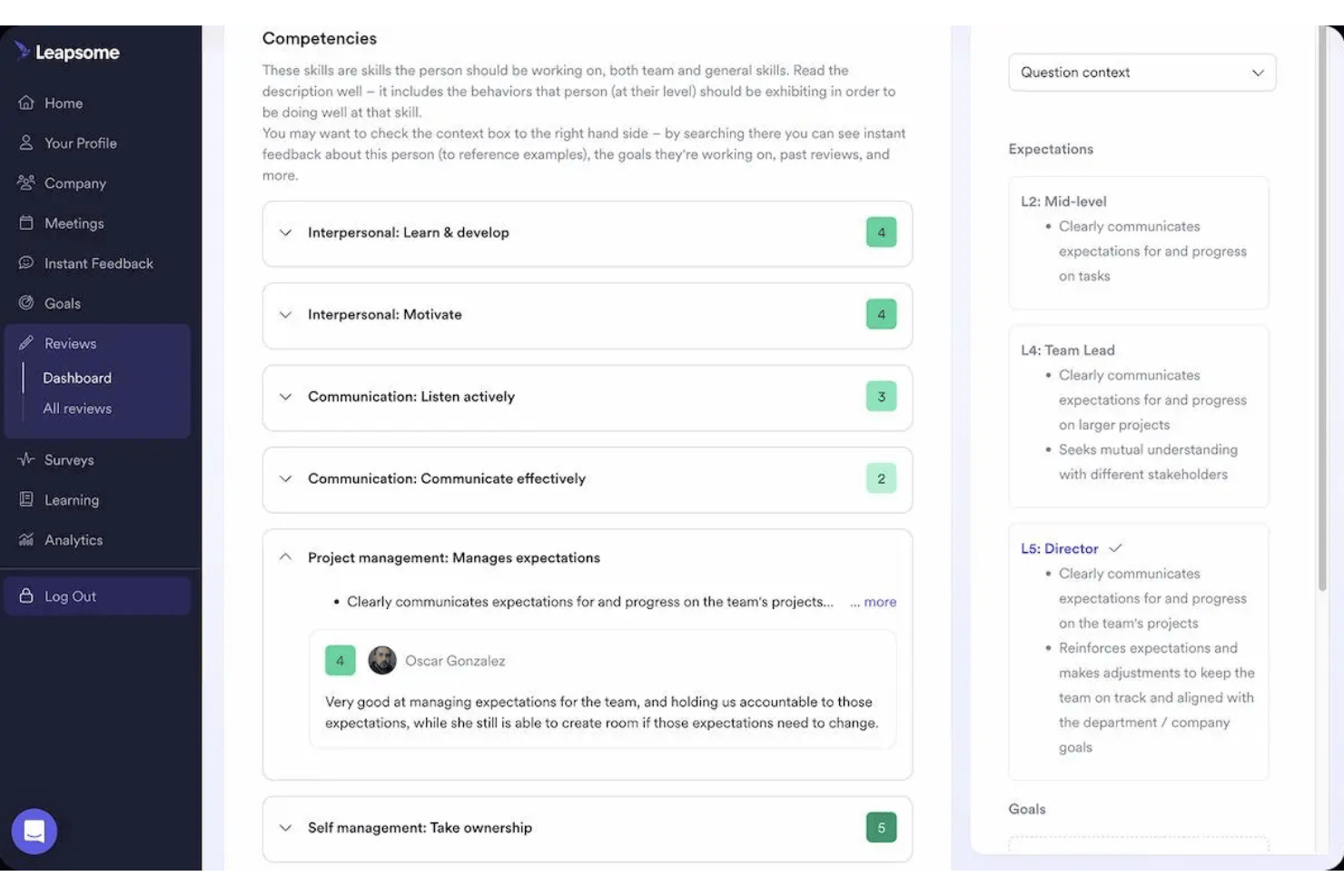
Leapsome is a modular performance management platform that combines performance reviews, OKR tracking, continuous feedback, 1:1 meeting tools, employee surveys, and learning into a single connected system.
Who Is Leapsome Best For?
Leapsome is a strong fit for growing small businesses—typically 30 to 100+ employees—that want structured performance and goals processes without managing multiple separate tools.
Why I Picked Leapsome
Leapsome earns its spot as one of the best on my shortlist because of how well its OKR framework connects individual work to company direction. The goal tree gives small teams a live visual of how each person's goals cascade up to team and company OKRs, which I rarely see done this clearly in tools built for smaller organizations. I also like the Jira integration, which automatically pulls engineering ticket progress into OKR updates without anyone needing to manually log in and refresh numbers.
Leapsome Key Features
- 360-degree reviews: Create fully customizable review cycles with peer, manager, and self-assessment options.
- 1:1 meetings module: Schedule recurring check-ins with shared agendas, talking points, and action item tracking.
- Instant feedback and praise: Share real-time feedback or public recognition with team members right from the platform or Slack.
- Survey builder: Design and automate employee surveys with science-backed question banks and anonymized response options.
Leapsome Integrations
Leapsome offers native integrations with BambooHR, Personio, Google Workspace, Jira, Slack, Okta, ADP Workforce Now, OneLogin, and TriNet, and connects with Zapier. An API is available for custom integrations.
Pros and Cons
Pros:
- Built-in science-backed survey templates
- Detailed calibration and 360-degree reviews
- Dynamic goal tree for visual goal alignment
Cons:
- No transparent month-to-month SMB pricing
- Modular setup requires time to configure
Lattice
Best for combining reviews, goals, and feedback
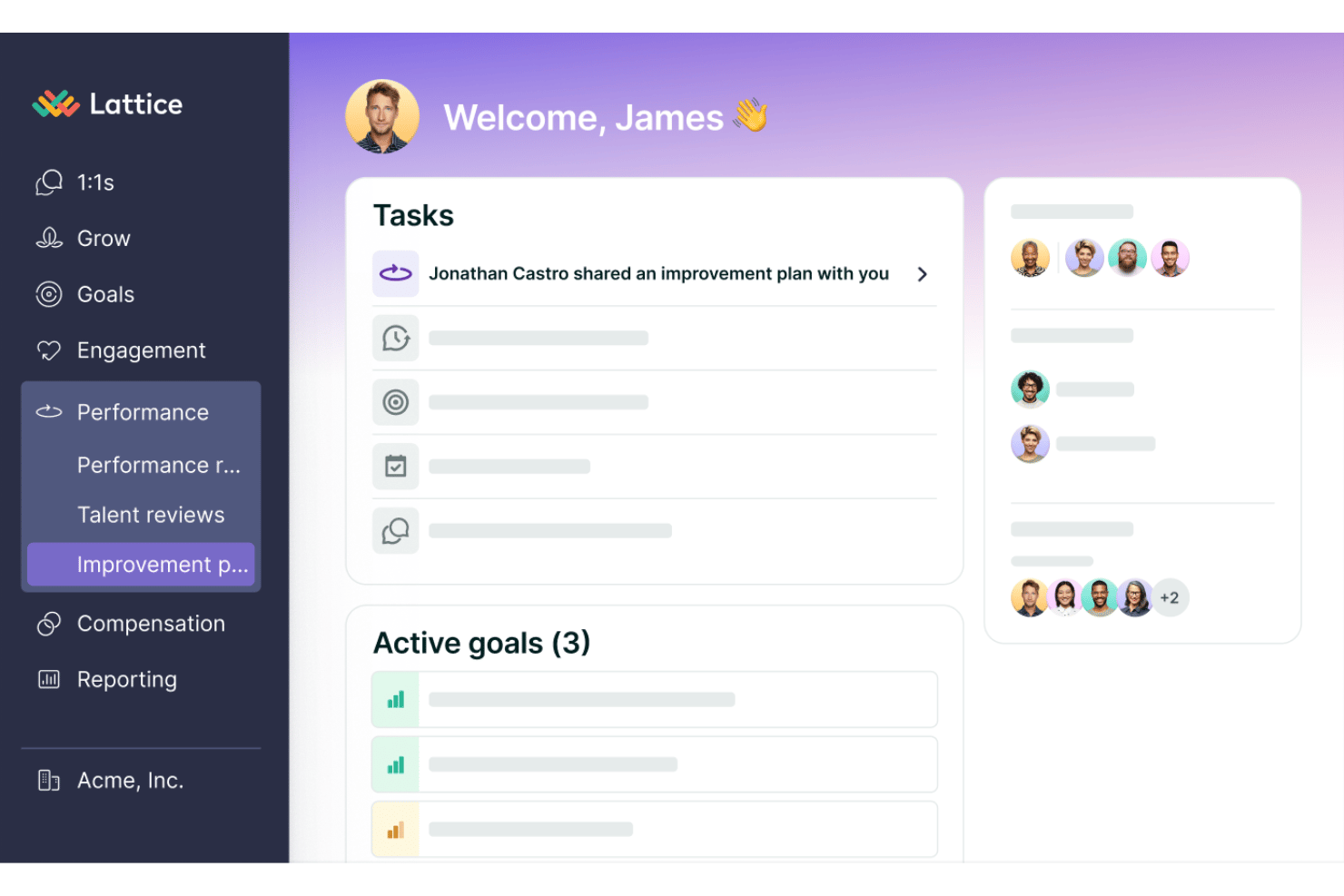
Lattice is a performance management platform that brings together performance reviews, goal tracking, continuous feedback, 1:1 meeting tools, and talent calibration in a single connected system.
Who Is Lattice Best For?
Lattice fits growing small businesses (roughly 30+ employees) that have a dedicated people ops or HR manager overseeing structured performance programs.
Why I Picked Lattice
Lattice earns its spot on my shortlist because no other tool I've tested ties reviews, goals, and feedback together as tightly. When I run a review cycle, Lattice pulls in each employee's goal progress and all the feedback exchanged throughout the year, so the review reflects the full performance picture rather than a single snapshot. I also like the AI-drafted review feature, which uses that accumulated data to generate a first draft grounded in real, documented context rather than starting from a blank page.
Lattice Key Features
- Talent reviews and calibration: Visual tools for evaluating employee performance and potential using 9-box grids or table views.
- 1:1 meeting templates: Built-in structures for manager and employee check-ins with shared agendas and history.
- HRIS and payroll integrations: Ready-made connections with platforms like Gusto, Workday, BambooHR, and more.
- Analytics and insights dashboards: Interactive dashboards for tracking trends in reviews, engagement, and team performance.
Lattice Integrations
Lattice offers native integrations with Gusto, Workday, BambooHR, Rippling, ADP, Personio, Greenhouse, and Slack. An API is available for custom integrations.
Pros and Cons
Pros:
- Built-in calibration and talent review features
- AI-assisted review writing and summaries
- Solid OKR and goal tracking tools
Cons:
- Onboarding is time-consuming for small teams
- Annual contract required for all plans
New Product Updates from Lattice

Lattice Introduces MCP Connector for AI Chat Tools
Lattice introduced Lattice MCP, a new connector that brings talent data into Claude, ChatGPT, and other LLM tools. The connector helps teams access performance context from reviews, 1:1 notes, feedback, goals, and updates within AI chat workflows. For more information, visit Lattice’s official site.
 .
.
15Five
Best for customizable 1:1 and employee coaching
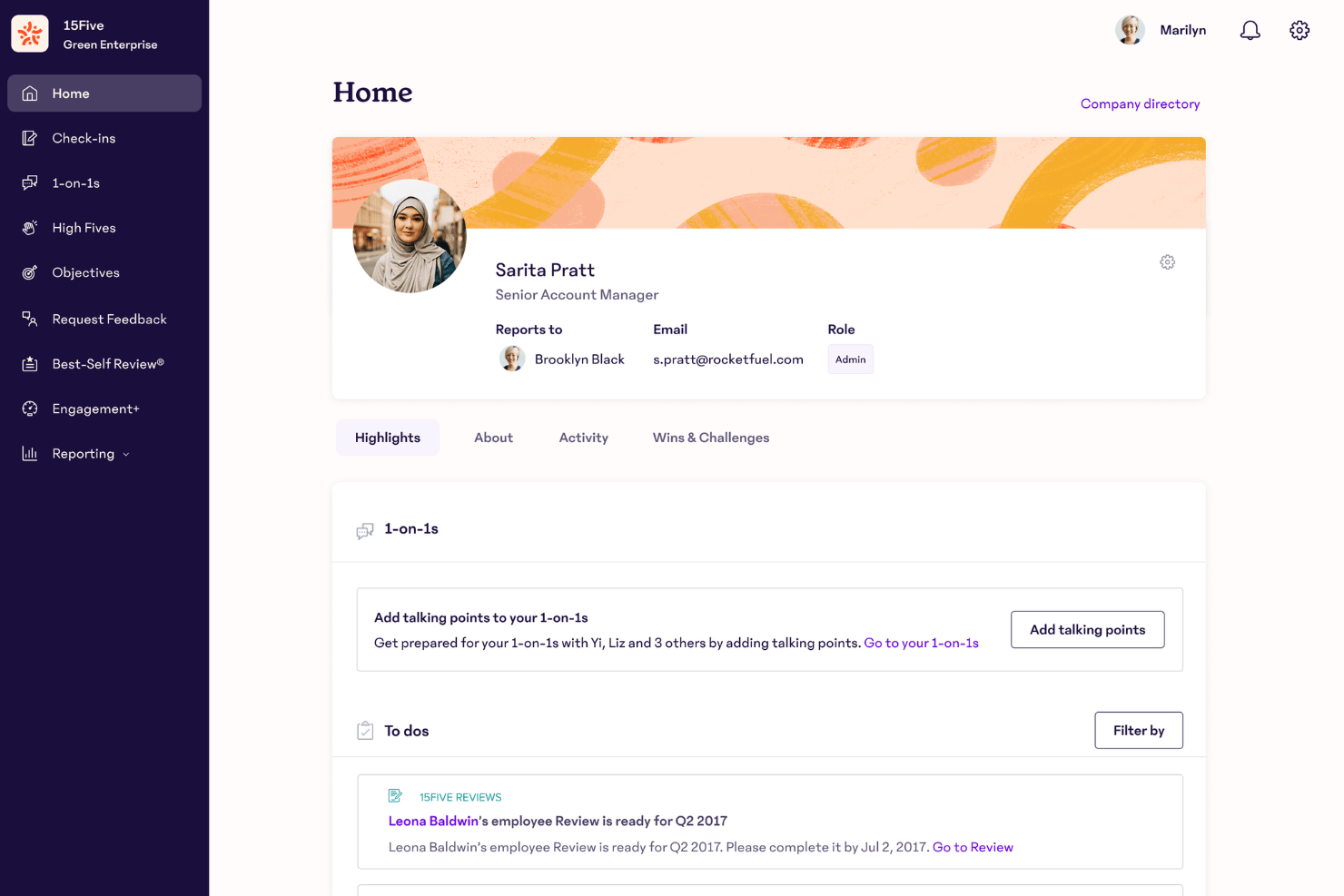
15Five is an AI-powered performance management platform that combines continuous feedback, OKRs, 360° reviews, 1:1 meeting tools, and employee engagement surveys in a single system.
Who Is 15Five Best For?
15Five fits growing companies with 50 or more employees where people ops or HR teams need structured manager development alongside performance tracking.
Why I Picked 15Five
I picked 15Five as one of the best because its 1:1 meeting tools go beyond a basic agenda field. Shared talking points pull directly from an employee's active goals and recent feedback, so managers walk into every meeting with real context. The Kona AI Coach add-on then layers in AI-powered manager coaching tailored to each individual, drawing on 15Five data to surface specific guidance between meetings.
15Five Key Features
- OKRs and goal tracking: Set, update, and monitor progress on individual, team, and company-wide OKRs.
- 360-degree performance reviews: Configure multi-source review cycles with templated and customizable workflows.
- Engagement surveys: Launch regular pulse and engagement surveys with actionable analytics for HR and managers.
- AI-powered review writing: Leverage AI suggestions to draft performance reviews and summarize employee achievements.
15Five Integrations
15Five offers native integrations with ADP, BambooHR, Workday, Slack, Microsoft Teams, Zoom, Asana, Jira, Salesforce, and an API is available for custom integrations.
Pros and Cons
Pros:
- Structured workflows for multi-source feedback
- AI-assisted review writing and insights
- Weekly check-ins and engagement surveys included
Cons:
- May overwhelm very small HR teams
- Annual contract required for all plans
Best for instant setup with Microsoft Teams
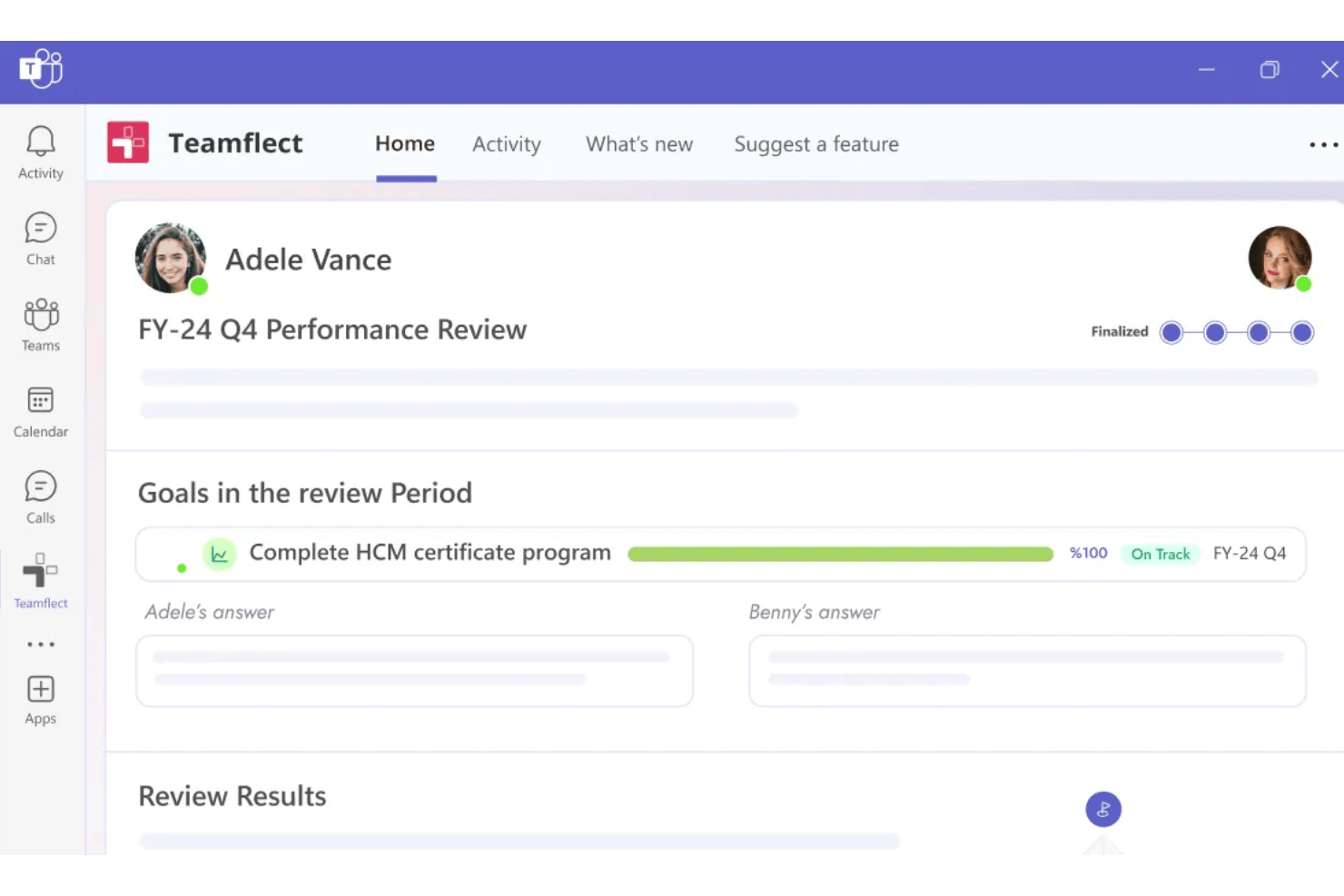
Teamflect is a performance management platform that runs natively inside Microsoft Teams and Outlook, combining performance reviews, OKR tracking, 360-degree feedback, 1:1 meeting tools, and employee recognition.
Who Is Teamflect Best For?
Small businesses already running Microsoft 365 that want a performance management tool their teams will actually use, without switching apps.
Why I Picked Teamflect
Teamflect earns its spot on my shortlist because it runs entirely inside Microsoft Teams, with no separate login or adoption hurdle to clear. I particularly like the in-Teams chat feedback, which lets managers send and receive feedback directly in conversation threads their teams already use. The automated OKR check-ins also prompt employees on a set schedule without any manual follow-up from HR.
Teamflect Key Features
- Customizable performance templates: Build review forms with multiple question types, rating scales, and form layouts to match your unique process.
- Engagement and pulse surveys: Quickly launch anonymous pulse surveys or longer engagement surveys to regularly check in with employees.
- Recognition and rewards catalog: Give digital badges, host a leaderboard, and connect recognition to a reward catalog for tangible incentives.
- Power BI reporting integration: Access customizable team and company performance dashboards generated through a native Microsoft Power BI integration.
Teamflect Integrations
Teamflect has native integrations across the Microsoft ecosystem, including Microsoft Teams, Outlook, Planner, To-Do, Power BI, and Entra ID. It also supports native connections with HR platforms like SAP SuccessFactors, ADP, BambooHR, HiBob, Workday, and UKG, plus offers an API for custom integrations.
Pros and Cons
Pros:
- OKR tracking with automated reminders
- Supports 360-degree feedback and recognition
- Runs fully inside Microsoft Teams
Cons:
- Advanced analytics require Microsoft Power BI
- No standalone web or mobile app

Best for lightweight review tools for small teams

Small Improvements is a performance management platform for small and mid-sized teams that covers performance reviews, 360-degree feedback, goal tracking, 1:1 meetings, pulse surveys, and continuous feedback.
Who Is Small Improvements Best For?
It's a strong fit for growing companies between 50 and 750 employees that need structured performance tooling without the complexity of enterprise HR systems.
Why I Picked Small Improvements
I picked Small Improvements as one of the best because its review tooling is genuinely built for lean teams, not stripped-down enterprise software. The assessment graph replaces numeric rating scales with a customizable x/y axis where manager and employee each place a dot independently, making post-review conversations more grounded. The side-by-side self-assessment view reinforces that: both sides see each other's responses to the same questions, which gives the conversation a concrete starting point.
Small Improvements Key Features
- 360-degree feedback: Collects feedback from peers, managers, and direct reports to provide a fuller view of employee performance.
- Objectives and cascading goals: Lets teams align individual, team, and company goals for clear tracking and accountability.
- Pulse surveys: Enables HR or managers to launch quick, confidential pulse checks to gauge team sentiment and engagement.
- Slack integration: Connects Small Improvements with Slack to share praise and reminders directly in team workflows.
Small Improvements Integrations
Small Improvements offers native integrations with BambooHR, Personio, Namely, Rippling, Workday, Kallidus, Workable, Slack, Google Calendar, Okta, OneLogin, and Google Workspace. An API is available for custom integrations.
Pros and Cons
Pros:
- Supports company, team, and individual goal tracking
- Built-in assessment graph for review alignment
- Customizable performance review workflows and templates
Cons:
- Lacks advanced 1:1 meeting management features
- Limited analytics for calibration or 9-box grids
Other Performance Management Software for Small Business
Here are some additional performance management software for small business options that didn’t make it onto my shortlist, but are still worth checking out:
- Keka HR
With modular HR, payroll, and talent tools
- BambooHR®
For all-in-one HR and performance management
- Synergita
For AI-driven OKRs on a startup budget
- Engagedly
For progressive feedback and recognition
- Profit.co
For OKR-linked performance reviews
- Workleap
For guided review templates and quick setup
- Effy AI
For AI-generated review summaries
- Betterworks
For advanced OKR and check-in functionality


How I Evaluate Performance Management Software for Small Business
I split my evaluation into must-have functionality—like configurable review cycles and goal tracking—and the differentiators that separate tools worth recommending from the rest.
Core Functionality (Table Stakes for This List)
When I'm selecting tools for my list, I rank each one on a scale from 0 (does not offer the functionality) to 5 (excels in this area) for each core functionality listed below. Then, I calculate the tool's total score into a percentage. Each tool needs to achieve a minimum total score of 65% to be considered for inclusion.
- Performance Reviews: I look for configurable review cycles that let you run annual, quarterly, or 360-degree reviews with custom templates and rating scales rather than one rigid format.
- Goal Management: Each tool should let managers and employees set, track, and update individual and team goals or OKRs with clear progress visibility across the org.
- Continuous Feedback: I evaluate whether the platform supports peer, manager, and self-feedback outside of formal review windows so feedback isn't limited to scheduled cycles.
- 1:1 Meeting Tools: Shared agendas, talking points, and action item tracking matter here—managers should be able to prep and follow up on check-ins in one place.
- SMB-Friendly Pricing & Scale: I check for transparent per-user pricing, self-serve setup, and low admin overhead so a single HR generalist or business owner can run it solo.
- Reporting & Analytics: The platform should offer dashboards covering review completion, goal progress, and team performance trends without requiring custom report builds.
Once I have a list of tools that meet the criteria, I consider what sets each platform apart.
Differentiating Factors (What Sets Vendors Apart)
Here's how I compare and contrast different vendors:
Standout Features
AI-assisted review writing is a major differentiator—I look for tools that help managers draft evaluations and summarize feedback, which saves hours when one person handles reviews for an entire team. OKR and goal cascading also matters because it connects company objectives down to individual contributors with visible alignment. I evaluate whether the platform includes built-in recognition features like kudos or praise walls that tie directly to performance behaviors and keep morale high between formal cycles.
Beyond Features
Pricing transparency matters a lot here—I check whether a vendor offers clear per-user pricing, flexible billing, and free trials so a small team isn't locked into a contract before they've tested the fit. Ease of implementation is equally important. A solo HR generalist should be able to launch a review cycle using pre-built templates without hiring a consultant. I also evaluate integrations with common SMB tools like Gusto, Slack, and Google Calendar to confirm feedback and review reminders reach people where they already work.
How to Choose Performance Management Software for Small Business
It’s easy to get bogged down in long feature lists and complex pricing structures. To help you stay focused as you work through your unique software selection process, here’s a checklist of factors to keep in mind:
| Factor | What to Consider |
| Scalability | Will the software adapt as your company grows from 10 to 200+ employees, or will you outgrow it fast? |
| Integrations | Does it connect with your payroll, HRIS, Slack, or calendar tools so you avoid duplicate data entry? |
| Customizability | Can you modify review templates, rating scales, and workflows without relying on support or IT help? |
| Ease of use | Are most users able to self-serve, or does it require training to complete reviews and track goals? |
| Implementation and onboarding | How long would setup take? Look for guided onboarding and pre-built templates for a quick launch. |
| Cost | Is pricing transparent per user, with no hidden fees or forced enterprise minimums? Are free trials available? |
| Security safeguards | Does it offer role-based permissions, data encryption, and compliance with regulations like GDPR? |
| Support availability | Will you get timely answers through chat, email, or help docs, especially during review cycles? |
What Is Performance Management Software for Small Business?
Performance management software for small business is a digital platform that helps smaller teams set goals, conduct employee reviews, give feedback, and track performance trends. These tools are designed to be affordable, easy to use, and flexible enough for busy HR generalists or business owners to support employee growth without complicated processes or enterprise overhead.
Features
When selecting performance management software for small business, keep an eye out for the following key features:
- Customizable review cycles: Set up annual, quarterly, or 360-degree reviews on your schedule using templates and workflows that fit your processes.
- Goal and OKR tracking: Establish, align, and monitor individual, team, or company goals—including OKRs—with clear progress visibility for managers and employees.
- Continuous feedback: Facilitate ongoing peer, manager, and self-feedback throughout the year, not just during formal review cycles.
- 1:1 meeting tools: Use shared agendas, talking points, and action item tracking to support structured check-ins and coaching conversations.
- Employee recognition: Recognize achievements with built-in kudos, praise, or shout-outs that connect daily wins to performance reviews.
- Transparent reporting and analytics: Access dashboards and reports on review completion, goal progress, and overall performance trends without manual data pulls.
- User-friendly dashboards: Centralize performance data and action items so employees and managers can quickly find what they need without digging through menus.
- Integration with HR and productivity tools: Connect to HRIS, payroll, Slack, or calendar apps for seamless data flow and timely reminders.
- Role-based permissions: Control access to sensitive data so managers, employees, and admins only see what’s appropriate for their role.
- Self-serve onboarding and support: Get up and running with guided setup, in-app tips, and access to a help center—no dedicated HR staff required.
Benefits
Implementing performance management software for small business provides several benefits for your team and your business. Here are a few you can look forward to:
- More consistent reviews: Run structured performance cycles on time with automated reminders and customizable templates, even without a dedicated HR staff.
- Clearer goal alignment: Help employees understand and track their progress toward individual, team, and company goals using built-in OKR and goal tracking tools.
- Ongoing feedback culture: Foster a high-feedback environment where employees and managers share input, recognition, and coaching throughout the year.
- Better manager-employee conversations: Support effective 1:1s using shared agendas, talking points, and action tracking so nothing falls through the cracks.
- Ease of scaling HR processes: Add new team members and adjust programs as you grow—without migrating to a new system or increasing admin complexity.
- Informed decision-making: Use dashboards and analytics to monitor performance trends and drive decisions about promotions, recognition, or development.
- Enhanced employee engagement: Tie recognition, feedback, and progress directly to daily work, boosting morale and connecting effort to business impact.
Costs & Pricing
Selecting performance management software for small business requires an understanding of the various pricing models and plans available. Costs vary based on features, team size, add-ons, and more. The table below summarizes common plans, their average prices, and typical features included in performance management software for small business solutions:
Plan Comparison Table for Performance Management Software for Small Business
| Plan Type | Average Price | Common Features |
|---|---|---|
| Free Plan | $0 | Basic performance reviews, simple goal tracking, limited feedback tools, and email support. |
| Personal Plan | $5–$10/user/month | Customizable reviews, individual goal setting, basic analytics, limited integrations, and chat support. |
| Business Plan | $10–$20/user/month | Team and company goals, 1:1 meeting tools, advanced feedback options, performance dashboards, and more integrations. |
| Enterprise Plan | $20–$40/user/month | Full OKR frameworks, advanced analytics, HRIS/payroll integrations, role-based permissions, and dedicated support. |
Performance Management Software for Small Business FAQs
Here are some answers to common questions about performance management software for small business:
How long does it take to implement performance management software for a small business?
Most small businesses can launch performance review software in a few days to a few weeks. If the platform offers guided onboarding, strong integration capabilities, and pre-built templates, a single HR generalist or business owner can usually get it up and running without outside help.
Can performance management software help with remote or hybrid teams?
Yes, performance management software is built to support remote and hybrid teams by enabling virtual feedback, goal tracking, regular check-ins, and development plans. Many platforms also use people analytics and performance metrics to help managers track progress and identify skill gaps.
Do these tools work if I don’t have a dedicated HR department?
Yes, many platforms are designed for self-serve use by business owners or managers with little HR experience. As an HR solution, simple setup, automation, and user-friendly dashboards make it realistic for small teams to manage performance appraisals and employee development on their own.
Are these platforms secure enough for sensitive employee data?
Yes, most reputable vendors offer security features like data encryption, role-based permissions, and comply with regulations such as GDPR or SOC 2. Many also integrate with broader HCM and talent management platforms. Always review each platform’s security and privacy documentation before making a decision.
Can I customize review questions and rating scales?
Yes, most software allows you to edit review templates, question sets, rating scales, and KPIs to match your company’s needs. Some platforms also connect these reviews with compensation management and applicant tracking workflows, helping create a more consistent employee experience.