

10 Best Workforce Management Software for Hospitality in 2026

Best Workforce Management Software for Hospitality Shortlist


Workforce management software for hospitality helps you handle staff scheduling, attendance, payroll, and communication across busy hotel, restaurant, and event operations. If you’re searching for tools that can keep pace with your team’s changing shifts, demands, and compliance requirements, you’re in the right place.
Choosing the right workforce management system can mean fewer scheduling headaches, happier teams, and more time to focus on your guest experience. In this guide, you’ll find targeted recommendations, so you can pick a workforce management solution that truly fits what hospitality teams need in 2026.
Why Trust Our Software Recommendations
Our team has been testing and reviewing software since 2012. As HR experts ourselves, we know how difficult—and important—it is to choose the right software.
For this guide, we evaluated tools using hands-on testing and independent research, scoring tools using our selection criteria. We also draw on insights from industry thought leaders and practicing HR experts.
Our reviews reflect our human editorial judgment, not a sales pitch.
Expert reviewers:
Comparison Table: Workforce Management Software for Hospitality
This comparison table summarizes pricing details for my top workforce management software for hospitality:
| Tool | Best For | Trial Info | Price | ||
|---|---|---|---|---|---|
| 1 | Best as an AI for business | Free demo available | From $8/user/month | Website | |
| 2 | Best for open-source workforce cost control | 30-day free trial | From $50/month | Website | |
| 3 | Best for flexible shift swapping | 14-day free trial + free demo available | From $5/user/month | Website | |
| 4 | Best for hourly communication tools | 30-day free trial | From $2.99/user/month | Website | |
| 5 | Best for enterprise labor analytics | Free demo available | Pricing upon request | Website | |
| 6 | Best for AI schedule automation | Free demo available | Pricing upon request | Website | |
| 7 | Best for multi-location coordination | Free trial + free plan available | From $1.70/user/month (billed annually) | Website | |
| 8 | Best for optimizing staff costs | Free demo available | Pricing upon request | Website | |
| 9 | Best for real-time labor forecasting | Free demo available | Pricing upon request | Website | |
| 10 | Best for operational data insights | Free demo available | Pricing upon request | Website |
Best Workforce Management Software for Hospitality Reviews
Below are my detailed summaries of the best workforce management software for hospitality on my shortlist. My reviews offer a detailed look at the features, best use cases, and integrations of each platform to help you find the best one for you.

Best as an AI for business
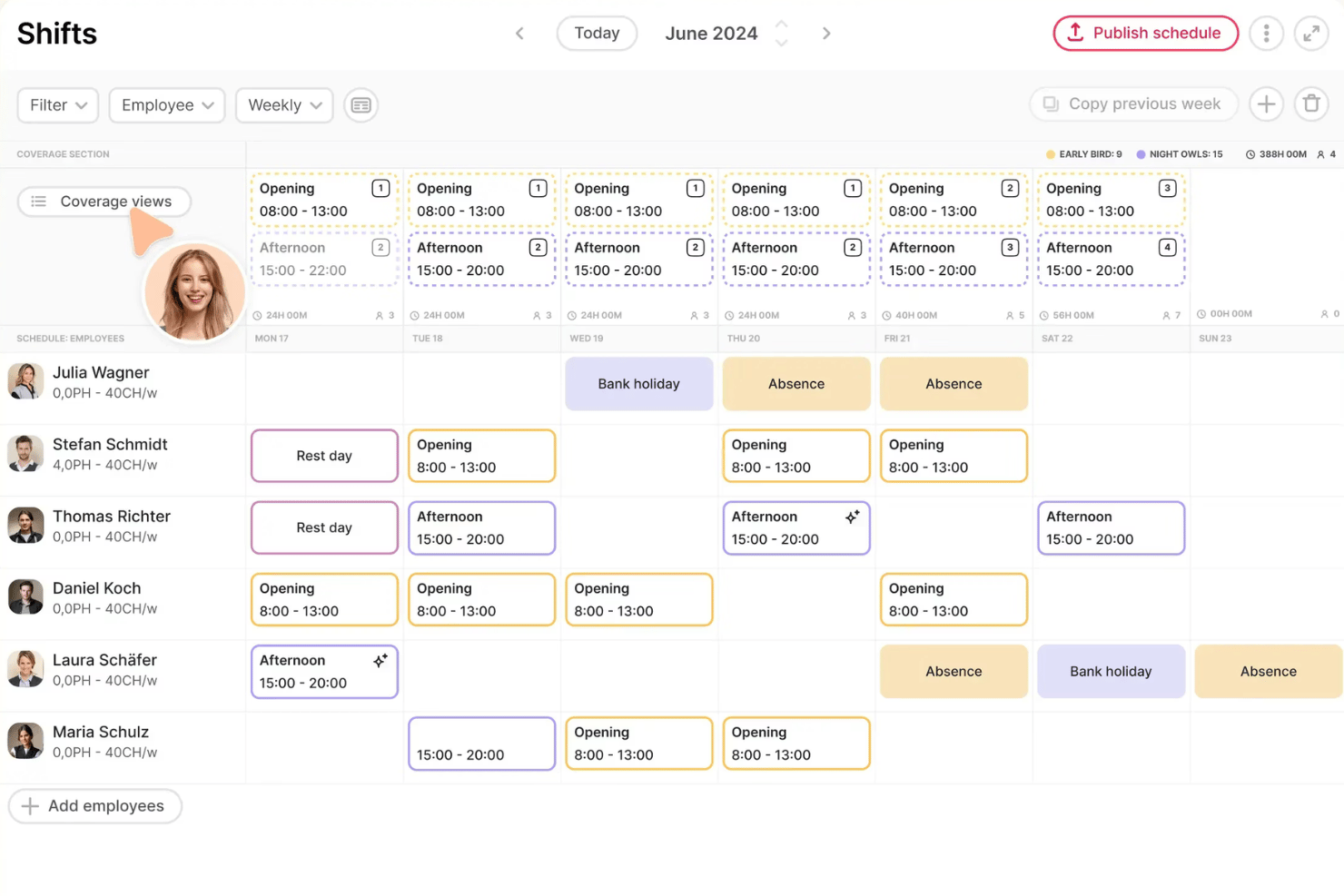
Factorial is an AI-driven HR and workforce management platform that covers shift scheduling, time tracking, attendance, and employee self-service for hospitality teams managing frontline staff across multiple locations.
Who Is Factorial Best For?
Factorial is a strong fit for European hospitality SMBs that want AI-driven HR tools—scheduling, reporting, and employee policy support—in one place.
Why I Picked Factorial
I've included Factorial in my top picks because its AI for business positioning is genuinely relevant to hospitality teams managing complex, high-turnover workforces. I particularly like how its AI handles the scheduling grind: managers can duplicate and regenerate full shift schedules from prior weeks in minutes, which matters when you're running rotating rosters across multiple locations. Factorial's AI also fields employee policy questions directly, cutting down the back-and-forth that bogs down HR in busy hotel or restaurant environments.
Factorial Key Features
- Multi-location shift conflict detection: Factorial automatically flags scheduling conflicts across departments and locations before shifts are published.
- Geolocation and QR code clock-in: Frontline staff can clock in using GPS-verified location or a scannable QR code from their mobile device.
- Built-in ATS with AI CV parsing: Factorial's recruitment module posts to multiple job boards and uses AI to screen and parse incoming applications.
- Financial Workspace for workforce cost tracking: Managers can view how hires, promotions, and exits affect labor budgets over time using a timeline-based cost dashboard.
Factorial Integrations
Factorial lists 32 payroll marketplace integrations, including Sage, DATEV, Silae, a3innuva Nómina, PayCaptain, and Zucchetti, plus connections with LinkedIn, Slack, Microsoft Power BI, Okta, and ZKTeco. It offers an open API and Zapier, but no native POS or PMS integrations are documented.
Pros and Cons
Pros:
- Supports multi-location frontline scheduling
- Answers employee policy questions directly
- AI-assisted timetable planning saves manager time
Cons:
- No built-in tip management
- No occupancy-based labor forecasting

TimeTrex
Best for open-source workforce cost control
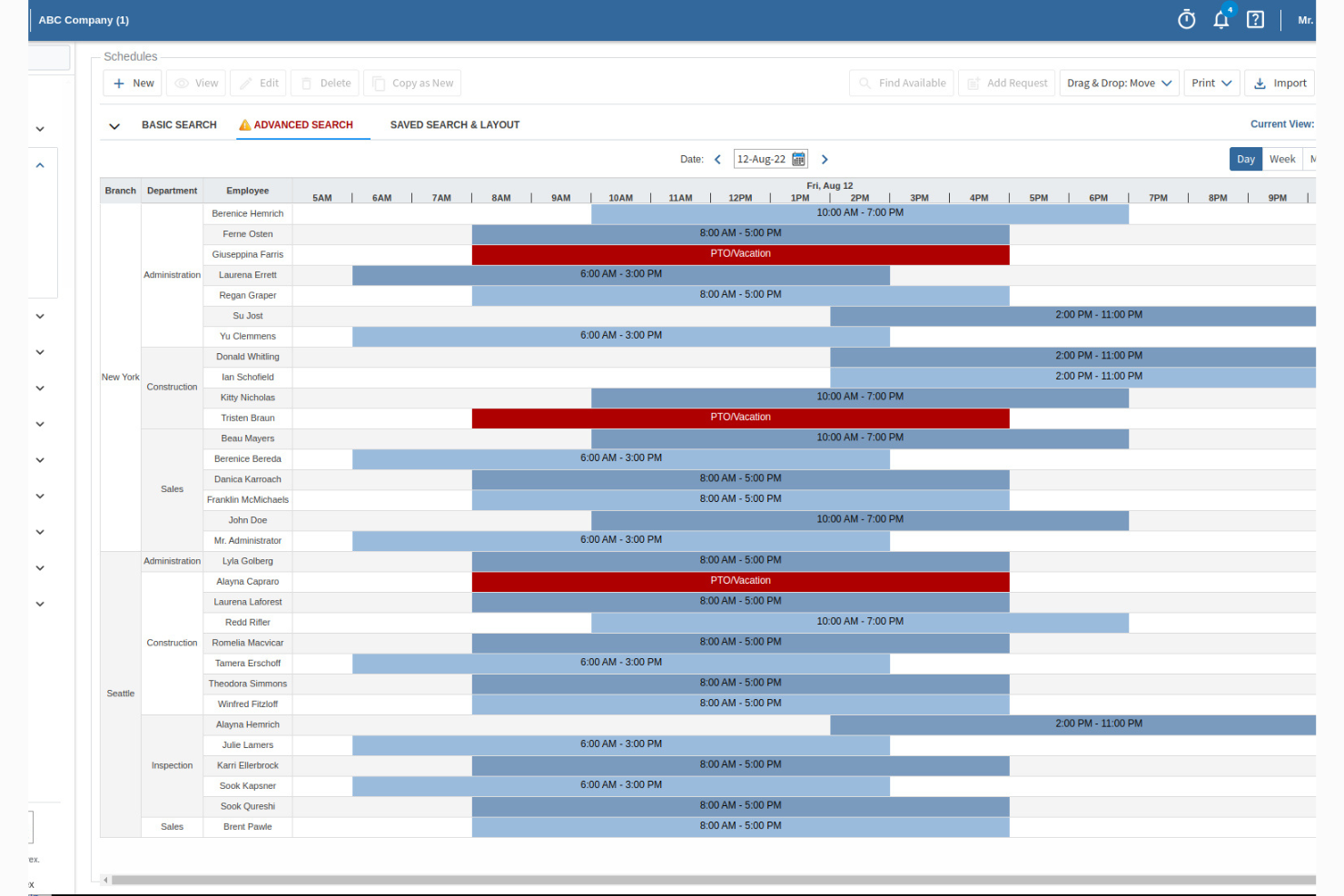
TimeTrex is an open-source workforce management platform that covers shift scheduling, biometric and GPS time tracking, payroll processing, and multi-jurisdictional compliance across hospitality departments and locations.
Who Is TimeTrex Best For?
TimeTrex is a strong fit for cost-conscious hospitality operators who want an open-source or self-hosted workforce management option with built-in payroll and biometric time tracking.
Why I Picked TimeTrex
I've included TimeTrex in my top picks because it's the only open-source option on this list that gives hospitality operators full control over workforce cost without locking them into a black-box SaaS model. I particularly like its biometric facial recognition timeclocks and GPS geofencing, which cut down on time theft across multi-location properties. Its offline mobile clock-in is a real differentiator for back-of-house and kitchen staff working in low-connectivity environments.
TimeTrex Key Features
- Multi-language employee self-service portal: Employees can view schedules, request time off, and swap shifts through a portal available in Spanish, French, German, and several other languages.
- ATS and digital onboarding: The Enterprise Edition includes an applicant tracking system with resume search and automated interview scheduling, built for high-turnover hospitality hiring cycles.
- Job costing by department: Managers can assign labor costs to specific departments or cost centers, giving visibility into per-department spend across hotel or F&B operations.
- Automated overtime and break rule enforcement: The platform applies configurable overtime thresholds and break rules automatically, keeping hourly shift coverage aligned with local labor law requirements.
TimeTrex Integrations
TimeTrex offers native integrations focused on payroll and tax providers, including ADP, Intuit QuickBooks, Paychex, Ceridian, Sage, and more. A RESTful API is available for custom integrations, and the open-source on-premise edition provides full source code access for deeper connectivity work.
Pros and Cons
Pros:
- Multi-language support for diverse hospitality teams
- Biometric time tracking helps prevent buddy punching
- Offline mobile clock-in for low-connectivity sites
Cons:
- Dated mobile app and user interface
- No native tip pooling or distribution tools
New Product Updates from TimeTrex
TimeTrex Redesigns Workforce Management With New Payroll, Scheduling, and AI Tools
TimeTrex redesigns its workforce management experience with new dashboards, scheduling and timesheet tools, a rebuilt payroll workflow, and expanded AI assistance. These updates give teams more flexible ways to manage schedules, payroll, reporting, and employee data. For more information, visit TimeTrex’s official site.
 .
.
Deputy
Best for flexible shift swapping
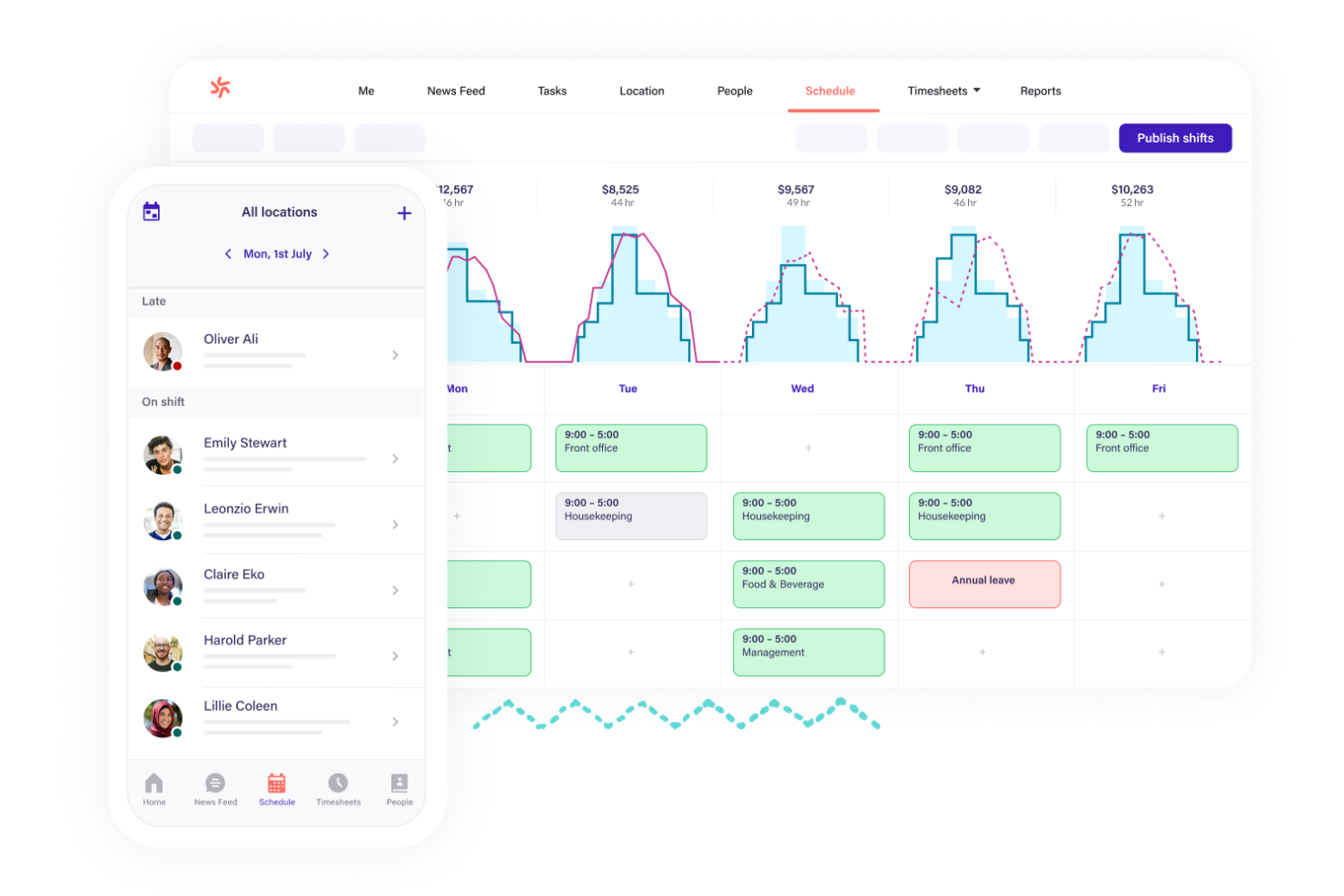
Deputy is a workforce management platform for hospitality teams that helps you handle employee scheduling, attendance, and time tracking, break management, and labor compliance.
Who Is Deputy Best For?
Hospitality businesses with hourly staff who need mobile-based scheduling and attendance management across multiple venues or departments.
Why I Picked Deputy
I picked Deputy as one of the best because I rely on its open shift marketplace for instant shift swapping, built-in schedule conflict warnings, and mobile self-service so staff can manage availability without manager intervention.
Deputy Key Features
- Time and attendance capture: Collect clock-in and clock-out data with geolocation or facial recognition.
- Break planning: Schedule and record employee breaks to support compliance.
- Payroll export: Export timesheet data directly from the scheduling software into major payroll systems.
- Task auto-allocation: Match staff to open shifts automatically based on availability, qualification, and fatigue rules.
Deputy Integrations
Deputy offers native integrations with ADP, Gusto, QuickBooks Online, Xero, Square, BambooHR, Paychex, Netsuite, CloudPayroll, MYOB, and Zapier. An API is available for custom integrations.
Pros and Cons
Pros:
- Automated scheduling based on forecasted demand
- Compliance tools flag overtime and breaks
- Mobile app supports instant shift swapping
Cons:
- Occasional syncing delays with payroll exports
- Advanced reporting requires higher tiers

Planday
Best for hourly communication tools
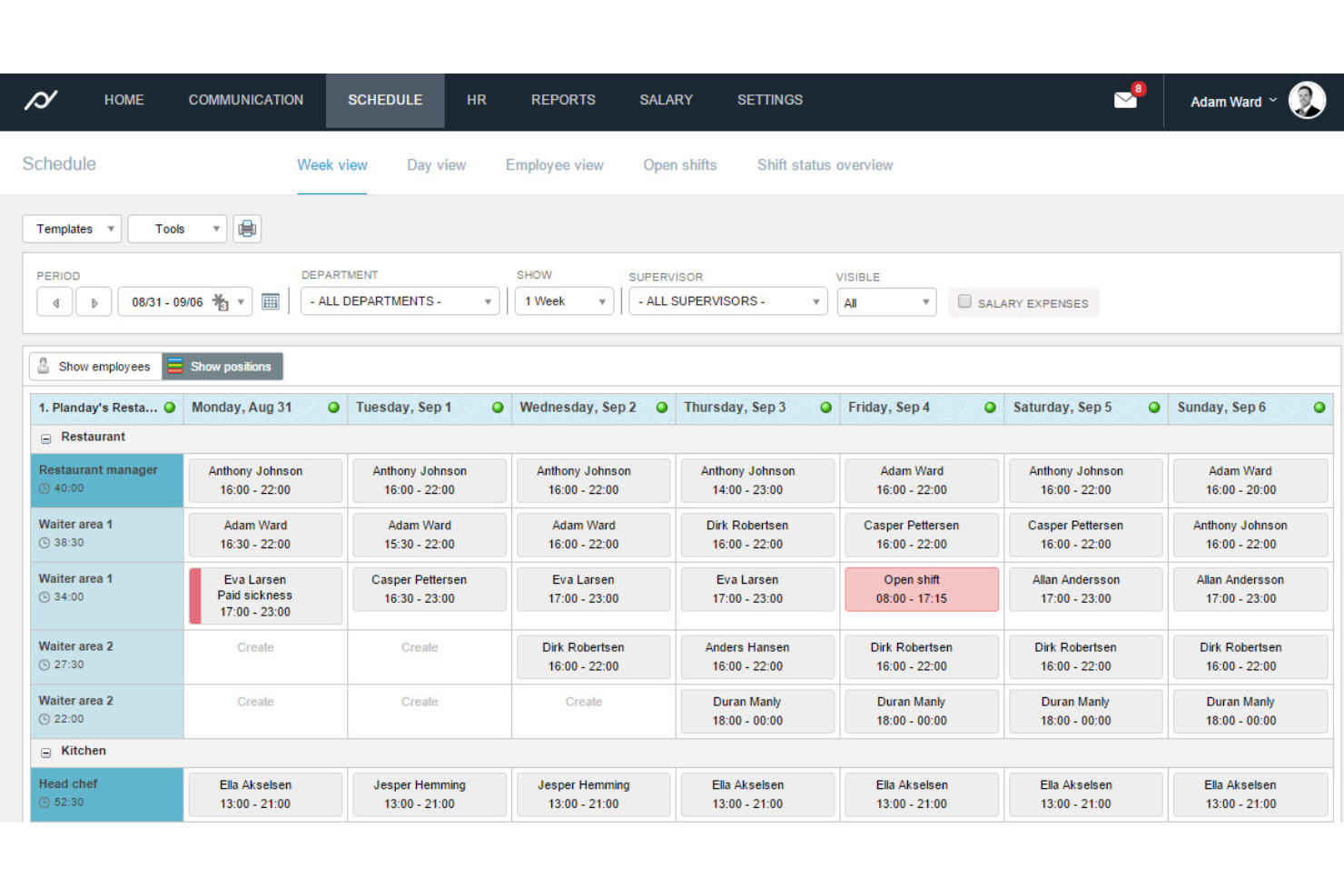
Planday is a hospitality workforce management platform with employee scheduling, instant messaging, shift trading, hours tracking, and real-time staff availability management.
Who Is Planday Best For?
Shift-based hospitality teams that rely on rapid staff communication and flexible scheduling across hotels, bars, or restaurants.
Why I Picked Planday
I picked Planday as one of the best because I rely on its in-app messaging and notifications to quickly communicate shift updates and announcements to my hourly hospitality staff. I use its group chat and direct messaging features daily to keep everyone on the same page.
Planday Key Features
- Employee scheduling: Create, publish, and manage shift schedules in a drag-and-drop interface.
- Time clock: Staff can clock in and out via the mobile app.
- Absence management: Track time-off requests and vacation approvals for all locations.
- Team communication: Send in-app direct or group messages, announce schedule updates, and allow staff to request shift swaps.
Planday Integrations
Planday offers native integrations with payroll and HR tools like Xero, QuickBooks Payroll, Lightspeed, Tenzo, Flow, and Sage, and provides an API for custom integrations.
Pros and Cons
Pros:
- Automated compliance with break and labor rules
- Real-time updates for staff across locations
- Shift swapping and claiming by employees
Cons:
- Payroll integration setup is complex
- Reporting customization is limited for large teams
UKG Pro
Best for enterprise labor analytics

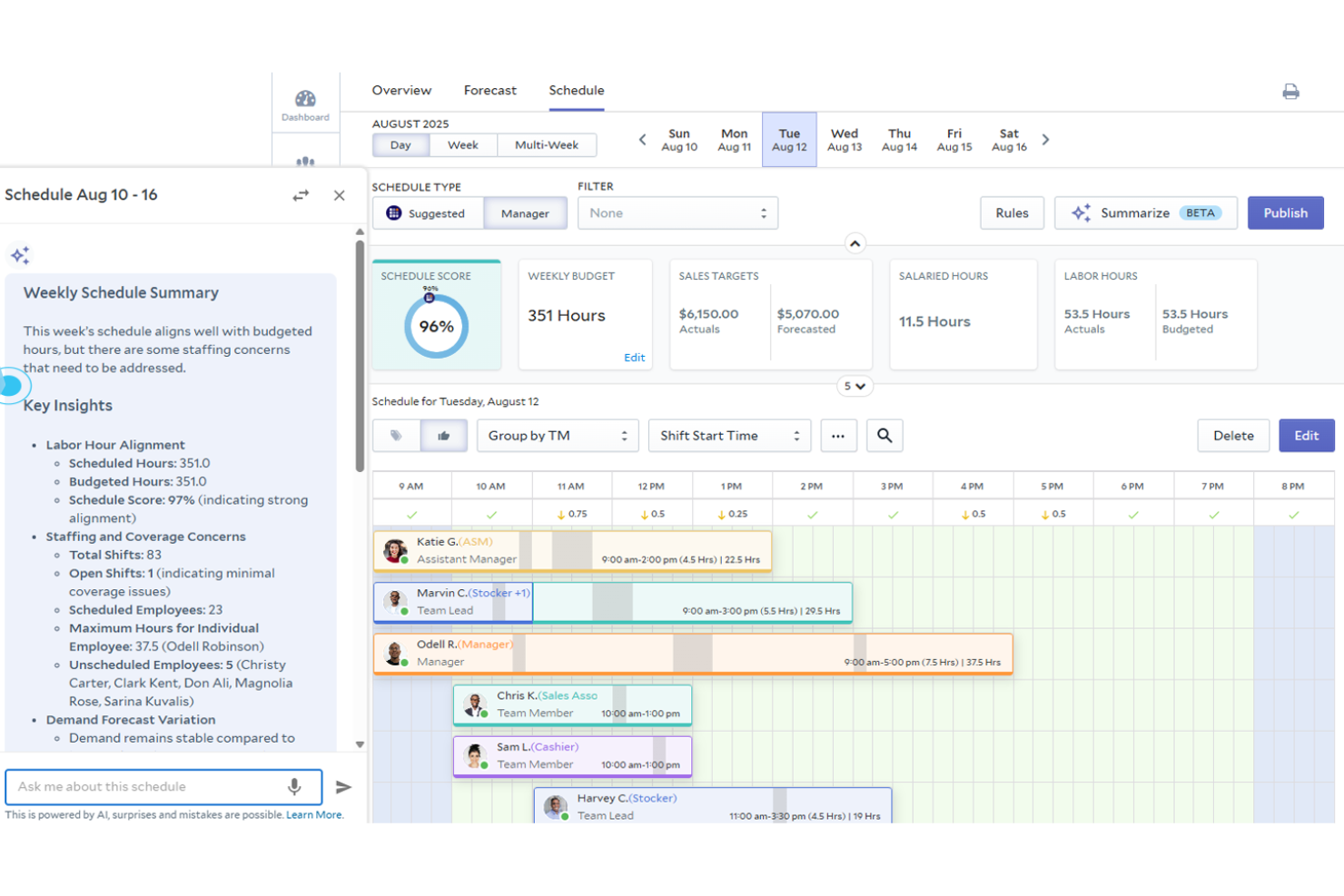
UKG Pro is an enterprise workforce management platform for hospitality that centralizes scheduling, attendance, payroll, HR, time tracking, and analytics in one system.
Who Is UKG Pro Best For?
Large hospitality enterprises with complex labor structures and a need for advanced workforce analytics across multiple locations.
Why I Picked UKG Pro
I picked UKG Pro as one of the best because I can drill into granular labor analytics and visualize real-time workforce KPIs for my hospitality properties. I rely on its forecasting, compliance dashboards, and mobile insights for enterprise-level operational decisions.
UKG Pro Key Features
- Automated scheduling: Build and adjust shift schedules with templates tailored for the hospitality industry.
- Time clock solutions: Capture employee punches through biometric and mobile devices.
- Multi-location support: Manage labor, compliance, and data across numerous hospitality sites.
- Advanced workforce analytics: Track real-time KPIs, monitor labor costs, and generate compliance reports across enterprise operations.
UKG Pro Integrations
UKG Pro offers more than 80 native integrations, including the Microsoft ecosystem, 15Five, Decusoft, Intuit Turbo Tax, Workstream, Accurate Background, and more. An API is available for custom integrations.
Pros and Cons
Pros:
- Supports union contract management and scheduling
- Advanced compliance tracking for wage and hour rules
- Labor forecasting adapts for peak hospitality seasons
Cons:
- Occasional delays with customer service response
- Creating custom reports has a steep learning curve

Legion
Best for AI schedule automation
Legion is a workforce management platform for hospitality businesses, offering AI-powered schedule automation, labor optimization, employee self-service tools, demand forecasting, and time tracking.
Who Is Legion Best For?
Hospitality operators and workforce managers at multi-location restaurants or hotels looking to automate shift scheduling and optimize labor costs.
Why I Picked Legion
I picked Legion because I rely on its AI-powered schedule automation to create labor-optimized shifts that adjust to real-time demand. I use its demand forecasting to match staffing with expected guest traffic, and the employee self-service app to handle shift swaps.
Legion Key Features
- Automated compliance tracking: Tracks labor law and break compliance automatically for every shift.
- Mobile time clock: Lets employees clock in and out using mobile devices, reducing the need for physical hardware.
- Shift bidding: Allows staff to express interest in open shifts directly in the app.
- Demand forecasting: Uses machine learning to predict labor needs based on historical sales, guest traffic, and weather data.
Legion Integrations
Legion offers native integrations with ADP, SAP SuccessFactors, and Workday, and provides an API for custom integrations.
Pros and Cons
Pros:
- Employee mobile app for schedule management
- Real-time compliance alerts for hospitality labor laws
- AI-driven auto-scheduling saves manual effort
Cons:
- Reporting features could be more efficient
- Implementation phase is somewhat disorganized
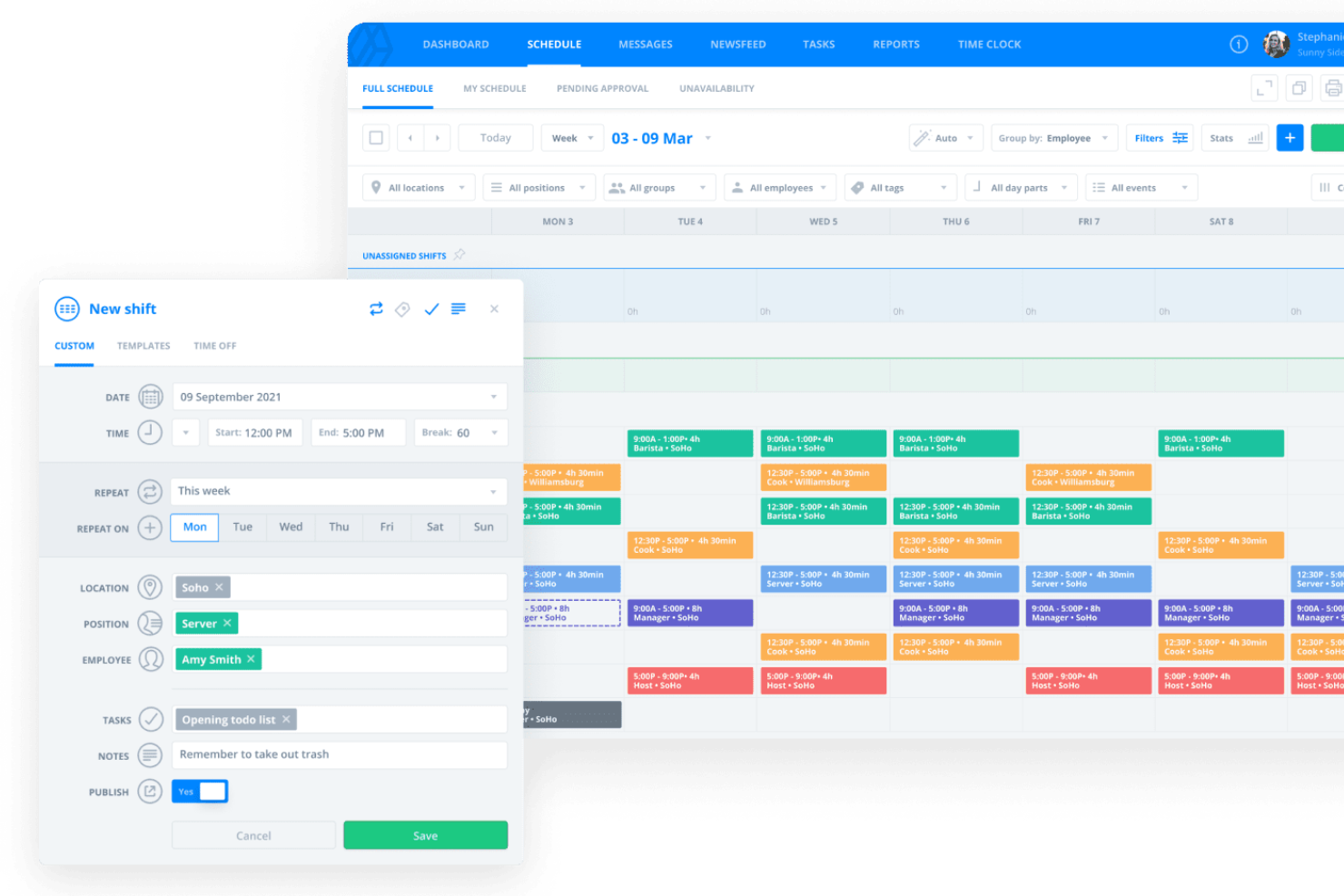
Sling is a workforce management platform for hospitality teams that blends shift scheduling, team messaging, time clock, task assignment, and labor cost controls in one unified system.
Who Is Sling Best For?
Hospitality managers who need to coordinate staff and scheduling across multiple venues or restaurant locations.
Why I Picked Sling
I picked Sling as one of the best because I rely on its multi-location dashboard to schedule, communicate, and manage staffing across all my hospitality venues at once. I use its location filters and bulk shift assignments to quickly distribute teams where they're needed most.
Sling Key Features
- Time clock: Capture employee work hours with mobile or kiosk clock-ins.
- Labor cost estimation: Monitor estimated labor costs directly alongside your schedule.
- Shift swapping: Let employees swap approved shifts within the app.
- Task management: Assign specific duties to employees or shifts and monitor completion status in real time.
Sling Integrations
Sling offers native integrations with Gusto, Square, Harbortouch, Toast, and POSitouch and provides an API for custom integrations.
Pros and Cons
Pros:
- Manages compliance with state break rules
- Lets staff swap and claim open shifts
- Broadcasts announcements to all hospitality locations
Cons:
- Limited reporting customization for larger operations
- Mobile app suffers from sync delays

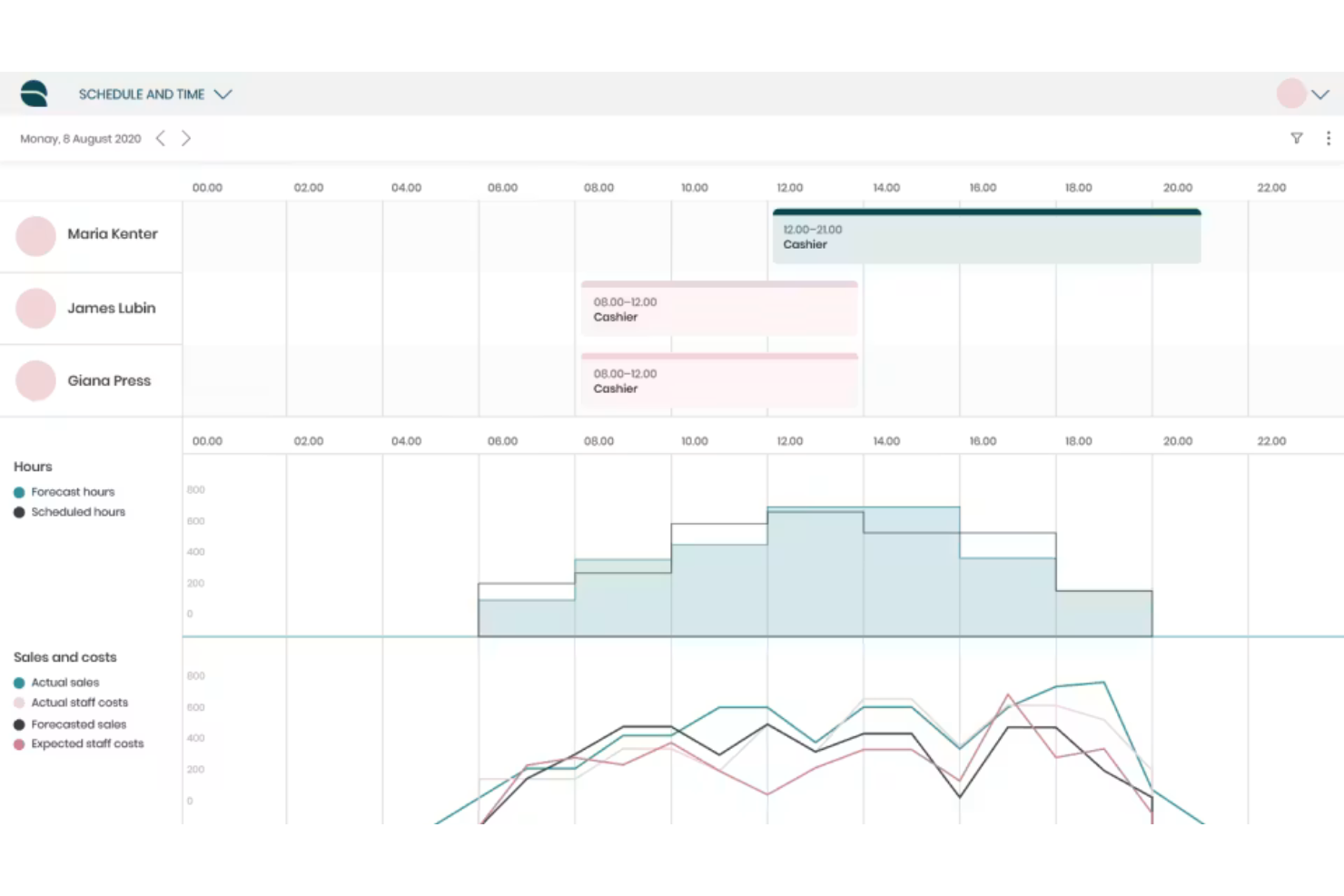
Quinyx is a workforce management platform for hospitality businesses that provides scheduling, time reporting, demand forecasting, mobile shift management, and labor cost controls.
Who Is Quinyx Best For?
Quinyx is a strong fit for hospitality companies managing large, distributed teams that need to control labor costs and optimize workforce planning.
Why I Picked Quinyx
I picked Quinyx because I use its demand forecasting engine and labor optimization features to manage fluctuating guest volumes. Its budget controls and real-time cost tracking help me keep staffing aligned with our financial targets.
Quinyx Key Features
- Mobile app for employees: Lets hospitality staff view schedules, swap shifts, and request time off using their phones.
- Automated scheduling rules: Applies company or region-specific labor regulations to shift assignments.
- Real-time attendance tracking: Tracks employee check-ins and absences live for managers.
- Demand forecasting: Uses AI to predict staffing needs based on historical sales, sales forecasts, and external variables.
Quinyx Integrations
Quinyx offers native integrations with SAP SuccessFactors, Deloitte, ADP, Sage, EY, Paylocity, and Paychex, and provides an API for custom integrations.
Pros and Cons
Pros:
- Mobile app enables on-the-go schedule changes
- Real-time compliance alerts for hospitality labor laws
- AI forecasting adjusts instantly to demand shifts
Cons:
- Reporting options lack customization flexibility
- Leave management system acts inconsistently

Unifocus
Best for real-time labor forecasting
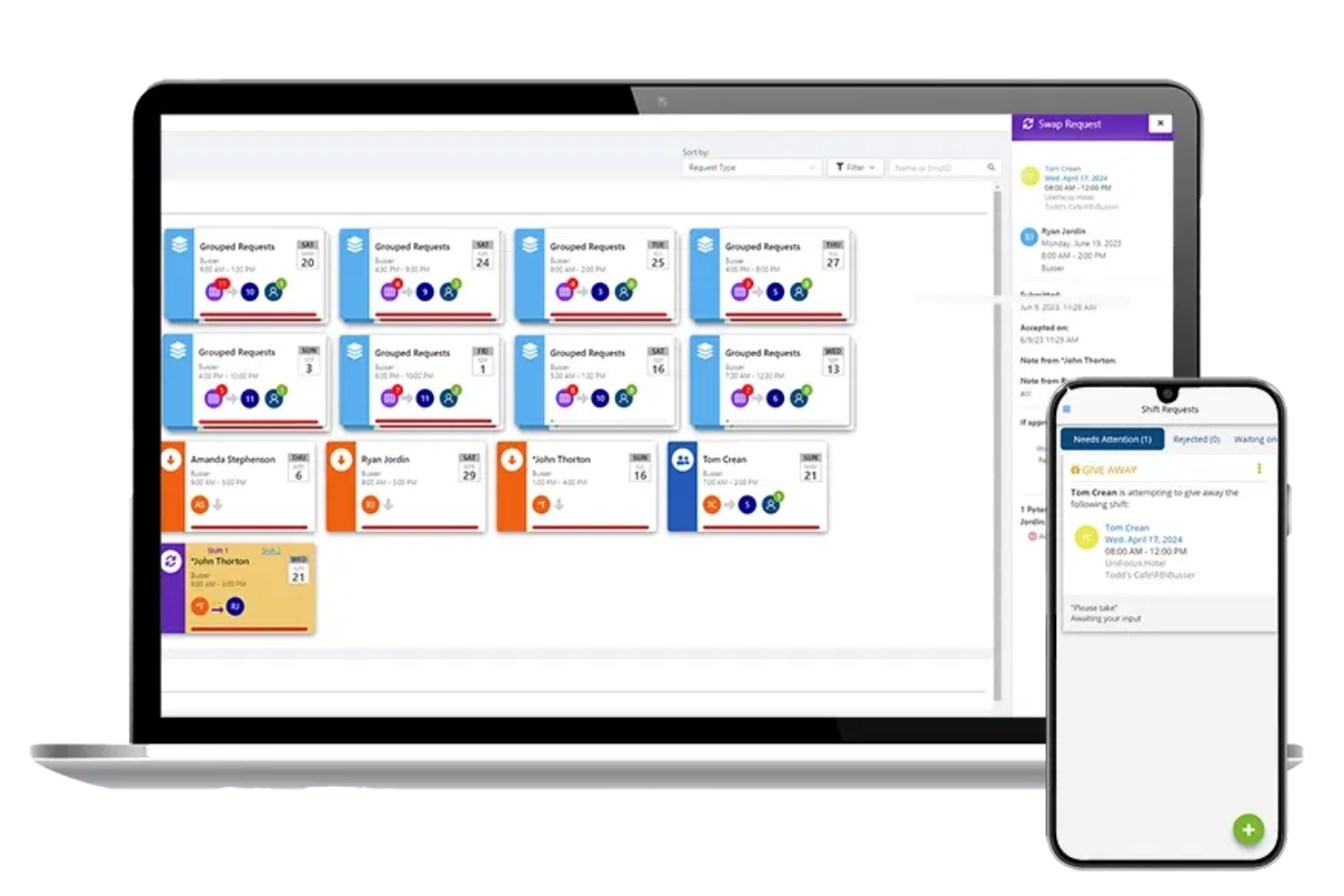
Unifocus is a hospitality workforce management solution that brings together scheduling, labor management, attendance tracking, budgeting, and analytics in a centralized platform.
Who Is Unifocus Best For?
Hotel operators and hospitality managers who need dynamic labor management and scheduling across multiple locations or properties.
Why I Picked Unifocus
I picked Unifocus because I can quickly adjust schedules and see updated labor forecasts as guest counts change in real time. I rely on its automated demand-based scheduling and mobile manager app when staffing for events or fluctuating occupancy.
Unifocus Key Features
- AI-powered labor standards builder: Automatically creates staffing benchmarks based on hotel type and business rules.
- Mobile employee self-service portal: Lets frontline staff view schedules, swap shifts, and request time off.
- Geofenced time clock: Ensures employees clock in and out only from designated work locations.
- Real-time labor management and forecasting: Adjusts schedule forecasts dynamically based on live hotel occupancy and guest count changes.
Unifocus Integrations
Unifocus offers native integrations with ADP, Workday, Paylocity, HotelKey, Infor, Oracle, Ceridian, Iris, Houdini, and more, and provides an API for custom integrations.
Pros and Cons
Pros:
- Manages union contracts and collective bargaining rules
- Automated compliance with wage and hour regulations
- Labor forecasting adapts for peak hospitality demand
Cons:
- User interface feels quite dated
- Occasional delays in customer service responses
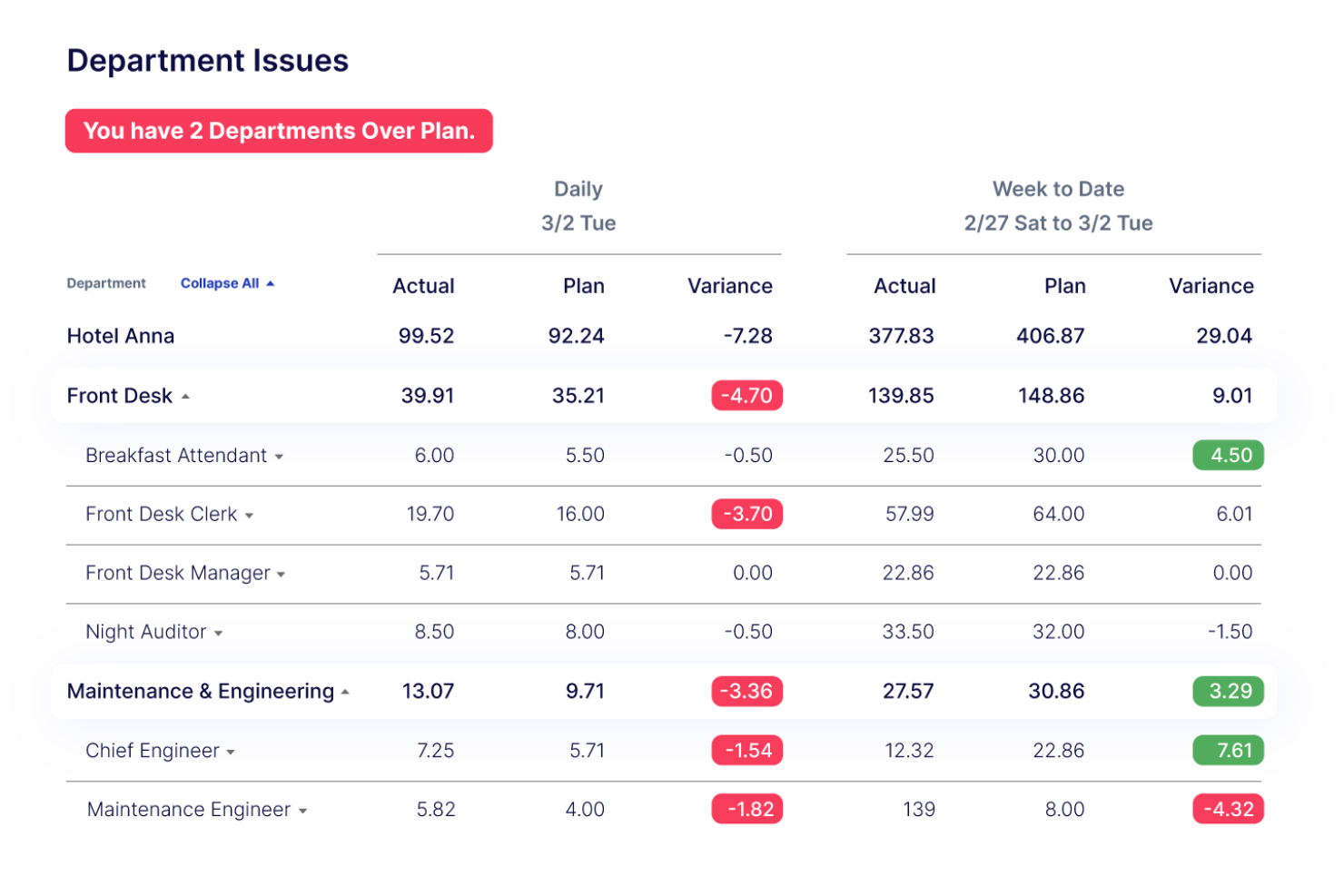
Actabl is a workforce management software for hospitality that combines labor scheduling, time and attendance, payroll data handling, and operational reporting with in-depth business analytics.
Who Is Actabl Best For?
Actabl is a strong choice for hospitality operators who want to deeply analyze workforce trends and optimize labor across multiple hotel or resort locations.
Why I Picked Actabl
I picked Actabl because I use its labor dashboards and custom KPI reporting to turn property-level staffing and performance data into concrete action plans. Its live metrics and deep analytic tools make it my go-to for surfacing operational data insights.
Actabl Key Features
- Task management module: Assign daily responsibilities to staff with trackable checklists.
- Automated scheduling engine: Build schedules using labor standards and real occupancy data.
- Mobile manager dashboard: Approve time-off, view attendance, and communicate from anywhere.
- Labor cost analytics: Track real-time labor spend against hotel performance metrics and property budgets.
Actabl Integrations
Actable offers native integrations with ADP, Oracle, Ceridian, HotelKey, Infor, UKG, Paychex, Salesforce, SAP, Sage, and more. Actabl also provides an API for custom integrations.
Pros and Cons
Pros:
- Mobile scheduling and approvals for managers
- Customized KPI dashboards built for hospitality
- Labor forecasting adjusts to special event patterns
Cons:
- Onboarding process can be lengthy
- Mobile app interface lacks speed
Other Workforce Management Software for Hospitality
Here are some additional workforce management software for hospitality options that didn’t make it onto my shortlist, but are still worth checking out:
- Fourth (HotSchedules)
For rapid restaurant staff scheduling
- Harri
For talent lifecycle management
- When I Work
For mobile shift scheduling
- Parim
For multi-location roster changes
- ADP Workforce Now
For native payroll integration
- 7shifts
For labor compliance tracking
- Homebase
For small team tip pooling
- Connecteam
For deskless task management
- Ubeya
For temporary agency management
- Workforce.com
For real-time coverage analytics
- Agendrix
For hotel-specific scheduling
- M3
For hotel financial reporting


How I Evaluate Workforce Management Software for Hospitality
I split my evaluation into core hospitality must-haves—like occupancy-based labor forecasting and tipped wage tracking—and differentiators that separate strong contenders from the rest.
Core Functionality (Table Stakes For This List)
When I'm selecting tools for my list, I rank each one on a scale from 0 (does not offer the functionality) to 5 (excels in this area) for each core functionality listed below. Then, I calculate the tool's total score into a percentage. Each tool needs to achieve a minimum total score of 65% to be considered for inclusion.
- Shift Scheduling: I look for role- and department-based scheduling that accounts for hospitality realities like split shifts, rotating stations, and cross-training between front desk and F&B.
- Time & Attendance Tracking: Each tool should handle clock-in/clock-out for hourly workers with support for tipped wages, overtime calculations, and geofenced or biometric options.
- Labor Demand Forecasting: I evaluate whether the platform can tie staffing predictions to occupancy rates, reservation volumes, or cover counts rather than relying on static headcount budgets.
- Labor Compliance Tools: The tool should enforce break rules, overtime thresholds, and scheduling regulations so managers at busy venues aren't left manually tracking rest periods.
- Employee Self-Service App: I check for a mobile app where frontline staff can view schedules, swap shifts, set availability, and request time off without calling a manager mid-service.
- Payroll & POS Integration: Strong contenders connect to hospitality POS platforms like Toast or Micros and popular payroll providers so labor data flows without manual re-entry.
Once I have a list of tools that meet the criteria, I consider what sets each platform apart.
Differentiating Factors (What Sets Vendors Apart)
Here's how I compare and contrast different vendors:
Standout Features
Tip management is a big differentiator—I look for tools that automate tip pooling and distribution so F&B managers aren't stuck reconciling spreadsheets after every shift. Multi-property management matters for hotel groups and restaurant chains that need to share floating staff across locations. I also evaluate labor cost analytics, specifically whether a platform can benchmark labor spend against sales-per-labor-hour or RevPAR in real time. For high-turnover environments, built-in applicant tracking and onboarding can save HR teams hours during seasonal hiring surges.
Beyond Features
Hospitality-specific integrations are one of the first things I check—a tool that connects natively to PMS and POS platforms means managers aren't manually importing labor data after each shift. I also evaluate the mobile experience, since housekeepers and servers rarely sit at a desk. Offline functionality and multilingual support matter when your workforce is diverse and spread across low-connectivity areas like kitchens or basements. Scalability is another key factor, especially whether a platform can handle seasonal staffing spikes without forcing an upgrade or slowing down during peak booking periods.
How to Choose Workforce Management Software For Hospitality
It’s easy to get bogged down in long feature lists and complex pricing structures. To help you stay focused as you work through your unique software selection process, here’s a checklist of factors to keep in mind:
| Factor | What to Consider |
|---|---|
| Scalability | Will the software handle your growth if you add more properties or team members? Ask about user limits and multi-property support. |
| Integrations | Does the tool connect with your payroll, HRIS, and PMS? Check for smooth data exchange with your most important existing systems. |
| Customizability | Can scheduling rules, roles, and workflows match your specific brand standards or property types? Avoid rigid, one-size-fits-all tools. |
| Ease of use | Is the interface intuitive for managers and hourly staff? Pilot with a mixed group to spot hidden workflow blockers or confusion. |
| Implementation and onboarding | How long will it take to get up and running? Find out what setup services, data migration, and early-stage training resources are offered. |
| Cost | What is the total cost, including user licenses, support, and add-on modules? Request a full quote and model your expected monthly fee. |
| Security safeguards | Does the system meet your company’s data privacy and access control requirements? Ask about SOC2, GDPR, or industry-specific standards. |
| Support availability | Is live support available during nights and weekends when hospitality staff work most? Ensure you have help when you’re most likely to need it. |
What Is Workforce Management Software For Hospitality?
Workforce management software for hospitality refers to digital tools that help hotels, restaurants, and similar businesses schedule staff, track time and attendance, and manage daily labor tasks.
These platforms are designed to address the unique shift patterns, compliance needs, and seasonal demands found across the hospitality industry.
Features
Here are the core features any great workforce management software for hospitality should have:
- Shift scheduling: Create, assign, and adjust work shifts for employees based on property needs, seasonal demand, or last-minute changes to ensure optimal coverage.
- Time and attendance tracking: Monitor clock-ins, clock-outs, overtime, breaks, and absences in real time to maintain accurate records and payroll compliance.
- Mobile access: Allow managers and staff to view schedules, swap shifts, or request time off directly from their smartphones, supporting a dynamic, on-the-go workforce.
- Labor budgeting: Set, track, and alert for labor cost targets by department, location, or day, so you manage expenses in line with occupancy or forecasted revenue.
- Compliance management: Automate required rest periods, overtime rules, and local labor law requirements to reduce violation risks and simplify audits.
- Employee self-service: Enable staff to update availability, request time off, and view their upcoming shifts, improving engagement and reducing administrative overhead.
- Real-time reporting: Access dashboards and exportable reports with metrics on labor costs, staffing efficiency, and schedule adherence to inform real-time insights and decisions.
- Role-based permissions: Assign different access levels to managers, supervisors, and employees, ensuring sensitive information is only available to authorized users.
- Notifications and alerts: Set up automated messages for new schedules, upcoming shifts, overtime warnings, or shift changes to keep everyone informed.
- Multi-location support: Manage schedules, attendance, and policies across multiple venues or departments from a single, centralized system.
Benefits
Implementing workforce management software for hospitality provides several benefits for your team and your business. Here are a few you can look forward to:
- Improved staffing accuracy: Smart scheduling and forecasting tools help you match staff levels to guest demand, reducing both understaffing and overstaffing.
- Labor cost control: Real-time budgeting and reporting support proactive oversight of overtime and labor expenses against your budget.
- Simplified compliance: Automated monitoring of labor laws, overtime, and rest requirements lowers the risk of compliance violations during audits.
- Greater employee satisfaction: Self-service features for shift swaps, time-off requests, and schedule access give staff more control and flexibility in their work lives.
- Faster schedule management: Managers can build, share, and adjust schedules quickly using drag-and-drop tools and instant alerts, even across multiple locations.
- Centralized workforce visibility: Dashboards and analytics bring all staffing and labor data into one place, making it easier to spot trends and plan ahead.
- Enhanced communication: Automated notifications and mobile app access keep managers and team members on the same page about schedule changes or important updates.
Costs and Pricing
Selecting workforce management software for hospitality requires an understanding of the various pricing models and plans available. Costs vary based on features, team size, add-ons, and more. The table below summarizes common plans, their average prices, and typical features included in workforce management software for hospitality solutions:
Plan Comparison Table for Workforce Management Software for Hospitality
| Plan Type | Average Price | Common Features |
|---|---|---|
| Free Plan | $0 | Basic shift scheduling, limited time tracking, simple employee self-service tools, and email support. |
| Personal Plan | $5-$10/user/month | Advanced scheduling, mobile app access, staff availability management, basic reporting, and chat or ticket support. |
| Business Plan | $10-$25/user/month | Multi-location management, labor budgeting, real-time reporting, compliance tools, integrations with payroll, and customizable alerts. |
| Enterprise Plan | $25-$50/user/month | Custom workflows, dedicated account management, advanced security controls, API access, tailored onboarding, and priority support. |
FAQs
Here are some answers to common questions about workforce management software for hospitality:
How does workforce management software help manage seasonal staffing changes?
Workforce management software lets you create flexible schedules and quickly adjust labor based on seasonal demand. This helps you handle busy periods, keep costs in check, and ensure enough staff are available when guest traffic increases or decreases.
Can workforce management software for hospitality track employee compliance with labor laws?
Yes, most platforms can automatically monitor overtime, rest periods, and age-related requirements. This is important in hospitality because of varied shift patterns and strict wage laws, making compliance tracking much easier for HR and operations teams.
Is workforce management software suitable for hotels with multiple locations?
Yes, these tools often include multi-location support. You can manage schedules, attendance, and staffing needs across several properties from a single dashboard, which simplifies management for hotel groups and franchises.
What types of integrations should I look for in hospitality workforce management software?
Look for integrations with payroll systems, HRIS, property management systems (PMS), time clocks, and communication tools. Smooth integrations reduce manual data entry and improve overall efficiency.
How do staff typically access their schedules in these platforms?
Most solutions offer employee mobile apps or web portals. Staff can view schedules, request time off, and swap shifts on their own devices, which cuts down on administrative work and improves communication.