

En iyi yapay zekâ destekli HRIS platformları, bordro, işe alım ve çalışan bağlılığı gibi geleneksel İK yönetimi işlevlerini akıllı otomasyon ve öngörücü analizlerle bir araya getirerek zamandan tasarruf etmenize ve daha bilinçli kararlar almanıza yardımcı olur.
Manuel süreçler ve parçalı sistemler, İK ekiplerini yavaşlatabilir ve maliyetli hatalara yol açabilir. Yapay zekâ destekli bir HRIS, iş akışlarını otomatikleştirerek, iş gücü eğilimlerini analiz ederek ve hatta gelecekteki ihtiyaçları öngörerek bu görevleri kolaylaştırır; böylece tepkisel yönetimden proaktif insan stratejisine geçebilirsiniz.
İK yazılımlarını yıllardır test edip incelememe dayanarak, sezgisel, ölçeklenebilir ve hem verimliliği hem de çalışan deneyimini artırmak üzere tasarlanmış en iyi AI HRIS çözümlerini derledim.
Bu kılavuzda, yönetim yükünü azaltan, karar alma süreçlerini geliştiren ve iş gücünüzün sağlığı ile performansı hakkında uygulanabilir içgörüler sunan platformları bulacaksınız.
Why Trust Our Software Recommendations
6,700+
Reviews
20
Industry experts
16+
Evaluation factors
14
Years
Our team has been testing and reviewing software since 2012. As HR experts ourselves, we know how difficult—and important—it is to choose the right software.
For this guide, we evaluated tools using hands-on testing and independent research, scoring tools using our selection criteria. We also draw on insights from industry thought leaders and practicing HR experts.
Our reviews reflect our human editorial judgment, not a sales pitch.
Expert reviewers:
- Phil GrayCOO
 Kim BehnkeHR Tech Editor & Analyst
 Josh BarkerPeople Ops Manager

AI HRIS Karşılaştırma Tablosu
Bu karşılaştırma tablosu, en iyi AI HRIS seçimlerimin fiyatlandırma ayrıntılarını özetlemektedir:
Sorted by: Default
| Tool | Starting Price | Website | |
|---|---|---|---|
Best for complex, multi-country scenarios | 4.8 out of 5 | $5/user/month Free demo available | Website |
Best for integrated time tracking | 4.6 out of 5 | $79/user/month Free demo available | Book Demo |
Best for customizable employee workflows | 4.3 out of 5 | $99/month Free demo available | Website |
Best as AI for business | 4.4 out of 5 | $8/user/month Free trial + Free demo available | Website |
Best for performance reviews | 4.8 out of 5 | €4/user/month 14-day free trial + demo available | Website |
Best for AI-powered HR automation | 4.3 out of 5 | Pricing upon request Free demo available | Website |
Best with AI-powered in-platform assistants | 4.5 out of 5 | Pricing upon request Free demo available | Website |
Best with custom people analytics dashboards | 4.8 out of 5 | $2/user/month Free plan + free demo available | Website |
Best for AI-driven performance management | 4.7 out of 5 | Pricing upon request 14-day free trial + free demo available | Website |
Best for AI-driven workforce planning | 4.4 out of 5 | Pricing upon request Free demo available | Website |


En İyi AI HRIS İncelemesi
Aşağıda, kısa listeme giren en iyi AI HRIS çözümlerine ilişkin ayrıntılı özetlerimi bulabilirsiniz. İncelemelerim, size en uygun seçeneği bulmanıza yardımcı olmak için her aracın temel özelliklerine, artılarına ve eksilerine, entegrasyonlarına ve ideal kullanım alanlarına ayrıntılı bir bakış sunar.& eksiler
 Best for complex, multi-country scenarios
- Free demo available
- From $5/user/month
Visit WebsiteCustomer Rating:4.8/5
Deel's centralized HRIS dashboard lets you view, filter, and manage global employees and their payroll status in one place. Deel HR is an AI-powered HRIS platform designed for managing global teams, offering features like multi-country compliance, payroll, onboarding, and document management.
Who Is Deel HR Best For?
Deel HR is a strong fit for HR teams at mid-size to enterprise companies managing employees and contractors across multiple countries.
Why I Picked Deel HR
I've included Deel HR in my top picks because it's one of the few HRIS platforms genuinely built for global complexity from the ground up. Where most HRIS tools treat international compliance as an add-on, Deel HR bakes country-specific employment rules, localized contracts, and local law alerts directly into every workflow across 150+ countries. I particularly like Deel AI, which is trained by HR and compliance experts across those same 150+ countries and gives my team instant answers on local labor laws, payslips, and policy questions without filing a support ticket. The platform also handles multiple worker types—employees, contractors, and EOR workers—all within a single system, so when my team is managing headcount across six different countries with different employment structures, everything stays in one place.
Deel HR Key Features
- Workforce planning: Forecast roles, costs, and headcount growth using live workforce and hiring data instead of disconnected spreadsheets.
- Performance management: Run review cycles, set goals, and build learning and development paths for employees across your global team.
- Automated workflow builder: Create onboarding, offboarding, and compliance workflows without coding, including country-specific notifications for local policy changes.
- Anonymous reporting: Built-in whistleblowing tools let employees report concerns securely, supporting compliant and people-centered HR practices.
Deel HR Integrations
Integrations include Google Workspace, QuickBooks, NetSuite, FaceUp, Zoom, Assembly, and more.
Pros and Cons
Pros:
- Centralized data makes auditing simple
- Strong global compliance and labor law coverage
- Automates complex HR workflows efficiently
Cons:
- Limited customization for smaller teams
- Pricing can rise with added modules
 Best for integrated time tracking
- Free demo available
- From $79/user/month
Visit WebsiteCustomer Rating:4.6/5
Combined payroll, benefits, PTO requests, company directory, and employee self-service features displayed across desktop and mobile app interfaces. Justworks is an HRIS platform that combines payroll, benefits administration, compliance management, time tracking, and employee self-service tools for businesses managing HR processes in one system.
Who Is Justworks Best For?
Justworks is a good fit for small to midsize businesses that need a unified HRIS for payroll, benefits, and compliance across multiple states.
Why I Picked Justworks
I picked Justworks as one of the best because I can manage time tracking directly within the HRIS, which keeps payroll and attendance data in sync. My team uses the built-in time tracking to monitor hours, approve timesheets, and ensure accurate pay runs. I like that I don’t have to rely on third-party tools for tracking employee hours—everything is handled in one place.
Justworks Key Services
- Automated payroll processing: Run payroll for salaried and hourly employees with automated tax filings.
- Benefits administration: Manage health insurance, 401(k), and other employee benefits from one dashboard.
- Multi-state compliance tools: Access resources and support for handling HR compliance across different states.
- HR document management: Store, organize, and share HR documents securely within the platform.
Justworks Integrations
Native integrations are not clearly documented. Justworks offers an API for custom integrations.
Pros and Cons
Pros:
- Built-in HR document management and e-signatures
- Access to large-group health insurance plans
- Integrated time tracking for hourly employees
Cons:
- No built-in performance management features
- Benefits administration restricted to U.S. employees
Learn more about Justworks: Best for customizable employee workflows
- Free demo available
- From $99/month
Visit WebsiteCustomer Rating:4.3/5
Paycor performance management dashboard displaying employee objectives, reviews, recognition tools, and mobile team member feedback features. Paycor is an AI-driven HR and payroll platform that covers the full employee lifecycle, from recruiting and onboarding through performance management, scheduling, and people analytics.
Who Is Paycor Best For?
Paycor is a strong fit for midsize to enterprise HR teams that need a unified platform to manage payroll, compliance, and the full employee lifecycle without juggling multiple disconnected systems.
Why I Picked Paycor
I've included Paycor in my top picks because I love how far its configurable workflow tools go across the entire employee lifecycle. The system automation layer lets you set up automated workflows, reminders, and notifications for everyday HR tasks, so nothing falls through the cracks when a new hire joins or an employee changes roles. I also really like the Customer Sandbox, which lets you test workflow configurations and security setups without touching live data—that's a genuinely useful feature when you're rolling out process changes across a large team.
Paycor Key Features
- Paycor Assistant: An AI-powered tool that uses generative AI to summarize HR documents and surface admin insights directly within the platform.
- AI Smart Sourcing: Automatically identifies and surfaces active, passive, and diverse candidates using AI-driven candidate matching.
- Workforce analytics dashboards: Pre-built dashboards that track turnover, headcount, gender pay equity, and D&I metrics in real time.
- Performance review tools: Structured review cycles with AI-assisted sentiment analysis built into the feedback workflow.
Paycor Integrations
Paycor offers 320+ marketplace integrations through its Paycor Marketplace, including connectors to Microsoft Entra ID, Okta, Google Workspace, Greenhouse, iCIMS, Jira, ServiceNow, NetSuite, and Oracle. Zapier is not currently available as a native integration, but Paycor provides 140+ APIs through its Developer Tools for custom integrations.
Pros and Cons
Pros:
- Multi-state payroll tax auto-filing
- License and certification expiration tracking
- Recruiting through payroll in one platform
Cons:
- Modules feel disjointed across platform sections
- Reporting tools are limited and outdated
 Best as AI for business
- Free trial + Free demo available
- From $8/user/month
Visit WebsiteCustomer Rating:4.4/5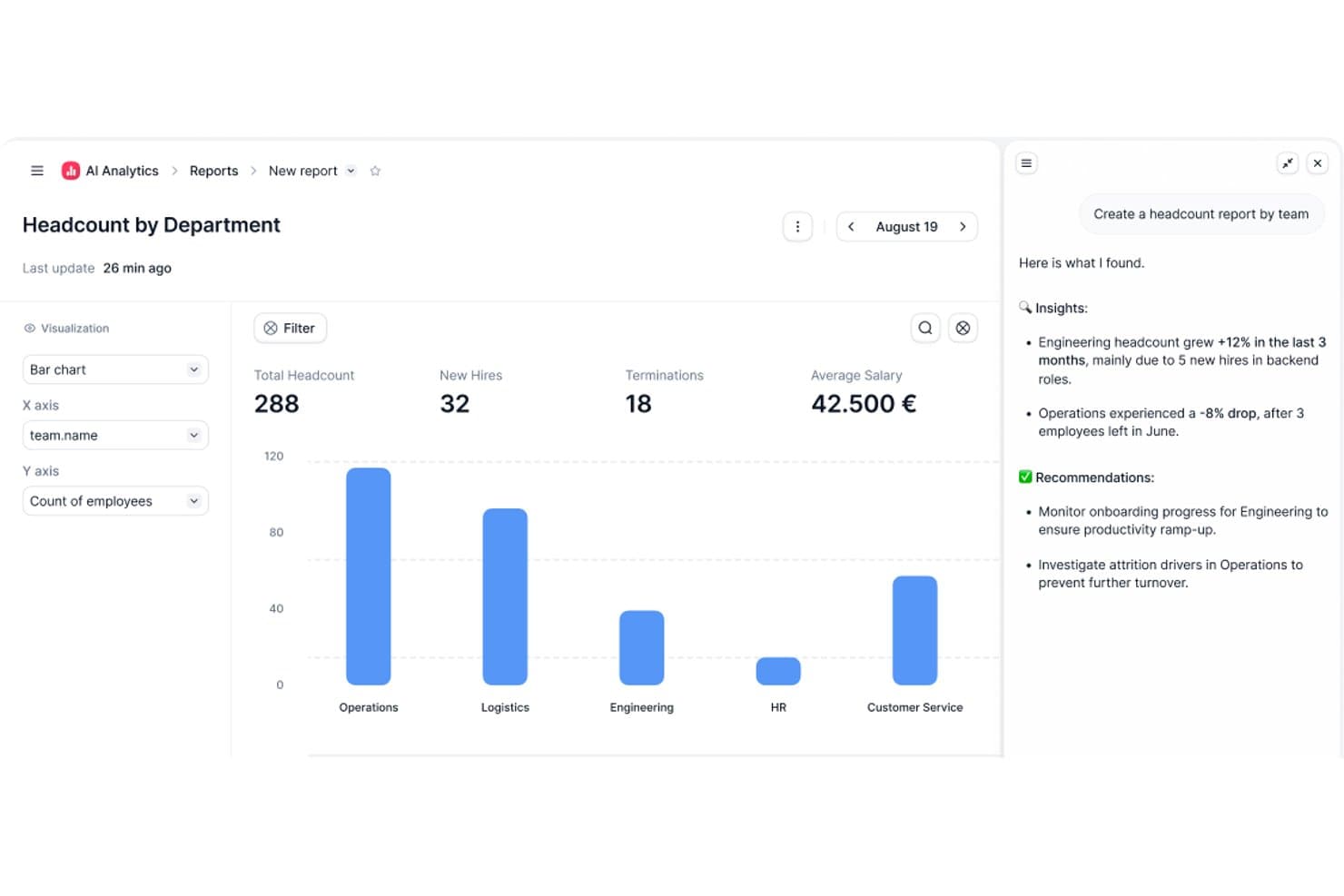
Factorial's AI Analytics generates headcount reports with insights. Factorial is an AI-powered HRIS that connects HR, finance, and IT operations, covering employee records, workflow automation, time tracking, recruitment, and performance management in one platform.
Who Is Factorial Best For?
Factorial suits growing SMBs and mid-market teams that want a single platform connecting HR, finance, and IT operations without managing multiple disconnected tools.
Why I Picked Factorial
I picked Factorial as one of the best because its AI for business positioning isn't just marketing language—One, its AI agent, actively works across HR, finance, and IT data to do things like answer employee questions about leave policies, flag payroll anomalies, and draft onboarding plans. I especially like that One respects each user's access permissions before responding or acting, so sensitive data stays appropriately gated. It's a genuinely cross-functional AI layer, not just a chatbot bolted onto an HR tool.
Factorial Key Features
- AI-assisted recruitment: Factorial uses AI to generate job descriptions, screen candidates, and summarize resumes within its built-in applicant tracking system.
- 360-degree performance reviews: The platform supports multi-rater feedback, review timelines, automatic participation reminders, and goal and competency tracking.
- Shift scheduling and time tracking: Factorial handles automated and rotating shift management alongside geolocation and QR-code-based time tracking.
- SaaS and IT inventory management: Factorial tracks your software licenses, flags unused ones, and manages device assignments and provisioning from a single dashboard.
Factorial Integrations
Factorial offers marketplace integrations with Microsoft Business Central, SAP Business One, Sage 100, Microsoft Power BI, Okta, Slack, LinkedIn, and Recruitee. It also supports an Open API and Zapier.
Pros and Cons
Pros:
- One answers policy questions with role-based access
- Automates leave, onboarding, and offboarding workflows
- Centralizes employee records and self-service documents
Cons:
- No documented predictive attrition-risk insights
- Workforce reporting offers limited customization
 Best for performance reviews
- 14-day free trial + demo available
- From €4/user/month
Visit WebsiteCustomer Rating:4.8/5
Leapsome boosts performance, engagement, and learning in growing teams. Leapsome is a people enablement platform designed for organizations focused on enhancing employee performance and engagement. It delivers solutions for performance management, employee engagement, and learning, making it suitable for companies aiming to foster a culture of continuous improvement.
Why I picked Leapsome: Leapsome integrates AI across performance management, learning, and engagement to create a continuous cycle of improvement.
Its AI-powered feedback and review tools surface patterns in employee performance, helping leaders spot strengths and growth opportunities. With personalized learning paths and intelligent goal alignment, Leapsome ensures teams stay productive, engaged, and future-ready.
Standout features & integrations:
Features include AI-driven performance reviews with customizable cycles and 360-degree feedback, making evaluations more data-informed and fair. Its intelligent goal-setting and tracking tools align employee efforts with company objectives, while AI-powered engagement surveys reveal morale trends and recommend focus areas. The learning module uses AI to create personalized development plans, addressing skill gaps and fostering continuous growth.
Integrations include Slack, Microsoft Teams, Google Workspace, BambooHR, Personio, Okta, Workday, Greenhouse, LinkedIn, and Microsoft Outlook.
Pros and Cons
Pros:
- Flexible feedback options
- Effective goal tracking
- Customizable review cycles
Cons:
- Requires ongoing user training
- Initial setup complexity
 Best for AI-powered HR automation
- Free demo available
- Pricing upon request
Visit WebsiteCustomer Rating:4.3/5
Paylocity’s AI-powered HRIS dashboard centralizes employee data, payroll, and analytics in one intuitive interface. Paylocity is an AI-powered HRIS platform that brings together payroll, benefits administration, time tracking, talent management, and analytics in one system.
Who Is Paylocity Best For?
Paylocity is a strong fit for mid-sized to large organizations looking for a unified HR and payroll platform with built-in AI capabilities.
Why I Picked Paylocity
Paylocity earns its spot as one of the best on my shortlist because of how deeply AI is woven into the day-to-day HR workflow rather than bolted on as a separate module. I particularly like the AI-powered retention playbook, which surfaces at-risk employees, flags the top risk factors, and generates research-backed action plans—so my team isn't just looking at turnover data after the fact, we're acting on it proactively. I also find the AI Assistant genuinely useful: it handles context-aware, self-service queries from employees using company-specific data, which cuts down on the volume of repetitive HR tickets my team fields. The intelligent scheduling feature, which predicts staffing needs based on historical data and sales goals, is another area where Paylocity's AI does real work rather than just surfacing dashboards.
Paylocity Key Features
- Payroll readiness dashboard: Highlights critical tasks before processing and runs 40+ automated audits to flag potential errors like unexpected pay spikes before you submit payroll.
- Benefits decision support: Gives employees personalized plan recommendations based on their individual preferences and situation, reducing costly elections and open enrollment questions to HR.
- 360-degree performance reviews: Collects multi-source feedback from peers, managers, and direct reports, with built-in sentiment analysis and compensation benchmarks to support data-driven evaluations.
- Automated onboarding checklists: Assigns role-, team-, or location-specific onboarding tasks automatically, with real-time tracking and integrated data flow across recruiting, HR, and payroll.
Paylocity Integrations
Paylocity offers hundreds of native integrations, including Microsoft Entra, Google Workspace, Okta, Indeed, Checkr, Toast, Relias, Aeqium, Branch, Crunchtime, and Blissbook. An API is available for custom integrations.
Pros and Cons
Pros:
- Easy-to-use, mobile-friendly interface
- Delivers predictive analytics and insights
- Automates payroll and HR workflows
Cons:
- Pricing may stretch small budgets
- Advanced setup can take time
 Best with AI-powered in-platform assistants
- Free demo available
- Pricing upon request
Visit WebsiteCustomer Rating:4.5/5
HiBob offers an AI-powered job catalog generator that suggests job profiles, roles, families, and levels based on existing titles and departments. HiBob is an AI-native HRIS that brings together employee records, payroll, performance, compensation, and workforce planning in one platform, with embedded agentic AI and a conversational assistant built across every module.
Who Is HiBob Best For?
HiBob is a strong fit for mid-market companies scaling across multiple geographies who need a single people platform that connects HR, payroll, and workforce planning.
Why I Picked HiBob
HiBob earns its spot as one of the best on my shortlist because the AI isn't a single bolt-on feature. I love that Bob Companion runs as a central conversational interface across the entire platform, and behind it sits a network of 12 specialized agents. In practice, that means I can use the Compensation Agent to surface pay insights, the Performance Agent to draft review content, and the Payroll Agent to flag discrepancies, all without switching tools or screens.
HiBob Key Features
- Skills intelligence engine: AI auto-maps employee skills from resumes, projects, and reviews to support workforce planning.
- Sentiment and engagement analytics: Surveys and feedback are analyzed in real time to surface morale trends and turnover risk.
- Global compliance certifications: Holds ISO 27001, SOC 2, ISO 42001, and ensures GDPR/HIPAA alignment for secure, global HR data.
- Configurable sandbox environment: Lets admins test workflows, settings, and integrations before rolling changes out to employees.
HiBob Integrations
HiBob offers native integrations with Greenhouse, Okta, Slack, Microsoft 365, Google Workspace, BambooHR, ADP, and more. An API is available for custom integrations.
Pros and Cons
Pros:
- Sentiment AI surfaces flight risk in real time
- Skills intelligence auto-maps workforce capabilities from data
- Bob Companion spans every HR module natively
Cons:
- Payroll features vary significantly by region
- Reporting customization limited without admin configuration
 Best with custom people analytics dashboards
- Free plan + free demo available
- From $2/user/month (billed annually)
Visit WebsiteCustomer Rating:4.8/5
TalentHR offers an AI HR assistant chat panel that provides step-by-step guidance on setting up time off policies with automated accruals and carryover. TalentHR is a cloud-based HRIS for organizations seeking AI-powered tools to manage core HR functions, automate onboarding, track time off, and build custom people analytics dashboards.
Who Is TalentHR Best For?
HR teams at small to midsize businesses that want an intuitive AI-driven platform for managing people data and processes.
Why I Picked TalentHR
I picked TalentHR as one of the best because I rely on its custom people analytics dashboards to break down workforce metrics at-a-glance. I use its configurable reports and data visualizations to track department trends, diversity, and salary distributions in detail.
TalentHR Key Features
- Automated onboarding workflows: Set up step-by-step processes for new hires with automated document collection and training.
- Time off and attendance tracking: Track employee absences, approval flows, and PTO balances with custom policies.
- Digital contract and document management: Store, track, and update employee contracts and signed documents securely.
- Multi-language support: Switch interfaces and communications between several languages to support global teams.
TalentHR Integrations
TalentHR offers native integrations with Google Workspace, Microsoft 365, Slack, Greenhouse, and PayFit. It connects with Zapier and provides an API for custom integrations.
Pros and Cons
Pros:
- AI-powered job description and survey tools
- Automated onboarding workflows with clear steps
- Custom analytics dashboards for people data
Cons:
- Minimal public documentation on native integrations
- Lacks advanced predictive analytics features
Learn more about TalentHR: Best for AI-driven performance management
- 14-day free trial + free demo available
- Pricing upon request
Visit WebsiteCustomer Rating:4.7/5
Sloneek’s employee profile dashboard displays key details like roles, evaluations, and performance metrics—all centralized for efficient HR management. Sloneek is an AI-powered HRIS platform that covers employee records, attendance tracking, document management, performance management, and workflow automation for HR teams looking for advanced digital tools.
Who Is Sloneek Best For?
Sloneek is a good fit for small to mid-sized companies that want a modern, AI-powered HRIS without the complexity of enterprise-grade systems.
Why I Picked Sloneek
I picked Sloneek as one of the best because I love how deeply AI is woven into its performance management tools. When a new role opens up, I can use the AI to generate skill sets, OKR sub-goals, and evaluation questionnaires for that position in seconds. The 360° feedback module also uses AI to generate questionnaires and automate evaluation recommendations, covering everything from soft skills to leadership across 90°, 180°, and full 360° configurations. I also rely on the competency evaluation dashboard to track how individual skill sets evolve over time, which makes development conversations much more grounded in actual data.
Sloneek Key Features
- People analytics dashboard: View pre-built charts covering headcount, turnover, absenteeism, and skills distribution across your organization.
- AI-powered ATS: Automatically import and parse CVs in bulk, rank candidates by fit, and generate job offers and interview questions using AI.
- Absence and attendance management: Configure working hours, absence types, approval workflows, and attendance terminals for each employee.
- Onboarding checklists: Build and assign customizable onboarding task lists to ensure every new hire completes the right steps in the right order.
Sloneek Integrations
Sloneek offers native integrations with Google Workspace, Microsoft 365, Slack, and Zapier. An API is available for custom integrations.
Pros and Cons
Pros:
- Strong employee engagement features
- AI-powered analytics and automation
- Comprehensive performance management tools
Cons:
- Limited public user review data
- Pricing available upon request
Learn more about Sloneek: 10Best for AI-driven workforce planning
ChartHop
- Free demo available
- Pricing upon request
Visit WebsiteCustomer Rating:4.4/5
ChartHop’s AI analyzes your dashboard and surfaces clear, data-driven hiring insights in seconds. ChartHop is an AI-powered HRIS platform that brings together org charting, people analytics, workforce planning, and employee data management in one system.
Who Is ChartHop Best For?
ChartHop is a good fit for mid-size to enterprise HR teams that need a centralized platform for headcount planning, org design, and people analytics.
Why I Picked ChartHop
ChartHop earns its spot as one of the best on my shortlist because of how deeply AI is woven into its workforce planning workflows—not just as a reporting layer, but as an active part of how decisions get made. I particularly like the visual scenario modeling in the Headcount Planning module, where you can drag and drop roles on an org chart and get instant AI analysis of budget impact and team dynamics before a single hire is approved. The AI Pro module takes this further, letting my team describe a workforce action in plain language and have ChartHop execute it—building dashboards, sending notifications, or updating records—without any manual back-and-forth. What makes this genuinely useful is that the AI reasons across people data, compensation, performance, and even business data from tools like Salesforce, so headcount decisions aren't made in a vacuum.
ChartHop Key Features
- Time off management: Employees request time off directly in ChartHop, managers approve from ChartHop or Slack, and admins configure custom approval workflows for different policies.
- Onboarding and offboarding workflows: Build custom forms, tasks, emails, and automated survey triggers to manage the new hire and exit experience end-to-end.
- Compensation cycle configuration: Set up comp cycles with flexible budgets, compensation bands, approval workflows, and manager-facing dashboards that display real-time budget impact.
- 360-degree performance reviews: Configure review cycles with 15 question types, peer feedback, 1:1 notes, and goal tracking, with completion monitoring at the manager level.
ChartHop Integrations
ChartHop offers native integrations with ADP Workforce Now, BambooHR, Greenhouse, Gusto, Workday, SAP SuccessFactors, Paylocity, Lever, QuickBooks, and UKG. An API is available for custom integrations.
Pros and Cons
Pros:
- Strong integration capabilities with various HRIS systems.
- Advanced planning tools for headcount and restructuring flexibility.
- Dynamic org charting supports real-time structural visualization.
Cons:
- The breadth of configurable options can result in complexity and a steeper learning curve for admins.
- Lengthy implementation process requiring significant resources.
Learn more about ChartHop:
Diğer AI HRIS Çözümleri
Kısa listeme giremeyen ancak yine de göz atmaya değer bazı ek AI HRIS seçenekleri şunlardır:
- 11WorkdayBest for finance integration
- 12PersonioBest for startups
- 13ADPBest for payroll processing
- 14SAP SuccessFactorsBest for talent management
- 15UKGBest for workforce management
- 16Oracle Cloud HCMBest for global enterprises
- 17BambooHRBest for user-friendly interface
- 18GustoBest for small businesses
- 19Lattice AIBest for employee engagement
- 20SenseBest for recruitment automation
- 21Keka HRBest for real-time AI-driven HR data sync
- 22CezanneBest for mid-sized businesses
- 23HumaansBest for rapid HR setup
How I Evaluate AI HRIS Solutions
Every tool on this list needs to go beyond slapping an AI label on basic automation—I look for platforms where AI actually reduces admin load, surfaces actionable workforce insights, or handles employee queries without human intervention. I split my evaluation into core functionality every AI HRIS must cover and the differentiating factors that separate good options from great ones.
Core Functionality (Table Stakes For This List)
When I'm selecting tools for my list, I rank each one on a scale from 0 (does not offer the functionality) to 5 (excels in this area) for each core functionality listed below. Then, I calculate the tool's total score into a percentage. Each tool needs to achieve a minimum total score of 65% to be considered for inclusion.
- Centralized Employee Database: I check whether the platform serves as a true single source of truth—storing profiles, org charts, employment history, and documents with a full audit trail.
- AI-Powered Workflow Automation: The AI should handle tasks like auto-routing approval chains, generating onboarding checklists, or pre-filling forms—not just basic if/then triggers.
- Conversational AI Assistant: I evaluate whether employees can ask questions about PTO balances or benefits eligibility through a chatbot and get accurate, policy-grounded answers.
- Predictive People Analytics: Dashboards with AI-generated attrition forecasts or engagement trend alerts matter here, not just static headcount reports that any legacy HRIS offers.
- Core HR Module Coverage: A platform should cover onboarding, time-off, benefits, and payroll—whether natively or through tight integrations, like Rippling's unified approach or BambooHR's partner ecosystem.
- Compliance & Document Intelligence: I look for AI that can parse uploaded tax forms or contracts, flag missing fields, and alert admins to regulatory deadlines across different jurisdictions.
Once I have a list of tools that meet the criteria, I consider what sets each platform apart.
Differentiating Factors (What Sets Vendors Apart)
Here's how I compare and contrast different vendors:
Standout Features
A skills intelligence engine is a major differentiator—platforms that auto-tag and map employee competencies from performance data and project history make internal mobility and succession planning far easier to manage. I also evaluate anomaly and bias detection, where AI flags pay equity gaps or hiring pattern imbalances before they become real compliance risks. Generative HR content stands out too, especially when HR teams can draft role-specific job descriptions or personalized offer letters in seconds instead of hours.
Beyond Features
AI governance matters a lot in this space—I check whether vendors offer clear model explainability, human-in-the-loop controls, and data residency options, since HR data is some of the most sensitive in any organization. Integration depth is another big factor. A platform that connects natively with your ATS, payroll provider, and collaboration tools like Slack or Teams reduces manual data transfers that create errors. I also evaluate implementation timelines and whether vendors provide guided migration tooling, because a slow rollout can stall AI adoption across your HR team.
AI HRIS Nasıl Seçilir?
Uzun özellik listeleri ve karmaşık fiyatlandırma yapıları arasında kaybolmak kolaydır. Kendinize özgü yazılım seçimi sürecinizde ilerlerken odağınızı korumanıza yardımcı olmak için göz önünde bulundurmanız gereken faktörleri aşağıda bir kontrol listesi hâlinde bulabilirsiniz:
| Faktör | Dikkate Alınması Gerekenler |
|---|---|
| FaktörÖlçeklenebilirlik | Dikkate Alınması GerekenlerYazılım şirketinizle birlikte büyüyebilir mi? Ekibiniz genişledikçe daha fazla çalışanı yönetip yönetemeyeceğini değerlendirin. Farklı şirket büyüklüklerini destekleyen seçenekleri arayın. |
| FaktörEntegrasyonlar | Dikkate Alınması GerekenlerMevcut araçlarınızla iyi çalışıyor mu? Bordro, muhasebe ve iletişim platformları gibi temel yazılımlarla uyumluluğunu kontrol edin. |
| FaktörÖzelleştirilebilirlik | Dikkate Alınması GerekenlerSüreçlerinize uyacak şekilde düzenleyebilir misiniz? Aşırı karmaşıklık yaratmadan iş akışlarını ve raporları İK ihtiyaçlarınıza göre ayarlayıp ayarlayamayacağınızı değerlendirin. |
| FaktörKullanım kolaylığı | Dikkate Alınması GerekenlerEkibiniz için kullanıcı dostu mu? Arayüzün sezgisel olduğundan ve başlamak için minimum düzeyde eğitim gerektirdiğinden emin olun. |
| FaktörUygulama ve işe alıştırma | Dikkate Alınması GerekenlerNe kadar hızlı çalışmaya başlayabilirsiniz? Kurulum süresini, eğitim için sunulan kaynakları ve geçiş sırasında sağlanan desteği değerlendirin. |
| FaktörMaliyet | Dikkate Alınması GerekenlerFiyatlandırma bütçenizle uyumlu mu? Maliyeti sunulan özelliklerle karşılaştırın ve gizli ücretler veya uzun vadeli sözleşmeler olup olmadığını kontrol edin. |
| FaktörGüvenlik önlemleri | Dikkate Alınması GerekenlerÇalışan verilerini koruyor mu? Şifreleme ve erişim denetimleri bulunduğundan ve veri koruma düzenlemelerine uyduğundan emin olun. |
| FaktörDestek erişilebilirliği | Dikkate Alınması Gerekenlerİhtiyaç duyulduğunda yardıma kolayca ulaşılabiliyor mu? 7/24 destek seçeneklerini arayın ve sunulan müşteri hizmetlerinin kalitesini değerlendirin. |
AI HRIS Nedir?
AI HRIS, insan kaynakları bilgi sistemlerini yönetmek için yapay zekâ kullanan dijital bir araçtır. İK profesyonelleri, yöneticiler ve işe alım uzmanları bu araçları genellikle verimliliği ve karar alma süreçlerini geliştirmek için kullanır.
Zaman takibi, bordro işlemleri ve çalışan bağlılığı özellikleri, iş gücü verilerinin yönetilmesine ve İK görevlerinin desteklenmesine yardımcı olur. Genel olarak bu araçlar, İK süreçlerini basitleştirir ve üretkenliği artırır.
AI HRIS'in Özellikleri
AI HRIS seçerken aşağıdaki temel özelliklere dikkat edin:
- Zaman takibi: Çalışanların çalışma saatlerinin kaydedilmesini otomatikleştirerek bordro işlemlerini daha doğru ve verimli hâle getirir.
- Bordro işlemleri: Maaş hesaplamalarını ve vergi bildirimlerini kolaylaştırarak ödemelerin zamanında ve doğru yapılmasını sağlar.
- Çalışan bağlılığı: Morali ve üretkenliği artırmak için geri bildirim ve iletişim araçları sunar.
- İşe alım yönetimi: Aday takibi ve otomatik iletişim özellikleriyle işe alım süreçlerini kolaylaştırır.
- Performans yönetimi: Gelişimi ve hedef belirlemeyi desteklemek için çalışan performansını takip eder ve değerlendirir.
- Özelleştirilebilir iş akışları: İK süreçlerinin belirli iş ihtiyaçlarına ve tercihlerine uyarlanmasına olanak tanır.
- Gelişmiş analizler: Stratejik İK kararlarına yön vermek için iş gücü verilerine ilişkin içgörüler sunar.
- Uyumluluk yönetimi: Yerleşik mevzuat araçlarıyla yasal gerekliliklere uyulmasını sağlar.
- Yan haklar yönetimi: Çalışan yan haklarını yöneterek kayıt ve takibi kolaylaştırır.
- Çalışan self servis hizmeti: Çalışanların kendi bilgilerini ve görevlerini yönetmesini sağlayarak İK iş yükünü azaltır.
AI HRIS'in Faydaları
AI HRIS'i uygulamak ekibiniz ve işletmeniz için çeşitli faydalar sağlar. Yararlanabileceğiniz birkaç fayda şunlardır:
- Artan verimlilik: Bordro ve zaman takibi gibi tekrarlayan görevleri otomatikleştirerek ekibinizin daha stratejik faaliyetlere odaklanmasını sağlar.
- Gelişmiş karar alma: Gelişmiş analizler iş gücü eğilimleri hakkında içgörüler sunarak bilinçli İK kararları almanıza yardımcı olur.
- Daha iyi uyumluluk: Yerleşik uyumluluk araçları şirketinizin yasal gereklilikleri karşılamasını sağlayarak ceza riskini azaltır.
- Artan çalışan bağlılığı: Geri bildirim ve iletişim özellikleri ekibinizin moralini ve üretkenliğini artırır.
- Kolaylaştırılmış işe alım: İşe alım yönetimi araçları işe alım süreçlerini basitleştirerek yetenekleri çekmeyi ve elde tutmayı kolaylaştırır.
- Maliyet tasarrufu: Manuel süreçlere duyulan ihtiyacı azaltarak İK operasyonlarında zaman ve kaynak tasarrufu sağlar.
- Esneklik ve ölçeklenebilirlik: Özelleştirilebilir iş akışları işletmenizin ihtiyaçlarına uyum sağlayarak büyümeyi ve değişimi destekler.
Maliyetler ve Fiyatlandırma
AI HRIS seçimi, mevcut çeşitli fiyatlandırma modellerinin ve planların anlaşılmasını gerektirir. Maliyetler özelliklere, ekip büyüklüğüne, eklentilere ve daha fazlasına göre değişir. Aşağıdaki tablo, AI HRIS çözümlerinde yaygın planları, bunların ortalama fiyatlarını ve genellikle dâhil edilen özellikleri özetlemektedir:
Plan Karşılaştırma Tablosu
| Plan Türü | Ortalama Fiyat | Yaygın Özellikler |
|---|---|---|
| Plan TürüÜcretsiz Plan | Ortalama Fiyat$0 | Yaygın ÖzelliklerTemel zaman takibi, temel raporlama ve sınırlı kullanıcı desteği. |
| Plan TürüBireysel Plan | Ortalama Fiyat$5-$25/kullanıcı/ay | Yaygın ÖzelliklerGelişmiş zaman takibi, bordro işlemleri ve çalışan self servis hizmeti. |
| Plan Türüİşletme Planı | Ortalama Fiyat$30-$50/kullanıcı/ay | Yaygın Özelliklerİşe alım yönetimi, performans yönetimi ve yan haklar yönetimi. |
| Plan TürüKurumsal Plan | Ortalama Fiyat$55-$100/kullanıcı/ay | Yaygın ÖzelliklerÖzelleştirilebilir iş akışları, gelişmiş analizler ve uyumluluk yönetimi araçları. |
AI HRIS SSS
AI HRIS hakkında sık sorulan bazı soruların yanıtları burada yer alıyor:
AI'ın HRIS'teki rolü nedir?
HRIS’te AI, büyük hacimli verilerin hızlı ve doğru bir şekilde analiz edilmesine yardımcı olur. İK profesyonellerine çalışan kayıtları, performans ölçümleri ve geri bildirim anketlerinden içgörüler sunar. Bu özellik, bilinçli karar alma ve stratejik planlamayı destekleyerek İK süreçlerini daha verimli hâle getirir.
AI'ın İK'daki sınırlamaları nelerdir?
İK’ta AI, algoritmalardaki önyargılar gibi sorunlarla karşılaşabilir; çünkü AI araçları, insan önyargıları içerebilen geçmiş verilerden öğrenir. Bu durum, işe alım ve değerlendirmeleri etkileyen önyargılı sonuçlara yol açabilir. Bu riskleri en aza indirmek ve adaleti sağlamak için AI sistemlerini izlemek ve ayarlamak çok önemlidir.
AI HRIS işe alım süreçlerini nasıl iyileştirebilir?
AI HRIS, işe alımda özgeçmişleri inceleme ve mülakatları planlama gibi tekrarlayan görevleri otomatikleştirebilir. Ayrıca geçmiş işe alım verilerine dayanarak en iyi adayları belirlemek için öngörücü analizler sunabilir. Bu, işe alım sürecini hızlandırır ve işe alınan kişilerin kalitesini artırır.
AI HRIS çalışan bağlılığını nasıl artırır?
AI HRIS, çalışan deneyimlerini kişiselleştirmek için veriye dayalı içgörüler kullanır ve hedefe yönelik gelişim fırsatları ile geri bildirim sunar. Ayrıca rutin görevleri otomatikleştirerek İK’nın bağlılığı artırmaya yönelik girişimlere odaklanması için zaman kazandırabilir. Bu da daha motive ve memnun bir iş gücü sağlar.
AI HRIS uyumluluk yönetimine yardımcı olabilir mi?
Evet, AI HRIS izleme ve raporlama görevlerini otomatikleştirerek uyumluluğa yardımcı olabilir. Düzenlemelerdeki değişiklikleri takip eder ve şirketinizin yasal gerekliliklere uymasını sağlar. Bu, uyumsuzluk cezaları riskini azaltır ve İK uygulamalarınızı güncel tutar.
AI HRIS'i uygularken nelere dikkat etmeliyim?
AI HRIS’i uygularken mevcut İK süreçlerinizi değerlendirin ve iyileştirilmesi gereken alanları belirleyin. Çözümün ölçeklenebilirliğini, mevcut sistemlerle entegrasyon özelliklerini ve sunulan destek düzeyini göz önünde bulundurun. Ayrıca sorunsuz bir geçiş sağlamak için gereken eğitimi değerlendirin.