

Bordro yazılımı, bir zamanlar zaman alan ve hataya açık olan süreci basitleştirerek her büyüklükteki kuruluş için vazgeçilmez bir araç haline gelmiştir.
Ücret hesaplamalarından vergi bildirimlerine kadar her şeyi otomatikleştirerek zamandan tasarruf sağlar, idari yükü azaltır ve maliyetli hataları en aza indirir.
İşletmeler büyüyüp iş gücü daha dağınık hale geldikçe doğru, verimli ve mevzuata uygun bordro işlemlerine duyulan ihtiyaç hiç olmadığı kadar artmıştır.
Modern bordro sistemleri yalnızca sayıları yönetmekle kalmaz; aynı zamanda stratejik karar alma süreçlerini destekler ve çalışan deneyimini geliştirir.
Ancak mevcut seçeneklerin sayısı bu kadar fazlayken Mac için doğru bordro yazılımını bulmak göz korkutucu olabilir.
Endişelenmeyin, bu süreçte size rehberlik etmek için buradayım. İnsan kaynakları alanındaki kapsamlı deneyimimden yararlanarak, ihtiyaçlarınıza en uygun çözümü bulmanıza yardımcı olmak için özellikler, fiyatlandırma ve benzersiz satış teklifleri de dahil olmak üzere en iyi çözümlerden bazılarını inceledim.
Why Trust Our Software Recommendations
6,700+
Reviews
20
Industry experts
16+
Evaluation factors
14
Years
Our team has been testing and reviewing software since 2012. As HR experts ourselves, we know how difficult—and important—it is to choose the right software.
For this guide, we evaluated tools using hands-on testing and independent research, scoring tools using our selection criteria. We also draw on insights from industry thought leaders and practicing HR experts.
Our reviews reflect our human editorial judgment, not a sales pitch.
Expert reviewers:
- Phil GrayCOO
 Kim BehnkeHR Tech Editor & Analyst
 Josh BarkerPeople Ops Manager

Karşılaştırma Tablosu: Mac için Bordro Yazılımı
Bu karşılaştırma tablosu, en iyi bordro yazılımı seçimlerim için fiyatlandırma ayrıntılarını özetlemektedir:
Score legend (out of 5)
- Excellent4.5–5
- Good4–4.4
- Average3–3.9
- Below average2–2.9
- Poor1–1.9
Sorted by: Default
| Tool | Starting Price | Website | |||||||
|---|---|---|---|---|---|---|---|---|---|
Best with integrated time tracking | 3.5 out of 5 | 4 | 3 | 4 | 3 | 3 | 4 | $79/user/month Free demo available | Book Demo |
Best for global HR and payroll integration | 3.5 out of 5 | 4 | 3 | 4 | 3 | 3 | 4 | $29/user/month Free demo available | Website |
Best for paying employees and contractors | 4.2 out of 5 | 4 | 5 | 4 | 4 | 4 | 4 | $49/month Free trial + free demo available | Book Demo |
Best with built-in bill pay and invoicing | 3.7 out of 5 | 4 | 3 | 4 | 3 | 3 | 5 | Pricing upon request Free demo available | Website |
Best for price transparency | 3.7 out of 5 | 4 | 4 | 4 | 3 | 3 | 4 | $17/month 30-day free trial + demo available | Website |
Best for integration with Square POS systems | 3.8 out of 5 | 4 | 5 | 4 | 3 | 3 | 4 | $35/month + $6/person/month Free demo available | Website |
Best for small business simplicity | 3.5 out of 5 | 3 | 4 | 4 | 3 | 3 | 4 | $29/month Not available | Website |
Best for paying without local entities | 3.3 out of 5 | 4 | 2 | 4 | 3 | 3 | 4 | $8/user/month Free trial + free demo available | Book Demo |
Best for modern workforce | 3.5 out of 5 | 3 | 3 | 4 | 4 | 3 | 4 | Pricing upon request Free demo available | Website |
Best for mobile access | 3.8 out of 5 | 4 | 4 | 4 | 4 | 3 | 4 | Pricing upon request Free demo available | Website |


Mac için En İyi Bordro Yazılımı İncelemeleri
Mac kullanıcıları için mevcut en iyi bordro yazılımlarına ilişkin kapsamlı incelemelerime göz atın. Her programın güçlü ve zayıf yönlerini titizlikle değerlendiriyorum. Analizim temel özellikleri ve kullanıcı deneyimlerini kapsıyor ve her yazılımın hangi senaryolarda öne çıktığını belirliyor.
 Best with integrated time tracking
- Free demo available
- From $79/user/month
Visit WebsiteCustomer Rating:4.6/5
Justworks offers expense management and reimbursement approval features alongside payroll scheduling functionality for Mac users. Justworks is a cloud-based payroll and HR platform designed for businesses that want a straightforward way to manage payroll on Mac devices. It’s a strong choice for small to midsize companies looking for a single solution to handle payroll, benefits, and compliance from anywhere. If you need a tool that simplifies complex HR tasks and keeps everything accessible for Mac users, Justworks is worth considering.
Who Is Justworks Best For?
Justworks is a good fit for small to midsize businesses that want an all-in-one payroll and HR platform accessible from any device, including Macs.
Why I Picked Justworks
For teams that need payroll software for Mac with built-in time tracking, Justworks stands out. I picked it because it lets you track employee hours directly within the platform, so you don’t have to juggle separate tools or worry about manual data entry. The time tracking feature syncs with payroll, making it easy to calculate wages and overtime accurately. This integration helps ensure that payroll runs smoothly for businesses using Macs, especially those with hourly or remote workers.
Justworks Key Features
Some other features that make Justworks a strong option for payroll software for Mac users include:
- Automated payroll processing: Run payroll automatically for both salaried and hourly employees, reducing manual work.
- Benefits administration: Manage health insurance, 401(k), and other employee benefits directly from the platform.
- Compliance support: Access built-in tools and resources to help you stay compliant with federal, state, and local regulations.
- Document storage: Store and organize important HR and payroll documents securely in the cloud for easy access from any Mac.
Justworks Integrations
Integrations include QuickBooks, NetSuite, Xero, Sage Intacct, Greenhouse, JazzHR, Lever, Culture Amp, 15Five, Brex, and more.
Pros and Cons
Pros:
- Native Mac access with employee self-service portal
- Automated W-2 and 1099 form generation
- IRS-certified PEO status for compliance assurance
Cons:
- Benefits administration limited to certain states
- Limited customization for payroll reports
Learn more about Justworks: Best for global HR and payroll integration
- Free demo available
- From $29/user/month
Visit WebsiteCustomer Rating:4.9/5
Deel provides a comprehensive platform with dashboards for managing global HR and payroll. Deel is a global HR management tool that provides payroll software compatible with Mac systems, catering to businesses that manage international payroll, benefits, and compliance.
Why I picked Deel: I chose Deel because the platform is designed to handle payroll for remote teams by connecting localized compliance and payments in one system of record, automating the entire process. Deel supports the management of both employees and contractors across over 150 countries. It offers features such as bulk payment processing, handling of taxes, provision of benefits and payslips, and multiple global payment options, ideal for Mac users looking to manage their global payroll and HR needs efficiently.
Standout features & integrations:
Features include on-time payment processing, benefits provisions, compliance documentation, and a centralized HR platform for managing workforce data, time off, expenses, reporting, performance, and more. Deel also provides in-house visa support to facilitate hiring or relocating team members.
Deel integrates with Quickbooks, OneLogin, Okta, Xero, Netsuite, BambooHR, Hibob, Workday, Workable, Expensify, Greenhouse, Ashby, and more.
Pros and Cons
Pros:
- Visa-related assistance
- Support for global teams
- Integrated payroll and HR
Cons:
- Potential migration delays
- Some users may find the interface difficult to navigate
Learn more about Deel Payroll: Best for paying employees and contractors
- Free trial + free demo available
- From $49/month
Visit WebsiteCustomer Rating:4.6/5
Gusto provides comprehensive payroll processing and benefits administration features, simplifying payroll management for Mac users. Gusto makes it simple to manage payroll, benefits, and basic HR tasks — a strong choice if you run a small to mid-sized business and want payroll handled without much fuss. If you need a solution that covers paying employees and contractors, filing taxes, and offering benefits, Gusto delivers a level of convenience that many traditional payroll tools don’t.
Why I Picked Gusto
I picked Gusto because it combines full-service payroll with built-in tax filing and benefits deductions in one platform — meaning you don’t have to manage multiple systems just to pay people. Its ability to handle unlimited payroll runs (including bonuses, overtime, or off-schedule payments) and automatically compute federal, state, and local taxes removes a lot of the manual headache around payroll. That mix of features gives you a dependable foundation for paying employees and contractors without worrying about tax compliance or manual errors.
Gusto Key Features
Aside from the core payroll and tax setup I mentioned above, you also get:
- Digital paystubs and mobile access: Employees get paystubs via email or through a mobile app, and you can run payroll or check status from your smartphone or tablet.
- Time Tracking: Integrated time tracking feature helps you accurately calculate hours worked and manage overtime pay.
- Benefits Administration: Simplifies the management of employee benefits, including health insurance and retirement plans.
- Online onboarding & document management: New hires can fill out their forms online and sign documents digitally, simplifying the hiring and compliance process.
Gusto Integrations
Integrations include QuickBooks, Xero, TSheets, Clover, Homebase, Deputy, Expensify, When I Work, FreshBooks, and Google Workspace.
Pros and Cons
Pros:
- Payroll, benefits, and HR in one unified platform
- Integrates with various accounting and HR tools
- User-friendly interface and setup proces
Cons:
- Not customizable enough to handle large, complex orgs
- SMBs that need advanced compliance or niche industry-specific HR modules may find Gusto limiting
 Best with built-in bill pay and invoicing
- Free demo available
- Pricing upon request
Visit WebsiteCustomer Rating:4.1/5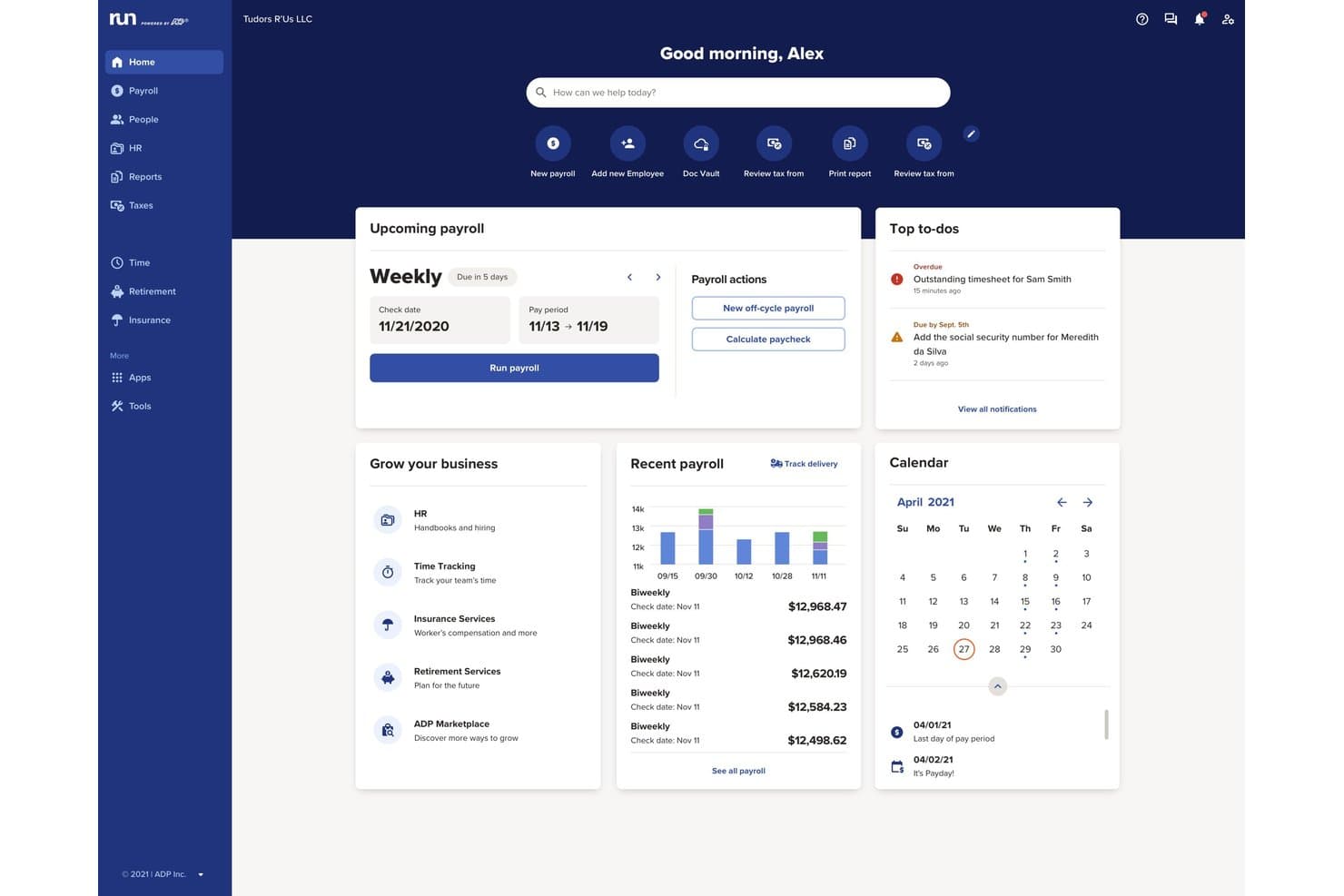
RUN Powered by ADP® offers a centralized home dashboard with payroll scheduling, recent payroll history, to-do alerts, and a business growth hub. RUN Powered by ADP® is a cloud-based payroll software designed for Mac users, offering automated payroll processing, tax filing, employee self-service, and integrations with leading accounting platforms.
Who Is RUN Powered by ADP® Best For?
RUN Powered by ADP® is a strong choice for small businesses and payroll teams seeking reliable payroll processing and compliance across multiple states.
Why I Picked RUN Powered by ADP®
I picked RUN Powered by ADP® as one of the best because I can pay contractors, schedule bill payments, and send invoices directly from the payroll dashboard. Built-in bill pay and invoicing streamlines payroll and accounts payable for busy Mac-based teams.
RUN Powered by ADP® Key Features
- Automated tax filing: Handles federal, state, and local payroll tax calculations and remittances.
- Employee self-service portal: Lets employees access pay stubs and manage tax forms online.
- Mac-friendly cloud access: Fully cloud-based platform works seamlessly across all major Mac web browsers.
- Multi-state payroll support: Processes payroll for employees across multiple states with compliance updates.
RUN Powered by ADP® Integrations
RUN Powered by ADP® offers native integrations with QuickBooks Online, Xero, Wave, and Slack. An API is available for custom integrations.
Pros and Cons
Pros:
- Dedicated Mac and iOS app access
- Supports multi-state compliance and reporting
- Includes built-in bill payment tools
Cons:
- Occasional delays in payroll processing
- Pricing details not transparently published
Learn more about RUN Powered by ADP®: Best for price transparency
- 30-day free trial + demo available
- From $17/month
Visit WebsiteCustomer Rating:5/5
Patriot Software provides automated payroll processing, tax calculations, and year-end reporting, offering streamlined payroll management for Mac users. Patriot Software is a comprehensive payroll tool designed to streamline payroll processing for businesses of all sizes. It offers automated payroll features and integrates with various tools to enhance its functionality.
Why I picked Patriot Software: I selected Patriot Software because it exemplifies price transparency, a critical factor for small businesses managing tight budgets. This tool's clear pricing structure eliminates the worry of unexpected costs. I determined Patriot Software to be best for price transparency due to its upfront cost breakdown, ensuring businesses are not blindsided by hidden fees.
Patriot Payroll is responsive and cloud-based, meaning you can run payroll from any type of computer, as well as from a mobile device or tablet. They also offer an employee-facing mobile app for Apple/iOS devices which is available through the Apple App Store.
Standout features & integrations:
Features include multiple pay rates, 2-day direct deposit, employee or contractor payments, electronic or printable W-2 forms, unlimited payroll runs, complimentary setup, and a straightforward three-step payroll process. It also offers a free employee portal, customizable earnings and deductions, and direct deposit capabilities.
Integrations include QuickBooks Online, Shopify, WooCommerce, Xero, Zapier, Clover, Square, PayPal, Gusto, and ADP.
Pros and Cons
Pros:
- Transparent pricing structure
- Modern, intuitive interface that's easy to navigate
- Very low price for the quality of features and service
Cons:
- No multicurrency abilities (USD only)
- Only available for US-based businesses
Learn more about Patriot Payroll: Best for integration with Square POS systems
- Free demo available
- From $35/month + $6/person/month
Visit WebsiteCustomer Rating:4.2/5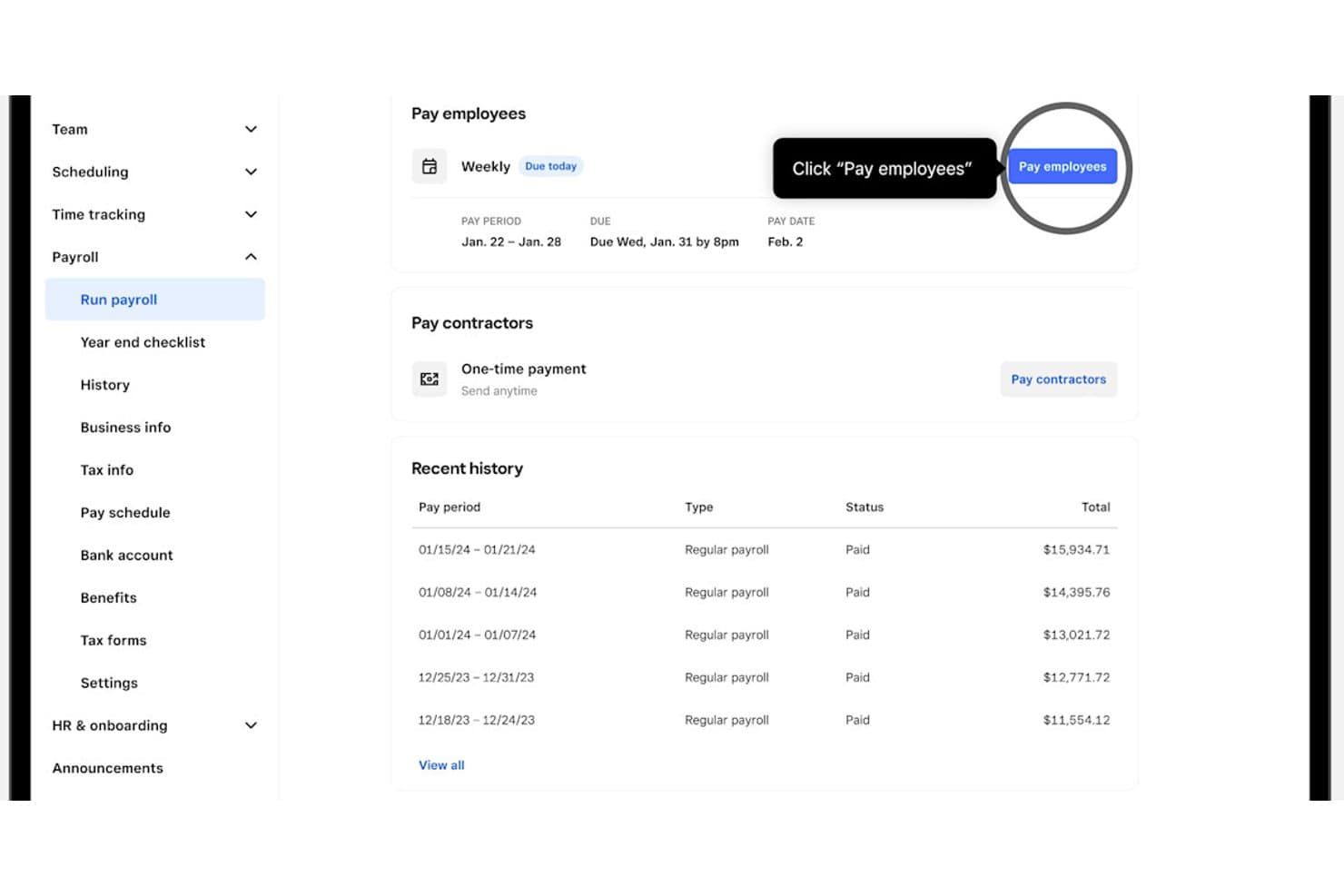
Square Payroll lets users run weekly payroll with one click. Square Payroll is a cloud-based payroll solution that handles employee and contractor pay, automated tax calculations and filings, time tracking, and benefits administration through an integration with the broader Square ecosystem.
Who Is Square Payroll Best For?
Square Payroll is a natural fit for small business owners who already rely on Square POS to run their day-to-day operations.
Why I Picked Square Payroll
Square Payroll earns its spot on my shortlist because of how tightly it connects with Square POS—if you're already running sales through Square, timecards, tips, and commissions flow directly into payroll without any manual re-entry. I especially like the automated federal and state tax filing, backed by Square's penalty guarantee for errors on their end. The contractor-only plan also stands out, letting you pay 1099 workers and file their forms through the same Dashboard you use for W-2 staff.
Square Payroll Key Features
- Employee self-onboarding: New hires can complete their own onboarding online, entering personal details and tax information directly through the platform.
- Multi-rate payroll support: You can assign multiple pay rates to individual employees, useful for staff who work different roles or shifts.
- QuickBooks Online sync: Payroll data automatically transfers to QuickBooks Online, with an option to send manually if you prefer more control.
- 1099-NEC generation and filing: Square Payroll generates and electronically files contractor tax forms, with contractors able to download their forms from their own online accounts.
Square Payroll Integrations
Square Payroll has documented integrations with Square POS, Square Team App, QuickBooks Online, SimplyInsured, and Vestwell. Its Square Team API supports team-member data synchronization with payroll systems for custom integrations.
Pros and Cons
Pros:
- Contractors receive digital 1099 forms
- Automated tax tasks reduce paperwork
- Multiple employee payment methods
Cons:
- Mac-specific compatibility details aren’t documented
- Local tax handling can require manual work
Learn more about Square Payroll:
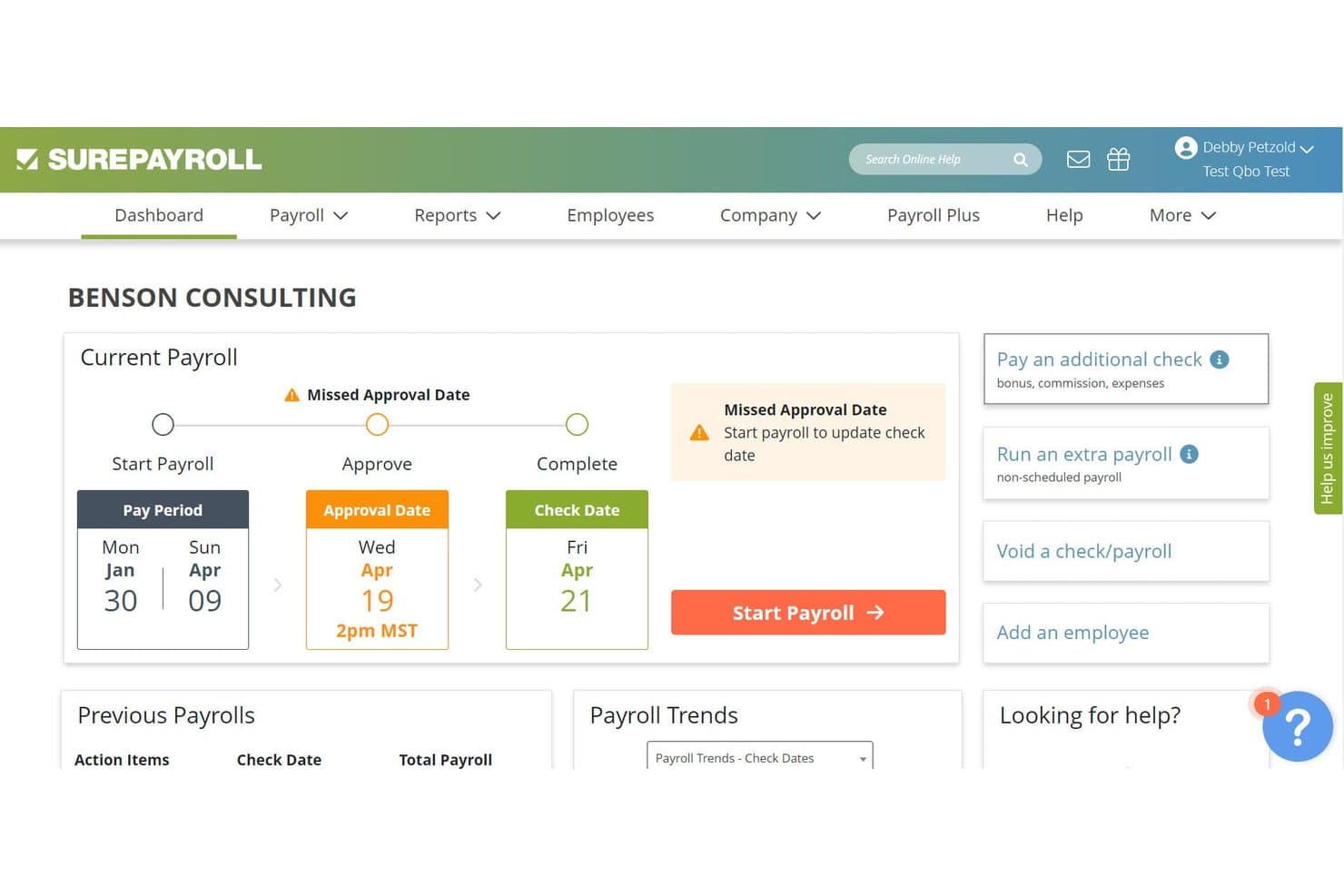
SurePayroll alerts users to missed payroll approval dates on the dashboard. SurePayroll is a cloud-based payroll platform built for small businesses that handles payroll processing, automatic tax calculation and filing, direct deposit, and year-end W-2 and 1099-NEC forms.
Who Is SurePayroll Best For?
SurePayroll is a strong fit for small business owners who want a no-fuss payroll solution without a steep learning curve or long-term contract.
Why I Picked SurePayroll
SurePayroll earns its spot on my shortlist because it's genuinely built for small businesses that need payroll done without a lot of overhead. I like that the Full Service plan automatically calculates, files, and deposits federal, state, and local payroll taxes, covering both W-2 employees and 1099 contractors in a single account. Running payroll takes just a few minutes once employees are set up, and automatic scheduling means I don't have to remember to kick off each pay cycle manually.
SurePayroll Key Features
- Employee self-service portal: Employees can log in to view paystubs, access tax forms, and update their own personal information at any time.
- Automatic payroll scheduling: Set payroll to run on a recurring schedule so each pay cycle processes without manual intervention.
- Year-end W-2 and 1099-NEC preparation: SurePayroll prepares and files year-end forms for both employees and contractors, with digital delivery through employee self-service.
- Accounting software export: Download a payroll export file and import it directly into tools like QuickBooks, Xero, or Sage 50 to keep your books in sync.
SurePayroll Integrations
SurePayroll supports integrations with QuickBooks, Xero, Zoho Books, Sage 50, FreshBooks, and AccountEdge through payroll export and accounting-software import. It also connects with external time-clock services such as Buddy Punch and TimeTrex.
Pros and Cons
Pros:
- Employee self-service keeps pay records accessible
- Routine payroll can take minutes
- Reviewers praise quarterly tax filing
Cons:
- Some users report tax filing problems
- Mac-specific browser support remains undocumented
Learn more about SurePayroll: Best for paying without local entities
- Free trial + free demo available
- From $8/user/month
Visit WebsiteCustomer Rating:4.9/5
Rippling’s global payroll dashboard showing employee earnings, deductions, and reimbursements across multiple countries. Rippling offers a versatile platform for managing payroll, HR, IT, and finance all from one place, making it an appealing choice for businesses seeking an integrated solution on Mac. It caters to organizations of various sizes and industries, addressing complexities in employee management and payroll processing. By automating administrative tasks and providing global payroll capabilities, Rippling helps businesses save time and improve accuracy in their operations.
Why I Picked Rippling
I picked Rippling because of its unique ability to integrate HR, IT, and finance into a single cohesive system, which is particularly beneficial for payroll management on Mac. The platform's global payroll capabilities allow you to hire and pay employees across different countries without needing local entities, making it ideal for businesses with international operations. Additionally, Rippling's automated payroll processing reduces errors and saves time by streamlining calculations and data entry, which is crucial for maintaining accuracy and efficiency.
Rippling Key Features
In addition to its standout features, here are some other functionalities that enhance its value as a payroll software for Mac:
- Global Payroll Solutions: Allows hiring and paying employees and contractors worldwide.
- Custom App Development: Offers no-code app building capabilities for tailored solutions.
- Policy Enforcement: Automatically enforces company rules across systems.
- Analytics and Reporting: Provides advanced reporting capabilities across applications.
Rippling Integrations
Integrations include QuickBooks Online, Xero, NetSuite, Sage Intacct, Slack, Microsoft 365, Google Workspace, Dropbox, Salesforce, and GitHub.
Pros and Cons
Pros:
- Supports 600+ third-party integrations
- Desktop app supports Mac and Windows
- Integrates HR, IT, and payroll in a single platform
Cons:
- Navigation complexity affects user experience
- No free trial offered


Paylocity provides comprehensive payroll processing and time tracking features, offering efficient payroll management tools for Mac users. Paylocity is a comprehensive payroll and HR software solution designed to meet the needs of the modern workforce.
Why I picked Paylocity: I chose Paylocity for this list because it stands out with its robust set of features tailored for today's diverse and dynamic work environments. Its ability to adapt to various business sizes and industries makes it a versatile choice. I believe Paylocity is best for the modern workforce due to its innovative approach to payroll and HR, offering tools that cater to the evolving demands of both employers and employees.
Standout features & integrations:
Paylocity's payroll software is designed to simplify payroll processes, automate tasks, and ensure tax compliance. Key features include customizable setup options, general ledger mapping, a three-step payroll processing flow, and pre-submit audits to minimize errors.
The software also offers seamless integration with time and labor systems, reducing manual data entry and ensuring paycheck accuracy with a Payroll Readiness Dashboard, such as time tracking integration, direct deposit, expense management, compensation management, tax services, on demand payment, garnishment services, global payroll, time & attendance, and scheduling.
Pros and Cons
Pros:
- Dedicated tax support to ensure compliance and reduce liability
- Integrated global payroll for managing international employees
- Customizable payroll features to fit various business needs
Cons:
- Some users may require additional training to fully utilize all available tools and integrations
- The breadth of features may be overwhelming for smaller businesses or those with simpler needs
- Pricing details are not transparent


Paychex Flex streamlines payroll processing and benefits administration, providing comprehensive payroll management tools for Mac users. Paychex Flex is a versatile payroll management system. It's recognized as the best for mobile access due to its comprehensive mobile app.
Why I picked Paychex Flex: I selected Paychex Flex for its exceptional mobile experience, which distinguishes it from other payroll software. The mobile app is a standout feature, offering convenience and flexibility for managing payroll tasks on the move. I judged it to be best for mobile access because it enables users to perform critical payroll functions from their mobile devices, which is invaluable for businesses with a dynamic and mobile workforce.
Standout features & integrations:
Paychex Flex boasts a suite of features that enhance payroll management, including automated tax calculations, payroll processing, and HR services. The mobile app allows for payroll on the go.
Paychex Flex integrates with numerous third-party applications, such as QuickBooks Online, Sage, Xero, BambooHR, Clover, and more, to streamline operations.
Pros and Cons
Pros:
- Integration with popular third-party applications
- Automated tax calculations and compliance features
- Comprehensive mobile app for payroll management
Cons:
- Custom pricing may lead to variable costs
- Additional features require extra payment
- Base fee plus per-employee cost can add up
Learn more about Paychex Flex:
Değerlendirilebilecek Diğer Mac Bordro Yazılımları
Aşağıda kısa listeme aldığım, ancak en iyi listeye giremeyen ek Mac bordro yazılımlarının bir listesini bulabilirsiniz. Bunlara kesinlikle göz atmaya değer.
- 11QuickBooks PayrollBest for QuickBooks users
- 12OnPayBest for multi-state payroll
- 13HomebaseBest for accountants with hourly clients
- 14TimeTrexBest for handling complex pay structures
- 15PaycorBest for user experience
- 16PaycomBest for employee self-service
- 17Wave PayrollBest for affordability and ease of use
- 18XeroBest for tracking payroll costs in Xero
- 19Roll by ADPBest for irregular contractor pay schedules
How I Evaluate Payroll Software for Mac
I split my evaluation into three parts, giving the most weight to core needs: run payroll on Mac, calculate and file taxes, and pay employees and contractors. Next, I weigh differentiators such as same-day deposits or built-in time tracking. Finally, I consider support, onboarding, and clear pricing for lean HR teams.
Core Functionality (Table Stakes For This List)
When I'm selecting tools for my list, I score each one on a scale from 0 (does not offer the functionality) to 5 (excels in this area) for each core functionality listed below. I then convert the total into a percentage to help assess each tool's overall fit, with extra weight on any functionalities I’ve deemed essential.
- Mac Compatibility (Essential): I check that payroll runs fully in a Mac browser or native app, without Windows emulation or missing features.
- Tax Calculation & Filing (Essential): I look for automated calculations and filing across applicable tax jurisdictions, including support for changing rates and rules.
- Payment Processing: Can the platform pay employees by direct deposit or check, and support the payment workflows your payroll schedule requires?
- Worker Types: I assess whether one system handles employee and contractor pay with the correct tax treatment for each.
- Payroll Records: I look for accessible pay stubs, payroll summaries, year-end forms, and records HR can use to answer employee questions.
- Accounting Integrations: I check for integrations with Mac-compatible accounting tools and whether payroll data syncs or requires manual exports.
Once I have a list of tools that meet the criteria, I consider what sets each platform apart.
Differentiating Factors (What Sets Vendors Apart)
Here's how I compare and contrast different vendors:
Standout Features
I look for built-in time tracking that feeds hours directly into pay runs, since a separate time clock app adds cost and creates sync errors. Same-day or next-day deposit options also matter—especially for startups where a delayed paycheck can hurt retention. I check whether each vendor offers on-demand HR advisory access, which is a lifeline when a lean team hires its first remote worker in an unfamiliar tax jurisdiction.
Beyond Features
I check whether pricing scales predictably as headcount grows, since a startup adding its tenth contractor shouldn't be forced onto an enterprise tier. Total cost of ownership matters more than the base fee—I look at what multi-state filing or benefits administration costs on top. I also evaluate how responsive support is during pay run windows, because a missed deadline with no one to call erodes trust fast.
Mac için Bordro Yazılımı Nasıl Seçilir?
bordro yazılımı karar sürecinizi yürütürken aşağıdaki noktaları göz önünde bulundurun:
- Mac ve Apple Cihazlarıyla Uyumluluk: Bordro yazılımının Mac bilgisayarlarla tamamen uyumlu olduğundan ve diğer Apple cihazlarıyla sorunsuz bir şekilde entegre olduğundan emin olun. Bu uyumluluk, tüm cihazlarda birleşik bir deneyim sağlar; bu da işletme faaliyetleri için Apple ekosistemine güvenen kullanıcılar açısından özellikle önemlidir.
- Temel Bordro Özellikleri: Yazılım, işletme faaliyetleriniz için gerekli tüm temel bordro özelliklerini içermelidir. Buna farklı çalışma saatleri türleri için ücret hesaplama, ücretli izinleri yönetme, vergi beyannamelerini düzenleme ve doğrudan para yatırma ile çek gibi çeşitli ödeme yöntemleri sunma özellikleri dahildir. Bu özellikler, bordro süreçlerinin verimli olmasını ve yasal gerekliliklere uygun şekilde yürütülmesini sağlamak açısından kritik öneme sahiptir.
- Zaman Takibi ve Planlama: Saatlik çalışanlara sahip işletmeler için entegre zaman takibi ve planlama özelliklerine sahip olmak önemli bir avantajdır. Bu entegrasyon, çalışılan saatlerin doğru bir şekilde takip edilmesine yardımcı olur ve ayrı sistemlere duyulan ihtiyacı ortadan kaldırarak bordro sürecini basitleştirir.
- Müşteri Desteği: Bordro yazılımı için güvenilir müşteri desteği kritik öneme sahiptir; çalışan ödemelerinde gecikmeleri önlemek için sorunların hızlı bir şekilde çözülmesi gerekir. İyi bir müşteri desteği, sorunların zamanında ele alınmasını sağlayarak bordro süreçlerinin sorunsuz şekilde yürütülmesini sürdürür.
- Şirket Büyüklüğü ve Büyüme Planları: Seçilen bordro yazılımı, ister tek bir çalışan için bordro yürütüyor ister büyüyen bir ekibi yönetiyor olun, mevcut ihtiyaçlarınızı karşılamalı ve şirketiniz büyüdükçe ölçeklenebilecek kapasiteye sahip olmalıdır. Bu husus, işletmeniz büyüdükçe yazılımı değiştirme ihtiyacını önlemek açısından önemlidir; çünkü bu tür değişiklikler hem aksamalara hem de yüksek maliyetlere yol açabilir.
2025'te Mac için Bordro Yazılımındaki Eğilimler
Mac için bordro yazılımı hızla gelişiyor. 2025 yılında kullanıcı deneyimini ve işlevselliği şekillendiren belirgin eğilimler görülüyor.
- Merkeziyetsiz Finans (DeFi) Platformlarıyla Entegrasyon: Mac için bordro yazılımları, yenilikçi ödeme seçeneklerine olanak tanımak amacıyla DeFi platformlarıyla entegre olmaya başlıyor. Bu eğilim ilgi çekicidir; çünkü çalışanlara alternatif finansal hizmetlere ve yatırımlara erişim olanağı sunar. Önemli olmasının nedeni, daha esnek ve çeşitlendirilmiş bordro ekosistemlerine doğru bir geçişi yansıtmasıdır.
- Kuantuma Dayanıklı Şifrelemeyle Geliştirilmiş Veri Güvenliği: Yeni ortaya çıkan Mac bordro çözümleri, hassas verileri korumak için kuantuma dayanıklı şifrelemeyi benimsiyor. Bu, gelecekteki siber güvenlik tehditlerini öngörmesi ve uzun vadeli veri koruması sağlaması açısından kritik öneme sahiptir. Bu ilerici eğilim, gelişen kuantum bilişim yeteneklerine karşı bordro verilerini güvende tutar.
- Yapay Zekâ Destekli Vergi Optimizasyonu: Bordro yazılımındaki vergi hesaplamalarını otomatikleştirmek ve optimize etmek için yapay zekâdan yararlanılıyor. Bu eğilim, insan hatasını en aza indirip vergi işlemlerinde verimliliği en üst düzeye çıkardığı için benzersizdir. Bordro süreçlerini kolaylaştırmak ve vergi düzenlemelerine uyumu güvence altına almak isteyen işletmeler için önemlidir.
- Gerçek Zamanlı Bordro İşleme: Mac için bordro sistemleri gerçek zamanlı işleme yeteneklerine doğru ilerliyor. Bu, anında güncellemelere ve düzenlemelere olanak tanır; bordro alanında ilerici bir gelişmedir. İlgi çekici olmasının nedeni, çalışan ücretlendirmesine daha dinamik ve hızlı yanıt veren bir yaklaşım sağlamasıdır.
- Geliştirilmiş Kullanıcı Deneyimine Sahip Çalışan Öz Hizmet Portalları: Mac bordro yazılımları, çalışan öz hizmet portallarını geliştirerek kullanıcı deneyimine odaklanıyor. Bu eğilim önemlidir; çünkü çalışanlara bordro bilgilerine ve işlemlerine doğrudan erişme olanağı tanır. Sezgisel tasarıma ve kullanıcı etkileşimine verdiği önem nedeniyle ilgi çekicidir.
Bu eğilimler, Mac kullanıcıları için daha güvenli, verimli ve kullanıcı odaklı bordro çözümlerine doğru ilerleyişi ortaya koyuyor.
Mac için Bordro Yazılımı Nedir?
Mac için bordro yazılımı, macOS üzerinde çalışmak üzere tasarlanmış ve çalışan ücretlendirmesinin yönetilmesini kolaylaştıran özel bir uygulamadır. Her büyüklükteki işletme, maaşların, vergi kesintilerinin ve bordroyla ilgili diğer görevlerin işlenmesini otomatikleştirmek için bu yazılımı kullanır.
Yazılım, bordro işlemlerini kolaylaştırarak doğruluğu ve vergi yasalarına uyumu güvence altına alır. Bu da işverenlerin iş gücünün finansal yönlerini verimli bir şekilde yönetmesi için gereklidir.
Özellikler
Her iyi Mac bordro yazılımının sahip olması gereken temel özellikler şunlardır:
- Zaman Takibi: Çalışma saatlerinin doğru şekilde kaydedilmesi, bordro için büyük önem taşır. Zaman takibi, çalışanlara çalıştıkları süre karşılığında doğru ödeme yapılmasını sağlar; bu durum özellikle saatlik ücret alan çalışanlar için önemlidir.
- Doğrudan Ödeme: Doğrudan ödeme, çalışanların standart beklentilerinden biridir ve işverenin bordro sürecini kolaylaştırır.
- Ücret Yönetimi: Bu özellik, ücret stratejilerinizin iş hedefleriniz ve piyasa standartlarıyla uyumlu olmasını sağlamaya yardımcı olur.
- Çalışan Öz Hizmet Portalı: Çalışan öz hizmet portalı, İK iş yükünü azaltır ve çalışanlara kişisel verileri ile bordro belgeleri üzerinde kontrol sağlar.
- Bordro Raporları: Özelleştirilebilir bordro raporları, bordro giderlerinizi ve eğilimlerinizi takip etmek ve analiz etmek için büyük önem taşır.
- Vergi Beyannamesi Entegrasyonu: Vergileri otomatik olarak hesaplayıp beyan eden yazılımlar sayesinde vergi düzenlemelerine uyum sağlamak kolaylaşır.
- Bordro İşleme: Bordro yazılımının temel amacı, çalışanlara doğru ve zamanında ödeme yapılmasını sağlamaktır.
- Raporlama ve Analiz Panoları ve Araçları: Gelişmiş raporlama araçları, bordro verilerinizi anlamanıza ve stratejik iş kararları almanıza yardımcı olur.
- Gider Yönetimi: Gider yönetiminin otomatikleştirilmesi, gider raporlamasını ve geri ödemelerini kolaylaştırır; çalışan giderlerinin yönetiminde doğruluk ve verimlilik sağlar.
- Entegre Bordro: Diğer yazılım sistemleriyle entegrasyon, veri tutarlılığının korunmasına yardımcı olur ve manuel veri girişini azaltır.
Avantajlar
Mac'te bordro yönetimi söz konusu olduğunda, doğru yazılım büyük fark yaratabilir.
Mac kullanıcıları için tasarlanmış bordro yazılımı, bordro sürecini kolaylaştırmaya, zamandan ve kaynaklardan tasarruf ederken doğruluk ve uyumluluk sağlamaya odaklanan çeşitli avantajlar sunar.
Kuruluşların Mac sistemlerinde bordro yazılımı kullanmayı tercih ettiklerinde yararlanabileceği beş temel avantaj aşağıda verilmiştir.
- Kullanım Kolaylığı: Mac için bordro yazılımı genellikle, bordro sürecini basitleştiren ve muhasebe deneyimi sınırlı olan kişilerin bile kullanabilmesini sağlayan kullanıcı dostu bir arayüzle tasarlanır.
- Entegrasyon Yetenekleri: Mac için birçok bordro yazılımı seçeneği, muhasebe yazılımı ve zaman takip uygulamaları gibi diğer iş sistemleriyle entegre olabilir. Böylece kesintisiz bir iş akışı oluşturulur ve manuel veri girişi ihtiyacı azalır.
- Vergi Uyumluluğu: Mac için bordro yazılımı çoğunlukla vergi tablolarını ve düzenlemelerini otomatik olarak güncelleyen özellikler içerir. Bu da işletmelerin sürekli manuel takip yapmasına gerek kalmadan federal ve eyalet vergi yasalarına uyumlu kalmasına yardımcı olur.
- Gelişmiş Güvenlik: Mac için bordro yazılımı, gelişmiş şifreleme ve güvenlik protokolleri sayesinde Sosyal Güvenlik numaraları ve maaş bilgileri gibi hassas çalışan verilerinin yetkisiz erişime karşı korunmasını sağlar.
- Maliyet Tasarrufu: Bordro hesaplamalarını otomatikleştirerek ve insan hatası olasılığını azaltarak Mac için bordro yazılımı, işletmelerin bordro hatalarıyla ilişkili maliyetlerden ve manuel bordro yönetiminin idari yükünden tasarruf etmesine yardımcı olabilir.
Maliyetler ve Fiyatlandırma
Mac için doğru bordro yazılımını seçmek, bordro süreçlerini kolaylaştırmak isteyen işletmeler için kritik öneme sahiptir. Bordro yazılımı; ücretlerin, vergi kesintilerinin hesaplanmasını otomatikleştirmeye ve iş yasalarına uyumu sağlamaya yardımcı olabilir.
Bordro sistemlerini kullanmaya yeni başlayan yazılım alıcıları için farklı plan seçeneklerini ve bunların maliyetlerini anlamak, işletmelerinin ihtiyaçlarına ve bütçelerine uygun bilinçli bir karar vermek açısından önemlidir.
Mac için Bordro Yazılımı Plan Karşılaştırma Tablosu
| Plan Türü | Ortalama Fiyat | Yaygın Özellikler |
| Ücretsiz Seçenek | $0 | Temel bordro işleme, vergi hesaplamaları, sınırlı raporlar ve destek |
| Temel Plan | $10 - $20 aylık + çalışan başına $2 - $5 | Standart bordro işleme, vergi hesaplamaları, doğrudan ödeme, temel raporlama |
| Orta Seviye Plan | $30 - $50 aylık + çalışan başına $4 - $7 | Gelişmiş bordro özellikleri, vergi beyannamesi gönderimi, birden fazla ödeme planı, ek entegrasyonlar |
| Üst Düzey Plan | $50+ aylık + çalışan başına $5 - $10 | Gelişmiş bordro özellikleri, birden fazla eyalete yönelik vergi beyannamesi gönderimi, İK araçları, özel destek, özel raporlama |
Mac için bordro yazılımı plan türleri, maliyetleri ve özelliklerinin dökümü.
*Not: Listelenen fiyatlar ve özellikler ortalamadır ve farklı yazılım sağlayıcıları arasında değişiklik gösterebilir. En doğru ve güncel fiyatlandırma ve özellik bilgileri için ilgili yazılım tedarikçilerine danışmanız önerilir.
Yazılım alıcıları, yazılımın maliyetini değerlendirirken çalışan sayısını, bordro çalıştırma sıklığını ve gereken destek düzeyini göz önünde bulundurmalıdır. Temel ihtiyaçları olan çok küçük işletmeler için ücretsiz bir seçenek yeterli olabilirken daha büyük işletmeler premium bir planın gelişmiş özelliklerine ihtiyaç duyabilir.
Yeni ve Dikkate Değer Ürün Güncellemeleri
Mac için bordro yazılımı sürekli gelişiyor; en iyi tedarikçiler müşterilerini dinliyor ve hayatlarını kolaylaştırmaya yardımcı olacak yeni özellikleri kullanıma sunuyor.
Listemdeki tedarikçilerin yakın zamanda yaptığı bazı güncellemelerin özeti şöyle:
2025 2. Çeyrek
Deel
1. W-2/W-3 Yıl Sonu Formu Oluşturma (ABD Bordrosu):
Deel artık ABD'deki işverenlerin W-2 ve W-3 vergi formlarını doğrudan platform üzerinden oluşturup dağıtmasına olanak tanıyor ve IRS son tarihlerine daha kolay uymalarına yardımcı oluyor. Çalışanlar formlarına Finans sekmesinden erişebilirken işverenler her şeyi Vergi Belgeleri bölümünden yönetebiliyor. Bu özellik, uyumluluk süreçlerini kolaylaştırıyor ve tüm kullanıcılar için vergi dönemini basitleştiriyor.
2. Harici ICP Yönetimi (Küresel Bordro):
Müşteriler artık harici ülke içi bordro sağlayıcılarını (ICP'ler) Deel içinde sisteme dahil edebilir, yönetebilir ve sistemden çıkarabilir; böylece tam görünürlük ve kontrol elde eder. Güncelleme, varlık eşleştirmesini, erişim izinlerini ve ICP temsilcilerine yönelik davetleri destekleyerek bordro operasyonlarını tek bir platformda merkezileştiriyor. Yaklaşan geliştirmeler, sisteme dahil olma sürecini iyileştirmeye ve güçlü raporlama özellikleri eklemeye odaklanacak.
Derecelendirme: Çok iyi! Bu güncellemeler, uyumluluk ve operasyonel sorunları doğrudan ele alan yüksek etkili iyileştirmelerdir. W-2/W-3 otomasyonu, vergi döneminde ABD'li kullanıcılar için kritik önem taşırken harici ICP desteği, küresel bordro ekipleri için esnekliği ve kontrolü önemli ölçüde artırıyor; bu da söz konusu geliştirmeleri öne çıkarıyor.
Patriot Payroll
Patriot Software, Zaman ve Devam platformuna bir coğrafi etiketleme özelliği ekledi. Bu özellik, işverenlerin çalışanların mobil uygulama üzerinden giriş ve çıkış yaptığı kesin konumları görüntülemesini sağlıyor.
Bu geliştirme, zaman girişlerinin harita tabanlı görünürlüğünü sağlayarak hesap verebilirliği artırmayı, zaman hırsızlığını azaltmayı ve uyumluluğu kolaylaştırmayı amaçlıyor. Yöneticiler, her çalışan için coğrafi etiketlemeyi zorunlu, isteğe bağlı veya gerekli değil olarak ayarlayabiliyor; bu da uygulamada esneklik sunuyor. Bu özellik, Patriot Time® müşterilerine ek bir ücret olmadan sunuluyor.
Derecelendirme: İyi – Coğrafi etiketleme, mobil çalışanların yönetimi için değerli işlevler eklese de birçok zaman takip çözümünde standart bir özellik olduğundan bu güncelleme sağlam olmakla birlikte çığır açıcı değil.
Papaya Global
1. Kayıt Temsilcisi (AOR) İş Akışı için Tam Destek:
Papaya Global, Ödemeler platformunda Kayıt Temsilcisi iş akışını tamamen otomatikleştiren yeni bir Onay Sahipliği Türü (AOT) modeli kullanıma sundu. Bu güncelleme, yapılandırılmış ve role dayalı onay akışlarına olanak tanıyor: müşteriler faturaları onaylıyor, iş ortakları ödemeleri onaylıyor ve çalışanlara anında ödeme yapılıyor; bunların tümü tek bir sistemde gerçekleşiyor. Bu özellik, iş akışı esnekliğini artırıyor, operasyonel devirleri iyileştiriyor ve faturadan ödemeye kadar uçtan uca şeffaflık sunuyor.
2. Küresel Ödemeler için Citibank Entegrasyonu:
Papaya, küresel finansal altyapısını güçlendirmek amacıyla JPMorgan Chase'e katılacak şekilde Citibank'ı doğrudan ödeme iş ortağı olarak entegre etti. Bu entegrasyon, 90'dan fazla ülkede daha hızlı ve güvenli ödemelerin yanı sıra iyileştirilmiş döviz kurları, uyumluluk ve gerçek zamanlı mutabakat sağlıyor. Birden fazla ödeme kanalıyla dayanıklılık ekleyen entegrasyon, ağlardan birinde sorun yaşansa bile hizmetin sürekliliğini güvence altına alıyor.
Derecelendirme: Çok iyi! Bu güncellemeler, Papaya Global'in temel değer önerisini önemli ölçüde güçlendiriyor. AOR iş akışı otomasyonu, geçici iş gücü yönetiminde verimliliği ve görünürlüğü artırırken Citibank entegrasyonu, küresel ödemelerin güvenilirliğini ve hızını yükseltiyor. Her iki özellik de karmaşık, çok uluslu operasyonları yöneten kurumsal müşteriler için kritik yeteneklerdir.
SSS
Bordro yazılımı ve bunun Mac bilgisayarlarda veya iOS mobil cihazlarda nasıl çalıştığı hakkında aklınıza gelebilecek sık sorulan soruların bazı yanıtlarını burada bulabilirsiniz:
Bordro yazılımını doğrudan Mac'imde çalıştırabilir miyim, yoksa web tabanlı bir uygulama mı kullanmam gerekir?
Mac için geliştirilmiş modern bordro yazılımı çözümlerinin çoğu bulut tabanlıdır; bu da Mac’inize herhangi bir yazılım yüklemenize gerek kalmadan bir web tarayıcısı üzerinden erişilebilecekleri anlamına gelir. Bu yaklaşım esneklik ve erişilebilirlik sunar; bordroyu internet bağlantısı olan herhangi bir cihazdan yönetebilirsiniz. Ancak bazı sağlayıcılar, doğrudan yüklenebilen bir Mac masaüstü uygulaması da sunabilir. Bu, web tarayıcısına güvenmemeyi tercih eden kullanıcılar için alternatif bir seçenek sağlar.
Mac uyumlu bordro yazılımıyla ne tür bir müşteri desteği bekleyebilirim?
Müşteri desteği yazılım sağlayıcısına göre değişir; ancak saygın bordro yazılımı şirketlerinin çoğu Mac kullanıcıları için çeşitli destek seçenekleri sunar. Bu seçenekler genellikle yardım makaleleri ve video eğitimleri gibi çevrim içi kaynakların yanı sıra e-posta, canlı sohbet veya telefon aracılığıyla doğrudan desteği içerir. Bazı sağlayıcılar ek ücret karşılığında özel hesap yöneticileri veya kişiselleştirilmiş destek hizmetleri de sunabilir.
Mac kullanıcıları için ücretsiz bordro yazılımı seçenekleri var mı?
Tamamen ücretsiz bordro yazılımı seçenekleri Mac için nadir olsa da bazı sağlayıcılar temel özelliklere sahip ücretsiz bir katman veya ücretsiz deneme süresi sunabilir. Ancak bu ücretsiz sürümlerin özellikleri ve olanakları genellikle sınırlıdır. Kapsamlı bordro işlevleri için vergi yasalarına uyumu sağlamak ve tam hizmet özelliklerine erişmek amacıyla genellikle ücretli bir aboneliğe yatırım yapmak gerekir.
Mac'te bordro yazılımı ne kadar güvenlidir?
Bordro yazılımı sağlayıcıları, hassas finansal ve kişisel bilgileri işledikleri için güvenliği çok ciddiye alır. Saygın Mac uyumlu bordro yazılımları genellikle veri şifreleme, güvenli veri merkezleri ve gizlilik düzenlemelerine uyum gibi güçlü güvenlik önlemlerine sahiptir. Kullanıcılar ayrıca güçlü parolalar kullanmak ve mevcut olduğunda iki faktörlü kimlik doğrulamayı etkinleştirmek gibi güvenlik açısından en iyi uygulamaları izlediklerinden emin olmalıdır.
Mac için bordro yazılımı vergi beyannamesi işlemlerini ve uyumluluğu yönetir mi?
Evet, Mac için geliştirilen bordro yazılımlarının çoğu vergi beyannamesi işlemlerini yönetmek ve federal, eyalet ve yerel vergi yasalarına uyumu sağlamak üzere tasarlanmıştır. Yazılım genellikle her çalışan için doğru vergi kesintilerini hesaplar, gerekli vergi belgelerini gönderir ve işletme adına uygun vergi ödemelerini yapar. Bazı hizmetler doğruluğu garanti eder ve bir hata olması durumunda tüm para cezalarını veya yaptırımları karşılar.
Çalışan yan haklarını Mac bordro yazılımı üzerinden yönetebilir miyim?
Mac için geliştirilen birçok bordro yazılımı çözümü, çalışan yan haklarını yönetmeye yönelik özellikler de içerir. Bunlar sağlık sigortası ve emeklilik planlarından ücretli izinlere ve diğer avantajlara kadar çeşitlilik gösterebilir. Yazılım genellikle çeşitli çalışan yan haklarının kolayca kaydedilmesine, izlenmesine ve yönetilmesine olanak tanır; böylece tüm bilgiler merkezi bir konumda tutulur ve erişilebilir olur.