

QuickBooks ile entegre olan doğru İK yazılımını seçmek zor olabilir. İK görevlerini yöneten ve muhasebe yazılımınız ile bordro sisteminizle senkronize olan bir çözüme ihtiyacınız vardır. Çeşitli İK araçlarını QuickBooks ile kullanma konusundaki kapsamlı deneyimim sayesinde size en uygun seçeneği bulmanızda yardımcı olabilirim. Doğru yazılım; bordro, yan haklar ve çalışan verileri yönetimini kolaylaştırarak zamandan tasarruf etmenizi, hataları azaltmanızı ve mevzuata uyumu sağlamanızı mümkün kılar.
Why Trust Our Software Recommendations
6,700+
Reviews
20
Industry experts
16+
Evaluation factors
14
Years
Our team has been testing and reviewing software since 2012. As HR experts ourselves, we know how difficult—and important—it is to choose the right software.
For this guide, we evaluated tools using hands-on testing and independent research, scoring tools using our selection criteria. We also draw on insights from industry thought leaders and practicing HR experts.
Our reviews reflect our human editorial judgment, not a sales pitch.
Expert reviewers:
- Phil GrayCOO
 Kim BehnkeHR Tech Editor & Analyst
 Josh BarkerPeople Ops Manager

QuickBooks ile Entegrasyon Sağlayan İK Yazılımları Karşılaştırma Tablosu
QuickBooks ile entegre olan en iyi İK yazılımlarıma ilişkin fiyatlandırma ayrıntılarını incelemek için bu karşılaştırma tablosunu kullanın.
Sorted by: Default
| Tool | Starting Price | Website | |
|---|---|---|---|
Best for connecting HR data with QuickBooks | 4.8 out of 5 | $5/user/month Free demo available | Website |
Best for small and mid-sized businesses | 4.6 out of 5 | $49/month Free trial + free demo available | Book Demo |
Best for advanced analytics and reporting | 4.3 out of 5 | $99/month Free demo available | Website |
Best for hourly-team HR and QuickBooks sync | 4.2 out of 5 | $99/month Free plan + 30-day free trial + free demo available | Website |
Best for payroll automation and integrations | 4.3 out of 5 | Pricing upon request Free demo available | Website |
Best for automating payroll and HR management | 4.5 out of 5 | $50/user/month 30-day free trial + free demo available | Website |
Best for employee engagement and onboarding | 4.7 out of 5 | Pricing upon request Free demo available | Website |
Best for employee scheduling and time tracking | 4.6 out of 5 | $5/user/month 30-day free trial + free demo available | Website |
Best for integrated HR and payroll | 4.2 out of 5 | Pricing upon request Free demo available | Website |
Best for HR compliance and expert support | Not rated | Pricing upon request Free demo available | Website |


QuickBooks ile Entegrasyon Sağlayan En İyi İK Yazılımları İncelemeleri
Aşağıda QuickBooks ile entegre olan çeşitli İK yazılımı seçeneklerine ilişkin ayrıntılı incelemelerimi ve analizlerimi bulabilirsiniz. Her aracın artılarını ve eksilerini, özelliklerini ve en uygun kullanım alanlarını ele alır.
 Best for connecting HR data with QuickBooks
- Free demo available
- From $5/user/month
Visit WebsiteCustomer Rating:4.8/5
Deel simplifies global hiring and compliance, offering streamlined payroll, contractor management, and localized HR services for remote teams. Deel is a comprehensive HR software designed to manage global contractor payments and streamline international payroll processes. It integrates with QuickBooks to sync invoices, expenses, and vendor records.
Why I picked Deel: I chose Deel for its robust capabilities in managing global contractor payments, which sets it apart from other HR tools. Deel's integration with QuickBooks ensures that businesses can handle international payroll efficiently, making it the best choice for global contractor payments.
Deel Standout Features & Integrations
Features include vendor management, invoice syncing, payment syncing, and document management. These features help automate and streamline the bookkeeping process for global contractors and EOR employees.
Integrations include QuickBooks, Xero, BambooHR, Expensify, NetSuite, Sage Intacct, Greenhouse, Workday, SAP, and ADP.
Pros and Cons
Pros:
- Vendor management
- Automated invoice syncing
- Comprehensive global payroll
Cons:
- Initial setup may require training
- Limited reporting features
 Best for small and mid-sized businesses
- Free trial + free demo available
- From $49/month
Visit WebsiteCustomer Rating:4.6/5
Gusto streamlines HR processes with user-friendly payroll, benefits administration, and compliance management for small to medium-sized businesses. Gusto provides a comprehensive solution for businesses seeking to integrate HR and payroll processes with QuickBooks. Tailored for small to medium-sized enterprises, Gusto facilitates efficient financial management by automating payroll data synchronization and creating detailed journal entries in QuickBooks Online. By addressing challenges such as manual data entry and payroll inaccuracies, Gusto empowers your team to focus on what truly matters—growing your business.
Why I Picked Gusto
I picked Gusto for its two-way integration with QuickBooks Online, a feature for businesses looking to enhance their financial management processes. This integration allows you to automatically sync payroll data, including detailed journal entries and employee earnings, directly into QuickBooks. Additionally, Gusto offers customizable chart of accounts mapping, ensuring accurate categorization and reporting of payroll expenses. These features not only save time but also improve the accuracy of financial data, making it a valuable tool for businesses aiming to streamline their HR and accounting operations.
Gusto Key Features
In addition to its QuickBooks integration, Gusto offers several features to support your HR and payroll needs:
- Time Tracking: Easily track employee hours and integrate this data with payroll for accurate compensation.
- Employee Benefits Management: Simplify the administration of employee benefits such as health insurance and retirement plans.
- Onboarding Tools: Streamline the hiring process with digital onboarding features that manage paperwork and compliance.
- Compliance Management: Stay updated with the latest labor laws and regulations to ensure your business remains compliant.
Gusto Integrations
Integrations include QuickBooks Online, Xero, Clover, FreshBooks, TSheets, Deputy, Trainual, When I Work, Bonusly, and Expensify.
Pros and Cons
Pros:
- Time-tracking syncs directly to payroll for accurate pay based on hours worked.
- Payroll includes unlimited runs and automatic tax filing.
- Direct payroll expenses sync to QuickBooks, eliminating manual entry.
Cons:
- Not customizable enough to handle large, complex orgs.
- Initial setup for account-mapping to QuickBooks may feel complicated for first-time users.
 Best for advanced analytics and reporting
- Free demo available
- From $99/month
Visit WebsiteCustomer Rating:4.3/5
Paycor performance management dashboard displaying employee objectives, reviews, recognition tools, and mobile team member feedback features. Paycor is an HCM platform that combines payroll processing, benefits administration, talent management, time tracking, and workforce analytics, with a direct QuickBooks integration for syncing payroll data to your general ledger.
Who Is Paycor Best For?
Paycor is a strong fit for mid-sized businesses that need a unified HR and payroll platform with built-in QuickBooks connectivity to keep their accounting and workforce data in sync.
Why I Picked Paycor
I picked Paycor as one of the best because its analytics go well beyond standard headcount reports. The predictive resignation feature uses AI to flag at-risk employees, estimate turnover probability over the next 12 months, and surface the specific factors driving that risk by department, manager, and location. I also like the historical trend analysis, which tracks up to seven years of workforce data—so when you're prepping a budget review or headcount planning session, you're not working from a snapshot. Add in the benchmarking tool, which pulls from EEOC data to show how your turnover and compensation stack up against industry peers, and you've got a genuinely deep analytics layer built right into your HR and payroll platform.
Paycor Key Features
- General ledger export: Export payroll data directly to QuickBooks or other accounting platforms using Paycor's configurable GL mapping tool.
- Payroll tax compliance: Automatically calculates, files, and pays federal, state, and local payroll taxes, including year-end W-2 and 1099 processing.
- Benefits administration: Manage open enrollment, carrier connections, and ACA tracking from a single dashboard with employee self-service access.
- Time and attendance tracking: Capture hours via web, mobile, or time clock hardware, with manager approval workflows and automatic payroll sync.
Paycor Integrations
Paycor offers hundreds of integrations through its marketplace, including QuickBooks, as well as connections with Active Directory, Microsoft Entra ID, Okta, Google Workspace, Greenhouse, iCIMS, Jira, ServiceNow, NetSuite, and Oracle. Paycor also provides developer tools with 140+ APIs for building custom integrations. Zapier support is not currently available.
Pros and Cons
Pros:
- Tracks recognition, promotions, and pay changes over time
- Time clocks flow directly into payroll processing
- Built for frontline sectors like healthcare and restaurants
Cons:
- Implementation can take several weeks to complete
- Time tracking and scheduling are paid add-ons
 Best for hourly-team HR and QuickBooks sync
- Free plan + 30-day free trial + free demo available
- From $99/month (billed annually)
Visit WebsiteCustomer Rating:4.2/5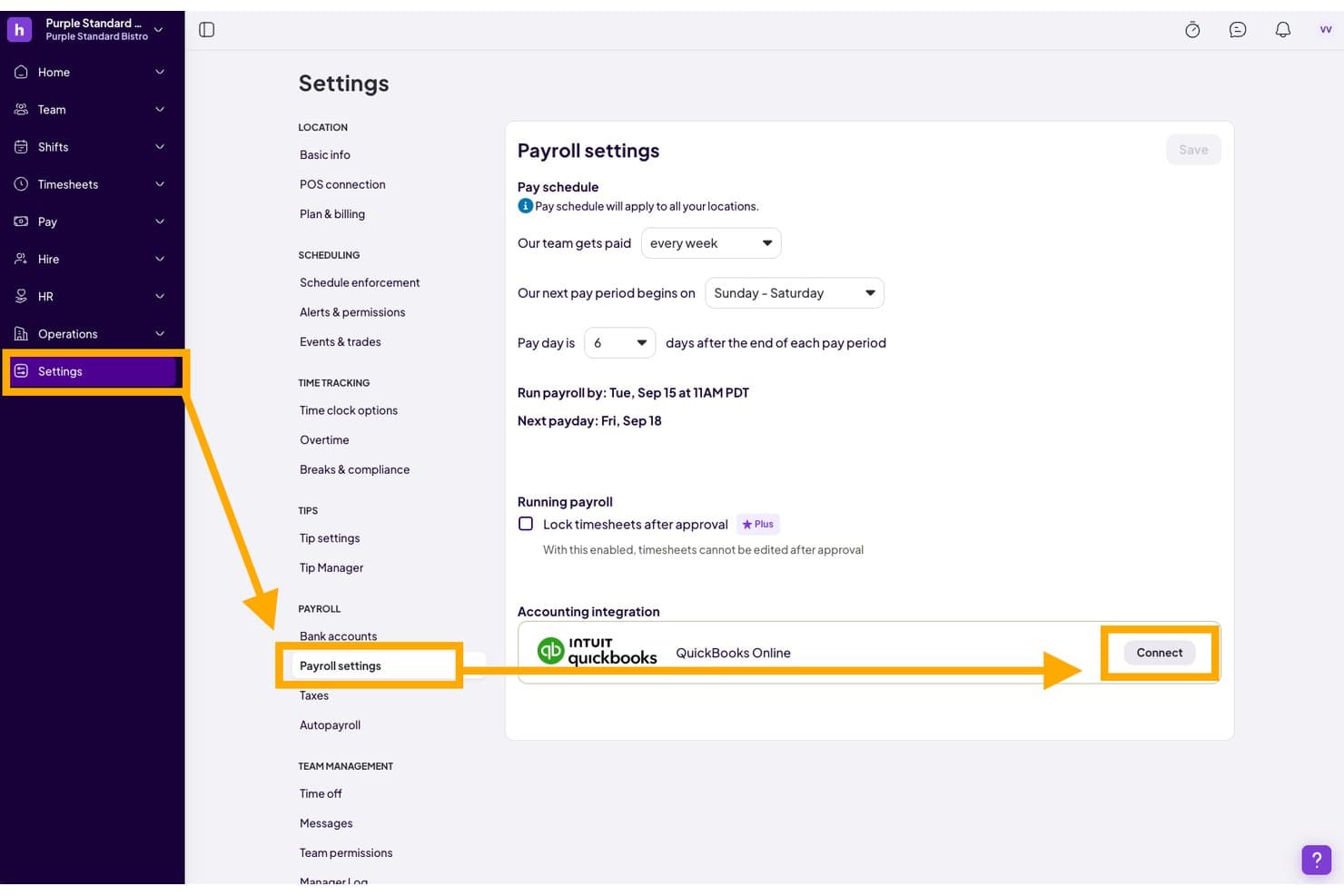
Homebase lets users connect QuickBooks Online directly from payroll settings. Homebase is an HR and workforce management platform built for hourly teams, combining employee scheduling, time tracking, payroll, onboarding, and compliance tools with a QuickBooks Online Plus integration.
Who Is Homebase Best For?
Homebase is built for small business owners and HR managers running hourly teams in restaurants, retail, and service industries who need scheduling, time tracking, and payroll in one place.
Why I Picked Homebase
I picked Homebase as one of the best because it's purpose-built for hourly teams, and that focus pays off when you're running payroll from timesheets. I love how time clock data flows directly into payroll calculations, and from there into a QuickBooks Online Plus-formatted export, cutting out a lot of manual re-entry. The built-in HR compliance layer, including certified HR advisor chat and a custom handbook builder, is genuinely rare at this price point for shift-based businesses.
Homebase Key Features
- Automated onboarding packets: Employees complete federal and state new-hire forms, including W-4, I-9, and direct deposit, entirely online with e-signature and secure document storage.
- PTO policy management: Set accrual rules for sick and vacation time, configure blackout dates, and have approved time off automatically appear in schedules and timesheets.
- Full-service payroll tax filing: Homebase calculates, files, and pays federal, state, and local payroll taxes automatically, and generates W-2s and 1099s at year end.
- POS labor cost sync: Connects with Square, Toast, Clover, and other POS systems to pull in sales data alongside labor hours for real-time cost tracking.
Homebase Integrations
Homebase integrates with QuickBooks Online Plus, Gusto, ADP RUN, Paychex Flex, Square Payroll, Square, Toast, Clover, Lightspeed, and Shopify. QuickBooks connectivity syncs employees and hours, supports formatted payroll exports, and requires separate location connections.
Pros and Cons
Pros:
- Payroll tax filing supports compliance confidence
- Hourly scheduling reduces payroll re-entry
- Timesheets support accurate payroll preparation
Cons:
- Mobile glitches can disrupt time tracking
- Location limits complicate growing operations
 Best for payroll automation and integrations
- Free demo available
- Pricing upon request
Visit WebsiteCustomer Rating:4.3/5
Paylocity gives employees and HR teams a centralized hub to manage time tracking, pay, benefits, and communication. Paylocity is a cloud-based HR and payroll platform designed to help businesses manage their workforce more efficiently. It offers a suite of tools for handling tasks like payroll processing, benefits administration, and employee engagement.
Why I picked Paylocity: I picked Paylocity for its strong payroll capabilities that let you automate calculations, tax filings, and direct deposits with minimal oversight. It supports multiple pay schedules, handles garnishments, and ensures tax compliance across jurisdictions. These features help reduce errors and save time for HR and finance teams. The added ability to sync payroll data with QuickBooks—alongside access to over 400 other integrations—makes it easier to keep your books accurate without manual entry.
Paylocity Standout Features & Integrations
Features include automated onboarding processes, a compliance dashboard to help you stay on top of changing regulations, and a self-service portal that empowers employees to manage their own information.
Integrations include QuickBooks, 24HourFlex, Criteria Corp, eSkill, HighMatch, PARiM, Plum, The Predictive Index, 15Five, 401GO, 4MyBenefits, BambooHR, and Greenhouse.
Pros and Cons
Pros:
- Flexible integration options with existing systems
- Automated onboarding processes
- Comprehensive payroll and HR functions
Cons:
- Lacks support for independent contractor payments
- Limited customization options for certain reports
 Best for automating payroll and HR management
- 30-day free trial + free demo available
- From $50/user/month
Visit WebsiteCustomer Rating:4.5/5
TimeTrex's time tracking features integrate with its payroll and HR functions to ensure centralized data visibility. TimeTrex is a comprehensive workforce management software that offers an all-in-one solution for integrating time and attendance tracking, employee scheduling, HR management, and payroll processing.
Why I picked TimeTrex: TimeTrex automatically calculates wages, taxes, and deductions, and syncs this data with QuickBooks, reducing manual data entry and minimizing errors. This integration supports businesses in maintaining accurate financial records while automating critical payroll functions.
TimeTrex Standout Features & Integrations
Features include job costing, document management, direct deposit, tax calculations, biometric facial recognition, mobile accessibility, real-time reporting, geolocation and geofencing, and customizable alerts and notifications.
Integrations include QuickBooks, Sage, ADP, Paychex, Ceridian, Xero, and various custom API integrations.
Pros and Cons
Pros:
- Robust reporting features
- Automated payroll and tax calculations
- Advanced time tracking and scheduling
Cons:
- Can be challenging to navigate to certain features
- Platform design is outdated
Learn more about TimeTrex: Best for employee engagement and onboarding
- Free demo available
- Pricing upon request
Visit WebsiteCustomer Rating:4.7/5
HR Cloud efficiently automates HR processes with employee onboarding, records management, and engagement tools in a centralized platform. HR Cloud offers a hard-hitting suite of HR software solutions designed to enhance employee engagement and streamline onboarding processes. It is best for employee engagement and onboarding due to its customizable onboarding journeys and robust engagement tools.
Why I picked HR Cloud: I chose HR Cloud for its exceptional focus on employee engagement and onboarding. The platform stands out with its customizable onboarding workflows and comprehensive engagement tools, which are crucial for maintaining high employee morale and smooth onboarding experiences. I believe HR Cloud is best for employee engagement and onboarding because it offers tailored solutions that cater to the unique needs of each organization, ensuring a flawless transition for new hires and ongoing employee satisfaction.
HR Cloud Standout Features & Integrations
Features include automated onboarding notifications, digital paperwork, customizable training modules, and robust employee engagement tools such as polls, surveys, and recognition programs.
Integrations include QuickBooks, ADP, Gusto, BambooHR, Workday, Paychex, Namely, Greenhouse, Lever, and Checkr.
Pros and Cons
Pros:
- Comprehensive HR suite
- Robust engagement tools
- Customizable onboarding workflows
Cons:
- Slight learning curve
- Limited advanced analytics
Learn more about HR Cloud: Best for employee scheduling and time tracking
- 30-day free trial + free demo available
- From AUD $5/user/month
Visit WebsiteCustomer Rating:4.6/5
Deputy is a comprehensive tool designed to streamline employee scheduling and time tracking. Deputy excels in employee scheduling and time tracking by offering features such as automated scheduling, real-time attendance tracking, and compliance with labor laws. This makes it the best choice for businesses that need to manage complex schedules and ensure accurate time tracking.
Why I picked Deputy: I chose Deputy for its robust scheduling and time-tracking capabilities, which stand out in the HR software market. Its ability to automate scheduling and track attendance in real-time makes it a valuable tool for businesses with shift workers. I believe Deputy is the best for employee scheduling and time tracking due to its comprehensive features that simplify these tasks and ensure compliance with labor laws.
Deputy Standout Features & Integrations
Features include automated scheduling, real-time attendance tracking, and compliance with labor laws. It also provides mobile access, allowing employees to clock in and out from their smartphones.
Integrations include QuickBooks, Xero, Gusto, ADP, Square, Vend, Lightspeed, MYOB, and Sage.
Pros and Cons
Pros:
- Mobile access
- Real-time attendance tracking
- Automated scheduling
Cons:
- Slight learning curve for new users
- Limited customization options
Learn more about Deputy: Best for integrated HR and payroll
- Free demo available
- Pricing upon request
Visit WebsiteCustomer Rating:4.2/5
Dayforce excels in HR management by integrating payroll, benefits, talent, and workforce management into a single, real-time platform. Dayforce is an online HR management software that centralizes all HR needs in one platform. It is best for integrated HR and payroll because it combines HR management, payroll, benefits, and performance data in real-time, ensuring efficient operations.
Why I picked Dayforce: I chose Dayforce for its comprehensive integration of HR and payroll functionalities, which stands out from other HR tools. Its real-time data synchronization across various HR functions makes it the best for integrated HR and payroll.
Dayforce Standout Features and Integrations
Features include centralized employee records, advanced analytics, and on-demand payroll through Dayforce Wallet. It also features Dayforce Assistant for easy shift management via voice or chat commands.
Integrations include QuickBooks, Salesforce, Microsoft Dynamics, SAP, Oracle, Workday, ADP, Kronos, BambooHR, and NetSuite.
Pros and Cons
Pros:
- On-demand payroll
- Comprehensive HR functionalities
- Real-time data synchronization
Cons:
- May require continuous training and adaptation for users
- Setup often requires a slight learning curve
Learn more about Dayforce:

Mineral is a comprehensive HR and compliance platform designed to help businesses manage HR tasks and ensure compliance with regulations. Mineral is a comprehensive HR and compliance platform designed to simplify HR management and compliance for businesses. It excels in providing expert support and compliance resources, making it the best choice for HR compliance and expert support.
Why I picked Mineral: I chose Mineral for its robust focus on HR compliance and expert support, which sets it apart from other HR tools. Mineral's unique combination of real-time alerts, expert advice, and comprehensive compliance resources make it the best for businesses needing reliable HR compliance solutions.
Mineral Standout Features and Integrations
Features include essential tools and resources, including the Mineral Platform™ for compliance guidance, Mineral Intelligence™ for real-time alerts, and Mineral Experts™ for expert advice.
Integrations include QuickBooks, ADP, Gusto, Paychex, BambooHR, Zenefits, Namely, TriNet, Insperity, and Justworks.
Pros and Cons
Pros:
- Real-time alerts
- Expert HR support
- Various compliance resources
Cons:
- Requires annual billing
- Costs may be high for small businesses
Learn more about Mineral:
QuickBooks ile Entegrasyon Sağlayan Diğer İK Yazılımları
Aşağıda, kısa listemize aldığımız ancak en iyi seçenekler arasına giremeyen QuickBooks ile entegre olan ek İK yazılımlarının bir listesini bulabilirsiniz. Bunları kesinlikle incelemeye değer.
- 11Happy HRBest for compliance with Australian HR laws
- 12RipplingBest for unified workforce management
- 13FactorialBest for AI-powered HR automation
- 14Oyster HRBest for global hiring and compliance
- 15ADP Workforce NowBest for comprehensive HR and payroll solutions
- 16RiseBest for all-in-one HR and benefits management
- 17BQE CoreBest for project management and billing
- 18PipefyBest for workflow automation
- 19OnPayBest for easy payroll integration
- 20Justworks PayrollBest for benefits administration
How I Evaluate HR Software with QuickBooks Integration
I split my evaluation into baseline criteria—payroll sync and QuickBooks data flow—and differentiators like GL mapping depth and SMB scalability that separate the best tools from the rest.
Core Functionality (Table Stakes For This List)
When I'm selecting tools for my list, I rank each one on a scale from 0 (does not offer the functionality) to 5 (excels in this area) for each core functionality listed below. Then, I calculate the tool's total score into a percentage. Each tool needs to achieve a minimum total score of 65% to be considered for inclusion.
- QuickBooks Integration Quality: I check whether the connection is native or API-based, and whether it supports QuickBooks Online, Desktop, or both.
- Payroll-to-QuickBooks Data Sync: Each tool should push wages, taxes, and deductions into QuickBooks as detailed journal entries, not just lump-sum totals.
- Employee Record Management: I look for centralized HR profiles that map cleanly to QuickBooks employee or vendor records when staff are added or updated.
- Time and Attendance Sync: Hours, PTO balances, and overtime data should flow into QuickBooks for payroll and labor costing without manual re-entry.
- Benefits and Deductions Tracking: Pre-tax and post-tax deductions like health plans or retirement contributions need to post to the correct GL accounts automatically.
- Tax and Compliance Reporting: I evaluate whether the tool generates filings and tax forms that reconcile with QuickBooks ledger data for clean audits.
Once I have a list of tools that meet the criteria, I consider what sets each platform apart.
Differentiating Factors (What Sets Vendors Apart)
Here's how I compare and contrast different vendors:
Standout Features
Custom GL mapping is a major differentiator. I look for tools that let you assign specific pay types and deductions to individual QuickBooks accounts. This matters when your chart of accounts goes beyond the basics. Job costing sync is equally important for project-driven teams that need labor hours tied to QuickBooks jobs or classes. Automated onboarding workflows also count—collecting tax forms and pushing new-hire data into QuickBooks saves real time during busy hiring periods.
Beyond Features
QuickBooks version compatibility is one of the first things I check. Some tools only support QuickBooks Online, which rules them out for businesses still running Desktop Enterprise. Pricing transparency matters too—I evaluate whether the QuickBooks sync is included in the base plan or locked behind a paid add-on. I also consider implementation support, especially whether the vendor offers guided chart-of-accounts mapping during setup. Getting that wrong on day one creates reconciliation headaches for months.
Nasıl Seçilir?
Uzun özellik listeleri ve karmaşık fiyatlandırma yapıları içinde kaybolmak kolaydır. Kendinize özgü yazılım seçim süreciniz üzerinde çalışırken odağınızı korumanıza yardımcı olmak için göz önünde bulundurmanız gereken faktörleri içeren bir kontrol listesi hazırladım:
| Faktör | Göz Önünde Bulundurulması Gerekenler |
|---|---|
| FaktörÖlçeklenebilirlik | Göz Önünde Bulundurulması GerekenlerYazılım işletmenizle birlikte büyüyebilir mi? Gelecekteki çalışan sayılarını ve işlem hacimlerini göz önünde bulundurun. Büyümeyi sınırlayabilecek veya yüksek yükseltme maliyetlerine yol açabilecek araçlardan kaçının. |
| FaktörEntegrasyonlar | Göz Önünde Bulundurulması GerekenlerKullandığınız diğer araçlarla çalışıyor mu? Manuel veri girişinden kaçınmak için QuickBooks'un yanı sıra CRM veya bordro hizmetleri gibi mevcut sistemlerle uyumluluğunu kontrol edin. |
| FaktörÖzelleştirilebilirlik | Göz Önünde Bulundurulması GerekenlerYazılımı süreçlerinize göre uyarlayabilir misiniz? Kendinize özgü iş akışlarınıza uyacak esnek ayarlar ve seçenekler arayın. Süreç değişikliklerini zorunlu kılan katı sistemlerden kaçının. |
| FaktörKullanım kolaylığı | Göz Önünde Bulundurulması GerekenlerArayüz ekibiniz için sezgisel mi? Öğrenme eğrisini ve kullanıcı geri bildirimlerini değerlendirin. Karmaşık bir sistem kullanıcıların hayal kırıklığı yaşamasına ve benimseme oranının düşük olmasına neden olabilir. |
| FaktörUygulama ve işe alıştırma | Göz Önünde Bulundurulması GerekenlerKurulum ne kadar sürecek? Yükleme ve eğitim için gereken zamanı ve kaynakları göz önünde bulundurun. Hızlı işe alıştırma zamandan tasarruf sağlayabilir ve aksamaları azaltabilir. |
| FaktörMaliyet | Göz Önünde Bulundurulması GerekenlerToplam sahip olma maliyeti nedir? Eğitim, destek ve bakım masraflarını da dahil ederek yalnızca fiyat etiketine bakmayın. Maliyetleri artırabilecek gizli ücretlere karşı dikkatli olun. |
| FaktörGüvenlik önlemleri | Göz Önünde Bulundurulması GerekenlerVerileriniz ne kadar güvende? Hassas çalışan bilgilerini korumak için şifreleme, veri düzenlemelerine uyumluluk ve tedarikçinin güvenlik politikalarını kontrol edin. |
| FaktörDestek bulunabilirliği | Göz Önünde Bulundurulması Gerekenlerİhtiyacınız olduğunda yardım alabiliyor musunuz? Destek saatlerini, kanallarını ve yanıt verme hızını göz önünde bulundurun. Desteğin ekibinizin ihtiyaçları ve saat dilimleriyle uyumlu olduğundan emin olun. |
Trendler
QuickBooks gibi günlük kullandığınız araçlarla entegre olan İK yazılım araçları, yalnızca entegrasyonlarını genişletmekle kalmayıp yerleşik özellikler aracılığıyla da hızla gelişiyor. Bu bölüm, bu entegrasyonu şekillendiren en son trendleri inceleyerek bu gelişmelerin İK ve muhasebe süreçlerini nasıl dönüştürdüğüne ilişkin bilgiler sunuyor.
- Öngörücü Analizler için Yapay Zekâ: İK yazılımlarında yapay zekâ entegrasyonu giderek yaygınlaşıyor ve öngörücü analiz yetenekleri sunuyor. Bu trend önemlidir; çünkü işletmelerin İK ihtiyaçlarını ve finansal sonuçlarını öngörmesine olanak tanıyarak stratejik karar alma süreçlerini geliştirir.
- Çalışanların Kendi Kendine Hizmet Platformları: Çalışanların kendi kendine hizmet platformlarının yükselişi dikkat çekicidir. Bu platformlar, çalışanların kişisel bilgilerini ve yan haklarını yönetmelerini sağlayarak idari iş yükünü azaltır ve verimliliği artırır.
- Gelişmiş Veri Güvenliği: İK yazılımlarının gelişmiş şifreleme ve çok faktörlü kimlik doğrulama özelliklerini içermesiyle veri güvenliği giderek daha fazla önem kazanıyor. Bu trend, hassas çalışan ve finansal verilerin korunması, mevzuata uygunluğun sağlanması ve güven oluşturulması açısından kritik öneme sahiptir.
- Mobil Öncelikli Çözümler: Mobil öncelikli çözümler yaygınlaşıyor ve İK ile muhasebe sistemlerine her yerden erişim sağlıyor. Bu trend, uzaktan çalışma esnekliği ve bağlantıya yönelik artan talebi destekliyor.
- Bulut Tabanlı Yazılımların Yaygınlaşması: Bulut tabanlı İK ve muhasebe yazılımları yaygınlaşıyor; daha düşük başlangıç maliyetleri ve daha kolay güncellemeler sunan ölçeklenebilir çözümler sağlıyor. Bu trend, uygun maliyetli ve uyarlanabilir işletme faaliyetleri için vazgeçilmezdir.
QuickBooks ile Entegre Olan İK Yazılımı Nedir?
QuickBooks ile entegre olan İK yazılımı, insan kaynakları görevlerini yönetirken finans ve muhasebe amaçları doğrultusunda QuickBooks'a bağlanmak üzere tasarlanmış bir araçtır. Küçük ve orta ölçekli işletmeler bu yazılımı genellikle bordro, yan hak yönetimi ve çalışan kayıtları gibi İK süreçlerini kolaylaştırmak, aynı zamanda doğru finansal raporlama ve mevzuata uygunluk sağlamak için kullanır.
Yazılım genellikle bordro yönetimi, çalışanların kendi kendine hizmet portalları, yan hak yönetimi ve zaman takibi gibi bileşenleri içerir. QuickBooks ile entegrasyon, bordro verilerinin otomatik olarak senkronize edilmesini sağlar; böylece manuel veri girişinden kaynaklanan hatalar azalır ve finansal kayıtların güncel olması güvence altına alınır.
Özellikler
QuickBooks ile entegre olan bir İK yazılımı seçerken, İK süreçlerini kolaylaştıracak ve muhasebe sisteminizle kusursuz entegrasyon sağlayacak özellikleri belirlemek büyük önem taşır. Bu entegrasyon; bordro, yan haklar, mevzuata uygunluk ve diğer İK işlevlerinin yönetimindeki verimliliği önemli ölçüde artırabilir. Aşağıda QuickBooks ile entegre olan İK yazılımlarında aranması gereken en önemli özelliklerden bazıları yer almaktadır.
- Bordro Yönetimi: Bordro işlemlerini otomatikleştirerek çalışanlara doğru ve zamanında ödeme yapılmasını sağlar; bu da çalışan memnuniyetinin ve iş kanunlarına uygunluğun korunması açısından büyük önem taşır.
- Çalışanların Kendi Kendine Hizmeti: Çalışanların bordro bilgilerine, yan haklarına ve kişisel verilerine erişmesine olanak tanıyarak İK personelinin idari yükünü azaltır ve çalışanların kendi bilgilerini yönetmesini sağlar.
- Yan Hak Yönetimi: Sağlık sigortası, emeklilik planları ve diğer ayrıcalıklar gibi çalışan yan haklarını yönetir; rekabetçi yan hak paketleri sunarak yetenekli çalışanları çekmeye ve elde tutmaya yardımcı olur.
- Mevzuata Uygunluk Yönetimi: Şirketin federal ve eyalet iş kanunlarına uymasını sağlar; düzenlemelerdeki değişiklikler hakkında şirketi güncel tutarak hukuki sorun ve cezalarla karşılaşma riskini azaltır.
- Zaman Takibi: Çalışanların çalışma saatlerini takip eder ve bordro ile entegre olur; çalışılan saatler için doğru ücretlendirme yapılmasını sağlar ve fazla mesai ile izin yönetimi sürecini kolaylaştırır.
- İşe Alıştırma Araçları: Yeni işe alınan çalışanlar için işe alıştırma sürecini kolaylaştırır; gerekli tüm evrakların tamamlanmasını ve yeni çalışanların şirkete sorunsuz bir şekilde uyum sağlamasını güvence altına alır.
- İK Destek Merkezi: İK danışmanlarına ve kaynaklarına erişim sağlayarak karmaşık İK sorunları hakkında rehberlik sunar ve şirketin ihtiyaçlarına göre uyarlanmış özel politikalar ile çalışan el kitaplarının oluşturulmasına yardımcı olur.
- Doğrudan Para Yatırma: Çalışan maaşlarının banka hesaplarına doğrudan aktarılmasını kolaylaştırır; ödeme verimliliğini artırır ve kâğıt çek ihtiyacını azaltır.
- Vergi Beyanı: Bordro vergilerinin beyan edilmesini otomatikleştirerek vergi düzenlemelerine uygunluğu sağlar ve hata ile ceza riskini azaltır.
- Çalışan Performans Yönetimi: Çalışan performansını takip eder ve yönetir; iyileştirme ve gelişim alanlarının belirlenmesine yardımcı olur ve çalışanların hedeflerine ve amaçlarına ulaştığından emin olunmasını sağlar.
Bu özelliklere sahip İK yazılımını seçmek, İK operasyonlarınızın verimliliğini ve etkinliğini büyük ölçüde artırabilir; şirketinizin düzenlemelere uygun kalmasını ve çalışanlarınızın yeterince desteklenip memnun olmasını sağlayabilir.
Avantajlar
İK yazılımını QuickBooks ile entegre etmek, operasyonlarını kolaylaştırmak ve verimliliği artırmak isteyen işletmelere çok sayıda avantaj sunar. Aşağıda, kullanıcıların ve kuruluşların bu entegrasyondan elde edebileceği beş temel avantaj yer almaktadır.
- Otomatik Bordro İşleme: Entegrasyon, bordro verilerinin otomatik olarak senkronize edilmesini sağlayarak manuel veri girişi hatalarını azaltır ve zamandan tasarruf sağlar.
- Birleştirilmiş Finansal Raporlama: İK ve finansal verilerin tek bir sistemde birleştirilmesi, kapsamlı raporlar sunarak daha iyi finansal kararlar alınmasına yardımcı olur.
- Geliştirilmiş Uyumluluk Yönetimi: Yazılım, tüm bordro ve vergi düzenlemelerine uyulmasını sağlamaya yardımcı olarak uyumsuzluk cezaları riskini en aza indirir.
- Geliştirilmiş Çalışan Verisi Yönetimi: Merkezi çalışan kayıtları, çalışan bilgilerini yönetmeyi ve bunlara erişmeyi kolaylaştırarak İK verimliliğini artırır.
- Maliyet Tasarrufu: Birden fazla sisteme ve manuel sürece duyulan ihtiyacı azaltarak işletmeler operasyonel maliyetlerini düşürebilir ve genel verimliliklerini artırabilir.
Maliyetler ve Fiyatlandırma
QuickBooks ile entegre olan İK yazılımlarını değerlendirirken mevcut çeşitli fiyatlandırma planlarını ve özellikleri anlamak önemlidir. İK aracının maliyetinin yanı sıra QuickBooks entegrasyonunu kullanmak için ortaya çıkabilecek ek maliyetleri de hesaba katmanız gerekir. Bu kılavuz, bilinçli bir karar vermenize yardımcı olmak için farklı İK yazılımı seçeneklerine, bunların maliyetlerine ve sundukları özelliklere genel bir bakış sağlar.
Aşağıda, QuickBooks ile entegre olan İK yazılımlarındaki farklı planları, ortalama fiyatlarını ve yaygın özelliklerini özetleyen ayrıntılı bir tablo yer almaktadır.
QuickBooks ile Uyumlu İK Yazılımları için Plan Karşılaştırma Tablosu
| Plan Türü | Ortalama Fiyat | Yaygın Özellikler |
|---|---|---|
| Plan TürüÜcretsiz Seçenek | Ortalama Fiyat$0 | Yaygın ÖzelliklerTemel çalışan yönetimi, zaman takibi, sınırlı raporlama ve sınırlı sayıda kullanıcı için erişim |
| Plan TürüStandart | Ortalama Fiyat$1.25 - $8 kullanıcı/ay başına | Yaygın ÖzelliklerÇalışan verisi senkronizasyonu, uyumluluk takibi, özel iş akışları, öz hizmet portalları, izin yönetimi, temel raporlama ve bordro özellikleri veya entegrasyonu |
| Plan Türü Profesyonel | Ortalama Fiyat$40 temel ücret + $6 kullanıcı/ay başına | Yaygın ÖzelliklerPerformans yönetimi, yan hak yönetimi, gelişmiş raporlama, gelişmiş güvenlik özellikleri, tam QuickBooks entegrasyonu ve üst düzey özellikler |
QuickBooks Entegrasyonlarına sahip İK yazılımları için plan türlerinin, maliyetlerin ve özelliklerin dökümü.
Bir İK yazılımı planı seçerken işletmenizin büyüklüğünü, İK ihtiyaçlarınızın karmaşıklığını ve bütçenizi (QuickBooks Entegrasyonunun maliyeti ile yazılımları için seçtiğiniz fiyatlandırma planı dahil) göz önünde bulundurun. Ücretsiz planlar iyi bir başlangıç noktası olabilir; ancak QuickBooks entegrasyonunun bu fiyatlandırma kademesinde kullanılabilir olduğundan emin olmanız gerekir. İşletmeniz büyüdükçe daha kapsamlı planlara yatırım yapmak; kullanıcı sayısı, verimlilik, hacme dayalı indirimler ve uyumluluk açısından önemli avantajlar sağlayabilir.
QuickBooks ile Entegre Olan İK Yazılımı SSS
QuickBooks ile entegre olan İK yazılımları hakkında bana sıkça sorulan sorulardan bazıları şunlardır.
Entegrasyon süreci nasıl işler?
Entegrasyon süreci genellikle İK yazılımının bir API veya üçüncü taraf bağlayıcı aracılığıyla QuickBooks’a bağlanmasını içerir. Bağlantı kurulduktan sonra çalışan bilgileri, bordro ayrıntıları ve vergi bilgileri gibi veriler iki sistem arasında otomatik olarak aktarılabilir; böylece tutarlılık ve doğruluk sağlanır.
İK yazılımını QuickBooks ile entegre etmenin bir maliyeti var mı?
Entegrasyon maliyeti, İK yazılımı sağlayıcısına ve gereken belirli özelliklere bağlı olarak değişebilir. Bazı sağlayıcılar entegrasyonu abonelik planlarının bir parçası olarak sunarken diğerleri ek ücret talep edebilir. Olası maliyetleri anlamak için fiyatlandırma ayrıntılarını İK yazılımı sağlayıcısıyla incelemek önemlidir.
Entegrasyonu işletmemin ihtiyaçlarına uyacak şekilde özelleştirebilir miyim?
Evet, birçok İK yazılımı çözümü işletmenizin benzersiz ihtiyaçlarına uyacak şekilde özelleştirilebilir entegrasyon seçenekleri sunar. Bu seçenekler arasında senkronize edilecek belirli veri alanlarının ayarlanması, iş akışlarının yapılandırılması ve ayarların şirketinizin süreçlerine uyacak şekilde düzenlenmesi bulunabilir.
Entegrasyon süreci sırasında veriler ne kadar güvende?
Veri güvenliği, özellikle entegrasyon sürecinde İK yazılımı sağlayıcıları için en önemli önceliklerden biridir. Çoğu platform, hassas bilgileri korumak için şifreleme ve diğer güvenlik önlemlerini kullanır. Verilerinizin yeterince korunduğundan emin olmak için hem İK yazılımının hem de QuickBooks’un güvenlik protokollerini incelemeniz önerilir.
İK yazılımını QuickBooks ile entegre etmek mevcut verilerimi etkiler mi?
İK yazılımını QuickBooks ile entegre etmek mevcut verilerinizi etkilememelidir. Entegrasyon, mevcut kayıtları değiştirmeden veya silmeden bilgileri senkronize etmek ve güncellemek üzere tasarlanmıştır. Bununla birlikte, entegrasyon sürecini başlatmadan önce verilerinizi yedeklemek her zaman iyi bir uygulamadır.
Entegrasyonla ilgili sorunlarla karşılaşırsam ne tür bir destek sunulur?
Çoğu İK yazılımı sağlayıcısı, entegrasyon sürecinde ortaya çıkabilecek sorunlara yardımcı olmak için müşteri desteği sunar. Bu destek; çevrimiçi kaynakları, eğitimleri ve teknik ekiplerden doğrudan desteği içerebilir. Sorunsuz bir entegrasyon deneyimi sağlamak için güvenilir destek sunan bir sağlayıcı seçmek önemlidir.