

Sağlık hizmetleri iş gücü yönetimi yazılımı; hastanelerde, kliniklerde ve bakım tesislerinde personel planlamanıza, çalışma saatlerini takip etmenize ve mevzuata uygunluğu yönetmenize yardımcı olur. Personel planlamasını iyileştirmenin, iş gücü maliyetlerini kontrol etmenin ve vardiya planlamasıyla ilgili sorunları azaltmanın yollarını arıyorsanız, doğru iş gücü yönetimi platformu büyük fark yaratır. Aşağıda, en iyi sağlık hizmetleri iş gücü yönetimi yazılımları için seçtiklerimi bulabilirsiniz. Böylece öne çıkan seçenekleri karşılaştırabilir, benzersiz güçlü yönleri görebilir ve hasta bakımını optimize etmek için hangi aracın iş gücü planlama ihtiyaçlarınıza uygun olduğuna karar verebilirsiniz.
Why Trust Our Software Recommendations
6,700+
Reviews
20
Industry experts
16+
Evaluation factors
14
Years
Our team has been testing and reviewing software since 2012. As HR experts ourselves, we know how difficult—and important—it is to choose the right software.
For this guide, we evaluated tools using hands-on testing and independent research, scoring tools using our selection criteria. We also draw on insights from industry thought leaders and practicing HR experts.
Our reviews reflect our human editorial judgment, not a sales pitch.
Expert reviewers:
- Phil GrayCOO
 Kim BehnkeHR Tech Editor & Analyst
 Josh BarkerPeople Ops Manager

Sağlık Hizmetleri İş Gücü Yönetimi Yazılımları Karşılaştırma Tablosu
En iyi sağlık hizmetleri iş gücü yönetimi yazılımı seçimlerimin fiyatlandırma ayrıntılarını bu karşılaştırma tablosunda özetliyorum:
Sorted by: Default
| Tool | Starting Price | Website | |
|---|---|---|---|
Best for managing mobile and deskless teams | 4.6 out of 5 | Pricing upon request Free plan + 14-day free trial available | Website |
Best for unified HR, payroll, and shift data | 4.9 out of 5 | $8/user/month Free trial + free demo available | Book Demo |
Best for credential-based shift scheduling | 4.3 out of 5 | Pricing upon request Free demo available | Website |
Best as AI for business | 4.4 out of 5 | $8/user/month Free trial + Free demo available | Website |
Best for tiered internal-to-agency labor sourcing | Not rated | Pricing upon request Free demo available | Website |
Best for fast healthcare shift scheduling | 4.6 out of 5 | $5/user/month 30-day free trial + free demo available | Website |
Best for integrated HR and payroll workflows | 4.6 out of 5 | Pricing upon request Free demo available | Website |
Best for credentialing and staff training | 4.3 out of 5 | Pricing upon request Free demo available | Website |
Best for healthcare staffing agency support | 4.1 out of 5 | $99/user/month Free demo available | Website |
Best for high-volume workforce scheduling flexibility | Not rated | Pricing upon request Free demo available | Website |


En İyi Sağlık Hizmetleri İş Gücü Yönetimi Yazılımları İncelemeleri
Kısa listeme giren en iyi sağlık hizmetleri iş gücü yönetimi yazılımlarıyla ilgili ayrıntılı özetlerimi aşağıda bulabilirsiniz. İncelemelerim, her platformun özelliklerine, en uygun kullanım alanlarına ve entegrasyonlarına ayrıntılı bir bakış sunarak sizin için en iyi seçeneği bulmanıza yardımcı olur.
 Best for managing mobile and deskless teams
- Free plan + 14-day free trial available
- Pricing upon request
Visit WebsiteCustomer Rating:4.6/5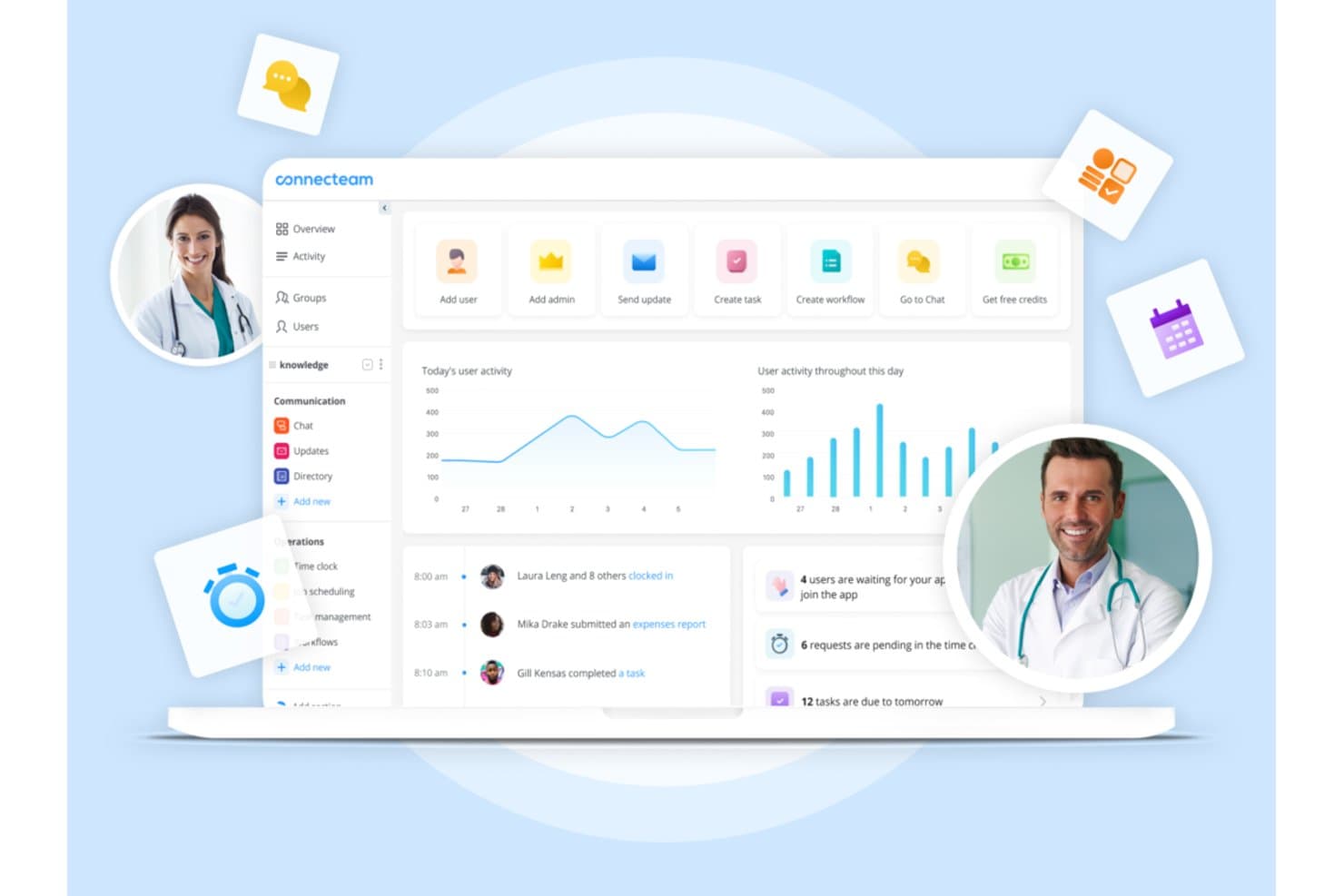
Connecteam offers a healthcare workforce management dashboard with activity tracking, scheduling, task management, and team communication tools. Connecteam is a mobile-first workforce management platform that combines shift scheduling, time tracking, team communication, and HR tools for frontline and deskless healthcare staff.
Who Is Connecteam Best For?
It's a strong fit for small-to-mid-sized healthcare operations, like home care agencies and clinics, that need a simple mobile app to manage non-clinical staff.
Why I Picked Connecteam
I picked Connecteam because its mobile-first design genuinely solves the coordination problem that home care agencies and small clinics face daily. Scheduling a home care worker, confirming their GPS clock-in at a patient's address, and sending a HIPAA-compliant message about a shift change all happen inside one app. I especially like the auto-scheduling feature, which builds full shift schedules around staff availability and roles without manual back-and-forth.
Connecteam Key Features
- Custom forms and checklists: Build digital forms and checklists for staff to complete via mobile.
- HIPAA-compliant messaging: Exchange sensitive team or scheduling information securely within the app.
- Document management: Store, share, and update policy documents, certificates, and onboarding files in one place.
- Task management: Assign tasks to individuals or teams with real-time status tracking for better coordination.
Connecteam Integrations
Connecteam offers native integrations with Gusto, QuickBooks, Paychex, ADP, and Xero for payroll, and provides an API for custom integrations.
Pros and Cons
Pros:
- Built-in HIPAA-compliant team messaging included
- GPS-verified clock-ins confirm remote staff locations
- Mobile-first scheduling suits deskless clinical staff
Cons:
- Lacks credential and license expiration tracking
- No acuity-based staffing or census forecasting
Learn more about Connecteam: Best for unified HR, payroll, and shift data
- Free trial + free demo available
- From $8/user/month
Visit WebsiteCustomer Rating:4.9/5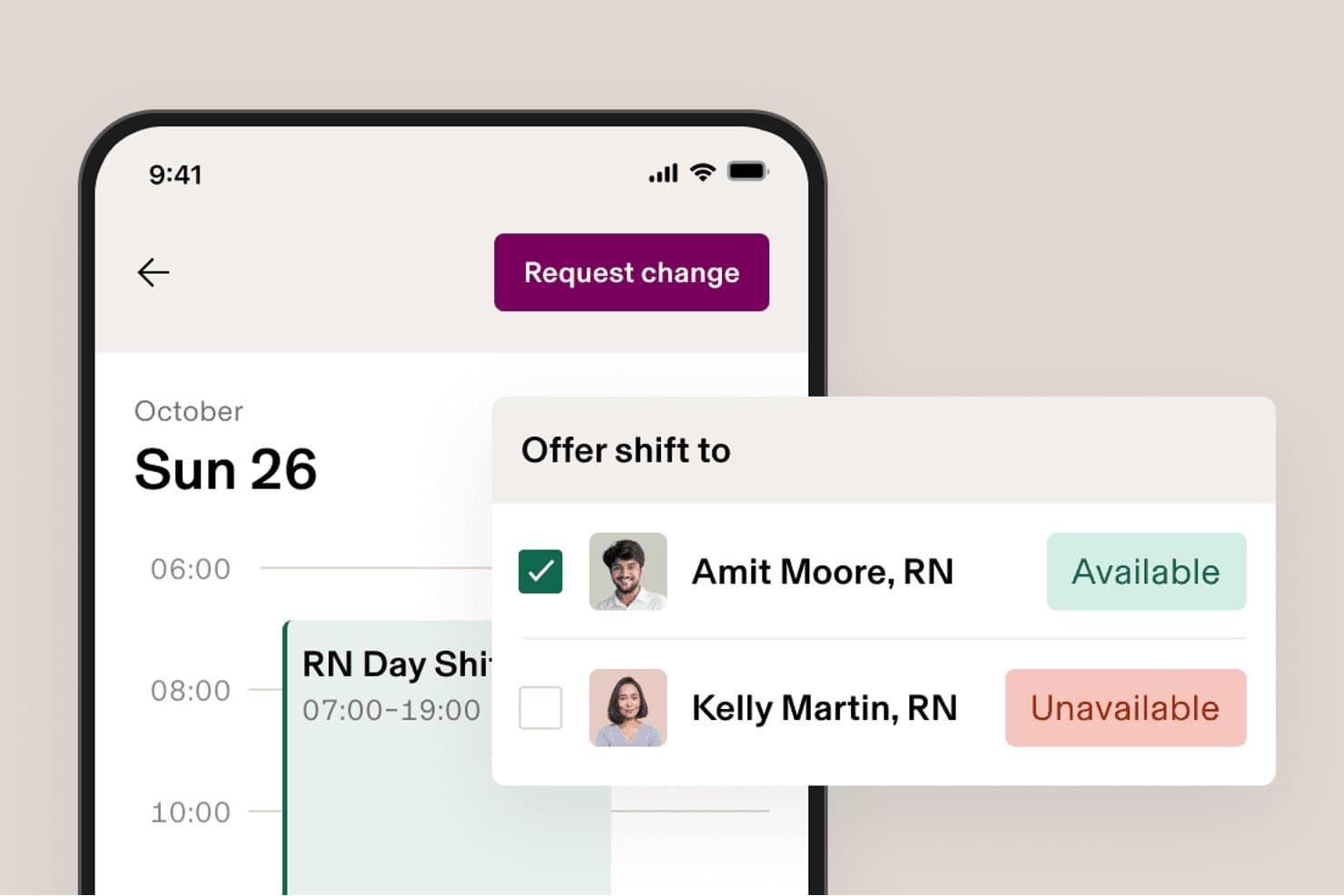
Rippling lets nurses swap shifts by checking colleague availability instantly. Rippling is a modular HR, payroll, and workforce management platform that combines scheduling, time and attendance, benefits, and compliance tools in a single unified system.
Who Is Rippling Best For?
Rippling is a strong fit for healthcare-adjacent or mixed-workforce organizations that want HR, payroll, and scheduling unified in one system without managing multiple platforms.
Why I Picked Rippling
I've included Rippling in my top picks because it's one of the few platforms that keeps HR, payroll, and scheduling data in a single system, so there's no reconciling records across separate tools. I particularly like how its AI-drafted scheduling pulls live certification and availability data to build shift assignments, which matters when you're managing staff with specific credential requirements. Location-based labor law rules apply automatically by work site, reducing manual compliance checks across mixed workforces.
Rippling Key Features
- Mobile clock-in and clock-out: Employees can punch in and out from iOS or Android devices, with automated checks that catch missed clock-outs and duplicate punches.
- Job costing by task or project: Staff can log hours against specific jobs or tasks, giving managers a clearer view of labor costs across work types.
- Custom reporting dashboards: Build dashboards that surface labor cost trends, overtime patterns, and retention data across your workforce.
- Rippling Chat: A built-in messaging tool that lets managers share schedules and communicate with staff without leaving the platform.
Rippling Integrations
Rippling supports more than 650 integrations, including Slack, Microsoft Teams, and Salesforce, plus a public API for custom connections.
Pros and Cons
Pros:
- Location rules flag payroll compliance issues
- Certification checks guide shift assignments
- Unified payroll, scheduling, and time records
Cons:
- No healthcare credential verification workflows
- No acuity-based staffing forecasts
 Best for credential-based shift scheduling
- Free demo available
- Pricing upon request
Visit WebsiteCustomer Rating:4.3/5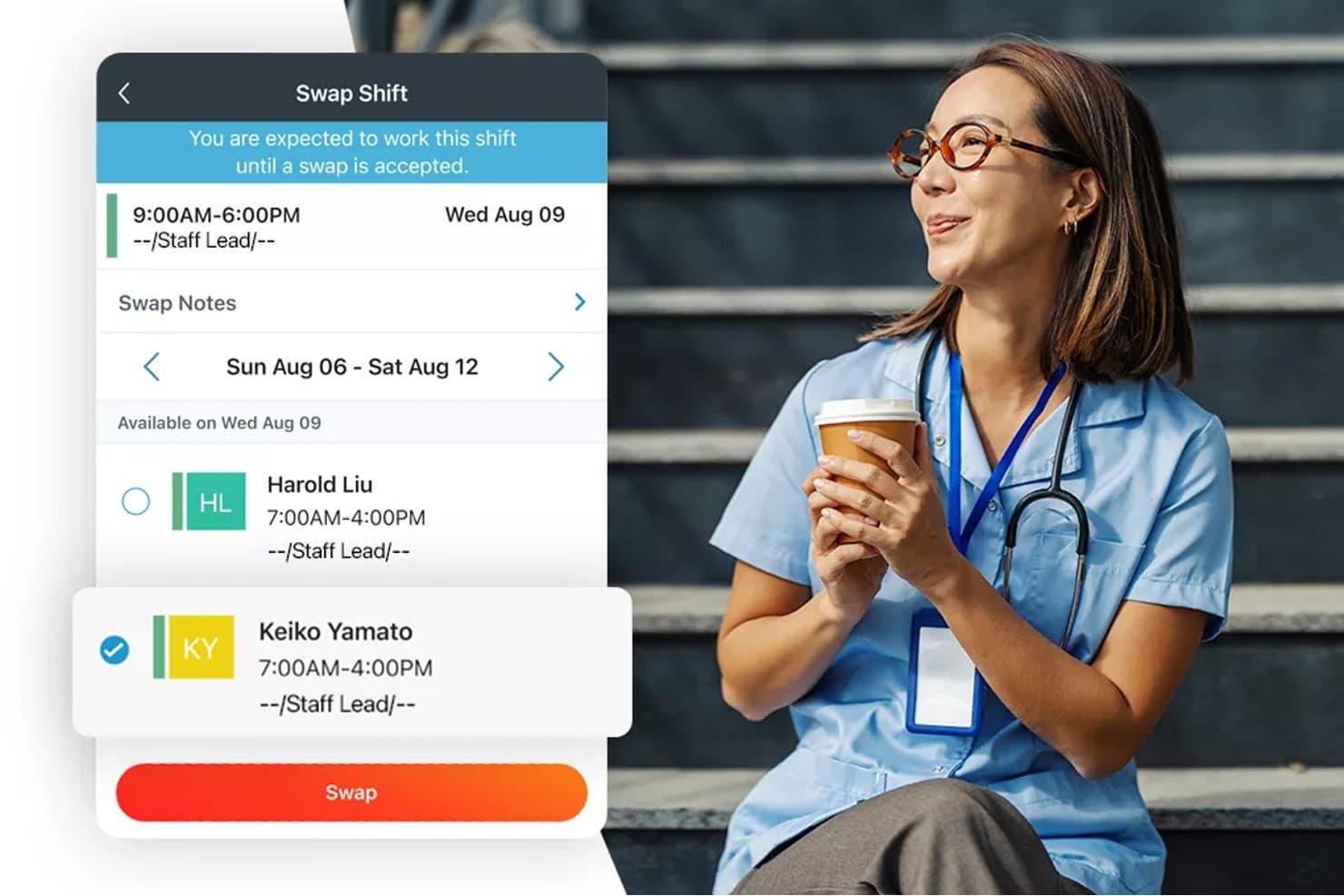
Paylocity lets healthcare staff swap shifts directly from a mobile app. Paylocity is an HR and workforce management platform that combines shift scheduling, credential and certification tracking, time and attendance, and labor cost visibility for healthcare organizations.
Who Is Paylocity Best For?
Paylocity suits healthcare organizations that need to tie shift scheduling directly to credential and certification records across multiple locations.
Why I Picked Paylocity
I picked Paylocity as one of the best because it connects credential records directly to the scheduling workflow, which is exactly what healthcare teams need to stay compliant without manual cross-checking. Managers can schedule staff by certification, skill, or license and validate those credentials at the point of shift assignment. The Compliance Dashboard also auto-tracks skill expiration dates, so gaps surface before they become a scheduling problem.
Paylocity Key Features
- AI shift recommendations: The scheduling engine generates shift suggestions using historical company trends and individual employee data to help managers fill coverage gaps.
- Multi-method time collection: Employees can clock in via time clock, kiosk tablet, web app, or mobile app, with options for biometric recognition and geofencing.
- Attendance dashboard: The Quick View dashboard surfaces real-time attendance status, overtime hours, time-card corrections, and pending time-off requests in one place.
- Budget and labor forecasting: Managers can set budget parameters and input projected data to forecast staffing needs and calculate rates, premiums, and overtime payments automatically.
Paylocity Integrations
Paylocity offers 350+ Marketplace integrations, including OnShift and SmartLinx, for healthcare scheduling, time tracking, and labor management. It also provides APIs and webhooks for custom integrations.
Pros and Cons
Pros:
- Shows overtime alongside workforce metrics
- Tracks expiring licenses and certifications
- Schedules span multiple locations and rotating shifts
Cons:
- Timesheet and payroll discrepancies require correction
- Shift task and staffing-count details are limited
 Best as AI for business
- Free trial + Free demo available
- From $8/user/month
Visit WebsiteCustomer Rating:4.4/5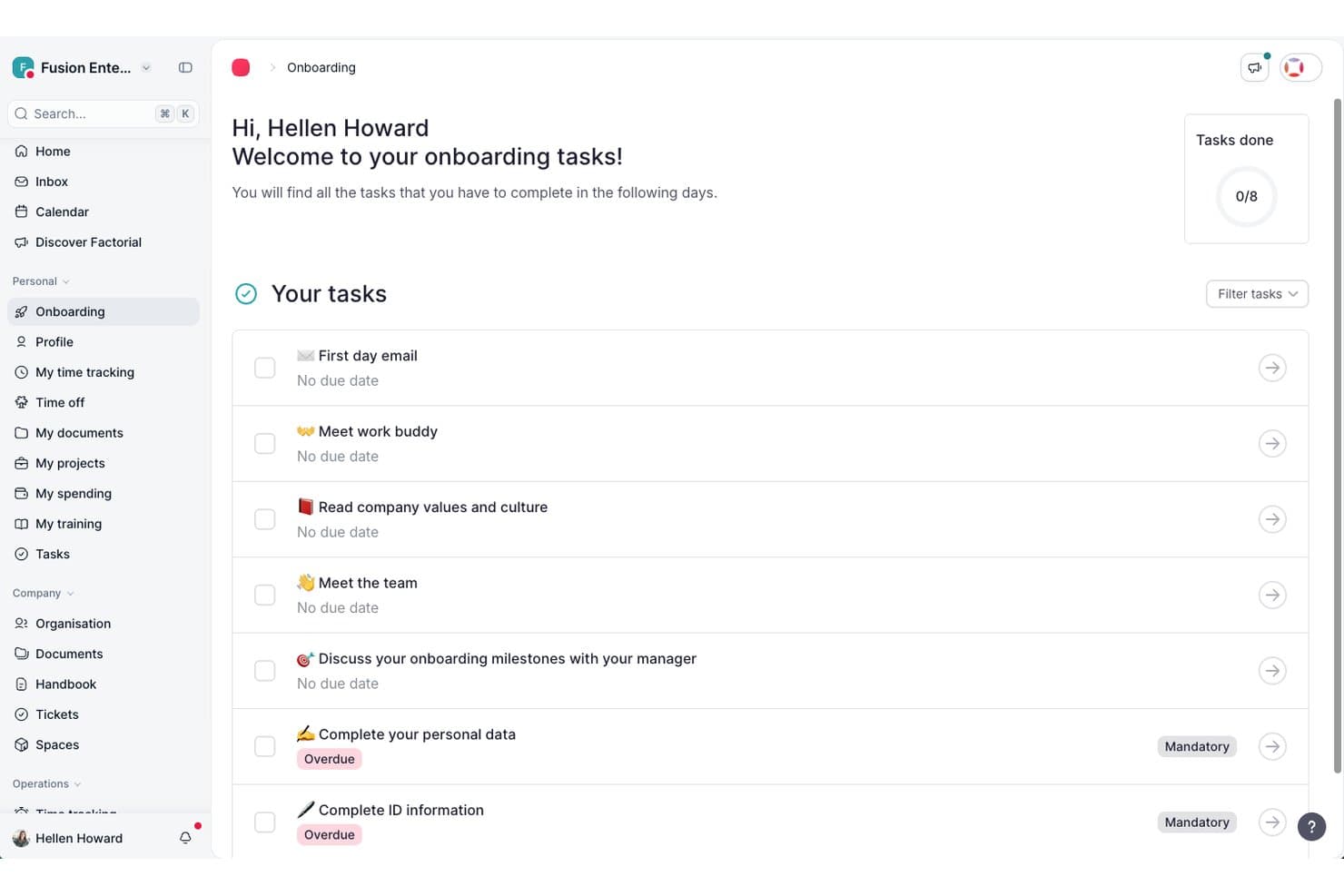
Factorial guides new hires through onboarding tasks in one place. Factorial is an AI-driven HR platform that brings time tracking, shift management, absence management, payroll coordination, and employee document tools together under one system.
Who Is Factorial Best For?
Factorial suits HR teams at small to mid-sized businesses that want AI assistance across everyday operations—from scheduling and reporting to answering employee policy questions.
Why I Picked Factorial
I've included Factorial in my top picks because its AI-driven approach handles the kind of day-to-day workforce admin that eats up time in healthcare settings, from auto-generating timetables to answering employee policy questions on the spot. Factorial One, its AI agent, can analyze scheduling data and produce reports without requiring a manual pull. Shift swap requests and timesheet approvals also run through the platform, keeping coordination visible in one place.
Factorial Key Features
- Time-off request and approval workflow: Employees submit leave requests with dates and reasons, and managers can approve or reject them from desktop or mobile.
- Geofencing-based clock-in: Employees clock in and out using location-based geofencing, ensuring time is only tracked at approved work sites.
- Trend Analytics cost tracking: Monitors workforce costs over time and compares planned versus actual spend across reporting periods.
- Legal e-signature for HR documents: Lets teams request legally binding digital signatures on contracts, payslips, and other employee documents.
Factorial Integrations
Factorial offers marketplace integrations with a3innuva Nómina, DATEV LODAS, Sage 200, Microsoft Power BI, Slack, Google Workspace, and Okta. It also supports custom integrations through its API and Zapier.
Pros and Cons
Pros:
- Shift swaps keep schedule changes visible
- Reviewers praise mobile hours and leave tracking
- AI answers policy questions and creates reports
Cons:
- No patient-ratio or skill-mix scheduling
- No credential tracking or expiration alerts
 Best for tiered internal-to-agency labor sourcing
- Free demo available
- Pricing upon request
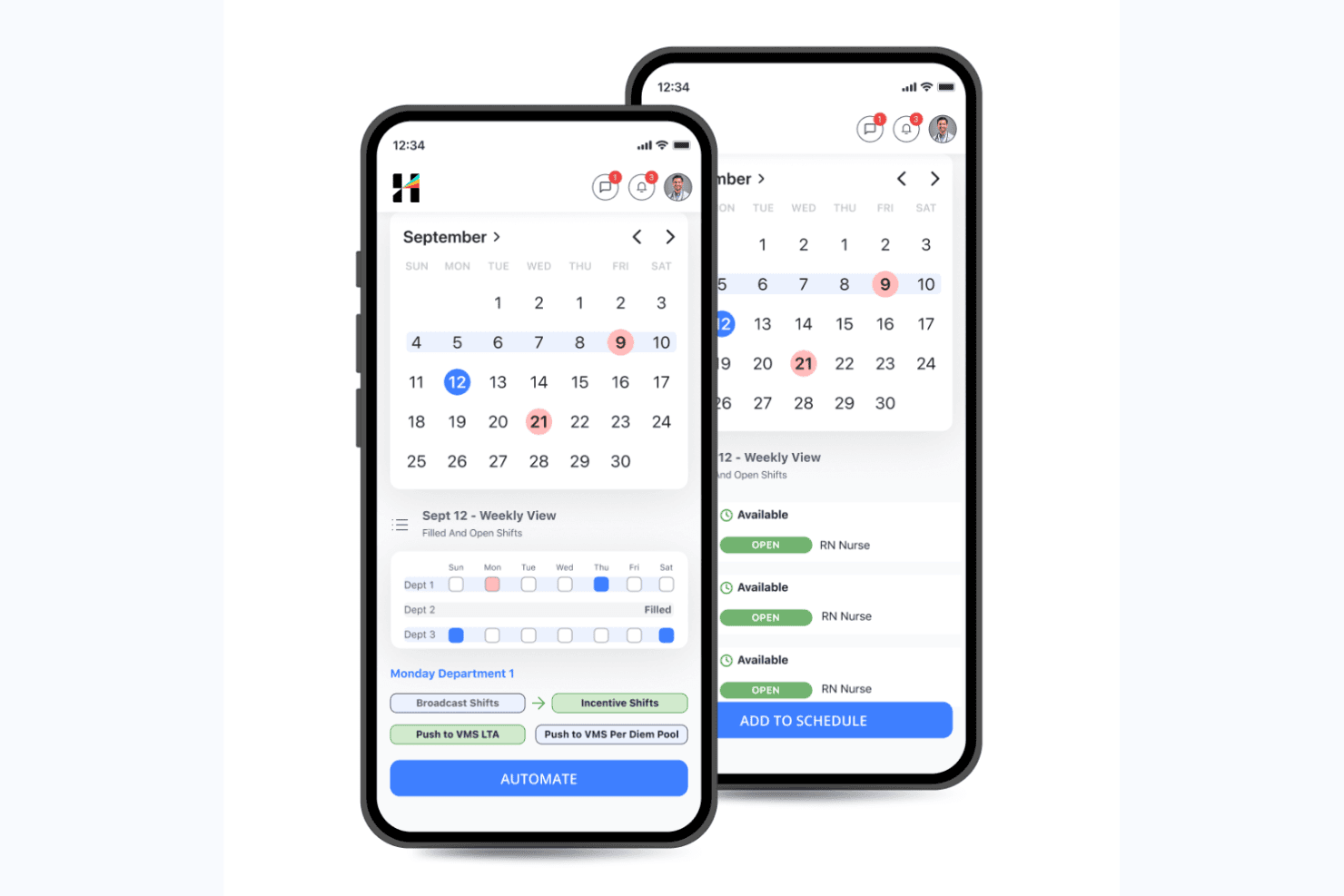
Hallmark Health Care Solutions lets managers schedule and automate open nursing shifts. Hallmark Health Care Solutions is an AI-native healthcare workforce management platform that combines clinical staff scheduling, demand forecasting, float pool management, a built-in vendor management system, and credential tracking in a single suite.
Who Is Hallmark Health Care Solutions Best For?
Hallmark Health Care Solutions is a strong fit for large hospital systems and health networks that need to manage complex, multi-tier staffing workflows across internal float pools, agency vendors, and on-demand labor channels.
Why I Picked Hallmark Health Care Solutions
I picked Hallmark Health Care Solutions because its tiered labor sourcing workflow is unlike anything else I've seen in this category. The Internal Resource Pool (IRP) module prioritizes your own float staff first, then escalates to its built-in VMS (connected to 750+ agencies), and finally routes to CareRev's on-demand nurse marketplace. One client grew their IRP to 110+ nurses and avoided $2.3M in agency spend using exactly this structure.
Hallmark Health Care Solutions Key Features
- AI-enabled shift matching: Automatically assigns open shifts to qualified staff based on credentials, availability, cost, and compliance rules.
- Demand forecasting: Projects staffing needs at the unit and service line level using census, length-of-stay, callout, and seasonal trend data.
- AI bill rate intelligence: Predicts and compares contract labor bill rates across vendors, units, and regions to support rate negotiation and cost control.
- Executive insights dashboard: Translates workforce data into C-suite-level visibility, connecting compensation decisions to margin, attrition risk, and patient outcomes.
Hallmark Health Care Solutions Integrations
Hallmark Health Care Solutions integrates with Epic, Workday, UKG, Oracle PeopleSoft, Paycom, OnBase, Imprivata OneSign, symplr Payer, and CareRev. Software Advice lists 24 integration providers in total.
Pros and Cons
Pros:
- Dedicated credentialing support for healthcare compliance
- AI-powered demand forecasting and cost controls
- Tiered internal-to-agency labor sourcing workflow
Cons:
- Minimal public user reviews available
- Custom pricing requires direct sales contact
Learn more about Hallmark Health Care Solutions: Best for fast healthcare shift scheduling
- 30-day free trial + free demo available
- From AUD $5/user/month
Visit WebsiteCustomer Rating:4.6/5
Deputy manages scheduling, shifts, timesheets, and leave tracking. Deputy is a healthcare workforce management software that provides employee scheduling, shift allocation, timesheets, leave management, and mobile app access tools designed for fast-paced healthcare environments.
Who Is Deputy Best For?
Nurse managers and healthcare facility operators need a user-friendly system to manage large shift-based teams across multiple locations.
Why I Picked Deputy
I picked Deputy as one of the best because I can build and publish shift schedules for my hospital in minutes, notify caregivers instantly with mobile alerts, and use built-in compliance management checks that flag potential staffing violations as I schedule.
Deputy Key Features
- Task management: Assign and track daily responsibilities for staff during shifts.
- Fatigue and break planning: Plan required breaks and monitor compliance with healthcare labour rules.
- Time clock with biometric verification: Secure staff check-ins using facial recognition or PIN on kiosk devices.
- Leave management: Submit, approve, and track vacation or sick leave requests digitally.
Deputy Integrations
Integrations include Square, ADP, Gusto, BambooHR, QuickBooks, Clover, Dropbox, EdApp, Epos Now, and HiBob.
Pros and Cons
Pros:
- Built-in timesheets with biometric verification
- Auto-fills shifts using AI demand forecasting
- Support shift swapping in mobile app
Cons:
- No built-in enterprise resource planning tools
- Limited support for complex hospital hierarchies
Learn more about Deputy: Best for integrated HR and payroll workflows
- Free demo available
- Pricing upon request
Visit WebsiteCustomer Rating:4.6/5
Oracle manages HR, payroll, scheduling, and workforce analytics. Oracle is a cloud-based healthcare workforce management software offering HR, payroll, time tracking, scheduling, and workforce analytics in a single unified platform.
Who Is Oracle Best For?
Large healthcare provider organizations need centralized HR, payroll, and workforce management on an enterprise scale.
Why I Picked Oracle
I picked Oracle because I can connect HR, payroll, and workforce scheduling in one platform, run unified workflows for healthcare roles, and use prebuilt compliance and payroll features for hospitals and clinics.
Oracle Key Features
- Mobile access: Staff and managers can handle scheduling and approvals from mobile devices.
- Advanced analytics: Access dashboards and reports on workforce trends and productivity.
- Shift bidding: Employees can view and bid for open shifts directly in the platform.
- Absence management: Track time off, sick leave, and FMLA compliance in one system.
Oracle Integrations
Integrations include Accu-Time Systems, dormakaba Workforce Solutions, Grosvenor Technology, and TCP Software.
Pros and Cons
Pros:
- Global financial and payroll data consolidation
- Flexible workforce analytics and reporting tools
- Centralized control of HR, payroll, and scheduling
Cons:
- Requires ongoing system maintenance
- User interface lacks healthcare-specific terminology
Learn more about Oracle: Best for credentialing and staff training
- Free demo available
- Pricing upon request
Visit WebsiteCustomer Rating:4.3/5
HealthStream manages credentialing, compliance, training, and policies. HealthStream is a healthcare workforce management platform with tools for credentialing, regulatory compliance management, learning management, policy tracking, and employee competency management.
Who Is HealthStream Best For?
Hospitals, health systems, and clinics need to centralize staff training, certifications, and ongoing compliance for their healthcare workforce.
Why I Picked HealthStream
I picked HealthStream as one of the best because I rely on its dedicated modules for verifying staff credentials, managing mandatory healthcare training, and tracking licenses and certifications in real time.
HealthStream Key Features
- Course authoring tool: Create and customize online training modules for healthcare staff.
- Competency assessment platform: Measure and document workforce competencies in clinical and non-clinical roles.
- Policy management module: Distribute, track, and attest to critical workplace policies and procedures.
- Mobile learning app: Allow employees to access coursework and assignments on smartphones and tablets.
HealthStream Integrations
Integrations include ADP, Cornerstone OnDemand, HireRight, AvoMD, EBSCO DynaMed, Workday, Adobe Sign, DocuSign, Zoom, and Instamed.
Pros and Cons
Pros:
- Customizable assessments for healthcare competencies
- Automated tracking of staff continuing education
- Clinical course library for healthcare staff
Cons:
- No test environment for training configurations
- Limited self-service options
Learn more about HealthStream: Best for healthcare staffing agency support
- Free demo available
- From $99/user/month
Visit WebsiteCustomer Rating:4.1/5
Bullhorn manages staffing, credential tracking, shifts, and clients. Bullhorn is a healthcare staffing and workforce management platform that lets agencies handle candidate sourcing, credential tracking, shifts, time capture, and client engagement in one system.
Who Is Bullhorn Best For?
Healthcare staffing agencies manage temporary clinical and allied staff placements across multiple organizations.
Why I Picked Bullhorn
I picked Bullhorn as one of the best because I can track credentials, manage placements, and automate candidate engagement—all tailored for healthcare staffing agencies juggling high-volume temp roles and client site coordination.
Bullhorn Key Features
- Shift scheduling dashboard: Lets you visualize, assign, and update shift rosters in real time.
- Mobile app access: Staffing teams and candidates can manage placements from any device.
- Custom reporting tools: Build reports on workforce activity and agency KPIs.
- Integrated time capture: Staff use digital tools for logging and verifying shift hours.
Bullhorn Integrations
Integrations include Xero, LinkedIn, 1218 Global, 3B for Salesforce, Actonomy, and ADP WOTC.
Pros and Cons
Pros:
- Support for per diem workforce management
- Built-in shift fulfillment and vacancy management
- Unified recruitment and placement pipeline management
Cons:
- Complex onboarding for administrators
- No offline data entry mode
 Best for high-volume workforce scheduling flexibility
- Free demo available
- Pricing upon request

Shiftboard manages scheduling, shifts, and real-time staffing oversight. Shiftboard is a cloud-based healthcare workforce management software that provides flexible employee scheduling, shift management, communication tools, and real-time staffing oversight for organizations with large, dynamic workforces.
Who Is Shiftboard Best For?
Large healthcare organizations and staffing agencies that need complex shift management and mobile-friendly scheduling for variable, high-volume workforces.
Why I Picked Shiftboard
I picked Shiftboard because I can set complex rules for open shifts, last-minute changes, and overtime restrictions all in one interface. In my experience, its high-volume staffing capabilities handle fluctuating demand and dynamic schedule changes effectively.
Shiftboard Key Features
- Credential tracking: Track staff certifications, credentials, and renewal dates directly in the platform.
- Mobile shift notifications: Notify employees of new shifts, changes, and approvals via mobile alerts.
- Automated shift assignments: Fill open shifts automatically based on qualifications, preferences, and availability.
- Time-off management: Enable employees to request, view, and manage time-off from the self-service portal.
Shiftboard Integrations
Integrations include UKG, Workday, ADP, Oracle PeopleSoft, SAP, Infor, Microsoft Dynamics, Salesforce, Workato, and PlanetTogether.
Pros and Cons
Pros:
- Real-time mobile notifications for shift updates
- Self-service shift bidding for hourly workers
- Flexible shift patterns for fluctuating staffing needs
Cons:
- Limited automated reporting options
- Interface is not optimized for mobile
Learn more about Shiftboard:
Diğer Sağlık Hizmetleri İş Gücü Yönetimi Yazılımları
Kısa listeme girmeyen ancak yine de göz atmaya değer bazı ek sağlık hizmetleri iş gücü yönetimi yazılımı seçeneklerini burada bulabilirsiniz:
- 11InforBest for system-wide resource optimization
- 12SymplrBest for overseeing contingent healthcare talent
- 13Workforce SoftwareBest for real-time data visualization
- 14PerfectServeBest for clinical team collaboration
- 15QgendaBest for physician scheduling automation
- 16HubstaffBest for real-time activity and location tracking
- 17PaycorBest for talent acquisition automation
- 18LegionBest for AI-powered labour forecasting
- 19PaychexBest for customizable payroll and HR bundles
- 20SlingBest for multi-location shift coordination
How I Evaluate Healthcare Workforce Management Software
I evaluate these platforms on two levels: the baseline requirements a tool must meet—like 24/7 clinical scheduling and credential tracking—and the differentiators that make one the right fit.
Core Functionality (Table Stakes For This List)
When I'm selecting tools for my list, I rank each one on a scale from 0 (does not offer the functionality) to 5 (excels in this area) for each core functionality listed below. Then, I calculate the tool's total score into a percentage. Each tool needs to achieve a minimum total score of 65% to be considered for inclusion.
- Clinical Shift Scheduling: I look for scheduling tools built around 24/7 healthcare operations, including self-scheduling, shift swaps, and role-based rules that match RNs to specific units or departments.
- Credential & License Tracking: Each tool should track clinical licenses, certifications, and training expirations so managers can spot gaps before a nurse with a lapsed BLS cert gets scheduled.
- Time & Attendance Management: I evaluate how well a platform handles complex healthcare pay scenarios like shift differentials, weekend premiums, and overtime calculations across variable shift lengths.
- Demand-Based Staffing Forecasts: Forecasting tools should tie staffing recommendations to real patient demand signals like census counts or acuity levels rather than relying on static templates alone.
- Healthcare Compliance Rules: I check whether the platform can enforce specific labor rules like mandated nurse-to-patient ratios, rest-between-shift requirements, and union contract provisions.
- Float Pool & Open Shift Management: The tool should support internal float pool deployment and open shift bidding so staffing coordinators can fill gaps from within before turning to external agencies.
Once I have a list of tools that meet the criteria, I consider what sets each platform apart.
Differentiating Factors (What Sets Vendors Apart)
Here's how I compare and contrast different vendors:
Standout Features
EMR/EHR integration is a major differentiator. Platforms that pull patient census and acuity data from systems like Epic or Cerner give staffing coordinators real-time demand signals instead of guesswork. I also look for a built-in vendor management system, which lets teams manage agency and travel nurse contracts alongside internal staff in one place. Predictive analytics dashboards add another layer, surfacing overtime trends and turnover risk before they become costly problems.
Beyond Features
HIPAA compliance and HITRUST certification matter here because these platforms often handle sensitive employee health data alongside patient-linked scheduling information. I also evaluate how well a tool scales across facility types—a platform that works for a single hospital may struggle in a multi-site health system with centralized and unit-level scheduling needs. Implementation support is another key factor. Migrating from legacy systems like Kronos or homegrown spreadsheets requires healthcare-specific consultants who understand clinical workflows.
Sağlık Hizmetleri İş Gücü Yönetimi Yazılımı Nasıl Seçilir?
Uzun özellik listeleri ve karmaşık fiyatlandırma yapılarına takılıp kalmak kolaydır. Kendinize özgü yazılım seçim sürecinizde ilerlerken odaklanmanızı korumanıza yardımcı olmak için göz önünde bulundurmanız gereken faktörleri aşağıdaki kontrol listesinde derledim:
| Faktör | Göz Önünde Bulundurulması Gerekenler |
|---|---|
| FaktörÖlçeklenebilirlik | Göz Önünde Bulundurulması GerekenlerYazılım tesisiniz veya sisteminizle birlikte büyüyebilir mi? İş akışlarını bozmadan veya maliyetleri karşılanamaz hâle getirmeden daha fazla personeli, konumu ya da rolü yönetebilir mi? |
| FaktörEntegrasyonlar | Göz Önünde Bulundurulması GerekenlerBordro, İKYS, elektronik sağlık kaydı veya zaman saati sistemlerinize sorunsuz şekilde bağlanıyor mu? Önemli sağlık hizmetleri araçları desteklenmiyor mu veya manuel geçici çözümler gerektiriyor mu? |
| FaktörÖzelleştirilebilirlik | Göz Önünde Bulundurulması Gerekenlerİş akışlarını, vardiya planlama kurallarını ve raporlamayı kurum içi protokollerinize, sendika kurallarına veya yasal gerekliliklere uyacak şekilde ne kadar kolay ayarlayabilirsiniz? |
| FaktörKullanım kolaylığı | Göz Önünde Bulundurulması GerekenlerYöneticiler ve personel, aşırı eğitim veya destek talepleri olmadan sistemi hızlıca öğrenip güvenilir şekilde kullanabilir mi? Bunu test etmek için demoları veya deneme sürümlerini kullanın. |
| FaktörUygulama ve işe alıştırma | Göz Önünde Bulundurulması GerekenlerTipik işe alıştırma zaman çizelgesi nedir? Veri aktarımı, personel eğitimi ve politika kurulumu pakete dâhil mi, yoksa bunları kendiniz mi yönetmeniz gerekiyor? |
| FaktörMaliyet | Göz Önünde Bulundurulması GerekenlerListe fiyatının ötesinde, çalışan başına veya eklenti ücretleri neler? Yatırım getirinizi hesaplarken dikkate almanız gereken minimum kullanım koşulları, destek ücretleri veya uzun süreli taahhütler var mı? |
| FaktörGüvenlik önlemleri | Göz Önünde Bulundurulması GerekenlerAraç, korunan sağlık bilgilerini nasıl koruyor, veri gizliliğini nasıl sürdürüyor ve erişim denetimlerini nasıl uyguluyor? HIPAA veya diğer ilgili sertifikaları arayın. |
| FaktörUyumluluk gereklilikleri | Göz Önünde Bulundurulması GerekenlerPlatform; eyalet ve federal iş gücü yasalarına, sendika zorunluluklarına, vardiya planlama düzenlemelerine ve kurum içi denetim ihtiyaçlarına uymanıza yardımcı oluyor mu? |
Sağlık Hizmetleri İş Gücü Yönetimi Yazılımı Nedir?
Sağlık hizmetleri iş gücü yönetimi yazılımı; sağlık kuruluşlarının personel planlaması yapmasına, devam durumunu izlemesine, izinleri yönetmesine ve iş gücü yasaları ile sektör standartlarına uyumu sürdürmesine yardımcı olan dijital bir araçtır. Bu sistemler iş gücü verilerini merkezileştirir ve rutin idari görevleri yerine getirmek için otomasyondan yararlanır. Bir iş gücü yönetimi platformu kullanıldığında, sağlık tesislerinin doğru kişileri doğru zamanda görevlendirmesi kolaylaşır ve sağlık hizmeti sunucularının yüksek hasta bakımı standartlarını korumasına yardımcı olur.
Özellikler
Sağlık hizmetleri iş gücü yönetimi yazılımı seçerken aşağıdaki temel özelliklere dikkat edin:
- Planlama ve vardiya planlaması: Kapsama, yetkinliklere ve vardiya tercihlerine göre karmaşık personel programları oluşturun, otomatikleştirin ve yönetin.
- Zaman ve devam takibi: İşe giriş ve işten çıkış saatlerini kesin olarak kaydedin, vardiyaya uyumu izleyin ve doğru ücret ödemesi için puantajları bordro ile senkronize edin.
- İzin ve devamsızlık yönetimi: Yeterli kapsama ve daha iyi iş gücü planlaması sağlamak için yıllık izin, hastalık izni ve diğer devamsızlıklara ilişkin talepleri, onayları ve hak edişleri otomatikleştirin.
- Uyum yönetimi: Planlama sırasında ihlalleri işaretleyerek ve gerçek zamanlı uyarılar sunarak iş gücü yasalarını, yetkinlik kontrollerini ve sendika kurallarını uygulayın.
- Mobil erişim: Sağlık personeline mobil uygulama üzerinden programlara erişme, vardiya değiştirme ve mesajlaşma olanağı sunarak iletişimi ve çalışan bağlılığını geliştirin.
- Bordro entegrasyonu: Ücretleri hesaplamak, fazla mesaiyi izlemek ve bordro işlemlerini hızlandırmak için iş gücü verilerini bordro sistemlerine bağlayın.
- Yetkinlik ve sertifika takibi: Personelin uyumlu kalmasını sağlamak için lisansların, yetkinliklerin veya eğitimlerin süresinin dolmak üzere olduğunu kaydedin, izleyin ve bildirim alın.
- Analiz ve raporlama: İş gücü maliyetleri, çalışan devir oranı ve tahmin eğilimleri gibi ölçümleri izlemek için veriye dayalı panolar kullanın.
- Güvenli mesajlaşma: Yazılım içinde yöneticiler ile sahada görev yapan personel arasında doğrudan ve HIPAA uyumlu iletişim kurulmasını sağlayın.
- Görev yönetimi: Her vardiya içindeki günlük klinik görevlerin veya idari iş akışlarının tamamlanmasını atayın ve doğrulayın.
Avantajlar
Sağlık hizmetleri iş gücü yönetimi yazılımını uygulamak, ekibiniz ve işletmeniz için çeşitli avantajlar sağlar. Yararlanabileceğiniz avantajlardan bazıları şunlardır:
- Geliştirilmiş program doğruluğu: Otomatik vardiya planlaması, manuel hataları ve kapsama boşluklarını azaltırken doğru klinisyenlerin planlanmasını sağlar.
- Daha güçlü uyum: Yerleşik kurallar ve uyarılar, rutin manuel kontroller gerektirmeden iş gücü yasalarına, sendika düzenlemelerine ve yetkinlik gerekliliklerine uymanıza yardımcı olur.
- Daha hızlı bordro işlemleri: Entegre zaman takibi ve bordro bağlantıları idari işleri azaltır ve ücret ödeme döngülerini hızlandırır.
- Daha iyi kaynak tahsisi: Gerçek zamanlı analizler ve raporlama, yöneticilerin veriye dayalı personel kararları almasına ve iş gücü maliyetlerini kontrol etmesine yardımcı olur.
- Artan çalışan memnuniyeti: Self servis özellikleri, bakım personelinin açık vardiyalara başvurmasına veya programları istediği zaman görüntülemesine olanak tanır.
- Azalan fazla mesai ve yorgunluk: Akıllı planlama araçları vardiyaları adil bir şekilde dağıtır, çalışma saatlerini izler ve personel tükenmişliğinin önlenmesine yardımcı olur.
- Merkezi yetkinlik izleme: Otomatik uyarılar ve takip, ekip üyelerinin lisans veya sertifikalarındaki geçerlilik kayıpları riskini azaltır.
Maliyetler ve Fiyatlandırma
Sağlık hizmetleri iş gücü yönetimi yazılımı seçimi, mevcut çeşitli fiyatlandırma modellerinin ve planların anlaşılmasını gerektirir. Maliyetler özelliklere, ekip büyüklüğüne, eklentilere ve daha fazlasına göre değişir. Aşağıdaki tablo, sağlık hizmetleri iş gücü yönetimi yazılımı çözümlerinde yaygın planları, ortalama fiyatlarını ve genellikle sunulan özellikleri özetlemektedir:
Sağlık Hizmetleri İş Gücü Yönetimi Yazılımı İçin Plan Karşılaştırma Tablosu
| Plan Türü | Ortalama Fiyat | Yaygın Özellikler |
|---|---|---|
| Plan TürüÜcretsiz Plan | Ortalama Fiyat$0 | Yaygın ÖzelliklerTemel planlama, sınırlı personel erişimi ve yalnızca mobil görüntüleme. |
| Plan TürüBireysel Plan | Ortalama Fiyat$5-$10/kullanıcı/ay | Yaygın ÖzelliklerGelişmiş planlama, mobil giriş, devamsızlık yönetimi ve temel raporlama. |
| Plan Türüİşletme Planı | Ortalama Fiyat$10-$25/kullanıcı/ay | Yaygın ÖzelliklerUyum yönetimi, entegrasyonlar, bordro dışa aktarımları, yetkinlik takibi, analizler ve güvenli mesajlaşma. |
| Plan TürüKurumsal Plan | Ortalama Fiyat$25+/kullanıcı/ay | Yaygın ÖzelliklerÖzel iş akışları, API erişimi, sınırsız destek, gelişmiş güvenlik ve ihtiyaca göre uyarlanmış işe alıştırma ve uygulama. |
Sağlık Hizmetleri İş Gücü Yönetimi Yazılımı Hakkında SSS
Sağlık hizmetleri iş gücü yönetimi yazılımı hakkında sık sorulan soruların bazı yanıtları:
Ne tür sağlık kuruluşları iş gücü yönetimi yazılımı kullanır?
Hastaneler, klinikler, uzun süreli bakım tesisleri, evde sağlık hizmeti sunan kuruluşlar ve ayaktan tedavi merkezlerinin tümü, personel vardiya planlamasını, bordroyu ve uyumluluk yönetimini düzenlemek için bir iş gücü yönetimi çözümü kullanır. Bu araçlar, doğru sağlık çalışanlarının her zaman görev başında olmasını sağlayarak sağlık kuruluşlarının yüksek bakım kalitesi standartlarını korumasına yardımcı olur.
Sağlık hizmetleri iş gücü yönetimi yazılımı diğer İK veya bordro sistemleriyle entegre olabilir mi?
Evet, çoğu çözüm İK bilgi sistemleri, elektronik sağlık kayıtları ve bordro araçlarıyla entegrasyon sunacak şekilde tasarlanmıştır. Bu sayede sağlık tesisleri veriye dayalı içgörüleri senkronize edebilir, manuel veri girişi veya raporlama hatalarını azaltabilir ve genel operasyonel verimliliği artırabilir.
İş gücü yönetimi yazılımı uyumluluğa nasıl yardımcı olur?
Bu sistemler personel vardiya planındaki çakışmaları işaretler, iş gücü maliyetlerini kontrol etmek için fazla mesaiyi izler ve sertifikaları ve yetkilendirmeleri takip eder. Denetime hazır kayıtlar tutarak sağlık hizmeti sağlayıcıları, hasta bakımına odaklanırken iş gücü yasalarına ve sendika sözleşmelerine uyum sağlayabilir.
Yöneticiler ve personel için mobil uygulamalar mevcut mu?
Evet, neredeyse tüm platformlar kullanıcı dostu bir mobil uygulama sunar. Bu araçlar ekip üyeleri için self servis özellikleri sağlar; böylece bakım çalışanları programlarını görüntüleyebilir, vardiya değişimi yapabilir ve uygunluk durumlarını gerçek zamanlı olarak güncelleyebilir. Bu esneklik, çalışan deneyimini iyileştirir ve sağlık hizmetleri personelinin daha iyi elde tutulmasını destekler.
Yeni bir kuruluşun iş gücü yönetimi platformuyla kurulumu ne kadar hızlı tamamlanabilir?
Kurulum, küçük ekiplerde genellikle bir hafta, büyük sağlık sistemlerinde ise birkaç ay sürebilir. Süre; işe alıştırma gereksinimlerine, veri aktarımına ve mevcut iş akışlarının karmaşıklığına bağlıdır.
Sağlık hizmetleri iş gücü yazılımında hangi güvenlik standartlarını aramalıyım?
Sağlık sektörüne yönelik, güçlü şifreleme kullanan, rol tabanlı erişim kontrolleri sunan ve sağlık hizmeti sağlayıcılarının hassas bilgilerini korumak için HIPAA veya diğer ilgili veri koruma düzenlemelerine uyan hepsi bir arada bir platform aramalısınız.