

The best Bullhorn alternatives are applicant tracking systems that blend strong candidate management, intuitive workflows, and reliable support—without the headaches Bullhorn users often report. If you’re looking for a smoother recruiting experience, fewer manual steps, or better integrations, you’re not alone. Recruiters and staffing agencies want tools that actually fit their unique process and scale as they grow. In this guide, you’ll get a clear look at top Bullhorn alternatives and exactly what makes them worth considering, so you can find the right fit to move your hiring forward.
Why Look for a Bullhorn Alternative?
Bullhorn can cost more than expected and feel slow or click-heavy, especially for smaller agencies or recruiters working across many open roles. Here’s when another tool might fit better:
- You want texting, automation and back-office tools in your base price. Bullhorn prices most plans by quote and lists texting, analytics, and payroll and billing as separate products or higher-tier features. Platforms such as Avionté build payroll and billing into the system, and JobDiva includes billing as a core feature.
- Your recruiters move through many records at once. Some users report slow loading times, especially during busy periods. Before choosing any tool, ask for a trial with your own data and test it at your busiest time of day.
- You want fewer clicks to get through your pipeline. Some users find Bullhorn’s layout takes too many clicks, and new users can face a steep learning curve. Tools like JobAdder keep work on one dashboard with drag-and-drop pipelines, and Recruit CRM offers a clean drag-and-drop pipeline.
- You need support that responds quickly. Some users report waiting a while for support replies, though others find it prompt. Options like JobAdder are known for strong support, which matters when a placement is stuck.
Bullhorn is still the right choice if you want recruiting, client management, contractor timesheets, and payroll and billing in one system. For staffing firms placing many temp and contract workers, that can outweigh a higher price, paying extra for texting and slower load times at busy hours.
Bullhorn Alternatives Comparison Table
This comparison table highlights pricing details for my top Bullhorn alternatives.
Sorted by: Default
| Tool | Starting Price | Website | |
|---|---|---|---|
Best for intuitive candidate scoring | 4.8 out of 5 | $15/user/month 14-day free trial + free demo available | Website |
Best for user-friendly interface and support | 4.4 out of 5 | Pricing upon request Free demo available | Website |
Best for staffing agency payroll and billing | 3.9 out of 5 | Pricing upon request Free demo available | Website |
Best for executive search firms | 4.9 out of 5 | $95/user/month 30-day free trial + free demo available | Website |
Best for automated recruiting workflows | 4.7 out of 5 | $119/user/month Free demo available | Website |
Best for detailed VMS integrations | 4.6 out of 5 | Pricing upon request Free demo available | Website |
Best for unified recruiting and sales pipelines | 4.5 out of 5 | $85/user/month Free trial + free demo available | Website |
Best for AI-driven candidate sourcing | 4.5 out of 5 | $149/user/month Free demo + 7-day free trial available | Website |
Best for large-scale staffing agencies | Not rated | Pricing upon request Free demo available | Website |
Best for integrated front and back office | Not rated | $88/user/month 6 week free trial available | Website |


Why Trust Our Software Recommendations
6,700+
Reviews
20
Industry experts
16+
Evaluation factors
14
Years
Our team has been testing and reviewing software since 2012. As HR experts ourselves, we know how difficult—and important—it is to choose the right software.
For this guide, we evaluated tools using hands-on testing and independent research, scoring tools using our selection criteria. We also draw on insights from industry thought leaders and practicing HR experts.
Our reviews reflect our human editorial judgment, not a sales pitch.
Expert reviewers:
- Phil GrayCOO
 Kim BehnkeHR Tech Editor & Analyst
 Josh BarkerPeople Ops Manager

Best Bullhorn Alternatives Reviews
Below are my detailed summaries of the best Bullhorn alternatives that made it onto my shortlist. My reviews offer a detailed look at the features, integrations, and best use cases of each platform to help you find the best one for you.
 Best for intuitive candidate scoring
- 14-day free trial + free demo available
- From $15/user/month (billed annually)
Visit WebsiteCustomer Rating:4.8/5
Manatal organizes candidates in a Kanban recruitment pipeline with visual screening scores and hiring stages. Manatal is an AI-powered ATS and recruiting CRM built for staffing agencies and in-house talent teams that need full-cycle candidate management without Bullhorn's complexity or pricing opacity.
Who Is Manatal Best For?
Manatal is a strong fit for small to mid-sized recruitment agencies and HR teams that want AI-assisted hiring tools without paying enterprise-level prices.
Why Manatal Is a Good Bullhorn Alternative
I picked Manatal as one of the best because its AI candidate scoring does something Bullhorn doesn't: it automatically enriches each profile from 20+ public and social sources, including LinkedIn, GitHub, and Medium, then scores candidates against your job requirements in real time. I use the scorecard view to rank applicants by match percentage before opening a single resume, so I'm spending my review time on the most qualified candidates first.
Manatal Key Features
- Customizable pipeline workflows: Configure hiring pipelines using drag-and-drop Kanban stages for each role or department.
- Recruitment CRM: Track clients, contacts, placements, and commercial activity for agency and headhunter needs.
- Job board multiposting: Post openings to over 2,500 free and premium job boards from a central dashboard.
- Advanced report builder: Create custom dashboards with KPIs for recruiter productivity, placements, and revenue.
Manatal Integrations
Manatal offers native integrations with Gmail, Outlook, LinkedIn, and Microsoft 365. An Open API is available for custom integrations.
Pros and Cons
Pros:
- Kanban pipeline view across all open roles
- Social media enrichment auto-builds candidate profiles
- AI scoring ranks candidates against job requirements
Cons:
- Analytics depth limited for high-volume agencies
- No built-in pay/bill or invoicing module
 Best for user-friendly interface and support
- Free demo available
- Pricing upon request
Visit WebsiteCustomer Rating:4.4/5
JobAdder features a Kanban-style recruitment pipeline with candidate stages including Internal Interview, Submitted, Client Interview, and References. JobAdder is a cloud-based ATS and recruiting CRM built for staffing and recruitment agencies that want a clean, intuitive platform for managing candidates, job orders, and client relationships without the complexity of heavier enterprise tools.
Who Is JobAdder Best For?
JobAdder suits recruitment agencies at any growth stage, from boutique firms with a handful of recruiters to established agencies with 20+ users across multiple desks.
Why JobAdder Is a Good Bullhorn Alternative
JobAdder earns its spot on my shortlist because the interface is genuinely built around how recruiters work, not how a database was structured. The single-dashboard layout with drag-and-drop pipeline stages and pop-out candidate drawers means I'm not jumping between tabs mid-workflow, which is a real difference from Bullhorn's multi-tab setup. And when something doesn't work as expected, JobAdder's named Customer Success Managers (on Pro) and consistently high support scores (8.9 on G2 vs. Bullhorn's 8.3) mean I'm not left waiting on a ticket queue.
JobAdder Key Features
- Adder Intelligence (AI): Uses AI-driven summaries and candidate relevancy ratings to speed up job matching.
- Job board marketplace: Connects directly to 200+ job boards for one-click job posting and distribution.
- Recruitment automation: Offers workflow automations for tasks like database hygiene, drip campaigns, and BD outreach.
- Mobile recruiting app: Lets recruiters manage candidates, jobs, and communications from anywhere on iOS or Android.
JobAdder Integrations
JobAdder offers native integrations with job boards like SEEK, LinkedIn, and Indeed, background check providers such as Certn and Xref, and HR systems like ActionHRM and BambooHR. An API is available for custom integrations.
Pros and Cons
Pros:
- AI-powered candidate matching against open reqs
- Posts to 200+ job boards directly
- Automated redeployment alerts for contract placements
Cons:
- Email sync can be inconsistent at times
- No built-in VMS connectivity for enterprise clients
Learn more about JobAdder: Best for staffing agency payroll and billing
- Free demo available
- Pricing upon request
Visit WebsiteCustomer Rating:3.9/5
Avionté offers a detailed talent profile view with work history, contact information, and a responsive mobile interface for staffing management. Avionté is a staffing-specific ATS and CRM platform built for recruiting and staffing agencies that need front-office candidate management and back-office payroll and billing running from a single system.
Who Is Avionté Best For?
Avionté is a strong fit for mid-market staffing firms running high-volume, W-2-based placements across light industrial, clerical, or professional services sectors.
Why Avionté Is a Good Bullhorn Alternative
I picked Avionté as one of the best Bullhorn alternatives because it's one of the few platforms where payroll and billing aren't bolted on as a separate product. Pay runs pull directly from time already recorded in the ATS, so invoices go out without reconciliation work between systems. I also appreciate the PIXEL AI automation, which handles onboarding compliance and W-2 processing, cutting the admin overhead that typically follows high-volume temp placements.
Avionté Key Features
- Customizable workflow automation: Create, automate, and adapt recruiting workflows to match your agency’s placement process.
- Integrated job order distribution: Distribute job orders across multiple recruiters and clients with linked applicant pipelines.
- Recruiter analytics dashboards: Get real-time visibility into recruiter activities, pipeline health, and placement outcomes.
- Marketplace integrations: Connect with over 80 staffing-focused partners for background checks, onboarding, time tracking, and more.
Avionté Integrations
Avionté connects with multiple partners through its Avionté+ marketplace, including Equifax, ADP, Adobe Sign, and Indeed, and provides an open API for custom integrations.
Pros and Cons
Pros:
- Redeployment alerts flag contractors before assignment ends
- Built-in W-2 compliance for temp workers
- Payroll and ATS run from one system
Cons:
- Search filters lack flexibility for recruiters
- Resume parsing can lose formatting
Learn more about Avionté: Best for executive search firms
- 30-day free trial + free demo available
- From $95/user/month (billed annually)
Visit WebsiteCustomer Rating:4.9/5
Recruit CRM offers a Team Performance Report with KPI-based bar charts to compare teammates across metrics like billable revenue and candidates added. Recruit CRM is an ATS and CRM platform built for recruiting and executive search agencies that need to manage candidates, clients, job orders, and outreach in one place—without the overhead of a bloated enterprise tool.
Who Is Recruit CRM Best For?
Recruit CRM is a strong fit for boutique and mid-size recruiting agencies, particularly executive search firms running retained or contingency searches.
Why Recruit CRM Is a Good Bullhorn Alternative
I've included Recruit CRM in my top picks because of how purpose-built it feels for retained and contingency executive search work. The Executive Search Report Generator lets my team produce branded candidate shortlists directly from the platform, which is something Bullhorn doesn't offer natively. I also appreciate the Off-Limits records feature, which flags conflicted or confidential candidates automatically, a detail that matters in senior-level searches.
Recruit CRM Key Features
- AI-powered sourcing extension: Source and add candidate profiles directly from LinkedIn and other sites using a Chrome extension.
- No-code workflow automation: Automate repetitive recruiting tasks with an easy visual workflow builder across stages and approvals.
- Two-way email and calendar sync: Log all candidate and client communication automatically, including scheduling and mailbox integration.
- Data migration tools: Import historical candidate and contact data from spreadsheets or legacy ATS/CRM systems with guided support.
Recruit CRM Integrations
Recruit CRM offers native integrations with LogicMelon, Google Workspace, Outlook, LinkedIn, Office 365, and connects with Zapier. An API is available for custom integrations.
Pros and Cons
Pros:
- Clean visual pipeline with drag-and-drop stages
- Strong candidate shortlist and presentation tools
- Purpose-built for executive search workflows
Cons:
- Reporting customization limited for complex analytics
- No native pay/bill or invoicing module
Learn more about Recruit CRM: Best for automated recruiting workflows
- Free demo available
- From $119/user/month (billed annually)
Visit WebsiteCustomer Rating:4.7/5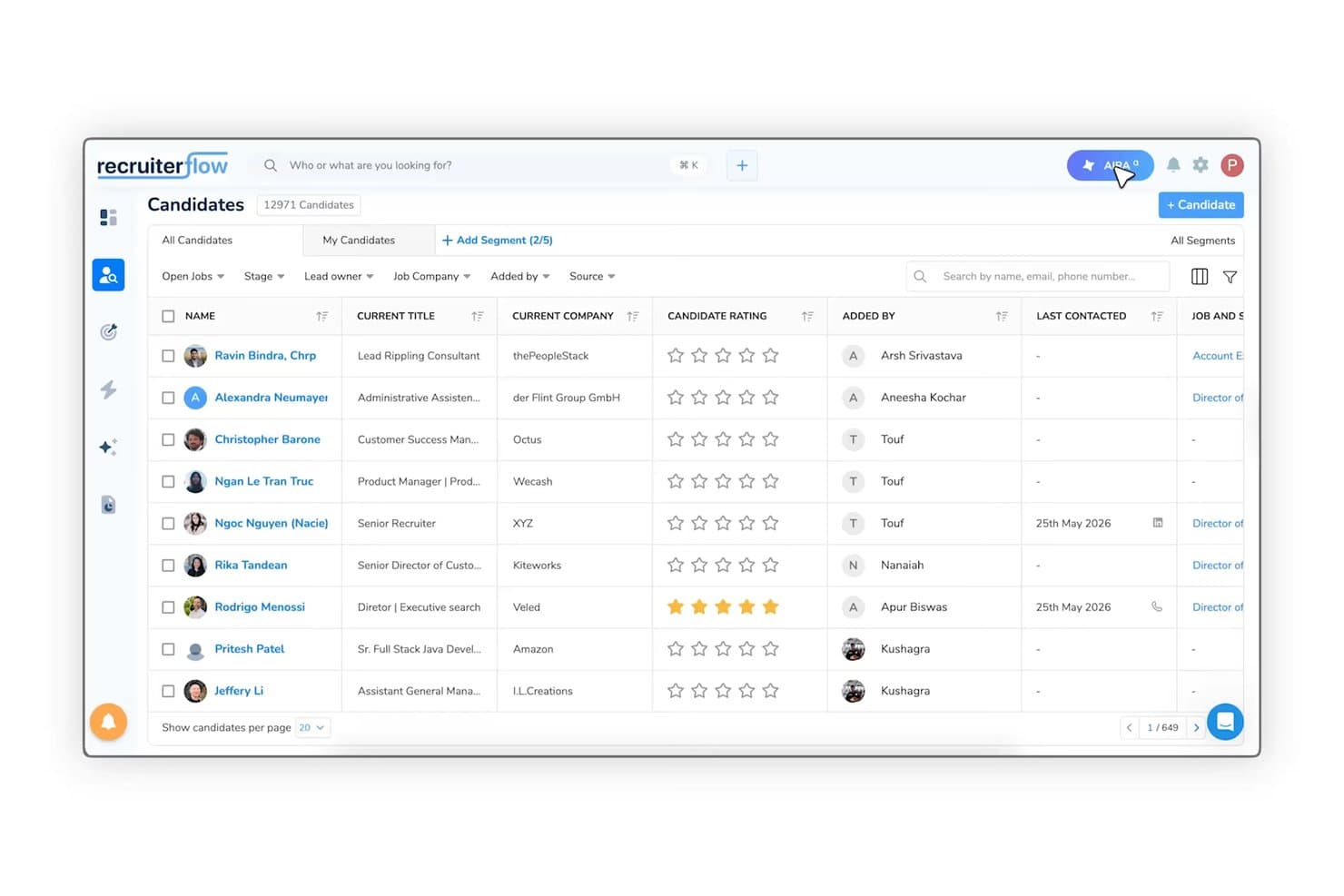
Recruiterflow offers a centralized candidate database with sortable columns for title, company, rating, owner, and last contacted date. Recruiterflow is an ATS and CRM built for agency recruiters and executive search firms who need a single platform to manage candidate pipelines, client relationships, and outbound sourcing without stitching together multiple tools.
Who Is Recruiterflow Best For?
It's a natural fit for small to mid-sized recruiting agencies that compete on outbound volume and want to move away from legacy platforms with rigid contracts and dated interfaces.
Why Recruiterflow Is a Good Bullhorn Alternative
I picked Recruiterflow as one of the best because its automation depth genuinely sets it apart from Bullhorn. Where Bullhorn requires bolt-on tools to run outbound sequences, Recruiterflow's Multichannel Sequences coordinate email, LinkedIn, SMS, and calls in a single workflow. Its "Recipes" let me build trigger-based automations across the recruiting pipeline, so repetitive tasks like stage updates and follow-ups run without manual intervention.
Recruiterflow Key Features
- Live client dashboards: Share real-time candidate pipeline and search progress updates directly with clients.
- Customizable application workflows: Configure multiple pipeline stages and automations to match agency or executive search processes.
- Open API and webhooks: Connect with external HR, payroll, or analytics tools for extended integrations.
- Bulk LinkedIn sourcing extension: Import and parse candidates from LinkedIn with a one-click Chrome extension.
Recruiterflow Integrations
Recruiterflow offers native integrations with Gmail, Outlook, LinkedIn, Slack, Zapier, and Google Calendar. An open API is also available for custom integrations.
Pros and Cons
Pros:
- Trigger-based workflow recipes across the full pipeline
- Client portals show live candidate pipeline updates
- Native multichannel outreach sequences without add-ons
Cons:
- Import tools can be slow and cumbersome
- Bulk candidate actions need improvement
Learn more about Recruiterflow: Best for detailed VMS integrations
- Free demo available
- Pricing upon request
Visit WebsiteCustomer Rating:4.6/5
CEIPAL offers an Executive Dashboard with placement tracking, applicant source analytics, client revenue margins, and recruiter performance charts in one view. Ceipal is a staffing-focused platform that combines ATS, CRM, VMS, and workforce management in one system, making it a strong fit for staffing and consulting firms that need to manage the full recruiting lifecycle without stitching together multiple tools.
Who Is CEIPAL Best For?
Staffing agencies focused on contract and temporary placements, particularly those managing multiple vendor relationships and high-volume candidate pipelines across IT, healthcare, or general staffing.
Why CEIPAL Is a Good Bullhorn Alternative
CEIPAL earns its spot on my shortlist because of its VMS portal coverage, which is the deepest I've seen among Bullhorn alternatives, with 30+ VMS portals connected natively. In practice, that means my team can submit candidates directly through Procurewise (Ceipal's built-in VMS) without toggling between systems. I also appreciate the Ceipal AI Recruiter Assistant, which handles job-to-candidate matching and automated follow-ups across those vendor portals automatically.
CEIPAL Key Features
- Automated redeployment workflows: Alerts and tracks contractors nearing assignment end to support proactive redeployment for temp and contract staffing.
- Middle and back-office automation: Integrated timesheets, invoicing, pay/bill, and commission calculations within the ATS platform.
- Two-way texting and omnichannel outreach: Combine SMS, bulk email, and tracked social messaging to manage recruiter-candidate engagement.
- Healthcare credentialing management: Built-in compliance tracking for licenses and certifications, especially suited to healthcare staffing needs.
CEIPAL Integrations
CEIPAL offers over 200 native integrations, including SAP Fieldglass, LinkedIn, Indeed, Monster, Dice, QuickBooks, ADP, DocuSign, Outlook, Gmail, and Microsoft Teams. An API is available for custom integrations.
Pros and Cons
Pros:
- Redeployment alerts for contractors nearing assignment end
- Back-office tools built into the platform
- AI candidate matching reduces manual sourcing time
Cons:
- Resume parsing occasionally misses key details
- Boolean search results can be inconsistent
Learn more about Ceipal: Best for unified recruiting and sales pipelines
- Free trial + free demo available
- From $85/user/month (billed annually)
Visit WebsiteCustomer Rating:4.5/5
Crelate offers a Kanban-style recruiting dashboard that organizes open jobs by client, showing candidate pipeline stages, activity dates, and job statuses. Crelate is an AI-powered recruiting platform built for staffing agencies and executive search firms that need to manage candidates, clients, and business development pipelines in a single system.
Who Is Crelate Best For?
Crelate is a strong fit for small-to-mid-sized staffing and executive search firms that want agency-grade ATS and CRM functionality without the enterprise complexity of platforms like Bullhorn.
Why Crelate Is a Good Bullhorn Alternative
I've included Crelate in my top picks because it's one of the few platforms that genuinely merges candidate pipelines with client and business development workflows in one place. I particularly like the Recruiting CRM, which tracks candidate relationships alongside job orders and client contacts so nothing lives in a separate system. The AI candidate discovery feature pulls from a database of around one billion people, which means I can source and manage talent without ever leaving the platform.
Crelate Key Features
- Two-way email sync: Connects with Gmail and Outlook to automatically log recruiter communications and candidate outreach.
- Automated workflow actions: Lets you trigger actions like status changes, messages, and tasks based on predefined recruiting events.
- Custom job and client portals: Provides branded portals for clients and candidates to submit feedback, review jobs, or upload documents.
- Back-office integration: Syncs with payroll, billing, and accounting systems to support pay and bill processes within the platform.
Crelate Integrations
Crelate offers native integrations with Gmail, Outlook, QuickBooks, Indeed, Monster, and Microsoft 365. An API is available for custom integrations.
Pros and Cons
Pros:
- Automated redeployment alerts for contract recruiters
- AI matching surfaces best-fit candidates automatically
- Combined ATS and CRM, no switching
Cons:
- Add-ons increase the total cost quickly
- Email tools lack advanced functionality
Learn more about Crelate: 8Best for AI-driven candidate sourcing
Loxo
- Free demo + 7-day free trial available
- From $149/user/month (billed annually)
Visit WebsiteCustomer Rating:4.5/5
Loxo offers a natural language search interface for sourcing junior data engineer candidates, filtered by location. Loxo is a talent intelligence platform that unifies ATS, recruiting CRM, and AI-powered sourcing in one system, built for staffing agencies and executive search firms that want to eliminate the patchwork of disconnected recruiting tools.
Who Is Loxo Best For?
Loxo fits recruiting and staffing agencies that run high-volume outbound searches and need sourcing, outreach, and pipeline management in a single platform.
Why Loxo Is a Good Bullhorn Alternative
I picked Loxo as one of the best because its proprietary 800M+ talent graph does what Bullhorn's sourcing tools simply can't match. I can run a natural language Boolean search and pull up to 5,000 verified candidates, complete with personal emails and cell numbers, into an outreach sequence in one workflow. The AI-powered Contact Info Finding Agent and Loxo Outreach GPT keep campaigns running without manually chasing contact data across separate tools.
Loxo Key Features
- Configurable recruiting pipelines: Customize workflow stages and move candidates with simple drag-and-drop tools.
- Hiring manager portal: Share candidate shortlists and feedback channels directly with clients or hiring managers.
- Automatic profile updates: Let the platform refresh candidate contact info and job history without manual data entry.
- Custom reporting dashboards: Build visual dashboards to track recruiter productivity, job pipeline health, and placement metrics.
Loxo Integrations
Loxo offers native integrations with Outlook, Gmail, RingCentral, Zoom, Indeed, Monster, ZipRecruiter, Broadbean, and Xero, and it provides an API for custom integrations.
Pros and Cons
Pros:
- Outreach sequences auto-track email, SMS, and call history
- Chrome extension pulls LinkedIn profiles into your database instantly
- Combines ATS, CRM, and sourcing in one place
Cons:
- No mobile app for recruiters working away from a laptop
- Sourcing data quality is uneven for niche or non-US roles
Learn more about Loxo:

JobDiva offers a Matching Resume Results feature that displays candidate profiles with shared skills, availability dates, and match scores for easy comparison. JobDiva is a staffing-specific ATS and CRM platform built for high-volume recruitment agencies that need automated resume harvesting, VMS synchronization, and integrated back-office billing in a single system.
Who Is JobDiva Best For?
JobDiva is a strong fit for large staffing and recruiting agencies managing high-volume placements across multiple clients, job boards, and VMS programs.
Why JobDiva Is a Good Bullhorn Alternative
I've included JobDiva in my top picks because it packs more of the staffing toolkit directly into its core platform than Bullhorn does. Where Bullhorn relies on its partner marketplace for sourcing and billing, JobDiva includes automated resume harvesting, native VMS synchronization, and its DivaFinancials back-office suite as built-in features. I also appreciate the "skills by years of experience" search filter, which is genuinely useful when filling high-volume roles with precise experience requirements.
JobDiva Key Features
- Automated onboarding workflows: Automates distribution and tracking of new hire forms and compliance paperwork.
- Job order creation and tracking: Lets teams create, distribute, and monitor job orders across recruiters and client accounts.
- Mobile recruiter app: Gives recruiters and sales teams ATS access and communications on the go via JobDiva’s mobile app.
- Custom reporting dashboard: Provides configurable dashboards for pipeline health, recruiter activity, and placement metrics.
JobDiva Integrations
JobDiva offers over 100 native integrations, including LinkedIn, Indeed, Monster, Dice, CareerBuilder, Outlook, ADP, DocuSign, Sterling, and Broadbean. An API is available for custom integrations.
Pros and Cons
Pros:
- AI-powered candidate matching from internal database
- Built-in back-office billing and invoicing tools
- Native VMS connectivity for enterprise staffing programs
Cons:
- Steeper setup time for smaller recruiting teams
- Outdated UI compared to newer ATS platforms
Learn more about JobDiva: 10Best for integrated front and back office
Vincere
- 6 week free trial available
- From $88/user/month (billed annually)

Vincere offers an AI Coach dashboard that tracks recruiter performance metrics including fees, placements, interviews, and activity ratios against monthly targets. Access Vincere Evo is a recruitment agency platform that unifies CRM, ATS, timesheets, pay & bill, and invoicing into a single system for agencies managing permanent, contract, and temporary placements.
Who Is Vincere Best For?
It's a strong fit for mid-market recruitment agencies that handle a mix of permanent, contract, and temporary placements and need one platform to manage both consultant-facing and back-office workflows.
Why Vincere Is a Good Bullhorn Alternative
I've included Vincere in my top picks because it's the closest like-for-like swap for Bullhorn's integrated front and back office model. The TimeTemp module handles timesheets, expenses, and invoicing for temp and contract placements natively, while Vincere Core manages candidate pipelines and client relationships in the same interface. I particularly like the LiveList™ feature, which lets you share branded, real-time candidate shortlists directly with clients from within the platform.
Vincere Key Features
- Recruitment analytics dashboard: Visualize placements, pipeline health, and consultant performance with real-time, customizable reports.
- Candidate portal: Let applicants update profiles, submit documents, and track their progress in a branded self-service portal.
- Job board multiposting: Distribute job orders to multiple job boards directly from the platform with one-click posting.
- Automated workflow sequences: Set up standardized, multi-step workflows to automate tasks like follow-up emails and interview scheduling.
Vincere Integrations
Vincere offers native integrations with Broadbean, Idibu, LogicMelon, Daxtra, Astute Payroll, FastTrack360, Xero, Office365, Gmail, Ringover, and Cloudcall. An API is available for custom integrations.
Pros and Cons
Pros:
- Single platform spans perm, contract, and temp
- LiveList™ enables real-time client candidate sharing
- Native back office covers timesheets and billing
Cons:
- Candidate migration can be difficult
- ATS pipelines have limited stage customization
Learn more about Vincere:
Other Bullhorn Alternatives
Here are some additional Bullhorn alternatives options that didn’t make it onto my shortlist, but are still worth checking out:
- 11TrackerBest for collaborative recruitment teams
- 12Zoho RecruitBest for flexible integrations and customization
- 13AtlasBest for automated data capture and search
- 14WorkableBest for multi-channel job posting management
- 15GreenhouseBest for structured hiring process support
- 16iCIMSBest for large enterprise talent acquisition
- 17OorwinBest for unified staffing, sales, and HR functions
- 18TargetRecruitBest for Salesforce-based recruiting solutions
- 19Firefish SoftwareBest for recruitment marketing and CRM tools
- 20Top EchelonBest for split placement network integration
How I Evaluate Bullhorn Alternatives
When agencies outgrow Bullhorn, I first check that each alternative covers the same core capabilities—ATS, CRM, job orders, sourcing, and reporting. Then I evaluate differentiators like pricing structure, VMS integrations, and support quality.
Core Functionality (Table Stakes for This List)
When I'm selecting tools for my list, I rank each one on a scale from 0 (does not offer the functionality) to 5 (excels in this area) for each core functionality listed below. Then, I calculate the tool's total score into a percentage. Each tool needs to achieve a minimum total score of 65% to be considered for inclusion.
- Applicant tracking system: I evaluate how each platform handles candidate pipelines, resume parsing, and workflow stages from application through placement.
- Recruiting CRM: A good CRM ties candidate, client, and contact records together with full communication history and activity logs.
- Job order management: I look for the ability to create, assign, and track job orders across recruiters—especially submittal and placement tracking.
- Candidate sourcing tools: Strong sourcing means job board integrations, database search, and features like Boolean or AI-powered candidate matching.
- Email and communication integration: I check whether the platform syncs emails, calls, and texts so recruiters aren't toggling between tools to log outreach.
- Recruiting analytics and reporting: Dashboards that track placements, pipeline health, and recruiter activity help agencies tie daily work to revenue.
Once I have a list of tools that meet the criteria, I consider what sets each platform apart.
Differentiating Factors (What Sets Vendors Apart)
Here's how I compare and contrast different vendors:
Standout Features
AI-powered candidate matching is a big differentiator—platforms that automatically rank candidates against open reqs save recruiters hours of manual database searching. I also look at redeployment workflows, which flag contractors nearing assignment end so your team can rebook them before they fall off. Two-way texting and omnichannel outreach matter too, especially for high-volume shops where candidates respond faster to a text than an email.
Beyond Features
Pricing transparency matters—I check whether features like texting and automation are bundled or sold as paid add-ons, since that changes total cost fast. Implementation is another factor I weigh, especially data migration support from Bullhorn, because losing years of placement history during a switch can set an agency back. I also evaluate each platform's integration ecosystem, looking for pre-built connectors to job boards, background check providers, and open API access for tools like QuickBooks or Sage.
Bullhorn Key Features
Here are some of the key features of Bullhorn, to help you contrast and compare what alternative solutions offer:
- Applicant tracking: Manage candidate pipelines, stages, and statuses from resume upload through final placement.
- Recruiting CRM: Centralize all candidate, client, and contact information, including communication history and activity logs.
- Job order management: Create, share, and track job requisitions across teams, clients, and multiple sourcing channels.
- Resume parsing: Automatically extract candidate data from resumes to speed up profile creation and reduce manual entry.
- Candidate sourcing tools: Search internal and external resume databases, and connect with integrated job boards for broader reach.
- Email and communication sync: Log communications with candidates and clients via integrated email, SMS, and phone call tracking.
- Reporting and analytics: Access dashboards and reports on recruiter activity, placements, funnel health, and revenue forecasting.
- Workflow automation: Set up automated alerts, emails, and task reminders for critical candidate, client, or job order events.
- Integration ecosystem: Connect Bullhorn with third-party job boards, payroll, background checks, and other staffing tools via marketplace apps and APIs.
- Mobile access: Use Bullhorn’s mobile application to manage candidates, view job orders, and communicate with clients on the go.