

Yükleniciler için bordro yazılımı, uyumluluk ve vergi formlarını yönetirken serbest çalışanlara, danışmanlara ve proje bazlı çalışanlara doğru zamanda ve doğru miktarda ödeme yapmanızı sağlar. Yükleniciler için bordro yazılımı arıyorsanız muhtemelen çalışan olmayan kişilere yapılan ödemeleri yönetebilen, 1099 formlarını otomatikleştiren ve kayıt tutmayı kolaylaştıran araçlara ihtiyacınız vardır.
Doğru seçeneği tercih etmek zamandan tasarruf etmenizi, hataları en aza indirmenizi ve yüklenicilerden oluşan ekibiniz büyürken uyumluluğunuzu korumanızı sağlayabilir. Bu listede, yüklenici ödemeleri için en iyi bordro platformlarının yanı sıra işletmeniz için 2026 yılında bilinçli bir seçim yapmanıza yardımcı olacak önemli ayrıntıları bulacaksınız.
Why Trust Our Software Recommendations
6,700+
Reviews
20
Industry experts
16+
Evaluation factors
14
Years
Our team has been testing and reviewing software since 2012. As HR experts ourselves, we know how difficult—and important—it is to choose the right software.
For this guide, we evaluated tools using hands-on testing and independent research, scoring tools using our selection criteria. We also draw on insights from industry thought leaders and practicing HR experts.
Our reviews reflect our human editorial judgment, not a sales pitch.
Expert reviewers:
- Phil GrayCOO
 Kim BehnkeHR Tech Editor & Analyst
 Josh BarkerPeople Ops Manager

Yükleniciler için En İyi Bordro Yazılımları Karşılaştırma Tablosu
En iyi bordro yazılımı seçimlerim için fiyatlandırma, deneme ve demo ayrıntılarını bu karşılaştırma tablosunda özetledim:
Score legend (out of 5)
- Excellent4.5–5
- Good4–4.4
- Average3–3.9
- Below average2–2.9
- Poor1–1.9
Sorted by: Default
| Tool | Starting Price | Website | |||||||
|---|---|---|---|---|---|---|---|---|---|
Best with automated direct deposit | 3.7 out of 5 | 4 | 4 | 4 | 3 | 4 | 3 | $79/user/month Free demo available | Book Demo |
Best for compliant payments in 150+ countries | 4.3 out of 5 | 4 | 4 | 5 | 5 | 4 | 4 | $29/user/month Free demo available | Website |
Best for automating 1099 filings | 4.0 out of 5 | 5 | 4 | 4 | 3 | 4 | 4 | $49/month Free trial + free demo available | Book Demo |
Best for contractor payment flexibility | 3.7 out of 5 | 2 | 4 | 4 | 5 | 4 | 3 | $199/user/month Free plan + free demo available | Website |
Best for organizing contractor documents | 4.3 out of 5 | 4 | 5 | 4 | 5 | 4 | 4 | Pricing upon request Free demo available | Book Demo |
Best for paying contractors in 200+ countries | 4.5 out of 5 | 4 | 5 | 5 | 5 | 4 | 4 | Pricing upon request Free plan available | Website |
Best for mass payments to global contractors | 4.3 out of 5 | 4 | 4 | 5 | 5 | 4 | 4 | $249/month Free demo available | Website |
Best for automated contractor onboarding | 4.5 out of 5 | 4 | 5 | 5 | 5 | 4 | 4 | $8/user/month Free demo available | Website |
Best for paying contractors across 210+ countries | 4.2 out of 5 | 4 | 4 | 5 | 5 | 4 | 3 | $2,399/year Free trial + free demo available | Website |
Best for same-day contractor pay runs | Not rated | 4 | 4 | 5 | Not rated | 4 | 5 | $0.50/payment Free demo available | Website |


Yükleniciler için En İyi Bordro Yazılımları İncelemeleri
Yalnızca yüklenici ödemelerini yönetmek için en iyi bordro yazılımlarından bazıları aşağıda yer alıyor. Bu yazılımların temel özelliklerini, artılarını & eksilerini ve neden bu listeye dahil ettiğime ilişkin notları bulabilirsiniz. İşletmenizin ihtiyaçları için en iyi seçeneği bulmanıza yardımcı olmak amacıyla listedeki her yazılım sistemi için ek kullanım alanlarını da belirttim.
 Best with automated direct deposit
- Free demo available
- From $79/user/month
Visit WebsiteCustomer Rating:4.6/5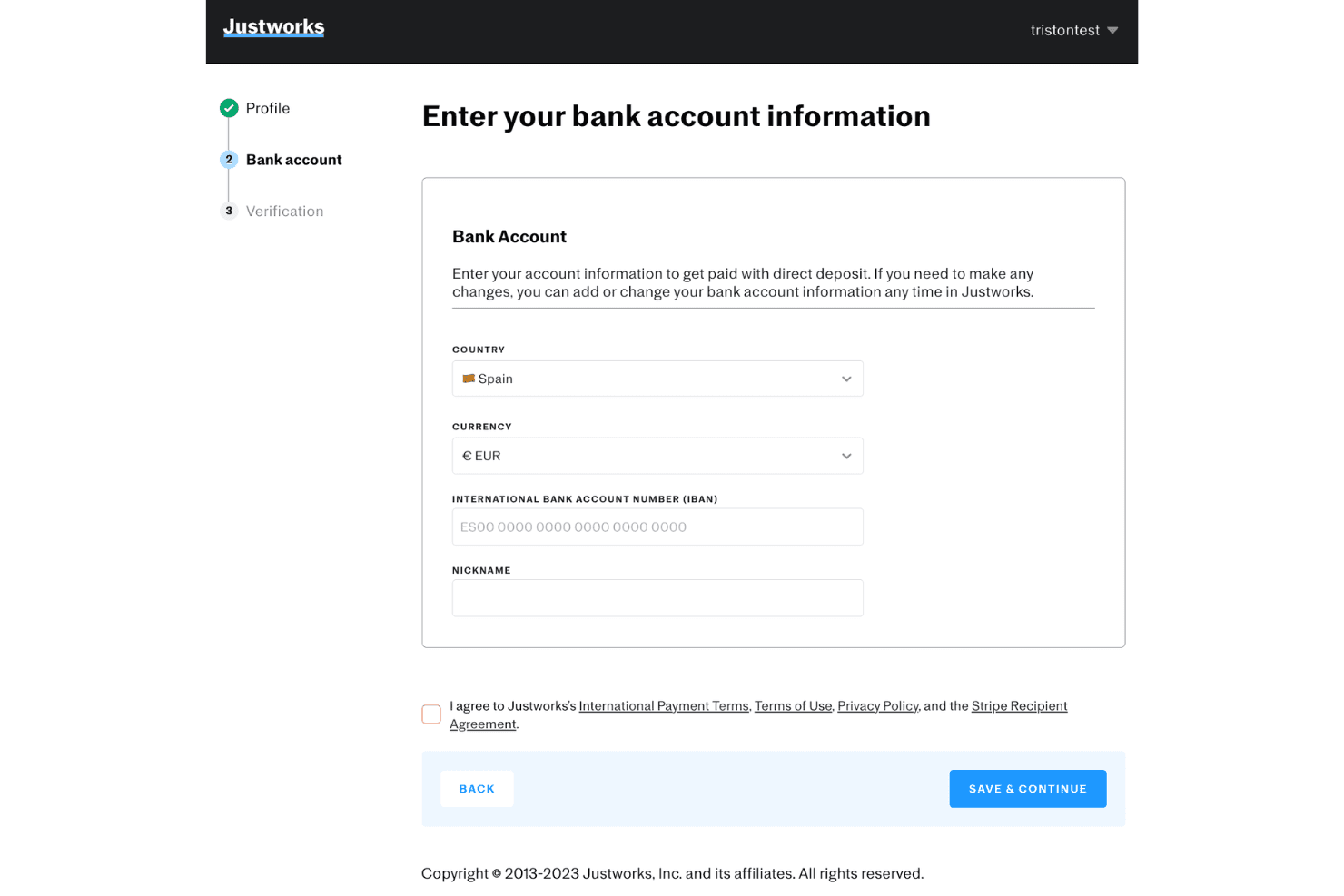
Justworks allows international contractors to set up direct deposit by entering their IBAN and bank account details during onboarding. Justworks is a PEO and payroll platform that handles payroll for both W-2 employees and 1099 contractors, covering tax filings, direct deposits, and multi-state compliance across all 50 states.
Who Is Justworks Best For?
Justworks suits small to mid-size US-based businesses that pay a mix of full-time employees and contractors and want payroll, compliance, and benefits in one place.
Why I Picked Justworks
Justworks is one of my top picks because I love how it automates the actual deposit of contractor payments, routing funds directly to bank accounts once a pay run is approved, with no manual transfer steps involved. My team can also schedule regular payment cycles, and 1099 generation happens automatically at year-end. With coverage across more than 2,000 tax localities, multi-state contractor tax calculations don't require any manual work on our end.
Justworks Key Features
- PEO-level benefits administration: Manage access to health, dental, and vision for eligible workers through a single platform.
- HR document storage: Upload and organize contracts, tax forms, and onboarding materials for both employees and contractors.
- Automated 1099 filing: Generate and file 1099 forms for contractors directly from the payroll system.
- Multi-state payroll support: Run payroll compliantly for contractors and employees across all 50 US states.
Justworks Integrations
Justworks offers native integrations with QuickBooks and Xero, and provides an API for custom integrations.
Pros and Cons
Pros:
- Flexible scheduling for contractor payment cycles
- Handles payroll tax compliance across all states
- Automatically generates contractor 1099 forms
Cons:
- Requires multiple steps to offboard contractors
- Benefits access limited for contractors
Learn more about Justworks: Best for compliant payments in 150+ countries
- Free demo available
- From $29/user/month
Visit WebsiteCustomer Rating:4.9/5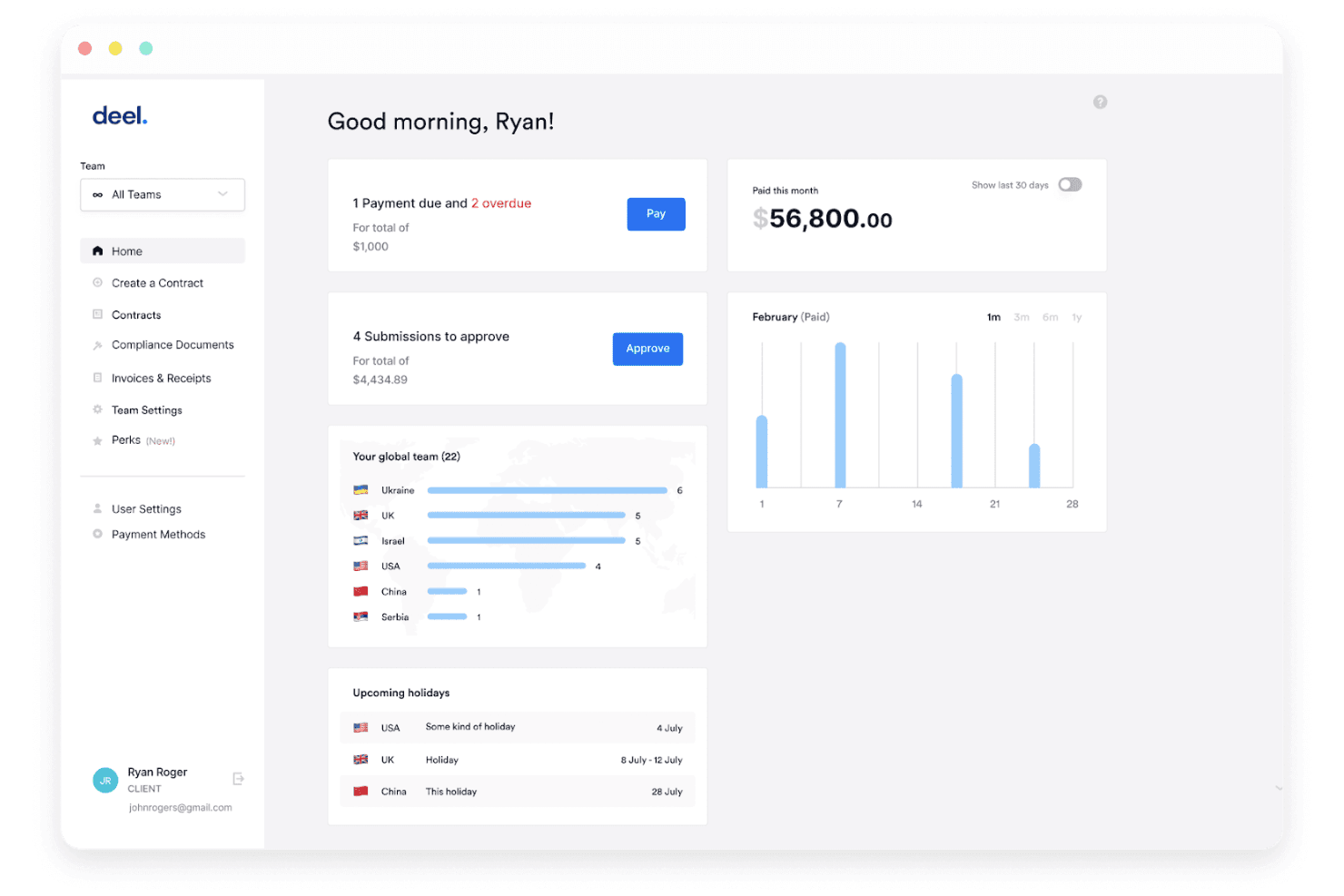
Deel Payroll displays a client dashboard with payment alerts, team distribution by country, upcoming holidays, and monthly payment analytics. Deel Payroll is a global contractor payroll platform that handles contract creation, multi-currency payments, automated invoicing, tax form collection, and worker classification compliance across 150+ countries.
Who Is Deel Payroll Best For?
Deel Payroll is a strong fit for companies that regularly pay international contractors across multiple countries and need built-in compliance without setting up foreign entities.
Why I Picked Deel Payroll
Deel Payroll earns its spot on my shortlist because no other contractor payroll tool covers compliance at this scale. I especially like Deel Shield, which assesses worker classification and indemnifies against misclassification liability, a real risk when paying contractors across dozens of countries. The platform also generates locally compliant contracts and supports payouts in 120+ currencies, so paying a designer in Brazil and a developer in Nigeria happens from one place.
Deel Payroll Key Features
- Automated invoicing: Easily create, send, and manage invoices for contractor payments in multiple currencies.
- Tax form management: Collect, generate, and store required contractor tax documents, like W-8 and W-9 forms, directly on the platform.
- Payment scheduling: Schedule one-time or recurring payments to contractors worldwide with flexible frequency options.
- Multi-method withdrawals: Contractors can withdraw funds through local bank transfers, PayPal, Wise, Payoneer, or even crypto.
Deel Payroll Integrations
Deel Payroll offers over 130 native integrations, including Workday, QuickBooks, Xero, BambooHR, NetSuite, Slack, Personio, Mesh Payments, 15Five, and JIRA. An API is available for custom integrations.
Pros and Cons
Pros:
- Supports multiple payment withdrawal methods
- Offers local tax document automation
- Handles contractor payments in 150+ countries
Cons:
- Limited built-in reporting customizations
- Global support response times can vary
Learn more about Deel Payroll: Best for automating 1099 filings
- Free trial + free demo available
- From $49/month
Visit WebsiteCustomer Rating:4.6/5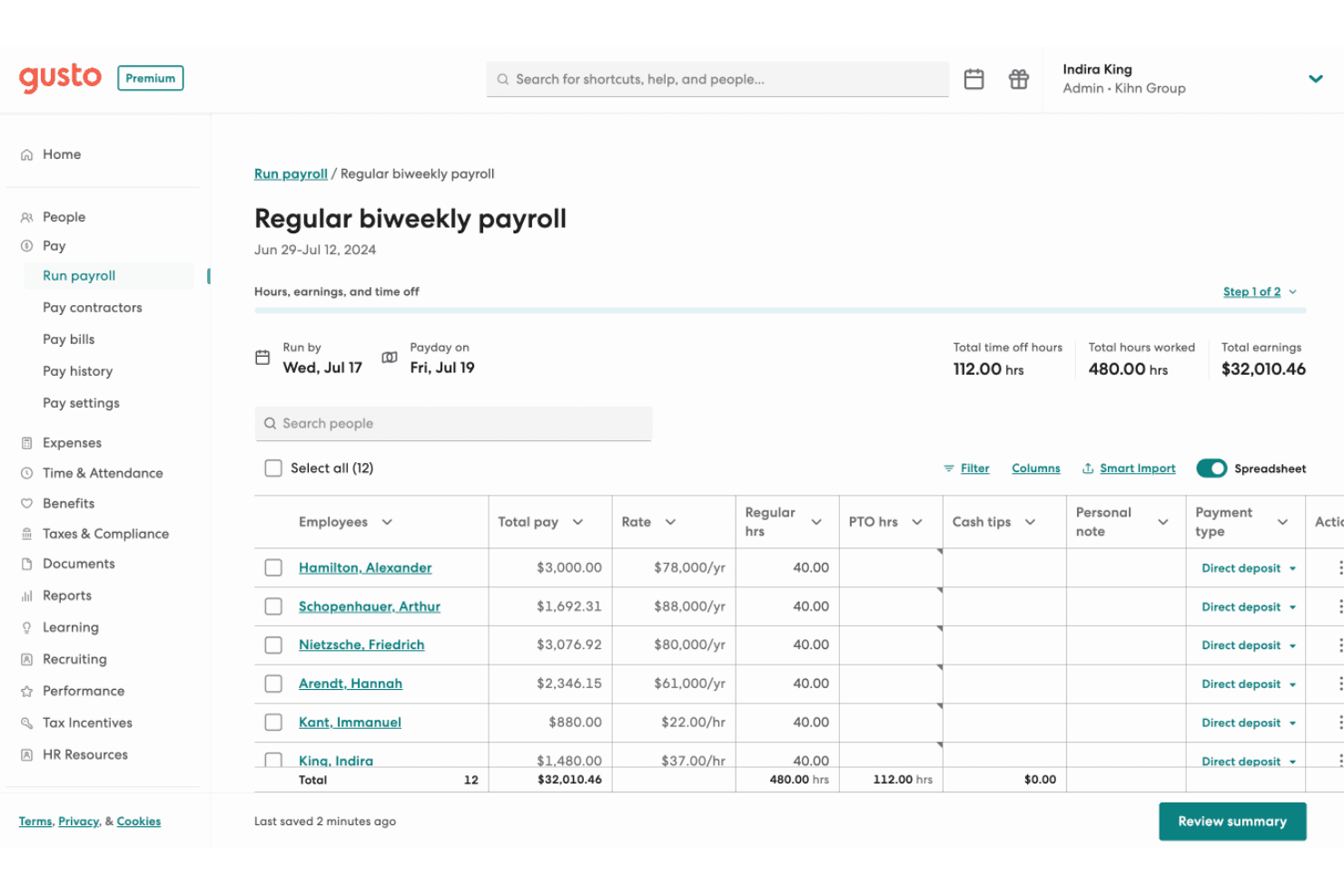
Gusto offers a detailed regular biweekly payroll interface showing employee pay, hours, rates, and payment types for easy payroll management. Gusto is a payroll and HR platform that handles contractor and employee payments, tax filings, benefits administration, and compliance in one place.
Who Is Gusto Best For?
Gusto is a strong fit for small businesses in the US that pay a mix of W-2 employees and 1099 contractors and want to manage both from a single platform.
Why I Picked Gusto
Gusto earns its spot as one of the best on my shortlist because of how thoroughly it handles 1099 filings without any extra effort on my part. When December rolls around, Gusto automatically generates, files, and delivers 1099-NEC forms to every contractor I've paid that year, at no added cost. I also like that contractors self-onboard and submit their own tax info upfront, which means I'm not chasing down W-9s at year-end.
Gusto Key Features
- Unlimited payroll runs: You can submit as many payrolls as needed each month without extra charges.
- Integrated time tracking: Capture contractor hours directly within Gusto for more accurate payroll processing.
- Multi-state payroll support: Pay contractors working in different states and manage compliance requirements in one platform.
- Accounting software integrations: Connect with platforms like QuickBooks or Xero to sync payroll data automatically.
Gusto Integrations
Gusto offers 150+ native integrations, including QuickBooks, Xero, Homebase, 7Shifts, 15Five, Expensify, Clover, Checkr, Ashby, BambooHR, and Hubstaff. An API is available for custom integrations.
Pros and Cons
Pros:
- Onboards contractors with self-service tax forms
- Automatically files and distributes 1099-NEC forms
- Handles unlimited contractor payments monthly
Cons:
- Some state tax forms require manual input
- International contractor payments not supported
 Best for contractor payment flexibility
- Free plan + free demo available
- From $199/user/month
Visit WebsiteCustomer Rating:4.5/5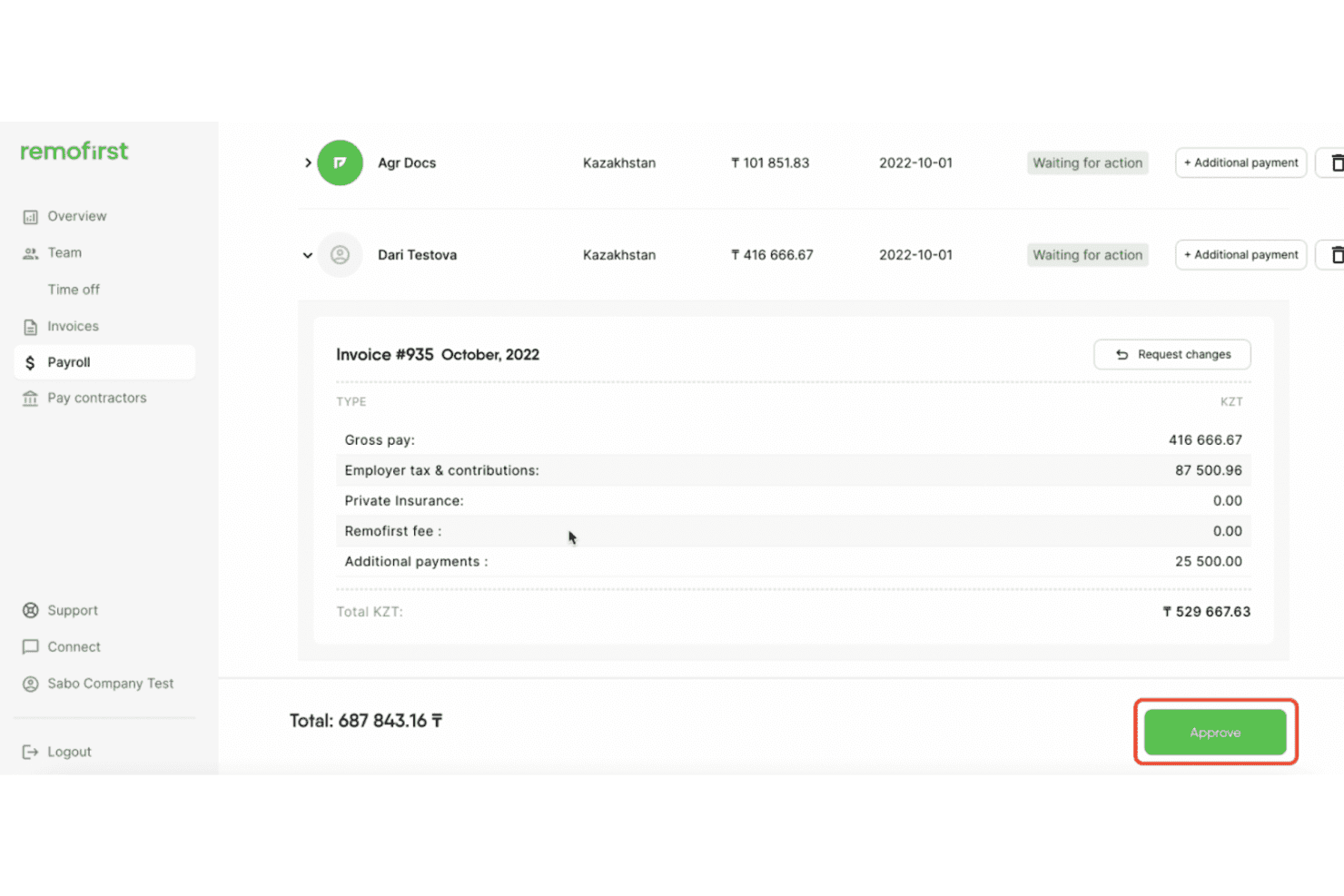
RemoFirst displays a detailed payroll invoice breakdown including gross pay, employer taxes, and additional payments for employees in Kazakhstan. RemoFirst is an EOR and contractor management platform that handles cross-border payroll, compliant contract generation, multi-currency payments, and time tracking for international contractors and employees across 185+ countries.
Who Is RemoFirst Best For?
RemoFirst is a strong fit for startups and growth-stage companies hiring international contractors for the first time.
Why I Picked RemoFirst
RemoFirst earns its spot on my shortlist because of how it handles contractor payments across borders. I love that you can invoice contractors in seven currencies (USD, EUR, GBP, CAD, AUD, NZD, SGD) while they still receive payment in their own local currency. I also like the one-click invoice generation on the Premium tier, which removes the manual back-and-forth when paying contractors across 150+ countries.
RemoFirst Key Features
- Compliant contract generation: Automatically create localized contracts for contractors in over 150 countries.
- Time tracking and timesheet management: Track contractor hours and manage digital timesheets within the platform.
- Integrated background checks: Run contractor background screenings globally with no added cost at the free tier.
- Expense reimbursement management: Enable contractors to submit expenses directly for approval and payment through the platform.
RemoFirst Integrations
RemoFirst offers native integrations with BambooHR, ADP Workforce Now, and GoCardless. An API is available for custom integrations.
Pros and Cons
Pros:
- Integrated background checks at no extra cost
- Automated compliant contracts in 150+ countries
- Fast onboarding for international contractors
Cons:
- Lacks in-depth local tax guidance
- VAT support is limited for some countries
 Best for organizing contractor documents
- Free demo available
- Pricing upon request
Visit WebsiteCustomer Rating:4.4/5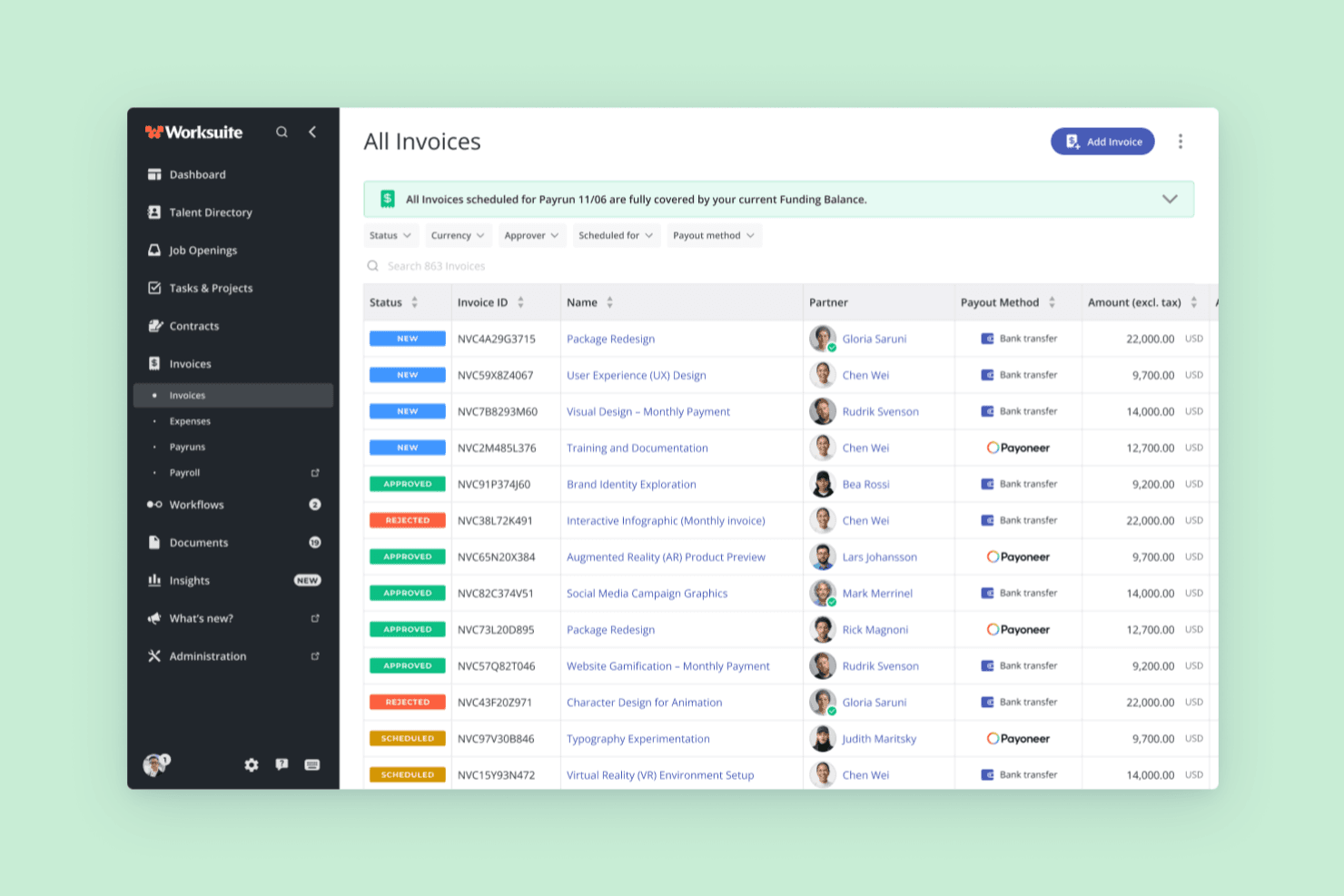
Worksuite offers an All Invoices dashboard that displays invoice status, IDs, project names, partners, payout methods, and amounts in a centralized management view. Worksuite is a freelancer management system that combines contractor onboarding, document collection, compliance management, contract lifecycle tracking, and multi-currency global payments in one platform.
Who Is Worksuite Best For?
Worksuite is a strong fit for mid-size to enterprise teams in media, publishing, and production that manage large, distributed contractor networks across multiple countries.
Why I Picked Worksuite
I've included Worksuite in my top picks because of how it handles contractor document organization at scale. When you're managing hundreds of contractors, documents like W-9s, signed contracts, and compliance certifications tend to scatter. Worksuite centralizes all of this with configurable onboarding workflows that automatically collect and store documents per entity or region. Compliance gates are built directly into those workflows, so a contractor can't advance to payment until their documentation is verified.
Worksuite Key Features
- Global payments: Send payments to contractors in 190+ countries with 120+ currencies supported.
- Contract lifecycle management: Create, negotiate, e-sign, and renew contracts all within the platform.
- Integrated compliance checks: Automatically verify classification, background, and KYC before issuing payments.
- Business intelligence dashboards: Track contractor headcount, spend, and onboarding metrics in real time.
Worksuite Integrations
Worksuite offers native integrations with NetSuite, QuickBooks, Xero, Salesforce, HubSpot, monday.com, Slack, Asana, Veriff, and Checkr. It connects with Zapier and has an API for custom integrations.
Pros and Cons
Pros:
- Real-time contractor workforce analytics
- Centralized contractor document storage
- Automated onboarding and compliance workflows
Cons:
- Global tax calculation setup can be complex
- Contractor portal branding options are limited
Learn more about Worksuite: Best for paying contractors in 200+ countries
- Free plan available
- Pricing upon request
Visit WebsiteCustomer Rating:4.6/5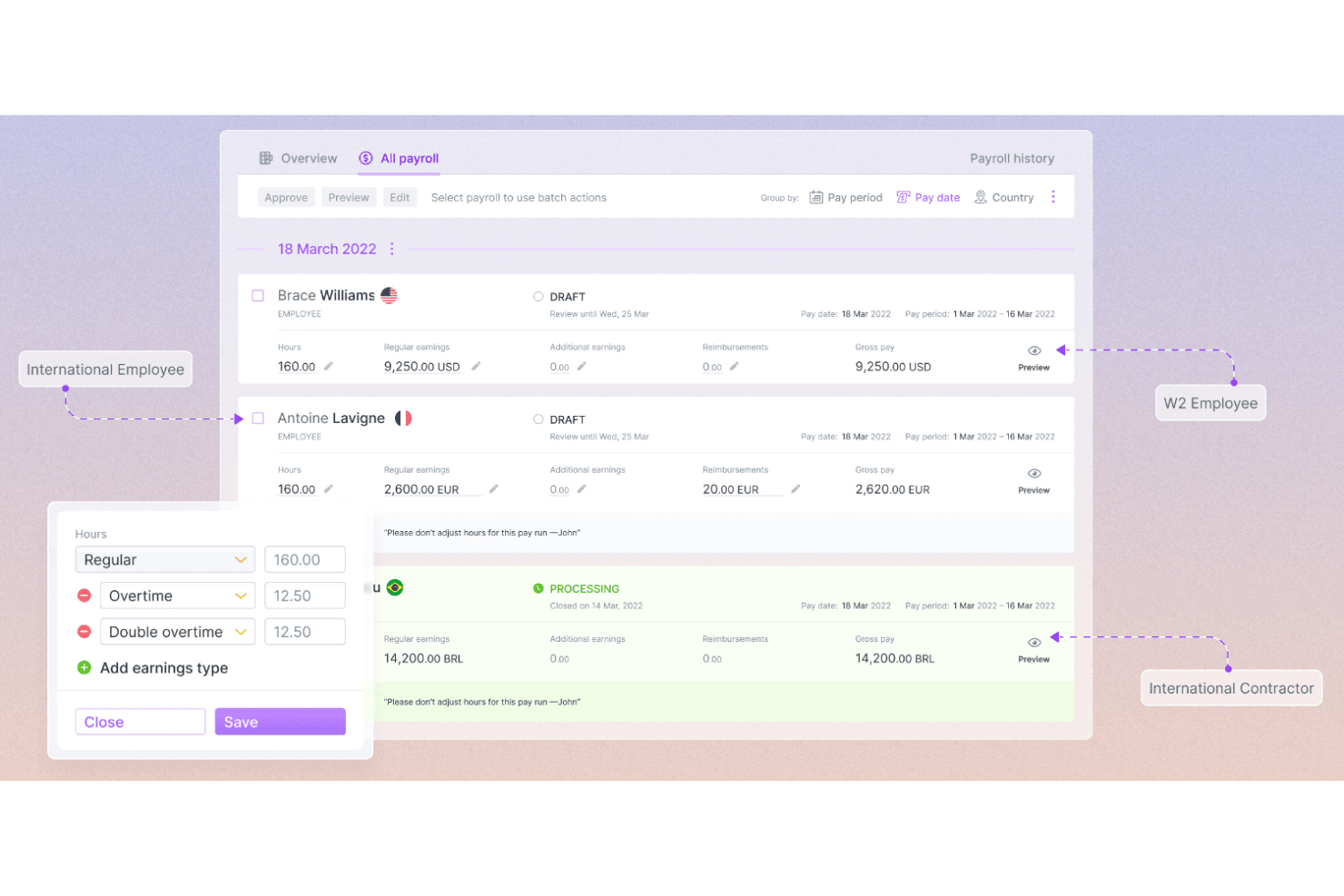
Plane is a payroll software for contractors designed to handle multi-country payroll complexities with compliance assurance and currency conversion capabilities. Plane is a contractor payroll platform that handles cross-border payments, automated 1099-NEC filing, embedded invoicing, and unified workforce management for contractors, US employees, vendors, and EOR hires in one system.
Who Is Plane Best For?
Plane works well for small businesses and HR teams that pay contractors across multiple countries and want to manage contractors, employees, and EOR hires in one place.
Why I Picked Plane
Plane earns its spot as one of the best on my shortlist because no other tool in this category matches its reach for paying contractors across 200+ countries with direct-to-bank deposits in 130+ currencies, no e-wallet required. I also love that it automatically collects W-9 and W-8 forms during onboarding and files 1099-NEC forms directly with the IRS on your behalf. On top of that, contractors, US employees, vendors, and EOR hires all live in one system.
Plane Key Features
- Recurring pay schedules: Set up weekly, biweekly, twice-monthly, or monthly pay schedules with auto-approval rules that process payments when no blockers exist.
- Embedded invoicing: Contractors submit payment requests directly in Plane, which flow into a structured approval and payment workflow before being added to payroll.
- Unified workforce dashboard: Manage US W2 employees, contractors, vendors, and EOR hires in a single system with grouped payroll runs and custom reports.
- Localized contract templates: Access lawyer-reviewed, country-specific contractor contracts with built-in e-signature and automatic update suggestions when local laws change.
Plane Integrations
Plane offers a native QuickBooks Online integration and a Slack marketplace integration. Its REST API, MCP server, CLI, webhooks, and sandbox support custom payroll workflows.
Pros and Cons
Pros:
- Contractors access documents and submit invoices
- Automated 1099-NEC filing with IRS
- Global contractor payments to 240+ countries
Cons:
- Only QuickBooks Online supported for accounting
- No mobile app for on-the-go access
Learn more about Plane: Best for mass payments to global contractors
- Free demo available
- From $249/month
Visit WebsiteCustomer Rating:4.5/5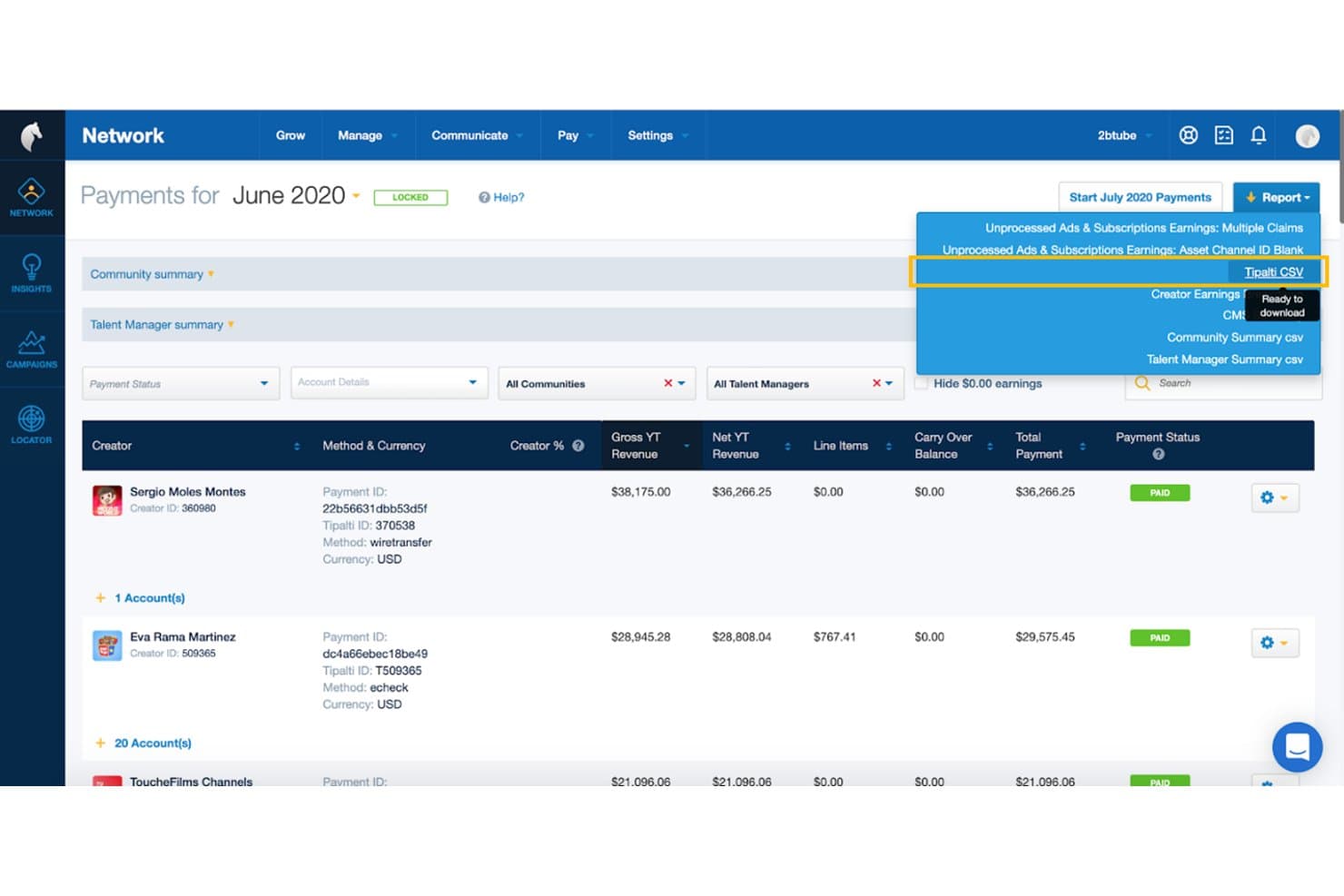
Tipalti lets users export contractor payment reports via CSV download. Tipalti is a global mass payments and accounts payable automation platform that handles contractor payouts across 200+ countries, tax form collection and compliance, multi-payee management, and self-service contractor onboarding.
Who Is Tipalti Best For?
Tipalti is built for finance and accounting teams managing high-volume payouts to contractors across multiple countries.
Why I Picked Tipalti
Tipalti earns its spot on my shortlist because no other tool I've reviewed matches its depth for paying contractors across borders at scale. I'm particularly impressed by its KPMG-reviewed tax engine, which automates W-9/W-8 collection, TIN matching, and 1099/1042-S filing without manual chasing. Its self-billing feature is a standout for high-volume payout workflows, generating invoices on behalf of contractors so your team never waits on paperwork to release payments.
Tipalti Key Features
- Multi-entity support: Manage separate payment workflows, approval rules, and branding for multiple business entities from a single centralized dashboard.
- Payee portal in 27+ languages: Contractors onboard themselves, select payment preferences, and track payment status through a white-labeled self-service portal.
- AI invoice capture agent: Automatically extracts and codes invoice data from PDFs, emails, and scanned documents across 146 languages.
- OFAC and sanctions screening: Every payment is checked against global sanctions lists and monitored for suspicious activity before funds are released.
Tipalti Integrations
Tipalti offers integrations with QuickBooks Online, Xero, Oracle NetSuite, Sage Intacct, Workday, BambooHR, and Zenwork. It also supports RESTful APIs for custom integrations.
Pros and Cons
Pros:
- Self-service onboarding with 27+ language portal
- Automated W-9/W-8 collection and tax filing
- Global mass payments to 200+ countries
Cons:
- Onboarding and ERP integration can be complex
- No employee payroll or W-2 support
Learn more about Tipalti: Best for automated contractor onboarding
- Free demo available
- From $8/user/month (billed annually)

Rippling is a payroll software for contractors that automates onboarding, benefits management, and compliance in one integrated platform. Rippling is an HR, payroll, and workforce management platform that handles contractor onboarding, global payments in 185+ countries, automated invoicing, tax form generation, and unified employee and contractor management in one system.
Who Is Rippling Best For?
Rippling is a strong fit for HR and operations teams that need to onboard and pay both employees and contractors across multiple countries from a single platform.
Why I Picked Rippling
I picked Rippling as one of the best because its contractor onboarding automation is genuinely impressive: a new contractor signs their agreement, completes KYC verification, and enters their payment details in a single guided flow, without any back-and-forth emails. I also like that Rippling auto-generates and auto-approves invoices for fixed-rate contractors, which means payroll runs practically trigger themselves once the timecard is approved. Add in 185+ countries and 50+ currencies supported, and it's a strong fit if your contractor roster spans borders.
Rippling Key Features
- Unified workforce dashboard: View and manage employees, EOR workers, and contractors across all locations from a single real-time dashboard.
- Workflow Studio: Build no-code automation triggers for approvals, onboarding steps, and compliance tasks without engineering support.
- 1099 and W-2 generation: Rippling automatically generates, delivers, and stores tax forms for contractors and employees, including print-and-mail options.
- Native accounting integrations: Sync payroll data directly to QuickBooks, Xero, NetSuite, or Sage Intacct with automatic journal-entry pushes and custom GL mapping.
Rippling Integrations
Rippling offers 650+ out-of-the-box integrations, including QuickBooks Online, Xero, NetSuite, Sage Intacct, Slack, and Microsoft 365. It also provides an API and developer platform for custom integrations.
Pros and Cons
Pros:
- Manages employees and contractors in one system
- Auto-generates and approves contractor invoices
- Onboards global contractors with one automated flow
Cons:
- FX and vendor payment fees not transparent
- Contractor payroll requires buying core HRIS
Learn more about Rippling: Best for paying contractors across 210+ countries
- Free trial + free demo available
- From $2,399/year (billed annually)
 Learn more about Trolley:

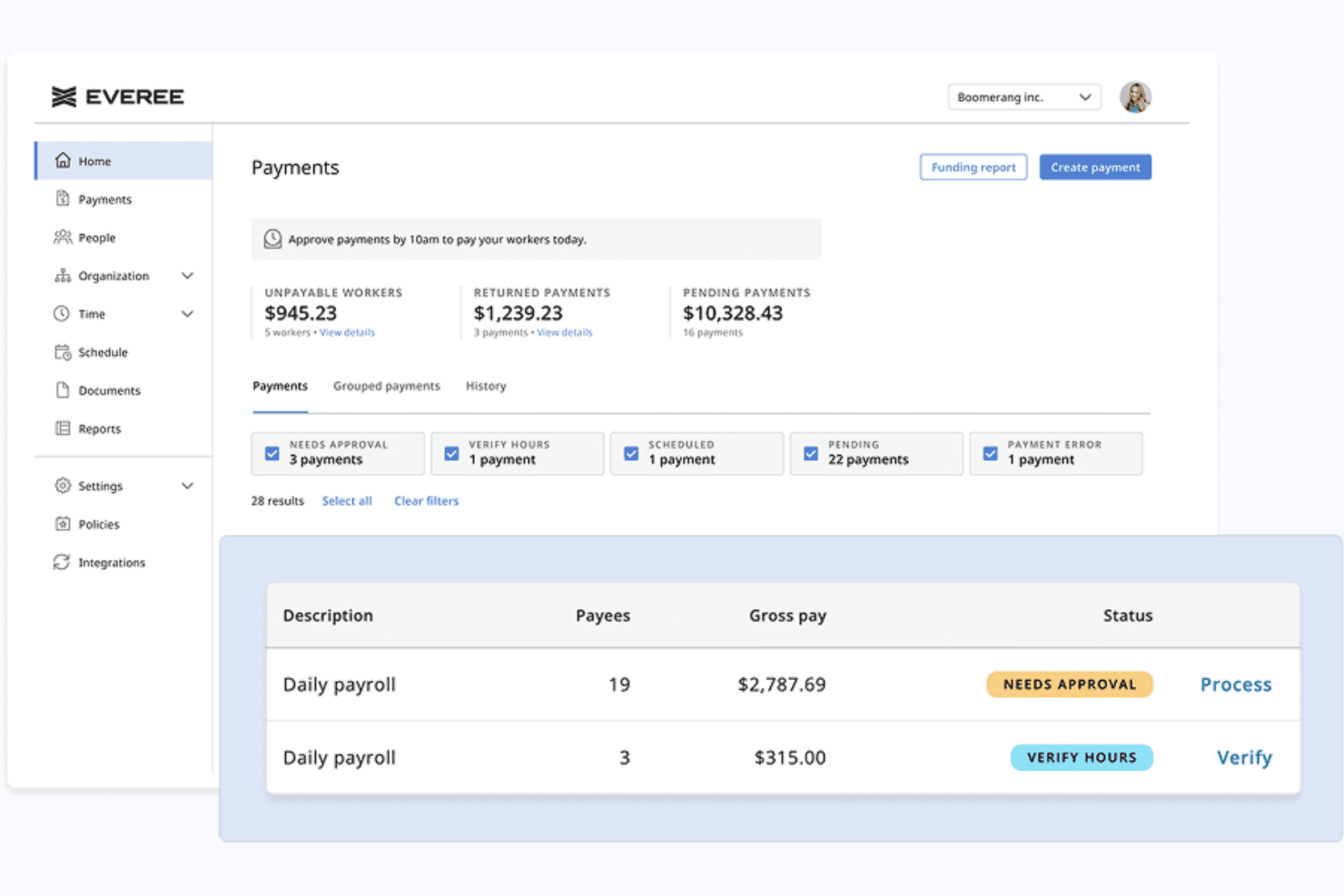
Everee displays a payments dashboard where admins can view pending, returned, and unpayable worker payments alongside approval statuses. Everee is a payroll platform built for businesses with flexible, non-traditional workforces that combines W-2 and 1099 contractor payroll, automated tax filings, and same-day payment processing in a single system.
Who Is Everee Best For?
Everee is a strong fit for small businesses, staffing agencies, and gig-work platforms that pay high volumes of US-based 1099 contractors on flexible or daily schedules.
Why I Picked Everee
Everee earns its spot on my shortlist because it's the only platform I've found that lets you process a contractor pay run in the morning and have funds in workers' bank accounts that same afternoon. I like that you can run 1099 and W-2 payroll together in a single pay run, so mixed workforces don't need two separate systems. The Everee Visa Pay Card adds instant access on top of same-day ACH, giving contractors a real choice in how they receive their money.
Everee Key Features
- Mobile onboarding and pay access: Contractors can onboard and manage payouts through Everee’s mobile app.
- Automated tax paperwork handling: W-2 and 1099 tax forms are generated and filed automatically for all payees.
- Multi-state payroll compliance: Supports tax filings and payments across all 50 US states for both W-2 and 1099 workers.
- Payroll API and white-label options: Offers APIs for custom integrations and the option to embed payroll into other platforms.
Everee Integrations
Native integrations are not clearly documented. Everee offers an API for custom integrations.
Pros and Cons
Pros:
- Everee Pay Card enables instant contractor access
- Runs W-2 and 1099 payroll together
- Same-day ACH payments for contractors
Cons:
- Limited reporting compared to larger payroll platforms
- US-only contractor payments, no global payouts
Learn more about Everee:
Yükleniciler için Diğer Bordro Yazılımları
Aşağıda, en iyi 10 listeme giremeyen ancak yine de göz atmaya değer olan yükleniciler için ek bordro yazılımlarının bir listesini bulabilirsiniz:
- 11RUN Powered by ADP®Best for automatic tax calculations
- 12TopSourceBest for 24/5 dedicated support
- 13TimeTrexBest for accurate time-to-payroll integration
- 14Patriot PayrollBest for paying US-based contractors
- 15Papaya GlobalBest for managing global contractor payments
- 16QuickBooks PayrollBest for quick payroll processing
- 17WingspanBest for end-to-end contractor management
- 18RemoteBest for international compliance
İlgili İK Yazılımı İncelemeleri
Aradığınızı hâlâ burada bulamadıysanız test edip değerlendirdiğimiz diğer ilgili araçlara göz atın:
- İK Yazılımı
- Bordro Yazılımı
- İşe Alım Yazılımı
- Kayıtlı İşveren Hizmetleri
- Aday Takip Sistemleri
- İşgücü Yönetimi Yazılımı
How I Evaluate Payroll Software for Contractors
I split my evaluation into two layers: the baseline capabilities a tool needs to qualify—like contractor payments and tax document automation—and the differentiators that set the best options apart.
Core Functionality (Table Stakes For This List)
When I'm selecting tools for my list, I rank each one on a scale from 0 (does not offer the functionality) to 5 (excels in this area) for each core functionality listed below. Then, I calculate the tool's total score into a percentage. Each tool needs to achieve a minimum total score of 65% to be considered for inclusion.
- Contractor Payment Processing: I check how many payout methods each platform supports and whether it can handle bulk pay runs, recurring schedules, and one-off payments to dozens of contractors at once.
- Multi-Currency & Global Payouts: Paying a designer in Europe and a developer in Southeast Asia from one dashboard matters, so I evaluate country coverage, supported currencies, and local payment rails.
- Tax Form Management: Each tool should collect W-9s and W-8BENs digitally, generate 1099-NECs at year-end, and ideally handle e-filing—platforms like Deel and Gusto approach this differently, but automation is what I look for.
- Contractor Onboarding: I evaluate whether the platform lets contractors self-serve through contract signing, identity verification, and banking setup without back-and-forth emails or manual document chasing.
- Compliance & Classification: Worker misclassification is a real risk, so I look for built-in classification questionnaires, jurisdiction-specific guidance, and risk flagging before you finalize a contractor agreement.
- Invoicing & Approval Workflows: I consider whether contractors can submit invoices directly in the platform and whether your team can route those through multi-step approvals before payments are triggered.
Once I have a list of tools that meet the criteria, I consider what sets each platform apart.
Differentiating Factors (What Sets Vendors Apart)
Here's how I compare and contrast different vendors:
Standout Features
EOR capabilities matter if you're planning to convert top-performing contractors into full-time employees abroad without setting up a local entity. I also look at whether platforms offer optional benefits like health coverage or stipends that contractors can opt into—this helps attract and retain skilled independents. For teams managing contractors across multiple subsidiaries, multi-entity support lets you handle everything from one dashboard rather than toggling between separate accounts.
Beyond Features
Pricing transparency is something I evaluate closely because FX markups and wire fees can quietly inflate your per-contractor costs. I also check how each platform integrates with accounting tools like QuickBooks, Xero, or NetSuite—without a clean sync, your finance team ends up reconciling contractor payments manually every month. Payout speed is another differentiator worth comparing; some vendors offer same-day transfers while others take several business days, which directly affects how contractors experience working with you.
Yükleniciler için Bordro Yazılımı Nedir?
Yükleniciler için bordro yazılımı, serbest çalışanlara, proje bazlı çalışanlara ve 1099 bağımsız yüklenicilere ödeme yapma sürecini otomatikleştiren bir araçtır. Öngörülebilir aylık maaşları ve yan hak kesintilerini yöneten standart çalışan bordrosunun aksine, yüklenici bordrosu değişken ve faturalara dayalı ödemeleri yönetir. Bu platformlar doğrudan para yatırma işlemlerini otomatikleştirir, vergi formlarını (W-9 ve 1099-NEC gibi) toplar, uluslararası çalışanlar için birden fazla para biriminde ödeme hesaplar ve işletmenizin yerel vergi yasalarına uyumlu kalmasını sağlar.
Yükleniciler için Bordro Yazılımı Nasıl Seçilir?
Uzun özellik listeleri ve karmaşık fiyatlandırma yapıları arasında kaybolmak kolaydır. bordro yazılımı seçme sürecinde ilerlerken odaklanmanıza yardımcı olmak için göz önünde bulundurmanız gereken temel faktörleri aşağıda açıklıyoruz:
| Faktör | Dikkat Edilmesi Gerekenler |
|---|---|
| FaktörÇalışan Sınıflandırması Desteği | Dikkat Edilmesi GerekenlerDenetimler sırasında yanlış sınıflandırma risklerini azaltmak için yazılım, 1099 bağımsız yüklenicileri (Form 1099-NEC) W-2 çalışanlarından ayırıyor mu? |
| FaktörOtomatik 1099 Vergi ve Ödeme Araçları | Dikkat Edilmesi GerekenlerEsnek ödeme takvimleri, doğrudan para yatırma ve IRS'ye otomatik 1099-NEC formu oluşturma ve gönderme özelliklerine sahip sistemleri arayın. |
| FaktörOnaylı Bordro Raporlama | Dikkat Edilmesi GerekenlerKamu projeleri veya geçerli ücret projeleri için teklif veriyorsanız araç, Davis-Bacon Yasası'na uyum için WH-347 gibi devlet formlarını otomatikleştiriyor mu? |
| Faktörİş Maliyeti Hesaplama ve Zaman Takibi | Dikkat Edilmesi GerekenlerYazılım, belirli iş sahalarındaki çalışma saatlerini kaydetmek ve proje başına kesin işçilik giderlerini takip etmek için saha uygulamalarıyla senkronize olabiliyor mu? |
| FaktörMuhasebe Sistemi Entegrasyonları | Dikkat Edilmesi GerekenlerPlatform, yüklenici faturaları ve ödemeleri için manuel çift veri girişini ortadan kaldırmak üzere QuickBooks veya Xero gibi sistemlere bağlanıyor mu? |
İnşaat ve Ticari Yükleniciler İçin Bordro Yazılımı Seçme
Saha ekipleri ve uzmanlık gerektiren ticari alt yükleniciler, iş sahalarını ve katı uyumluluk kurallarını yönetmek için özel olarak tasarlanmış inşaat bordrosu altyapısına ihtiyaç duyar:
- Onaylı Bordro Raporlama: Davis-Bacon Yasası kapsamındaki geçerli ücret projeleri için federal WH-347 Formunu ve eyalet düzeyindeki onaylı bordro belgelerini otomatik olarak oluşturur.
- İş Maliyeti Hesaplama ve Puantaj Senkronizasyonu: Saatleri doğrudan belirli iş sahalarına, aşamalara ve maliyet kodlarına eşlemek için mobil saha uygulamalarıyla entegre olur.
- Sendika ve Eyaletler Arası Kurallar: Farklı sendika yan hakları kademelerini, ek yan hakları ve yerel meslek ücret oranlarını otomatik olarak hesaba katar.
- En Uygun Önde Gelen Platformlar: Foundation Software, Sage 100 Contractor, Payroll4Construction.
Bağımsız 1099 Yüklenicileri İçin Bordro Yazılımı Seçme
Proje bazlı serbest çalışanları veya 1099 alt yüklenicilerini işe alan kurumsal ekipler, hız ve vergi otomasyonuna odaklanan idari ödeme motorlarına ihtiyaç duyar:
- 1099 Vergi Otomasyonu: İşe alım sürecinde Form W-9'u (veya yabancı çalışanlar için W-8BEN'i) otomatik olarak toplar ve yıl sonunda Form 1099-NEC'yi IRS'ye elektronik olarak gönderir.
- Esnek ve Küresel Ödemeler: Toplu doğrudan para yatırma, aynı gün ACH transferleri ve çok para birimli uluslararası transferler sağlar.
- Yanlış Sınıflandırma Güvenceleri: Vergi yasaları kapsamında 1099 yüklenicilerinin W-2 çalışanları gibi değerlendirilmesini önlemek için yerleşik risk değerlendirmeleri sunar.
- Aktif Yüklenici Başına Ödeme Modelleri: Sistemin, sizi aylık W-2 çalışanı temel ücretlerine veya karmaşık W-2 iş akışlarına zorlamadan fatura bazlı ödemelere izin verdiğinden emin olun.
- En Uygun Önde Gelen Platformlar: Gusto, Deel, Rippling, Wise.
Yükleniciler İçin Bordro Yazılımındaki Trendler
Yüklenici bordrosu araçları, uzaktan çalışan ekipler ve değişen vergi yasalarına ayak uydurmak için hızla gelişiyor. Alanı yeniden şekillendiren başlıca trendlerden bazıları şunlardır:
- Anında Ödemeler ve Esnek Ödeme Seçenekleri: Yükleniciler, kazandıkları ücretlere hızlı erişim sağlamayı giderek daha fazla bekliyor. Yazılım sağlayıcıları artık ekibinizin en iyi yetenekleri elinde tutmasına yardımcı olmak için doğrudan karta para yatırma ve aynı gün ödeme transferlerini entegre ediyor.
- Otomatik Çalışan Sınıflandırması Korumaları: 1099 yüklenicilerini W-2 çalışanları olarak yanlış sınıflandırmak, ağır vergi denetimi cezalarına yol açar. Platformlar artık otomatik risk değerlendirme anketlerini ve vergi kontrollerini doğrudan işe alım iş akışlarına dahil ediyor.
- Sınır Ötesi Uyumluluk ve Çok Para Birimli Ödemeler: Küresel serbest çalışanları yönetmek, yerelleştirilmiş sözleşmeler ve yabancı vergi raporlaması gerektirir. Önde gelen platformlar artık 150'den fazla ülke için yerleşik yerelleştirilmiş sözleşmeler ve otomatik vergi formu toplama özelliklerini içeriyor.
Yükleniciler İçin Bordro Yazılımının Özellikleri
Yüklenici odaklı bir platform seçerken şu temel bordro yazılımı özelliklerini arayın:
- Çalışan sınıflandırması desteği: Vergi denetimleri sırasında yanlış sınıflandırma risklerini azaltmak için 1099 bağımsız yüklenicileri (Form 1099-NEC) W-2 çalışanlarından ayırın.
- İş maliyetlendirme ve zaman takibi: Saatleri belirli projelere kaydetmek ve saha başına işçilik giderlerini hesaplamak için QuickBooks Time veya BusyBusy gibi saha uygulamalarıyla senkronize olun.
- Onaylı bordro raporlaması: Şirketiniz kamu projeleri veya geçerli ücret projeleri için teklif veriyorsa Form WH-347 dahil olmak üzere devlet kurumları ve sendikalar için raporlama belgeleri oluşturun.
- Otomatik yüklenici ödemeleri: Doğrudan para yatırma, çek veya yerel ödeme sistemlerini kullanarak yüklenicilere yapılacak ödemeleri planlayın, gönderin ve takip edin.
- 1099 vergi formu oluşturma: Yıl sonunda çalışan olmayan kişilere verilecek Form 1099-NEC vergi belgelerini otomatik olarak oluşturun, IRS'ye bildirin ve dağıtın.
- Yüklenici işe alım araçları: Yeni çalışanların kurulumunu hızlandırmak için Form W-9 veya W-8BEN'i, sözleşmeleri ve banka bilgilerini dijital olarak toplayın.
- Uluslararası ödeme desteği: Sınır ötesi vergi uyumluluğu için doğru kayıtları tutarken küresel yüklenicilere birden fazla yerel para biriminde ödeme yapın.
- Kendi kendine hizmet veren yüklenici portalları: Çalışanlara kişisel banka bilgilerini güncelleme, faturaları yükleme ve yıllık vergi formlarını indirme konusunda doğrudan erişim sağlayın.
- Muhasebe platformu entegrasyonları: Çift veri girişini ve manuel mutabakatı ortadan kaldırmak için ödeme verilerini doğrudan QuickBooks veya Xero gibi sistemlere aktarın.
- Çok kullanıcılı erişim denetimleri: Hassas ücretlendirme verilerini yalnızca yetkili insan kaynakları ve finans ekibi üyelerinin görüntüleyebilmesi için rollere dayalı olarak belirli kullanıcı izinleri atayın.
Yükleniciler için Bordro Yazılımının Faydaları
Yükleniciler için bordro yazılımı uygulamak ekibiniz ve işletmeniz için çeşitli faydalar sağlar. Yararlanabileceğiniz bazı avantajlar şunlardır:
- Zamandan tasarruf: Yüklenici ödemelerini, işe alım süreçlerini ve vergi formu oluşturmayı otomatikleştirmek, evrak işlerine daha az, katma değer sağlayan görevlere daha fazla odaklanmanızı sağlar.
- Daha yüksek doğruluk: Dahili vergi hesaplamaları, raporlama ve uyumluluk kontrolleri manuel veri girişi hataları riskini azaltmaya ve maliyetli yanlışlıklardan kaçınmaya yardımcı olur.
- Daha kolay uyumluluk: Otomatik 1099 bildirimleri ve belge takibi, değişen vergi düzenlemelerine uyum sağlamanıza yardımcı olur ve denetimler sırasındaki riskleri azaltır.
- İyileştirilmiş yüklenici deneyimi: Kendi kendine hizmet veren portallar ve daha hızlı ödemeler, yüklenicilere bekledikleri şeffaflığı ve verimliliği sunar.
- Ölçeklenebilirlik: Yönetim yükünüzü önemli ölçüde artırmadan büyüyen yüklenici ekipleri için ödemeleri ve belgeleri kolayca yönetin.
- Veri güvenliği: Merkezi ve şifrelenmiş sistemler yüklenici bilgilerini korur ve erişimi kullanıcı izinlerine göre sınırlar.
- Sadeleştirilmiş raporlama: Ayrıntılı ödeme geçmişleri ve dışa aktarılabilir raporlar, gider takibini kolaylaştırır ve daha geniş kapsamlı muhasebe süreçlerinizi destekler.
Yükleniciler için Bordro Yazılımı Maliyetleri ve Fiyatlandırması
Yükleniciler için bordro yazılımı seçmek, mevcut çeşitli fiyatlandırma modellerinin ve planların anlaşılmasını gerektirir. Maliyetler özelliklere, ekip büyüklüğüne, eklentilere ve daha fazlasına göre değişir. Aşağıdaki tablo, yükleniciler için bordro yazılımı çözümlerinde yaygın planları, ortalama fiyatlarını ve genellikle sunulan özellikleri özetlemektedir:
Yükleniciler için Bordro Yazılımı Planları Karşılaştırma Tablosu
| Plan Türü | Ortalama Fiyat | Yaygın Özellikler |
|---|---|---|
| Plan TürüÜcretsiz Plan | Ortalama Fiyat$0 | Yaygın ÖzelliklerTemel yüklenici ödeme araçları, sınırlı 1099 bildirimi ve asgari düzeyde raporlama. |
| Plan TürüKişisel Plan | Ortalama Fiyat$5-$15/kullanıcı/ay | Yaygın ÖzelliklerOtomatik ödemeler, temel raporlama, basit yüklenici işe alımı ve sınırlı entegrasyonlar. |
| Plan Türüİşletme Planı | Ortalama Fiyat$20-$40/kullanıcı/ay | Yaygın ÖzelliklerGelişmiş işe alım, uyumluluk takibi, çoklu para birimi desteği, muhasebe entegrasyonları ve raporlama. |
| Plan TürüKurumsal Plan | Ortalama Fiyat$50+/kullanıcı/ay | Yaygın ÖzelliklerÖzel entegrasyonlar, gelişmiş güvenlik denetimleri, kişiye özel işe alım desteği, özel destek ve eksiksiz denetim kayıtları. |
Yükleniciler için Bordro Yazılımı SSS
Yükleniciler için bordro yazılımı hakkında sık sorulan soruların bazı yanıtları:
Yüklenici bordro yazılımı sistemleri vergileri nasıl yönetir?
Yüklenici bordro yazılımı platformları, işe alım ve belge toplama süreçlerini otomatikleştirerek vergi beyannamelerini ve birden fazla eyalete ilişkin vergileri yönetir. Sistemler Form W-9 gibi vergi formlarını toplar ve yüklenici ödemelerini farklı vergi bölgelerinde kaydeder. Vergi döneminde yazılım, IRS’ye yapılacak 1099 bildirimleri için vergi hesaplamalarını yürütür. W-2 çalışanlarının aksine, serbest çalışanların bordro vergilerini kesmezsiniz.
Yüklenici bordrosunu mevcut muhasebe yazılımımla entegre edebilir miyim?
\u003cspan style=\u0022font-weight: 400\u0022\u003eEvet, önde gelen sistemler QuickBooks, Xero ve NetSuite gibi muhasebe yazılımlarıyla entegre olur. Bordronun ötesinde, kapsamlı çalışan yan hakları, ücretli izin takibi ve muhasebe senkronizasyonu sunan platformlar, ödemeler onaylanır onaylanmaz defterinizi güncelleyerek çift veri girişini ortadan kaldırır.\u003c/span\u003e
Yüklenici Bordro Yazılımı ile Kayıtlı İşveren (EOR) Arasındaki Fark Nedir?
\u003cspan data-path-to-node=\u00222,0\u0022\u003eYüklenici bordro yazılımı, kendi vergilerini yöneten bağımsız 1099 çalışanlarına ödeme yapmanıza yardımcı olur\u003c/span\u003e\u003cspan data-path-to-node=\u00222,2\u0022\u003e. Kayıtlı işveren (EOR), W-2 veya uluslararası çalışanlarınız için yasal işveren olarak hareket eder ve vergi kesintilerini, yerel iş hukuku uyumluluğunu ve yasal yan hakları yönetir\u003c/span\u003e\u003cspan data-path-to-node=\u00222,4\u0022\u003e. Deneyimlerime göre, bir EOR’a yalnızca W-2 eşdeğeri çalışanları işe alırken veya karmaşık ortak istihdam risklerini yönetirken ihtiyaç duyarsınız\u003c/span\u003e\u003cspan data-path-to-node=\u00222,6\u0022\u003e. Standart çalışan olmayan ödemeleri için yüklenici bordro yazılımı yeterlidir ve daha düşük maliyetlidir\u003c/span\u003e\u003cspan data-path-to-node=\u00222,8\u0022\u003e.\u003c/span\u003e
Yüklenici bordrosu yerine Borçlar (A/P) yazılımını kullanabilir miyim?
Evet, yükleniciler yalnızca manuel faturalar gönderiyorsa. Ancak otomatik W-9 işe alımı, 1099-NEC IRS elektronik başvurusu ve doğrudan uyumluluk kontrollerine ihtiyacınız varsa yüklenici bordro yazılımı daha iyi bir seçenektir.
1099 yüklenicileri için en yaygın kullanılan bordro yazılımı platformları hangileridir?
Genel 1099 serbest çalışanları ve proje bazlı yükleniciler için Gusto ve Rippling, ABD içindeki ekiplerde en yaygın kullanılan platformlardır; uluslararası yüklenici ödemelerinde ise Deel ve Wise öne çıkar. Ticaret ve ağır inşaat sektörlerinde Foundation Software ve Sage 100 Contractor, yerleşik onaylı bordro raporlaması sayesinde sektör standartlarıdır.
Bağımsız bir 1099 yüklenicisi için bordroyu nasıl yürütürsünüz?
W-2 çalışanlarının aksine, yüklenici ödemelerinden gelir vergisi, Sosyal Güvenlik veya Medicare vergilerini kesmezsiniz. Yüklenici bordrosunu yürütmek için:\r\n\u003col\u003e\r\n \t\u003cli\u003eİşe alım sırasında imzalı bir Form W-9 (veya uluslararası çalışanlar için W-8BEN) toplayın. Gönderilen proje faturalarını veya kaydedilen çalışma saatlerini onaylayın.\u003c/li\u003e\r\n \t\u003cli\u003eBrüt fatura tutarını doğrudan para yatırma veya ACH transferi yoluyla ödeyin.\u003c/li\u003e\r\n \t\u003cli\u003eTakvim yılı içinde 600 $ veya daha fazla ödeme yapılan tüm yurt içi yükleniciler için yıl sonunda Form 1099-NEC düzenleyin.\u003c/li\u003e\r\n\u003c/ol\u003e