

En iyi işe alım ajansı yazılımı, profesyonel işe alım uzmanlarının birden fazla müşteriyi, aday süreçlerini ve arka ofis görevlerini tek bir merkezi platformdan yönetmesine yardımcı olur.
İşe alım uzmanları, hem müşteriler hem de adaylar için harika bir deneyim sunarken hızlı sonuç elde etme konusunda sürekli baskı altındadır. Doğru yazılım, tekrarlayan idari işleri otomatikleştirerek, yetenek havuzlarını düzenleyerek ve yerleştirmeler arasındaki iletişimi kolaylaştırarak bu süreci basitleştirir.
İK ve işe alım araçlarını inceleme deneyimimden yararlanarak, üretkenliği, doğruluğu ve müşteri memnuniyetini artırmak üzere tasarlanmış en iyi işe alım ajansı yazılımlarından oluşan bir liste hazırladım. Bu rehberde, ajansların daha akıllı çalışmasına, ilişkilerini güçlendirmesine ve geniş ölçekte daha iyi işe alım sonuçları elde etmesine yardımcı olan platformları bulacaksınız.
Why Trust Our Software Recommendations
6,700+
Reviews
20
Industry experts
16+
Evaluation factors
14
Years
Our team has been testing and reviewing software since 2012. As HR experts ourselves, we know how difficult—and important—it is to choose the right software.
For this guide, we evaluated tools using hands-on testing and independent research, scoring tools using our selection criteria. We also draw on insights from industry thought leaders and practicing HR experts.
Our reviews reflect our human editorial judgment, not a sales pitch.
Expert reviewers:
- Phil GrayCOO
 Kim BehnkeHR Tech Editor & Analyst
 Josh BarkerPeople Ops Manager

İşe Alım Ajansı Yazılımları Karşılaştırma Tablosu
Bu karşılaştırma tablosu, en iyi işe alım ajansı yazılımı seçimlerimin fiyatlandırma ayrıntılarını özetlemektedir:
Sorted by: Default
| Tool | Starting Price | Website | |
|---|---|---|---|
Best for reviewable CRM migration | 4.2 out of 5 | $599/user/month Free demo available | Book Demo |
Best ATS with CRM | 4.7 out of 5 | $79/user/month Free demo available | Book Demo |
Best for integrated recruitment automation | 4.9 out of 5 | $95/user/month 30-day free trial | Website |
Best for social media recruitment | 4.8 out of 5 | $15/user/month 14-day free trial + free demo available | Website |
Best for novice recruiting specialists | 4.5 out of 5 | $85/user/month Free trial + demo available | Website |
Best for recruitment task tracking | 4.4 out of 5 | Pricing upon request Free demo available | Website |
Best for referral-based recruiting | 4.7 out of 5 | Pricing upon request Free demo available | Website |
Best sourcing for hourly positions | 4.2 out of 5 | Pricing upon request Free demo available | Website |
Best for organized candidate databases | 4.1 out of 5 | $99/user/month Free demo available | Website |
Best for branded career pages | 4.4 out of 5 | $175/user/month Free demo available | Website |


En İyi İşe Alım Ajansı Yazılımı İncelemeleri
En iyi işe alım ajansı yazılımlarına ilişkin ayrıntılı özetlerim aşağıdadır ; bunlar en iyi 10 listeme girmeyi başaran ve onları neden seçtiğime dair notlar içeren yazılımlardır. Her inceleme, size en uygun aracı bulmanıza yardımcı olmak için her sistemin temel özelliklerine, artılarına ve eksilerine, entegrasyonlarına ve ideal kullanım alanlarına ayrıntılı bir bakış sunar.
 Best for reviewable CRM migration
- Free demo available
- From $599/user/month
Visit WebsiteCustomer Rating:4.2/5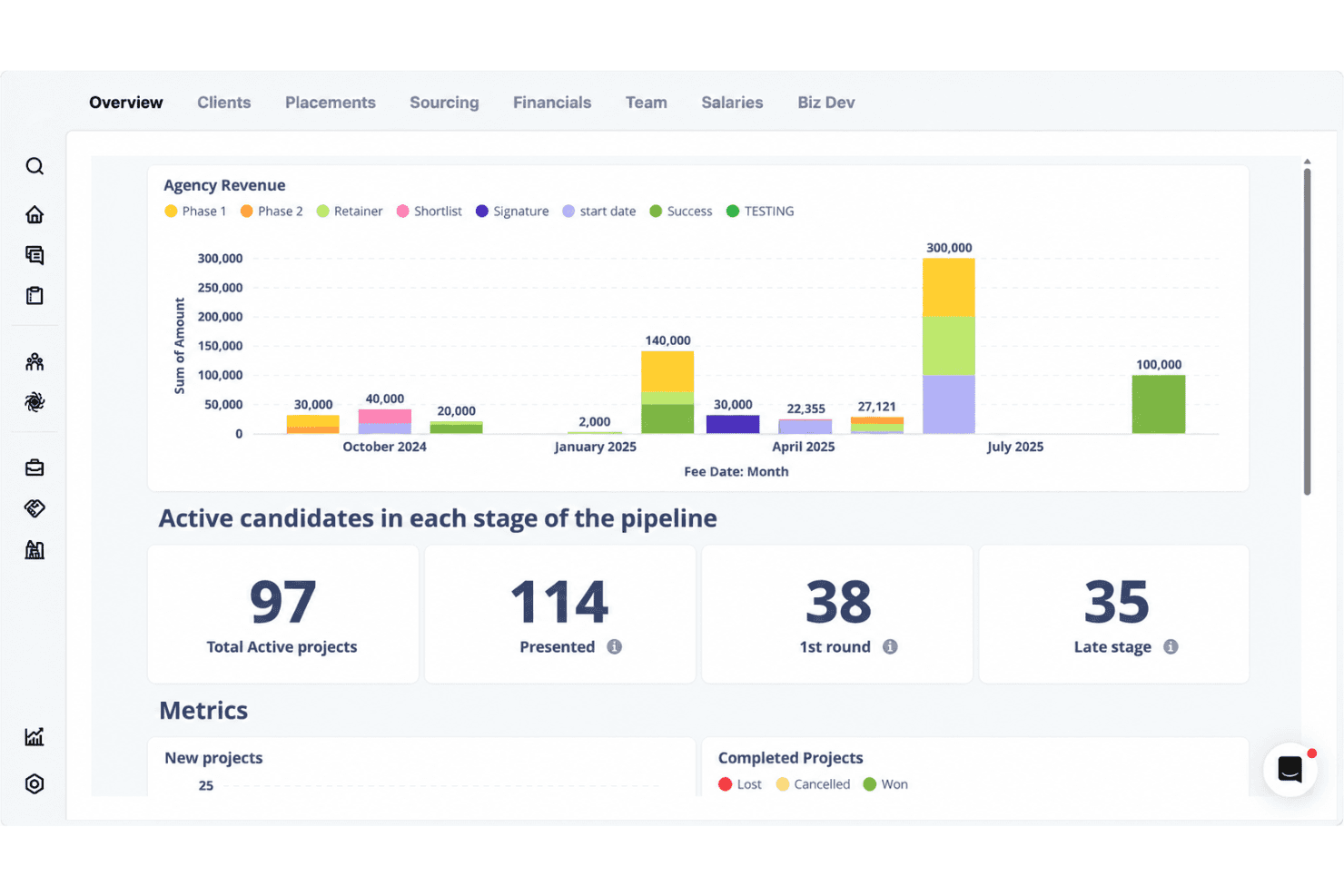
Atlas automates recruiting CRM data, conversations, and pipeline tracking. Atlas is an AI-powered recruiting CRM and ATS built for staffing agencies, combining candidate sourcing, multi-channel outreach, pipeline management, business-development tracking, and automated note capture in one platform.
Who Is Atlas Best For?
Atlas is a strong fit for staffing and executive search agencies that want to consolidate candidate sourcing, outreach, and business development into a single AI-powered platform.
Why I Picked Atlas
I picked Atlas as one of the best because its CRM migration process is the most reviewable I've seen: your data is worked on as a separate copy, you approve the field mapping, and production doesn't go live until you've signed off on staged data. A migration dashboard gives daily progress updates throughout. That level of client control sits alongside genuinely useful AI tools, like plain-language candidate search that returns matches with explanations and a business-development pipeline with real-time opportunity scoring.
Atlas Key Features
- AI note taker: Automatically captures transcripts and key details—like salary expectations and notice periods—from candidate interviews and client calls.
- Multi-channel outreach sequences: Launches multi-step campaigns across email, phone, social, and to-do lists with AI-drafted, personalized messaging.
- Opportunity scoring: Scores business-development opportunities in real time based on interest, momentum, and conversion potential to indicate likelihood of closing.
- Recruitment KPI dashboard: Tracks pipeline stages, revenue, placements, hires, and time-to-fill across your agency in real time.
Atlas Integrations
Documented integrations include Xero, Broadbean, idibu, Talin, Recruitcha, CoRecruit, Google Workspace, Microsoft Outlook, Microsoft Teams, and Zoom. Atlas also offers an Open API for custom connections.
Pros and Cons
Pros:
- Migration includes staged data approval
- Automated campaigns reduce manual outreach work
- Search across candidate records and conversations
Cons:
- No documented commission splits or desk allocations
- External sourcing tools may still be needed
Learn more about Atlas:

Manage all of your applicant records and track each candidate through the recruitment process with the integrated ATS and CRM system. Tracker is an ATS and CRM in one, providing a comprehensive solution for staffing and recruitment agencies to manage a high volume of candidates, clients, and tasks under a single roof.
Why I picked Tracker: I decided to add this software to my list because of its robust functionality and feature set. Your staffing agency can maintain all candidate records in the same place you track recruitment processes, and even draw up reports using the analytics suite. Instead of managing multiple disparate systems, you’ll have an all-in-one solution.
Some of the handy tools included in the ATS are its custom recruitment workflows and resume parsing capabilities. As for the CRM module, you can easily send emails and text messages in bulk to keep candidates up to date on progress. Client-facing features help you manage not just staffing, but also your clients.
Tracker Standout Features & Integrations
Standout features of this platform include its AI capabilities, which can automatically parse resumes and rank applicants for specific roles. It also provides plenty of automations, including unlimited sequences and candidate matching to roles. Web forms and surveys also make data collection simple and straightforward.
Integrations include QuickBooks, Sage, Xero, Outlook, Gmail, LinkedIn, and Office365. An API is available to build custom integrations, and a paid Zapier account unlocks additional integrations.
Pros and Cons
Pros:
- Knowledgeable and helpful customer support team
- Designed specifically for recruitment agencies
- User-friendly and intuitive interface
Cons:
- Limited customization options
- Pricing is not transparent
Learn more about Tracker: Best for integrated recruitment automation
- 30-day free trial
- From $95/user/month
Visit WebsiteCustomer Rating:4.9/5
Recruit CRM helps you track all recruitment communications and relationships for a complete ATS + CRM solution. Recruit CRM combines the functionalities of a CRM with an ATS, making it an excellent choice for high-volume recruiters or recruitment agencies.
Why I picked Recruit CRM: Their user interface is intuitive and includes a Kanban style view that visually organizes all the prospective candidates in your hiring pipeline with separate columns for whichever recruitment phase they’re in. Moving them along in the pipeline is also straightforward, with just a click.
To increase your productivity, you can set up triggers for automated emails and other tasks to occur once you move a candidate from one phase to the next.
Recruit CRM Standout Features and Integrations:
Features include a Chrome browser extension that simplifies candidate sourcing through LinkedIn. You can use it to tag promising candidates and add them to your general database, or to one of your active hot lists, which function as individual talent pools for each position. Once flagged, Recruit CRM automatically scans the candidate’s profile details and transfers their personal details into your system for future use.
Their suite of built-in reports is what makes Recruit CRM stand out as an asset for recruiting teams or staffing firms.
You can run custom reports on all types of common recruiting metrics, or use one of their built-in reports, such as their Recruiter KPI Report, their Candidate Lifecycle Report, a Job Statistics Report, or a Client Performance Report.
Within each report, the data is visualized graphically, as well as in a table format that can be exported as a CSV file. Managers can even compare the output of recruiters side-by-side or click into the individual graph points to drill down into more nitty-gritty details.
Integrations for this software are entirely based on Zapier's offering. RecruitCRM has a Zapier connector that lets you integrate the software with thousands of apps like Gmail, Slack, HubSpot, and Typeform. Keep in mind that you will need to have a paid account with Zapier to be able to connect external apps.
Pros and Cons
Pros:
- Includes Boolean and radius searches to capture more candidates
- Huge list of third-party app integrations (over 5,000 via Zapier)
- Includes powerful AI features like resume parsing, email sequencing, and candidate matching
Cons:
- No freemium plan
- Custom branding locked to highest paid plan
Learn more about Recruit CRM: Best for social media recruitment
- 14-day free trial + free demo available
- From $15/user/month (billed annually)
Visit WebsiteCustomer Rating:4.8/5
Launch paid job postings across recruiting channels or send them straight to social media. Manatal is an award-winning recruitment solution suitable for internal hiring teams and recruiting agencies and headhunters.
Why I picked Manatal: It comes with a range of features to help secure top talent across diverse roles using advanced sourcing capabilities and AI-driven candidate recommendations.
This includes ability to share roles across 2,500+ free and premium channels, import profiles directly from LinkedIn and LinkedIn Recruiter, and access to an external database of over 600 million professionals.
Manatal Standout Features & Integrations:
Standout features for Manatal include their intelligent candidate sourcing and AI-powered recommendations. These features work in tandem to help you sift through your stacks of candidate data, with the system automatically picking out candidates who check the most boxes.
It's also possible to retrieve verified email addresses and phone numbers directly from candidate profiles and their Vendor Management System, VM, empowers hiring teams and recruitment agencies to work together more efficiently.
Integrations are available with Facebook, Gmail, G Suite, Line, LinkedIn, Microsoft Outlook, Office 365, Wechat, and WhatsApp. Zapier integration and API access are available on their custom plan subscription.
Pros and Cons
Pros:
- You can create customizable career landing pages with embedded application forms
- Includes task tracking and team collaboration tools
- Candidate sourcing tool draws from 2,500+ job platforms
Cons:
- Annual billing only
- SMS recruitment features only available in their top-level plan
 Best for novice recruiting specialists
- Free trial + demo available
- From $85/user/month (billed annually)
Visit WebsiteCustomer Rating:4.5/5
This is what a job pipeline looks like in Crelate. Crelate is a recruiting agency recruiting tool built by recruiters with plenty of useful ATS and CRM features.
Why I picked Crelate: I selected Crelate due the tool's ease of use, customizability, and extensive feature list.
For example, you can easily drag and drop applicant records as candidates move through your recruitment process.
You can also tag applicants with skills, experience, source, or any other information that can be surfaced when searching.
It's the same with the CRM too, which is full customizable to adapt to your sales workflow. The customization filter allows you to search jobs by placements, companies, opportunities.
Crelate Standout Features and Integrations:
Standout features include resume parsing and automated candidate profile creation. Crelate pulls the information from your candidate’s resumes and uses it to create detailed profiles, complete with each job seeker’s social media information.
Also useful is their client portal allowing recruiters to communicate with clients via automated real-time alerts and record all client interactions and feedback regarding candidates in one centralized, easily accessible location.
Integrations include communication and analytics tools, and ATS solutions, such as ZoomInfo, hireEZ, CareerBuilder, Seekout, Glassdoor, Monster, JobInventory, Dice, CareerJet, Google Workspace, and Microsoft Outlook.
Pros and Cons
Pros:
- Drag-and-drop visual editor
- Automation features help you capture candidate data
- Great support department
Cons:
- You can’t customize the required fields for job applications
- Limited number of email templates
Learn more about Crelate: Best for recruitment task tracking
- Free demo available
- Pricing upon request
Visit WebsiteCustomer Rating:4.4/5
Here’s what the Jobs dashboard looks like in JobAdder. JobAdder is a recruiting agency platform that enables you to track applicants through your recruiting funnels. The solution gives you an overview of your recruiting efforts, allowing you to identify potential bottlenecks in your workflows.
Why I picked JobAdder: JobAdder made my list thanks to its applicant tracking features. The platform shows hiring managers the status of each candidate in real-time, allowing them to understand how the hiring process is going at a glance. Team members can rate candidates and leave comments for one another in candidate profiles, ensuring that only the best candidates move deeper into the funnel.
JobAdder’s Interview and Task dashboard enables you to keep your team members on track. The dashboard allows you to view upcoming tasks so you can optimize your calendar and your team’s workload.
JobAdder Standout Features and Integrations:
Standout features include candidate records, search and match automation, record enrichment, and talent pools. Combined, these features allow you to source candidates in a short amount of time by performing lookalike searches with advanced filters.
Integrations include communication, CRM, payroll, and ATS solutions, such as BambooHR, Calendly, Checkmate, Applyflow, Seek, Aircall, Deputy, Deel, QuickBooks, and HubSpot.
Pros and Cons
Pros:
- Good customization options
- Interview scorecards
- Great mobile app
Cons:
- May lag when saving multiple candidate profiles at once
- Some functionalities may seem complicated to novice users
Learn more about JobAdder: 7Best for referral-based recruiting
Boon
- Free demo available
- Pricing upon request
Visit WebsiteCustomer Rating:4.7/5
Boon makes it easy to manage, track, and reward employee referrals from a single interactive dashboard. Boon is a recruiting automation platform built to help recruiters and companies hire faster through referral-based sourcing. It connects employers with potential candidates by turning existing networks into a dynamic recruiting engine.
Why I picked Boon: I chose Boon because it’s centered on automating and incentivizing referrals. It allows you to crowdsource referrals from employees, alumni, and your broader network, then automatically engages those contacts with pre-set campaigns. This makes it especially effective for teams looking to tap into their existing relationships instead of only sourcing externally. You can set bounties for each job, giving people a reason to recommend candidates, which expands your reach without a traditional sourcing team.
Boon Standout Features and Integrations
Features include a referral leaderboard that gamifies participation by showing who brings in the most candidates, helping boost engagement. The tracking dashboard also shows how many referrals are coming in, what stage they’re at, and who made them, so your team can measure impact and accountability.
Integrations include NetSuite, Lever, Workday, Greenhouse, Google Workspace, Okta, Slack, Microsoft Teams, Facebook, LinkedIn, QuickBooks, Xero, and SmartRecruiters.
Pros and Cons
Pros:
- Referral tracking is efficient and easy to manage
- Gamification features help increase employee engagement
- AI automation helps recruiters identify better candidates faster
Cons:
- Uploading data manually can be difficult or time-consuming
- Incentive tracking lacks deeper customization options
Learn more about Boon: Best sourcing for hourly positions
- Free demo available
- Pricing upon request
Visit WebsiteCustomer Rating:4.2/5
You can cut down on candidate no-shows by allowing candidates to self-schedule their interviews when it works for them. TalentReef's cloud-based recruitment and hiring platform purpose-built for location-based, high-volume recruiting.
Why I picked TalentReef: I included TalentReef in this list because of their unique focus on sourcing candidates to fill hourly positions. This makes their software particularly well-suited for sourcing talent for businesses in the service industry, such as restaurants, retail stores, and other hourly employers that frequently hire new staff in bulk.
TalentReef Standout Features and Integrations
Standout features include their conversational AI chatbot, a text-to-apply feature, two-way texting abilities, and social recruiting tools. Recruiters can also save a lot of time by using their campaign communication features to create templated email and SMS communications for candidate interactions, allowing them to stay in touch with high volumes of candidates at scale.
Another plus worth highlighting is their interview scheduling automation. By allowing candidates to pick a time that works for them, you'll reduce the likelihood of no-shows or last-minute cancellations, and eliminate the need for back-and-forth phone tag to find a time that works.
Integrations are available with payroll systems, candidate assessment tools, background check providers, and learning management systems, though individual platforms are not specified.
Pros and Cons
Pros:
- Well-suited for filling hourly roles in bulk
- Offers branded email communications
- Includes mobile-friendly features
Cons:
- No free trial available
- Pricing details are not transparent
Learn more about Mitratech TalentReef: Best for organized candidate databases
- Free demo available
- From $99/user/month
Visit WebsiteCustomer Rating:4.1/5
Here’s what Bullhorn’s dashboard looks like. Bullhorn aims to offer a single source of truth for busy staffing agencies and even acts as the central hub for the wider tech stack.
Why I picked Bullhorn: Bullhorn understands how busy recruitment teams are but also the need to balance efficiency (read, automation) with the human touch. As such, they're careful to implement automation with caution and use it to improve the experience for teams and candidates.
They're also generous with knowledge, providing playbooks to help organizations engage with candidates and differentiate their offering.
Bullhorn Standout Features and Integrations
Standout features include their AI tool, built on a sea of recruitment data, to help source and screen candidates and craft relevant communications, as well as advanced analytics features such as real-time dashboards and custom reporting.
Additionally, the platform allows you to create custom recruitment flows using omnichannel communication. This enables you to attract candidates on social media, engage them via SMS, and nurture them through personalized emails.
Integrations include applicant tracking systems (ATS), communication tools, background checkers, and customer relationship management (CRM) tools, such as Accurate Background, ADP, Checkr, First Advantage, hireEZ, Indeed, Arya, SkillCheck, LinkedIn, and Sterling.
Pros and Cons
Pros:
- Allows you to build multi-step custom flows
- Great for omnichannel communication
- Robust reporting and analytics capabilities
Cons:
- User interface can feel clunky when performing large searches
- Large number of features can feel overwhelming
 Best for branded career pages
- Free demo available
- From $175/user/month
Visit WebsiteCustomer Rating:4.4/5
Here’s what TargetRecruit’s applicant tracking looks like. TargetRecruit is a recruiting agency software targeted at commercial, healthcare, and professional staffing.
Why I picked TargetRecruit: The platform helps you quickly source candidates through accurately searching your own database, external sources, job boards or posting to your own career pages.
Regarding the latter, the software offers a variety of templates to start with, but you can also build your own careers pages from scratch. These allow your candidates to search your open positions by title, skills, or location.
They can also create and update profiles, submit resumes, activate notifications so they receive alerts when you open a job that matches their profile, and complete onboarding and compliance docs.
From a sales perspective, their CRM provides a 360-degree view of your customer and candidate relationships and can also auto-convert new business to job orders to ensure the fastest possible placements.
TargetRecruit Standout Features and Integrations:
Standout features include Boolean search, automated lead scoring and routing for a quicker outreach, and a timesheet portal making it easy for contractors to record work hours and expenses and client hiring managers to accept and pay or reject requests as necessary.
I’m also a fan of TargetRecruit’s reporting features. The platform enables all your users to create custom reports and dashboards using only the data accessible with their permission levels, and they can also export reports to clients via email.
Integrations include CRMs, accounting and invoicing tools, and job posting solutions, such as QuickBooks, PayChex, ADP, ZoomInfo, Quip, DocuSign, Salesforce, CloudCall, Relias, and DataTrim.
Pros and Cons
Pros:
- Multiple add-ons available
- Flexible, customizable solution
- Great reporting features
Cons:
- Advanced features may feel overwhelming
- May be less effective outside North America
Learn more about TargetRecruit:
Diğer İşe Alım Ajansı Yazılımları
Aşağıda, en iyi 10 listeme giremeyen ancak yine de göz atmaya değer olan ek işe alım ajansı yazılımlarının bir listesi yer almaktadır:
- 11Unnanu HireBest for candidate scoring in bulk
- 12GemBest for talent engagement
- 13Top EchelonBest for pipeline management
- 14VincereBest for AI candidate matching
- 15AryaBest for diversity hiring
- 16MindscopeBest for mobile-first candidate experiences
- 17RecruiterflowBest for custom hiring pipelines
- 18hireEZBest for candidate sourcing using AI
- 19JuiceboxBest for AI candidate outreach and sourcing
- 20TE RecruitBest for split placement network access
- 21GreenhouseBest for scalable workflows
- 22Zoho RecruitBest for candidate sourcing
- 23CeipalBest for advanced candidate ranking
- 24PCRecruiterBest for job management
- 25CATSBest for for agency and high-volume staffing workflows
- 26FountainBest for hiring hourly workers
- 27AviontéBest for high volume hiring
- 28JobDivaBest for complex recruiting funnels
İlgili İK Yazılımı İncelemeleri
Aradığınızı hâlâ burada bulamadıysanız, test edip değerlendirdiğimiz diğer ilgili insan kaynakları araçlarına göz atın:
- İK Yazılımı
- En İyi Bordro Yazılımları
- İşe Alım Yazılımı
- En İyi Aday Takip Sistemleri
- Kayıtlı İşveren Hizmetleri
- En İyi İş Gücü Yönetimi Yazılımları
How I Evaluate Recruiting Agency Software
I evaluate recruiting agency tools in two layers: the must-haves—candidate pipelines, client CRM, job board posting—that qualify a platform, and the differentiators that distinguish the best options.
Core Functionality (Table Stakes For This List)
When I'm selecting tools for my list, I rank each one on a scale from 0 (does not offer the functionality) to 5 (excels in this area) for each core functionality listed below. Then, I calculate the tool's total score into a percentage. Each tool needs to achieve a minimum total score of 65% to be considered for inclusion.
- Applicant Tracking & Pipelines: I look for customizable recruiting pipelines that let you build unique workflows per job order—like separating IT contract roles from permanent executive searches with distinct stages and automations.
- Candidate CRM & Database: Resume parsing, Boolean search, and tagging matter here. A good candidate database lets recruiters rediscover past applicants when a matching role comes in months later.
- Client & Contact CRM: I evaluate whether the platform tracks client companies, hiring managers, and job orders separately from candidates—agencies need to log BD activity alongside recruitment activity.
- Multi-Job, Multi-Client Workflows: Agencies juggle dozens of open roles across clients simultaneously. I check that each job order maintains its own pipeline, ownership, and submission tracking without cross-contamination.
- Sourcing & Job Distribution: I look at how many job boards a tool posts to natively and whether it connects to sourcing channels like LinkedIn Recruiter or resume aggregators to widen your candidate reach.
- Placement & Billing Tracking: Staffing firms live on placement fees. I evaluate whether the tool tracks perm placements, contract margins, and commission splits—and whether it connects to accounting tools for invoicing.
Once I have a list of tools that meet this criteria, I consider what sets each platform apart.
Differentiating Factors (What Sets Vendors Apart)
Here's how I compare and contrast different vendors:
Standout Features
AI candidate matching is a major differentiator—I check whether the platform can auto-rank database candidates against new job orders, which saves hours on high-volume desks. Contractor back-office tools also matter for temp staffing firms that need timesheets, expense tracking, and onboarding built into the recruiting workflow. I look for branded client portals, too. Giving hiring managers a space to review submissions and leave feedback directly cuts out the usual email chains that slow down placements.
Beyond Features
Pricing model fit matters a lot here—some platforms charge per recruiter seat while others tier by job volume, and the wrong structure can quietly erode margins as your agency scales. I also evaluate the integration ecosystem, especially connections to major job boards and accounting tools like QuickBooks or Xero, since placement invoicing touches both recruiting and finance workflows. Implementation and data migration deserve attention, too. Agencies switching from legacy systems like Bullhorn or even spreadsheets need a clear path to move candidate and client data without losing history.
İşe Alım Ajansı Yazılımı Nasıl Seçilir?
Kendinize özgü araç seçim sürecinizi yürütürken aşağıdaki noktaları göz önünde bulundurun:
- Hangi sorunu çözmeye çalışıyorsunuz - Üstesinden gelmeye çalıştığınız zorlukları belirleyerek başlayın. Bu, yeni yazılımınızın sunması gereken özellikleri ve işlevleri netleştirmenize yardımcı olacaktır.
- Kimlerin kullanması gerekecek - Maliyeti ve gereksinimleri değerlendirmek için aracı kimlerin kullanacağını ve kaç lisansa ihtiyaç duyacağınızı göz önünde bulundurun. Bu netleştikten sonra, tüm ihtiyaçların karşılandığından emin olmak için farklı kullanıcılarınızın gereksinimlerini sıralayarak yetkin kullanıcılarınız, yöneticileriniz ve çalışanlarınız için temel öncelikleri belirlemeniz de faydalı olacaktır.
- Hangi diğer araçlarla çalışması gerekiyor - Hangi araçları değiştireceğinizi, hangi araçları kullanmaya devam edeceğinizi ve muhasebe ve faturalandırma yazılımınız, beceri değerlendirme yazılımınız veya diğer önemli sistemler gibi hangi araçlarla entegre olmanız gerektiğini netleştirin. Araçların birlikte entegre edilmesi gerekip gerekmediğine veya alternatif olarak birden fazla aracı hepsi bir arada bir işe alım ajansı platformuyla değiştirip değiştiremeyeceğinize karar vermeniz gerekir.
- Hangi sonuçlar önemli - Elde etmek veya geliştirmek istediğiniz yetenekleri ve başarıyı nasıl ölçeceğinizi gözden geçirin. Örneğin, adayları iş tanımlarıyla daha hızlı karşılaştırmak için yapay zekâ destekli araçlar veya aynı anda birden fazla müşteriyi yönetmek için daha iyi araçlar edinmek isteyebilirsiniz. Ancak sonuç hedeflerinizi önceden belirlemezseniz, çok fazla değerli zaman kaybedebilirsiniz.
- Kuruluşunuz içinde nasıl çalışacağı - Araç seçimini mevcut iş akışlarınız ve sistemlerinizle birlikte değerlendirin. Neyin iyi çalıştığını ve ele alınması gereken sorunlu alanları değerlendirin.
Her işletmenin farklı olduğunu unutmayın — sırf popüler olduğu için bir işe alım ajansı sisteminin kuruluşunuz için de işe yarayacağını varsaymayın.
İşe Alım Ajansı Yazılımı Nedir?
İşe alım ajansı yazılımı, profesyonel işe alım uzmanları tarafından farklı müşteriler için işe alım kampanyalarını ve ilgili yetenek havuzlarını düzenlemek amacıyla kullanılır. Ekip tabanlı bir işe alım modelini destekler ve muhasebe, faturalandırma ve zaman takibi araçları gibi diğer arka ofis işlevlerinin yanı sıra dahili iletişim ve iş birliği araçlarını ve müşterilere yönelik portalları da içerir. Bu yazılımlar, aynı anda birden fazla müşteri için işe alım süreçlerini basitleştirmek üzere tasarlanmıştır; ekiplerin çok sayıda pozisyonu hızla doldurmasına yardımcı olurken müşterilere ve adaylara da mükemmel bir deneyim sunar.
İşe alım ajansı yazılımı, otomasyon, gelişmiş aday veri yönetimi ve şeffaf ekip tabanlı iletişim ve iş birliği araçları aracılığıyla sonuç olarak daha hızlı ve daha iyi işe alım süreçlerini destekler. Bu çözümleri, iş ilanı yayınlamadan özgeçmiş ayrıştırmaya, geçmiş taramasına, aday takip etmeye, mülakat planlamaya, adaylarla ilişkileri geliştirmeye ve raporlamaya kadar işe alım sürecinin tüm yönlerini otomatikleştirmek için kullanabilirsiniz.
İşe Alım Ajansı Yazılımının Özellikleri
İşe alım ajansı platformları çeşitli özellikler sunsa da aşağıdakiler temel özelliklerdir:
- Aday Takibi: Müşterilerinize sunduğunuz her adayın ilerlemesini takip edebilmeniz gerekir; böylece pozisyon doldurma süresi ölçümlerinizi hesaplayabilir ve performansınız karşılığında ödeme alabilirsiniz.
- Müşteri İlişkileri Yönetimi (CRM): Bir CRM özelliği, müşterilerinizle olan ilişkilerinizi yönetmenize ve geliştirmenize olanak tanıyarak onların ihtiyaçlarını anlamanızı ve mümkün olan en iyi hizmeti sunmanızı sağlar.
- Otomasyon: Araç, işe alım sürecindeki adımların bir kısmını veya mümkünse tamamını otomatikleştirmenize olanak tanımalıdır; böylece kısa sürede çok sayıda pozisyonu doldurabilirsiniz.
- İş İlanı Yayınlama: Çözüm, işleri birden fazla yerde yayınlamanıza olanak tanımalıdır; böylece hedef kitlenize ulaşma şansınız artar.
- Aday Bulma: Araç; sosyal medya, iş ilanı panoları, kariyer siteleri ve benzeri birden fazla kaynaktan adayları çekmenize yardımcı olmalıdır.
- Gelişmiş Arama Filtreleri: Gelişmiş arama filtreleri veya yönetici arama özellikleri sunan personel çözümleri, zaman kaybetmeden doğru adayları hızlı bir şekilde belirlemenize yardımcı olur. Bu, özellikle talebin yüksek olduğu sektörlerde doldurulması zor pozisyonlar için işe alım yapanlar açısından önemlidir.
- İletişim Araçları: İletişimlerinizi merkezi bir konumdan yönetebilmek, görüşmeleri kolayca takip etmenize ve adaylarla ilişkilerinizi geliştirmenize olanak tanır.
- Mobil Erişim: İşe alım faaliyetlerini her yerden yönetmenize olanak tanıyan özel mobil uygulamalar veya mobil uyumlu işlevler, müşteri ve aday ihtiyaçlarına hızlı bir şekilde yanıt vermenize yardımcı olur.
- Raporlama ve Analiz: Ayrıntılı raporlar ve analizler, işe alım süreçleriniz hakkında içgörüler sunarak geliştirilmesi gereken alanları belirlemenize ve müşterilerinize sağladığınız değeri göstermenize yardımcı olur.
- Yazılım Entegrasyonları: Aday takip sistemleri, iletişim araçları, CRM'ler ve geçmiş kontrolü çözümleriyle gerçekleştirilen temel entegrasyonlar, ekibinizin daha verimli çalışmasına yardımcı olabilir.
- Yönetim İşlevleri: En iyi işe alım ajansı yazılımı, küçük işletmenizi yönetmenize yardımcı olacak muhasebe araçlarının yanı sıra nakit akışınızı yönetmek için birleştirilmiş faturalandırma ve bordro araçlarını da içermelidir.
İşe Alım Ajansı Yazılımı için Maliyetler ve Fiyatlandırma
İşe alım ajansı yazılımları, küçük işletmeler ve girişimlerden büyük işletmelere kadar her ölçekteki kuruluşun ihtiyaçlarını karşılamak üzere tasarlanmış çeşitli planlar sunar. Her plan; özellikler, kullanıcı sınırları ve fiyatlandırma açısından farklılık gösterir ve kuruluşunuzun gereksinimlerine ve bütçesine en uygun seçeneği belirlemenize olanak tanır.
İşe Alım Ajansı Yazılımı için Plan Karşılaştırma Tablosu
| Plan | Fiyat | Özellikler |
|---|---|---|
| PlanÜcretsiz | Fiyat$0 | ÖzelliklerTemel aday takibi, sınırlı iş ilanı, aday veritabanı ve e-posta desteği |
| PlanBaşlangıç | Fiyat$49 aylık | ÖzelliklerÜcretsiz plandaki tüm özellikler, ek iş ilanları, özgeçmiş ayrıştırma, temel raporlama ve telefon desteği |
| PlanProfesyonel | Fiyat$149 aylık | ÖzelliklerBaşlangıç planındaki tüm özellikler, gelişmiş raporlama, CRM entegrasyonu, aday bulma ve öncelikli destek |
| PlanKurumsal | FiyatÖzel Fiyatlandırma | ÖzelliklerProfesyonel plandaki tüm özellikler, sınırsız kullanıcı, özel entegrasyonlar ve özel müşteri yöneticisi |
İşe alım ajansı yazılımı için planların, fiyatların ve özelliklerin dökümü.
Bu planları değerlendirirken ajansınızın özel ihtiyaçlarını, kaç kullanıcıya sahip olacağınızı ve ihtiyaç duyduğunuz destek düzeyini göz önünde bulundurun. Bu, bütçenize ve özel ihtiyaçlarınıza en uygun planı seçmenize yardımcı olacaktır.
İşe Alım Ajansı Yazılımı Hakkında Sıkça Sorulan Sorular
İşe alım ajansı yazılımı hakkında daha fazla bilgi edinmek ister misiniz? İşte bu konuyla ilgili yaygın soruların bazı yanıtları:
Bir işe alım ajansı kullanmanın faydaları nelerdir?
Bir işe alım ajansı kullanmak aşağıdakiler dahil olmak üzere birden çok fayda sunar:
- Uzmanlık: İşe alım ajansları birden fazla müşteri için aday bulur; bu nedenle erişim alanlarını nasıl genişleteceklerini ve teklifinizi hedef kitlenize nasıl sunacaklarını bilirler. (Örneğin, bazı ajanslar finans alanında işe alım konusunda uzmanlaşırken, diğerleri mühendislik yeteneklerinin işe alımında başarılı olabilir.)
- Daha kısa işe alım süresi: Personel bulma ajansları genellikle kapsamlı aday veritabanlarına sahiptir; bu nedenle kısa sürede uygun bir aday bulma olasılıkları daha yüksektir ve kurum içi İK departmanlarına kıyasla daha iyi işe alım ölçümlerine sahiptirler.
İşe alım ajansı yazılımı birden fazla müşteriyle olan ilişkilerin yönetilmesine nasıl yardımcı olur?
İyi bir yazılım, müşteri profillerini bölümlere ayırmanıza, iletişimleri takip etmenize ve her müşteri için iş taleplerini ayrı ayrı yönetmenize olanak tanır. Otomatik hatırlatıcılar oluşturabilir, toplantı notlarını saklayabilir ve müşteriye özel raporlar hazırlayabilirsiniz. Tüm bunlar, birden fazla müşterinin talepleriyle ilgilenirken kişiselleştirilmiş bir deneyim sunmanıza yardımcı olur.
İşe alım yazılımını değiştirirken karşılaşılan yaygın zorluklar nelerdir ve ajanslar bunların üstesinden nasıl gelebilir?
Yaygın zorluklar arasında veri aktarımı, personelin eğitilmesi ve iş akışlarının uyarlanması yer alır. Bunların üstesinden gelmek için kademeli bir geçiş planlamalı, uygulamalı eğitim sağlamalı ve güçlü bir başlangıç desteği sunan bir yazılım seçmelisiniz. Mevcut verileri yedeklemek ve bir test grubuyla başlamak, kesintileri en aza indirmeye yardımcı olabilir.