

Tam hizmet bordro yazılımı, bordroyu otomatik olarak işler, vergi bildirimlerini gerçekleştirir, yan hakları entegre eder ve işverenler için uyumluluğu yönetir. Bordro süreçlerini basitleştirmenin ve bu süreçlerin yarattığı stresi azaltmanın yollarını arıyorsanız yalnızca genel bordro işlemlerini değil, İK ekibinizin özel ihtiyaçlarını da karşılayan araçlara ihtiyacınız vardır. Burada, doğru seçimi güvenle yapabilmeniz için İK odaklı öneriler, pratik değerlendirme ipuçları ve önde gelen bordro yazılımlarını birbirinden ayıran özelliklerin bir özeti yer alıyor.
Why Trust Our Software Recommendations
6,700+
Reviews
20
Industry experts
16+
Evaluation factors
14
Years
Our team has been testing and reviewing software since 2012. As HR experts ourselves, we know how difficult—and important—it is to choose the right software.
For this guide, we evaluated tools using hands-on testing and independent research, scoring tools using our selection criteria. We also draw on insights from industry thought leaders and practicing HR experts.
Our reviews reflect our human editorial judgment, not a sales pitch.
Expert reviewers:
- Phil GrayCOO
 Kim BehnkeHR Tech Editor & Analyst
 Josh BarkerPeople Ops Manager

Tam Hizmet Bordro Yazılımı Karşılaştırma Tablosu
Bu karşılaştırma tablosu, en iyi tam hizmet bordro yazılımı seçimlerimin fiyatlandırma ayrıntılarını özetlemektedir.
Score legend (out of 5)
- Excellent4.5–5
- Good4–4.4
- Average3–3.9
- Below average2–2.9
- Poor1–1.9
Sorted by: Default
| Tool | Starting Price | Website | |||||||
|---|---|---|---|---|---|---|---|---|---|
Best for mixed US and global workforces | Not rated | Not rated | 3 | 3 | 3 | 3 | 2 | $29/user/month Free demo available | Website |
Best for CPA access to client tax filings | 3.5 out of 5 | 2 | 4 | 4 | 4 | 3 | 4 | Pricing upon request Free demo available | Website |
Best for a payroll tax penalty guarantee | 3.7 out of 5 | 3 | 4 | 3 | 4 | 4 | 4 | $35/month + $6/person/month Free demo available | Website |
Best for payroll across multiple job roles | 3.8 out of 5 | 3 | 4 | 4 | 4 | 4 | 4 | Pricing upon request Free demo available | Website |
Best for accountants managing client payrolls | 3.3 out of 5 | 3 | 4 | 3 | 4 | 4 | 2 | $20/month Not available | Website |
Best for human-reviewed AI pay actions | 3.7 out of 5 | 3 | 4 | 3 | 4 | 4 | 4 | $8/user/month Free trial + free demo available | Book Demo |
Best for onboarding and paying first hires | 3.8 out of 5 | 3 | 4 | 4 | 4 | 4 | 4 | $49/month Free trial + free demo available | Book Demo |
Best for accountants managing client payroll | 3.7 out of 5 | 3 | 4 | 4 | 4 | 4 | 3 | Pricing upon request Free demo available | Website |
Best for expert-reviewed provider migration | 3.2 out of 5 | 3 | 3 | 3 | 4 | 3 | 3 | $50/month Not available | Website |
Best for tax penalty protection | 3.5 out of 5 | 2 | 4 | 4 | 4 | 3 | 4 | Pricing upon request Free demo available | Website |
Best for payroll review before submission | 3.3 out of 5 | 2 | 4 | 3 | 4 | 4 | 3 | Pricing upon request Free demo available | Website |
Best for licensed in-house benefits guidance | 4.0 out of 5 | 4 | 5 | 3 | 4 | 4 | 4 | $49/month + $6/user/month 30-day free trial available | Website |


Tam Hizmet Bordro Yazılımı İncelemeleri
Aşağıda, kısa listeme giren en iyi tam hizmet bordro yazılımlarının ayrıntılı özetlerini bulabilirsiniz. İncelemelerim, size en uygun seçeneği bulmanıza yardımcı olmak için her yazılımın özelliklerine, en uygun kullanım alanlarına ve entegrasyonlarına yakından bakmaktadır.
 Best for mixed US and global workforces
- Free demo available
- From $29/user/month
Visit WebsiteCustomer Rating:4.9/5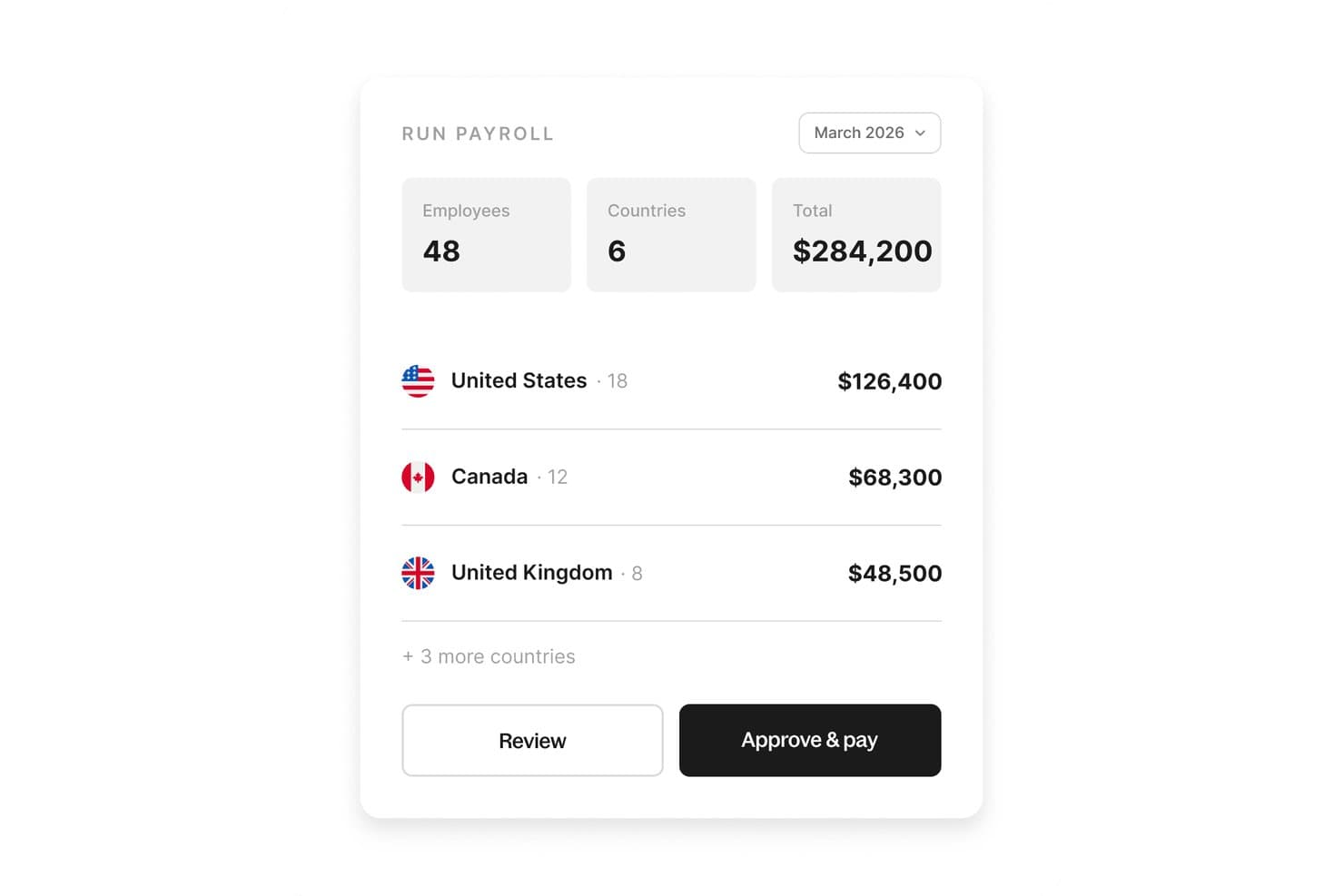
Deel Payroll lets you review and run payroll for multiple countries from a single view. Deel Payroll is a full-service payroll platform that automates payroll runs, tax filing and remittance, and multi-state compliance for both employees and contractors. It supports US and global workforces from a single system.
Who Is Deel Payroll Best For?
Deel Payroll is a good fit for companies managing a mix of domestic and international workers, especially remote-first teams paying employees and contractors across multiple countries.
Why I Picked Deel Payroll
I picked Deel Payroll because it handles US payroll across all 50 states and global payroll in 150+ countries in one system, which makes it a strong option for mixed US and global workforces. You can pay W-2 employees, 1099 contractors, and international workers without switching platforms or reconciling data across tools. Its built-in Compliance Hub also runs checks before each payroll approval, so jurisdiction-specific issues get flagged before they turn into filing errors.
Deel Payroll Key Features
Deel Payroll also gives you flexibility in how payroll gets done and how your people get paid.
- Dual delivery model: Choose self-serve payroll for simple setups or a fully managed option with a dedicated Deel Payroll Manager.
- Contractor payouts: Pay contractors in 120+ currencies through 15+ payout methods, including bank transfer, PayPal, and Wise.
- Benefits administration: Manage health, dental, vision, 401(k), and HSA benefits directly within the payroll platform.
- Employee self-service portal: Employees can view pay stubs, download W-2s, and update withholding and direct deposit details on web or mobile.
Deel Payroll Integrations
Integrations include Workday, SAP SuccessFactors, QuickBooks Online, Xero, NetSuite, Sage Intacct, BambooHR, HiBob, UKG, and Personio.
Pros and Cons
Pros:
- No additional charge for off-cycle payroll
- Offers both self-serve and managed payroll
- Manages US and international payroll together
Cons:
- No native time tracking included
- No tax penalty liability guarantee
Learn more about Deel Payroll: Best for CPA access to client tax filings
- Free demo available
- Pricing upon request
Visit WebsiteCustomer Rating:4.5/5
Netchex lets users review payroll totals and exceptions before submitting. Netchex is a full-service payroll and HR platform that handles payroll processing, automated tax filing, benefits deduction administration, and time and attendance in a single system.
Who Is Netchex Best For?
Netchex is a strong fit for mid-sized companies with 50–5,000 employees that need payroll, HR, and benefits consolidated in one platform—especially if a CPA or accounting partner manages their tax filings.
Why I Picked Netchex
I've included Netchex in my top picks because its dedicated CPA partner portal gives accountants direct, read-only access to client payroll summaries, tax liabilities, and filings without needing to chase anyone down. That alone makes it stand out for firms managing multiple clients' tax compliance. Netchex also files federal, state, local, SUTA, and FUTA taxes across all 50 states for full-service clients, with quarterly reconciliation included.
Netchex Key Features
- FlexPay earned wage access: Lets eligible employees draw up to 50% of wages earned in the current pay period, with standard ACH delivery in one to two business days or an instant transfer option.
- Multi-schedule payroll runs: Supports weekly, biweekly, semimonthly, and monthly pay schedules with one-click payroll runs and multiple payment methods, including direct deposit, pay cards, and printed checks.
- Garnishment management: Calculates garnishment deductions, handles remittance, and generates garnishment reports within the payroll workflow.
- 90+ retirement plan integrations: Syncs 401(k) contributions and eligibility data with more than 90 retirement plan providers through two-way API connections.
Netchex Integrations
Netchex lists 156+ integration partners across nine categories, including QuickBooks, Employee Navigator, Rain, and Transamerica, plus 90+ retirement-plan connections. It also supports API and webhook integrations for custom connectivity.
Pros and Cons
Pros:
- Flexible pay cycles and disbursement methods
- Quarterly tax reconciliation spans all states
- CPAs get read-only tax filing access
Cons:
- Users report withholding and remittance errors
- Tax setup still depends on employer inputs
Learn more about Netchex: Best for a payroll tax penalty guarantee
- Free demo available
- From $35/month + $6/person/month
Visit WebsiteCustomer Rating:4.2/5
Square Payroll lets users review and confirm payroll withdrawals before processing. Square Payroll is a full service payroll solution that handles payroll processing, tax filing, contractor payments, and team management for businesses that also use Square's broader ecosystem.
Who Is Square Payroll Best For?
Square Payroll is a natural fit for small businesses already using Square for payments and point-of-sale who want payroll built into the same ecosystem.
Why I Picked Square Payroll
Square Payroll earns its spot on my shortlist because of its payroll tax penalty guarantee, which means Square covers any fines if a tax filing error is on their end. I also like that it automatically files and pays federal, state, and local payroll taxes on your behalf. For businesses already running Square POS, payroll syncs directly with hours tracked and tips processed, so there's no manual data entry between systems.
Square Payroll Key Features
- Contractor payments: Pay contractors alongside employees in the same payroll run, with automated 1099-NEC form generation at year-end.
- Same-day direct deposit: Send employee pay with same-day direct deposit, giving your team faster access to their wages.
- Employee self-service portal: Employees can view pay stubs, download tax forms, and update their personal details directly from their own accounts.
- Team management tools: Built-in scheduling, time tracking, and team communication features let you manage your workforce from within the same platform.
Square Payroll Integrations
Square Payroll has a native integration with QuickBooks Online and connects with Square POS, time tracking, scheduling, and team-management tools.
Pros and Cons
Pros:
- Square POS timecards transfer into payroll
- Automatic federal, state, and local tax filing
- Penalty coverage for Square-caused tax errors
Cons:
- Support response times can lag
- Reporting offers limited customization
Learn more about Square Payroll: Best for payroll across multiple job roles
- Free demo available
- Pricing upon request
Visit WebsiteCustomer Rating:4.4/5
UKG Ready lets users edit and manage employee timesheet entries by day. UKG Ready is a full service payroll solution that handles payroll processing, tax compliance, time tracking, and workforce scheduling across hourly, salaried, and mixed-role employee populations.
Who Is UKG Ready Best For?
UKG Ready is a strong fit for mid-sized businesses that manage a mix of hourly, salaried, and shift-based workers across multiple roles or departments.
Why I Picked UKG Ready
I picked UKG Ready as one of the best because it handles payroll across hourly, salaried, and shift-based workers without forcing you to manage separate systems for each group. I particularly like how it ties time tracking and workforce scheduling directly into payroll, so a retail manager's variable shift hours or a healthcare worker's overtime automatically flows into the pay run. Its role-based pay rules let you configure different earning codes, deductions, and compliance settings per job type.
UKG Ready Key Features
- Automated tax filing: UKG Ready calculates, files, and remits payroll taxes at the federal, state, and local levels on your behalf.
- Employee self-service portal: Employees can access pay stubs, update personal information, and manage direct deposit settings without HR involvement.
- Garnishment management: The platform handles wage garnishment calculations and payments, including child support and creditor orders, within the pay run.
- Benefits deduction integration: UKG Ready syncs benefits enrollment data directly into payroll to apply deductions accurately each pay period.
UKG Ready Integrations
UKG Ready offers a marketplace integration with QuickBooks Online for general ledger transfers and provides APIs for custom integrations.
Pros and Cons
Pros:
- Tax filing covers federal, state, and local levels
- Time and scheduling data feed into payroll
- Payroll supports hourly, salaried, and shift-based roles
Cons:
- Broad workforce scope may exceed simpler payroll needs
- Pay rules require careful setup across job types
Learn more about UKG Ready: Best for accountants managing client payrolls
- Not available
- From $20/month
Visit WebsiteCustomer Rating:4.2/5
SurePayroll's dashboard lets users manage and start payroll runs easily. SurePayroll is a full service payroll software designed for small businesses and accounting professionals, covering payroll processing, tax filing, and employee self-service tools.
Who Is SurePayroll Best For?
SurePayroll is a strong fit for accountants and bookkeepers who manage payroll on behalf of multiple small business clients.
Why I Picked SurePayroll
I've included SurePayroll in my top picks because its dedicated accountant portal makes managing multiple client payrolls genuinely practical. The portal lets you switch between client accounts, run payroll on their behalf, and access payroll history without logging in and out repeatedly. I also like that SurePayroll handles tax filing automatically across all client accounts, so quarterly and year-end filings don't pile up into a bottleneck.
SurePayroll Key Features
- Employee self-service portal: Employees can log in to view pay stubs, download tax forms, and update personal information without contacting an administrator.
- Multiple pay schedules: SurePayroll supports weekly, biweekly, semi-monthly, and monthly pay cycles, letting you run different schedules for different employee groups.
- New hire reporting: The platform automatically submits new hire data to the relevant state agency each time you add an employee to payroll.
- Workers' compensation integration: SurePayroll connects with pay-as-you-go workers' compensation plans, so premiums are calculated and deducted based on each actual payroll run.
SurePayroll Integrations
SurePayroll supports integrations with eight accounting platforms, including QuickBooks Online, QuickBooks Desktop, Zoho Books, Xero, AccountEdge, IAC-EZ, Peachtree/Sage 50, and FreshBooks.
Pros and Cons
Pros:
- Employees retrieve pay stubs and tax forms
- Automatic tax filing handles quarterly returns
- Client switching simplifies multi-account payroll administration
Cons:
- Payroll reports may lack detailed transmittal data
- Support response times can delay urgent fixes
Learn more about SurePayroll: Best for human-reviewed AI pay actions
- Free trial + free demo available
- From $8/user/month
Visit WebsiteCustomer Rating:4.9/5
Rippling manages multi-country payroll runs from a single dashboard. Rippling is a full service payroll platform that combines automated pay runs, tax filing, compliance management, and AI-assisted pay actions with built-in human review.
Who Is Rippling Best For?
Rippling is a strong fit for fast-growing companies that want AI-driven payroll automation without removing human oversight from the process.
Why I Picked Rippling
Rippling earns its spot on my shortlist because of how it handles AI-suggested pay actions with a mandatory human review layer before anything is processed. I love that payroll admins can see exactly what the AI is recommending—whether that's flagging a compensation change or catching an off-cycle pay discrepancy—and approve or override it before it runs. That kind of built-in check matters when payroll errors carry real compliance consequences.
Rippling Key Features
- Global payroll processing: Run payroll for employees and contractors across multiple countries from a single platform.
- Automated tax filing: Rippling calculates, withholds, and files federal, state, and local payroll taxes automatically.
- Off-cycle pay runs: Initiate ad hoc payroll runs outside the standard pay schedule for bonuses, corrections, or terminations.
- PEO and EOR services: Access employer of record and professional employer organization services directly through Rippling for entities without a local legal presence.
Rippling Integrations
Rippling offers 600+ native integrations, including QuickBooks, Google Workspace, Microsoft 365, Slack, Salesforce, and Zoom. It also provides an API and developer tools for custom integrations.
Pros and Cons
Pros:
- Automated tax calculation and filing reduce admin
- Global payroll covers employees and contractors
- Human-reviewed AI pay actions prevent unchecked changes
Cons:
- Payroll setup can span several product modules
- Support issues can require repeated follow-ups
 Best for onboarding and paying first hires
- Free trial + free demo available
- From $49/month
Visit WebsiteCustomer Rating:4.6/5
Gusto lets users review employee hours, earnings, and PTO in one payroll run. Gusto is a full service payroll software that handles payroll processing, tax filing, benefits administration, and new hire onboarding in one platform.
Who Is Gusto Best For?
Gusto is a great fit for small businesses and startups that are bringing on their first employees and want one place to handle payroll, taxes, and onboarding.
Why I Picked Gusto
Gusto earns its spot on my shortlist because of how well it handles the full arc of bringing on a first hire, from offer letter to first paycheck. I particularly like its onboarding checklists, which let new employees self-onboard by entering their own tax and banking details before day one. Its automated new hire reporting also takes a compliance task off your plate without any extra setup.
Gusto Key Features
- Benefits administration: Gusto lets you manage health insurance, 401(k), and workers' comp plans directly within the platform, alongside payroll.
- Multi-state payroll: The platform automatically calculates and files payroll taxes across multiple states, handling different tax rules per jurisdiction.
- Contractor payments: You can pay both employees and independent contractors through the same system and generate 1099 forms at year-end.
- Time tracking integration: Gusto includes built-in time tracking that syncs directly with payroll, so hours worked flow into each pay run automatically.
Gusto Integrations
Gusto offers integrations with QuickBooks Online, Xero, QuickBooks Desktop, Sage Intacct, and ZipBooks through its marketplace. Its API supports custom app integrations.
Pros and Cons
Pros:
- One workflow pays employees and contractors
- Automated payroll tax calculations and filings
- Employee-led onboarding collects tax and bank details
Cons:
- Priority support requires an upper-tier plan
- Basic plan limits payroll to one state
 Best for accountants managing client payroll
- Free demo available
- Pricing upon request
Visit WebsiteCustomer Rating:4.7/5
ADP Run lets users preview payroll totals before final approval. ADP Run is a full service payroll platform built for accountants and small business payroll processing, covering payroll runs, tax filing, compliance management, and employee self-service tools.
Who Is ADP Run Best For?
ADP Run is a strong fit for accountants and bookkeepers who manage payroll on behalf of multiple small business clients.
Why I Picked ADP Run
ADP Run earns its spot on my shortlist because of how well it's built for accountants running payroll across multiple small business clients from a single platform. I particularly like the multi-client dashboard, which lets you switch between client accounts without logging in and out repeatedly. The automated tax filing and compliance tools also handle federal, state, and local filings on behalf of each client, which cuts down on manual work significantly.
ADP Run Key Features
- Employee self-service portal: Employees can access their pay stubs, W-2s, and personal information directly through a dedicated online portal.
- Garnishment management: ADP Run calculates and processes wage garnishments automatically, including child support and creditor orders.
- New hire reporting: The platform files new hire reports with the appropriate government agencies on your behalf as part of the onboarding process.
- Workers' compensation integration: ADP Run connects with workers' compensation insurance providers to support pay-as-you-go premium calculations based on actual payroll data.
ADP Run Integrations
ADP Run offers built-in integrations with QuickBooks and Xero, plus connected HR apps through ADP Marketplace. It also supports custom integrations through ADP APIs.
Pros and Cons
Pros:
- Employee portal provides pay stubs and W-2s
- Automated federal, state, and local tax filings
- Multi-client dashboard avoids repeated account switching
Cons:
- Support wait times and expertise can vary
- Reporting options offer limited flexibility
Learn more about ADP Run: Best for expert-reviewed provider migration
- Not available
- From $50/month
Visit WebsiteCustomer Rating:4.4/5
QuickBooks Payroll tracks employee pay schedules and total payroll costs. QuickBooks Payroll is a full service payroll solution that handles payroll processing, tax filing, benefits administration, and HR support, with built-in tools for switching from another payroll provider.
Who Is QuickBooks Payroll Best For?
QuickBooks Payroll is a strong fit for small to mid-sized businesses already using QuickBooks accounting that want a guided, expert-reviewed process for switching payroll providers.
Why I Picked QuickBooks Payroll
I've included QuickBooks Payroll in my top picks because its expert-reviewed migration process genuinely reduces the risk of switching providers mid-year. When you move payroll data, QuickBooks assigns a payroll specialist to review your setup and verify that prior payroll history, tax filings, and employee records transfer correctly. I also like that it flags potential errors before your first payroll run, so you're not discovering mistakes on payday.
QuickBooks Payroll Key Features
- Same-day direct deposit: Employees can receive their pay the same day payroll is processed, rather than waiting the standard two-day window.
- Automatic tax calculations and filings: QuickBooks Payroll calculates, files, and pays federal and state payroll taxes on your behalf each pay period.
- Employee self-service portal: Employees can access their pay stubs, W-2s, and personal details directly without needing to contact HR.
- Benefits administration: You can manage health insurance, 401(k) plans, and workers' compensation directly within the platform alongside payroll.
QuickBooks Payroll Integrations
QuickBooks Payroll offers native integration with QuickBooks Time and syncs with QuickBooks Online. QuickBooks Online connects with 800+ business apps, but those broader integrations aren’t necessarily payroll-specific.
Pros and Cons
Pros:
- Same-day direct deposit speeds pay access
- Automated tax filing reduces manual follow-up
- Specialist reviews transferred payroll history
Cons:
- Time-off tracking offers limited flexibility
- Support response times vary by issue
Learn more about QuickBooks Payroll: Best for tax penalty protection
- Free demo available
- Pricing upon request
Visit WebsiteCustomer Rating:4.2/5
Paychex Flex centralizes payroll, HR, and workforce data in one dashboard. Paychex Flex is a full service payroll software that covers payroll processing, tax filing, compliance management, and HR administration, with built-in safeguards designed to catch and correct tax errors before they become penalties.
Who Is Paychex Flex Best For?
Paychex Flex is a strong fit for small to mid-sized businesses that want dedicated payroll support and built-in protection against costly tax filing mistakes.
Why I Picked Paychex Flex
Tax penalty protection is what puts Paychex Flex at the top of my list. It includes a tax penalty guarantee, meaning Paychex takes on the financial responsibility if a filing error occurs on their end. I also like its automated tax filing across federal, state, and local levels, which catches discrepancies before submissions go out. That kind of built-in error prevention is hard to find in a full service payroll solution.
Paychex Flex Key Features
- Self-service employee portal: Employees can access their pay stubs, W-2s, and benefits information directly through the Paychex Flex platform.
- HR and payroll integration: Paychex Flex connects payroll processing with HR functions like onboarding, time tracking, and benefits administration in one platform.
- Retirement plan administration: Paychex offers built-in tools to manage 401(k) and other retirement plans alongside payroll.
- Mobile app access: Managers and employees can run payroll, approve timesheets, and view reports from the Paychex Flex mobile app.
Paychex Flex Integrations
Paychex Flex lists integrations with Intuit QuickBooks, Sage Intacct, Xero, Oracle NetSuite, BambooHR, and Employee Navigator. Its APIs and developer resources support custom connections through the Paychex Marketplace.
Pros and Cons
Pros:
- Payroll connects with onboarding and time tracking
- Automates federal, state, and local filings
- Tax penalty guarantee shifts filing-error liability
Cons:
- Some users report unresolved payroll issues
- Long phone holds delay payroll support
Learn more about Paychex Flex: Best for payroll review before submission
- Free demo available
- Pricing upon request
Visit WebsiteCustomer Rating:4.3/5
Paylocity's dashboard gives employees a snapshot of time off and pay. Paylocity is a full service payroll software platform that handles payroll processing, tax filing, compliance management, and workforce management, with built-in tools for reviewing payroll data before it's submitted.
Who Is Paylocity Best For?
Paylocity is a strong fit for mid-sized businesses that want HR and payroll in one place, with the ability to catch errors before payroll runs.
Why I Picked Paylocity
Paylocity earns its spot on my shortlist because of how seriously it takes the pre-submission review process. Before payroll runs, you get a dedicated review step where you can audit changes, flag discrepancies, and confirm everything looks right across the entire pay period. I especially like the payroll dashboard, which surfaces exceptions and pending approvals so nothing slips through. That kind of built-in checkpoint is what separates it from platforms where you're essentially running payroll blind.
Paylocity Key Features
- Automated tax filing: Paylocity calculates, files, and remits federal, state, and local payroll taxes on your behalf.
- Employee self-service portal: Employees can access pay stubs, update personal details, and manage direct deposit information directly.
- Garnishment management: The platform handles wage garnishment calculations and payments, keeping you compliant with court orders.
- On-demand pay: Employees can access earned wages before the scheduled pay date through Paylocity's earned wage access feature.
Paylocity Integrations
Paylocity offers 350+ marketplace integrations, including Checkr, Aeqium, Microsoft Entra, Google Workspace, and Okta. Its APIs and webhooks support custom connections and real-time updates for payroll and employee changes.
Pros and Cons
Pros:
- Built-in garnishment calculations support compliance
- Automated tax filing covers multiple jurisdictions
- Pre-run review flags payroll exceptions
Cons:
- Data sync issues require manual checks
- Support responses can vary by team
 12Best for licensed in-house benefits guidance
OnPay
- 30-day free trial available
- From $49/month + $6/user/month
Visit WebsiteCustomer Rating:5/5
OnPay lets users enter employee hours and wages during payroll runs. OnPay is a full service payroll software that handles payroll processing, tax filing, benefits administration, and HR tools for businesses managing employees and contractors.
Who Is OnPay Best For?
OnPay is a strong fit for small to mid-sized businesses that want hands-on benefits support from licensed advisors built directly into their payroll platform.
Why I Picked OnPay
OnPay earns its spot on my shortlist because it's one of the few payroll platforms that embeds licensed benefits advisors directly into the product. I love that when your team has questions about health insurance or workers' comp options, you're talking to a real, licensed professional rather than a chatbot or a support ticket queue. OnPay also handles benefits enrollment and payroll deductions in one place, so there's no manual reconciliation between separate systems.
OnPay Key Features
- Multi-state payroll processing: Run payroll across multiple states with automatic tax calculations and filings handled for each jurisdiction.
- Contractor payments: Pay both W-2 employees and 1099 contractors in the same payroll run, with year-end forms generated automatically.
- PTO tracking: Set up and manage custom paid time off policies with accrual rules that sync directly with employee payroll records.
- HR document storage: Store offer letters, signed agreements, and employee records in a central document library accessible to your HR team.
OnPay Integrations
OnPay offers integrations and app partnerships with QuickBooks Online, Xero, When I Work, Deputy, JazzHR, Vestwell, and TurboTax. It also provides a developer-friendly API for custom payroll, HR, time tracking, and accounting connections.
Pros and Cons
Pros:
- Employees and contractors share payroll runs
- Tax calculations and filings cover multiple states
- Licensed benefits advisors guide plan choices
Cons:
- Support unavailable on weekends
- Admin mobile access trails desktop workflows
Diğer Tam Hizmet Bordro Yazılımları
Kısa listeme giremeyen ancak yine de göz atmaya değer bazı ek tam hizmet bordro yazılımı seçenekleri şunlardır:
- 13BambooHRBest for payroll runs with human review
- 14TriNetBest for contractor payments and 1099-NECs
- 15DayforceBest for pay access between paydays
- 16NamelyBest for specialist-led pay administration
- 17PaycorBest for guided pay moves and parallel runs
- 18Wave PayrollBest for Wave users keeping books in sync
- 19Patriot PayrollBest for changing payroll without per-run fees
- 20Homebase PayrollBest for payroll migration with a project lead
- 21isolvedBest for AI payroll review with admin approval
How I Evaluate Full-Service Payroll Software
I split my evaluation into three parts, weighting core tasks most: calculate and pay wages, and file and remit payroll taxes. Next, I look for differentiators such as a tax penalty guarantee. Finally, I consider onboarding, support access, and pricing clarity beyond the feature set.
Core Functionality (Table Stakes For This List)
When I'm selecting tools for my list, I score each one on a scale from 0 (does not offer the functionality) to 5 (excels in this area) for each core functionality listed below. I then convert the total into a percentage to help assess each tool's overall fit, with extra weight on any functionalities I’ve deemed essential.
- Automated Tax Filing (Essential): I assess whether the platform calculates, files, and remits federal, state, and local payroll taxes, including for employees across jurisdictions.
- Payroll Processing (Essential): I check gross-to-net calculations for hourly and salaried staff, varied pay schedules and types, and payment options such as direct deposit or checks.
- Compliance Updates: I look for automatic updates to tax, wage, and labor rules, plus alerts that help HR teams respond to changes affecting payroll.
- New Hire Reporting: I evaluate whether the system reports new hires and rehires to the appropriate agencies, including when employees work in different locations.
- Benefits Deductions: I check how health, retirement, and garnishment deductions enter payroll and whether changes to benefit elections update deduction amounts.
- Year-End Tax Forms: I look for W-2 and 1099 generation and distribution, and check whether the platform supports corrections for employees and contractors.
Once I have a list of tools that meet the criteria, I consider what sets each platform apart.
Differentiating Factors (What Sets Vendors Apart)
Here's how I compare and contrast different vendors:
Standout Features
I look for a tax penalty guarantee, where the vendor covers IRS or state penalties caused by filing errors—this shifts real financial risk off your team. I also evaluate AutoPilot payroll, which lets salaried runs process on schedule without manual approval each cycle. For teams with international contractors, I check whether the platform pays in local currencies alongside domestic workers.
Beyond Features
I check whether live onboarding support and data migration assistance are included, since switching providers mid-year without help risks tax reporting gaps. Pricing structure matters just as much—base fees plus per-employee charges and add-ons for multi-state filing or benefits administration can shift costs fast as headcount grows. I also evaluate support access, because payroll errors are time-sensitive and some vendors limit phone or chat availability to higher-tier plans.
Tam Hizmet Bordro Yazılımı Nasıl Seçilir?
Doğru tam hizmet bordro yazılımını seçmek, ekibiniz için hangi bordro, uyumluluk ve destek sorunlarının en acil olduğuna ve farklı sağlayıcıların bu ihtiyaçları nasıl karşıladığına bağlıdır:
| Önceliğiniz... | Şunları arayın... |
|---|---|
| Önceliğiniz...Bordro vergisi riskini ortadan kaldırmak | Şunları arayın...Vergi bildirimlerindeki hatalar için ceza koruması sunan sözleşmeler |
| Önceliğiniz...Farklı yerlerde bulunan, birden çok eyalette çalışan ekipleri desteklemek | Şunları arayın...Sık sık güncellenen vergi oranlarıyla otomatik uyumluluk |
| Önceliğiniz...Çalışanların kendi işlemlerini yapabilmesi ve bağımsızlığı | Şunları arayın...Mobil cihazlardan erişilebilen, tam hizmet sunan çalışan portalları |
| Önceliğiniz...Yan hakları bordroyla entegre etmek | Şunları arayın...Yerleşik yan hak kesintileri ve yönetilen broker iş akışları |
| Önceliğiniz...Son dakika düzenlemeleri için hızlı bordro işlemleri | Şunları arayın...Aynı gün veya ertesi gün doğrudan para yatırma seçenekleri |
Kısa Listenizi Nasıl Değerlendirmelisiniz?
- Yazılı bir vergi uyumluluğu garantisi isteyin: Politikayı inceleyin ve tüm yargı bölgelerini ve yıl sonu bildirimlerini kapsadığını doğrulayın.
- Birden çok eyaleti kapsayan bordro işleminin canlı gösterimini talep edin: Eyalete veya yargı bölgesine özgü vergilerin platform içinde nasıl hesaplandığını ve ödendiğini izleyin.
- Geçmiş verilerin aktarımı için bir destek talebi oluşturun: Yanıt süresini ve sağlayıcının aktarımın hangi bölümünü gerçekten üstlendiğini belgeleyin.
- Hem W-2 hem de 1099 çalışanlarını kullanarak bir bordro denemesi yapın: Sistemin, otomatik ödeme ve bildirim işlemleriyle her ikisini de gerçekten desteklediğinden emin olun.
- Garantili sağlayıcı sorumluluğu ile daha düşük devam eden maliyetler arasında karar verin: Birinci sınıf sağlayıcılar daha fazla riski kabul eder, ancak daha fazla ödeme yapabilirsiniz; kuruluşunuz için hangisinin daha önemli olduğuna karar verin.
Tam Hizmet Bordro Yazılımı Nedir?
Tam hizmet bordro yazılımları, bordro işlemlerini otomatikleştiren, tüm bordro vergisi beyannamelerini ve ödemelerini gerçekleştiren, ayrıca işverenler için yan haklar ve uyumluluk görevlerini entegre eden platformlardır. Bu sistemler hem çalışanlar hem de yükleniciler için ödemeleri destekler, çalışanların maaş bordrolarına ve vergi belgelerine erişebileceği self servis portallar sunar ve çok eyaletli bordro işlemlerinin karmaşıklıklarını yöneterek İK ekiplerinin bölgeler genelinde uyumlu ve verimli kalmasına yardımcı olur.
Tam Hizmet Bordro Yazılımlarının Özellikleri
Tam hizmet bordro yazılımı seçerken aşağıdaki temel özelliklere dikkat edin:
- Otomatik bordro çalıştırmaları: Yinelenen ödeme planları belirleyin ve her dönemde doğrudan para yatırma veya çek ödemesiyle bordro hesaplamalarını otomatikleştirin.
- Vergi beyannamesi ve ödeme işlemleri: Platform, federal, eyalet ve yerel bordro vergilerini hesaplar, beyan eder ve öder; otomatik vergi beyannamesi işlemleri uyumluluk riskini azaltır.
- Çok eyaletli bordro desteği: Güncel vergi oranları, karşılıklılık kuralları ve yerel uyumluluk özellikleri yerleşik olan sistemlerle birden fazla eyalet veya yargı bölgesinde bordro çalıştırın.
- Çalışan self servis portalı: Personel, kendi güvenli oturum açma bilgileriyle maaş bordrolarına erişebilir, vergi formlarını indirebilir ve doğrudan para yatırma bilgilerini güncelleyebilir.
- W-2 ve 1099 ödemeleri desteği: Otomatik vergi formları ve ödeme işlemleriyle hem çalışanlara hem de yüklenicilere tek bir sistem üzerinden ödeme yapın.
- Yan hak yönetimi entegrasyonu: Sağlık sigortasını, 401(k) planını ve çalışan tazminat sigortasını bordroyla senkronize ederek kesintilerin ve katkıların otomatik ve doğru olmasını sağlayın.
- Aynı gün veya ertesi gün doğrudan para yatırma: Çalışanların son dakika değişikliklerini veya acil nakit akışı ihtiyaçlarını karşılamak için hızlandırılmış ödeme çalıştırmaları sunun.
- Mobil erişilebilirlik: Çalışanların ve yöneticilerin bir mobil cihaz veya uygulama kullanarak her yerden bordro çalıştırmasını, ödeme bilgilerine erişmesini ve görevleri yönetmesini sağlayın.
- Zaman takibi entegrasyonları: Bordro hesaplamaları için saatlik verileri otomatik olarak içe aktarmak üzere doğrudan zaman takip araçlarına bağlanın.
- Bordro raporlama ve analizleri: Denetimleri, planlamayı ve uyumluluk incelemelerini desteklemek için ayrıntılı bordro raporlarına, vergi özetlerine ve iş gücü maliyeti analizlerine erişin.
Tam Hizmet Bordro Yazılımlarının Faydaları
Tam hizmet bordro yazılımını uygulamak, ekibiniz ve işletmeniz için çeşitli faydalar sağlar. Yararlanabileceğiniz birkaç fayda şunlardır:
- Azalan bordro hataları: Otomatik hesaplamalar ve vergi beyannamesi işlemleri, manuel hataları en aza indirir ve maliyetli uyumluluk risklerini azaltır.
- Zaman tasarrufu: Ödeme çalıştırmalarını, beyannameleri ve ödeme işlemlerini otomatikleştirmek, İK ekiplerinin daha yüksek etkili çalışmalara zaman ayırmasını sağlar.
- Çok eyaletli uyumluluk: Yerleşik vergi güncellemeleri ve yerel yargı bölgesi yönetimi, bölgeler genelinde çalışanlara ödeme yaparken uyumlu kalmanızı sağlar.
- Kolaylaştırılmış yüklenici yönetimi: Otomatik formlar ve beyannamelerle hem W-2 çalışanlarına hem de 1099 yüklenicilerine tek bir birleşik sistem üzerinden ödeme yapın.
- Geliştirilmiş çalışan deneyimi: Çalışan self servis portalları, ekibinize maaş bordrolarına, vergi belgelerine ve ödeme güncellemelerine anında erişim sağlar.
- Entegre yan hak yönetimi: Sağlık sigortası, 401(k) veya diğer yan haklara ilişkin kesintileri her bordro çalıştırmasıyla doğrudan senkronize edin.
- Daha hızlı ödeme seçenekleri: Aynı gün veya ertesi gün doğrudan para yatırma, esnekliği artırır ve son dakika bordro değişikliklerini yönetmenize yardımcı olur.
Tam Hizmet Bordro Yazılımlarının Maliyetleri ve Fiyatlandırması
Tam hizmet bordro yazılımı seçmek, mevcut çeşitli fiyatlandırma modellerinin ve planların anlaşılmasını gerektirir. Maliyetler özelliklere, ekip büyüklüğüne, eklentilere ve diğer unsurlara göre değişir. Aşağıdaki tablo, tam hizmet bordro yazılımı çözümlerinde yaygın planları, ortalama fiyatlarını ve genellikle dahil edilen özellikleri özetlemektedir:
Tam Hizmet Bordro Yazılımı İçin Plan Karşılaştırma Tablosu
| Plan Türü | Ortalama Fiyat | Yaygın Özellikler |
|---|---|---|
| Plan TürüÜcretsiz Plan | Ortalama Fiyat$0 | Yaygın ÖzelliklerTemel bordro hesaplamaları, sınırlı çalışan sayısı, temel raporlar ve basit doğrudan para yatırma. |
| Plan TürüBireysel Plan | Ortalama Fiyat$5-$15/kullanıcı/ay | Yaygın ÖzelliklerOtomatik vergi hesaplamaları, tek eyaletli bordro, çalışan self servisi ve standart müşteri desteği. |
| Plan Türüİşletme Planı | Ortalama Fiyat$20-$40/kullanıcı/ay | Yaygın ÖzelliklerÇok eyaletli bordro desteği, yan hak entegrasyonu, zaman takibi entegrasyonu ve yıl sonu vergi formu beyannamesi. |
| Plan TürüKurumsal Plan | Ortalama Fiyat$40-$70/kullanıcı/ay | Yaygın ÖzelliklerGelişmiş uyumluluk araçları, özel entegrasyonlar, özel hesap yöneticisi, kişiselleştirilmiş işe alım süreci ve SLA'lar. |
Tam Kapsamlı Bordro Yazılımı Hakkında SSS
Tam kapsamlı bordro yazılımı hakkında sık sorulan soruların bazı yanıtlarını burada bulabilirsiniz:
Tam kapsamlı bordro yazılımı vergi uyumluluğunu nasıl yönetir?
Tam kapsamlı bordro yazılımı, federal, eyalet ve yerel bordro vergilerini sizin için otomatik olarak hesaplar, beyan eder ve öder. Buna W-2 ve 1099 formlarının yıl sonu beyanı da dahildir; böylece son tarihlerin kaçırılması veya hata yapılması riski önemli ölçüde azalır.
Bu platformlar hem çalışanları hem de yüklenicileri destekleyebilir mi?
Evet, tam kapsamlı bordro yazılımlarının çoğu hem W-2 çalışanlarını hem de 1099 yüklenicilerini destekler. Bordroyu işleyebilir, her iki personel türüne de ödeme yapabilir ve doğru vergi belgelerini tek bir sistemden oluşturabilirsiniz.
Tam kapsamlı bir bordro sağlayıcısından ne tür bir destek beklemeliyim?
Canlı sohbet, telefon ve e-posta desteğine, çoğu zaman bordro son tarihleri döneminde uzatılmış çalışma saatleriyle birlikte erişebilmeniz beklenir. Bazı sağlayıcılar, özellikle daha büyük ekipler için özel bir müşteri yöneticisi veya bordro uzmanı da görevlendirir.
Yıl ortasında bordro yazılımını değiştirmek mümkün mü?
Evet, bordro sağlayıcılarını yılın herhangi bir döneminde değiştirebilirsiniz. Çoğu sağlayıcı, sorunsuz bir geçiş sağlamak için şirket verilerinizi, çalışan bilgilerinizi ve geçmiş ödeme kayıtlarınızı taşımaya yardımcı olur.
Çalışanlar kendi bordro belgelerine erişebilecek mi?
Evet, çalışanlara genellikle güvenli bir self servis portalı sunulur. Çalışanlar burada maaş bordrolarını indirebilir, vergi formlarına erişebilir ve insan kaynakları desteği almadan kişisel bilgilerini veya doğrudan para yatırma bilgilerini güncelleyebilir.