

10 mejores alternativas a Envoy para la gestión de visitantes en 2026

Mejores alternativas a Envoy - Lista breve


Las mejores alternativas a Envoy te ofrecen una gestión flexible de visitantes, una reserva sencilla de espacios y herramientas que se adaptan a las necesidades únicas de tu lugar de trabajo. Si estás buscando alternativas a Envoy, probablemente buscas soluciones que gestionen los registros de entrada, las reservas de salas y el cumplimiento normativo, sin las limitaciones que has encontrado con Envoy. En esta guía encontrarás plataformas de gestión del lugar de trabajo que te ayudan a gestionar visitantes, escritorios y espacios de reunión, para que puedas apoyar a tu equipo y mantener tu oficina funcionando sin problemas.
¿Qué es Envoy?
Envoy es una plataforma de gestión del lugar de trabajo que ayuda a las empresas a gestionar los registros de entrada de visitantes, las reservas de escritorios y las reservas de salas de reuniones. Está diseñada para simplificar las operaciones de recepción, mejorar la seguridad y facilitar los entornos de trabajo híbridos. Con funciones como el registro de entrada digital, la impresión de acreditaciones y las herramientas de cumplimiento normativo, Envoy te ofrece una forma centralizada de gestionar quién entra en tu lugar de trabajo y cómo se utilizan tus espacios.
Resumen de las mejores alternativas a Envoy
Este cuadro comparativo resume los detalles de precios de mis principales alternativas a Envoy para ayudarte a encontrar la mejor opción para tu presupuesto y las necesidades de tu empresa.
| Tool | Best For | Trial Info | Price | ||
|---|---|---|---|---|---|
| 1 | La mejor opción para registro de visitantes en inglés y francés | Plan gratuito + demo gratuita disponible | Desde $500/mes | Website | |
| 2 | Ideal para una incorporación rápida y asistencia para la migración | Demostración gratuita disponible | Precios bajo solicitud | Website | |
| 3 | Ideal para programación de empleados con enfoque móvil | Prueba gratuita de 7 días + demo gratuita disponible | Desde $1.79/usuario/mes (facturación anual) | Website | |
| 4 | El mejor para el seguimiento de la huella de carbono | Demo gratuita disponible | Desde $99/ubicación/mes | Website | |
| 5 | La mejor opción para la integración con pantallas de salas de reuniones | Prueba gratuita de 30 días disponible | Precio bajo consulta | Website | |
| 6 | La mejor para la coordinación de reservas de escritorios basada en Slack | Prueba gratuita + demostración gratis disponible | Desde $2.50/usuario/mes (facturación anual) | Website | |
| 7 | Ideal para análisis de utilización del espacio de trabajo | Demostración gratuita disponible | Precio a consultar | Website | |
| 8 | Lo mejor para planos interactivos | Demo gratuita disponible | Precios bajo solicitud | Website | |
| 9 | Ideal para impresión personalizada de credenciales de visitantes | Prueba gratuita de 15 días disponible | Desde $630/sitio/año | Website | |
| 10 | Ideal para gestionar equipos distribuidos | Demo gratuita disponible | Desde $2.50/usuario/mes | Website |

Por qué confiar en nuestras reseñas de software
Nuestro equipo lleva probando y evaluando software desde 2012. Como expertos en RR. HH., sabemos lo difícil —y lo importante— que es elegir el software adecuado.
Para esta guía, evaluamos las herramientas mediante pruebas prácticas e investigación independiente, puntuando las herramientas según nuestros criterios de selección. También nos basamos en la experiencia de líderes de opinión del sector y de profesionales de RR. HH. en activo.
Nuestras reseñas reflejan nuestro criterio editorial humano, no un discurso de ventas.
Revisores expertos:
Opiniones sobre alternativas a Envoy
A continuación se muestran mis resúmenes detallados de las alternativas a Envoy que han entrado en mi lista breve. Mis reseñas ofrecen un análisis detallado de las funciones, los casos de uso más adecuados y las integraciones de cada plataforma para ayudarte a encontrar la mejor opción para ti.
elia
La mejor opción para registro de visitantes en inglés y francés
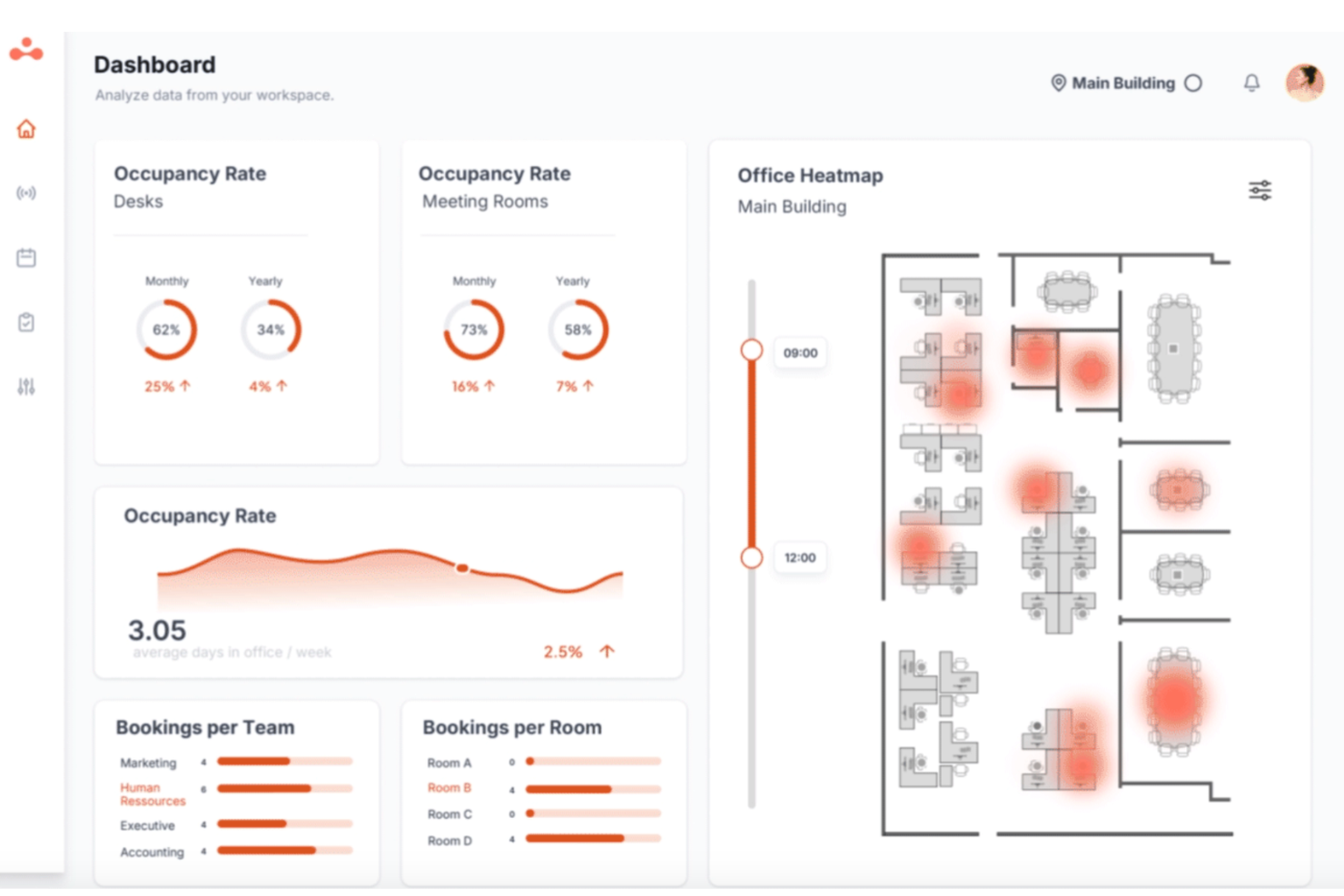
elia es una plataforma de operaciones de lugar de trabajo para equipos híbridos que integra la gestión de visitantes, reserva de escritorios, programación de salas y seguimiento de ocupación en un solo sistema—de modo que tu recepción, RR. HH. y equipos de instalaciones compartan una única fuente de información verdadera.
¿Para quién es mejor elia?
elia es ideal para organizaciones de tamaño medio a empresarial que gestionan lugares de trabajo híbridos donde los equipos de instalaciones, RR. HH. y TI necesitan visibilidad compartida sobre las operaciones de la oficina.
Por qué elia es una buena alternativa a Envoy
Elegí elia como uno de los mejores porque su quiosco admite los idiomas inglés y francés de forma nativa, lo que significa que los visitantes internacionales pueden registrarse por sí mismos sin necesidad de asistencia en recepción para salvar la barrera idiomática. Me gusta que el soporte de idiomas esté incorporado directamente en el flujo de registro y no agregado después como una ocurrencia tardía.
Funciones clave de elia
- Preinscripción: Envía a los visitantes una invitación personalizada por adelantado para que lleguen con un código QR listo para escanear, reduciendo los tiempos de espera en el lobby.
- Firma de NDA y documentos: Integra el reconocimiento de documentos o la firma de NDA directamente en el proceso de registro antes de que el visitante obtenga acceso a tu espacio.
- Impresión de credencial de visitante: Imprime automáticamente una credencial de visitante al hacer el registro, brindando a los equipos de seguridad en sitio una referencia visual rápida para identificar a los invitados.
- Registro de visitantes listo para auditorías: Accede a un registro con sello de tiempo de cada visita con exportación CSV para revisiones de cumplimiento o auditorías de seguridad.
Integraciones de elia
elia ofrece integraciones nativas con Microsoft 365, Google Workspace, Slack y herramientas específicas dentro de esos ecosistemas, incluyendo Google Calendar, Microsoft Teams y Microsoft Outlook.
Pros and Cons
Pros:
- Incluye hardware nativo para espacios de trabajo
- Incluye seguimiento de primeros respondedores en emergencias
- Combina módulos de visitantes y reserva de escritorios
Cons:
- Las estadísticas de ocupación pueden ser inexactas
- Las opciones de edición de perfil de administrador son limitadas

Ideal para una incorporación rápida y asistencia para la migración
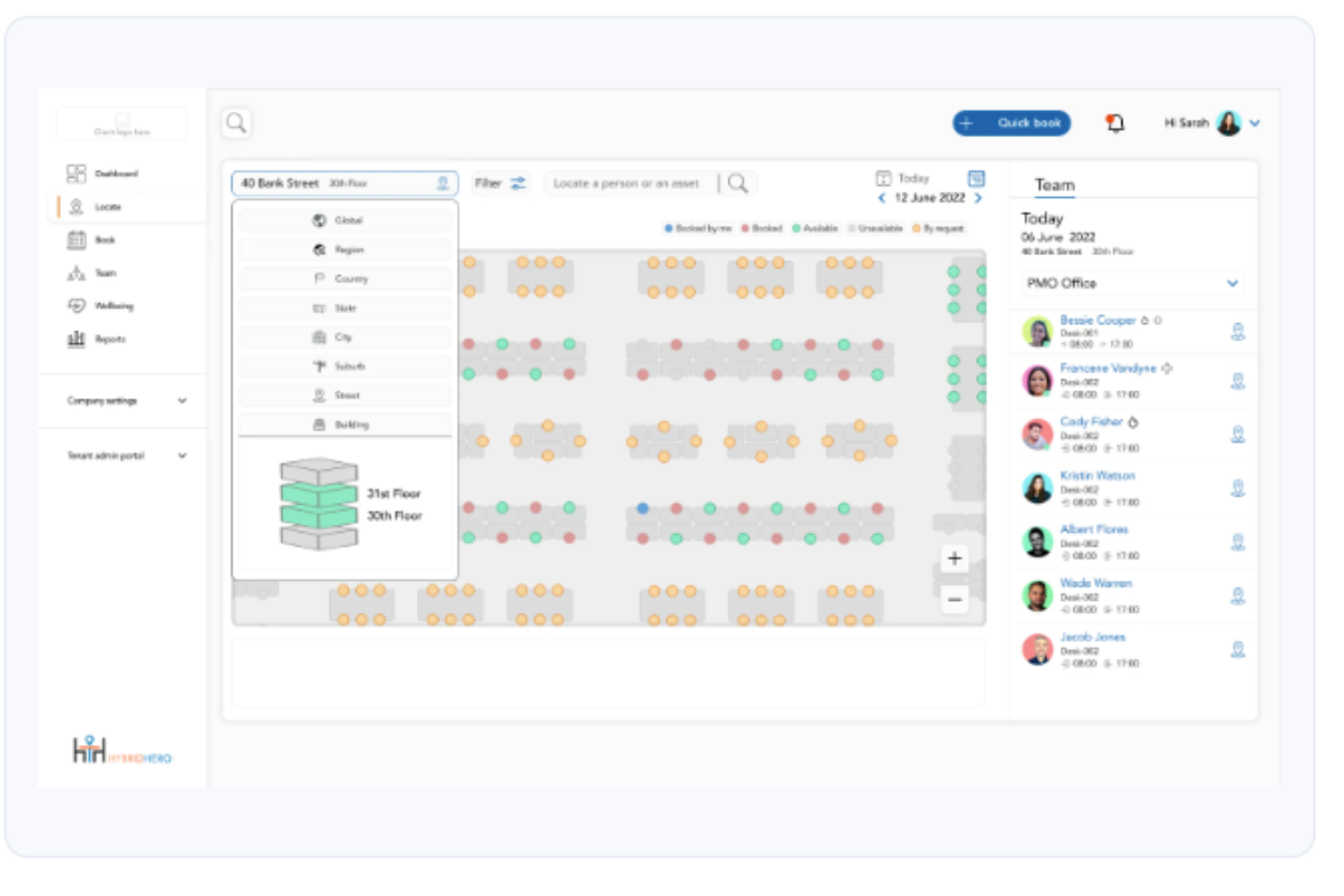
Hybrid Hero es una plataforma de gestión del lugar de trabajo que ayuda a los equipos de HR y de instalaciones a coordinar la reserva de escritorios, las reservas de salas, el registro de visitantes y la programación del trabajo híbrido en una o varias ubicaciones de oficina.
¿Para quién es más adecuado Hybrid Hero?
Hybrid Hero es adecuado para organizaciones empresariales y de mercado medio que gestionan espacios de oficina distribuidos, especialmente aquellas de sectores regulados como las finanzas, la energía o la construcción.
Por qué Hybrid Hero es una buena alternativa a Envoy
He incluido Hybrid Hero entre mis principales opciones porque su Programa Switch es una de las rutas de migración más estructuradas que he visto en este sector. Incluye una llamada de evaluación de 15 minutos, un plan de migración de una página y un plazo de migración garantizado de 30 días. Este tipo de transición estructurada permite a los equipos que abandonan Envoy superar los obstáculos de implementación y conseguir que los empleados reserven escritorios y registren a los visitantes desde el primer día.
Características principales de Hybrid Hero
- Constructor de planos interactivos: Permite asignar rápidamente los espacios de trabajo y gestionar escritorios asignados y no asignados para cualquier distribución de oficina.
- Reserva mediante lenguaje natural con AI: Permite reservar escritorios o salas utilizando consultas en lenguaje sencillo directamente en la aplicación.
- Búsqueda basada en servicios: Permite filtrar los espacios de trabajo por características como monitores dobles, escritorios de pie o zonas silenciosas antes de hacer una reserva.
- Registro y liberación automatizados de escritorios: Los códigos QR permiten registrarse rápidamente en las instalaciones y liberan automáticamente los escritorios no utilizados.
Integraciones de Hybrid Hero
Hybrid Hero ofrece integraciones nativas con Microsoft 365, Google Workspace, Slack, Azure Active Directory, Okta y el inicio de sesión único SAML. También hay una API disponible para integraciones personalizadas.
Pros and Cons
Pros:
- El Programa Switch estructurado simplifica la migración desde Envoy
- La reserva mediante lenguaje natural con AI acelera las reservas
- El filtrado basado en servicios agiliza la búsqueda de escritorios
Cons:
- Las funciones de gestión de visitantes están menos desarrolladas que las de reserva de escritorios
- La escasez de reseñas públicas de usuarios dificulta la evaluación

Ideal para programación de empleados con enfoque móvil

WorkInSync es una plataforma de gestión de espacios de trabajo diseñada para equipos que priorizan la programación flexible y el acceso móvil. Es una excelente opción para organizaciones que buscan coordinar el trabajo híbrido, gestionar la reserva de escritorios y mejorar los desplazamientos de empleados desde una sola aplicación.
¿Para quién es mejor WorkInSync?
Equipos de RRHH y responsables de instalaciones en organizaciones híbridas o distribuidas que necesitan herramientas móviles para la programación de empleados y la coordinación de espacios de trabajo.
Por qué WorkInSync es una buena alternativa a Envoy
Elegí WorkInSync porque su aplicación móvil pone el control de la programación directamente en manos de los empleados. Desde la app, los empleados pueden consultar la disponibilidad de escritorios en tiempo real, reservar un espacio de trabajo y confirmar su día en la oficina antes de salir de casa. Aprecio la función de zonas de equipo, que permite a los responsables agrupar a los miembros en zonas designadas del piso, de modo que cuando la gente vaya a la oficina, esté cerca de los colegas con los que necesita colaborar. En la práctica, esto significa que mi equipo no solo está reservando un escritorio al azar, sino que coordina la presencia con propósito, algo que el modelo orientado al visitante de Envoy no prioriza de la misma manera.
Funciones clave de WorkInSync
- Reserva de estacionamiento: Los empleados reservan plazas de aparcamiento mediante móvil o web antes de llegar, con opción para que los administradores definan zonas, designen lugares para tipos específicos de vehículos y monitoricen la ocupación en tiempo real.
- Gestión de visitantes: Los anfitriones invitan a los visitantes a través de la app, los visitantes reciben un código QR para la entrada sin contacto y los administradores pueden ver en tiempo real todos los visitantes programados y registrados en el día.
- Panel de análisis del espacio de trabajo: Los administradores acceden a informes en tiempo real sobre uso de escritorios, salas y estacionamiento para identificar patrones de ocupación y tomar decisiones informadas sobre el uso del espacio.
- Módulo de gestión de comidas: Los empleados registran pedidos de cafetería por adelantado, permitiendo a los equipos de instalaciones tener visibilidad en tiempo real sobre la demanda y el consumo para reducir el desperdicio de comida.
Integraciones de WorkInSync
WorkInSync ofrece integraciones nativas con Microsoft Teams, Google Workspace, Slack, Okta y Active Directory, y proporciona una API para integraciones personalizadas.
Pros and Cons
Pros:
- La app móvil soporta todas las características de programación
- Reserva de escritorios y aparcamiento en una sola plataforma
- Ocupación y analítica de oficina en tiempo real
Cons:
- Poca personalización para flujos de visitantes
- No ofrece opciones de hardware tipo kiosko
YAROOMS
El mejor para el seguimiento de la huella de carbono

YAROOMS es una plataforma de gestión de espacios de trabajo diseñada para organizaciones que desean coordinar reservas de salas, escritorios y políticas de trabajo híbrido. Es ideal para empresas que buscan centralizar la programación y optimizar el uso del espacio en múltiples ubicaciones.
¿Para quién es mejor YAROOMS?
Responsables de instalaciones y líderes de sostenibilidad en organizaciones medianas y grandes que buscan rastrear y reducir la huella de carbono en el trabajo.
Por qué YAROOMS es una buena alternativa a Envoy
El seguimiento de la huella de carbono es lo que diferencia a YAROOMS de la mayoría de alternativas a Envoy, y es la principal razón por la que lo recomendaría a organizaciones enfocadas en la sostenibilidad. YAROOMS monitoriza las emisiones de CO2 de Alcance 2 y Alcance 3 derivadas del uso de equipos de oficina, desplazamientos de empleados y trabajo remoto, brindando a los gestores de instalaciones datos reales en los que basar sus acciones. Además, me gusta que esto esté integrado junto con la reserva de escritorios y salas, planificación de trabajo híbrido y gestión de visitantes en una sola plataforma. Para los equipos que necesitan informar sobre el impacto medioambiental junto con la gestión diaria de los espacios, esta combinación es difícil de encontrar en otros lugares.
Funciones clave de YAROOMS
- Mapas interactivos de planta: Explora la disponibilidad en tiempo real de escritorios y salas en planos visuales, con rutas internas integradas para ubicar compañeros y moverse por la oficina.
- Programación de trabajo híbrido: Establece el estado de trabajo, coordina días de oficina por equipos y visualiza quién acudirá cualquier día.
- Sistema de gestión de visitantes: Pre-registra invitados, envía notificaciones automáticas de llegada y gestiona todo el proceso de registro de visitantes.
- Asistente Yarvis AI: Reserva espacios, encuentra compañeros y administra agendas mediante indicaciones en lenguaje natural directamente en Microsoft Teams o correo electrónico.
Integraciones de YAROOMS
YAROOMS ofrece integraciones nativas con Microsoft 365, Google Workspace, Okta y Azure Active Directory, y proporciona una API para integraciones personalizadas.
Pros and Cons
Pros:
- Monitoriza datos de emisiones de Alcance 2 y 3
- Incluye mapas de planta interactivos para reservas
- Ofrece gestión de visitantes con pre-registro
Cons:
- Carece de integraciones avanzadas de control de acceso
- No incluye solicitudes de catering o servicios

Joan
La mejor opción para la integración con pantallas de salas de reuniones
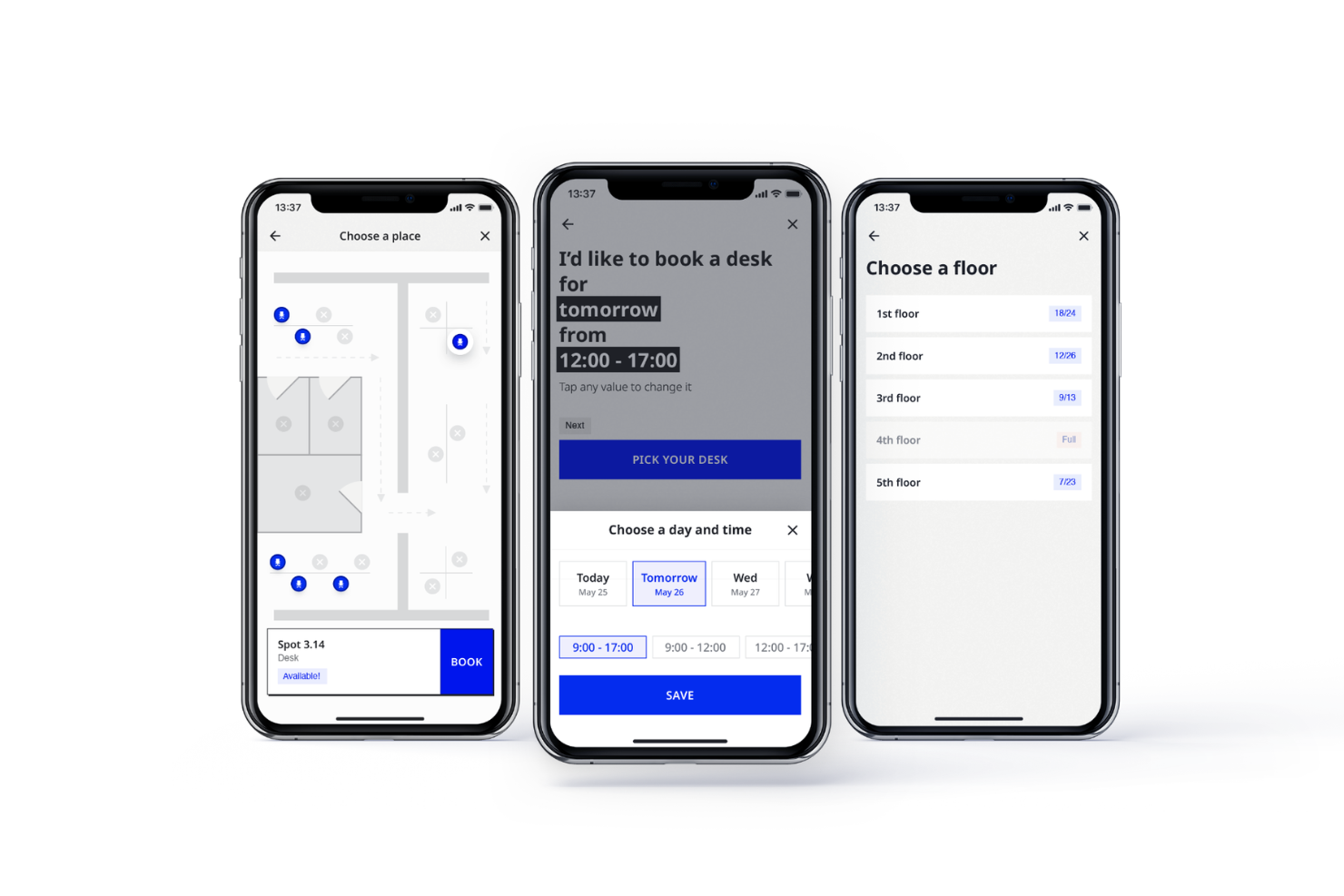
Joan es una plataforma de gestión de espacios de trabajo diseñada para organizaciones que necesitan coordinar la reserva de salas de reuniones y mostrar la disponibilidad de salas en tiempo real. Es una excelente opción para gestores de oficina y equipos de TI que buscan reducir conflictos de programación y optimizar el uso de espacios compartidos.
¿Para quién es mejor Joan?
Gestores de oficina y equipos de TI en organizaciones medianas y grandes que necesitan soluciones dedicadas para mostrar información de salas de reuniones.
Por qué Joan es una buena alternativa a Envoy
La integración para mostrar información de salas de reuniones es donde creo que Joan realmente destaca. Los programadores ePaper propios de Joan se instalan sin cables directamente fuera de las salas de reuniones y se sincronizan en tiempo real con Google Calendar, Outlook y Microsoft Teams, por lo que el estado de la sala siempre es preciso de un solo vistazo. También valoro la función de prevención de reuniones fantasma, que libera automáticamente las salas cuando nadie se registra, reduciendo el espacio desperdiciado. Para equipos que gestionan varias salas, los ajustes por dispositivo permiten configurar cada pantalla de forma independiente, algo que considero especialmente útil al gestionar salas con diferentes reglas de reserva o capacidades.
Características clave de Joan
- Reserva de escritorios con vista de plano de planta: Sube el plano de tu oficina y permite que los empleados busquen y reserven escritorios visualmente, filtrando por comodidades como escritorios de pie o monitores.
- Analítica del espacio de trabajo: Supervisa la ocupación de salas, uso de escritorios, frecuencia de reservas y horarios pico desde un único panel de administración.
- Reglas de reserva por departamento: Asigna escritorios a departamentos específicos y establece límites de ocupación para que solo las personas autorizadas puedan reservar ciertos espacios.
- Monitorización de la calidad del aire interior: Supervisa la temperatura y los niveles de humedad de tu oficina directamente desde la plataforma Joan.
Integraciones de Joan
Joan ofrece integraciones nativas con Google Workspace, Microsoft 365, Microsoft Teams, Slack, Zoom y Cisco Webex, además de una API para integraciones personalizadas.
Pros and Cons
Pros:
- Las pantallas ePaper inalámbricas no requieren cables de alimentación
- La prevención de reuniones fantasma libera automáticamente las salas
- Ofrece sensores para monitorizar la calidad del aire interior
Cons:
- Sin funciones de gestión de visitantes ni registro de entrada
- Se requiere la compra de hardware para funcionalidad completa

Officely
La mejor para la coordinación de reservas de escritorios basada en Slack

Officely es una herramienta todo en uno para la reserva de escritorios y coordinación de oficinas, integrada directamente en Slack, lo que facilita a los equipos híbridos la gestión de reservas de espacios de trabajo. Es una excelente opción para empresas que desean coordinar la asistencia a la oficina sin complementos adicionales.
¿Para quién es mejor Officely?
Equipos que utilizan Slack en entornos de trabajo híbrido o flexible y que necesitan una coordinación sencilla para reservar escritorios y espacios de oficina.
Por qué Officely es una buena alternativa a Envoy
Elegí Officely porque gestiona la reserva de escritorios completamente dentro de Slack, lo que significa que mi equipo no necesita abrir una aplicación aparte para reservar un espacio de trabajo. La función de vecindarios permite agrupar escritorios por departamento, así que las personas pueden ver dónde están sentados sus colegas y reservar cerca. También me gusta la visibilidad de la asistencia a la oficina, que muestra quién planea asistir en un día determinado directamente en Slack, facilitando la coordinación de la colaboración presencial sin idas y vueltas adicionales.
Características clave de Officely
- Seguimiento de cumplimiento de políticas híbridas: Compara la asistencia real con tu política de trabajo híbrida y detecta automáticamente los incumplimientos.
- Reserva de salas de reuniones: Reserva salas de reuniones directamente en Slack o Microsoft Teams, con disponibilidad en tiempo real para evitar dobles reservas.
- Reserva de estacionamiento y recursos: Permite que los empleados reserven plazas de aparcamiento, almuerzos y otros recursos de oficina junto con su reserva de escritorio.
- Aviso diario de asistencia a la oficina: Envía automáticamente un mensaje a un canal de Slack o Microsoft Teams mostrando quién irá a la oficina cada día.
Integraciones de Officely
Officely ofrece integraciones nativas con Google Calendar, Microsoft Outlook y Slack, y proporciona una API para integraciones personalizadas.
Pros and Cons
Pros:
- Integración total con Slack y Microsoft Teams
- Reserva de escritorios y control de asistencia en una sola plataforma
- Notificaciones automáticas diarias de asistencia a la oficina
Cons:
- Opciones limitadas de análisis e informes
- La reserva de salas de reuniones solo está disponible en planes de pago

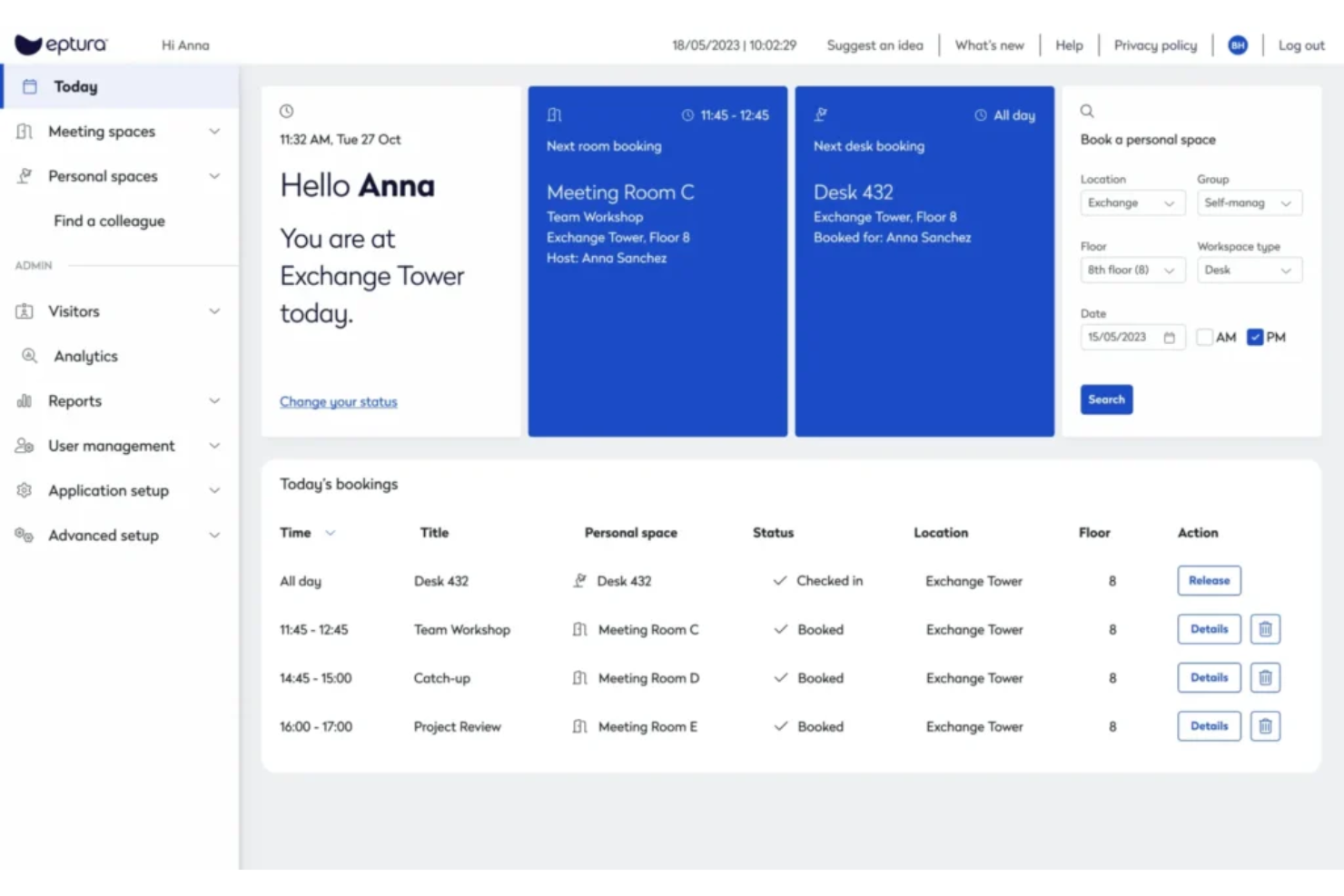
Eptura es una plataforma de gestión de espacios de trabajo creada para organizaciones que buscan optimizar el espacio, los recursos y la experiencia del usuario. Los responsables de instalaciones y los equipos de gestión de espacios la utilizan para coordinar la reserva de escritorios, gestionar visitantes y obtener información accionable sobre cómo se utilizan las oficinas.
¿Para quién es mejor Eptura?
Responsables de instalaciones y líderes de oficinas en grandes organizaciones que necesitan análisis avanzados para optimizar el uso de espacios y recursos.
Por qué Eptura es una buena alternativa a Envoy
Lo que me atrae de Eptura en el análisis del lugar de trabajo es cómo combina datos de sensores con datos de reservas para dar una visión completa de cómo se utiliza realmente el espacio. La función de monitoreo de uso rastrea la ocupación máxima y las tendencias de frecuencia en todo el plano de oficinas, para que puedas ver no solo qué escritorios están reservados, sino también a cuáles realmente se presentan los empleados. También utilizo el panel de planificación inmobiliaria para seguir los costes de alquiler y las fechas de vencimiento junto con los datos de ocupación, lo que ayuda a justificar decisiones de espacio ante la dirección con cifras concretas. En la práctica, esto significa que mi equipo puede asistir a una revisión de portafolio con evidencias de uso en lugar de estimaciones.
Funciones clave de Eptura
- Programación de salas de reuniones: Reserva y administra salas de reuniones en toda la oficina, con visibilidad de la disponibilidad y la capacidad de cada sala.
- Gestión de mudanzas: Planifica y ejecuta traslados de empleados de principio a fin, desde la asignación de asientos hasta la reubicación de departamentos.
- Orientación interna: Ayuda a empleados y visitantes a orientarse en la oficina utilizando mapas interactivos y herramientas de dirección.
- Zonas de vecinos y áreas de colaboración: Designa y administra zonas de equipo o espacios compartidos para apoyar el trabajo en grupo y la disposición flexible de asientos.
Integraciones de Eptura
Las integraciones nativas incluyen Slack, Jira, Power BI, Dropbox, Google Drive y Zoom. Hay una API disponible para integraciones personalizadas.
Pros and Cons
Pros:
- Actualizaciones en tiempo real de disponibilidad de escritorios y salas
- Gestión de visitantes con opciones de pre-registro
- Flujos de trabajo personalizables para servicios de reuniones
Cons:
- Problemas ocasionales de sincronización con integraciones de calendarios
- Menos integraciones nativas


Robin es una plataforma de gestión de espacios de trabajo diseñada para equipos que desean simplificar la reserva de escritorios, la programación de salas de reuniones y la coordinación de oficinas. Si necesitas una forma flexible de gestionar espacios de trabajo híbridos y mantener tu oficina organizada, Robin te ofrece las herramientas para hacerlo.
¿Para quién es ideal Robin?
Responsables de oficina y equipos de lugares de trabajo en empresas medianas y grandes que deben coordinar espacios flexibles y visualizar los planos de la oficina.
Por qué Robin es una buena alternativa a Envoy
Los planos interactivos de Robin son lo que más me llama la atención. El editor de mapas permite a los administradores diseñar, actualizar y publicar la distribución de la oficina a medida que evoluciona el espacio laboral, y los empleados pueden hacer clic directamente en el plano para ver qué escritorios están disponibles y reservar uno en tiempo real. Considero que la funcionalidad de orientación es especialmente útil para oficinas grandes: empleados y visitantes pueden ubicar un escritorio, sala o punto de interés específico sin necesidad de pedir indicaciones. En la práctica, esto significa que los nuevos empleados y colegas visitantes pueden orientarse el primer día sin ayuda, algo que el modelo centrado en visitantes de Envoy no abarca con tanto detalle.
Funciones clave de Robin
- Gestión de visitantes: Pre-registra invitados, gestiona registros de entrada y accede a los historiales de visita desde un solo panel.
- Políticas en la oficina: Define y comunica políticas de trabajo híbrido, y permite que los empleados registren su propia asistencia en la oficina.
- Servicios para reuniones: Crea flujos de trabajo personalizables para solicitudes de catering, preparación de salas y soporte AV vinculados a las reservas de reuniones.
- Analítica del espacio de trabajo: Genera informes personalizados para seguir la utilización del espacio y monitorizar las tendencias de ocupación en la oficina.
Integraciones de Robin
Robin ofrece integraciones nativas con Google Workspace, Microsoft 365, Slack, Zoom, Okta y Azure Active Directory. Hay una API disponible para integraciones personalizadas.
Pros and Cons
Pros:
- Planos interactivos para reservas visuales
- Actualizaciones en tiempo real de disponibilidad de escritorios y salas
- Soporte flexible para políticas de trabajo híbrido
Cons:
- Precios no mostrados de forma transparente online
- No incluye hardware para quioscos de registro

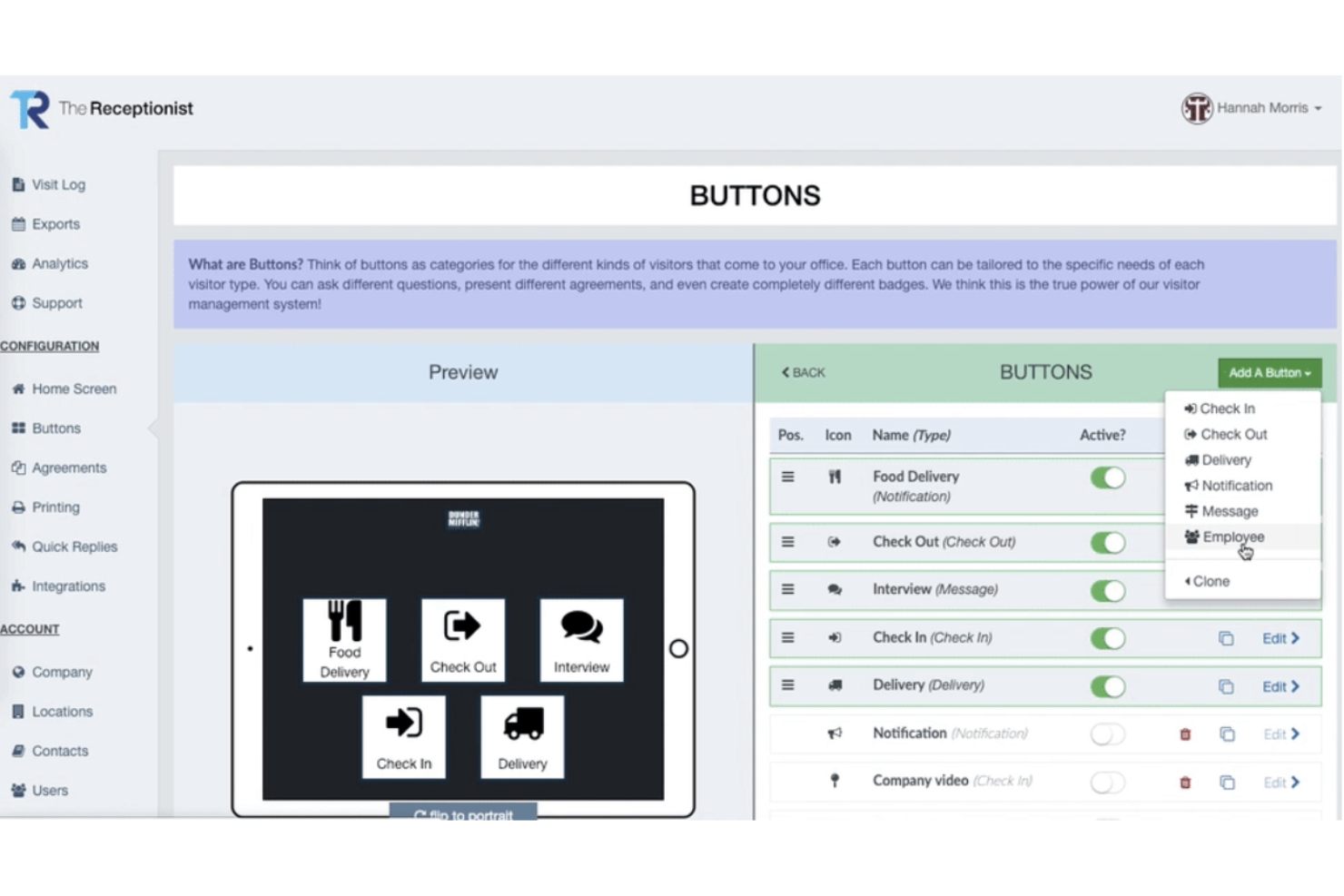
The Receptionist es un sistema de gestión de visitantes diseñado para oficinas, espacios de coworking y clínicas que desean automatizar el registro de invitados y las notificaciones. Es una excelente opción para equipos que buscan mejorar las operaciones de recepción y el seguimiento de visitantes.
¿Para quién es ideal The Receptionist?
Equipos de recepción y gerentes de oficina en servicios profesionales, salud y espacios de coworking que necesitan un registro de visitantes seguro, personalizado y la impresión de credenciales.
Por qué The Receptionist es una buena alternativa a Envoy
La impresión de credenciales es algo que muchas herramientas de gestión de visitantes consideran secundario—The Receptionist no lo hace. Me gusta que el diseñador de credenciales te permite controlar exactamente qué se imprime: foto del visitante, nombre del anfitrión, motivo de la visita, tiempo de expiración y logotipo personalizado, todo configurable según el tipo de visitante. Ese nivel de control es esencial en entornos donde una credencial de contratista debe verse y comunicar algo distinto a una de cliente. Además, uso el flujo de registro basado en botones para dirigir a los diferentes tipos de visitantes por rutas de registro totalmente separadas, por lo que la credencial siempre se ajusta al contexto de la visita.
Funciones clave de The Receptionist
- Flujos de registro personalizados: Crea flujos de registro separados para diferentes tipos de visitantes, como repartidores, clientes o contratistas, cada uno recopilando distinta información.
- Registro con código QR y sin contacto: Permite a los visitantes registrarse sin tocar el iPad usando el escaneo de un código QR desde su teléfono.
- Lista de emergencia y evacuación: Extrae una lista en tiempo real de todos los presentes registrados para apoyar evacuaciones seguras y rápidas.
- Notificaciones de pre-registro de visitantes: Notifica automáticamente a los anfitriones cuando un visitante esperado se registra, vía correo electrónico, SMS, Slack o Microsoft Teams.
Integraciones de The Receptionist
The Receptionist ofrece integraciones nativas con Slack, Microsoft Teams, Google Workspace y Active Directory, y proporciona una API para integraciones personalizadas.
Pros and Cons
Pros:
- Diseñador de credenciales personalizadas con logo y foto
- Notificaciones instantáneas al anfitrión por Slack o Teams
- Múltiples flujos de registro para tipos de visitantes
Cons:
- No cuenta con integración nativa con Salesforce
- Requiere hardware iPad para el registro

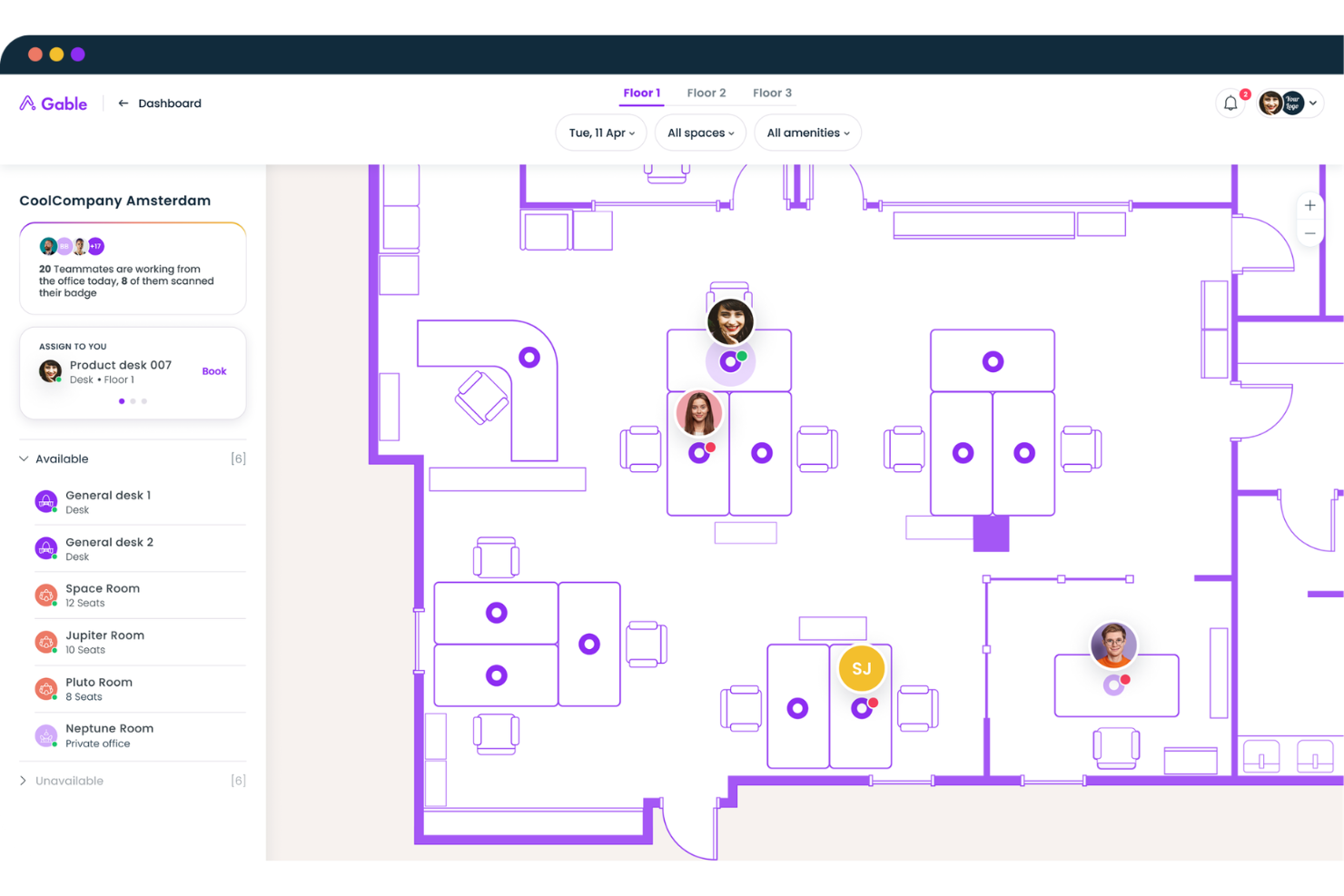
Gable es una plataforma de gestión de espacios de trabajo diseñada para empresas con equipos distribuidos o híbridos que necesitan coordinar el acceso a oficinas y espacios de trabajo flexibles. Ayuda a los líderes de RR. HH. y operaciones a centralizar las reservas de espacios, gestionar presupuestos y fomentar la colaboración entre empleados en diferentes ubicaciones.
¿Para quién es Gable ideal?
Equipos de RR. HH. y operaciones en empresas distribuidas o híbridas que gestionan el acceso a espacios de trabajo y presupuestos en varias ubicaciones.
Por qué Gable es una buena alternativa a Envoy
Gable adopta un enfoque distinto al de la mayoría de las herramientas de trabajo en esta lista: está creada específicamente para equipos que no trabajan todos en la misma oficina. La red de espacios de trabajo bajo demanda es lo que la hace destacar para los equipos distribuidos: los empleados pueden reservar estaciones de trabajo compartidas, oficinas privadas o salas de reuniones en más de 20,000 coworkings en más de 900 ciudades de todo el mundo, algo que Envoy simplemente no ofrece. También considero que la geolocalización y los controles de presupuesto son realmente útiles para mantener las reservas distribuidas dentro de la política: los administradores pueden limitar el gasto por departamento o restringir en qué ciudades pueden reservar los empleados. En la práctica, eso significa que una empresa con enfoque remoto puede ofrecer a sus empleados opciones reales de trabajo presencial sin tener que asumir nuevos arrendamientos.
Funciones clave de Gable
- Gestión de visitantes: Recibe a los visitantes con auto-registro mediante quiosco iPad o código QR, impresión de credenciales, firma de acuerdos de confidencialidad y notificaciones de llegada.
- Orquestación de eventos: Crea, promociona y haz seguimiento de eventos presenciales o remotos, incluyendo reserva de espacios, confirmación de asistencia y recolección de comentarios de participantes.
- Analítica de uso de oficinas: Accede a datos de reservas, espacios y asistencia para tomar decisiones inmobiliarias y planificar políticas híbridas.
- Geo-fencing y controles de permisos: Establece restricciones de reservas basadas en ubicación y flujos de aprobación para gestionar dónde y cómo los empleados reservan espacios de trabajo.
Integraciones de Gable
Gable ofrece integraciones nativas con Slack, Google Workspace y Okta, y proporciona una API para integraciones personalizadas.
Pros and Cons
Pros:
- Permite gestionar reservas de espacios distribuidos
- Ofrece controles de presupuesto para el gasto en espacios de trabajo
- Centraliza la analítica del uso de espacios de trabajo
Cons:
- No permite reservar salas de reuniones en oficinas privadas
- El panel de análisis es básico y poco profundo
Otras alternativas a Envoy
Estas son algunas alternativas adicionales a Envoy que no han entrado en mi lista breve, pero que merece la pena conocer:
- OfficeSpace
Ideal para la gestión personalizable de espacios
- Visitly
Mejor para la gestión de visitantes en múltiples ubicaciones
- Sign In Solutions
Lo mejor para revisión de visitantes orientada al cumplimiento
- SwipedOn
Ideal para registro de visitantes mediante códigos QR
- Archie
Mejor para la automatización de espacios de coworking


Cómo evalúo las alternativas a Envoy
Divido cada evaluación en dos capas: las capacidades básicas —como el registro de visitantes y la reserva de escritorios— que debe tener una herramienta, y los factores diferenciadores que distinguen una plataforma de otra.
Funcionalidad principal (requisitos básicos para esta lista)
Al seleccionar herramientas para mi lista, clasifico cada una en una escala del 0 (no ofrece la funcionalidad) al 5 (sobresale en esta área) para cada funcionalidad principal indicada a continuación. Después, calculo la puntuación total de la herramienta como porcentaje. Cada herramienta debe alcanzar una puntuación total mínima del 65 % para ser considerada.
- Gestión de visitantes: Evalúo si una herramienta gestiona todo el ciclo de vida del visitante —registro previo, registro de entrada, alertas al anfitrión e impresión de credenciales— tanto en configuraciones de una sola ubicación como de varias.
- Registro y programación de empleados: Los equipos que trabajan con modelos híbridos necesitan que los empleados indiquen cuándo estarán en las instalaciones, por lo que busco coordinación de horarios y seguimiento de la asistencia.
- Reserva de escritorios y salas: Compruebo cómo gestiona cada herramienta las reservas de espacios de trabajo, ya sea mediante mapas interactivos, integraciones con calendarios o reservas sencillas basadas en listas.
- Cumplimiento sanitario y de seguridad: Los cuestionarios de detección, la recopilación de acuerdos de confidencialidad, las comprobaciones en listas de vigilancia y el escaneo de identificaciones son factores que considero, especialmente para los equipos de sectores regulados.
- Análisis del lugar de trabajo: Las buenas herramientas para el lugar de trabajo muestran tendencias de ocupación y datos de reservas en paneles, por lo que analizo qué información presenta cada plataforma y qué tan accesibles son sus conclusiones.
- Integraciones de RR. HH. y del lugar de trabajo: Evalúo cómo se conecta cada herramienta con los sistemas que ya utilizan los equipos de RR. HH., desde plataformas de sistemas de información de recursos humanos y proveedores de inicio de sesión único hasta Slack, Teams y dispositivos de control de acceso.
Una vez que tengo una lista de herramientas que cumplen este criterio, considero qué distingue a cada plataforma.
Factores diferenciadores (qué distingue a los proveedores)
Así es como comparo y contrasto distintos proveedores:
Funciones destacadas
Los planos de planta interactivos marcan una diferencia real: los empleados pueden ver quién está en la oficina y dónde hay escritorios disponibles antes de reservar, lo que reduce la confusión en configuraciones híbridas. También analizo las herramientas de evacuación de emergencia, ya que los recuentos en tiempo real y las funciones de pase de lista son importantes cuando eres responsable de la seguridad en las instalaciones. Para las organizaciones con oficinas en varias ciudades, la gestión de múltiples ubicaciones, con políticas específicas para cada ubicación y generación centralizada de informes, es un factor diferenciador importante.
Más allá de las funciones
Los estándares de cumplimiento y seguridad tienen un peso considerable en este ámbito: compruebo certificaciones como SOC 2 Tipo II y la preparación para el RGPD, especialmente cuando los datos de los visitantes incluyen información de identificación personal. La estructura de precios también es importante, ya que algunos proveedores cobran por ubicación, mientras que otros facturan por empleado, y los planes modulares permiten a los equipos de RR. HH. evitar pagar por funciones que no necesitan. También evalúo hasta qué punto el servicio de asistencia para la incorporación cubre la configuración del hardware, como los quioscos iPad y las impresoras de credenciales, que pueden retrasar una implementación si se deja únicamente en manos del equipo interno de TI.
¿Por qué buscar una alternativa a Envoy?
Aunque Envoy es una buena opción como solución de gestión del lugar de trabajo, hay varias razones por las que algunos usuarios buscan soluciones alternativas. Es posible que estés buscando una alternativa a Envoy porque…
- Necesitas funciones más avanzadas para reservar escritorios
- Tu equipo depende de una planificación prioritaria para móviles
- Quieres una gestión integrada del aparcamiento
- Necesitas análisis e informes más profundos
- Tu organización necesita una privacidad de datos centrada en el RGPD
- Necesitas más opciones de integración de hardware
Si alguna de estas situaciones te resulta familiar, has llegado al lugar adecuado. Mi lista incluye varias opciones de soluciones de gestión del lugar de trabajo más adecuadas para los equipos que afrontan estos desafíos con Envoy y buscan soluciones alternativas.
Funciones principales de Envoy
Estas son algunas de las funciones principales de Envoy, que te ayudarán a contrastar y comparar lo que ofrecen las soluciones alternativas:
- Gestión del registro de visitantes: Automatiza el registro de invitados, la impresión de credenciales y las notificaciones a los anfitriones, mejorando el proceso de registro con funciones de seguridad.
- Reserva de escritorios: Permite a los empleados reservar escritorios con antelación o sobre la marcha, facilitando los asientos flexibles y las modalidades de trabajo híbrido.
- Programación de salas: Permite a los usuarios reservar salas de reuniones, consultar la disponibilidad y gestionar reservas desde dispositivos web o móviles.
- Gestión de entregas: Realiza un seguimiento de los paquetes entrantes, notifica a los destinatarios y registra las entregas para garantizar una recogida segura y reducir la carga de trabajo de recepción.
- Control de salud y seguridad: Ofrece cuestionarios de salud personalizables y registro sin contacto para respaldar los protocolos de seguridad en el lugar de trabajo.
- Registro de empleados: Permite al personal registrar su entrada y salida de la oficina, proporcionando datos de ocupación en tiempo real y registros de asistencia.
- Análisis del espacio: Proporciona información sobre el uso del espacio de trabajo, las tendencias de visitantes y los patrones de ocupación para fundamentar las decisiones de planificación del espacio.
- Integraciones: Se conecta con herramientas como Slack, Microsoft Teams, Google Workspace y sistemas de control de acceso para integrarse en tus flujos de trabajo.
- Aplicación móvil: Proporciona a empleados y administradores acceso sobre la marcha a las reservas, el registro y las notificaciones.
- Integración con el control de acceso: Se sincroniza con sistemas de credenciales y mecanismos de puertas para automatizar la entrada segura de empleados y visitantes.