

Las 10 mejores herramientas de gestión de crisis con IA analizadas en 2026

Lista de las mejores herramientas de IA para la gestión de crisis


Las crisis no esperan a un momento conveniente, especialmente cuando te encuentras justo en medio de una. Ya se trate de una interrupción repentina de la plantilla, un problema de relaciones públicas que sacude la moral de los empleados o un riesgo de cumplimiento inesperado, se espera que respondas rápidamente, te comuniques con claridad y mantengas a todos tranquilos e informados. Sin presión, ¿verdad?
Ahí es donde las herramientas de IA para la gestión de crisis pueden brillar de verdad. Te ayudan a abrirte paso entre el caos con datos en tiempo real, alertas automatizadas y análisis predictivos que te permiten ir un paso por delante. En lugar de tener que gestionar hojas de cálculo y mensajes de Slack, obtienes claridad —rápidamente— para poder centrarte en las personas, no solo en los procesos.
He probado y analizado personalmente una variedad de estas herramientas para descubrir cuáles cumplen realmente sus promesas. Mi enfoque se centra en las funciones de IA que mejoran de verdad la respuesta ante las crisis: herramientas que te ayudan a actuar con decisión, adaptarte más rápido y apoyar a tu equipo cuando más importa.
En este artículo, compartiré mis principales recomendaciones de herramientas de IA para la gestión de crisis, junto con información sobre lo que diferencia a cada una y cómo pueden reforzar la resiliencia de tu organización. Descubramos las soluciones que hacen que gestionar las crisis sea un poco menos caótico y mucho más humano.
Por qué confiar en nuestras reseñas de software
Nuestro equipo lleva probando y evaluando software desde 2012. Como expertos en RR. HH., sabemos lo difícil —y lo importante— que es elegir el software adecuado.
Para esta guía, evaluamos las herramientas mediante pruebas prácticas e investigación independiente, puntuando las herramientas según nuestros criterios de selección. También nos basamos en la experiencia de líderes de opinión del sector y de profesionales de RR. HH. en activo.
Nuestras reseñas reflejan nuestro criterio editorial humano, no un discurso de ventas.
Revisores expertos:
Tabla comparativa de herramientas de IA para la gestión de crisis
Esta tabla comparativa resume los detalles de precios de mi selección de las mejores herramientas de IA para la gestión de crisis:
| Tool | Best For | Trial Info | Price | ||
|---|---|---|---|---|---|
| 1 | Mejor para cumplimiento global de RR.HH. | Demo gratuita disponible | Desde $5/empleado/mes | Website | |
| 2 | Mejor para el compromiso de los empleados | Demostración gratuita disponible | Precio bajo solicitud | Website | |
| 3 | Mejor para alertas urgentes | Prueba gratuita de 30 días | Desde $2/usuario/mes | Website | |
| 4 | Mejor para la gestión de eventos a gran escala | Demo gratuita disponible | Precio bajo consulta | Website | |
| 5 | Ideal por su interfaz fácil de usar | Demostración gratuita disponible | Precio disponible a petición | Website | |
| 6 | Ideal para relaciones con los medios | Demostración gratuita disponible | $20,000/year | Website | |
| 7 | Ideal para la gestión de riesgos | Demo gratuita disponible | Desde $25/usuario/mes (facturación anual, mínimo 5 usuarios) | Website | |
| 8 | Ideal para comunicaciones internas | Demostración gratuita disponible | Precios a consultar | Website | |
| 9 | Mejor para pequeñas empresas | Demostración gratuita disponible | Precios bajo solicitud | Website | |
| 10 | Ideal para información en tiempo real basada en datos | Demo gratuita disponible | Precio bajo solicitud | Website |
Análisis de las mejores herramientas de IA para la gestión de crisis
A continuación encontrarás mis resúmenes detallados de las mejores herramientas de IA para la gestión de crisis que llegaron a mi lista. Mis análisis ofrecen una visión detallada de las funciones clave, ventajas y desventajas, integraciones y casos de uso ideales de cada herramienta para ayudarte a encontrar la mejor opción para ti.

Deel HR
Mejor para cumplimiento global de RR.HH.

Cuando surgen crisis laborales o de cumplimiento — desde cambios regulatorios repentinos hasta riesgos inesperados de clasificación errónea — Deel AI te brinda una forma rápida y confiable de entender lo que está sucediendo y qué hacer a continuación. Obtienes orientación instantánea respaldada por expertos en más de 150 países, junto con información extraída directamente de los datos de tu personal, ayudándote a responder rápidamente cuando los retrasos pueden aumentar el riesgo.
Por qué elegí Deel
Elegí Deel porque sus herramientas de IA van más allá de responder preguntas básicas de RR.HH.; te ayudan activamente a navegar crisis de cumplimiento y empleo con experiencia localizada en tiempo real. Funciones como los conocimientos contextuales y las alertas automáticas de cumplimiento proporcionan claridad inmediata cuando enfrentas cambios regulatorios urgentes o exposición a riesgos. También valoro que Deel AI se base en Compliance Hub, que monitorea leyes en 150 países y señala problemas como visas por vencer, cambios en reglas salariales o riesgos de clasificación. Esta combinación de IA más inteligencia de cumplimiento respaldada por expertos hace de Deel una opción sólida cuando necesitas una guía rápida y accionable durante momentos críticos.
Características clave de Deel
Además de los conocimientos en tiempo real para crisis que mencioné arriba, estas funciones te resultarán especialmente relevantes:
- Informes mensuales sobre la plantilla: Analiza los datos de tu equipo ante actualizaciones legales globales para alertarte sobre vencimientos de visas, riesgos de incumplimiento y señales de alerta de clasificación errónea antes de que se agraven.
- Monitor de cumplimiento: Rastrea automáticamente cambios salariales, ajustes fiscales, regulaciones de licencia, requisitos de pensión y más en 150 países, resumiendo el impacto en un lenguaje claro.
- Clasificador de trabajadores basado en IA: Utiliza datos legales respaldados por investigaciones para evaluar el estatus de empleado versus contratista con más del 90% de precisión, ayudándote a abordar crisis de clasificación errónea desde el principio.
- Guía de IA 24/7: Ofrece soporte constante para preguntas sobre políticas, problemas de nómina y tareas de la plataforma, asegurando respuestas rápidas cuando surgen asuntos urgentes en diferentes zonas horarias.
Integraciones de Deel
Las integraciones incluyen QuickBooks, Xero, BambooHR, Rippling, Workday, Greenhouse, Lever, Netsuite, Sage y SAP SuccessFactors.
Pros and Cons
Pros:
- Las alertas de cumplimiento destacan cambios legales urgentes en más de 150 países
- Workforce Insights identifica de forma proactiva problemas con visas, salarios y beneficios
- El clasificador de IA reduce crisis de clasificación errónea con alta precisión
Cons:
- Las crisis complejas quizás requieran asesoría legal especializada
- Los conocimientos de cumplimiento sólo se aplican a las jurisdicciones que Deel supervisa
New Product Updates from Deel HR

Deel Expands Stablecoin Wallet to 80+ Countries
Deel expands its Stablecoin Wallet to 80+ countries with dollar-backed balances and optional rewards. This gives eligible contractors more ways to hold and manage earnings inside Deel. For more information, visit Deel’s official site.
 .
.
Simpplr
Mejor para el compromiso de los empleados

Simpplr es una plataforma de intranet y comunicación diseñada para empresas que buscan aumentar el compromiso y la comunicación entre los empleados. Sus herramientas impulsadas por IA ayudan a personalizar el contenido y mejorar las estrategias de comunicación interna.
Por qué elegí Simpplr: Simpplr ofrece capacidades de IA que personalizan la experiencia del usuario, adaptando el contenido a las preferencias individuales de cada empleado. Su función de búsqueda inteligente ayuda a tu equipo a encontrar información rápidamente.
La herramienta proporciona perspectivas reales sobre el compromiso de los empleados a través de análisis de IA. Estas características hacen de Simpplr una herramienta valiosa para organizaciones que buscan aumentar el compromiso y la comunicación interna de sus empleados.
Funciones destacadas e integraciones:
Funciones incluyen una interfaz fácil de usar que fomenta la interacción de los empleados, un sistema de gestión de contenidos para organizar y compartir información, y acceso móvil para mantener a tu equipo conectado en cualquier lugar. Estas funciones apoyan una fuerza laboral cohesionada y comprometida.
Integraciones incluyen Workday, UKG Pro, Salesforce, Jira, ServiceNow, BambooHR, Google Workspace, Okta, Box, Confluence, Microsoft 365, ADP, Microsoft Teams, Slack, Tableau y Zoom.
Pros and Cons
Pros:
- Analíticas específicas por función para empoderar a los interesados
- Encuestas diseñadas para medir mensajes clave
- Acceso móvil para conectividad remota
Cons:
- Descuentos en precios disponibles para organizaciones grandes
- Limitaciones administrativas en móvil

Mejor para alertas urgentes

SnapComms es una herramienta de comunicación interna diseñada para empresas que necesitan distribuir alertas urgentes. Sus funciones impulsadas por IA ayudan a que los mensajes críticos lleguen a tu equipo sin demora.
Por qué elegí SnapComms: SnapComms destaca por entregar alertas urgentes gracias a sus capacidades de segmentación por IA. Garantiza que los mensajes sean vistos de inmediato a través de canales como alertas en el escritorio y notificaciones móviles.
La analítica de la plataforma proporciona información sobre la entrega y el engagement de los mensajes, ayudándote a perfeccionar tu estrategia de comunicación. Estas características hacen de SnapComms una opción fiable para equipos que necesitan una comunicación rápida y eficaz durante crisis.
Funciones destacadas e integraciones:
Funciones incluyen un sistema de alerta temprana en el escritorio que evita el correo electrónico para asegurar la visibilidad inmediata, una franja informativa desplazable que mantiene las actualizaciones importantes a la vista y una aplicación móvil para llegar a miembros del equipo remoto. Estas funciones mejoran tu capacidad de comunicarte eficientemente.
Integraciones incluyen Microsoft Teams, Slack, Zoom, Azure, SharePoint y Okta.
Pros and Cons
Pros:
- La franja informativa desplazable asegura actualizaciones muy visibles
- La notificación de mensaje urgente tarda menos de 10 segundos
- Funcionalidad multidispositivo, incluyendo móvil
Cons:
- Requiere instalación de TI en cada dispositivo
- Personalización limitada de las plantillas de alerta

Mejor para la gestión de eventos a gran escala

Everbridge 360 es una plataforma de gestión de eventos críticos ideal para grandes empresas y organismos de seguridad pública. Ofrece análisis impulsados por IA y comunicación automatizada para ayudarte a gestionar eventos de gran escala de manera eficiente.
Por qué elegí Everbridge 360: La capacidad de Everbridge 360 para gestionar la administración de eventos a gran escala la distingue del resto. Utiliza IA para analizar grandes volúmenes de datos rápidamente, asegurando que tu equipo reciba alertas oportunas y relevantes.
Los flujos de trabajo automatizados de la herramienta simplifican el proceso de notificación a las personas adecuadas en el momento oportuno. Estas características la hacen adecuada para organizaciones que necesitan gestionar eventos complejos.
Características destacadas e integraciones:
Características incluyen un sistema de notificación masiva capaz de llegar a millones de personas, una aplicación móvil para la gestión sobre la marcha y herramientas de evaluación de amenazas en tiempo real. Estas funciones ayudan a tu equipo a mantenerse informado y actuar cuando sea necesario.
Integraciones incluyen IBM, Jira, Microsoft Active Directory, Slack, Salesforce, ServiceNow y Zabbix.
Pros and Cons
Pros:
- Escalabilidad comprobada para la gestión de eventos a gran escala
- Herramientas dinámicas de geolocalización en tiempo real
- Informes detallados posteriores a la acción
Cons:
- Funcionalidad limitada debido a complementos
- Limitaciones en el soporte multilingüe

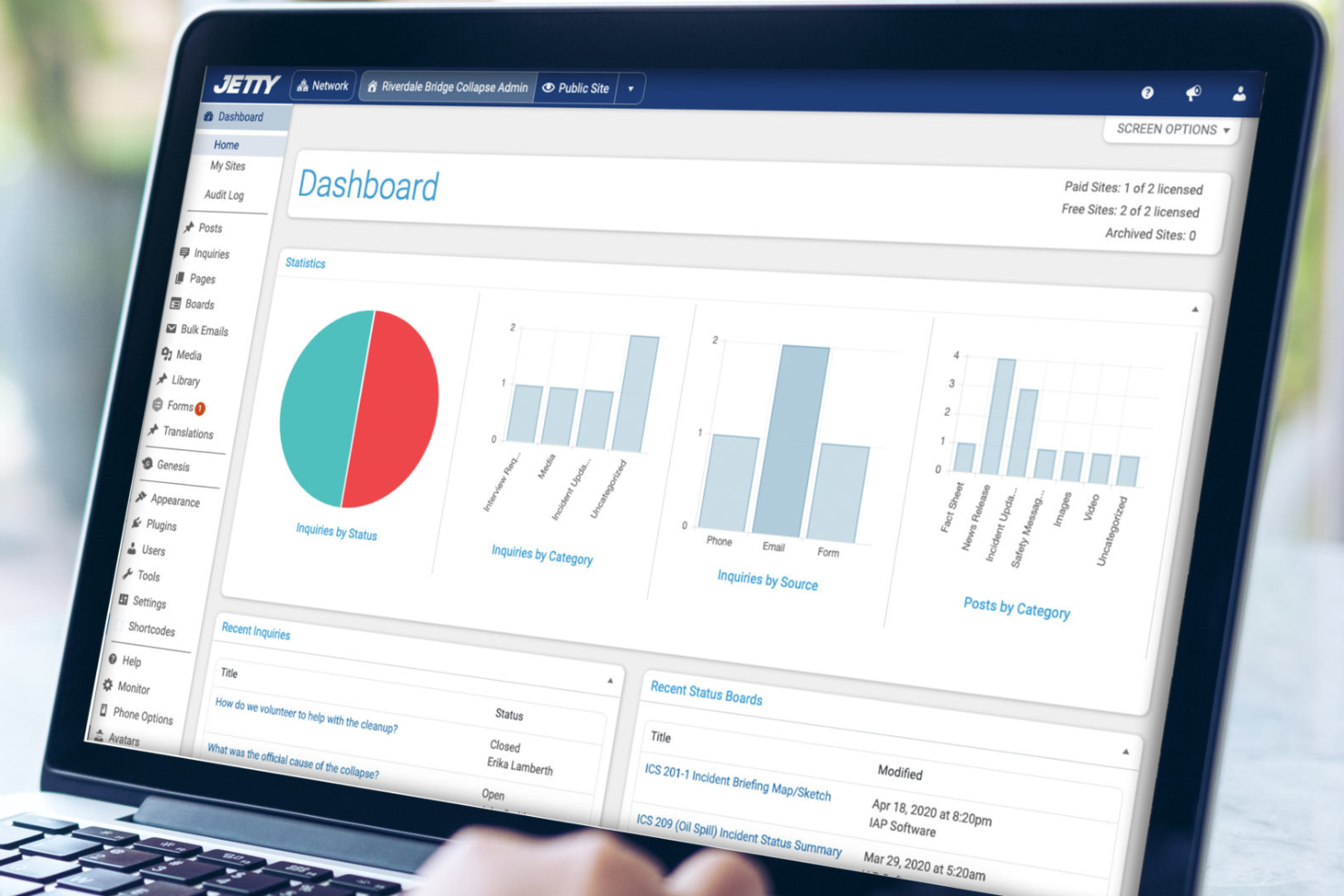
Jetty es un software de gestión de crisis diseñado para empresas que valoran la simplicidad y la facilidad de uso. Ofrece herramientas para ayudar a gestionar incidentes y comunicaciones.
Por qué elegí Jetty: La interfaz fácil de usar de Jetty lo hace accesible para equipos con diferentes niveles de experiencia técnica. Sus capacidades incluyen notificaciones automáticas y análisis basados en datos, asegurando que tu equipo permanezca informado.
Jetty optimiza la gestión de incidentes con paneles intuitivos y alertas en tiempo real. Estas características lo convierten en una excelente opción para organizaciones que buscan una solución sencilla para la gestión de crisis.
Características y integraciones destacadas:
Características incluyen una interfaz de arrastrar y soltar que simplifica la configuración, alertas personalizables para adaptarse a las necesidades de tu equipo y un sistema de informes que proporciona información clara sobre los incidentes. Estas funcionalidades te ayudan a gestionar crisis de forma eficiente.
Integraciones incluyen el software IAP de Response Group (sincronización de formularios de incidentes con paneles de estado), fuentes de monitoreo de redes sociales, fuentes de monitoreo de noticias tradicionales y las aplicaciones móviles Jetty para iOS y Android.
Pros and Cons
Pros:
- Lanza rápidamente sitios web específicos para incidentes
- Notificaciones automáticas de revisión
- El contenido se puede traducir y publicar en más de 100 idiomas
Cons:
- Se centra únicamente en las comunicaciones
- Falta de capacidades de IA para la planificación de respuestas

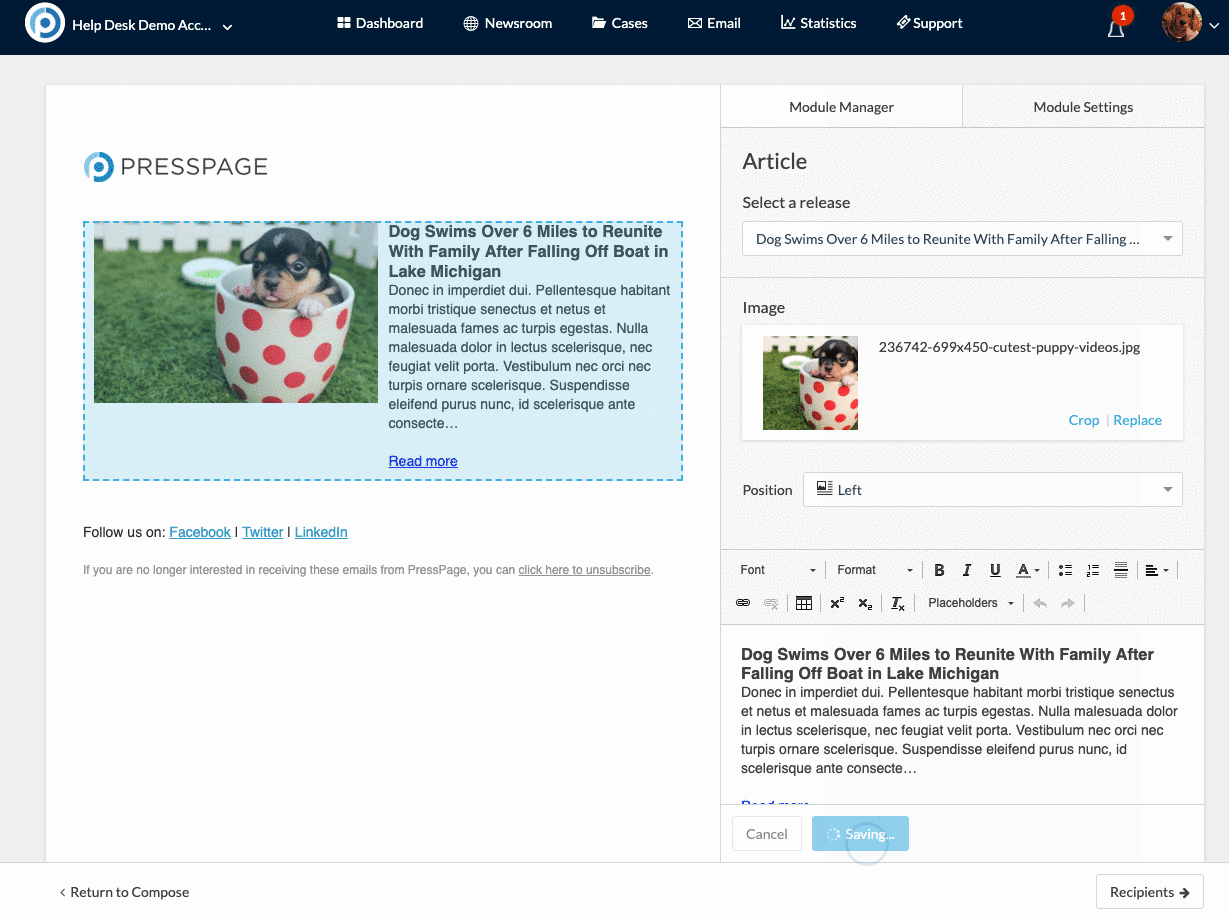
Presspage es un software de comunicación de crisis diseñado para equipos de relaciones públicas y medios, que ofrece herramientas para gestionar salas de prensa y distribuir comunicados. Proporciona analíticas impulsadas por IA que te ayudan a medir el impacto y la interacción en los medios.
Por qué elegí Presspage: Presspage destaca en relaciones con los medios, ofreciendo información basada en IA que ayuda a tu equipo a comprender tendencias mediáticas. Su distribución automatizada de comunicados de prensa asegura que tus noticias lleguen al público adecuado.
Las herramientas analíticas de la plataforma proporcionan informes detallados sobre la interacción y cobertura en los medios. Estas características hacen de Presspage una excelente opción para equipos enfocados en gestionar la presencia mediática de su marca.
Características destacadas e integraciones:
Características incluyen un editor de arrastrar y soltar para crear contenido fácilmente, un sistema de gestión de salas de prensa para organizar los materiales y una biblioteca de medios para almacenar y compartir recursos. Estas funciones ayudan a tu equipo a mantener una presencia mediática consistente y profesional.
Integraciones incluyen Staffbase Communications Control, Google Analytics, Facebook, Instagram, X (Twitter), comScore, fuentes RSS/XML, acceso personalizado a API y servicios de dominios Bitly o traducción para funcionalidades extendidas
Pros and Cons
Pros:
- Solución integrada todo en uno para gestión y distribución
- Distribución automatizada de comunicados de prensa
- Analíticas de medios detalladas para seguimiento de interacción
Cons:
- Se centra en medios propios versus monitorización de medios ganados
- Precios modulares con cargos por complementos


Riskonnect es un software de gestión de crisis diseñado para empresas enfocadas en la gestión de riesgos y la continuidad del negocio. Ofrece análisis impulsados por IA para ayudarte a identificar y mitigar riesgos.
Por qué elegí Riskonnect: Las capacidades de IA de Riskonnect proporcionan evaluaciones de riesgos detalladas que ayudan a tu equipo a tomar decisiones informadas. Sus paneles en tiempo real ofrecen visibilidad sobre posibles crisis y sus impactos.
Los flujos de trabajo automatizados de la herramienta simplifican el proceso de respuesta a las crisis. Estas características hacen de Riskonnect una opción popular para las organizaciones que priorizan la gestión integral de riesgos.
Características destacadas e integraciones:
Características incluyen una plataforma centralizada para todos los datos relacionados con riesgos, herramientas de informes personalizables para adaptarse a las necesidades de tu negocio y planificación de escenarios para poner a prueba las respuestas de tu equipo ante diferentes crisis. Estas funciones pueden mejorar tu capacidad para gestionar riesgos.
Integraciones incluyen Oracle, Slack, Everbridge, Microsoft Excel, WTW, Twilio, ServiceNow, UCF, SAP, Workday, AWS 33, FilNet, IBM Doors y Lineslip.
Pros and Cons
Pros:
- Combina datos de riesgos para una visión de 360 grados
- Predicción de la gravedad de eventos adversos e información relevante
- Flujos de trabajo automatizados para la respuesta ante desastres
Cons:
- Las funciones complejas requieren una formación extensa
- La eficacia depende de la calidad de los datos


iTacit es una plataforma interna de comunicación para crisis, diseñada para organizaciones que necesitan canales de comunicación eficaces. Ofrece herramientas impulsadas por IA para facilitar una comunicación rápida y clara durante las crisis.
Por qué elegí iTacit: iTacit destaca en las comunicaciones internas gracias a sus capacidades de IA que automatizan la distribución de mensajes a grupos específicos. Sus conocimientos automatizados por IA te ayudan a comprender los patrones de comunicación y optimizar la efectividad de los mensajes.
El software proporciona herramientas para crear y enviar mensajes a través de diversos canales, lo que garantiza que tu equipo se mantenga informado. Estas funciones hacen de iTacit una opción sólida para organizaciones que priorizan la comunicación interna durante emergencias.
Funciones destacadas e integraciones:
Funciones incluyen un panel de control personalizable que te permite adaptar la interfaz según tus necesidades, un sistema de retroalimentación para recopilar opiniones del equipo y herramientas de análisis para medir el impacto de la comunicación. Estas funciones pueden mejorar la capacidad de tu equipo para mantenerse conectado e informado.
Las integraciones incluyen ADP, BambooHR, SAP, Oracle, Ceridian, UKG, Workday, Sage, Google Workspace y Microsoft Entra ID.
Pros and Cons
Pros:
- Ofrece acceso móvil y web para trabajar en cualquier lugar
- Soporte de contenido multimedia al redactar mensajes
- Editores de arrastrar y soltar que no requieren conocimientos de codificación
Cons:
- Requiere tiempo de gestión dedicado
- Carece de funciones avanzadas de análisis

Crises Control es una plataforma de gestión de crisis diseñada para pequeñas empresas y organizaciones. Proporciona alertas impulsadas por IA y gestión de incidentes para ayudarte a manejar emergencias de manera eficaz.
Por qué elegí Crises Control: Crises Control está diseñado para satisfacer las necesidades de pequeñas empresas gracias a su interfaz fácil de usar y sus capacidades de inteligencia artificial. Ofrece alertas y reportes de incidentes automatizados, asegurando que tu equipo se mantenga informado durante emergencias.
El panel de control intuitivo de la plataforma proporciona actualizaciones y análisis en tiempo real para guiar la toma de decisiones. Estas funciones pueden ofrecer a equipos pequeños una solución sencilla de gestión de crisis.
Funciones y conexiones destacadas:
Funciones incluyen una app móvil que permite a tu equipo acceder a la plataforma desde cualquier lugar, un gestor de tareas para asignar y rastrear responsabilidades, y una herramienta de reporte de incidentes mejorada con IA para bitácoras detalladas. Estas funciones mantienen a tu equipo organizado y receptivo.
Integraciones incluyen Microsoft Teams, Slack, Azure Active Directory, Workday, Okta, y BambooHR.
Pros and Cons
Pros:
- Interfaz sencilla para acceso rápido
- Alta capacidad de procesamiento de llamadas de voz
- Asistente de emergencias con IA CRAiG
Cons:
- Falta de geoperimetraje más detallado
- Errores ocasionales en el software

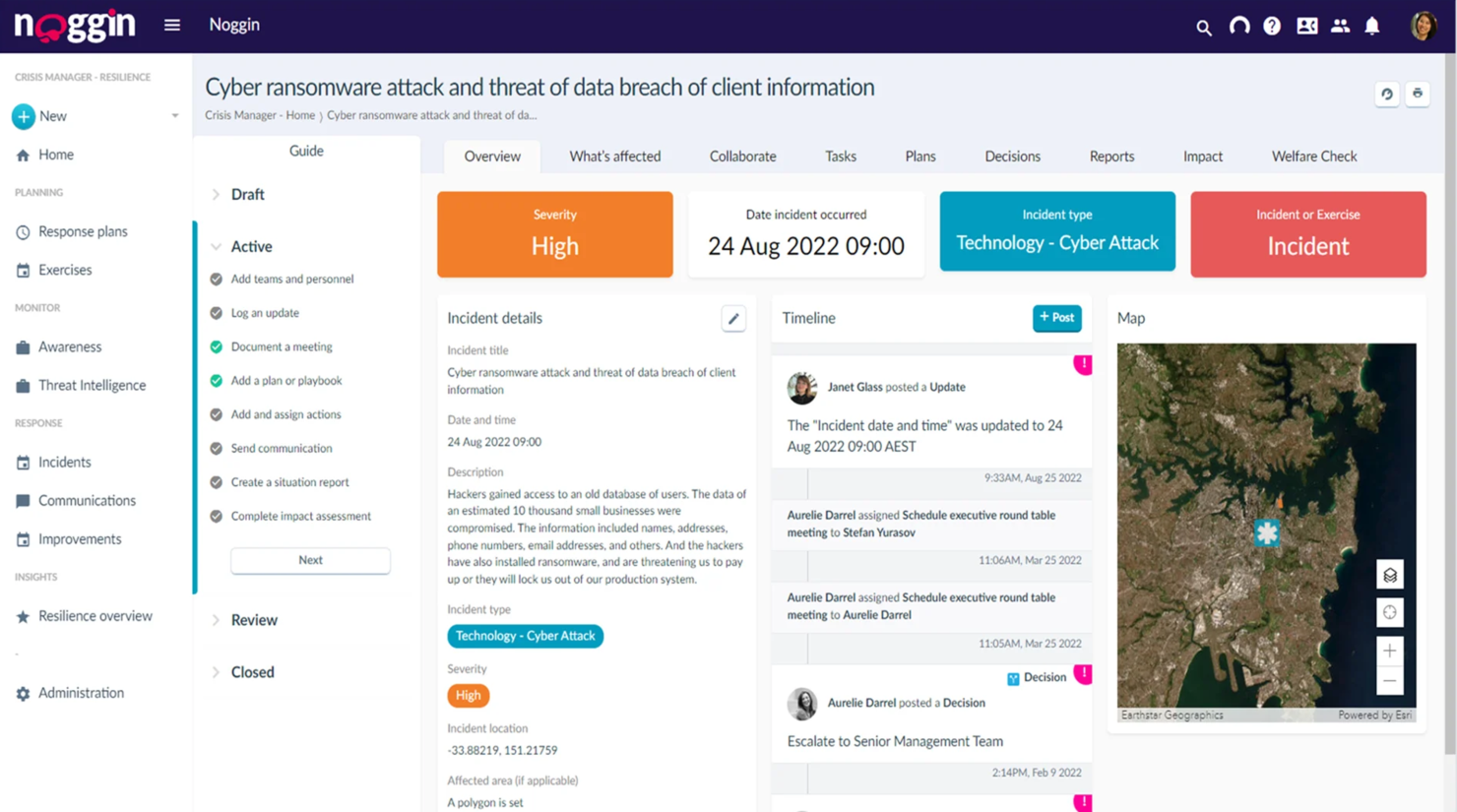
Noggin es un software de comunicaciones de crisis diseñado para industrias como la aviación y la atención médica. Integra la gestión de riesgos y la gestión de incidentes con información impulsada por IA para mejorar la toma de decisiones durante crisis.
Por qué elegí Noggin: Las perspectivas de datos en tiempo real de Noggin son un diferenciador clave. Sus funciones de IA incluyen mensajes basados en ubicación y flujos de trabajo automatizados, que ayudan a tu equipo a responder rápidamente ante crisis.
La plataforma ofrece plantillas de mensajes preplanificadas y comunicaciones dirigidas, lo que te permite gestionar respuestas de manera eficaz. Estas capacidades de IA hacen de Noggin una herramienta poderosa para organizaciones que necesitan información oportuna y precisa durante emergencias.
Funciones destacadas e integraciones:
Funciones incluyen flujos de trabajo automatizados que simplifican la respuesta a crisis, mensajes basados en ubicación para dirigir áreas específicas y plantillas de mensajes preplanificadas para una comunicación rápida. Estas funciones aseguran que tu equipo pueda actuar con rapidez y eficiencia en situaciones de alta presión.
Integraciones incluyen Microsoft 365, SAP, Oracle, ServiceNow, IBM, Tableau, AWS y PeopleSoft.
Pros and Cons
Pros:
- Datos en tiempo real para una toma de decisiones rápida
- Biblioteca de plantillas de mensajes predefinidas
- Personalización sin programación
Cons:
- La interfaz de usuario carece de la profundidad de algunos competidores
- Limitaciones de acceso en la app móvil
Otras herramientas de IA para la gestión de crisis
Estas son algunas opciones adicionales de herramientas de IA para la gestión de crisis que no llegaron a mi lista, pero que aun así merece la pena consultar:
- D4H
Ideal para equipos de respuesta a emergencias
- EcoOnline
Ideal para el cumplimiento de la salud ambiental
- YUDU Sentinel
Ideal para canales de comunicación seguros


Cómo evalúo las herramientas de IA para gestión de crisis
Cada herramienta en esta lista debe aportar algo más que una etiqueta de IA: tiene que ofrecer un valor real usando IA cuando los equipos de RRHH enfrentan interrupciones en la fuerza laboral, incidentes de seguridad o amenazas reputacionales. Divido mi evaluación en dos niveles: la funcionalidad básica que toda herramienta debe tener para calificar y los factores diferenciadores que separan las opciones buenas de las excelentes.
Funcionalidad básica (Requisitos mínimos para esta lista)
Cuando selecciono herramientas para mi lista, evalúo cada una en una escala del 0 (no ofrece la funcionalidad) al 5 (destaca en esta área) para cada funcionalidad básica enumerada a continuación. Después, calculo la puntuación total de la herramienta como un porcentaje. Cada herramienta debe alcanzar una puntuación total mínima del 55% para ser considerada.
- Detección de amenazas impulsada por IA: Busco herramientas que utilicen aprendizaje automático para identificar riesgos emergentes—como un aumento en la intención de renuncia o agrupaciones de sentimiento negativo—antes de que los líderes de RRHH se enteren por otros medios.
- Notificación masiva en tiempo real: Cada herramienta debe enviar alertas multicanal (SMS, correo electrónico, notificaciones push, voz) lo suficientemente rápido como para alcanzar a una fuerza laboral distribuida durante un incidente activo.
- Flujos de trabajo de respuesta a incidentes: Aquí importan los protocolos estructurados con asignación automática de tareas, para que los equipos de RRHH puedan asignar roles y escalar problemas sin depender de cadenas de correos improvisadas.
- Análisis de sentimiento y riesgo con IA: Evalúo si la herramienta aplica PLN a los comentarios de los empleados o canales internos para cuantificar cambios de moral, y no sólo para sumar puntuaciones de encuestas.
- Seguridad del empleado y check-in: Las revisiones automatizadas de bienestar con paneles de estado ayudan a RRHH a confirmar la seguridad de los empleados durante eventos como desastres naturales o emergencias en instalaciones.
- Registro de auditoría e informes de cumplimiento: Toda acción, alerta y decisión debe estar sellada por tiempo y ser exportable para que RRHH pueda cumplir con revisiones regulatorias o auditorías internas posteriores al incidente.
Una vez que tengo una lista de herramientas que cumplen estos criterios, considero qué diferencia a cada plataforma.
Factores diferenciadores (lo que distingue a los proveedores)
Así es como comparo y contrasto los diferentes proveedores:
Funciones destacadas
Un copiloto generativo de IA puede ahorrar minutos cruciales al redactar comunicaciones para empleados y sugerir respuestas durante un incidente. También busco capacidades de simulación de escenarios: las herramientas que permiten a los equipos de RRHH practicar con ejercicios de mesa ante escenarios de crisis generados por IA ayudan a desarrollar memoria muscular real antes de que ocurra un evento auténtico. Para plantillas globales, la traducción automática multilingüe es un gran diferenciador, asegurando que las alertas lleguen a cada empleado en su idioma preferido sin esperar a una traducción manual.
Más allá de las funciones
La seguridad de los datos es aún más crucial aquí que en la mayoría de herramientas de RRHH, porque las plataformas de crisis manejan información personal sensible bajo condiciones de alta presión. Reviso que cuenten con certificación SOC 2 tipo II y opciones claras de residencia de datos. El nivel de integración con su HRIS existente es otro factor importante: si la herramienta no puede sincronizarse con sistemas como Workday o SAP SuccessFactors, sus flujos de respuesta tendrán brechas. También evalúo los modelos de precios, especialmente si las funciones de IA están en niveles premium o si se aplican tarifas adicionales durante crisis activas cuando el uso aumenta.
Cómo elegir una herramienta de IA para la gestión de crisis
Es fácil perderse entre largas listas de funciones y estructuras de precios complejas. Para ayudarte a mantener la concentración mientras llevas a cabo tu proceso específico de selección de software, aquí tienes una lista de factores que debes tener en cuenta:
| Factor | Qué tener en cuenta |
|---|---|
| Escalabilidad | ¿Puede la herramienta crecer con tu organización? Ten en cuenta las necesidades futuras y si el software puede gestionar un aumento de usuarios y datos sin problemas de rendimiento. |
| Integraciones | ¿Funciona con tus sistemas actuales? Comprueba la compatibilidad con herramientas actuales como Slack, Microsoft Teams y Salesforce para evitar interrupciones en los flujos de trabajo. |
| Personalización | ¿Puedes adaptarla para que se ajuste a tus procesos? Busca opciones que te permitan modificar paneles, alertas e informes para adaptarlos al flujo de trabajo de tu equipo. |
| Facilidad de uso | ¿Es fácil de usar para todos los miembros del equipo? Evalúa la interfaz y la navegación para asegurarte de que el personal pueda utilizarla con una formación mínima. |
| Implementación e incorporación | ¿Con qué rapidez puedes empezar? Evalúa los recursos y el soporte disponibles para la configuración, incluidos los vídeos de formación y las demostraciones en directo. |
| Coste | ¿Se ajusta a tu presupuesto? Compara los planes de precios y considera el coste total de propiedad, incluidas las tarifas ocultas y los compromisos a largo plazo. |
| Medidas de seguridad | ¿Protege tus datos? Verifica funciones de seguridad como el cifrado, los controles de acceso y el cumplimiento de las normativas de protección de datos. |
| Disponibilidad del soporte | ¿Hay ayuda disponible cuando la necesitas? Asegúrate de que el proveedor ofrezca canales de soporte fiables, como chat en directo, teléfono y correo electrónico, especialmente durante las emergencias. |
¿Qué son las herramientas de gestión de crisis con IA?
Las herramientas de gestión de crisis con IA son soluciones de software diseñadas para ayudar a las organizaciones a gestionar y responder ante emergencias mediante inteligencia artificial. Utilizadas habitualmente por responsables de crisis, equipos de comunicación y servicios de emergencia, estas herramientas proporcionan análisis de datos en tiempo real y alertas automatizadas para mejorar la toma de decisiones y la comunicación.
Funciones como las alertas en tiempo real, la información basada en datos y los flujos de trabajo automatizados ayudan a facilitar una respuesta y coordinación eficientes ante las crisis. En general, estas herramientas ofrecen un valor significativo al mejorar los tiempos de respuesta y garantizar una gestión de crisis más eficaz.
Funciones
Al seleccionar herramientas de gestión de crisis con IA, presta atención a las siguientes funciones clave:
- Alertas en tiempo real: Proporcionan notificaciones inmediatas para garantizar una respuesta rápida ante las crisis emergentes.
- Información basada en datos: Analiza datos históricos para ofrecer información útil, ayudando a los equipos a tomar decisiones fundamentadas rápidamente.
- Flujos de trabajo automatizados: Automatizan la comunicación y la gestión de tareas para mejorar la eficiencia durante las emergencias.
- Análisis de sentimientos: Supervisa el sentimiento del público y el interno para evaluar las reacciones y ajustar las estrategias de crisis en consecuencia.
- Segmentación geográfica: Envía alertas basadas en la ubicación para garantizar que las personas adecuadas reciban la información correcta.
- Análisis predictivo: Anticipa posibles riesgos y amenazas, lo que permite a los equipos prepararse y mitigar los problemas de forma proactiva.
- Paneles personalizables: Ofrecen vistas adaptadas de conjuntos de datos y alertas, ayudando a los usuarios a centrarse en lo más importante para su función.
- Seguimiento de incidentes: Registra y supervisa incidentes para proporcionar una visión general clara y facilitar el análisis posterior a la crisis.
- Planificación de escenarios: Permite a los equipos generar una simulación de crisis y poner a prueba sus respuestas, mejorando la preparación y las estrategias de respuesta.
- Compatibilidad con integraciones: Se conecta con las herramientas y los sistemas existentes para mantener una comunicación y un flujo de datos fluidos entre plataformas.
Ventajas
La implementación de herramientas de gestión de crisis con IA proporciona varias ventajas para tu equipo y tu empresa. Estas son algunas de las que puedes esperar:
- Tiempos de respuesta más rápidos: Las alertas en tiempo real y los flujos de trabajo automatizados ayudan a tu equipo a actuar con rapidez durante las crisis.
- Toma de decisiones fundamentada: La información basada en datos proporciona la información necesaria para tomar decisiones acertadas bajo presión.
- Gestión proactiva de riesgos: Los modelos predictivos permiten anticipar posibles problemas de alto riesgo antes de que se agraven.
- Comunicación mejorada: La segmentación geográfica y el análisis de sentimientos garantizan que los mensajes lleguen a las personas adecuadas con el tono correcto.
- Mayor preparación: Las herramientas de planificación de escenarios ayudan a tu equipo a prepararse para diferentes situaciones de crisis, mejorando la preparación general.
- Asignación eficiente de recursos: El seguimiento de incidentes te ayuda a gestionar los recursos de forma eficaz durante las emergencias.
- Mejor coordinación: La compatibilidad con integraciones conecta con los sistemas existentes para mantener una comunicación fluida en toda tu organización.
Costes y precios
La selección de herramientas de gestión de crisis con IA requiere comprender los distintos modelos de precios y planes disponibles. Los costes varían en función de las funciones, el tamaño del equipo, los complementos y otros factores. La tabla siguiente resume los planes habituales, sus precios medios y las funciones que suelen incluir las soluciones de herramientas de gestión de crisis con IA:
Tabla comparativa de planes para herramientas de gestión de crisis con IA
| Tipo de plan | Precio medio | Funciones habituales |
|---|---|---|
| Plan gratuito | $0 | Alertas básicas, análisis de datos limitado y asistencia mínima. |
| Plan básico | $5,000-10,000/año | Alertas en tiempo real, informes básicos y acceso para un número limitado de usuarios. |
| Plan empresarial | +$10,000/año | Análisis avanzado, paneles personalizados, asistencia completa para la integración y asistencia dedicada. |
Preguntas frecuentes sobre herramientas de gestión de crisis con IA
Estas son algunas respuestas a preguntas frecuentes sobre las herramientas de gestión de crisis con IA:
¿Pueden las herramientas de gestión de crisis con IA integrarse con los sistemas existentes?
Sí, las herramientas de gestión de crisis con IA suelen integrarse con sistemas existentes como Microsoft Teams, Slack y Salesforce. Al evaluar las herramientas, comprueba su compatibilidad con tu conjunto de programas actual. Considera utilizar API o soluciones de middleware si no hay integración directa disponible. Esto garantiza un flujo de datos y una comunicación coherentes. Consulta siempre con tu equipo de TI para evaluar los requisitos técnicos y los posibles desafíos durante el proceso de integración.
¿Se pueden personalizar las alertas y notificaciones en las herramientas de gestión de crisis con IA?
Sí, la mayoría de las herramientas de gestión de crisis con IA permiten personalizar las alertas y notificaciones. Puedes establecer activadores específicos según los tipos de incidentes o los niveles de gravedad. Adapta las notificaciones para que lleguen a los miembros adecuados del equipo a través de los canales preferidos, como el correo electrónico o los SMS. Esta personalización garantiza que la información llegue rápidamente a las personas adecuadas. Consulta la documentación de la herramienta o ponte en contacto con el servicio de asistencia para aprovechar al máximo esta función.
¿Cómo ayudan las herramientas de IA con el análisis posterior a una crisis?
Las herramientas de IA ayudan con el análisis posterior a una crisis al proporcionar informes detallados y conclusiones útiles. Mediante sus algoritmos, realizan un seguimiento de los datos de los incidentes, los tiempos de respuesta y la eficacia de la comunicación. A continuación, los modelos de IA utilizan estas conclusiones para identificar áreas de mejora y perfeccionar tus estrategias de gestión de crisis. Busca herramientas que ofrezcan análisis visuales y paneles para simplificar la interpretación de los datos. Revisa periódicamente los informes posteriores a las crisis para mejorar tu preparación ante futuros incidentes.
¿Pueden las herramientas de gestión de crisis con IA ayudar a los equipos remotos?
Sí, las herramientas de gestión de crisis con IA son adecuadas para los equipos remotos. Ofrecen acceso basado en la nube, lo que permite a los miembros del equipo conectarse desde cualquier lugar con conexión a Internet. Funciones como las notificaciones móviles y las herramientas de colaboración en tiempo real mantienen a todos informados y coordinados. Asegúrate de que tu equipo disponga de los dispositivos necesarios y entienda cómo acceder a la herramienta y utilizarla de forma remota. Esta configuración es esencial para mantener una comunicación eficaz durante las crisis.