

Los 10 mejores programas de gestión de personal sanitario en 2026

Lista de los mejores programas de gestión de personal sanitario


El software de gestión de personal sanitario te ayuda a programar los turnos del personal, controlar las horas y gestionar el cumplimiento normativo en hospitales, clínicas y centros asistenciales. Si buscas formas de mejorar la dotación de personal, controlar los costes laborales y reducir los quebraderos de cabeza relacionados con la programación, la plataforma de gestión de personal adecuada marca la diferencia. A continuación, encontrarás mi selección de los mejores programas de gestión de personal sanitario, para que puedas comparar las principales opciones, identificar sus puntos fuertes y decidir qué herramienta se adapta mejor a tus necesidades de planificación de personal para optimizar la atención al paciente.
Por qué confiar en nuestras reseñas de software
Nuestro equipo lleva probando y evaluando software desde 2012. Como expertos en RR. HH., sabemos lo difícil —y lo importante— que es elegir el software adecuado.
Para esta guía, evaluamos las herramientas mediante pruebas prácticas e investigación independiente, puntuando las herramientas según nuestros criterios de selección. También nos basamos en la experiencia de líderes de opinión del sector y de profesionales de RR. HH. en activo.
Nuestras reseñas reflejan nuestro criterio editorial humano, no un discurso de ventas.
Revisores expertos:
Tabla comparativa de programas de gestión de personal sanitario
Esta tabla comparativa resume los detalles de precios de mi selección de los mejores programas de gestión de personal sanitario:
| Tool | Best For | Trial Info | Price | ||
|---|---|---|---|---|---|
| 1 | La mejor para gestionar equipos móviles y sin escritorio | Prueba gratuita de 14 días + demo gratis disponible | Desde $29/mes (facturado anualmente) | Website | |
| 2 | Ideal para datos unificados de RR. HH., nóminas y turnos | Demo gratuita disponible | Precio bajo solicitud | Website | |
| 3 | Ideal para la programación personalizada de RR. HH. y la sincronización de nóminas | Demostración gratuita disponible | Desde $8/usuario/mes | Website | |
| 4 | La mejor opción para la obtención escalonada de personal, desde recursos internos hasta agencias | Demostración gratuita disponible | Precios disponibles previa solicitud | Website | |
| 5 | Ideal para programación rápida de turnos en salud | Prueba gratuita + demostración gratuita disponible | Desde $5/usuario/mes (facturado anualmente) | Website | |
| 6 | Ideal para flujos de trabajo integrados de recursos humanos y nómina | Demostración gratuita disponible | Precio bajo solicitud | Website | |
| 7 | Ideal para acreditación y formación del personal | Demostración gratuita disponible | Precios bajo solicitud. | Website | |
| 8 | Ideal para el apoyo a agencias de dotación de personal sanitario | Demo gratuita disponible | Desde $99/usuario/mes | Website | |
| 9 | Mejor para la flexibilidad en la programación de plantillas de alto volumen | Demostración gratuita disponible | Precio bajo petición | Website | |
| 10 | Ideal para la optimización de recursos a nivel de sistema | Demo gratuita disponible | Precios bajo solicitud | Website |

Análisis de los mejores programas de gestión de personal sanitario
A continuación, encontrarás mis resúmenes detallados de los mejores programas de gestión de personal sanitario que han entrado en mi lista de selección. En mis análisis, examino en detalle las funciones, los casos de uso más adecuados y las integraciones de cada plataforma para ayudarte a encontrar la mejor opción para ti.

La mejor para gestionar equipos móviles y sin escritorio
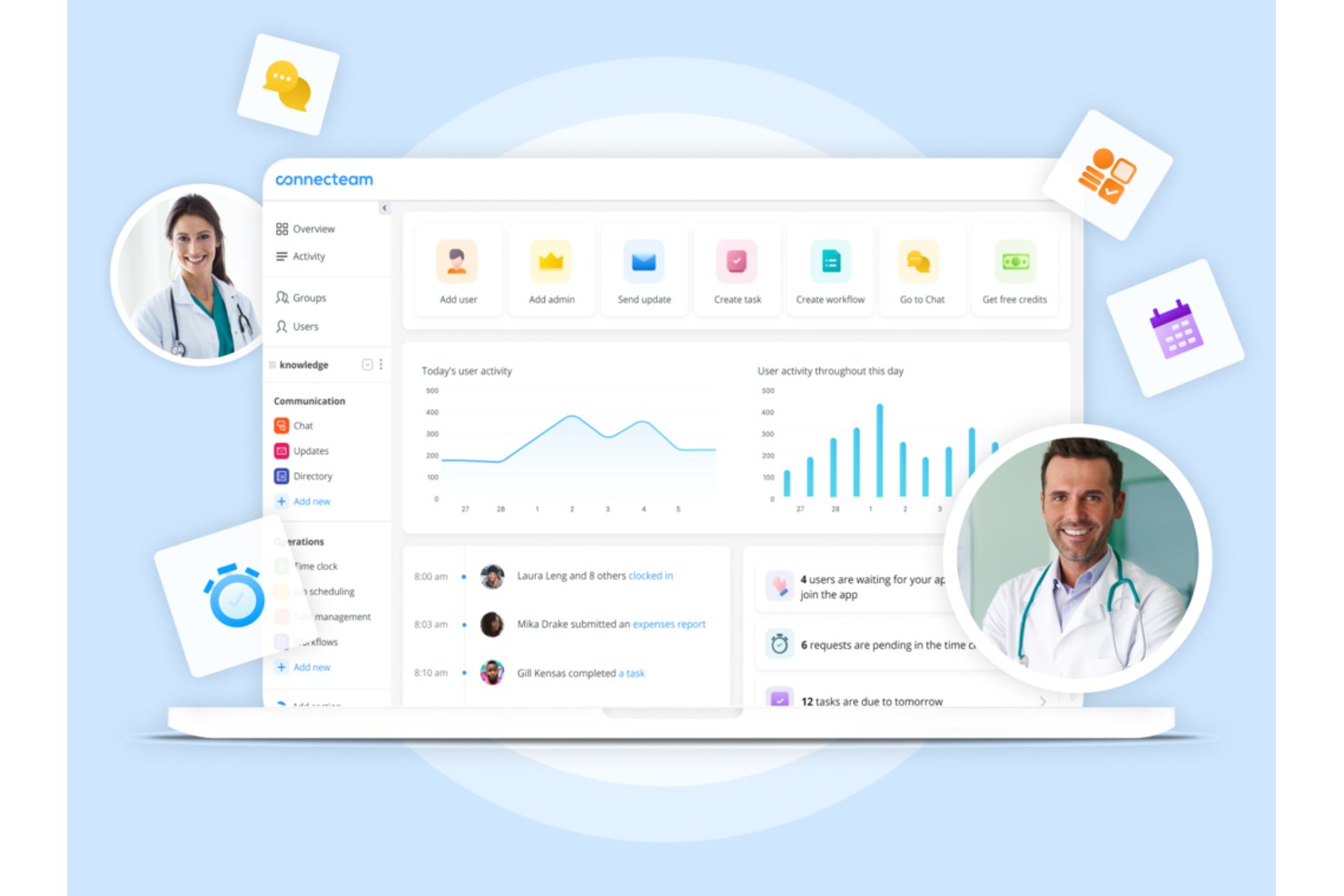
Connecteam es una plataforma de gestión de la fuerza laboral orientada a dispositivos móviles que combina la programación de turnos, el registro de horas, la comunicación en equipo y herramientas de recursos humanos para el personal sanitario de primera línea y sin escritorio.
¿Para quién es mejor Connecteam?
Es ideal para operaciones sanitarias pequeñas y medianas, como agencias de atención domiciliaria y clínicas, que necesitan una aplicación móvil sencilla para gestionar al personal no clínico.
Por qué elegí Connecteam
Elegí Connecteam porque su diseño enfocado en lo móvil realmente resuelve el problema de coordinación que enfrentan diariamente las agencias de cuidados a domicilio y las clínicas pequeñas. Programar a un trabajador de atención domiciliaria, confirmar su registro mediante GPS en la dirección de un paciente, y enviar un mensaje compatible con HIPAA sobre un cambio de turno, todo sucede dentro de una sola aplicación. Me gusta especialmente la función de programación automática, que crea horarios completos de turnos alrededor de la disponibilidad y funciones del personal sin necesidad de idas y vueltas manuales.
Características clave de Connecteam
- Formularios y listas de comprobación personalizables: Crea formularios y listas de verificación digitales para que el personal complete mediante su móvil.
- Mensajería compatible con HIPAA: Intercambia información sensible del equipo o de horarios, de forma segura dentro de la app.
- Gestión de documentos: Almacena, comparte y actualiza documentos de políticas, certificados y archivos de incorporación en un solo lugar.
- Gestión de tareas: Asigna tareas a individuos o equipos con seguimiento de estado en tiempo real para una mejor coordinación.
Integraciones de Connecteam
Connecteam ofrece integraciones nativas con Gusto, QuickBooks, Paychex, ADP y Xero para nómina, y proporciona una API para integraciones personalizadas.
Pros and Cons
Pros:
- La programación móvil se adapta al personal clínico sin escritorio
- Registros de entrada validados por GPS confirman la ubicación del personal remoto
- Mensajería de equipo integrada compatible con HIPAA incluida
Cons:
- Sin asignación por agudeza ni previsión de censo
- No incluye seguimiento de vencimiento de credenciales y licencias
New Product Updates from Connecteam

Connecteam Expands Break and Timesheet Controls
Connecteam adds flexible break thresholds, personalized policies, auto-end options, a centralized exceptions report, and improved timesheet issue visibility to help teams manage breaks and timesheets more effectively. For more information, visit Connecteam’s official site.
 .
.
Rippling
Ideal para datos unificados de RR. HH., nóminas y turnos
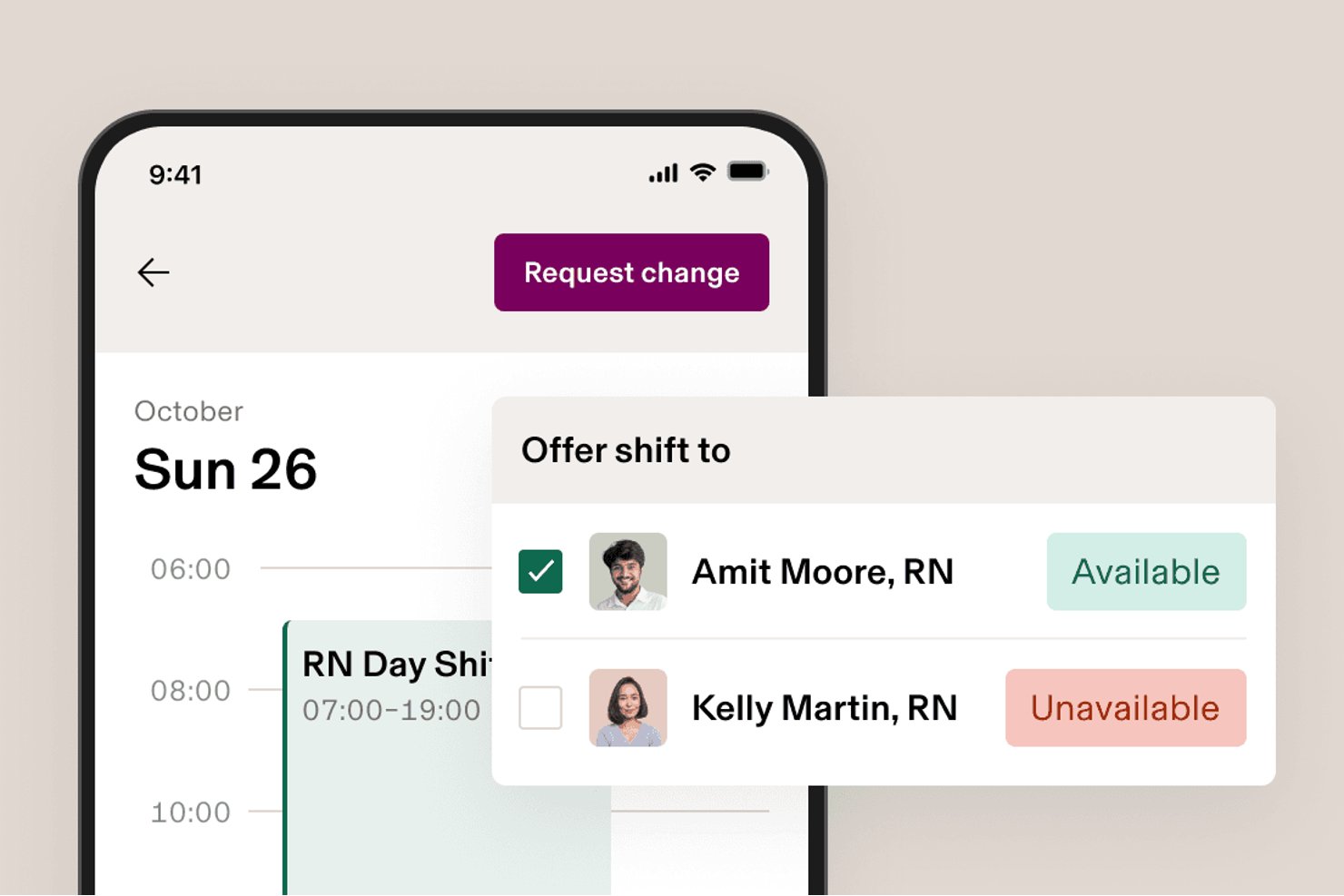
Rippling es una plataforma modular de RR. HH., nóminas y gestión de la plantilla que combina herramientas de programación, control horario y asistencia, beneficios y cumplimiento normativo en un único sistema unificado.
¿Para quién es más adecuado Rippling?
Rippling es una opción excelente para organizaciones del ámbito sanitario o con plantillas mixtas que desean unificar los RR. HH., las nóminas y la programación en un solo sistema sin tener que gestionar varias plataformas.
Por qué elegí Rippling
He incluido Rippling entre mis principales opciones porque es una de las pocas plataformas que mantiene los datos de RR. HH., nóminas y programación en un único sistema, por lo que no es necesario conciliar registros entre herramientas independientes. Me gusta especialmente cómo su programación de turnos redactada por IA utiliza datos actualizados de certificaciones y disponibilidad para crear asignaciones de turnos, algo importante cuando se gestiona personal con requisitos específicos de credenciales. Las normas laborales basadas en la ubicación se aplican automáticamente según el centro de trabajo, lo que reduce las comprobaciones manuales de cumplimiento en plantillas mixtas.
Características principales de Rippling
- Registro de entrada y salida desde el móvil: Los empleados pueden registrar su entrada y salida desde dispositivos iOS o Android, con comprobaciones automatizadas que detectan registros de salida omitidos y registros duplicados.
- Costes laborales por tarea o proyecto: El personal puede registrar las horas dedicadas a trabajos o tareas específicos, lo que proporciona a los responsables una visión más clara de los costes laborales según el tipo de trabajo.
- Paneles de informes personalizados: Crea paneles que muestren las tendencias de los costes laborales, los patrones de horas extra y los datos de retención de tu plantilla.
- Rippling Chat: Una herramienta de mensajería integrada que permite a los responsables compartir horarios y comunicarse con el personal sin salir de la plataforma.
Integraciones de Rippling
Rippling admite más de 650 integraciones, incluidas Slack, Microsoft Teams y Salesforce, además de una API pública para conexiones personalizadas.
Pros and Cons
Pros:
- Nóminas, programación y registros horarios unificados
- Las comprobaciones de certificaciones orientan las asignaciones de turnos
- Las normas de ubicación señalan problemas de cumplimiento de las nóminas
Cons:
- No ofrece previsiones de dotación de personal basadas en la gravedad de los pacientes
- No ofrece flujos de trabajo para verificar credenciales sanitarias
New Product Updates from Rippling

Rippling AI Adds Plugins, Skills, and Automations
Rippling AI now supports plugins, skills, and automations so employees can connect approved third-party tools, package repeatable work into reusable AI instructions, and run recurring workflows under existing Rippling policies and permissions. For more information, visit Rippling's official site.

Ideal para la programación personalizada de RR. HH. y la sincronización de nóminas
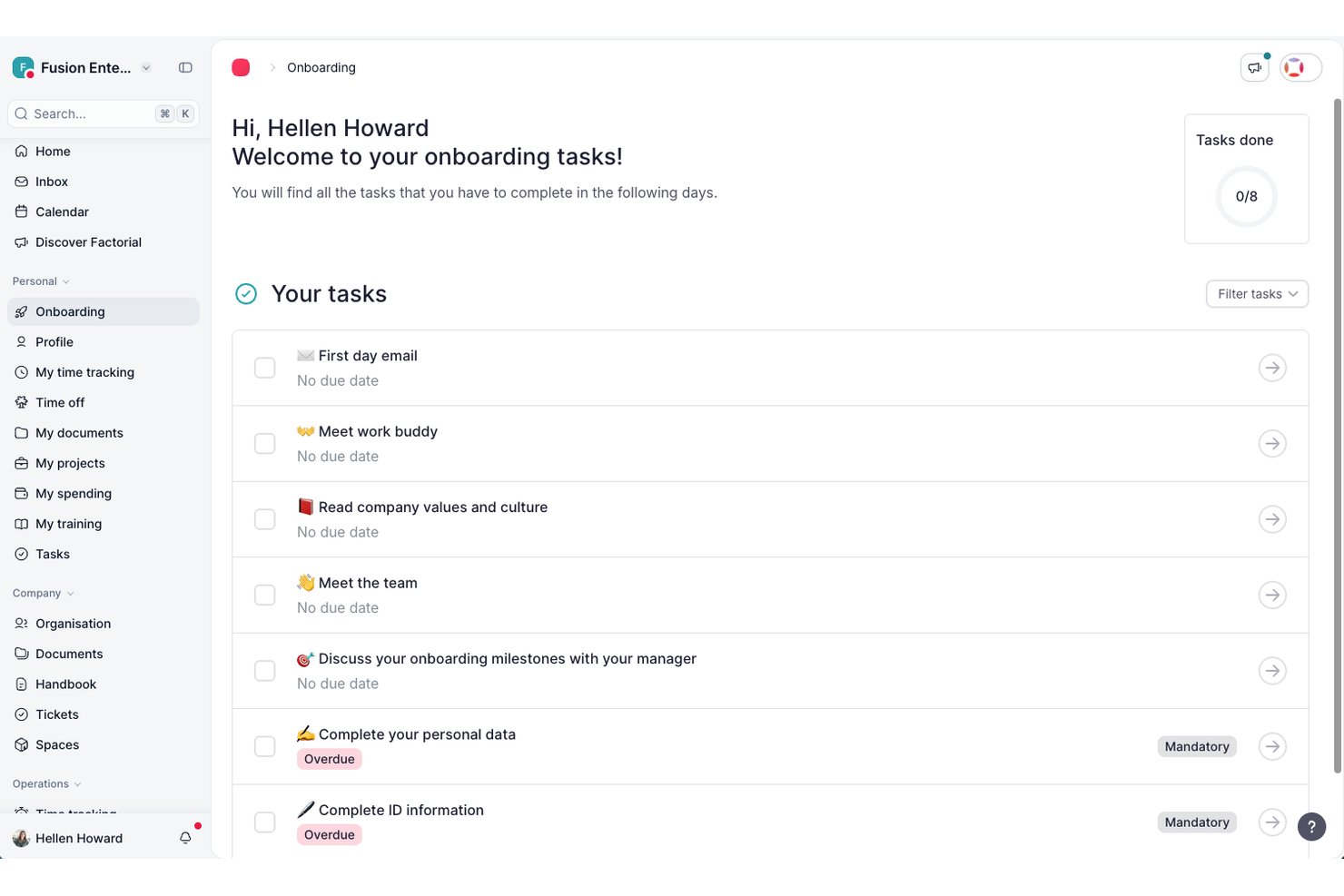
Factorial es un software integral de RR. HH. y nóminas diseñado para que las organizaciones de atención médica gestionen la programación, el control del tiempo, las nóminas y los datos de los empleados desde una sola plataforma.
¿Para quién es más adecuado Factorial?
Equipos de RR. HH. del sector de la atención médica en organizaciones pequeñas y medianas que desean unificar los registros de empleados, el cumplimiento normativo, la programación y las nóminas en una sola plataforma.
Por qué elegí Factorial
Elegí Factorial como una de las mejores opciones porque mi equipo puede configurar integraciones personalizadas de RR. HH. y nóminas para sincronizar los datos de programación y nóminas con nuestros otros sistemas, además de automatizar el cumplimiento de los turnos mediante flujos de trabajo específicos para la atención médica relacionados con el control del tiempo y la gestión de documentos.
Funciones principales de Factorial
- Portal de autoservicio para empleados: El personal puede actualizar sus datos personales, solicitar tiempo libre y acceder a sus recibos de nómina directamente en línea.
- Gestión digital de documentos: Almacena, organiza y comparte de forma segura los registros de empleados, contratos y documentación de cumplimiento normativo.
- Flujos de trabajo personalizados: Crea cadenas de aprobación para solicitudes como permisos, certificaciones y tareas de incorporación.
- Asistente de RR. HH. con inteligencia artificial: Utiliza la inteligencia artificial integrada para responder preguntas sobre RR. HH., mostrar información clave y automatizar tareas administrativas.
Integraciones de Factorial
Factorial ofrece integraciones nativas con Slack, Google Calendar, Microsoft Outlook, Sage HR, Teamtailor y QuickBooks. También hay una API disponible para integraciones personalizadas.
Pros and Cons
Pros:
- La programación automatizada se adapta a los cambios de turno
- La aplicación móvil permite el control remoto del tiempo
- Flujos de aprobación personalizados para el cumplimiento normativo en la atención médica
Cons:
- Las funciones de informes carecen de opciones avanzadas de personalización
- Disminuciones ocasionales del rendimiento del sistema durante los periodos de mayor uso

La mejor opción para la obtención escalonada de personal, desde recursos internos hasta agencias
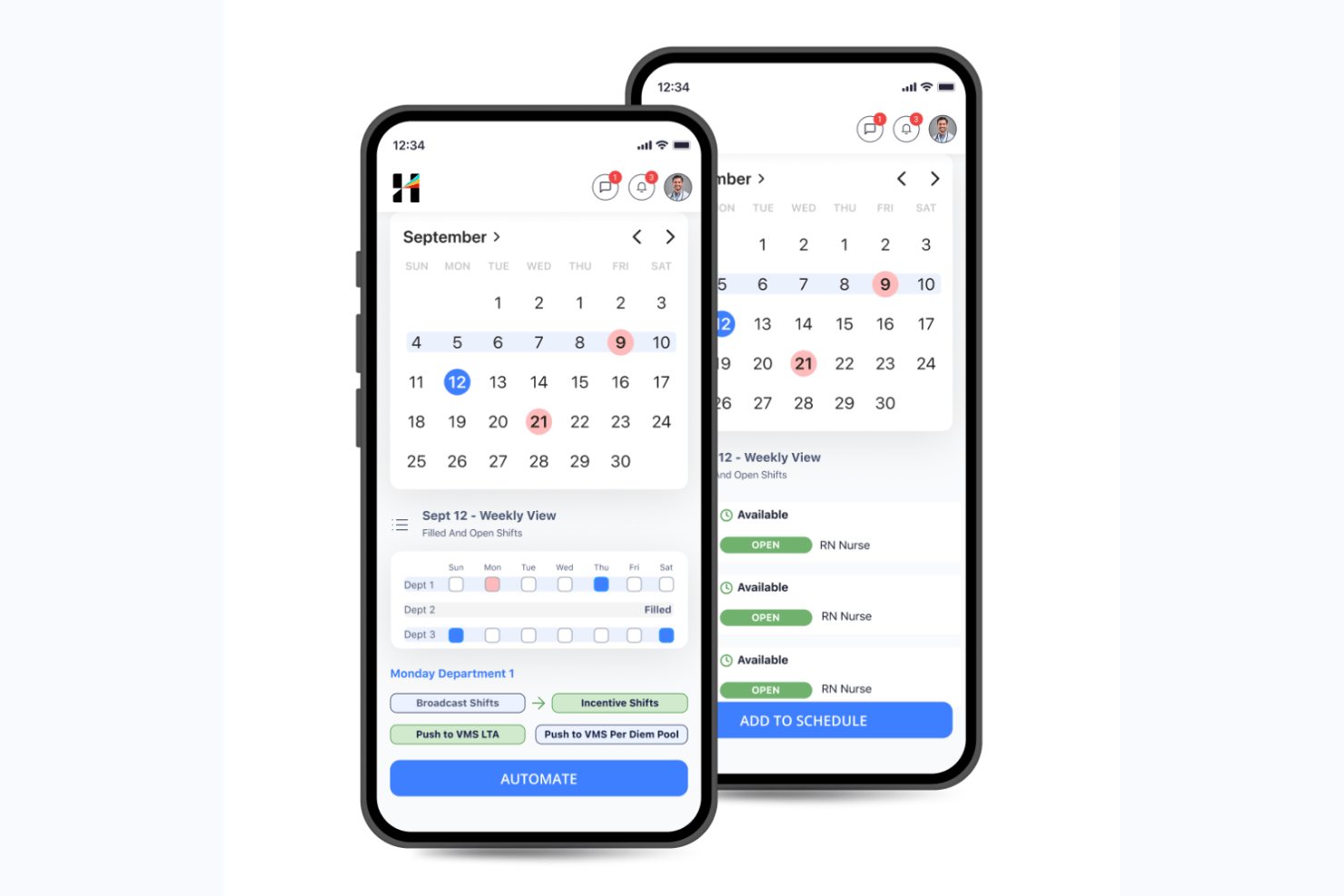
Hallmark Health Care Solutions es una plataforma nativa de IA para la gestión de la fuerza laboral sanitaria que combina la programación del personal clínico, la previsión de la demanda, la gestión de grupos de cobertura, un sistema integrado de gestión de proveedores y el seguimiento de credenciales en una sola suite.
¿Para quién es más adecuada Hallmark Health Care Solutions?
Hallmark Health Care Solutions es una opción especialmente adecuada para grandes sistemas hospitalarios y redes de salud que necesitan gestionar flujos de trabajo complejos de personal en varios niveles, a través de grupos de cobertura internos, proveedores de agencias y canales de trabajadores bajo demanda.
Por qué elegí Hallmark Health Care Solutions
Elegí Hallmark Health Care Solutions porque su flujo de trabajo escalonado para obtener personal es diferente de todo lo que he visto en esta categoría. El módulo Grupo de Recursos Internos (IRP) da prioridad primero al personal de cobertura propio, luego escala a su sistema integrado de gestión de proveedores (VMS), conectado a más de 750 agencias, y finalmente dirige la solicitud al mercado de enfermeros bajo demanda de CareRev. Un cliente amplió su IRP a más de 110 enfermeros y evitó 2,3 millones de dólares en gastos de agencias utilizando exactamente esta estructura.
Características principales de Hallmark Health Care Solutions
- Asignación de turnos habilitada por IA: Asigna automáticamente los turnos abiertos al personal cualificado según sus credenciales, disponibilidad, coste y las reglas de cumplimiento.
- Previsión de la demanda: Proyecta las necesidades de personal a nivel de unidad y línea de servicio utilizando datos de censo, duración de la estancia, ausencias imprevistas y tendencias estacionales.
- Inteligencia sobre tarifas de facturación mediante IA: Predice y compara las tarifas de facturación del personal contratado entre proveedores, unidades y regiones para respaldar la negociación de tarifas y el control de costes.
- Panel de información ejecutiva: Convierte los datos de la fuerza laboral en visibilidad al nivel de la alta dirección, conectando las decisiones de compensación con el margen, el riesgo de rotación y los resultados de los pacientes.
Integraciones de Hallmark Health Care Solutions
Hallmark Health Care Solutions se integra con Epic, Workday, UKG, Oracle PeopleSoft, Paycom, OnBase, Imprivata OneSign, symplr Payer y CareRev. Software Advice indica un total de 24 proveedores de integración.
Pros and Cons
Pros:
- Flujo de trabajo escalonado para la obtención de personal, desde recursos internos hasta agencias
- Previsión de la demanda y controles de costes basados en IA
- Asistencia especializada en la gestión de credenciales para el cumplimiento sanitario
Cons:
- Los precios personalizados requieren contactar directamente con el equipo de ventas
- Hay pocas reseñas públicas de usuarios disponibles

Deputy
Ideal para programación rápida de turnos en salud
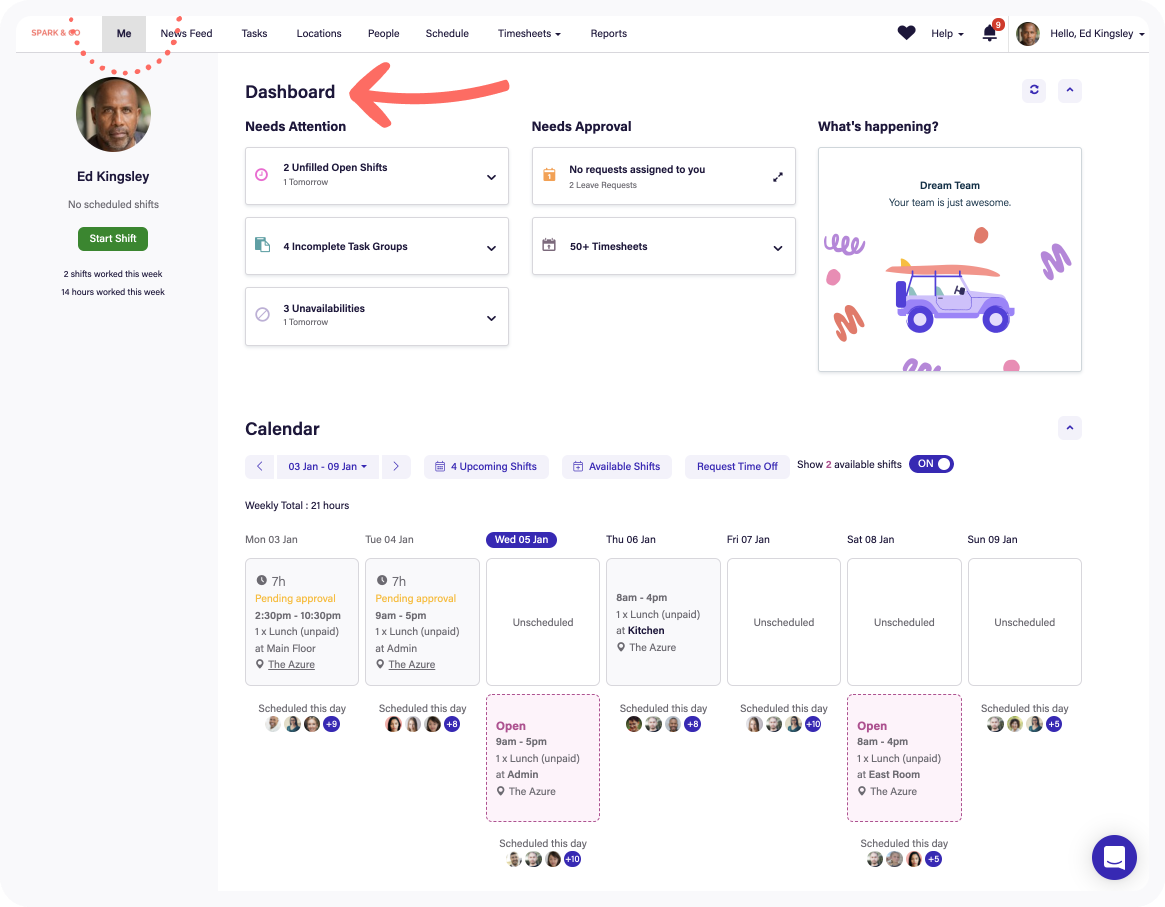
Deputy es un software de gestión de fuerza laboral para el sector salud que ofrece herramientas de programación de empleados, asignación de turnos, hojas de tiempo, gestión de licencias y acceso mediante aplicación móvil, diseñado para entornos sanitarios de ritmo acelerado.
¿Para quién es mejor Deputy?
Los gestores de enfermería y operadores de centros de salud que necesitan un sistema fácil de usar para gestionar grandes equipos basados en turnos en múltiples ubicaciones.
Por qué elegí Deputy
Elegí Deputy como uno de los mejores porque puedo crear y publicar los horarios de turnos de mi hospital en minutos, notificar a los cuidadores al instante con alertas móviles y usar controles de gestión de cumplimiento integrados que señalan posibles violaciones de personal mientras programo.
Características clave de Deputy
- Gestión de tareas: Asigne y realice el seguimiento de las responsabilidades diarias del personal durante los turnos.
- Planificación de fatiga y descansos: Planifique descansos obligatorios y controle el cumplimiento de las normas laborales sanitarias.
- Reloj de tiempo con verificación biométrica: Registre el ingreso del personal de manera segura usando reconocimiento facial o PIN en dispositivos quiosco.
- Gestión de licencias: Envíe, apruebe y realice el seguimiento de solicitudes de vacaciones o bajas por enfermedad de forma digital.
Integraciones de Deputy
Las integraciones incluyen Square, ADP, Gusto, BambooHR, QuickBooks, Clover, Dropbox, EdApp, Epos Now y HiBob.
Pros and Cons
Pros:
- Soporte para intercambio de turnos en la app móvil
- Relleno automático de turnos usando predicción de demanda con IA
- Hojas de tiempo integradas con verificación biométrica
Cons:
- Soporte limitado para jerarquías hospitalarias complejas
- Sin herramientas integradas de planificación de recursos empresariales

Oracle
Ideal para flujos de trabajo integrados de recursos humanos y nómina

Oracle es un software de gestión de la fuerza laboral en salud basado en la nube que ofrece recursos humanos, nómina, seguimiento del tiempo, programación y análisis de la fuerza laboral en una única plataforma unificada.
¿Para quién es mejor Oracle?
Las grandes organizaciones proveedoras de servicios de salud necesitan recursos humanos, nómina y gestión de la fuerza laboral centralizados a escala empresarial.
Por qué elegí Oracle
Elegí Oracle porque puedo conectar recursos humanos, nómina y programación de turnos en una sola plataforma, ejecutar flujos de trabajo unificados para los roles en salud y utilizar funciones predefinidas de cumplimiento y nómina para hospitales y clínicas.
Características clave de Oracle
- Acceso móvil: El personal y los gerentes pueden gestionar la programación y aprobaciones desde dispositivos móviles.
- Análisis avanzados: Acceso a paneles e informes sobre tendencias y productividad de la fuerza laboral.
- Postulación a turnos: Los empleados pueden ver y postularse a turnos disponibles directamente en la plataforma.
- Gestión de ausencias: Realiza un seguimiento de las ausencias, licencias por enfermedad y cumplimiento con la FMLA en un solo sistema.
Integraciones de Oracle
Las integraciones incluyen Accu-Time Systems, dormakaba Workforce Solutions, Grosvenor Technology y TCP Software.
Pros and Cons
Pros:
- Control centralizado de recursos humanos, nómina y programación
- Herramientas flexibles de análisis y generación de informes de la fuerza laboral
- Consolidación global de datos financieros y de nómina
Cons:
- La interfaz de usuario carece de terminología específica para el sector salud
- Requiere mantenimiento continuo del sistema
Ideal para acreditación y formación del personal

HealthStream es una plataforma de gestión de personal sanitario que ofrece herramientas para la acreditación, gestión del cumplimiento normativo, gestión del aprendizaje, seguimiento de políticas y gestión de competencias del personal.
¿Para Quién es Mejor HealthStream?
Hospitales, sistemas de salud y clínicas que necesitan centralizar la formación del personal, certificaciones y el cumplimiento continuo para su plantilla sanitaria.
Por Qué Elegí HealthStream
Elegí HealthStream como uno de los mejores porque confío en sus módulos dedicados para verificar las credenciales del personal, gestionar la formación sanitaria obligatoria y hacer seguimiento de licencias y certificaciones en tiempo real.
Funciones Clave de HealthStream
- Herramienta de creación de cursos: Permite crear y personalizar módulos de formación online para el personal sanitario.
- Plataforma de evaluación de competencias: Mide y documenta las competencias de la plantilla en roles clínicos y no clínicos.
- Módulo de gestión de políticas: Distribuye, rastrea y certifica el cumplimiento de políticas y procedimientos críticos en el lugar de trabajo.
- Aplicación móvil de aprendizaje: Permite a los empleados acceder a cursos y tareas desde teléfonos inteligentes y tabletas.
Integraciones de HealthStream
Las integraciones incluyen ADP, Cornerstone OnDemand, HireRight, AvoMD, EBSCO DynaMed, Workday, Adobe Sign, DocuSign, Zoom e Instamed.
Pros and Cons
Pros:
- Biblioteca de cursos clínicos para personal sanitario
- Seguimiento automatizado de la educación continua del personal
- Evaluaciones personalizables para competencias sanitarias
Cons:
- Opciones de autoservicio limitadas
- No cuenta con entorno de pruebas para la configuración de formaciones

Bullhorn
Ideal para el apoyo a agencias de dotación de personal sanitario
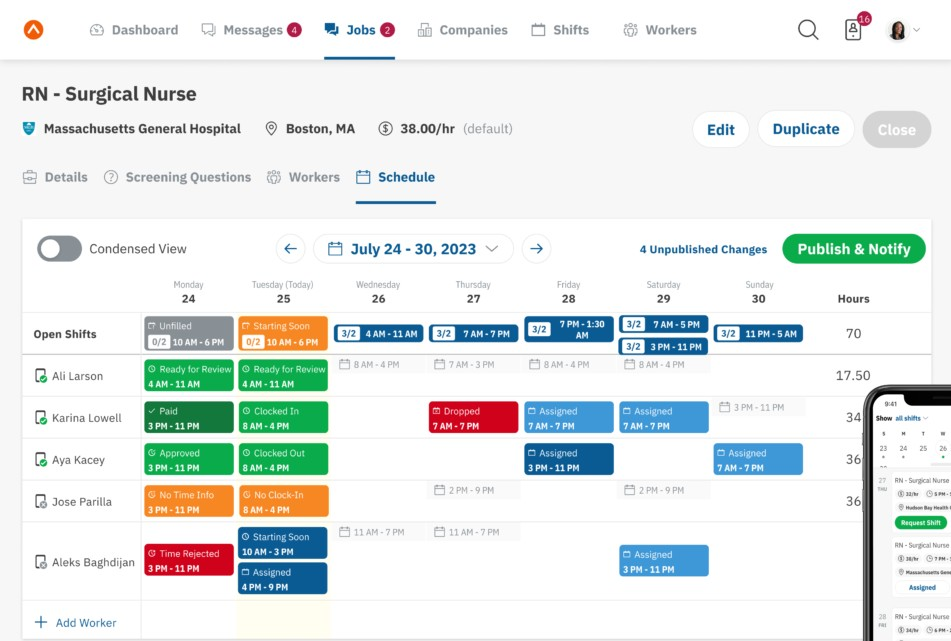
Bullhorn es una plataforma de gestión de personal y dotación de personal sanitario que permite a las agencias gestionar la búsqueda de candidatos, el seguimiento de credenciales, los turnos, el registro de horas y la interacción con los clientes en un solo sistema.
¿Para quién es Bullhorn más adecuado?
Las agencias de dotación de personal sanitario gestionan la colocación temporal de personal clínico y auxiliar en múltiples organizaciones.
Por qué elegí Bullhorn
Elegí Bullhorn como uno de los mejores porque puedo hacer un seguimiento de credenciales, gestionar colocaciones y automatizar la participación de candidatos, todo adaptado para agencias de personal sanitario que manejan una alta demanda de trabajos temporales y la coordinación en sitio con clientes.
Características clave de Bullhorn
- Panel de programación de turnos: Permite visualizar, asignar y actualizar los turnos en tiempo real.
- Acceso por aplicación móvil: Los equipos de personal y los candidatos pueden gestionar colocaciones desde cualquier dispositivo.
- Herramientas de informes personalizadas: Genera informes sobre la actividad laboral y los KPIs de la agencia.
- Registro de horas integrado: El personal utiliza herramientas digitales para registrar y verificar las horas de los turnos.
Integraciones de Bullhorn
Las integraciones incluyen Xero, LinkedIn, 1218 Global, 3B para Salesforce, Actonomy y ADP WOTC.
Pros and Cons
Pros:
- Gestión unificada del proceso de reclutamiento y colocación
- Gestión integrada de cumplimiento de turnos y vacantes
- Soporte para la gestión de personal por turnos o jornada
Cons:
- No permite entrada de datos sin conexión
- Incorporación compleja para administradores
Mejor para la flexibilidad en la programación de plantillas de alto volumen
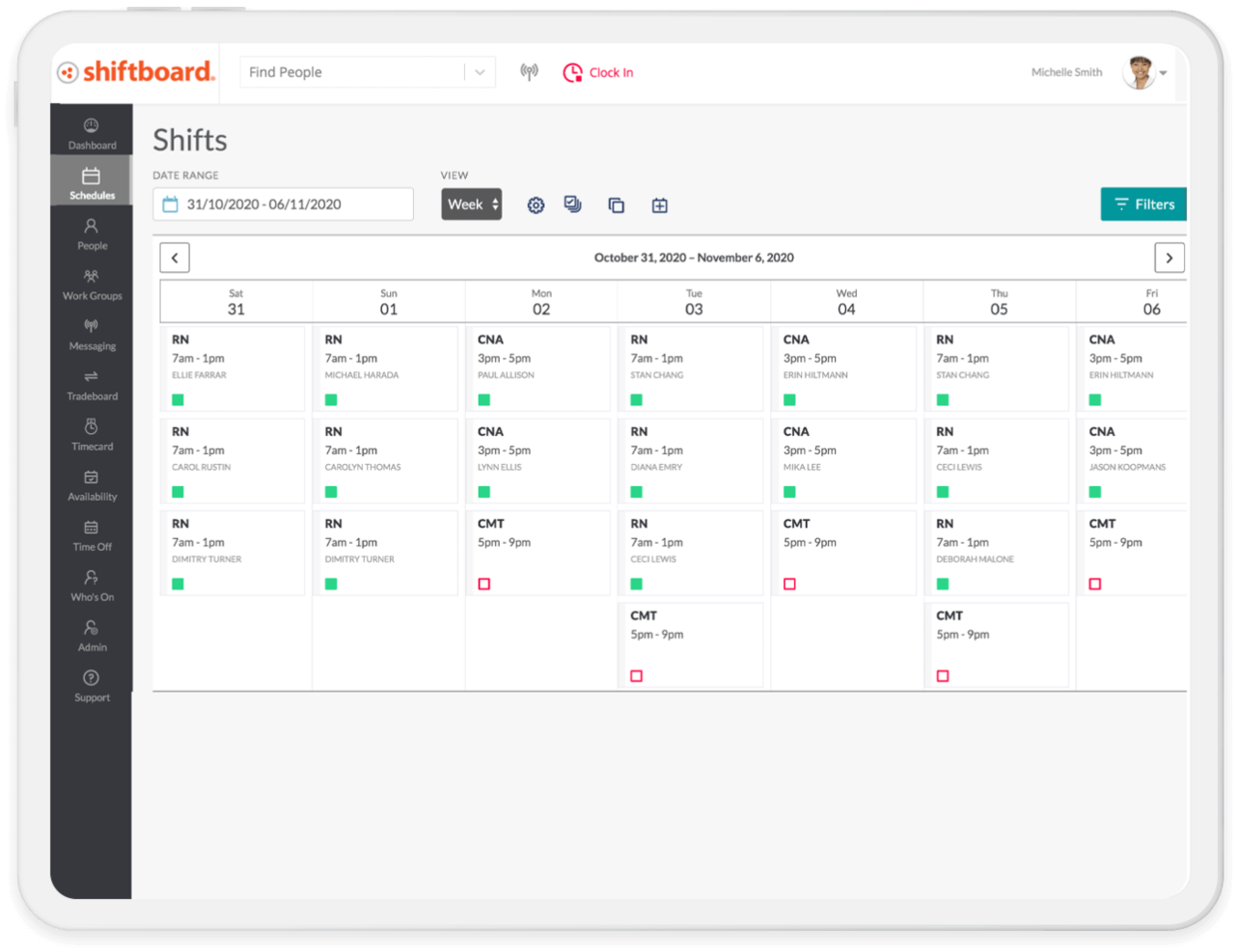
Shiftboard es un software de gestión de personal sanitario basado en la nube que ofrece programación de empleados flexible, gestión de turnos, herramientas de comunicación y supervisión de la dotación de personal en tiempo real para organizaciones con grandes plantillas dinámicas.
¿Para quién es mejor Shiftboard?
Grandes organizaciones de atención médica y agencias de personal que necesitan una gestión de turnos compleja y programación compatible con dispositivos móviles para plantillas variables y de alto volumen.
Por qué elegí Shiftboard
Elegí Shiftboard porque puedo establecer reglas complejas para turnos abiertos, cambios de última hora y restricciones de horas extra todo en una sola interfaz. En mi experiencia, sus capacidades para gestionar grandes volúmenes de personal manejan eficazmente la demanda fluctuante y los cambios dinámicos en los horarios.
Funciones clave de Shiftboard
- Seguimiento de credenciales: Realiza un seguimiento de las certificaciones, credenciales y fechas de renovación del personal directamente en la plataforma.
- Notificaciones móviles de turnos: Notifica a los empleados sobre nuevos turnos, cambios y aprobaciones mediante alertas móviles.
- Asignación automática de turnos: Cubre turnos abiertos automáticamente según las cualificaciones, preferencias y disponibilidad.
- Gestión de permisos: Permite a los empleados solicitar, ver y gestionar permisos desde el portal de autoservicio.
Integraciones de Shiftboard
Las integraciones incluyen UKG, Workday, ADP, Oracle PeopleSoft, SAP, Infor, Microsoft Dynamics, Salesforce, Workato y PlanetTogether.
Pros and Cons
Pros:
- Patrones de turnos flexibles para necesidades de personal fluctuantes
- Subasta de turnos de autoservicio para trabajadores por hora
- Notificaciones móviles en tiempo real para actualizaciones de turnos
Cons:
- La interfaz no está optimizada para móviles
- Opciones limitadas de informes automáticos
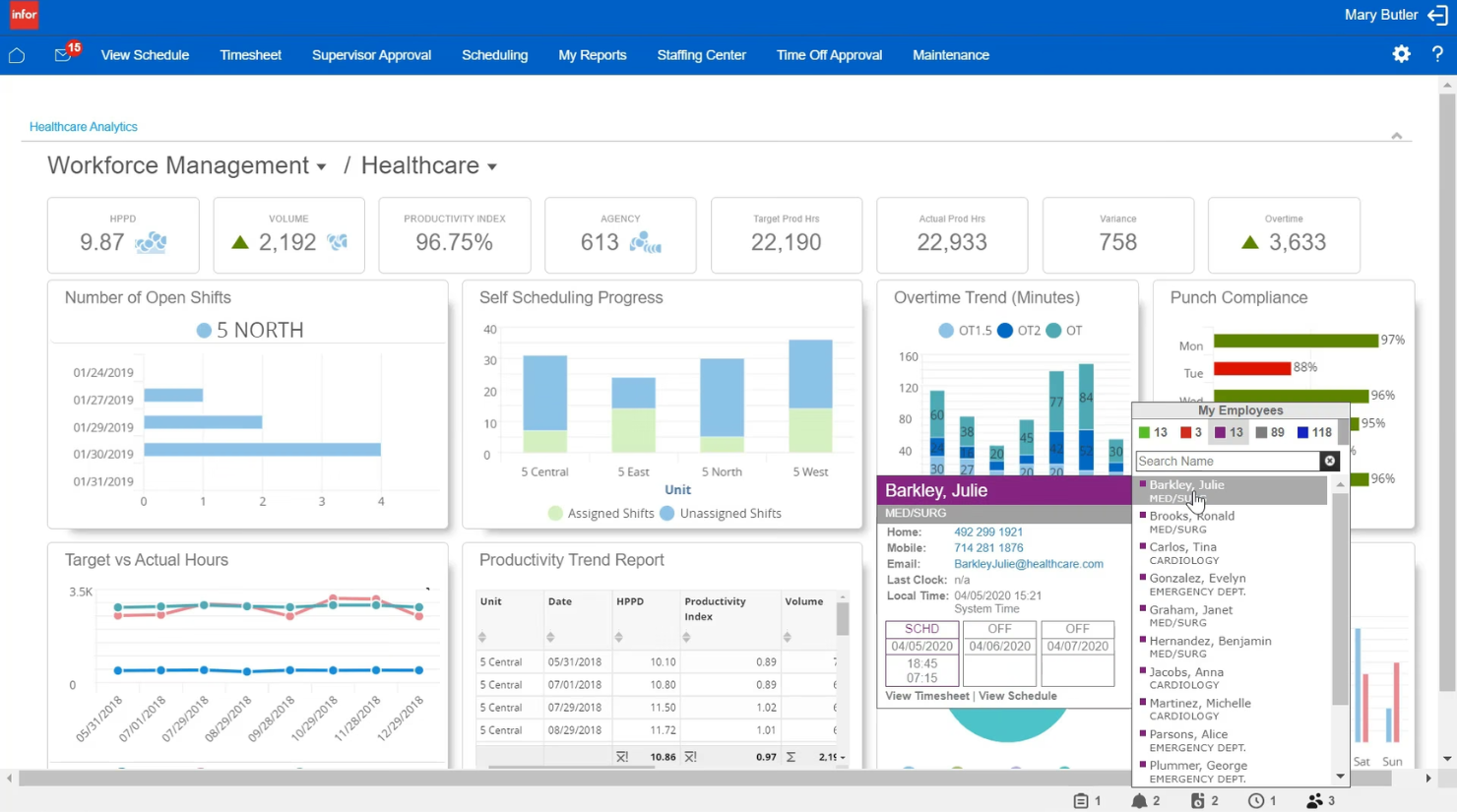
Infor es una plataforma integrada de gestión de la fuerza laboral en el sector salud, diseñada para ayudar a las organizaciones a manejar la previsión de personal, la programación, el seguimiento de horas, la asignación de recursos y los análisis en sistemas de salud complejos.
¿Para quién es mejor Infor?
Redes de salud medianas a grandes que buscan gestionar los recursos humanos, optimizar la programación y coordinar la dotación de personal en múltiples centros de atención.
Por qué elegí Infor
Elegí Infor como uno de los mejores porque permite coordinar profesionales de la salud y grupos flotantes en varios departamentos hospitalarios, utilizar análisis basados en datos para la planificación de personal y gestionar los costos laborales y la asignación de recursos en todo el sistema desde una única interfaz integral.
Características principales de Infor
- Herramientas de movilidad clínica: Herramientas móviles que permiten al personal ver horarios y administrar tareas de forma remota.
- Seguimiento de tiempo y asistencia: Captura automatizada de las horas de trabajo y los datos de asistencia de los empleados.
- Gestión del cumplimiento: Supervisa la expiración de licencias y requisitos regulatorios del personal.
- Portal de autoservicio para empleados: Permite al personal solicitar tiempo libre, actualizar su disponibilidad y consultar los recibos de sueldo.
Integraciones de Infor
Las integraciones incluyen Shopify, DocuSign, Salesforce, Marketo, ServiceNow, Zoom, ShipEngine, Twilio, Microsoft Dynamics 365 y ADP.
Pros and Cons
Pros:
- Funciones avanzadas de previsión de personal y análisis
- Integra la gestión de personal y suministros
- Admite el seguimiento del cumplimiento y credenciales
Cons:
- La configuración del sistema puede ser laboriosa
- Elevados requisitos de hardware
Otros programas de gestión de personal sanitario
Estas son algunas opciones adicionales de programas de gestión de personal sanitario que no han entrado en mi lista de selección, pero que merece la pena consultar:
- Symplr
Mejor para supervisar talento sanitario contingente
- Workforce Software
Ideal para visualización de datos en tiempo real
- PerfectServe
Ideal para la colaboración de equipos clínicos
- Qgenda
Ideal para la automatización de programación médica
- Amion
Ideal para una programación de guardias transparente
- ShiftMed
Mejor para contratar enfermeras locales por turnos per diem
- CareRev
La mejor opción para la contratación interna de clínicos W-2


Comment j'évalue les prestataires EOR pour les entreprises de services numériques
Lorsqu'une agence digitale doit embaucher rapidement un ingénieur à Berlin ou un développeur à Manille, je divise mon évaluation en exigences de base que chaque EOR doit remplir et en éléments différenciateurs qui distinguent les meilleurs.
Fonctionnalités essentielles (Conditions préalables pour cette liste)
Lorsque je sélectionne les outils pour ma liste, j'attribue à chacun une note de 0 (ne propose pas la fonctionnalité) à 5 (excelle dans ce domaine) pour chacune des fonctionnalités essentielles listées ci-dessous. Je calcule ensuite le score total de l'outil en un pourcentage. Chaque outil doit obtenir un score total minimum de 65 % pour être envisagé pour inclusion.
- Couverture mondiale de l'emploi : Je vérifie l'étendue des pays couverts et si le prestataire utilise ses propres entités ou des partenaires tiers, car cela impacte directement la rapidité d'intégration et la fiabilité.
- Paye en multi-devises : Traiter la paie dans plusieurs juridictions avec une retenue fiscale locale précise et des déductions obligatoires est essentiel—surtout quand votre équipe s'étend sur des pays aux exigences complexes de déclaration.
- Conformité et contrats : J'évalue si le fournisseur génère des contrats de travail conformes au droit local et s'il surveille activement les évolutions réglementaires, plutôt que de se fier à des modèles figés.
- Protection des données et de la propriété intellectuelle : Les équipes de services numériques partagent quotidiennement code source, données clients et secrets commerciaux, je recherche donc des clauses d'attribution de propriété intellectuelle exécutoires et des certifications telles que SOC 2 ou ISO 27001.
- Gestion des avantages sociaux : J'évalue la capacité de chaque prestataire à offrir des packages compétitifs localement en matière de santé, retraite et congés, car les minimums légaux standards attirent rarement les développeurs ou designers seniors.
- Gestion des sous-traitants : De nombreuses sociétés numériques emploient un mélange de sous-traitants et de salariés ; je privilégie donc la gestion complète des paiements, le contrôle de conformité et la possibilité de convertir facilement les sous-traitants en salariés via EOR.
Une fois la liste des outils conformes établie, j'analyse ce qui distingue chaque plateforme.
Facteurs différenciateurs (Ce qui distingue les fournisseurs)
Voici comment je compare et différencie les différents prestataires :
Fonctionnalités remarquables
La gestion des actions et des stock-options est un critère clé. Les sociétés de services numériques utilisent régulièrement l'actionnariat pour attirer des ingénieurs seniors. Je privilégie donc les prestataires capables de gérer l'octroi des actions et les implications fiscales dans chaque pays. Le soutien à l'immigration et aux visas est également important lorsque vous devez relocaliser un développeur principal dans un nouveau bureau. Au-delà, j'évalue les outils intégrés de gestion des dépenses et des indemnités pour le télétravail ou le coworking, qui sont devenus un prérequis pour les équipes numériques distribuées.
Au-delà des fonctionnalités
La rapidité d'intégration est toujours un critère d'évaluation. Lorsqu'une agence digitale remporte un nouveau projet client, attendre des semaines avant d'intégrer un sous-traitant ou un salarié à l'étranger peut représenter une perte de chiffre d'affaires. J'examine également de près la structure tarifaire : les frais fixes par employé s'adaptent généralement mieux que les modèles à pourcentage de la masse salariale pour les entreprises employant des profils techniques hautement rémunérés. Enfin, j'étudie la profondeur de l'expertise juridique interne, en particulier si le prestataire offre une indemnisation et s'il a l'expérience de la gestion des risques liés à l'établissement permanent.
Cómo elegir un programa de gestión de personal sanitario
Es fácil perderse entre largas listas de funciones y estructuras de precios complejas. Para ayudarte a mantener la atención mientras avanzas en tu proceso específico de selección de software, aquí tienes una lista de factores que debes tener en cuenta:
| Factor | Qué debes tener en cuenta |
|---|---|
| Escalabilidad | ¿Puede el software crecer junto con tu centro o sistema y gestionar más personal, ubicaciones o funciones sin interrumpir los flujos de trabajo ni resultar prohibitivo? |
| Integraciones | ¿Se conecta sin problemas con tus sistemas de nóminas, HRIS, EHR o de control horario? ¿Hay herramientas sanitarias importantes que no sean compatibles o que requieran soluciones manuales? |
| Personalización | ¿Con qué facilidad puedes ajustar los flujos de trabajo, las reglas de programación y los informes para adaptarlos a tus protocolos internos y a los requisitos sindicales o legales? |
| Facilidad de uso | ¿Pueden los responsables y el personal aprender a utilizar el sistema rápidamente y hacerlo de forma fiable sin una formación excesiva ni un gran número de solicitudes de asistencia? Prueba demostraciones o versiones de prueba para comprobarlo. |
| Implementación e incorporación | ¿Cuál es el plazo habitual de incorporación? ¿Se incluyen la migración, la formación del personal y la configuración de políticas, o debes encargarte de ello por tu cuenta? |
| Coste | Más allá del precio de lista, ¿cuáles son los costes por empleado o de los complementos? ¿Hay mínimos, tarifas de asistencia o compromisos de permanencia que puedan cambiar el cálculo del retorno de la inversión? |
| Medidas de seguridad | ¿Cómo protege la herramienta la PHI, mantiene la privacidad de los datos y aplica los controles de acceso? Busca certificaciones HIPAA u otras certificaciones relevantes. |
| Requisitos de cumplimiento | ¿Te ayuda la plataforma a cumplir las leyes laborales estatales y federales, las exigencias sindicales, las normativas de programación y las necesidades de auditoría interna? |
¿Qué es un programa de gestión de personal sanitario?
El software de gestión de la plantilla sanitaria es una herramienta digital que ayuda a las organizaciones sanitarias a programar al personal, registrar la asistencia, gestionar las ausencias y mantener el cumplimiento de las leyes laborales y las normas del sector. Estos sistemas centralizan los datos de la plantilla y utilizan la automatización para gestionar las tareas administrativas rutinarias. Al utilizar una plataforma de gestión de la plantilla, resulta más fácil para los centros sanitarios asignar a las personas adecuadas en el momento adecuado, lo que ayuda a los proveedores a mantener unos estándares elevados de atención al paciente.
Características
Al seleccionar un software de gestión de la plantilla sanitaria, presta atención a las siguientes características clave:
- Programación y planificación de turnos: Crea, automatiza y gestiona horarios complejos del personal teniendo en cuenta la cobertura, las acreditaciones y las preferencias de los turnos.
- Registro del tiempo y la asistencia: Registra las horas exactas de entrada y salida, supervisa el cumplimiento de los turnos y sincroniza las hojas de horas con las nóminas para garantizar una remuneración precisa.
- Gestión de permisos y ausencias: Automatiza las solicitudes, aprobaciones y acumulaciones de vacaciones, bajas por enfermedad y otras ausencias, garantizando una cobertura suficiente y una mejor planificación de la plantilla.
- Gestión del cumplimiento: Aplica las leyes laborales, las comprobaciones de acreditaciones y las normas sindicales señalando las infracciones y proporcionando advertencias en tiempo real durante la programación.
- Acceso móvil: Permite al personal sanitario acceder a los horarios, intercambiar turnos y utilizar la mensajería desde una aplicación móvil, mejorando la comunicación y el compromiso de los empleados.
- Integración con las nóminas: Vincula los datos de la plantilla con los sistemas de nóminas para calcular los salarios, realizar un seguimiento de las horas extraordinarias y agilizar el procesamiento de las nóminas.
- Seguimiento de acreditaciones y certificaciones: Registra, supervisa y envía alertas cuando las licencias, acreditaciones o formaciones estén a punto de caducar para mantener el cumplimiento del personal.
- Análisis e informes: Utiliza paneles basados en datos para realizar un seguimiento de métricas como los costes laborales, la rotación y las tendencias de las previsiones.
- Mensajería segura: Permite la comunicación directa y conforme con HIPAA entre los responsables y el personal de primera línea dentro del software.
- Gestión de tareas: Asigna y verifica la finalización de las funciones clínicas diarias o los flujos de trabajo administrativos dentro de cada turno.
Ventajas
La implementación de un software de gestión de la plantilla sanitaria ofrece varias ventajas para tu equipo y tu empresa. Estas son algunas de las que puedes esperar:
- Mayor precisión en los horarios: La planificación automatizada de los turnos garantiza que se programen los profesionales sanitarios adecuados, al tiempo que reduce los errores manuales y las carencias de cobertura.
- Mayor cumplimiento: Las reglas y alertas integradas ayudan a cumplir las leyes laborales, las normativas sindicales y los requisitos de acreditación sin comprobaciones manuales rutinarias.
- Procesamiento más rápido de las nóminas: El registro integrado del tiempo y las conexiones con las nóminas reducen el trabajo administrativo y aceleran los ciclos de pago.
- Mejor asignación de recursos: Los análisis y los informes en tiempo real ayudan a los responsables a tomar decisiones de personal basadas en datos y a controlar los costes laborales.
- Mayor satisfacción de los empleados: Las funciones de autoservicio permiten a los cuidadores solicitar turnos disponibles o consultar los horarios cuando lo necesiten.
- Reducción de las horas extraordinarias y la fatiga: Las herramientas de programación inteligente distribuyen los turnos de forma justa, supervisan las horas y ayudan a prevenir el agotamiento del personal.
- Supervisión centralizada de las acreditaciones: Las alertas y el seguimiento automatizados reducen el riesgo de que caduquen las licencias o certificaciones de los miembros del equipo.
Costes y precios
Para seleccionar un software de gestión de la plantilla sanitaria es necesario comprender los distintos modelos de precios y planes disponibles. Los costes varían en función de las características, el tamaño del equipo, los complementos y otros factores. La siguiente tabla resume los planes habituales, sus precios medios y las características que suelen incluir las soluciones de software de gestión de la plantilla sanitaria:
Tabla comparativa de planes de software de gestión de la plantilla sanitaria
| Tipo de plan | Precio medio | Características habituales |
|---|---|---|
| Plan gratuito | $0 | Programación básica, acceso limitado del personal y solo visualización desde el móvil. |
| Plan personal | $5-$10/usuario/mes | Programación avanzada, registro de entrada desde el móvil, gestión de ausencias e informes básicos. |
| Plan empresarial | $10-$25/usuario/mes | Gestión del cumplimiento, integraciones, exportaciones de nóminas, seguimiento de acreditaciones, análisis y mensajería segura. |
| Plan empresarial avanzado | $25+/usuario/mes | Flujos de trabajo personalizados, acceso a la API, asistencia ilimitada, seguridad avanzada y procesos de incorporación e implementación adaptados. |
Preguntas frecuentes sobre el software de gestión de personal sanitario
Estas son algunas respuestas a preguntas frecuentes sobre el software de gestión de personal sanitario:
¿Qué tipos de organizaciones sanitarias utilizan software de gestión de personal?
Hospitales, clínicas, centros de atención a largo plazo, agencias de atención sanitaria a domicilio y centros ambulatorios utilizan soluciones de gestión de personal para gestionar la planificación de turnos, las nóminas y el cumplimiento normativo. Estas herramientas ayudan a las organizaciones sanitarias a mantener altos estándares de calidad asistencial al garantizar que siempre estén disponibles los profesionales sanitarios adecuados.
¿Puede el software de gestión de personal sanitario integrarse con otros sistemas de RR. HH. o nóminas?
Sí, la mayoría de las soluciones están diseñadas para ofrecer integraciones con herramientas HRIS, EHR y de nóminas. Esto permite a los centros sanitarios sincronizar información útil basada en datos y reducir la introducción manual de datos o los errores en los informes, mejorando la eficiencia operativa general.
¿Cómo ayuda el software de gestión de personal a cumplir la normativa?
Estos sistemas detectan conflictos en la planificación de personal, supervisan las horas extra para controlar los costes laborales y realizan un seguimiento de las certificaciones y acreditaciones. Al mantener registros preparados para auditorías, los proveedores pueden cumplir las leyes laborales y los acuerdos sindicales mientras se centran en la atención al paciente.
¿Hay aplicaciones móviles disponibles para responsables y empleados?
Sí, casi todas las plataformas ofrecen una aplicación móvil fácil de usar. Estas herramientas proporcionan funciones de autoservicio para los miembros del equipo, lo que facilita que los cuidadores consulten sus horarios, intercambien turnos y actualicen su disponibilidad en tiempo real. Esta flexibilidad mejora la experiencia de los empleados y favorece una mayor retención del personal sanitario.
¿Con qué rapidez puede una nueva organización configurar una plataforma de gestión de personal?
La configuración suele tardar desde una semana en equipos pequeños hasta varios meses en grandes sistemas sanitarios. El plazo depende de las necesidades de incorporación, la migración de datos y la complejidad de los flujos de trabajo existentes.
¿Qué normas de seguridad debo buscar en un software de gestión de personal sanitario?
Debería buscar una plataforma integral del sector sanitario que utilice un cifrado sólido, ofrezca controles de acceso basados en roles y cumpla con HIPAA u otras normativas pertinentes de protección de datos para proteger la información confidencial de los profesionales sanitarios.