

Le 10 migliori app per la gestione della forza lavoro nel 2026

Elenco di app per la gestione della forza lavoro


Un'app per la gestione della forza lavoro è un software che aiuta il tuo team a gestire programmazione, presenze, monitoraggio delle ore e pianificazione del lavoro in un unico posto. Se stai cercando la migliore app per la gestione della forza lavoro, probabilmente hai bisogno di un modo affidabile per coordinare i turni, gestire la conformità e stare al passo con le esigenze mutevoli dell'ambiente di lavoro. Scegliere lo strumento giusto può aiutarti a supportare il tuo personale, ridurre il lavoro manuale e adattarti alle nuove sfide della forza lavoro. In questa guida troverai un confronto chiaro tra le migliori app per la gestione della forza lavoro, così potrai scegliere con sicurezza quella più adatta alle esigenze della tua organizzazione.
Perché fidarsi delle nostre recensioni sui software
Il nostro team testa e recensisce software dal 2012. In quanto esperti HR noi stessi, sappiamo quanto sia difficile — e importante — scegliere il software giusto.
Per questa guida, abbiamo valutato gli strumenti attraverso test pratici e ricerche indipendenti, assegnando un punteggio agli strumenti in base ai nostri criteri di selezione. Ci basiamo inoltre sulle competenze di leader di pensiero del settore e di professionisti HR attivi.
Le nostre recensioni riflettono il nostro giudizio editoriale umano, non un discorso di vendita.
Revisori esperti:
Tabella di confronto delle app per la gestione della forza lavoro
Questa tabella di confronto riassume i dettagli sui prezzi delle mie migliori app per la gestione della forza lavoro.
| Tool | Best For | Trial Info | Price | ||
|---|---|---|---|---|---|
| 1 | Ideale per assumere in oltre 150 paesi | Demo gratuita disponibile | A partire da $5/dipendente/mese | Website | |
| 2 | La scelta migliore per l'intelligenza artificiale aziendale | Demo gratuita disponibile | A partire da $8/utente/mese | Website | |
| 3 | Ideale per l'integrazione di terminali biometrici di rilevazione presenze | Prova gratuita di 30 giorni + demo gratuita disponibile | Da $50/mese | Website | |
| 4 | Ideale per analisi della forza lavoro globale | Demo gratuita disponibile | Prezzo su richiesta | Website | |
| 5 | Ideale per strumenti di compliance configurabili | Demo gratuita disponibile | Prezzo su richiesta | Website | |
| 6 | Ideale per calcoli delle buste paga in tempo reale | Demo gratuita disponibile | Prezzo su richiesta | Website | |
| 7 | Ottimo per il controllo della forza lavoro su più sedi | Demo gratuita disponibile | Prezzo su richiesta | Website | |
| 8 | Ideale per la gestione intuitiva delle assenze | Prova gratuita disponibile | Da $10/dipendente/mese | Website | |
| 9 | Ideale per flussi di lavoro HR e IT unificati | Demo gratuita disponibile | Prezzo su richiesta | Website | |
| 10 | Ideale per automatizzare i flussi di lavoro di inserimento dei nuovi dipendenti | Demo gratuita + piano gratuito disponibile | A partire da $49/mese + $6/utente/mese | Website |
Recensioni delle app per la gestione della forza lavoro
Di seguito trovi i miei riepiloghi dettagliati delle migliori app per la gestione della forza lavoro incluse nel mio elenco. Le mie recensioni offrono uno sguardo approfondito alle funzionalità, ai migliori casi d’uso e alle integrazioni di ciascuna piattaforma, per aiutarti a trovare quella più adatta a te.

Deel HR
Ideale per assumere in oltre 150 paesi

Deel HR è una piattaforma di gestione del personale che riunisce strumenti per l'assunzione globale, l'elaborazione delle paghe, la conformità, l'HRIS e la gestione delle prestazioni per team distribuiti.
Per chi è più adatto Deel HR?
Deel HR è adatto a team HR e leader aziendali che gestiscono dipendenti internazionali, collaboratori e paghe in più paesi.
Perché ho scelto Deel HR
Ho scelto Deel HR come uno dei migliori perché posso assumere dipendenti o collaboratori in oltre 150 paesi quasi istantaneamente. Il mio team utilizza l'onboarding automatizzato e la generazione di contratti localizzati di Deel HR per accelerare le assunzioni transfrontaliere. Mi affido anche ai loro controlli di conformità integrati nella piattaforma per evitare ritardi durante l'espansione in nuovi mercati.
Funzionalità principali di Deel HR
- Gestione globale delle paghe: Gestisci le paghe di dipendenti e collaboratori in più paesi da un'unica dashboard.
- Monitoraggio delle assenze: Gestisci e approva le richieste di ferie dei dipendenti con politiche personalizzabili.
- Gestione dei documenti: Archivia, organizza e accedi in modo sicuro ai documenti HR all'interno della piattaforma.
- Report HRIS: Genera analisi della forza lavoro e report di conformità per il tuo team globale.
Integrazioni di Deel HR
Le integrazioni native non sono chiaramente documentate. Deel HR offre un'API per integrazioni personalizzate.
Pros and Cons
Pros:
- Paghe automatizzate per team internazionali
- HRIS centralizzato con strumenti di gestione delle prestazioni
- Workflow di onboarding personalizzati per diversi paesi
Cons:
- Le funzioni di reportistica non permettono personalizzazioni avanzate
- Le funzioni di gestione delle spese sono basilari rispetto ai concorrenti
New Product Updates from Deel HR

Deel Expands Stablecoin Wallet to 80+ Countries
Deel expands its Stablecoin Wallet to 80+ countries with dollar-backed balances and optional rewards. This gives eligible contractors more ways to hold and manage earnings inside Deel. For more information, visit Deel’s official site.
 .
.
La scelta migliore per l'intelligenza artificiale aziendale
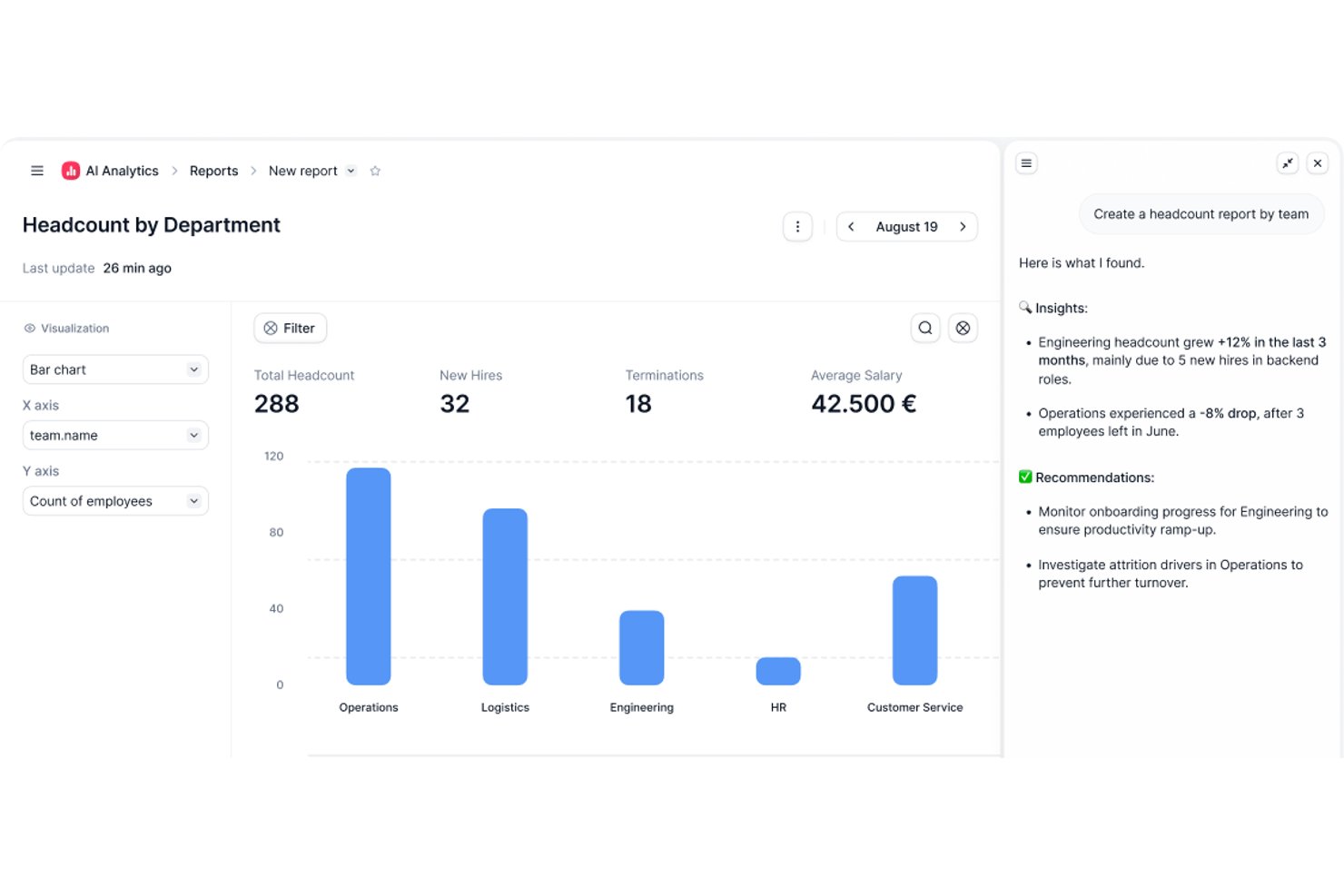
Factorial è una piattaforma per le risorse umane e le operazioni aziendali basata sull'intelligenza artificiale, che comprende la pianificazione dei turni, il monitoraggio delle ore, la pianificazione della forza lavoro e i servizi autonomi per i dipendenti, oltre a flussi di lavoro più ampi per le risorse umane, le paghe e l'IT.
Per chi è più indicato Factorial?
Factorial è particolarmente adatto alle PMI che desiderano un'unica piattaforma basata sull'intelligenza artificiale per gestire le risorse umane, la pianificazione e le operazioni quotidiane senza dover utilizzare diversi strumenti.
Perché ho scelto Factorial
Ho incluso Factorial tra le mie scelte principali perché il suo posizionamento nell'ambito dell'intelligenza artificiale per le aziende va oltre i consueti strumenti per le risorse umane: l'agente di intelligenza artificiale della piattaforma, One, lavora con i dati della tua azienda per pianificare gli orari, generare rapporti e rispondere alle domande dei dipendenti sulle politiche aziendali, senza dover consultare la documentazione. Apprezzo il fatto che i responsabili possano creare e pubblicare i turni, gestire le approvazioni degli scambi di turno e monitorare le ore tramite timbrature GPS o con codice QR, tutto in un unico posto. La pianificazione automatica dei turni è disponibile nei piani Enterprise per i team che desiderano generare calendari settimanali ottimizzati senza inserimenti manuali.
Funzionalità principali di Factorial
- Opzioni di timbratura tramite dispositivi mobili: I dipendenti possono timbrare utilizzando la posizione basata sul GPS, la delimitazione geografica o un codice QR direttamente dall'app mobile di Factorial.
- Controlli per l'autorizzazione degli straordinari: I responsabili possono richiedere l'approvazione delle ore di straordinario, così solo gli straordinari autorizzati vengono conteggiati nel saldo del dipendente.
- Avvisi configurabili sulla durata delle pause: Gli avvisi del monitoraggio delle ore segnalano quando i dipendenti non hanno effettuato pause conformi alle soglie configurabili, ad esempio una pausa di 30 minuti dopo sei ore di lavoro.
- Integrazioni con i connettori per le paghe: Factorial si connette ai fornitori di servizi paghe, tra cui DATEV LODAS, Silae e Sage, per sincronizzare i dati dei dipendenti, le nuove assunzioni e le assenze.
Integrazioni di Factorial
Factorial offre integrazioni tramite il mercato delle applicazioni con DATEV LODAS, Silae, Sage, Microsoft Power BI, Okta, Slack e Recruitee. Fornisce inoltre un'API pubblica, OAuth 2.0, richiami web, un kit di sviluppo software (SDK) e Zapier per una connettività personalizzata.
Pros and Cons
Pros:
- L'intelligenza artificiale aiuta a pianificare gli orari e a rispondere alle domande sulle politiche aziendali
- Le timbrature da dispositivi mobili supportano GPS e codici QR
- Gli scambi di turno e le richieste di congedo rimangono visibili
Cons:
- La pianificazione automatizzata dei turni richiede il piano Enterprise
- Le previsioni del fabbisogno di manodopera e la conformità alle normative locali restano limitate

TimeTrex
Ideale per l'integrazione di terminali biometrici di rilevazione presenze
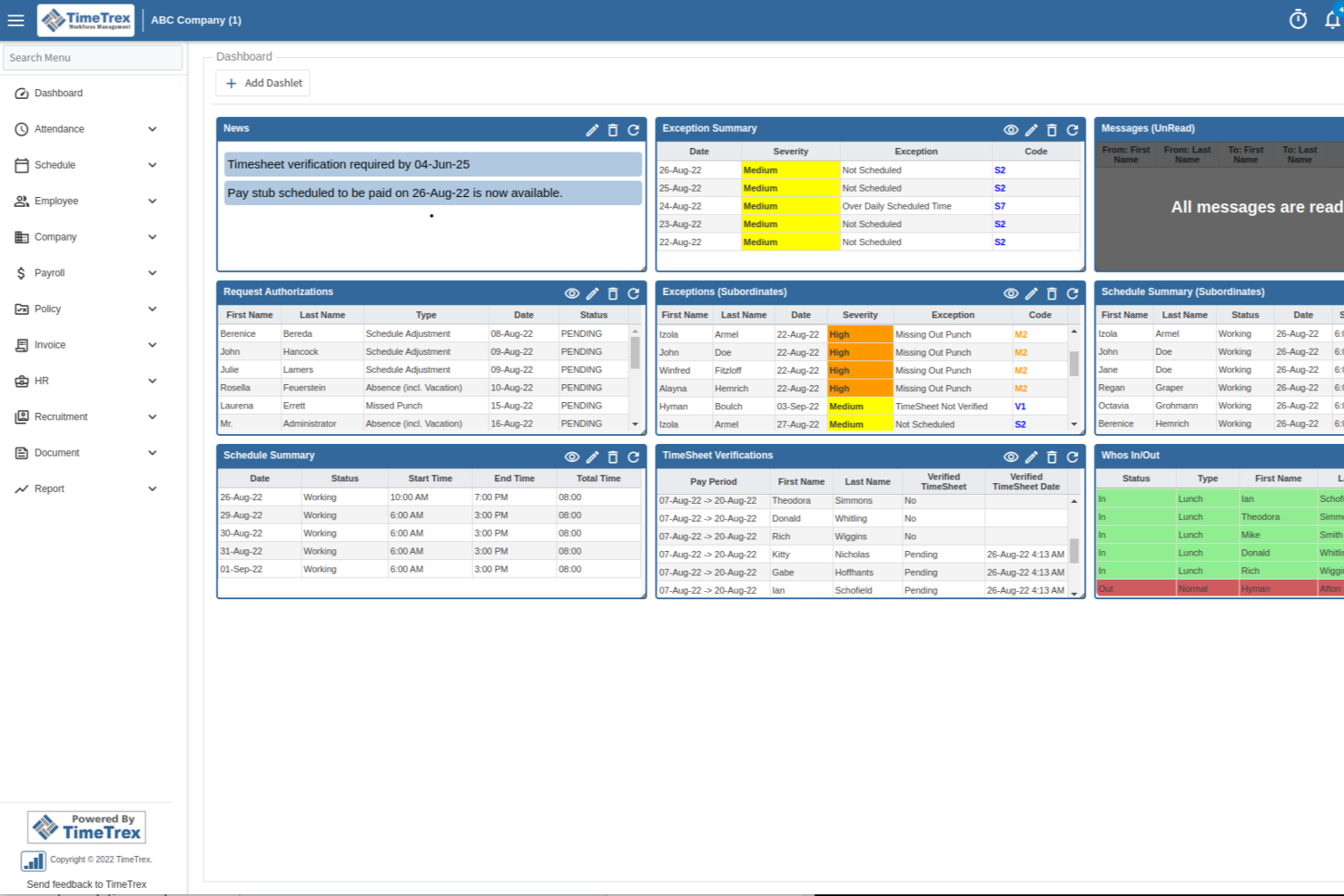
TimeTrex è una piattaforma di gestione della forza lavoro che combina rilevazione di presenze, pianificazione dei turni, elaborazione delle buste paga e gestione HR in un unico sistema con opzioni di implementazione sia in cloud che on-premise.
Per chi è ideale TimeTrex?
TimeTrex è particolarmente adatto alle aziende di medie dimensioni con personale a ore o su turni che necessitano di un sistema integrato per rilevazione presenze, pianificazione e gestione delle paghe all'interno della stessa piattaforma.
Perché ho scelto TimeTrex
TimeTrex è tra le mie migliori scelte perché apprezzo come integra direttamente i sistemi di rilevazione presenze biometriche nella propria piattaforma. Supporta la timbratura tramite riconoscimento facciale, funzionalità che il mio team utilizza per eliminare il fenomeno del 'buddy punching' senza dipendere da hardware o software di terze parti. TimeTrex abbina inoltre i dati biometrici al geofencing, permettendo così che le timbrature siano verificate sia per identità che per posizione, soluzione particolarmente utile per la gestione di lavoratori orari distribuiti o sul campo.
Caratteristiche chiave di TimeTrex
- Pianificazione dei turni tramite drag-and-drop: Crea facilmente turni semplici o rotativi su più settimane e pubblicali direttamente ai dipendenti tramite la piattaforma.
- Gestione integrata delle buste paga: Elabora le paghe con calcoli automatici delle tasse federali, statali e locali, con supporto anche per trattenute come benefit e pignoramenti.
- Controllo dei costi di commessa: Assegna le ore lavorate dai dipendenti a specifici lavori o centri di costo, così da poter monitorare le spese di manodopera in modo dettagliato.
- Gestione archivi HR: Archivia e gestisci qualifiche, recensioni delle prestazioni e dati personali dei dipendenti in un unico profilo centralizzato.
Integrazioni TimeTrex
TimeTrex offre integrazioni con piattaforme di contabilità e gestione paghe, tra cui ADP, QuickBooks, Sage, Paychex e Surepay, così come Ceridian, CompuPay, Tyler Technologies e Vensure Employer Services. È inoltre disponibile un'API per integrazioni personalizzate.
Pros and Cons
Pros:
- Motore di regole flessibile per politiche complesse
- Disponibile una versione open-source gratuita alla community
- Rileva le ore lavorate dei dipendenti al minuto
Cons:
- Configurazione iniziale complessa per le funzionalità avanzate
- L'interfaccia utente appare molto datata
New Product Updates from TimeTrex
TimeTrex Adds Quick Punch App With Offline and QR Support
TimeTrex adds a new Quick Punch app, offline punching, QR code scanning, punch images, configurable messages, and punch warnings or lockouts to improve employee clock-ins across browsers and local computers. For more information, visit TimeTrex’s official site.
 .
.
Workday
Ideale per analisi della forza lavoro globale
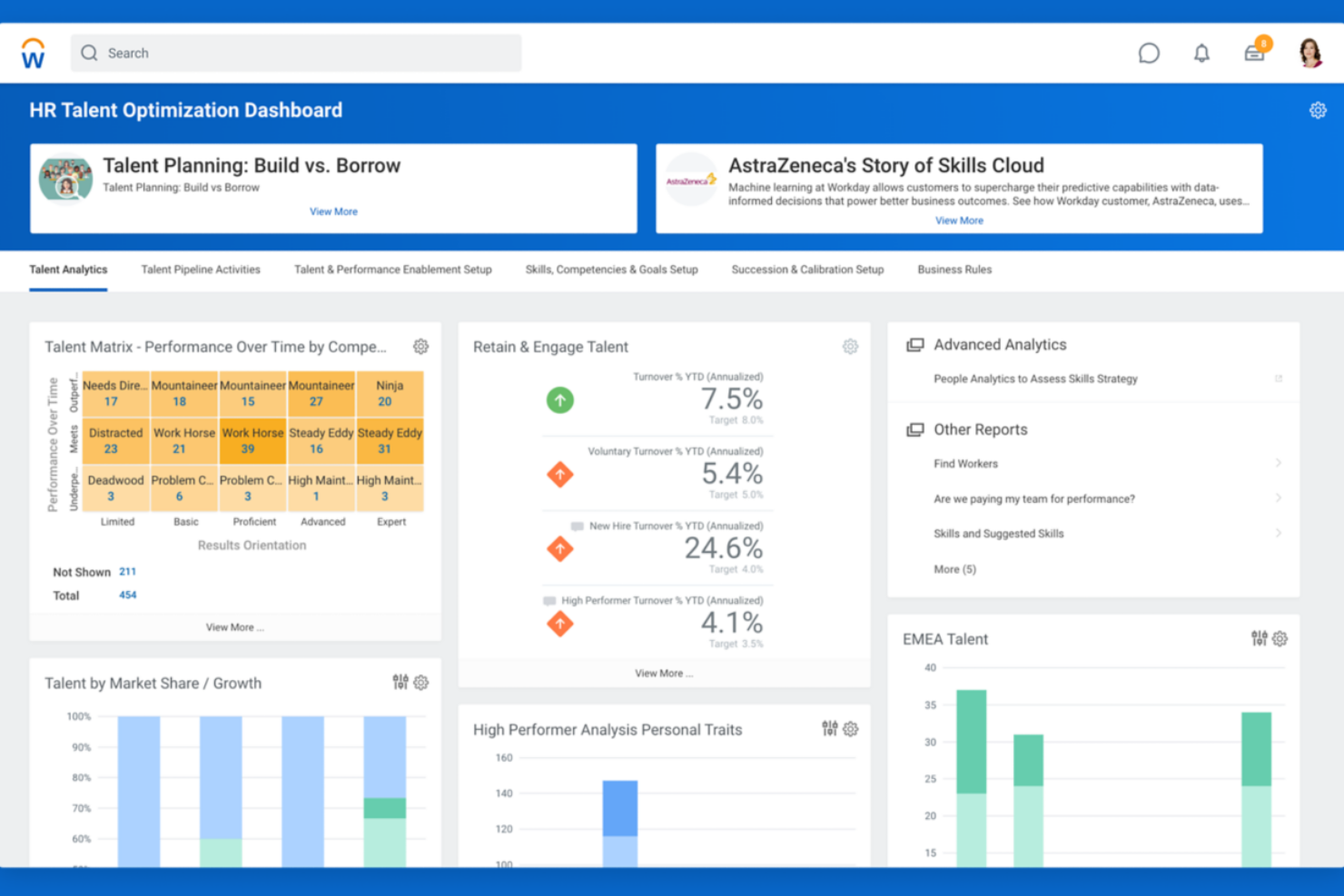
Workday è una piattaforma di gestione della forza lavoro progettata per organizzazioni con team complessi e distribuiti. È rivolta a responsabili delle risorse umane e professionisti delle operazioni che necessitano di strumenti unificati per gestire pianificazioni globali, costi del lavoro e conformità. Se hai bisogno di coordinare una forza lavoro numerosa in più regioni, Workday riunisce pianificazione, rilevamento delle presenze e analisi in un unico sistema.
Per chi è più adatto Workday?
Workday è indicato per grandi aziende e organizzazioni multinazionali che devono gestire le operazioni della forza lavoro e l’analisi dei dati in diversi paesi.
Perché ho scelto Workday
Ciò che mi ha spinto a scegliere Workday per la gestione della forza lavoro sono le sue avanzate capacità di analisi della forza lavoro globale. La piattaforma integra dati in tempo reale provenienti da pianificazione, rilevamento delle presenze e gestione dei costi del lavoro, facilitando l’individuazione di tendenze e la risoluzione di problematiche in diversi paesi o unità operative. Apprezzo il fatto che le dashboard analitiche di Workday permettano ai team HR e operations di approfondire le metriche della forza lavoro per regione, dipartimento o ruolo. Questo livello di dettaglio è particolarmente prezioso per le organizzazioni che devono prendere decisioni basate sui dati riguardo a personale, conformità e allocazione delle risorse su scala globale.
Funzionalità principali di Workday
Altre funzionalità che rendono Workday una scelta solida per la gestione della forza lavoro includono:
- Strumenti di pianificazione automatizzata: I responsabili possono creare, modificare e pubblicare gli orari dei dipendenti sulla base di regole aziendali e della domanda di lavoro.
- Rilevamento presenze da mobile: I dipendenti possono timbrare entrata e uscita, richiedere permessi e visualizzare i turni dai loro dispositivi mobili.
- Gestione delle assenze: La piattaforma tiene traccia di tutti i tipi di permesso, compresi ferie, malattia e politiche personalizzate.
- Monitoraggio della conformità: Workday aiuta le organizzazioni a rimanere aggiornate sulle normative del lavoro e sulle politiche interne tramite avvisi automatici e registri di audit.
Integrazioni Workday
Le integrazioni includono ADP, Salesforce, Microsoft Teams, ServiceNow, Okta, Slack, SAP, Oracle, DocuSign e Cornerstone OnDemand.
Pros and Cons
Pros:
- Regole robuste di conformità
- Elevata sicurezza dei dati
- Tracciamento complesso dei dipendenti
Cons:
- Tempi di implementazione lunghi
- Richiede un amministratore dedicato
Ideale per strumenti di compliance configurabili

UKG Ready è una piattaforma di gestione della forza lavoro progettata per le organizzazioni che necessitano di strumenti flessibili per HR, gestione tempi e paghe in un unico luogo. È una scelta solida per i team delle risorse umane in settori con esigenze complesse di pianificazione e conformità, come sanità, manifatturiero e settore pubblico. Se cerchi una soluzione che si adatti a leggi sul lavoro in evoluzione e a regole aziendali specifiche, UKG Ready offre la configurabilità per supportare le tue necessità.
Per chi è UKG Ready?
UKG Ready si adatta a organizzazioni di medie e grandi dimensioni in settori regolamentati che necessitano di strumenti configurabili per la compliance e la gestione della forza lavoro.
Perché ho scelto UKG Ready
Ciò che mi ha colpito di UKG Ready è la profonda configurabilità degli strumenti di compliance per la gestione della forza lavoro. La piattaforma consente di impostare regole personalizzate per rilevazione presenze, pianificazione e politiche retributive in base alle esigenze uniche dell'organizzazione e alle normative in evoluzione. Apprezzo il fatto che si possano automatizzare avvisi e flussi di lavoro per aspetti come straordinari, rispetto delle pause e monitoraggio delle certificazioni, riducendo così la supervisione manuale. Per i team HR che gestiscono normative complesse in più sedi o giurisdizioni, la flessibilità di UKG Ready rappresenta un punto di forza.
Funzionalità chiave di UKG Ready
Altre funzionalità che rendono UKG Ready una valida opzione per la gestione della forza lavoro includono:
- Portale self-service per i dipendenti: I dipendenti possono visualizzare i propri turni, richiedere permessi e aggiornare le informazioni personali direttamente dalla piattaforma.
- Accesso da app mobile: Manager e collaboratori possono gestire approvazioni, pianificazioni e rilevazione presenze dai propri dispositivi mobili.
- Gestione documentale: Archivia, organizza e condividi documenti HR in modo sicuro all'interno del sistema.
- Strumenti di gestione delle performance: Definisci obiettivi, svolgi valutazioni e monitora i progressi dei dipendenti tutto in un unico luogo.
Integrazioni di UKG Ready
Le integrazioni includono QuickBooks, NetSuite, ADP, Employee Navigator, TurboTax, Indeed, DocuSign, Boomi, OpenSesame e HireRight.
Pros and Cons
Pros:
- Eccellente sincronizzazione delle regole sindacali
- Ottima ripartizione dei costi del lavoro
- Solido supporto per biometria
Cons:
- Implementazione lunga
- I ticket di assistenza sono lenti

Dayforce
Ideale per calcoli delle buste paga in tempo reale
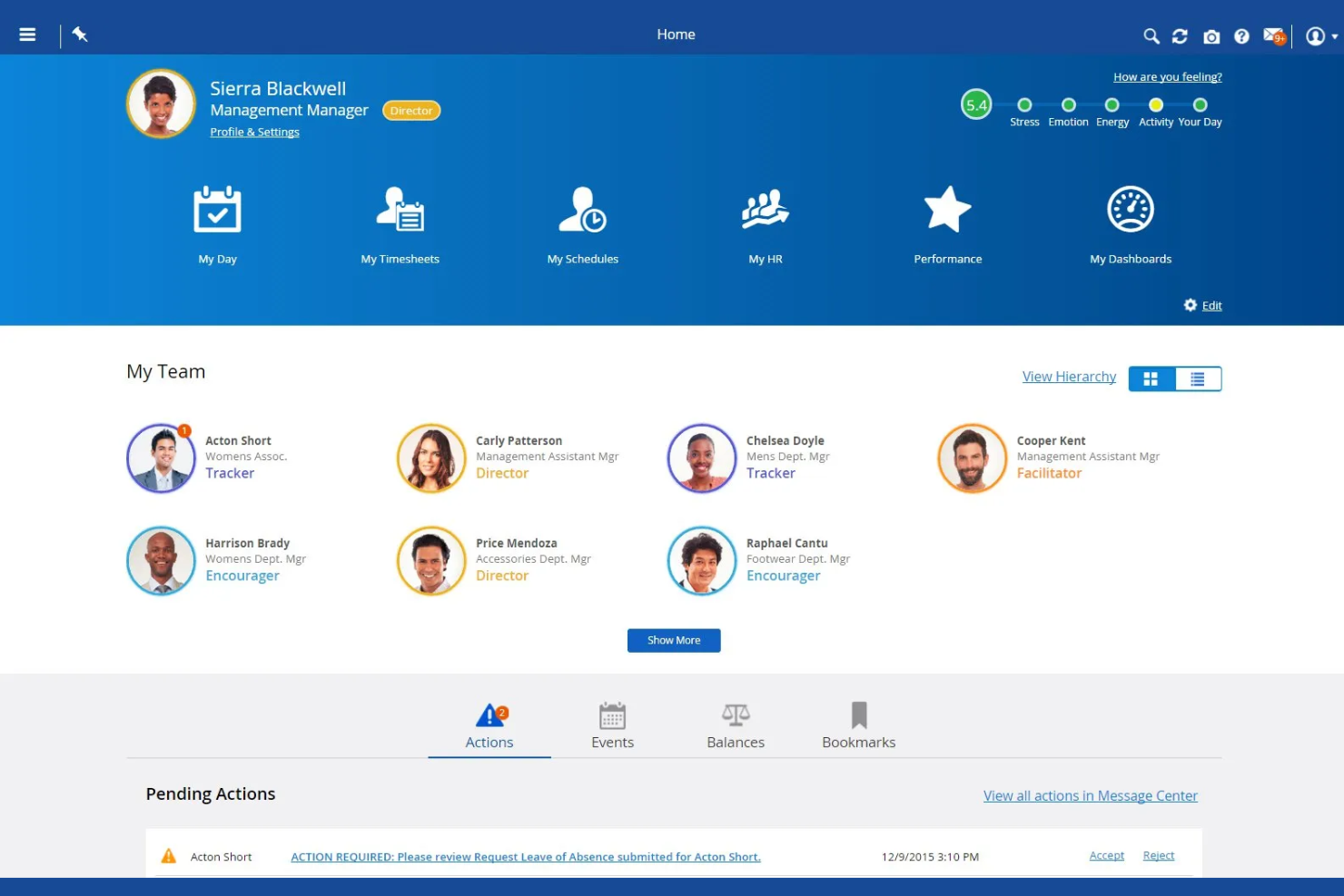
Dayforce è una piattaforma di gestione della forza lavoro progettata per organizzazioni che necessitano di HR, paghe e monitoraggio delle presenze unificati in un unico sistema. È particolarmente adatta ai team HR di settori con personale orario o a turni, come il retail, la sanità e la produzione. Se desideri semplificare la conformità normativa e gestire una pianificazione complessa, Dayforce riunisce in un'unica piattaforma tutti gli strumenti necessari.
Per chi è più adatta Dayforce?
Dayforce è indicata per organizzazioni di medie e grandi dimensioni nei settori come retail, sanità e produzione che necessitano di gestione unificata delle buste paga e della forza lavoro.
Perché ho scelto Dayforce
Ciò che distingue Dayforce è la capacità di calcolare le buste paga in tempo reale mentre i dati dei dipendenti cambiano nel corso del periodo di paga. Questo significa che i team HR e paghe possono vedere immediatamente l'impatto di modifiche ai turni, straordinari o richieste di permessi sui costi salariali, riducendo errori e sorprese a fine ciclo. Apprezzo anche che Dayforce combini monitoraggio delle presenze e buste paga in un unico sistema, eliminando la necessità di riconciliare dati tra piattaforme separate. Per le organizzazioni con regole retributive complesse o frequenti variazioni di turnazione, questo approccio in tempo reale alla gestione delle paghe è un grande vantaggio.
Funzionalità principali di Dayforce
Oltre ai calcoli delle buste paga in tempo reale, Dayforce offre diverse altre funzionalità utili per la gestione del personale:
- Strumenti di pianificazione automatica: I manager possono creare, modificare e pubblicare i turni dei dipendenti sulla base delle regole aziendali e della domanda di lavoro.
- App mobile self-service: I dipendenti possono visualizzare i turni, richiedere permessi e scambiare i turni direttamente dai loro dispositivi mobili.
- Gestione della conformità: La piattaforma monitora le normative sul lavoro e le politiche interne, avvisando i responsabili di eventuali rischi di non conformità.
- Analisi e reportistica: Gli utenti possono accedere a dashboard e report per monitorare trend del personale, presenze e produttività.
Integrazioni di Dayforce
Le integrazioni includono Emburse, VidCruiter, DocuSign, Go1, HireRight, AdminaHealth, TELUS Health, Okta, Microsoft 365 e Oracle.
Pros and Cons
Pros:
- Tutto in un unico database
- Gestione di volumi elevati
Cons:
- Ottima pianificazione dei turni
- Assistenza clienti lenta
- Portale amministrativo complesso

ADP
Ottimo per il controllo della forza lavoro su più sedi

ADP offre una suite di strumenti per la gestione della forza lavoro progettati per organizzazioni con esigenze di personale complesse. È una valida opzione per i team HR che gestiscono dipendenti in più sedi o giurisdizioni. Se necessiti di un controllo centralizzato e di un monitoraggio dettagliato delle ore lavorative, ADP mette a disposizione funzionalità utili per coordinare e controllare la forza lavoro.
A chi è più adatto ADP?
ADP è ideale per grandi organizzazioni o aziende multi-sede che necessitano di una supervisione centralizzata della forza lavoro e della gestione della compliance.
Perché ho scelto ADP
Ciò che distingue ADP nella gestione della forza lavoro è la sua capacità di fornire supervisione su più sedi e giurisdizioni. Ho scelto ADP perché offre dashboard centralizzate per monitorare in tempo reale costi del lavoro, presenze e conformità, anche quando la forza lavoro è distribuita. Gli strumenti per la pianificazione e il tracciamento delle ore sono progettati per gestire strutture organizzative complesse, consentendo di impostare regole e politiche specifiche per ogni sede. Per i team HR che devono coordinare personale, reportistica e compliance su diversi siti, le funzionalità di gestione multi-sede di ADP sono particolarmente preziose.
Funzionalità principali di ADP
Altre funzionalità che rendono ADP una solida opzione per la gestione della forza lavoro includono:
Elaborazione automatizzata delle buste paga: ADP calcola ed elabora le buste paga in base ai dati di presenza e orario, riducendo l'inserimento manuale.
Portale self-service per i dipendenti: I dipendenti possono consultare i cedolini, aggiornare le informazioni personali e gestire direttamente le richieste di permesso.
Avvisi di conformità: Il sistema notifica ai team HR i cambiamenti normativi e i potenziali problemi di compliance.
Strumenti di reportistica personalizzabili: Gli utenti possono generare report dettagliati su metriche della forza lavoro, buste paga e presenze per supportare decisioni più consapevoli.
Integrazioni di ADP
Le integrazioni includono QuickBooks, Xero, Wave, allGeo, Synerion, ClockShark, GP, Trusaic, Points North e Wex.
Pros and Cons
Pros:
- Ampia lista di integrazioni
- Piattaforma altamente sicura
- Ottimi strumenti di compliance
Cons:
- L'app mobile presenta bug
- Troppo complesso per le piccole imprese

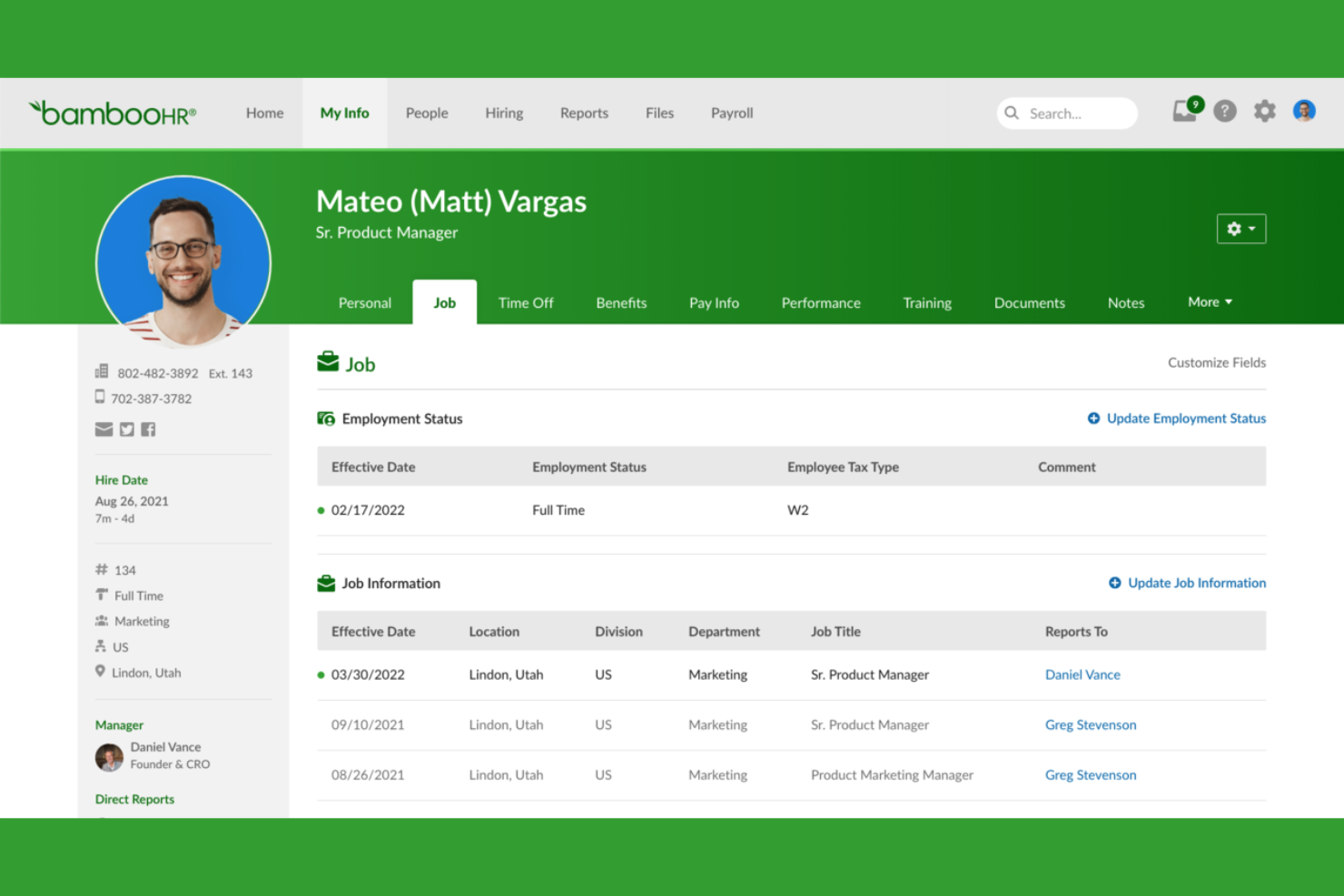
Se cerchi un'app di gestione della forza lavoro che riunisca dati sul personale e processi HR in un unico posto, BambooHR merita considerazione. È pensato per piccole e medie imprese che desiderano centralizzare i dati dei dipendenti, automatizzare i flussi di lavoro HR e semplificare le attività HR quotidiane. I team e i manager HR utilizzano BambooHR per gestire tutto, dall'onboarding alla valutazione delle performance, su una piattaforma unica e facile da navigare.
Per chi è più adatto BambooHR?
BambooHR è una scelta solida per piccole e medie imprese che vogliono centralizzare la gestione HR e automatizzare la registrazione delle assenze.
Perché ho scelto BambooHR
Ciò che distingue BambooHR nella gestione della forza lavoro è il modo in cui gestisce la gestione delle assenze, con chiarezza e flessibilità. L'ho scelto perché la piattaforma permette ai dipendenti di richiedere i permessi direttamente dal sistema, mentre i manager possono approvare o rifiutare le richieste con pochi clic. Il calendario integrato si aggiorna automaticamente per riflettere le assenze, facilitando ai team la visualizzazione di chi è fuori e la pianificazione delle coperture. Questo approccio aiuta a ridurre la gestione manuale e le incomprensioni sulle assenze, una sfida frequente per i team HR.
Funzionalità principali di BambooHR
Altre funzionalità che rendono BambooHR utile per la gestione della forza lavoro includono:
- Portale self-service per i dipendenti: I dipendenti possono aggiornare le informazioni personali, visualizzare le buste paga e accedere ai documenti aziendali senza dover coinvolgere le risorse umane.
- Flussi di lavoro onboarding: Automatizza le attività di onboarding e assegna checklist ai nuovi assunti per garantire un inizio senza intoppi.
- Strumenti per la gestione delle performance: Imposta obiettivi, effettua valutazioni e raccogli feedback all'interno della piattaforma per supportare lo sviluppo dei dipendenti.
- Archiviazione documenti e firme elettroniche: Archivia in modo sicuro i documenti HR e raccogli firme elettroniche per moduli e accordi importanti.
Integrazioni di BambooHR
Le integrazioni includono Slack, Greenhouse, Culture Amp, Lattice, Remote, 15Five, Lever, DocuSign, QuickBooks, e ADP Workforce Now.
Pros and Cons
Pros:
- Il portale self-service consente aggiornamenti istantanei delle informazioni
- I cicli di valutazione delle performance sono completamente configurabili
- Firme elettroniche integrate nei flussi documentali HR
Cons:
- Nessuna pianificazione dei turni o scheduling integrato
- Ruoli e permessi personalizzati sono limitati
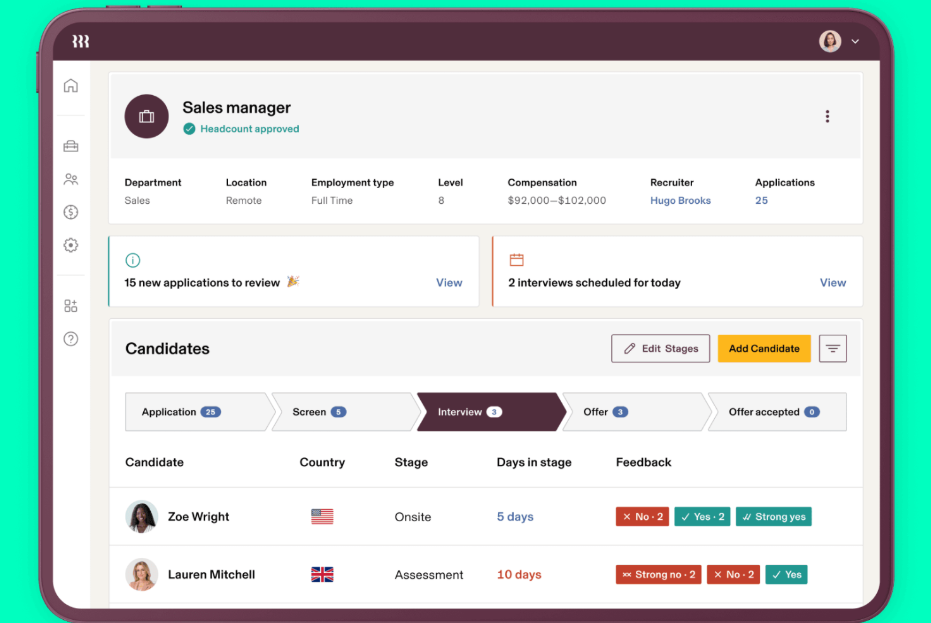
Rippling unisce la gestione di HR, IT e workforce in un'unica piattaforma. È una soluzione adatta alle aziende che vogliono gestire i dati dei dipendenti, le paghe e la fornitura di dispositivi da un'unica dashboard. Se desideri ridurre il lavoro manuale e mantenere le operazioni del personale strettamente connesse, Rippling offre un approccio unificato.
Per chi è ideale Rippling?
Rippling si adatta a organizzazioni di medie e grandi dimensioni che necessitano di gestire sia i processi HR che quelli IT da un'unica piattaforma.
Perché ho scelto Rippling
Ciò che mi ha attirato verso Rippling per la gestione della forza lavoro è il modo in cui collega i flussi di lavoro di HR e IT in un unico luogo. La piattaforma consente di inserire i dipendenti in azienda configurando in automatico paghe, benefit e persino la fornitura di dispositivi e accessi ai software, tutto dalla stessa dashboard. Trovo questo approccio unificato particolarmente prezioso per le organizzazioni che hanno bisogno di coordinare le attività delle persone con la gestione tecnologica. Centralizzando questi processi, Rippling aiuta a ridurre i passaggi manuali e mantiene i dati dei dipendenti coerenti tra i sistemi HR e IT.
Caratteristiche principali di Rippling
Altre funzionalità che rendono Rippling utile per la gestione della forza lavoro includono:
- Rilevazione di presenze e orari: I dipendenti possono timbrare entrata e uscita, monitorare le ore lavorate, e i manager possono approvare i timesheet direttamente dalla piattaforma.
- Gestione globale delle paghe: Elabora paghe per dipendenti e collaboratori in diversi paesi con strumenti integrati per la conformità.
- Automazione dei flussi di lavoro personalizzati: Crea flussi di lavoro automatizzati per approvazioni, notifiche e compiti HR senza la necessità di programmare.
- Gestione dei documenti dei dipendenti: Archivia, organizza e condividi documenti HR in modo sicuro con controllo versione e permessi di accesso.
Integrazioni di Rippling
Le integrazioni includono Slack, Google Workspace, Microsoft 365, Salesforce, QuickBooks Online, Xero, Asana, Zoom, Jira e HubSpot.
Pros and Cons
Pros:
- Automatizza l'onboarding tra HR e IT
- Offre strumenti personalizzabili per l'automazione dei flussi di lavoro
- Supporta esigenze di gestione globale delle paghe e conformità
Cons:
- La gestione delle paghe richiede moduli aggiuntivi a pagamento
- Le funzionalità di reportistica sono limitate per l'analisi dei dati

Gusto
Ideale per automatizzare i flussi di lavoro di inserimento dei nuovi dipendenti
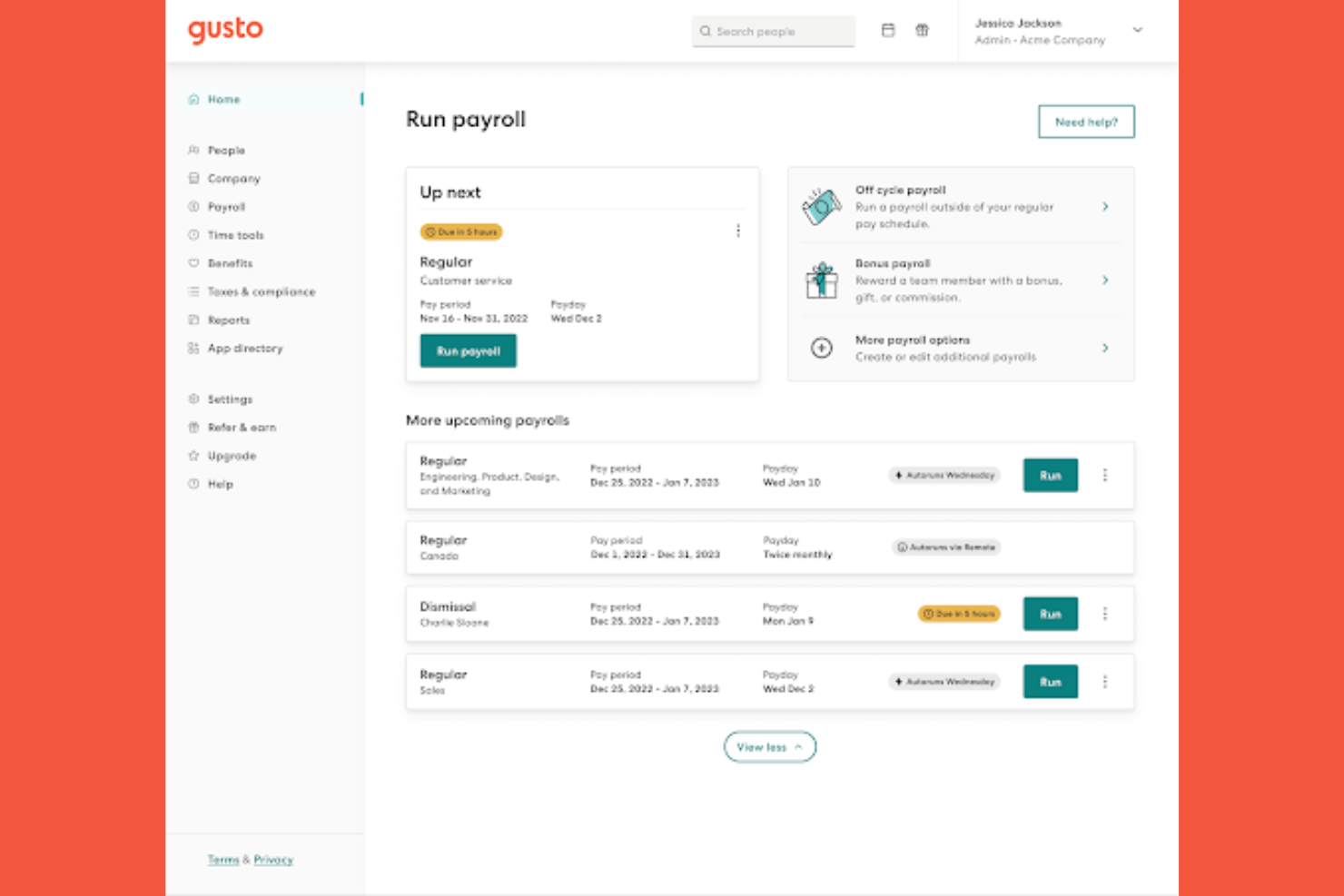
Gusto offre una piattaforma di gestione della forza lavoro progettata per le piccole e medie imprese che desiderano semplificare i processi delle risorse umane. Il software riunisce in un unico luogo l'elaborazione delle buste paga, la gestione dei benefit e la gestione dei dipendenti. Se cerchi una soluzione che riduca le attività manuali delle risorse umane e aiuti a mantenere organizzato il tuo team, vale la pena prendere in considerazione Gusto.
A chi è più adatto Gusto?
Gusto è una scelta valida per le piccole e medie imprese che desiderano automatizzare le attività relative alle risorse umane e all'inserimento dei nuovi dipendenti.
Perché ho scelto Gusto
Ciò che mi ha spinto a scegliere Gusto per la gestione della forza lavoro è il modo in cui automatizza e personalizza i flussi di lavoro per l'inserimento dei nuovi dipendenti. La piattaforma consente di creare checklist personalizzate per l'inserimento, inviare lettere di offerta digitali e raccogliere firme elettroniche, tutto da un'unica dashboard. Apprezzo inoltre il fatto che Gusto configuri automaticamente i nuovi assunti nel sistema paghe e nei benefit, riducendo l'inserimento manuale dei dati e i rischi legati alla conformità. Per i team delle risorse umane che desiderano rendere l'inserimento dei nuovi dipendenti più fluido e coerente, gli strumenti di automazione di Gusto sono particolarmente preziosi.
Funzionalità principali di Gusto
Tra le altre funzionalità che rendono Gusto una valida soluzione per la gestione della forza lavoro figurano:
Monitoraggio del tempo: I dipendenti possono registrare l'entrata e l'uscita, monitorare le ore lavorate e sincronizzare direttamente i dati delle ore con il sistema paghe.
Gestione dei permessi retribuiti: La piattaforma consente di configurare, approvare e monitorare le politiche e le richieste relative ai permessi retribuiti.
Organigramma e directory: Gusto genera automaticamente un organigramma visivo e una directory dei dipendenti consultabile tramite ricerca.
Archiviazione dei documenti: Archivia e gestisci in modo sicuro i documenti importanti delle risorse umane all'interno della piattaforma.
Integrazioni di Gusto
Le integrazioni includono 15Five, 7Shifts, Accelo, Amalgam, Analytics by Syft, Aplos, ApplicantPro, Ardius, Arvo e Asana.
Pros and Cons
Pros:
- Ideale per i piccoli team
- Interfaccia mobile intuitiva
- Monitoraggio del tempo semplice
Cons:
- Funzionalità limitate per l'instradamento complesso
- Regole di conformità di base
Altre app per la gestione della forza lavoro
Ecco alcune ulteriori opzioni di app per la gestione della forza lavoro che non sono state incluse nel mio elenco, ma che vale comunque la pena considerare:
- Connecteam
Ideale per la pianificazione dei turni in mobilità
- Workforce.com
Ideale per la previsione del personale basata sui turni
- Paylocity
Ideale per regole personalizzabili di rilevazione delle presenze
- CommunityWFM
Ideale per la precisione delle previsioni del contact center


Come valuto le app di gestione della forza lavoro
Divido la mia valutazione in requisiti di base—pianificazione dei turni, rilevamento delle presenze, conformità alla normativa sul lavoro—e elementi distintivi che rivelano quali strumenti valgono davvero la pena di essere utilizzati.
Funzionalità principali (requisiti minimi per questa lista)
Quando seleziono gli strumenti per la mia lista, valuto ciascuno su una scala da 0 (non offre la funzionalità) a 5 (eccelle in questo ambito) per ogni funzionalità principale indicata di seguito. Poi, calcolo il punteggio totale dello strumento in percentuale. Ogni strumento deve raggiungere un punteggio totale minimo del 75% per essere preso in considerazione per l'inclusione.
- Pianificazione dei turni: Cerco strumenti che vadano oltre l'inserimento base dei turni—come i builder drag-and-drop, la pianificazione automatica per ruolo o competenza e la pubblicazione su più sedi.
- Rilevamento di presenze e orari: Sia che si tratti di timbratura tramite mobile, modalità chiosco o timbrature geolocalizzate, valuto la gamma dei metodi di registrazione e come vengono segnalate le eccezioni.
- Previsione del fabbisogno di personale e pianificazione della domanda: Gli strumenti validi collegano le proiezioni del personale a fattori aziendali come il traffico di clienti o il volume degli ordini, non solo alle ore storiche registrate.
- Gestione assenze e permessi: Verifico come ogni piattaforma gestisce il conteggio delle maturazioni, i workflow di approvazione e la visibilità delle assenze a livello di team durante la pianificazione dei turni.
- Gestione della conformità normativa: Questo riguarda regole sugli straordinari, rispetto delle pause obbligatorie e il supporto alle normative locali—valuto quanto automaticamente lo strumento applica queste regole.
- Servizi mobile self-service per i dipendenti: I dipendenti devono poter visualizzare i turni, richiedere scambi e chiedere permessi direttamente dallo smartphone senza che il responsabile intervenga in ogni fase.
Una volta identificati gli strumenti che rispettano i criteri, considero cosa distingue ogni piattaforma dall'altra.
Fattori differenzianti (cosa distingue i fornitori)
Ecco come confronto e metto a confronto i diversi fornitori:
Funzionalità distintive
La pianificazione automatica guidata dall'intelligenza artificiale è un grande elemento di distinzione—valuto se lo strumento può generare turni ottimizzati utilizzando competenze, disponibilità e modelli di domanda senza bisogno di un intenso intervento manuale. Anche le analisi avanzate della forza lavoro sono importanti. I migliori dashboard consentono di approfondire trend sugli straordinari e costi del lavoro per sede per individuare i problemi in anticipo. Guardo anche alle funzioni di gestione della fatica, come gli avvisi quando i dipendenti sono assegnati a troppi turni consecutivi, particolarmente utili in ambito sanitario e alberghiero.
Oltre le funzionalità
Le integrazioni con HRIS e software paghe sono tra le prime cose che controllo. Un'app per la gestione della forza lavoro che sincronizza le ore direttamente in sistemi come ADP, Workday o BambooHR risparmia al reparto HR l'inserimento manuale dei dati a ogni ciclo paga. Anche l'aderenza all'industria conta—uno strumento pensato per i turni ospedalieri funziona in modo molto diverso rispetto a uno progettato per la copertura dei turni in negozio. Valuto inoltre la scalabilità, in particolare se la piattaforma supporta gerarchie multi-sede, permessi basati sui ruoli e gestione dei fusi orari per realtà che operano su più regioni.
Come scegliere le app per la gestione della forza lavoro
È facile perdersi in lunghi elenchi di funzionalità e strutture di prezzo complesse. Per aiutarti a rimanere concentrato mentre affronti il tuo specifico processo di selezione del software, ecco una lista di fattori da tenere a mente:
| Fattore | Cosa considerare |
|---|---|
| Scalabilità | L'app supporterà le dimensioni del tuo team durante la crescita, includendo più sedi o reparti? |
| Integrazioni | Si collega nativamente ai sistemi di gestione delle paghe, HRIS e rilevazione delle presenze senza middleware aggiuntivo? |
| Personalizzazione | Puoi adattare flussi di lavoro, autorizzazioni e report per rispecchiare le politiche della tua organizzazione? |
| Facilità d'uso | I responsabili e il personale operativo lo adotteranno rapidamente o la formazione e il supporto rappresenteranno un ostacolo? |
| Implementazione e avviamento | Quanto tempo servirà per iniziare a utilizzarlo e quali risorse o forme di supporto del fornitore saranno necessarie? |
| Costo | I livelli di prezzo sono chiari e sono in linea con i tuoi modelli di utilizzo e i vincoli di budget? |
| Misure di sicurezza | Il fornitore offre accesso basato sui ruoli, crittografia dei dati e conformità agli standard pertinenti? |
| Requisiti di conformità | L'app è in grado di gestire automaticamente le leggi sul lavoro specifiche, le norme sindacali o i requisiti del settore? |
Cosa sono le app per la gestione della forza lavoro?
Un'app per la gestione della forza lavoro è uno strumento software che aiuta le organizzazioni a programmare, monitorare e gestire le ore lavorative, le presenze e i turni dei dipendenti. Queste app centralizzano attività come il monitoraggio delle ore, la pianificazione dei turni, le richieste di ferie e il controllo dei costi del lavoro. Automatizzando i processi di routine relativi alla forza lavoro, favoriscono la conformità alle normative sul lavoro e aiutano i responsabili a ottimizzare i livelli di personale per soddisfare le esigenze aziendali.
Funzionalità
Quando scegli un'app per la gestione della forza lavoro, presta attenzione alle seguenti funzionalità chiave:
- Pianificazione dei turni: consente ai responsabili di creare, assegnare e modificare i turni dei dipendenti, garantendo una copertura adeguata e riducendo al minimo i conflitti di pianificazione.
- Monitoraggio delle ore e delle presenze: registra l'entrata e l'uscita dei dipendenti, tiene traccia delle ore lavorate e contribuisce a prevenire il furto di tempo o le timbrature per conto di altri.
- Gestione delle assenze: consente ai dipendenti di richiedere permessi e ai responsabili di approvare o rifiutare le richieste, aggiornando automaticamente i turni e i saldi maturati.
- Monitoraggio dei costi del lavoro: monitora in tempo reale le spese salariali, aiutando i responsabili a rispettare il budget e a individuare i rischi legati agli straordinari.
- Gestione della conformità: segnala potenziali violazioni delle leggi sul lavoro, delle regole sindacali o delle politiche aziendali, supportando il rispetto dei requisiti legali e normativi.
- Servizi di autogestione per i dipendenti: consente al personale di visualizzare i turni, richiedere modifiche e gestire direttamente la propria disponibilità da un'app web o per dispositivi mobili.
- Integrazione con le paghe: sincronizza i dati dei fogli presenze con i sistemi paghe per ridurre l'inserimento manuale e garantire elaborazioni degli stipendi accurate e puntuali.
- Accesso mobile: offre funzionalità utilizzabili ovunque sia dai responsabili sia dai dipendenti, supportando i team remoti o che lavorano sul campo.
- Report e analisi: genera informazioni utili su presenze, costi del lavoro e tendenze nella pianificazione dei turni per orientare le decisioni sulla pianificazione della forza lavoro.
- Notifiche e avvisi: invia promemoria e aggiornamenti automatici su modifiche ai turni, approvazioni o problemi di conformità, mantenendo tutti informati.
Vantaggi
L'implementazione di un'app per la gestione della forza lavoro offre diversi vantaggi al team e all'azienda. Ecco alcuni dei benefici che puoi aspettarti:
- Maggiore accuratezza nella pianificazione: la pianificazione automatizzata dei turni e gli aggiornamenti in tempo reale contribuiscono a ridurre gli errori e a garantire una copertura adeguata per ogni turno.
- Maggiore sicurezza in materia di conformità: i controlli e gli avvisi integrati sulla conformità aiutano a rispettare le leggi sul lavoro, le regole sindacali e le politiche interne.
- Riduzione del carico amministrativo: il monitoraggio centralizzato delle ore, la gestione delle assenze e l'integrazione con le paghe riducono al minimo l'inserimento manuale dei dati e la documentazione cartacea.
- Maggiore coinvolgimento dei dipendenti: gli strumenti per l'autogestione consentono al personale di gestire i propri turni, richiedere permessi e scambiarsi i turni, aumentando soddisfazione e flessibilità.
- Migliore controllo dei costi del lavoro: il monitoraggio dei costi del lavoro in tempo reale e gli avvisi sugli straordinari aiutano i responsabili a prendere decisioni informate ed evitare il superamento del budget.
- Inserimento e adozione più rapidi: interfacce intuitive e risorse guidate per l'inserimento aiutano i nuovi utenti a diventare rapidamente operativi e a ottenere prima i vantaggi della soluzione.
- Informazioni utili sulla forza lavoro: le funzionalità di report e analisi offrono visibilità sui modelli di presenza, sui costi del lavoro e sulle tendenze nella pianificazione dei turni, a supporto della pianificazione strategica.
Costi e prezzi
La scelta di un'app per la gestione della forza lavoro richiede la comprensione dei diversi modelli di prezzo e dei piani disponibili. I costi variano in base alle funzionalità, alle dimensioni del team, agli elementi aggiuntivi e ad altri fattori. La tabella seguente riassume i piani più comuni, i relativi prezzi medi e le funzionalità generalmente incluse nelle soluzioni per la gestione della forza lavoro:
Tabella comparativa dei piani per l'app di gestione della forza lavoro
| Tipo di piano | Prezzo medio | Funzionalità comuni |
|---|---|---|
| Piano gratuito | $0 | Pianificazione di base dei turni, monitoraggio limitato delle ore e funzionalità di autogestione per i dipendenti dei piccoli team. |
| Piano personale | $4-$8/utente/mese | Pianificazione dei turni, monitoraggio delle ore e delle presenze, gestione delle assenze e reportistica di base. |
| Piano aziendale | $9-$18/utente/mese | Pianificazione avanzata, strumenti per la conformità, integrazione con le paghe, accesso mobile e cruscotti analitici. |
| Piano per grandi aziende | $20-$45/utente/mese | Flussi di lavoro personalizzati, accesso API, sicurezza avanzata, assistenza dedicata e gestione di più sedi. |
Domande frequenti sulle app per la gestione della forza lavoro
Ecco alcune risposte alle domande più comuni sulle app per la gestione della forza lavoro:
In che modo le app per la gestione della forza lavoro aiutano a garantire la conformità?
Le app per la gestione della forza lavoro aiutano a garantire la conformità monitorando automaticamente le leggi sul lavoro, le regole sugli straordinari e i requisiti relativi alle pause. Avvisano i responsabili di potenziali violazioni e generano registri pronti per gli audit, riducendo il rischio di costosi errori o sanzioni.
Le app per la gestione della forza lavoro possono integrarsi con i sistemi paghe?
Sì, la maggior parte delle app per la gestione della forza lavoro si integra con i sistemi paghe più diffusi. Ciò consente di trasferire direttamente i dati dei fogli presenze e delle presenze, riducendo l’inserimento manuale e contribuendo a garantire un’elaborazione delle paghe accurata e puntuale.
Le app per la gestione della forza lavoro sono adatte ai team da remoto o mobili?
Sì, molte app per la gestione della forza lavoro offrono accesso mobile e tracciamento GPS. Ciò supporta i team da remoto, sul campo o ibridi, consentendo ai dipendenti di timbrare l’entrata, consultare i turni e richiedere permessi da qualsiasi luogo.
Cosa devo considerare quando scelgo un'app per la gestione della forza lavoro per una grande organizzazione?
Per le grandi organizzazioni, è importante considerare la scalabilità, il supporto per più sedi, la sicurezza avanzata e le opzioni per flussi di lavoro personalizzati. Verifica inoltre la disponibilità di funzionalità avanzate di reportistica, capacità di integrazione e assistenza clienti dedicata per gestire esigenze complesse.
Quanto tempo occorre per implementare un'app per la gestione della forza lavoro?
I tempi di implementazione variano, ma la maggior parte delle app cloud per la gestione della forza lavoro può essere configurata in pochi giorni o nell’arco di alcune settimane. Tra i fattori da considerare rientrano la migrazione dei dati, le esigenze di integrazione e la complessità dei requisiti relativi alla pianificazione dei turni e alla conformità.