

Le 10 Migliori Soluzioni Software per Onboarding e Offboarding nel 2026

Shortlist dei migliori software per onboarding e offboarding


Il software per onboarding e offboarding è una tipologia di piattaforma che aiuta i team a gestire le transizioni dei dipendenti dall'inizio alla fine. Questi strumenti supportano la gestione delle risorse umane automatizzando le attività, monitorando i progressi e garantendo la conformità dal primo giorno di un nuovo assunto fino alla sua uscita. Riducendo il lavoro manuale e standardizzando i processi, aiutano le organizzazioni a evitare passi mancanti e a offrire un'esperienza più fluida e coerente sia per i dipendenti che per i team HR. Questa guida ti aiuterà a confrontare le migliori soluzioni, comprendere ciò che le differenzia e trovare quella più adatta alle esigenze specifiche della tua organizzazione.
Perché fidarsi delle nostre recensioni sui software
Il nostro team testa e recensisce software dal 2012. In quanto esperti HR noi stessi, sappiamo quanto sia difficile — e importante — scegliere il software giusto.
Per questa guida, abbiamo valutato gli strumenti attraverso test pratici e ricerche indipendenti, assegnando un punteggio agli strumenti in base ai nostri criteri di selezione. Ci basiamo inoltre sulle competenze di leader di pensiero del settore e di professionisti HR attivi.
Le nostre recensioni riflettono il nostro giudizio editoriale umano, non un discorso di vendita.
Revisori esperti:
Riepilogo dei migliori software per onboarding e offboarding
Questo grafico comparativo riassume i dettagli sui prezzi delle mie migliori selezioni di software per onboarding e offboarding per aiutarti a trovare quello più adatto al tuo budget e alle esigenze del tuo business.
| Tool | Best For | Trial Info | Price | ||
|---|---|---|---|---|---|
| 1 | Ideale per la gestione della conformità HR globale | Demo gratuita disponibile | A partire da $14/lavoratore/mese | Website | |
| 2 | Ideale per un onboarding personalizzabile e pronto per l’audit | Prova gratuita + demo gratuita disponibile | A partire da $10/dipendente/mese | Website | |
| 3 | La scelta migliore con informazioni HR integrate basate sull'intelligenza artificiale | Demo gratuita disponibile | Da $8/utente/mese | Website | |
| 4 | Ideale con strumenti IA opzionali per attività HR | Piano gratuito disponibile | Da $2/utente/mese | Website | |
| 5 | Ideale per la gestione delle licenze SaaS | Demo gratuita + prova gratuita di 14 giorni disponibile | Prezzi su richiesta | Website | |
| 6 | Ideale per la configurazione di dispositivi Apple | Prova gratuita di 14 giorni + demo gratuita disponibile | Da $4/dispositivo/mese | Website | |
| 7 | Ideale per integrazioni aziendali di grandi dimensioni | Demo gratuita disponibile | Prezzo su richiesta | Website | |
| 8 | Ideale per controlli di accesso SaaS altamente granulari | Prova gratuita di 21 giorni + demo gratuita disponibile | Prezzo su richiesta | Website | |
| 9 | Ideale per il monitoraggio del ciclo di vita dei dipendenti nelle PMI | Demo gratuita + prova gratuita disponibile | Da $8/utente/mese | Website | |
| 10 | Ideale per automatizzare passaggi di workflow complessi | Piano gratuito disponibile | Da $1000/mese | Website |
Recensioni sui software per onboarding e offboarding
Di seguito trovi i miei riepiloghi dettagliati dei migliori software per onboarding e offboarding che sono stati inclusi nella mia shortlist. Le mie recensioni offrono uno sguardo approfondito alle funzionalità, ai migliori casi d’uso e alle integrazioni di ciascuna piattaforma per aiutarti a trovare quella giusta per te.

Deel HR
Ideale per la gestione della conformità HR globale
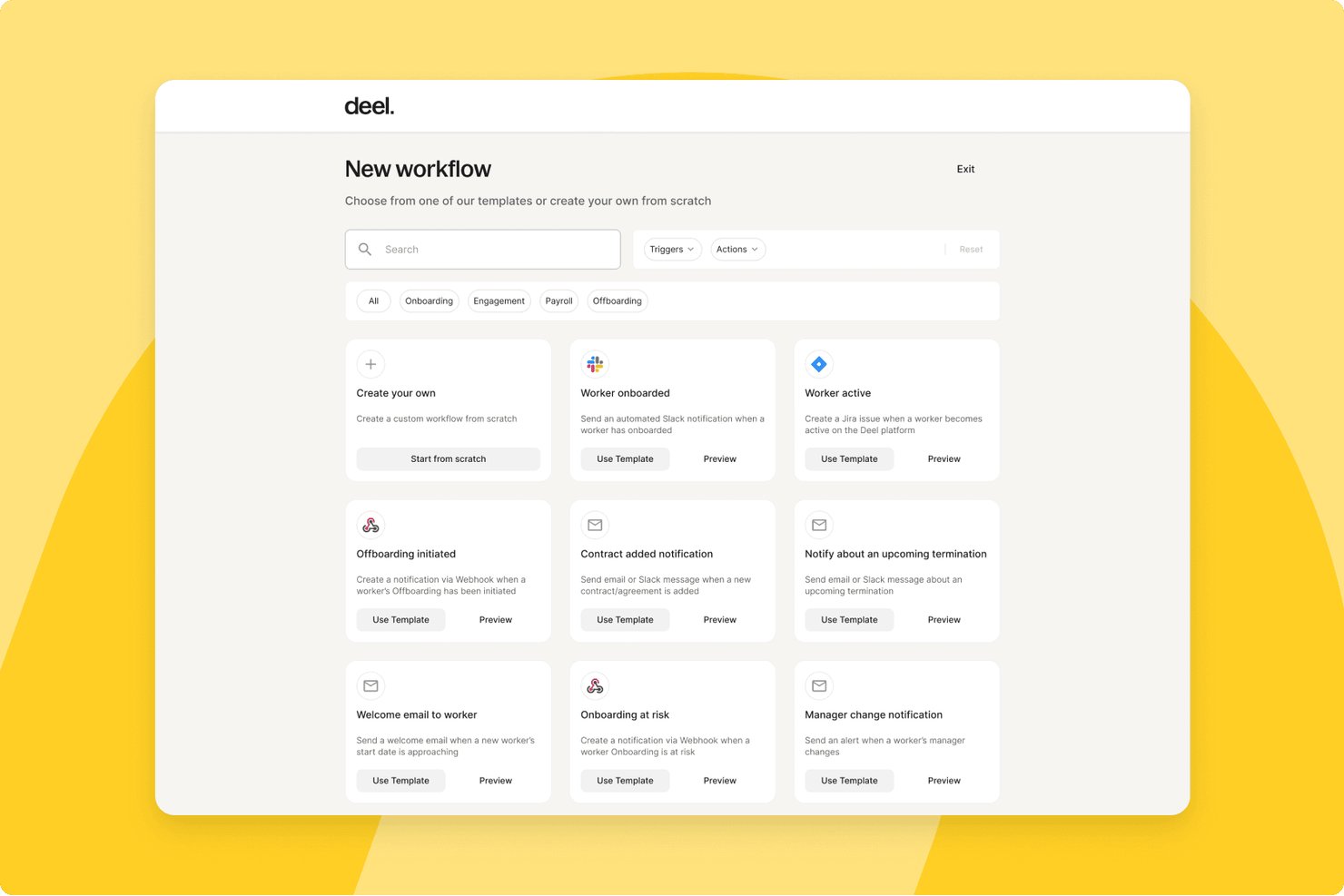
Deel HR è una piattaforma globale per la gestione del personale che gestisce l'intero ciclo di vita dei dipendenti, tra cui onboarding, offboarding, gestione dei documenti, assegnazione degli accessi, buste paga e conformità in oltre 150 Paesi.
Per chi è più adatto Deel HR?
Deel HR è ideale per le aziende che gestiscono team distribuiti o internazionali e necessitano di processi di onboarding e offboarding conformi alle normative in più Paesi e giurisdizioni.
Perché ho scelto Deel HR
Deel HR è entrato nel mio elenco ristretto per il modo in cui gestisce l'onboarding ad alta intensità di conformità in più Paesi all'interno di un unico flusso di lavoro. Apprezzo il fatto che i contratti localizzati si aggiornino automaticamente quando cambiano le leggi locali, così il mio team non deve monitorare manualmente le modifiche normative in oltre 10 giurisdizioni. Il flusso di onboarding guidato raccoglie moduli fiscali specifici per il Paese, contratti di lavoro e documenti in un unico posto, applicando regole di conformità integrate in base alla sede e al tipo di contratto di ciascun lavoratore.
Funzionalità principali di Deel HR
- Provisioning automatico dei dispositivi: Ordina e spedisce laptop e attrezzature per il lavoro da casa ai nuovi assunti in oltre 130 Paesi.
- Integrazione con Google Workspace: Crea account e assegna l'accesso alle app ai dipendenti nell'ambito dell'onboarding.
- Flussi di lavoro localizzati per la conformità: Applica campi e requisiti documentali specifici per il Paese ai lavoratori da remoto e assunti nel Paese.
- Gestione centralizzata dei documenti: Archivia contratti, prese visioni delle policy e moduli di conformità con controlli degli accessi.
Integrazioni di Deel HR
Deel HR offre integrazioni con QuickBooks, Xero, BambooHR, Expensify, NetSuite, Sage Intacct, Greenhouse, Workday, SAP e ADP, oltre ad altre disponibili tramite il suo app store. Si connette inoltre a Zapier e mette a disposizione un'API per integrazioni personalizzate.
Pros and Cons
Pros:
- Aggiornamenti automatici della conformità in oltre 150 Paesi
- Gestisce collaboratori e dipendenti su un'unica piattaforma
- Flussi di onboarding specifici per Paese integrati nativamente
Cons:
- Gli strumenti per l'offboarding sono meno sviluppati rispetto alle funzionalità di onboarding
- Può essere complesso per i team che operano in un solo Paese
New Product Updates from Deel HR

Deel Expands Stablecoin Wallet to 80+ Countries
Deel expands its Stablecoin Wallet to 80+ countries with dollar-backed balances and optional rewards. This gives eligible contractors more ways to hold and manage earnings inside Deel. For more information, visit Deel’s official site.
 .
.
Ideale per un onboarding personalizzabile e pronto per l’audit
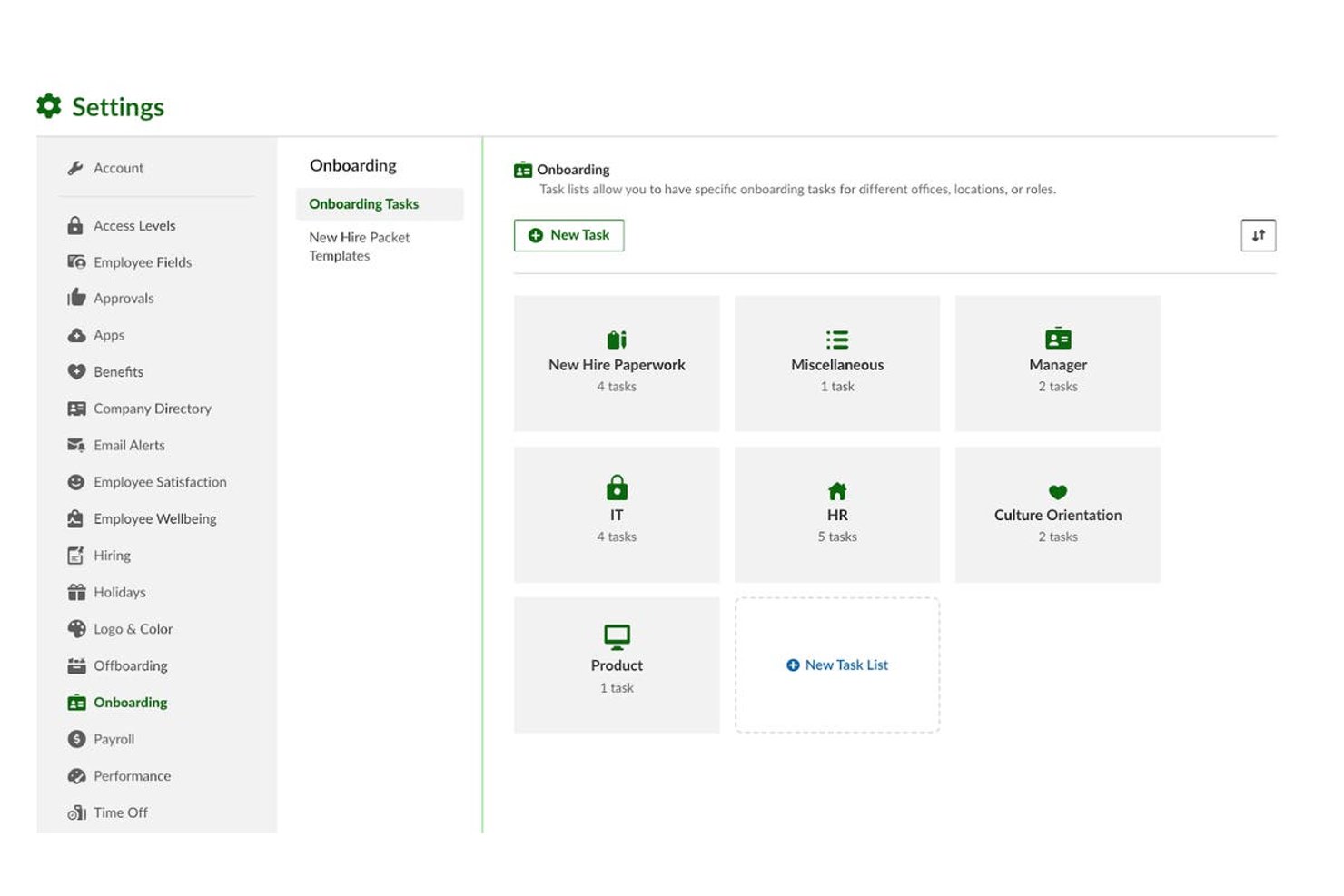
BambooHR è una piattaforma HR per team di medie dimensioni che centralizza la gestione del ciclo di vita dei dipendenti, con flussi di lavoro dedicati per onboarding e offboarding, firme elettroniche, monitoraggio della conformità e un sistema integrato di recruiting (ATS).
Per chi è più adatto BambooHR?
È particolarmente indicato per i responsabili delle operazioni HR in aziende in crescita con 50–1.000 dipendenti che necessitano di un onboarding strutturato e conforme, senza un forte coinvolgimento dell’IT.
Perché ho scelto BambooHR
Ho scelto BambooHR tra i migliori perché la sua infrastruttura di conformità è realmente integrata nell’onboarding, non aggiunta successivamente. La verifica I-9 viene gestita automaticamente tramite Mitratech, e VirgilHR segnala lacune normative prima che diventino problemi in fase di audit. I kit di benvenuto per i nuovi assunti sono completamente personalizzabili, così posso adattare i flussi di firma, le conferme delle policy e i moduli specifici per ruolo senza doverli ricreare ogni volta da zero.
Caratteristiche principali di BambooHR
- Portale di coinvolgimento per i nuovi assunti: Un portale personalizzato fornisce contenuti di benvenuto, presentazioni e checklist pre-inizio ai nuovi dipendenti.
- App mobile self-service: I dipendenti possono svolgere compiti di onboarding e offboarding, caricare documenti e monitorare i progressi direttamente dal telefono.
- Cicli di valutazione strutturati: Strumenti integrati permettono ai manager di programmare check-in e cicli di feedback per i nuovi assunti alle principali tappe.
- Monitoraggio del passaggio di consegne: I flussi di lavoro di offboarding includono strumenti dedicati alla documentazione delle responsabilità e alla riassegnazione della proprietà dei progetti.
Integrazioni di BambooHR
BambooHR offre oltre 150 integrazioni native, inclusi Checkr, Remote, Slack, Cronofy, Zendesk, Paychex, QuickBooks, Microsoft 365, Google Workspace, Risotto e molti altri. È disponibile un’API per integrazioni personalizzate.
Pros and Cons
Pros:
- Checklist di onboarding personalizzabili per ruolo o reparto
- Portale di pre-onboarding coinvolge i nuovi assunti subito
- Check-in integrati 30/60/90 per monitorare l’inserimento
Cons:
- Gli strumenti di offboarding sono meno sviluppati rispetto a quelli per l’onboarding
- La personalizzazione avanzata dei report richiede configurazione aggiuntiva
New Product Updates from BambooHR®

BambooHR Adds Employee Navigator Integration
BambooHR adds an Employee Navigator integration that syncs employee demographic data and sends benefit deductions into BambooHR Payroll runs to cut duplicate entry and keep records aligned. For more information, visit BambooHR's official site.
 .
.
La scelta migliore con informazioni HR integrate basate sull'intelligenza artificiale
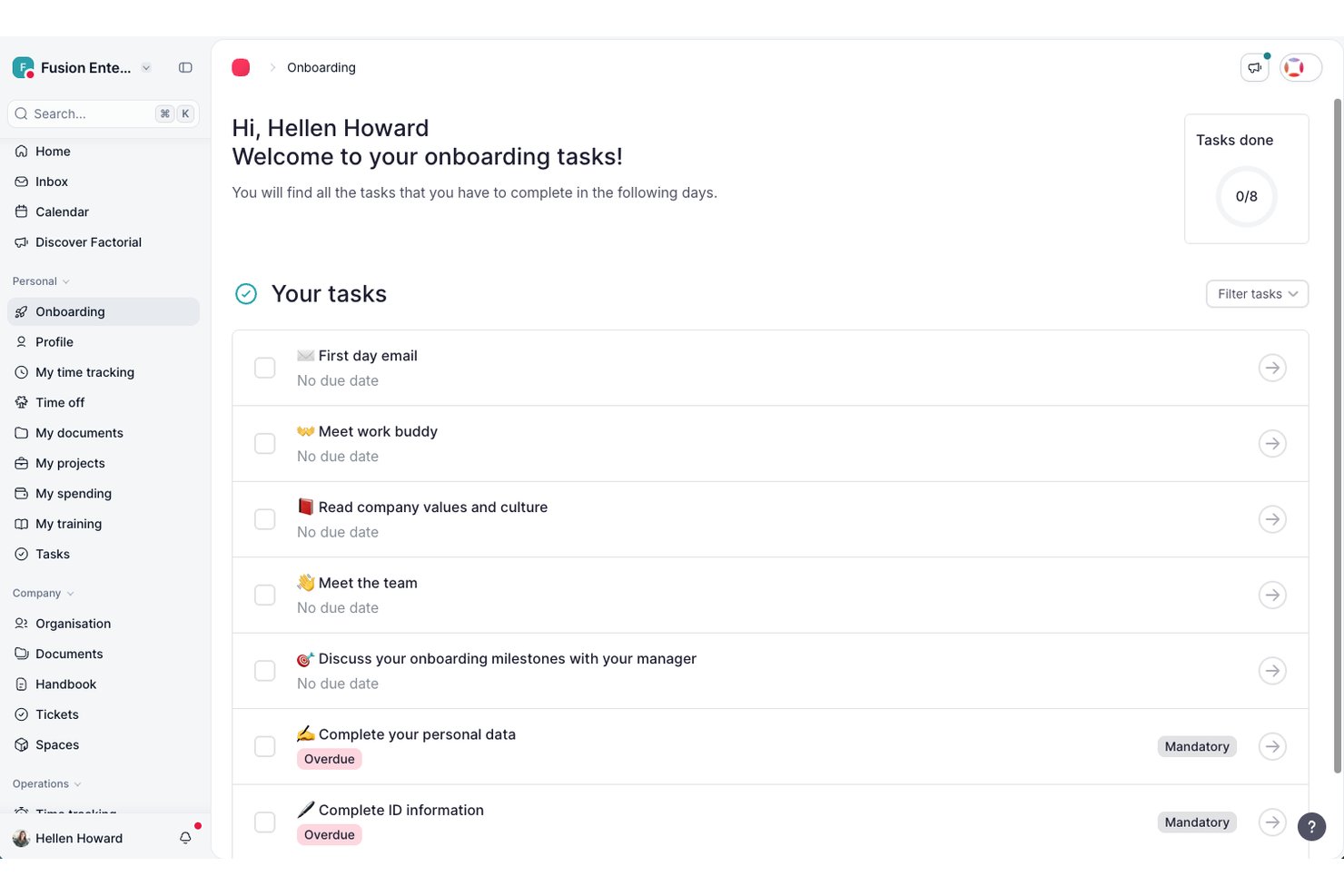
Factorial è una piattaforma HR progettata per la gestione dell'inserimento e dell'uscita dei dipendenti, che riunisce automazione dei flussi di lavoro, gestione dei documenti, monitoraggio delle attività, firme elettroniche e analisi basate sull'intelligenza artificiale.
Per chi è più indicato Factorial?
Team HR di aziende piccole e medie che cercano una soluzione unificata per l'inserimento e l'uscita dei dipendenti, con solide funzionalità di automazione e analisi.
Perché ho scelto Factorial
Ho scelto Factorial come una delle migliori soluzioni perché mi affido alle sue informazioni HR integrate basate sull'intelligenza artificiale per monitorare i progressi dell'inserimento, analizzare i fattori di rischio dei dipendenti e automatizzare i controlli di conformità in ogni fase del ciclo di vita dei dipendenti.
Funzionalità principali di Factorial
- Flussi di lavoro personalizzati per l'inserimento: Configura modelli per automatizzare le attività e i requisiti dei nuovi assunti in base ai diversi ruoli.
- Gestione dei documenti dei dipendenti: Carica, archivia e organizza contratti, documenti d'identità e policy con controllo delle versioni.
- Assegnazione e monitoraggio delle attività: Assegna attività alle risorse HR, IT o ai responsabili e monitora il completamento tra i diversi reparti.
- Firme elettroniche integrate: Raccogli le firme necessarie per la documentazione di inserimento e uscita direttamente all'interno della piattaforma.
Integrazioni di Factorial
Factorial offre integrazioni native con Google Workspace, Slack, Microsoft 365, Zapier, Xero, QuickBooks, Teamtailor e Zapier. È disponibile un'API per integrazioni personalizzate.
Pros and Cons
Pros:
- Analisi basate sull'intelligenza artificiale sulle tendenze dell'inserimento
- Flussi di lavoro personalizzabili per diversi ruoli lavorativi
- Monitoraggio automatizzato delle attività e richieste di documenti
Cons:
- Alcuni utenti segnalano un'assistenza clienti lenta
- Funzionalità limitate di automazione dell'uscita per il reparto IT

TalentHR
Ideale con strumenti IA opzionali per attività HR
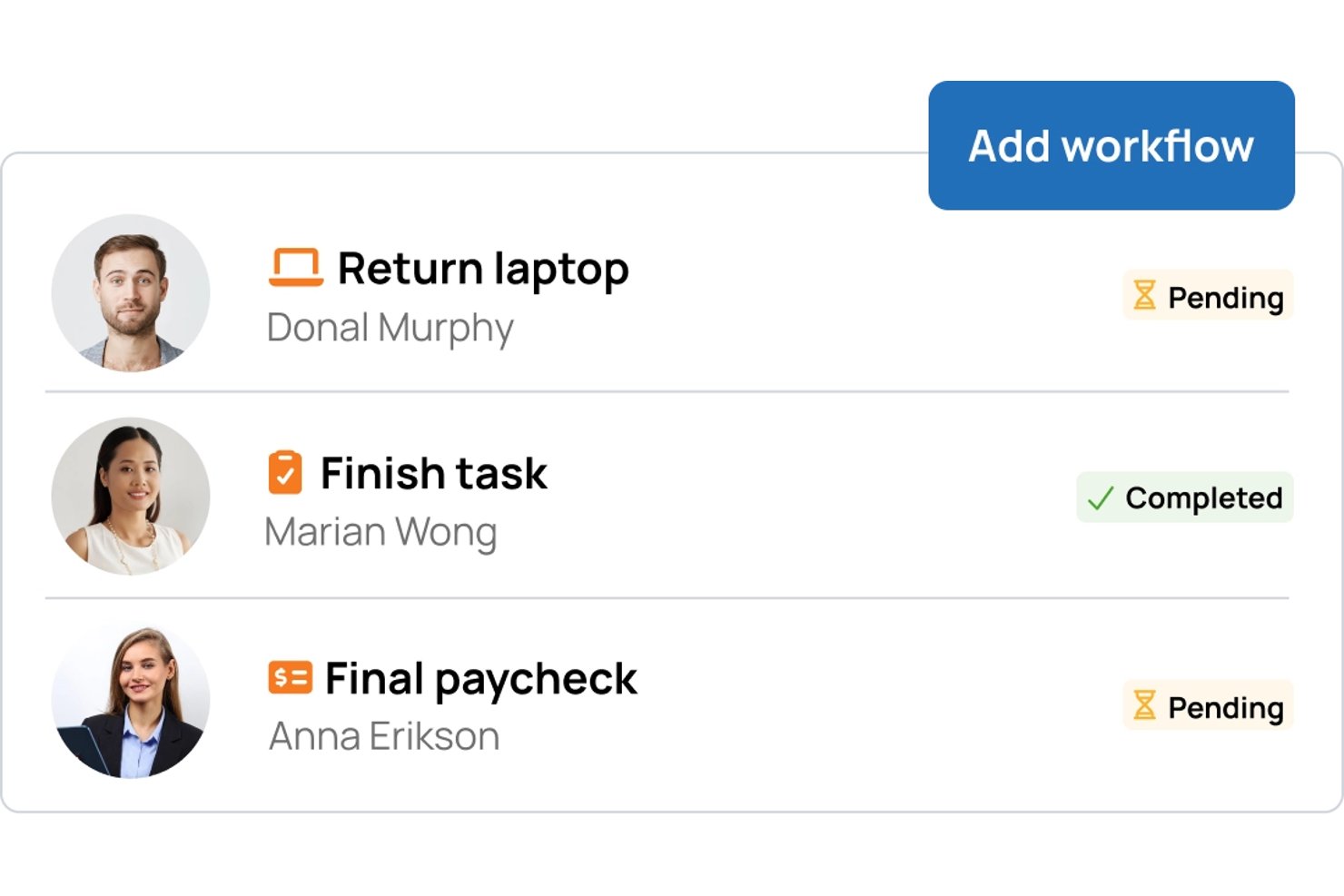
TalentHR è un software cloud per l’onboarding e l’offboarding progettato per i team HR che necessitano di flussi di lavoro automatizzati, gestione dei dati dei dipendenti, monitoraggio delle assenze e strumenti fondamentali per la conformità, tutto in un sistema centralizzato.
Per chi è ideale TalentHR?
I team HR di piccole e medie aziende che desiderano strumenti di onboarding e offboarding semplificati e centralizzati, con possibilità di automazione opzionale.
Perché ho scelto TalentHR
Ho scelto TalentHR tra i migliori perché posso automatizzare le attività ripetitive di onboarding e offboarding tramite strumenti opzionali di IA, come la creazione automatica di documenti d’onboarding o la gestione delle notifiche. In pratica, questo significa che il mio team passa meno tempo su mansioni amministrative manuali.
Caratteristiche principali di TalentHR
- Portale self-service per i dipendenti: I membri del team possono aggiornare i propri dati e accedere direttamente ai materiali sull’onboarding.
- Flussi di onboarding personalizzati: I team HR possono progettare sequenze di onboarding passo dopo passo per diversi ruoli.
- Controlli di accesso basati sui ruoli: Decidi chi può visualizzare e modificare dati sensibili su onboarding e personale.
- Gestione digitale dei documenti: Conserva, organizza e recupera contratti dei dipendenti e documentazione per la conformità.
Integrazioni di TalentHR
TalentHR offre integrazioni native con Google Workspace, Microsoft 365, Slack, Greenhouse e PayFit. Si collega con Zapier e offre un’API per integrazioni personalizzate.
Pros and Cons
Pros:
- Gli strumenti IA automatizzano i passaggi ripetitivi dell’onboarding
- Flussi di onboarding e offboarding personalizzabili
- Portale self-service per i dipendenti per un onboarding più rapido
Cons:
- Le integrazioni native sono limitate
- Le funzionalità di offboarding ricevono meno attenzione nello sviluppo del prodotto
Ideale per la gestione delle licenze SaaS
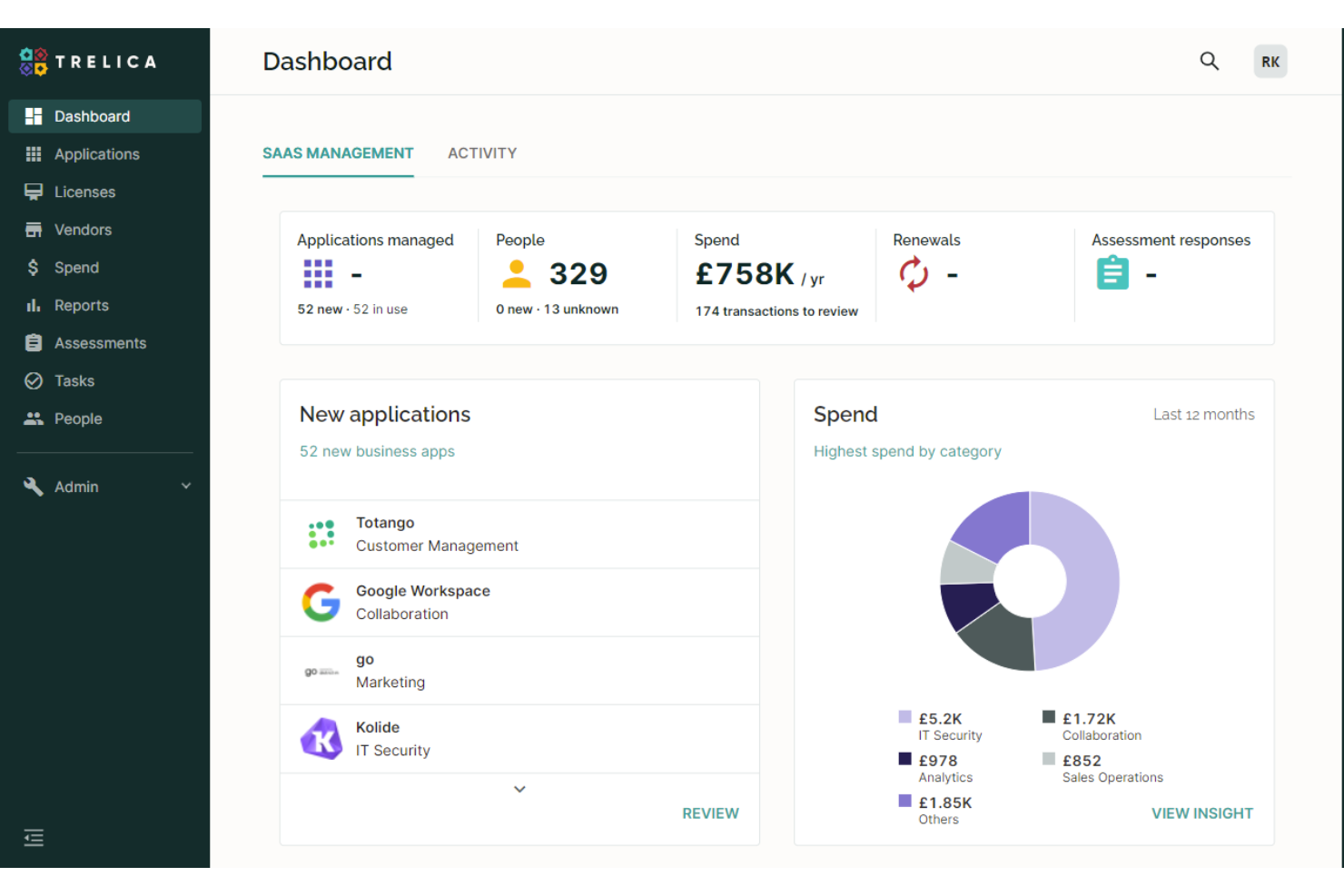
1Password è una piattaforma di gestione SaaS progettata per i team IT e operativi che devono automatizzare l'onboarding e l'offboarding ottenendo al contempo visibilità sull'utilizzo delle app e sugli accessi in tutta l'organizzazione.
Per chi è più indicato 1Password?
Team IT di organizzazioni di medie e grandi dimensioni che gestiscono accessi e licenze SaaS tra più dipartimenti.
Perché ho scelto 1Password
Ho scelto 1Password come uno dei migliori perché posso monitorare l'utilizzo delle licenze SaaS e automatizzare le attività di onboarding e offboarding da un'unica dashboard. Mi piace che 1Password permetta di recuperare licenze inutilizzate durante l'offboarding, aiutando così a tenere sotto controllo i costi. Il mio team utilizza l'automazione dei flussi di lavoro per garantire che ogni assegnazione e rimozione di app sia registrata e verificabile.
Funzionalità principali di 1Password
- Scoperta automatica delle app: Identifica tutte le applicazioni SaaS in uso nell'organizzazione.
- Checklist personalizzate per l'onboarding: Permette di creare attività di onboarding passo dopo passo per i nuovi assunti.
- Flussi di lavoro per la revisione degli accessi: Pianifica e gestisce revisioni periodiche degli accessi per la conformità.
- Integrazione con i sistemi HRIS: Sincronizza i dati dei dipendenti per attivare azioni di onboarding e offboarding.
Integrazioni di 1Password
1Password offre integrazioni native con Google Workspace, Okta, Microsoft 365, Slack, BambooHR, Workday, Salesforce, Jira, Zendesk e Zapier. È inoltre disponibile una API per integrazioni personalizzate.
Pros and Cons
Pros:
- Monitora l'utilizzo delle licenze e recupera i posti non utilizzati
- Fornisce audit trail per la rendicontazione di conformità
- Offre visibilità centralizzata sull'uso delle app SaaS
Cons:
- Personalizzazione limitata dei flussi di offboarding
- Supporto incompleto per app legacy ospitate localmente
Jamf
Ideale per la configurazione di dispositivi Apple
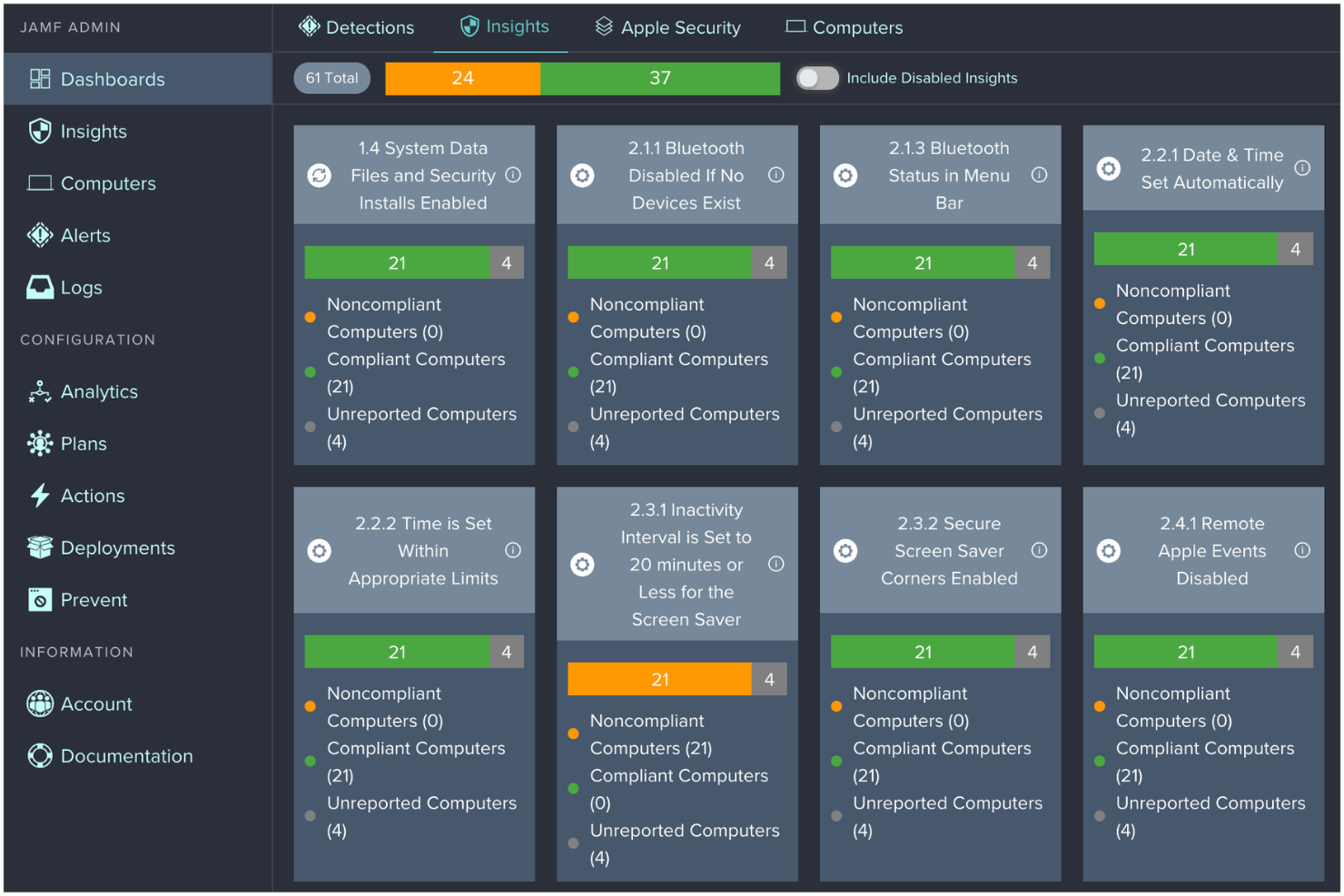
Jamf è una piattaforma di gestione dei dispositivi progettata per i team IT nelle organizzazioni che distribuiscono, integrano e dismettono dispositivi Apple, aiutando ad automatizzare la configurazione, la sicurezza e la conformità per Mac, iPhone e iPad.
Per chi è ideale Jamf?
Amministratori IT in ambito educativo, sanitario e aziende che gestiscono ampi volumi di dispositivi Apple.
Perché ho scelto Jamf
Ho scelto Jamf tra i migliori perché posso automatizzare la configurazione dei dispositivi Apple per i nuovi assunti e cancellare o riassegnare da remoto i dispositivi durante la dismissione. Mi piace che Jamf si integri con Apple Business Manager, così il mio team può effettuare il deployment senza contatto di Mac e iPad subito dopo l’acquisto. Uso anche i controlli di sicurezza e conformità di Jamf per applicare le policy aziendali durante l’onboarding e l’offboarding.
Funzionalità principali di Jamf
- App Self-Service: Permette ai dipendenti di installare app e risorse approvate sui propri dispositivi.
- Blocco e sblocco da remoto: Consente all’IT di mettere in sicurezza o sbloccare dispositivi durante la dismissione o emergenze.
- Gestione inventario: Monitora lo stato, la proprietà e l’assegnazione dei dispositivi nell’organizzazione.
- Aggiornamenti software automatici: Pianifica e distribuisce aggiornamenti di sistema operativo e app sui dispositivi Apple.
Integrazioni di Jamf
Jamf offre integrazioni native con Apple Business Manager, Microsoft Azure Active Directory, Google Workspace e Okta. È inoltre disponibile un’API per integrazioni personalizzate.
Pros and Cons
Pros:
- Automatizza il setup senza contatto dei dispositivi Apple
- Supporta blocco e cancellazione remota dei dispositivi
- Offre monitoraggio granulare dell'inventario dei dispositivi
Cons:
- Limitato solo ad ambienti con dispositivi Apple
- Non include una gestione delle attività di onboarding integrata

Workday
Ideale per integrazioni aziendali di grandi dimensioni
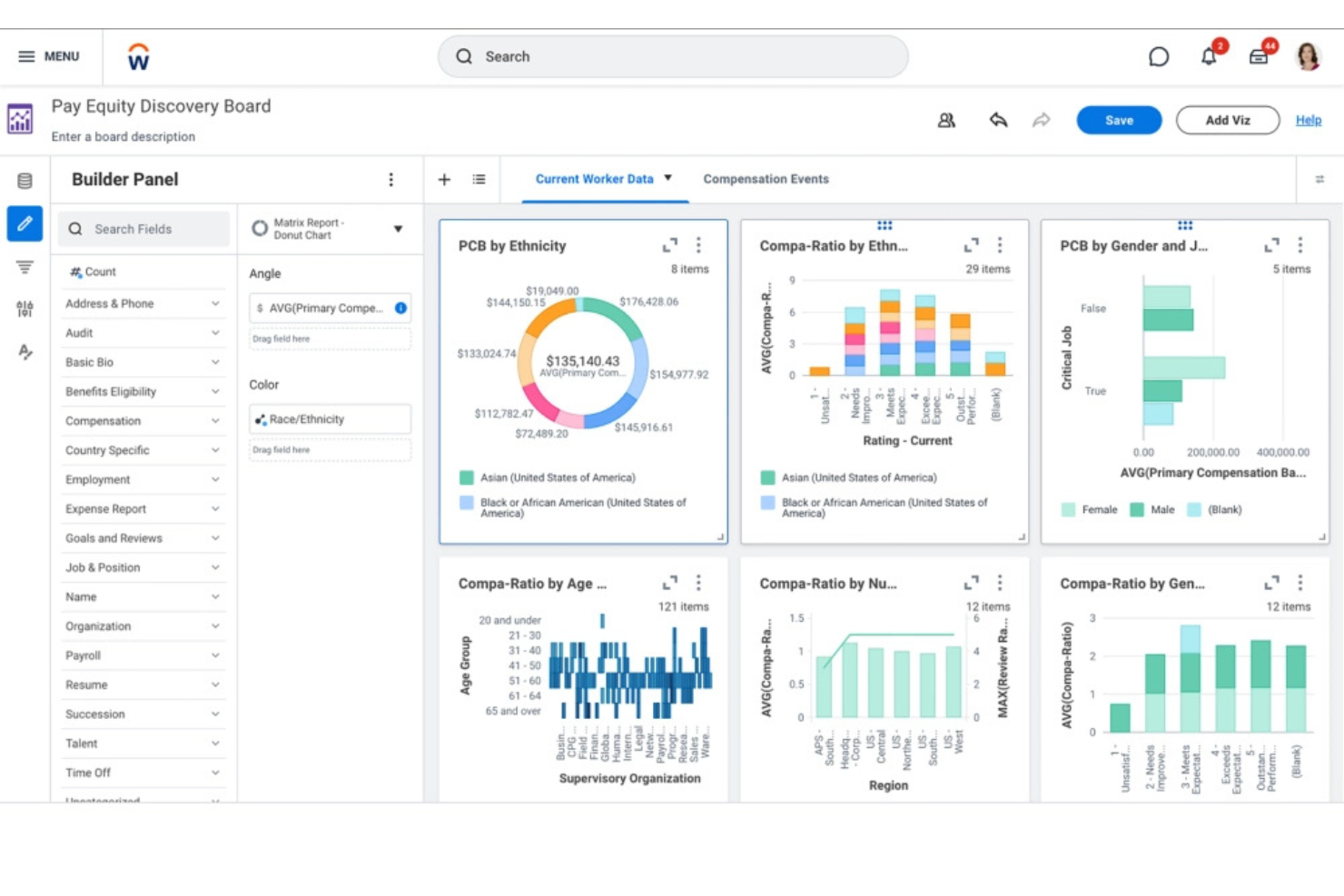
Workday è una piattaforma HR basata su cloud utilizzata dalle grandi imprese per automatizzare l’onboarding e l’offboarding, gestire i dati dei dipendenti e coordinare processi complessi di gestione del personale in team globali.
Per chi è più indicato Workday?
Team HR e IT di imprese globali che gestiscono flussi di lavoro complessi di onboarding e offboarding.
Perché ho scelto Workday
Ho scelto Workday tra i migliori perché consente di automatizzare l’onboarding e l’offboarding su larga scala per team globali, con workflow che collegano HR, IT e finanza. Apprezzo il fatto che il framework d’integrazione di Workday permetta al mio team di sincronizzare i dati dei dipendenti tra diversi sistemi aziendali. In pratica, ciò significa che possiamo attivare automaticamente processi di assegnazione e rimozione degli accessi quando le persone si uniscono o lasciano l’azienda, anche in settori altamente regolamentati.
Funzionalità principali di Workday
- Dashboard di gestione attività: Traccia le attività di onboarding e offboarding per ogni dipendente.
- Gestione documentale: Archivia, condivide e gestisce i documenti dei dipendenti in modo sicuro.
- Controlli degli accessi basati sui ruoli: Assegna permessi in base ai ruoli e alle responsabilità lavorative.
- Notifiche automatizzate: Invia avvisi e promemoria per le principali fasi di onboarding e offboarding.
Integrazioni di Workday
Workday offre integrazioni native con ServiceNow, Salesforce, Okta, ADP, SAP, DocuSign, Greenhouse, LinkedIn, Slack e integrazioni native in tutto l’ecosistema Microsoft, incluso Microsoft 365 e Azure. È disponibile anche un’API per integrazioni personalizzate.
Pros and Cons
Pros:
- Automatizza compiti di conformità e raccolta documentale
- Gestisce esigenze complesse e globali di onboarding
- Traccia il progresso dell’onboarding con dashboard in tempo reale
Cons:
- Gli aggiornamenti di sistema possono interrompere le integrazioni personalizzate
- Flessibilità limitata per le esigenze delle aziende di fascia media

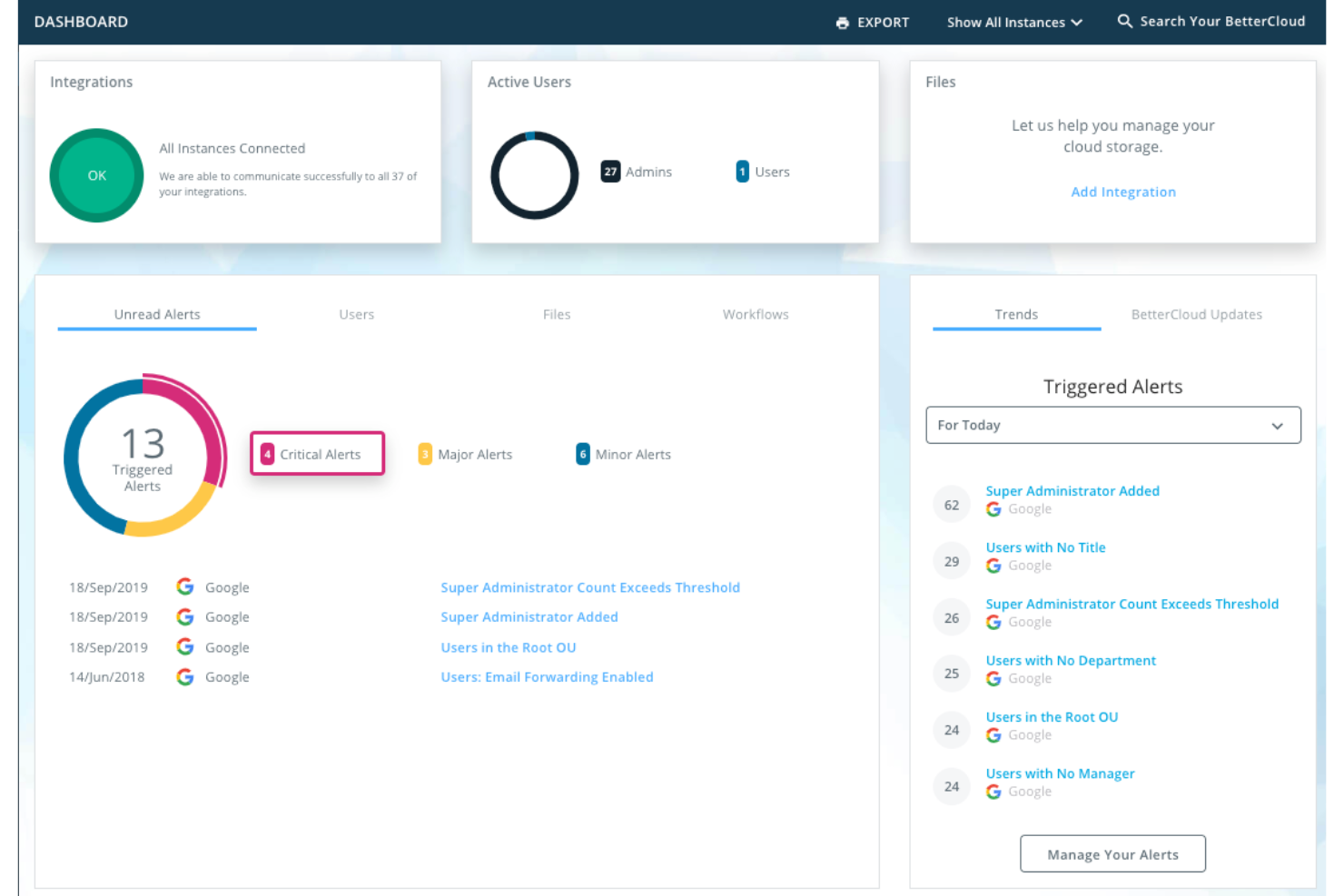
BetterCloud è una piattaforma di gestione SaaS progettata per i team IT e di sicurezza di organizzazioni di medie e grandi dimensioni che necessitano di automatizzare il processo di onboarding e offboarding e far rispettare le policy di sicurezza tra più applicazioni cloud.
Per chi è più indicato BetterCloud?
Team IT e di sicurezza in aziende di medie e grandi dimensioni che gestiscono più applicazioni SaaS.
Perché ho scelto BetterCloud
Ho scelto BetterCloud tra i migliori perché posso impostare controlli di accesso SaaS altamente granulari per l'onboarding e l'offboarding, fino ai permessi dei singoli utenti e alle policy specifiche delle app. Apprezzo il fatto di poter automatizzare i passaggi di deprovisioning su dozzine di strumenti SaaS, garantendo che non rimanga alcun accesso attivo. Il mio team utilizza il motore di policy di BetterCloud per far rispettare gli standard di sicurezza e attivare avvisi se le procedure di offboarding non vengono completate come richiesto.
Funzionalità principali di BetterCloud
- Costruttore di workflow: Crea workflow automatizzati di onboarding e offboarding con azioni drag-and-drop.
- Log di audit: Traccia ogni modifica e azione compiuta durante gli eventi del ciclo di vita dell'utente.
- Connettori SaaS predefiniti: Collegamento diretto alle app cloud più diffuse per il provisioning degli utenti e la gestione dei dati.
- Controlli di accesso basati sui ruoli: Assegna permessi ad amministratori e manager in base alla funzione lavorativa.
Integrazioni BetterCloud
BetterCloud offre oltre 100 integrazioni native, incluse Google Workspace, Okta, Slack, Dropbox e Zapier. È disponibile un'API per integrazioni personalizzate.
Pros and Cons
Pros:
- Automatizza onboarding e offboarding tra le app SaaS
- Traccia e monitora tutte le azioni del ciclo di vita dell'utente
- Permette la creazione di workflow personalizzati per i team IT
Cons:
- Nessuna app mobile per la gestione dei workflow
- Richiede una configurazione tecnica per le automazioni avanzate
Ideale per il monitoraggio del ciclo di vita dei dipendenti nelle PMI
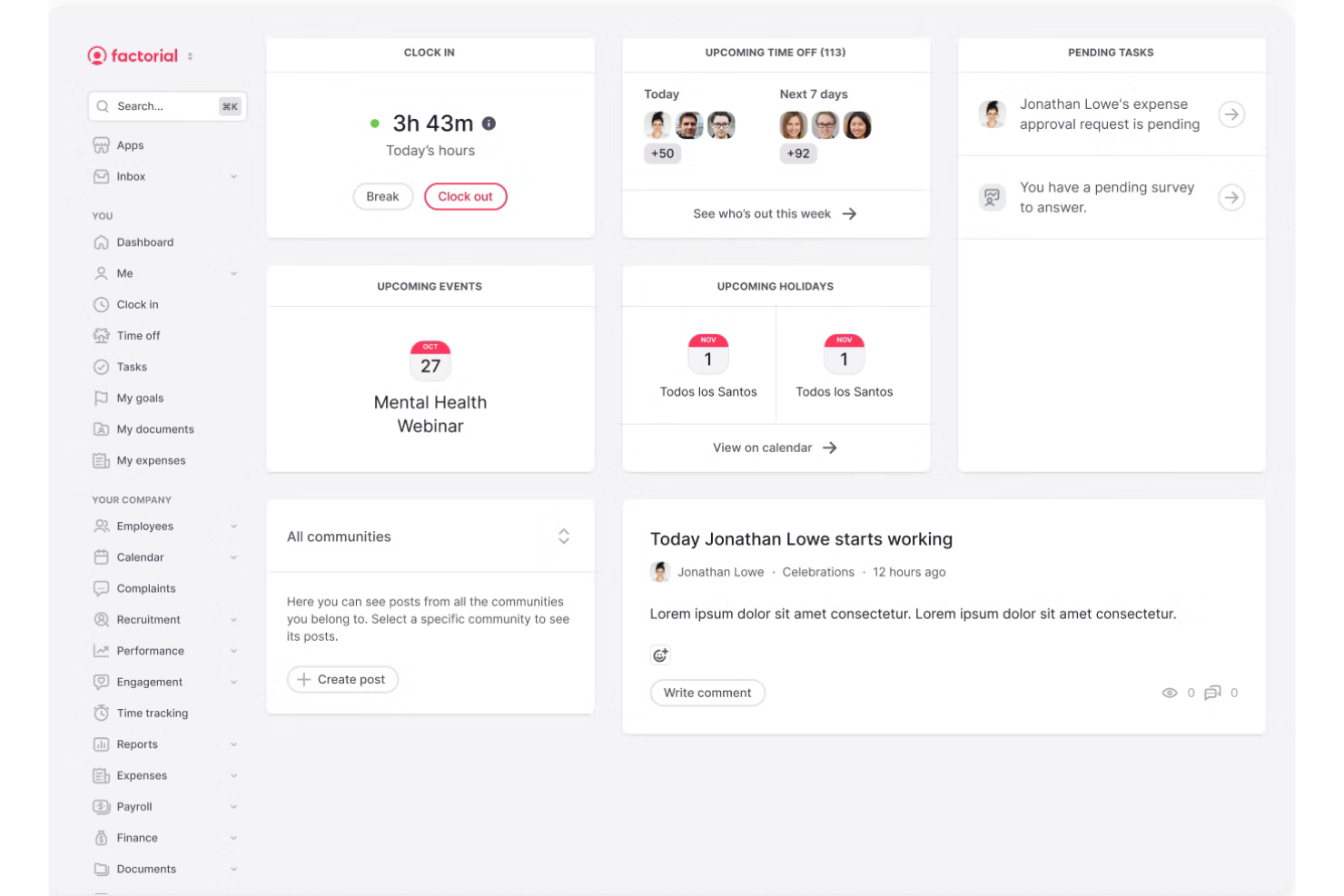
Factorial è una piattaforma HR tutto-in-uno progettata per le piccole e medie imprese che desiderano gestire l'onboarding, l'offboarding e ogni fase del ciclo di vita del dipendente in un unico posto.
Per chi è ideale Factorial?
Team HR di piccole e medie imprese in crescita che vogliono centralizzare l'onboarding, l'offboarding e la gestione del ciclo di vita dei dipendenti.
Perché ho scelto Factorial
Ho scelto Factorial come uno dei migliori perché posso tracciare ogni fase del percorso di un dipendente, dai task di onboarding e raccolta documenti alle checklist di offboarding, tutto su un'unica dashboard. Mi piace poter automatizzare la generazione dei contratti e assegnare workflow di onboarding per ruolo o dipartimento. Il mio team usa Factorial per monitorare i progressi e garantire la conformità per ogni evento del ciclo di vita dei dipendenti.
Caratteristiche chiave di Factorial
- Workflow di firma elettronica: Raccogli firme digitali su contratti e documenti aziendali.
- Template personalizzati per onboarding: Crea e riutilizza liste di attività di onboarding per diversi ruoli.
- Archivio documenti dei dipendenti: Archivia e gestisci i file dei dipendenti in sicurezza in un unico posto.
- Notifiche automatizzate: Attiva promemoria per le scadenze di onboarding e offboarding.
Integrazioni di Factorial
Factorial offre integrazioni native con Google Workspace, Microsoft Outlook, Microsoft Power BI, Sage 200, a3innuva Nómina, DATEV LODAS, Payflow, TravelPerk, Figures, Teamtailor e Zapier. È disponibile anche una API per integrazioni personalizzate.
Pros and Cons
Pros:
- Offre checklist di onboarding personalizzabili per ruolo
- Traccia il progresso dell'onboarding con dashboard visive
- Integra onboarding con payroll e ferie
Cons:
- Nessuna gestione automatica di abilitazione/disabilitazione degli accessi
- La funzione di offboarding non include il tracciamento della restituzione dell'hardware

Stitchflow
Ideale per automatizzare passaggi di workflow complessi

Stitchflow è progettato per i team HR e i responsabili delle operazioni che devono coordinare processi complessi di onboarding e offboarding tra più reparti e sistemi.
Per chi è più indicato Stitchflow?
Grandi organizzazioni o aziende in rapida crescita con esigenze di onboarding e offboarding complesse e multi-fase tra diversi team.
Perché ho scelto Stitchflow
Ho scelto Stitchflow tra i migliori perché mi permette di automatizzare flussi di lavoro complessi di onboarding e offboarding che coinvolgono diversi reparti e approvazioni. Apprezzo la possibilità di costruire logiche condizionali in ogni workflow, in modo che le attività vengano attivate solo quando vengono soddisfatti determinati criteri. Il mio team utilizza Stitchflow per coordinare i passaggi tra IT, HR e servizi generali senza perdere nessun passaggio.
Funzionalità principali di Stitchflow
- Assegnazione dei compiti: Assegna le attività di onboarding e offboarding a utenti o team specifici.
- Dashboard di monitoraggio dei progressi: Controlla lo stato di ogni fase del workflow in tempo reale.
- Gestione dei documenti: Archivia, condividi e richiedi i documenti necessari all'interno di ogni workflow.
- Notifiche automatiche: Invia promemoria e avvisi alle parti interessate quando le attività stanno per scadere.
Integrazioni Stitchflow
Stitchflow offre oltre 60 integrazioni API native con strumenti come Okta, Jira, Slack e si collega ad app aggiuntive tramite un agente locale del browser per le piattaforme prive di API di gestione. È inoltre disponibile un'API per integrazioni personalizzate.
Pros and Cons
Pros:
- Gestisce l'onboarding multi-reparto con logica condizionale
- Supporta il provisioning e deprovisioning IT automatico
- Offre assegnazione e monitoraggio dettagliato delle attività
Cons:
- Pochi template predefiniti per i flussi di onboarding
- Manca la raccolta integrata del feedback dei dipendenti
Altri software per onboarding e offboarding
Ecco alcune altre opzioni di software per onboarding e offboarding che non sono entrate nella mia shortlist, ma che meritano comunque di essere considerate:
- Rippling
Ideale per azioni HR e IT unificate
- Auvik
Ideale per la supervisione dei SaaS collegati alla rete
- Gusto
Ideale per transizioni gestite dalle buste paga
- Axero
Ideale per l'onboarding tramite base di conoscenza
- Mitratech
Ideale per l'automazione di processi guidati da policy
- SailPoint
Ideale per la certificazione degli accessi basata su policy


Cómo evalúo el software de nómina para contratistas
Divido mi evaluación en dos niveles: las capacidades básicas que una herramienta necesita para calificar —como pagos a contratistas y automatización de documentos fiscales— y los diferenciadores que destacan a las mejores opciones.
Funcionalidad principal (requisitos mínimos para esta lista)
Cuando selecciono herramientas para mi lista, califico cada una en una escala de 0 (no ofrece la funcionalidad) a 5 (sobresale en esta área) para cada funcionalidad principal listada a continuación. Luego, calculo la puntuación total de la herramienta en un porcentaje. Cada herramienta debe alcanzar una puntuación total mínima del 65% para ser considerada en la inclusión.
- Procesamiento de pagos a contratistas: Reviso cuántos métodos de pago admite cada plataforma y si puede manejar pagos masivos, programaciones recurrentes y pagos puntuales a decenas de contratistas al mismo tiempo.
- Pagos internacionales y multidivisa: Pagar a un diseñador en Europa y a un desarrollador en el sudeste asiático desde un solo panel de control es importante, así que evalúo la cobertura de países, las monedas soportadas y los sistemas locales de pago.
- Gestión de formularios fiscales: Cada herramienta debe recopilar W-9 y W-8BEN de forma digital, generar 1099-NEC al final del año y, idealmente, gestionar la presentación electrónica—plataformas como Deel y Gusto lo abordan de manera diferente, pero lo que busco es automatización.
- Incorporación de contratistas: Evalúo si la plataforma permite a los contratistas autogestionar la firma de contratos, la verificación de identidad y la configuración bancaria sin intercambios de correos ni búsqueda manual de documentos.
- Cumplimiento y clasificación: La mala clasificación de trabajadores es un riesgo real, así que busco cuestionarios integrados para la clasificación, orientación específica por jurisdicción y alertas de riesgo antes de finalizar un acuerdo con un contratista.
- Facturación y flujos de aprobación: Considero si los contratistas pueden enviar facturas directamente en la plataforma y si tu equipo puede enrutar esas facturas a través de aprobaciones en varios pasos antes de que se realicen los pagos.
Una vez que tengo una lista de herramientas que cumplen con los criterios, considero qué distingue a cada plataforma.
Factores diferenciadores (lo que separa a los proveedores)
Así es como comparo y contrasto diferentes proveedores:
Funciones destacadas
Las capacidades EOR son importantes si planeas convertir a contratistas de alto rendimiento en empleados de tiempo completo en el extranjero sin crear una entidad local. También reviso si las plataformas ofrecen beneficios opcionales como cobertura médica o estipendios a los que los contratistas puedan adherirse—esto ayuda a atraer y retener a profesionales independientes calificados. Para equipos que gestionan contratistas en varias filiales, el soporte para múltiples entidades permite manejar todo desde un único panel sin tener que cambiar entre cuentas separadas.
Más allá de las funciones
La transparencia de precios es algo que evalúo cuidadosamente porque los recargos por cambio de divisa y las tarifas por transferencias bancarias pueden inflar sigilosamente el coste por contratista. También verifico cómo se integra cada plataforma con herramientas contables como QuickBooks, Xero o NetSuite—sin una sincronización adecuada, tu equipo financiero termina conciliando pagos a contratistas manualmente cada mes. La velocidad de pago es otro diferenciador que merece la pena comparar; algunos proveedores ofrecen transferencias el mismo día mientras que otros tardan varios días hábiles, lo que impacta directamente en la experiencia de los contratistas al trabajar contigo.
Come scegliere un software per onboarding e offboarding
È facile perdersi in elenchi lunghi di funzionalità e strutture di prezzo complesse. Per aiutarti a rimanere concentrato durante il tuo processo di selezione software, ecco una checklist di fattori da tenere in considerazione:
| Fattore | Cosa considerare |
|---|---|
| Scalabilità | Il software gestirà il tuo organico attuale e futuro? Informati sui limiti di utenti e sugli scatti di prezzo nella fase di crescita. |
| Integrazioni | Si collega nativamente al tuo HRIS, gestione delle paghe, provider di identità e altri sistemi centrali? Verifica che non vi siano mancanze che possano comportare compiti manuali. |
| Personalizzazione | Puoi adattare i flussi di lavoro, le notifiche e le regole di accesso alle tue policy e procedure interne? Evita strumenti troppo rigidi che costringono a trovare soluzioni alternative. |
| Facilità d’uso | HR, IT e responsabili troveranno l’interfaccia intuitiva? Testa la piattaforma con utenti reali per individuare passaggi poco chiari o impostazioni difficili da trovare. |
| Implementazione e onboarding | Quanto tempo richiederà la configurazione e quali risorse saranno necessarie? Chiedi del supporto alla migrazione, della formazione e delle tempistiche tipiche di go-live. |
| Costo | Tutte le funzionalità necessarie sono incluse nel prezzo indicato? Fai attenzione a costi aggiuntivi, numero minimo di utenti o vincoli contrattuali. |
| Sicurezza | Lo strumento offre crittografia, log di audit e accessi basati sui ruoli? Assicurati che soddisfi gli standard di sicurezza della tua organizzazione. |
| Disponibilità del supporto | Quali canali di supporto vengono offerti, e in quali orari? Valuta se potrebbe servirti assistenza fuori dall’orario lavorativo standard. |
Che cos’è il software per onboarding e offboarding?
Il software per onboarding e offboarding è uno strumento digitale che automatizza e gestisce i processi relativi all’ingresso dei nuovi dipendenti in azienda e alla revoca sicura degli accessi in caso di uscita. Queste piattaforme aiutano i team HR e IT a coordinare le attività, assegnare o revocare i permessi ai sistemi, monitorare l’avanzamento e garantire la conformità alle policy interne e ai requisiti normativi.
Funzionalità del software di onboarding e offboarding
Quando scegli un software per l'onboarding e l'offboarding, presta attenzione alle seguenti funzionalità chiave:
- Provisioning automatico degli utenti: Crea automaticamente gli account e assegna l’accesso a sistemi, app e dispositivi per i nuovi assunti in base al loro ruolo o dipartimento.
- Deprovisioning automatico: Revoca istantaneamente gli accessi e rimuove gli account da tutti i sistemi collegati quando un dipendente lascia l’azienda, riducendo i rischi per la sicurezza.
- Gestione dei flussi di lavoro: Ti permette di progettare, assegnare e monitorare le attività di onboarding e offboarding tra risorse umane, IT e altri dipartimenti per garantire che nulla venga tralasciato.
- Integrazione con provider di identità: Si collega direttamente a piattaforme come Active Directory o Okta per sincronizzare l’accesso degli utenti e le credenziali.
- Controlli di accesso basati sui ruoli: Permettono di impostare permessi e livelli di accesso basati sulla funzione lavorativa, così i dipendenti hanno accesso solo a ciò di cui hanno bisogno.
- Tracciabilità e reportistica: Registra log dettagliati di tutte le azioni di onboarding e offboarding per la conformità, audit di sicurezza e miglioramento dei processi.
- Modelli personalizzabili: Fornisce modelli preconfigurati o modificabili per checklist, email e documentazione di onboarding e offboarding.
- Portali self-service: Offrono ai nuovi assunti e ai dipendenti in uscita un luogo centrale per completare moduli, caricare documenti e monitorare i propri progressi.
- Notifiche e promemoria: Invia avvisi automatici agli stakeholder riguardo attività in sospeso, approvazioni o scadenze per mantenere i processi in linea.
- Gestione dei documenti: Archivia, condividi e traccia i documenti richiesti per l’onboarding e l’offboarding, come contratti, NDA e checklist di uscita.
Vantaggi del software di onboarding e offboarding
L’implementazione di un software di onboarding e offboarding offre diversi vantaggi per il tuo team e la tua azienda. Ecco alcuni benefici a cui puoi aspirare:
- Riduzione del lavoro manuale: I flussi di lavoro automatizzati e il provisioning eliminano le attività ripetitive per i team HR e IT.
- Migliore sicurezza: Deprovisioning immediato e tracciabilità aiutano a prevenire accessi non autorizzati e violazioni dei dati.
- Esperienza utente coerente: Checklist e modelli standardizzati assicurano a ogni dipendente lo stesso processo di onboarding e offboarding.
- Maggiore rapidità verso la produttività: Configurazione automatica degli account e assegnazione chiara delle attività aiutano i nuovi assunti ad essere operativi più velocemente.
- Maggiore conformità: Log dettagliati delle attività e reportistica supportano requisiti normativi e audit interni.
- Migliore coordinamento tra i team: Flussi di lavoro centralizzati e notifiche consentono a HR, IT e responsabili di essere allineati su responsabilità e scadenze.
- Scalabilità per la crescita: Processi e integrazioni automatizzati facilitano la gestione di onboarding e offboarding in caso di espansione aziendale.
Costi e prezzi del software di onboarding e offboarding
La scelta di un software per onboarding e offboarding richiede la comprensione dei diversi modelli e piani di prezzo disponibili. I costi variano in base alle funzionalità, alla dimensione del team, agli add-on e altro ancora. La tabella seguente riassume i piani più comuni, i prezzi medi e le funzionalità tipiche comprese nelle soluzioni di software per onboarding e offboarding:
Tabella di confronto dei piani per il software di onboarding e offboarding
| Tipo di piano | Prezzo medio | Funzionalità comuni |
|---|---|---|
| Piano gratuito | $0 | Checklist di onboarding di base, provisioning utenti limitato, notifiche email e reportistica semplice. |
| Piano personale | $5–$10/user/month | Flussi di lavoro automatici di onboarding, integrazioni di base, portali self-service e supporto standard. |
| Piano business | $15–$25/user/month | Automazione avanzata dei flussi di lavoro, controlli di accesso basati sui ruoli, log di audit e integrazione con HRIS. |
| Piano enterprise | $30–$50/user/month | Flussi di lavoro personalizzabili, provisioning in massa, sicurezza avanzata, supporto dedicato e strumenti di conformità. |
Domande frequenti sul software di onboarding e offboarding
Ecco alcune risposte alle domande più comuni sul software di onboarding e offboarding:
In che modo il software di onboarding e offboarding migliora la sicurezza?
Il software di onboarding e offboarding migliora la sicurezza automatizzando la concessione e la revoca degli accessi, garantendo che i dipendenti abbiano solo le autorizzazioni necessarie e che tutti i permessi vengano rimossi tempestivamente quando qualcuno lascia l’azienda. Questo riduce il rischio di accessi non autorizzati e violazioni dei dati.
Il software di onboarding e offboarding può integrarsi con i miei attuali sistemi HR e IT?
Sì, la maggior parte dei software di onboarding e offboarding può integrarsi con HRIS, payroll, provider di identità e altri sistemi aziendali principali. Queste integrazioni aiutano ad automatizzare la creazione, l’aggiornamento e la rimozione degli account utente, riducendo il lavoro manuale e gli errori.
Cosa devo considerare nella valutazione di un software di onboarding e offboarding?
Concentrati su scalabilità, capacità di integrazione, personalizzazione dei flussi di lavoro, facilità d’uso e misure di sicurezza. Valuta quanto il software si adatti a dimensione, processi ed esigenze di conformità della tua organizzazione e se offre il supporto e la formazione necessari al tuo team.
Il software di onboarding e offboarding è adatto alle piccole imprese?
Sì, molte soluzioni offrono piani flessibili e funzionalità che si adattano alle piccole imprese. Cerca strumenti semplici da configurare, con prezzi accessibili e automazione essenziale per aiutare il tuo team a gestire l’onboarding e l’offboarding senza carichi di lavoro aggiuntivi.
Quanto tempo ci vuole per implementare un software di onboarding e offboarding?
Il tempo di implementazione dipende dal fornitore e dalla complessità, ma la maggior parte delle soluzioni cloud può essere impostata in pochi giorni o settimane. Fattori come integrazioni, migrazione dei dati e personalizzazione dei flussi di lavoro possono influire sulla tempistica, quindi chiedi ai vendor quanto dura in genere l’onboarding.