

I 10 migliori software per la fatturazione e la gestione delle buste paga del 2026

10 I migliori software per fatturazione e paghe


Gestire fatture e paghe può essere una vera seccatura. In qualità di professionista delle risorse umane, conosci le difficoltà legate alla gestione di conformità, precisione e tempi. È qui che entra in gioco il giusto software per la fatturazione e le paghe, offrendo soluzioni che fanno risparmiare tempo e riducono gli errori.
Ho trascorso anni a testare e recensire questi strumenti e sono qui per condividere opinioni imparziali su ciò che funziona meglio. Il mio obiettivo è aiutarti a trovare la soluzione più adatta al tuo team, che tu gestisca una piccola impresa o un'azienda in crescita.
In questo articolo troverai un elenco ben documentato delle migliori soluzioni, ciascuna con caratteristiche uniche per soddisfare le tue esigenze. Scopriamo insieme le opzioni che possono rendere più gestibili le tue attività nelle risorse umane.
Perché fidarsi delle nostre recensioni sui software
Il nostro team testa e recensisce software dal 2012. In quanto esperti HR noi stessi, sappiamo quanto sia difficile — e importante — scegliere il software giusto.
Per questa guida, abbiamo valutato gli strumenti attraverso test pratici e ricerche indipendenti, assegnando un punteggio agli strumenti in base ai nostri criteri di selezione. Ci basiamo inoltre sulle competenze di leader di pensiero del settore e di professionisti HR attivi.
Le nostre recensioni riflettono il nostro giudizio editoriale umano, non un discorso di vendita.
Revisori esperti:
Tabella comparativa dei software per fatturazione e paghe
Questa tabella comparativa riassume i dettagli dei prezzi delle mie migliori selezioni di software per fatturazione e paghe:
| Tool | Best For | Trial Info | Price | ||
|---|---|---|---|---|---|
| 1 | Ideale per l'accesso in tempo reale alle buste paga | Prova gratuita di 30 giorni | Da $44/mese + $6,50/dipendente/mese | Website | |
| 2 | Ideale per rimborsi collegati al payroll | Demo gratuita disponibile | Da $8/utente/mese (fatturato annualmente) | Website | |
| 3 | Ideale per la gestione della conformità delle buste paga internazionali | Demo gratuita disponibile | Da $25/persona/mese | Website | |
| 4 | Ideale per la fatturazione e la gestione globale delle buste paga | Dimostrazione gratuita disponibile | A partire da $29/dipendente/mese | Website | |
| 5 | Ideale per piccole e medie imprese | Demo gratuita disponibile | Da $49/mese + $6/mese per persona | Website | |
| 6 | Ideale per automatizzare processi di payroll complessi | Prova gratuita di 30 giorni + demo gratuita disponibile | Da $50/mese | Website | |
| 7 | Ideale per l'accessibilità economica | Prova gratuita di 30 giorni disponibile | A partire da $8,50/mese + $2/dipendente | Website | |
| 8 | Ideale per strumenti aziendali diversificati | Prova gratuita di 30 giorni | Da $38/mese | Website | |
| 9 | La migliore per la contabilità online | Prova gratuita di 30 giorni disponibile | Da $2.50/mese | Website | |
| 10 | Ideale per software finanziari gratuiti | Piano gratuito disponibile | Da $19/mese | Website |


Recensioni dei migliori software per fatturazione e paghe
Ecco le mie sintesi dettagliate dei migliori software per fatturazione e paghe che sono entrati nella mia selezione delle 10 migliori soluzioni, con note sul motivo per cui li ho scelti. Ogni recensione include anche i pro e i contro di ciascun sistema, le sue funzionalità principali e gli scenari d’uso ideali.
Ideale per l'accesso in tempo reale alle buste paga
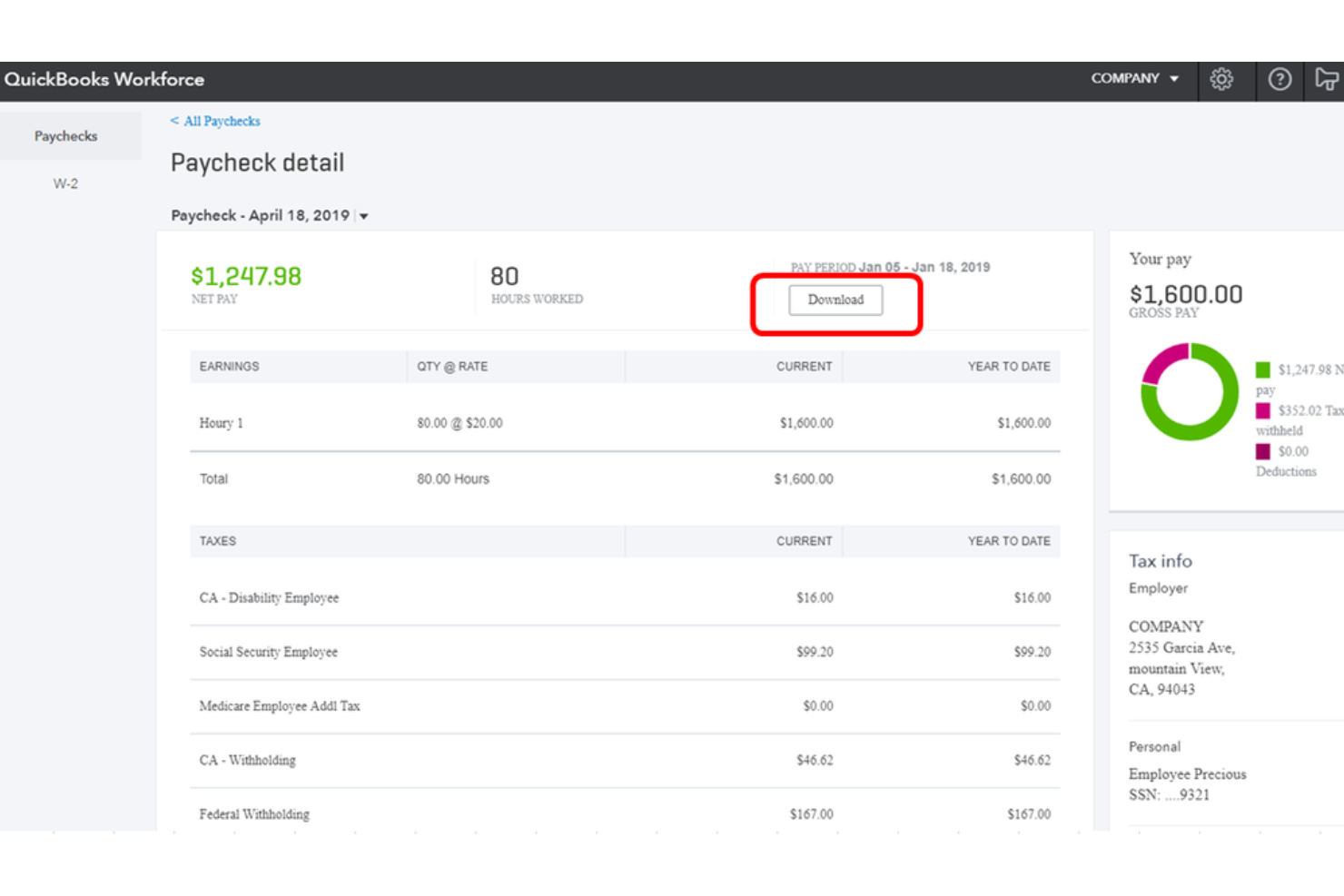
QuickBooks Workforce è una piattaforma per la gestione delle paghe e il self-service dei dipendenti che si occupa di elaborazione delle buste paga, dichiarazione dei redditi, fatturazione, rilevazione delle presenze e amministrazione dei benefit all'interno dell'ecosistema QuickBooks.
Per chi è ideale QuickBooks Workforce?
QuickBooks Workforce è perfetto per le piccole e medie imprese che già utilizzano QuickBooks Online e desiderano avere gestione paghe e fatturazione in un unico sistema connesso.
Perché ho scelto QuickBooks Workforce
Ho scelto QuickBooks Workforce tra i migliori per l'accesso in tempo reale alle buste paga perché il portale dipendenti offre a ogni membro del team visibilità immediata sulle proprie buste paga e W-2, sia da desktop sia dall'app mobile, non appena viene elaborata la paga. Se a questo si aggiungono le opzioni di accredito diretto in giornata o il giorno successivo, i dipendenti non rimangono mai in attesa o con dubbi sul proprio stipendio. Mi piace anche che i dipendenti possano aggiornare da soli i propri dati bancari e fiscali direttamente dal portale, riducendo le comunicazioni tra personale e HR.
Funzionalità principali di QuickBooks Workforce
- Paghe automatiche: Elabora automaticamente le buste paga dei dipendenti con stipendio fisso tramite accredito diretto secondo una programmazione stabilita, senza input manuali a ogni ciclo.
- Dichiarazione dei redditi automatica: Calcola, presenta e paga le imposte sui salari federali e statali per tuo conto, incluse le dichiarazioni di fine anno.
- Invio elettronico moduli 1099: Genera e invia in formato elettronico i moduli 1099 per i collaboratori direttamente tramite la piattaforma.
- Integrazione con la fatturazione: Collega i dati delle paghe con QuickBooks Online per gestire fatture, spese e payroll da un unico account.
Integrazioni di QuickBooks Workforce
QuickBooks si integra con oltre 800 app business popolari tramite il suo marketplace, tra cui strumenti come Shopify, PayPal, Square, Mailchimp, Gusto, QuickBooks Time, Amazon Business e Housecall Pro. È supportato anche da Zapier ed è disponibile un'API per integrazioni personalizzate.
Pros and Cons
Pros:
- Dati su paghe e tasse sincronizzati automaticamente alla contabilità
- Pagamenti sia a dipendenti W-2 sia a collaboratori 1099
- Opzioni di accredito diretto in giornata o entro il giorno successivo
Cons:
- Limite massimo di 150 dipendenti per account
- Il piano base non include la dichiarazione fiscale locale automatica
Ideale per rimborsi collegati al payroll
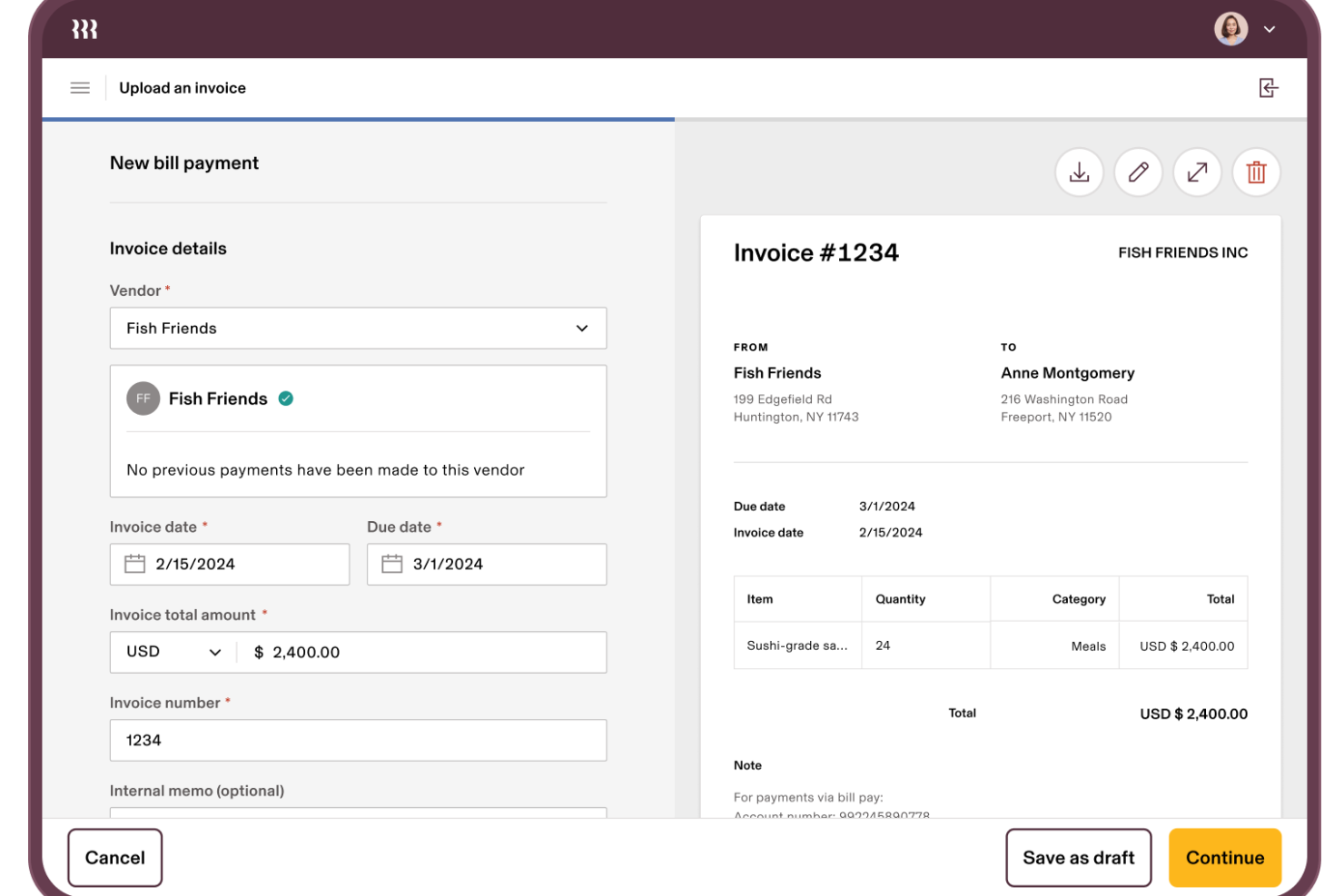
Rippling Spend aiuta i team finanziari e operativi a gestire le spese aziendali, i pagamenti delle fatture, le carte aziendali, i rimborsi spese e i rimborsi collegati alle paghe in un'unica piattaforma.
Perché ho scelto Rippling Spend
Ho scelto Rippling Spend perché riunisce tutte le funzioni critiche di spesa finanziaria in un solo sistema invece di diversi strumenti separati. Puoi emettere carte aziendali virtuali e fisiche con limiti prestabiliti legati a ruoli e dipartimenti, così il tuo team può restare nel budget senza un controllo costante.
I flussi di lavoro di approvazione automatizzati utilizzano i dati dei dipendenti (come dipartimento o ruolo) per indirizzare le spese o le fatture al responsabile corretto, risparmiando ore di inseguimenti manuali ogni mese. L’integrazione stretta con il payroll significa che i rimborsi compaiono automaticamente nei cicli paga, eliminando passaggi separati di riconciliazione tra stipendio e spese. E con i controlli delle policy che bloccano le spese non conformi in anticipo, non dovrai rincorrere errori a posteriori.
Funzionalità principali di Rippling Spend
Ecco alcune funzionalità chiave da sottolineare:
- Controlli di spesa basati su policy: Crea regole personalizzate usando attributi dei dipendenti per bloccare le spese fuori policy prima che avvengano.
- Flussi di approvazione multi-livello: Definisci catene di approvazione che si adattano in base a importo, categoria o ruolo del dipendente.
- Rimborsi globali: Paga e segnala le spese in valute locali per dipendenti in tutto il mondo.
- Sincronizzazione con libro mastro: Sincronizza automaticamente le spese categorizzate nel tuo sistema contabile per velocizzare la chiusura di fine mese.
Integrazioni Rippling Spend
Le integrazioni includono QuickBooks, Xero, Sage Intacct, Netsuite, Checkr, Jira, Slack e Microsoft 365.
Pros and Cons
Pros:
- Sistema unificato per la gestione delle spese, pagamenti e payroll
- Applica automaticamente le policy di spesa e indirizza le approvazioni
- Automatizza la categorizzazione delle spese per velocizzare la chiusura di fine mese
Cons:
- L'app mobile è limitata rispetto alla versione desktop
- La configurazione di policy complesse può richiedere sforzi aggiuntivi

Ideale per la gestione della conformità delle buste paga internazionali
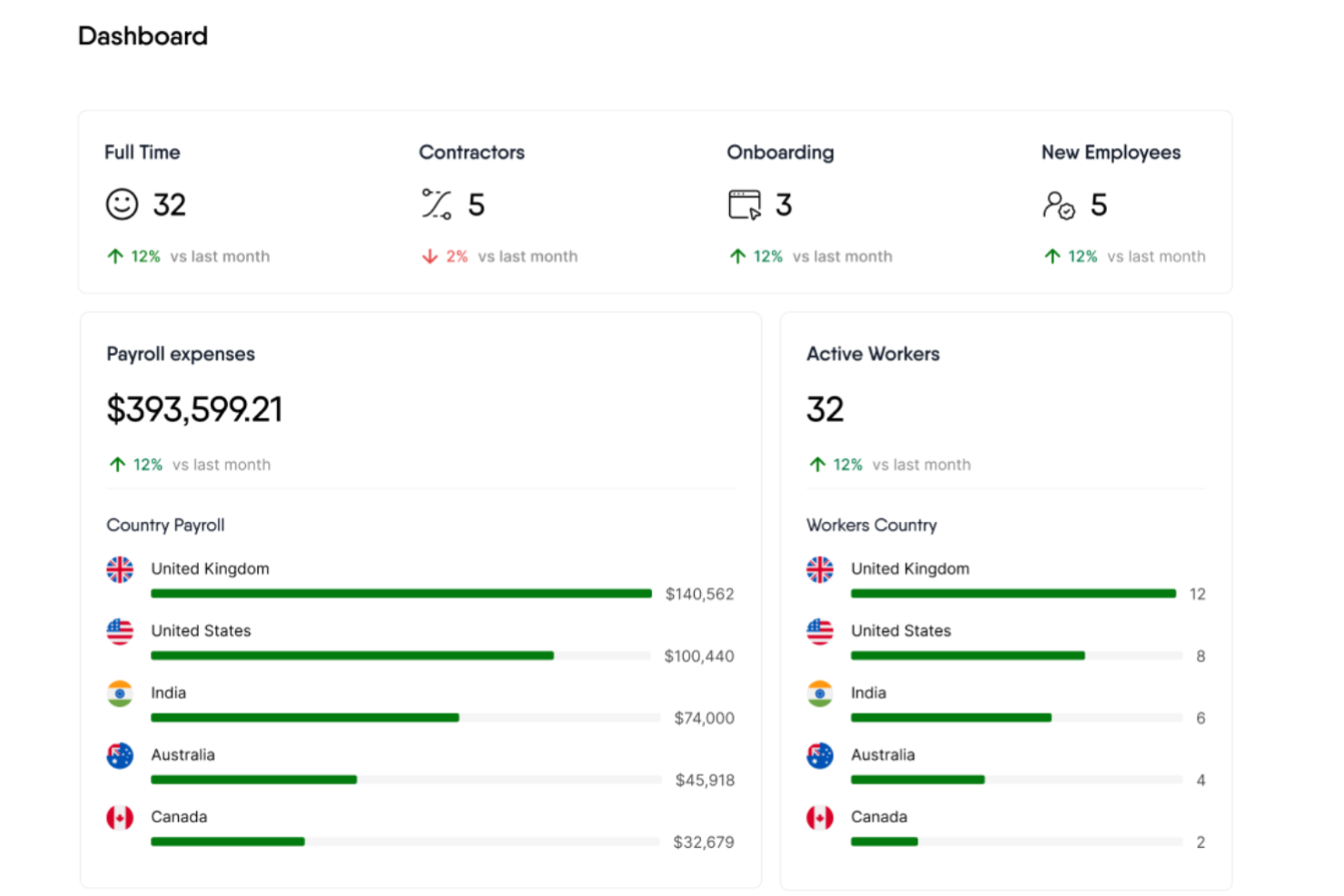
Remofirst è una piattaforma globale di servizi per l'occupazione che offre strumenti per l'assunzione e la gestione di un team internazionale, inclusi servizi di employer of record, gestione delle buste paga, gestione dei benefit e supporto alla conformità.
Perché ho scelto Remofirst: Mi piace che Remofirst offra una piattaforma HRIS tutto-in-uno che include funzionalità come calcolo automatico delle buste paga, audit di conformità e account manager dedicati per il supporto. Inoltre, la capacità della piattaforma di gestire le leggi e normative locali per i contratti dei dipendenti e la gestione dei benefit rende più semplice assumere a livello internazionale, sia dipendenti a stipendio sia collaboratori.
Funzionalità principali & integrazioni:
Funzionalità includono strumenti per la gestione di visti e permessi di lavoro, gestione della forza lavoro e fornitura di attrezzature, assicurando che le aziende possano gestire in modo efficiente le esigenze della propria forza lavoro globale. Include anche un calcolatore del costo dei dipendenti per determinare il costo di assunzione di una persona in un altro paese.
Integrazioni includono ADP.
Pros and Cons
Pros:
- Gestisce pagamenti e fatturazione in più paesi
- Assistenza clienti reattiva e disponibile 24/7
- Garantisce la conformità alle leggi sul lavoro locali
Cons:
- Nessuna app mobile disponibile
- Assenza di integrazioni estese

Ideale per la fatturazione e la gestione globale delle buste paga
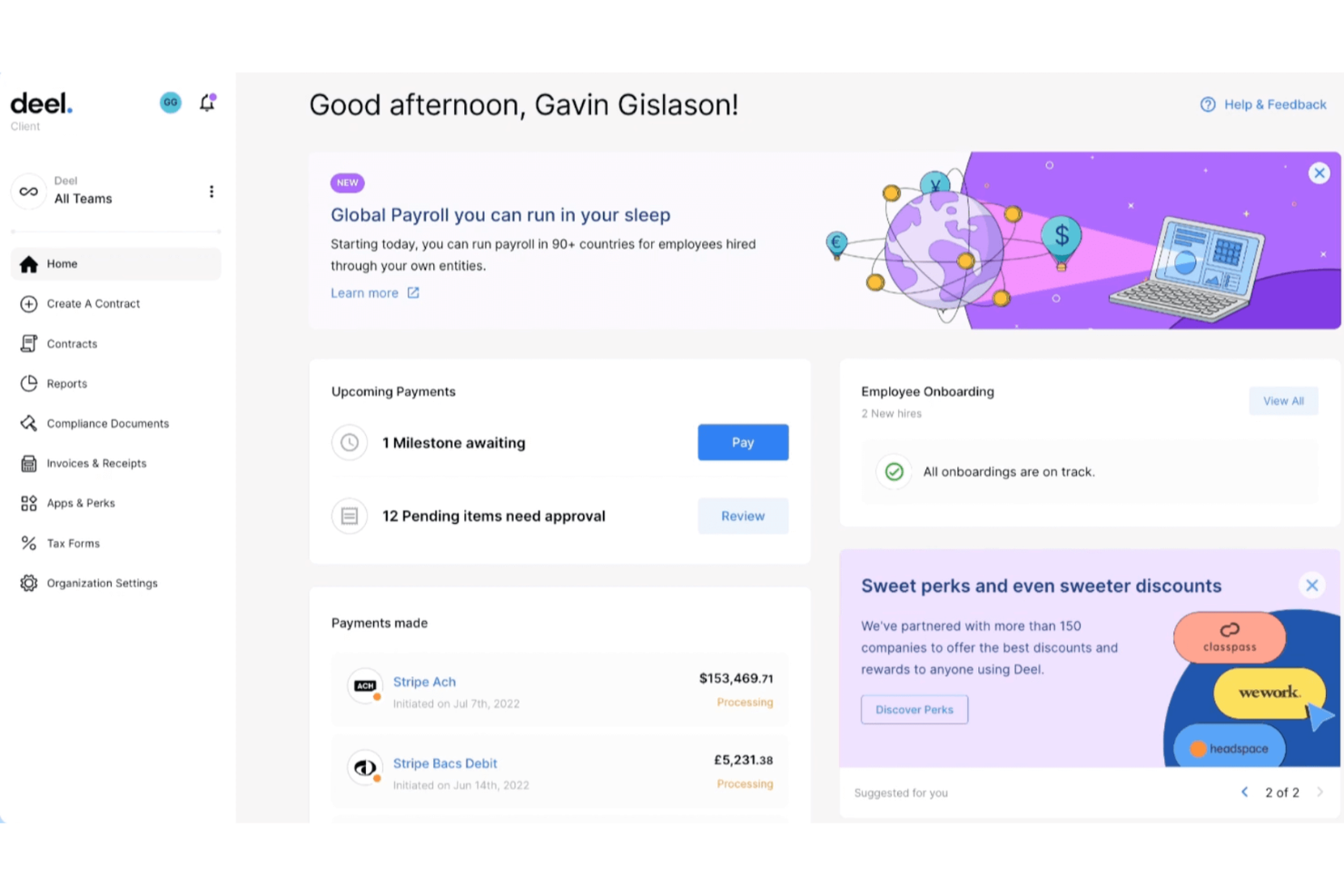
Deel consente di gestire le buste paga, pagare i collaboratori e gestire le fatture in oltre 150 Paesi, occupandosi per te delle normative fiscali locali, dei contratti e della conformità. Se il tuo team collabora con dipendenti o collaboratori internazionali, Deel ti aiuta a centralizzare buste paga e pagamenti globali in un unico posto.
Perché ho scelto Deel
Ho scelto Deel perché rende gestibili le buste paga e la fatturazione globali per le aziende che operano in più Paesi. Puoi pagare dipendenti e collaboratori nelle valute locali, mentre Deel gestisce in background i calcoli fiscali specifici di ogni Paese e le detrazioni previste dalla legge.
I suoi strumenti di fatturazione integrati consentono ai collaboratori di inviare fatture conformi direttamente nella piattaforma, riducendo gli scambi manuali, e apprezzo anche il fatto che Deel supporti le assunzioni tramite il datore di lavoro ufficiale (EOR), permettendoti di assumere personale a tempo pieno all'estero senza aprire entità legali in altri Paesi. Per i team in espansione internazionale, questa combinazione di gestione delle buste paga, fatturazione e supporto alla conformità è difficile da eguagliare.
Funzionalità principali di Deel
Ecco alcune funzionalità principali che vale la pena evidenziare:
- Gestione globale delle buste paga: Gestisci buste paga conformi alle normative in più Paesi, con gestione automatizzata di imposte e detrazioni.
- Fatturazione dei collaboratori: I collaboratori generano fatture direttamente in Deel sulla base dei contratti approvati e dei termini di pagamento.
- Pagamenti multivaluta: Paga i lavoratori nelle valute che preferiscono utilizzando bonifici bancari locali o metodi di pagamento supportati.
- Gestione della conformità: Applica automaticamente le leggi locali sul lavoro, le normative fiscali e la documentazione richiesta in base al Paese.
Integrazioni di Deel
Le integrazioni includono QuickBooks, Xero, NetSuite, BambooHR, Greenhouse, HiBob, Workday, Ashby ed Expensify.
Pros and Cons
Pros:
- Supporta diverse opzioni di pagamento, inclusa la criptovaluta
- Vantaggi e conformità localizzati
- Gestisce automaticamente i calcoli delle imposte locali e le detrazioni previste dalla legge
Cons:
- Nessuna app per dispositivi mobili disponibile
- Personalizzazione limitata delle fatture

Gusto
Ideale per piccole e medie imprese
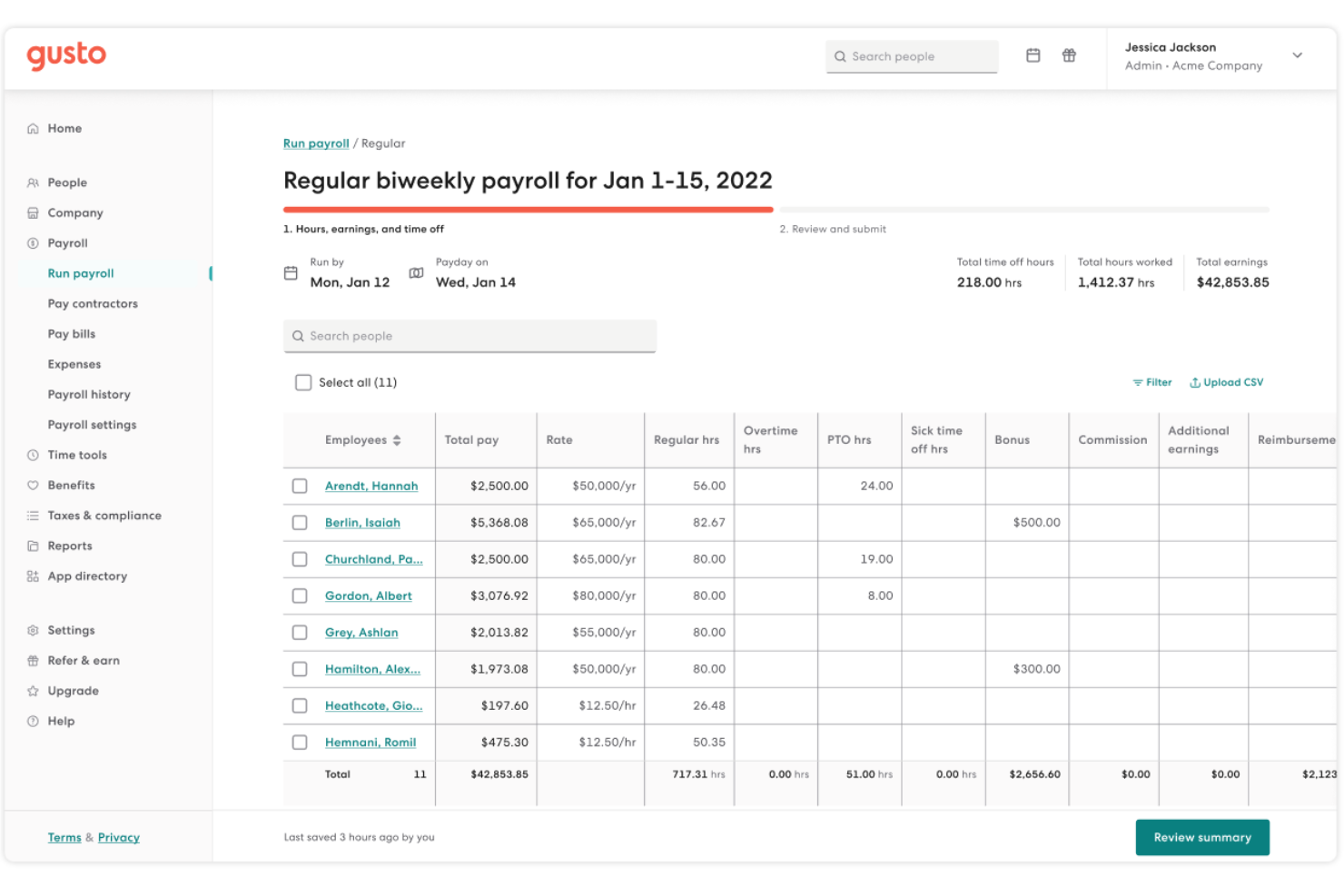
Gusto aiuta le piccole e medie imprese a gestire sia la fatturazione che le buste paga su un'unica piattaforma, così non devi destreggiarti tra sistemi separati per fatturare i clienti e pagare il tuo team. È particolarmente utile se la tua azienda ha bisogno di strumenti semplici che gestiscano pagamenti in entrata e tasse sui salari senza flussi di lavoro complicati.
Perché ho scelto Gusto
Ho scelto Gusto perché combina le funzionalità di gestione delle buste paga e della fatturazione in modo semplice da adottare per i proprietari di piccole imprese o i team HR alle prime armi con questi compiti. Puoi creare fatture personalizzate con il tuo marchio, consentire ai clienti di pagare tramite bonifico bancario o carta di credito e ricevere i pagamenti direttamente sul tuo conto tramite gli strumenti di fatturazione.
Per quanto riguarda la parte delle retribuzioni, Gusto supporta esecuzioni illimitate dei pagamenti, calcolo e invio delle tasse automatici e bonifici diretti, così puoi pagare dipendenti e collaboratori in tutta tranquillità. La dashboard delle buste paga si sincronizza con i benefit e il monitoraggio delle presenze, il che significa meno tempo perso a passare da un sistema all'altro e a correggere errori di dati. Inoltre, i dipendenti possono accedere in autonomia a buste paga, documenti fiscali e informazioni sui benefit, riducendo così le domande all'amministrazione.
Funzionalità principali di Gusto
Ecco alcune funzionalità chiave da evidenziare:
- Fatturazione personalizzata: Crea e invia fatture con il tuo marchio e link di pagamento, così i clienti possono pagare tramite bonifico o carta.
- Invio automatico delle tasse: Gusto calcola, trattiene e invia automaticamente le tasse sui salari a livello federale, statale e locale.
- Self-service per i dipendenti: I membri del team possono visualizzare da soli buste paga, documenti fiscali e dettagli sui benefit senza coinvolgimento dell'HR.
- Sincronizzazione ore-busta paga: Quando aggiungi ore lavorate o assenze, queste confluiscono direttamente nelle buste paga, riducendo le registrazioni manuali.
Integrazioni di Gusto
Le integrazioni includono QuickBooks, Xero, FreshBooks, Expensify, Homebase, Deputy, TSheets (QuickBooks Time) e Asana.
Pros and Cons
Pros:
- Il monitoraggio del tempo si sincronizza direttamente con le buste paga per pagamenti precisi in base alle ore lavorate
- La gestione delle buste paga include esecuzioni illimitate e invio automatico delle tasse
- Invia fatture e accetta pagamenti tramite bonifico o carta all'interno di un'unica dashboard
Cons:
- Non è sufficientemente personalizzabile per gestire aziende grandi e complesse
- Alcune automazioni HR avanzate richiedono piani di livello superiore
New Product Updates from Gusto
Gusto Adds Solo Advisory Tools and Mobile Money Features
Gusto adds Solo S-Corp Advisory Tools and Gusto Money on Mobile for tax guidance, invoicing, and bill payments. These updates help accountants advise solopreneurs and let users manage business finances from their phones. For more information, visit Gusto’s official site.

TimeTrex
Ideale per automatizzare processi di payroll complessi
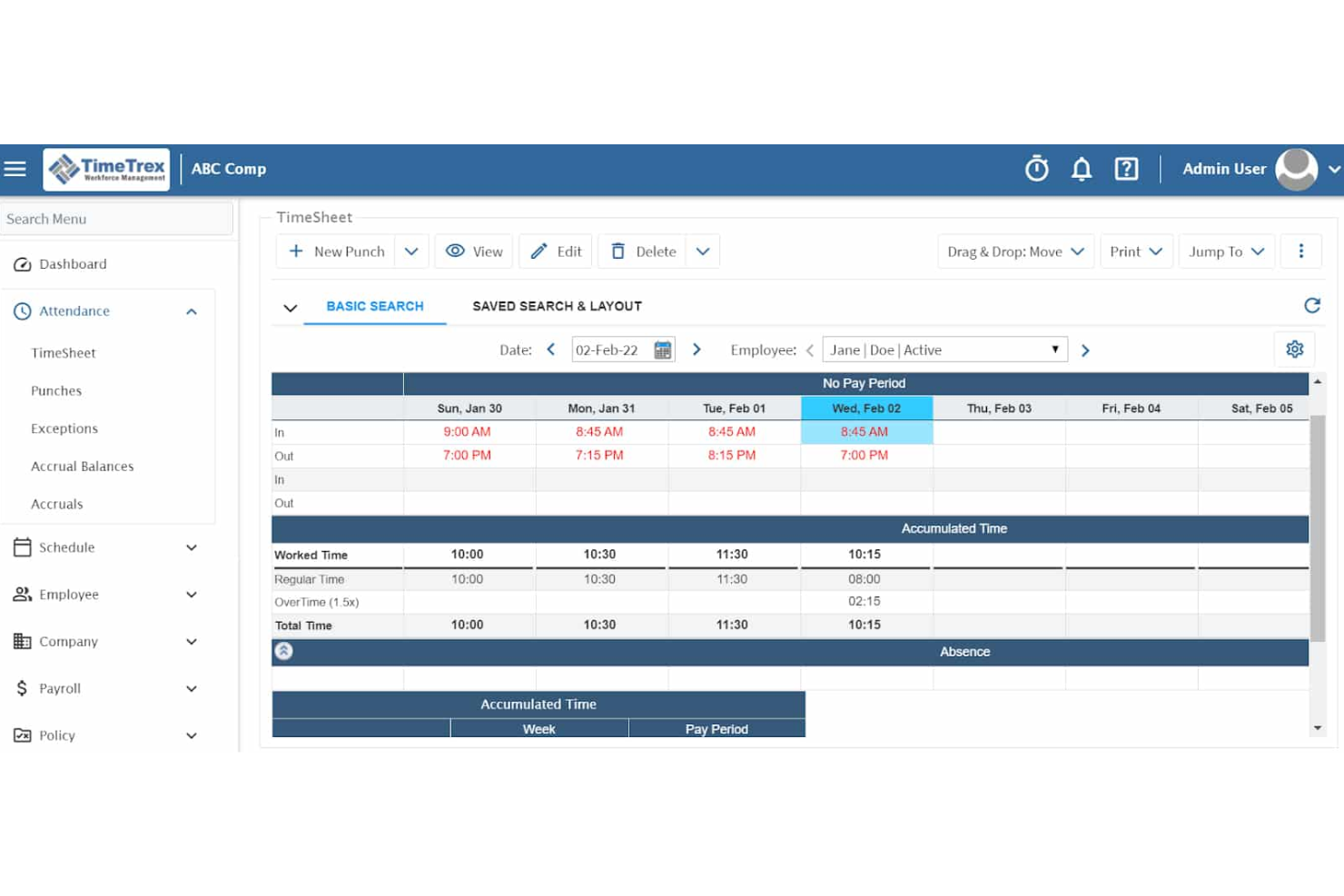
TimeTrex è un software completo per la gestione delle risorse umane che offre alle aziende una soluzione tutto-in-uno per la gestione di buste paga, fatturazione, presenze e altre funzioni HR.
Perché ho scelto TimeTrex: La piattaforma offre un motore paghe sofisticato in grado di gestire strutture salariali complesse e processi articolati. Calcola automaticamente tasse federali, statali e locali, garantendo la conformità a tutti i requisiti normativi. Inoltre, le funzionalità di fatturazione di TimeTrex permettono alle aziende di creare e gestire fatture direttamente dalla piattaforma, integrandosi perfettamente con i dati delle buste paga per garantire una fatturazione precisa.
Funzionalità e integrazioni principali:
Le funzionalità includono calcoli delle buste paga in tempo reale, supporto multi-valuta, bonifico diretto, detrazioni personalizzate, dichiarazioni fiscali automatizzate, buste paga digitali, report personalizzabili, portale self-service per i dipendenti, rilevamento di presenze e tempi, analisi dei costi di commessa, pianificazione turni, gestione delle assenze, gestione documentale e monitoraggio delle spese.
Le integrazioni includono QuickBooks, Sage, ADP, Xero, Microsoft Dynamics, Paychex, Gusto, FreshBooks, Zoho Books e NetSuite.
Pros and Cons
Pros:
- Payroll e calcolo tasse automatizzati
- Monitoraggio avanzato delle presenze e pianificazione
- Funzioni integrate HR e payroll
Cons:
- Il design della piattaforma appare datato
- La navigazione verso alcune funzioni può essere complicata
New Product Updates from TimeTrex
TimeTrex Adds Quick Punch App With Offline and QR Support
TimeTrex adds a new Quick Punch app, offline punching, QR code scanning, punch images, configurable messages, and punch warnings or lockouts to improve employee clock-ins across browsers and local computers. For more information, visit TimeTrex’s official site.
 .
.
Ideale per l'accessibilità economica
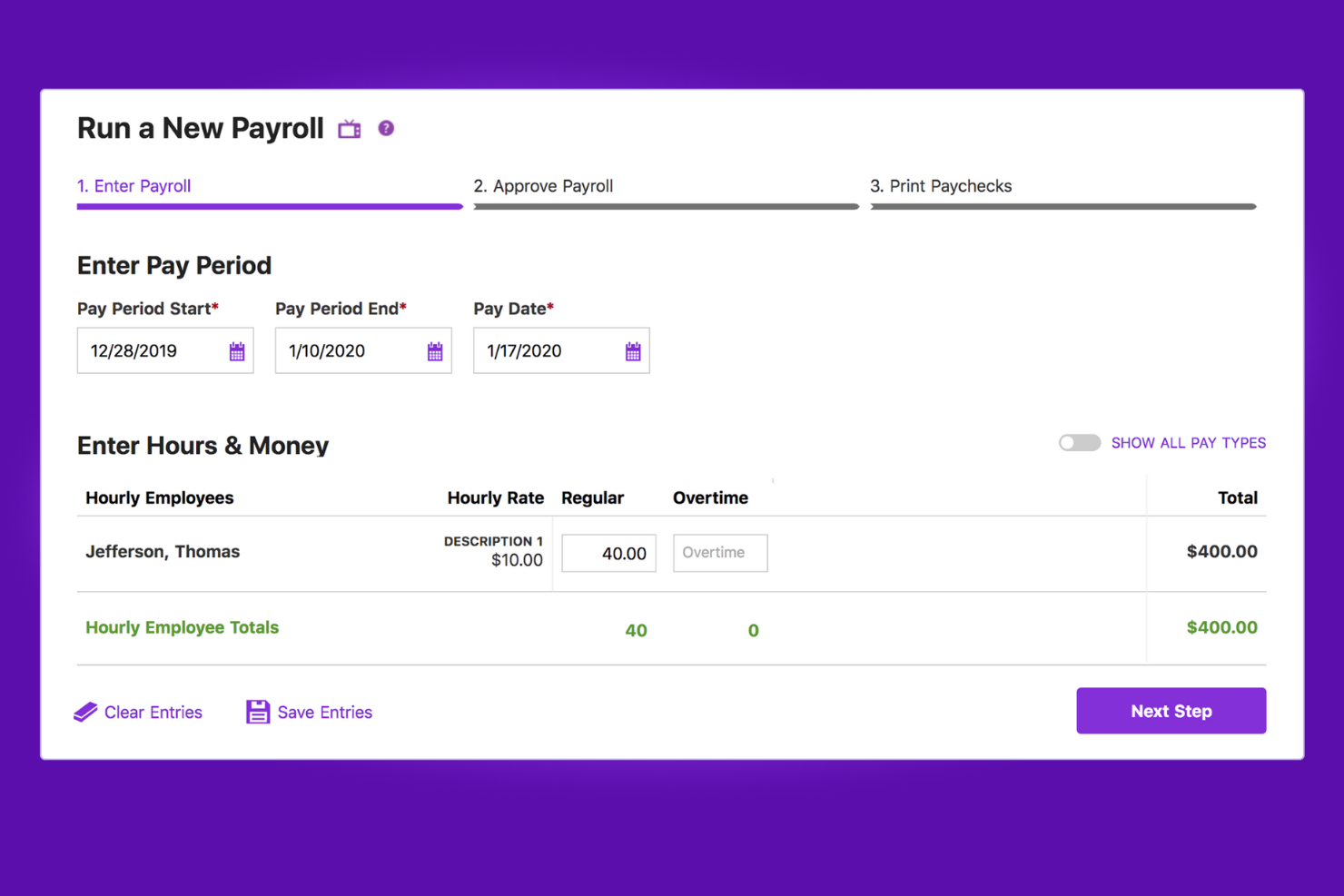
Patriot semplifica la contabilità e la gestione delle paghe per le piccole imprese offrendo prodotti integrati sia per la contabilità che per le paghe. È riconosciuto per la sua convenienza, fornendo una soluzione completa senza un notevole onere finanziario.
Perché ho scelto Patriot: Ho selezionato Patriot Software per l'equilibrio eccezionale tra costo e funzionalità. Si distingue dagli altri strumenti di fatturazione e gestione paghe grazie ai suoi prezzi competitivi, rendendolo una scelta ideale per le piccole imprese. Lo considero il migliore per l'accessibilità economica grazie alla capacità di offrire funzionalità essenziali di contabilità e paghe a un prezzo accessibile anche per le realtà più piccole.
I prodotti per la contabilità e le paghe sono separati, ma strettamente interconnessi se acquistati entrambi.
Funzionalità principali & integrazioni:
Le funzionalità che rendono brillante Patriot Software includono fatturazione illimitata, configurazione e supporto gratuiti, e assenza di contratti a lungo termine. Supporta sia la contabilità per cassa che per competenza, e consente di gestire le paghe in tre semplici passaggi. Il software si integra con diversi strumenti fondamentali, ampliando la sua utilità per le aziende.
Il prodotto di contabilità offre anche riconciliazione conti, sottoconti, preventivi, fatture ricorrenti, promemoria per i pagamenti delle fatture e strumenti di gestione delle ricevute.
Il prodotto di gestione paghe comprende più livelli salariali, bonifici diretti in 2 giorni lavorativi, pagamenti a dipendenti o collaboratori, moduli W-2 elettronici o stampabili, e l'opzione di inviare direttamente i moduli 1099 all'IRS in formato elettronico.
Le integrazioni includono QuickBooks Online, Shopify, WooCommerce, Xero, Zapier, Clover, Square, PayPal, Gusto e ADP.
Pros and Cons
Pros:
- Configurazione e supporto gratuiti, migliorando l'esperienza utente
- Funzionalità complete di gestione paghe e contabilità
- Prezzi competitivi per le piccole imprese
Cons:
- Integrazioni limitate con terze parti rispetto ad alcuni concorrenti
- Le funzionalità dei livelli superiori richiedono piani avanzati

Ideale per strumenti aziendali diversificati
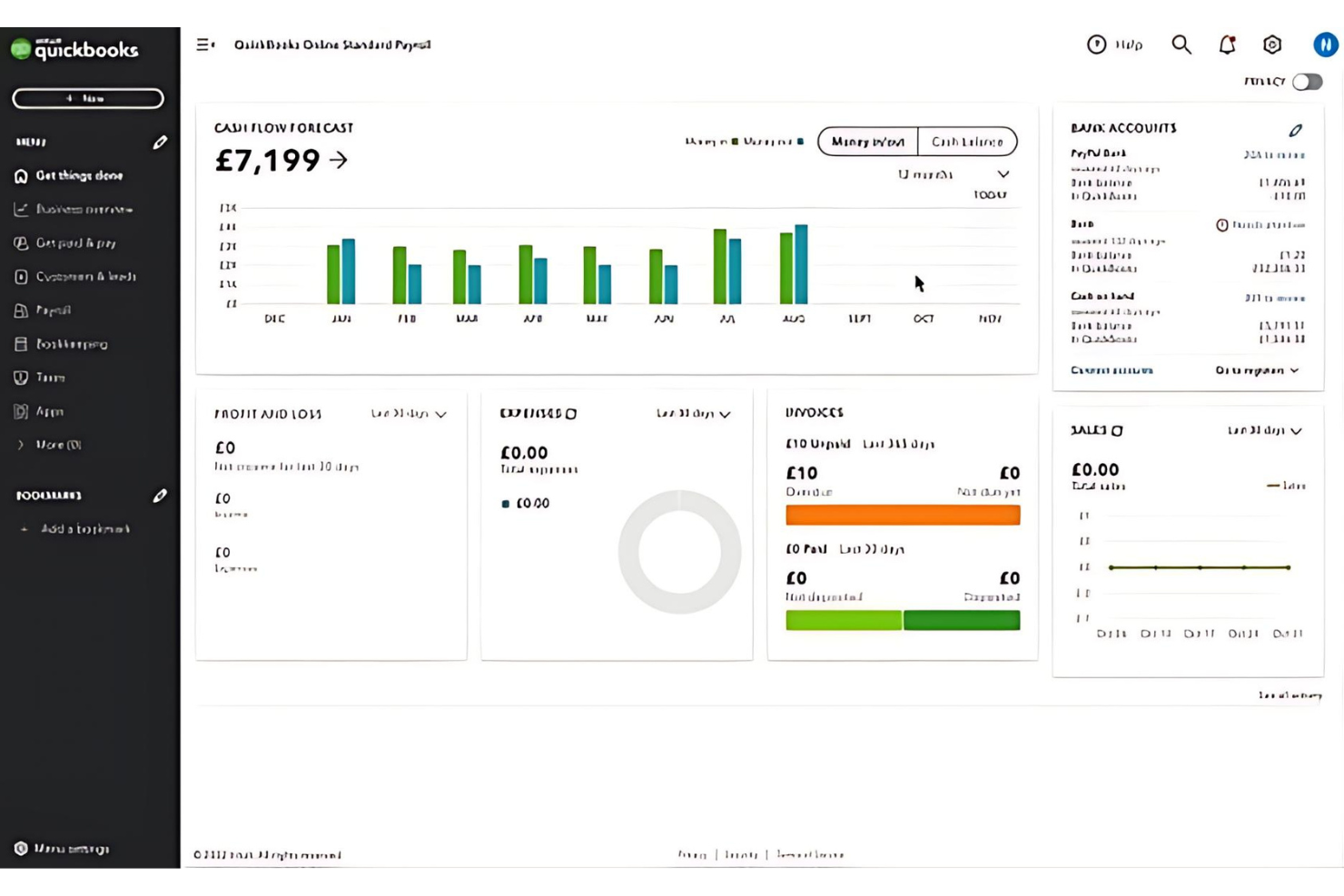
QuickBooks è una soluzione contabile completa che semplifica la gestione finanziaria per le aziende. È ideale per offrire una suite di strumenti aziendali diversificati che soddisfano diverse esigenze, dalla contabilità alla gestione delle paghe.
Perché ho scelto QuickBooks: Ho scelto QuickBooks per questa lista perché offre un set di funzionalità robuste essenziali per aziende di ogni dimensione. La sua versatilità e l'ampiezza degli strumenti disponibili lo rendono una scelta eccezionale per una gestione finanziaria completa. Credo che QuickBooks sia il migliore per strumenti aziendali diversificati, perché offre un'ampia gamma di funzionalità che vanno oltre la semplice contabilità, includendo la gestione delle buste paga, il rilevamento delle ore lavorate e soluzioni di pagamento, tutto integrato in un'unica piattaforma.
Caratteristiche principali e integrazioni:
Le funzionalità includono contabilità automatizzata, gestione di fatture e pagamenti, deduzioni fiscali e reportistica approfondita. Questi strumenti sono progettati per automatizzare le attività più noiose, consentendo agli imprenditori di concentrarsi sulla crescita.
Le integrazioni sono disponibili nativamente con numerosi altri strumenti, tra cui TurboTax, Shopify, Square, PayPal, TSheets, Gusto, Bill.com e molti altri, facilitando un flusso di lavoro efficiente tra le diverse operazioni aziendali.
Pros and Cons
Pros:
- Si collega facilmente a conti bancari e carte di credito
- Basato su cloud, garantisce accesso ai dati in tempo reale da qualsiasi luogo
- Ampie opzioni di integrazione con altre applicazioni aziendali
Cons:
- Problemi occasionali con l'assistenza clienti
- Numero limitato di utenti
Xero
La migliore per la contabilità online

Xero è una piattaforma di contabilità cloud completa progettata per piccole imprese e commercialisti. È la scelta migliore per la contabilità online perché offre accesso ai dati finanziari in tempo reale da qualsiasi luogo, semplificando i processi finanziari e il processo decisionale.
Perché ho scelto Xero: Ho scelto Xero per questa lista per la sua capacità di integrarsi con un vasto numero di istituti finanziari a livello globale, che la rende una scelta eccezionale. Credo che Xero sia il migliore per la contabilità su cloud grazie alla sua accessibilità, agli aggiornamenti in tempo reale dei dati e agli strumenti completi di gestione finanziaria che rispondono alle esigenze dei moderni titolari di piccole imprese.
Caratteristiche distintive e integrazioni:
Caratteristiche includono fatturazione online, collegamenti bancari, contabilità multivaluta e report finanziari dettagliati. Gli utenti possono monitorare e pagare le fatture puntualmente, gestire le spese, riconciliare le transazioni bancarie e ottenere una visione chiara del flusso di cassa e dei conti da pagare e da incassare.
Integrazioni sono disponibili nativamente con un'ampia gamma di strumenti, tra cui Gusto, Avalara, Wagepoint, Payevo, Jibble, Humi, Timedock, Oyster, Payworks, Knit, Rise, Rippling, Remote, Deel, Hubdoc, Stripe, PayPal, WorkflowMax, Square, Expensify, Vendy, Deputy e Shopify. Si collega inoltre con oltre 21.000 istituti finanziari a livello globale, consentendo feed bancari automatizzati e riconciliazioni.
Pros and Cons
Pros:
- Accesso in tempo reale ai dati finanziari
- Integrazione con oltre 21.000 istituti finanziari
- Un set completo di funzionalità contabili
Cons:
- I piani di livello superiore possono essere costosi per le microimprese
- Le funzionalità di gestione paghe sono adatte solo a un numero ridotto di dipendenti

Wave
Ideale per software finanziari gratuiti
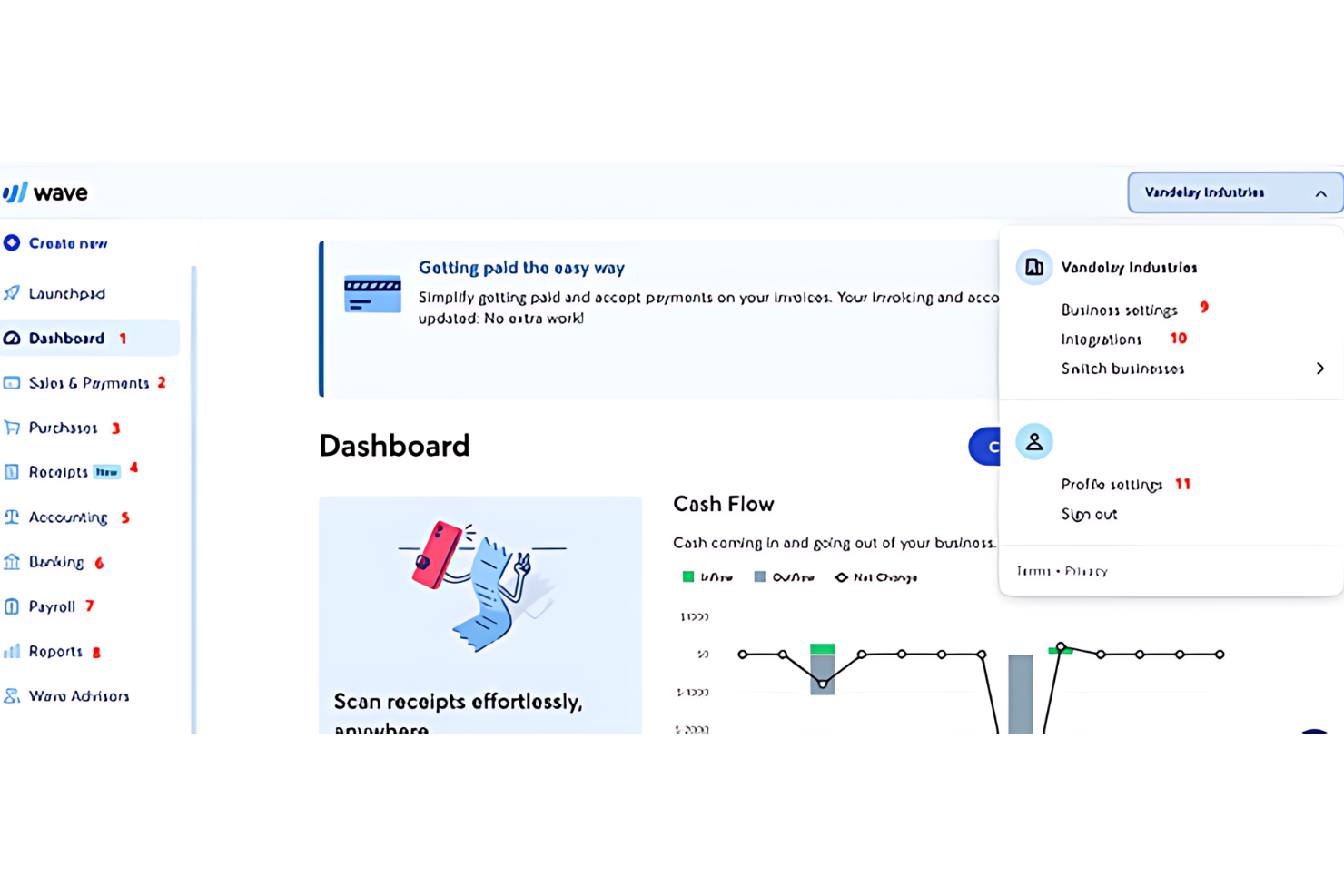
Wave è uno strumento completo per la gestione finanziaria delle piccole imprese. È riconosciuto come il migliore tra i software finanziari gratuiti, offrendo un set di strumenti base per la gestione finanziaria e la fatturazione senza alcun costo.
Perché ho scelto Wave: Ho inserito Wave in questa lista perché offre una soluzione finanziaria basilare per piccole imprese e liberi professionisti senza alcuna tariffa, cosa piuttosto rara. Si distingue da altri software di fatturazione e paghe per non applicare costi sulle funzionalità base, tra cui contabilità, fatturazione e possibilità di accettare pagamenti online.
Funzionalità e integrazioni principali:
Le funzionalità includono strumenti di fatturazione, contabilità e gestione del flusso di cassa, tutti disponibili gratuitamente. Se si passa al piano a pagamento, Wave offre anche la scansione delle ricevute e connessioni dirette ai conti bancari e alle carte di credito per l'importazione automatica delle transazioni, semplificando così la contabilità.
Le integrazioni sono disponibili nativamente con Google Sheets, PayPal, Stripe, Etsy, Shopify, Shoeboxed, Zapier, Mailchimp, Square e RBC (Royal Bank of Canada).
Pros and Cons
Pros:
- Nessun costo mensile per le funzionalità di base
- Connessioni dirette a conti bancari e carte di credito
- Fatturazione e monitoraggio delle spese personalizzabili
Cons:
- Commissioni per transazione per i pagamenti con Wave
- Integrazione limitata con app di terze parti
Altri software per fatturazione e paghe
Ecco alcune opzioni aggiuntive di software per fatturazione e paghe che non sono entrate nella mia selezione, ma che vale comunque la pena valutare:
- Zoho Books
Ideale per le funzionalità di automazione
- Sage 50cloud
Ideale per soluzioni di contabilità complete
- KashFlow
Ideale per buste paga e conformità nel Regno Unito
- Paychex
Ideale per soluzioni HR integrate


Come Valuto il Software di Fatturazione e Gestione Paghe
Che si tratti di elaborare le paghe per un team di cinque persone o di fatturare una dozzina di clienti ogni mese, cerco prima una base di funzionalità indispensabili, poi gli elementi che distinguono una piattaforma come la soluzione ideale.
Funzionalità Principali (Requisiti Indispensabili per Questa Lista)
Queste capacità fondamentali costituiscono i criteri di accettazione per l'inclusione nella mia lista:
- Creazione e Invio delle Fatture: Valuto se sia possibile creare fatture personalizzate con il marchio aziendale, impostare fatturazioni ricorrenti e monitorare lo stato dei pagamenti—tutto senza uscire dalla piattaforma.
- Elaborazione delle Paghe: Ogni strumento deve gestire pagamenti programmati sia per dipendenti W-2 che per collaboratori 1099, compresa l'erogazione tramite bonifico diretto.
- Calcolo e Invio delle Tasse: Verifico la presenza di ritenute fiscali automatiche a livello federale, statale e locale, oltre alla generazione annuale di moduli come W-2 e 1099.
- Accettazione dei Pagamenti: Ricevere il pagamento di una fattura deve essere un'operazione senza attriti, quindi cerco elaborazione incorporata di pagamenti ACH e carte di credito con riconciliazione automatica.
- Gestione di Dipendenti e Collaboratori: I profili dei lavoratori, il monitoraggio delle tariffe e i dettagli di classificazione devono essere presenti nello stesso sistema che gestisce le paghe.
- Reportistica Finanziaria e Archiviazione: Collegare le entrate delle fatture alle spese per le paghe in un unico report è fondamentale nella dichiarazione dei redditi, quindi valuto la profondità della reportistica di ciascun strumento.
Attribuisco a ciascun fornitore un punteggio da 0 (funzionalità assente) a 5 (eccellente in quest'area) per ogni criterio.
I fornitori devono ottenere un punteggio medio minimo per essere presi in considerazione per la mia lista. Da lì, valuto cosa distingue ciascuna piattaforma.
Fattori Differenzianti (Cosa Distingue i Fornitori)
Dopo aver selezionato la mia lista, ecco come confronto fra loro i diversi fornitori:
Funzionalità Distintive
Mi concentro su piattaforme che integrano il rilevamento ore direttamente con la fatturazione e la gestione paghe, così i team possono generare fatture e processare paghe in un unico flusso di lavoro. La gestione delle spese—specie la possibilità di rimborsare i dipendenti o addebitare spese ai clienti—aggiunge valore reale alle attività di servizi. Anche la disponibilità di app mobili è fondamentale: poter inviare una fattura o approvare una busta paga dallo smartphone permette di gestire tutto anche fuori ufficio. Flussi di lavoro automatizzati, come promemoria intelligenti e rilevamento errori, aiutano a prevenire sbagli e a risparmiare ore ogni mese.
Oltre le Funzionalità
Le integrazioni contabili sono molto importanti. Valuto se una piattaforma si sincronizza in modo bidirezionale con strumenti come QuickBooks, Xero o NetSuite per eliminare le registrazioni manuali. Il rispetto della normativa è un altro fattore cruciale: la certificazione SOC 2, la conformità PCI-DSS e l'aggiornamento automatico delle normative fiscali sono segnali di una solida attenzione alla sicurezza dei pagamenti e delle paghe. Considero anche quanto ogni strumento sia adatto a gestire team misti, soprattutto se paghi sia dipendenti W-2 che collaboratori 1099 in più stati tramite un unico sistema.
Come scegliere un software per fatturazione e paghe
È facile perdersi in lunghi elenchi di funzionalità e strutture tariffarie complesse. Per aiutarti a rimanere concentrato mentre affronti il tuo specifico processo di selezione del software, ecco un elenco di fattori da tenere a mente:
| Fattore | Cosa considerare |
|---|---|
| Scalabilità | Il software crescerà insieme alla tua azienda? Considera l'espansione futura, i limiti relativi agli utenti e la capacità di gestire un volume maggiore di transazioni con la crescita del team. |
| Integrazioni | Si collega agli strumenti che già utilizzi? Verifica la compatibilità con i sistemi di contabilità, CRM e altri sistemi essenziali per garantire flussi di lavoro efficienti. |
| Personalizzazione | Puoi adattarlo alle tue esigenze? Cerca opzioni per modificare modelli, report e processi in base ai requisiti specifici della tua azienda. |
| Facilità d'uso | È facile da usare per il tuo team? Valuta l'interfaccia e l'esperienza utente per evitare lunghi periodi di formazione e garantire un'adozione rapida. |
| Implementazione e avviamento | Quanto tempo ci vorrà per iniziare? Valuta il tempo e le risorse necessari per la configurazione, inclusa l'eventuale formazione o migrazione dei dati. |
| Costo | Rientra nel tuo budget? Confronta i piani tariffari, i costi nascosti e il rapporto qualità-prezzo. Considera gli sconti per i pagamenti annuali o per la combinazione di servizi. |
| Misure di sicurezza | Quanto sono sicuri i tuoi dati? Assicurati che il software rispetti gli standard di settore per la crittografia, la protezione dei dati e la conformità a normative come il GDPR. |
Che cos'è un software per fatturazione e paghe?
Il software per la fatturazione e le buste paga è uno strumento che automatizza i processi di fatturazione e di pagamento dei dipendenti per le aziende. Questi strumenti vengono generalmente utilizzati da professionisti delle risorse umane, contabili e titolari d'azienda per gestire in modo efficiente le transazioni finanziarie e le buste paga. Funzionalità come la fatturazione automatizzata, il calcolo delle imposte e l'integrazione con i sistemi contabili contribuiscono alla precisione e al risparmio di tempo. Nel complesso, questi strumenti semplificano la gestione finanziaria e garantiscono pagamenti puntuali.
Funzionalità
Quando selezioni un software per la fatturazione e le buste paga, presta attenzione alle seguenti funzionalità chiave:
- Fatturazione automatizzata: crea, invia e monitora automaticamente le fatture, così non perderai mai un pagamento o una scadenza. In questo modo risparmi ore di lavoro manuale e mantieni il flusso di cassa sempre attivo.
- Integrazione con l'elaborazione dei pagamenti: accetta i pagamenti direttamente dalle tue fatture tramite diversi metodi, come carta di credito, ACH o portafogli digitali. Questo rende più fluido il processo di pagamento e facilita il saldo rapido per i clienti e per te.
- Gestione delle buste paga: gestisci calcoli relativi a stipendi, detrazioni, imposte e benefit su un'unica piattaforma. In questo modo il giorno di paga sarà privo di complicazioni, o almeno meno complicato.
- Calcolo delle imposte e conformità: calcola e applica accuratamente le imposte secondo le normative federali, statali e locali, aiutandoti a evitare grattacapi e anche l'IRS.
- Portali self-service per i dipendenti: consenti al tuo team di accedere ai cedolini, ai moduli fiscali e agli orari senza dover riempire la tua casella di posta di richieste. Dare più autonomia ai dipendenti è positivo e tu riceverai meno interruzioni.
- Integrazione del monitoraggio delle ore: importa senza difficoltà le ore lavorate dai dipendenti per calcolare accuratamente le buste paga, così non dovrai decifrare fogli presenze scritti a mano o assemblare fogli di calcolo a mezzanotte.
- Supporto multivaluta: crea fatture ed elabora le buste paga in valute diverse se lavori con clienti o dipendenti internazionali. Niente più confusione nella conversione valutaria.
- Report e analisi: genera report dettagliati su fatture, pagamenti, buste paga e spese per individuare le tendenze e prendere decisioni finanziarie più intelligenti, senza dover conseguire un dottorato di ricerca in fogli di calcolo.
- Gestione delle spese: monitora le spese aziendali insieme a buste paga e fatture, assicurandoti che nulla sfugga al controllo o scompaia misteriosamente.
- Modelli personalizzabili: utilizza e adatta modelli di fatture e buste paga in linea con il tuo marchio e il tuo flusso di lavoro, così potrai apparire professionale e rimanere efficiente.
Vantaggi
L'implementazione di un software per la fatturazione e le buste paga offre diversi vantaggi al tuo team e alla tua azienda. Ecco alcuni dei vantaggi che puoi aspettarti:
- Risparmio di tempo: l'automazione delle attività di fatturazione e gestione delle buste paga riduce il lavoro manuale, liberando tempo per attività più strategiche.
- Precisione: i calcoli automatizzati riducono al minimo gli errori nelle fatture e nelle buste paga, garantendo registri finanziari accurati.
- Conformità: le funzionalità integrate per la conformità fiscale aiutano la tua azienda a soddisfare facilmente i requisiti legali.
- Efficienza dei costi: semplificando i processi, il software riduce la necessità di risorse amministrative aggiuntive.
- Miglioramento del flusso di cassa: la fatturazione e l'elaborazione puntuale dei pagamenti migliorano la gestione del flusso di cassa.
- Maggiore sicurezza: la crittografia dei dati e le misure di conformità proteggono le informazioni finanziarie sensibili dalle violazioni.
- Flessibilità: l'accesso da dispositivi mobili e le funzionalità di integrazione consentono di gestire le finanze ovunque, adattandosi alle esigenze del lavoro da remoto.
Costi e prezzi
La scelta di un software per la fatturazione e le buste paga richiede la comprensione dei vari modelli e piani tariffari disponibili. I costi variano in base alle funzionalità, alle dimensioni del team, agli extra e ad altri fattori. La tabella seguente riassume i piani più comuni, i relativi prezzi medi e le funzionalità tipicamente incluse nelle soluzioni per la fatturazione e le buste paga:
Tabella comparativa dei piani per software di fatturazione e gestione delle buste paga
| Tipo di piano | Prezzo medio | Funzionalità comuni |
|---|---|---|
| Piano gratuito | $0 | Fatturazione di base, elaborazione limitata delle buste paga e reportistica di base. |
| Piano personale | $5-$25/utente/mese | Fatturazione automatizzata, elaborazione delle buste paga, calcolo delle imposte e assistenza via e-mail. |
| Piano aziendale | $30-$60/utente/mese | Reportistica avanzata, supporto multivaluta, integrazioni con strumenti contabili e assistenza tramite chat dal vivo. |
| Piano aziendale avanzato | $70-$120/utente/mese | Modelli personalizzabili, account manager dedicato, accesso API e funzionalità di sicurezza avanzate. |
Domande frequenti sul software di fatturazione e gestione paghe
Ecco alcune risposte alle domande comuni sul software di fatturazione e gestione paghe:
Il software di fatturazione e gestione paghe può integrarsi con i miei sistemi esistenti?
Sì, la maggior parte dei software di fatturazione e gestione paghe può integrarsi con i sistemi esistenti, come piattaforme di contabilità, CRM e risorse umane. Questa integrazione aiuta a semplificare il flusso di lavoro e riduce l’inserimento manuale dei dati. Prima dell’acquisto, verifica la compatibilità del software con gli strumenti attuali per assicurarti che il processo di integrazione sia fluido. Potrebbe essere necessario consultare il team IT per gestire eventuali aspetti tecnici o apportare modifiche.
È importante che il software di fatturazione offra opzioni di personalizzazione per le fatture?
Sì, la personalizzazione è fondamentale per personalizzare le fatture con il logo, i colori e i dettagli specifici del tuo marchio. Questo aiuta a lasciare un’impressione professionale sui clienti. Cerca un software che offra opzioni di personalizzazione, consentendoti di creare fatture che riflettano l’identità del tuo marchio.
In che modo il software di fatturazione gestisce la fatturazione e i promemoria automatici?
Un buon software di fatturazione dovrebbe semplificare il lavoro automatizzando le fatture ricorrenti e i promemoria per i pagamenti in scadenza. Questa funzionalità fa risparmiare tempo, garantisce una fatturazione puntuale e migliora il flusso di cassa. Verifica se il software è in grado di automatizzare le scadenze di fatturazione e inviare promemoria ai clienti per i pagamenti scaduti.
Quali misure di sicurezza devono essere adottate per proteggere i dati nel software di fatturazione?
Dai priorità alla sicurezza quando scegli un software di fatturazione, soprattutto quando gestisci informazioni finanziarie sensibili. Cerca un software che impieghi solide misure di sicurezza, come la crittografia dei dati, backup regolari e server sicuri. Assicurati che il software segua le prassi del settore per proteggere i tuoi dati finanziari dagli accessi non autorizzati.
È importante che il software di fatturazione sia conforme alle normative pertinenti?
Sì, la conformità alle normative è fondamentale, soprattutto nella gestione delle transazioni finanziarie. Assicurati che il software di fatturazione scelto sia conforme alle normative e agli standard pertinenti del settore, inclusi il rispetto delle normative fiscali, degli standard di fatturazione e delle leggi sulla protezione dei dati.