

Le 10 migliori soluzioni software per la gestione delle assenze per il 2026

Elenco dei migliori software per la gestione delle assenze


Il software per la gestione delle assenze aiuta il tuo team a monitorare, gestire e creare report su ferie, permessi e presenze dei dipendenti in un unico posto. Se stai cercando il miglior software per la gestione delle assenze, probabilmente devi conciliare la conformità normativa, la complessità delle policy e la necessità di avere una visibilità chiara su tutta la tua forza lavoro.
Lo strumento giusto può aiutarti a ridurre il monitoraggio manuale, evitare errori e supportare sia le esigenze aziendali sia quelle dei dipendenti. In questo elenco troverai diverse soluzioni per organizzazioni di dimensioni e settori differenti, oltre che per diverse policy sulle assenze, così potrai confrontare le funzionalità e scegliere quella più adatta ai tuoi obiettivi HR.
Perché fidarsi delle nostre recensioni sui software
Il nostro team testa e recensisce software dal 2012. In quanto esperti HR noi stessi, sappiamo quanto sia difficile — e importante — scegliere il software giusto.
Per questa guida, abbiamo valutato gli strumenti attraverso test pratici e ricerche indipendenti, assegnando un punteggio agli strumenti in base ai nostri criteri di selezione. Ci basiamo inoltre sulle competenze di leader di pensiero del settore e di professionisti HR attivi.
Le nostre recensioni riflettono il nostro giudizio editoriale umano, non un discorso di vendita.
Revisori esperti:
Tabella comparativa dei software per la gestione delle assenze
Questa tabella comparativa riassume i dettagli sui prezzi delle mie migliori selezioni di software per la gestione delle assenze.
| Tool | Best For | Trial Info | Price | ||
|---|---|---|---|---|---|
| 1 | Ideale per la centralizzazione dei registri della forza lavoro globale | Demo gratuita disponibile | Da $5/dipendente/mese | Website | |
| 2 | La scelta migliore per l'intelligenza artificiale nelle aziende | Demo gratuita disponibile | A partire da $8/utente/mese | Website | |
| 3 | Ideale per l'integrazione con sistemi HR aziendali | Demo gratuita disponibile | Prezzo su richiesta | Website | |
| 4 | Ideale per la gestione delle ferie nelle piccole imprese | Prova gratuita disponibile | Da €2.99/utente/mese | Website | |
| 5 | Ideale per visualizzare il calendario del team in modo semplice | Prova gratuita di 30 giorni disponibile | Da $1,50/utente/mese | Website | |
| 6 | Ideale per sincronizzazione delle paghe in tempo reale | Demo gratuita disponibile | Prezzo su richiesta | Website | |
| 7 | Ideale per la gestione delle supplenze K-12 | Demo gratuita disponibile | Prezzo su richiesta | Website | |
| 8 | Ideale per la pianificazione di turni per personale orario | Demo gratuita disponibile | A partire da $1.800/mese (fatturazione annuale) | Website | |
| 9 | Ideale per la personalizzazione open-source | Prova gratuita di 30 giorni disponibile | Da $1/utente/mese | Website | |
| 10 | Ideale per la gestione di politiche di assenza complesse | Demo gratuita disponibile | Prezzo su richiesta | Website |
Recensioni dei migliori software per la gestione delle assenze
Di seguito trovi i miei riepiloghi dettagliati dei software per la gestione delle assenze inclusi nel mio elenco. Le mie recensioni offrono un’analisi approfondita delle funzionalità, dei migliori casi d’uso e delle integrazioni di ciascun software, per aiutarti a trovare quello più adatto alla tua organizzazione.

Deel HR
Ideale per la centralizzazione dei registri della forza lavoro globale
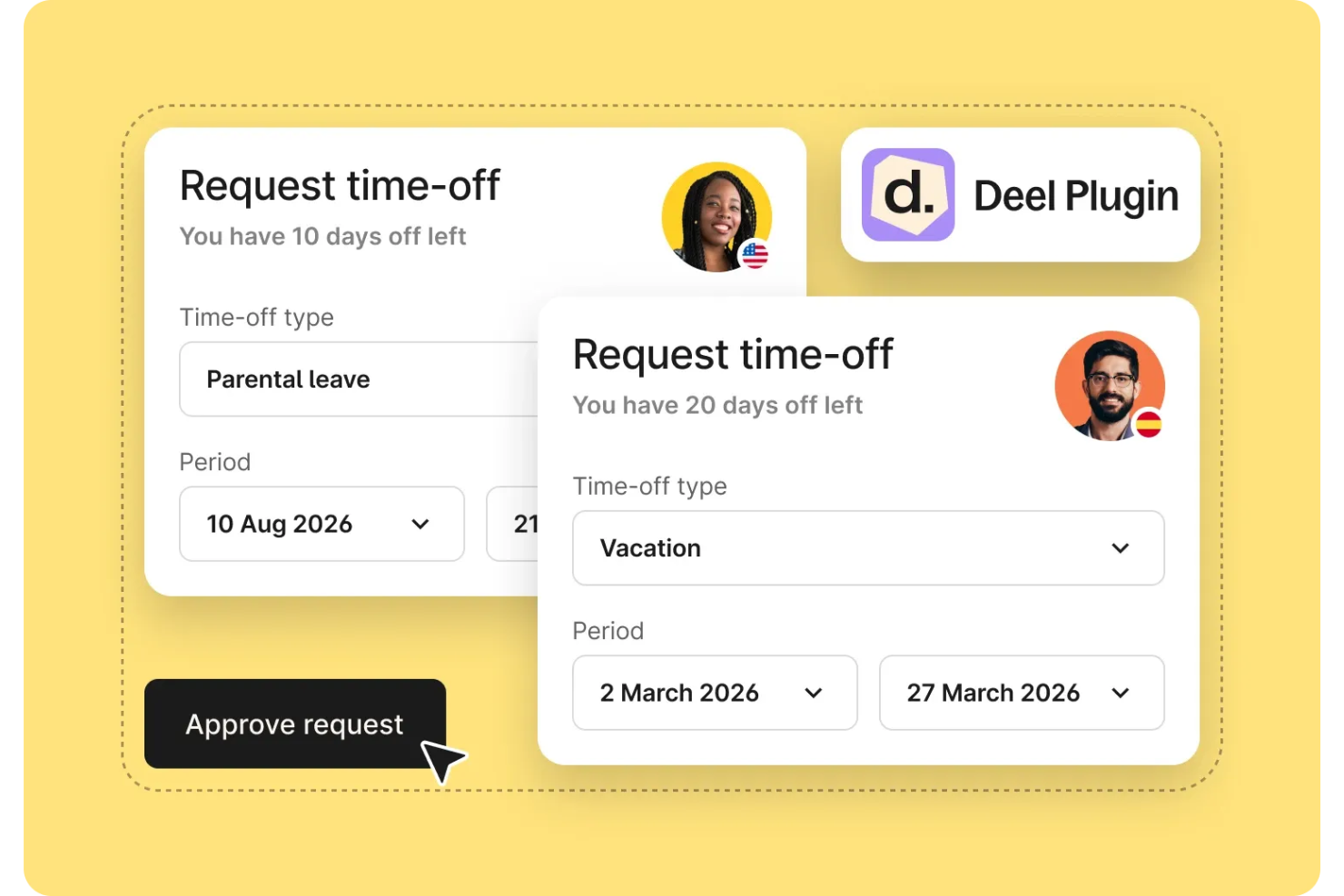
Deel HR è una piattaforma di gestione delle assenze progettata per team globali, che offre registri centralizzati dei dipendenti, tracciamento delle assenze, gestione della conformità e funzionalità integrate di gestione paghe.
Per chi è ideale Deel HR?
Team HR globali e responsabili delle operazioni in aziende multinazionali che devono gestire i registri dei dipendenti, le assenze e la conformità in diversi paesi.
Perché ho scelto Deel HR
Ho scelto Deel HR come uno dei migliori perché posso conservare tutti i registri relativi alla forza lavoro globale in un unico posto, indipendentemente da quanti paesi opera il mio team. Mi piace poter monitorare dettagli dei dipendenti, contratti e dati sulle assenze tramite una sola dashboard. Il mio team utilizza Deel HR per gestire la documentazione di conformità e le richieste di assenza di dipendenti e collaboratori in tutto il mondo.
Caratteristiche principali di Deel HR
- Gestione delle assenze: Monitora, approva e genera report sulle ferie e le assenze dei dipendenti in un unico sistema.
- Policy personalizzabili sulle assenze: Imposta regole di assenza specifiche per paese o azienda per diversi gruppi di dipendenti.
- Calendari delle festività automatizzati: Applica automaticamente le festività locali agli orari dei dipendenti.
- Tracciamento delle attività: Accedi a registri dettagliati di tutte le modifiche e approvazioni relative ai dati sulle assenze.
Integrazioni di Deel HR
Le integrazioni native non sono chiaramente documentate. Deel HR offre un'API per integrazioni personalizzate.
Pros and Cons
Pros:
- Aggiornamenti in tempo reale alla gestione paghe con le assenze
- Tipologie di permessi personalizzabili per diverse regioni
- Flussi di approvazione per richieste di assenza in blocco
Cons:
- Integrazioni native limitate con piattaforme HR
- Le funzionalità di reportistica possono essere prive di filtri avanzati
New Product Updates from Deel HR

Deel Expands Stablecoin Wallet to 80+ Countries
Deel expands its Stablecoin Wallet to 80+ countries with dollar-backed balances and optional rewards. This gives eligible contractors more ways to hold and manage earnings inside Deel. For more information, visit Deel’s official site.
 .
.
La scelta migliore per l'intelligenza artificiale nelle aziende
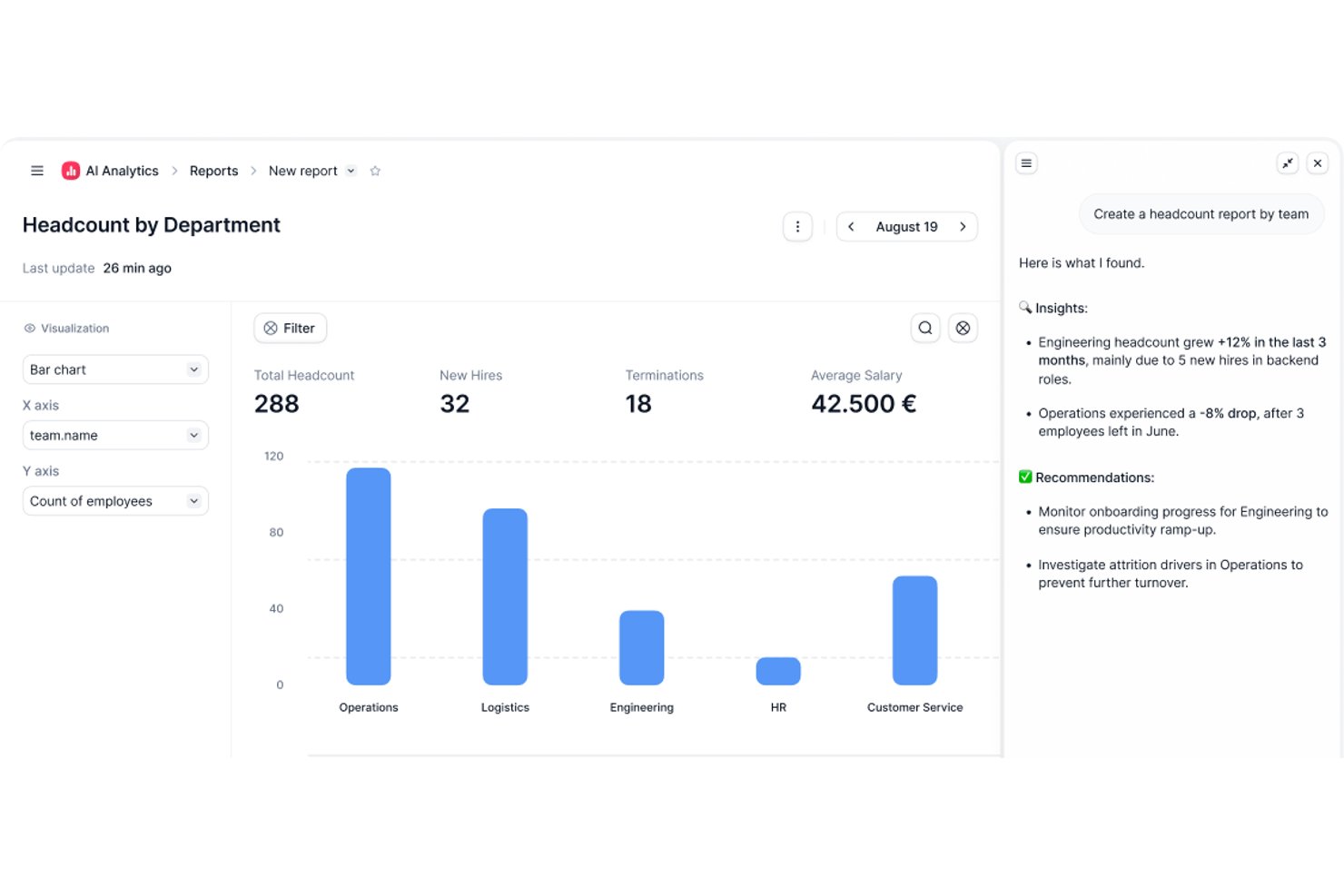
Factorial è una piattaforma HR basata sull'intelligenza artificiale che gestisce le assenze, oltre al monitoraggio delle ore, alla programmazione dei turni e alla configurazione delle politiche di congedo su web e dispositivi mobili.
Per chi è più adatto Factorial?
Factorial è adatto ai team HR che desiderano operazioni quotidiane assistite dall'intelligenza artificiale, dalle approvazioni delle assenze e dalla pianificazione degli orari fino alle risposte alle domande dei dipendenti sulle politiche aziendali, tutto all'interno di un'unica piattaforma.
Perché ho scelto Factorial
Ho incluso Factorial tra le mie scelte principali perché il suo posizionamento nell'ambito dell'intelligenza artificiale per le aziende va oltre un'etichetta accattivante: la piattaforma assiste attivamente nelle attività quotidiane di gestione delle assenze, come la pianificazione degli orari, la generazione di report e le risposte alle domande dei dipendenti sulle politiche di congedo. Apprezzo in particolare il fatto che i dipendenti possano inviare richieste e controllare i saldi da un dispositivo mobile, mentre i responsabili dispongono di una vista del calendario condivisa per individuare le sovrapposizioni e pianificare la copertura prima che le lacune diventino problematiche. Le politiche personalizzate per le assenze, con regole di maturazione, limiti di riporto e periodi di blocco, possono essere configurate in base alla sede o al tipo di contratto, mantenendo tutto organizzato senza richiedere molto lavoro amministrativo manuale.
Funzionalità principali di Factorial
- Richieste di congedo da dispositivi mobili: i dipendenti possono inviare richieste di congedo, allegare file e visualizzare direttamente dall'app Factorial per iOS o Android i saldi rimanenti.
- Flussi di approvazione configurabili: gli amministratori possono assegnare approvatori specifici per ogni team e configurare sistemi di approvazione personalizzati per le richieste di congedo.
- Supporto per politiche con indennità multiple: una singola politica di congedo può includere più indennità, come un'indennità ferie standard insieme a un'indennità di congedo maturata tramite straordinari.
- Esportazione dei report sui congedi: i responsabili possono esportare report sui congedi filtrati per team o entità giuridica, mostrando sia i congedi usufruiti sia quelli ancora disponibili.
Integrazioni di Factorial
Le integrazioni disponibili nel marketplace includono a3innuva Nómina, DATEV LODAS, Sage 200, Silae, Microsoft Power BI, Slack e Zapier. Factorial offre inoltre un'API REST, webhook e SDK per integrazioni personalizzate.
Pros and Cons
Pros:
- L'AI assiste nella gestione delle politiche, dei report e degli orari
- Richieste da dispositivi mobili e saldi dei congedi visibili
- Il calendario condiviso delle assenze aiuta a pianificare la copertura
Cons:
- Nessun monitoraggio o avviso documentato sui congedi previsti dalla legge
- Analisi delle assenze e personalizzazione dei report limitate

Workday
Ideale per l'integrazione con sistemi HR aziendali

Il modulo di gestione delle assenze di Workday è progettato per grandi organizzazioni che necessitano di collegare il monitoraggio delle assenze con processi HR e payroll più ampi. È una soluzione ideale per le aziende che desiderano gestire politiche di permesso complesse, conformità e reportistica all'interno di un unico sistema HR. La piattaforma aiuta i team HR ad automatizzare i flussi di lavoro relativi alle assenze e a mantenere la visibilità sulle forze lavoro globali.
Perché ho scelto Workday
Quando hai bisogno di una gestione delle assenze che si integri senza soluzione di continuità in un ecosistema HR più ampio, Workday è una scelta evidente. Il suo modulo assenze si collega direttamente a payroll, benefit e monitoraggio delle presenze, consentendo di gestire le politiche di permesso e la conformità senza dover utilizzare più sistemi. Mi piace il fatto che sia possibile automatizzare flussi di approvazione complessi e impostare regole specifiche per regione per i team globali. Gli strumenti di reportistica di Workday aiutano inoltre i team HR a monitorare le tendenze e garantire l'allineamento delle politiche in tutta l'organizzazione.
Funzionalità principali di Workday
Altre funzionalità di Workday aiutano le organizzazioni a gestire le assenze in modo più efficiente:
- Self-service mobile: Dipendenti e responsabili possono richiedere e approvare permessi direttamente dall'app mobile di Workday.
- Integrazione con calendario: Sincronizza i dati delle assenze con i calendari condivisi per tenere informati i team su chi è assente.
- Gestione delle deleghe: Assegna responsabili o delegati di backup per le richieste di assenza durante l'assenza dei manager.
- Audit trail: Mantieni un registro dettagliato di tutte le transazioni relative alle assenze per scopi di conformità e revisione.
Integrazioni Workday
Le integrazioni includono Slack, Microsoft Teams, Salesforce, ServiceNow, ADP, SAP, Oracle, Okta e Cornerstone OnDemand.
Pros and Cons
Pros:
- Sincronizza automaticamente i dati delle assenze con il payroll
- Supporta la compliance globale per le politiche di permesso
- Permette di delegare facilmente l'autorità di approvazione
Cons:
- Richiede supporto IT per la configurazione iniziale
- La creazione di report personalizzati richiede tempo

Ideale per la gestione delle ferie nelle piccole imprese
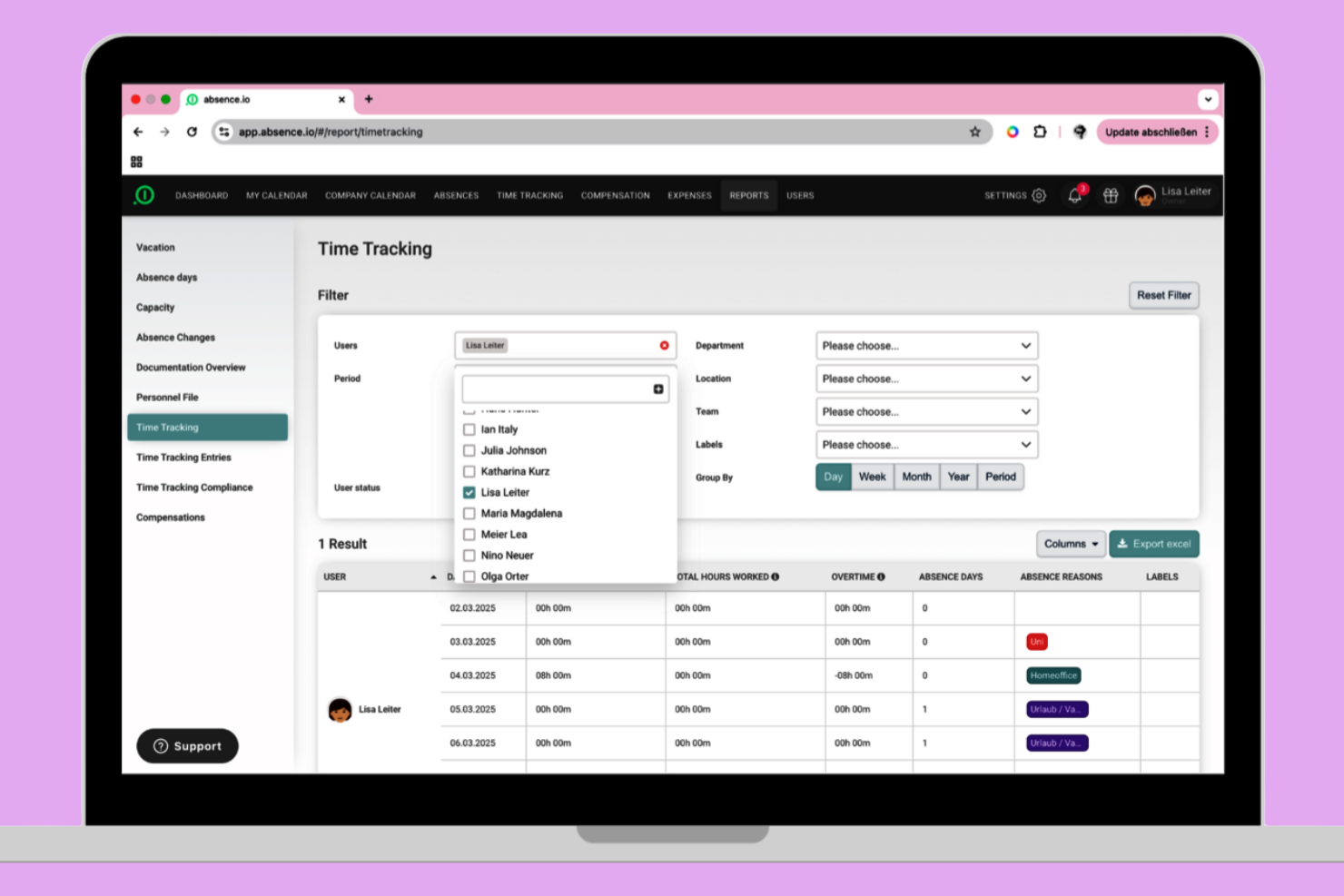
absence.io offre una soluzione semplice per la gestione delle ferie, pensata per le piccole imprese. È particolarmente utile per i team che desiderano automatizzare le richieste di permesso, le approvazioni e il monitoraggio dei saldi senza complicazioni aggiuntive. La piattaforma aiuta a ridurre la gestione manuale e offre ai dipendenti una visione chiara delle proprie ferie.
Perché ho scelto absence.io
Per le piccole imprese che hanno bisogno di una soluzione semplice per tracciare le ferie, absence.io si distingue per il suo approccio mirato. La piattaforma consente di automatizzare le richieste e le approvazioni dei permessi, evitando così l’uso di fogli di calcolo o processi manuali. Apprezzo il fatto che i dipendenti possano visualizzare i propri saldi e inviare le richieste direttamente dal sistema, riducendo lo scambio di email. La visualizzazione del calendario aiuta inoltre i responsabili a vedere rapidamente chi è assente e pianificare le coperture.
Funzionalità principali di absence.io
Altre funzionalità di absence.io aiutano le piccole imprese a gestire più facilmente le assenze:
- Tipi di permesso personalizzati: Crea e gestisci diverse categorie di permesso, come giorni di malattia, congedi parentali o permessi non retribuiti.
- Caricamento documenti: I dipendenti possono allegare certificati medici o altri documenti direttamente alle richieste di permesso.
- Condivisione calendario del team: Condividi i calendari del team affinché tutti possano vedere le assenze programmate ed evitare conflitti di pianificazione.
- Dashboard HR: Accedi a una dashboard centralizzata per monitorare le statistiche sulle assenze e tenere traccia delle tendenze complessive.
Integrazioni di absence.io
Le integrazioni includono Google Workspace, Microsoft Excel, Microsoft Azure, Outlook e Slack. È disponibile anche una API aperta per integrazioni personalizzate.
Pros and Cons
Pros:
- Offre calcoli automatici dell'accumulo ferie
- Supporta molteplici tipi di permesso personalizzati
- Include il caricamento di documenti per le richieste di permesso
Cons:
- Mancano funzionalità integrate per l'elaborazione delle buste paga
- I flussi di approvazione hanno una logica condizionale limitata

Ideale per visualizzare il calendario del team in modo semplice
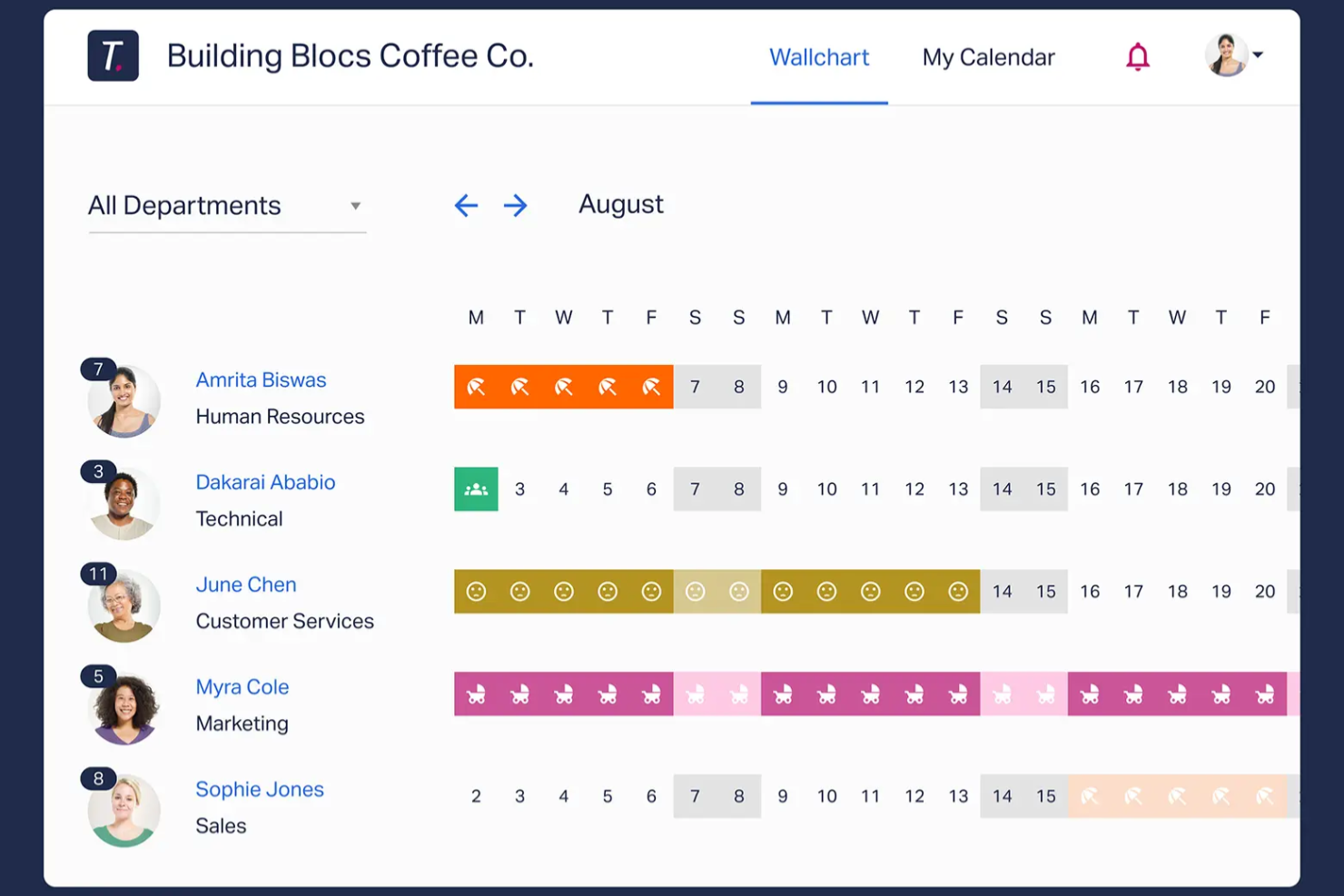
Se il tuo team ha bisogno di un modo chiaro e visivo per gestire le assenze, Timetastic offre una soluzione semplice. È adatto a piccole imprese e manager che desiderano un calendario condiviso e facile da usare per tenere traccia delle assenze senza inutili complessità. La piattaforma aiuta a evitare conflitti di programmazione e rende sempre visibile lo stato delle ferie di tutti a colpo d'occhio.
Perché ho scelto Timetastic
Per i team che vogliono una panoramica chiara delle assenze di tutti, Timetastic offre un semplice calendario visivo facile da condividere. Il calendario di squadra codificato per colori permette di vedere immediatamente chi è assente e quando, aiutando così a prevenire sovrapposizioni. Apprezzo la possibilità di filtrare la visualizzazione per reparto o sede, rendendolo pratico per i manager con team distribuiti. Se il tuo obiettivo principale è mantenere la gestione delle assenze trasparente e accessibile, l'approccio di Timetastic centrato sul calendario è una scelta azzeccata.
Funzionalità principali di Timetastic
Altre funzionalità che rendono Timetastic pratico per la gestione delle assenze includono:
- App mobile: Invia e approva richieste di assenza direttamente dal tuo telefono.
- Tipi di assenza personalizzati: Configura diverse categorie per ferie, malattie e altre assenze.
- Tracciamento automatico delle ferie: Il sistema aggiorna e monitora automaticamente il saldo ferie rimanente di ciascun dipendente.
- Integrazione con calendari: Sincronizza Timetastic con Google Calendar, Outlook o iCal per una pianificazione unificata.
Integrazioni di Timetastic
Le integrazioni includono Outlook Calendar, Apple Calendar, Slack e Google Workspace.
Pros and Cons
Pros:
- Calendario codificato per colori per una rapida visibilità delle assenze
- Calcolo automatico del saldo ferie per il personale
- Integrazione con Slack per notifiche di assenza istantanee
Cons:
- Non supporta la conformità a FMLA o ADA
- Non è possibile allegare documenti alle richieste di assenza

Dayforce
Ideale per sincronizzazione delle paghe in tempo reale
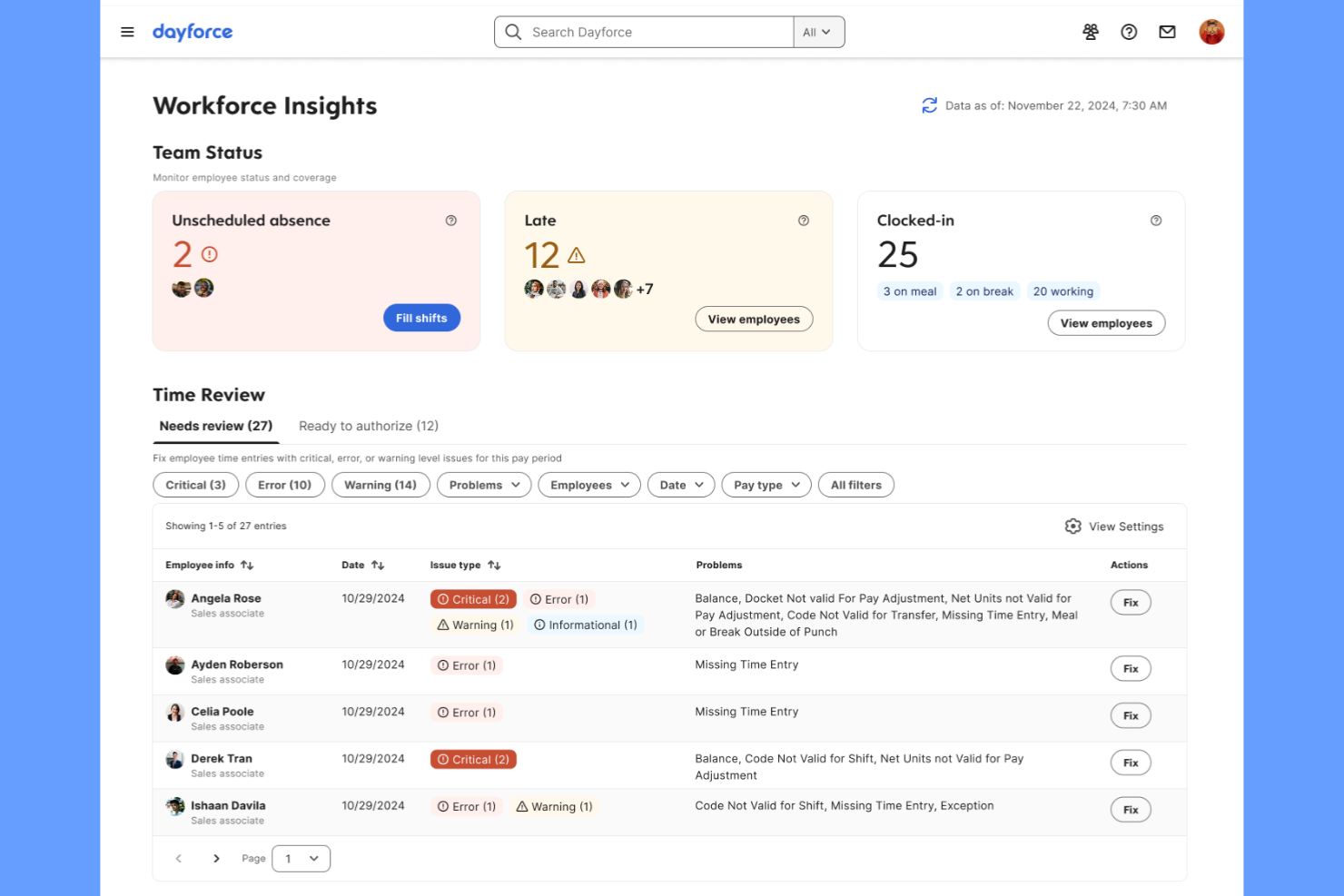
Dayforce è progettato per le organizzazioni che necessitano di una gestione delle assenze strettamente collegata a buste paga e rilevamento delle presenze. È particolarmente utile per i team HR e paghe nei settori in cui calcoli salariali in tempo reale e conformità sono fondamentali. La piattaforma aiuta a ridurre gli errori nelle buste paga sincronizzando istantaneamente i dati sulle assenze con l’elaborazione delle paghe.
Perché ho scelto Dayforce
Ciò che distingue Dayforce nella gestione delle assenze è la sincronizzazione in tempo reale con le buste paga, elemento essenziale per le organizzazioni in cui le assenze influiscono direttamente sui salari. La piattaforma aggiorna automaticamente i calcoli delle retribuzioni non appena vengono registrate assenze, riducendo il rischio di errori e problematiche di conformità. Apprezzo come Dayforce colleghi richieste di permesso, maturazione dei giorni e paga in un unico sistema, offrendo sempre informazioni aggiornate ai team HR e paghe. Questo lo rende una scelta solida per le aziende che necessitano di aggiustamenti salariali precisi e immediati legati alle assenze dei dipendenti.
Funzionalità principali di Dayforce
Altre funzionalità che rendono Dayforce utile per la gestione delle assenze includono:
- Accesso tramite app mobile: Dipendenti e responsabili possono richiedere e approvare assenze dai propri dispositivi mobili.
- Calcolo automatico delle maturazioni: Il sistema tiene traccia e aggiorna i saldi di ferie e permessi secondo le policy aziendali.
- Motore di regole di conformità: Regole integrate assicurano che le politiche di assenza siano allineate alle normative locali, statali e federali.
- Tipologie di assenza personalizzabili: I team HR possono definire e gestire più categorie di permessi secondo le esigenze organizzative.
Integrazioni Dayforce
Attualmente non sono elencate integrazioni native.
Pros and Cons
Pros:
- Aggiornamenti automatici delle maturazioni dopo ogni richiesta
- Regole di conformità integrate per più regioni
- Tipi di assenza personalizzabili per diverse policy
Cons:
- Gli strumenti di reportistica richiedono una configurazione avanzata
- Il prezzo non è trasparente online


Tyler Technologies offre una soluzione specializzata per la gestione delle assenze e delle supplenze, pensata per i distretti scolastici K-12. È progettata per gli amministratori che devono coordinare le assenze degli insegnanti e trovare rapidamente supplenti qualificati. La piattaforma aiuta le scuole ad automatizzare le richieste di assenza, abbinare i supplenti in base alle credenziali e mantenere la copertura delle classi senza ricorrere a chiamate manuali o fogli di calcolo.
Perché ho scelto Tyler Technologies
Per le scuole K-12 che devono gestire sia le assenze degli insegnanti che gli incarichi ai supplenti, Tyler Technologies offre una soluzione mirata. La piattaforma consente agli amministratori di automatizzare le richieste di assenza e notificare immediatamente i supplenti qualificati, essenziale per garantire la copertura delle classi. Apprezzo il modo in cui abbina i supplenti in base a credenziali e disponibilità, riducendo il rischio di scoperture dell’ultimo minuto. Tyler Technologies monitora anche le tendenze delle assenze, aiutando i dirigenti scolastici a pianificare le esigenze ricorrenti di copertura.
Caratteristiche principali di Tyler Technologies
Altre funzionalità di Tyler Technologies aiutano le scuole a gestire le assenze in modo più efficace:
- Chiamate automatiche: Il sistema può chiamare automaticamente i supplenti per coprire le posizioni aperte.
- Cruscotto assenze in tempo reale: Gli amministratori possono visualizzare rapidamente le assenze attuali e future.
- Codici assenza personalizzabili: Le scuole possono impostare codici specifici per diversi tipi di assenza.
- Integrazione con sistemi paghe: I dati sulle assenze possono essere inviati direttamente al payroll per una retribuzione accurata.
Integrazioni di Tyler Technologies
Le integrazioni includono Tyler Time and Attendance e Tyler School ERP.
Pros and Cons
Pros:
- Mostra la copertura delle assenze in tempo reale ogni giorno
- Codici assenza personalizzati secondo le politiche dei distretti scolastici
- Tiene traccia delle credenziali dei supplenti per controlli di conformità
Cons:
- Opzioni di reportistica limitate per le analisi delle assenze
- Le funzionalità di accesso mobile non sono pienamente sviluppate

Ideale per la pianificazione di turni per personale orario
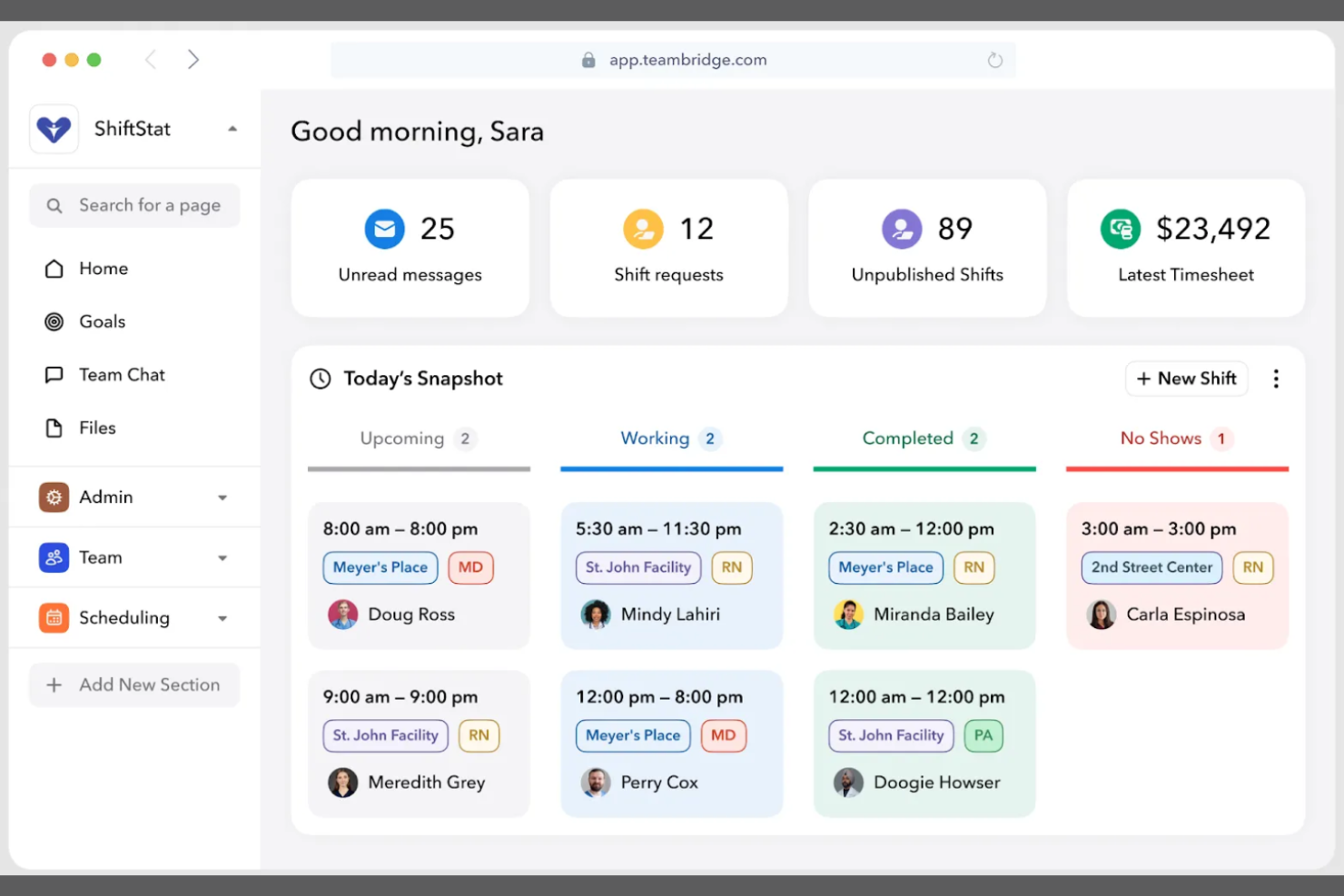
Teambridge si distingue per le aziende che gestiscono grandi team di lavoratori orari o su turni. È pensato per i responsabili operativi e i team HR che necessitano di coordinare ferie, permessi e pianificazione dei turni in un unico luogo. La piattaforma aiuta a ridurre assenteismo, coperture mancanti e problemi dell'ultimo minuto nella programmazione, collegando direttamente la gestione delle assenze agli strumenti di pianificazione della forza lavoro.
Perché ho scelto Teambridge
Per le organizzazioni con lavoratori orari, Teambridge offre una soluzione strettamente connessa alla gestione della forza lavoro e degli orari. La piattaforma consente ai manager di visualizzare le richieste di ferie accanto alle assegnazioni dei turni, facilitando la copertura dei vuoti e prevenendo la carenza di personale. Mi piace che Teambridge aggiorni automaticamente i turni quando un permesso viene approvato, così è possibile identificare rapidamente eventuali problemi di copertura. Questo approccio è particolarmente utile per il settore retail, dell’ospitalità e altri ambiti dove la copertura dei turni è fondamentale.
Funzionalità principali di Teambridge
Altre funzionalità utili di Teambridge per la gestione delle assenze includono:
- Portale self-service per i dipendenti: Il personale può inviare richieste di permesso e visualizzare i propri saldi direttamente dal proprio account.
- Maturazione automatica dei permessi: Il sistema calcola e aggiorna i saldi dei permessi secondo le politiche aziendali.
- Notifiche per i manager: I responsabili ricevono avvisi istantanei per nuove richieste di permesso e approvazioni.
- Tipologie di permesso personalizzabili: Il team HR può definire diverse categorie di permesso per rispecchiare le policy aziendali.
Integrazioni Teambridge
Le integrazioni includono ADP, Paychex, Rippling, Greenshades, QuickBooks, Bullhorn, SmartRecruiters, Job Robotix e Salesforce.
Pros and Cons
Pros:
- Aggiornamento automatico dei turni in caso di permessi
- Portale dipendenti mostra i saldi dei permessi in tempo reale
- Avvisi per i manager sulle richieste di permesso in sospeso
Cons:
- Analisi limitate sulle tendenze di assenza
- Nessun monitoraggio della conformità integrato per tutte le regioni


TimeOff si distingue per i team che desiderano il pieno controllo sul proprio sistema di gestione delle assenze. Come piattaforma open-source, è particolarmente interessante per i team IT, le startup e le organizzazioni con esigenze specifiche di integrazione o policy particolari. Puoi personalizzare i flussi di lavoro, i tipi di congedo e persino l'interfaccia per adattarli ai tuoi requisiti esatti.
Perché ho scelto TimeOff
Se vuoi una soluzione che puoi davvero rendere tua, TimeOff offre questa flessibilità grazie alla personalizzazione open-source. Puoi modificare il codice sorgente per adattarlo alle uniche policy sulle assenze della tua azienda, ai flussi di approvazione o anche al branding. Apprezzo il fatto che tu possa aggiungere tipi di congedo personalizzati e automatizzare regole che rispecchiano le necessità specifiche della tua organizzazione. Per i team con risorse tecniche, questo livello di controllo è difficile da trovare nella maggior parte dei software per la gestione delle assenze.
Funzionalità principali di TimeOff
Altre funzionalità che rendono TimeOff utile per il tracciamento delle assenze includono:
- Supporto multilingua: Gli utenti possono cambiare l'interfaccia in diverse lingue.
- Notifiche email: Il sistema invia email automatiche per le richieste e le approvazioni di congedo.
- Esportazione calendario: Esporta i dati delle assenze su calendari esterni per una maggiore visibilità.
- Accesso basato sui ruoli: Assegna permessi differenti a manager, dipendenti e amministratori.
Integrazioni di TimeOff
Le integrazioni includono Slack, Google Workspace, Microsoft Outlook, Google Calendar e una REST API per integrazioni personalizzate.
Pros and Cons
Pros:
- Codice open-source che consente la modifica completa del sistema
- Opzione self-hosting per il controllo della privacy dei dati
- Interfaccia multilingua per team internazionali
Cons:
- Mancano collegamenti integrati ai sistemi di gestione paghe
- Aggiornamenti manuali richiesti per la versione self-hosted
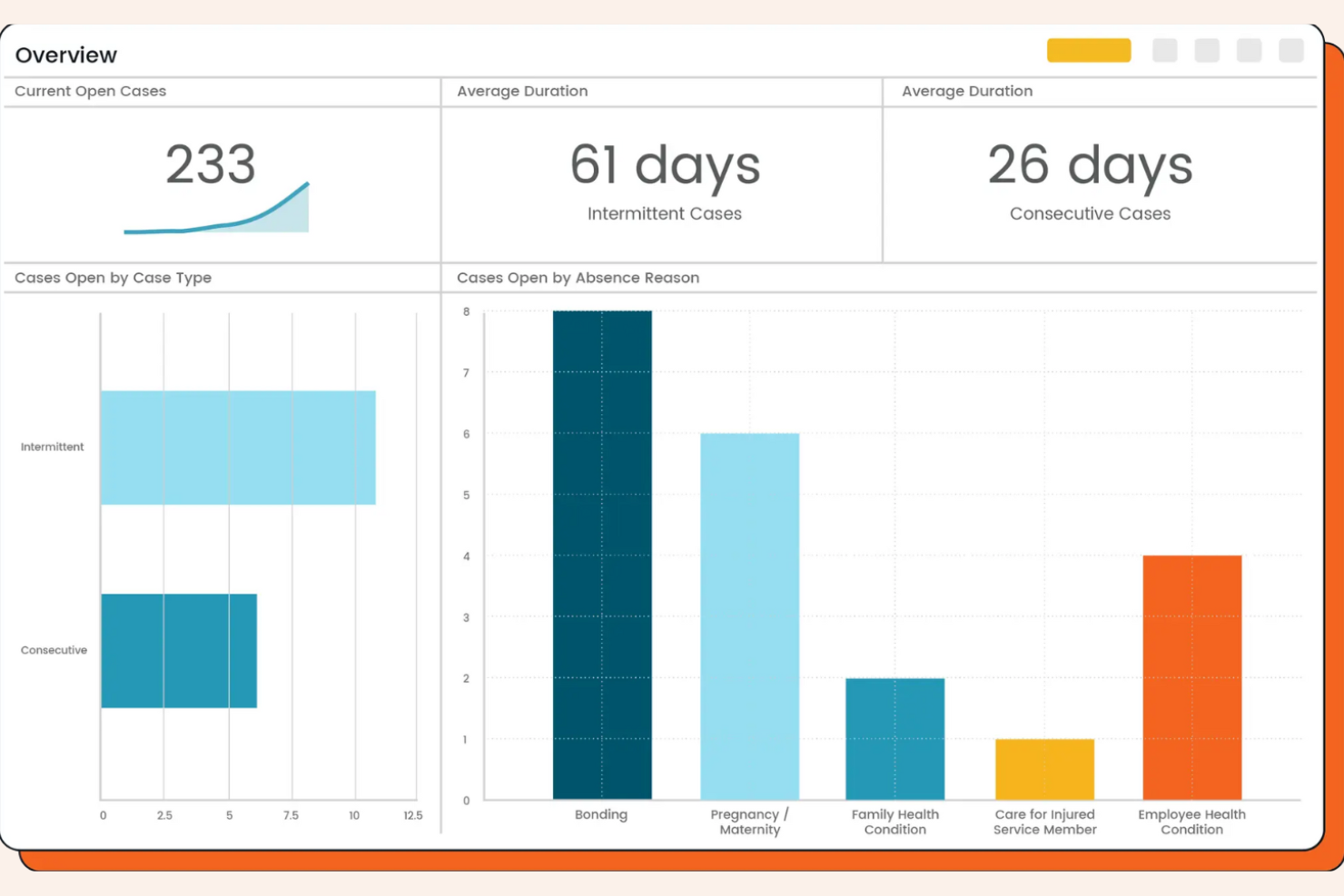
AbsenceSoft è progettato per i team HR che devono gestire politiche di assenza complesse e requisiti di conformità. È particolarmente indicato per organizzazioni con necessità articolate in materia di FMLA, ADA o permessi specifici per stato. La piattaforma aiuta ad automatizzare il monitoraggio delle assenze, la documentazione e la comunicazione, riducendo il lavoro manuale e il rischio.
Perché ho scelto AbsenceSoft
Ho scelto AbsenceSoft perché affronta le sfide della gestione delle politiche di assenza complesse che molti team HR incontrano. La piattaforma offre motori di regole configurabili, permettendo di automatizzare i calcoli di idoneità e maturazione per FMLA, ADA e altri tipi di permessi sovrapposti. Apprezzo il fatto che centralizzi la documentazione e la comunicazione, facilitando il rispetto delle normative in evoluzione. I processi automatizzati garantiscono inoltre che ogni fase del processo di assenza sia tracciata e verificabile.
Funzionalità principali di AbsenceSoft
Altre funzionalità di AbsenceSoft aiutano i team HR a gestire le assenze in modo più efficiente:
- Portale self-service per i dipendenti: I dipendenti possono inviare richieste di assenza, caricare documentazione e controllare i saldi direttamente.
- Notifiche automatizzate: Il sistema invia avvisi a manager e dipendenti sulle variazioni di stato delle assenze e sulle azioni richieste.
- Report personalizzabili: Genera report dettagliati sulle tendenze delle assenze, sull'utilizzo e sulla conformità per audit o revisioni della direzione.
- Accesso mobile: Gli utenti possono accedere agli strumenti e alle informazioni sulla gestione delle assenze da qualsiasi dispositivo grazie all'interfaccia ottimizzata per dispositivi mobili.
Integrazioni di AbsenceSoft
Le integrazioni includono Workday, UKG, ADP, SAP SuccessFactors, Oracle, Paycom, Ceridian Dayforce, Paylocity, BambooHR e Okta.
Pros and Cons
Pros:
- Gestisce regole FMLA, ADA e permessi a livello statale
- Offre workflow configurabili per casi complessi
- Centralizza la documentazione delle assenze e le tracce di audit
Cons:
- Opzioni self-service limitate per i team più piccoli
- Nessun sistema integrato di rilevazione presenze per il personale orario
Altri software per la gestione delle assenze
Ecco alcune ulteriori opzioni di software per la gestione delle assenze che non sono entrate nel mio elenco, ma che vale comunque la pena valutare:
- FINEOS Absence
Ideale per la conformità assicurativa e nella gestione dei reclami
- J. J. Keller Leave Manager
Ideale per il monitoraggio normativo FMLA e ADA
- Stiira
Ideale per il coordinamento del personale su più sedi
- TalentHR
Il migliore con automazione HR intuitiva potenziata da intelligenza artificiale
- Replicon
Ideale per la configurazione delle policy a livello globale


Come valuto i software di gestione delle assenze
La mia valutazione si svolge su due livelli: gli elementi non negoziabili—come la richiesta di ferie digitale, il monitoraggio delle maturazioni e i calendari delle assenze di squadra—e i fattori che distinguono uno strumento dall'altro.
Funzionalità core (requisiti base per questa lista)
Quando seleziono gli strumenti per la mia lista, valuto ciascuno in una scala da 0 (non offre la funzionalità) a 5 (eccelle in questo campo) per ogni funzionalità principale indicata qui sotto. Successivamente, calcolo il punteggio totale dello strumento in percentuale. Ogni strumento deve raggiungere un punteggio totale minimo del 65% per essere considerato per l'inclusione.
- Flussi di approvazione delle richieste di ferie: Verifico se i dipendenti possono inviare richieste in formato digitale e se le approvazioni passano attraverso catene configurabili—come ad esempio un responsabile regionale che approva per primo, seguito dalla revisione HR.
- Monitoraggio accumulo PTO: Ogni strumento dovrebbe gestire in automatico le maturazioni su più tipi di assenza, inclusi ferie, malattia e congedo parentale, supportando regole come livelli in base all'anzianità e limiti per il riporto delle ferie.
- Calendario delle assenze & visibilità: Cerco calendari condivisi di squadra che mostrano chiaramente chi è assente e quando, affinché i manager possano individuare sovrapposizioni prima di approvare una richiesta che lascerebbe scoperto un turno.
- Configurazione delle policy & conformità: La piattaforma deve consentire di costruire policy di congedo specifiche per area geografica—come le regole FMLA o i minimi di ferie annuali—senza dover ricorrere a workaround o interventi manuali.
- Reportistica & analisi: Valuto se lo strumento va oltre la semplice esportazione dei saldi offrendo report sulle tendenze e metriche sui modelli di assenza che aiutano l'HR a individuare per tempo assenze ripetute a breve termine.
- Integrazioni HRIS & payroll: I dati sulle assenze approvate devono sincronizzarsi con i sistemi payroll e HRIS, evitando la riconciliazione manuale delle ore a fine periodo di paga.
Una volta che dispongo di un elenco di strumenti che rispondono ai criteri, considero cosa distingue ciascuna piattaforma dalle altre.
Fattori differenzianti (cosa distingue i fornitori)
Ecco come confronto e metto a paragone i diversi fornitori:
Caratteristiche distintive
I modelli di ferie multi-paese sono fondamentali per team distribuiti. Cerco regole normative già pronte che risparmino la ricerca manuale dei diritti di assenza per ogni nuovo Paese. Il punteggio Bradford Factor è un altro elemento distintivo: aiuta l'HR a individuare con anticipo modelli di assenze brevi e frequenti prima che diventino un problema. Valuto anche l'integrazione con Slack o Teams, visto che le richieste in chat e i promemoria giornalieri su "chi è assente" mantengono la gestione delle assenze all'interno dei canali di comunicazione abituali della squadra.
Oltre le caratteristiche
La trasparenza dei prezzi è importante—verifico se i fornitori pubblicano tariffe chiare per dipendente e se offrono una prova gratuita per valutare lo strumento prima dell'acquisto. Valuto anche la rapidità d'implementazione, perché una piattaforma che richiede mesi per configurare le policy di assenza ritarda la fruizione dei benefici da parte del team. Considero inoltre come ogni fornitore gestisce la sicurezza dei dati, in particolare l'accesso basato sui ruoli ai dati sensibili relativi a documenti medici o parentali.
Come scegliere un software per la gestione delle assenze
È facile perdersi in lunghi elenchi di funzionalità e strutture tariffarie complesse. Per aiutarti a rimanere concentrato mentre affronti il tuo processo di selezione del software, ecco un elenco di fattori da tenere presenti:
| Fattore | Cosa considerare |
|---|---|
| Scalabilità | Il software sarà in grado di gestire il numero attuale e futuro di dipendenti, le sedi e i cambiamenti organizzativi? |
| Integrazioni | Si collega nativamente ai tuoi sistemi paghe, HRIS, HCM o di pianificazione, oppure dovrai ricorrere a soluzioni alternative? |
| Personalizzazione | Puoi adattare i tipi di assenza, i flussi di approvazione e le policy alle esigenze della tua organizzazione? |
| Facilità d'uso | Manager e dipendenti lo adotteranno rapidamente o dovrai investire molto nella formazione? |
| Implementazione e onboarding | Quanto tempo sarà necessario per renderlo operativo e di quali risorse o forme di supporto avrai bisogno durante il lancio? |
| Costo | Tutti i costi sono chiari fin dall'inizio e il modello tariffario è adatto ai tuoi modelli di utilizzo e ai cicli di budget? |
| Misure di sicurezza | Il fornitore offre la crittografia dei dati, controlli degli accessi e conformità alle leggi sulla privacy applicabili? |
| Disponibilità dell'assistenza | Puoi contattare l'assistenza quando ne hai bisogno e sono previsti SLA o referenti dedicati per i problemi urgenti? |
Che cos'è un software per la gestione delle assenze?
Il software per la gestione delle assenze è uno strumento digitale che aiuta le organizzazioni a monitorare, gestire e creare report sulle assenze dei dipendenti, come malattia, ferie e altri periodi di assenza. Centralizza le richieste di assenza, automatizza i flussi di approvazione e conserva registri accurati per la conformità e la pianificazione. I team HR lo utilizzano per garantire la copertura, applicare le policy e ottenere visibilità sulle tendenze delle presenze della forza lavoro.
Funzionalità dei software per la gestione delle assenze
Quando selezioni un software per la gestione delle assenze, presta attenzione alle seguenti funzionalità chiave:
- Portale per le richieste di congedo: consente ai dipendenti di inviare online le richieste di assenza, rendendo il processo più rapido e trasparente sia per il personale sia per i responsabili.
- Flussi di approvazione automatizzati: indirizza le richieste di congedo agli approvatori appropriati e notifica tutte le parti interessate dei cambiamenti di stato, riducendo la necessità di solleciti manuali.
- Tipi di congedo personalizzati: consente di definire e gestire diverse categorie di congedo, come giorni di malattia, ferie, congedo parentale o assenze non retribuite.
- Calendario per il monitoraggio delle assenze: offre una visualizzazione a calendario di tutte le assenze programmate e già utilizzate, aiutando i team a pianificare la copertura ed evitare conflitti.
- Calcolo dei saldi in tempo reale: aggiorna e mostra automaticamente il saldo delle assenze disponibile per ciascun dipendente in base alla maturazione e all'utilizzo.
- Report e analisi: genera report dettagliati sulle tendenze delle assenze, sui modelli di utilizzo e sulla conformità alle policy, per supportare decisioni HR basate sui dati.
- Strumenti per l'applicazione delle policy: applica le regole specifiche dell'azienda relative a idoneità, trasferimento dei saldi, periodi di blackout e requisiti di documentazione, garantendo coerenza.
- Notifiche e promemoria: invia avvisi automatici a dipendenti e responsabili riguardo alle assenze imminenti, alle approvazioni in sospeso o alle azioni richieste.
- Tracciamento delle attività: conserva un registro sicuro e con marcatura temporale di tutte le azioni relative ai congedi, per garantire la conformità e risolvere eventuali controversie.
- Accesso mobile: consente a dipendenti e responsabili di richiedere, approvare o consultare le assenze da smartphone o tablet, supportando ambienti di lavoro flessibili.
Vantaggi del software per la gestione delle assenze
L'implementazione di un software per la gestione delle assenze offre diversi vantaggi al tuo team e alla tua azienda. Ecco alcuni dei benefici che puoi aspettarti:
- Maggiore conformità: l'applicazione automatizzata delle policy e i registri delle attività aiutano la tua organizzazione a rispettare le leggi sul lavoro e le regole interne.
- Maggiore visibilità: i calendari in tempo reale e gli strumenti di reportistica offrono al reparto HR e ai responsabili una visione chiara delle assenze e delle lacune nella copertura.
- Approvazioni più rapide: i flussi di lavoro e le notifiche automatizzati accelerano il processo di richiesta e approvazione dei congedi per tutte le persone coinvolte.
- Saldi dei congedi accurati: i calcoli in tempo reale garantiscono che dipendenti e responsabili visualizzino sempre i diritti alle assenze aggiornati.
- Riduzione del lavoro manuale: i registri digitali centralizzati e i portali self-service riducono al minimo la documentazione cartacea e l'inserimento ripetitivo dei dati.
- Pianificazione migliore: gli strumenti di pianificazione visiva e le analisi supportano una pianificazione proattiva della forza lavoro e riducono le interruzioni dell'ultimo minuto.
- Esperienza dei dipendenti migliorata: l'accesso semplice alle informazioni sui congedi e gli strumenti ottimizzati per i dispositivi mobili migliorano l'esperienza dei dipendenti nella gestione e nella richiesta delle assenze in modo sicuro.
Costi e prezzi del software per la gestione delle assenze
La scelta di un software per la gestione delle assenze richiede la comprensione dei diversi modelli e piani tariffari disponibili. I costi variano in base alle funzionalità, alle dimensioni del team, agli strumenti aggiuntivi e ad altri fattori. La tabella seguente riepiloga i piani più comuni, i relativi prezzi medi e le funzionalità generalmente incluse nelle soluzioni software per la gestione delle assenze:
Tabella comparativa dei piani per il software di gestione delle assenze
| Tipo di piano | Prezzo medio | Funzionalità comuni |
|---|---|---|
| Piano gratuito | $0 | Monitoraggio di base dei congedi, numero limitato di utenti, reportistica semplice e notifiche via e-mail. |
| Piano personale | $5–$10/utente/mese | Richieste di congedo, flussi di approvazione, visualizzazioni del calendario, monitoraggio dei fogli presenze e personalizzazione di base delle policy. |
| Piano aziendale | $10–$25/utente/mese | Reportistica avanzata, integrazioni con HRIS o sistemi paghe, tipi di congedo personalizzati e accesso mobile. |
| Piano per grandi aziende | $25–$50/utente/mese | Supporto per più sedi, registri delle attività, strumenti avanzati per la conformità, assistenza dedicata e onboarding personalizzato. |
Domande frequenti sul software per la gestione delle assenze
Ecco alcune risposte alle domande comuni sul software per la gestione delle assenze:
In che modo il software per la gestione delle assenze aiuta a garantire la conformità?
Il software per la gestione delle assenze aiuta a garantire la conformità applicando le politiche aziendali sui congedi, monitorando la documentazione e mantenendo tracce di controllo. Supporta inoltre il rispetto delle leggi sul lavoro automatizzando la maturazione, i riporti e le regole di idoneità, riducendo il rischio di errori manuali o di mancato rispetto dei requisiti normativi.
Il software per la gestione delle assenze può integrarsi con i sistemi paghe e HR?
Sì, la maggior parte dei software per la gestione delle assenze può integrarsi con i sistemi paghe e HR. Queste integrazioni consentono l’aggiornamento automatico dei saldi dei congedi, calcoli accurati delle retribuzioni e semplificano la condivisione dei dati tra le piattaforme, riducendo l’inserimento manuale e il rischio di discrepanze.
Cosa devo considerare quando passo dal monitoraggio manuale al software?
Quando si passa dal monitoraggio manuale delle presenze, è necessario considerare l’accuratezza dei dati, l’importazione dello storico, la formazione degli utenti e la configurazione delle politiche. Occorre pianificare un periodo di transizione durante il quale entrambi i sistemi potrebbero essere utilizzati in parallelo e assicurarsi che il team comprenda i nuovi flussi di lavoro e sappia dove trovare le risorse di supporto.
Il software per la gestione delle assenze è adatto ai team da remoto o distribuiti?
Sì, il software per la gestione delle assenze è particolarmente adatto ai team da remoto o distribuiti. L’accesso basato sul cloud, le app mobili e le notifiche automatiche consentono ai dipendenti e ai responsabili che si trovano in sedi diverse di richiedere, approvare e monitorare le assenze in tempo reale.
Quanto sono sicuri i dati dei dipendenti nel software per la gestione delle assenze?
I dati dei dipendenti nel software per la gestione delle assenze sono generalmente protetti mediante crittografia, controlli degli accessi e conformità alle normative sulla privacy. È sempre consigliabile verificare le certificazioni di sicurezza del fornitore e le sue pratiche di gestione dei dati per assicurarsi che soddisfino gli standard della propria organizzazione.