

10 Elenco ristretto dei migliori software per il monitoraggio della produttività


Monitorare la produttività è una sfida comune per i professionisti delle risorse umane. Mantenere il team concentrato sui propri obiettivi mentre si gestiscono innumerevoli attività può sembrare opprimente. I software per il monitoraggio della produttività offrono un modo per gestire questo caos, aiutandoti a concentrarti su ciò che conta davvero.
Ho approfondito il mondo degli strumenti per il monitoraggio della produttività per offrirti una valutazione imparziale delle migliori opzioni disponibili. In base alla mia esperienza, scegliere il software giusto può trasformare il modo in cui opera il tuo team, semplificando il tuo lavoro.
In questo articolo ti guiderò attraverso le mie migliori scelte, mettendo in evidenza funzionalità e vantaggi in linea con le tue esigenze. Troverai spunti utili per prendere una decisione informata, assicurandoti che il tuo team rimanga efficiente e produttivo.
Perché fidarsi delle nostre recensioni sui software
Il nostro team testa e recensisce software dal 2012. In quanto esperti HR noi stessi, sappiamo quanto sia difficile — e importante — scegliere il software giusto.
Per questa guida, abbiamo valutato gli strumenti attraverso test pratici e ricerche indipendenti, assegnando un punteggio agli strumenti in base ai nostri criteri di selezione. Ci basiamo inoltre sulle competenze di leader di pensiero del settore e di professionisti HR attivi.
Le nostre recensioni riflettono il nostro giudizio editoriale umano, non un discorso di vendita.
Revisori esperti:
Tabella comparativa dei software per il monitoraggio della produttività
Questa tabella comparativa riassume i dettagli dei prezzi delle mie migliori selezioni di software per il monitoraggio della produttività:
| Tool | Best For | Trial Info | Price | ||
|---|---|---|---|---|---|
| 1 | Il miglior software di monitoraggio della produttività per la mappatura automatizzata e semplice del tempo | Prova gratuita di 7 giorni + demo gratuita disponibile | Da $8/postazione/mese | Website | |
| 2 | Ideale per rifocalizzare i team su lavori ad alto impatto | Prova gratuita di 14 giorni + piano gratuito + demo gratuita disponibile | Da $10/utente/mese (fatturato annualmente) | Website | |
| 3 | Ideale per il monitoraggio delle attività della forza lavoro mobile | Prova gratuita di 14 giorni + demo gratuita disponibile | Da $6.42/utente/mese (fatturazione annuale) | Website | |
| 4 | Ideale per la verifica visiva del lavoro svolto | Prova gratuita di 14 giorni + demo gratuita disponibile | A partire da $4.99/utente/mese (fatturazione annuale) | Website | |
| 5 | Ideale per analisi avanzate del comportamento degli utenti | Prova gratuita + demo gratuita disponibili | Da $14/postazione/mese (fatturazione annuale) | Website | |
| 6 | Ideale per reportistica dettagliata | Piano gratuito + prova gratuita di 30 giorni + demo gratuita disponibile | A partire da $6/utente/mese (fatturato annualmente) | Website | |
| 7 | Ideale per il monitoraggio in tempo reale delle attività | Prova gratuita disponibile | Da $6,67/utente/mese (fatturato annualmente) | Website | |
| 8 | Il miglior software di monitoraggio della produttività per approfondimenti completi sui livelli di efficienza dei dipendenti | Prova gratuita di 21 giorni + piano gratuito per un massimo di 3 utenti | Da $7/postazione/mese | Website | |
| 9 | Il miglior software di monitoraggio della produttività per automatizzare i processi di vendita e gestire gli account | Piano gratuito + demo gratuita disponibile | Da $7/utente/mese (fatturato annualmente) | Website | |
| 10 | Il miglior software per il monitoraggio della produttività e l'ottenimento di analisi della produttività in tempo reale | Prova gratuita disponibile | A partire da $6.99/utente/mese | Website |


I migliori software per il monitoraggio della produttività
Ecco una breve descrizione di ciascun software per il monitoraggio della produttività, che illustra il caso d’uso migliore di ogni sistema, le sue funzionalità più rilevanti e alcuni pro e contro. Ho incluso anche schermate per offrirti un’istantanea della loro interfaccia utente.

Il miglior software di monitoraggio della produttività per la mappatura automatizzata e semplice del tempo
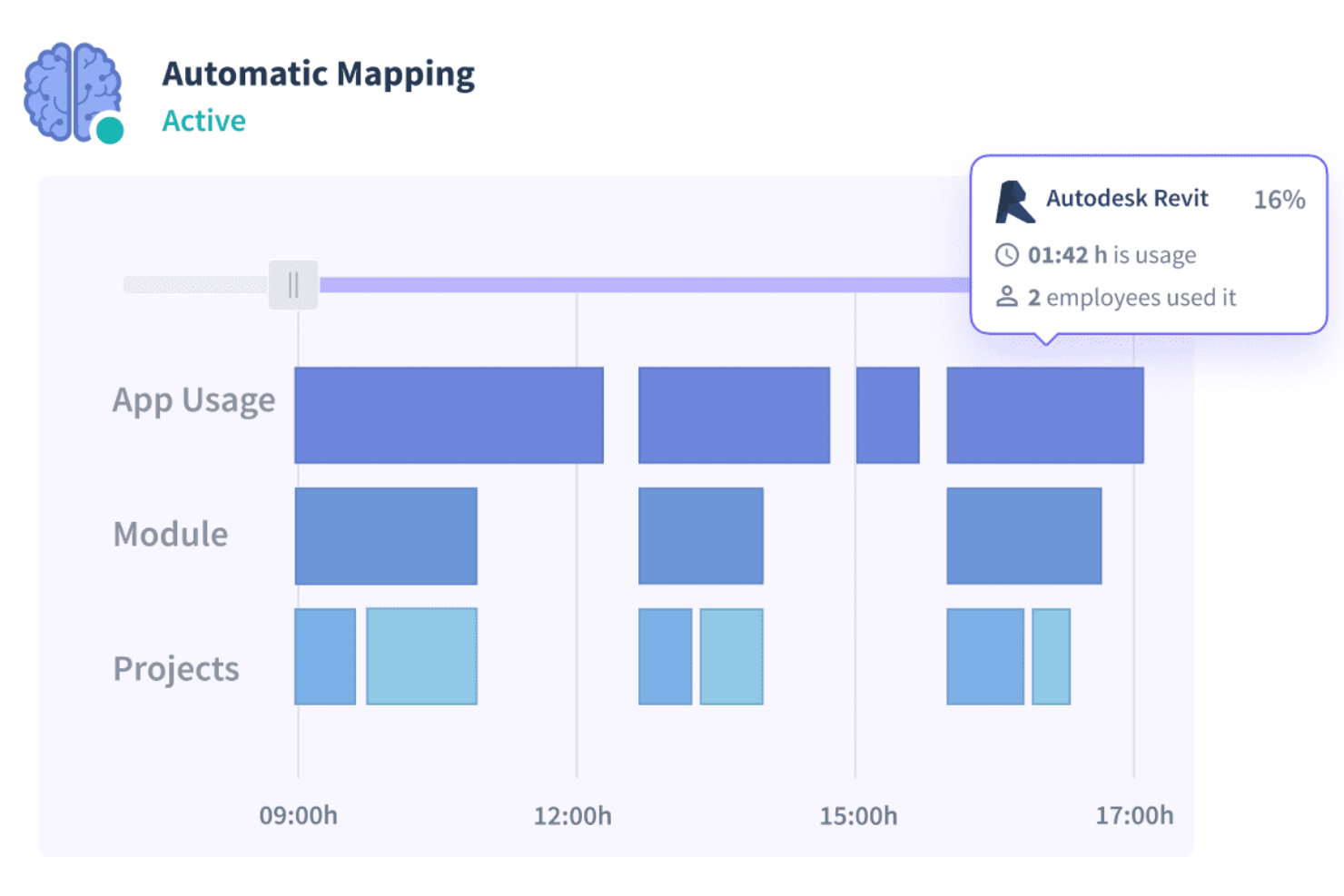
Insightful è all'altezza del suo nome, in quanto lo strumento promette di fornire numerose informazioni relative ai progetti e agli attributi di produttività dei dipendenti. Molte piccole imprese si affidano a Insightful per aumentare la produttività e monitorare l'efficienza dei dipendenti.
Perché ho scelto Insightful: Apprezzo Insightful soprattutto per la funzionalità di mappatura automatica del tempo. Implementando la mappatura automatica dei dati temporali, Insightful fornisce informazioni precise sui progetti eliminando l'errore umano. Insightful ti permette di avere una visione completa del tempo impiegato dai tuoi dipendenti nelle diverse fasi di un progetto. Lo strumento, inoltre, offre statistiche precise che aiutano a giustificare meglio i budget dei progetti e le ore fatturabili.
La prova del lavoro è un'altra sfida per i datori di lavoro che assumono freelance o collaboratori esterni che fatturano in base alle ore lavorate. Insightful implementa un metodo di monitoraggio in tempo reale che offre un'istantanea dell'utilizzo da parte dei dipendenti di siti web e app. Inoltre, puoi etichettare personalmente le app e i siti che consideri produttivi per il tuo progetto o la tua organizzazione.
Funzionalità e integrazioni di Insightful
Funzionalità includono screenshot automatici, presenze verificate, mappatura automatica delle registrazioni orarie, monitoraggio delle presenze, cronologia delle ore lavorate, etichettatura della produttività e diversi accessi per clienti, manager e dipendenti.
Integrazioni includono oltre 5 strumenti come Data Studio, IBM Cognos Analytics, Looker, Power BI, Slack, Tableau e altri.
Pros and Cons
Pros:
- Interfaccia utente intuitiva
- Screenshot che mostrano i cambi di finestra
- Include un'API REST per integrazioni personalizzate
Cons:
- Bug occasionali nell'automazione
- In alcuni casi non è possibile eliminare gli utenti
New Product Updates from Insightful
Insightful Expands MCP and HRIS Integrations
Insightful adds OAuth connections for ChatGPT and Microsoft Copilot Studio through its MCP Server, while HRIS integrations gain manager scope syncing in Beta. These updates expand AI access and automate permission management. For more information, visit Insightful’s official site.
 .
.
Ideale per rifocalizzare i team su lavori ad alto impatto

ActivTrak è una piattaforma di monitoraggio della produttività che ti aiuta a comprendere come viene svolto il lavoro all'interno della tua organizzazione. Raccoglie dati sulle attività digitali per mostrare dove viene impiegato il tempo, come si comportano i team e dove è possibile migliorare l'efficienza.
Perché ho scelto ActivTrak: Ho scelto ActivTrak perché ti aiuta a capire cosa stimola le prestazioni senza invadere la privacy. Traccia il lavoro produttivo, improduttivo e offline, così puoi individuare eventuali lacune e opportunità di miglioramento. Puoi confrontare la produttività individuale e di squadra rispetto alla media organizzativa per vedere dove è necessario concentrare l'attenzione o fornire coaching.
La piattaforma mette anche in evidenza le attività a basso valore, così i team possono rifocalizzarsi sui compiti che portano risultati. Grazie agli approfondimenti sulle prestazioni e agli strumenti per prevenire il burnout, puoi bilanciare i carichi di lavoro e mantenere costante l'energia del tuo team.
Funzionalità e integrazioni principali:
Le funzionalità includono il monitoraggio delle prestazioni della produttività che suddivide il tempo dedicato ai diversi tipi di attività, aiutandoti a individuare inefficienze e aree di miglioramento. Un altro strumento utile è l'ottimizzazione dei turni, che utilizza i dati di presenza per garantire una copertura costante e prevenire turni mancati, mantenendo le operazioni fluide.
Le integrazioni includono Microsoft Outlook, Google Calendar, Salesforce, Microsoft Teams, Slack, ServiceNow, Zendesk, Zoom, Microsoft Viva, Lattice, Qualtrics e Jira Software.
Pros and Cons
Pros:
- Il benchmarking facilita i confronti sulle prestazioni
- Aiuta a rilevare il burnout prima che influisca sui risultati
- Dettagliata suddivisione tra tempo produttivo e improduttivo
Cons:
- Nessuno strumento integrato per paghe o HR
- Personalizzazione limitata dei layout della dashboard

DeskTime
Ideale per il monitoraggio delle attività della forza lavoro mobile

DeskTime è uno strumento automatico di monitoraggio del tempo e della produttività che controlla l’uso di app, URL e documenti su dispositivi desktop e mobile, offrendo a manager e dipendenti visibilità su come vengono impiegate le ore di lavoro.
Basato sul monitoraggio automatico del tempo, DeskTime è una piattaforma di controllo della produttività che registra attività su app e URL, tempi di progetto e dati di presenza del team sia su desktop che su mobile.
DeskTime è una piattaforma per il tracciamento della produttività che registra automaticamente l’utilizzo di app, l’attività sui siti web e i tempi di progetto su diversi dispositivi, unendo il rilevamento orario con la pianificazione e la gestione delle assenze in un’unica soluzione.
Per chi è più adatto DeskTime?
DeskTime è ideale per manager e responsabili di team di piccole e medie imprese che necessitano di una visibilità automatica e senza intervento su come i loro collaboratori trascorrono il tempo lavorativo.
Perché ho scelto DeskTime
Ho selezionato DeskTime tra i migliori strumenti per monitorare l’attività della forza lavoro mobile perché l’app mobile non elimina le funzionalità principali come fanno molti strumenti pensati prima per desktop. Che il tuo team sia in trasferta presso clienti, lavori da una sede esterna o timbri il tempo lontano dal computer, l’app supporta sia la rilevazione manuale sia quella automatica del tempo su iOS e Android, inclusa la registrazione offline. Questa capacità offline è fondamentale: le ore registrate senza connessione vengono sincronizzate automaticamente una volta online, quindi i tuoi dati non avranno lacune. La dashboard mobile offre inoltre ai manager accesso in tempo reale ai livelli di produttività del team, all’avanzamento dei progetti e alle assegnazioni di tempo offline, tutto dal cellulare.
Funzionalità principali di DeskTime
- Monitoraggio di URL e app: Registra automaticamente ogni sito visitato e applicazione usata durante l’orario di lavoro, categorizzando le attività come produttive, improduttive o neutre.
- Monitoraggio dei titoli dei documenti: Rileva i nomi specifici di file o documenti su cui i dipendenti lavorano, offrendo una visibilità dettagliata oltre alla sola app aperta.
- Report di produttività: Produce report giornalieri, settimanali e su intervalli personalizzati sui punteggi di produttività individuali e di squadra basati sulle attività tracciate.
- Pianificazione dei turni: Permette ai manager di creare e assegnare orari di lavoro in modo che il tempo rilevato possa essere confrontato con le ore previste.
Integrazioni DeskTime
DeskTime offre un piccolo set di integrazioni native, tra cui Google Calendar, Outlook Calendar, Trello, GitLab, Asana e Jira, e si collega anche con Zapier. È inoltre disponibile una API per integrazioni personalizzate.
Pros and Cons
Pros:
- Traccia il tempo in modo automatico senza input manuale
- Classifica la produttività di app e URL per team
- Supporta il monitoraggio mobile per lavoratori da remoto
Cons:
- L’app mobile non rileva automaticamente gli URL
- L’avvio automatico su desktop a volte non si attiva
Hubstaff
Ideale per la verifica visiva del lavoro svolto

Hubstaff è uno strumento versatile per il monitoraggio del tempo e della produttività che si adatta a team di qualsiasi dimensione, sia che tu sia un imprenditore individuale o faccia parte di una grande organizzazione. Il suo obiettivo principale è aumentare la produttività fornendo approfondimenti su come viene impiegato il tempo tra vari progetti e attività.
Perché ho scelto Hubstaff: Una delle funzionalità chiave che mi ha colpito è la sua capacità di monitoraggio dell’attività. Il software misura l’utilizzo della tastiera e del mouse per determinare i livelli di attività, offrendo un modo quantificabile per valutare il coinvolgimento durante l’orario di lavoro. Questi dati aiutano i manager a individuare schemi, allocare risorse in modo efficace e affrontare eventuali problemi di produttività.
Un’altra caratteristica degna di nota è la funzionalità opzionale di acquisizione di screenshot di Hubstaff. I manager possono configurare il software per scattare screenshot periodici degli schermi dei dipendenti, fornendo una conferma visiva delle attività svolte. Questa funzione può essere personalizzata per offuscare informazioni sensibili, bilanciando controllo e considerazioni sulla privacy.
Funzionalità e integrazioni distintive di Hubstaff
Funzionalità includono monitoraggio del tempo, fogli presenze, gestione delle presenze, reportistica, gestione stipendi, spese e fatturazione, monitoraggio del tempo tramite GPS, gestione dei costi di progetto, pianificazione dei dipendenti, monitoraggio degli straordinari, fatturazione, e analisi della forza lavoro.
Integrazioni includono Jira, Slack, Asana, Trello, QuickBooks, Salesforce, GitHub, PayPal, FreshBooks, ClickUp, monday.com e Zendesk.
Pros and Cons
Pros:
- Estensione Chrome
- Grafici di produttività a linea
- Report automatici
Cons:
- Navigazione dell'interfaccia utente un po' complicata
- Occasionali discrepanze di dati tra il tempo calcolato nei pannelli dipendente e amministratore

Teramind
Ideale per analisi avanzate del comportamento degli utenti

Teramind è una piattaforma software di analisi del comportamento degli utenti progettata per le aziende di diversi settori, con funzionalità focalizzate su cybersicurezza, gestione della conformità e produttività dei dipendenti.
Perché ho scelto Teramind: Il software di monitoraggio della produttività di Teramind offre dettagliate informazioni su come il tuo team impiega il tempo al lavoro. Grazie all'analisi comportamentale, puoi individuare schemi nelle azioni degli utenti, aiutando a identificare inefficienze e perfezionare i flussi di lavoro. La funzione di telemetria dei dati raccoglie informazioni sulle attività degli utenti senza essere invasiva, mostrando dove il tempo è ben investito o sprecato.
Un'altra funzionalità utile è l’analisi predittiva basata sull’IA, che individua potenziali colli di bottiglia nella produttività prima che diventino problemi seri. Il software aiuta anche nel monitoraggio delle minacce interne, avvisando in caso di attività sospette, per gestire i rischi e mantenere sicuro l'ambiente di lavoro. Per i team ibridi, Teramind supporta la gestione della conformità, garantendo che tutte le attività siano in linea con le politiche aziendali.
Caratteristiche e integrazioni distintive di Teramind
Funzionalità includono registrazione delle sequenze di tasti, registrazione dello schermo, tracciamento del trasferimento dei file, monitoraggio delle email, monitoraggio dei messaggi istantanei, monitoraggio dell’attività sui social media, tracciamento delle stampe, monitoraggio degli appunti, monitoraggio dell’attività di rete, tracciamento dell’utilizzo delle applicazioni e monitoraggio della navigazione sui siti web.
Integrazioni includono Google Cloud BigQuery, Splunk Cloud Platform, Jira, Zendesk, Redmine, Microsoft Power BI, IBM Security QRadar, LogRhythm, ArcSight, McAfee Business Protection, Microsoft Entra ID e ServiceNow.
Pros and Cons
Pros:
- Supporta sia implementazioni in cloud che on-premises
- Avvisi in tempo reale e risposte automatiche alle violazioni delle policy
- Analisi dettagliata del comportamento degli utenti per rilevare anomalie
Cons:
- Supporto limitato al monitoraggio dei dispositivi mobili
- Minimo 5 postazioni

actiTIME
Ideale per reportistica dettagliata
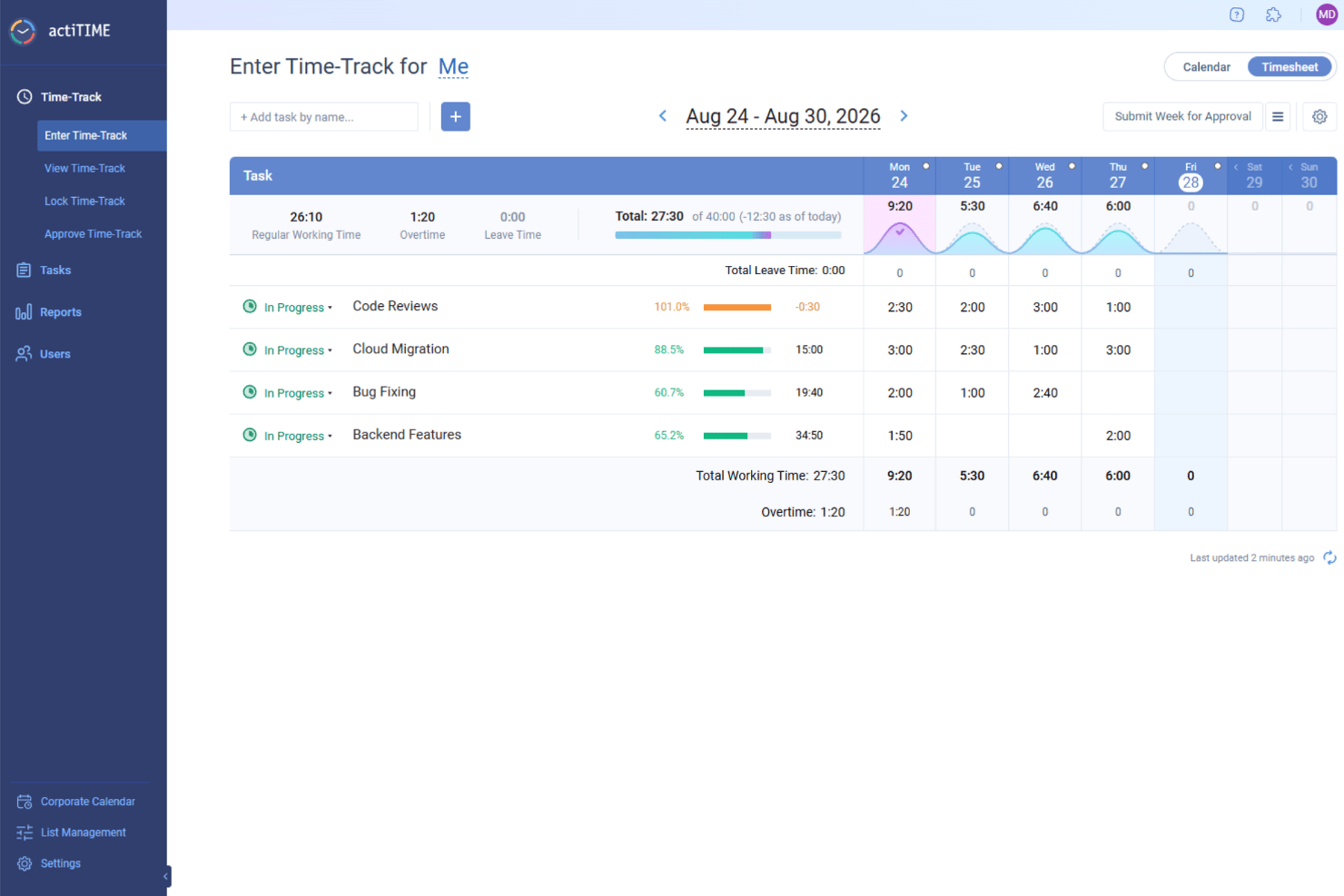
actiTIME è un software per il monitoraggio del tempo che aiuta le aziende a gestire progetti, team e clienti in un unico luogo. Consente al tuo team di registrare le ore lavorate, monitorare i periodi di assenza e controllare l'avanzamento dei progetti.
Perché ho scelto actiTIME: Uno dei motivi per cui ho scelto actiTIME sono le sue complete funzionalità di reportistica. Puoi generare report dettagliati sulla distribuzione del tempo tra clienti e incarichi, monitorare le tendenze della produttività individuale e del team e valutare i costi dei progetti. Queste informazioni ti consentono di identificare i progetti più redditizi e prendere decisioni basate sui dati per migliorare l'efficienza.
Un'altra caratteristica degna di nota sono gli strumenti di actiTIME per la gestione di attività e progetti. Puoi impostare stime, scadenze e stati delle attività per mantenere i progetti nei tempi previsti. La visualizzazione tramite bacheca Kanban offre un quadro chiaro dell'avanzamento del lavoro, aiutando il team a rimanere organizzato e concentrato. Questo approccio strutturato alla gestione delle attività contribuisce a migliorare la produttività e a completare i progetti nei tempi previsti.
Funzionalità distintive e integrazioni di actiTIME
Funzionalità includono foglio presenze settimanale, visualizzazione calendario, calcolo degli straordinari, blocco del foglio presenze, approvazione del foglio presenze, notifiche via e-mail, flussi di lavoro personalizzati, esportazione dei dati, autorizzazioni degli utenti, gestione del carico di lavoro, assegnazione delle attività e campi personalizzati.
Integrazioni includono actiPLANS, QuickBooks, Zapier, GitHub, Salesforce, Jira, Trello, Outlook, Evernote, Todoist, Bamboo HR e Google Calendar.
Pros and Cons
Pros:
- Funzionalità complete per il monitoraggio del tempo e dei progetti
- Funzionalità di reportistica dettagliate per l'analisi della produttività
- L'app mobile facilita il monitoraggio del tempo in mobilità
Cons:
- Opzioni di integrazione limitate rispetto ai concorrenti
- La configurazione iniziale e la personalizzazione possono richiedere molto tempo
New Product Updates from actiTIME

actiTIME Visual Hour Indicator and Time-Track Report Redesign
actiTIME adds a wave-style hour indicator to the Timesheet and Calendar views and refreshes the Time-Track report for smoother navigation and clearer visuals. For more information, visit actiTIME's official site.

Controlio è uno strumento cloud per il monitoraggio della produttività e la supervisione dei dipendenti, progettato per aiutare le organizzazioni a misurare, analizzare e migliorare le prestazioni del personale. Raccoglie dati di attività dai desktop per offrire approfondimenti dettagliati sui livelli di produttività, sull’utilizzo di app e siti web, e sulle abitudini lavorative dei team in sede, da remoto e ibridi.
Perché ho scelto Controlio: Ho scelto Controlio perché offre visibilità in tempo reale sulle attività dei dipendenti, aiutandoti a identificare quali attività e applicazioni contribuiscono maggiormente alla produttività. Il suo sistema di punteggio della produttività classifica automaticamente il tempo trascorso su diverse app e siti web, consentendo di individuare comportamenti sia produttivi che fonte di distrazione. Apprezzo anche il supporto alla registrazione continua dello schermo e la visualizzazione delle sessioni in tempo reale, che facilita la verifica dei progressi lavorativi e il mantenimento della responsabilità.
Per i team distribuiti, questa combinazione di tracciamento, punteggio e sorveglianza offre una panoramica completa di come si svolge il lavoro quotidiano.
Funzionalità e integrazioni distintive di Controlio:
Le funzionalità includono il punteggio di produttività che valuta utenti e reparti in base al tempo trascorso su attività produttive o distraenti, sorveglianza in tempo reale per monitorare dal vivo i desktop e registrazione continua dello schermo che cattura le attività degli utenti per una revisione successiva. Il software supporta anche analisi dettagliate dei comportamenti, approfondimenti sulla distribuzione del tempo e conformità agli standard di protezione dei dati come GDPR e HIPAA, garantendo pratiche di monitoraggio responsabili.
Le integrazioni al momento non sono elencate da Controlio.
Pros and Cons
Pros:
- Rispetta GDPR e HIPAA
- Offre registrazione continua dello schermo
- Monitora attività produttive e distraenti
Cons:
- La registrazione video continua può sollevare preoccupazioni sulla privacy
- Ricerca limitata nei dati registrati

Traqq
Il miglior software di monitoraggio della produttività per approfondimenti completi sui livelli di efficienza dei dipendenti
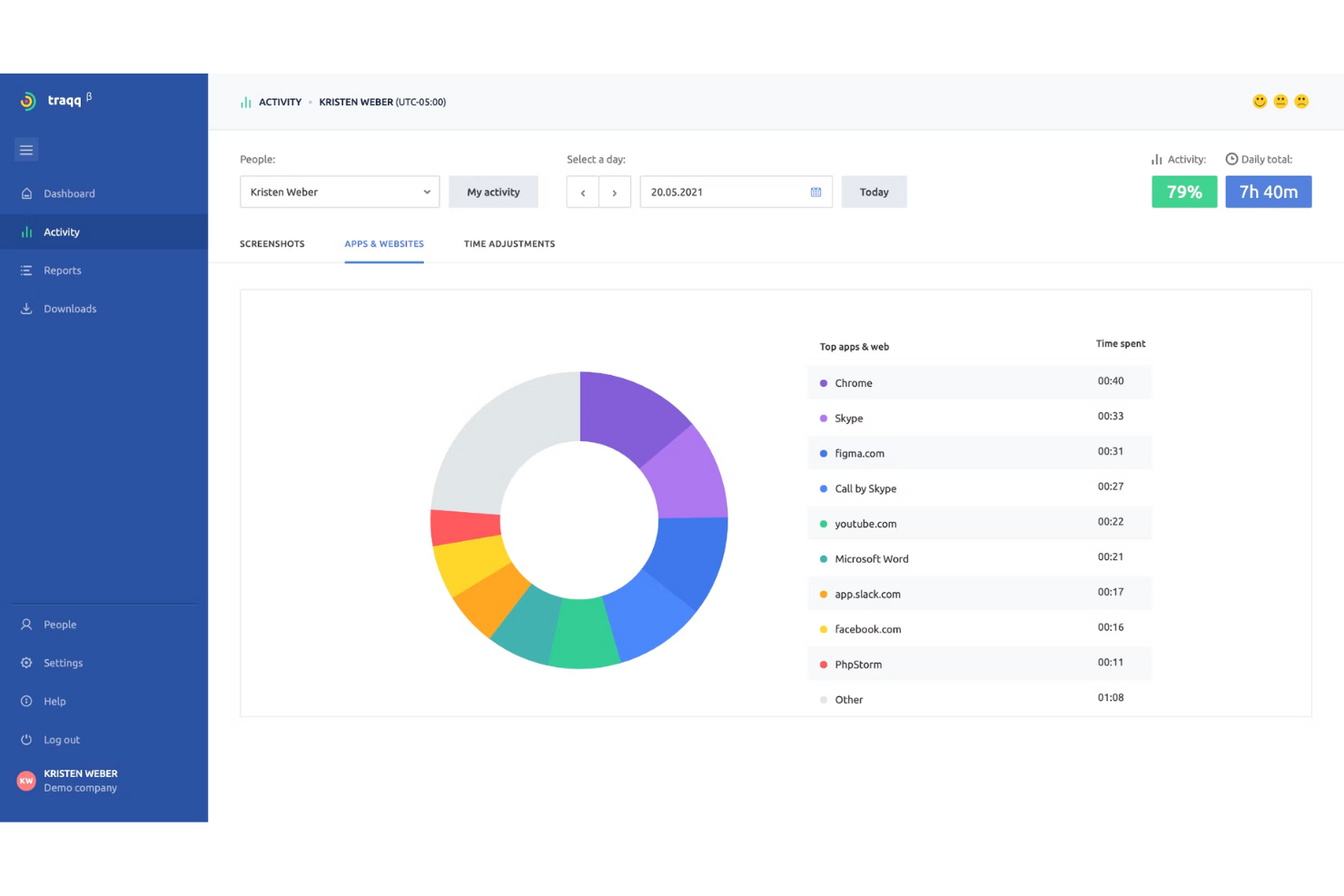
Traqq consente alle aziende di esaminare e analizzare i processi interni. Con Traqq, i tuoi team sbloccano una nuova dimensione nella comprensione di vari aspetti della produttività lavorativa. Di conseguenza, puoi condurre un'analisi delle cause profonde dei periodi di bassa produttività e implementare rapidamente una soluzione per aumentare l'efficienza.
Perché ho scelto Traqq: Mi piace come gli sviluppatori di Traqq abbiano creato un software di monitoraggio della produttività semplice ma completo. I livelli di attività generati sulla dashboard di Traqq utilizzano un algoritmo interessante. Lo strumento traccia i clic della tastiera e i movimenti del mouse dei tuoi dipendenti. Di conseguenza, la pagina delle attività popola l'attività giornaliera dei tuoi dipendenti in blocchi colorati che rappresentano sessioni con livelli bassi, medi e alti di attività.
Traqq rileva e segnala i siti web e le app su cui i tuoi dipendenti trascorrono più di 10 secondi. Così puoi ottenere una panoramica immediata su ciò che distrae i tuoi dipendenti. Traqq inoltre scatta screenshot casuali a intervalli di 10 minuti e li carica in uno spazio di archiviazione online sicuro.
Funzionalità e integrazioni principali di Traqq
Funzionalità includono il monitoraggio delle applicazioni e degli URL, la generazione dei livelli di attività, screenshot del desktop, registrazione dello schermo del desktop, monitoraggio dei tempi di inattività e delle presenze, gestione del team, analisi e reportistica e altro.
Dettagli sulle integrazioni al momento non disponibili.
Pros and Cons
Pros:
- Monitoraggio preciso dei dipendenti
- La funzione screenshot può essere messa in pausa
- Automazione dei report via email (giornalieri/settimanalmente)
Cons:
- Nessun supporto per lingue straniere
- Nessun supporto per integrazioni di terze parti

ClickUp
Il miglior software di monitoraggio della produttività per automatizzare i processi di vendita e gestire gli account
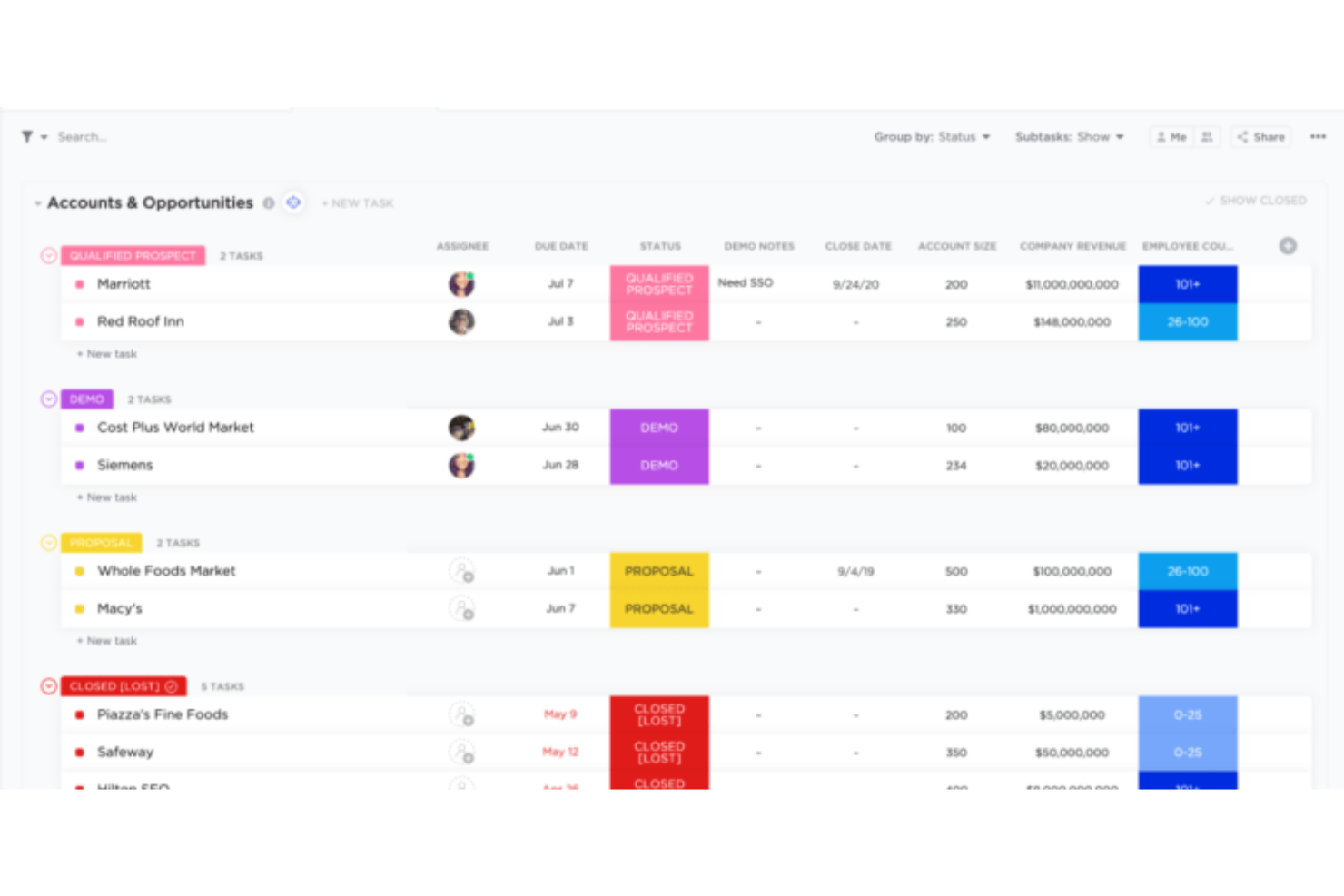
ClickUp crede fermamente nella semplificazione del mondo della produttività. Esistono sempre più strumenti disponibili anche per i servizi più piccoli e ClickUp desidera ridurre il tempo speso a passare da un'app all'altra per aumentare la produttività. Curiosamente, il motto di ClickUp è “Risparmia un giorno ogni settimana.”
Perché ho scelto ClickUp: Mi piace il fatto che ClickUp sia così versatile e abbia molto da offrire a diversi stakeholder, che si tratti di vendite, marketing, prodotto o ingegneria. ClickUp consente ai responsabili commerciali di automatizzare i processi di vendita manuali. I venditori possono mantenere attive le trattative nelle loro pipeline grazie a follow-up automatici sui lead.
ClickUp offre inoltre un valore aggiunto ai team di vendita aiutandoli a monitorare potenziali clienti, trattative e clienti esistenti tramite una lista o bacheca condivisa. In più, le funzionalità di reportistica in tempo reale aiutano i manager commerciali senior a visualizzare quanto sono produttivi i team di vendita: chi sta chiudendo più trattative e come sta andando la performance complessiva delle vendite nel trimestre o nell’anno.
Caratteristiche e integrazioni principali di ClickUp
Caratteristiche includono visualizzazioni multiple, dashboard personalizzabili, collaborazione di squadra, lavagna virtuale, reportistica in tempo reale, impostazione di obiettivi e traguardi, modelli utili e altro ancora.
Integrazioni includono oltre 10 strumenti come Dropbox, Everhour, Figma, GitHub, Google Calendar, Google Drive, HubSpot, Loom, Outlook, Sentry, Slack, Toggl, Vimeo, Webhooks, Zoom e altri ancora.
Pros and Cons
Pros:
- Builder di automazione personalizzabile
- Ottimi strumenti di collaborazione
- Piano gratuito generoso con progetti illimitati
Cons:
- Curva di apprendimento ripida
- Funzionalità limitate di monitoraggio del tempo
New Product Updates from ClickUp
ClickUp Adds Meetings Hub, Super Agent Templates, and ZoomInfo Integration
ClickUp adds a searchable Meetings Hub, new ways to clone and template Super Agents, and a ZoomInfo integration through the App Center. These updates improve meeting retrieval, agent reuse, and access to sales intelligence. For more information, visit ClickUp’s official site.

We360.ai
Il miglior software per il monitoraggio della produttività e l'ottenimento di analisi della produttività in tempo reale

We360.ai è nato nel quarto trimestre del 2020 e ha compiuto progressi significativi nel software per il monitoraggio della produttività. Il software offre numerosi strumenti, tra cui la gestione dei progetti, il monitoraggio dei registri della produttività e l'analisi in tempo reale.
Perché ho scelto We360.ai: Sono particolarmente interessato alle analisi della produttività in tempo reale offerte da We360.ai. We360.ai fornisce statistiche in tempo reale sulle attività dei dipendenti: quali applicazioni utilizzano, la durata del loro utilizzo e il loro stato di disponibilità. È come uno streaming in diretta delle attività online dei dipendenti.
Inoltre, We360.ai dispone di un pratico sistema di gestione delle ferie che tiene traccia delle assenze dei dipendenti, facilitando l'elaborazione delle buste paga. Di conseguenza, puoi monitorare, approvare o rifiutare facilmente le richieste di ferie. Il segmento Health360 di We360.ai ti aiuta a gestire il benessere dei dipendenti. Puoi analizzare rapidamente quali dipendenti stanno lavorando troppo o troppo poco e quindi redistribuire intelligentemente i carichi di lavoro.
Funzionalità distintive e integrazioni di We360.ai
Le funzionalità includono analisi in tempo reale, screenshot del desktop, un'app per il monitoraggio del tempo, gestione delle ferie, importazione dei dati degli utenti, esportazione dei report in formato CSV, compatibilità multipiattaforma, rilevamento automatico delle presenze, blocco dei domini, un'applicazione mobile per gli amministratori e strumenti per la gestione delle attività e dei progetti.
Le integrazioni includono oltre 10 strumenti come Asana, ClickUp, GitHub, Google Calendar, Insightly, Jira, PayPal, Slack, Trello, Zapier, Zendesk e altri.
Pros and Cons
Pros:
- È disponibile un'opzione per un'offerta a vita (LTD)
- Formazione dal vivo gratuita e dettagliata
- Responsabile di account dedicato
Cons:
- Problemi con il download in blocco degli screenshot
- Il piano mensile richiede un minimo di 10 utenti
Altri software per il monitoraggio della produttività
Ecco alcune altre opzioni degne di nota che non sono entrate nell'elenco dei migliori software per il monitoraggio della produttività:
- Guru
Ideale per la ricerca di conoscenza AI a livello enterprise
- EmailAnalytics
Il miglior software per monitorare la produttività attraverso l’analisi delle tendenze delle email e il miglioramento dei tempi di risposta
- DeskTrack
Il miglior software per il monitoraggio della produttività e per impostare limiti di tempo alle applicazioni
- Height
Il miglior monitoraggio della produttività per la gestione di progetti, attività e flussi di lavoro
- Monitask
Il miglior software di monitoraggio della produttività con controllo delle attività
- monday AI Workspace
Il miglior software di monitoraggio della produttività per l'automazione senza codice di attività manuali e ripetitive
- WebWork Time Tracker
Ideale per report di produttività basati sull'intelligenza artificiale
- Peoplebox.ai
Miglior software di monitoraggio della produttività per implementare sondaggi automatizzati sul coinvolgimento
- Wrike
Il miglior software di monitoraggio della produttività per seguire l'andamento del team e individuare potenziali ostacoli
- Prodoscore
Ideale per presentare modelli di lavoro
- Intelogos
Ideale per insight sui dipendenti basati sull'IA


Come valuto i software di monitoraggio della produttività
Divido la mia valutazione in capacità indispensabili—come la rilevazione automatica delle attività e i controlli sulla privacy—e i fattori differenzianti che separano uno strumento realmente pronto per l’HR da un semplice rilevatore di tempo.
Funzionalità principali (requisiti essenziali per questa lista)
Quando seleziono gli strumenti per la mia lista, valuto ciascuno su una scala da 0 (non offre la funzionalità) a 5 (eccelle in quest’area) per ogni funzionalità principale elencata qui sotto. Poi, calcolo il punteggio totale dello strumento trasformandolo in percentuale. Ogni strumento deve raggiungere un punteggio minimo totale del 65% per essere considerato per l’inclusione.
- Monitoraggio delle attività: Cerco la rilevazione automatica dell’uso delle app, delle visite ai siti web e del tempo attivo rispetto a quello inattivo, piuttosto che strumenti che si basano solo sull’inserimento manuale dei dati da parte dei dipendenti.
- Analisi della produttività & dashboard: Ogni strumento dovrebbe fornire dati visivi sulle tendenze a livello individuale, di team e di organizzazione in modo che i responsabili HR possano individuare variazioni nei carichi di lavoro tra periodi di paga.
- Monitoraggio di tempo & attività: Valuto se uno strumento può collegare le ore a specifici compiti o progetti, cosa importante quando l’HR deve validare l’allocazione delle risorse durante la pianificazione della forza lavoro.
- Analisi della forza lavoro & benchmarking: Strumenti come ActivTrak e Teramind affrontano questo aspetto in modo diverso, quindi verifico se le analisi vanno oltre i numeri grezzi per segnalare rischi di burnout, lacune nella collaborazione o tendenze del tempo di concentrazione.
- Controlli di privacy & conformità: Cerco opzioni configurabili per l’anonimizzazione, flussi di consenso e tracciamento degli audit che permettano ai team HR di adattare le politiche di monitoraggio ai requisiti regionali per la protezione dei dati.
- Integrazioni HR & workflow: Lo strumento dovrebbe connettersi a piattaforme HRIS, payroll o di project management già utilizzate dalla tua squadra, invece di operare come un silo isolato di dati.
Una volta stilata la lista degli strumenti che soddisfano i criteri, considero ciò che distingue ogni piattaforma.
Fattori differenzianti (cosa distingue i fornitori)
Ecco come confronto e metto a confronto i diversi fornitori:
Funzionalità distintive
La rilevazione del benessere è molto importante qui. Verifico se uno strumento è in grado di segnalare schemi come straordinari eccessivi o riduzione del tempo di concentrazione—segnali che aiutano l’HR a intervenire prima che si verifichi il burnout. Le raccomandazioni alimentate dall’IA aggiungono un ulteriore livello, evidenziando suggerimenti di coaching o ri-bilanciamento del carico di lavoro che i manager possono mettere in atto. Valuto anche l’allineamento agli obiettivi e agli OKR, poiché collegare le attività monitorate agli obiettivi del team sposta la conversazione da "ore registrate" ai risultati raggiunti durante le valutazioni delle prestazioni.
Oltre le funzionalità
La fiducia dei dipendenti è un elemento centrale. Esamino se il fornitore offre dashboard rivolte ai dipendenti in modo che possano visualizzare i propri dati—questo trasforma lo strumento da semplice sorveglianza a responsabilità condivisa. Sono importanti anche la conformità e la residenza dei dati, soprattutto per i team che operano in diverse regioni dove la posizione di hosting dei dati e certificazioni come SOC 2 o ISO 27001 influenzano le tempistiche di implementazione. Valuto inoltre quanto bene una piattaforma si integri con il tech stack HR già esistente, verificando la presenza di connessioni native con strumenti come BambooHR, Workday o Slack.
Come scegliere un software per il monitoraggio della produttività
È facile perdersi in lunghi elenchi di funzionalità e strutture tariffarie complesse. Per aiutarti a rimanere concentrato mentre affronti il tuo processo specifico di selezione del software, ecco una lista di fattori da tenere a mente:
| Fattore | Cosa considerare |
|---|---|
| Scalabilità | Il software può crescere insieme al tuo team? Considera le esigenze future e se lo strumento è in grado di gestire un aumento degli utenti o dei dati senza problemi. |
| Integrazioni | Si connette agli strumenti che già utilizzi? Cerca un'integrazione perfetta con i sistemi esistenti per evitare interruzioni del flusso di lavoro. |
| Personalizzazione | Puoi adattare il software ai tuoi processi? Cerca opzioni per modificare impostazioni, visualizzazioni e report in base alle tue esigenze specifiche. |
| Semplicità d'uso | Il tuo team lo adotterà rapidamente? Considera la curva di apprendimento e quanto sia intuitiva l'interfaccia per gli utenti di tutti i giorni. |
| Implementazione e avviamento | Quanto è semplice il processo di configurazione? Valuta il tempo e le risorse necessari per l'introduzione, la formazione e la preparazione del tuo team. |
| Costo | Rientra nel tuo budget? Confronta i piani tariffari, i costi nascosti e la corrispondenza tra funzionalità e prezzo. Considera i costi a lungo termine man mano che il team cresce. |
| Misure di sicurezza | Come protegge i tuoi dati? Assicurati che lo strumento soddisfi standard di sicurezza come la crittografia e i controlli degli accessi per mantenere le informazioni al sicuro. |
| Disponibilità dell'assistenza | Puoi ricevere aiuto quando ne hai bisogno? Verifica se sono disponibili assistenza 24 ore su 24, 7 giorni su 7, chat dal vivo o responsabili dedicati degli account per aiutare il tuo team. |
Che cos'è il software di monitoraggio della produttività?
Il software di monitoraggio della produttività è uno strumento che aiuta a controllare e gestire il tempo dedicato alle attività e ai progetti. Professionisti come manager, lavoratori da remoto e liberi professionisti utilizzano questi strumenti per aumentare l'efficienza e monitorare i progressi. Le funzionalità di monitoraggio del tempo, gestione delle attività e reportistica aiutano a mantenere l'organizzazione e a individuare i modelli di produttività. Nel complesso, questi strumenti offrono informazioni preziose sulle abitudini lavorative e aiutano a ottimizzare le routine quotidiane.
Funzionalità
Quando scegli un software di monitoraggio della produttività, presta attenzione alle seguenti funzionalità principali:
- Monitoraggio del tempo: Consente agli utenti di registrare le ore dedicate alle attività, aiutando ad analizzare la produttività e a gestire il tempo in modo efficace.
- Gestione delle attività: Organizza attività e progetti in un unico luogo, semplificando la definizione delle priorità e il monitoraggio dei progressi.
- Reportistica e analisi: Fornisce informazioni sui modelli di lavoro e sulle tendenze della produttività, favorendo decisioni basate sui dati.
- Integrazioni: Si connette ad altri strumenti e piattaforme per garantire un flusso di lavoro continuo tra sistemi diversi.
- Dashboard personalizzabili: Offre visualizzazioni e report personalizzati in base alle preferenze e alle esigenze individuali o del team.
- Disponibilità di un'app mobile: Consente agli utenti di monitorare e gestire le attività in mobilità, aumentando flessibilità e accessibilità.
- Avvisi e promemoria automatici: Tengono gli utenti informati sulle scadenze e sulle attività importanti, riducendo il rischio di dimenticanze.
- Gestione degli utenti: Consente agli amministratori di controllare gli accessi e monitorare l'attività, garantendo operazioni sicure ed efficienti.
- Informazioni basate sull'intelligenza artificiale: Utilizza l'intelligenza artificiale per fornire suggerimenti personalizzati e consigli sulla produttività.
- Misure di sicurezza: Garantisce la protezione dei dati tramite crittografia e controlli degli accessi, tutelando privacy e sicurezza.
Vantaggi
L'implementazione di un software di monitoraggio della produttività offre diversi vantaggi al tuo team e alla tua azienda. Eccone alcuni:
- Migliore gestione del tempo: Monitorando le ore dedicate alle attività, i team possono individuare le attività che assorbono più tempo e ottimizzare i programmi.
- Maggiore concentrazione: Le funzionalità di gestione delle attività aiutano a stabilire le priorità del lavoro, riducendo le distrazioni e aumentando la concentrazione.
- Decisioni basate sui dati: La reportistica e l'analisi forniscono informazioni che supportano decisioni consapevoli e la pianificazione strategica.
- Maggiore responsabilizzazione: Gli avvisi e i promemoria automatici assicurano il rispetto delle scadenze, responsabilizzando i membri del team.
- Migliore collaborazione: Le integrazioni con altri strumenti favoriscono un flusso di lavoro connesso, migliorando il coordinamento e la comunicazione del team.
- Flessibilità e accessibilità: La disponibilità di un'app mobile consente ai membri del team di gestire le attività ovunque si trovino, adattandosi agli ambienti di lavoro da remoto o ibridi.
- Operazioni sicure: Le misure di sicurezza proteggono le informazioni sensibili, garantendo privacy e conformità alle normative sui dati.
Costi e prezzi
La selezione di un software per il monitoraggio della produttività richiede la comprensione dei vari modelli e piani tariffari disponibili. I costi variano in base alle funzionalità, alle dimensioni del gruppo, ai componenti aggiuntivi e ad altri fattori. La tabella seguente riassume i piani più comuni, i relativi prezzi medi e le funzionalità tipicamente incluse nelle soluzioni software per il monitoraggio della produttività:
Tabella comparativa dei piani per i software di monitoraggio della produttività
| Tipo di piano | Prezzo medio | Funzionalità comuni |
|---|---|---|
| Piano gratuito | $0 | Monitoraggio di base del tempo, gestione delle attività e reportistica limitata. |
| Piano personale | $5-$15/utente/mese | Monitoraggio avanzato del tempo, pannelli di controllo personalizzabili e accesso all'app per dispositivi mobili. |
| Piano aziendale | $20-$50/utente/mese | Strumenti per la collaborazione del gruppo, integrazioni con altri software e maggiore sicurezza. |
| Piano aziendale avanzato | $60+/utente/mese | Funzionalità personalizzabili, assistenza dedicata e analisi complete. |
Domande frequenti
Il software per il monitoraggio della produttività può invadere la privacy?
Sì, il software per il monitoraggio della produttività può sollevare problemi di privacy se non viene utilizzato responsabilmente. È importante scegliere strumenti che consentano di personalizzare le impostazioni sulla privacy e comunicare chiaramente al gruppo quali dati vengono monitorati. Cerca software che offrano politiche trasparenti sull’utilizzo dei dati e forniscano agli utenti opzioni per controllare i propri dati. Assicurarsi che il gruppo comprenda e acconsenta al processo di monitoraggio può contribuire a ridurre i problemi di privacy.
Il software per il monitoraggio della produttività è adatto ai gruppi remoti?
Sì, il software per il monitoraggio della produttività è particolarmente utile per i gruppi remoti. Aiuta a gestire le attività e monitorare il tempo senza la necessità di essere fisicamente presenti, consentendo un migliore coordinamento e una maggiore responsabilità. Grazie a funzionalità come il monitoraggio del tempo e la gestione delle attività, i gruppi remoti possono rimanere organizzati e connessi. Molti strumenti offrono app per dispositivi mobili e accesso basato sul cloud, rendendo facile per i lavoratori da remoto registrare le proprie attività e collaborare con i membri del gruppo da qualsiasi luogo.