

I 10 migliori software per la programmazione dei colloqui per le assunzioni nel 2026

10 Elenco dei migliori software per la pianificazione dei colloqui


Gestire i programmi di più colloqui può essere un grattacapo per qualsiasi team delle risorse umane. Probabilmente devi gestire email scambiate avanti e indietro, confusione sui fusi orari e cancellazioni dell'ultimo minuto. È molto da gestire, ed è qui che entra in gioco il software per la pianificazione dei colloqui.
In base alla mia esperienza, questi strumenti possono farti risparmiare tempo e ridurre lo stress automatizzando il processo di pianificazione. Ti aiutano a coordinarti in modo efficiente con candidati e intervistatori, assicurandoti che tutti siano sulla stessa lunghezza d'onda.
Ho testato e recensito diverse opzioni per offrirti un elenco imparziale delle migliori soluzioni disponibili. Troverai informazioni su funzionalità, facilità d'uso e su ciò che ogni strumento offre al tuo team. Facciamo in modo che la pianificazione dei colloqui sia una preoccupazione in meno.
Perché fidarsi delle nostre recensioni sui software
Il nostro team testa e recensisce software dal 2012. In quanto esperti HR noi stessi, sappiamo quanto sia difficile — e importante — scegliere il software giusto.
Per questa guida, abbiamo valutato gli strumenti attraverso test pratici e ricerche indipendenti, assegnando un punteggio agli strumenti in base ai nostri criteri di selezione. Ci basiamo inoltre sulle competenze di leader di pensiero del settore e di professionisti HR attivi.
Le nostre recensioni riflettono il nostro giudizio editoriale umano, non un discorso di vendita.
Revisori esperti:
Riepilogo dei migliori software per la pianificazione dei colloqui
Questa tabella comparativa riassume i dettagli dei prezzi delle mie migliori scelte di software per la pianificazione dei colloqui, per aiutarti a trovare quello più adatto al tuo budget e alle esigenze della tua azienda.
| Tool | Best For | Trial Info | Price | ||
|---|---|---|---|---|---|
| 1 | Ideale per l'auto-prenotazione dei candidati | Demo gratuita disponibile | Prezzo su richiesta | Website | |
| 2 | Il miglior software basato su IA per le aziende | Demo gratuita disponibile | Prezzo su richiesta | Website | |
| 3 | Ideale per la coordinazione dei colloqui tramite IA | Demo gratuita disponibile | Prezzi su richiesta | Website | |
| 4 | Ideale per la flessibilità nei tipi di colloquio | Demo gratuita disponibile | Prezzo su richiesta | Website | |
| 5 | Ideale per la pianificazione colloqui tramite IA conversazionale | Demo gratuita disponibile | Prezzo su richiesta | Website | |
| 6 | Ideale per pipeline di selezione personalizzate | Versione di prova gratuita di 14 giorni | Da $31/utente/mese (fatturazione annuale) | Website | |
| 7 | Ideale per le assunzioni di lavoratori pagati a ore nelle PMI, tutto in un unico posto | Piano gratuito disponibile | A partire da 30 $ al mese | Website | |
| 8 | Ideale per un'integrazione semplice sul sito web | Piano gratuito disponibile | A partire da $5/utente/mese (fatturazione annuale) | Website | |
| 9 | Ideale per un approccio automatizzato e senza interventi manuali | Demo gratuita disponibile | Prezzo su richiesta | Website | |
| 10 | Ideale per sostenere colloqui video | Demo gratuita disponibile | Prezzo su richiesta | Website |

I migliori sistemi software per la pianificazione dei colloqui
Ecco una breve descrizione dei 10 migliori software per la pianificazione dei colloqui. I miei riepiloghi evidenziano anche casi d’uso esclusivi, funzionalità principali e vantaggi & svantaggi essenziali. Continua a leggere per trovare ulteriori scelte bonus in fondo all’elenco.

Ideale per l'auto-prenotazione dei candidati
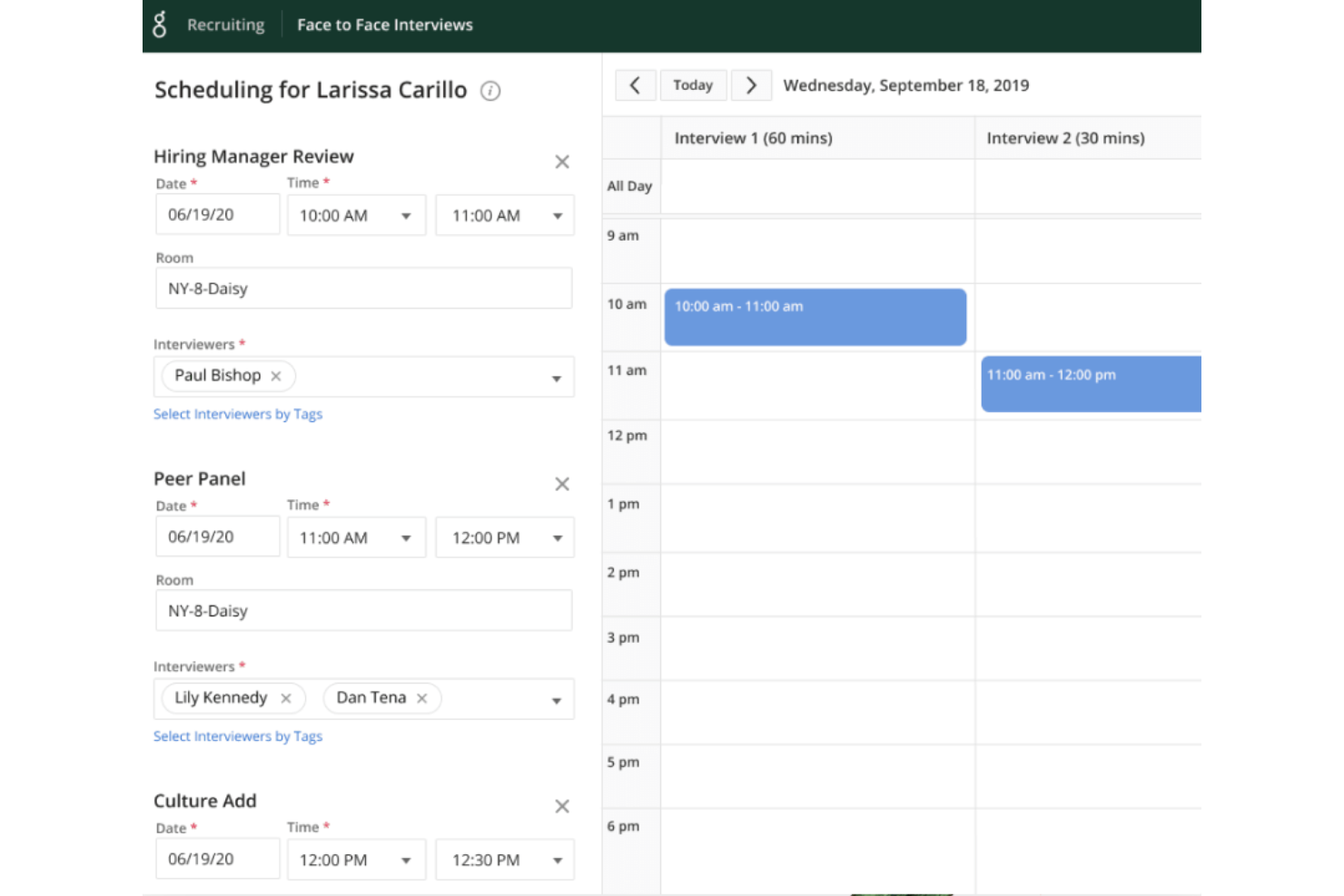
Greenhouse è una piattaforma per la pianificazione dei colloqui, progettata per i team di selezione che devono coordinare i colloqui, automatizzare i flussi di lavoro e migliorare l'esperienza dei candidati all'interno di organizzazioni in rapida crescita.
Per Chi È Più Indicato Greenhouse?
Greenhouse è particolarmente adatto ad aziende di medie e grandi dimensioni con team di recruiting dedicati che gestiscono un elevato volume di colloqui attraverso più dipartimenti.
Perché Ho Scelto Greenhouse
Ho scelto Greenhouse tra i migliori per l'efficacia nella gestione dell'auto-prenotazione dei colloqui da parte dei candidati all'interno di un processo di selezione completamente strutturato. I candidati ricevono un link per prenotare autonomamente il loro slot di colloquio in base alla disponibilità in tempo reale degli intervistatori, eliminando così i continui scambi di comunicazioni che rallentano l'assunzione su larga scala. Mi piace anche che l'auto-prenotazione sia integrata direttamente nei kit per i colloqui di Greenhouse: una volta che il candidato ha prenotato il suo slot, gli intervistatori hanno già pronti materiali di preparazione, schede di valutazione e domande specifiche per il ruolo. I promemoria automatici vengono inviati ad entrambe le parti, quindi nessuno si presenta impreparato o perde completamente l'incontro.
Funzionalità Principali di Greenhouse
- Kit di colloquio strutturati: Crea kit di preparazione specifici per il ruolo con schede di valutazione e domande che gli intervistatori ricevono prima di ogni colloquio programmato.
- Test da casa anonimizzati: Invia ai candidati valutazioni standardizzate con risultati anonimizzati per favorire una valutazione coerente e ridurre i bias.
- Comunicazione automatica con i candidati: Imposta regole email personalizzate per notificare ai candidati i prossimi passi, le decisioni e gli aggiornamenti di stato nei punti definiti del percorso di selezione.
- Oltre 40 report predefiniti: Accedi a una libreria di report preimpostati e personalizzabili per monitorare le performance di assunzione, la salute della pipeline e l'attività degli intervistatori.
Integrazioni di Greenhouse
Le integrazioni includono Checkr, Criteria Corp, Findem, HireRight, BrightHire, Pave, Grayscale, Aboard, Accurate ACE e Adway Social Recruiting Technology.
Pros and Cons
Pros:
- Ottima esperienza per i candidati
- Report e analisi completi
- Scalabile per gestire grandi volumi di candidature
Cons:
- La personalizzazione può essere limitata per alcune funzionalità
- La configurazione può essere complessa
New Product Updates from Greenhouse

Greenhouse Opens Candidate Insights and Talent Matching Assistants to Beta
Greenhouse opens Candidate Insights and Talent Matching assistants to beta for candidate questions and natural-language search. This helps recruiters review candidates and build searches faster. For more information, visit Greenhouse’s official site.
 .
.
GoodTime
Il miglior software basato su IA per le aziende
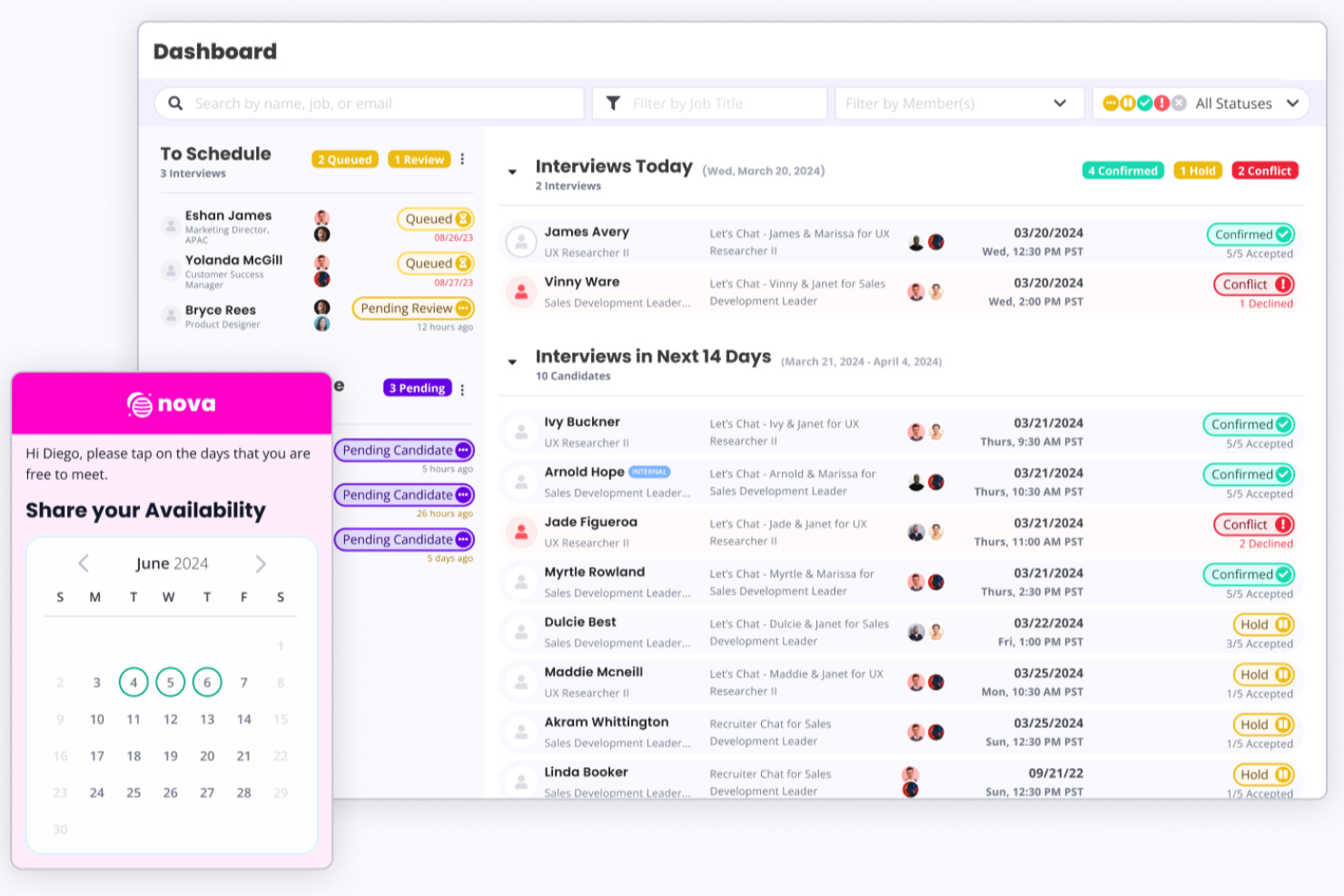
GoodTime serve i team di selezione del personale nelle grandi organizzazioni che devono automatizzare la programmazione complessa dei colloqui, coordinare più stakeholder e migliorare l'esperienza dei candidati durante il reclutamento ad alto volume.
Per Chi è Meglio GoodTime?
GoodTime è particolarmente indicato per i team di acquisizione talenti aziendali che gestiscono assunzioni ad alto volume attraverso più dipartimenti, sedi o unità operative.
Perché Ho Scelto GoodTime
GoodTime si guadagna un posto tra i migliori nella mia lista grazie al modo in cui l'IA è profondamente integrata nel flusso di lavoro della programmazione — non solo come funzionalità superficiale. Gli agenti Orchestra AI della piattaforma gestiscono la selezione degli intervistatori, la distribuzione dei carichi di lavoro e l'individuazione dei colli di bottiglia 24 ore su 24. In pratica, significa che il mio team può programmare complessi colloqui di gruppo su più giorni senza coordinarsi manualmente tra i calendari o dover inseguire la disponibilità. Apprezzo anche il completamento assistito tramite IA dei punteggi delle valutazioni, che aiuta gli intervistatori a fornire feedback più velocemente e riduce l'onere amministrativo che di solito rallenta le decisioni di assunzione. Per i team aziendali che gestiscono un alto volume di colloqui in diversi dipartimenti, questi non sono piccoli vantaggi — fanno la differenza tra un time-to-fill di 45 giorni e uno di 60 giorni.
Funzionalità Principali di GoodTime
- Auto-programmazione da parte del candidato: I candidati possono prenotare, riprogrammare e gestire autonomamente i propri slot per i colloqui tramite un portale dedicato.
- Messaggistica SMS e WhatsApp: I recruiter possono comunicare con i candidati e coordinare la programmazione direttamente tramite SMS o WhatsApp.
- Gestione della formazione per intervistatori: Assegna sessioni di affiancamento e formazione per ampliare il pool di intervistatori qualificati.
- Dashboard in tempo reale per assunzioni: Presenta dati dal vivo sulle attività di programmazione, lo stato delle assunzioni e i benchmark di processo in tutta l'organizzazione.
Integrazioni di GoodTime
Le integrazioni includono Workday, Greenhouse, SuccessFactors, Lever, iCIMS, SmartRecruiters, Jobvite, Google Calendar, Office 365 e Zoom.
Pros and Cons
Pros:
- Assistenza clienti eccellente
- Branding e personalizzazione dei template
- Automazione completa
Cons:
- L'implementazione iniziale può richiedere tempo
- Curva di apprendimento leggermente ripida per i recruiter

Ideale per la coordinazione dei colloqui tramite IA

candidate.fyi è una piattaforma di pianificazione dei colloqui progettata per i team di talent acquisition che necessitano di una programmazione automatizzata, flussi di lavoro personalizzati e integrazioni con sistemi ATS e calendari.
Per chi è ideale candidate.fyi?
I team di acquisizione del talento di aziende di medie e grandi dimensioni che devono coordinare un alto volume di colloqui tra diversi reparti e sedi.
Perché ho scelto candidate.fyi
Ho scelto candidate.fyi tra le migliori soluzioni perché il suo sistema di escalation basato su IA aiuta a gestire conflitti complessi di pianificazione che spesso gli strumenti manuali non rilevano. Quando intervistatori cambiano all’ultimo minuto o quando ci sono sovrapposizioni di fusi orari, il sistema può suggerire automaticamente intervistatori e orari alternativi. Apprezzo anche il modo in cui segnala i colli di bottiglia ed esegue l’escalation dei casi irrisolti ai recruiter, contribuendo a garantire che i problemi di pianificazione vengano affrontati tempestivamente.
Funzionalità principali di candidate.fyi
- Coordinatore intelligente basato su IA: Pianifica, riprogramma e risolve automaticamente i conflitti.
- Selezione dinamica degli intervistatori: Abbina gli intervistatori giusti in base a disponibilità, competenze e preferenze.
- Rilevamento e escalation delle criticità in tempo reale: Segnala e risolve i colli di bottiglia prima che impattino i candidati.
- Automazione completa della coordinazione: Gestisce pianificazioni multi-step, panel e su scala globale senza intervento manuale.
Integrazioni di candidate.fyi
candidate.fyi offre integrazioni native con Greenhouse, Lever, Workday, iCIMS, UKG, Google Calendar e Microsoft Outlook. È disponibile un’API per integrazioni personalizzate.
Pros and Cons
Pros:
- L’agente IA automatizza i flussi di lavoro di coordinamento degli intervistatori
- Gestisce la pianificazione di panel e multi-step
- Supporta team di reclutamento su larga scala
Cons:
- Potrebbe superare le esigenze dei team più piccoli
- Richiede configurazione per l’automazione dei flussi di lavoro

Ideale per la flessibilità nei tipi di colloquio
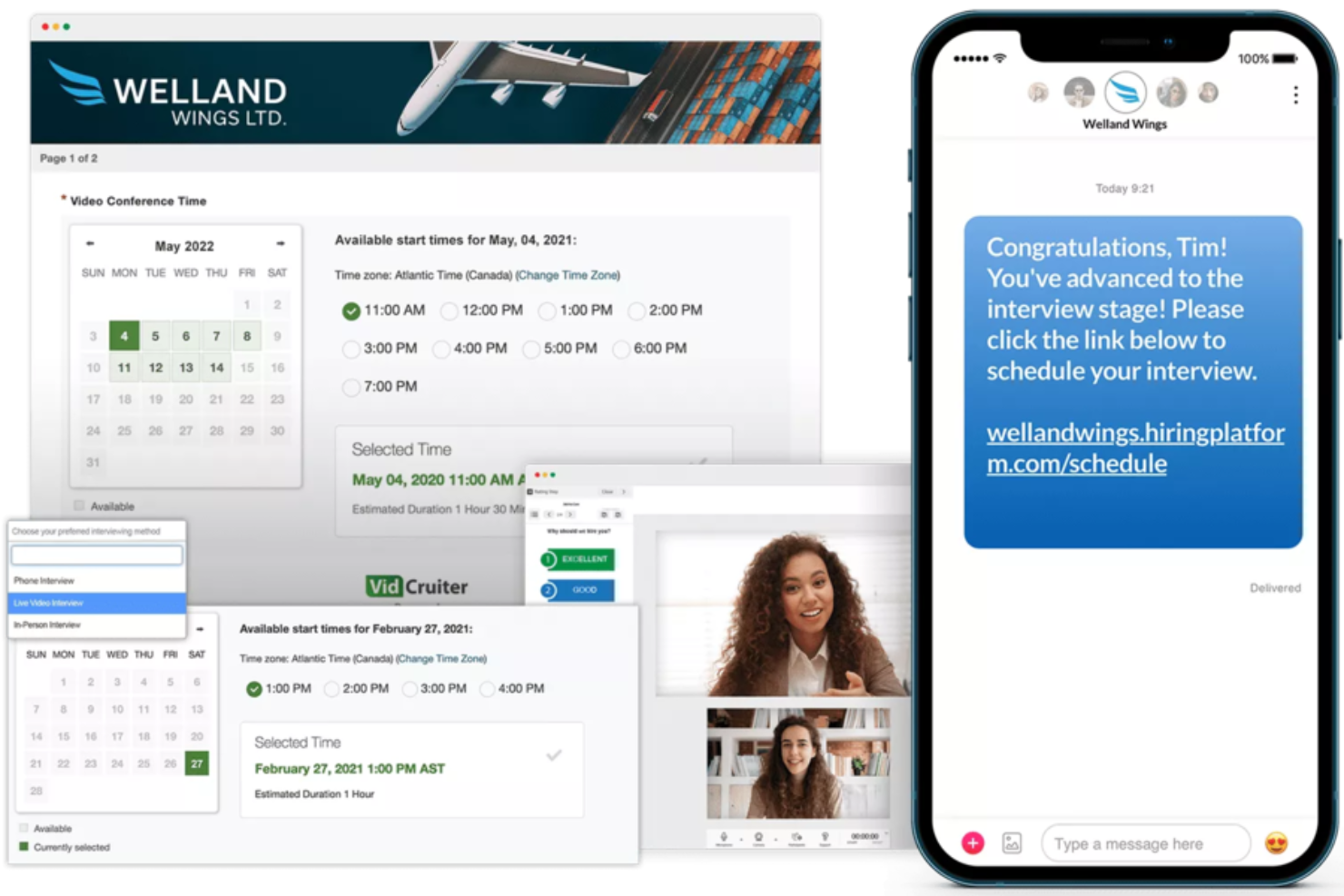
VidCruiter è una piattaforma di programmazione dei colloqui progettata per i team di selezione di organizzazioni che necessitano di coordinare processi di colloquio complessi e semplificare le comunicazioni con i candidati.
Per chi è pensato VidCruiter?
VidCruiter è adatto a organizzazioni di medie e grandi dimensioni con elevate esigenze di assunzione che richiedono flussi di lavoro strutturati e multi-formato per i colloqui.
Perché ho scelto VidCruiter
Ho scelto VidCruiter tra i migliori grazie alla flessibilità che offre sia ai candidati che ai team di selezione nel formato del colloquio. Una caratteristica utile è che i candidati possono scegliere il tipo di colloquio al momento della pianificazione, selezionando tra video o presenza, invece di vedere questa decisione presa per loro. Un simile livello di flessibilità nel formato è raro nei tool di pianificazione. Apprezzo inoltre il fatto che VidCruiter supporti un'ampia gamma di strutture di colloquio già pronte, da colloqui individuali e panel a turni alternati, colloqui di gruppo, MMI e formati ibridi, tutti gestiti tramite lo stesso flusso di pianificazione. Per i team che gestiscono processi di selezione in più fasi in cui ruoli o reparti diversi hanno esigenze di colloquio differenti, questa copertura fa davvero la differenza a livello operativo.
Funzionalità principali di VidCruiter
- Auto-prenotazione del candidato: I candidati scelgono autonomamente l'orario del proprio colloquio da finestre di disponibilità preimpostate, eliminando la necessità di continui scambi tra recruiter e candidati.
- Notifiche automatiche via SMS ed email: VidCruiter invia automaticamente conferme di colloquio, promemoria e follow-up sia ai candidati che agli intervistatori, inclusi allegati come guide all'intervista o indicazioni stradali.
- Regole di riprogrammazione configurabili: I recruiter possono impostare il numero esatto di volte in cui un candidato può riprogrammare e quanto vicino alla data dell'intervista, con notifiche automatiche inviate a tutte le parti in caso di modifiche.
- Automazione fuso orario: La piattaforma rileva e adatta automaticamente le differenze di fuso orario, così candidati e intervistatori vedranno sempre l'orario locale corretto per il colloquio programmato.
Integrazioni VidCruiter
Le integrazioni includono Workday, Dayforce, ADP, Oracle, UKG, SAP SuccessFactors, SmartRecruiters, Icims, PageUp e Lever.
Pros and Cons
Pros:
- Template personalizzati per i colloqui video
- Ottimo supporto clienti
- Link cliccabili senza login
Cons:
- Padroneggiare i vari comandi dello strumento richiede tempo
- Prendere appunti durante i colloqui è complicato

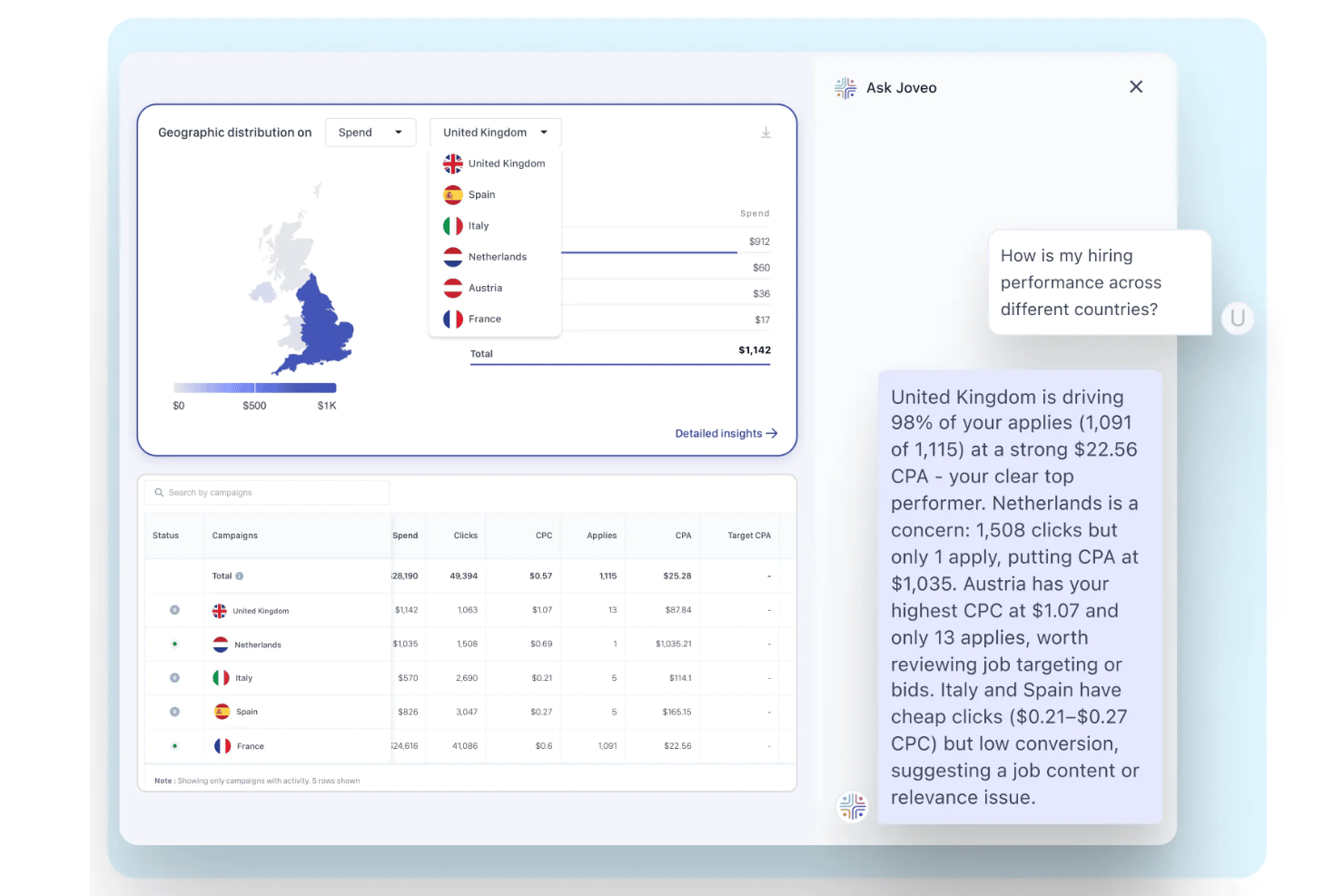
Joveo è una piattaforma di recruitment marketing con un modulo integrato di pianificazione di colloqui tramite intelligenza artificiale che automatizza l'auto-prenotazione dei candidati, la coordinazione di più turni di colloquio e la sincronizzazione del calendario tramite email, SMS, WhatsApp e web.
Per chi è più adatto Joveo?
Joveo è particolarmente indicato per team di acquisizione talenti enterprise, agenzie di selezione e società di RPO che gestiscono alti volumi di colloqui su più ruoli e sedi contemporaneamente.
Perché ho scelto Joveo
Ho scelto Joveo come uno dei migliori perché la sua intelligenza artificiale conversazionale guida i candidati nell'auto-prenotazione tramite SMS, WhatsApp, email e web senza coinvolgimento di recruiter. Ciò che trovo particolarmente impressionante è come gestisce automaticamente colloqui multipli, sia sequenziali che paralleli, risolvendo conflitti e distribuendo il carico tra gli intervistatori in base a disponibilità e carico di lavoro. In pratica, il mio team può passare un candidato dalla candidatura al colloquio programmato in meno di un minuto, anche per ruoli di tipo panel.
Funzionalità principali di Joveo
- Integrazioni con ecosistemi ATS: Si collega nativamente con oltre 100 piattaforme ATS per sincronizzare dati dei candidati e fasi dei colloqui.
- Notifiche e promemoria automatici: Invia conferme, aggiornamenti e promemoria brandizzati a candidati e intervistatori tramite email, SMS o WhatsApp.
- Assegnazione intervistatori con bilanciamento del carico: Distribuisce i colloqui in base a disponibilità e carico di lavoro degli intervistatori per evitare conflitti di calendario.
- Dashboard di analisi pianificazione colloqui: Offre report su efficienza della pianificazione dei colloqui, tassi di rifiuto e progressione dei candidati lungo il funnel di selezione.
Integrazioni di Joveo
Joveo offre integrazioni native con oltre 100 piattaforme ATS, tra cui iCIMS, Greenhouse, Workday, Bullhorn, SuccessFactors, Oracle e Cornerstone. Fornisce inoltre integrazioni native con calendari Google, Outlook, iCloud, Office 365 ed Exchange, e dispone di un'API per integrazioni personalizzate.
Pros and Cons
Pros:
- Pianifica colloqui senza coinvolgimento del recruiter
- Gestisce assunzioni ad alto volume su diversi canali
- Supporta la pianificazione sequenziale e parallela di più turni di colloquio
Cons:
- Progettato principalmente per team di selezione di grandi aziende
- Gli strumenti di reportistica potrebbero essere limitati per le PMI

Ideale per pipeline di selezione personalizzate
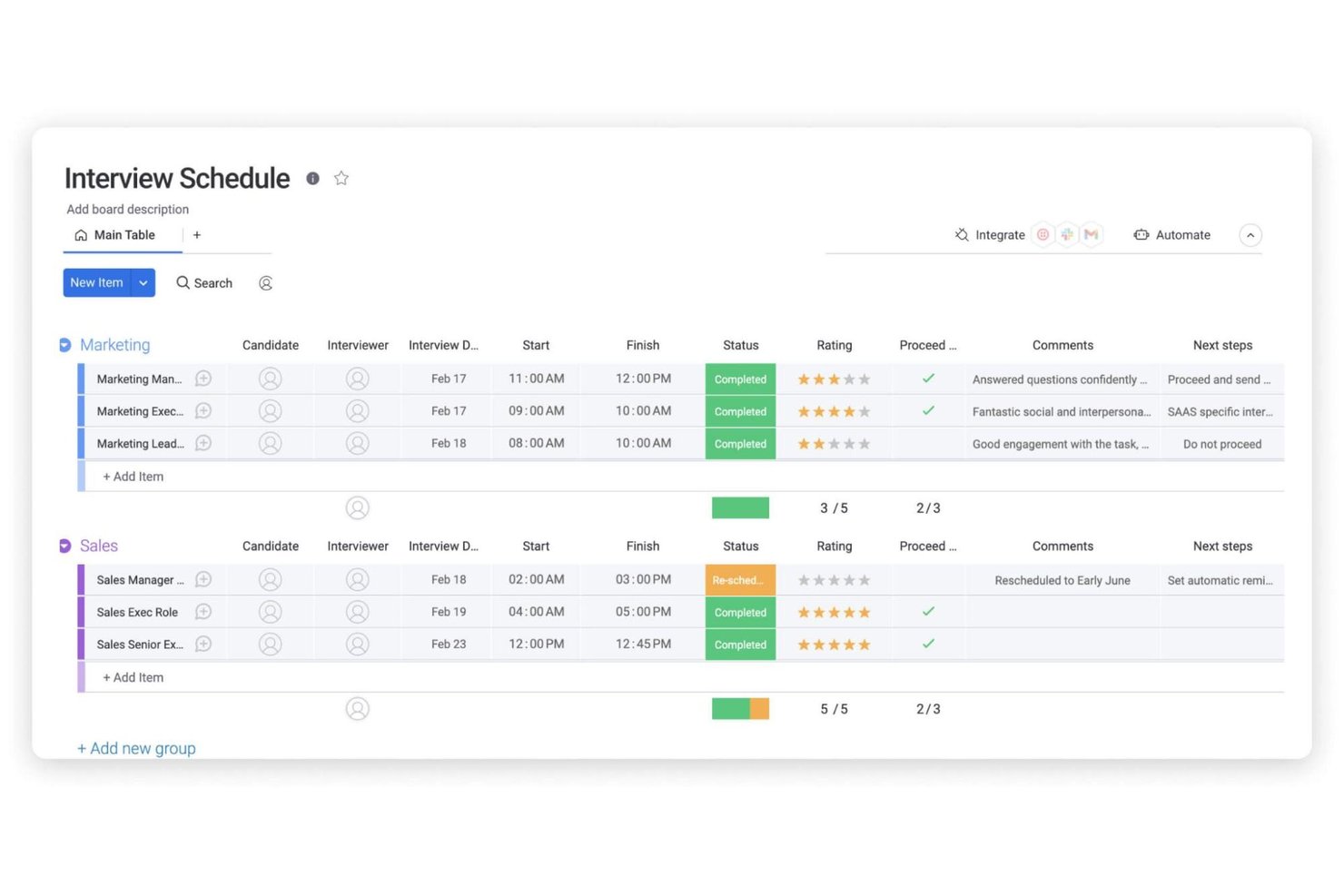
monday AI Workspace è una piattaforma di gestione del lavoro con agenti AI integrati che gestiscono i flussi di lavoro del recruiting, tra cui la pianificazione dei colloqui, il tracciamento della pipeline dei candidati, la sincronizzazione del calendario e il coordinamento del team di assunzione.
Per chi è ideale monday AI Workspace?
È particolarmente adatto a team di selezione di medie e grandi dimensioni che desiderano gestire l’intera pipeline di assunzione in un unico spazio di lavoro personalizzabile.
Perché ho scelto monday AI Workspace
Ho incluso monday AI Workspace tra le mie migliori scelte perché le sue board possono essere modellate su qualsiasi processo di assunzione si segua, invece di uno schema generico che impone di adattarsi. Apprezzo in particolare l’AI Scheduling Agent, che si sincronizza in tempo reale con il calendario del team e gestisce automaticamente riprogrammazioni e assenze non giustificate. Il Coordinator Agent aggiunge un ulteriore livello inviando solleciti ai responsabili delle assunzioni che non hanno inviato feedback, mantenendo ogni posizione aperta in movimento senza bisogno di follow-up manuali.
Funzionalità principali di monday AI Workspace
- Template per colloqui a panel: Configura panel strutturati con ruoli assegnati e flussi di lavoro personalizzati per ciascuna fase.
- Sincronizzazione bidirezionale del calendario: Collega Google Calendar, Outlook o Microsoft Teams per pianificazioni in tempo reale e prevenzione dei conflitti.
- Automazioni integrate nei flussi di lavoro: Attiva automaticamente task di follow-up, cambi di stato e notifiche mentre i candidati avanzano nelle fasi.
- Dashboard di analisi dei flussi di lavoro: Visualizza metriche dell’imbuto di assunzione, colli di bottiglia e attività di pianificazione dei colloqui in tempo reale.
Integrazioni di monday AI Workspace
monday AI Workspace offre centinaia di integrazioni native, tra cui Google Calendar, Outlook, Microsoft Teams, Slack, HubSpot, Salesforce e Zoom. Supporta anche Zapier e dispone di un’API per integrazioni personalizzate.
Pros and Cons
Pros:
- Agenti AI per l’automazione della comunicazione nel team
- Template di pipeline per colloqui personalizzabili
- Sincronizzazione del calendario in tempo reale tra i team
Cons:
- Nessuna opzione per l’autoprenotazione da parte dei candidati
- Supporto limitato per integrazioni ATS
New Product Updates from monday AI Workspace
monday AI Workspace Adds Human Approval Routing
monday AI Workspace adds a human-in-the-loop approval block to AI Workflows, sending approval requests and routing workflow paths based on responses. For more information, visit monday AI Workspace's official site.

Homebase
Ideale per le assunzioni di lavoratori pagati a ore nelle PMI, tutto in un unico posto
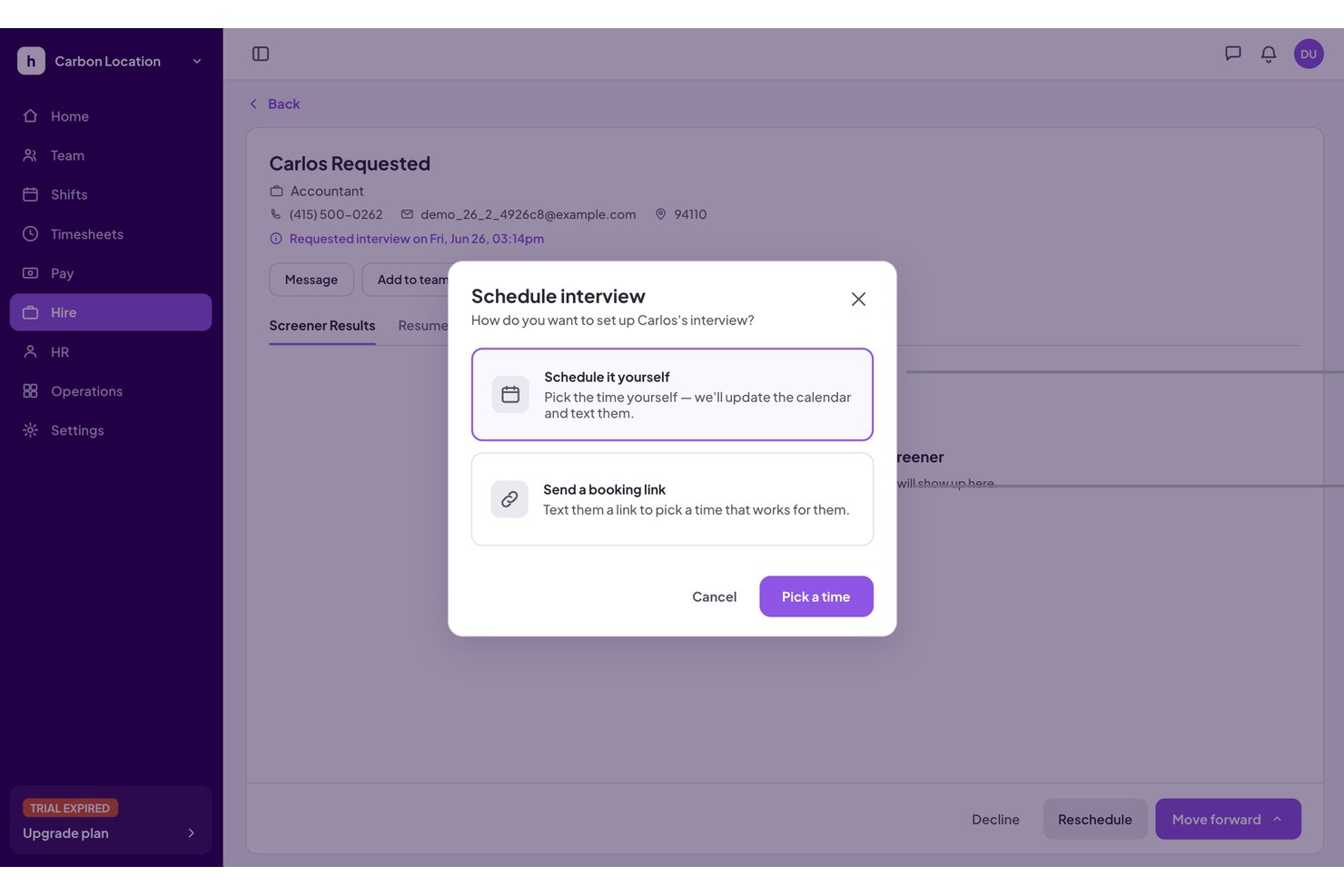
Homebase è una piattaforma completa per la gestione della forza lavoro destinata alle piccole imprese, che riunisce in un unico sistema l'assunzione di lavoratori pagati a ore, la selezione dei candidati tramite IA, l'autoprogrammazione dei colloqui, l'inserimento dei nuovi assunti, la pianificazione dei turni e le buste paga.
Per chi è più adatto Homebase?
Homebase è adatto ai titolari di piccole imprese nei settori con lavoratori pagati a ore—ristoranti, negozi e saloni di bellezza—che desiderano gestire assunzioni, programmazione dei colloqui e gestione della forza lavoro su un'unica piattaforma.
Perché ho scelto Homebase
Ho scelto Homebase come uno dei migliori strumenti perché è l'unico nella mia lista che integra direttamente la programmazione dei colloqui nella gestione della forza lavoro pagata a ore. Quando un candidato viene qualificato come Corrispondenza migliore, l'Assistente IA per le assunzioni di Homebase lo invita automaticamente a prenotare il colloquio autonomamente nel calendario in tempo reale del responsabile delle assunzioni, eliminando completamente lo scambio di messaggi. Una volta assunto, lo stesso candidato passa direttamente all'inserimento, alla pianificazione dei turni e alle buste paga, senza dover reinserire i dati.
Funzionalità principali di Homebase
- Selezione dei candidati tramite IA: l'IA di Homebase esamina le candidature in tempo reale, riassume i profili dei candidati e segnala le corrispondenze migliori per gli inviti ai colloqui.
- Pubblicazione degli annunci su più bacheche: pubblica un singolo annuncio su Indeed, ZipRecruiter, Facebook Jobs, Craigslist e Google da un unico punto.
- Sincronizzazione della disponibilità con Google Calendar: i responsabili delle assunzioni collegano Google Calendar affinché la prenotazione autonoma da parte dei candidati rifletta i loro impegni in tempo reale.
- Processo di inserimento integrato: i candidati appena assunti passano automaticamente ai documenti digitali per l'inserimento, senza dover reinserire manualmente i dati.
Integrazioni di Homebase
Homebase offre integrazioni native con Google Calendar, Indeed, ZipRecruiter, Gusto, ADP RUN e QuickBooks Online. Google Calendar è il collegamento principale per la programmazione dei colloqui; gli altri supportano principalmente la distribuzione degli annunci, le buste paga e la gestione della forza lavoro.
Pros and Cons
Pros:
- L'IA abbina i candidati migliori ai colloqui
- Gli inviti ai colloqui utilizzano la disponibilità del responsabile in tempo reale
- I candidati assunti passano direttamente all'inserimento
Cons:
- Non supporta la programmazione di colloqui con più intervistatori
- Non dispone di integrazioni con ATS o HRIS esterni

Setmore
Ideale per un'integrazione semplice sul sito web

Setmore offre ai team di selezione e ai recruiter un modo semplice per gestire la pianificazione dei colloqui, automatizzare i promemoria e coordinare i calendari, contribuendo a ridurre le assenze e a snellire la comunicazione con i candidati.
Per chi è più indicato Setmore?
Setmore è adatto a piccole e medie imprese e a recruiter indipendenti che hanno bisogno di uno strumento di pianificazione semplice senza una curva di apprendimento impegnativa.
Perché ho scelto Setmore
Setmore merita il suo posto tra i migliori nella mia selezione grazie alla facilità con cui è possibile integrare un modulo di prenotazione direttamente nel sito delle carriere o nel sito aziendale. Mi piace che il plugin per il sito web funzioni su WordPress, Wix, Squarespace e diversi altri builder—basta inserire un pulsante 'Prenota ora' e i candidati possono auto-prenotarsi i colloqui senza scambi di email. La pagina di prenotazione è personalizzabile, quindi posso elencare tipi specifici di colloqui, impostare disponibilità per membro dello staff e visualizzarla in più lingue per assunzioni a livello globale. Conferme e promemoria automatici via email vengono inviati sia all'intervistatore che al candidato non appena viene prenotato uno slot.
Caratteristiche principali di Setmore
- Sincronizzazione bidirezionale del calendario: Collega i calendari Google o Microsoft Outlook per mantenere aggiornata in tempo reale la disponibilità degli intervistatori.
- Link per riunioni video: Genera e allega automaticamente link Zoom o Teleport alle prenotazioni di colloquio confermate.
- Prenotazione di classi e gruppi: Pianifica colloqui di gruppo o panel aprendo una singola fascia oraria a più candidati contemporaneamente.
- Gestione dello staff: Aggiungi membri del team con disponibilità, profili e pagine di prenotazione separate per diversi intervistatori.
Integrazioni di Setmore
Le integrazioni includono Google Calendar, Zoom, Slack, Salesforce, HubSpot, WordPress, Mailchimp, QuickBooks, PayPal e Stripe.
Pros and Cons
Pros:
- Supporta i builder di siti web
- Facile integrazione con i social media
- Completamente gratuito fino a 4 utenti
Cons:
- Nessuna integrazione con sistemi ATS
- Crash occasionali
Ideale per un approccio automatizzato e senza interventi manuali
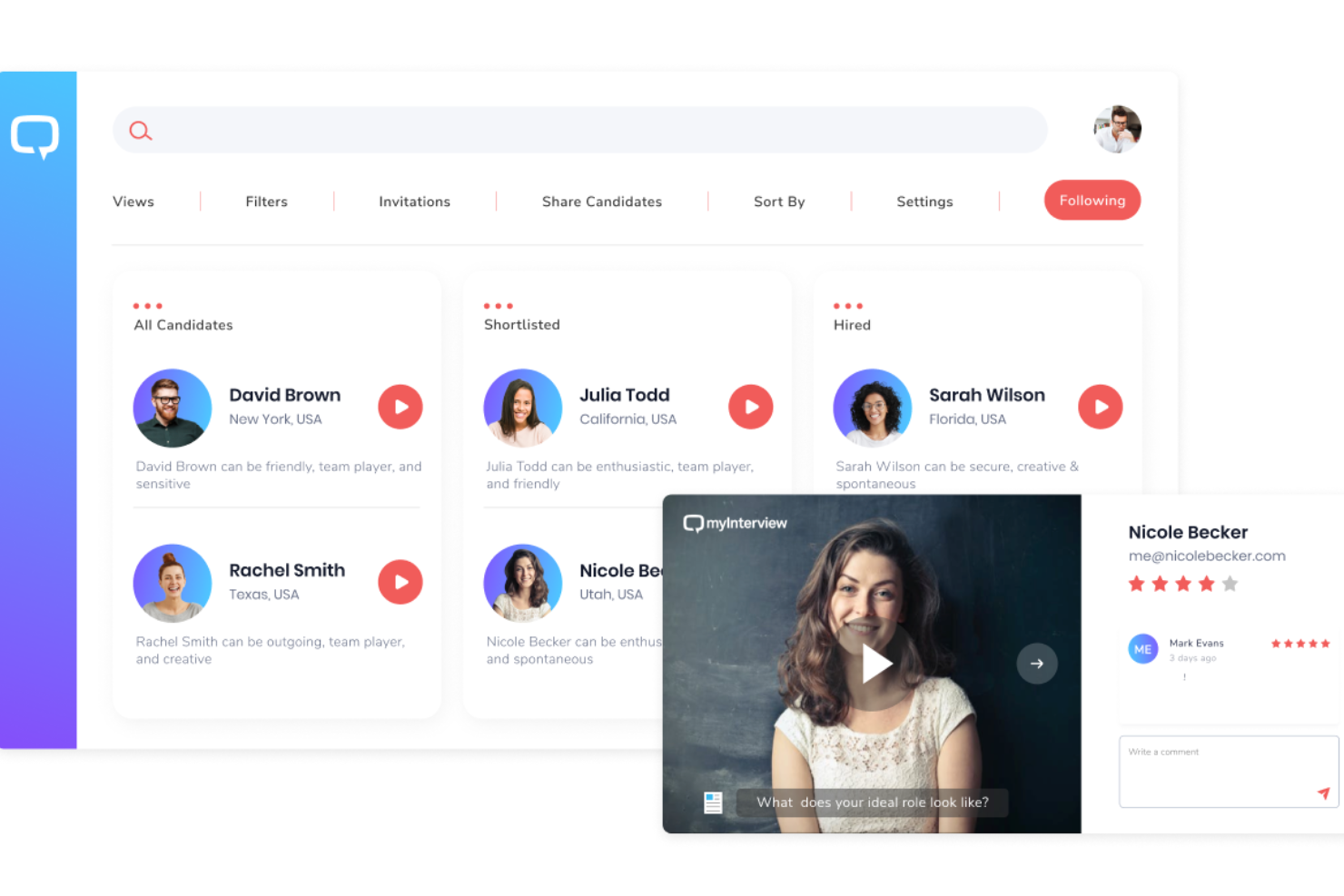
myInterview è una piattaforma unica che utilizza strumenti innovativi per perfezionare il processo di selezione del personale. Questa piattaforma non solo semplifica la pianificazione dei colloqui, ma migliora anche la valutazione dei candidati grazie alle sue funzionalità integrate di video colloquio, rendendola uno strumento completo per le moderne esigenze di assunzione.
Perché ho scelto myInterview: Una delle caratteristiche chiave che distingue myInterview è il suo specialista virtuale di TA (Talent Acquisition) basato sull'IA, Taira. Questo assistente intelligente può analizzare i curriculum e altre informazioni, pre-selezionarli tramite una chat automatica e stilare una shortlist in base all'allineamento con l'annuncio di lavoro. Questo assistente dispone anche di funzionalità per valutare le soft skill, la personalità, la conoscenza della lingua e altre qualità dei candidati.
Taira si occupa poi della pianificazione dei colloqui attraverso una chat conversazionale. myInterview riconosce la natura tediosa degli scambi tra candidati e recruiter e mira a semplificare questo processo. Questa funzione automatizzata può gestire anche il ripianificazione e i follow-up in caso di assenza.
Funzionalità e integrazioni di spicco di myInterview
Le funzionalità includono la revisione collaborativa e l'annotazione dei profili dei candidati, colloqui video, colloqui dal vivo, esperienza multilingue per i candidati, risposte testuali, risposte a scelta multipla, lavagne Kanban per la gestione dei candidati, flussi di lavoro personalizzati e shortlisting automatizzato.
Le integrazioni includono SmartRecruiters, SAP, monday.com, Workday, JazzHR, Greenhouse, PageUp, Pinpoint, Zapier e altri ancora. È inoltre disponibile una API per integrazioni personalizzate.
Pros and Cons
Pros:
- Pianificazione e ripianificazione automatica
- Capacità di pre-selezione guidata dall'IA
- Flussi di lavoro per la gestione dei candidati
Cons:
- Nessuna app mobile
- Opzioni di personalizzazione limitate

Jobma
Ideale per sostenere colloqui video
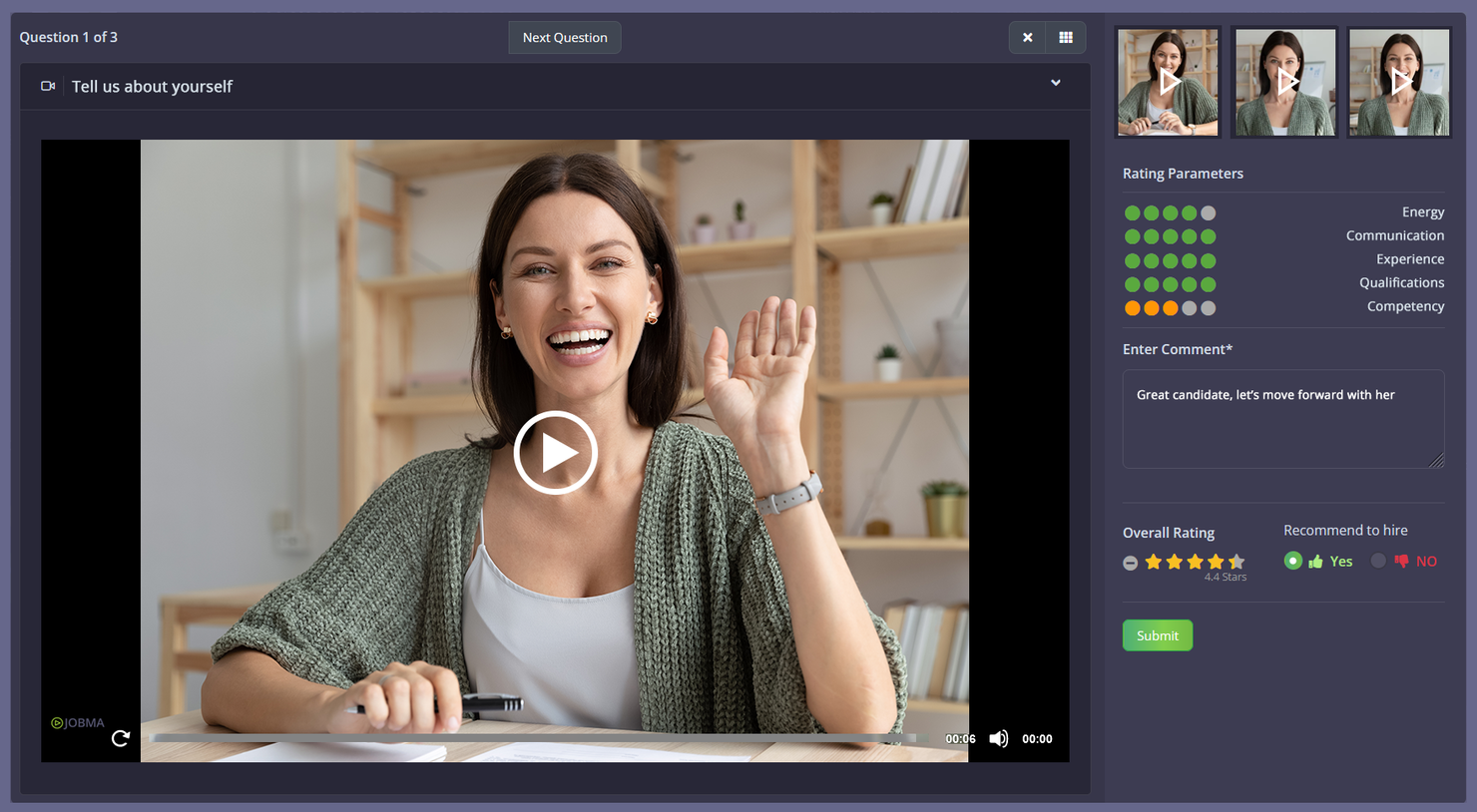
Jobma è una piattaforma di colloqui digitali progettata per team di selezione e recruiter che desiderano semplificare la pianificazione dei colloqui e connettersi con i candidati tramite video, aiutando le aziende a ottimizzare il processo di assunzione e migliorare il coinvolgimento dei candidati.
Per chi è pensato Jobma?
Jobma è ideale per recruiter e team di acquisizione talenti in aziende di medie e grandi dimensioni che fanno ampio uso di video colloqui per selezionare e valutare i candidati su larga scala.
Perché ho scelto Jobma
Ho scelto Jobma perché mette il video colloquio al centro del flusso di lavoro di selezione. Il mio team utilizza Jobma per inviare inviti a colloqui video unidirezionali ai candidati, che registrano le loro risposte quando preferiscono—senza la necessità di programmazioni incrociate. Quando arriva il momento dei colloqui live, lo strumento dedicato di video colloquio dal vivo di Jobma mantiene tutto in un unico posto, evitando di dover passare da uno strumento di pianificazione a una piattaforma video separata. Apprezzo anche la funzione di valutazione tramite IA, che esamina le risposte dei candidati e genera punteggi oggettivi, rendendo più rapido il confronto tra candidati dopo una fase di screening ad alto volume.
Caratteristiche principali di Jobma
- Valutazioni scritte, a scelta multipla e audio: Crea kit di intervista che includono domande aperte, a scelta multipla e audio, per valutare i candidati oltre le risposte video.
- Strumenti collaborativi per l'assunzione: Condividi le risposte dei candidati con i colleghi e raccogli feedback strutturati da più membri del team prima di prendere una decisione di assunzione.
- Generazione automatica di kit di intervista tramite IA: Genera automaticamente domande di intervista personalizzate in base al ruolo e alla descrizione del lavoro, per creare kit di colloquio strutturati e coerenti.
- Supervisione tramite IA: Monitora i colloqui dei candidati per rilevare comportamenti irregolari grazie al rilevamento automatico di più volti, al monitoraggio delle finestre attive e alle azioni di copia-incolla.
Integrazioni di Jobma
Le integrazioni includono iCIMS, Workday, Oracle, Greenhouse, Ceipal, Lever, Bullhorn, SAP, Teamtailor e BambooHR.
Pros and Cons
Pros:
- Supporto 24/7 incluso
- Funzionalità basate su IA
- Adatto a diverse applicazioni aziendali
Cons:
- I candidati devono scaricare l'app
- Opzioni di personalizzazione limitate
Altri software per la pianificazione dei colloqui
Ecco alcune altre opzioni valide che non sono entrate nell'elenco dei migliori software per la pianificazione dei colloqui. Non avevo spazio per una recensione completa di ciascuna di queste, ma meritano comunque di essere prese in considerazione:
- HireVue
Ideale per recruiter tecnici e IT
- Mitratech TalentReef
Ideale per assumere personale orario e collaboratori
- Jobvite
Ideale per aziende senza un ATS esistente
- Unnanu Hire
Ideale con strumenti integrati per offerte e onboarding
- Paradox
Miglior software per la pianificazione dei colloqui per coinvolgimento conversazionale potenziato da AI
- Rooster
Miglior software di pianificazione colloqui per recruiting globale e supporto multilingue
- Scheduling Bot by Sense
Il miglior software per la pianificazione dei colloqui focalizzato sulle interazioni via testo
- TurboHire
Miglior software per la pianificazione dei colloqui per PMI con sfide nella ricerca dei candidati
- Interviewstream
Il miglior software per la programmazione dei colloqui per ottenere feedback concreti sulle routine di selezione
- Workable
Miglior software di pianificazione dei colloqui per l'autoprogrammazione


Come Valuto i Software per la Programmazione dei Colloqui
Suddivido la mia valutazione in due livelli: la funzionalità di base che uno strumento deve possedere, come la programmazione autonoma da parte dei candidati e la sincronizzazione con l’ATS, e i fattori che differenziano un buon software da quello giusto per il tuo team.
Funzionalità di Base (Requisiti Minimi per Questa Lista)
Quando seleziono gli strumenti per la mia lista, valuto ciascuno su una scala da 0 (non offre la funzionalità) a 5 (eccelle in questa area) per ogni funzionalità di base elencata di seguito. Successivamente, calcolo il punteggio totale dello strumento in percentuale. Ogni strumento deve raggiungere un punteggio minimo totale del 65% per essere incluso nella selezione.
- Programmazione Autonoma da Parte del Candidato: Verifico se i candidati possono scegliere in autonomia le fasce orarie dei colloqui dalla disponibilità in tempo reale, invece di attendere che un recruiter proponga manualmente gli orari via email.
- Integrazione e Sincronizzazione del Calendario: La sincronizzazione bidirezionale in tempo reale con Google Calendar, Outlook o Office 365 è fondamentale, specialmente per evitare doppie prenotazioni su agende impegnate degli intervistatori.
- Pianificazione di Panel e Colloqui a Più Fasi: Valuto quanto bene uno strumento coordina panel con più intervistatori e turni sequenziali, poiché controllare manualmente cinque calendari per gli ultimi colloqui di selezione è spesso un punto critico.
- Integrazione ATS/HRIS: Le connessioni native con piattaforme come Greenhouse, Lever, Workday o iCIMS mantengono dati dei candidati e fasi dei colloqui allineate senza reinserimenti manuali tra i sistemi.
- Notifiche e Promemoria Automatizzati: Cerco conferme configurabili, promemoria e link per il riprogrammare inviati sia ai candidati che agli intervistatori, poiché assenze e confusione dell’ultimo minuto fanno perdere tempo a tutti.
- Bilanciamento del Carico per gli Intervistatori: Gli strumenti che distribuiscono i colloqui in base a disponibilità, competenze o carico di lavoro impediscono che sempre gli stessi pochi intervistatori vengano sovraccaricati ad ogni ciclo di assunzione.
Una volta che ho una lista di strumenti che soddisfano i criteri, valuto cosa distingue ogni piattaforma.
Fattori di Differenziazione (Cosa Distingue i Fornitori)
Ecco come confronto e metto a confronto i diversi fornitori:
Funzionalità Distintive
La programmazione basata su AI è un grande elemento di distinzione. Gli strumenti che suggeriscono gli orari migliori per i colloqui o risolvono automaticamente conflitti in base ai modelli storici fanno risparmiare ore reali ai recruiter durante i picchi di assunzione. Osservo anche le analisi di programmazione, poiché dashboard che monitorano il tempo per programmare, il tasso di rifiuto degli intervistatori e i colli di bottiglia forniscono ai responsabili TA i dati necessari per migliorare le operazioni di recruiting. Per i team che gestiscono eventi universitari o campagne stagionali di assunzione, la programmazione ad alto volume con inviti multipli e gestione delle fasce orarie libere merita un’attenta valutazione.
Oltre le Funzionalità
Anche la profondità dell’integrazione è importante. Verifico se uno strumento si collega nativamente alle piattaforme ATS e HRIS su cui il tuo team fa già affidamento, poiché un tool di programmazione che vive fuori dal flusso principale di recruiting genera più lavoro manuale di quello che risolve. La sicurezza e la conformità sono altrettanto fondamentali — i dati dei candidati sono sensibili, quindi verifico la certificazione SOC 2, la conformità GDPR e i controlli di accesso basati sui ruoli. Anche la trasparenza sui prezzi orienta le mie raccomandazioni, in particolare se i costi crescono prevedibilmente all’aumentare del volume di assunzioni invece di subire forti incrementi ai cambi di fascia.
Come scegliere il software per la pianificazione dei colloqui
È facile perdersi in lunghi elenchi di funzionalità e strutture di prezzo complesse. Per aiutarti a rimanere concentrato mentre affronti il tuo particolare processo di selezione del software, ecco una lista di controllo dei fattori da tenere a mente:
| Fattore | Cosa considerare |
|---|---|
| Scalabilità | Il software cresce insieme al tuo team? Pensa alle esigenze future e assicurati che lo strumento possa gestire un numero maggiore di utenti e dati. |
| Integrazioni | Verifica se il software si collega agli strumenti che utilizzi attualmente, come i sistemi di posta elettronica o delle risorse umane. Cerca integrazioni semplici per evitare il lavoro manuale. |
| Personalizzazione | Puoi adattare lo strumento ai tuoi processi? Valuta se si adatta alle esigenze specifiche del tuo flusso di lavoro o se è rigido. |
| Semplicità d'uso | L'interfaccia è intuitiva? Assicurati che i membri del team possano imparare a utilizzarla rapidamente senza una formazione approfondita. |
| Implementazione e inserimento | Quanto tempo occorrerà per iniziare? Valuta il tempo e le risorse necessari per la configurazione e la formazione. |
| Costo | Confronta i piani tariffari e ciò che includono. Fai attenzione ai costi nascosti e verifica se è disponibile una prova gratuita per testare il prodotto prima di acquistarlo. |
| Misure di sicurezza | Quali misure proteggono i tuoi dati? Cerca la crittografia, i controlli degli accessi e la conformità alle normative sulla protezione dei dati. |
| Disponibilità dell'assistenza | Quale assistenza offre il fornitore? Considera l'accesso 24 ore su 24, 7 giorni su 7, i tempi di risposta e i canali di assistenza disponibili per assicurarti di ricevere aiuto quando ne hai bisogno. |
Che cos'è il software per la programmazione dei colloqui?
Il software per la programmazione dei colloqui è uno strumento che automatizza il processo di coordinamento dei colloqui tra candidati e intervistatori. I professionisti delle risorse umane e i recruiter utilizzano generalmente questi strumenti per risparmiare tempo e ridurre i conflitti di programmazione. La sincronizzazione dei calendari, i promemoria automatici e il coordinamento dei fusi orari aiutano a gestire in modo efficiente la programmazione e la comunicazione. Nel complesso, questi strumenti rendono il processo di colloquio più fluido e organizzato per tutte le persone coinvolte.
Funzionalità
Quando selezioni un software per la programmazione dei colloqui, presta attenzione alle seguenti funzionalità principali:
- Sincronizzazione dei calendari: Si integra con i calendari per aggiornare e gestire automaticamente gli orari dei colloqui.
- Promemoria automatici: Invia notifiche ai candidati e agli intervistatori per ridurre le assenze e mantenere tutti informati.
- Coordinamento dei fusi orari: Adatta automaticamente la programmazione ai diversi fusi orari per evitare confusione e garantire la precisione.
- Integrazione dei colloqui video: Si collega agli strumenti per le videoconferenze per consentire colloqui virtuali senza interruzioni.
- Flussi di lavoro personalizzabili: Consente agli utenti di adattare il processo di programmazione alle proprie esigenze e preferenze specifiche.
- Autoprogrammazione da parte dei candidati: Permette ai candidati di scegliere gli orari disponibili, riducendo le comunicazioni ripetute.
- Integrazione con i sistemi ATS: Si collega ai sistemi di tracciamento dei candidati per rendere più fluido il processo di selezione.
- Accesso da dispositivi mobili: Fornisce un'app mobile per programmare gli appuntamenti in mobilità, migliorando flessibilità e accessibilità.
- Sicurezza dei dati: Garantisce la protezione delle informazioni sensibili attraverso la crittografia e la conformità alle normative sui dati.
- Interfaccia intuitiva: Offre un design intuitivo che semplifica la navigazione e riduce la curva di apprendimento.
Vantaggi
L'implementazione di un software per la programmazione dei colloqui offre diversi vantaggi al tuo team e alla tua azienda. Ecco alcuni dei vantaggi che puoi aspettarti:
- Risparmio di tempo: Automatizza le attività di programmazione, lasciando ai professionisti delle risorse umane più tempo da dedicare ad altre responsabilità.
- Riduzione dei conflitti di programmazione: La sincronizzazione dei calendari e il coordinamento dei fusi orari aiutano a prevenire le doppie prenotazioni e le incomprensioni.
- Migliore esperienza per i candidati: I promemoria automatici e le opzioni di autoprogrammazione rendono il processo più comodo per i candidati.
- Maggiore organizzazione: Fornisce una piattaforma centralizzata per gestire tutte le attività relative ai colloqui, mantenendo tutto in un unico posto.
- Maggiore flessibilità: L'accesso da dispositivi mobili consente agli utenti di programmare e gestire i colloqui da qualsiasi luogo e in qualsiasi momento.
- Migliore collaborazione: L'integrazione con i sistemi ATS e altri strumenti favorisce il lavoro di squadra e garantisce che tutti siano informati.
- Protezione dei dati: Garantisce la sicurezza delle informazioni sensibili attraverso funzionalità di sicurezza dei dati, mantenendo la fiducia e la conformità.
Costi e prezzi
La scelta di un software per la programmazione dei colloqui richiede la comprensione dei vari modelli e piani tariffari disponibili. I costi variano in base alle funzionalità, alle dimensioni del team, ai componenti aggiuntivi e ad altri fattori. La tabella seguente riassume i piani più comuni, i relativi prezzi medi e le funzionalità tipicamente incluse nelle soluzioni software per la programmazione dei colloqui:
Tabella di confronto dei piani per il software di programmazione dei colloqui
| Tipo di piano | Prezzo medio | Funzionalità comuni |
|---|---|---|
| Piano gratuito | $0 | Programmazione di base, sincronizzazione limitata del calendario e promemoria essenziali. |
| Piano personale | $5-$15/user/month | Programmazione avanzata, sincronizzazione illimitata del calendario, promemoria automatici e integrazioni di base. |
| Piano aziendale | $20-$40/user/month | Collaborazione tra team, flussi di lavoro personalizzati, integrazione dei colloqui video e analisi dettagliate. |
| Piano per grandi aziende | $50+/user/month | Integrazioni complete, sicurezza avanzata, assistenza dedicata e report personalizzabili. |
Software di programmazione dei colloqui: domande frequenti
Ecco alcune domande frequenti e relative risposte sul software di programmazione dei colloqui:
In che modo l'intelligenza artificiale può aiutare con la programmazione e il recruiting?
In che modo il software di programmazione dei colloqui si integra con gli strumenti che già utilizzo?
Il software di programmazione dei colloqui è sicuro per la gestione dei dati dei candidati?
Qual è il prossimo passo:
Se stai cercando un software di programmazione dei colloqui, contatta gratuitamente un consulente SoftwareSelect per ricevere consigli.
Dovrai compilare un modulo e fare una breve conversazione durante la quale verranno analizzate nel dettaglio le tue esigenze. In seguito riceverai una selezione ristretta di software da esaminare. Ti accompagneranno inoltre durante l'intero processo di acquisto, comprese le negoziazioni sul prezzo.