

I 10 migliori software per colloqui video recensiti per il 2026

10 Elenco dei migliori software per videocolloqui


I migliori software per videocolloqui aiutano i professionisti delle risorse umane a semplificare la selezione dei candidati, ridurre i conflitti di programmazione e garantire decisioni di assunzione eque e coerenti.
Se ti affidi ancora ai colloqui telefonici, gestisci la programmazione manualmente o hai difficoltà a mantenere la coerenza tra i colloqui, sai già quanto queste sfide possano essere dispendiose in termini di tempo e frustranti. Le piattaforme per videocolloqui aiutano a eliminare questi problemi consentendo di registrare i candidati su richiesta, utilizzare guide strutturate per i colloqui e accedere a strumenti di collaborazione integrati, così il tuo team può prendere decisioni di assunzione più rapide e sicure.
In qualità di ex addetto alla selezione interno, che ha utilizzato e analizzato decine di piattaforme per la selezione del personale, ho visto in prima persona come lo strumento giusto possa trasformare i risultati delle assunzioni.
In questo articolo presenterò i migliori software per videocolloqui disponibili oggi, spiegherò cosa distingue ciascuno di essi e fornirò indicazioni pratiche per aiutarti a scegliere la soluzione più adatta alla tua organizzazione.
Perché fidarsi delle nostre recensioni sui software
Il nostro team testa e recensisce software dal 2012. In quanto esperti HR noi stessi, sappiamo quanto sia difficile — e importante — scegliere il software giusto.
Per questa guida, abbiamo valutato gli strumenti attraverso test pratici e ricerche indipendenti, assegnando un punteggio agli strumenti in base ai nostri criteri di selezione. Ci basiamo inoltre sulle competenze di leader di pensiero del settore e di professionisti HR attivi.
Le nostre recensioni riflettono il nostro giudizio editoriale umano, non un discorso di vendita.
Revisori esperti:
I migliori software per videocolloqui: tabella comparativa
Questa tabella comparativa riassume i dettagli relativi a prezzi, periodi di prova e dimostrazioni dei migliori software per videocolloqui che ho selezionato, per aiutarti a trovare il software più adatto al tuo budget e alle esigenze della tua azienda.
| Tool | Best For | Trial Info | Price | ||
|---|---|---|---|---|---|
| 1 | Ideale per i colloqui video a più livelli | Demo gratuita disponibile | Prezzo su richiesta | Website | |
| 2 | Migliore per programmazione e screening dei colloqui con AI | Demo gratuita disponibile | Prezzo su richiesta | Website | |
| 3 | Ideale per video colloqui unidirezionali | Prova gratuita di 30 giorni | Da $75/mese | Website | |
| 4 | Ideale per confrontare i feedback del team di assunzione | Prova gratuita di 15 giorni + demo gratuita disponibile | A partire da $299/mese (fatturati annualmente) | Website | |
| 5 | Ideale per l’analisi dei candidati tramite IA | Prova gratuita di 7 giorni + demo disponibile | Da $99/mese (fatturazione annuale) | Website | |
| 6 | Ideale per colloqui da remoto conformi al GDPR | Prova gratuita di 7 giorni + demo gratuita disponibile | Da $35/mese (fatturazione annuale) | Website | |
| 7 | Ideale per videocolloqui AI con trascrizioni | Prova gratuita di 14 giorni | Da $15/utente/mese | Website | |
| 8 | Ideale per lo screening dei candidati tramite IA conversazionale | Demo gratuita disponibile | Prezzo su richiesta | Website | |
| 9 | Ideale per i video colloqui asincroni | Demo gratuita disponibile | Da $335/mese (fatturazione annuale) | Website | |
| 10 | Ideale per selezionare e assumere candidati su larga scala | 15 giorni di prova gratuita | Da $42/utente/mese | Website |

Recensioni dei migliori software per videocolloqui
Ecco una breve descrizione dei 10 migliori software per videocolloqui, che illustra i punti di forza di ciascun sistema e include schermate per evidenziarne alcune funzionalità. Di seguito sono disponibili anche altre 20 opzioni, se desideri prendere in considerazione un numero maggiore di sistemi.
Ideale per i colloqui video a più livelli
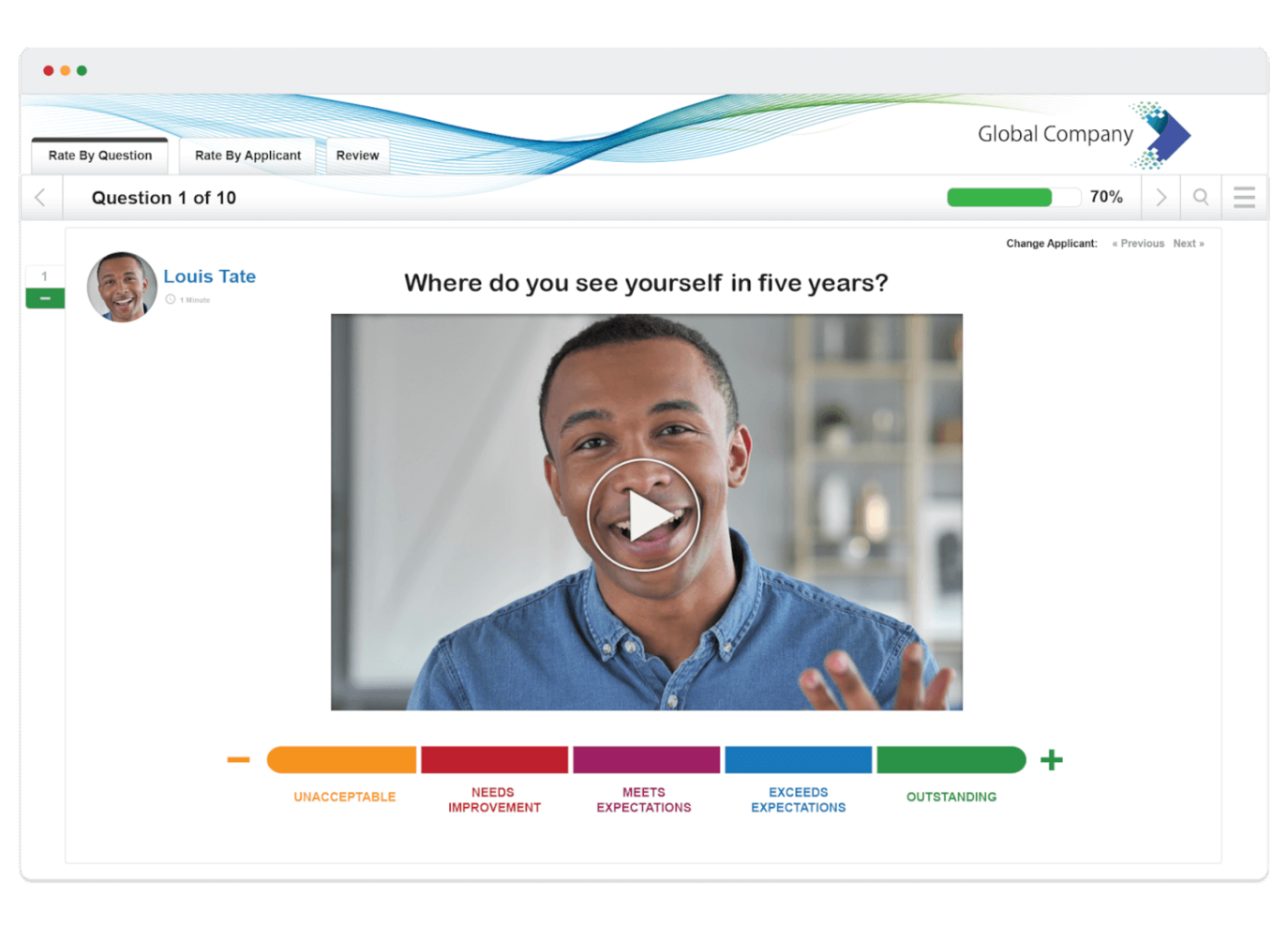
VidCruiter è una piattaforma di video colloqui progettata per team HR e selezionatori che hanno bisogno di gestire processi di assunzione strutturati e virtuali, con flussi di lavoro personalizzabili e pianificazione automatizzata.
Per chi è ideale VidCruiter?
VidCruiter è adatto per organizzazioni di medie e grandi dimensioni con esigenze di assunzione elevata che necessitano di processi di colloquio strutturati e su più fasi tra diversi team di selezione.
Perché ho scelto VidCruiter
VidCruiter si guadagna il suo posto tra i migliori della mia lista grazie alla sua gestione efficace dei flussi di lavoro per colloqui multi-livello. Mi piace che si possano combinare colloqui pre-registrati di screening con colloqui video dal vivo in una singola pipeline strutturata—così i candidati passano attraverso ogni fase senza che il tuo team debba coordinare manualmente i passaggi. Le guide di valutazione basate sulle competenze, integrate, accompagnano ogni livello, il che significa che i valutatori ad ogni fase utilizzano gli stessi criteri. Ho anche trovato molto utili gli strumenti di pianificazione automatizzata, poiché eliminano i rimbalzi che spesso rallentano i processi multi-fase.
Funzionalità principali di VidCruiter
- Chat privata tra panel: Gli intervistatori che partecipano a una sessione di gruppo o panel possono inviarsi messaggi privati durante la sessione dal vivo senza che il candidato veda la conversazione.
- Stanza d’attesa personalizzata per i candidati: Crea una sala d’attesa brandizzata con controllo tecnico integrato e consigli per il colloquio prima che i candidati entrino nel colloquio live.
- Note AI e trascrizioni dei colloqui: Registra automaticamente le trascrizioni e genera riassunti di colloquio assistiti dall’AI, focalizzati sulle competenze lavorative, durante gli incontri dal vivo.
- Test delle competenze: Valuta i candidati con test di abilità integrati che possono essere inseriti nel processo di selezione insieme ai colloqui video.
Integrazioni VidCruiter
Le integrazioni includono Workday, Dayforce, ADP, Oracle, UKG, SAP SuccessFactors, SmartRecruiters, iCIMS, Greenhouse e Lever.
Pros and Cons
Pros:
- Supporta flussi di lavoro strutturati e multi-fase per i colloqui
- Combina colloqui asincroni e live sulla stessa piattaforma
- La valutazione standardizzata migliora la coerenza tra le fasi di colloquio
Cons:
- La configurazione richiede più impegno con flussi di lavoro complessi e multi-fase
- L’interfaccia può risultare dispersiva per chi conduce colloqui solo occasionalmente
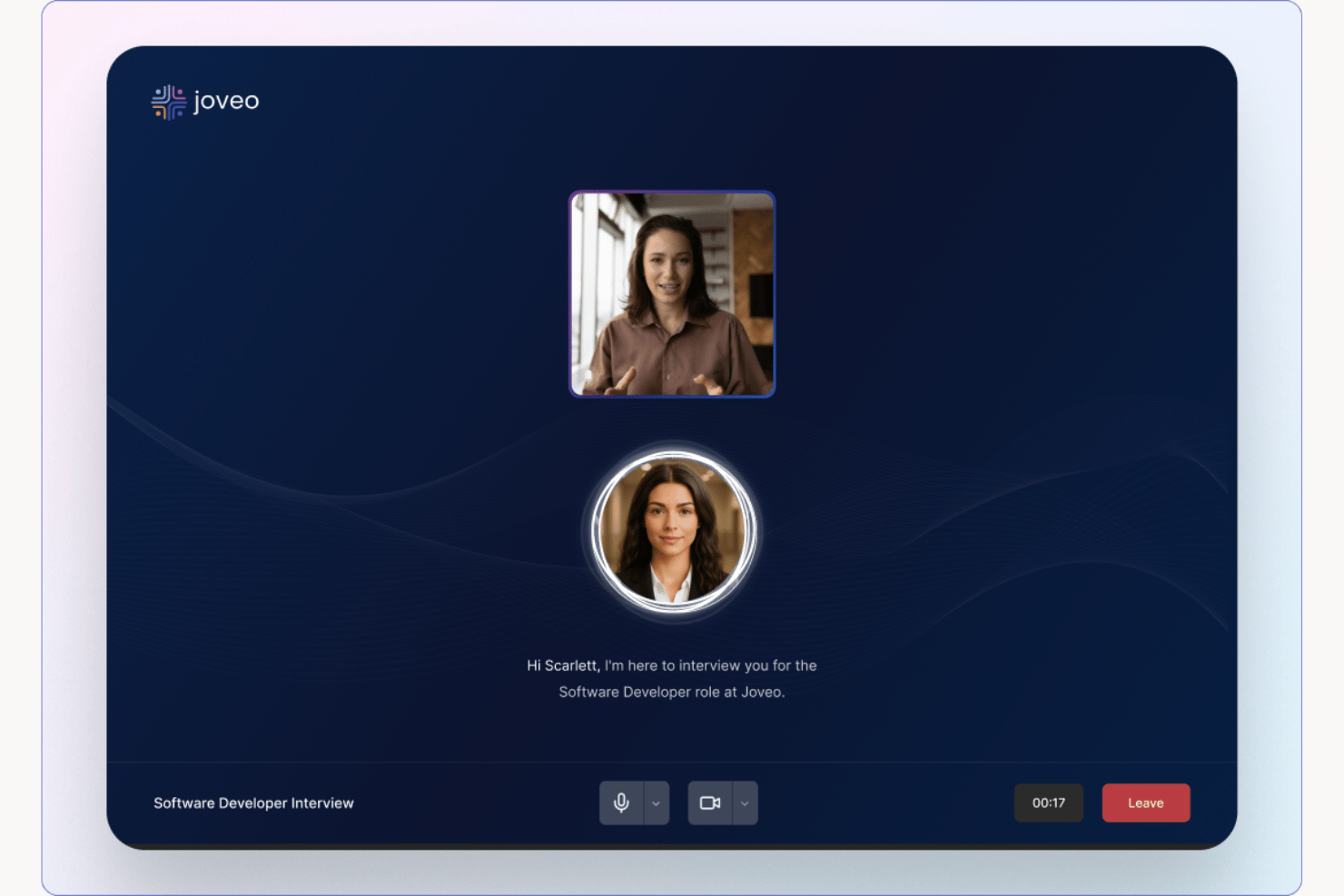
Joveo è una piattaforma di recruiting basata sull'intelligenza artificiale che gestisce lo screening dei candidati tramite colloqui AI conversazionali, programmazione automatica dei colloqui e pubblicità programmatica delle offerte di lavoro, tutto connesso al tuo ATS.
Per Chi È Meglio Joveo?
Joveo è particolarmente indicato per team di assunzione ad alto volume e agenzie di staffing che devono valutare grandi bacini di candidati senza aumentare il personale di recruiting.
Perché Ho Scelto Joveo
Ho scelto Joveo tra i migliori perché il suo AI Interviewer non si limita a porre domande preimpostate: approfondisce con follow-up adattivi e valuta le risposte rispetto a una griglia di competenze in tempo reale. La funzione AI Scheduling gestisce poi l’intera catena di coordinamento, da incontri singoli a panel multi-turno, con auto-prenotazione da parte del candidato tramite SMS, email o WhatsApp. Apprezzo molto che entrambe le funzioni si sincronizzino direttamente con l’ATS, quindi nessun passaggio deve essere fatto manualmente tra uno step e l’altro.
Funzionalità Principali di Joveo
- Pubblicità di lavoro AI: Distribuisce le offerte a una vasta rete di publisher tramite ottimizzazione automatizzata delle campagne.
- Costruttore di siti carriera: Permette alle organizzazioni di creare e personalizzare pagine carriera brandizzate con strumenti no-code.
- Coinvolgimento multi-canale dei candidati: Si connette ai candidati tramite web, SMS, email e WhatsApp attraverso punti di contatto conversazionali automatizzati.
- Integrazioni ATS: Offre integrazione diretta con oltre 100 sistemi di tracking dei candidati per una sincronizzazione fluida dei dati.
Integrazioni di Joveo
Joveo offre integrazioni native con oltre 100 ATS, tra cui iCIMS, Greenhouse, Workday, Bullhorn, SAP SuccessFactors, Oracle Recruiting Cloud e Cornerstone. È disponibile un’API per integrazioni personalizzate.
Pros and Cons
Pros:
- Lo screening AI gestisce pipeline di candidati ad alto volume
- L’auto-prenotazione dei colloqui riduce il tempo richiesto ai recruiter
- L’AI conversazionale adatta le domande in base alle risposte
Cons:
- Creato principalmente per il sourcing, non per il colloquio
- Profondità di valutazione meno strutturata

Hireflix
Ideale per video colloqui unidirezionali

Hireflix è una piattaforma di video colloqui per team HR e recruiter che desiderano semplificare la selezione dei candidati e velocizzare l’assunzione virtuale permettendo ai candidati di registrare le risposte quando preferiscono.
Per Chi è Ideale Hireflix?
Hireflix è adatto a piccole e medie imprese che hanno bisogno di un modo semplice per scremare un alto volume di candidati senza dover pianificare colloqui dal vivo.
Perché Ho Scelto Hireflix
Hireflix si guadagna il suo posto nella mia shortlist perché è progettato appositamente per interviste video unidirezionali e nient’altro. Mi piace il fatto che si debbano registrare le domande solo una volta e poi inviarle a quanti candidati si desidera—niente riprogrammazioni, nessuna gestione dei fusi orari. I candidati rispondono quando vogliono e da qualsiasi dispositivo, senza dover scaricare app o registrare un account. Trovo anche veramente utile la funzione di condivisione delle risposte: è possibile inoltrare i colloqui registrati direttamente ai responsabili delle assunzioni o ai clienti, per una revisione collaborativa, senza che nessuno debba unirsi a una chiamata dal vivo.
Funzionalità Principali di Hireflix
- Limiti di tempo personalizzabili per le domande: Imposta una durata massima di risposta per ogni domanda dell’intervista, così le risposte dei candidati restano mirate e attinenti.
- Integrazione con ATS: Collega Hireflix al tuo sistema di tracciamento dei candidati esistente, così puoi invitare i partecipanti direttamente senza cambiare il tuo attuale flusso di lavoro.
- Compatibilità multi-dispositivo: I candidati possono registrare le risposte da qualsiasi smartphone, tablet o computer senza dover scaricare un’app o creare un account.
- Prova gratuita di 30 giorni: Accedi a tutte le funzionalità della piattaforma per un mese intero senza bisogno di carta di credito per testare lo strumento prima di adottarlo.
Hireflix Integrazioni
Le integrazioni includono Lever, BambooHR, Teamtailor, Recruitee, JazzHR, SmartRecruiters, Greenhouse, Workable. È inoltre disponibile un’API per integrazioni personalizzate.
Pros and Cons
Pros:
- Elimina la pianificazione degli appuntamenti
- I candidati possono usare qualsiasi dispositivo senza download o account
- Impostazioni personalizzabili per introduzione/conclusione e domande adattano lo screening alle posizioni
Cons:
- Non supporta colloqui live o bidirezionali
- Modificare le risposte dopo l'invio può essere scomodo

Workable
Ideale per confrontare i feedback del team di assunzione

Workable offre ai team HR e ai recruiter una piattaforma per gestire colloqui virtuali, semplificare la valutazione dei candidati e coordinare i flussi di lavoro di assunzione, facilitando così alle organizzazioni il collegamento con i talenti da remoto e la presa di decisioni informate sulle assunzioni.
Per Chi è Ideale Workable?
Workable è particolarmente adatto a medie e grandi aziende con team di selezione strutturati che necessitano di una piattaforma centralizzata per gestire i flussi di lavoro del recruiting e i colloqui virtuali su larga scala.
Perché Ho Scelto Workable
Ho scelto Workable tra i migliori perché gestisce la valutazione collaborativa dei candidati all’interno del team di assunzione. Le schede di valutazione e i kit per i colloqui consentono a ogni intervistatore di valutare i candidati secondo gli stessi criteri. Quando il mio team confronta i feedback dopo un ciclo di colloqui virtuali, vediamo dati strutturati e uniformi invece di appunti disordinati. Mi piace anche che i profili dei candidati raccolgano tutti i feedback in un unico posto, così posso vedere esattamente dove gli intervistatori sono d’accordo o divergono senza rincorrere nessuno. Inoltre, i colloqui video asincroni consentono al team di valutare i candidati lasciando feedback con timestamp, mantenendo attivo il confronto anche se gli orari non coincidono.
Caratteristiche Principali di Workable
- Domande per il colloquio generate dall’IA: L’IA di Workable può generare automaticamente domande di colloquio personalizzate per il ruolo specifico, fornendoti un set pronto senza doverlo creare da zero.
- Prenotazione autonoma dei colloqui da parte dei candidati: I candidati possono prenotare in autonomia il proprio slot di colloquio tramite un portale self-service, con sincronizzazione automatica del calendario per il team di selezione.
- Attivatori automatici per le pipeline: Imposta azioni automatiche per inviare richieste di video-colloquio ai candidati al raggiungimento di una determinata fase, senza necessità di follow-up manuale.
- App mobile per la valutazione dei candidati: Valuta i profili, le risposte video e le attività di selezione su iOS e Android, mantenendo il processo attivo ovunque ti trovi.
Integrazioni di Workable
Le integrazioni includono LinkedIn, Indeed, ADP Workforce Now, Xero, Slack, Google Calendar, Microsoft Outlook, Zoom, DocuSign e BambooHR.
Pros and Cons
Pros:
- Il feedback video centralizzato migliora l’allineamento del team di selezione
- Le valutazioni parallele velocizzano le decisioni di assunzione ad alto volume
- Le schede di valutazione aiutano a standardizzare le valutazioni dei colloqui
Cons:
- La funzionalità video manca di personalizzazioni avanzate
- Branding limitato dei colloqui rispetto agli strumenti video specialistici
New Product Updates from Workable
Workable Recruiting Enables Direct LinkedIn Job Promotion
Workable Recruiting lets teams purchase and manage paid LinkedIn job promotion directly in Workable. This gives recruiters more control over campaign spend and performance. For more information, visit Workable’s official site.

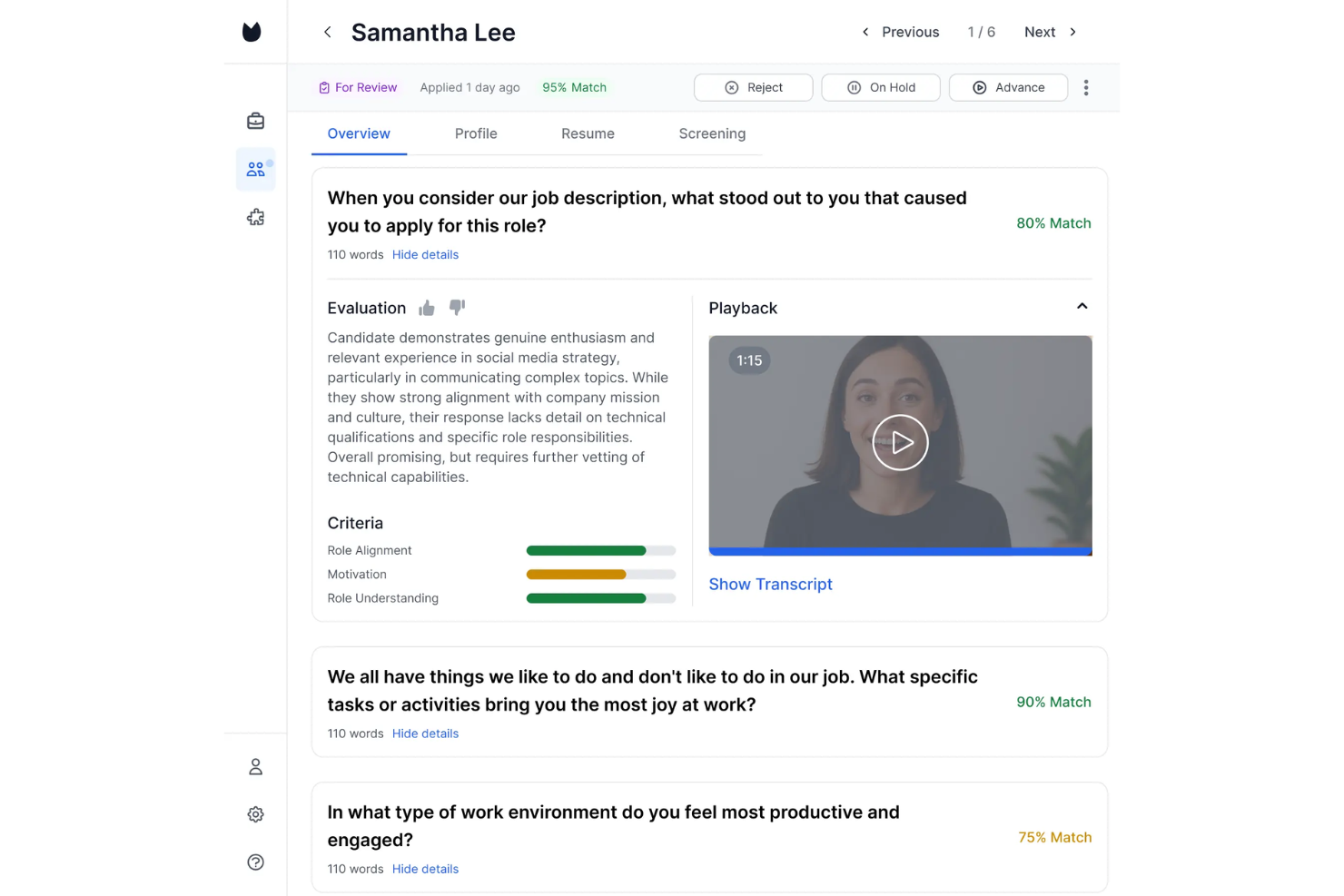
Truffle è una piattaforma di video colloqui progettata per team HR e recruiter che desiderano ottimizzare i colloqui virtuali, automatizzare la valutazione dei candidati e prendere decisioni di assunzione più intelligenti grazie a insight basati sull'IA.
Per Chi è Ideale Truffle?
Truffle è adatto ad aziende in crescita e team di selezione interni che necessitano di un sistema strutturato e scalabile per gestire numerosi colloqui virtuali senza rinunciare alla qualità dei candidati.
Perché Ho Scelto Truffle
Ho scelto Truffle per il modo in cui gestisce l’analisi dei candidati tramite IA durante i video colloqui. Dopo che i candidati completano un’intervista video on-demand, l’IA di Truffle valuta le loro risposte e mette in evidenza insight che consentono al mio team di confrontare i candidati fianco a fianco senza dover rivedere ogni registrazione. Mi piace anche la presenza di librerie di domande strutturate per mantenere la coerenza nelle valutazioni tra diversi intervistatori e ridurre i bias che si verificano quando i selezionatori giudicano in modo diverso i candidati.
Funzionalità Principali di Truffle
- Recap Candidato: Truffle genera automaticamente un riepilogo video di 30 secondi dell’intervista di ciascun candidato per una revisione rapida.
- Valutazioni del talento: Tre valutazioni strutturate — Personalità (Big Five), Giudizio Situazionale e Compatibilità con l’Ambiente — misurano l’allineamento reale al ruolo.
- AI Check: Un segnale integrato che segnala quando le risposte dei candidati mostrano schemi tipici di risposte generate da IA.
- Branding personalizzabile: Schermate per i candidati, incluse landing page del colloquio ed email di conferma, possono mostrare il tuo logo, i colori aziendali e i tuoi messaggi.
Integrazioni di Truffle
Le integrazioni includono Ashby, Breezy HR e Indeed.
Pros and Cons
Pros:
- Valuta i candidati usando punteggi IA specifici per il ruolo
- Riduce i bias con criteri di selezione coerenti
- Riduce i tempi di revisione grazie a trascrizioni e riepiloghi
Cons:
- Si concentra sullo screening, non sull’intero ciclo del colloquio
- Poche integrazioni al di fuori dei principali ATS
Ideale per colloqui da remoto conformi al GDPR

TestTrick è una piattaforma di valutazione pre-assunzione che combina colloqui video asincroni monodirezionali con test di competenze, valutazioni di programmazione e analisi dei candidati basata sull'intelligenza artificiale.
Per chi è ideale TestTrick?
TestTrick è adatto ai team di acquisizione talenti di aziende di medie dimensioni che vogliono valutare i candidati con test strutturati e video asincroni su un'unica piattaforma.
Perché ho scelto TestTrick
Ho incluso TestTrick tra le mie migliori scelte perché la sua conformità al GDPR va ben oltre una semplice informativa sulla privacy. La piattaforma offre ai recruiter controlli di consenso integrati che si attivano prima dell'inizio di qualsiasi valutazione, impostazioni personalizzate per la conservazione dei dati e strumenti per esportare, anonimizzare o eliminare i dati dei candidati su richiesta. Per i team che assumono nell'UE o nello SEE, ciò significa che le risposte video sono criptate sia a riposo sia in transito, e per ogni account cliente è disponibile un Accordo di Trattamento dei Dati, non solo per i livelli enterprise.
Funzionalità principali di TestTrick
- Valutazione video supportata dall'IA: TestTrick analizza espressioni facciali, chiarezza vocale e segnali di soft skills nelle risposte registrate dei candidati senza necessità di integrazioni aggiuntive.
- Kit di colloquio standardizzati: Crea set di domande coerenti con limiti di tempo fissi e tempo per riflettere, riducendo i bias inconsci tra tutti i candidati per lo stesso ruolo.
- Monitoraggio webcam e schermo: Durante le sessioni video asincrone, TestTrick acquisisce flussi webcam e screenshot della sessione per segnalare comportamenti sospetti prima della valutazione delle risposte.
- Branding white-label: Applica il logo, i colori e le email personalizzate della tua azienda a tutta l'esperienza di colloquio che vede il candidato.
Integrazioni di TestTrick
TestTrick offre integrazioni ATS native con Greenhouse, Lever, Manatal, JazzHR e Teamtailor, con punteggi e registrazioni video che si sincronizzano in tempo reale nel tuo ATS. È inoltre disponibile un'API per integrazioni personalizzate.
Pros and Cons
Pros:
- Consente inviti multipli ai candidati
- Permette di allegare un video introduttivo personalizzato del recruiter
- Automatizza la valutazione dei candidati
Cons:
- Nessuna programmazione colloqui o sincronizzazione calendario
- Manca di colloqui video live bidirezionali

Manatal
Ideale per videocolloqui AI con trascrizioni

Manatal è una piattaforma di reclutamento progettata per team HR e agenzie di selezione che desiderano colloqui virtuali, screening automatico dei candidati e la gestione dell’intero processo di assunzione in un unico luogo.
Per chi è più adatto Manatal?
Manatal è particolarmente indicato per team HR e agenzie di selezione di piccole e medie dimensioni che necessitano di una piattaforma di reclutamento tutto-in-uno con strumenti integrati per colloqui virtuali.
Perché ho scelto Manatal
Ho inserito Manatal tra i migliori della mia selezione per la sua eccellente gestione dei videocolloqui basati su intelligenza artificiale con trascrizione automatica integrata direttamente nel flusso di lavoro di assunzione. Apprezzo che i candidati possano registrare risposte video in modo asincrono e che l’AI di Manatal generi poi trascrizioni che il mio team può esaminare, cercare e annotare senza dover riguardare ogni clip. Questo livello di trascrizione è davvero utile quando si confrontano più candidati per una posizione ad alto volume. La valutazione AI aggiunge inoltre un ulteriore segnale, evidenziando le risposte in base alla pertinenza e alla qualità comunicativa.
Le funzionalità principali confermate includono: pipeline ATS/candidati, raccomandazioni AI, arricchimento dei profili candidati, strumenti di collaborazione, pagine carriera personalizzate, report & analytics e CRM per il recruiting. L’elenco qui sotto esclude le funzioni AI di videocolloquio e trascrizione già discusse sopra.
Funzionalità principali di Manatal
- Raccomandazioni AI per i candidati: L’AI di Manatal identifica e classifica automaticamente i candidati dal tuo database in base ai requisiti del ruolo.
- Arricchimento dei profili dei candidati: Raccoglie dati pubblici dai profili social per arricchire i profili dei candidati oltre quanto riportato nel CV.
- Costruttore di pagine carriera personalizzate: Crea e personalizza una pagina carriera con il tuo brand e incorpora moduli di candidatura personalizzati.
- Dashboard di report e analytics: Monitora metriche di assunzione come tempi di assunzione, conversione delle fasi della pipeline e performance dei canali di sourcing.
Integrazioni di Manatal
Le integrazioni includono Indeed, Codility, Mailchimp, Google Suite, Microsoft 365, LinkedIn Premium, ZipRecruiter, Monster, Talent.com e Google for Jobs.
Pros and Cons
Pros:
- Videocolloqui asincroni integrati con trascrizioni
- La valutazione AI dei candidati mette in evidenza le migliori corrispondenze
- Pipeline personalizzabili adattabili alle fasi di assunzione
Cons:
- I report avanzati sono meno dettagliati rispetto alla concorrenza
- Per accedere a tutte le funzionalità sono richiesti piani di livello superiore
New Product Updates from Manatal

Manatal Adds Candidate Login and Employee Portal to Career Pages
Manatal has added Candidate Login, Internal Employee Portal, and internal job visibility controls for Career Pages. These features help teams simplify applications, support employee mobility, and manage internal hiring workflows. For more information, visit Manatal’s official site.
 .
.
Humanly
Ideale per lo screening dei candidati tramite IA conversazionale
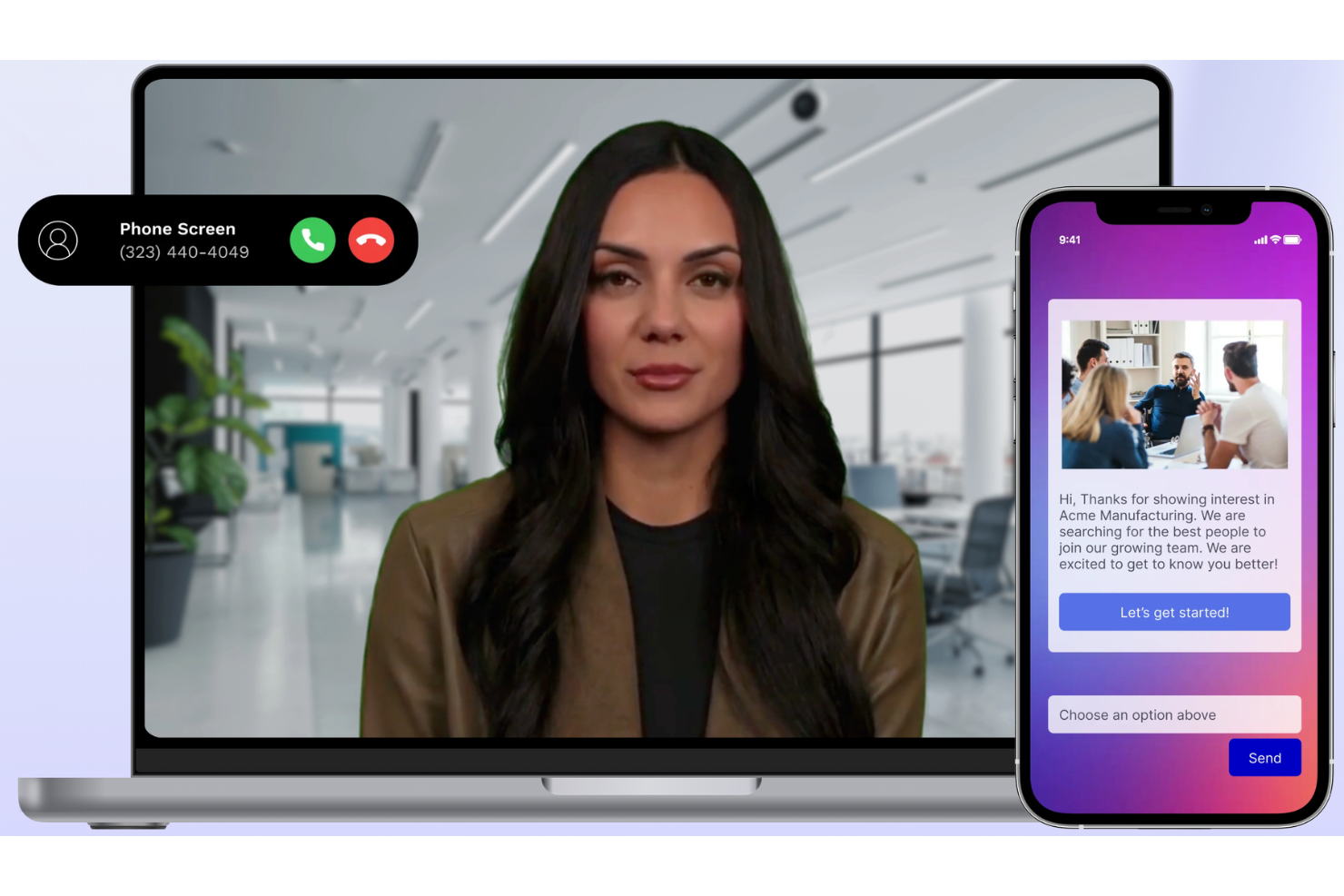
Humanly è una piattaforma di selezione del personale alimentata dall’IA, progettata per team HR e recruiter che vogliono automatizzare la selezione dei candidati, semplificare i colloqui virtuali e migliorare l’esperienza complessiva dei candidati in ambienti di lavoro da remoto e ibridi.
A chi è più adatto Humanly?
Humanly è particolarmente indicato per team di selezione di medie e grandi dimensioni che gestiscono alti volumi di candidature e necessitano di automatizzare il coinvolgimento dei candidati nelle prime fasi senza rinunciare a un approccio personalizzato.
Perché ho scelto Humanly
Humanly è nella mia shortlist per il modo in cui gestisce lo screening tramite IA conversazionale prima di un colloquio umano. La piattaforma utilizza un’interfaccia di chat IA per coinvolgere immediatamente i candidati subito dopo la candidatura, ponendo domande di scrematura specifiche per il ruolo e avanzando o escludendo i candidati in base alle risposte fornite. Il mio team può configurare fasi strutturate di colloquio video che seguono direttamente queste conversazioni IA; quando un recruiter esamina il candidato, la scrematura preliminare è già avvenuta. La funzione di pianificazione automatica dei colloqui elimina il ping-pong organizzativo che rallenta i processi di assunzione ad alto volume.
Caratteristiche principali di Humanly
- Riepiloghi strutturati dei colloqui: L’AI Notetaker genera subito dopo ogni colloquio dei riepiloghi dei candidati allineati al ruolo, mettendo in evidenza punti di forza, rischi e segnali comportamentali chiave.
- Punteggio e classifica dei candidati: L’IA attribuisce automaticamente un punteggio e ordina i candidati sulla base delle risposte nello screening, così i recruiter possono dare priorità ai profili più qualificati.
- Regole di esclusione personalizzabili: Imposta criteri specifici per il ruolo per filtrare automaticamente i candidati non idonei prima della fase di colloquio.
- Analisi dei colloqui: I dati successivi ai colloqui rilevano l’equilibrio nei tempi di parola, il sentiment del candidato e la copertura degli argomenti rispetto alle competenze raccomandate.
Integrazioni di Humanly
Le integrazioni includono le principali piattaforme ATS come Greenhouse, Lever, Workday e iCIMS.
Pros and Cons
Pros:
- Automatizza le conversazioni iniziali con i candidati, riducendo il lavoro manuale di screening per i recruiter
- Semplifica la comunicazione con i candidati nelle prime fasi di reclutamento e nelle fasi di pianificazione
- Fa risparmiare tempo nella selezione raccogliendo le risposte dei candidati prima dei colloqui dal vivo
Cons:
- Sfide nella navigazione quando si cercano report o dati specifici sui candidati o sulle scremature
- Bug occasionali che influenzano l’ordine delle domande, la formattazione o la qualità audio

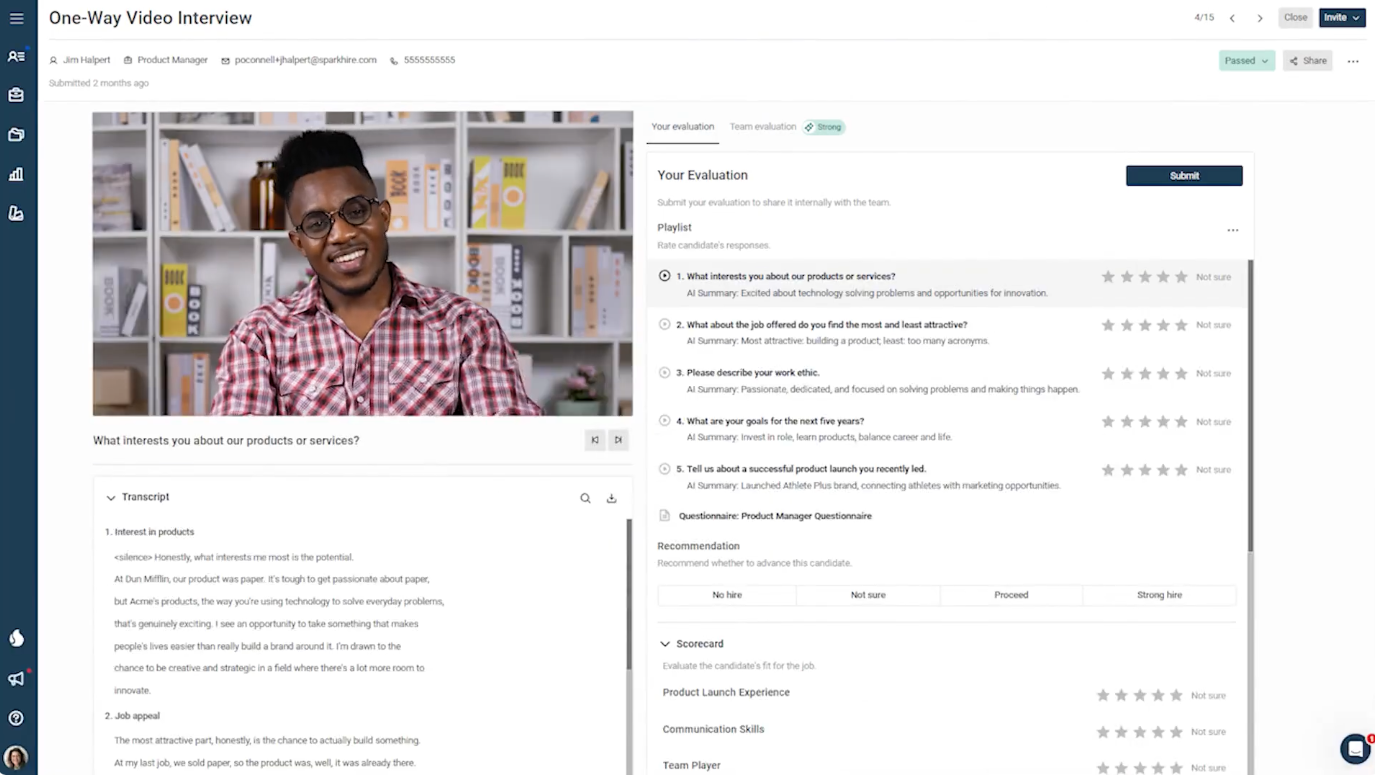
La piattaforma di video colloqui unidirezionali di SparkHire è progettata per i team di selezione che desiderano sostituire le pre-selezioni telefoniche con un processo asincrono più strutturato. I candidati registrano le risposte alle domande standardizzate nel momento a loro più comodo, e i responsabili delle assunzioni possono esaminare le candidature senza dover coordinare gli orari. La piattaforma è particolarmente adatta per le organizzazioni che devono selezionare candidati per più ruoli o sedi, mantenendo coerenza nelle valutazioni delle prime fasi.
Per chi è ideale SparkHire?
SparkHire è una soluzione indicata per team HR e recruiter di piccole e medie imprese che hanno bisogno di valutare i candidati in modo coerente su diversi ruoli o sedi senza aumentare il carico di pianificazione.
Perché ho scelto SparkHire
Ho scelto SparkHire perché consente ai recruiter di inviare domande di colloquio standardizzate a cui tutti i candidati rispondono nelle stesse condizioni. I responsabili delle assunzioni possono analizzare le candidature in blocco, e la piattaforma offre anche trascrizione assistita dall’IA, riepiloghi dei candidati e strumenti di valutazione delle competenze a supporto dei flussi di lavoro di revisione delle candidature.
Caratteristiche principali di SparkHire
Altre funzionalità che rendono SparkHire particolarmente valido per i colloqui video includono:
- Colloqui video unidirezionali standardizzati: I candidati rispondono alle stesse domande in un formato coerente per una valutazione strutturata nelle prime fasi.
- Colloqui video dal vivo: Possibilità di condurre colloqui in tempo reale direttamente sulla piattaforma, sia in formato panel che uno-a-uno.
- Revisione assistita dall’IA: Opzione per trascrivere le risposte, generare riepiloghi dei candidati e valutare le risposte in base alle competenze selezionate.
- Esperienza di colloquio personalizzata: Personalizza l’interfaccia del colloquio con il logo, i colori e i messaggi della tua azienda.
Integrazioni di SparkHire
Le integrazioni includono Greenhouse, Lever, iCIMS, BambooHR, Bullhorn, JazzHR, ApplicantStack, Avature, Ceipal e Crelate Talent.
Pros and Cons
Pros:
- Strumenti integrati di valutazione e rating dei candidati
- Supporta più recruiter per colloquio
- Esperienza di colloquio personalizzata con il brand
Cons:
- Opzioni limitate di personalizzazione dell’esperienza candidato
- Le funzionalità di reportistica sono meno avanzate rispetto ad alcuni concorrenti

Willo
Ideale per selezionare e assumere candidati su larga scala
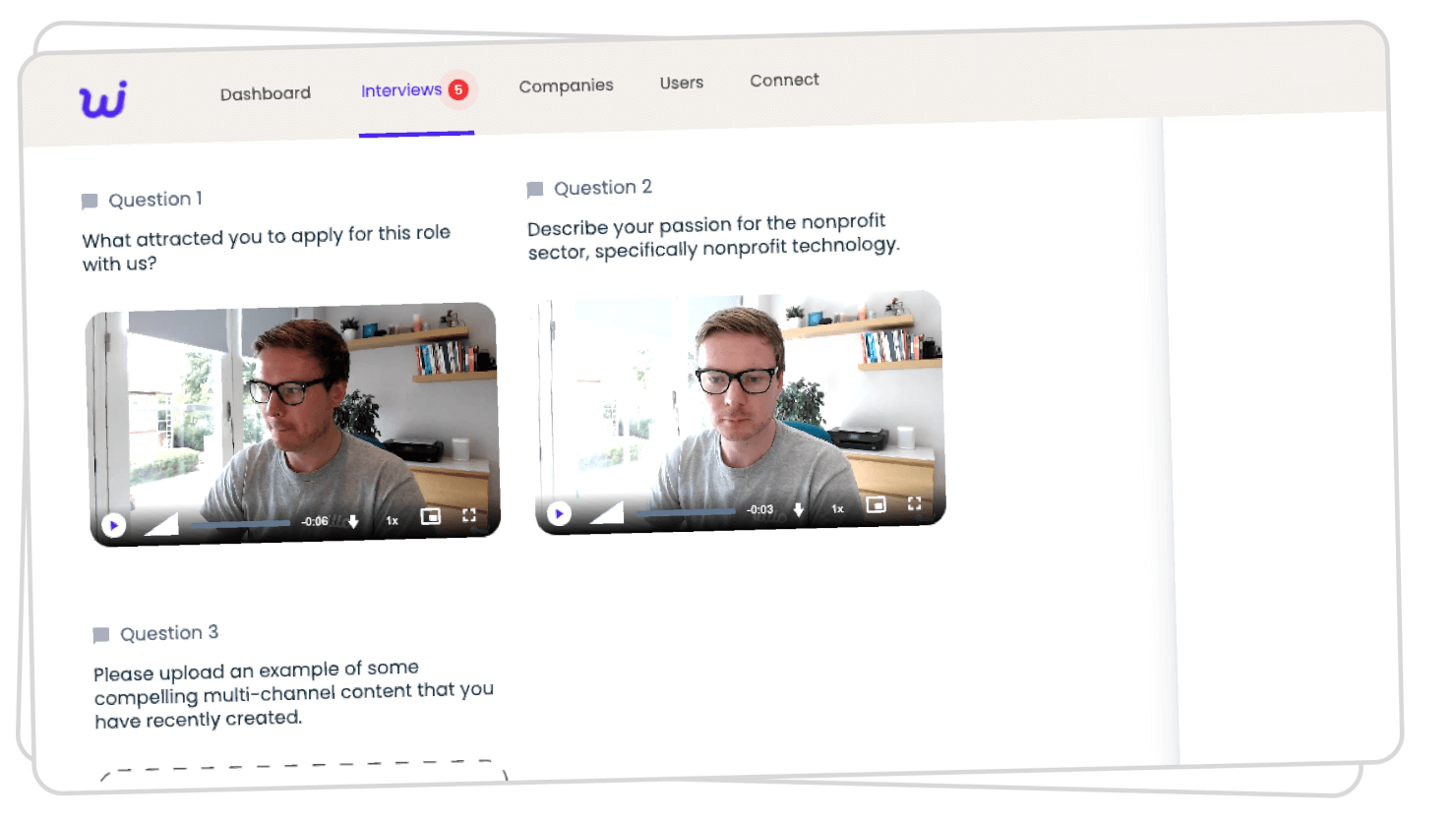
Willo è una piattaforma per colloqui video progettata per i team HR e i recruiter che devono selezionare e valutare i candidati da remoto, rendendo più semplice la gestione di grandi gruppi di candidati e ottimizzando le fasi iniziali di assunzione.
Per chi è più adatto Willo?
Willo è ideale per team di selezione di medie e grandi dimensioni che gestiscono regolarmente un alto volume di candidati per diversi ruoli o sedi.
Perché ho scelto Willo
Ho scelto Willo tra i migliori perché è progettato appositamente per l'assunzione su larga scala, e la funzione di 'invito a livello massivo' è il suo punto di forza. Il mio team può caricare un file CSV con centinaia di candidati e Willo gestisce gli inviti via email e SMS, oltre ai promemoria automatici, senza alcun follow-up manuale. Apprezzo anche gli strumenti anti-cheating, che segnalano deepfake e risposte registrate, così possiamo essere certi dell’autenticità dei candidati che valutiamo. La funzione Showcase link consente di condividere con un solo clic le risposte pre-selezionate con i responsabili delle assunzioni, riducendo i passaggi che normalmente rallentano le selezioni ad alto volume.
Funzionalità principali di Willo
- Costruttore di domande personalizzate: Crea domande strutturate per il colloquio utilizzando testo, video o formati a scelta multipla su misura per ogni ruolo.
- Riproduzione delle risposte dei candidati: Rivedi le risposte video registrate a velocità regolabile con la possibilità di lasciare commenti con timestamp.
- Esperienza di colloquio personalizzata: Aggiungi logo, colori e video di benvenuto della tua azienda per offrire ai candidati un ambiente di colloquio coerente.
- Valutazione collaborativa: Valuta e attribuisci punteggi ai candidati individualmente prima di confrontare le valutazioni all'interno del team di selezione.
Integrazioni di Willo
Le integrazioni includono Greenhouse, Lever, Workable, Teamtailor, BambooHR, Bullhorn, JazzHR, Ashby, SmartRecruiters e Recruitee.
Altri software per videocolloqui
Ecco alcuni altri strumenti per colloqui virtuali che non sono rientrati nella mia lista dei 10 migliori, ma che vale comunque la pena esaminare:
- Zoom
Ideale per l'usabilità
- Riverside
Ideale per la registrazione su dispositivo locale
- myInterview
Miglior screening AI per selezioni senza contatto
- Jobma
Ideale per video colloqui e valutazioni delle competenze
- Vervoe
Ideale per le integrazioni
- Skype
Ideale per utenti Microsoft
- Zoho Meeting
Ideale per colloqui video collaborativi
- eSkill
Ideale per colloqui video personalizzabili e valutazioni delle competenze
- XOR
Miglior video colloquio con supporto SMS
- HireVue
Ideale per le aziende
- Google Classroom
Miglior strumento gratuito per l'apprendimento in aula
- HRBLADE
Ideale per colloqui video assistiti da AI con verifica antiplagio
- Harver
Ideale per il reclutamento su larga scala
- Interviewstream
Miglior calendario colloqui integrato
- Haystack Pro
Ideale per elementi interattivi nella candidatura
- Canditech
Ideale per integrare colloqui video con test di competenze valutati automaticamente
- Zoho Recruit
Ideale per i suoi molteplici formati di colloquio video e le funzioni di selezione collaborativa
- Screenz
Ideale per le misure anti-frode integrate


Recensioni correlate di software per le risorse umane
Se non hai ancora trovato quello che cerchi, dai un'occhiata a questi altri strumenti correlati che abbiamo testato e valutato:
- Software per le risorse umane
- Software per la gestione delle buste paga
- Servizi di datore di lavoro legale
- Sistemi HRMS
- Software HCM
- Software per la gestione della forza lavoro
Come Valuto le Piattaforme di Video Colloquio
Divido la mia valutazione in due livelli: le funzionalità di base che tutte le piattaforme devono avere—registrazione asincrona, video live, sincronizzazione con ATS—e i fattori differenzianti che distinguono alcuni strumenti dagli altri.
Funzionalità Principali (Requisiti Fondamentali per Questa Lista)
Quando seleziono gli strumenti per la mia lista, valuto ciascuno di essi su una scala da 0 (non offre la funzionalità) a 5 (eccelle in quest'area) per ogni funzionalità di base elencata qui di seguito. Quindi calcolo il punteggio totale dello strumento in percentuale. Ogni strumento deve raggiungere un punteggio totale minimo del 65% per essere preso in considerazione per l'inclusione.
- Video Colloqui in Diretta: Verifico se la piattaforma supporta videochiamate native basate su browser con capacità di panel, condivisione schermo e sincronizzazione con il calendario—così i team di selezione possono condurre fasi strutturate senza spingere i candidati verso app di terze parti.
- Colloqui Video Asincroni: Valuto come i candidati ricevono, registrano e inviano risposte a domande predefinite, incluso se la piattaforma offre limiti di tempo configurabili, possibilità di rifare la risposta e prompt personalizzati con branding.
- Registrazione e Riproduzione dei Colloqui: Valuto come vengono archiviate, condivise e ricercate le registrazioni—ad esempio, se un recruiter può taggare un momento specifico nella riproduzione e inviare un link con timestamp a un responsabile per la revisione.
- Kit per Colloqui Strutturati: In questa sezione sono importanti template di schede di valutazione, scale di rating e librerie di domande. Verifico che gli strumenti consentano ai team di selezione di creare kit specifici per ruolo, così ogni intervistatore valuta i candidati in base agli stessi criteri di competenza.
- Strumenti di Valutazione Collaborativa: Esamino come i membri del panel condividono feedback—se i valutatori possono attribuire punteggi in modo indipendente, confrontare candidati fianco a fianco e lasciare commenti senza influenzare le valutazioni degli altri.
- Integrazioni ATS/HRIS: Il valore di una piattaforma diminuisce rapidamente se i dati dei colloqui restano isolati. Controllo le integrazioni native, bidirezionali, con sistemi principali come Greenhouse, Workday, Lever e iCIMS per mantenere sincronizzati i dati dei candidati.
Una volta ottenuta una lista di strumenti che soddisfano i criteri, considero ciò che rende unica ogni piattaforma.
Fattori Differenzianti (Cosa Distingue i Fornitori)
Ecco come confronto i vari fornitori:
Funzionalità Distintive
Le analisi dei candidati basate su AI sono un fattore di differenziazione importante. Cerco piattaforme che trascrivono le risposte e segnalano le competenze, affinché i recruiter possano rivedere una risposta specifica senza riguardare l’intera registrazione. La pianificazione automatica con rilevamento del fuso orario e prenotazione self-service riduce lo scambio di email che rallenta le assunzioni di massa. Anche gli strumenti per mitigare i bias hanno un peso reale—prompt di valutazione strutturati e funzionalità di anonimizzazione aiutano i panel a valutare i dati di competenza invece delle reazioni istintive.
Oltre le Funzionalità
Conformità e protezione dei dati sono in cima alla mia lista. I video colloqui catturano dati biometrici e personali, quindi verifico le certificazioni SOC 2, le policy di conservazione dei dati configurabili e le informative trasparenti sull’uso dell’AI. Anche la scalabilità è importante—una piattaforma in grado di soddisfare un team di 20 persone potrebbe essere in difficoltà durante una campagna stagionale con migliaia di candidati. Valuto inoltre la profondità delle analisi, cercando dashboard che tracciano il rapporto tra colloqui e offerte e la calibrazione degli intervistatori, così i responsabili HR possono individuare colli di bottiglia e monitorare la coerenza delle assunzioni.
Come scegliere un software per videocolloqui
Il software per videocolloqui può aiutarti a migliorare il processo di assunzione e a entrare in contatto con i migliori talenti in tutto il mondo, sia faccia a faccia sia in modalità asincrona. Per capire quale software per videocolloqui soddisfi meglio le tue esigenze, tieni presenti i seguenti aspetti:
- Quali sfide legate alle assunzioni stai cercando di risolvere? Inizia identificando le sfide che stai cercando di superare. Questo ti aiuterà a chiarire le caratteristiche e le funzionalità che il software per i colloqui video deve offrire.
- Chi sono i tuoi utenti principali? Considera chi utilizzerà il software e quante licenze ti serviranno. Per il software per i colloqui video, potresti voler garantire l'accesso all'intera forza lavoro oppure scegliere di limitarlo ai recruiter interni e ai responsabili delle assunzioni. Una volta chiarito questo aspetto, è inoltre utile classificare le esigenze dei diversi utenti per individuare le priorità principali per gli utenti avanzati, i responsabili e i dipendenti, assicurandoti che siano tutte soddisfatte.
- Hai bisogno di integrazioni specifiche con altri software? Chiarisci se il nuovo software per i colloqui video sostituirà alcuni strumenti o dovrà integrarsi con essi. Tra i sistemi principali da considerare ci sono il software per il recruiting, le applicazioni per l'accesso singolo e i calendari digitali attraverso sistemi operativi di lavoro come Microsoft 365 o Google Workspace.
- Quali risultati sono importanti e come misurerai il successo? Definire chiaramente i risultati desiderati fin dall'inizio è fondamentale per evitare di sprecare tempo prezioso. Ad esempio, potresti voler migliorare la tua capacità di entrare in contatto con le persone in cerca di lavoro da remoto o iniziare a condurre colloqui video preregistrati.
- Il nuovo software soddisfa i tuoi requisiti tecnici? Considera la scelta del software insieme ai flussi di lavoro e ai sistemi esistenti. Valuta ciò che funziona bene e le eventuali aree problematiche che devono essere affrontate. Il nuovo software si integrerà con il tuo sistema operativo di lavoro, come Microsoft 365 o Google Workspace? Offre le funzionalità di sicurezza o le caratteristiche ottimizzate per i dispositivi mobili di cui hai bisogno?
Ricorda: ogni azienda è diversa — non dare per scontato che un sistema per i colloqui video funzionerà per la tua organizzazione solo perché è popolare.
Tendenze nel software per i colloqui video
Poiché le organizzazioni continuano a competere aggressivamente a livello internazionale per conquistare i migliori talenti, gli strumenti che contribuiscono a migliorare le attività di recruiting si sono evoluti per rispondere a queste esigenze. Ecco alcune tendenze chiave che stanno plasmando il futuro del software per i colloqui video:
- Analisi avanzata basata sull'intelligenza artificiale: Si osserva una tendenza significativa verso l'integrazione di algoritmi avanzati di intelligenza artificiale per analizzare più approfonditamente le risposte dei candidati. Questa tecnologia aiuta a valutare gli indizi non verbali e i modelli linguistici, offrendo una visione più completa dell'idoneità del candidato.
- Analisi predittiva: Sfruttando i big data e l'apprendimento automatico, alcuni strumenti offrono ora funzionalità di analisi predittiva che prevedono il successo dei candidati in ruoli specifici sulla base di dati storici e metriche relative alle prestazioni.
- Opzioni per i colloqui asincroni: La flessibilità è fondamentale nel mercato del lavoro odierno e le funzionalità che consentono ai candidati di completare i colloqui quando preferiscono sono molto apprezzate. Questa funzionalità è particolarmente importante per interagire con i migliori talenti in diversi fusi orari.
- Ambienti per colloqui in realtà virtuale (VR): Alcune piattaforme stanno iniziando a sperimentare la VR per simulare situazioni di colloquio reali, con l'obiettivo di rendere l'esperienza più immersiva sia per i candidati sia per gli intervistatori.
Con il continuo progresso del software per i colloqui video, è chiaro che l'attenzione si concentra sulla creazione di esperienze di recruiting più efficienti, coinvolgenti e ricche di informazioni. Investendo in uno strumento che sfrutta questi sviluppi, migliorerai la tua capacità strategica di attrarre e valutare efficacemente i candidati migliori.
Che cos'è il software per i colloqui video?
Il software per i colloqui video è uno strumento digitale che aiuta i team delle risorse umane e i recruiter a condurre colloqui di lavoro da remoto tramite video. Semplifica il processo di assunzione sostituendo i colloqui telefonici preliminari e gli incontri di persona con colloqui video registrati o dal vivo.
Queste piattaforme vengono utilizzate dai datori di lavoro per risparmiare tempo, ridurre i conflitti di programmazione e garantire valutazioni dei candidati più coerenti e scalabili, particolarmente utili per le assunzioni da remoto e internazionali.
Funzionalità del software per i colloqui video
Nell'odierno mercato del lavoro globalizzato, trovare e coinvolgere i migliori talenti richiede strumenti e strategie innovative. Il software per i colloqui video aiuta le aziende a condurre colloqui strutturati dal vivo o asincroni con candidati da qualsiasi parte del mondo. Per garantire che questi colloqui siano efficaci ed efficienti, ecco le funzionalità più importanti da cercare:
- Video e audio di alta qualità: La chiarezza del video e dell'audio è fondamentale per valutare gli indizi verbali e non verbali di un candidato, che sono cruciali per comprendere le sue risposte e garantire una comunicazione efficace.
- Colloqui video unidirezionali e bidirezionali: La migliore piattaforma per i colloqui video consentirà di configurare colloqui unidirezionali, durante i quali i candidati rispondono davanti a una videocamera a domande predefinite e il filmato viene salvato e analizzato in un secondo momento. I candidati migliori, selezionati per proseguire nel processo, dovrebbero poter partecipare alla fase successiva a colloqui dal vivo, individuali o di gruppo.
- Funzionalità di registrazione: La registrazione dei colloqui consente ai team addetti alle assunzioni di esaminare le risposte in modo più approfondito, garantendo una valutazione equa e completa di ogni candidato.
- Modelli di colloquio personalizzabili: La possibilità di personalizzare e standardizzare le domande del colloquio garantisce che tutti i candidati siano valutati allo stesso modo, rendendo il processo di selezione più equo e obiettivo.
- Controllo del tempo: Alcune domande o prove devono essere svolte entro limiti di tempo e il miglior software per i colloqui video offrirà funzionalità integrate per questo scopo.
- Configurazione e adozione semplici: Gli intervistati potrebbero non avere o non conoscere l'app per i colloqui video scelta; pertanto, è fondamentale che il processo di invito, la configurazione e l'usabilità siano estremamente intuitivi per chi utilizza il servizio per la prima volta, offrendo un'esperienza utente positiva.
- Strumenti di collaborazione: Le funzionalità che aiutano gli intervistatori e i responsabili delle assunzioni a condividere note, punteggi e impressioni sui candidati aiutano i team a prendere decisioni di assunzione collaborative e basate sul consenso.
- Compatibilità con i dispositivi mobili: Garantire che il software sia compatibile con i dispositivi mobili consente a candidati e intervistatori di connettersi da qualsiasi luogo, aumentando l'accessibilità e i tassi di partecipazione.
- Funzionalità di sicurezza e privacy: Misure di sicurezza efficaci, tra cui la crittografia dei dati e la conformità alle leggi sulla privacy, sono essenziali per proteggere le informazioni personali di tutti i partecipanti coinvolti nel processo di colloquio.
- Strumenti di pianificazione: Offrendo strumenti di pianificazione o integrazioni con i calendari, il software semplifica il coordinamento degli orari dei colloqui, tenendo conto delle differenze di fuso orario e della disponibilità dei candidati e riducendo le difficoltà legate alla pianificazione.
- Integrazioni software: Le piattaforme per i colloqui raramente funzionano in modo isolato, quindi la compatibilità con altre app è importante. È consigliabile scegliere un software che si connetta a strumenti di terze parti come il proprio sistema di gestione dei candidati, sistemi di messaggistica come e-mail o Slack, software per il recruiting e il proprio software HRIS.
Scegliere un software per i colloqui video dotato di queste funzionalità è fondamentale per le organizzazioni che desiderano attrarre e valutare i migliori talenti da tutto il mondo. Questi strumenti possono aiutare a creare un'esperienza positiva per i candidati, con ricadute positive sul marchio del datore di lavoro.
Vantaggi del software per i colloqui video
Il software per i colloqui video è diventato un elemento fondamentale per i dipartimenti delle risorse umane che desiderano migliorare i propri processi di assunzione. Ecco alcuni dei vantaggi che puoi aspettarti implementando il software per i colloqui video più adatto alle tue esigenze:
- Riduzione dei costi: Conducendo i colloqui online, le organizzazioni possono risparmiare sui costi elevati associati ai colloqui in presenza, tra cui viaggi, alloggio e tempo, rendendo questo abbonamento software conveniente nel lungo periodo.
- Riduzione del tempo necessario per l'assunzione: Rendendo i colloqui più accessibili e facili da programmare, il software per i colloqui video può ridurre significativamente il tempo necessario per coprire una posizione, aiutando le organizzazioni ad assicurarsi rapidamente i talenti migliori.
- Assunzioni di maggiore qualità: La comodità dei colloqui video può portare a un maggior numero di interazioni con i candidati, offrendo una comprensione più approfondita delle loro capacità e della loro idoneità al ruolo.
- Maggiore portata globale: Consentendo alle aziende di intervistare candidati da qualsiasi parte del mondo, questi strumenti eliminano le barriere geografiche e permettono alle imprese di trovare la persona più adatta al proprio team, indipendentemente dalla sua posizione.
- Esperienza del candidato migliorata: Offre comodità e flessibilità ai candidati. I candidati apprezzano la flessibilità dei colloqui video, poiché possono partecipare comodamente da casa e in un momento a loro conveniente, migliorando così la loro percezione dell'azienda.
L'adozione di un software per i colloqui video aiuta le organizzazioni a migliorare l'efficienza e l'efficacia del processo di assunzione, offrire un'esperienza flessibile ai candidati e connettersi facilmente con i migliori talenti di tutto il mondo. Con una forza lavoro sempre più globale e da remoto, l'importanza di integrare soluzioni innovative di questo tipo nelle pratiche delle risorse umane continua a crescere.
Costi e prezzi del software per i colloqui video
Il software per i colloqui video offre una varietà di piani progettati per soddisfare le esigenze di organizzazioni di diverse dimensioni e con diversi volumi di assunzioni, dalle piccole startup alle grandi aziende. Comprendere le opzioni dei piani e i relativi prezzi è fondamentale per selezionare un pacchetto software che non solo rientri nel budget, ma supporti anche efficacemente gli obiettivi di reclutamento. Di seguito è riportata una panoramica dettagliata delle opzioni di piano tipiche che si possono incontrare esplorando il software per i colloqui video.
Tabella comparativa dei piani per il software per i colloqui video
| Tipo di piano | Prezzo medio | Funzionalità comuni |
|---|---|---|
| Gratuito | $0 | Funzionalità di base per i colloqui video, numero limitato di colloqui al mese e accesso all'assistenza standard |
| Base | $50 - $100 al mese | Qualità video migliorata, limiti più elevati per i colloqui, assistenza via e-mail e accesso alle analisi di base |
| Professionale | $100 - $250 al mese | Branding personalizzato, opzioni di pianificazione avanzate, integrazione con il software per le risorse umane e assistenza prioritaria |
| Aziendale | Prezzo personalizzato | Colloqui illimitati, account manager dedicato, integrazioni personalizzate, analisi e report avanzati e assistenza 24/7 |
Quando valuti quale piano scegliere, dovresti confrontare le tue esigenze attuali e future in materia di assunzioni con le funzionalità e i limiti di ciascun piano. È importante selezionare un piano che non solo rientri nel budget, ma che sia anche in grado di adattarsi alla crescita della tua organizzazione e all'evoluzione delle tue strategie di reclutamento.
Software per videocolloqui: FAQ
Ti stai ancora chiedendo in che modo il software per videocolloqui possa aiutarti a valutare i candidati qualificati? Queste risposte alle domande frequenti sono un buon punto di partenza:
Le piattaforme per videocolloqui si integrano con altri software per le risorse umane o sistemi ATS?
Sì, la maggior parte delle principali piattaforme per videocolloqui si integra con i più diffusi software per le risorse umane e sistemi di tracciamento dei candidati (ATS), come Greenhouse, Workday o Lever. Le integrazioni automatizzano il monitoraggio dei candidati, la programmazione dei colloqui e la raccolta dei feedback. Prima di scegliere un fornitore, verifica le integrazioni specifiche offerte per assicurarti un flusso di lavoro senza intoppi.
Esistono piattaforme gratuite per i videocolloqui?
Sì, alcune piattaforme per videocolloqui offrono piani o prove gratuite, ma generalmente presentano limitazioni, come un numero ridotto di colloqui o funzionalità limitate. Le opzioni gratuite sono ideali per piccoli cicli di assunzione o programmi pilota. La maggior parte dei fornitori affermati applica un costo per la piena funzionalità, soprattutto per le integrazioni e l’analisi dei dati. Prima di impegnarti, verifica sempre che la versione gratuita sia adatta al tuo flusso di lavoro.
Quanto tempo occorre per implementare un software per videocolloqui?
La configurazione della maggior parte delle piattaforme richiede da alcuni giorni a due settimane, a seconda della complessità del sistema e delle integrazioni. Se devi collegare il tuo ATS o personalizzare i flussi di lavoro, prevedi tempi più lunghi. I fornitori offrono spesso supporto per l’avvio o account manager per accelerare il lancio. Pianificare in anticipo la formazione del team contribuisce a rendere più fluida l’implementazione.
Come preparo i candidati a un videocolloquio?
Condividi in anticipo istruzioni chiare, inclusi i requisiti tecnici e i dettagli sulla scadenza. Suggerisci ai candidati di testare webcam, microfono, illuminazione e connessione Internet. Quando disponibili, fornisci domande di esempio o link per esercitarsi. In questo modo garantisci un’esperienza di colloquio fluida e aiuti i candidati a dare il meglio.
Come possono i datori di lavoro garantire un processo di valutazione equo nei videocolloqui?
Elabora griglie di valutazione strutturate e domande standardizzate per ogni candidato. Valuta l’utilizzo di funzionalità di revisione anonima, che nascondono le informazioni identificative. Forma il team addetto alle assunzioni sulle migliori pratiche per una valutazione imparziale e verifica regolarmente gli esiti delle assunzioni per individuare eventuali pregiudizi involontari. Molte piattaforme offrono strumenti integrati per promuovere l’equità, che puoi utilizzare per sostenere queste iniziative.
Gli strumenti per videocolloqui possono contribuire a ridurre i pregiudizi nel processo di assunzione?
Sì, molte piattaforme supportano colloqui strutturati, revisioni anonime e valutazioni standardizzate, contribuendo a ridurre al minimo i pregiudizi inconsci. Alcune offrono anche analisi per evidenziare potenziali schemi di pregiudizio nelle assunzioni. In definitiva, affiancare questi strumenti alla formazione degli intervistatori è fondamentale per favorire decisioni più eque.
In che modo il software per videocolloqui gestisce la privacy dei dati e la conformità normativa?
La maggior parte delle piattaforme è conforme alle normative internazionali sulla protezione dei dati (come GDPR, SOC 2 e CCPA) e offre archiviazione sicura dei video, trasmissioni crittografate e controlli di accesso personalizzabili. Cerca soluzioni con politiche chiare sulla conservazione dei dati, funzionalità per la gestione del consenso e registri di controllo, così da poter rispettare gli standard di conformità della tua organizzazione.
In che modo le piattaforme per videocolloqui supportano le assunzioni da remoto e internazionali?
Queste piattaforme consentono di programmare, registrare e rivedere i colloqui tra diversi fusi orari, favorendo le assunzioni per i team distribuiti. Funzionalità come la programmazione automatizzata dei colloqui, le opzioni linguistiche e i colloqui asincroni aiutano a entrare in contatto in modo efficiente con candidati di tutto il mondo. Gli strumenti di collaborazione integrati consentono ai team da remoto di esaminare e valutare i candidati da qualsiasi luogo.
Ecco tre modi specifici in cui i videocolloqui supportano le assunzioni da remoto e internazionali:
- Accessibilità e comodità: i videocolloqui permettono ai candidati di qualsiasi parte del mondo di partecipare al processo di assunzione senza dover viaggiare. Questa accessibilità apre l’accesso a un bacino globale di talenti, rendendo più semplice per le aziende trovare i candidati migliori indipendentemente dalla loro posizione.
- Efficienza in termini di tempo e costi: queste piattaforme riducono il tempo e i costi associati ai metodi di assunzione tradizionali. Svolgendo i colloqui online, le aziende risparmiano sulle spese di viaggio e riducono il tempo dedicato alla programmazione e allo svolgimento dei colloqui di persona.
- Valutazione più approfondita dei candidati: gli strumenti per videocolloqui spesso includono funzionalità ATS avanzate, come colloqui registrati, analisi basate sull’intelligenza artificiale e formati di colloquio strutturati. Queste funzionalità aiutano a valutare meglio le capacità comunicative, la personalità e l’idoneità di un candidato al ruolo, andando oltre il semplice curriculum.
In breve, le aziende dovrebbero adottare le piattaforme per videocolloqui come strumento fondamentale del proprio arsenale di selezione se vogliono attingere efficacemente a una forza lavoro globale diversificata e competente.
Quanto è affidabile la valutazione dei videocolloqui basata sull'intelligenza artificiale e dovrei utilizzarla?
Le valutazioni basate sull’intelligenza artificiale possono accelerare lo screening assegnando punteggi alle risposte e segnalando i candidati migliori, ma accuratezza ed equità possono variare. Utilizza l’intelligenza artificiale come supporto, non come sostituto della valutazione umana. Esamina sempre criticamente le raccomandazioni dell’intelligenza artificiale, garantisci la trasparenza e verifica che i fornitori valutino regolarmente i propri algoritmi per individuare eventuali pregiudizi.
Quali sono i vantaggi e gli svantaggi dei videocolloqui asincroni o a senso unico?
I colloqui asincroni fanno risparmiare tempo permettendo ai candidati di registrare le proprie risposte secondo i loro programmi e consentendo ai revisori di valutare i colloqui con flessibilità. Tuttavia, si perde l’interazione in tempo reale e si potrebbero non cogliere segnali non verbali o opportunità di porre domande di approfondimento. Usali come strumento di preselezione o nelle prime fasi dei colloqui per ottimizzare i tempi senza compromettere l’esperienza dei candidati.
Per analizzare ulteriormente la questione, ecco alcuni pro e contro di questa pratica:
| Pro dei colloqui video unidirezionali | Contro dei colloqui video unidirezionali |
| Snellisce il processo di selezione dei candidati | È letteralmente unilaterale e può far sentire i candidati non valorizzati |
| Permette ai candidati di rivedere le domande e preparare in anticipo le risposte | Manca di un elemento umano e toglie la possibilità di avviare discussioni spontanee |
| Garantisce coerenza nell’uso di una serie definita di domande per ogni candidato | Elimina la possibilità di porre domande di approfondimento e chiarimento |
Altre recensioni di software utili per il processo di reclutamento
Il software per i colloqui video non è l’unico tipo di software che può aiutarti a migliorare il processo di selezione. Ecco alcune altre opzioni di cui potresti aver bisogno:
- Software per il personale
- Software per la programmazione dei colloqui
- Software di marketing per il reclutamento
- Software per i test pre-assunzione
- Software per videoconferenze
- Software per il reclutamento
- Software di reclutamento con AI per il sourcing ad alto volume
Cosa succede ora:
Se stai cercando un software per i colloqui video, contatta gratuitamente un consulente SoftwareSelect per ricevere consigli.
Compili un modulo e partecipi a una breve conversazione durante la quale il consulente approfondirà le tue esigenze specifiche. Successivamente, riceverai una rosa ristretta di software da valutare. Ti supporterà persino durante l’intero processo di acquisto, comprese le negoziazioni sul prezzo.