

I 10 migliori software CRM per il recruiting del 2026 per coinvolgere i talenti

10 Elenco dei migliori software CRM per il recruiting


I migliori software CRM per il recruiting ti aiuteranno ad attrarre, coinvolgere e coltivare i migliori talenti, offrendo al contempo diversi punti di forza nell'automazione, nella facilità d'uso e nella gestione della pipeline, per supportare al meglio la tua strategia di assunzione.
Il marketing per il recruiting è essenziale per raggiungere i candidati giusti e creare un processo di assunzione efficiente, ma non tutti i CRM sono uguali. A seconda del volume di ricerca dei candidati, dei tipi di ruoli da ricoprire o del fatto che tu gestisca clienti oltre ai candidati, la piattaforma giusta può offrirti una visibilità migliore, strumenti di coinvolgimento più efficaci e un flusso di lavoro più scalabile.
Basandomi sulla mia esperienza pratica nell'utilizzo di CRM per il recruiting sia per team interni che per società di selezione del personale, ho analizzato e confrontato le principali piattaforme. In questa guida troverai opzioni di spicco con funzionalità chiare, casi d'uso reali e indicazioni pratiche, così potrai scegliere con sicurezza il CRM per il recruiting più adatto alle tue esigenze di assunzione.
Perché fidarsi delle nostre recensioni sui software
Il nostro team testa e recensisce software dal 2012. In quanto esperti HR noi stessi, sappiamo quanto sia difficile — e importante — scegliere il software giusto.
Per questa guida, abbiamo valutato gli strumenti attraverso test pratici e ricerche indipendenti, assegnando un punteggio agli strumenti in base ai nostri criteri di selezione. Ci basiamo inoltre sulle competenze di leader di pensiero del settore e di professionisti HR attivi.
Le nostre recensioni riflettono il nostro giudizio editoriale umano, non un discorso di vendita.
Revisori esperti:
I migliori software CRM per il recruiting: tabella comparativa dei prezzi
Questa tabella comparativa riassume i dettagli dei prezzi delle mie migliori selezioni di software CRM per il recruiting, per aiutarti a trovare il software più adatto al tuo budget e alle esigenze della tua azienda.
| Tool | Best For | Trial Info | Price | ||
|---|---|---|---|---|---|
| 1 | Ideale per coinvolgere talenti su più mercati | Demo gratuita disponibile | Da $599/dipendente/mese | Website | |
| 2 | Ideale per l'analisi delle selezioni per più clienti | 14 giorni di prova gratuita + demo gratuita | A partire da $15 per utente, al mese | Website | |
| 3 | Ideale per il nuovo coinvolgimento dei talenti sanitari e la ricerca di candidati tramite IA | Demo gratuita disponibile | Prezzi su richiesta | Website | |
| 4 | La miglior soluzione end-to-end per la ricerca del personale nelle agenzie di staffing | 14 giorni di prova gratuita + demo gratuita | Da $85/mese | Website | |
| 5 | Ideale per decisioni di assunzione collaborative | Demo gratuita disponibile | Prezzo su richiesta | Website | |
| 6 | Ideale per le capacità di gestione dei dati in tempo reale | Prova gratuita di 30 giorni + demo gratuita disponibile | A partire da $25/utente/mese (fatturato mensilmente o annualmente) | Website | |
| 7 | Ideale per la gestione dell’intero ciclo di vita del dipendente | Demo gratuita disponibile | Prezzo su richiesta | Website | |
| 8 | Ideale per la selezione gestita dalle risorse umane all'interno di un HRIS unificato | Dimostrazione gratuita disponibile | A partire da $8/utente/mese | Website | |
| 9 | Ideale per la visualizzazione della pipeline | Demo gratuita + prova gratuita | A partire da $69 per utente, al mese | Website | |
| 10 | Ideale per la collaborazione semplificata tra recruiter | Demo gratuita disponibile | A partire da $75/mese (fatturazione annuale) | Website |
Recensioni dei migliori software CRM per il recruiting
Ecco i miei riepiloghi dettagliati dei migliori software CRM per il recruiting inclusi nella mia lista dei 20 migliori, con note sul motivo per cui li ho scelti. Ogni recensione offre uno sguardo dettagliato alle funzionalità principali, alle integrations e ai casi d’uso ideali di ciascun sistema, per aiutarti a trovare lo strumento più adatto a te.
Ideale per coinvolgere talenti su più mercati
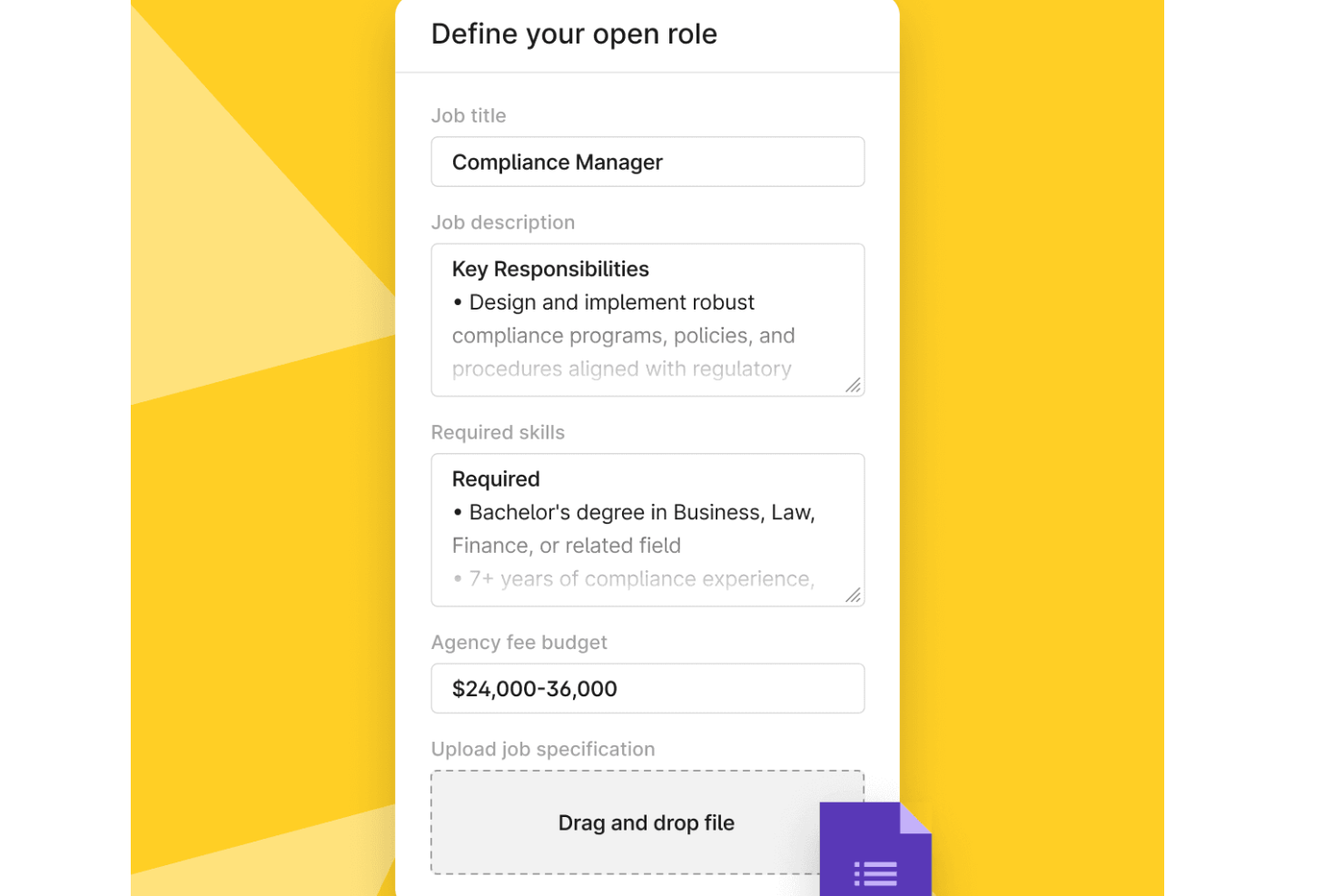
Deel è progettato per i team che collaborano con più agenzie di personale e necessitano di un unico luogo per gestire le assunzioni a livello globale. Consente di creare richieste dettagliate, confrontare le candidature provenienti da agenzie selezionate e monitorare l'attività di assunzione senza dover saltare da una casella di posta o uno strumento all'altro.
Perché ho scelto Deel
Ho scelto Deel perché centralizza le relazioni con le agenzie e il flusso di lavoro per le assunzioni in un'unica piattaforma, particolarmente utile se selezioni candidati in diversi paesi.
Puoi creare richieste strutturate che guidano le agenzie sulle competenze richieste, i budget e i dettagli del lavoro, aiutandoti a ricevere candidature di qualità migliore più rapidamente. Deel inoltre fornisce dati sulle prestazioni di ciascuna agenzia—come volume di candidati, tempo di assunzione e spesa totale—così puoi vedere quali partner ottengono i migliori risultati.
Apprezzo anche il fatto che tutto, dalla revisione dei CV alla messaggistica, sia gestito in un'unica dashboard, riducendo il ping-pong di messaggi che spesso rallenta i team HR. Se desideri una visione più chiara e basata sui dati delle performance di reclutamento globale, Deel lo rende semplice attraverso strumenti integrati di monitoraggio e reportistica.
Funzionalità principali di Deel
Ecco alcune funzionalità chiave da evidenziare:
- Costruttore di richieste: Crea richieste di lavoro strutturate con competenze, budget e specifiche necessarie per le agenzie.
- Dashboard di revisione candidati: Confronta i CV provenienti da più agenzie e lascia commenti nello stesso luogo.
- Automazione della conformità: Gestisci documenti e approvazioni necessari per le assunzioni in diversi paesi.
- Messaggistica in piattaforma: Comunica direttamente con le agenzie all'interno di Deel per mantenere le conversazioni organizzate.
Integrazioni di Deel
Le integrazioni includono Hubstaff, QuickBooks, Slack, Google Workspace, JIRA, Brex, Expensify, NetSuite, BambooHR, Skovik, Workday e Xero.
Pros and Cons
Pros:
- Dashboard centralizzata delle candidature delle agenzie
- Dati sulle prestazioni chiari per ogni agenzia
- Automazione integrata della conformità globale
Cons:
- I costi aumentano con grandi volumi di assunzioni
- Le configurazioni complesse possono richiedere supporto

Manatal
Ideale per l'analisi delle selezioni per più clienti
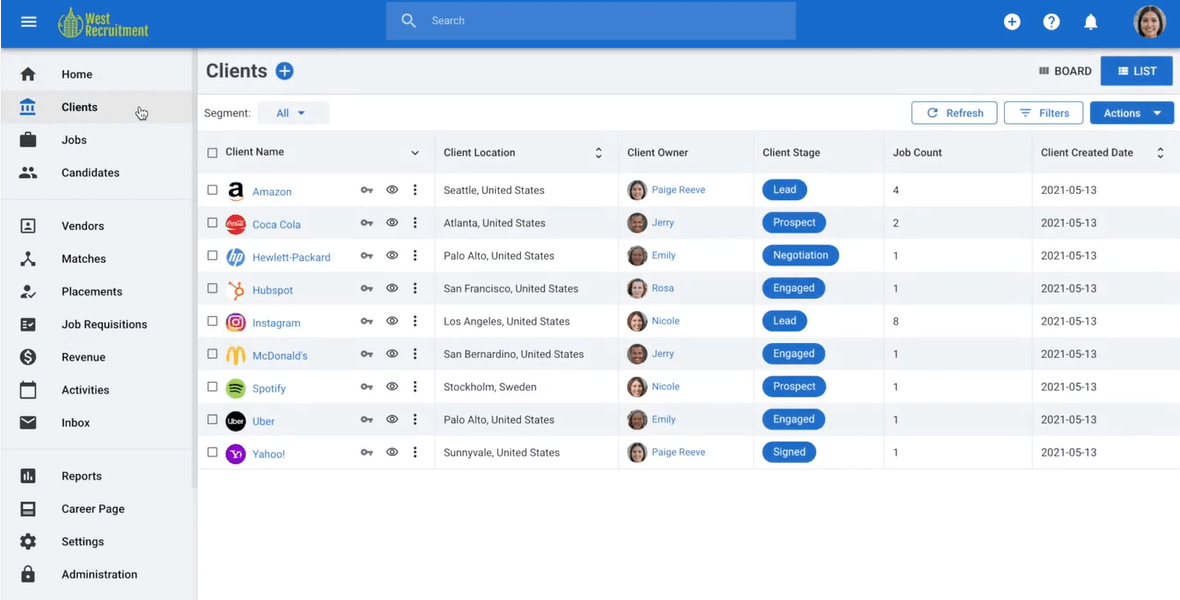
Manatal è pensato per i team di selezione del personale e le agenzie che gestiscono posizioni per più clienti e necessitano di un CRM e ATS in un'unica soluzione. Ti aiuta a tracciare i candidati, analizzare le pipeline dei clienti e coordinare la comunicazione su ogni posizione aperta senza dover cambiare strumento.
Perché ho scelto Manatal
Ho scelto Manatal perché offre un modo chiaro per gestire sia i candidati che i clienti all'interno di un unico sistema sviluppato per il recruiting multi-cliente. Puoi esaminare le pipeline, tracciare i ricavi e mantenere organizzata la comunicazione con i clienti tramite un ambiente CRM accessibile.
Inoltre, mi piace che si possano reperire rapidamente i candidati utilizzando l'estensione Chrome, che consente di importare profili da LinkedIn in pochi clic, e i suggerimenti AI aiutano il team a dare priorità ai candidati più qualificati analizzando i profili e i requisiti delle posizioni. Hai anche strumenti di reportistica integrati che mostrano l'andamento su tutti i clienti, aiutandoti a individuare colli di bottiglia e comprendere le prestazioni dei vari account.
Caratteristiche principali di Manatal
Ecco alcune caratteristiche chiave da evidenziare:
- Gestione CRM Clienti: Traccia pipeline dei clienti, contatti, trattative e cronologia delle attività in un'unica dashboard.
- Fasi di selezione personalizzabili: Crea flussi di lavoro su misura per ogni cliente o posizione, in modo che ogni ricerca rifletta le esigenze specifiche.
- Strumenti di collaborazione: Condividi note sui candidati, file e valutazioni per mantenere team e clienti allineati.
- App mobile per recruiting: Valuta candidati, aggiorna pipeline e invia messaggi ai clienti o candidati ovunque tu sia.
Integrazioni di Manatal
Le integrazioni includono Office 365, Microsoft Outlook, LinkedIn, Gmail, Facebook, WhatsApp, Mailchimp, Zapier, Slack e Google Calendar.
Pros and Cons
Pros:
- Reperimento rapido dei candidati con l'estensione Chrome per LinkedIn
- I suggerimenti AI aiutano a dare priorità ai candidati più adatti
- Monitoraggio chiaro di ricavi e performance
Cons:
- Personalizzazione CRM limitata per strutture agenziali complesse
- I modelli di report potrebbero offrire filtri più approfonditi
New Product Updates from Manatal

Manatal Adds Candidate Login and Employee Portal to Career Pages
Manatal has added Candidate Login, Internal Employee Portal, and internal job visibility controls for Career Pages. These features help teams simplify applications, support employee mobility, and manage internal hiring workflows. For more information, visit Manatal’s official site.
 .
.
Hellora
Ideale per il nuovo coinvolgimento dei talenti sanitari e la ricerca di candidati tramite IA
Hellora è un CRM per il recruiting basato sull'IA, progettato esclusivamente per i team che si occupano di assunzioni nel settore sanitario. Cerca in due bacini di candidati — i professionisti sanitari già presenti nell'ATS di un'organizzazione sanitaria e oltre 40 milioni di professionisti sanitari statunitensi abilitati, raccolti da database pubblici delle licenze. Gestisce inoltre l'arricchimento dei dati, l'invio di email e SMS personalizzati e la gestione di bacini di talenti basati su coorti.
Per chi è più adatto Hellora?
Hellora è progettato per i team di acquisizione dei talenti nel settore sanitario che desiderano assumere dal proprio database di candidati esistente e trovare direttamente nuovi professionisti sanitari, invece di affidarsi a bacheche di annunci di lavoro e agenzie.
Perché ho scelto Hellora
Hellora è entrato nella mia selezione ristretta perché il suo agente di IA, Eve, fa qualcosa che non avevo mai visto altrove: analizza i database ATS esistenti, contenenti fino a 2 milioni di profili di candidati, per individuare professionisti sanitari qualificati con cui i selezionatori hanno già interagito in passato. Apprezzo in particolare il fatto che le comunicazioni vengano inviate dalle caselle Gmail o Outlook effettivamente utilizzate dai selezionatori: per questo i tassi di risposta raggiungono il 33–50%, rispetto ai risultati quasi nulli degli invii di massa tramite le bacheche di annunci di lavoro. I bacini di talenti basati su coorti (candidati arrivati in finale, segnalazioni e partecipanti a eventi di selezione) rendono semplice segmentare e coinvolgere nuovamente i candidati giusti per specifici ruoli clinici senza dover ricominciare da zero.
Funzionalità principali di Hellora
- Modulo per gli eventi di selezione: Gestisci in un unico luogo le conferme di partecipazione alle fiere del lavoro, la selezione degli orari dei colloqui e i promemoria SMS automatici.
- Candidatura mobile istantanea: Consente ai candidati di candidarsi alle posizioni aperte in circa due minuti da un dispositivo mobile, senza dover creare un account.
- Ricerca dei candidati in linguaggio naturale: Cerca sia nei dati esistenti dell'ATS sia nei dati pubblici sulle licenze utilizzando interrogazioni in linguaggio naturale, con risultati etichettati in base alla fonte.
- Posta in arrivo unificata: Riunisce tutte le risposte dei candidati via email e SMS in un'unica vista, permettendo ai selezionatori di gestire le conversazioni.
Integrazioni di Hellora
Hellora offre integrazioni documentate con Gmail e Microsoft Outlook, oltre a 16 piattaforme ATS e HRIS i cui nomi dei fornitori non sono specificati pubblicamente.
Pros and Cons
Pros:
- L'IA individua candidati in ampi database interni
- Comunicazioni inviate direttamente dalle caselle di posta dei selezionatori
- Corrispondenze spiegabili basate sull'IA per i ruoli clinici
Cons:
- Supporta esclusivamente il recruiting nel settore sanitario statunitense
- Nessuna visualizzazione del flusso di selezione in stile kanban

La miglior soluzione end-to-end per la ricerca del personale nelle agenzie di staffing
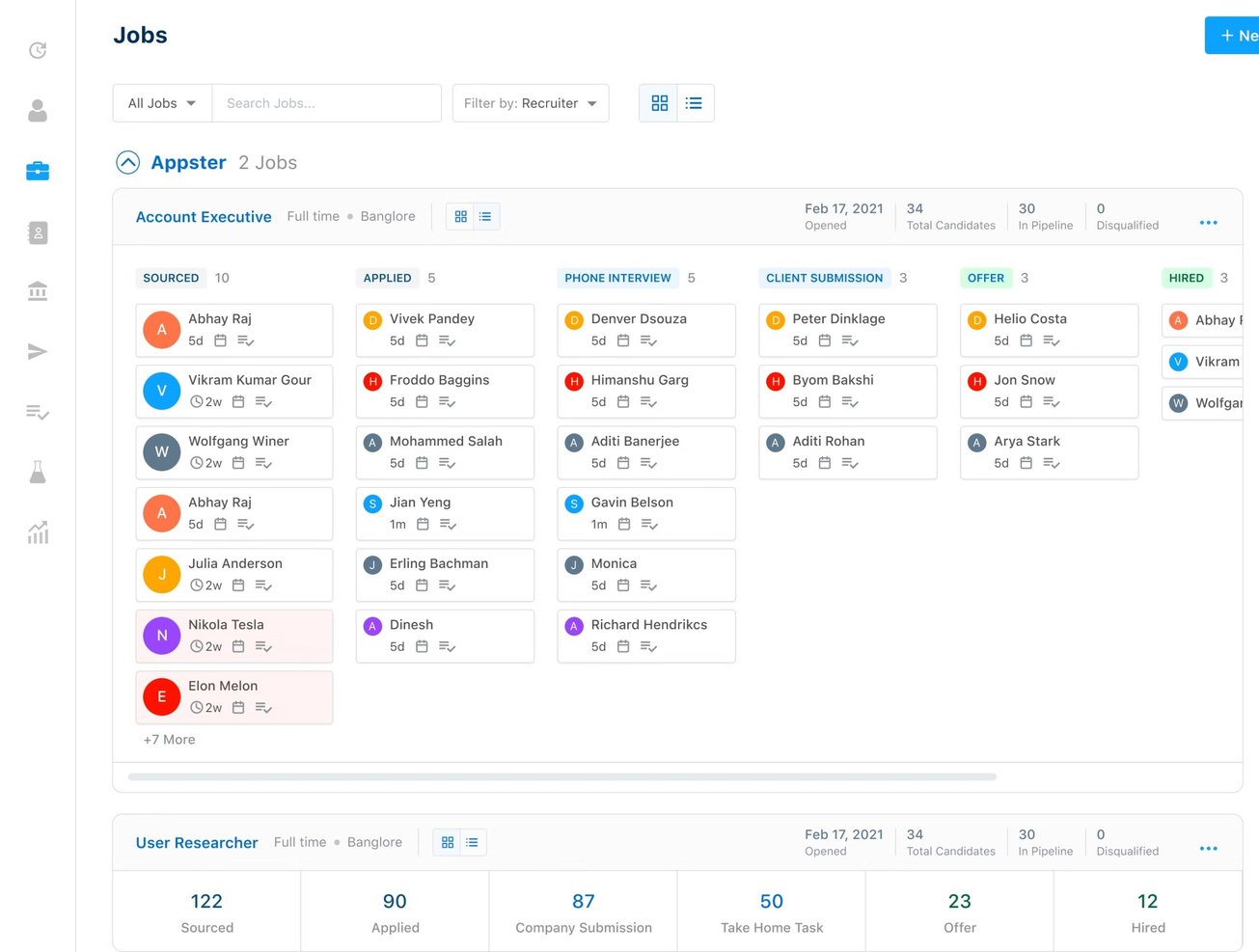
Recruiterflow è un software di tracciamento candidati (ATS) e CRM per il reclutamento pensato appositamente per le agenzie di ricerca personale, ma molto popolare anche tra i team interni.
Perché ho scelto Recruiterflow: Creato pensando alle agenzie di reclutamento, il loro CRM offre numerose automazioni per aiutare i team impegnati a concludere accordi e consolidare i rapporti con i clienti. È altamente personalizzabile per adattarsi ai tuoi processi e ovviamente si integra perfettamente con la funzione ATS.
Caratteristiche distintive e integrazioni di Recruiterflow:
Le caratteristiche distintive includono la loro pipeline delle offerte in stile Kanban che aggiorna automaticamente i dettagli dei contatti, invia notifiche email e assegna compiti ai membri del team per accelerare la chiusura delle trattative e un portale clienti completamente brandizzato per collaborare e offrire servizi ai clienti.
Le integrazioni sono disponibili con i principali siti di annunci di lavoro e con Zapier. Puoi anche creare le tue app personalizzate o configurare integrazioni software aggiuntive utilizzando le loro API aperte.

Ideale per decisioni di assunzione collaborative

Greenhouse è un software CRM per il recruiting progettato per i team che danno priorità all'assunzione collaborativa. Offre strumenti strutturati per gestire ogni interazione con i candidati e aiuta il tuo team a restare allineato grazie a valutazioni condivise e comunicazione centralizzata.
Perché ho scelto Greenhouse
Ho scelto Greenhouse perché supporta l'assunzione collaborativa tramite schede di valutazione strutturate, flussi di feedback condivisi e assegnazione chiara dei compiti. Questi strumenti permettono al team di confrontare i candidati in modo coerente, evitando di affidarsi a note sparse o a impressioni soggettive.
Inoltre, ricevi promemoria e messaggi automatici, così nessun candidato viene trascurato durante il processo di selezione. Apprezzo anche che Greenhouse integri sourcing, colloqui e gestione delle offerte in un'unica piattaforma, offrendo così visibilità su ogni fase del percorso di assunzione. Questo approccio unificato è particolarmente utile per i team che necessitano di responsabilità e trasparenza tra più decisori.
Caratteristiche principali di Greenhouse
Ecco alcune caratteristiche principali da evidenziare:
- Kit di colloquio strutturati: Forniscono agli intervistatori domande standardizzate e criteri di valutazione.
- Schede di valutazione dei candidati: Raccolgono feedback coerenti per decisioni giuste e collaborative.
- Reportistica sulla pipeline: Mostra dove i candidati progrediscono o si bloccano, aiutandoti a ottimizzare il processo di assunzione.
- Strumenti di recruiting mobile: Consentono al team di consultare i candidati e inviare feedback ovunque si trovi.
Integrazioni di Greenhouse
Le integrazioni includono BambooHR, BrightHire, Calendly, Checkr, DocuSign, GoodTime, Sterling, Starred, Spark Hire, Slack e LinkedIn.
Pros and Cons
Pros:
- Le schede di valutazione condivise garantiscono valutazioni coerenti dei candidati
- L'assegnazione dei compiti aiuta il team a restare allineato durante il recruiting
- I follow-up automatici riducono i vuoti di comunicazione con i candidati
Cons:
- La personalizzazione dei report richiede una conoscenza tecnica più approfondita
- Manca un marketplace di sourcing integrato rispetto ad alcuni concorrenti
New Product Updates from Greenhouse

Greenhouse Opens Candidate Insights and Talent Matching Assistants to Beta
Greenhouse opens Candidate Insights and Talent Matching assistants to beta for candidate questions and natural-language search. This helps recruiters review candidates and build searches faster. For more information, visit Greenhouse’s official site.
 .
.
Ideale per le capacità di gestione dei dati in tempo reale
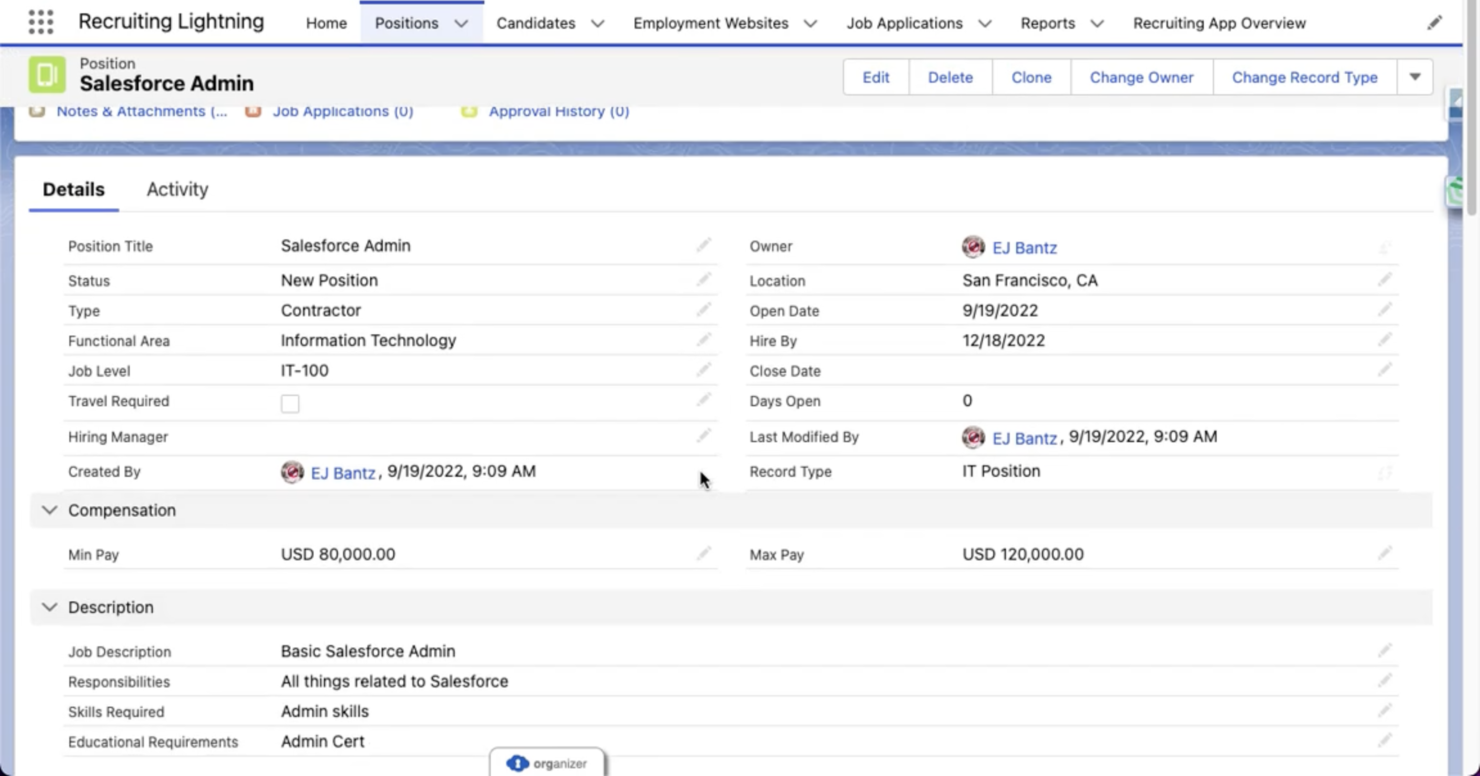
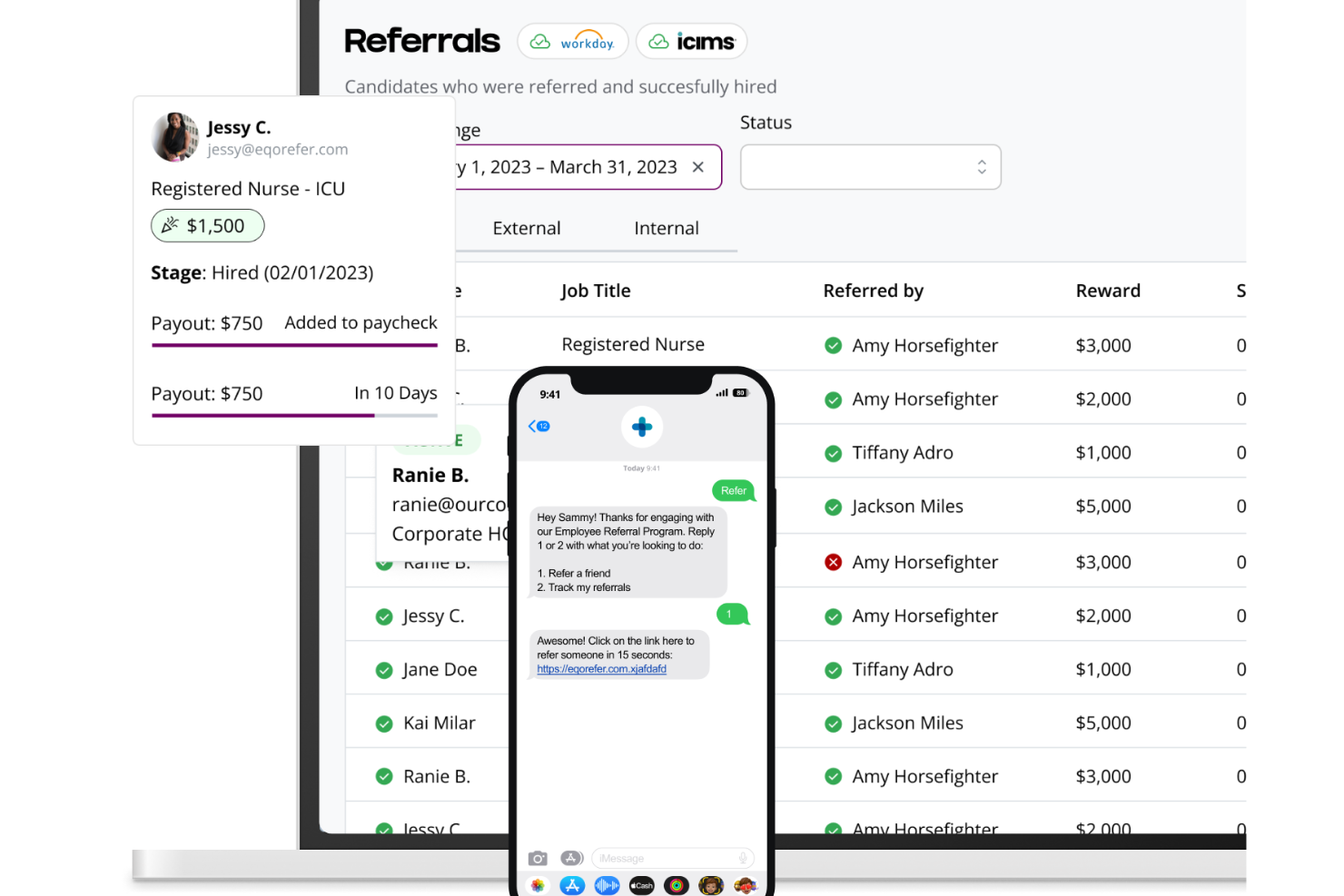
Salesforce offre una soluzione CRM completa per aiutare a connettere recruiter, talenti e clienti e aumentare la velocità di inserimento.
Perché ho scelto Salesforce CRM: Il CRM di Salesforce integra intelligenza artificiale e automazione per semplificare i processi di recruitment, consentendo alle agenzie di concentrarsi sulla ricerca e sull'inserimento dei migliori talenti. Le sue capacità di gestione dei dati in tempo reale facilitano esperienze personalizzate sia per i candidati che per i clienti, garantendo abbinamenti ottimali e un coinvolgimento migliorato.
Caratteristiche distintive e integrazioni di Salesforce:
Caratteristiche distintive includono comunicazioni automatizzate e altamente personalizzate con clienti e candidati basate su dati in tempo reale, la possibilità di generare sintesi concise delle chiamate di vendita e previsioni in tempo reale per guidare i venditori nella chiusura delle trattative, automatizzare il processo di vendita e costruire relazioni più solide.
Si integra con la suite di prodotti Salesforce, tra cui Sales Cloud, Service Cloud, Marketing Cloud, Data Cloud, Tableau e Slack, oltre ad applicazioni e job board di terze parti, il tutto facilitato dal robusto ecosistema di API di Salesforce.
New Product Updates from Salesforce CRM

Salesforce CRM Adds Automated CMS Access Expiration
Salesforce CRM adds automated access expiration and a new view-only support role for Point of Sale CMS users. These controls reduce manual access cleanup and help teams limit unnecessary permissions. For more information, visit Salesforce CRM’s official site.
 .
.
Ideale per la gestione dell’intero ciclo di vita del dipendente
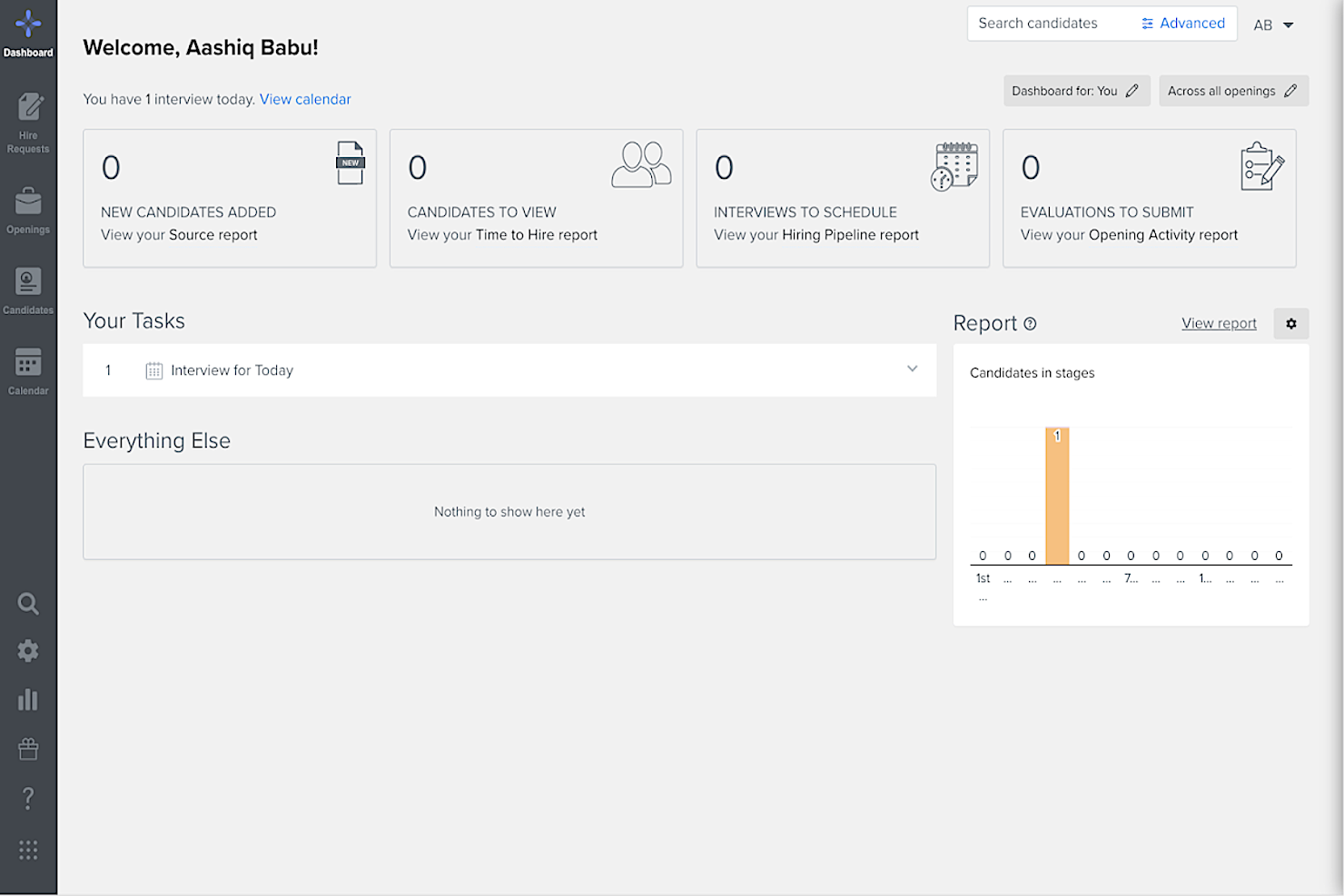
Mitratech Perform è un software CRM per il recruiting che offre alle organizzazioni l'accesso a un ampio bacino di talenti e facilita la comunicazione con i potenziali candidati durante tutto il processo di assunzione. Aiuta i team HR a identificare e analizzare rapidamente i migliori talenti, ottimizzare le operazioni di recruiting e prendere decisioni di assunzione più informate.
Perché ho scelto Mitratech Perform: Il software presenta un'interfaccia intuitiva in cui recruiter e responsabili delle assunzioni possono collaborare sui CV e monitorare i progressi durante tutto il reclutamento, dal primo contatto fino all'onboarding e alla gestione dei talenti dei nuovi dipendenti.
Gli utenti possono cercare tra centinaia di profili per individuare i candidati migliori per qualsiasi ruolo, con opzioni di filtro come località, livello di esperienza e livello di istruzione; inoltre, le ricerche dei candidati possono essere salvate per un accesso rapido in futuro.
Caratteristiche distintive e integrazioni di Mitratech Perform:
Caratteristiche distintive includono strumenti di comunicazione integrati come modelli di email e notifiche automatiche che aiutano i recruiter a rimanere in contatto con i candidati e a fornire aggiornamenti tempestivi sulle posizioni aperte e altre opportunità all'interno dell'organizzazione.
Il software offre inoltre potenti funzionalità di analisi con report dettagliati su metriche di performance dei candidati come il tempo trascorso nei colloqui o i test sostenuti dagli aspiranti. Questo aiuta i recruiter a comprendere meglio chi avrà successo nei diversi ruoli basandosi sui dati anziché sulle opinioni, assicurando che solo individui qualificati vengano assunti o promossi all'interno dell'organizzazione.
Le integrazioni includono Indeed, Slack, Google Workspace, Zoom, Office365 e PandaDoc.

Ideale per la selezione gestita dalle risorse umane all'interno di un HRIS unificato
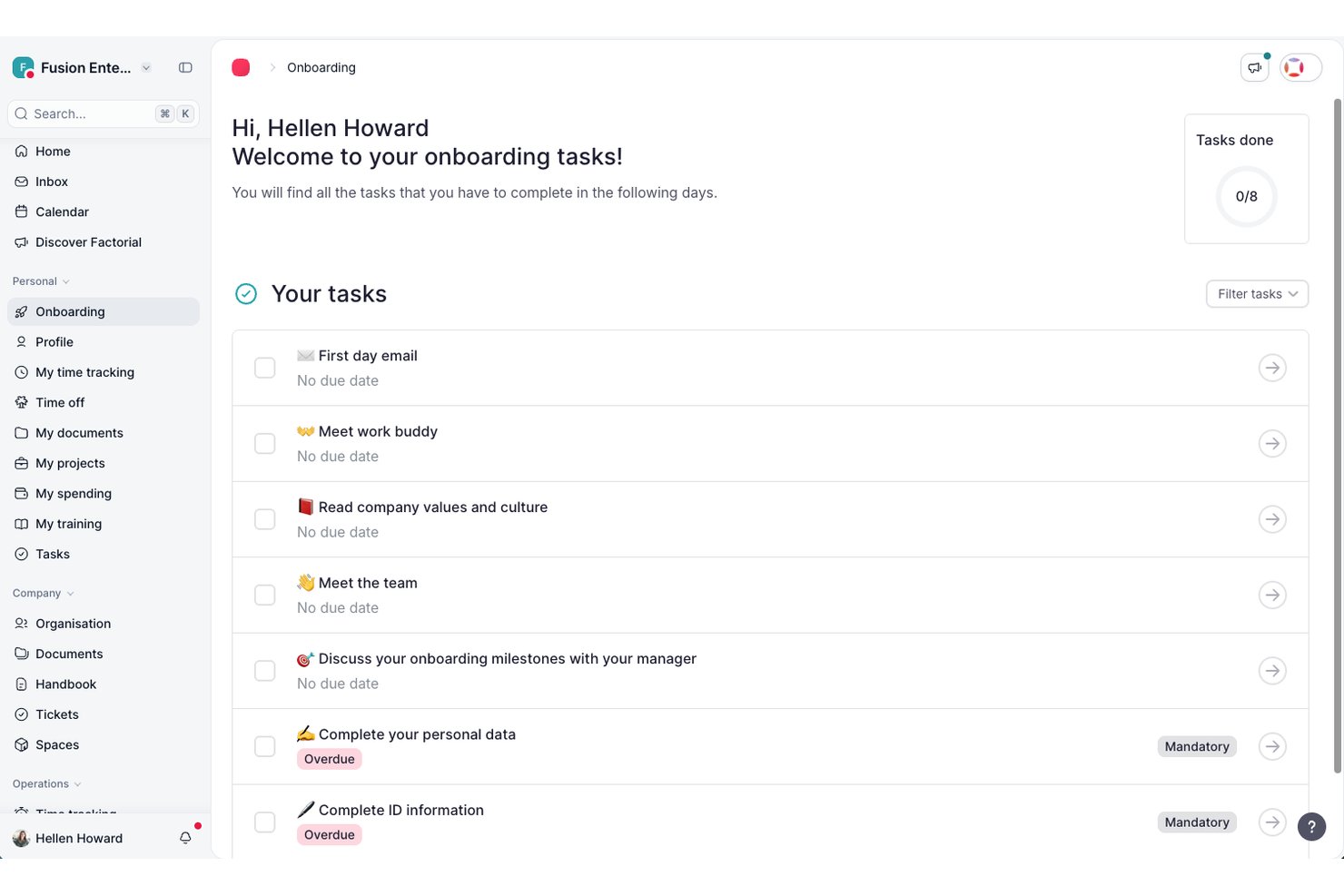
Factorial è un HRIS modulare con un ATS integrato che include la pubblicazione di offerte di lavoro, l'analisi dei CV basata sull'IA, flussi di selezione personalizzabili e il monitoraggio del ciclo di vita dal candidato al dipendente in un'unica piattaforma.
A chi è più adatto Factorial?
Factorial è adatto ai responsabili delle risorse umane di aziende di piccole e medie dimensioni che si occupano di selezione oltre a gestire responsabilità HR più ampie e desiderano una sola piattaforma per amministrare tutto.
Perché ho scelto Factorial
Ho incluso Factorial tra le mie scelte principali perché è l'unico strumento di questo elenco che integra la selezione direttamente in un HRIS completo, così i responsabili HR non devono gestire due piattaforme separate. Apprezzo particolarmente il fatto che i candidati assunti vengano convertiti automaticamente in profili dipendente e attivino i flussi di inserimento, completando il collegamento tra selezione e risorse umane senza alcun reinserimento manuale dei dati. L'analisi dei CV basata sull'IA aiuta inoltre i team guidati dalle risorse umane a velocizzare la preselezione quando gestiscono la selezione insieme a tutte le altre attività.
Funzionalità principali di Factorial
- Flussi di selezione personalizzabili: Crea e assegna un nome alle fasi del flusso per ogni posizione aperta, con e-mail automatiche attivate quando i candidati passano da una fase all'altra.
- Pubblicazione su più bacheche: Pubblica contemporaneamente le offerte di lavoro su LinkedIn, JOIN e altri portali per il lavoro da un'unica pannello di controllo.
- Collaborazione del team basata sui ruoli: Assegna responsabili delle assunzioni e selezionatori a flussi specifici, dove possono condividere riscontri e lasciare note sui candidati.
- Conversione del profilo da candidato a dipendente: I candidati assunti vengono trasferiti automaticamente nei profili dei dipendenti e attivano i flussi di inserimento senza reinserimento manuale dei dati.
Integrazioni di Factorial
Factorial offre integrazioni con LinkedIn, Greenhouse, Workable, Teamtailor, Recruitee e Microsoft Power BI. Fornisce inoltre un'API REST pubblica, webhook e Zapier.
Pros and Cons
Pros:
- Il passaggio da candidato a dipendente attiva automaticamente l'inserimento
- Analisi dei CV basata sull'IA integrata per velocizzare la preselezione
- HRIS modulare con ATS in un'unica piattaforma
Cons:
- Nessuna funzionalità per la gestione di un bacino di talenti passivi
- Mancano campagne di fidelizzazione o campagne a goccia articolate in più fasi

Ideale per la visualizzazione della pipeline
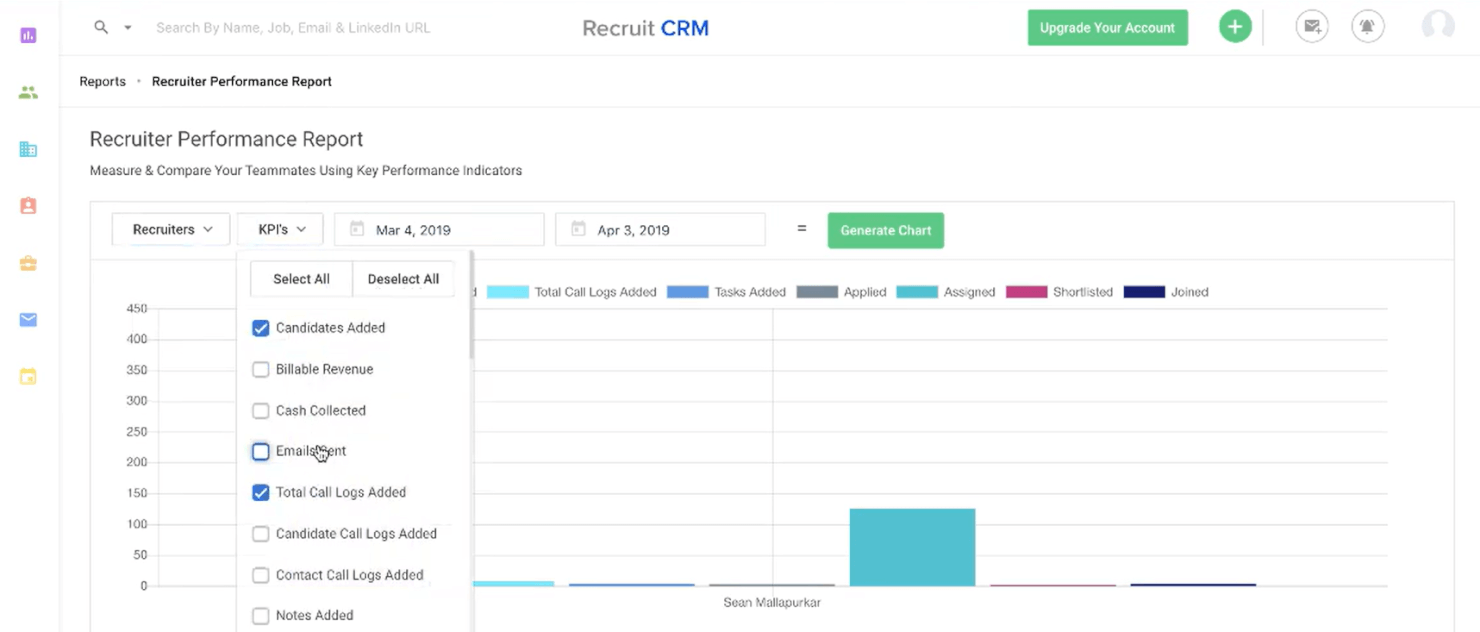
Recruit CRM combina le funzionalità di un CRM con un ATS (sistema di tracciamento dei candidati), rendendolo una scelta eccellente per reclutatori che gestiscono volumi elevati o per agenzie di ricerca e selezione.
Perché ho scelto Recruit CRM: La loro interfaccia utente è intuitiva e include una vista in stile kanban che organizza visivamente tutti i candidati potenziali nel tuo processo di selezione, con colonne separate per ogni fase del reclutamento in cui si trovano. Spostarli lungo il processo di selezione è anche molto semplice, con un solo clic.
Per aumentare la produttività, puoi impostare trigger che attivano email automatiche e altre attività ogni volta che sposti un candidato da una fase all’altra.
Caratteristiche e integrazioni distintive di Recruit CRM:
Le funzionalità includono un’estensione per il browser Chrome che semplifica la ricerca di candidati tramite LinkedIn. Puoi usarla per taggare candidati promettenti e aggiungerli al tuo database generale oppure a una delle tue hot list attive, che funzionano come singoli talent pool per ogni posizione. Una volta segnalati, Recruit CRM esegue automaticamente la scansione dei dettagli del profilo del candidato e trasferisce le sue informazioni personali nel sistema per un utilizzo futuro.
La suite di report integrati è ciò che rende Recruit CRM una risorsa di valore per team di reclutamento o società di staffing. Puoi eseguire report personalizzati su tutti i tipi di metriche di reclutamento comuni, oppure utilizzare uno dei loro report predefiniti, come il Recruiter KPI Report, il Candidate Lifecycle Report, un Job Statistics Report o un Client Performance Report.
All’interno di ogni report, i dati sono visualizzati sia graficamente che in formato tabellare, che può essere esportato come file CSV. I manager possono persino confrontare i risultati dei recruiter uno accanto all’altro o cliccare sui singoli punti dei grafici per approfondire nei dettagli.
Le integrazioni includono Gmail, Outlook e molti altri sistemi collegandolo a un account Zapier oppure tramite la loro API personalizzata.
TE Recruit
Ideale per la collaborazione semplificata tra recruiter
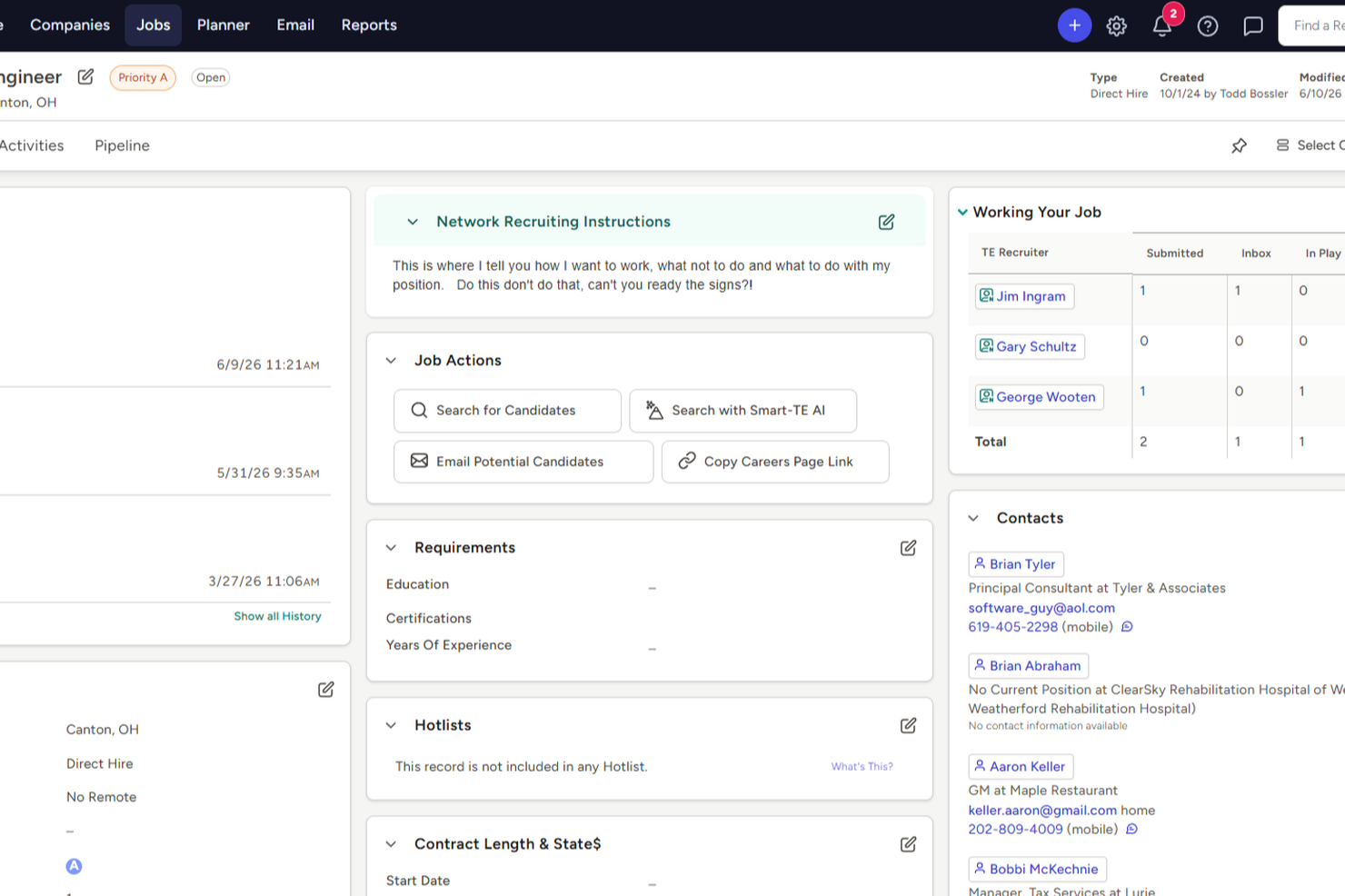
TE Recruit è un ATS e CRM per il recruiting progettato per le agenzie di selezione del personale, con strumenti per il sourcing dei candidati, la gestione delle relazioni con i clienti, il monitoraggio delle richieste di lavoro e l'accesso a una rete integrata di recruiter.
Per chi è più adatto TE Recruit?
TE Recruit è particolarmente indicato per i recruiter indipendenti e per le agenzie di selezione boutique che lavorano in modo collaborativo tra team o con partner di recruiting esterni.
Perché ho scelto TE Recruit
Ho incluso TE Recruit tra le mie scelte migliori perché facilita la collaborazione del team senza obbligare i recruiter a passare da uno strumento all'altro. Il database condiviso consente a tutti i membri del team di lavorare sugli stessi record di candidati e richieste di lavoro, evitando duplicazioni e note in conflitto. Apprezzo anche gli strumenti di pianificazione e registrazione delle attività, che permettono a più recruiter di vedere esattamente a che punto si trova un candidato nella pipeline, mantenendo così l'intero team allineato sui prossimi passi.
Funzionalità chiave di TE Recruit
- Parsing del curriculum: Estrae automaticamente le informazioni di contatto, la carriera lavorativa, l'istruzione e le certificazioni dai curriculum per costruire i record dei candidati, includendo il controllo dei duplicati.
- Pubblicazione delle offerte con un clic: Pubblica le posizioni aperte su più bacheche di lavoro e siti di carriera contemporaneamente dalla piattaforma.
- Hotlist: Crea e condividi elenchi personalizzati di candidati, aziende o annunci di lavoro per organizzare l'attività di outreach e supportare i flussi di lavoro relativi allo sviluppo del business.
- Reportistica e analisi: Genera report sulle prestazioni di recruiting e sui dati della pipeline per monitorare l'attività del team e supportare le decisioni di assunzione.
Integrazioni di TE Recruit
TE Recruit offre integrazioni tramite il suo marketplace, tra cui Indeed, ZipRecruiter, Dice, Spark Hire, Checkr, Verified First, ZoomInfo, Swordfish, SourceWhale e Bilflo. È disponibile una API aperta per integrazioni personalizzate. Il supporto per Zapier non è chiaramente documentato.
Pros and Cons
Pros:
- ATS e CRM combinati con inserimenti condivisi
- Motore di parsing dei CV che elabora i curriculum ricevuti via email
- Tracciamento email integrato sui record dei candidati
Cons:
- Mancano strumenti avanzati di matching dei candidati basati su AI
- La sincronizzazione con email e Outlook può essere inaffidabile
Altri software CRM per il recruiting
Ecco alcune altre opzioni valide che non sono entrate nell'elenco dei migliori software CRM per il recruiting:
- Humanly
Ideale per il coinvolgimento dei candidati guidato dall'IA
- Act!
Ideale per accesso offline e da mobile
- Gem
Ideale per coltivare i candidati lungo il percorso di selezione
- Freshsales
Ideale per il punteggio dei candidati guidato dall'IA
- Wizehire
Ideale per un supporto all'assunzione guidato da persone
- Pipedrive CRM
Ideale per un monitoraggio strutturato dei candidati
- Fetcher
Migliore per strumenti di ricerca della diversità
- JobAdder
Migliore con uno strumento per il monitoraggio della concorrenza
- PCRecruiter
Ideale per profili candidati dettagliati
- Boon
Ideale per segnalazioni basate su AI
- Mitratech TalentReef
Ideale per coprire posizioni orarie
- Bullhorn
Il migliore con integrazione LinkedIn
- Jobvite
Ideale per video colloqui e coinvolgimento dei candidati
- Atlas
Il miglior CRM per agenzie con IA a inserimento zero
- Eightfold
Ideale per processi di selezione dei candidati guidati dall'IA
- Thryv
Ideale per i portali dei candidati
- Creatio CRM
Ideale per flussi di lavoro di selezione personalizzabili senza codice
- Teamtailor
Ideale per automatizzare le comunicazioni personalizzate
- Tracker
Ideale per CRM e ATS combinati
- ClearCo
Ideale per la pubblicazione su più portali di lavoro
- Zoho Recruit
Ideale per strumenti avanzati di automazione del reclutamento
- Joveo
Ideale per la pubblicità lavorativa guidata dall’intelligenza artificiale


Recensioni correlate di software per le risorse umane
Se non hai ancora trovato quello che cerchi, dai un'occhiata a questi altri strumenti correlati che abbiamo testato e valutato:
- Software per le risorse umane
- Software per la gestione delle buste paga
- Software per il recruiting
- Servizi di datore di lavoro registrato
- Software per la gestione della forza lavoro
Come Valuto i CRM per il Recruiting
Valuto i CRM per il recruiting su due livelli: la base che ogni strumento deve avere—come pipeline dei candidati e attività di outreach automatizzata—e i fattori di differenziazione che rendono una soluzione più adatta rispetto a un'altra.
Funzionalità di Base (Requisiti Minimi per questa Lista)
Quando seleziono gli strumenti per la mia lista, valuto ciascuno su una scala da 0 (non offre la funzionalità) a 5 (eccelle in quest'area) per ognuna delle funzionalità base elencate di seguito. Successivamente, calcolo il punteggio totale dello strumento in percentuale. Ogni strumento deve raggiungere un punteggio minimo totale del 65% per poter essere incluso.
- Database dei Candidati & Profili: Verifico se uno strumento memorizza profili completi dei candidati con CV, note, tag e una cronologia completa delle interazioni—non semplicemente un elenco di contatti base.
- Gestione Pipeline & Fasi: I recruiter gestiscono pipeline differenti per diversi ruoli, quindi cerco fasi personalizzabili per ogni posizione o gruppo di talenti, non flussi di lavoro predefiniti e rigidi.
- Outreach & Automazione Email: Sequenze email multi-step, modelli e campagne drip sono fondamentali qui—valuto se uno strumento può automatizzare i contatti di nurturing su larga scala.
- Strumenti di Sourcing & Enrichment: L'analisi automatica dei CV è un requisito base, ma cerco anche estensioni browser o integrazioni che estraggano dati dei candidati da LinkedIn o portali di lavoro.
- Segmentazione & Gruppi di Talenti: La possibilità di taggare, filtrare e raggruppare i candidati in pool di talento riutilizzabili per competenze, località o tipologia di ruolo è qualcosa che valuto attentamente.
- Reportistica & Analisi della Pipeline: Dashboard che monitorano le performance dei canali di sourcing, i tassi di conversione nelle pipeline e l'attività dei recruiter aiutano i team a capire cosa funziona e cosa no.
Una volta che ho un elenco di strumenti che soddisfano i criteri, considero cosa distingue ciascuna piattaforma.
Fattori di Differenziazione (Cosa Distingue i Fornitori)
Ecco come confronto i diversi fornitori:
Funzionalità Distintive
L'abbinamento dei candidati tramite AI è un grande fattore di differenziazione—cerco strumenti che suggeriscano profili rilevanti dal tuo database esistente quando si apre una nuova posizione, invece di costringere i recruiter a effettuare sempre ricerche manuali. Anche la gestione del consenso GDPR è importante, specialmente per i team che fanno sourcing su più regioni e hanno bisogno di monitorare i consensi e il controllo dei dati. Per le agenzie di selezione, valuto se una piattaforma supporta la gestione di clienti e job order oltre che dei candidati, dal momento che i flussi di lavoro delle agenzie dipendono dalla gestione di entrambe le parti della relazione.
Oltre le Funzionalità
La profondità di integrazione con gli ATS è una delle prime cose che valuto—un CRM per il recruiting è utile solo se collegato efficacemente al proprio stack tecnologico esistente, quindi verifico che ci siano sincronizzazioni bidirezionali con piattaforme come Greenhouse, Lever o Bullhorn. Anche la struttura dei prezzi è un fattore chiave, poiché i modelli per utente possono diventare costosi rapidamente quando il numero di recruiter varia stagionalmente. Considero inoltre se uno strumento è progettato appositamente per team TA interni o per agenzie di selezione, perché questi flussi di lavoro sono fondamentalmente differenti e una scelta sbagliata crea attriti fin dal primo giorno.
Come scegliere un software CRM per il recruiting
Il software CRM per il recruiting può aiutarti a mantenere coinvolti i candidati e a creare un'esperienza di assunzione migliore. Per capire quale software CRM per il recruiting sia più adatto alle esigenze della tua azienda, devi innanzitutto individuare gli utenti principali e documentare le loro difficoltà specifiche.
Mentre affronti il tuo processo di selezione del software CRM per il recruiting, unico per la tua azienda, tieni a mente i seguenti punti:
- Quale problema stai cercando di risolvere? Inizia identificando le difficoltà di reclutamento che stai cercando di superare. Questo ti aiuterà a chiarire le caratteristiche e le funzionalità che il software CRM per il reclutamento deve offrire.
- Chi dovrà utilizzarlo? Per valutare costi e requisiti, considera chi utilizzerà il software e quante licenze ti serviranno. Dovrai valutare se l'accesso sarà necessario solo ai tuoi specialisti del reclutamento (alcune soluzioni includono anche portali per i clienti). Una volta chiarito questo aspetto, è utile anche classificare le esigenze dei diversi utenti per individuare le priorità dei principali utilizzatori del software per il reclutamento, dei responsabili e dei futuri candidati, assicurandoti che siano tutte soddisfatte.
- Con quali altri strumenti deve integrarsi? Chiarisci quali strumenti stai sostituendo, quali rimarranno in uso e con quali strumenti dovrai integrarlo, come i sistemi di gestione delle risorse umane o i software per l'inserimento dei nuovi assunti. Dovrai decidere se gli strumenti debbano integrarsi tra loro oppure, in alternativa, se puoi sostituire più strumenti con un'unica piattaforma CRM per il reclutamento consolidata.
- Quali risultati sono importanti? Esamina le capacità che vuoi acquisire o migliorare e il modo in cui misurerai il successo. Ad esempio, un risultato potrebbe essere ridurre il tempo necessario per assumere una persona o aumentare la capacità di automatizzare i processi di coinvolgimento dei candidati per mantenerli informati. Tuttavia, potresti sprecare molto tempo prezioso se non definisci in anticipo i risultati importanti.
- È compatibile con i tuoi requisiti tecnici? Considera la scelta del software insieme ai flussi di lavoro e ai sistemi esistenti. Valuta cosa funziona bene e quali aree problematiche devono essere affrontate.
Ricorda che ogni azienda è diversa: non dare per scontato che un sistema CRM per il reclutamento funzioni per la tua organizzazione solo perché è popolare.
Tendenze del software CRM per il reclutamento
Il software CRM per il reclutamento continua a evolversi per tenere il passo con la competizione sempre agguerrita per i migliori talenti. Ecco le tendenze più recenti in via di sviluppo che influenzano il software CRM per il reclutamento:
- Funzionalità avanzate di IA e apprendimento automatico: Le evidenze mostrano una spinta significativa verso algoritmi di IA più sofisticati, progettati per migliorare la ricerca e il coinvolgimento dei candidati. Questi strumenti sono ora in grado di analizzare enormi quantità di dati per identificare con maggiore precisione i candidati migliori e prevedere la loro adeguatezza al ruolo e il loro potenziale successo all'interno di un'organizzazione.
- Coinvolgimento personalizzato dei candidati: Gli aggiornamenti hanno introdotto funzionalità di personalizzazione più avanzate, consentendo ai selezionatori di adattare la comunicazione con i candidati in base ai loro interessi, alle loro competenze e alle interazioni precedenti, aiutandoli a costruire relazioni più solide con i candidati durante tutto il processo di reclutamento.
- Strumenti per la diversità e l'inclusione: Molti sviluppatori di software stanno ora aggiungendo strumenti avanzati per la diversità e l'inclusione, che aiutano a ridurre i pregiudizi inconsci durante il processo di reclutamento. Questi strumenti sono progettati per promuovere una forza lavoro più diversificata e inclusiva, riflettendo la crescente importanza della responsabilità sociale d'impresa nelle strategie di reclutamento.
- Accessibilità e funzionalità da dispositivi mobili: La domanda di software CRM per il reclutamento ottimizzato per i dispositivi mobili continua a crescere, con aggiornamenti incentrati sul miglioramento dell'esperienza utente mobile sia per i selezionatori sia per i candidati.
Queste tendenze evidenziano un chiaro passaggio verso processi di reclutamento più intelligenti, efficienti e inclusivi. Per i professionisti delle risorse umane, investire in software che sfrutta queste tendenze aiuterà ad attrarre, coinvolgere e trattenere efficacemente i migliori talenti.
Che cos'è il software CRM per il reclutamento?
Il software CRM per il reclutamento è una suite di strumenti per reclutare candidati e gestire le interazioni con loro durante il processo di reclutamento e assunzione.
Viene utilizzato dalle aziende di selezione del personale e dai selezionatori interni per segmentare i candidati in base alle competenze e all'esperienza e coltivare il rapporto con loro in vista di ruoli specifici in futuro.
Puoi utilizzarlo per identificare i candidati più qualificati e sfruttare l'automazione e l'intelligenza artificiale (IA) per mantenere vivo il loro interesse.
Il software CRM per il reclutamento offre un valore enorme per il reclutamento basato sul lavoro di squadra, automatizzando le comunicazioni con i candidati che richiedono molto tempo e registrando tutte le interazioni in un unico luogo, così qualsiasi selezionatore può riprendere facilmente la conversazione da dove era stata interrotta.
Aiuta inoltre le squadre a costruire un'immagine positiva del datore di lavoro, rispondendo tempestivamente alle domande dei candidati con messaggi personalizzati e pertinenti.
Funzionalità del software CRM per il reclutamento
Quando scegli un software CRM per il reclutamento, presta attenzione alle seguenti funzionalità chiave:
- Gestione del database dei candidati: Organizza, archivia e cerca tutti i tuoi candidati in un unico luogo. Questa funzionalità ti consente di accedere rapidamente ai profili, monitorare i progressi dei candidati e non perdere mai un ottimo candidato in una pila digitale.
- Messaggistica e comunicazione automatizzate: Invia email o messaggi di testo puntuali ai candidati e ai responsabili delle assunzioni direttamente dal tuo CRM. Puoi ricontattare i candidati, coltivare le relazioni e tenere tutti aggiornati, senza più passare da una casella di posta all'altra o perdere un passaggio.
- Monitoraggio del flusso di selezione: Visualizza ogni fase del processo di selezione, dal primo contatto all'accettazione dell'offerta. Ottieni una panoramica chiara e in tempo reale, così sai a che punto si trova ogni candidato e puoi individuare i colli di bottiglia prima che diventino problemi.
- Integrazione con le bacheche di lavoro e i social network: Pubblica le offerte di lavoro ovunque con un solo clic e importa facilmente i candidati nel tuo sistema. Risparmi ore di lavoro ripetitivo e raggiungi più candidati qualificati nei luoghi online che già frequentano.
- Strumenti di collaborazione: Lavora senza problemi con il tuo team condividendo feedback, assegnando attività o lasciando note direttamente sui profili dei candidati. In questo modo tutti rimangono aggiornati e si riducono gli errori di comunicazione.
- Conformità e sicurezza dei dati: Anticipa le normative sulla privacy e mantieni al sicuro le informazioni sensibili. Gli strumenti automatici per la conformità al GDPR e l'archiviazione sicura aiutano a proteggere sia la tua azienda sia i tuoi candidati.
- Analisi e report: Ottieni informazioni immediate sui tuoi canali di ricerca, sui tempi di assunzione e sulla qualità dei candidati. Questa funzionalità ti permette di individuare le tendenze, misurare ciò che funziona e prendere decisioni più efficaci per le assunzioni future.
- Flussi di lavoro personalizzabili: Configura il processo di selezione proprio come preferisci. Adatta fasi, attivatori e azioni allo stile del tuo team, senza doverti adeguare a un modello rigido.
- Analisi dei curriculum: Estrai automaticamente le informazioni principali dai CV, così dedichi meno tempo all'inserimento dei dati e più tempo a conoscere i candidati.
- Accessibilità da dispositivi mobili: Accedi ai dati dei candidati, comunica con il tuo team e mantieni attivo il processo di assunzione, anche quando sei fuori a pranzo o in treno.
Funzionalità comuni dell'IA nei software CRM per la selezione del personale
Oltre alle funzionalità standard dei software CRM per la selezione del personale elencate sopra, molte di queste soluzioni stanno integrando l'IA con funzionalità come:
- Analisi del sentiment: Analizza messaggi e feedback per capire come si sentono i candidati rispetto al tuo processo, così puoi affrontare le loro preoccupazioni prima che diventino problemi e rafforzare il tuo marchio come datore di lavoro.
- Abbinamento dei candidati basato sull'IA: Abbina istantaneamente le persone in cerca di lavoro alle posizioni aperte in base alle loro competenze, esperienze e preferenze, utilizzando algoritmi intelligenti che imparano dalle tue precedenti decisioni di assunzione.
- Analisi predittiva: Anticipa le situazioni prevedendo quali candidati hanno maggiori probabilità di accettare un'offerta o quali canali di ricerca stanno per portarti il tuo prossimo ottimo candidato. Questo ti aiuta a stabilire le priorità dei contatti e a risparmiare tempo.
- Programmazione automatizzata dei colloqui: Lascia che l'IA gestisca la difficoltà di coordinare i calendari, inviare promemoria e riprogrammare i colloqui, così puoi concentrarti sulle relazioni con le persone, non sulle email.
- Chatbot per il coinvolgimento dei candidati: Coinvolgi in tempo reale i visitatori del tuo sito dedicato alle carriere, rispondi alle domande e raccogli le informazioni di base utilizzando bot conversazionali sempre disponibili, offrendo ai candidati un'esperienza utile fin dall'inizio.
Vantaggi dei software CRM per la selezione del personale
I software CRM per la selezione del personale offrono numerosi vantaggi sia ai responsabili della selezione interni sia a chi lavora nella selezione del personale o presso un'agenzia interinale. Comprendendo i potenziali vantaggi offerti da questi sistemi software, potrai prendere una decisione più consapevole su quale opzione sia maggiormente in linea con le esigenze della tua organizzazione.
Ecco alcuni dei vantaggi che puoi aspettarti investendo nel miglior software CRM per la selezione del personale più adatto a te:
- Ricerca dei candidati semplificata: questo software amplia significativamente la portata delle attività di ricerca dei candidati automatizzando il processo di raccolta dei profili dei candidati da diverse fonti, garantendo un bacino di talenti diversificato e qualificato, fondamentale per ricoprire le posizioni in modo rapido ed efficace.
- Miglioramento del coinvolgimento dei candidati e della gestione delle relazioni: sfruttando un database centralizzato delle informazioni e delle interazioni con i candidati, il software contribuisce a costruire relazioni più solide con i potenziali assunti, facilitando interazioni personalizzate e tempestive che mantengono i candidati coinvolti e informati durante tutto il processo di selezione. Questo coinvolgimento continuo può portare a un bacino di candidati più reattivo quando si presentano nuove opportunità e rafforzare il marchio del datore di lavoro nel mercato dei talenti.
- Maggiore efficienza e produttività: automatizzando le attività amministrative, come la programmazione dei colloqui e l'invio dei promemoria, il software CRM per il recruiting rende il processo di selezione più efficiente. Ciò consente ai selezionatori di dedicare più tempo alle attività strategiche, come interagire direttamente con i candidati.
- Maggiore collaborazione tra i team di selezione: queste piattaforme favoriscono la collaborazione consentendo ai membri del team di condividere facilmente il feedback sui candidati e gli aggiornamenti sullo stato delle candidature. Questo contributo collettivo garantisce decisioni di assunzione più ponderate e un maggiore allineamento tra i membri del team.
- Analisi avanzate basate sui dati: grazie alle funzionalità di analisi avanzate, il software CRM per il recruiting fornisce informazioni utili e operative sul processo di selezione. Queste informazioni aiutano a individuare i colli di bottiglia, ottimizzare le strategie e migliorare il processo decisionale, portando a risultati migliori nelle assunzioni.
Come puoi vedere, il software CRM per il recruiting offre un vantaggio strategico nel competitivo mondo dell'acquisizione dei talenti. Nel complesso, questi vantaggi contribuiscono a un processo di selezione più efficiente, efficace e attento alle esigenze dei candidati, posizionando le organizzazioni in modo da attrarre e trattenere i migliori talenti nei rispettivi settori.
Costi e prezzi del software CRM per il recruiting
Il software CRM per il recruiting offre diverse opzioni di prezzo a seconda delle funzionalità e del livello di assistenza clienti richiesti. Per aiutarti a comprendere le strutture tariffarie e gli intervalli di prezzo più comuni, ho preparato questa tabella riepilogativa.
Tabella comparativa dei piani del software CRM per il recruiting
| Tipo di piano | Prezzo medio | Funzionalità comuni |
|---|---|---|
| Gratuito | $0 | Monitoraggio di base dei candidati, offerte di lavoro limitate, integrazione e-mail e reportistica di base |
| Base | $15 - $100 per utente, al mese | Monitoraggio avanzato dei candidati, offerte di lavoro illimitate, integrazione con e-mail e calendario, analisi di base e assistenza clienti |
| Professionale | $100 - $250 per utente, al mese | Strumenti avanzati per la ricerca dei candidati, integrazione CRM e ATS, analisi avanzate, campagne e-mail personalizzate e assistenza clienti premium |
| Enterprise | Prezzo personalizzato | Flussi di lavoro personalizzabili, funzionalità avanzate di integrazione, account manager dedicato, analisi e reportistica complete e maggiore sicurezza dei dati |
Oltre a questi intervalli di prezzo approssimativi, vale la pena notare che alcuni sistemi CRM per il recruiting hanno un prezzo stabilito in base al volume di offerte di lavoro o al numero di utenti del sistema. Per questo è sempre importante richiedere un preventivo personalizzato in base alle specifiche esigenze della tua attività.
Software CRM per il recruiting: domande frequenti
Altre recensioni di software per il recruiting
Esistono molti tipi diversi di software per il recruiting. La buona notizia per te è che ho già svolto tutte le ricerche al posto tuo. Ecco una raccolta di altre 10 proposte per diversi sottotipi di software per il recruiting. Sono certo che troverai qualcosa che susciterà ulteriormente il tuo interesse:
- Software per il recruiting per piccole imprese
- Software aziendale per il recruiting in caso di assunzioni ad alto volume
- Software di recruiting basato sull'IA per la ricerca di candidati su larga scala
- Software per il recruiting della diversità per assunzioni orientate alla DEI
- Software di marketing del recruiting per le assunzioni
- Software cloud per il recruiting per i team addetti alle assunzioni
- Software per database di recruiting per i team addetti alle assunzioni
- Software per il personale per il recruiting e la gestione del personale
Altre risorse per trovare i migliori talenti
Non sei sicuro che il software CRM per il recruiting sia adatto a te? Forse ciò di cui hai davvero bisogno è un software migliore per la ricerca di candidati o un sistema collaudato per il monitoraggio dei candidati?
Per completare il tuo approccio complessivo all'acquisizione di talenti, ti consiglio di dare un'occhiata anche a queste altre risorse popolari:
- Perché e come creare una strategia efficace di gestione dei talenti
- Come attrarre e fidelizzare i migliori talenti durante il ciclo di vita dei dipendenti
- 10 metriche chiave del recruiting su cui concentrarsi (e 12 avanzate)
- Budget per il recruiting: tutto ciò che devi sapere + esempio
Qual è il prossimo passo?
Se stai svolgendo ricerche sul software CRM per il recruiting, contatta gratuitamente un consulente di SoftwareSelect per ricevere consigli.
Compili un modulo e fai una breve conversazione durante la quale entreranno nello specifico delle tue esigenze. Dopodiché riceverai una lista ristretta di software da esaminare. Ti supporteranno persino durante l'intero processo di acquisto, comprese le trattative sul prezzo.