

Recensione ThriveSparrow 2026: Vantaggi, Svantaggi, Funzionalità e Prezzi



Employee engagement can quickly become a box-ticking exercise when feedback is collected but rarely acted on. Surveys go unanswered, recognition feels inconsistent, and HR leaders are left trying to connect scattered insights to meaningful improvements.
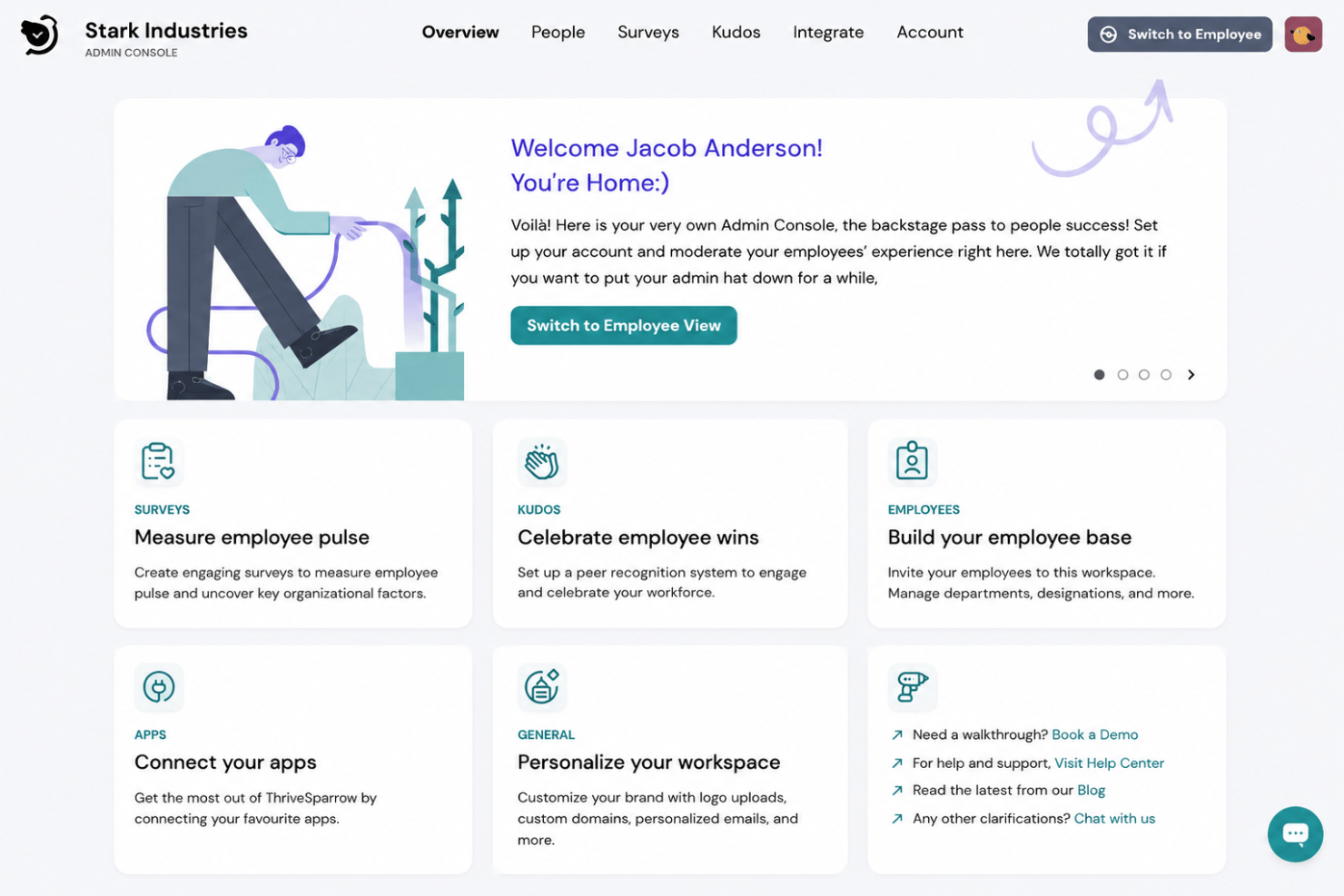
ThriveSparrow is employee engagement software designed for mid-sized and enterprise organizations, positioned more broadly as an AI-native, all-in-one employee success platform. It combines engagement surveys, action planning, peer recognition, continuous feedback, one-on-ones, performance reviews, goals and OKRs, and AI-powered analytics to help HR teams understand employee sentiment and turn those insights into practical next steps.
In this detailed review, I’ve evaluated ThriveSparrow using my experience reviewing HR software to help you determine whether it is the right fit for your organization’s employee engagement needs and goals.
ThriveSparrow Evaluation Summary
- From $2/user/month (billed annually)
- Free trial available
Perché fidarsi delle nostre recensioni sui software
Il nostro team testa e recensisce software dal 2012. In quanto esperti HR noi stessi, sappiamo quanto sia difficile — e importante — scegliere il software giusto.
Per questa guida, abbiamo valutato gli strumenti attraverso test pratici e ricerche indipendenti, assegnando un punteggio agli strumenti in base ai nostri criteri di selezione. Ci basiamo inoltre sulle competenze di leader di pensiero del settore e di professionisti HR attivi.
Le nostre recensioni riflettono il nostro giudizio editoriale umano, non un discorso di vendita.
Revisori esperti:
ThriveSparrow Overview
In my opinion, ThriveSparrow is a capable employee engagement and performance management platform. Its AI-native approach is especially useful for HR and People Ops teams managing surveys, action plans, recognition, reviews, goals, one-on-ones, and continuous feedback. With sentiment analysis, personalized development plans, and people insights built into its workflows, ThriveSparrow gives leaders a broad view of employee engagement and performance. Its clean interface, guided onboarding, and transparent pricing add to its appeal.
pros
-
Combines engagement, performance, goals, feedback, and recognition tools
-
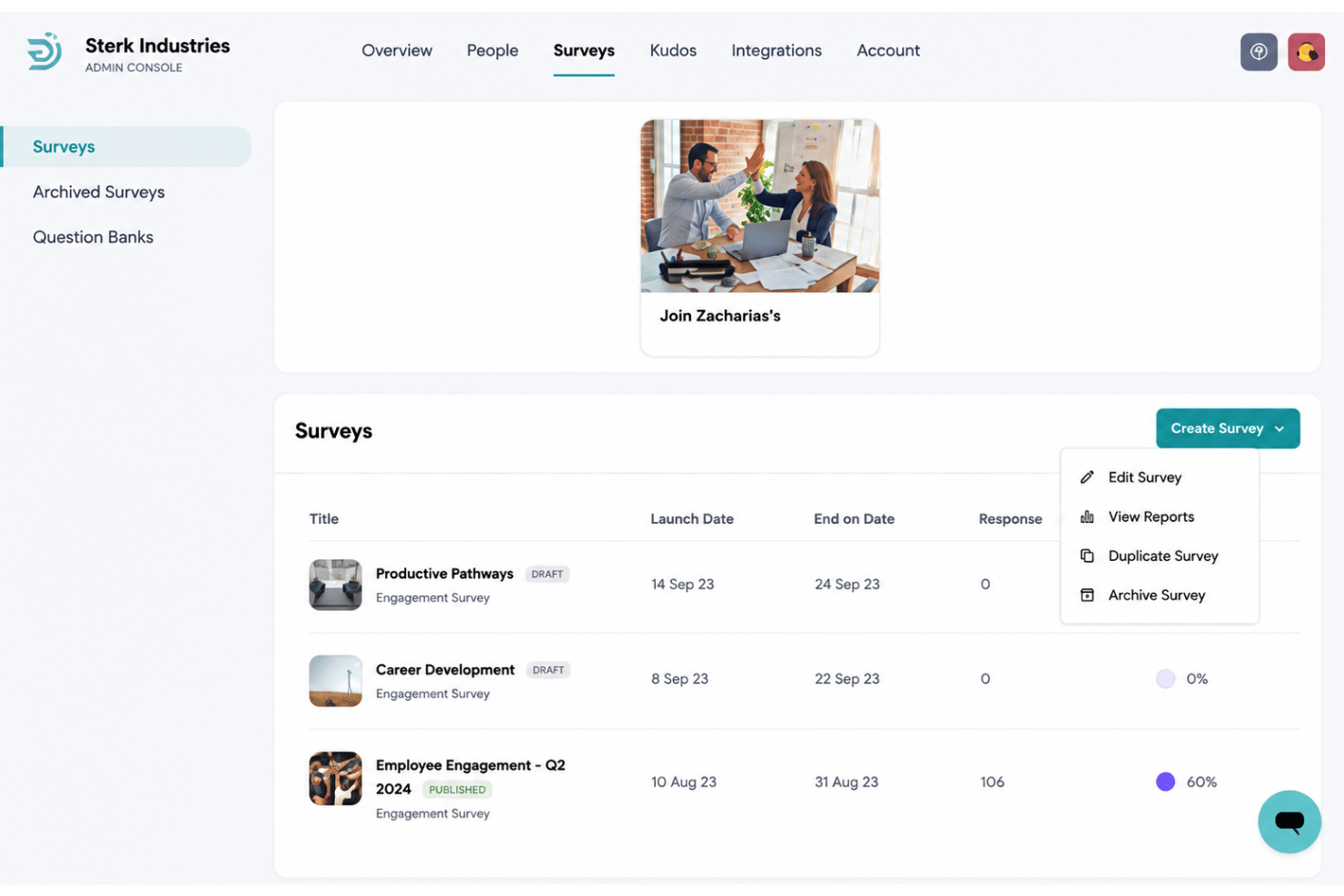
Turns survey insights into assigned action plans with progress tracking
-
Supports email, SMS, and QR code surveys for distributed workforces
cons
-
Does not include core HRIS, payroll, or HR administration features
-
Complex enterprise workflows may require additional configuration
-
Some specialized enterprise capabilities are still being developed
Is ThriveSparrow Right For Your Needs?
Who Would be a Good Fit for ThriveSparrow?
ThriveSparrow is best suited to mid-sized and enterprise organizations that want employee engagement, performance management, goals, recognition, and feedback tools working together. It is particularly useful for HR and People Ops teams that need to turn employee feedback into assigned action plans rather than letting survey results gather dust.
-
Mid-Sized Businesses
Growing organizations can use ThriveSparrow to formalize surveys, reviews, recognition, and goal tracking as their people processes become more complex.
-
Enterprise Organizations
Larger companies can manage engagement surveys, 360-degree reviews, calibration, development plans, and organizational goals across multiple teams.
-
HR and People Ops Teams
HR teams can collect employee feedback, analyze sentiment, identify trends, and turn findings into action plans with clear owners and progress tracking.
-
Distributed and Frontline Workforces
Email, SMS, and QR-code distribution help organizations reach office-based, remote, hybrid, frontline, and deskless employees.
-
People Managers
Managers can use one-on-ones, continuous feedback, goals, recognition, and performance insights to guide more consistent employee conversations.
-
Performance-Focused Organizations
Companies prioritizing employee development can connect reviews, skill-gap analysis, personalized development plans, feedback, and OKRs within the same system.
Who Would be a Bad Fit for ThriveSparrow?
ThriveSparrow may be more software than very small organizations need, especially when they do not yet have formal engagement or performance processes. It is also not intended to replace a core HRIS, payroll system, or basic HR administration platform, while highly specialized enterprise workflows may require additional configuration.
-
Very Small Teams
Organizations with fewer than around 20 to 25 employees may not get enough value from ThriveSparrow, especially if feedback and performance discussions are still handled informally.
-
Early-Stage Startups
Startups looking mainly for employee records, leave management, payroll, or other basic HR administration will need a core HR platform instead.
-
Payroll-First Buyers
ThriveSparrow does not process payroll or manage payroll operations, making it a poor fit for companies prioritizing payroll functionality.
-
Core HRIS Replacements
Organizations searching for a central system of record for employee data and routine HR administration should not treat ThriveSparrow as a full HRIS replacement.
-
Organizations Without Formal People Processes
Teams that do not yet run structured surveys, reviews, goals, recognition, or development programs may find the platform broader than they currently need.
-
Highly Customized Enterprises
Large organizations with complex approval chains, specialized review workflows, or detailed reporting requirements may need additional configuration, implementation support, or custom integrations.
Come Testiamo e Valutiamo i Nostri Strumenti
Abbiamo impiegato anni per costruire, perfezionare e migliorare il nostro sistema di test e valutazione dei software. Il modello è progettato per cogliere le sfumature della scelta del software e per evidenziare cosa rende uno strumento efficace, concentrandosi sugli aspetti più critici del processo decisionale. Di seguito puoi vedere esattamente come funziona la nostra valutazione e attribuzione dei punteggi secondo sette criteri. Questo ci consente di fornire una valutazione imparziale del software basandoci su funzionalità principali, caratteristiche distintive, facilità d’uso, onboarding, assistenza clienti, integrazioni, recensioni dei clienti e rapporto qualità/prezzo.
Funzionalità Principali (25% del punteggio finale)
Il punto di partenza della nostra valutazione sono sempre le funzionalità principali dello strumento. Possiede le funzioni di base che l’utente si aspetta? Alcune di queste funzioni sono disponibili solo in piani a prezzi più alti? In sostanza, ci aspettiamo che uno strumento rispecchi almeno le capacità base dei concorrenti.
Caratteristiche Distintive (25% del punteggio finale)
Successivamente valutiamo le funzionalità particolari che superano le funzionalità di base tipiche degli strumenti della sua categoria. Un punteggio alto riflette caratteristiche specializzate o uniche che rendono il prodotto più veloce, efficiente, o che offrono ulteriore valore all’utente. Valutiamo inoltre quanto sia semplice integrare il software con altri strumenti tradizionalmente presenti nel tech stack per espanderne funzionalità e utilizzo. Gli strumenti che offrono numerose integrazioni native, collegamenti di terze parti e accesso API per creare integrazioni personalizzate ricevono i punteggi migliori.
Facilità d’Uso (10% del punteggio finale)
Consideriamo quanto sia veloce e semplice svolgere i compiti definiti dalle funzionalità principali utilizzando lo strumento. I software con punteggi alti sono ben progettati, intuitivi, dispongono di app mobili, offrono modelli preimpostati e rendono semplici anche i compiti più complessi.
Onboarding (10% del punteggio finale)
Sappiamo quanto sia importante una rapida adozione di una nuova piattaforma all’interno di un team, quindi valutiamo quanto sia facile imparare e utilizzare uno strumento con una formazione minima. Valutiamo quanto rapidamente un membro del team possa iniziare a utilizzare lo strumento senza esperienza. Le soluzioni con punteggio alto richiedono poco o nessun supporto.
Assistenza Clienti (10% del punteggio finale)
Esaminiamo quanto sia facile e veloce ricevere supporto o trovare aiuto tramite telefono, chat dal vivo o knowledge base. Gli strumenti e le aziende che forniscono un’assistenza in tempo reale ottengono i punteggi migliori, mentre i chatbot ottengono i risultati peggiori.
Recensioni dei Clienti (10% del punteggio finale)
Oltre ai nostri test e valutazioni, consideriamo il punteggio net promoter dei clienti attuali e passati. Analizziamo la loro propensione, se potessero scegliere, a selezionare di nuovo lo strumento per le sue funzionalità principali. Un software con un punteggio alto riflette un elevato net promoter score da parte dei clienti attuali o passati.
Rapporto Qualità/Prezzo (10% del punteggio finale)
Infine, considerando tutti gli altri criteri, esaminiamo il prezzo medio dei piani base rispetto alle funzionalità principali e teniamo conto del valore degli altri criteri di valutazione. I software che offrono di più, a meno, ottengono un punteggio più alto.
Core Features
Employee Engagement Surveys
Run pulse, eNPS, and lifecycle surveys to measure sentiment, loyalty, and employee experiences over time. Surveys are available in 100+ languages for global teams.
Flexible Survey Distribution
Send surveys through email, text notifications, or QR codes to reach office, hybrid, frontline, and deskless employees. These options can help improve participation across different work environments.
Action Plans
Turn survey findings into clear action plans with assigned owners and trackable tasks. HR teams can monitor progress and measure whether engagement initiatives lead to improvement.
Performance Management
Run 360-degree reviews, calibration, promotions, and development workflows to assess employee performance from multiple perspectives. ThriveSparrow can also create personalized development plans based on feedback and identified skill gaps.
Goals and OKRs
Set and track individual, team, and company goals connected to broader organizational priorities. Progress updates and dashboards help managers keep employees aligned and accountable.
Kudos, One-on-Ones, and Feedback
Support peer recognition, recurring one-on-ones, and continuous feedback between formal review cycles. These tools help managers maintain regular conversations around performance, development, and employee contributions.
Standout Features
Infer AI and Sentiment Analysis
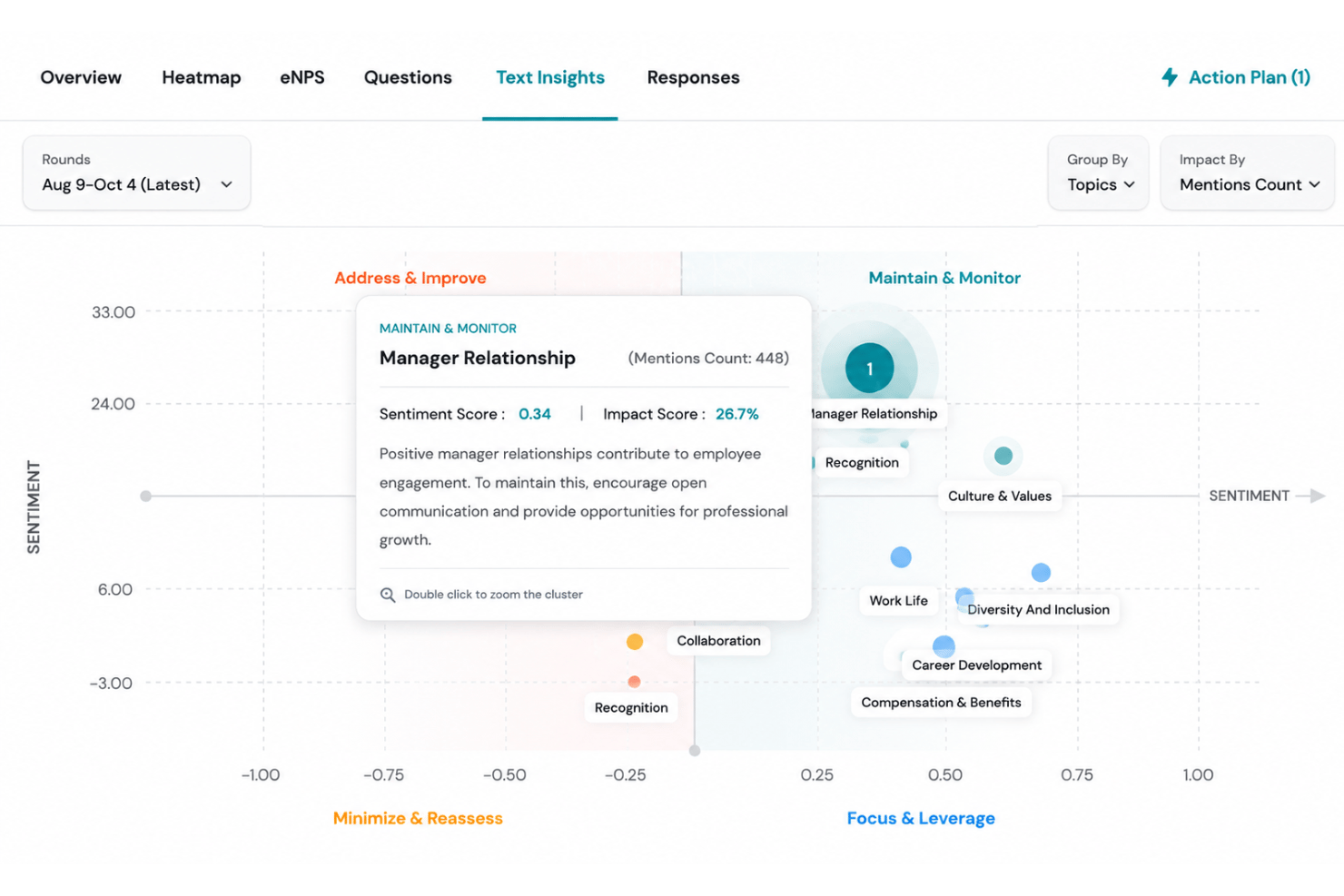
Infer AI summarizes qualitative feedback, surfaces engagement and performance trends, and identifies the emotions behind employee responses. HR leaders can also explore their people data through AI Coach.
Vault Rewards Marketplace
Employees can redeem recognition points through Vault’s marketplace of more than 800 global gift cards. This gives organizations built-in rewards functionality without relying on a separate third-party tool.
Ease of Use
ThriveSparrow is easy to get around, with a clean interface and guided workflows that make launching surveys, reviews, and recognition programs feel manageable. Templates, question banks, automated reminders, and configurable reporting options help admins get started without building every process from scratch. More complex enterprise workflows may require additional setup, but everyday engagement tasks are refreshingly straightforward.
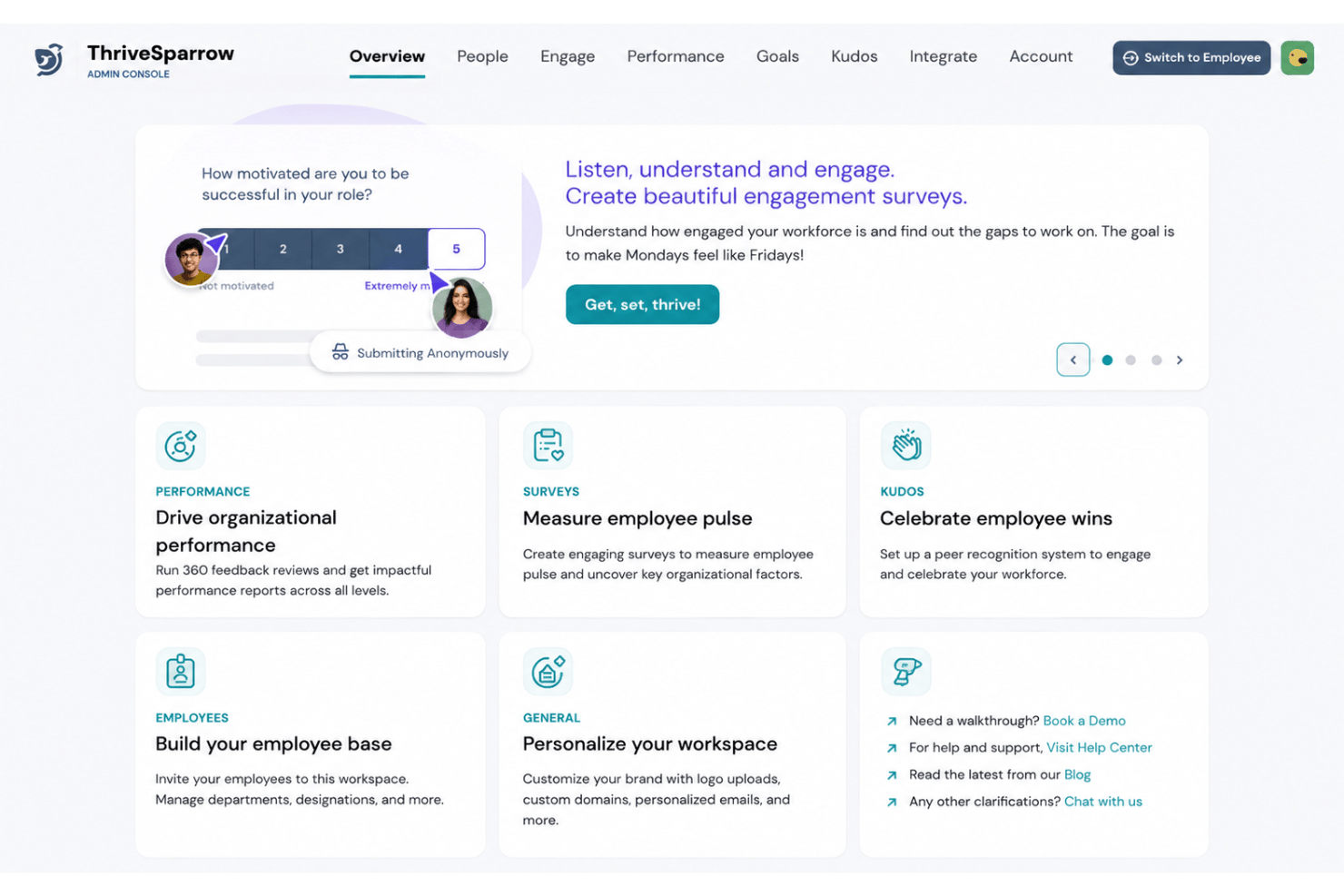
Onboarding
ThriveSparrow offers guided onboarding for most customers, with a dedicated customer success manager supporting implementation and adoption. The process can include employee data migration, HRIS integration support, platform configuration, admin and manager training, and go-live planning. Smaller organizations can also use a self-service setup, while post-launch support helps teams monitor adoption and adjust the platform as needed.
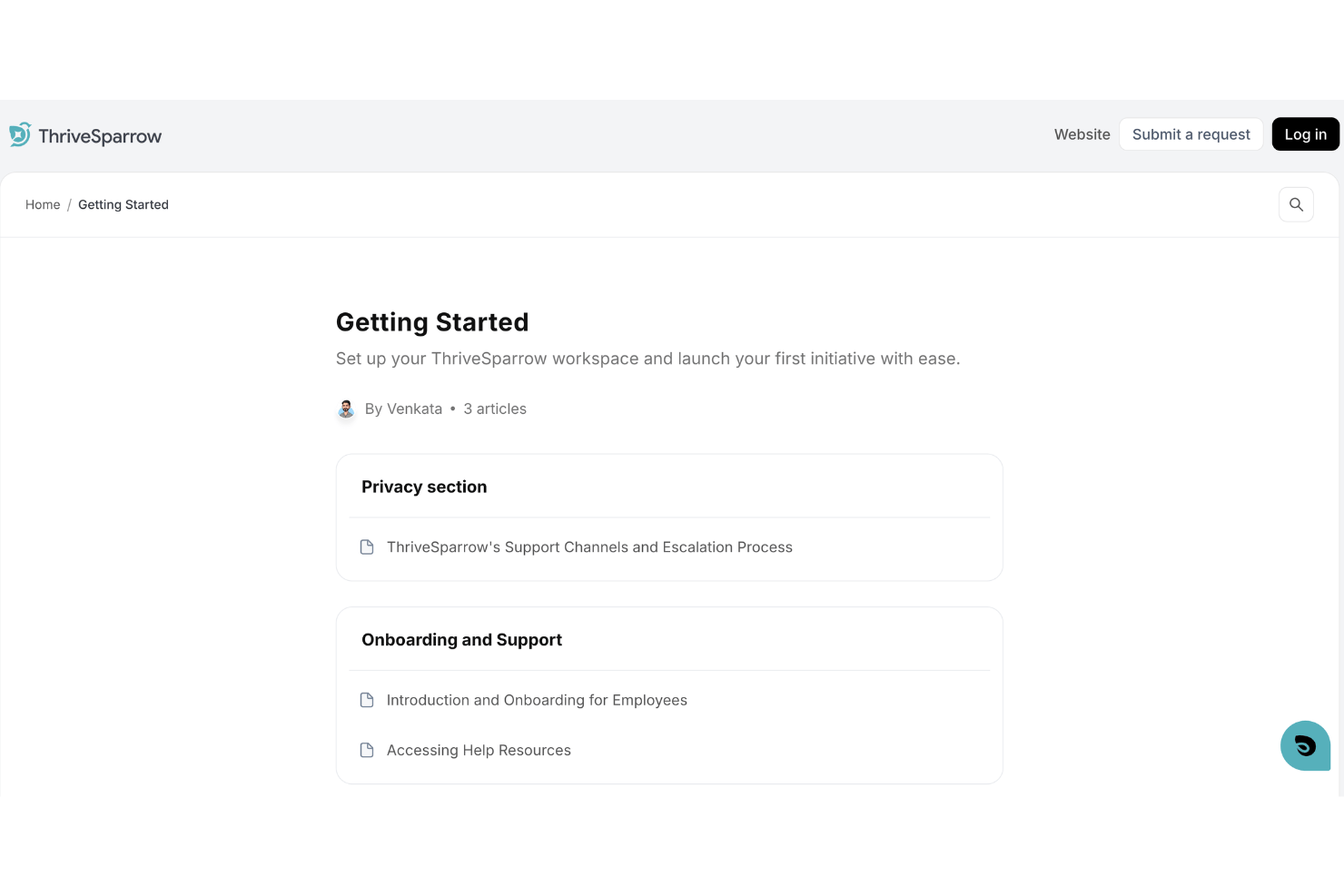
Customer Support
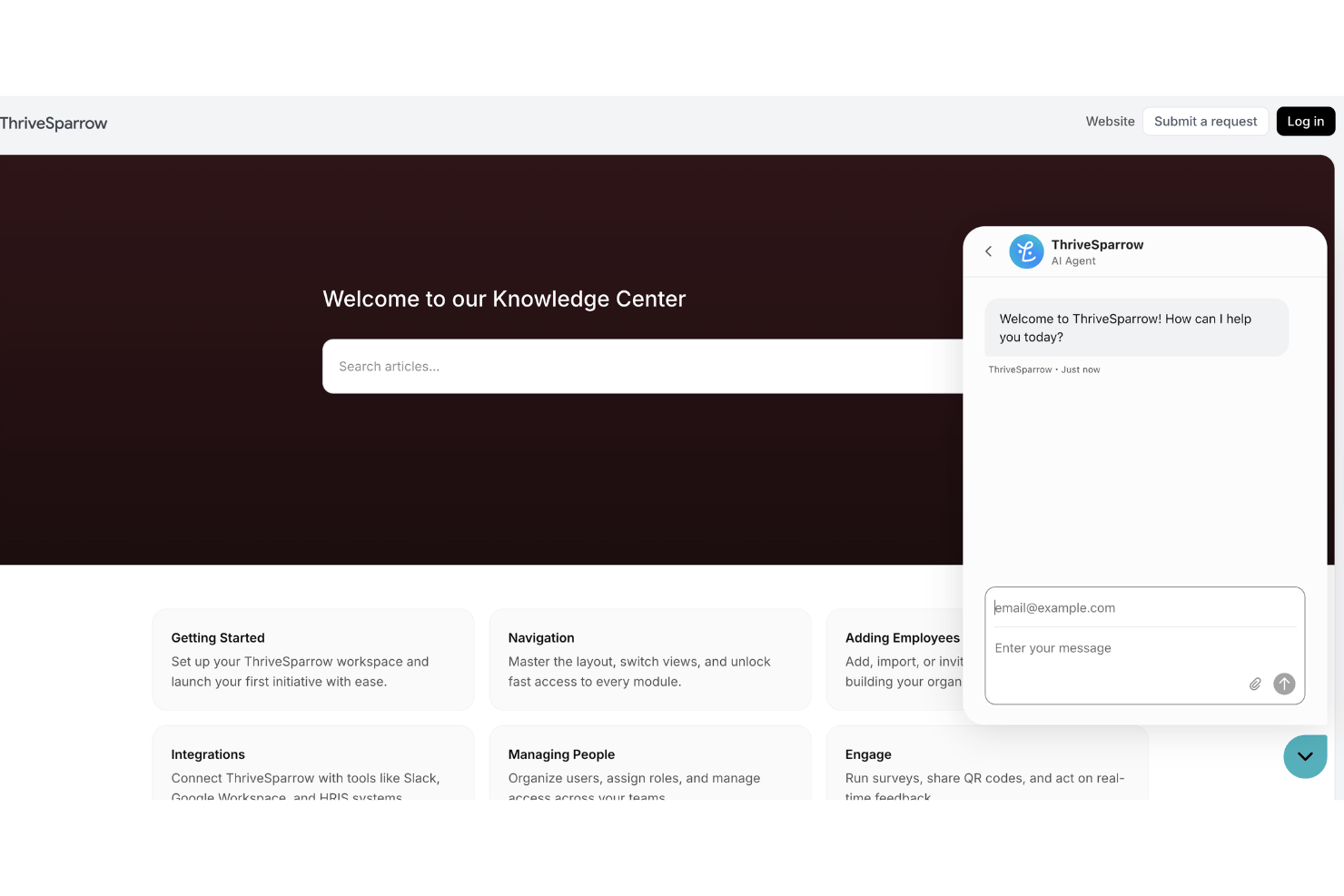
ThriveSparrow offers a searchable knowledge center covering setup, integrations, surveys, performance reviews, goals, and other core workflows, plus a built-in chatbot for quick support. Guided customers also receive help from a dedicated customer success manager during implementation and after launch, giving teams a useful mix of self-service and hands-on assistance.
Integrations
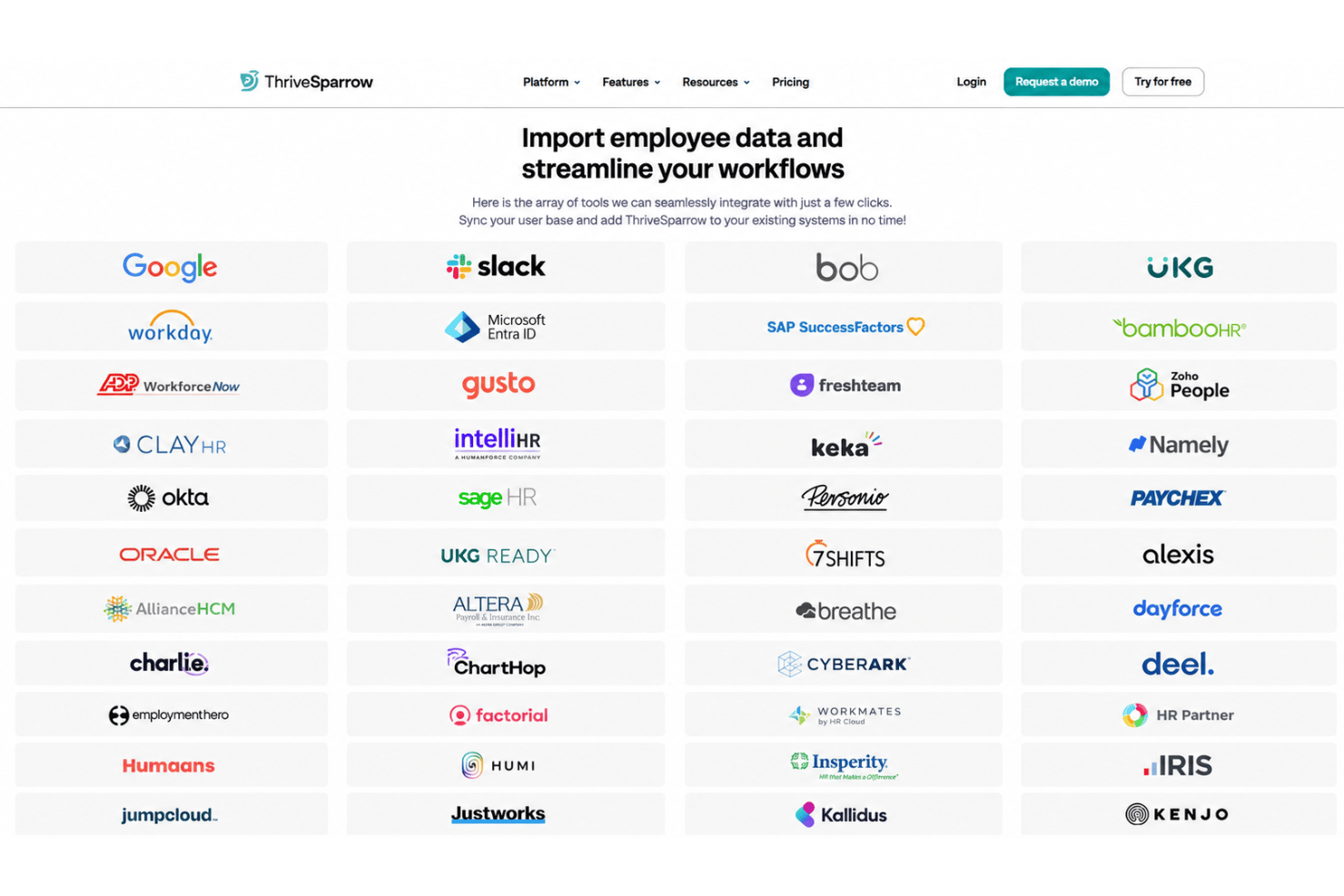
ThriveSparrow integrates with Google Workspace, Slack, Microsoft Teams, BambooHR, Workday, ADP, Gusto, SAP SuccessFactors, and other HRIS and workplace tools. Depending on the integration, teams can import employee records, keep directory data updated, or deliver survey, performance, and recognition notifications through existing work tools.
Value for Money
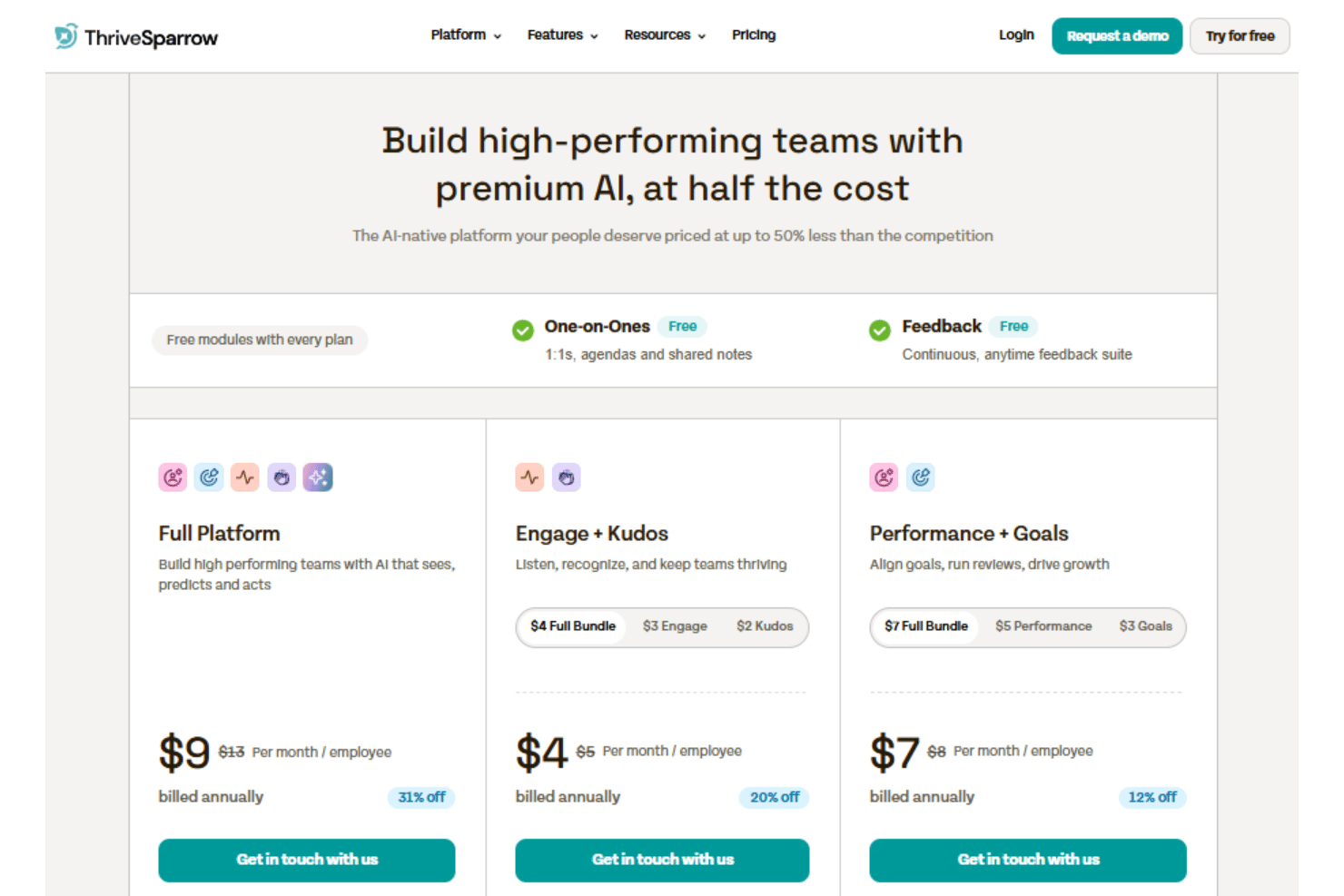
ThriveSparrow offers good value for organizations that want to combine employee engagement, recognition, performance management, goals, and AI-powered insights without paying for several separate tools. Its modular plans let you choose the capabilities you need, while One-on-Ones and Continuous Feedback are included across all paid options. The full platform offers the strongest value for teams that plan to use multiple modules, though smaller organizations may find a focused bundle more practical.
- One-on-Ones and Feedback: Includes recurring one-on-one meetings, agendas, shared notes, and continuous feedback tools.
- Engage + Kudos: Includes pulse and lifecycle surveys, industry benchmarks, AI-supported analysis and action plans, peer recognition, customizable Kudos cards, rewards, and recognition analytics.
- Performance + Goals: Includes 360-degree reviews, calibration, box grids, AI-generated development plans, performance analytics, OKR creation, goal tracking, and Jira and custom integrations.
- Full Platform: Includes all engagement, recognition, performance, and goals capabilities, along with AI Coach, sentiment analysis, AI-generated development plans, and AI highlights.
ThriveSparrow Specs
- 360 Degree Feedback
- API
- Application Tracking
- Attendance Tracking
- Budgeting
- Calendar Management
- Dashboard
- Data Export
- Data Import
- Data Visualization
- Employee Database
- Employee Engagement
- Employee Incentive Management
- Employee Onboarding
- External Integrations
- Feedback Management
- Forecasting
- Multi-User
- Notifications
- Onboarding
- Scheduling
- Timesheets
- Vacation & Absence Calendar
ThriveSparrow FAQs
Is ThriveSparrow mainly an employee engagement survey tool?
Can ThriveSparrow replace an HRIS or payroll system?
Is ThriveSparrow suitable for enterprise organizations?
Does ThriveSparrow include performance management tools?
How does ThriveSparrow use AI?
How does ThriveSparrow help teams act on employee feedback?
What are ThriveSparrow’s main limitations?
What security standards and protections does ThriveSparrow provide?
How does ThriveSparrow handle onboarding?
How does ThriveSparrow’s pricing work?
ThriveSparrow Company Overview & History
ThriveSparrow is an AI-native employee success platform operated by SurveySparrow Inc. and headquartered in Palo Alto, California. Founded in 2022, it helps HR and People teams manage employee engagement surveys, performance reviews, goals and OKRs, continuous feedback, one-on-ones, recognition and rewards, and people analytics.
The company is privately held and lists a workforce of 201–500 employees. The platform publicly names customers such as Siemens, Tech Mahindra, APL Logistics, Dümmen Orange, Tropicana, Active Interest Media, and greytHR.
ThriveSparrow Major Milestones
- 2022: ThriveSparrow was founded as an employee engagement and performance management software provider.
- 2025: The platform introduced Lifecycle Surveys in September and expanded its recognition tools with Awards in December.
- 2026: ThriveSparrow expanded access through a mobile app supporting performance reviews, recognition, feedback, and engagement activities.