

10 Migliori software per l’amministrazione dei benefit del 2026

10 Elenco dei migliori software per la gestione dei benefit


I migliori software per la gestione dei benefit aiutano a semplificare ogni aspetto, dall’iscrizione e dall’idoneità alla conformità e alla reportistica, così puoi gestire i benefit dei dipendenti con sicurezza e semplicità.
Quando gestisci assicurazioni sanitarie, piani pensionistici e benefit opzionali per un team in crescita, è facile che si verifichino errori, scadenze mancate o problemi di conformità. La piattaforma giusta automatizza il monitoraggio dell’idoneità, semplifica il periodo di iscrizione e centralizza tutti i dati dei fornitori, facendoti risparmiare tempo e riducendo gli errori.
Grazie a funzionalità come il self-service per i dipendenti, il confronto integrato dei piani e i promemoria automatici, questi strumenti aumentano la soddisfazione e riducono le richieste di assistenza.
Dopo aver valutato diverse piattaforme utilizzate da piccole e medie imprese, ho selezionato un elenco delle migliori opzioni, intuitive, scalabili e progettate per rendere la gestione dei benefit semplice e priva di stress.
Perché fidarsi delle nostre recensioni sui software
Il nostro team testa e recensisce software dal 2012. In quanto esperti HR noi stessi, sappiamo quanto sia difficile — e importante — scegliere il software giusto.
Per questa guida, abbiamo valutato gli strumenti attraverso test pratici e ricerche indipendenti, assegnando un punteggio agli strumenti in base ai nostri criteri di selezione. Ci basiamo inoltre sulle competenze di leader di pensiero del settore e di professionisti HR attivi.
Le nostre recensioni riflettono il nostro giudizio editoriale umano, non un discorso di vendita.
Revisori esperti:
Riepilogo dei migliori software per la gestione dei benefit
Questa tabella comparativa riassume i dettagli sui prezzi delle mie migliori selezioni di software per la gestione dei benefit, per aiutarti a trovare quello più adatto al tuo budget e alle esigenze della tua azienda.
| Tool | Best For | Trial Info | Price | ||
|---|---|---|---|---|---|
| 1 | Ideale per l’amministrazione dei benefit tutto-in-uno | Demo gratuita disponibile | Da $8/dipendente/mese + $50/mese di quota base | Website | |
| 2 | Ideale per offrire benefit localizzati ai dipendenti internazionali | Demo gratuita disponibile | Prezzo fisso su richiesta | Website | |
| 3 | Ideale per benefit sanitari flessibili e personalizzati per i dipendenti | Demo gratuita disponibile | A partire da $45/utente/mese | Website | |
| 4 | Ideale per la gestione della conformità COBRA | Nessuna prova gratuita disponibile | Prezzo su richiesta | Website | |
| 5 | Ideale per detrazioni benefit automatizzate | Demo gratuita disponibile | Da $12/utente/mese | Website | |
| 6 | Ideale per sincronizzare direttamente i costi delle detrazioni dei benefit con le buste paga | 30 giorni di prova gratuita | A partire da $4/dipendente/mese + una quota base di $36/mese | Website | |
| 7 | Ideale per offrire benefici sanitari globali a team internazionali | Demo gratuita disponibile | Da $199/utente/mese | Website | |
| 8 | Ideale per integrazioni dirette con fornitori di benefit | Demo gratuita disponibile | Prezzo su richiesta | Website | |
| 9 | Ideale per decisioni sui benefit guidate dall'IA | Demo gratuita disponibile | Prezzo su richiesta | Website | |
| 10 | La migliore suite software HCM per una gestione integrata dei benefit e un facile self-service per i dipendenti | Not available | Prezzi su richiesta | Website |


Recensioni dei migliori software per la gestione dei benefit
Di seguito trovi i miei riepiloghi dettagliati dei migliori software per la gestione dei benefit inclusi nella mia selezione. Le mie recensioni offrono una panoramica dettagliata delle funzionalità principali, dei pro e dei contro, delle integrazioni e dei casi d’uso ideali di ogni strumento, per aiutarti a trovare quello più adatto a te.

Ideale per l’amministrazione dei benefit tutto-in-uno
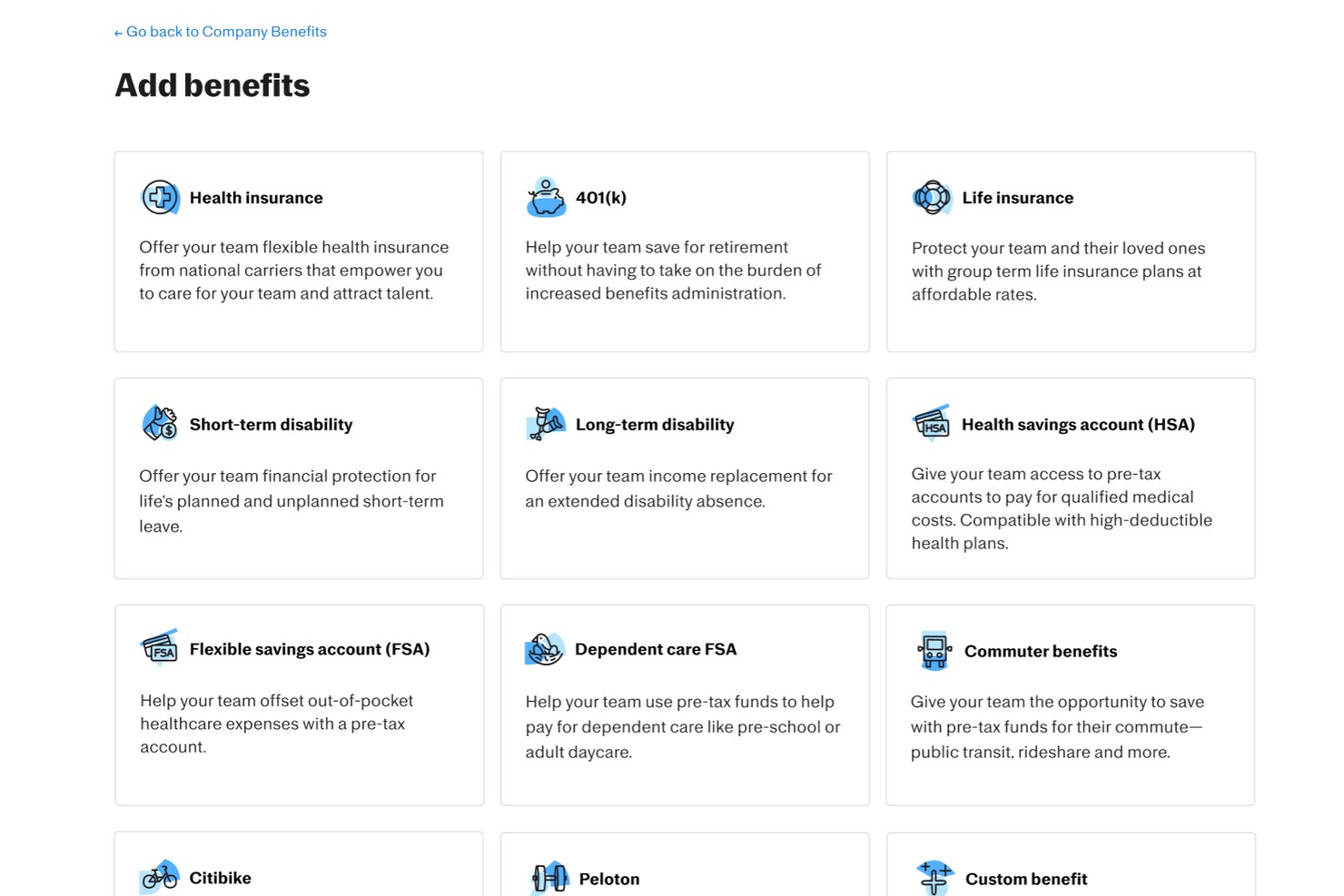
Justworks è una piattaforma software di amministrazione dei benefit che unifica buste paga, risorse umane, conformità e iscrizione ai benefit per i dipendenti, ideale per le organizzazioni che desiderano gestire piani, onboarding e requisiti normativi in un unico sistema.
Per chi è migliore Justworks?
Per piccole e medie imprese che cercano una piattaforma tutto-in-uno per amministrare buste paga, risorse umane e benefit con supporto alla conformità integrato.
Perché ho scelto Justworks
Ho scelto Justworks come uno dei migliori perché apprezzo la possibilità di contattare un supporto umano in diretta 24/7, specialmente quando si tratta di domande urgenti su benefit o buste paga. Posso gestire l’iscrizione ai benefit e gli eventi della vita in qualsiasi momento, sapendo che il loro team è disponibile per risolvere tempestivamente problemi complessi in tempo reale.
Caratteristiche principali di Justworks
- Reportistica ACA automatizzata: La piattaforma genera e invia i moduli ACA per i dipendenti idonei.
- Flussi di lavoro di iscrizione online: I dipendenti seguono procedure guidate per selezionare e modificare i piani di benefit online.
- Gestione COBRA: Justworks si occupa dell’iscrizione e delle comunicazioni COBRA per i dipendenti cessati.
- Elaborazione paghe integrata: L’elaborazione delle paghe viene gestita insieme ai benefit con detrazioni e aggiornamenti sincronizzati.
Integrazioni di Justworks
Justworks offre integrazioni native con QuickBooks, Xero e QuickBooks Time. È disponibile un’API per integrazioni personalizzate.
Pros and Cons
Pros:
- Supporto umano attivo 24/7 per i dipendenti
- Gestione automatizzata di ACA e COBRA inclusa
- Offre un’ampia selezione di piani di benefit nazionali
Cons:
- Devi utilizzare i fornitori assicurativi selezionati da Justworks
- Nessun strumento avanzato di supporto decisionale per i dipendenti

Deel HR
Ideale per offrire benefit localizzati ai dipendenti internazionali

Deel è un software di amministrazione dei benefit progettato per le aziende che gestiscono dipendenti in diversi paesi. Si concentra sulla gestione globale delle buste paga e dei benefit, offrendo strumenti per affrontare compiti complessi di conformità internazionale e gestione delle retribuzioni.
Perché ho scelto Deel: Deel eccelle nelle funzionalità di gestione delle buste paga a livello globale, rendendolo ideale per le aziende con team internazionali. Offre funzionalità come piani di benefit personalizzabili e integrazioni fluide con strumenti HR.
Lo strumento supporta anche diversi modelli contrattuali, garantendo conformità e processi di pagamento efficienti. L'interfaccia intuitiva semplifica la gestione dei benefit a livello globale, rendendolo la scelta migliore per la gestione delle buste paga internazionali.
Caratteristiche e integrazioni distintive:
Funzionalità includono piani di benefit personalizzabili, esperienze di iscrizione guidata e detrazioni automatiche dalla busta paga. Deel supporta la gestione dell'iscrizione aperta, consentendo ai team HR di gestire i piani e monitorare facilmente la partecipazione dei dipendenti. Il software supporta inoltre vari programmi pre-tasse, migliorando le sue capacità di gestione globale delle buste paga.
Integrazioni includono QuickBooks, Xero, NetSuite, BambooHR, Gusto, Greenhouse, Lever, Slack, Microsoft Teams e Workable.
Pros and Cons
Pros:
- Offre esperienze di iscrizione guidata
- Mantiene le relazioni esistenti con i broker
- Fornisce detrazioni automatiche dalla busta paga
Cons:
- Opzioni limitate di supporto offline
- Potrebbe non adattarsi a tutte le esigenze dei settori
New Product Updates from Deel HR

Deel Expands Stablecoin Wallet to 80+ Countries
Deel expands its Stablecoin Wallet to 80+ countries with dollar-backed balances and optional rewards. This gives eligible contractors more ways to hold and manage earnings inside Deel. For more information, visit Deel’s official site.
 .
.
Thatch
Ideale per benefit sanitari flessibili e personalizzati per i dipendenti
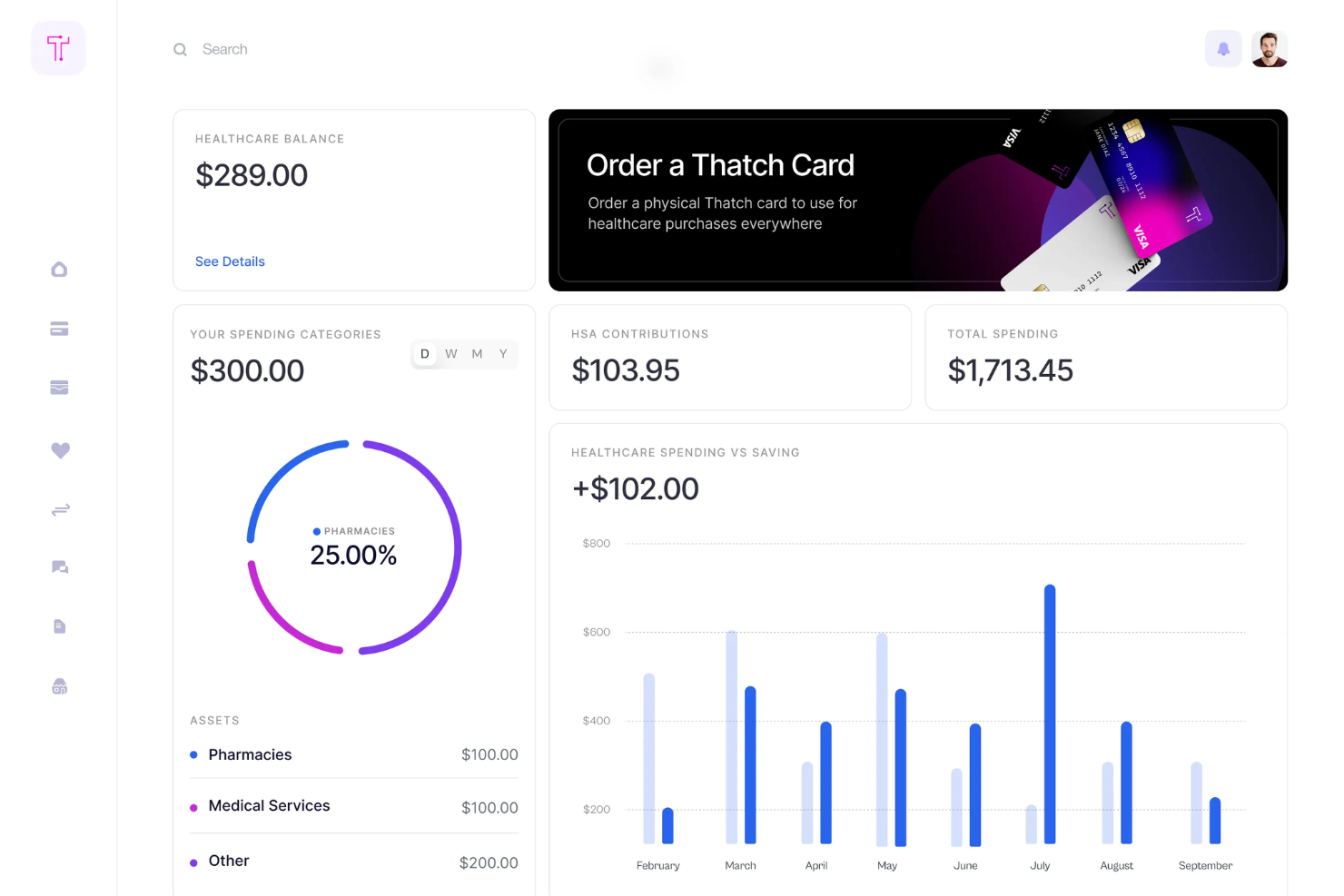
Thatch è una piattaforma di benefit sanitari progettata per le aziende che desiderano offrire ai dipendenti opzioni sanitarie flessibili. Offre ai datori di lavoro strumenti per gestire i benefit sanitari tramite un Individual Coverage Health Reimbursement Arrangement (ICHRA), consentendo ai dipendenti di scegliere i piani sanitari, dentistici e oculistici che preferiscono.
Perché ho scelto Thatch: Thatch fornisce analisi basate sull'IA che aiutano il tuo team a comprendere l'utilizzo e i costi dell'assistenza sanitaria. Offre un marketplace selezionato di servizi sanitari e per il benessere, migliorando la soddisfazione dei dipendenti. Il modello di spesa sanitaria basato sul budget della piattaforma consente ai dipendenti di scegliere i piani più adatti alle loro esigenze. Gli strumenti per progettare e implementare un ICHRA la rendono una scelta eccellente per la gestione personalizzata dei benefit.
Thatch gestisce l'iscrizione, la conformità, i pagamenti ai vettori assicurativi e le trattenute in busta paga per i budget sanitari dei dipendenti, sostituendo integralmente il lavoro amministrativo manuale.
Caratteristiche principali & integrazioni:
Le funzionalità includono la spesa sanitaria basata sul budget, un marketplace selezionato di servizi sanitari e la carta di debito Thatch Visa per i budget non utilizzati. I dipendenti possono scegliere tra diversi piani assicurativi, ottenendo un'assistenza sanitaria personalizzata. La piattaforma semplifica inoltre la gestione per i datori di lavoro grazie ai suoi strumenti ICHRA.
Le integrazioni includono la compatibilità con tutti i fornitori di servizi paghe e i piani assicurativi, richiedendo una configurazione minima.
Pros and Cons
Pros:
- Esperienza sanitaria personalizzata
- Gestione semplificata per i datori di lavoro
- Eccellente assistenza clienti
Cons:
- Richiede un coinvolgimento proattivo dei dipendenti
- Potrebbe non coprire tutti i QHP statali

WEX Benefits offre una soluzione versatile per le aziende che desiderano semplificare la gestione dei benefit ai dipendenti. Con funzionalità come Health Savings Accounts (HSAs), Flexible Spending Accounts (FSAs) e conformità COBRA, si rivolge a una vasta gamma di settori, compresi sanità e settore pubblico. Questa piattaforma è particolarmente interessante per i professionisti HR e gli amministratori dei benefit che cercano soluzioni personalizzabili per ottimizzare le operazioni e garantire la conformità.
Perché ho scelto WEX Benefits
Ho scelto WEX Benefits per il suo focus sulla semplificazione delle complesse attività di amministrazione dei benefit, fondamentale per aziende di tutte le dimensioni. La caratteristica di spicco del software è la gestione della conformità COBRA, che garantisce che la tua organizzazione rimanga conforme alle normative mentre gestisce i benefit dei dipendenti. Inoltre, l'integrazione con Health Savings Accounts (HSAs) e Flexible Spending Accounts (FSAs) offre un approccio semplificato alla gestione di diversi tipi di benefit, risolvendo la sfida comune di dover gestire più sistemi.
Caratteristiche principali di WEX Benefits
Oltre alle sue funzioni distintive, ho identificato anche varie altre funzionalità chiave che ne aumentano l'attrattiva:
- Soluzioni personalizzabili: Modella la piattaforma sulle esigenze specifiche della tua organizzazione, assicurandoti che il software si integri perfettamente nei tuoi processi esistenti.
- Analisi avanzata: Ottieni informazioni sull'utilizzo e le tendenze dei benefit, aiutandoti a prendere decisioni basate sui dati per ottimizzare l'offerta dei benefit.
- Pagamenti in tempo reale: Gestisci i pagamenti in modo efficiente con l'elaborazione in tempo reale, riducendo il carico amministrativo sul tuo team.
- Risorse approfondite: Accedi a una grande quantità di risorse, tra cui blog, report e podcast, per rimanere informato e sfruttare al massimo la piattaforma.
Integrazioni WEX Benefits
Le integrazioni comprendono fornitori di servizi payroll e benefit, assicurando una gestione dei dati senza soluzione di continuità e migliorando l'esperienza utente. WEX Benefits non elenca integrazioni native specifiche, ma la piattaforma supporta diversi benefit accounts e servizi professionali.
Pros and Cons
Pros:
- Supporto completo per HSA e FSA
- Eccellenti capacità di conformità COBRA
- Strumenti avanzati di reporting e analisi
Cons:
- Prezzi non disponibili pubblicamente
- Integrazioni pubblicamente elencate limitate

Gusto
Ideale per detrazioni benefit automatizzate
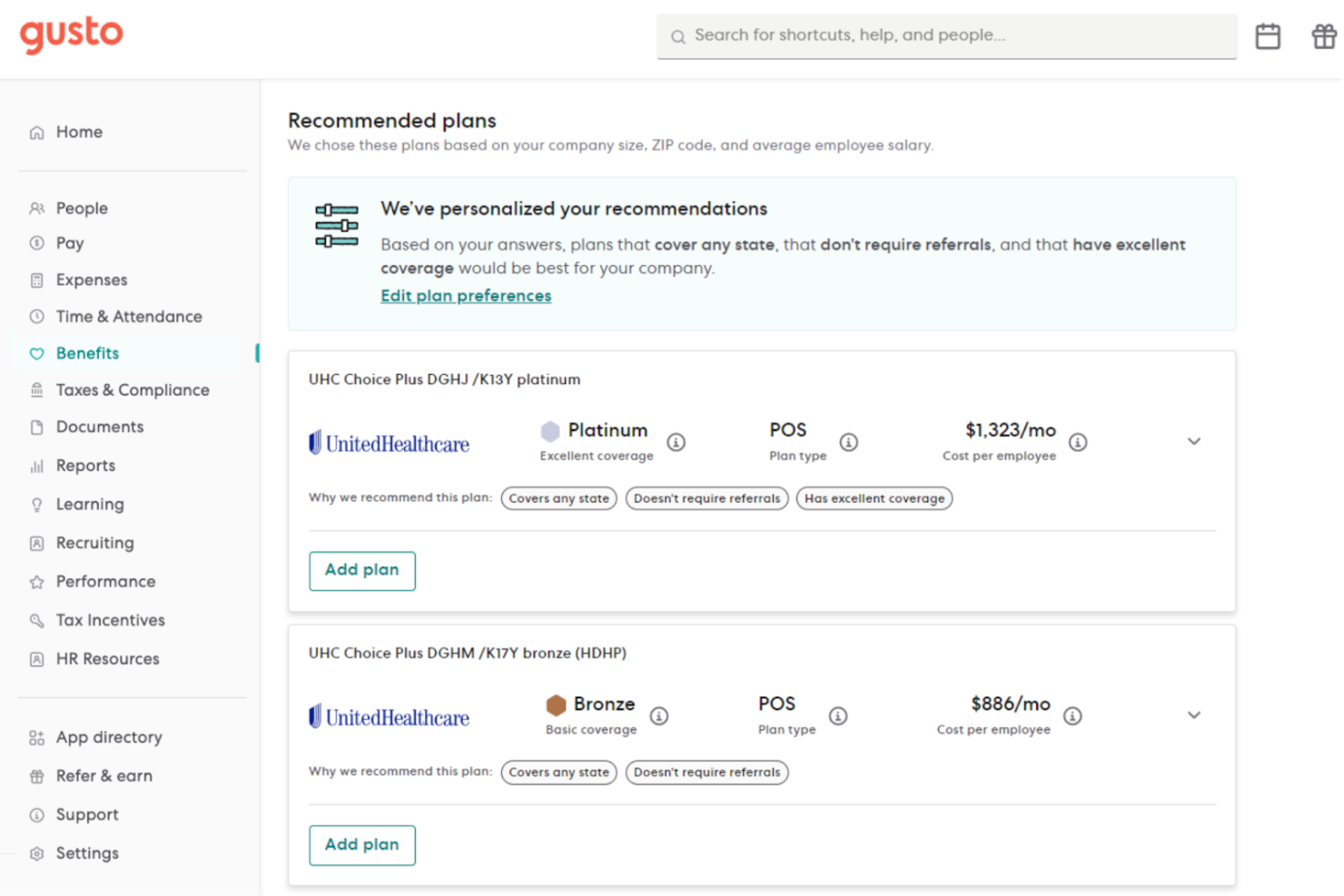
Per le aziende in crescita che cercano una piattaforma tutto-in-uno per gestire paghe, benefit e risorse umane, Gusto è un'ottima opzione. È pensato per piccole e medie imprese di vari settori che necessitano di un approccio semplificato all'amministrazione dei benefit per i dipendenti. Gusto affronta la sfida di gestire molteplici offerte di benefit garantendo la conformità normativa, diventando così uno strumento prezioso sia per i professionisti delle risorse umane che per i titolari d’azienda.
Perché ho scelto Gusto
Ho scelto Gusto per la sua perfetta integrazione dell’amministrazione dei benefit con le funzioni di gestione paghe e HR. La capacità della piattaforma di automatizzare le trattenute in busta paga per benefit come odontoiatria, oculistica e piani 401(k) semplifica la gestione delle attività. Inoltre, la funzione di self-service per i dipendenti permette ai membri del team di gestire i propri benefit in modo autonomo, offrendo un’esperienza utente più coinvolgente. Il supporto completo alla conformità fornito da Gusto garantisce inoltre che le aziende restino allineate alle normative, riducendo gli oneri amministrativi.
Caratteristiche chiave di Gusto
Oltre alle funzionalità sopra menzionate, Gusto offre altre caratteristiche che potenziano la gestione dei benefit.
- Gestione dell’iscrizione aperta: Fornisce strumenti per gestire i periodi di iscrizione aperta, consentendo ai dipendenti di selezionare o rinunciare ai benefit in modo efficiente.
- Gestione delle variazioni per eventi della vita: Facilita le modifiche ai benefit a seguito di eventi importanti nella vita, assicurando che la copertura sia sempre aggiornata.
- Gestione paghe multi-stato: Gestisce le buste paga per team situati in diversi stati, adattandosi alla tipica diversità geografica dell’autotrasporto.
- Gestione COBRA: Offre supporto e assistenza nella gestione della copertura COBRA per i dipendenti uscenti, garantendo la conformità con la normativa federale.
Integrazioni Gusto
Le integrazioni includono QuickBooks, Xero, Freshbooks, Hubstaff, Expensify, Greenhouse, Breezy HR, JazzHR, Carta e Shopify.
Pros and Cons
Pros:
- Le trattenute automatiche in busta paga semplificano la gestione dei benefit.
- Il self-service integrato per i dipendenti migliora il coinvolgimento degli utenti.
- Fornisce supporto nell'amministrazione COBRA per i dipendenti uscenti.
Cons:
- Copertura globale limitata rispetto ad alcuni concorrenti.
- La disponibilità di benefit premium potrebbe essere limitata in alcuni stati USA.
New Product Updates from Gusto
Gusto Adds Solo Advisory Tools and Mobile Money Features
Gusto adds Solo S-Corp Advisory Tools and Gusto Money on Mobile for tax guidance, invoicing, and bill payments. These updates help accountants advise solopreneurs and let users manage business finances from their phones. For more information, visit Gusto’s official site.
OnPay
Ideale per sincronizzare direttamente i costi delle detrazioni dei benefit con le buste paga
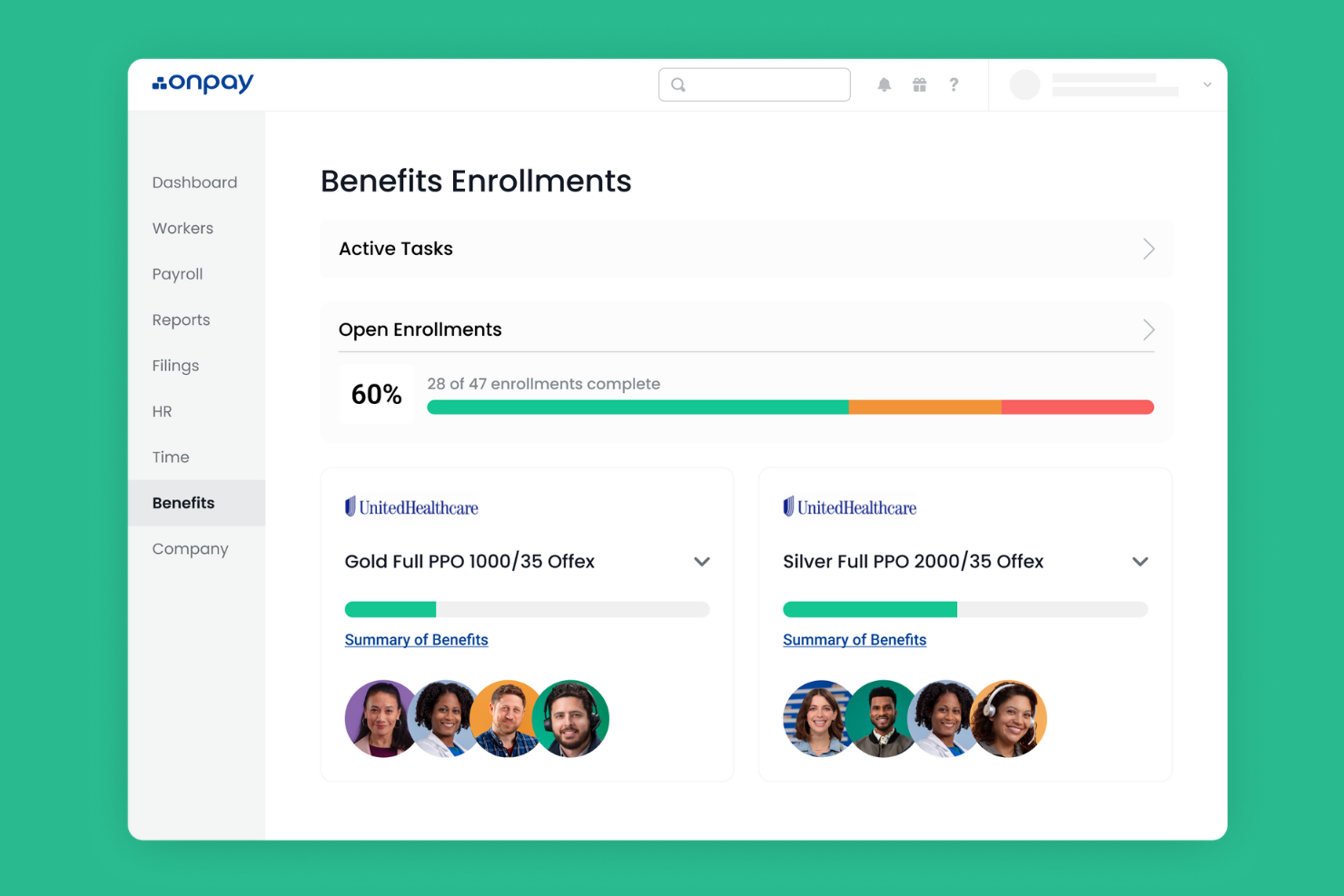
OnPay è un software per la gestione delle buste paga e delle risorse umane pensato per le piccole imprese, che offre funzioni chiave come l’elaborazione degli stipendi, la dichiarazione dei contributi fiscali e l’amministrazione dei benefit. Supporta piccoli team con strumenti semplici per gestire i benefit dei dipendenti e i requisiti di conformità.
Perché ho scelto OnPay: OnPay è stato sviluppato per rispondere alle esigenze delle piccole imprese grazie alla sua interfaccia semplice e alle funzionalità essenziali. Offre la compilazione automatica delle dichiarazioni fiscali, consentendo al tuo team di risparmiare tempo sulle mansioni legate alla conformità.
Gli strumenti di amministrazione dei benefit di OnPay includono opzioni semplici per la configurazione e la gestione dei piani, rendendolo accessibile anche ai team più piccoli. Il software è proposto a un prezzo competitivo, risultando ideale per le piccole imprese.
Funzionalità e integrazioni principali:
Funzionalità includono la gestione automatica delle dichiarazioni fiscali delle buste paga, portali self-service per i dipendenti e orari di pagamento flessibili. OnPay mette inoltre a disposizione opzioni di deposito diretto, semplificando i processi di pagamento per il tuo team. Puoi tenere traccia e gestire le ferie per garantire una corretta amministrazione dei permessi.
Integrazioni includono QuickBooks, Xero, TSheets, Mineral, Guideline, Vestwell, Kabbage, Humanity, Deputy e When I Work.
Pros and Cons
Pros:
- Dichiarazioni fiscali automatiche
- Orari di pagamento flessibili
- Opzioni di deposito diretto
Cons:
- Funzioni di reportistica di base
- Nessuno strumento HR avanzato

Ideale per offrire benefici sanitari globali a team internazionali
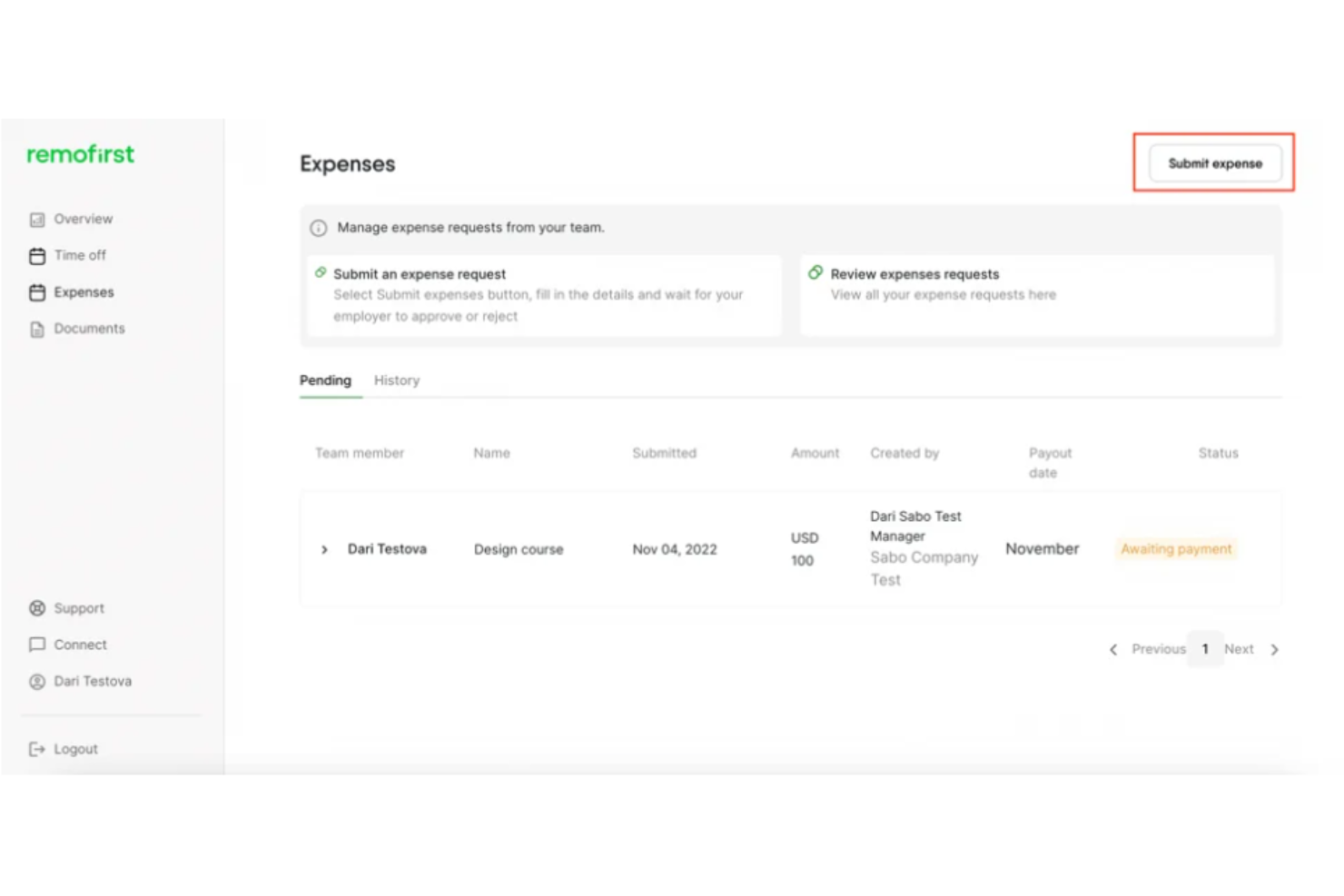
RemoFirst è una soluzione globale Employer of Record, ideale per le aziende che desiderano assumere e gestire collaboratori internazionali senza dover costituire entità locali. Offre servizi come gestione salariale globale, onboarding e assicurazione sanitaria per supportare le aziende in oltre 185 paesi.
Perché ho scelto RemoFirst: RemoFirst è pensato per la gestione di collaboratori internazionali, offrendo un rapido onboarding e elaborazione delle paghe in più valute. Fornisce supporto per visti e permessi di lavoro, facilitando la gestione della conformità normativa per il tuo team.
L'assicurazione sanitaria della piattaforma, RemoHealth, garantisce ai tuoi collaboratori una copertura mondiale. Le sue soluzioni di impiego convenienti sono ideali per aziende in espansione globale.
Funzionalità e integrazioni principali:
Funzionalità includono supporto per oltre 185 paesi, coperture sanitarie personalizzate ed elaborazione efficiente delle buste paga. RemoFirst aiuta con visti e permessi di lavoro, garantendo la conformità alle normative locali. Puoi gestire ferie e bonus, migliorando l'esperienza lavorativa complessiva del tuo team globale.
Integrazioni includono QuickBooks, Xero, BambooHR, Slack, Microsoft Teams, Gusto, Greenhouse, Lever, Asana e Trello.
Pros and Cons
Pros:
- Assicurazione sanitaria su misura
- Supporto per visti e permessi
- Soluzioni convenienti
Cons:
- Richiede configurazione per ogni regione
- Può richiedere formazione iniziale

Ideale per integrazioni dirette con fornitori di benefit
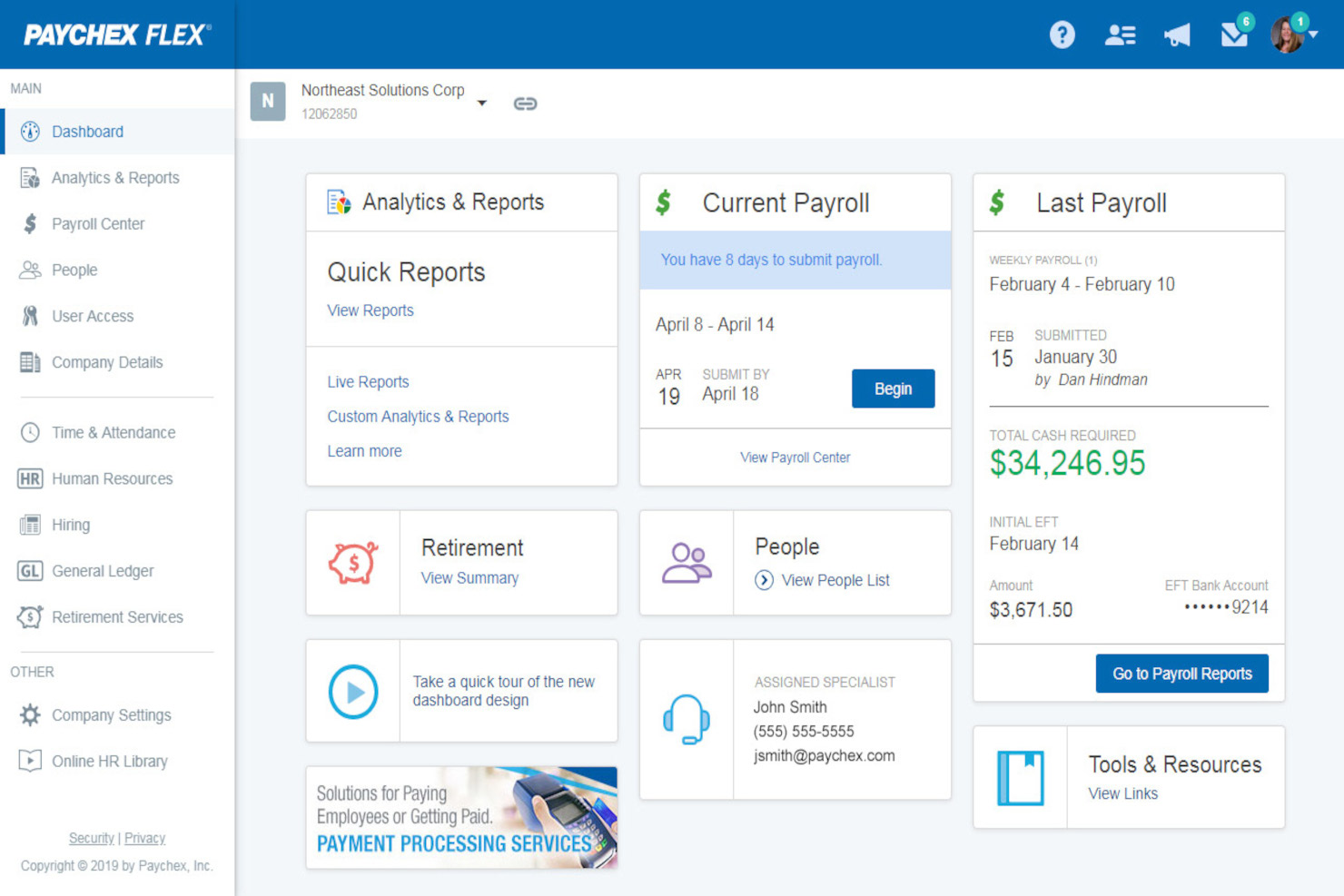
Paychex Flex è una soluzione cloud per la gestione delle risorse umane e delle buste paga progettata per aziende di ogni dimensione. Offre gestione dei salari, amministrazione dei benefit e servizi per le risorse umane, facilitando alle squadre la gestione efficiente dei dati dei dipendenti.
Perché ho scelto Paychex Flex: Paychex Flex semplifica la gestione delle buste paga tramite un'interfaccia intuitiva e processi automatizzati. Offre funzionalità come bonifico diretto e accesso da mobile, consentendo al tuo team di gestire le paghe ovunque si trovi. Paychex Flex fornisce anche supporto per la conformità fiscale, riducendo il carico delle attività regolatorie. La sua scalabilità lo rende adatto alle aziende che prevedono una crescita futura.
Funzionalità principali & integrazioni:
Funzionalità includono report personalizzabili, portale self-service per i dipendenti e accesso tramite app mobile. Paychex Flex consente di creare report dettagliati su misura per le esigenze aziendali. Il portale self-service permette al tuo personale di gestire in autonomia le proprie informazioni e visualizzare le proprie buste paga.
Integrazioni includono QuickBooks, Xero, Indeed, BambooHR, TSheets, Google Workspace, Microsoft Teams, Salesforce, Slack e ADP.
Pros and Cons
Pros:
- Accesso mobile per la gestione delle buste paga
- Opzioni di report personalizzabili
- Portale self-service per i dipendenti
Cons:
- Occasionali ritardi nell'assistenza clienti
- Alcune funzionalità richiedono aggiornamenti manuali
Healthee
Ideale per decisioni sui benefit guidate dall'IA

Healthee aiuta i team a superare la complessità dei benefit sanitari utilizzando una guida assistita dall'IA per rendere più chiara la selezione e la copertura dei benefit sia per i dipendenti che per gli amministratori, soprattutto durante il periodo di iscrizione e nella navigazione delle cure durante tutto l'anno. È rivolto a responsabili HR, team finanziari, broker, PEO e amministratori terzi che desiderano ridurre le domande ripetitive e aiutare i dipendenti a comprendere i propri piani e ad accedere alle cure con sicurezza.
Perché ho scelto Healthee
Ho scelto Healthee perché il suo supporto decisionale e di navigazione dei benefit basato su IA assiste direttamente amministratori dei benefit e team HR nel semplificare le informazioni complesse sulla copertura sanitaria per i dipendenti. Il suo strumento di confronto dei piani guidato dall'IA offre raccomandazioni personalizzate che aiutano i dipendenti a scegliere i benefit più adatti durante il periodo di iscrizione, riducendo confusione e domande.
L'assistente virtuale integrato “Zoe” può rispondere in tempo reale a domande su copertura e benefit, togliendo dal vostro team le richieste di routine. Queste funzionalità supportano i vostri obiettivi di migliorare l’utilizzo dei benefit e ridurre il carico amministrativo.
Funzionalità principali di Healthee
Oltre alle funzionalità già menzionate, ho trovato utili anche le seguenti:
- Ricerca e valutazione dei fornitori: Permette al vostro team di trovare e valutare facilmente fornitori di assistenza sanitaria all’interno della rete.
- Promemoria per la prevenzione: Incoraggia la gestione proattiva della salute con promemoria e suggerimenti nell'app.
- Rilevamento frodi: Utilizza l'IA per identificare e mitigare casi di frode, abuso e sprechi nelle richieste di rimborso.
- Servizi di telemedicina: Fornisce accesso a visite telemediche 24/7 con professionisti qualificati per la salute fisica e mentale, senza necessità di presentare richieste di rimborso.
Integrazioni Healthee
Sebbene Healthee non pubblichi un catalogo di integrazioni native, la piattaforma supporta una API flessibile e widget UI incorporabili in modo da poter aggiungere la sua esperienza personalizzata nei benefit all’interno dell’ambiente tecnologico HR.
Pros and Cons
Pros:
- Accesso telemedicina 24/7 offre consulenze mediche immediate.
- Gli strumenti di trasparenza sui costi aiutano gli utenti a prendere decisioni consapevoli.
- L'assistente virtuale IA Zoe potenzia l'efficienza nella navigazione dei benefit.
Cons:
- Alcuni utenti vorrebbero anche il supporto ai benefit non-medici per un sistema più completo.
- I benefit limitati a fornitori selezionati possono restringere le opzioni.
La migliore suite software HCM per una gestione integrata dei benefit e un facile self-service per i dipendenti

ADP Vantage HCM è una soluzione di gestione del capitale umano pensata per le grandi aziende statunitensi. Offre servizi come gestione delle buste paga, amministrazione dei benefit e gestione dei talenti per ottimizzare le operazioni HR delle grandi organizzazioni.
Perché ho scelto ADP Vantage HCM: ADP Vantage HCM è pensato per le grandi imprese e offre funzioni avanzate di gestione delle buste paga e dei benefit. Supporta strutture organizzative complesse grazie agli strumenti di reportistica personalizzabili.
Le funzionalità di gestione dei talenti della piattaforma aiutano il tuo team a reclutare e trattenere i migliori talenti. Il supporto per la conformità assicura che l'azienda rispetti in modo efficiente i requisiti normativi.
Funzionalità e integrazioni principali:
Funzionalità includono analisi avanzate, accesso mobile e opzioni di self-service per i dipendenti. Le funzionalità di analisi di ADP Vantage HCM ti aiutano a monitorare le tendenze della forza lavoro e prendere decisioni basate sui dati. L'app mobile permette al team di accedere alle funzioni HR ovunque si trovi, migliorando la flessibilità.
Integrazioni includono QuickBooks, Microsoft Dynamics, Workday, Oracle, SAP, Salesforce, Kronos, NetSuite, BambooHR e Slack.
Pros and Cons
Pros:
- Analisi avanzata per il processo decisionale
- Solide funzionalità di conformità
- Strumenti di reportistica personalizzabili
Cons:
- Curva di apprendimento per le funzioni avanzate
- Sono necessari aggiornamenti di sistema occasionali
Altri software per la gestione dei benefit
Ecco alcune altre opzioni che non sono rientrate nella selezione principale. Se hai bisogno di ulteriori suggerimenti per trovare un software pratico per la gestione dei benefit, dai un’occhiata a questi strumenti e sentiti libero di commentare con i tuoi consigli su altri software:
- GoCo
Ideale per l'iscrizione ai benefit in modalità self-service
- BenefitFocus
Ideale per un ampio catalogo di prodotti di benefit leader del settore già pre-valutati
- Trinet
Ideale per la gestione della conformità ACA e dell’amministrazione COBRA
- SAP SuccessFactors
Ideale per raccogliere feedback sui programmi di benefit
- Abenity
La migliore piattaforma per offrire programmi di risparmio ai dipendenti
- Insperity
Ideale per l'esternalizzazione della gestione dei benefit dei dipendenti
- Infor CloudSuite HCM
Ideale per programmi di pensionamento
- Peoplekeep
Ideale per offrire conti di risparmio sanitario e rimborsi sanitari ai dipendenti
- Rippling
Ideale per l'iscrizione automatica dei nuovi assunti ai piani sanitari
- BambooHR®
Ideale per l'amministrazione dei benefit semplice e per le richieste di ferie tramite app mobile
- Justworks
Ideale per la sua flessibilità nel modificare i pacchetti di benefit
- Papaya Global
Miglior piattaforma per la gestione della forza lavoro e la semplificazione della complessa gestione dei benefit globali
- Paycor
Ideale per il self-service dei dipendenti
- ADP Workforce Now
Ideale per gestire l'intero ciclo di vita dei dipendenti


Come Valuto il Software di Gestione dei Benefici
La mia valutazione si articola su due livelli: requisiti imprescindibili come i flussi EDI dei carrier, i report ACA e i workflow per l’iscrizione annuale, poi elementi distintivi come strumenti di supporto alle decisioni e portali per broker.
Funzionalità di Base (Requisiti Fondamentali per Questa Lista)
Quando seleziono gli strumenti per la mia lista, valuto ciascuno su una scala da 0 (non offre la funzionalità) a 5 (eccelle in quest’area) per ogni funzionalità chiave riportata sotto. Successivamente, calcolo il punteggio totale dello strumento in percentuale. Ogni software deve raggiungere un punteggio minimo totale del 65% per essere preso in considerazione.
- Impostazione e Gestione dei Piani: Valuto quanto sia flessibile una piattaforma nella configurazione dei piani tra medico, dentistico, visivo, vita, invalidità e benefit volontari, incluse regole di idoneità e strutture di contribuzione multilivello.
- Iscrizione Annua e per Eventi Straordinari: Qui contano i workflow guidati; cerco piattaforme che supportano sia l’iscrizione annuale che eventi straordinari come matrimonio, nascita o cambiamento di status lavorativo.
- Connessioni con Carrier e Flussi EDI: Verifico se la piattaforma dispone di una vasta libreria di connessioni preconfigurate con i carrier e gestisce la manutenzione continua dei flussi EDI, avvisi di errore e riconciliazione.
- Gestione della Conformità: Contano la reportistica ACA (generazione 1094-C/1095-C), la gestione COBRA e il supporto ERISA/HIPAA, oltre a come la piattaforma aggiorna proattivamente rispetto ai cambi normativi.
- Integrazione con Payroll e HRIS: La piattaforma deve sincronizzare detrazioni, dati demografici e cambi di status con i principali sistemi payroll e HCM come ADP, UKG, Workday o Paylocity tramite connessioni native o API.
- Portale Self-Service per i Dipendenti: Cerco portali in cui i dipendenti possano confrontare i piani, gestire i familiari, caricare documenti e accedere alle informazioni sui benefit tutto l’anno — non solo durante le finestre di iscrizione.
Una volta creata una lista di strumenti che rispettano questi criteri, valuto ciò che distingue davvero ciascuna piattaforma.
Fattori Differenzianti (Cosa Distingue i Fornitori)
Ecco come confronto i vari fornitori:
Funzionalità Distintive
Gli strumenti di supporto alle decisioni rappresentano una vera differenza. Cerco piattaforme che consigliano piani in base a dimensione del nucleo familiare, bisogni sanitari previsti e profilo economico del dipendente. I dashboard di analisi dei benefit sono importanti quando i responsabili HR devono monitorare le tendenze di iscrizione e la ripartizione dei costi prima del rinnovo. Portali di collaborazione per broker e TPA completano la mia valutazione, dato che molti team si affidano a consulenti esterni che necessitano di accesso per gestire i rinnovi e i report.
Oltre le Funzionalità
Il supporto durante l’implementazione è fondamentale. Migrare storici di iscrizione e costruire da zero i flussi EDI è complesso, quindi valuto se il fornitore offre un responsabile di progetto dedicato. Esamino anche l’adeguatezza al mercato: una piattaforma pensata per aziende da 50 persone spesso fatica su realtà da 2.000 dipendenti e viceversa. Chiudo con sicurezza e conformità: cerco certificazioni SOC 2 Type II e HIPAA, insieme a controlli di accesso basati su ruoli per limitare la visibilità di broker, amministratori e manager.
Come scegliere un software per la gestione dei benefit
È facile perdersi tra lunghi elenchi di funzionalità e strutture di prezzo complesse. Per aiutarti a rimanere concentrato mentre affronti il tuo specifico processo di selezione del software, ecco una lista di controllo dei fattori da tenere presenti:
| Fattore | Elementi da considerare |
|---|---|
| Scalabilità | Il software può crescere insieme alla tua azienda? Verifica se sarà in grado di gestire un aumento del numero di dipendenti e l'ampliamento delle offerte di benefit senza problemi. |
| Integrazioni | Funziona con i sistemi che utilizzi attualmente? Cerca connessioni fluide con i software per buste paga, risorse umane e contabilità. |
| Personalizzazione | Puoi adattarlo alle tue esigenze? Assicurati che la piattaforma consenta di modificare i flussi di lavoro e i report in base ai tuoi processi. |
| Semplicità d'uso | È facile da usare per tutti i membri del team? Scegli uno strumento con un'interfaccia semplice che riduca al minimo i tempi di formazione e massimizzi la produttività. |
| Implementazione e avviamento | Quanto tempo sarà necessario per renderlo operativo? Valuta il processo di configurazione, le risorse necessarie e il supporto disponibile per una transizione fluida. |
| Costo | Rientra nel tuo budget? Confronta i piani tariffari e verifica la presenza di costi nascosti. Considera sia i costi iniziali sia il valore a lungo termine. |
| Misure di sicurezza | I tuoi dati e le tue transazioni sono al sicuro? Verifica la conformità del software agli standard di protezione dei dati e la sua capacità di gestire informazioni sensibili. |
| Requisiti di conformità | Soddisfa gli standard del tuo settore? Assicurati che lo strumento supporti la conformità alle normative pertinenti, soprattutto se gestisci dati sanitari o finanziari. |
Le ultime tendenze nei software per l'amministrazione dei benefit
La tecnologia per l'amministrazione dei benefit si sta sviluppando a ritmo costante. Ecco alcune delle ultime tendenze da tenere d'occhio:
- Supporto decisionale basato sull'IA: raccomandazioni personalizzate sui piani, basate sui dati dei dipendenti e sui modelli di utilizzo, per semplificare la selezione e migliorare l'utilizzo dei benefit.
- Strumenti integrati per il benessere e il benessere finanziario: accesso a risorse per la salute mentale, programmi di fitness, consulenza finanziaria e assistenza per i prestiti studenteschi direttamente integrati nella piattaforma.
- Automazione avanzata della conformità: monitoraggio e avvisi in tempo reale per ACA, COBRA, HIPAA e altre normative, con report automatizzati per evitare sanzioni onerose.
- Esperienza incentrata sui dispositivi mobili: app mobili e portali responsivi che consentono ai dipendenti di gestire i benefit da qualsiasi luogo, ideali per i team da remoto o senza postazione fissa.
- Integrazioni in tempo reale con i sistemi HR: sincronizzazione fluida con i sistemi paghe, gli HRIS e i fornitori assicurativi per eliminare l'inserimento manuale dei dati e ridurre gli errori.
- Funzionalità per il coinvolgimento dei dipendenti: ludicizzazione, suggerimenti, contenuti educativi e comunicazioni mirate per aumentare la partecipazione e la comprensione.
- Supporto per team globali e da remoto: funzionalità che consentono di gestire i benefit a livello internazionale e di integrarsi con i servizi del datore di lavoro registrato (EOR).
Che cos'è un software per l'amministrazione dei benefit?
Il software per l'amministrazione dei benefit è uno strumento progettato per aiutare le organizzazioni a gestire in modo efficiente i programmi di benefit per i dipendenti. I professionisti delle risorse umane e i responsabili dei benefit utilizzano in genere questi strumenti per garantire l'accuratezza dell'iscrizione ai benefit e la conformità normativa.
Le funzionalità di iscrizione automatizzata, monitoraggio della conformità e reporting contribuiscono a ridurre il carico amministrativo e a migliorare l'accuratezza dei dati. Nel complesso, questi strumenti semplificano la gestione di piani di benefit complessi, facendo risparmiare tempo e riducendo gli errori.
Funzionalità
Quando scegli un software per l'amministrazione dei benefit, presta attenzione alle seguenti funzionalità chiave:
- Iscrizione automatizzata: semplifica il processo di iscrizione dei dipendenti ai piani di benefit, facendo risparmiare tempo e riducendo gli errori.
- Monitoraggio della conformità: garantisce che la tua organizzazione soddisfi i requisiti normativi, riducendo al minimo il rischio di sanzioni.
- Portale self-service per i dipendenti: consente ai dipendenti di gestire autonomamente le informazioni sui propri benefit e apportare modifiche, aumentando il coinvolgimento e riducendo il carico di lavoro amministrativo.
- Piani personalizzabili: consentono di adattare i pacchetti di benefit alle esigenze specifiche della tua forza lavoro.
- Report e analisi: forniscono informazioni sull'utilizzo e sulle tendenze dei benefit, aiutandoti a prendere decisioni consapevoli.
- Accesso mobile: offre ai dipendenti la comodità di accedere alle informazioni sui propri benefit anche in mobilità.
- Funzionalità di integrazione: si collegano ai sistemi HR, paghe e contabilità esistenti per garantire la coerenza dei dati e semplificare i processi.
- Misure di sicurezza: proteggono i dati sensibili dei dipendenti con solide misure di sicurezza, garantendo privacy e conformità.
- Gestione del budget: aiuta a monitorare e gestire i costi associati ai benefit per i dipendenti, supportando la pianificazione finanziaria.
Vantaggi
L'implementazione di un software per l'amministrazione dei benefit offre numerosi vantaggi al tuo team e alla tua azienda. Eccone alcuni di cui potrai beneficiare:
- Risparmio di tempo: l'automazione dei processi di iscrizione e gestione delle buste paga riduce le attività manuali, consentendo al tuo team di concentrarsi sul lavoro strategico.
- Maggiore precisione: le funzionalità automatizzate riducono al minimo gli errori umani nella gestione dei benefit, garantendo che i dipendenti ricevano i benefit corretti.
- Maggiore conformità: le funzionalità di monitoraggio della conformità aiutano la tua azienda a rispettare i requisiti normativi, riducendo il rischio di sanzioni.
- Maggiore soddisfazione dei dipendenti: i portali self-service consentono ai dipendenti di gestire i propri benefit, favorendo un maggiore coinvolgimento e una maggiore soddisfazione.
- Decisioni basate sui dati: i report e le analisi forniscono informazioni preziose sull'utilizzo dei benefit, aiutandoti a prendere decisioni consapevoli.
- Gestione dei costi: gli strumenti di gestione del budget aiutano a monitorare e controllare le spese relative ai benefit, facilitando la pianificazione finanziaria.
- Flessibilità: i piani personalizzabili consentono di adattare i pacchetti di benefit alle esigenze specifiche della tua forza lavoro.
Costi e prezzi
La scelta di un software per la gestione dei benefit richiede la comprensione dei vari modelli e piani tariffari disponibili. I costi variano in base alle funzionalità, alle dimensioni del team, agli strumenti aggiuntivi e ad altri fattori. La tabella seguente riassume i piani più comuni, i relativi prezzi medi e le funzionalità generalmente incluse nelle soluzioni software per la gestione dei benefit:
Tabella comparativa dei piani per i software di gestione dei benefit
| Tipo di piano | Prezzo medio | Funzionalità comuni |
|---|---|---|
| Piano gratuito | $0 | Iscrizione di base, report limitati e portale self-service. |
| Piano personale | $5-$25/utente/mese | Iscrizione automatizzata, monitoraggio della conformità e analisi di base. |
| Piano aziendale | $30-$60/utente/mese | Piani personalizzabili, funzionalità di integrazione e report avanzati. |
| Piano per grandi imprese | $65-$120/utente/mese | Suite completa di analisi, assistenza dedicata e funzionalità di sicurezza avanzate. |
Domande frequenti sul software per l'amministrazione dei benefit
Ecco alcune risposte alle domande più comuni sul software per l’amministrazione dei benefit:
In che modo il software per l'amministrazione dei benefit aiuta a configurare i sistemi di benefit per i dipendenti?
Il software per l’amministrazione dei benefit consente di strutturare e gestire i benefit per i dipendenti in un unico posto. Puoi configurare le opzioni dei benefit in base alle dimensioni dell’azienda, alla sede e al budget. In genere, la piattaforma ti guida nella progettazione dei piani, aiuta a collegare i benefit alle paghe e rende molto più semplice l’iscrizione del personale sia per le risorse umane sia per i dipendenti.
In che modo il software per l'amministrazione dei benefit si confronta con i servizi di esternalizzazione dell'amministrazione dei benefit?
Il software per l’amministrazione dei benefit mantiene il controllo nelle tue mani, ma richiede una maggiore gestione quotidiana. L’esternalizzazione trasferisce a terzi il lavoro amministrativo e quello relativo alla conformità, ma offre meno flessibilità e può risultare più costosa nel lungo periodo. Con il software, controlli la scelta dei fornitori e mantieni i dati sensibili all’interno dell’azienda.
La sicurezza dei dati è una preoccupazione con il software per l'amministrazione dei benefit?
Sì, la sicurezza dei dati è fondamentale quando si gestiscono le informazioni dei dipendenti. Scegli un software che offra crittografia, rigidi controlli di accesso e conformità al GDPR, all’HIPAA o ad altre normative sulla privacy. Chiedi sempre ai fornitori informazioni sui loro audit di sicurezza, sui piani di risposta alle violazioni e sulle modalità con cui proteggono i dati sensibili.
A quali funzionalità dovrei dare priorità nel software per l'amministrazione dei benefit per un team in crescita?
Cerca un software con strumenti di iscrizione scalabili, onboarding semplice, solide funzionalità di reportistica e opzioni di integrazione complete. Gli strumenti automatizzati per la conformità, l’accessibilità da dispositivi mobili e i portali self-service sono indispensabili per i team delle risorse umane in crescita che vogliono mantenere la propria agilità.
Come posso garantire la conformità ad ACA, COBRA e ad altre normative utilizzando il software per i benefit?
I principali sistemi per l’amministrazione dei benefit automatizzano il monitoraggio della conformità e la presentazione della documentazione prevista da normative come ACA e COBRA. Segnalano le scadenze, generano report e offrono promemoria per mantenere l’azienda aggiornata. Verifica sempre che il fornitore aggiorni le funzionalità di conformità in base alle modifiche normative.
Gli strumenti per l'amministrazione dei benefit possono integrarsi con il mio sistema paghe o HRIS?
Sì, la maggior parte delle principali piattaforme offre integrazioni fluide con software per le paghe, HRIS e la contabilità. Prima di acquistare, chiedi un elenco delle integrazioni supportate e richiedi una demo per vedere come fluiscono i dati tra i sistemi ed evitare l’inserimento manuale.
In che modo l'iscrizione self-service è vantaggiosa per il mio team delle risorse umane e per i dipendenti?
L’iscrizione self-service riduce l’inserimento manuale dei dati da parte delle risorse umane e consente ai dipendenti di esaminare e aggiornare autonomamente i propri benefit. Questo riduce la documentazione cartacea, minimizza gli errori e permette alle risorse umane di concentrarsi su attività più rilevanti invece di inseguire i moduli.
Qual è il modo migliore per valutare il ROI quando si passa a un nuovo software per l'amministrazione dei benefit?
Calcola il ROI misurando il tempo risparmiato in processi come l’iscrizione annuale, la riduzione degli errori e dei rischi di non conformità e il minor numero di richieste di assistenza. Chiedi ai fornitori casi di successo. Confronta i costi con il carico di lavoro amministrativo e i miglioramenti dell’esperienza dei dipendenti.
Cosa succede ora:
Se stai cercando un software per l'amministrazione dei benefit, contatta gratuitamente un consulente SoftwareSelect per ricevere consigli.
Compili un modulo e partecipi a una breve conversazione in cui il consulente approfondisce le tue esigenze specifiche. In seguito riceverai una selezione ristretta di software da valutare. Ti assisterà anche durante l'intero processo di acquisto, comprese le negoziazioni sul prezzo.