

10 beste AI-verktøy for planlegging av arbeidsstyrken, gjennomgått i 2026

Kortliste over de beste verktøyene for AI-basert bemanningsplanlegging


De beste verktøyene for AI-basert bemanningsplanlegging hjelper HR-team med å forutse bemanningsbehov, optimalisere ressursfordelingen og tilpasse seg skiftende forretningsbehov – slik at du kan forbli fleksibel i et konkurransepreget arbeidsmarked.
Tradisjonell bemanningsplanlegging er ofte basert på regneark og gjetning, noe som gjør det vanskelig å forutse ansettelsesbehov, håndtere kostnader eller forberede seg på fremtidige kompetansegap.
AI-drevne plattformer fjerner usikkerheten fra prosessen ved å analysere bemanningsdata, modellere scenarier og levere prediktiv innsikt som legger til rette for bedre beslutninger.
Med utgangspunkt i min erfaring med å teste HR-teknologi har jeg gjennomgått de beste løsningene for AI-basert bemanningsplanlegging som er intuitive, skalerbare og utviklet for å støtte både strategisk og daglig planlegging.
I denne veiledningen finner du verktøy som hjelper deg med å forutse trender, øke effektiviteten og tilpasse bemanningsstrategien til virksomhetens mål.
Why Trust Our Software Recommendations
Our team has been testing and reviewing software since 2012. As HR experts ourselves, we know how difficult—and important—it is to choose the right software.
For this guide, we evaluated tools using hands-on testing and independent research, scoring tools using our selection criteria. We also draw on insights from industry thought leaders and practicing HR experts.
Our reviews reflect our human editorial judgment, not a sales pitch.
Expert reviewers:
Sammenligningstabell for verktøy for AI-basert bemanningsplanlegging
Denne sammenligningstabellen oppsummerer prisdetaljene for mine beste utvalgte verktøy for AI-basert bemanningsplanlegging:
| Tool | Best For | Trial Info | Price | ||
|---|---|---|---|---|---|
| 1 | Best for global headcount scenario planning | Free demo available | From $5/user/month | Website | |
| 2 | Best for automated payroll calculations | 30-day free trial | From $88/month | Website | |
| 3 | Best as AI for business | Free demo available | From $8/user/month | Website | |
| 4 | Best for advanced analytics | Free demo available | Pricing upon request | Website | |
| 5 | Best for actionable workforce productivity insights | Free demo + 14-day free trial available | From $10/user/month (billed annually) | Website | |
| 6 | Best for large enterprises | Free demo available | Pricing upon request | Website | |
| 7 | Best for data-driven insights | 30-day free trial + free demo | Pricing upon request | Website | |
| 8 | Best for HR integration | Free demo available | Pricing upon request | Website | |
| 9 | Best for omnichannel engagement | Free demo available | From $75/user/month (billed annually) | Website | |
| 10 | Best for shift-based industries | Free demo available | Pricing upon request | Website |


Anmeldelser av de beste verktøyene for AI-basert bemanningsplanlegging
Nedenfor finner du mine detaljerte sammendrag av de beste verktøyene for AI-basert bemanningsplanlegging som kom med på kortlisten min. Anmeldelsene mine gir et detaljert innblikk i de viktigste funksjonene, fordelene & ulempene, integrasjonene og ideelle bruksområdene for hvert verktøy, slik at du kan finne det som passer best for deg.

Deel HR
Best for global headcount scenario planning

Deel offers a workforce planning solution as part of its HR product suite, aimed at helping you plan headcount, budgets, and hiring across global teams. You can use it to model scenarios, forecast hiring costs, and align planning across HR, finance, and recruiting.
Why I picked Deel: I picked Deel because its workforce planning tool goes beyond just headcounts — it includes scenario planning that lets you model different growth paths and cost impacts before you commit. It also provides AI insights to suggest where to hire and at what level, which helps you make smarter decisions.
And since Deel supports global salary insights across 150+ countries, your plans can reflect real market expectations rather than guesses, giving you more reliable forecasts.
Standout features & integrations:
Features include automated approvals and request tracking so your hiring plan moves forward without getting blocked in email chains. It syncs approved roles directly to your ATS, so your recruiting team doesn’t have to re-enter data. You also get built-in global salary insights drawn from a large dataset of worker records to more accurately budget in different markets.
Integrations include QuickBooks, BambooHR, NetSuite, Gusto, ADP Workforce Now, SAP SuccessFactors, Slack, Google Workspace, Hubstaff, Time Doctor, Ravio, and PinPoint.
Pros and Cons
Pros:
- Global salary data supports realistic forecasts
- AI hiring agent suggests roles and locations
- Scenario modeling helps avoid budget surprises
Cons:
- Forecasts still depend on quality of your input
- Some global compliance may lag in niche markets
New Product Updates from Deel HR

Deel Expands Stablecoin Wallet to 80+ Countries
Deel expands its Stablecoin Wallet to 80+ countries with dollar-backed balances and optional rewards. This gives eligible contractors more ways to hold and manage earnings inside Deel. For more information, visit Deel’s official site.
 .
.
Best for automated payroll calculations
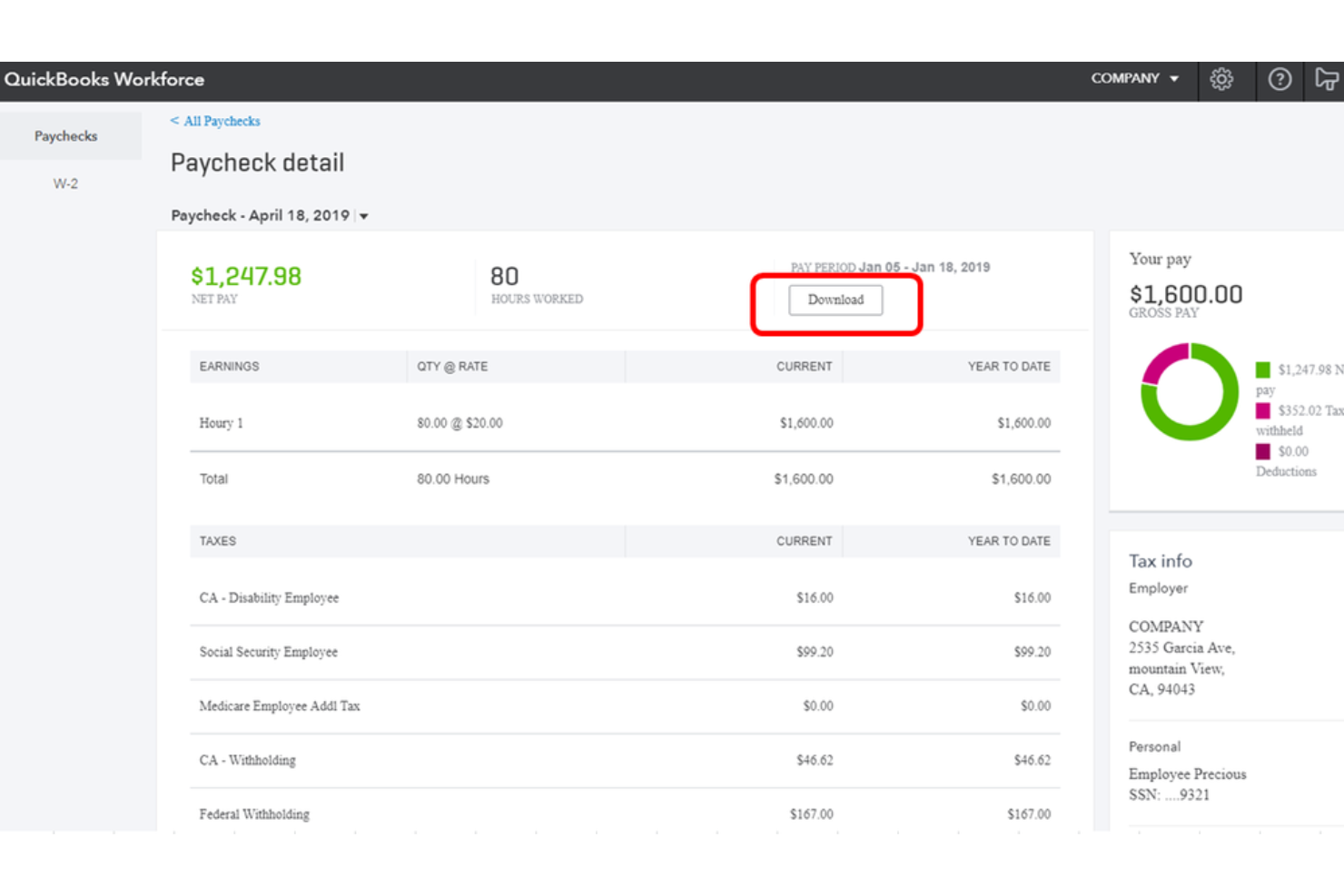
QuickBooks Workforce is an AI-powered payroll and workforce management platform that handles payroll processing, time tracking, employee self-service, HR workflows, and scheduling for small to midsize businesses.
Who Is QuickBooks Workforce Best For?
QuickBooks Workforce is a natural fit for small to midsize businesses already using QuickBooks for accounting that need integrated payroll and workforce management.
Why I Picked QuickBooks Workforce
I've included QuickBooks Workforce in my top picks because its Payroll AI is genuinely impressive for automated payroll calculations. It proactively pulls time and attendance data, scans for anomalies, and drafts a ready-to-run payroll before you even open the app. I also like that it handles full-service tax calculations, including garnishments and deductions, without any manual input from your team.
QuickBooks Workforce Key Features
- Time tracking: Employees can clock in and out via mobile or web, with GPS tracking and timesheet approval built in.
- Shift scheduling: Managers can build and publish employee schedules, with tools to assign shifts based on availability.
- PTO management: Track and manage time-off requests, balances, and accruals directly within the platform.
- Workforce reporting: Generate detailed reports on hours worked, labor costs, and headcount across your organization.
QuickBooks Workforce Integrations
QuickBooks integrates with over 800 popular business apps through its app marketplace, including tools like Shopify, PayPal, Square, Mailchimp, Gusto, QuickBooks Time, Amazon Business, and Housecall Pro. It's also available on Zapier, and an API is available for custom integrations.
Pros and Cons
Pros:
- Combines payroll, time, and HR in one
- GPS and geofencing for field teams
- Payroll syncs directly to general ledger
Cons:
- Fewer onboarding tools than competitors
- No automated local tax filing support

Best as AI for business
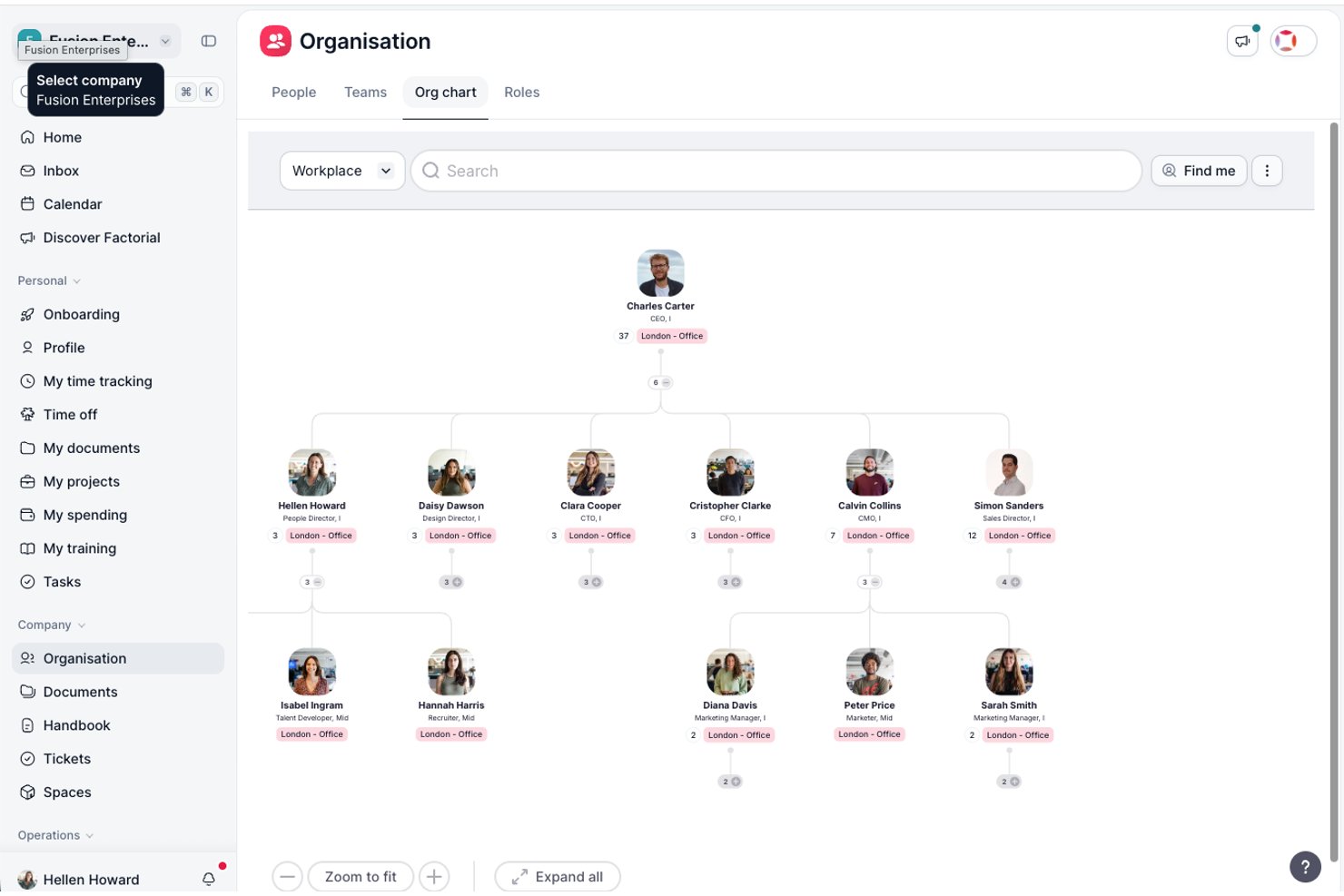
Factorial is an AI for business platform that centralizes HR, finance, and IT workflows—covering headcount planning, shift scheduling, recruitment, time tracking, and AI-driven reporting across day-to-day operations.
Who Is Factorial Best For?
Factorial suits HR teams at small to mid-sized companies that want a single platform to handle people operations, scheduling, and AI-assisted reporting without juggling multiple tools.
Why I Picked Factorial
I've included Factorial in my top picks because it positions itself as an AI for business that covers the full scope of day-to-day operations, from planning timetables and generating reports to answering employee questions on policies. I especially like how Factorial One pulls live company data to surface trends and flag risks, which gives HR and finance teams a shared view when planning headcount and hiring budgets. When an approved headcount request automatically creates a vacancy in recruitment, the planning process connects directly to action.
Factorial Key Features
- Shift scheduling: A drag-and-drop scheduler lets managers plan, adjust, and communicate shifts, with built-in conflict detection and mobile access for the team.
- AI CV parsing: Factorial's recruitment module automatically extracts candidate details from uploaded resumes to speed up screening and reduce manual data entry.
- eNPS and climate surveys: Built-in engagement tools let HR teams collect employee feedback through net promoter score surveys and pulse checks.
- Job Catalog: Defines company roles, hierarchies, competency requirements, and salary ranges in one structured reference to support workforce planning and recruitment.
Factorial Integrations
Factorial offers marketplace integrations with Microsoft Power BI, Microsoft Business Central, SAP Business One, Recruitee, LinkedIn, Slack, and Zapier. Its public API supports API keys, OAuth 2.0, webhooks, SDKs, and an MCP server for custom integrations.
Pros and Cons
Pros:
- Visible org chart clarifies reporting lines
- AI reports surface trends from company data
- Approved plans flow directly into recruitment
Cons:
- No skills-gap or succession-risk analysis
- No scenario modeling or headcount forecasting

Best for advanced analytics

Managing workforce data can be complex, but Paylocity’s AI tools help connect HR, payroll, and IT processes in one system. The platform supports businesses of different sizes by using data insights to improve payroll accuracy and workforce planning. These tools help teams spot trends, reduce manual work, and make more informed staffing and payroll decisions.
Why I Picked Paylocity
I picked Paylocity for its unique ability to integrate advanced analytics and predictive modeling into workforce planning, making it an excellent choice for those seeking AI-driven solutions. These features enable you to anticipate workforce needs and make informed decisions, addressing common human resources management challenges. Additionally, Paylocity's integration with existing systems ensures that your team can maintain operational efficiency without disruptions. This combination of analytics, predictive capabilities, and integration makes Paylocity a compelling option for optimizing workforce strategies.
Paylocity Key Features
In addition to its robust analytics, Paylocity offers:
- Payroll Services: Automates payroll processes to ensure accuracy and compliance, reducing administrative burden on your HR team.
- Expense Management: Simplifies expense tracking and reporting, providing a clear view of financial allocations across your organization.
- Headcount Planning: Offers tools to forecast staffing needs and manage employee counts in alignment with business goals.
- IT Asset Management: Helps manage and track IT resources, ensuring that your technology infrastructure supports workforce productivity.
Paylocity Integrations
Integrations include Microsoft Teams, Slack, Salesforce, ADP, QuickBooks, NetSuite, SAP SuccessFactors, Workday, BambooHR, and Oracle.
Pros and Cons
Pros:
- Offers built-in compliance support for labor regulations
- Integration with other HR tools for seamless operations
- Mobile access for employees enhances flexibility
Cons:
- Some users find the interface less intuitive than competitors
- Some users report inconsistencies in customer service experience
New Product Updates from Paylocity

Paylocity Expands Expense and Purchase Request Tools
Paylocity adds connected personal cards, smarter expense categorization, and a streamlined purchase request experience. This reduces manual entry and helps finance teams manage expenses and approvals more efficiently. For more information, visit Paylocity’s official site.
 .
.
Best for actionable workforce productivity insights
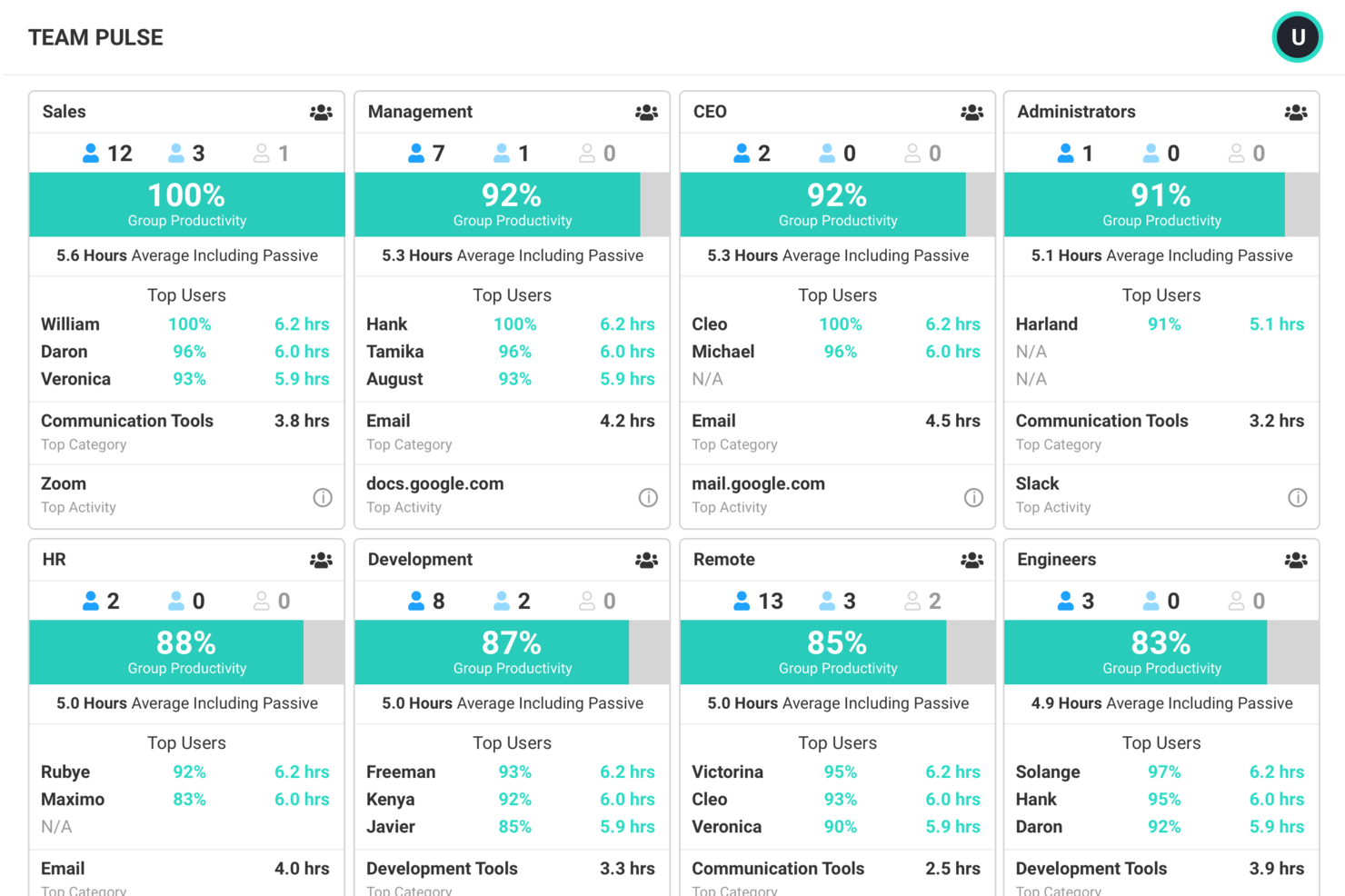
ActivTrak is a work intelligence platform that tracks behavioral workforce activity, analyzes productivity trends, monitors AI tool adoption, and provides capacity and workload insights to support data-driven workforce planning.
Who Is ActivTrak Best For?
ActivTrak is a strong fit for HR and operations teams in mid-size companies managing hybrid or remote workforces who need visibility into how work actually gets done.
Why I Picked ActivTrak
ActivTrak is one of my top picks because I love how it translates raw activity data into productivity insights that actually drive decisions. The productivity benchmarking feature lets my team compare individual and team output against established baselines, so we can spot underperformance patterns before they become headcount problems. I also rely on the AI Insights feature, which surfaces trends across app usage and work habits and flags where productivity is being gained or lost across the organization.
ActivTrak Key Features
- Capacity planning dashboard: Visualizes workforce utilization data to help identify whether current headcount can meet projected demand.
- Schedule adherence monitoring: Tracks whether employees are working during their expected hours, flagging deviations for managers to review.
- Technology usage analysis: Shows which apps and tools employees use most, helping teams identify underused software licenses.
- Location-based productivity reporting: Breaks down productivity data by work location to support hybrid workforce planning decisions.
ActivTrak Integrations
ActivTrak offers native integrations with Microsoft Outlook, Google Calendar, and Microsoft Entra ID for calendar sync and user management without needing the API. Through its ActivConnect API, it connects with tools like Salesforce, Jira, ServiceNow, Zendesk, Slack, Microsoft Teams, and Power BI, and supports HRIS platforms including Workday, ADP, BambooHR, and UKG Pro. SQL access is also available for custom reporting and data analysis.
Pros and Cons
Pros:
- Surfaces workload imbalances before employee burnout
- Tracks AI tool adoption and impact
- Privacy-first approach avoids keystroke logging
Cons:
- No mobile device tracking available
- Misses offline work like calls and meetings

Anaplan
Best for large enterprises

Anaplan is a cloud-based planning and performance management platform designed for large enterprises. It supports comprehensive workforce planning and analytics, helping businesses align their workforce strategies with organizational goals.
Why I picked Anaplan: Anaplan is built for large enterprises that need highly scalable and connected workforce planning. Its strength lies in extensive modeling capabilities and a connected planning approach, which unifies data across HR, finance, and operations for more accurate decision-making.
What makes Anaplan stand out is its AI- and machine learning–driven scenario planning, allowing organizations to forecast, stress-test assumptions, and prepare for multiple business conditions in real time. Combined with its intuitive interface, it turns complex planning into a more collaborative and actionable process.
Standout features & integrations:
Features include real-time data updates across your planning ecosystem, ensuring decisions are based on the latest information. Its scenario modeling tools allow you to simulate outcomes, compare scenarios, and identify the best strategies under changing conditions. AI capabilities surface insights and predictive forecasts, enhancing accuracy and agility. The platform integrates with HRIS, ERP, and financial systems, enabling end-to-end workforce planning and alignment across the enterprise.
Integrations include Salesforce, Workday, SAP, Oracle, Microsoft Dynamics, Tableau, Google Cloud, AWS, Slack, and DocuSign.
Pros and Cons
Pros:
- Intuitive user interface
- Real-time data updates
- Extensive modeling capabilities
Cons:
- High learning curve
- Requires technical expertise
Visier
Best for data-driven insights

Visier is a people analytics and workforce planning tool designed for HR leaders, IT leaders, and product development leaders. It focuses on providing AI-driven insights to improve talent acquisition, retention, and internal mobility.
Why I picked Visier: Visier excels in delivering data-driven insights through its comprehensive data model and pre-built metrics. The Manager Agent AI companion and Vee analytics AI agent help you unify HR and business data efficiently. This makes it a go-to choice for those seeking data-driven workforce planning. Its automation tools further enhance analytics, offering you actionable insights to drive strategic decisions.
Standout features & integrations:
Features include a comprehensive data model that integrates various data sources, pre-built metrics and dashboards for easy analysis, and automation tools for streamlined analytics. Visier's AI agents provide insights that help your team make data-driven decisions and improve workforce planning.
Integrations include SAP SuccessFactors, Workday, Oracle, ADP, Ceridian, UKG, Cornerstone, Microsoft Power BI, Tableau, and Salesforce.
Pros and Cons
Pros:
- AI-driven insights
- Pre-built metrics and dashboards
- Strong data integration capabilities
Cons:
- Requires data management expertise
- Pricing details are not transparent

Workday
Best for HR integration

Workday is a cloud-based workforce management platform tailored for HR professionals and large enterprises. It offers solutions for human capital management, financial management, and analytics, helping organizations manage their workforce more effectively.
Why I picked Workday: Workday offers a unified platform that integrates core HR functions with advanced workforce planning and analytics. Its real-time insights make it easier for HR leaders to respond quickly to changing business needs and align talent strategies with organizational goals.
What sets Workday apart is its ability to combine everyday HR management with powerful predictive analytics, giving decision-makers the tools to plan ahead and optimize workforce performance.
Standout features & integrations:
Features include real-time workforce insights that help HR teams and managers make faster, data-driven decisions. Its customizable reporting tools allow you to tailor dashboards and data views to your specific requirements. With workforce planning and analytics, you can forecast staffing needs, identify talent gaps, and align HR strategies with business objectives. Workday also integrates seamlessly with financial, payroll, and talent management modules, while its AI-driven analytics uncover patterns in workforce behavior and offer predictive recommendations to support strategic decision-making.
Integrations include Salesforce, Microsoft Azure, Slack, Google Workspace, SAP, Oracle, ADP, ServiceNow, Okta, and Box.
Pros and Cons
Pros:
- Customizable reporting features
- Real-time data insights
- Strong HR integration capabilities
Cons:
- Requires technical expertise
- High learning curve
Genesys
Best for omnichannel engagement

Genesys is a workforce engagement management platform designed for businesses seeking to enhance customer interactions across multiple channels. It serves contact centers and customer support teams by providing tools for managing workforce engagement and optimizing customer experience.
Why I picked Genesys: I picked Genesys because it offers a strong suite of workforce engagement and planning tools that help organizations optimize staffing, scheduling, and resource allocation. Its real-time analytics provide visibility into workforce performance, enabling managers to make data-driven decisions that align staffing levels with demand. What makes Genesys stand out is its AI-powered forecasting and flexible deployment options, which make it easier to anticipate workforce needs and adapt to changing business conditions.
Standout features & integrations:
Features include workforce optimization features such as forecasting, scheduling, and performance tracking to help ensure the right people are in the right roles at the right time. Its real-time analytics surface trends in employee productivity and resource utilization, allowing managers to adjust proactively. With AI-driven workforce planning, the platform predicts future staffing needs, identifies efficiency gaps, and recommends adjustments to improve operations. Genesys also integrates with existing HR and workforce management tools, creating a seamless ecosystem for workforce planning and execution.
Integrations include Salesforce, Microsoft Dynamics, Zendesk, Oracle, SAP, Slack, Zoom, Google Cloud, AWS, and Twilio.
Pros and Cons
Pros:
- Flexible deployment options
- Real-time customer analytics
- Strong omnichannel engagement capabilities
Cons:
- Requires ongoing maintenance
- Complex initial setup


Quinyx is an AI-powered workforce management platform designed for shift-based industries. It primarily serves businesses in sectors like retail, hospitality, and logistics, focusing on scheduling and workforce optimization.
Why I picked Quinyx: I picked Quinyx because it offers a powerful workforce management solution designed specifically for shift-based industries like retail, hospitality, logistics, and healthcare. Its strength lies in intelligent demand forecasting and labor optimization, which ensure the right staff are scheduled at the right times. On top of scheduling, Quinyx emphasizes employee engagement, with built-in communication and feedback tools that improve flexibility and morale in environments where shifts change often. Its AI-driven forecasting and scheduling make it a standout choice for organizations managing large, dynamic workforces.
Standout features & integrations:
Features include automated scheduling, time and attendance tracking, and employee self-service for managing shifts. Its AI-powered demand forecasting helps predict staffing needs accurately, while labor optimization balances business efficiency with employee preferences. Engagement tools like chat, shift-swapping, and feedback systems foster better team interaction. Quinyx also integrates with payroll systems, HR platforms, and ERP solutions, making it easy to connect workforce data across your business.
Integrations include SAP, Workday, ADP, Microsoft Teams, Oracle, Google Calendar, Slack, Kronos, BambooHR, and Salesforce.
Pros and Cons
Pros:
- Strong employee engagement tools
- Accurate demand forecasting
- Efficient shift scheduling
Cons:
- Implementation challenges
- Complex pricing structure
Andre verktøy for AI-basert bemanningsplanlegging
Her er noen flere alternativer for verktøy for AI-basert bemanningsplanlegging som ikke kom med på kortlisten min, men som likevel er verdt å undersøke:


How I Evaluate AI Workforce Planning Tools
I look for tools where AI goes beyond branding—where it actually powers forecasting, surfaces attrition risks, or models hiring scenarios that would take weeks to run manually. My evaluation splits into two layers: the core functionality a tool needs to make the list, and the differentiating factors that separate good options from great ones.
Core Functionality (Table Stakes For This List)
When I'm selecting tools for my list, I rank each one on a scale from 0 (does not offer the functionality) to 5 (excels in this area) for each core functionality listed below. Then, I calculate the tool's total score into a percentage. Each tool needs to achieve a minimum total score of 65% to be considered for inclusion.
- AI-Driven Demand Forecasting: I evaluate whether the tool uses ML models to project future headcount needs—like predicting seasonal hiring surges based on historical revenue and attrition patterns.
- Skills Gap Analysis: Each tool should map current workforce skills against future needs and flag gaps, such as identifying a shortage of cloud engineering talent ahead of a planned migration.
- Scenario Modeling & Simulation: I look for multi-variable "what-if" planning, like modeling the cost and talent impact of opening a new office versus hiring remotely across multiple regions.
- Workforce Data Integration: The tool needs to pull data from core HR systems like Workday, SAP SuccessFactors, or ADP so planners aren't manually stitching together spreadsheets.
- Predictive Attrition & Retention Analytics: I check whether the tool surfaces flight risk at the team or individual level, helping HR leaders intervene before a critical departure disrupts project timelines.
- Labor Cost & Capacity Optimization: The tool should connect headcount plans to budget constraints, helping HR and finance align on whether to fill roles, redistribute capacity, or adjust contractor ratios.
Once I have a list of tools that meet the criteria, I consider what sets each platform apart.
Differentiating Factors (What Sets Vendors Apart)
Here's how I compare and contrast different vendors:
Standout Features
External labor market intelligence is a big differentiator—I look for tools that pull in real-time wage benchmarks and talent supply data so planners aren't building forecasts in a vacuum. Internal mobility matching also stands out, especially when AI surfaces employees ready for lateral moves or stretch assignments before you post a role externally. I also evaluate whether a tool offers a shared finance-HR planning workspace, since workforce plans that live apart from budgets tend to stall at the approval stage.
Beyond Features
AI model transparency matters a lot in this space—I check whether vendors explain how their attrition or demand models reach their conclusions, since HR leaders need to justify AI-driven recommendations to executives. Compliance is another key consideration, particularly around data privacy regulations and emerging AI-specific legislation that governs automated employment decisions. I also evaluate implementation timelines and whether vendors offer prebuilt templates or dedicated onboarding support, because workforce planning tools that take six-plus months to deploy often lose stakeholder buy-in.
Slik velger du verktøy for AI-basert bemanningsplanlegging
Det er lett å gå seg vill i lange funksjonslister og kompliserte prismodeller. For å hjelpe deg med å holde fokus mens du går gjennom den unike programvarevalgsprosessen din, får du her en sjekkliste over faktorer du bør ha i bakhodet:
| Faktor | Hva du bør vurdere |
|---|---|
| Skalerbarhet | Kan verktøyet vokse sammen med organisasjonen din? Sjekk om det støtter antallet brukere du forventer å trenge i fremtiden. Vurder om det kan håndtere økt datamengde og kompleksitet etter hvert som teamet ditt vokser. |
| Integrasjoner | Kan verktøyet integreres med de eksisterende systemene dine? Se etter kompatibilitet med HR-, lønns- og andre forretningsapplikasjoner. Vurder hvor enkelt det er å integrere, samt eventuelle tilleggskostnader knyttet til koblinger. |
| Tilpasningsmuligheter | Kan du tilpasse verktøyet til de spesifikke arbeidsflytene dine? Vurder muligheten til å tilpasse rapporter, dashbord og brukergrensesnitt. Unngå verktøy med rigide strukturer som kanskje ikke passer til prosessene dine. |
| Brukervennlighet | Er verktøyet intuitivt for teamet ditt? Evaluer brukergrensesnittet og navigasjonen. En bratt læringskurve kan føre til lav bruk. Vurder hvor mye opplæring teamet ditt trenger for å bli fortrolig med verktøyet. |
| Implementering og introduksjon | Hvor lang tid tar det å sette opp verktøyet? Sjekk hvilken støtte leverandøren tilbyr under implementeringen. Se etter hurtigstartveiledninger, introduksjonsøkter og tydelig dokumentasjon for å gjøre overgangen enklere. |
| Kostnad | Passer prisen inn i budsjettet ditt? Analyser de totale eierkostnadene, inkludert eventuelle skjulte gebyrer. Sammenlign prisen på verktøyet med verdien det gir. Vurder om kostnaden øker i takt med bruken eller antallet brukere. |
| Sikkerhetstiltak | Er dataene og driften din sikre? Sørg for at verktøyet overholder bransjestandarder for databeskyttelse. Se etter kryptering, tilgangskontroller og regelmessige sikkerhetsrevisjoner. |
| Tilgjengelig kundestøtte | Kan du få tilgang til kundestøtte når du trenger det? Sjekk tilgjengeligheten til kundestøtten, inkludert åpningstider og kanaler. Se etter vurderinger av svartider og hvor effektivt kundestøtteteamet er. |
Hva er verktøy for AI-basert bemanningsplanlegging?
Verktøy for AI-basert bemanningsplanlegging er programvareløsninger som er utviklet for å hjelpe organisasjoner med å administrere og optimalisere arbeidsstyrken gjennom datadrevet innsikt og automatisering. HR-medarbeidere, ledere og teamledere bruker vanligvis disse verktøyene til å forbedre planlegging, ressursfordeling og den generelle effektiviteten i arbeidsstyrken.
Funksjoner for etterspørselsprognoser, bemanningsplanlegging og sanntidsanalyse bidrar til planlegging og beslutningstaking. Disse verktøyene gir til syvende og sist verdi ved å øke produktiviteten og sikre at de riktige ressursene er på plass for å møte virksomhetens behov.
Funksjoner
Her er de viktigste funksjonene all god programvare for AI-basert bemanningsplanlegging bør ha:
- Etterspørselsprognoser: Forutsier fremtidige bemanningsbehov basert på historiske data for å sikre optimal ressursfordeling.
- Bemanningsplanlegging: Automatiserer opprettelsen av arbeidsplaner for å øke effektiviteten og redusere konflikter.
- Sanntidsanalyse: Gir innsikt i arbeidsstyrkens prestasjoner og utnyttelse for å støtte informerte beslutninger.
- Tilpassbare dashbord: Gjør det mulig å tilpasse datavisninger og rapporter etter spesifikke organisatoriske behov.
- Integrasjonsmuligheter: Kobler sømløst sammen med eksisterende HR-, lønns- og forretningssystemer for helhetlig datahåndtering.
- Prediktiv analyse: Forutser trender og mønstre for å bidra til strategisk bemanningsplanlegging.
- Ressursfordeling: Sikrer at de riktige personene får de riktige oppgavene for å forbedre produktiviteten.
- Sikkerhetstiltak: Beskytter sensitive data med kryptering og tilgangskontroller for å opprettholde dataintegriteten.
- Brukervennlig grensesnitt: Tilbyr et intuitivt design som gjør det enkelt å navigere og raskt ta verktøyet i bruk i teamene.
Fordeler
Implementering av verktøy for AI-basert bemanningsplanlegging gir flere fordeler for teamet og virksomheten din. Her er noen av fordelene du kan se frem til:
- Forbedret effektivitet: Automatiserer planlegging og ressursfordeling, reduserer den administrative arbeidsmengden og frigjør tid til strategiske oppgaver.
- Bedre beslutningstaking: Gir sanntidsanalyse og prediktiv innsikt for å støtte informerte og tidsriktige beslutninger.
- Optimal ressursbruk: Sikrer at de riktige medarbeiderne tildeles de riktige oppgavene, noe som forbedrer produktiviteten og reduserer sløsing.
- Kostnadsbesparelser: Bidrar til å forutsi bemanningsbehov nøyaktig, slik at overbemanning eller underbemanning unngås og arbeidskraftkostnadene dermed holdes under kontroll.
- Økt fleksibilitet: Tilbyr tilpassbare dashbord og rapporter, slik at du raskt kan tilpasse deg endrede forretningsbehov.
- Datasikkerhet: Beskytter sensitive arbeidsstyrkedata med robuste sikkerhetstiltak og opprettholder samsvar og tillit.
- Bedre medarbeidertilfredshet: Legger til rette for rettferdig planlegging og fordeling av arbeidsbelastning, noe som bidrar til en mer engasjert og motivert arbeidsstyrke.
Kostnader og priser
Valg av verktøy for AI-basert arbeidsstyrkeplanlegging krever en forståelse av de ulike prismodellene og abonnementene som er tilgjengelige. Kostnadene varierer basert på funksjoner, teamstørrelse, tillegg og mer.
Tabellen nedenfor oppsummerer vanlige abonnementer, gjennomsnittsprisene deres og typiske funksjoner som er inkludert i løsninger for AI-basert arbeidsstyrkeplanlegging:
Sammenligningstabell for verktøy for AI-basert arbeidsstyrkeplanlegging
| Abonnementstype | Gjennomsnittspris | Vanlige funksjoner |
|---|---|---|
| Gratisabonnement | $0/bruker/måned | Grunnleggende planlegging, begrenset rapportering og grunnleggende brukerstøtte |
| Personlig abonnement | $5-$25/bruker/måned | Avansert planlegging, tidsregistrering, personlige kontrollpaneler og brukerstøtte via e-post. |
| Bedriftsabonnement | $30-$60/bruker/måned | Prognoser for etterspørsel, ressursallokering, avansert analyse og brukerstøtte via telefon. |
| Foretaksabonnement | $70-$120/bruker/måned | Tilpassede integrasjoner, prediktiv analyse, dedikert kundeansvarlig og førsteklasses brukerstøtte døgnet rundt. |
Vanlige spørsmål
Her er noen svar på vanlige spørsmål om verktøy for AI-basert arbeidsstyrkeplanlegging:
Hvordan kan AI brukes i arbeidsstyrkeplanlegging?
AI i arbeidsstyrkeplanlegging hjelper deg med å forbedre nøyaktighet og effektivitet ved å gi datadrevet innsikt. Du kan bruke AI til scenarioplanlegging for å forutsi fremtidige behov, integrere planlegging i den daglige driften og håndtere langsiktige strategier for arbeidsstyrken. Dette gjør det mulig å ta informerte beslutninger og optimalisere ressursallokeringen.
Hvordan kan AI forbedre strategisk arbeidsstyrkeplanlegging?
AI forbedrer strategisk arbeidsstyrkeplanlegging ved å tilby prediktiv analyse og automatisering. Det hjelper deg med å forutsi trender og optimalisere bemanningen, noe som fører til bedre beslutningstaking. Med AI kan du effektivisere prosesser og oppnå mer nøyaktige planleggingsresultater, samtidig som strategiene for arbeidsstyrken tilpasses virksomhetens mål.
Hvordan kan AI forbedre vaktplanleggingen for ansatte?
AI forbedrer vaktplanleggingen for ansatte ved å analysere data for å forutsi etterspørsel og optimalisere fordelingen av vakter. Det tar hensyn til faktorer som ansattes tilgjengelighet, ferdigheter og preferanser. Resultatet er mer effektive arbeidsplaner, færre konflikter og høyere medarbeidertilfredshet, noe som til syvende og sist gir bedre produktivitet for teamet ditt.
Hvilken rolle spiller data i verktøy for AI-basert arbeidsstyrkeplanlegging?
Data er avgjørende i AI-basert arbeidsstyrkeplanlegging, siden de danner grunnlaget for innsikten og analysene som disse verktøyene tilbyr. Ved å samle inn og analysere data kan AI-verktøy identifisere mønstre, forutsi fremtidige behov og optimalisere ressursallokeringen. Denne datadrevne tilnærmingen hjelper deg med å ta informerte beslutninger og forbedre styringen av arbeidsstyrken.