

10 beste apper for arbeidsstyring i 2026

Kortliste over apper for arbeidsstyring


En app for arbeidsstyring er programvare som hjelper teamet ditt med å håndtere skiftplanlegging, oppmøte, tidsregistrering og arbeidsplanlegging på ett sted. Hvis du leter etter den beste appen for arbeidsstyring, trenger du sannsynligvis en pålitelig måte å koordinere skift på, håndtere krav til overholdelse og holde tritt med endrede behov på arbeidsplassen. Ved å velge riktig verktøy kan du støtte medarbeiderne dine, redusere manuelt arbeid og tilpasse deg nye utfordringer knyttet til arbeidsstyrken. I denne veiledningen finner du en tydelig sammenligning av de beste appene for arbeidsstyring, slik at du trygt kan velge den som passer best til organisasjonens behov.
Hvorfor du kan stole på våre programvareanbefalinger
Teamet vårt har testet og anmeldt programvare siden 2012. Vi er selv HR-eksperter, så vi vet hvor vanskelig og hvor viktig det er å velge riktig programvare.
I denne guiden har vi vurdert verktøyene gjennom praktisk testing og uavhengig research og gitt dem poeng ut fra våre utvelgelseskriterier. Vi bygger også på innsikt fra ledende eksperter i bransjen og erfarne HR-eksperter.
Anmeldelsene våre bygger på vår egen redaksjonelle vurdering. De er ikke et salgsargument.
Ekspertanmeldere:
Sammenligningstabell for apper for arbeidsstyring
Denne sammenligningstabellen oppsummerer prisopplysningene for mine utvalgte apper for arbeidsstyring.
| Tool | Best For | Trial Info | Price | ||
|---|---|---|---|---|---|
| 1 | Best for hiring in 150+ countries | Free demo available | From $14/user/month | Website | |
| 2 | Best as AI for business | Free demo available | From $8/user/month | Website | |
| 3 | Best for biometric time clock integration | 30-day free trial + free demo available | From $50/user/month | Website | |
| 4 | Best for global workforce analytics | Free demo available | Pricing upon request | Website | |
| 5 | Best for configurable compliance tools | Free demo available | Pricing upon request | Website | |
| 6 | Best for real-time payroll calculations | Free demo available | Pricing upon request | Website | |
| 7 | Best for multi-location workforce oversight | Free demo available | Pricing upon request | Website | |
| 8 | Best for intuitive time-off management | Free trial + free demo available | Pricing upon request | Website | |
| 9 | Best for unified HR and IT workflows | Free demo available | Pricing upon request | Website | |
| 10 | Best for automated onboarding workflows | Free demo + free plan available | From $49/month + $6/user/month | Website |
Anmeldelser av apper for arbeidsstyring
Nedenfor finner du mine detaljerte oppsummeringer av de beste appene for arbeidsstyring som kom med på kortlisten. Anmeldelsene mine gir en detaljert oversikt over funksjonene, de beste bruksområdene og integrasjonene til hver plattform, slik at du kan finne den som passer best for deg.

Deel HR
Best for hiring in 150+ countries
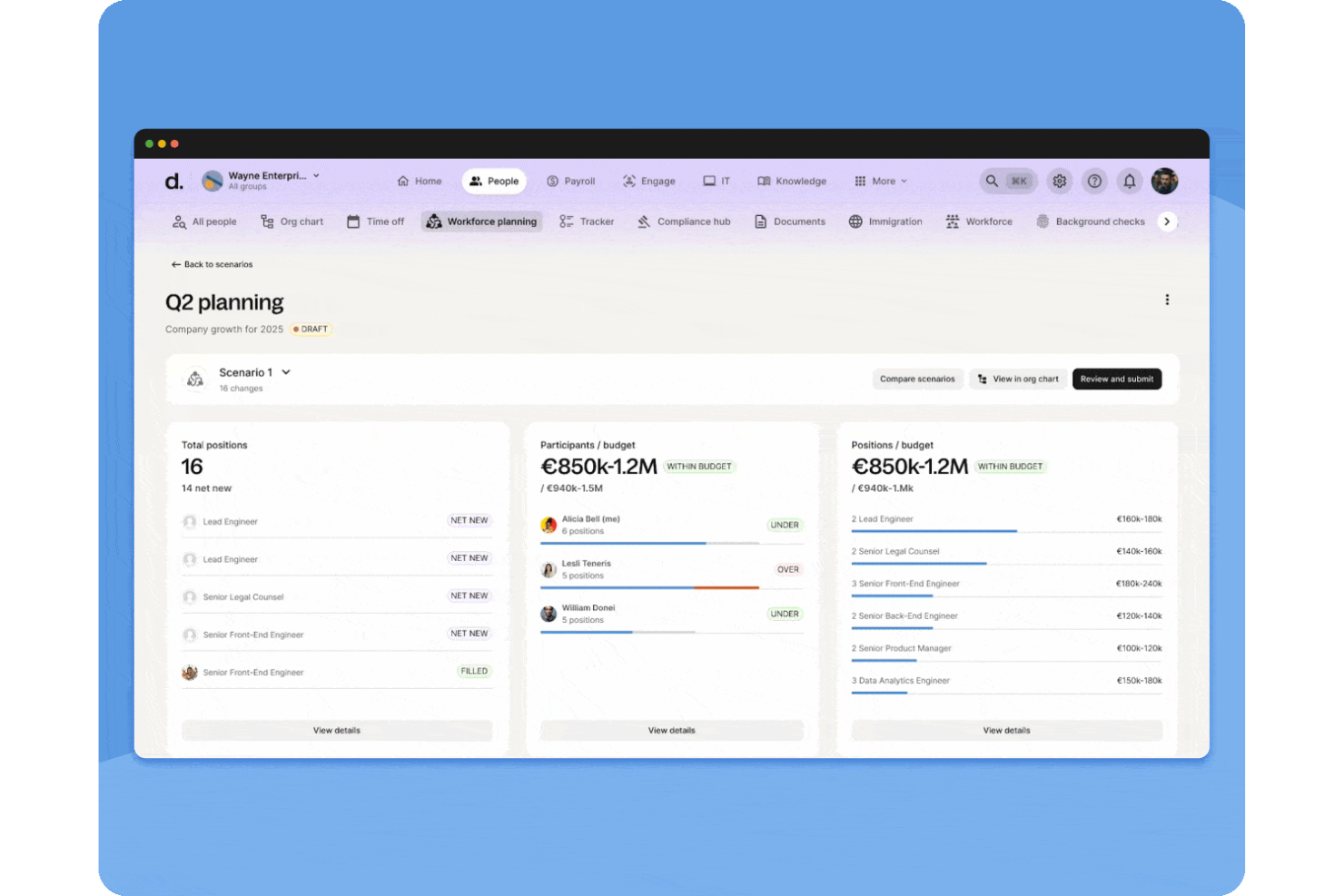
Deel HR is a workforce management platform that brings together global hiring, payroll, compliance, HRIS, and performance management tools for distributed teams.
Who Is Deel HR Best For?
Deel HR suits HR teams and business leaders managing international employees, contractors, and payroll across multiple countries.
Why I Picked Deel HR
I picked Deel HR as one of the best because I can hire employees or contractors in over 150 countries almost instantly. My team uses Deel HR’s automated onboarding and localized contract generation to speed up cross-border hiring. I also rely on their in-platform compliance checks to avoid delays when expanding into new markets.
Deel HR Key Features
- Global payroll management: Run payroll for employees and contractors in multiple countries from a single dashboard.
- Time off tracking: Manage and approve employee leave requests with customizable policies.
- Document management: Store, organize, and access HR documents securely within the platform.
- HRIS reporting: Generate workforce analytics and compliance reports for your global team.
Deel HR Integrations
Native integrations are not clearly documented. Deel HR provides an API for custom integrations.
Pros and Cons
Pros:
- Custom onboarding workflows for different countries
- Centralized HRIS with performance management tools
- Automated payroll for international teams
Cons:
- Expense management features are basic compared to peers
- Reporting features lack advanced customization options
New Product Updates from Deel HR

Deel Expands Stablecoin Wallet to 80+ Countries
Deel expands its Stablecoin Wallet to 80+ countries with dollar-backed balances and optional rewards. This gives eligible contractors more ways to hold and manage earnings inside Deel. For more information, visit Deel’s official site.
 .
.
Best as AI for business
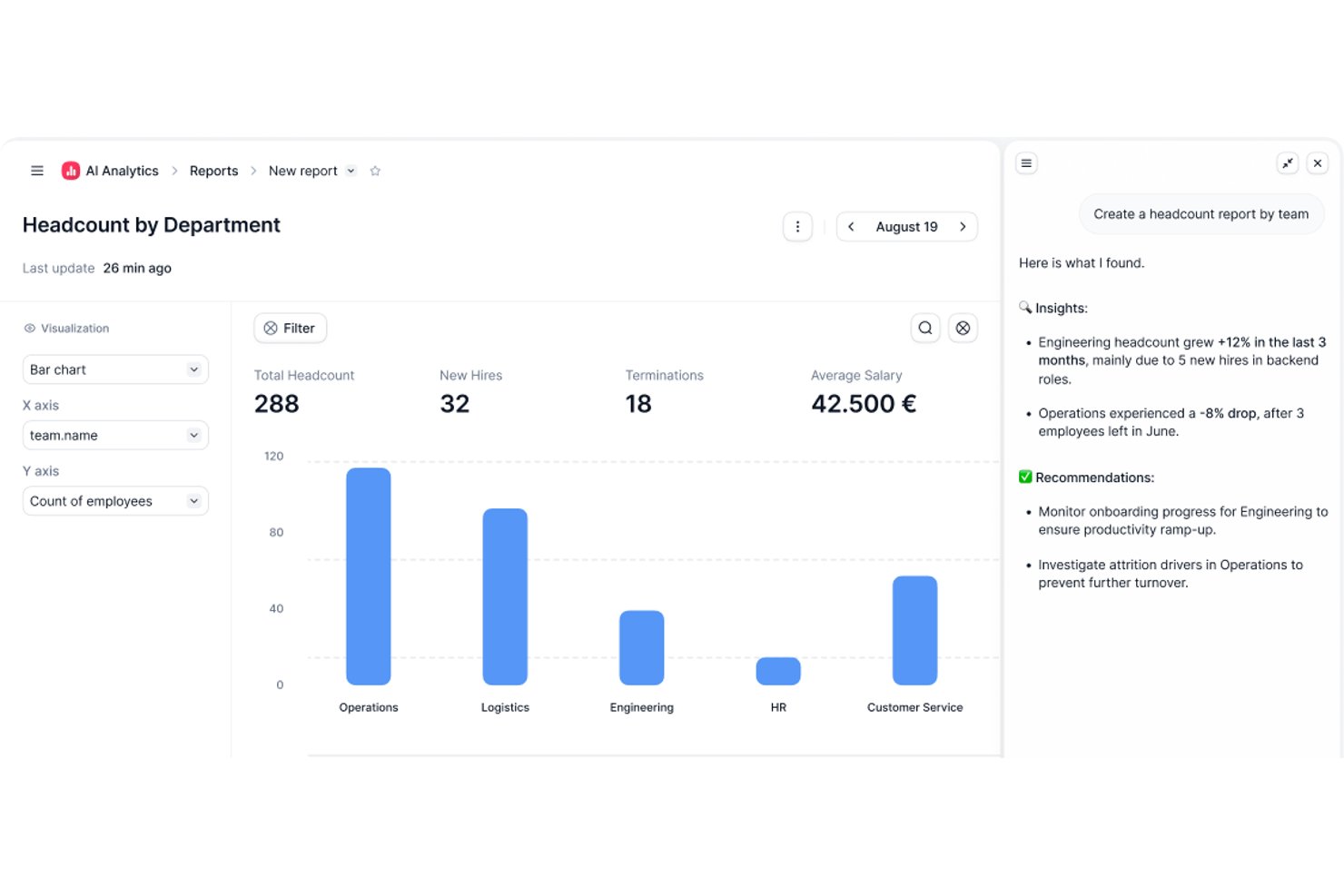
Factorial is an AI-powered HR and business operations platform that covers shift scheduling, time tracking, workforce planning, and employee self-service alongside broader HR, payroll, and IT workflows.
Who Is Factorial Best For?
Factorial is a strong fit for SMBs that want a single AI-powered platform to handle HR, scheduling, and day-to-day operations without juggling multiple tools.
Why I Picked Factorial
I've included Factorial in my top picks because its AI for business positioning goes beyond typical HR tooling—the platform's AI agent, One, works with your company's data to plan timetables, generate reports, and answer employee questions about policies without you having to dig through documentation. I like that managers can build and publish shift schedules, handle swap approvals, and track hours through GPS or QR-code clock-ins, all in one place. Automatic shift planning is available on Enterprise plans for teams that want optimized weekly schedules generated without manual input.
Factorial Key Features
- Mobile clock-in options: Employees can clock in using GPS-based location, geofencing, or QR code directly from the Factorial mobile app.
- Overtime authorization controls: Managers can require approval for overtime hours, so only authorized overtime counts toward an employee's balance.
- Configurable break-duration alerts: Time-tracking alerts flag when employees haven't taken breaks that meet configurable thresholds, such as a 30-minute break after six hours worked.
- Payroll connector integrations: Factorial connects with payroll providers including DATEV LODAS, Silae, and Sage to sync employee data, new hires, and absences.
Factorial Integrations
Factorial offers marketplace integrations with DATEV LODAS, Silae, Sage, Microsoft Power BI, Okta, Slack, and Recruitee. It also provides a Public API, OAuth 2.0, webhooks, SDKs, and Zapier for custom connectivity.
Pros and Cons
Pros:
- Shift swaps and leave requests stay visible
- Mobile clock-ins support GPS and QR codes
- AI assists timetable planning and policy answers
Cons:
- Labor forecasting and jurisdictional compliance remain limited
- Automated shift planning requires Enterprise

TimeTrex
Best for biometric time clock integration

TimeTrex is a workforce management platform that combines time and attendance tracking, employee scheduling, payroll processing, and HR management in a single system with both cloud and on-premise deployment options.
Who Is TimeTrex Best For?
TimeTrex is a strong fit for mid-sized businesses with hourly or shift-based workforces that need integrated time tracking, scheduling, and payroll in one platform.
Why I Picked TimeTrex
TimeTrex is one of my top picks because I love how it handles biometric time clock integration directly within its native platform. It supports facial recognition clock-ins, which my team uses to eliminate buddy punching without relying on third-party hardware software. TimeTrex also pairs biometric data with geofencing, so clock-ins are verified by both identity and location, which is especially useful for managing distributed or field-based hourly workers.
TimeTrex Key Features
- Drag-and-drop employee scheduling: Build simple or multi-week rotating shift schedules and publish them directly to employees within the platform.
- Integrated payroll processing: Run payroll with automatic federal, state, and local tax calculations, plus support for deductions like benefits and garnishments.
- Job costing: Assign employee time to specific jobs or cost centers, so you can track labor costs at a granular level.
- HR record management: Store and manage employee qualifications, performance reviews, and personal information in a centralized employee profile.
TimeTrex Integrations
TimeTrex offers integrations with payroll and accounting platforms, including ADP, QuickBooks, Sage, Paychex, and Surepay, as well as Ceridian, CompuPay, Tyler Technologies, and Vensure Employer Services. It also provides an API for custom integrations.
Pros and Cons
Pros:
- Tracks employee hours down to the minute
- Free open-source community edition available
- Flexible rule engine for complex policies
Cons:
- User interface feels heavily outdated
- Complex initial setup for advanced features
New Product Updates from TimeTrex
TimeTrex Redesigns Workforce Management With New Payroll, Scheduling, and AI Tools
TimeTrex redesigns its workforce management experience with new dashboards, scheduling and timesheet tools, a rebuilt payroll workflow, and expanded AI assistance. These updates give teams more flexible ways to manage schedules, payroll, reporting, and employee data. For more information, visit TimeTrex’s official site.
 .
.
Workday
Best for global workforce analytics
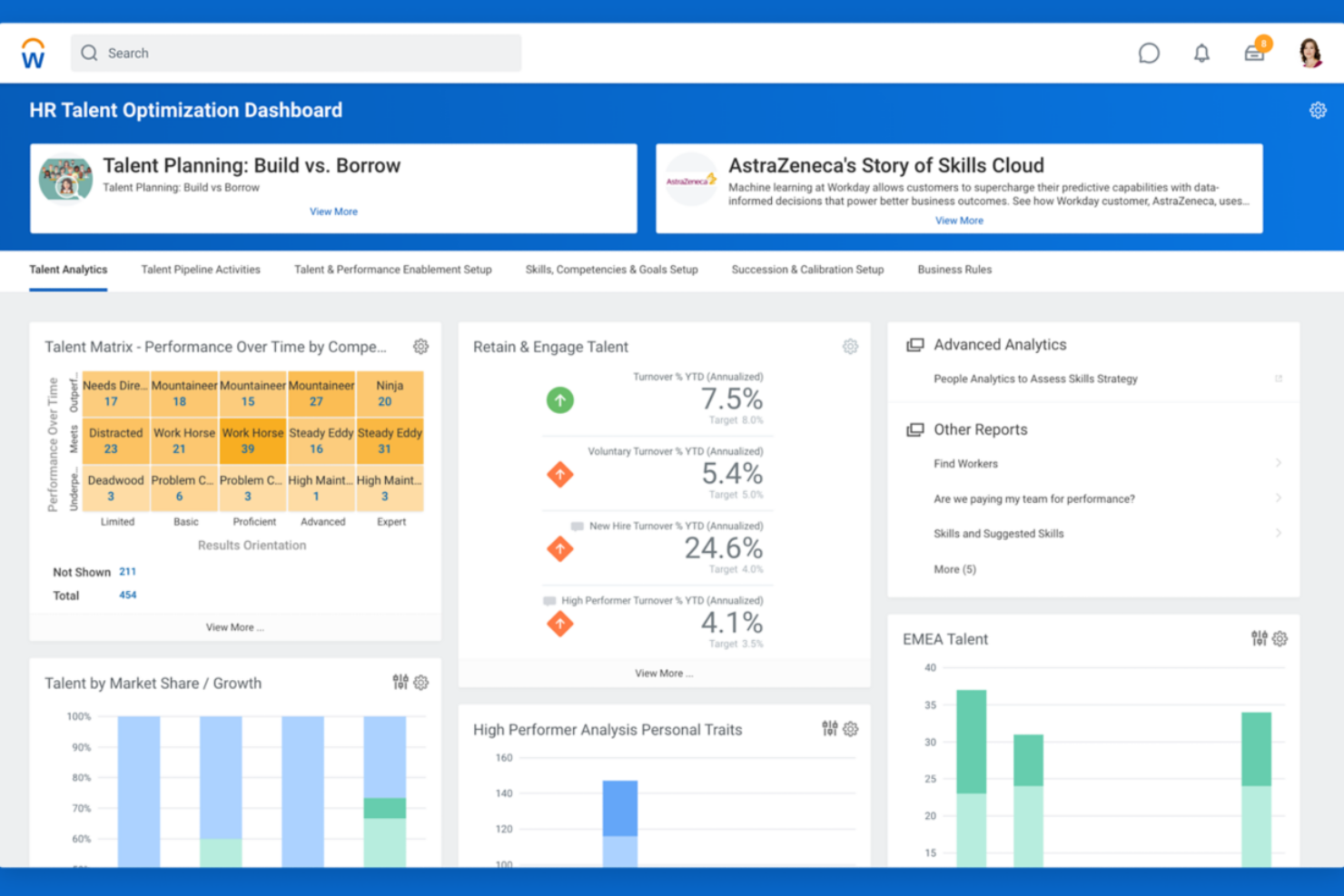
Workday is a workforce management platform designed for organizations with complex, distributed teams. It appeals to HR leaders and operations professionals who need unified tools for managing global schedules, labor costs, and compliance. If you’re looking to coordinate a large workforce across multiple regions, Workday brings together scheduling, time tracking, and analytics in one system.
Who Is Workday Best For?
Workday suits large enterprises and multinational organizations that need to manage workforce operations and analytics across multiple countries.
Why I Picked Workday
What drew me to Workday for workforce management is its advanced global workforce analytics capabilities. The platform brings together real-time data from scheduling, time tracking, and labor cost management, making it easier to spot trends and address issues across multiple countries or business units. I appreciate how Workday’s analytics dashboards let HR and operations teams drill down into workforce metrics by region, department, or role. This level of insight is especially valuable for organizations that need to make data-driven decisions about staffing, compliance, and resource allocation on a global scale.
Workday Key Features
Some other features that make Workday a strong choice for workforce management include:
- Automated scheduling tools: Managers can build, adjust, and publish employee schedules based on business rules and labor demand.
- Mobile time tracking: Employees can clock in and out, request time off, and view schedules from their mobile devices.
- Absence management: The platform tracks all types of leave, including vacation, sick time, and custom leave policies.
- Compliance monitoring: Workday helps organizations stay on top of labor regulations and internal policies with automated alerts and audit trails.
Workday Integrations
Integrations include ADP, Salesforce, Microsoft Teams, ServiceNow, Okta, Slack, SAP, Oracle, DocuSign, and Cornerstone OnDemand.
Pros and Cons
Pros:
- Complex labor tracking
- High data security
- Robust compliance rules
Cons:
- Needs dedicated admin
- Long deployment times
Best for configurable compliance tools
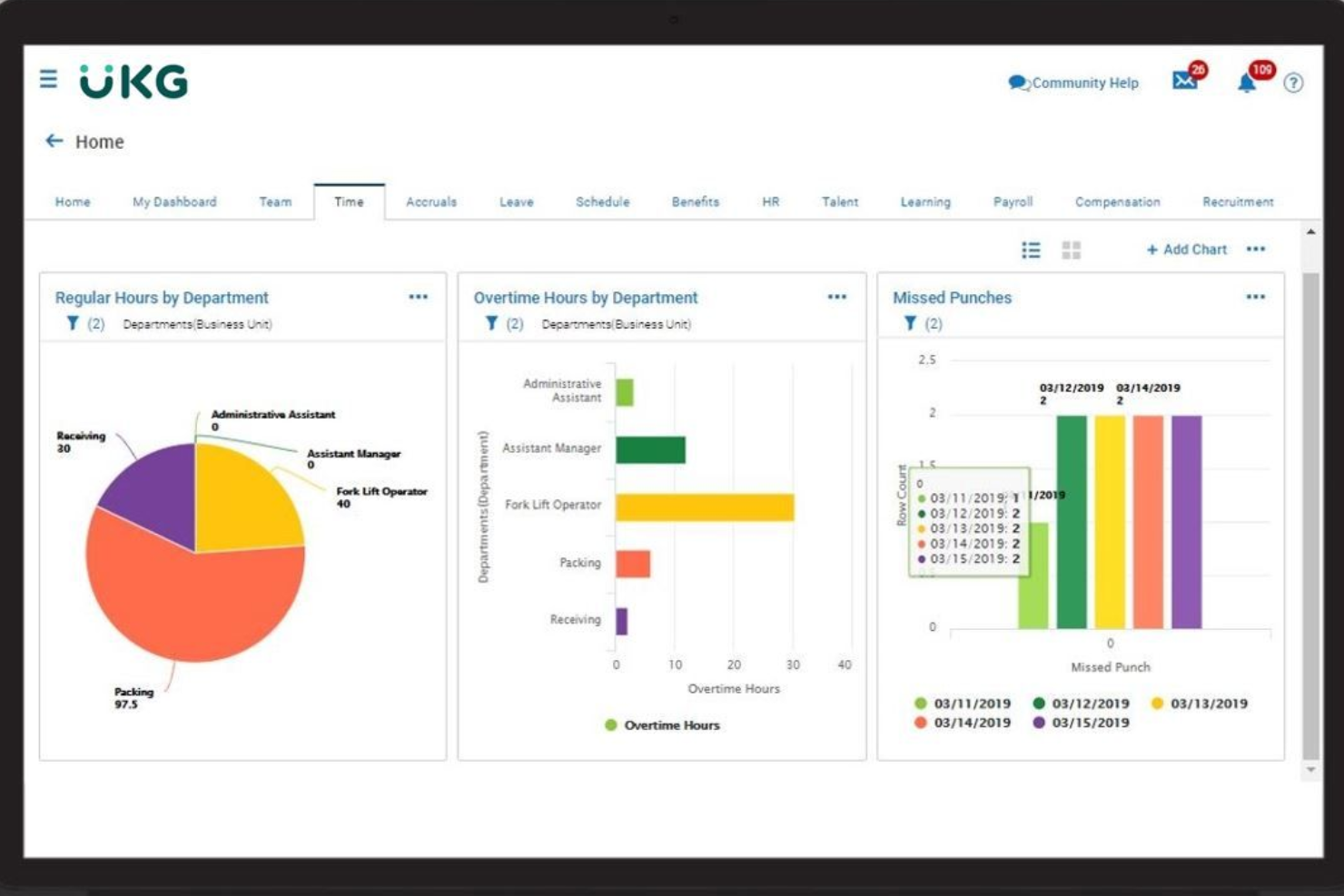
UKG Ready is a workforce management platform designed for organizations that need flexible HR, time, and payroll tools in one place. It’s a strong choice for HR teams in industries with complex scheduling and compliance needs, like healthcare, manufacturing, and public sector. If you’re looking for a solution that adapts to changing labor laws and unique business rules, UKG Ready offers the configurability to support your requirements.
Who Is UKG Ready Best For?
UKG Ready is a good fit for mid-sized to large organizations in regulated industries that need configurable compliance and workforce management tools.
Why I Picked UKG Ready
What drew me to UKG Ready is how deeply configurable its compliance tools are for workforce management. The platform lets you set up custom rules for timekeeping, scheduling, and pay policies to match your organization’s unique requirements and changing regulations. I appreciate that you can automate alerts and workflows for things like overtime, break compliance, and certification tracking, which helps reduce manual oversight. For HR teams managing complex compliance across multiple locations or jurisdictions, UKG Ready’s flexibility stands out.
UKG Ready Key Features
Some other features that make UKG Ready a strong workforce management option include:
- Employee self-service portal: Employees can view schedules, request time off, and update personal information directly from the platform.
- Mobile app access: Managers and staff can handle approvals, scheduling, and time tracking from their mobile devices.
- Document management: Store, organize, and share HR documents securely within the system.
- Performance management tools: Set goals, conduct reviews, and track employee progress all in one place.
UKG Ready Integrations
Integrations include QuickBooks, NetSuite, ADP, Employee Navigator, TurboTax, Indeed, DocuSign, Boomi, OpenSesame, and HireRight.
Pros and Cons
Pros:
- Solid biometric support
- Strong labor costing
- Great union rule sync
Cons:
- Support tickets lag
- Implementation is long
Dayforce
Best for real-time payroll calculations
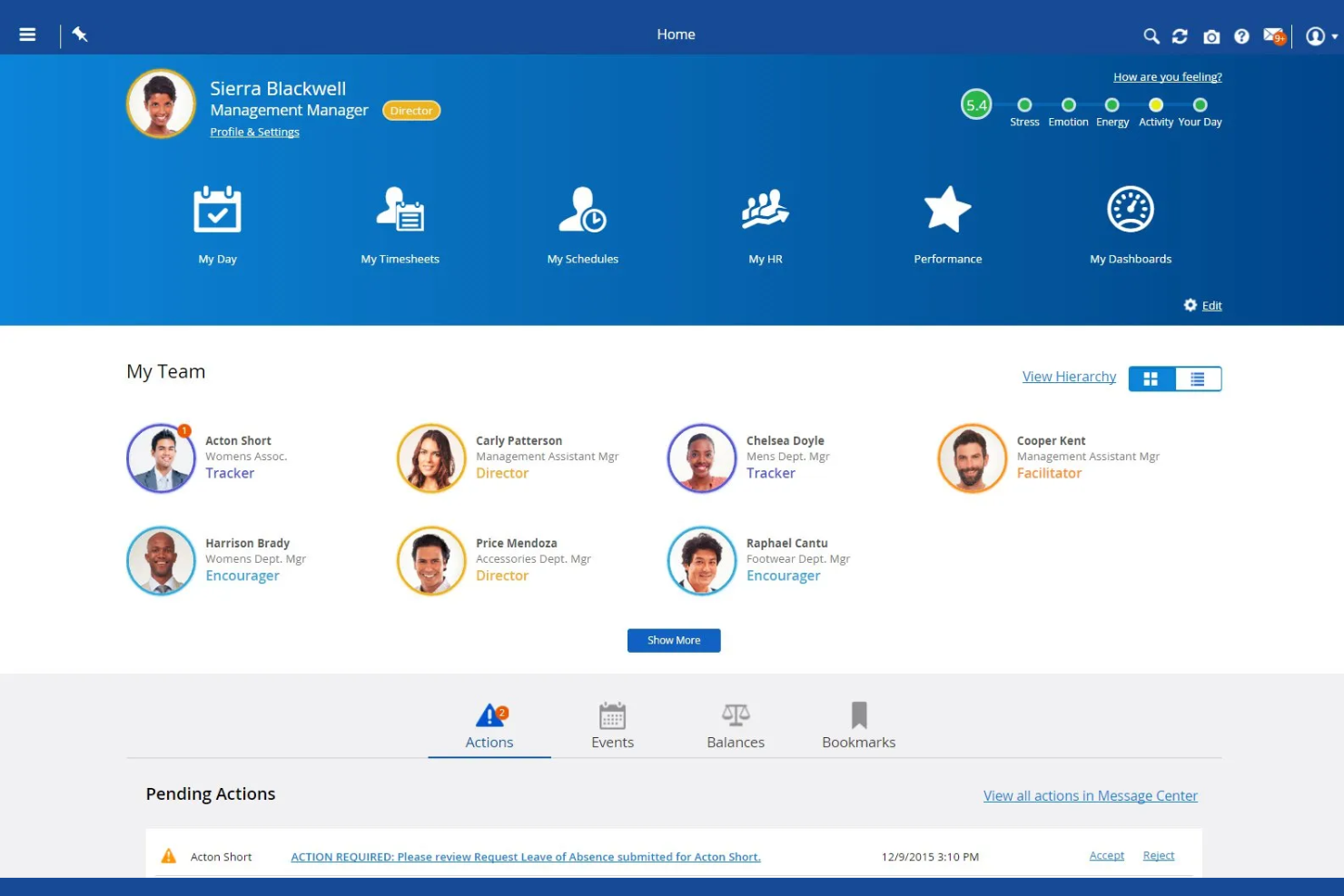
Dayforce is a workforce management platform designed for organizations that need unified HR, payroll, and time tracking in one system. It’s a strong fit for HR teams in industries with hourly or shift-based workforces, like retail, healthcare, and manufacturing. If you’re looking to simplify compliance and manage complex scheduling, Dayforce brings together the tools you need in a single platform.
Who Is Dayforce Best For?
Dayforce is a good fit for mid-sized to large organizations in industries like retail, healthcare, and manufacturing that need unified payroll and workforce management.
Why I Picked Dayforce
What stands out about Dayforce is its ability to calculate payroll in real time as employee data changes throughout the pay period. This means HR and payroll teams can see the immediate impact of schedule changes, overtime, or time-off requests on payroll costs, which helps reduce errors and surprises at the end of each cycle. I also like that Dayforce combines time tracking and payroll in a single system, so there’s no need to reconcile data between separate platforms. For organizations with complex pay rules or frequent schedule adjustments, this real-time approach to payroll management is a major advantage.
Dayforce Key Features
In addition to real-time payroll calculations, Dayforce offers several other features that support workforce management:
- Automated scheduling tools: Managers can create, adjust, and publish employee schedules based on business rules and labor demand.
- Mobile self-service app: Employees can view schedules, request time off, and swap shifts directly from their mobile devices.
- Compliance management: The platform monitors labor laws and internal policies, alerting managers to potential compliance issues.
- Analytics and reporting: Users can access dashboards and reports to track workforce trends, attendance, and productivity.
Dayforce Integrations
Integrations include Emburse, VidCruiter, DocuSign, Go1, HireRight, AdminaHealth, TELUS Health, Okta, Microsoft 365, and Oracle.
Pros and Cons
Pros:
- High volume handling
- All-in-one database
Cons:
- Complex admin portal
- Slow customer support
- Good shift scheduling
ADP
Best for multi-location workforce oversight
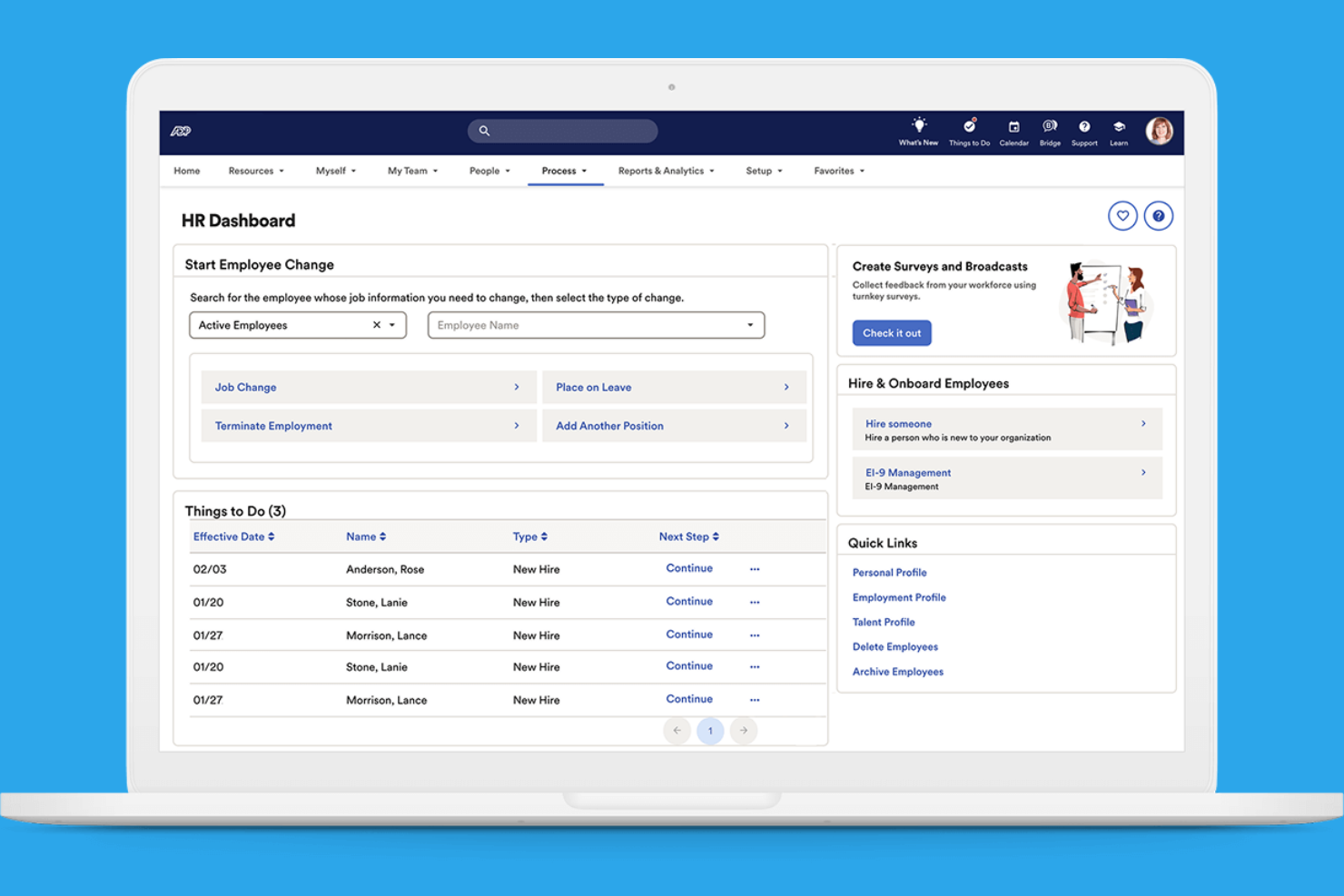
ADP offers a suite of workforce management tools designed for organizations with complex staffing needs. It’s a strong option for HR teams managing employees across multiple locations or jurisdictions. If you need centralized oversight and detailed labor tracking, ADP provides features to help you coordinate and control your workforce.
Who Is ADP Best For?
ADP is a good fit for large or multi-location organizations that need centralized workforce oversight and compliance management.
Why I Picked ADP
What makes ADP stand out for workforce management is its ability to handle oversight across multiple locations and jurisdictions. I picked ADP because it offers centralized dashboards for tracking labor costs, attendance, and compliance in real time, even when your workforce is spread out. The platform’s scheduling and time tracking tools are designed to accommodate complex organizational structures, letting you set location-specific rules and policies. For HR teams that need to coordinate staffing, reporting, and compliance across different sites, ADP’s multi-location management features are especially valuable.
ADP Key Features
Some other features that make ADP a strong workforce management option include:
Automated payroll processing: ADP calculates and processes payroll based on time and attendance data, reducing manual entry.
Employee self-service portal: Employees can view pay statements, update personal information, and manage time-off requests directly.
Compliance alerts: The system notifies HR teams of regulatory changes and potential compliance issues.
Customizable reporting tools: Users can generate detailed reports on workforce metrics, payroll, and attendance for better decision-making.
ADP Integrations
Integrations include QuickBooks, Xero, Wave, allGeo, Synerion, ClockShark, GP, Trusaic, Points North, and Wex.
Pros and Cons
Pros:
- Great compliance tools
- Highly secure platform
- Massive integration list
Cons:
- Too complex for SMBs
- Mobile app has bugs


If you’re looking for a workforce management app that puts people data and HR processes in one place, BambooHR is worth considering. It’s designed for small and mid-sized businesses that want to centralize employee records, automate HR workflows, and simplify everyday HR tasks. HR teams and managers use BambooHR to handle everything from onboarding to performance management in a single, easy-to-navigate platform.
Who Is BambooHR Best For?
BambooHR is a strong choice for small to mid-sized businesses that want to centralize HR management and automate time-off tracking.
Why I Picked BambooHR
What sets BambooHR apart for workforce management is how it handles time-off management with clarity and flexibility. I picked it because the platform lets employees request time off directly in the system, while managers can approve or decline requests with just a few clicks. The built-in calendar automatically updates to reflect absences, making it easy for teams to see who’s out and plan coverage. This approach helps reduce manual tracking and miscommunication around leave, which is a common challenge for HR teams.
BambooHR Key Features
Some other features that make BambooHR useful for workforce management include:
- Employee self-service portal: Employees can update personal information, view pay stubs, and access company documents without HR intervention.
- Onboarding workflows: Automate onboarding tasks and assign checklists to new hires to ensure a smooth start.
- Performance management tools: Set goals, conduct reviews, and gather feedback within the platform to support employee development.
- Document storage and e-signatures: Securely store HR documents and collect electronic signatures for important forms and agreements.
BambooHR Integrations
Integrations include Slack, Greenhouse, Culture Amp, Lattice, Remote, 15Five, Lever, DocuSign, QuickBooks, and ADP Workforce Now.
Pros and Cons
Pros:
- Built-in e-signatures for HR document workflows
- Performance review cycles are fully configurable
- Employee self-service portal updates records instantly
Cons:
- Custom roles and permissions are restricted
- No built-in scheduling or shift planning
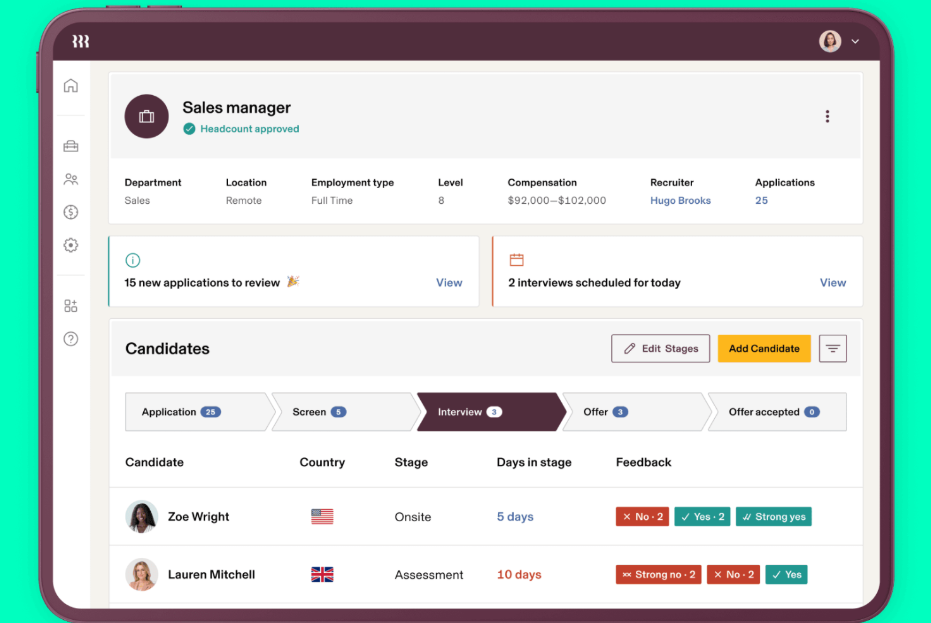
Rippling brings HR, IT, and workforce management together in one platform. It’s a good fit for businesses that want to manage employee data, payroll, and device provisioning from a single dashboard. If you’re looking to reduce manual work and keep people's operations tightly connected, Rippling offers a unified approach.
Who Is Rippling Best For?
Rippling suits mid-sized to large organizations that need to manage both HR and IT processes from a single platform.
Why I Picked Rippling
What drew me to Rippling for workforce management is how it connects HR and IT workflows in one place. The platform lets you onboard employees by automatically setting up payroll, benefits, and even provisioning devices and software access—all from a single dashboard. I find this unified approach especially valuable for organizations that need to coordinate people operations with technology management. By centralizing these processes, Rippling helps reduce manual handoffs and keeps employee data consistent across HR and IT systems.
Rippling Key Features
Some other features that make Rippling useful for workforce management include:
- Time and attendance tracking: Employees can clock in and out, track hours, and managers can approve timesheets directly in the platform.
- Global payroll processing: Run payroll for employees and contractors in multiple countries with built-in compliance tools.
- Custom workflow automation: Build automated workflows for approvals, notifications, and HR tasks without coding.
- Employee document management: Store, organize, and share HR documents securely with version control and access permissions.
Rippling Integrations
Integrations include Slack, Google Workspace, Microsoft 365, Salesforce, QuickBooks Online, Xero, Asana, Zoom, Jira, and HubSpot.
Pros and Cons
Pros:
- Supports global payroll and compliance needs
- Offers customizable workflow automation tools
- Automates onboarding across HR and IT
Cons:
- Reporting features are limited for analytics
- Payroll requires additional paid modules

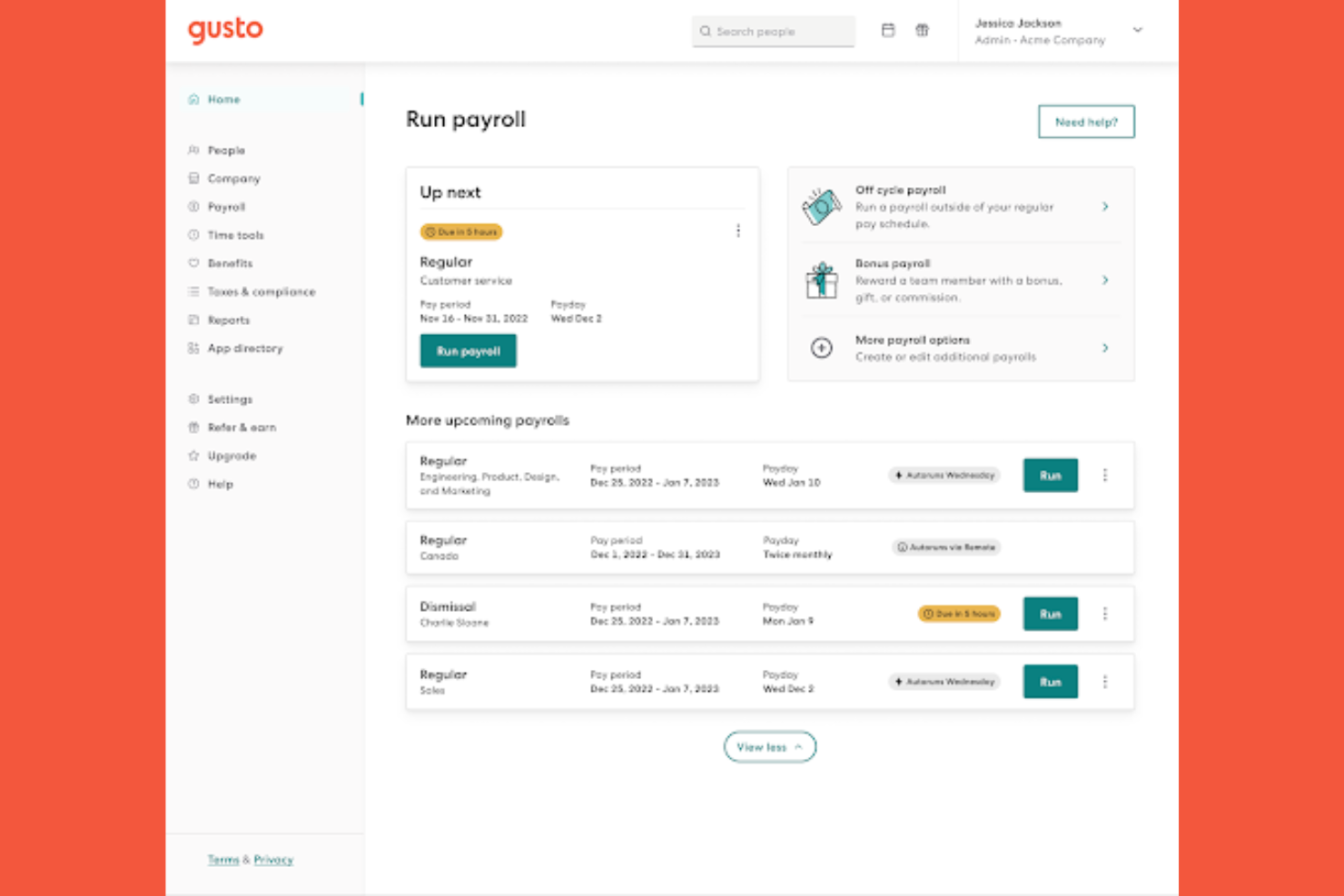
Gusto offers a workforce management platform designed for small and midsize businesses that want to simplify HR processes. The software brings together payroll, benefits administration, and employee management in one place. If you’re looking for a solution that reduces manual HR tasks and helps keep your team organized, Gusto is worth considering.
Who Is Gusto Best For?
Gusto is a strong choice for small to midsize businesses that want to automate HR and onboarding tasks.
Why I Picked Gusto
What drew me to Gusto for workforce management is how it automates and personalizes onboarding workflows. The platform lets you create custom onboarding checklists, send digital offer letters, and collect e-signatures, all from a single dashboard. I also appreciate that Gusto automatically sets up new hires in payroll and benefits, reducing manual data entry and compliance risks. For HR teams that want to make onboarding smoother and more consistent, Gusto’s automation tools are especially valuable.
Gusto Key Features
Some other features that make Gusto a strong workforce management option include:
Time tracking: Employees can clock in and out, track hours, and sync time data directly to payroll.
PTO management: The platform lets you set up, approve, and track paid time off policies and requests.
Org chart and directory: Gusto automatically generates a visual org chart and searchable employee directory.
Document storage: Store and manage important HR documents securely within the platform.
Gusto Integrations
Integrations include 15Five, 7Shifts, Accelo, Amalgam, Analytics by Syft, Aplos, ApplicantPro, Ardius, Arvo, and Asana.
Pros and Cons
Pros:
- Simple time tracking
- Clean mobile interface
- Great for small teams
Cons:
- Basic compliance rules
- Limited complex routing
Andre apper for arbeidsstyring
Her er noen flere alternativer for apper for arbeidsstyring som ikke kom med på kortlisten, men som likevel er verdt å se nærmere på:
- Connecteam
For mobile-first employee scheduling
- Workforce.com
For shift-based labor forecasting
- Paylocity
For customizable time tracking rules
- Tanda
For automated award interpretation in Australia
- ClockShark
For GPS-enabled mobile time tracking


How I Evaluate Workforce Management Apps
I split my evaluation into baseline requirements—shift scheduling, time tracking, labor compliance—and differentiators that reveal which tools are actually worth using.
Core Functionality (Table Stakes For This List)
When I'm selecting tools for my list, I rank each one on a scale from 0 (does not offer the functionality) to 5 (excels in this area) for each core functionality listed below. Then, I calculate the tool's total score into a percentage. Each tool needs to achieve a minimum total score of 75% to be considered for inclusion.
- Employee Scheduling: I look for tools that go beyond basic shift entry—things like drag-and-drop builders, auto-scheduling by role or skill, and multi-location publishing.
- Time & Attendance Tracking: Whether it's mobile clock-in, kiosk mode, or geofenced punches, I evaluate the range of capture methods and how exceptions get flagged.
- Labor Forecasting & Demand Planning: Good tools tie staffing projections to business drivers like foot traffic or order volume, not just historical hours logged.
- Absence & Leave Management: I check how each platform handles accrual tracking, approval workflows, and visibility into team-wide absences during the scheduling process.
- Labor Compliance Management: This covers overtime rules, mandatory break enforcement, and region-specific labor law support—I look at how automatically the tool applies these.
- Mobile Employee Self-Service: Employees need to view schedules, request swaps, and submit time-off requests from their phones without manager intervention at every step.
Once I have a list of tools that meet the criteria, I consider what sets each platform apart.
Differentiating Factors (What Sets Vendors Apart)
Here's how I compare and contrast different vendors:
Standout Features
AI-driven auto-scheduling is a big differentiator—I evaluate whether the tool can generate optimized schedules using skills, availability, and demand patterns without heavy manual input. Advanced labor analytics also matter. The best dashboards let you drill into overtime trends and labor cost per location to catch problems early. I look at fatigue management features too, like alerts when employees are booked for too many consecutive shifts, which is especially valuable in healthcare and hospitality environments.
Beyond Features
HRIS and payroll integrations are one of the first things I check. A workforce management app that syncs hours directly into systems like ADP, Workday, or BambooHR saves HR teams from manual data entry every pay cycle. Industry fit matters too—a tool built for healthcare shift rotations works very differently than one designed for retail floor coverage. I also evaluate scalability, specifically whether the platform supports multi-location hierarchies, role-based permissions, and time zone handling for organizations that operate across regions.
Slik velger du apper for arbeidsstyring
Det er lett å gå seg vill i lange funksjonslister og kompliserte prismodeller. For å hjelpe deg med å holde fokus mens du arbeider deg gjennom den unike prosessen med å velge programvare, får du her en sjekkliste over faktorer du bør ha i mente:
| Faktor | Hva du bør vurdere |
|---|---|
| Skalerbarhet | Vil appen støtte størrelsen på teamet ditt når dere vokser, inkludert flere lokasjoner eller avdelinger? |
| Integrasjoner | Kan den kobles direkte til lønns-, HRIS- og tidsregistreringssystemene dine uten ekstra mellomvare? |
| Tilpasningsmuligheter | Kan du tilpasse arbeidsflyter, tillatelser og rapportering slik at de samsvarer med organisasjonens retningslinjer? |
| Brukervennlighet | Vil ledere og ansatte i førstelinjen ta den i bruk raskt, eller vil opplæring og brukerstøtte bli en hindring? |
| Implementering og oppstart | Hvor lang tid vil det ta å komme i gang, og hvilke ressurser eller hvilken leverandørstøtte kreves? |
| Kostnad | Er prisnivåene tydelige, og samsvarer de med bruksmønstrene og budsjettbegrensningene dine? |
| Sikkerhetstiltak | Tilbyr leverandøren rollebasert tilgang, datakryptering og overholdelse av relevante standarder? |
| Krav til overholdelse | Kan appen håndtere de spesifikke arbeidsrettslige bestemmelsene, fagforeningsreglene eller bransjekravene dine automatisk? |
Hva er apper for arbeidsstyring?
En app for arbeidsstyring er et programvareverktøy som hjelper organisasjoner med å planlegge, registrere og administrere arbeidstid, oppmøte og skift for ansatte. Disse appene samler oppgaver som tidsregistrering, skiftplanlegging, permisjonssøknader og overvåking av arbeidskostnader på ett sted. Ved å automatisere rutinemessige prosesser knyttet til arbeidsstyringen støtter de overholdelse av arbeidsrettslige regler og hjelper ledere med å optimalisere bemanningen for å dekke virksomhetens behov.
Funksjoner
Når du velger en app for arbeidsstyring, bør du se etter følgende viktige funksjoner:
- Skiftplanlegging: Gjør det mulig for ledere å opprette, tildele og justere ansattes skift, slik at tilstrekkelig bemanning sikres og planleggingskonflikter minimeres.
- Registrering av arbeidstid og oppmøte: Registrerer når ansatte stempler inn og ut, holder oversikt over arbeidede timer og bidrar til å forhindre tidsjuks eller stempling for andre.
- Håndtering av permisjoner: Gjør det mulig for ansatte å be om fri og for ledere å godkjenne eller avslå forespørsler, med automatiske oppdateringer av arbeidsplaner og opptjente saldoer.
- Oversikt over arbeidskostnader: Overvåker lønnskostnader i sanntid og hjelper ledere med å holde seg innenfor budsjettet og identifisere risiko for overtidsarbeid.
- Etterlevelsesstyring: Varsler om mulige brudd på arbeidslovgivning, fagforeningsregler eller virksomhetens retningslinjer, og støtter juridisk og regulatorisk etterlevelse.
- Selvbetjening for ansatte: Lar ansatte se arbeidsplaner, be om endringer og administrere tilgjengeligheten sin direkte fra en nett- eller mobilapp.
- Integrasjon med lønnssystem: Synkroniserer timelistedata med lønnssystemer for å redusere manuell registrering og sikre nøyaktige lønnskjøringer til rett tid.
- Mobil tilgang: Gir både ledere og ansatte funksjonalitet på farten og støtter team som arbeider eksternt eller ute i felt.
- Rapportering og analyse: Genererer innsikt i oppmøte, arbeidskostnader og trender innen skiftplanlegging for å informere beslutninger om arbeidsstyrkeplanlegging.
- Varsler og meldinger: Sender automatiske påminnelser og oppdateringer om endringer i skift, godkjenninger eller problemer med etterlevelse, slik at alle holdes informert.
Fordeler
Implementering av en app for arbeidsstyrkestyring gir flere fordeler for teamet og virksomheten din. Her er noen av fordelene du kan se frem til:
- Mer nøyaktig skiftplanlegging: Automatisert planlegging av skift og oppdateringer i sanntid bidrar til å redusere feil og sikrer riktig bemanning for hvert skift.
- Større trygghet for etterlevelse: Innebygde kontroller og varsler for etterlevelse hjelper deg med å følge arbeidslovgivning, fagforeningsregler og interne retningslinjer.
- Redusert administrativ arbeidsmengde: Sentralisert tidsregistrering, håndtering av permisjoner og integrasjon med lønnssystemer minimerer manuell dataregistrering og papirarbeid.
- Større engasjement blant ansatte: Selvbetjeningsverktøy gir ansatte mulighet til å administrere arbeidsplanene sine, be om fri og bytte skift, noe som øker tilfredsheten og fleksibiliteten.
- Bedre kontroll over arbeidskostnader: Sanntidsoversikt over arbeidskostnader og overtidsvarsler hjelper ledere med å ta informerte beslutninger og unngå budsjettoverskridelser.
- Raskere opplæring og innføring: Intuitive grensesnitt og veiledede ressurser for innføring hjelper nye brukere med å komme raskt i gang og dra nytte av løsningen tidligere.
- Handlingsrettet innsikt i arbeidsstyrken: Funksjoner for rapportering og analyse gir oversikt over oppmøtemønstre, arbeidskostnader og trender innen skiftplanlegging for å støtte strategisk planlegging.
Kostnader og priser
Ved valg av en app for arbeidsstyrkestyring er det nødvendig å forstå de ulike prismodellene og abonnementene som er tilgjengelige. Kostnadene varierer basert på funksjoner, teamstørrelse, tillegg og mer. Tabellen nedenfor oppsummerer vanlige abonnementer, gjennomsnittsprisene deres og typiske funksjoner som er inkludert i løsninger for apper for arbeidsstyrkestyring:
Sammenligningstabell for abonnementer for apper for arbeidsstyrkestyring
| Abonnementstype | Gjennomsnittspris | Vanlige funksjoner |
|---|---|---|
| Gratisabonnement | $0 | Grunnleggende skiftplanlegging, begrenset tidsregistrering og selvbetjening for ansatte i små team. |
| Personlig abonnement | $4-$8/bruker/måned | Skiftplanlegging, registrering av arbeidstid og oppmøte, håndtering av permisjoner og grunnleggende rapportering. |
| Bedriftsabonnement | $9-$18/bruker/måned | Avansert skiftplanlegging, verktøy for etterlevelse, integrasjon med lønnssystem, mobil tilgang og analysepaneler. |
| Virksomhetsabonnement | $20-$45/bruker/måned | Tilpassede arbeidsflyter, API-tilgang, avansert sikkerhet, dedikert kundestøtte og administrasjon av flere lokasjoner. |
Vanlige spørsmål om apper for arbeidsstyring
Her er noen svar på vanlige spørsmål om apper for arbeidsstyring:
Hvordan bidrar apper for arbeidsstyring til å sikre overholdelse av regelverket?
Apper for arbeidsstyring bidrar til å sikre overholdelse av regelverket ved å spore arbeidsrettslige bestemmelser, regler for overtidsarbeid og krav til pauser automatisk. De varsler ledere om mulige brudd og genererer revisjonsklare oppføringer, noe som reduserer risikoen for kostbare feil eller sanksjoner.
Kan apper for arbeidsstyring integreres med lønnssystemer?
Ja, de fleste apper for arbeidsstyring kan integreres med populære lønnssystemer. Dette gjør det mulig å overføre data fra timelister og fremmøteregistrering direkte, noe som reduserer manuell registrering og bidrar til nøyaktig og punktlig lønnsbehandling.
Passer apper for arbeidsstyring for eksterne eller mobile team?
Ja, mange apper for arbeidsstyring tilbyr mobiltilgang og GPS-sporing. Dette støtter eksterne, feltbaserte eller hybride team ved at ansatte kan stemple inn, se arbeidsplaner og be om fri fra hvor som helst.
Hva bør jeg vurdere når jeg velger en app for arbeidsstyring for en stor organisasjon?
For store organisasjoner bør du vurdere skalerbarhet, støtte for flere lokasjoner, avansert sikkerhet og tilpassede arbeidsflyter. Undersøk også om løsningen har omfattende rapportering, gode integrasjonsmuligheter og dedikert kundestøtte for å håndtere komplekse behov.
Hvor lang tid tar det å implementere en app for arbeidsstyring?
Implementeringstiden varierer, men de fleste skybaserte appene for arbeidsstyring kan settes opp på alt fra noen dager til noen uker. Faktorer som spiller inn, er datamigrering, integrasjonsbehov og kompleksiteten i kravene til arbeidsplanlegging og overholdelse av regelverket.