
10 beste programvarer for møtehåndtering i 2026

10 Beste programvare for møtehåndtering


Å håndtere møter kan være en skikkelig hodepine. Du kjenner rutinen: endeløse planleggingskonflikter, bortkastet tid og utfordringen med å holde alle på samme side. Programvare for møtehåndtering hjelper teamet ditt med å jobbe smartere, ikke hardere.
Etter min erfaring kan disse verktøyene utgjøre en stor forskjell for hvor effektivt du håndterer møtene dine. De hjelper deg med å holde orden, spare tid og sørge for at alle er samkjørte om målene.
I denne artikkelen deler jeg mine beste anbefalinger for programvare for møtehåndtering. Jeg har testet og gjennomgått hver av dem, med fokus på det som virkelig betyr noe for deg og teamet ditt. La oss finne den beste løsningen for dine behov.
Hvorfor du kan stole på våre programvareanbefalinger
Teamet vårt har testet og anmeldt programvare siden 2012. Vi er selv HR-eksperter, så vi vet hvor vanskelig og hvor viktig det er å velge riktig programvare.
I denne guiden har vi vurdert verktøyene gjennom praktisk testing og uavhengig research og gitt dem poeng ut fra våre utvelgelseskriterier. Vi bygger også på innsikt fra ledende eksperter i bransjen og erfarne HR-eksperter.
Anmeldelsene våre bygger på vår egen redaksjonelle vurdering. De er ikke et salgsargument.
Ekspertanmeldere:
Sammenligningstabell for programvare for møtehåndtering
Denne sammenligningstabellen oppsummerer prisopplysningene for mine beste anbefalinger innen programvare for møtehåndtering.
| Tool | Best For | Trial Info | Price | ||
|---|---|---|---|---|---|
| 1 | Best for async collaboration across time zones | Free demo available | From $5/user/month | Website | |
| 2 | Project management software with communications tools for conducting remote meetings | Free plan available | From $7.25/user/month (billed annually) | Website | |
| 3 | Meeting platform that lets users maximize their mobile devices | Free plan available | From $14.16/user/month (billed annually) | Website | |
| 4 | Best for collaborative agenda creation | Free plan available | From $7/user/month (billed annually) | Website | |
| 5 | Meeting management software that lets users manage meeting agenda effectively | Free demo available | Pricing upon request | Website | |
| 6 | Video conferencing tool that allows up to 250 attendees to join | Free plan available | Pricing upon request | Website | |
| 7 | Best for secure web conferencing | Free plan available; 14-day free trial | From $1/user/month (billed annually) | Website | |
| 8 | Meeting management software that allows users to organize multiple meeting schedules | Free demo available | From $8/user/month | Website | |
| 9 | Best for hybrid workspace management | 30-day free trial + free demo available | From $13.50/month (billed annually) | Website | |
| 10 | Meeting management software for creating and sharing meeting transcriptions and recordings | Free trial + free demo available | From $12/organizer/month (billed annually) | Website |
Anmeldelser av den beste programvaren for møtehåndtering
Nedenfor finner du mine detaljerte sammendrag av den beste programvaren for møtehåndtering som kom med på kortlisten min. Anmeldelsene mine gir en detaljert gjennomgang av de viktigste funksjonene, fordeler \u0026 ulemper, integrasjoner og ideelle bruksområder for hvert verktøy, slik at du kan finne det beste alternativet for deg.
Deel HR
Best for async collaboration across time zones
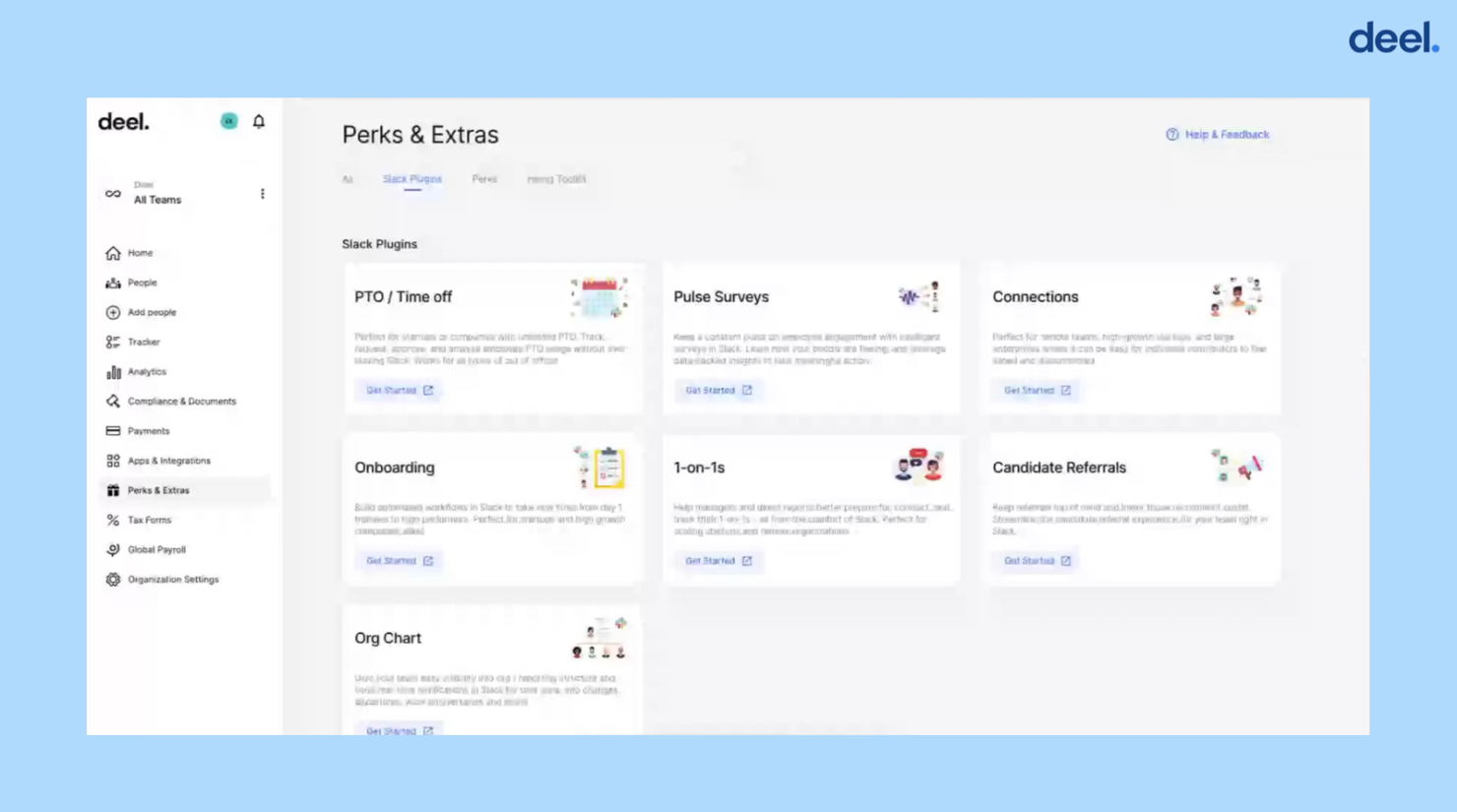
Deel is a powerful HR software that’s perfect for remote teams looking to streamline their meeting management processes. One of its standout features is the "1 on 1" tool, which helps managers better prepare for, conduct, and track their one-on-one meetings in Slack.
The "1 on 1" plugin connects to user calendars and automatically sends pre-meeting messages in a shared Slack channel to help attendees align on talking points and coordinate a shared agenda. This ensures that meetings are productive and focused, saving time and helping to keep everyone on track. At the end of the meeting, an exit survey is sent to attendees to help them track what was discussed and log their outlook at that particular moment in time.
What makes "1 on 1" particularly compelling is its integration with Deel's other offerings. “1 on 1” is part of Deel Engage, a set of Slack plugins that simplify common HR tasks like PTO management and employee engagement surveys.
Combined with Deel's advanced payroll capabilities and global coverage for benefits and compliance, managers can stay on top of all HR-related issues with a growing distributed team. Overall Deel is an excellent choice for remote teams looking to manage their HR needs more effectively.
Deel integrates with a handful of popular HR software systems, including Ashby, BambooHR, Expensify, Greenhouse, Hibob, Netsuite, Okta, OneLogin, Quickbooks, SCIM, Xero, Workday, and Workable. They also have an Open API that supports additional custom integrations as well.
Deel offers flat pricing details upon request, as well as a free demo. It also offers free HR software for businesses wanting to automate admin and reporting across their global team.
New Product Updates from Deel HR

Deel Expands Stablecoin Wallet to 80+ Countries
Deel expands its Stablecoin Wallet to 80+ countries with dollar-backed balances and optional rewards. This gives eligible contractors more ways to hold and manage earnings inside Deel. For more information, visit Deel’s official site.
 .

Slack
Project management software with communications tools for conducting remote meetings

Slack is a communications tool you can use to initiate chat sessions and video calls with other team members to foster teamwork. You can use Slack to create workspaces where team members can work on projects in private. Slack allows users to collaborate with others outside of their organization, including subcontractors and guest users, ensuring users access to resources outside their organization.
Slack is the best meeting platform you can get if you want an all-in-one platform with a full host of collaboration tools like workspaces, huddles, file sharing, and chat messaging. You can use Slack to conduct video meetings with up to 15 team members allowing you to keep your team members up to date while working remotely. Slack has a centralized file storage system so team members can store and retrieve files crucial to the projects they’re working on.
Slack integrates with other productivity apps like Fuze, Cisco Webex Meetings, Google Drive, eWebinar, LiveWebinar.com, and others.
Slack pricing starts at $8.75/user/month. Slack has a freemium version available as a trial, but it lacks a group video conferencing feature.
Zoom
Meeting platform that lets users maximize their mobile devices
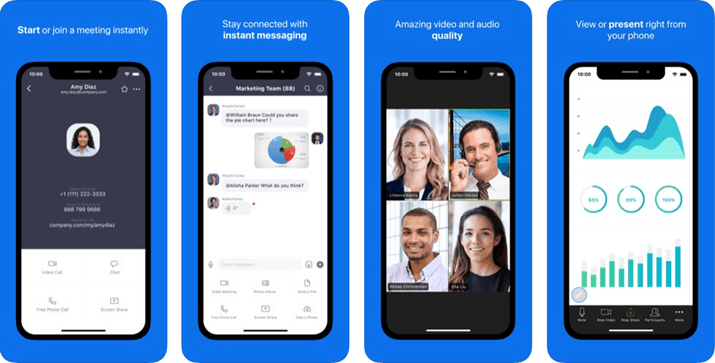
Zoom is a cloud-based communications software for conducting video conferences, virtual meetings, and chat sessions. You can use the software to set up Zoom Rooms, where you can meet and work with select team members in private. It also has an events management feature for hosting events, managing event tickets, and tracking attendance, making hosting more manageable.
Zoom is the best meeting management software for you if you want to conduct and attend meetings using your mobile device because Zoom allows users to go from a chat session or phone call directly into a mobile meeting. This meeting management solution has a mobile app that works on iOS and Android mobile devices allowing you to attend or conduct meetings on the go. With Zoom’s virtual background feature, you can have a presentable meeting background while working offsite, helping you maintain formality in less than ideal settings.
You can integrate a wide range of productivity tools to Zoom, including CRM Connector, Cronofy, Slack, Asana, Zapier, Zendesk, and others.
Zoom has a free version, while the paid version starts at $14.99/license/month.
Fellow
Best for collaborative agenda creation
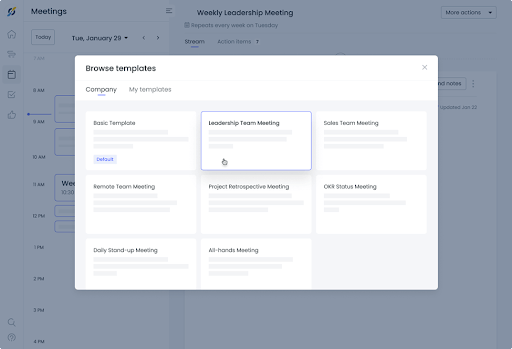
Fellow is a meeting management software to help your team be productive before, during, and after meetings. Fellow can help you build your agenda to ensure that meetings proceed smoothly and that you tackle all critical business matters. It allows you to store a comprehensive history of all your meetings so you can go back to previous discussions for reference. You can use Fellow to get feedback from meeting attendees so you know how you can improve future meetings.
Meetings are collaborative, and if you need meeting management software to help your team turn meetings into productive sessions, then Fellow is your best choice. You can use Fellow to record action items on the spot to ensure that you have a complete to-do list that you can share with other team members. Fellow allows you to send meeting notes to everyone with a single click of a button, so they have a copy of the minutes and suggest corrections or additions if needed.
Fellow integrates with other meeting management and collaboration tools, including Slack, Google Meet, MS Teams, Google Tasks, etc.
Fellow has a free version with limited features for up to 10 users, while the pricing of its Pro version starts at $5/user/month.
Meeting management software that lets users manage meeting agenda effectively
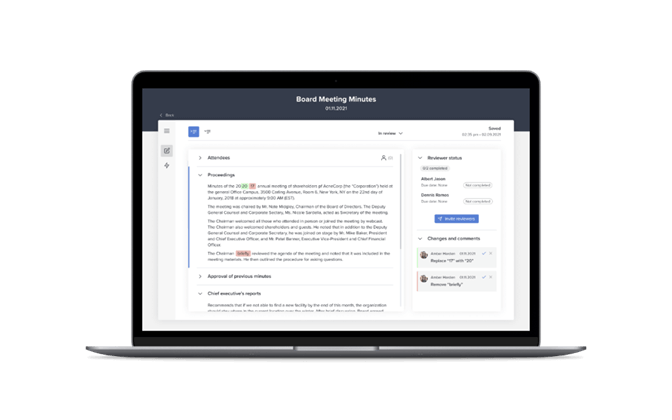
Diligent is a meeting management software you can use to increase committee and board meetings effectiveness by helping you digitize your meetings. You can use it to streamline the taking note and sharing of minutes so you can concentrate on discussions. Diligent also helps you simplify board evaluations and questionnaires, allowing you to get the pulse of members on critical matters.
If you need a meeting management software for better agenda management, then Diligent is the best choice because you can use it to create and share meeting agendas with team members. It can also help you avoid version control problems because updates get reflected even on the agenda you’ve sent out. You can use it to digitize board books while keeping sensitive information secure before, during, and after meetings.
Diligent pricing is available upon request.
Video conferencing tool that allows up to 250 attendees to join
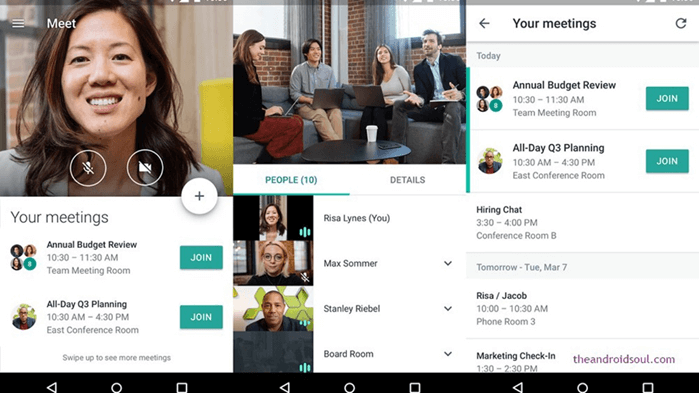
Google Meet is a video communication service you can use to conduct team meetings, webinars, and video conferences. It comes integrated into Google’s Workspace letting users access other Google productivity apps like Gmail, Drive, Calendar, Sheets, Docs, Slides, and Forms to use during meetings. Google Meet is an excellent option for video interviews with applicants because you can send invites to anyone via email without worrying about permissions.
Google Meet is the best option for you if you want meeting management software if you frequently hold extensive virtual meetings with your remote team because it allows meetings to go on for a maximum of 24 hours with up to 250 attendees. You can use Google Meet to create digital whiteboards enabling team members to share ideas during brainstorming sessions. It allows you to record meetings and save them on Google Drive, giving access to all attendees.
Google Meet pricing starts at $4.20/user/month.
Best for secure web conferencing
Zoho Meeting is an online meeting and webinar software designed to facilitate remote collaboration and communication through features like audio and video conferencing, screen sharing, and session recording. Its emphasis on data protection and privacy positions it as a leading choice for secure web conferencing needs.
Zoho Meeting offers a comprehensive set of features tailored to streamline the meeting management process, making it an ideal choice for businesses of all sizes. First, Zoho Meeting excels in its simplicity and ease of use. From scheduling meetings to conducting virtual conferences, the platform provides a user-friendly interface that requires minimal training for employees to navigate. This accessibility ensures smooth adoption across teams, enhancing overall productivity and collaboration within the organization.
Additionally, Zoho Meeting offers various integrations with popular calendar applications like Google Calendar and Outlook, simplifying the scheduling process and ensuring seamless coordination of meetings across different platforms.
Moreover, Zoho Meeting prioritizes security and privacy, crucial aspects for HR professionals handling sensitive information. The platform offers end-to-end encryption for all meetings, ensuring that confidential discussions remain protected from unauthorized access. With features like password protection and waiting room functionality, Zoho Meeting provides administrators with the necessary tools to control access and maintain the integrity of meetings.
As part of the Zoho ecosystem, Zoho Meeting integrates with various Zoho applications such as Zoho CRM, Zoho Projects, and Zoho Campaigns, as well as external platforms like Microsoft Teams and Slack. It also supports email integrations with Zoho Mail and Gmail, and connects with automation tools like Zoho Flow and Zoho Marketing Automation.
Infinity
Meeting management software that allows users to organize multiple meeting schedules
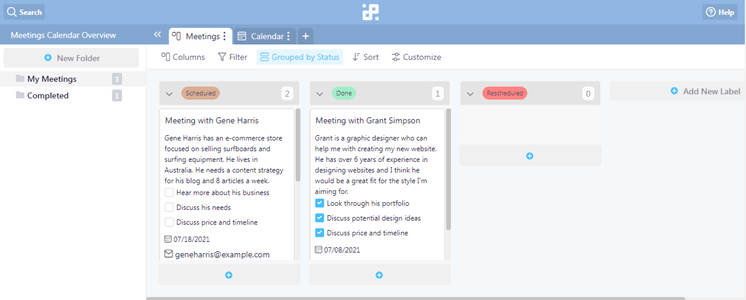
Infinity is a team collaboration software with meeting scheduling features on top of task management capabilities. It has Kanban boards allowing you a visual means of tracking the progress of tasks and projects. You can use Infinity to assign tasks and actions items to team members ensuring that tasks get assigned to members according to their skillset.
If you are looking for meeting management software to help you organize your meeting schedule, then Infinity is the best option for you because of its meetings calendar template. You can use this template to keep track of information critical to meetings, like meeting dates and times and contact information of other attendees. Infinity’s meeting templates also allow users to include notes on meetings to keep track of crucial topics.
Infinity integrates with Zapier, Trello Import, CSV Import, and others.
Infinity has a one-time fee of $149.
Best for hybrid workspace management
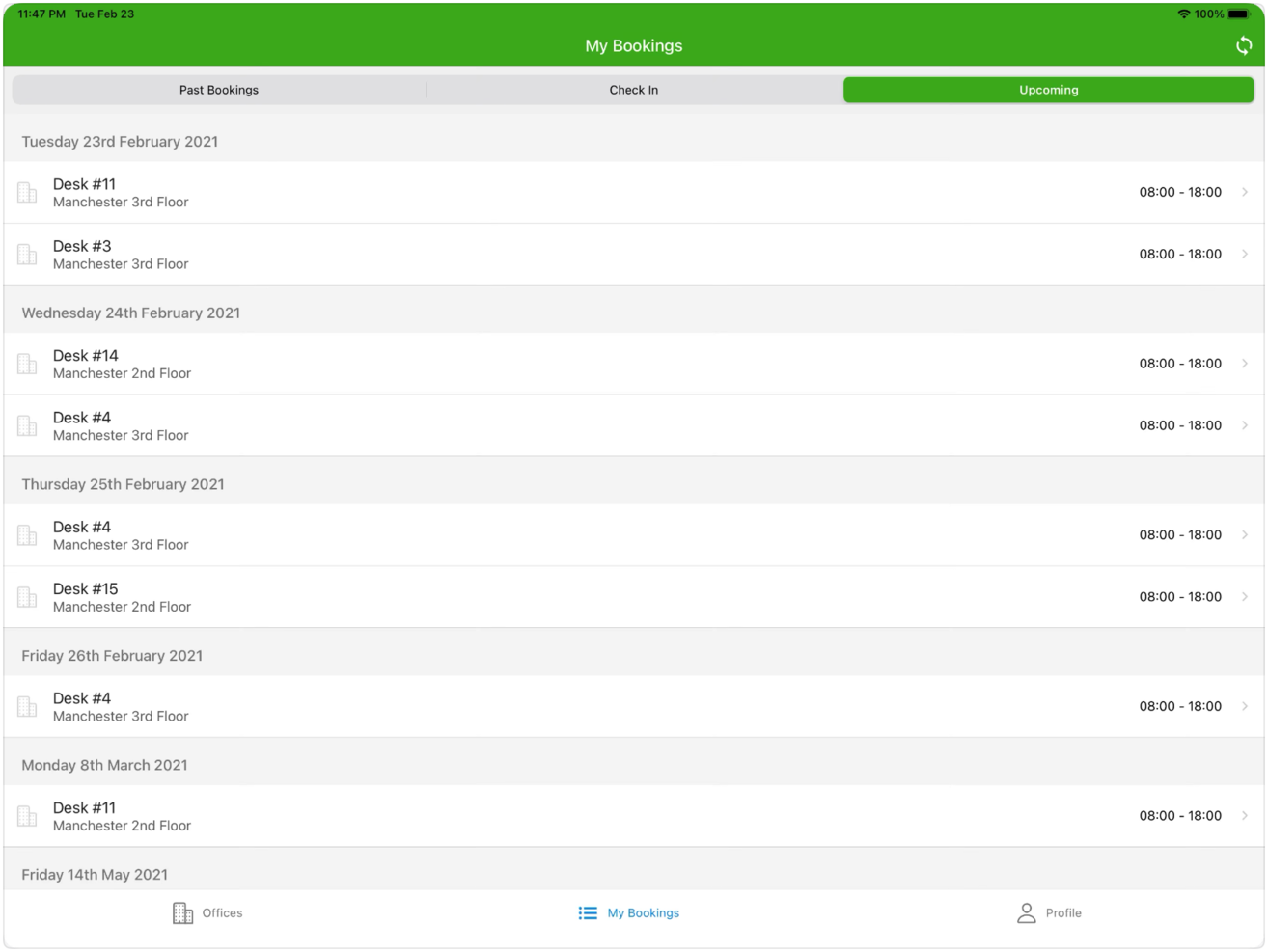
Clearooms is a meeting room and hot desk booking software designed to manage hybrid workspaces, providing a solution for businesses that operate with both in-office and remote workforces. It is recognized for its ability to cater to the complexities of managing a hybrid workspace, which positions it as a suitable choice for businesses aiming to maintain an efficient and productive work environment in such a setting.
Clearooms advanced features cater to both in-person and virtual meetings, which is essential for today's hybrid work environments. What makes it different is its user-friendly interface that simplifies the management of meeting spaces and its integration with other productivity tools, which supports a cohesive workflow.
Additionally, it offers a real-time room booking system with an interactive floor plan, allowing users to easily reserve meeting spaces for specific dates and times. It supports recurring bookings, automating the reservation process for regular meetings. The platform includes a check-in system to free up rooms when not confirmed, and provides additional services booking options like catering or equipment.
Integrations with various systems to facilitate user authentication and meeting room bookings. It supports Single Sign On (SSO) with platforms like Google, Okta, and OneLogin. Additionally, it offers third-party integrations with platforms like Office 365 and MS Teams. Finally, you can use its API to build your own integrations.
GoTo Meeting
Meeting management software for creating and sharing meeting transcriptions and recordings
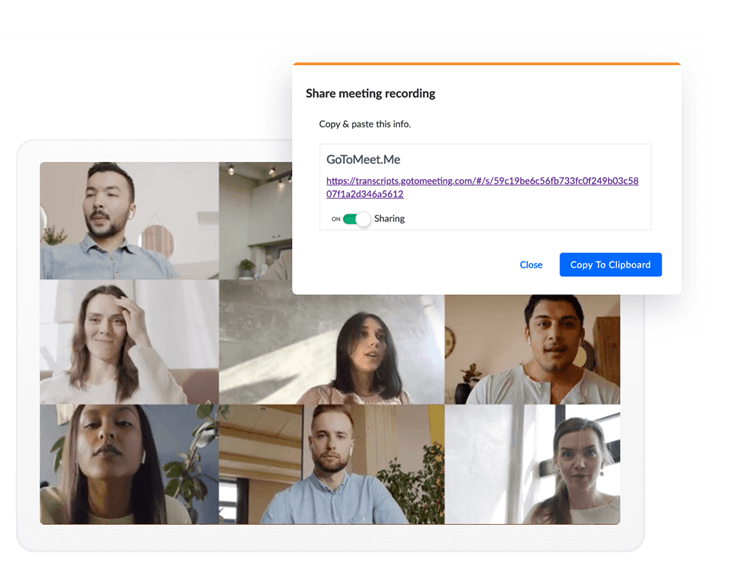
GoToMeeting is an online meeting management software with video conferencing and desktop sharing features you can use to meet employees remotely. You can use GoToMeeting to create Breakout Rooms, allowing you to split attendees into smaller groups to collaborate effectively in real-time. GoToMeeting has a mobile app version available to both Android and iOS mobile devices enabling employees to attend meetings using their mobile devices.
GoToMeeting is the best meeting management software for your company if you want flawless transcriptions because of GoToMeeting’s meeting transcriptions feature. GoToMeeting transcribes meetings for you, so there is no need to assign a notetaker allowing all team members to concentrate on your discussion. You can also share meeting minutes to team members anywhere they are, making it ideal for teams working remotely. Transcripts are accessible anywhere you are, so you can review previous meetings whenever and wherever you need them.
GoToMeeting integrates with a host of other productivity tools, including Google Calendar, Outlook, Microsoft Teams, Salesforce, etc.
GoToMeeting pricing starts at $12/organizer/month, and they offer a 14-day free trial.
Annen programvare for møtehåndtering
Her er noen flere alternativer innen programvare for møtehåndtering som ikke kom med på kortlisten min, men som likevel er verdt å undersøke:
- Blue Jeans Network
Meeting management software with accessibility features for a diverse workforce
- BoardDocs
Meeting management feature ideal for small teams and companies without an IT department
- Teaming
Mobile-based app allowing users to send photos and videos to other users
- 4Minitz
Open-source meeting management software that allows users to customize features to suit their needs
- monday AI Workspace
For AI-powered project risk detection
- Topicflow
For data-driven performance conversations
- ConnectWise Control
Remote desktop and mobile tool for remote meetings
- Livestorm
Web conferencing software for conducting webinars, meetings, and video conferences
- Skype
Software that allows users to conduct video chats, video interviews and conference calls
- OnBoard
A suite of tools for preparing, hosting, and analyzing meetings


How I Evaluate Meeting Management Software
I evaluate tools against two layers: the baseline features—like collaborative agendas and action item tracking—that qualify inclusion, and the differentiators that set the best options apart.
Core Functionality (Table Stakes for This List)
These core capabilities serve as the acceptance criteria for inclusion on my list of meeting management software:
- Collaborative Agenda Building: I check whether attendees can co-edit agendas in real time—like a team adding discussion items to a weekly sync before it starts.
- Meeting Notes & Minutes: Structured notes tied to each meeting matter more than a blank text field, especially for tracking decisions across recurring syncs.
- Action Item Tracking: I look for assignable tasks with owners, due dates, and status updates that carry over automatically to the next meeting instance.
- Calendar & Conferencing Integration: Two-way sync with Google Calendar, Outlook, Zoom, and Teams is baseline—meetings should pull context without manual entry.
- Recording & Transcription: I evaluate whether the tool records, transcribes, and summarizes discussions so participants can search past meetings for specific topics.
- Reusable Meeting Templates: Pre-built and customizable templates for common formats like 1:1s, sprint retrospectives, and board meetings save real setup time.
I rank each vendor on a scale from 0 (does not offer the functionality) to 5 (excels in this area) for each criterion.
Vendors need to achieve a minimum average score to be considered for inclusion on my list. From there, I consider what sets each platform apart.
Differentiating Factors (What Sets Vendors Apart)
Once I've curated my list, here's how I contrast and compare different vendors in the meeting management software space:
Standout Features
AI-powered meeting assistants that draft agendas and summarize discussions help busy teams stay focused and organized without extra effort. I also look for decision and voting tools—which are especially useful for executive and board meetings—and cross-meeting analytics that reveal trends in meeting frequency, participation, and action item follow-through over time. Integrations with company knowledge bases, so meeting notes feed directly into tools like Confluence or Notion, make a big impact on overall information management.
Beyond Features
Security matters here because meeting content often includes sensitive HR discussions and board-level strategy. I check for SOC 2 Type II certification, SSO support, and granular permissions that restrict access to confidential meetings. Pricing structure also plays a role—some tools charge per user while others offer workspace-based plans, which changes the math for large teams. I also evaluate whether a platform fits your specific meeting cadence, whether that's daily standups, quarterly business reviews, or formal board governance sessions.
Slik velger du programvare for møtehåndtering
Det er lett å gå seg vill i lange funksjonslister og kompliserte prisstrukturer. For å hjelpe deg med å holde fokus mens du går gjennom din unike prosess for valg av programvare, får du her en sjekkliste over faktorer du bør ha i bakhodet:
| Faktor | Hva bør vurderes |
|---|---|
| Skalerbarhet | Kan programvaren vokse sammen med teamet ditt? Ta hensyn til fremtidig vekst og om verktøyet kan håndtere flere brukere eller større møter uten ekstra kostnader eller ytelsesproblemer. |
| Integrasjoner | Fungerer det med verktøyene du allerede bruker, for eksempel kalendere eller apper for prosjektstyring? Se etter sømløs dataflyt og mindre manuelt arbeid. |
| Tilpasningsmuligheter | Kan du tilpasse programvaren slik at den passer til de spesifikke arbeidsflytene dine? Se etter alternativer for å tilpasse møtemaler eller dashbord. |
| Brukervennlighet | Er grensesnittet intuitivt for alle teammedlemmer? Test demo- eller prøveversjonen for å sikre at alle kan bruke det uten frustrasjon. |
| Implementering og introduksjon | Hvor lang tid vil det ta å komme i gang? Vurder tilgjengeligheten av opplæringsressurser og støtte under overgangsfasen. |
| Kostnad | Passer prisen inn i budsjettet ditt? Sammenlign kostnaden med funksjonene som tilbys, og se etter skjulte gebyrer eller kostnader for ekstra funksjoner. |
| Sikkerhetstiltak | Beskytter det dataene dine? Se etter krypteringsstandarder, tilgangskontroller og samsvar med personvernforordninger. |
Hva er programvare for møtehåndtering?
Programvare for møtehåndtering er et verktøy som bidrar til å organisere og gjennomføre møter på en effektiv måte. Fagpersoner som ledere, teamledere og koordinatorer bruker disse verktøyene for å øke produktiviteten og forbedre kommunikasjonen. Funksjoner for planlegging, oppretting av agendaer og integrasjoner støtter effektiv planlegging og gjennomføring av møter. Disse verktøyene sparer tid, reduserer planleggingskonflikter og forbedrer de samlede resultatene av møtene.
Funksjoner
Når du velger programvare for møtehåndtering, bør du se etter følgende viktige funksjoner:
- Planleggingsverktøy: Automatiserer prosessen med å finne ledige tidspunkter og reduserer mengden frem-og-tilbake-e-poster.
- Oppretting av agendaer: Bidrar til å organisere møtets temaer og mål, slik at diskusjonene holder seg fokuserte og produktive.
- Integrasjonsmuligheter: Kobler seg til kalendere og verktøy for prosjektstyring for å sikre sømløs integrasjon med arbeidsflyten.
- Tilpassbare maler: Gjør det mulig for brukere å tilpasse møteformatene etter spesifikke behov, noe som øker effektiviteten.
- Samarbeid i sanntid: Gjør det mulig for deltakerne å samarbeide under møter, noe som forbedrer engasjementet og resultatene.
- Videokonferanser: Tilbyr en plattform for direkte kommunikasjon ansikt til ansikt på avstand, noe som er avgjørende for distribuerte team.
- Opptak av møtereferater: Fanger opp og lagrer notater automatisk, slik at alle holdes informert. For team som ønsker et mer konsentrert sammendrag, kan AI-verktøy for møtesammendrag automatisk gjøre møteinnhold om til korte sammendrag.
- Automatiserte oppfølginger: Sender påminnelser og oppfølgingspunkter etter møtet, slik at ansvarlighet og fremdrift sikres.
- Sikkerhetstiltak: Beskytter sensitive møtedata med kryptering og tilgangskontroller.
- Brukervennlig grensesnitt: Sikrer at alle deltakere enkelt kan bruke løsningen og minimerer læringskurven.
Fordeler
Implementering av programvare for møtehåndtering gir flere fordeler for teamet og virksomheten din. Her er noen av fordelene du kan se frem til:
- Tidsbesparelser: Automatisert planlegging og påminnelser reduserer tiden som brukes på å organisere møter.
- Økt produktivitet: Fokuserte agendaer og oppfølginger holder diskusjonene på sporet og fører til resultater som kan settes ut i praksis.
- Bedre samarbeid: Funksjoner for samarbeid i sanntid øker engasjementet og legger til rette for teamarbeid.
- Økt tilgjengelighet: Videokonferanser gjør det mulig for eksterne team å kommunisere effektivt, uavhengig av hvor de befinner seg.
- Bedre organisering: Sentralisert lagring av møtereferater og agendaer bidrar til å holde alle informert og samkjørt.
- Datasikkerhet: Sterke sikkerhetstiltak beskytter sensitiv informasjon og gir deg trygghet.
- Brukervennlighet: Brukervennlige grensesnitt gjør det enkelt for alle å delta uten en bratt læringskurve.
Kostnader og priser
Ved valg av programvare for møtehåndtering er det nødvendig å forstå de ulike prismodellene og abonnementene som er tilgjengelige. Kostnadene varierer basert på funksjoner, teamstørrelse, tillegg og mer. Tabellen nedenfor oppsummerer vanlige abonnementer, gjennomsnittsprisene deres og typiske funksjoner som er inkludert i løsninger for møtehåndtering:
Sammenligningstabell for programvare for møtehåndtering
| Plantype | Gjennomsnittspris | Vanlige funksjoner |
|---|---|---|
| Gratisabonnement | $0 | Grunnleggende planlegging, begrensede integrasjoner og grunnleggende videokonferanser. |
| Personlig abonnement | $5-$15/bruker/måned | Planleggingsverktøy, oppretting av agendaer og grunnleggende integrasjoner. |
| Bedriftsabonnement | $20-$50/bruker/måned | Avanserte integrasjoner, tilpassbare maler og samarbeid i sanntid. |
| Virksomhetsabonnement | $60-$100/bruker/måned | Full tilgang til funksjoner, avanserte sikkerhetstiltak og dedikert kundestøtte. |
Vanlige spørsmål om programvare for møtehåndtering
Her er noen svar på vanlige spørsmål om programvare for møtehåndtering:
Hvordan vet jeg om teamet mitt trenger programvare for møtehåndtering?
Hvis teamet ditt har problemer med planleggingskonflikter, uorganiserte møter eller dårlig kommunikasjon, kan programvare for møtehåndtering være til hjelp. Den kan automatisere planlegging, effektivisere kommunikasjonen og sørge for at alle er samkjørte. Ta hensyn til størrelsen på teamet og hvor komplekse møtene er, når du tar avgjørelsen.
Passer programvare for møtehåndtering for eksterne team?
Ja, programvare for møtehåndtering er ideell for eksterne team. Den tilbyr videokonferanser, samarbeid i sanntid og sentralisert dokumentlagring, noe som er avgjørende for å holde eksterne team tilkoblet og effektive. Sørg for at programvaren støtter de foretrukne kommunikasjonsmetodene dine og har gode sikkerhetstiltak.
Hvor sikker er programvare for møtehåndtering?
Sikkerheten varierer fra programvare til programvare, så se etter krypteringsstandarder, tilgangskontroller og samsvar med personvernregler. Velg programvare som tilbyr regelmessige sikkerhetsoppdateringer og har et godt omdømme når det gjelder beskyttelse av brukerdata. Sikkerhet er avgjørende, spesielt hvis du håndterer sensitiv informasjon under møter.

